EA Desk MT5
- Утилиты
-
Christian Kotschote
 I've been trading since 2021, with Expert Advisors since 2024, and today I run an EA portfolio across several accounts and brokers. As an engineer with a PhD, I'm used to building processes that leave little room for error.
 - Версия: 1.0
Shows account results and a table per Magic Number on its own chart, so you can see which Expert Advisor is active and which has been quiet. EA Desk does not trade.
EA Desk is a read-only panel that shows your account results per Expert Advisor in one calm view.
The user manual explains every ring, the table, the calculations and common questions: https://www.mql5.com/en/blogs/post/778831
EA Desk is a read-only panel that shows your account results per Expert Advisor in one calm view.
What EA Desk does
Many traders run several Expert Advisors on one account. The terminal shows one shared list of deals. To see what each Expert Advisor has done, you have to filter and calculate by hand. It is easy to miss an Expert Advisor that has not traded for days.
EA Desk puts this on one panel. It reads the deal history and the open positions of your account and shows the result on a chart. It does not open, change or close any order or position. It does not trade in the Strategy Tester either.
One chart is enough. EA Desk reads the whole account, not only the symbol of its chart.
Design of the panel
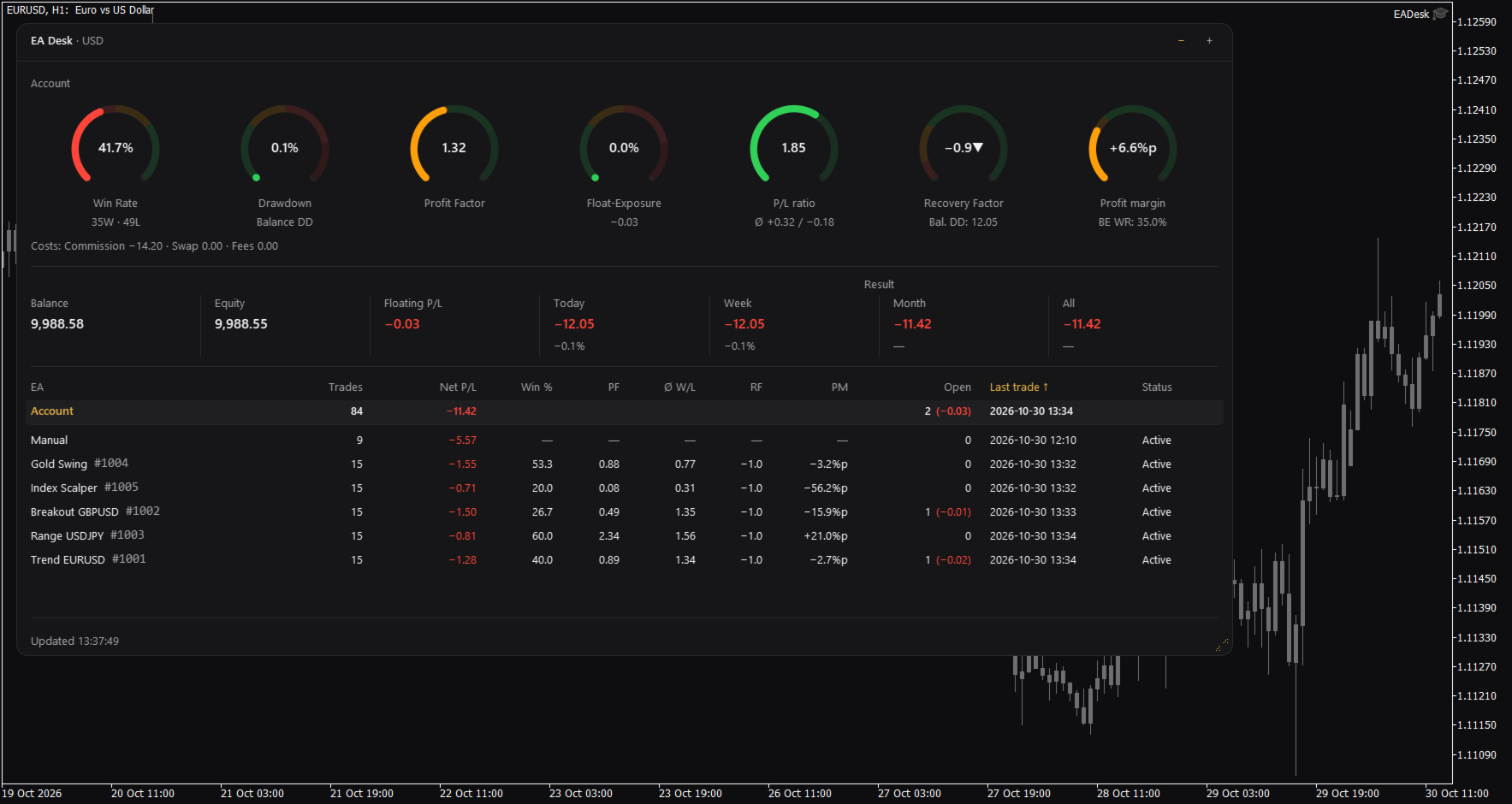
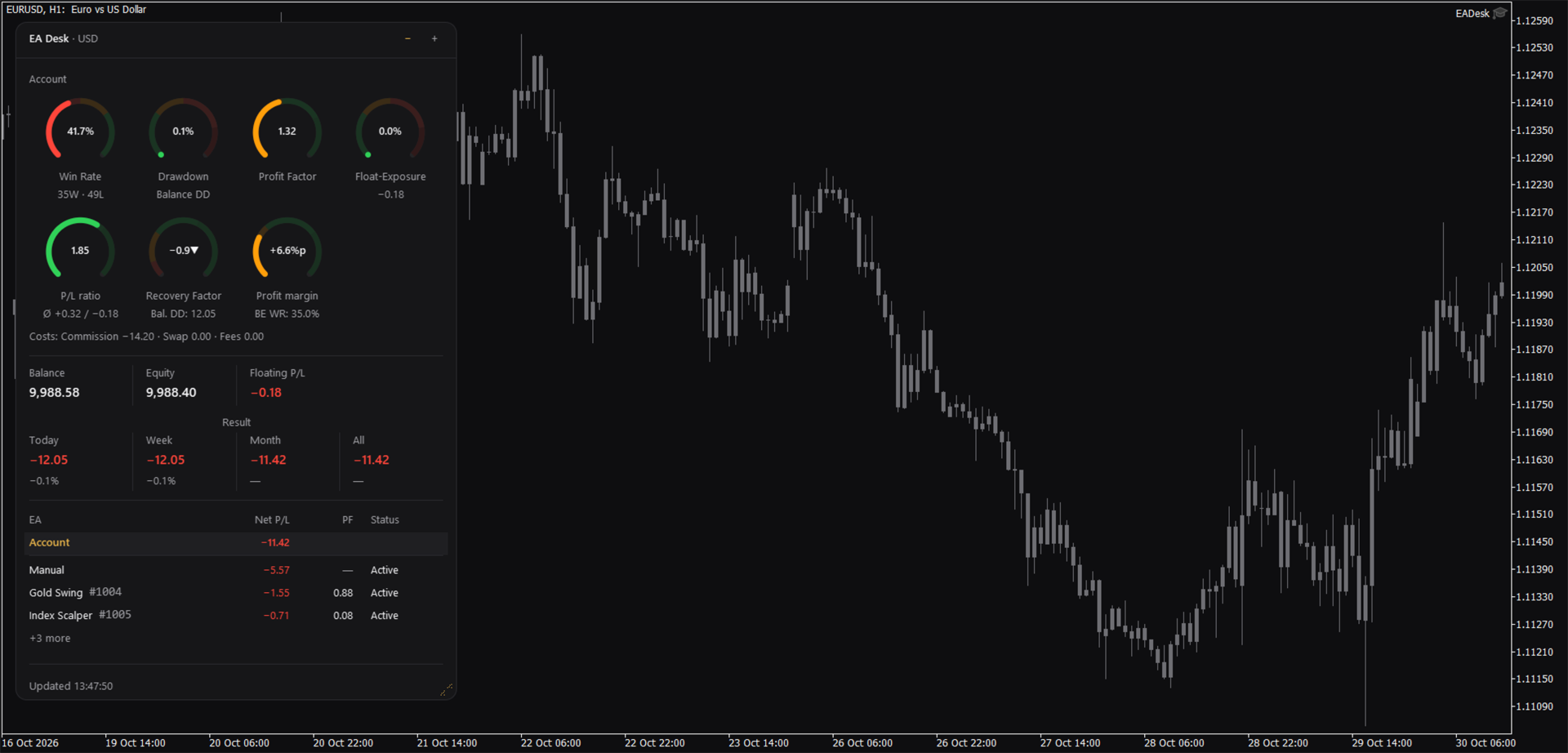
EA Desk is a small dark panel with a clear order: rings at the top, account values in the middle, the table below. Each ring shows one value and its range in colour. The panel uses few colours and no flashing. Text and rings follow the Windows display scaling. You can change width and height of the panel, and narrow panels arrange the rings in two rows.
The panel has these parts:
- Seven rings for the account: Win Rate, Drawdown, Profit Factor, Float-Exposure, P/L ratio, Recovery Factor and Profit margin. Each ring shows a value, a short second line and a coloured range. The colours only mark ranges on the ring. They are not advice.
- A cost line under the rings: Commission, Swap and Fees.
- A line with Balance, Equity and Floating P/L, and the Result for Today, Week, Month and All. Today, Week and Month also show the percentage of the balance at the start of that period.
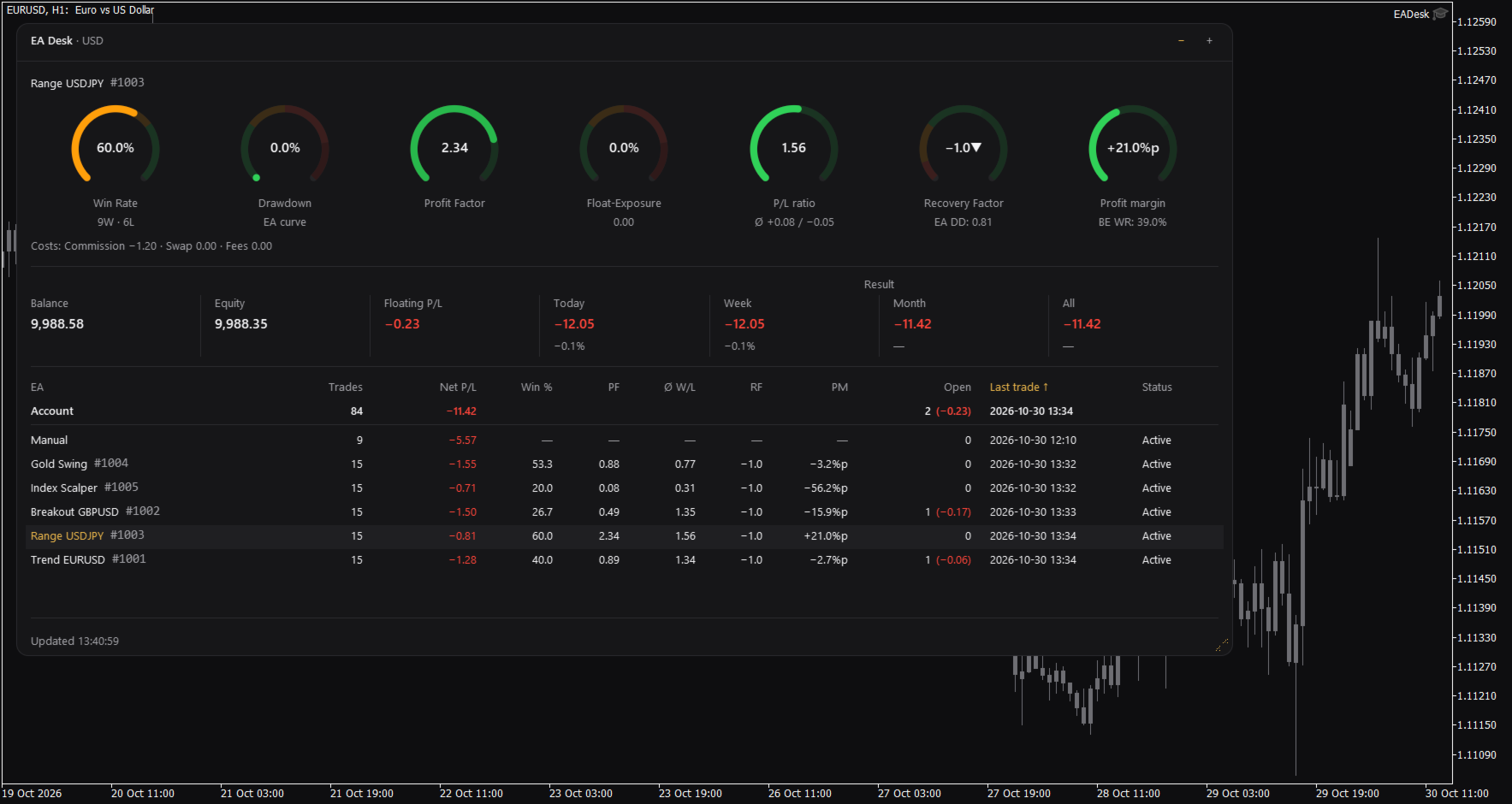
- A table with one row per Magic Number. A fixed row called Account stays at the top. Each row of an Expert Advisor shows Trades, Net P/L, Win %, Profit Factor (PF), P/L ratio (W/L), Recovery Factor (RF), Profit margin (PM), Open positions, Last trade and Status.
- Click the row of an Expert Advisor and the seven rings and the cost line switch to that Expert Advisor. Click the row again, or click Account, to go back to the account.
Which Expert Advisor is quiet
The Status column shows Active or Idle. Idle means that the Expert Advisor has had no trading activity for a number of days (setting IdleDays) and has no open position. It does not mean that the Expert Advisor is not loaded on a chart. A loaded Expert Advisor that does not trade also appears as Idle. By default the table lists the oldest last trade first.
Sizes and memory
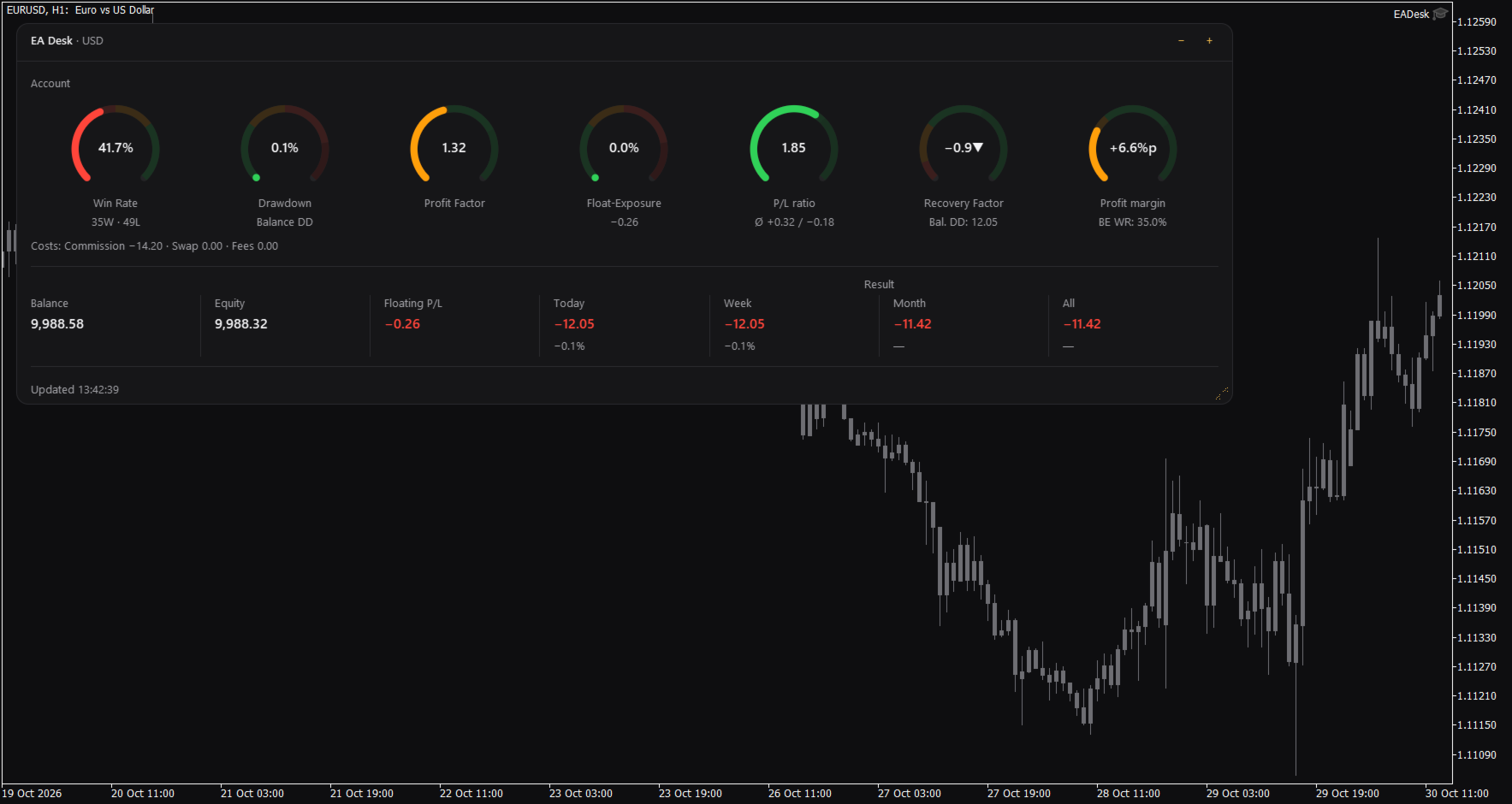
The panel has three sizes. Use the minus and plus buttons in the header to change them. Full shows everything. Compact hides the table. Collapsed shows only the header with a short line such as "5 EAs, 1 idle".
Drag the grip in the corner to change width and height. A double click on the header sets the size back to the default.
EA Desk remembers size, level and the selected row for each chart, also after you change symbol or timeframe and after a terminal restart. If you remove EA Desk from the chart, this memory is deleted.
Terms used in the panel
The panel uses short labels. They are explained here.
Win Rate is the share of winning trades: wins divided by wins plus losses, times 100. A trade with a result of zero counts as a win.
Float-Exposure is the absolute floating profit or loss divided by the account balance, times 100. It shows how large the open result is compared with the balance.
P/L means profit or loss.
PF is the Profit Factor: gross profit divided by gross loss.
W/L is the P/L ratio: the average winning trade divided by the average losing trade.
RF is the Recovery Factor: total profit divided by the largest drawdown.
PM is the Profit margin: the win rate minus the break-even win rate, shown in percentage points.
DD is drawdown. Balance DD is the largest fall of the daily closing balance from an earlier high point to a later day. The percentage refers to the balance at that high point.
BE WR is the break-even win rate: the win rate at which average win and average loss would give a result of zero.
%p means percentage points. A change from 50 percent to 52.5 percent is +2.5%p.
Idle is described above.
How the numbers are calculated
Some numbers use different bases on purpose.
Result is the trading result: profit, swap, commission and fee of all buy and sell deals in the period. Deposits, withdrawals, credit and bonus are not included. Fees, interest, taxes and dividends that the broker books as separate entries are not included either. Times are server times. A period starts at 00:00 server time.
Net P/L in the table is net. It covers all deals of the positions of that Magic Number. The ratios (Win %, PF, W/L, RF, PM) are gross. They cover closed positions only and do not include swap and commission.
The account rings and the Account row count closing deals. The rows of the Expert Advisors count positions. If you close part of a position, the account counts each closing deal as a trade and the row of the Expert Advisor counts the position as one trade. Both numbers can therefore differ.
The Recovery Factor of the account includes fees and other bookings, such as corrections or interest. Result does not. The Recovery Factor of the account is not the sum of the Recovery Factors of the Expert Advisors.
Withdrawals raise the Balance DD, because the balance curve is not adjusted for deposits and withdrawals. Deposits raise the curve.
Ratios per Expert Advisor are shown from 10 closed positions on. Below this number the table and the rings show a dash.
The cost line follows the selection. If you select an Expert Advisor, Fees contain only fees booked on the trades of that Magic Number. Account fees without a Magic Number are missing there.
Profit Factor and P/L ratio show an infinity sign when there is no losing trade. A dash means that the value cannot be calculated.
Inputs
Display
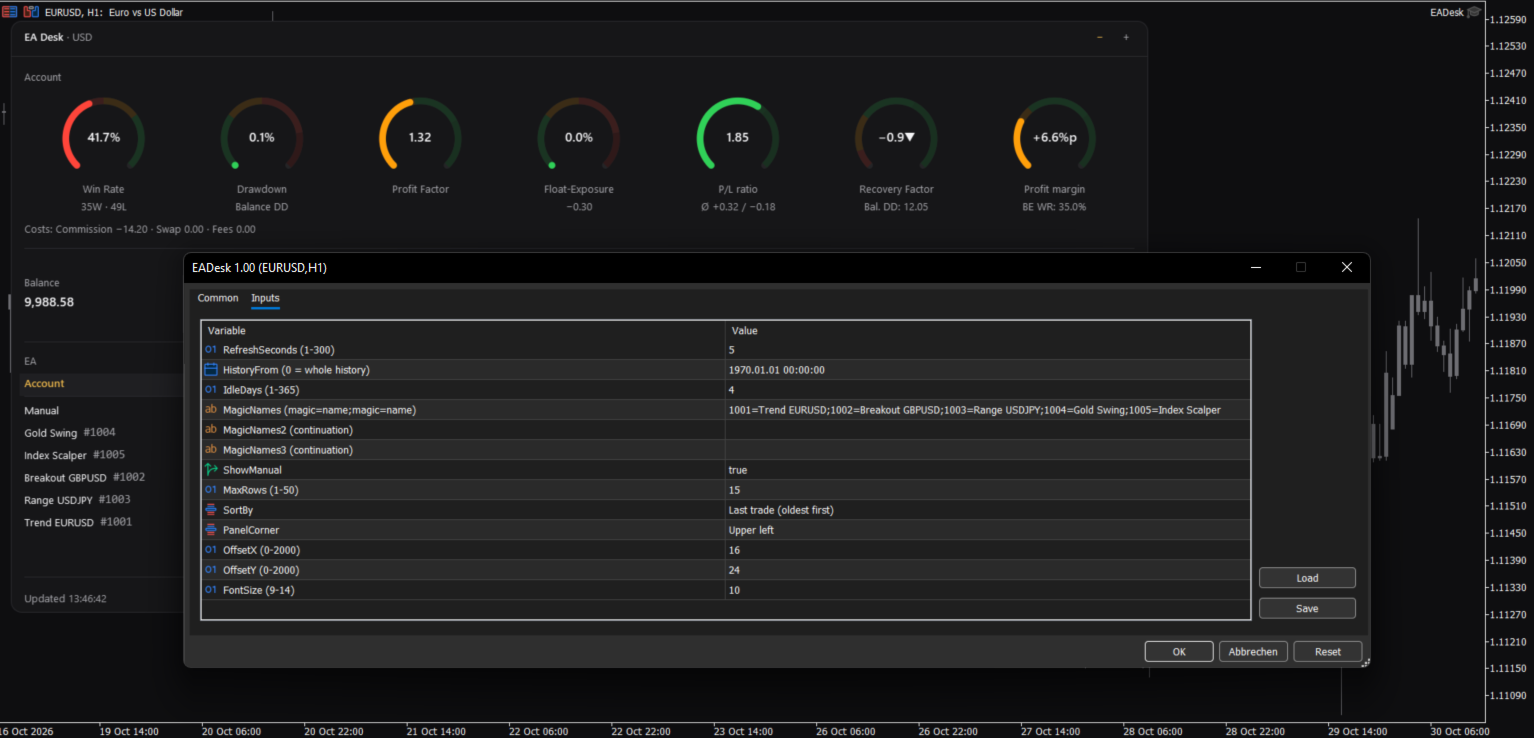
RefreshSeconds: how often the panel is updated, in seconds (1 to 300, default 5).
FontSize: base font size (9 to 14, default 10). The panel also follows the Windows display scaling.
PanelCorner: the chart corner where the panel is anchored (default upper left).
OffsetX and OffsetY: distance to that corner in pixels (default 16 and 24).
Data
HistoryFrom: start date of the evaluation. 0 means the whole history. With a date, the account values count deals from that date. The rows of the Expert Advisors count only positions opened from that date. The sum of Net P/L can then differ from Result All.
IdleDays: days without a deal and without an open position after which a row shows Idle (1 to 365, default 4).
Table
MagicNames, MagicNames2, MagicNames3: names for your Magic Numbers in the form 1001=Trend H1;2002=Grid EURUSD. Use the second and third field if the first is too short. Without a name, a row shows the Magic Number and the comment of the last opening deal.
ShowManual: show the row Manual (Magic Number 0, manual trades and Expert Advisors without a Magic Number).
MaxRows: maximum number of rows of Expert Advisors (1 to 50, default 15). More rows are shown as "+N more".
SortBy: sort order: last trade (oldest first), last trade (newest first), Net P/L, Trades or Magic.
If an input has an invalid value, EA Desk uses the default and writes one line to the Experts tab.
How to use
1. Open a new, empty chart of any symbol and timeframe.
2. Attach EA Desk to this chart. Do not attach it to a chart that already runs an Expert Advisor. MetaTrader allows one Expert Advisor per chart, so the other one would be replaced.
3. Set MagicNames if you want names instead of numbers.
4. Click a row to see the rings of one Expert Advisor.
Use one EA Desk per chart. EA Desk works with Algo Trading switched off, because it does not trade. It runs only inside your terminal. It sends no data, uses no web requests and needs no entry in the list of allowed URLs. Settings are stored inside the terminal. EA Desk writes no files.
EA Desk is not limited to a certain broker or symbol, and it works on hedging and netting accounts. On netting accounts, a reversal closes the position and starts a new one.
In the Strategy Tester, EA Desk does not trade, so a test run has no deals. In visual mode the panel shows the message "No trades in history yet." This is expected.
Limits
EA Desk lists up to 1000 Magic Numbers one by one. All further Magic Numbers are added together in one row called Other.
All numbers come from the deal history that your terminal holds. If your broker provides a shorter history, EA Desk can only use that part. A position whose opening deal is missing from the history is not assigned to a row of an Expert Advisor. It still counts in the account values. If numbers look incomplete, set the History tab of the terminal to All History.
Values refer to the past. EA Desk makes no forecast and gives no advice about trading.
The panel does not show your account number, name or server.
Manual & Questions
The user manual explains every ring, the table, the calculations and common questions: https://www.mql5.com/en/blogs/post/778831
Questions and problem reports are welcome in the product comments or by private message on MQL5.