EA Desk MT5

EA Desk MT5 is a free, read-only panel that shows your account results per Expert Advisor in one calm view, and which of them has gone quiet.

Shows account results and a table per Magic Number on its own chart, so you can see which Expert Advisor is active and which has been quiet. EA Desk does not trade.

EA Desk is a read-only panel that shows your account results per Expert Advisor in one calm view.

What EA Desk does

Many traders run several Expert Advisors on one account. The terminal shows one shared list of deals. To see what each Expert Advisor has done, you have to filter and calculate by hand. It is easy to miss an Expert Advisor that has not traded for days.

EA Desk puts this on one panel. It reads the deal history and the open positions of your account and shows the result on a chart. It does not open, change or close any order or position. It does not trade in the Strategy Tester either.

One chart is enough. EA Desk reads the whole account, not only the symbol of its chart.

Design of the panel

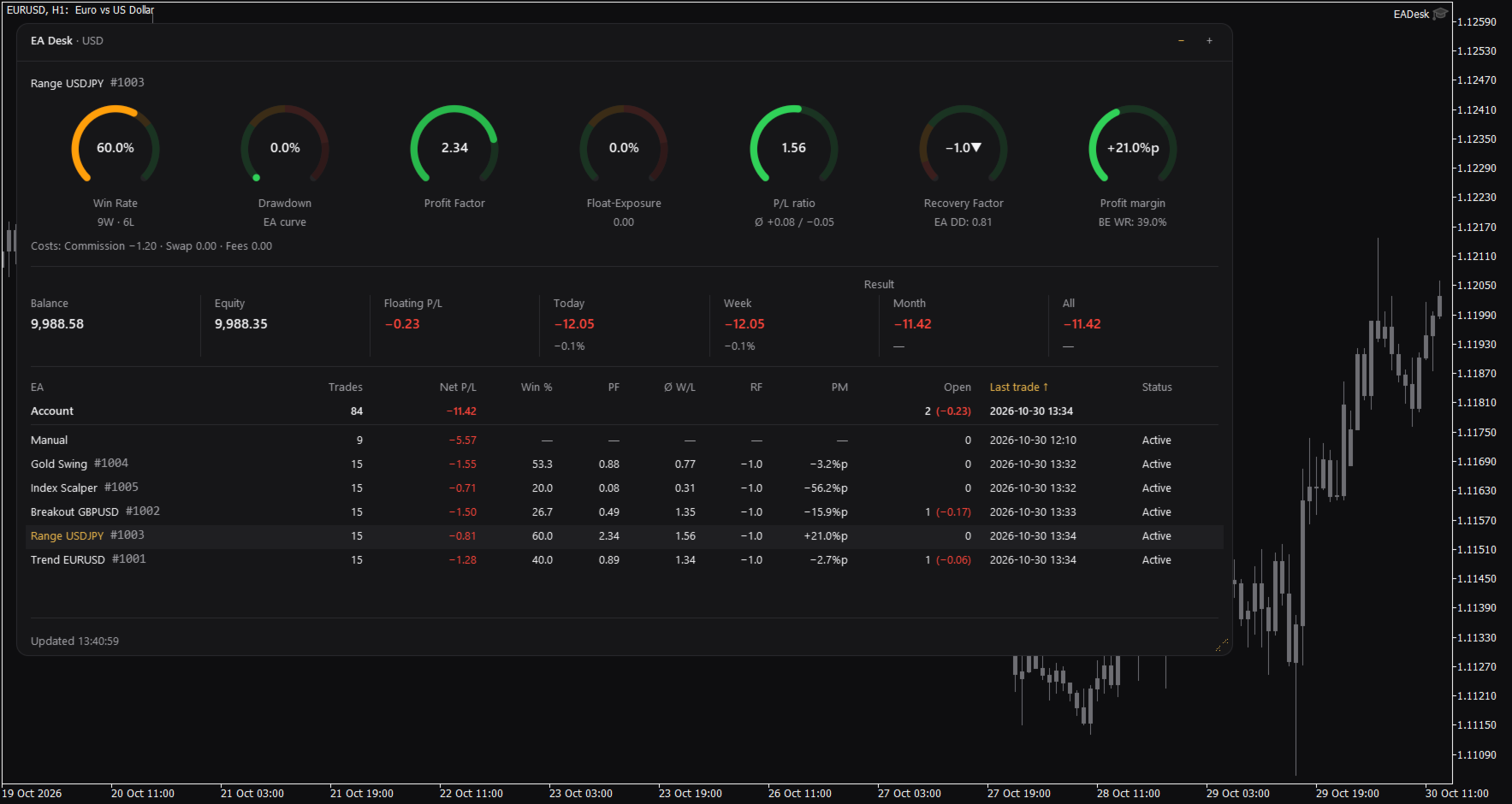
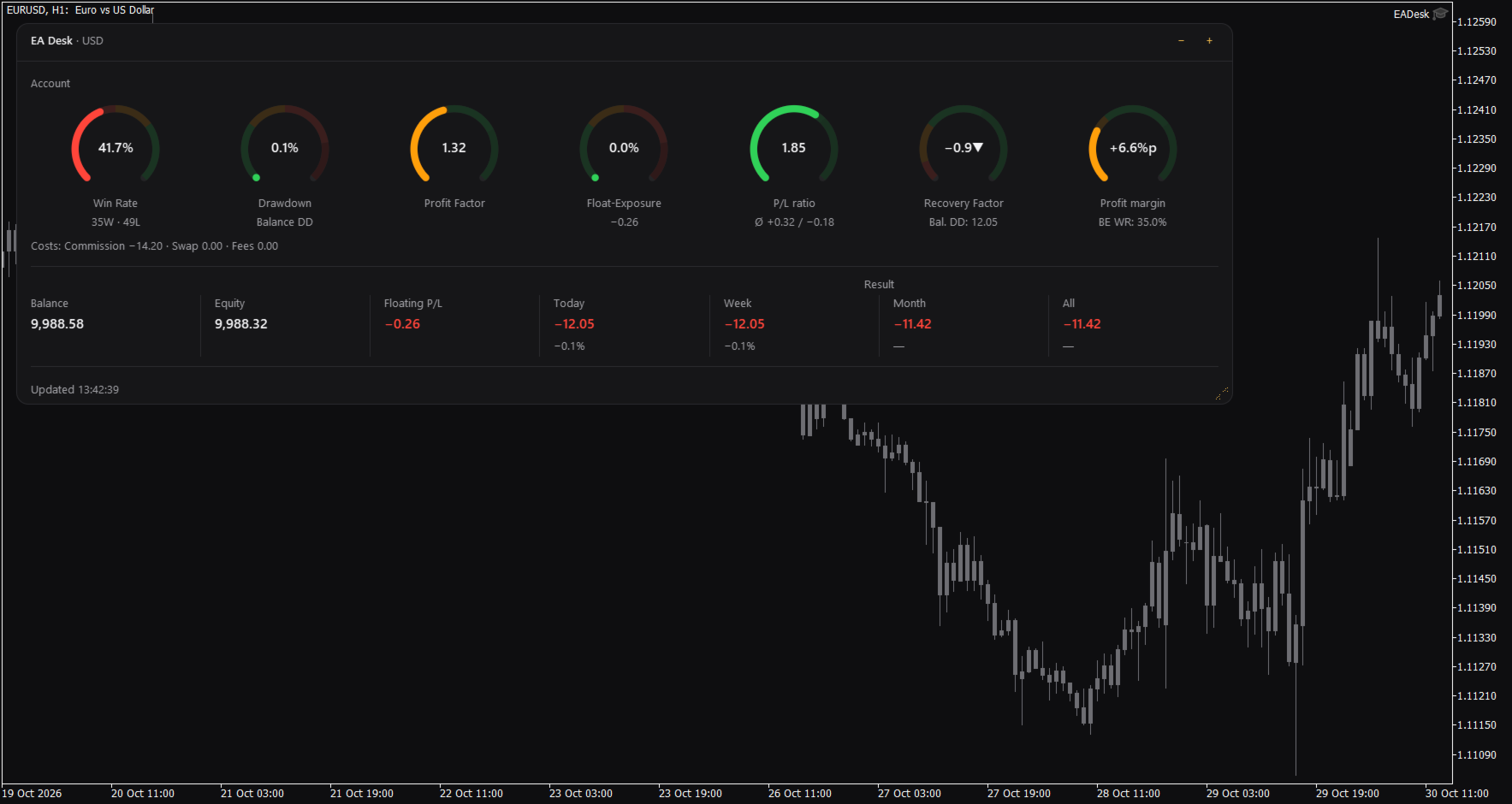
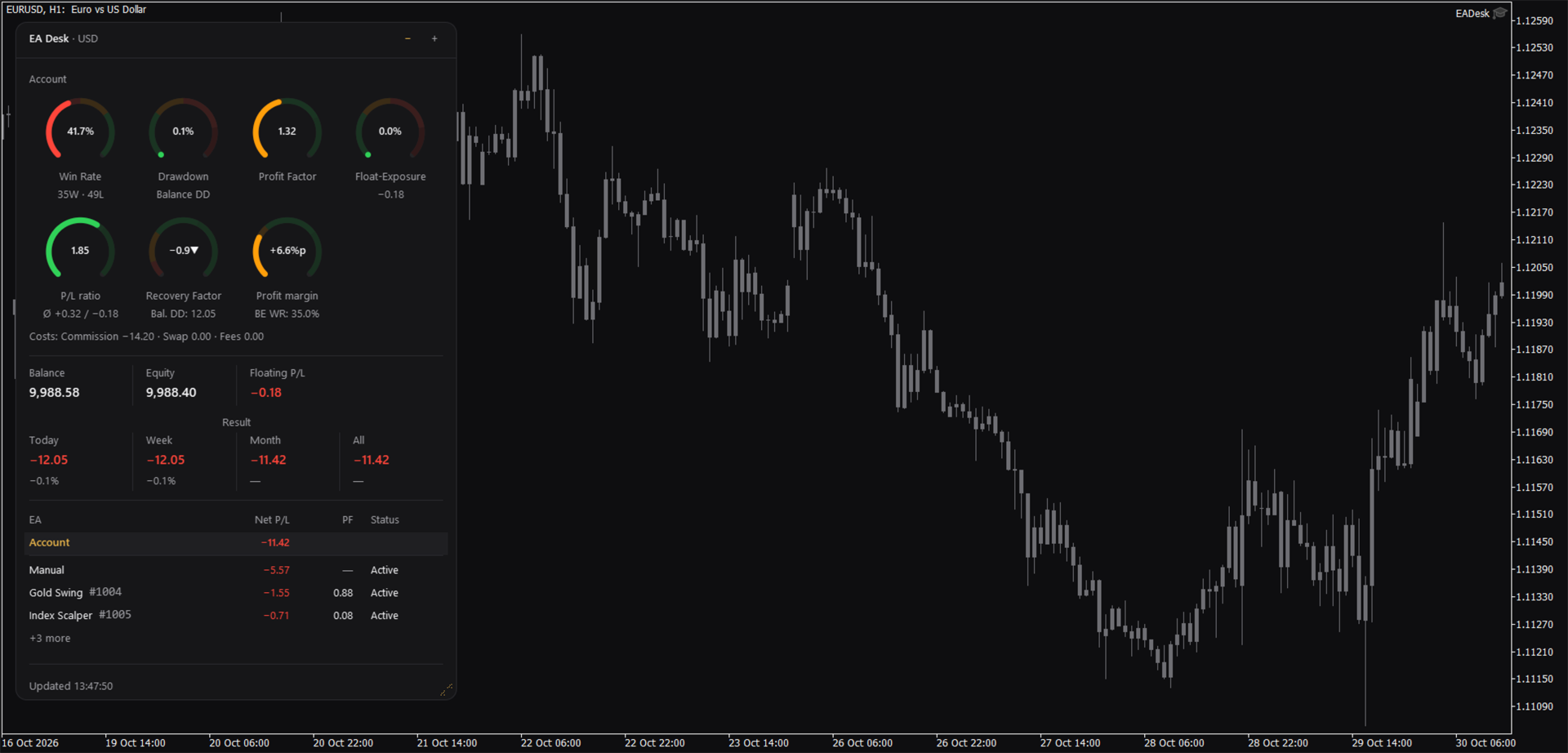
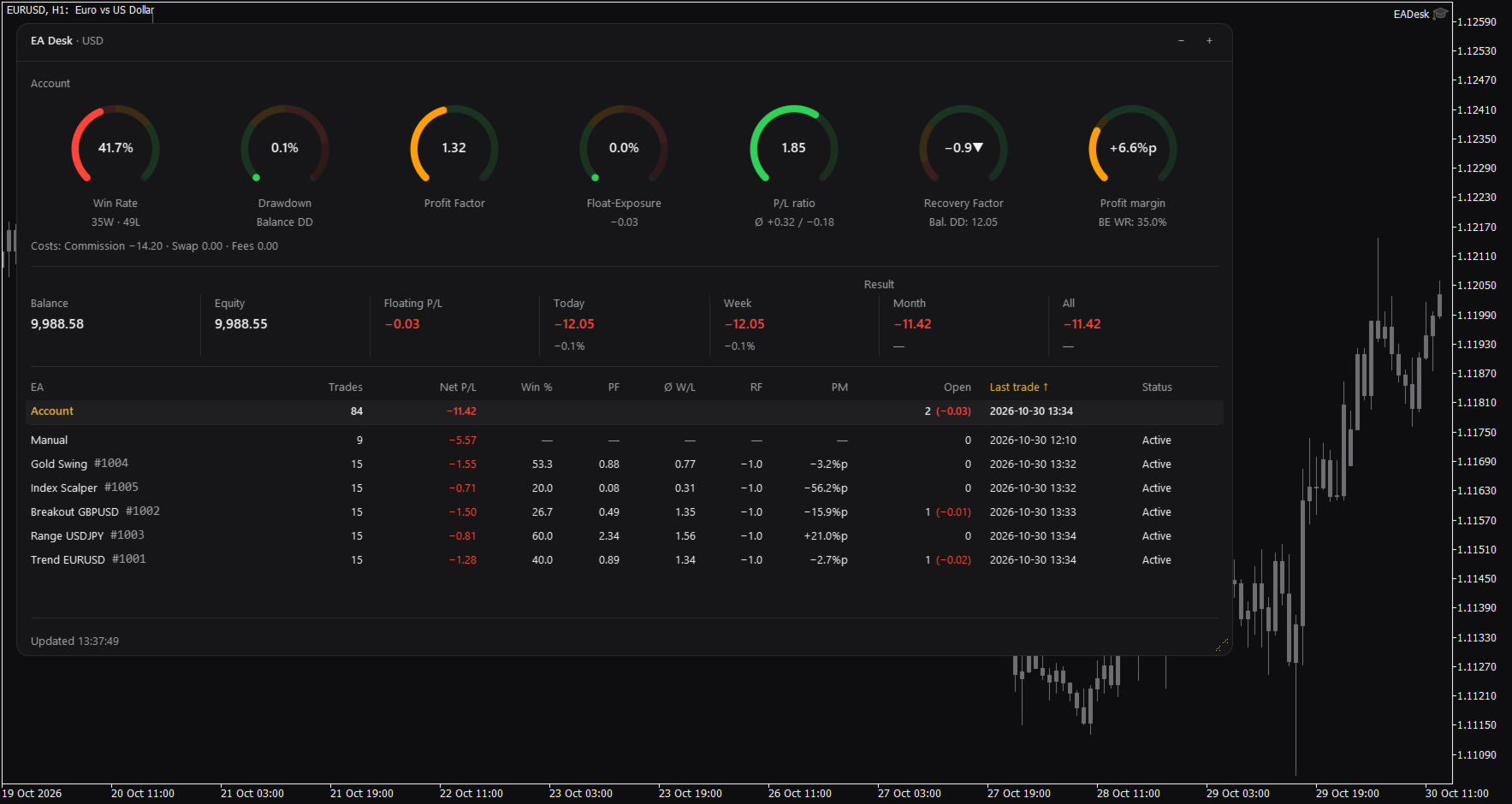
EA Desk is a small dark panel with a clear order: rings at the top, account values in the middle, the table below. Each ring shows one value and its range in colour. The panel uses few colours and no flashing. Text and rings follow the Windows display scaling. You can change width and height of the panel, and narrow panels arrange the rings in two rows.

The panel has these parts:

  • Seven rings for the account: Win Rate, Drawdown, Profit Factor, Float-Exposure, P/L ratio, Recovery Factor and Profit margin. Each ring shows a value, a short second line and a coloured range. The colours only mark ranges on the ring. They are not advice.
  • A cost line under the rings: Commission, Swap and Fees.
  • A line with Balance, Equity and Floating P/L, and the Result for Today, Week, Month and All. Today, Week and Month also show the percentage of the balance at the start of that period.
  • A table with one row per Magic Number. A fixed row called Account stays at the top. Each row of an Expert Advisor shows Trades, Net P/L, Win %, Profit Factor (PF), P/L ratio (W/L), Recovery Factor (RF), Profit margin (PM), Open positions, Last trade and Status.
  • Click the row of an Expert Advisor and the seven rings and the cost line switch to that Expert Advisor. Click the row again, or click Account, to go back to the account.

Which Expert Advisor is quiet

The Status column shows Active or Idle. Idle means that the Expert Advisor has had no trading activity for a number of days (setting IdleDays) and has no open position. It does not mean that the Expert Advisor is not loaded on a chart. A loaded Expert Advisor that does not trade also appears as Idle. By default the table lists the oldest last trade first.

Sizes and memory

The panel has three sizes. Use the minus and plus buttons in the header to change them. Full shows everything. Compact hides the table. Collapsed shows only the header with a short line such as "5 EAs, 1 idle".

Drag the grip in the corner to change width and height. A double click on the header sets the size back to the default.

EA Desk remembers size, level and the selected row for each chart, also after you change symbol or timeframe and after a terminal restart. If you remove EA Desk from the chart, this memory is deleted.

Terms used in the panel

The panel uses short labels. They are explained here.

Win Rate is the share of winning trades: wins divided by wins plus losses, times 100. A trade with a result of zero counts as a win.
Float-Exposure is the absolute floating profit or loss divided by the account balance, times 100. It shows how large the open result is compared with the balance.
P/L means profit or loss.
PF is the Profit Factor: gross profit divided by gross loss.
W/L is the P/L ratio: the average winning trade divided by the average losing trade.
RF is the Recovery Factor: total profit divided by the largest drawdown.
PM is the Profit margin: the win rate minus the break-even win rate, shown in percentage points.
DD is drawdown. Balance DD is the largest fall of the daily closing balance from an earlier high point to a later day. The percentage refers to the balance at that high point.
BE WR is the break-even win rate: the win rate at which average win and average loss would give a result of zero.
%p means percentage points. A change from 50 percent to 52.5 percent is +2.5%p.
Idle is described above.

How the numbers are calculated

Some numbers use different bases on purpose.

Result is the trading result: profit, swap, commission and fee of all buy and sell deals in the period. Deposits, withdrawals, credit and bonus are not included. Fees, interest, taxes and dividends that the broker books as separate entries are not included either. Times are server times. A period starts at 00:00 server time.

Net P/L in the table is net. It covers all deals of the positions of that Magic Number. The ratios (Win %, PF, W/L, RF, PM) are gross. They cover closed positions only and do not include swap and commission.

The account rings and the Account row count closing deals. The rows of the Expert Advisors count positions. If you close part of a position, the account counts each closing deal as a trade and the row of the Expert Advisor counts the position as one trade. Both numbers can therefore differ.

The Recovery Factor of the account includes fees and other bookings, such as corrections or interest. Result does not. The Recovery Factor of the account is not the sum of the Recovery Factors of the Expert Advisors.

Withdrawals raise the Balance DD, because the balance curve is not adjusted for deposits and withdrawals. Deposits raise the curve.

Ratios per Expert Advisor are shown from 10 closed positions on. Below this number the table and the rings show a dash.

The cost line follows the selection. If you select an Expert Advisor, Fees contain only fees booked on the trades of that Magic Number. Account fees without a Magic Number are missing there.

Profit Factor and P/L ratio show an infinity sign when there is no losing trade. A dash means that the value cannot be calculated.

Inputs

Display

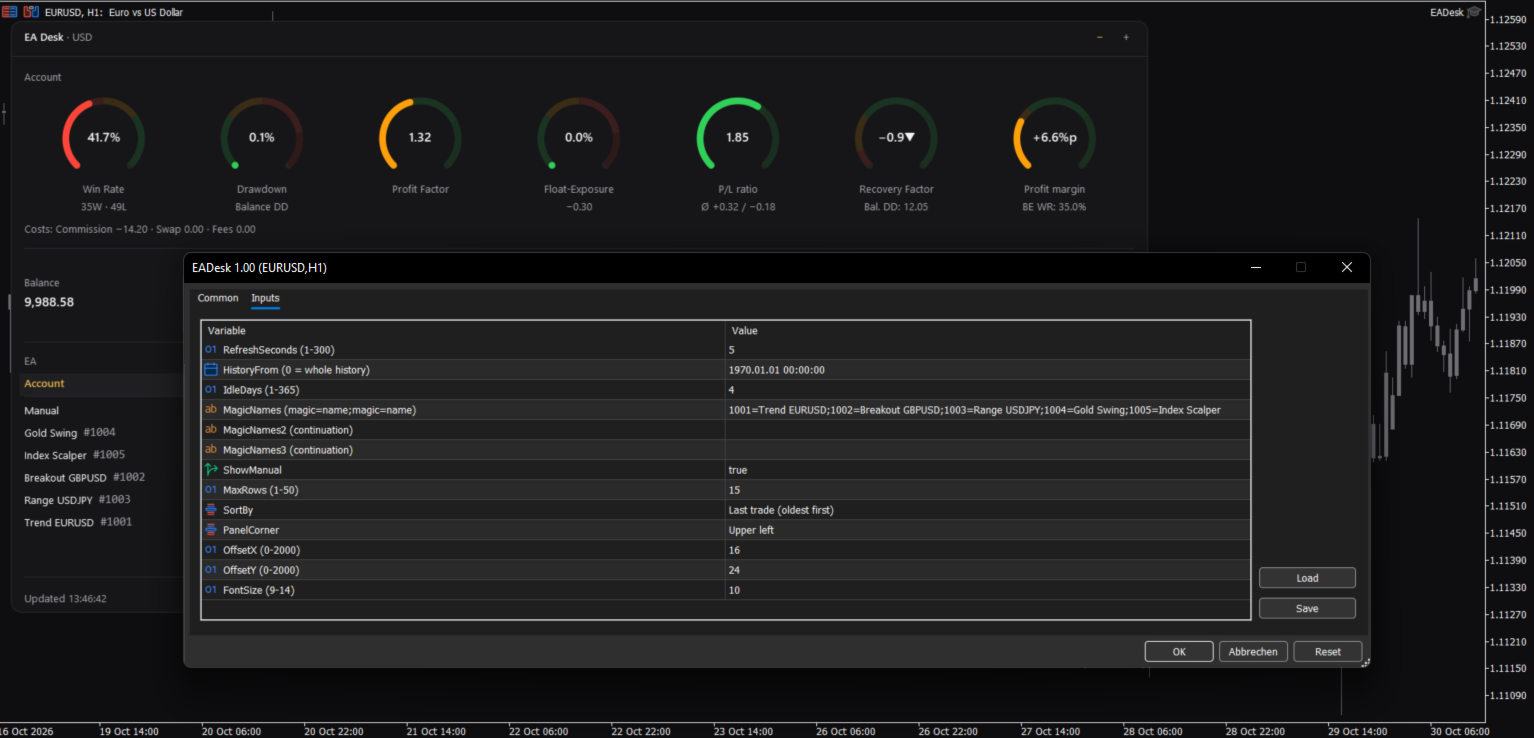
RefreshSeconds: how often the panel is updated, in seconds (1 to 300, default 5).
FontSize: base font size (9 to 14, default 10). The panel also follows the Windows display scaling.
PanelCorner: the chart corner where the panel is anchored (default upper left).
OffsetX and OffsetY: distance to that corner in pixels (default 16 and 24).

Data

HistoryFrom: start date of the evaluation. 0 means the whole history. With a date, the account values count deals from that date. The rows of the Expert Advisors count only positions opened from that date. The sum of Net P/L can then differ from Result All.
IdleDays: days without a deal and without an open position after which a row shows Idle (1 to 365, default 4).

Table

MagicNames, MagicNames2, MagicNames3: names for your Magic Numbers in the form 1001=Trend H1;2002=Grid EURUSD. Use the second and third field if the first is too short. Without a name, a row shows the Magic Number and the comment of the last opening deal.
ShowManual: show the row Manual (Magic Number 0, manual trades and Expert Advisors without a Magic Number).
MaxRows: maximum number of rows of Expert Advisors (1 to 50, default 15). More rows are shown as "+N more".
SortBy: sort order: last trade (oldest first), last trade (newest first), Net P/L, Trades or Magic.

If an input has an invalid value, EA Desk uses the default and writes one line to the Experts tab.

How to use

1. Open a new, empty chart of any symbol and timeframe.
2. Attach EA Desk to this chart. Do not attach it to a chart that already runs an Expert Advisor. MetaTrader allows one Expert Advisor per chart, so the other one would be replaced.
3. Set MagicNames if you want names instead of numbers.
4. Click a row to see the rings of one Expert Advisor.

Use one EA Desk per chart. EA Desk works with Algo Trading switched off, because it does not trade. It runs only inside your terminal. It sends no data, uses no web requests and needs no entry in the list of allowed URLs. Settings are stored inside the terminal. EA Desk writes no files.

EA Desk is not limited to a certain broker or symbol, and it works on hedging and netting accounts. On netting accounts, a reversal closes the position and starts a new one.

In the Strategy Tester, EA Desk does not trade, so a test run has no deals. In visual mode the panel shows the message "No trades in history yet." This is expected.

Limits

EA Desk lists up to 1000 Magic Numbers one by one. All further Magic Numbers are added together in one row called Other.

All numbers come from the deal history that your terminal holds. If your broker provides a shorter history, EA Desk can only use that part. A position whose opening deal is missing from the history is not assigned to a row of an Expert Advisor. It still counts in the account values. If numbers look incomplete, set the History tab of the terminal to All History.

Values refer to the past. EA Desk makes no forecast and gives no advice about trading.

The panel does not show your account number, name or server.

Manual & Questions

The user manual explains every ring, the table, the calculations and common questions: https://www.mql5.com/en/blogs/post/778831
Questions and problem reports are welcome in the product comments or by private message on MQL5.
Produtos recomendados
Second Level Candles And Alligator Indicators 每12秒产生一个K线,而且自带Alligator指标,对超短线选手交易非常有帮助。程序启动时可能不成功,是因为MT5 MqlTick 数据加载少的原因。可以通过修改显示的数据参数避免,比如display=100,程序正常之后再将参数调大 display=300 。如果数据不正常,也可以采用重新加载的方式解决。 如果您对这个指标有任何建议,请联系作者。  Second Level Candles And Alligator Indicators  produced a candle per 12 seconds,include Alligator, it's helpful to Short-Term Trading。You'd better reload the indicator every start MT5 or change display parameter to reslove data bug. Please attach author when  you had some su
FREE
- وصف المنتج - مؤشر احترافي متكامل لا يعد KING Fusion MACD-Vol من KING TRADING EA مجرد MACD آخر — فهو عبارة عن مجموعة أدوات تداول كاملة تجمع بين مؤشرات احترافية متعددة في نافذة فرعية واحدة أنيقة. لم تعد بحاجة إلى تحميل مخططك بأدوات منفصلة. يجمع هذا المؤشر بين: MACD مع خطوط مزدوجة ورسم بياني مكبر رسم بياني ملون ومثبت بالحجم ملصقات ديناميكية مع قيم المؤشرات في الوقت الفعلي (ATR، ADX، RSI، Volume) عداد تنازلي للبار التنبيهات المتقاطعة (مرئية + صوتية) كل ما تحتاجه من الوضوح والسرعة والدقة -
FREE
IMPORTANT NOTE: This is a professional Trade Management Utility and on-chart assistant. It is NOT an automated trading robot. It does not open trades on its own. The UltraFast Trade Manager MT5 is the ultimate execution and risk-management suite designed to give you absolute control over your manual and algorithmic trades. When managing multiple positions, calculating complex net break-even points, or constantly monitoring the economic calendar, hesitation can lead to costly mistakes. This utili
FREE
Trade assistant pro v8
Ahmed Mohammed Bakr Bakr
2 (1)
FREE FREE FREE Trade Assistant MT5 – Professional Trading & Risk Management Panel Trade Assistant MT5 is an advanced trading panel designed to help traders execute orders faster, safer, and more professionally . It simplifies manual trading by combining smart order management , precise risk control , and one-click execution , making it ideal for both beginners and advanced traders. This tool does not trade automatically . Instead, it empowers you with full control while applying professional-gra
FREE
FiT Panel Pro
Thonglak Janyakorn
Overview FiT Panel Pro is a professional-grade trade management panel designed for MetaTrader 5 traders who demand speed, precision, and full control over their trades. Built with a modern dark-theme UI, it combines one-click execution with advanced risk management, visual SL/TP drag lines, automatic Fibonacci-based levels, and comprehensive order management — all in a single, compact panel. Whether you are a scalper, day trader, or swing trader, FiT Panel Pro gives you the edge you need to exec
FREE
A simple button to completely close all existing open trades (both Buy and Sell) on the current chart . Warning : Once the button is pressed, all open trades on the current chart will be deleted immediately without any more questions or dialogue. Use this utility very carefully. We recommend that you do a trial of removing open trades on a demo account first, before trying to use this utility on a real account.
FREE
Apresentamos o NAS100 Auto SL e TP Maker para MT5: Nunca mais perca a definição de StopLoss e TakeProfit com o nosso NAS100 Auto SL e TP Maker, um assistente indispensável para os traders que navegam no mercado Nasdaq 100 no MetaTrader 5. Esta ferramenta foi concebida para aqueles que procuram uma solução perfeita para automatizar a gestão dos níveis de StopLoss e TakeProfit. Caraterísticas principais: Automação sem esforço: Monitoriza automaticamente as transacções Nasdaq 100 sem StopLoss e/o
FREE
SPECIAL ANNOUNCEMENT: Get the Ultimate Trading Suite! Before you grab this utility, did you know? The LogicLadder Visual Trade Planner is so powerful that it serves as the core visual execution engine for my flagship MT5 trading systems! If you are looking for a massive, all-in-one trading dashboard, advanced trade management, or strict prop-firm guardrails, you can get this exact visual planner already included inside my premium and free full-suite EAs: Pro LTS TradeDashboard MT5 (Paid
FREE
DF Fib Trader Pro O DF Fib Trader Pro é um sistema de negociação automatizado desenvolvido para o MetaTrader 5. Utiliza níveis de preços baseados em Fibonacci combinados com análise de tendências e estrutura para definir pontos de entrada e saída. O EA suporta posições longas e curtas e inclui parâmetros de gestão de risco integrados. Principais Recursos: • Utiliza a lógica de retração e extensão de Fibonacci para traçar pontos de entrada, SL e TP. • Tamanho de lote e níveis de stop loss/take
FREE
Backstop enforces the two rules that end funded accounts. A daily loss limit and a maximum loss limit, applied to everything on the account — every Expert Advisor, every symbol, and every trade you place by hand. Attach it to any one chart and it governs the whole terminal. It does not trade. It has no strategy, no signals and no opinion about the market. It is a governor. What it does Daily loss limit — measured from balance at the reset, equity at the reset, or a fixed account size. Firms diff
FREE
Introduction Welcome to the world of Forex trading, where every tick of the market can be influenced by news events. Introducing our expert advisor for MetaTrader, your ultimate tool for navigating the complexities of news trading. This innovative advisor is specifically designed to automate your trading strategy during key macroeconomic releases, ensuring you never miss an opportunity.  When important indicators are announced, volatility often spikes, creating potential for profit. Our expert
FREE
AI Weekly Open Bias Trader
Fadi Hassan Khaled Ghanem
Usa o preço de abertura semanal como linha de viés e opera as rejeições dessa linha na direção do viés semanal. Como funciona O EA avalia suas regras uma vez por barra fechada do timeframe do sinal (H1 por padrão), portanto os sinais não repintam e a lógica é a mesma no testador e em um gráfico real. Quando o setup aparece e não há nenhuma posição deste EA aberta no símbolo, ele abre uma ordem a mercado com um stop loss e um alvo. Principais recursos Tamanho de lote baseado em risco a partir de
FREE
Donchian Breakout And Rsi
Mattia Impicciatore
4.33 (3)
Descrição geral Este indicador é uma versão aprimorada do Canal Donchian clássico, enriquecida com funções práticas para o trading real. Além das três linhas padrão (máxima, mínima e linha do meio), o sistema detecta breakouts e os mostra visualmente com setas no gráfico, exibindo apenas a linha oposta à direção da tendência atual para uma leitura mais limpa. O indicador inclui: Sinais visuais : setas coloridas nos breakouts Notificações automáticas : alerta pop-up, push e e-mail Filtro RSI : pa
FREE
Monkey Lite
Dang Cong Duong
Monkey Lite  offers the following array of features: One-click instant order entry (short or long). Track total current orders and total current profit. Instant Close Buy, Close Sell, Close All button. Utility types Risk management, Graphical objects, Panels. Main features Take Profit and Stop Loss by money (not pip). After the price reached the Take Profit threshold, trailing stop 20% of the current profit. After the price reached the Stop Loss threshold, the orders will be closed immediately.
FREE
================================================================ MATRIX CONDITION MONITOR Live Trade Condition Panel for MetaTrader 5 Fully Automatic -- Works with ALL Matrix EAs ================================================================ NEVER MISS A TRADE SETUP AGAIN Matrix Condition Monitor is a free utility that attaches to any chart and automatically checks all 10 trade conditions in real time -- showing you exactly why a trade will or will not open, and alerting you the moment ever
FREE
RiskCompass Panel MT5 1. The Problem and the Approach You have a position idea, and the first real question is always the same: how much of this account am I about to put at risk, and can the account carry it. The information that answers that question is scattered across half a dozen windows. Balance is on one tab. Margin level is somewhere else. The spread you just paid is visible only if you look at the instrument row. The server day, which decides whether your daily loss limit has already be
FREE
XAU VWAP Mean Reversion H4 Expert Advisor for MetaTrader 5 — Gold / XAUUSD focus Version: 1.00 What it is XAU VWAP Mean Reversion H4 is an Expert Advisor for gold on the H4 chart. Intraday VWAP mean-reversion style participation on gold H4. Built for structured automated participation — not grid , not martingale . Evaluate on your broker and risk profile before any live use. This product is a technical system . Exact thresholds and entry equations remain internal product design and are not publ
FREE
My Grid Scalper
Ahmad Aan Isnain Shofwan
3 (2)
Cambista MyGrid Ou você lidera, ou ela lidera você. Estou lançando uma versão para MT5 baseada na versão para MT4 — que já foi baixada mais de 30.000 vezes desde 2022 — sem alarde, propaganda ou descontos. Este EA é gratuito e permanecerá gratuito para sempre. Dedico as recompensas espirituais do bem e dos benefícios que ele proporciona à minha falecida mãe, na vida após a morte . Simplesmente uma execução consistente nas mãos de quem entende do assunto. Informações básicas Símbolo: Qualquer (
FREE
Revolucione seu trading com nosso Gerenciador de Operações Avançado para MT4 e MT5 Mt4 Version : https://www.mql5.com/en/market/product/107249 Impulsione sua estratégia de trading com a ferramenta definitiva de precisão e controle – nosso Gerenciador de Operações Avançado para MT4 e MT5. Diferente dos gerenciadores convencionais, o nosso não apenas se adapta dinamicamente às condições de mercado, mas também define automaticamente níveis de stop-loss e take-profit assim que você inicia uma oper
FREE
ConsistencyGuard
Vanessa Cristina Ribeiro Dos Anjos
Versão 7.04 Grande atualização focada em fortalecer a disciplina no day trade e a proteção da conta. • Modo Post-Session Review com tempo configurável de 0 a 60 minutos. • Depois de concluir o número de operações permitido, o trader pode manter o MetaTrader 5 aberto para revisar gráficos, tirar prints e preencher seu diário de trade. • Qualquer tentativa de realizar uma nova operação após atingir o limite diário ativa a proteção Emergency Close. • O Emergency Close fecha posições abertas e cance
FREE
PropFirm Shield Essential
Sandrine Claudine Laurain
O que mata os challenges é o limite diário, não o alvo de lucro. Uma noite de alavancagem excessiva, um pending esquecido, um gap. O PropFirm Shield Essential é o guarda gratuito que vigia A regra mais importante — e bloqueia antes da violação. Em QUALQUER gráfico. Vigia toda a conta — símbolos, magics, manuais, copiadores, outros EAs. - DAILY LOSS GUARD — o teu limite e a tua hora de reset. - LOCKDOWN — fecha posições, elimina pendentes, bloqueia novos até ao reset. - BUFFER — dispara antes
FREE
AT Scalper
Maruthupandiyan
3.33 (3)
AT Scalper  Helps trader to place order seamlessly  Close mulitple position at a time Place SL or TP for multiple position in a click Place hedge order same time with predefined SL and TP Place multi layer pending order in a click Place martingale layer Be informed about SL and TP in currency Get to know time remaining in current candle Get to know current spread View PnL, Balance, Equity on screen
FREE
Chart Pro Classic Dark v1.00 Chart Pro Classic Dark is a professional MT5 chart styling and customization tool designed to give your charts a clean, modern, and professional dark appearance. Key Features Dark Black Background — Applies a clean black background to the chart. ️ Candlestick Chart — Automatically configures the chart to use candlesticks. Bullish Candles — Green/Lime bullish candles. Bearish Candles — White bearish candles. Grid Removal — Hides the chart grid for a clean
FREE
Esta pequena ferramenta ajuda você a definir seu gerenciamento de riscos com um simples arrastar de linha no gráfico. Ele mostra o tamanho real do lote calculado na% da conta ou no valor fixo em dinheiro diretamente na linha. Tudo o que você precisa fazer é ativar a linha pressionando a tecla “t” do teclado e arrastar a linha até o ponto de stop loss. É isso. Nas configurações você pode definir a cor e a largura da linha e do texto, também o espaço do texto a linha e à direita e pode definir o
FREE
PULLBACK IHS PRO is a trend-following Expert Advisor (EA) for MetaTrader 5. It waits for a clear trend to emerge and for the price to undergo a correction (pullback) toward a moving average; it then places a pending Buy Stop or Sell Stop order to capture the price movement as the trend resumes. The EA is designed for major Forex currency pairs as well as synthetic instruments on M1 and M5 timeframes, though it can also be used on higher timeframes. How the strategy works Trend: A fast EMA (defau
FREE
Go Long Advanced
Phantom Trading Inc.
4.78 (9)
O EA Go Long implementa uma estratégia avançada de trading intradiário baseada no princípio de trading diário sistemático com múltiplas confirmações técnicas. Enquanto muitos traders procuram algoritmos complexos, este EA combina conceitos simples mas eficazes com gestão sofisticada de risco e múltiplos filtros técnicos. O EA abre posições em um horário específico todos os dias, mas apenas quando as condições de mercado se alinham com múltiplos indicadores técnicos. Esta abordagem sistemática
FREE
Auto BreakEven Pro
Migael Devandre Raseala
5 (1)
Auto BreakEven Pro is a lightweight, no-nonsense Expert Advisor designed to automatically move your Stop Loss to breakeven once your trade reaches a predefined profit level. This EA is ideal for traders who want to protect profits without constantly monitoring the charts.  Key Features: Automatically sets Stop Loss to break-even after a custom number of pips in profit.  Optional break-even offset to lock in small gains (e.g., +0.5 pips). Compatible with any manual or automated strategy – simpl
FREE
Gold Adaptive EA MT5 is an automated Expert Advisor for MetaTrader 5 designed for trading Gold (XAUUSD). The EA uses several internal trading models and market filters to adapt to different phases of Gold price movement. Instead of relying on one fixed entry pattern, Gold Adaptive EA MT5 analyzes market behavior and selects suitable logic for trend continuation, impulse moves, pullbacks and selected recovery conditions. The main goal of the Expert Advisor is to provide a structured Gold tradi
FREE
Most lot size calculators assume one pip is worth ten dollars. That assumption is wrong on gold, wrong on indices, wrong on JPY crosses, and wrong on every account not denominated in USD - which is to say, wrong exactly where oversizing hurts. This one asks your server instead. It reads the tick value, tick size, point size, volume step and margin requirements actually published for the symbol on your chart, so the number it gives you is the number your account will accept. How it works Attach i
FREE
Free automatic Fibonacci is an indicator that automatically plots a Fibonacci retracement based on the number of bars you select on the BarsToScan setting in the indicator. The Fibonacci is automatically updated in real time as new highest and lowest values appears amongst the selected bars. You can select which level values to be displayed in the indicator settings. You can also select the color of the levels thus enabling the trader to be able to attach the indicator several times with differe
FREE
Os compradores deste produto também adquirem
Trade Assistant MT5
Evgeniy Kravchenko
4.43 (216)
Ajuda a calcular o risco por comércio, a fácil instalação de uma nova encomenda, gestão de encomendas com funções de fecho parcial, trailing stop de 7 tipos e outras funções úteis. Materiais e instruções adicionais Instruções de instalação   -   Instruções para a aplicação   Função de linha Mostra no gráfico a linha de Abertura, Stop Loss, Take Profit. Com esta função é fácil definir uma nova ordem e ver as suas características adicionais antes da abertura.   Gestão de risco A função de cálcul
Bem-vindo ao Trade Manager EA—uma ferramenta de gestão de risco criada para tornar o trading mais intuitivo, preciso e eficiente. Não é apenas uma ferramenta para executar ordens, mas uma solução abrangente para planejamento de operações, gerenciamento de posições e controle de risco. Seja você um iniciante, trader avançado ou scalper que precisa de execução rápida, o Trade Manager EA adapta-se às suas necessidades, oferecendo flexibilidade em todos os mercados, desde forex e índices até commodi
Farmed Hedge Yield Farming | All Markets (Manual - Hybrid - Semi/Automated EA) VERIFIED TRADING RESULTS - Farmed Hedge Yield Axi Copy:  https://www.mql5.com/en/signals/2356376 - Farmed Hedge Yield Exn Copy:   https://www.mql5.com/en/signals/2356404 - Farmed Hedge Yield V Copy:  https://www.mql5.com/en/signals/2357156 IMPORTANT NOTICE: FarmedHedge is a MANUAL-FOCUSED TRADING UTILITY ,not a fully automated EA. Results shown on this Signal include manual trades and overall strategic management.
O Telegram to MT5 Multi-Channel Copier copia automaticamente os sinais de trading dos seus canais de Telegram e Discord diretamente para o MetaTrader 5. Sem bots, sem extensões de navegador, sem copiar à mão. O sinal chega ao Telegram ou ao Discord e o EA abre a operação no seu terminal em poucos segundos. E antes de copiar um canal, o backtester integrado mostra o que esse canal teria feito na sua conta. O produto inclui dois componentes: um aplicativo de Windows que escuta os seus canais de Te
Local Trade Copier EA MT5
Juvenille Emperor Limited
4.94 (149)
Local Trade Copier EA MT5 é um copiador de operações rápido e flexível para copiar e gerenciar operações entre várias contas MetaTrader 5 no mesmo computador Windows ou Windows VPS. Ele combina a sincronização local de operações com controles no lado do Receiver para tamanho de lote, gerenciamento de risco, filtragem de operações, mapeamento de símbolos, gerenciamento de operações e proteção da conta. Configure seus terminais Transmitter e Receiver em aproximadamente 1 minuto e copie operações
Strategy Ledger Pro
Abdullah Uygar Tuna
5 (14)
Agora disponível em português. Strategy Ledger Pro é um painel de análise de conta somente leitura para o MetaTrader 5. Ele separa os resultados da conta por Expert Advisor, estratégia, símbolo e número mágico, para que você veja o que cada um realmente contribui. O painel está disponível em 11 idiomas: English, Français, Deutsch, Español, Italiano, Português, Русский, Türkçe, 中文, 日本語 e 한국어. Antes de baixar a demo. O Market executa a demo de qualquer produto pago somente no Testador de Estratég
Copie sinais do Telegram com suas próprias regras de negociação Telegram to MT5 Signal Trader copia automaticamente sinais de negociação em texto de canais e grupos públicos e privados do Telegram para o MetaTrader 5. Gerencie vários provedores e contas MT5 em um único aplicativo para desktop, com configurações individuais de risco e de negociação para cada provedor . Você não precisa de um bot do Telegram nem configurar uma API para copiar sinais. Basta entrar com sua própria conta do Telegram
TradePanel MT5
Alfiya Fazylova
4.88 (170)
Trade Panel é um assistente de negociação multifuncional. O aplicativo contém mais de 50 funções de negociação para trading manual e permite automatizar a maioria das tarefas de negociação. Instruções para o aplicativo: https://www.mql5.com/pt/blogs/post/762435 Versão de teste do aplicativo para conta demo: https://www.mql5.com/pt/blogs/post/762547 Como instalar o aplicativo: https://www.mql5.com/pt/blogs/post/762548 Como testar o aplicativo no modo visual: https://www.mql5.com/pt/blogs/post/770
================================================================================ POC BREAKOUT - V20.72. Full Professional Grade Toolkit ================================================================================ POC Breakout is a full MetaTrader 5 trading dashboard for discretionary traders who want breakout signals, Point of Control (POC) context, volume profiles, order flow, market structure, news, alerts, and advanced trade planning in one professional workspace. Attached directly to you
MT5 to Telegram Signal Provider é uma utilidade fácil de usar e totalmente personalizável que permite o envio de sinais especificados para o chat, canal ou grupo do Telegram, tornando sua conta um fornecedor de sinais . Ao contrário da maioria dos produtos concorrentes, ele não usa importações de DLL. [ Demonstração ] [ Manual ] [ Versão MT4 ] [ Versão Discord ] [ Canal do Telegram ]  New: [ Telegram To MT5 ] Configuração Um guia do usuário passo a passo está disponível. Não é necessário conhec
VirtualTradePad PRO SE MT5 — centro profissional de controle de trading para MetaTrader 5 VirtualTradePad PRO SE é um painel de trading premium baseado no gráfico e um ambiente de gerenciamento de operações para MetaTrader 5 . Ele foi desenvolvido para traders que desejam execução mais rápida, controle de posições mais claro, gerenciamento de trades estruturado, planejamento visual de níveis e um fluxo de trabalho profissional diretamente no gráfico. Não é apenas um painel de COMPRA / VENDA. O P
REVDEN AI Desk: Conduza Seu Trading a Partir de Uma Conversa com Sua Própria IA, sobre o Contexto de Mercado do REVDEN Imagine conduzir seu trading a partir de uma única conversa. O REVDEN AI Desk traz isso para o MetaTrader 5: você pergunta à sua própria IA como ela lê o mercado, e ela responde a partir do contexto completo do REVDEN sobre os símbolos que você opera, com o estado de cada um, o quadro de risco e as divulgações que vêm pela frente. As propostas dela chegam com entrada, stop, alvo
Trade copier MT5
Alfiya Fazylova
4.61 (57)
Trade Copier é um utilitário profissional projetado para copiar e sincronizar negociações entre contas de negociação. A cópia ocorre da conta / terminal do fornecedor para a conta / terminal do destinatário, instalada no mesmo computador ou vps. Antes de comprar, você pode testar a versão demo em uma conta demo. Versão de demonstração aqui . Instruções completas aqui . Principais funcionalidades e benefícios: Suporta a cópia de MT5> MT5, MT4> MT5, MT5> MT4, incluindo contas "MT5 netting". Os mod
News Trade EA MT5
Konstantin Kulikov
4.55 (11)
Apresento um robô útil que eu mesmo uso há vários anos. Pode ser usado nos modos semiautomático e totalmente automático. >>> Chat <<< O programa contém configurações flexíveis para negociação nas notícias do calendário econômico. Não pode ser verificado no testador de estratégia. Somente trabalho real. Descarregue o ficheiro mais recente de definições: https://www.mql5.com/en/blogs/post/747929 Monitorização de sinais: https://www.mql5.com/en/signals/author/test-standart Ao criar suas próprias
Exp COPYLOT CLIENT for MT5
Vladislav Andruschenko
3.97 (35)
Copiador profissional de operações para MetaTrader 5 Um copiador de operações rápido, profissional e confiável para MetaTrader . COPYLOT permite copiar operações de Forex entre terminais MT4 e MT5 com suporte para contas Hedge e Netting . A versão MT5 do COPYLOT oferece suporte a: - MT5 Hedge → MT5 Hedge - MT5 Hedge → MT5 Netting - MT5 Netting → MT5 Hedge - MT5 Netting → MT5 Netting - MT4 → MT5 Hedge - MT4 → MT5 Netting Versão MT4 Descrição completa + DEMO + PDF Como comprar Como instalar Como
RETAILBERG FOOTPRINT CHART PRO — Order-Flow Workspace for MetaTrader 5 Version 7.00  |  Professional System  |  31 tools  |  One chart A full 150-page illustrated User Manual is included. Please read the full manual to understand this feature packed footprint chart elements and ui. https://www.mql5.com/en/blogs/post/777982 DEMO / STRATEGY TESTER — PLEASE READ FIRST
The Patch
Mian Rameez Ali
The Patch It never opens a trade. It walks behind the ones that did. Every open position, every pending order — checked twice a second for the one thing that's easy to forget: a stop, a target. Found bare, it doesn't ask. It writes the missing number in, measured in points from wherever the position began, and moves on to the next. No strategy, no opinion on direction. Just the quiet assumption that nothing should ever sit on the market unprotected — not because someone decided it shouldn't,
Telegram To MT5 Ultra
Mirel Daniel Gheonu
5 (5)
Telegram To MT5 — Copiador de sinais Transforme as chamadas de trading dos seus canais do Telegram em ordens reais no MT5 — automaticamente, em quantas contas quiser, com o risco e as regras totalmente sob o seu controlo. O Telegram To MT5 liga os canais VIP / de sinais que já segue no Telegram ao seu terminal MetaTrader 5. Um aplicativo de desktop complementar gratuito lê as mensagens (mesmo de canais que bloqueiam bots), e este Expert Advisor executa-as na sua conta — aplicando as suas própria
Próxima Atualização — Versão 2.52 em Breve! [NOVO] Prepare-se para 4 Grandes Novos Recursos Projetados para Aprimorar sua Análise de Mercado e seu Fluxo de Trabalho de Trading Estamos levando a análise de mercado a um novo nível com 4 novos recursos desenvolvidos para atender às suas necessidades de trading. Apresentamos: 1. TRADE OVERVIEW DASHBOARD 2. CONFLUENCE AT ZONE 3. STRONG & WEAK HIGH/LOW 4. OTE 1. TRADE OVERVIEW DASHBOARD Um painel que ajuda você a compreender mais facilmente o panoram
Grid Manual MT5
Alfiya Fazylova
4.73 (22)
"Grid Manual" é um painel comercial para trabalhar com uma grade de ordens. O utilitário é universal, possui configurações flexíveis e uma interface intuitiva. Ele trabalha com uma grade de ordens não apenas na direção da média das perdas, mas também na direção do aumento dos lucros. O trader não precisa criar e manter uma grade de ordens, tudo será feito pelo ""Grid Manual". Basta abrir um orden e o "Grid manual" criará automaticamente uma grade de ordens para ele e trabalhará com ele até que s
HINN MagicEntry Extra
ALGOFLOW OÜ
4.74 (19)
HINN MAGIC ENTRY – the ultimate tool for entry and position management! SIMPLE. FASTEST. INTUITIVE. MAX AUTOMATED. Place orders by selecting a level directly on the chart! full description   ::  demo-version  :: 60-sec-video-description Key features: - Market, limit, and pending orders - Automatic lot size calculation - Automatic spread and commission accounting - Unlimited partitial take-profits  - Breakeven and trailing stop-loss and take-profit  functions - Invalidation leves - Intuitive, a
Anchor Trade Manager
Kalinskie Gilliam
5 (8)
Your EAs cannot see each other, but Anchor can. Anchor gives you one place to coordinate your EAs, manage risk, and decide when trading is allowed. It works alongside the trading bots you already use without any changes to them. The Problem One EA opens a trade. Then another starts trading. The next thing you know, you wake up to multiple grids built across your account. Each EA may be doing exactly what it was designed to do, but together they can place far more risk on your account than you in
EA Portfolio Control & Cloud Monitoring for MetaTrader 5 Your EAs manage trades. KONTROL_01 manages your EAs. A control system for traders running multiple Expert Advisors on the same account. Coordinate EA activity, manage trading risks and monitor your setup remotely. A detailed User Manual is available via DM after purchase. IN PRACTICE Multiple EAs. No coordination. Your EAs trade independently, unaware of each other's activity. KONTROL_01 coordinates them, limits simultaneous activity a
The product will copy all telegram signal to MT5 ( which you are member) , also it can work as remote copier.  Easy to set up, copy order instant, can work with almost signal formats, image signal,  s upport to translate other language to English Work with all type of channel or group, even channel have "Restrict Saving Content", work with  multi channel, multi MT5 Work as remote copier: with signal have ticket number, it will copy exactly via ticket number. Support to backtest signal. How to s
Astro Trade MT5
Indra Maulana
5 (8)
25% discount on the release of the tool: only for the next 3 buyers Send a message to receive a demo version. AstroTrade Trading Assistant AstroTrade is a comprehensive multi-functional trading utility developed for the MetaTrader 5 platform. It integrates essential tools for trade execution, risk management, and technical monitoring into a single unified interface. The application is designed to assist traders in managing their daily operations through a visual and structured environment. Vi
Timeless Charts
Samuel Manoel De Souza
5 (9)
Timeless Charts é um utilitário de trading tudo-em-um para traders profissionais. Ele combina tipos de gráficos personalizados, como Gráficos por Segundos e Renko , com análise avançada de fluxo de ordens utilizando Footprints , Clusters , Perfis de Volume , estudos VWAP e ferramentas de análise ancorada para uma visão mais profunda do mercado. O gerenciamento de ordens e posições é realizado diretamente no gráfico por meio de um painel integrado de gerenciamento de operações , enquanto o Market
Floor Watch
Syed Tauqeer Hussain Shah
Floor Watch One number, watched every thirty seconds: how far equity has fallen since the day began — or since its highest point, if it's told to trail the peak instead of the open. Cross the line and it doesn't argue. Every open position closes, every pending order vanishes, and anything that slips through afterward gets shut the moment it appears. Not asked. Removed. The floor holds until the clock turns 5 AM Pakistan time — then, and only then, does the day start over. One rule. No except
RS Trade Copier - o local trade copier ultrarrápido com uma interface gráfica verdadeira . Pare de digitar números de conta manualmente. Chega daquela lista enorme de 200+ parâmetros de entrada incompreensíveis. Uma ferramenta confiável e flexível para cópia de operações comerciais entre múltiplos terminais MT5 e MT4. Atende tanto traders experientes e serviços de sinais quanto investidores individuais. Permite sincronizar negociações de um ou múltiplos Provedores para um ou múltiplos Clientes c
Seconds Chart MT5
Boris Sedov
4.61 (18)
Seconds Chart - uma ferramenta exclusiva para criar gráficos de segundos no MetaTrader 5 . Com o Seconds Chart , você pode criar gráficos com períodos definidos em segundos, proporcionando flexibilidade e precisão ideais para análise, indisponíveis em gráficos padrão de minutos ou horas. Por exemplo, o período S15 indica um gráfico com velas de 15 segundos. Você pode usar qualquer indicador ou Expert Advisor com suporte a símbolos personalizados. Trabalhar com eles é tão conveniente quanto negoc
Power Candles Strategy Scanner - Localizador de configurações multissímbolo com auto-otimização O Power Candles Strategy Scanner utiliza o mesmo motor de auto-otimização que alimenta o indicador Power Candles — em todos os símbolos da sua lista de observação, lado a lado. Um painel indica-lhe quais os símbolos que são estatisticamente negociáveis neste momento, qual a estratégia vencedora para cada um, o par ideal de Stop Loss / Take Profit, e avisa-o assim que um novo sinal é emitido. Esta ferr
Filtro:
Sem comentários
Responder ao comentário