EA Desk MT5

Shows account results and a table per Magic Number on its own chart, so you can see which Expert Advisor is active and which has been quiet. EA Desk does not trade.

EA Desk is a read-only panel that shows your account results per Expert Advisor in one calm view.

What EA Desk does

Many traders run several Expert Advisors on one account. The terminal shows one shared list of deals. To see what each Expert Advisor has done, you have to filter and calculate by hand. It is easy to miss an Expert Advisor that has not traded for days.

EA Desk puts this on one panel. It reads the deal history and the open positions of your account and shows the result on a chart. It does not open, change or close any order or position. It does not trade in the Strategy Tester either.

One chart is enough. EA Desk reads the whole account, not only the symbol of its chart.

Design of the panel

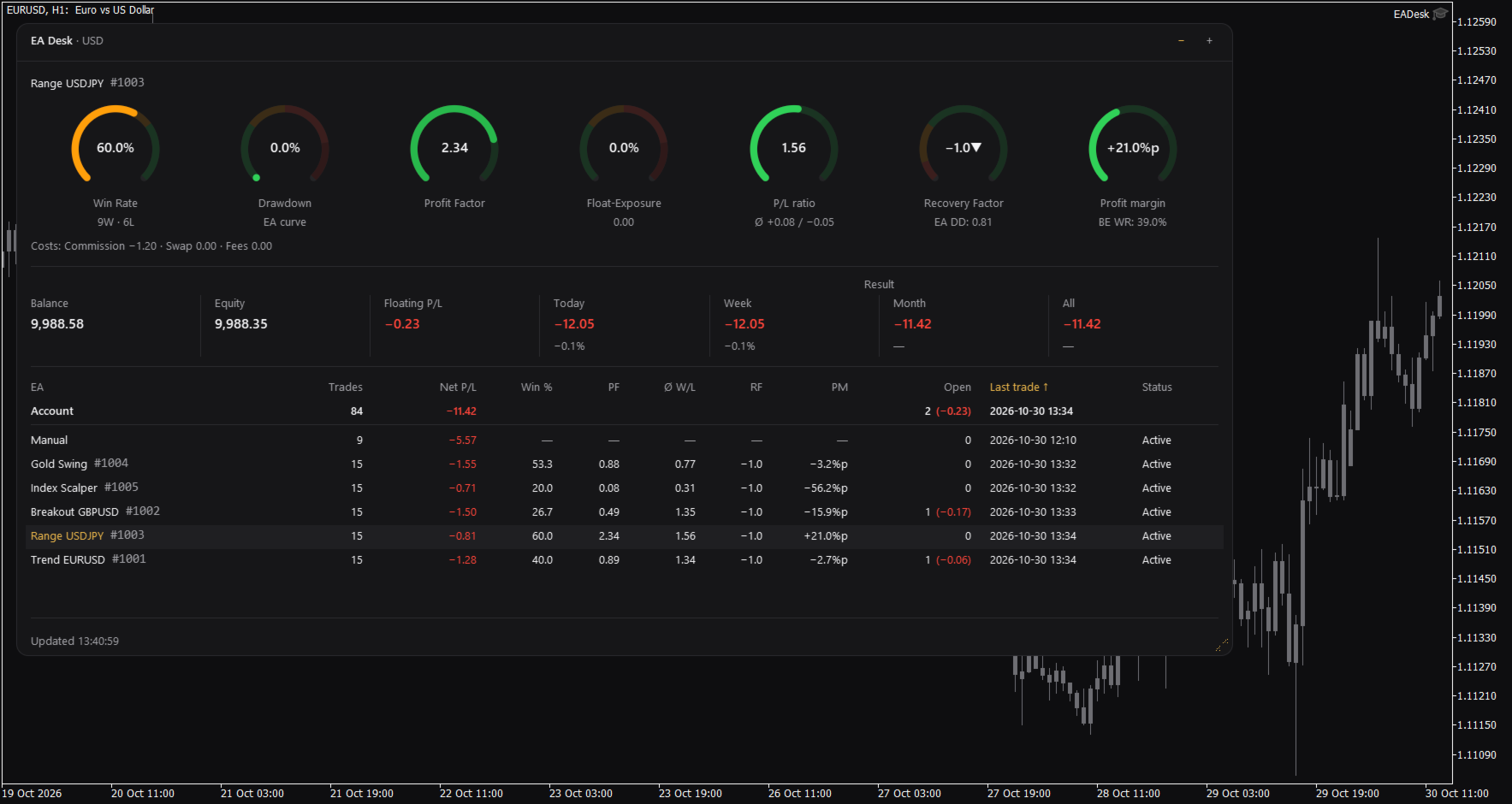
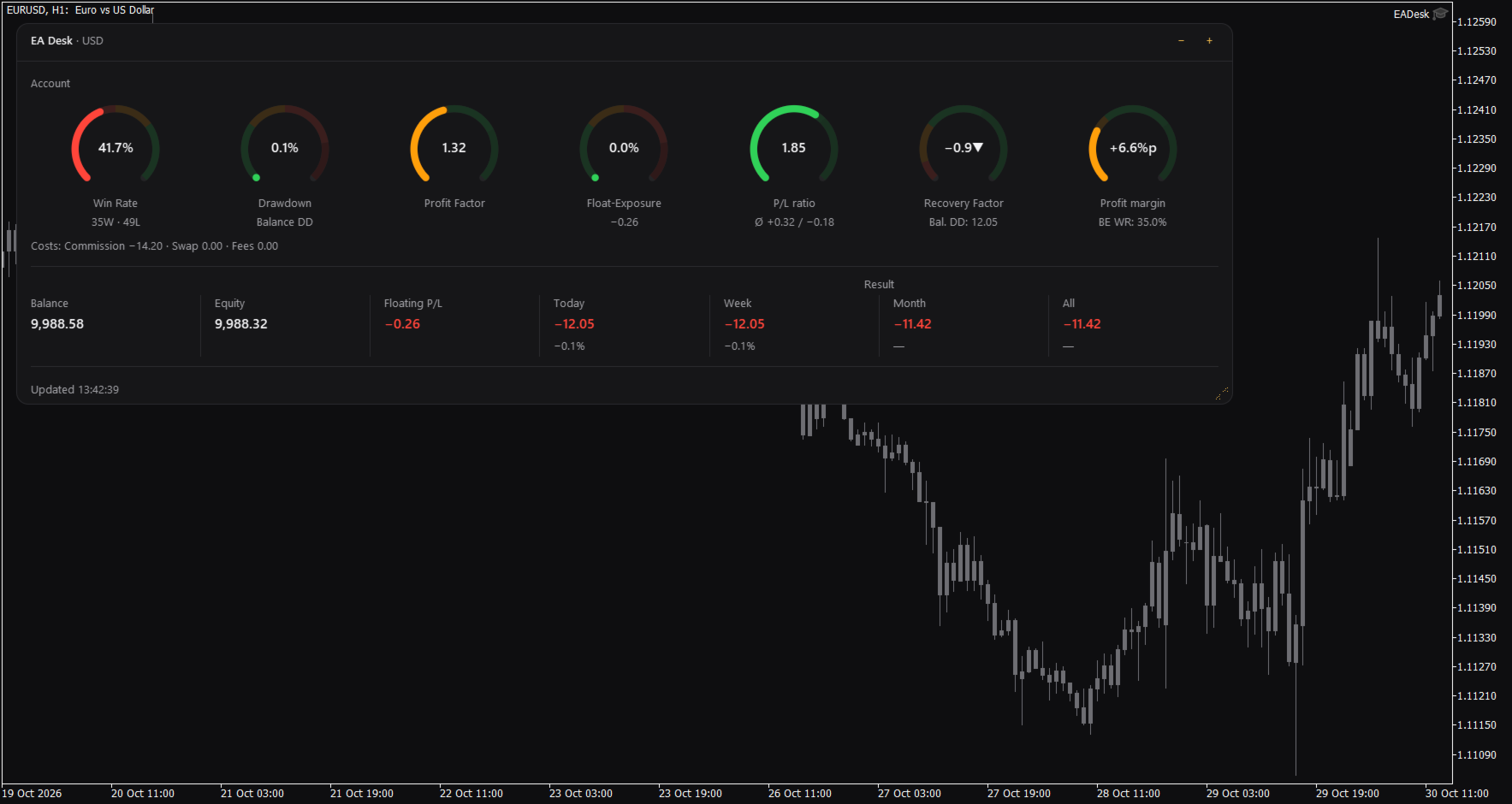
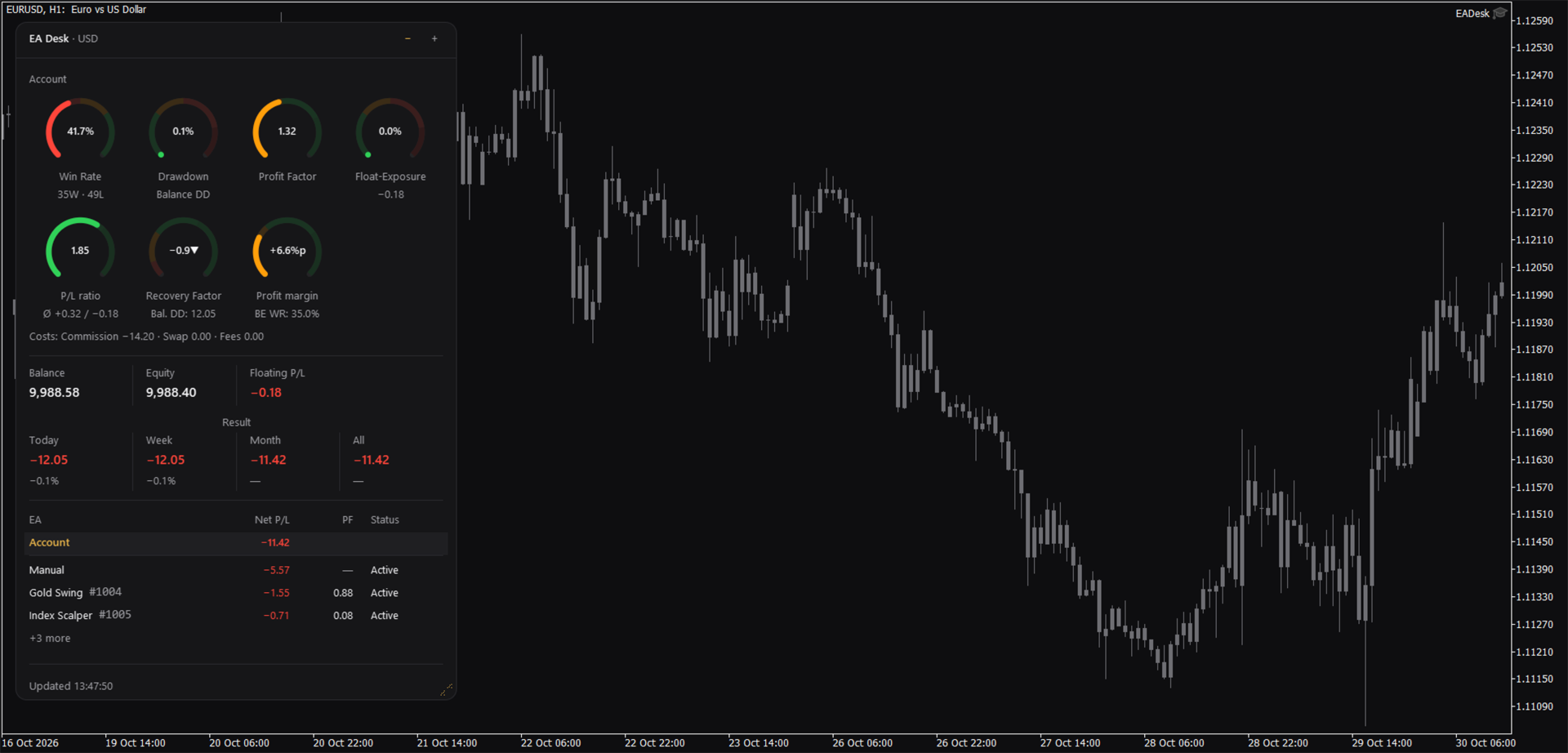
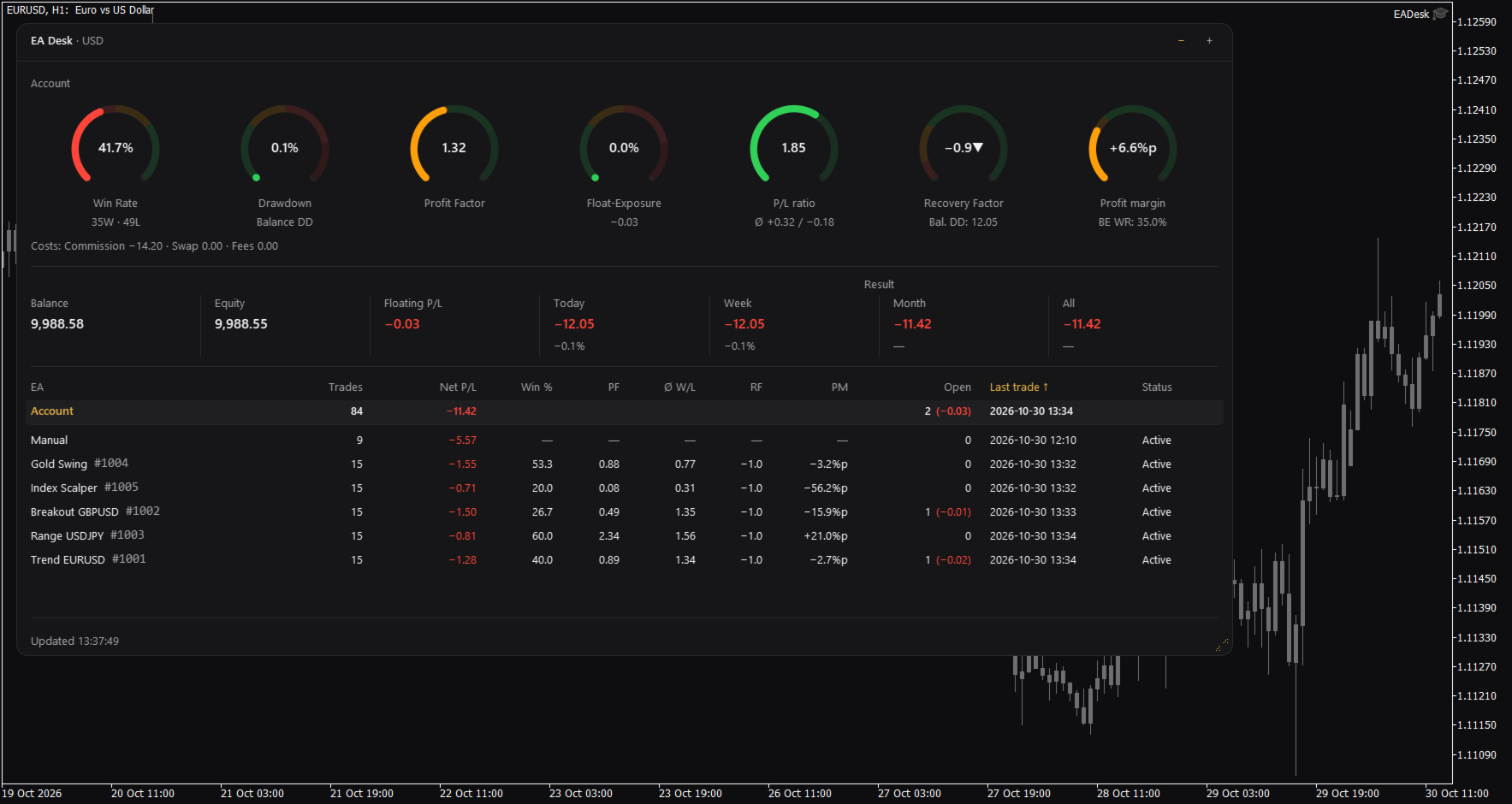
EA Desk is a small dark panel with a clear order: rings at the top, account values in the middle, the table below. Each ring shows one value and its range in colour. The panel uses few colours and no flashing. Text and rings follow the Windows display scaling. You can change width and height of the panel, and narrow panels arrange the rings in two rows.

The panel has these parts:

  • Seven rings for the account: Win Rate, Drawdown, Profit Factor, Float-Exposure, P/L ratio, Recovery Factor and Profit margin. Each ring shows a value, a short second line and a coloured range. The colours only mark ranges on the ring. They are not advice.
  • A cost line under the rings: Commission, Swap and Fees.
  • A line with Balance, Equity and Floating P/L, and the Result for Today, Week, Month and All. Today, Week and Month also show the percentage of the balance at the start of that period.
  • A table with one row per Magic Number. A fixed row called Account stays at the top. Each row of an Expert Advisor shows Trades, Net P/L, Win %, Profit Factor (PF), P/L ratio (W/L), Recovery Factor (RF), Profit margin (PM), Open positions, Last trade and Status.
  • Click the row of an Expert Advisor and the seven rings and the cost line switch to that Expert Advisor. Click the row again, or click Account, to go back to the account.

Which Expert Advisor is quiet

The Status column shows Active or Idle. Idle means that the Expert Advisor has had no trading activity for a number of days (setting IdleDays) and has no open position. It does not mean that the Expert Advisor is not loaded on a chart. A loaded Expert Advisor that does not trade also appears as Idle. By default the table lists the oldest last trade first.

Sizes and memory

The panel has three sizes. Use the minus and plus buttons in the header to change them. Full shows everything. Compact hides the table. Collapsed shows only the header with a short line such as "5 EAs, 1 idle".

Drag the grip in the corner to change width and height. A double click on the header sets the size back to the default.

EA Desk remembers size, level and the selected row for each chart, also after you change symbol or timeframe and after a terminal restart. If you remove EA Desk from the chart, this memory is deleted.

Terms used in the panel

The panel uses short labels. They are explained here.

Win Rate is the share of winning trades: wins divided by wins plus losses, times 100. A trade with a result of zero counts as a win.
Float-Exposure is the absolute floating profit or loss divided by the account balance, times 100. It shows how large the open result is compared with the balance.
P/L means profit or loss.
PF is the Profit Factor: gross profit divided by gross loss.
W/L is the P/L ratio: the average winning trade divided by the average losing trade.
RF is the Recovery Factor: total profit divided by the largest drawdown.
PM is the Profit margin: the win rate minus the break-even win rate, shown in percentage points.
DD is drawdown. Balance DD is the largest fall of the daily closing balance from an earlier high point to a later day. The percentage refers to the balance at that high point.
BE WR is the break-even win rate: the win rate at which average win and average loss would give a result of zero.
%p means percentage points. A change from 50 percent to 52.5 percent is +2.5%p.
Idle is described above.

How the numbers are calculated

Some numbers use different bases on purpose.

Result is the trading result: profit, swap, commission and fee of all buy and sell deals in the period. Deposits, withdrawals, credit and bonus are not included. Fees, interest, taxes and dividends that the broker books as separate entries are not included either. Times are server times. A period starts at 00:00 server time.

Net P/L in the table is net. It covers all deals of the positions of that Magic Number. The ratios (Win %, PF, W/L, RF, PM) are gross. They cover closed positions only and do not include swap and commission.

The account rings and the Account row count closing deals. The rows of the Expert Advisors count positions. If you close part of a position, the account counts each closing deal as a trade and the row of the Expert Advisor counts the position as one trade. Both numbers can therefore differ.

The Recovery Factor of the account includes fees and other bookings, such as corrections or interest. Result does not. The Recovery Factor of the account is not the sum of the Recovery Factors of the Expert Advisors.

Withdrawals raise the Balance DD, because the balance curve is not adjusted for deposits and withdrawals. Deposits raise the curve.

Ratios per Expert Advisor are shown from 10 closed positions on. Below this number the table and the rings show a dash.

The cost line follows the selection. If you select an Expert Advisor, Fees contain only fees booked on the trades of that Magic Number. Account fees without a Magic Number are missing there.

Profit Factor and P/L ratio show an infinity sign when there is no losing trade. A dash means that the value cannot be calculated.

Inputs

Display

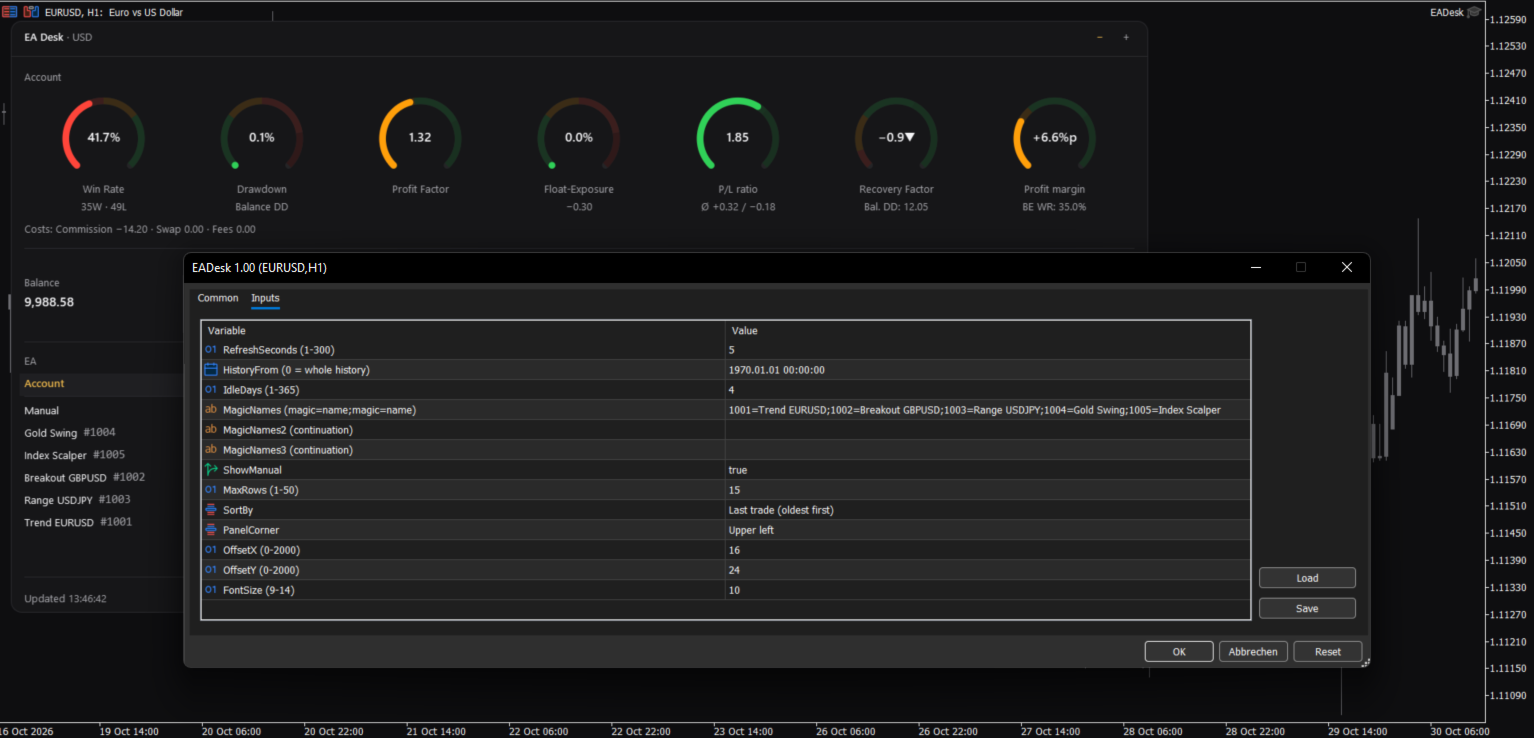
RefreshSeconds: how often the panel is updated, in seconds (1 to 300, default 5).
FontSize: base font size (9 to 14, default 10). The panel also follows the Windows display scaling.
PanelCorner: the chart corner where the panel is anchored (default upper left).
OffsetX and OffsetY: distance to that corner in pixels (default 16 and 24).

Data

HistoryFrom: start date of the evaluation. 0 means the whole history. With a date, the account values count deals from that date. The rows of the Expert Advisors count only positions opened from that date. The sum of Net P/L can then differ from Result All.
IdleDays: days without a deal and without an open position after which a row shows Idle (1 to 365, default 4).

Table

MagicNames, MagicNames2, MagicNames3: names for your Magic Numbers in the form 1001=Trend H1;2002=Grid EURUSD. Use the second and third field if the first is too short. Without a name, a row shows the Magic Number and the comment of the last opening deal.
ShowManual: show the row Manual (Magic Number 0, manual trades and Expert Advisors without a Magic Number).
MaxRows: maximum number of rows of Expert Advisors (1 to 50, default 15). More rows are shown as "+N more".
SortBy: sort order: last trade (oldest first), last trade (newest first), Net P/L, Trades or Magic.

If an input has an invalid value, EA Desk uses the default and writes one line to the Experts tab.

How to use

1. Open a new, empty chart of any symbol and timeframe.
2. Attach EA Desk to this chart. Do not attach it to a chart that already runs an Expert Advisor. MetaTrader allows one Expert Advisor per chart, so the other one would be replaced.
3. Set MagicNames if you want names instead of numbers.
4. Click a row to see the rings of one Expert Advisor.

Use one EA Desk per chart. EA Desk works with Algo Trading switched off, because it does not trade. It runs only inside your terminal. It sends no data, uses no web requests and needs no entry in the list of allowed URLs. Settings are stored inside the terminal. EA Desk writes no files.

EA Desk is not limited to a certain broker or symbol, and it works on hedging and netting accounts. On netting accounts, a reversal closes the position and starts a new one.

In the Strategy Tester, EA Desk does not trade, so a test run has no deals. In visual mode the panel shows the message "No trades in history yet." This is expected.

Limits

EA Desk lists up to 1000 Magic Numbers one by one. All further Magic Numbers are added together in one row called Other.

All numbers come from the deal history that your terminal holds. If your broker provides a shorter history, EA Desk can only use that part. A position whose opening deal is missing from the history is not assigned to a row of an Expert Advisor. It still counts in the account values. If numbers look incomplete, set the History tab of the terminal to All History.

Values refer to the past. EA Desk makes no forecast and gives no advice about trading.

The panel does not show your account number, name or server.

Manual & Questions

The user manual explains every ring, the table, the calculations and common questions: https://www.mql5.com/en/blogs/post/778831
Questions and problem reports are welcome in the product comments or by private message on MQL5.
Önerilen ürünler
Second Level Candles And Alligator Indicators 每12秒产生一个K线,而且自带Alligator指标,对超短线选手交易非常有帮助。程序启动时可能不成功,是因为MT5 MqlTick 数据加载少的原因。可以通过修改显示的数据参数避免,比如display=100,程序正常之后再将参数调大 display=300 。如果数据不正常,也可以采用重新加载的方式解决。 如果您对这个指标有任何建议,请联系作者。  Second Level Candles And Alligator Indicators  produced a candle per 12 seconds,include Alligator, it's helpful to Short-Term Trading。You'd better reload the indicator every start MT5 or change display parameter to reslove data bug. Please attach author when  you had some su
FREE
- وصف المنتج - مؤشر احترافي متكامل لا يعد KING Fusion MACD-Vol من KING TRADING EA مجرد MACD آخر — فهو عبارة عن مجموعة أدوات تداول كاملة تجمع بين مؤشرات احترافية متعددة في نافذة فرعية واحدة أنيقة. لم تعد بحاجة إلى تحميل مخططك بأدوات منفصلة. يجمع هذا المؤشر بين: MACD مع خطوط مزدوجة ورسم بياني مكبر رسم بياني ملون ومثبت بالحجم ملصقات ديناميكية مع قيم المؤشرات في الوقت الفعلي (ATR، ADX، RSI، Volume) عداد تنازلي للبار التنبيهات المتقاطعة (مرئية + صوتية) كل ما تحتاجه من الوضوح والسرعة والدقة -
FREE
IMPORTANT NOTE: This is a professional Trade Management Utility and on-chart assistant. It is NOT an automated trading robot. It does not open trades on its own. The UltraFast Trade Manager MT5 is the ultimate execution and risk-management suite designed to give you absolute control over your manual and algorithmic trades. When managing multiple positions, calculating complex net break-even points, or constantly monitoring the economic calendar, hesitation can lead to costly mistakes. This utili
FREE
Trade assistant pro v8
Ahmed Mohammed Bakr Bakr
2 (1)
FREE FREE FREE Trade Assistant MT5 – Professional Trading & Risk Management Panel Trade Assistant MT5 is an advanced trading panel designed to help traders execute orders faster, safer, and more professionally . It simplifies manual trading by combining smart order management , precise risk control , and one-click execution , making it ideal for both beginners and advanced traders. This tool does not trade automatically . Instead, it empowers you with full control while applying professional-gra
FREE
Overview FiT Panel Pro is a professional-grade trade management panel designed for MetaTrader 5 traders who demand speed, precision, and full control over their trades. Built with a modern dark-theme UI, it combines one-click execution with advanced risk management, visual SL/TP drag lines, automatic Fibonacci-based levels, and comprehensive order management — all in a single, compact panel. Whether you are a scalper, day trader, or swing trader, FiT Panel Pro gives you the edge you need to exec
FREE
A simple button to completely close all existing open trades (both Buy and Sell) on the current chart . Warning : Once the button is pressed, all open trades on the current chart will be deleted immediately without any more questions or dialogue. Use this utility very carefully. We recommend that you do a trial of removing open trades on a demo account first, before trying to use this utility on a real account.
FREE
MT5 için NAS100 Auto SL ve TP Maker ile tanışın: MetaTrader 5'te Nasdaq 100 piyasasında gezinen yatırımcılar için vazgeçilmez bir yardımcı olan NAS100 Auto SL ve TP Maker ile StopLoss ve TakeProfit ayarlarını bir daha asla kaçırmayın. Bu araç, StopLoss ve TakeProfit seviyelerinin yönetimini otomatikleştirmek için sorunsuz bir çözüm arayanlar için tasarlanmıştır. Temel Özellikler: Zahmetsiz Otomasyon: StopLoss ve/veya TakeProfit olmadan Nasdaq 100 işlemlerini otomatik olarak izler. Kullanıcı ta
FREE
SPECIAL ANNOUNCEMENT: Get the Ultimate Trading Suite! Before you grab this utility, did you know? The LogicLadder Visual Trade Planner is so powerful that it serves as the core visual execution engine for my flagship MT5 trading systems! If you are looking for a massive, all-in-one trading dashboard, advanced trade management, or strict prop-firm guardrails, you can get this exact visual planner already included inside my premium and free full-suite EAs: Pro LTS TradeDashboard MT5 (Paid
FREE
DF Fib Trader Pro DF Fib Trader Pro, MetaTrader 5 için tasarlanmış otomatik bir işlem sistemidir. Giriş ve çıkış noktalarını tanımlamak için Fibonacci tabanlı fiyat seviyelerini trend ve yapı analiziyle birleştirir. EA hem uzun hem de kısa pozisyonları destekler ve yerleşik risk yönetimi parametreleri içerir. Temel Özellikler: • Giriş, SL ve TP noktalarını çizmek için Fibonacci geri çekilme ve uzatma mantığını kullanır. • Yapılandırılabilir lot büyüklüğü ve zarar durdurma/kâr alma seviyeleri •
FREE
Backstop enforces the two rules that end funded accounts. A daily loss limit and a maximum loss limit, applied to everything on the account — every Expert Advisor, every symbol, and every trade you place by hand. Attach it to any one chart and it governs the whole terminal. It does not trade. It has no strategy, no signals and no opinion about the market. It is a governor. What it does Daily loss limit — measured from balance at the reset, equity at the reset, or a fixed account size. Firms diff
FREE
Introduction Welcome to the world of Forex trading, where every tick of the market can be influenced by news events. Introducing our expert advisor for MetaTrader, your ultimate tool for navigating the complexities of news trading. This innovative advisor is specifically designed to automate your trading strategy during key macroeconomic releases, ensuring you never miss an opportunity.  When important indicators are announced, volatility often spikes, creating potential for profit. Our expert
FREE
AI Weekly Open Bias Trader
Fadi Hassan Khaled Ghanem
Haftalık açılış fiyatını yön (bias) çizgisi olarak kullanır ve bu çizgiden gelen retlerde haftalık yön doğrultusunda işlem yapar. Nasıl çalışır EA, kurallarını sinyal zaman diliminin (varsayılan H1) her kapanan barında bir kez değerlendirir, bu nedenle sinyaller yeniden çizilmez ve mantık test cihazında ve canlı grafikte aynıdır. Kurulum oluştuğunda ve sembolde bu EA'ya ait açık pozisyon yoksa, stop loss ve hedef ile bir piyasa emri açar. Temel özellikler Bakiyenin yüzdesine göre risk bazlı lot
FREE
Donchian Breakout And Rsi
Mattia Impicciatore
4.33 (3)
Genel Açıklama Bu gösterge, klasik Donchian Kanalı ’nın geliştirilmiş bir versiyonudur ve gerçek işlem için pratik işlevlerle zenginleştirilmiştir. Standart üç çizgiye (üst, alt ve orta çizgi) ek olarak sistem breakout (fiyat kırılımı) noktalarını tespit eder ve bunları grafikte oklarla görsel olarak gösterir. Ayrıca grafiği sadeleştirmek için mevcut trend yönünün tersindeki çizgi yalnızca görüntülenir. Gösterge şunları içerir: Görsel sinyaller : Kırılım sırasında renkli oklar Otomatik bildiriml
FREE
Monkey Lite  offers the following array of features: One-click instant order entry (short or long). Track total current orders and total current profit. Instant Close Buy, Close Sell, Close All button. Utility types Risk management, Graphical objects, Panels. Main features Take Profit and Stop Loss by money (not pip). After the price reached the Take Profit threshold, trailing stop 20% of the current profit. After the price reached the Stop Loss threshold, the orders will be closed immediately.
FREE
================================================================ MATRIX CONDITION MONITOR Live Trade Condition Panel for MetaTrader 5 Fully Automatic -- Works with ALL Matrix EAs ================================================================ NEVER MISS A TRADE SETUP AGAIN Matrix Condition Monitor is a free utility that attaches to any chart and automatically checks all 10 trade conditions in real time -- showing you exactly why a trade will or will not open, and alerting you the moment ever
FREE
RiskCompass Panel MT5 1. The Problem and the Approach You have a position idea, and the first real question is always the same: how much of this account am I about to put at risk, and can the account carry it. The information that answers that question is scattered across half a dozen windows. Balance is on one tab. Margin level is somewhere else. The spread you just paid is visible only if you look at the instrument row. The server day, which decides whether your daily loss limit has already be
FREE
XAU VWAP Mean Reversion H4 Expert Advisor for MetaTrader 5 — Gold / XAUUSD focus Version: 1.00 What it is XAU VWAP Mean Reversion H4 is an Expert Advisor for gold on the H4 chart. Intraday VWAP mean-reversion style participation on gold H4. Built for structured automated participation — not grid , not martingale . Evaluate on your broker and risk profile before any live use. This product is a technical system . Exact thresholds and entry equations remain internal product design and are not publ
FREE
My Grid Scalper
Ahmad Aan Isnain Shofwan
3 (2)
MyGrid Karaborsacısı Ya sen ona önderlik edersin ya da o sana önderlik eder. MT4 sürümünü temel alarak hazırladığım MT5 sürümünü, 2022'den beri 30.000'den fazla kez indirildi, ancak bunu herhangi bir abartı, tantana veya indirim yapmadan gerçekleştiriyorum. Bu EA ücretsizdir ve sonsuza dek ücretsiz kalacaktır. Sağladığı iyilik ve faydalardan doğacak manevi ödülleri ahirette rahmetli anneme ithaf ediyorum . Anlayanların elinde tutarlı bir uygulama söz konusu. Temel Bilgiler Sembol: Herhangi bir
FREE
MT4 ve MT5 Gelişmiş Ticaret Yöneticimiz ile Ticaretinizi Değiştirin Mt4 Version : https://www.mql5.com/en/market/product/107249 MT4 ve MT5 için Gelişmiş Ticaret Yöneticimiz ile ticaret stratejinizi kesinlik ve kontrol için nihai araçla güçlendirin. Geleneksel ticaret yöneticilerinden farklı olarak, yöneticimiz yalnızca piyasa koşullarına dinamik olarak uyum sağlamakla kalmaz, aynı zamanda bir ticarete girdiğiniz anda otomatik stop-loss ve kar alma seviyelerini ayarlar. Öne Çıkan Özellikler: Ot
FREE
ConsistencyGuard
Vanessa Cristina Ribeiro Dos Anjos
Sürüm 7.04 Day trading disiplini ve hesap korumasını güçlendirmeye odaklanan büyük bir güncelleme. • 0 ile 60 dakika arasında yapılandırılabilen Post-Session Review modu. • İzin verilen işlem sayısı tamamlandıktan sonra trader, grafiklerini incelemek, ekran görüntüsü almak ve trading günlüğünü doldurmak için MetaTrader 5'i açık tutabilir. • Günlük işlem limitine ulaşıldıktan sonra yeni bir işlem açma girişimi Emergency Close korumasını etkinleştirir. • Emergency Close, işlem seansını kilitlemede
FREE
Challenge'ları öldüren kâr hedefi değil, günlük kayıp limitidir. Aşırı kaldıraçlı bir gece, unutulmuş bir bekleyen emir, bir gap. PropFirm Shield Essential, en önemli kuralı izleyen ücretsiz nöbetçi — ihlalden önce kilitler. HERHANGİ bir grafikte. Tüm hesabı izler — semboller, magic'ler, manuel, kopyacılar, diğer EA'lar. - GÜNLÜK KAYIP KORUMA — senin limitin ve reset saatin. - LOCKDOWN — pozisyonları kapatır, bekleyenleri siler, resete kadar yeniyi engeller. - BUFFER — limitten önce tetiklen
FREE
AT Scalper
Maruthupandiyan
3.33 (3)
AT Scalper  Helps trader to place order seamlessly  Close mulitple position at a time Place SL or TP for multiple position in a click Place hedge order same time with predefined SL and TP Place multi layer pending order in a click Place martingale layer Be informed about SL and TP in currency Get to know time remaining in current candle Get to know current spread View PnL, Balance, Equity on screen
FREE
Chart Pro Classic Dark v1.00 Chart Pro Classic Dark is a professional MT5 chart styling and customization tool designed to give your charts a clean, modern, and professional dark appearance. Key Features Dark Black Background — Applies a clean black background to the chart. ️ Candlestick Chart — Automatically configures the chart to use candlesticks. Bullish Candles — Green/Lime bullish candles. Bearish Candles — White bearish candles. Grid Removal — Hides the chart grid for a clean
FREE
Bu küçük araç, grafik üzerinde basit bir çizgi sürükleyerek risk yönetiminizi tanımlamanıza yardımcı olur. Hesap yüzdesi veya sabit para tutarı üzerinden hesaplanan gerçek lot büyüklüğünü doğrudan satırda gösterir. Tek yapmanız gereken klavyenizdeki "t" tuşuna basarak hattı aktif hale getirmek ve hattı stoploss noktanıza sürüklemek. Bu kadar. Ayarlarda çizgi ve metnin rengini ve genişliğini, ayrıca metinden satıra kadar olan boşluğu ve sağı tanımlayabilir ve riski hesap yüzdesi veya sabit para
FREE
PULLBACK IHS PRO is a trend-following Expert Advisor (EA) for MetaTrader 5. It waits for a clear trend to emerge and for the price to undergo a correction (pullback) toward a moving average; it then places a pending Buy Stop or Sell Stop order to capture the price movement as the trend resumes. The EA is designed for major Forex currency pairs as well as synthetic instruments on M1 and M5 timeframes, though it can also be used on higher timeframes. How the strategy works Trend: A fast EMA (defau

FREE
Go Long Advanced
Phantom Trading Inc.
4.78 (9)
Go Long EA, çoklu teknik onaylarla sistematik günlük ticaret prensibine dayalı gelişmiş bir gün içi ticaret stratejisi uygular. Birçok trader karmaşık algoritmalar ararken, bu EA basit ama etkili konseptleri sofistike risk yönetimi ve çoklu teknik filtrelerle birleştirir. EA her gün belirli bir saatte pozisyon açar, ancak sadece piyasa koşulları çoklu teknik göstergelerle uyumlu olduğunda işlem yapar. Bu sistematik yaklaşım, kârları aşındırabilecek gecelik tutma maliyetlerinden kaçınırken gün
FREE
Auto BreakEven Pro
Migael Devandre Raseala
5 (1)
Auto BreakEven Pro is a lightweight, no-nonsense Expert Advisor designed to automatically move your Stop Loss to breakeven once your trade reaches a predefined profit level. This EA is ideal for traders who want to protect profits without constantly monitoring the charts.  Key Features: Automatically sets Stop Loss to break-even after a custom number of pips in profit.  Optional break-even offset to lock in small gains (e.g., +0.5 pips). Compatible with any manual or automated strategy – simpl
FREE
Gold Adaptive EA MT5 is an automated Expert Advisor for MetaTrader 5 designed for trading Gold (XAUUSD). The EA uses several internal trading models and market filters to adapt to different phases of Gold price movement. Instead of relying on one fixed entry pattern, Gold Adaptive EA MT5 analyzes market behavior and selects suitable logic for trend continuation, impulse moves, pullbacks and selected recovery conditions. The main goal of the Expert Advisor is to provide a structured Gold tradi
FREE
Most lot size calculators assume one pip is worth ten dollars. That assumption is wrong on gold, wrong on indices, wrong on JPY crosses, and wrong on every account not denominated in USD - which is to say, wrong exactly where oversizing hurts. This one asks your server instead. It reads the tick value, tick size, point size, volume step and margin requirements actually published for the symbol on your chart, so the number it gives you is the number your account will accept. How it works Attach i
FREE
Free automatic Fibonacci is an indicator that automatically plots a Fibonacci retracement based on the number of bars you select on the BarsToScan setting in the indicator. The Fibonacci is automatically updated in real time as new highest and lowest values appears amongst the selected bars. You can select which level values to be displayed in the indicator settings. You can also select the color of the levels thus enabling the trader to be able to attach the indicator several times with differe
FREE
Bu ürünün alıcıları ayrıca şunları da satın alıyor
Trade Assistant MT5
Evgeniy Kravchenko
4.43 (216)
It helps to calculate the risk per trade, the easy installation of a new order, order management with partial closing functions, trailing stop of 7 types and other useful functions. Additional materials and instructions Installation instructions - Application instructions Line function -   shows on the chart the Opening line, Stop Loss, Take Profit. With this function it is easy to set a new order and see its additional characteristics before opening.   Risk management  - The risk calculation
Trade Manager EA’ye hoş geldiniz! Ticaretin daha sezgisel, hassas ve verimli hale gelmesi için tasarlanmış nihai risk yönetim aracı ile tanışın. Bu sadece bir emir verme aracı değil; ticaret planlaması, pozisyon yönetimi ve risk kontrolü için kapsamlı bir çözüm. İster yeni başlayan bir yatırımcı olun, ister deneyimli bir trader ya da hızlı emir gerektiren bir scalper, Trade Manager EA ihtiyaçlarınıza uyum sağlar ve forex, endeksler, emtialar ve kripto paralar dahil tüm piyasalarda esneklik sunar
Local Trade Copier EA MT5
Juvenille Emperor Limited
4.94 (149)
Local Trade Copier EA MT5, aynı Windows bilgisayarı veya Windows VPS üzerinde çalışan birden fazla MetaTrader 5 hesabı arasında işlemleri kopyalamak ve yönetmek için hızlı ve esnek bir işlem kopyalayıcıdır. Yerel işlem senkronizasyonunu, Receiver tarafında lot büyüklüğü, risk yönetimi, işlem filtreleme, sembol eşleştirme, işlem yönetimi ve hesap koruması kontrolleriyle birleştirir. Transmitter ve Receiver terminallerinizi yaklaşık 1 dakika içinde ayarlayın ve aynı veya farklı brokerlardaki hesa
Telegram to MT5 Multi-Channel Copier   , Telegram ve Discord kanallarınızdaki alım-satım sinyallerini doğrudan MetaTrader 5'e otomatik kopyalar. Bot yok, tarayıcı uzantısı yok, elle kopyalama yok. Sinyal Telegram'a veya Discord'a düşer ve EA birkaç saniye içinde terminalinizde işlemi açar. Ve bir kanalı kopyalamadan önce, yerleşik backtester o kanalın hesabınızda ne yapmış olacağını gösterir. Ürün iki bileşenden oluşur: Telegram kanallarınızı dinleyen bir Windows uygulaması ve sinyalleri MT5 ter
Strategy Ledger Pro
Abdullah Uygar Tuna
5 (14)
Şimdi Türkçe dil desteği ile. Strategy Ledger Pro , MetaTrader 5 için salt okunur bir hesap analiz panelidir. Hesap sonuçlarını Uzman Danışman (EA), strateji, sembol ve magic numaraya göre ayırır; böylece her birinin gerçekte ne kattığını görürsünüz. Panel 11 dilde kullanılabilir: English, Français, Deutsch, Español, Italiano, Português, Русский, Türkçe, 中文, 日本語 ve 한국어. Demoyu indirmeden önce. Market, her ücretli ürünün demosunu yalnızca Strateji Test Cihazında çalıştırır. Bu panel kendi hesabı
Telegram sinyallerini kendi işlem kurallarınızla kopyalayın Telegram to MT5 Signal Trader , herkese açık ve özel Telegram kanallarındaki ve gruplarındaki metin tabanlı işlem sinyallerini otomatik olarak MetaTrader 5'e kopyalar. Tek bir masaüstü uygulamasından birden fazla sinyal sağlayıcısını ve MT5 hesabını yönetin; her sağlayıcı için ayrı risk ve işlem ayarları belirleyin. Sinyal kopyalamak için Telegram botu veya API kurulumu gerekmez. Kendi Telegram hesabınızla telefon numarası veya QR kod k
TradePanel MT5
Alfiya Fazylova
4.88 (170)
Trade Panel, çok işlevli bir ticaret asistanıdır. Uygulama, manuel ticaret için 50'den fazla ticaret fonksiyonu içerir ve çoğu ticaret görevini otomatikleştirmeyi mümkün kılar. Uygulama talimatları: https://www.mql5.com/en/blogs/post/756482 Demo hesabı için uygulamanın deneme sürümü: https://www.mql5.com/en/blogs/post/750865 Uygulamayı nasıl kurulur: https://www.mql5.com/en/blogs/post/756239 Uygulamayı görsel modda nasıl test edilir: https://www.mql5.com/en/blogs/post/770277 Uygulamayı VPS MetaT
================================================================================ POC BREAKOUT - V20.72. Full Professional Grade Toolkit ================================================================================ POC Breakout is a full MetaTrader 5 trading dashboard for discretionary traders who want breakout signals, Point of Control (POC) context, volume profiles, order flow, market structure, news, alerts, and advanced trade planning in one professional workspace. Attached directly to you
VirtualTradePad PRO SE MT5 — MetaTrader 5 için profesyonel işlem kontrol merkezi VirtualTradePad PRO SE , MetaTrader 5 için grafik tabanlı premium bir işlem paneli ve trade yönetim çalışma alanıdır. Daha hızlı emir yürütme, daha net pozisyon kontrolü, yapılandırılmış trade yönetimi, görsel seviye planlama ve doğrudan grafik üzerinden profesyonel bir çalışma akışı isteyen traderlar için tasarlanmıştır. Bu yalnızca basit bir BUY / SELL paneli değildir. PRO SE; manuel işlem, bekleyen emirler, pozis
MT5 to Telegram Signal Provider , hesabınızı bir sinyal sağlayıcı haline getirerek belirtilen sinyalleri Telegram'ın sohbetine, kanalına veya grubuna göndermeyi sağlayan kullanımı kolay, tamamen özelleştirilebilir bir araçtır. Rakip ürünlerin çoğunun aksine, DLL içe aktarması yapmaz. [ Demo ] [ Kılavuz ] [ MT4 Versiyonu ] [ Discord Versiyonu ] [ Telegram Kanalı ]  New: [ Telegram To MT5 ] Kurulum Adım adım bir kullanıcı kılavuzu mevcuttur. Telegram API'si hakkında bilgi gerekmemektedir; ihtiyac
Farmed Hedge Yield Farming | All Markets (Manual - Hybrid - Semi/Automated EA) VERIFIED TRADING RESULTS - Farmed Hedge Yield Axi Copy:  https://www.mql5.com/en/signals/2356376 - Farmed Hedge Yield Exn Copy:   https://www.mql5.com/en/signals/2356404 - Farmed Hedge Yield V Copy:  https://www.mql5.com/en/signals/2357156 IMPORTANT NOTICE: FarmedHedge is a MANUAL-FOCUSED TRADING UTILITY ,not a fully automated EA. Results shown on this Signal include manual trades and overall strategic management.
Trade copier MT5
Alfiya Fazylova
4.61 (57)
Trade Copier, ticaret hesapları arasındaki işlemleri kopyalamak ve senkronize etmek için tasarlanmış profesyonel bir yardımcı programdır. Kopyalama, tedarikçinin hesabından/terminalinden alıcının aynı bilgisayarda veya vps'de kurulu olan hesabına/terminaline gerçekleşir. Satın almadan önce demo sürümünü bir demo hesabında test edebilirsiniz. Demo versiyonu burada . Tüm talimatlar burada . Ana işlevler ve avantajlar: Emirlerin kopyalanmasını destekler: МТ5> МТ5, МТ4> МТ5, МТ5> МТ4. Emirlerin kopy
RETAILBERG FOOTPRINT CHART PRO — Order-Flow Workspace for MetaTrader 5 Version 7.00  |  Professional System  |  31 tools  |  One chart A full 150-page illustrated User Manual is included. Please read the full manual to understand this feature packed footprint chart elements and ui. https://www.mql5.com/en/blogs/post/777982 DEMO / STRATEGY TESTER — PLEASE READ FIRST
Exp COPYLOT CLIENT for MT5
Vladislav Andruschenko
3.97 (35)
MetaTrader 5 için profesyonel işlem kopyalayıcı MetaTrader için hızlı, profesyonel ve güvenilir bir işlem kopyalayıcı . COPYLOT , MT4 ve MT5 terminalleri arasında Forex işlemlerini kopyalamanıza olanak tanır ve Hedge ile Netting hesaplarını destekler. COPYLOT MT5 sürümü şunları destekler: - MT5 Hedge → MT5 Hedge - MT5 Hedge → MT5 Netting - MT5 Netting → MT5 Hedge - MT5 Netting → MT5 Netting - MT4 → MT5 Hedge - MT4 → MT5 Netting MT4 sürümü Tam açıklama + DEMO + PDF Nasıl satın alınır Nasıl kurul
News Trade EA MT5
Konstantin Kulikov
4.55 (11)
Birkaç yıldır kullandığım çok yararlı bir robotu tanıtıyorum. Hem yarı otomatik hem de tam otomatik modlarda kullanılabilir. >>> Chat <<< Program, ekonomik takvim haberlerinde esnek ticaret ayarlarını içeriyor. Stratejiler test cihazında kontrol edilemez. Sadece gerçek bir iş. Terminal ayarlarında, haberler sitesini izin verilen URL'ler listesine eklemeniz gerekir. Servisler > Araçlar > Danışmanlar'a tıklayın. "Aşağıdaki URL'ler için WebRequest'e İzin Ver:" kutucuğunu işaretle. Aşağıdakini ekl
The Patch It never opens a trade. It walks behind the ones that did. Every open position, every pending order — checked twice a second for the one thing that's easy to forget: a stop, a target. Found bare, it doesn't ask. It writes the missing number in, measured in points from wherever the position began, and moves on to the next. No strategy, no opinion on direction. Just the quiet assumption that nothing should ever sit on the market unprotected — not because someone decided it shouldn't,
Telegram To MT5 — Sinyal Kopyalayıcı Telegram kanallarınızdaki işlem çağrılarını gerçek MT5 emirlerine dönüştürün — otomatik olarak, istediğiniz kadar hesapta ve risk ile kurallar tamamen sizin kontrolünüzde. Telegram To MT5, Telegram'da zaten takip ettiğiniz VIP / sinyal kanallarını MetaTrader 5 terminalinize bağlar. Ücretsiz bir eşlik eden masaüstü uygulaması mesajları okur (botlara izin vermeyen kanallardan bile), ve bu Expert Advisor bunları hesabınızda yürütür — kendi risk ayarlarınızı, sem
Sonraki Güncelleme — Sürüm 2.52 Çok Yakında! [YENİ] Piyasa Analizinizi ve İşlem Sürecinizi Geliştirmek İçin Tasarlanmış 4 Büyük Yeni Özelliğe Hazır Olun İşlem ihtiyaçlarınızı karşılamak üzere tasarlanmış 4 yeni özellikle piyasa analizini bir üst seviyeye taşıyoruz. İşte yeni özellikler: TRADE OVERVIEW DASHBOARD CONFLUENCE AT ZONE STRONG & WEAK HIGH/LOW OTE 1. TRADE OVERVIEW DASHBOARD Piyasanın genel görünümünü daha kolay anlamanıza yardımcı olan, işlem kararlarınızı desteklemek için rehberlik s
HINN MAGIC ENTRY – the ultimate tool for entry and position management! SIMPLE. FASTEST. INTUITIVE. MAX AUTOMATED. Place orders by selecting a level directly on the chart! full description   ::  demo-version  :: 60-sec-video-description Key features: - Market, limit, and pending orders - Automatic lot size calculation - Automatic spread and commission accounting - Unlimited partitial take-profits  - Breakeven and trailing stop-loss and take-profit  functions - Invalidation leves - Intuitive, a
Your EAs cannot see each other, but Anchor can. Anchor gives you one place to coordinate your EAs, manage risk, and decide when trading is allowed. It works alongside the trading bots you already use without any changes to them. The Problem One EA opens a trade. Then another starts trading. The next thing you know, you wake up to multiple grids built across your account. Each EA may be doing exactly what it was designed to do, but together they can place far more risk on your account than you in
Trader Evolution
Siarhei Vashchylka
5 (7)
" Trader Evolution " - A utility designed for traders who use wave and technical analysis in their work. One tab of the utility is capable of money management and opening orders, and the other can help in making Elliott wave and technical analysis. Manual (Be sure to read before purchasing) | Version for MT4 Advantages 1. Trading in a few clicks. Immediate and pending orders are available in the panel 2. Money management. The program automatically selects the appropriate lot size 3. Simplifies
Grid Manual MT5
Alfiya Fazylova
4.73 (22)
Grid Manual, sipariş ızgarasıyla çalışmak için kullanılan bir ticaret yardımcı programıdır. Yardımcı program evrenseldir, esnek ayarlara ve sezgisel bir arayüze sahiptir. Sadece kayıpların ortalaması yönünde değil, aynı zamanda kazanç artışı yönünde de bir emir ızgarası ile çalışır. Tüccarın bir emir ızgarası oluşturmasına ve eşlik etmesine gerek yoktur, bu yardımcı programı yapacaktır. Emri açmanız yeterlidir ve Grid manual otomatik olarak ona bir emir ızgarası oluşturacak ve kapanana kadar ona
YuClusters
Yury Kulikov
4.93 (43)
Attention: You can view the program operation in the free version  YuClusters DEMO .  YuClusters is a professional market analysis system. The trader has unique opportunities to analyze the flow of orders, trade volumes, price movements using various charts, profiles, indicators, and graphical objects. YuClusters operates on data based on Time&Sales or ticks information, depending on what is available in the quotes of a financial instrument. YuClusters allows you to build graphs by combining da
The product will copy all telegram signal to MT5 ( which you are member) , also it can work as remote copier.  Easy to set up, copy order instant, can work with almost signal formats, image signal,  s upport to translate other language to English Work with all type of channel or group, even channel have "Restrict Saving Content", work with  multi channel, multi MT5 Work as remote copier: with signal have ticket number, it will copy exactly via ticket number. Support to backtest signal. How to s
Timeless Charts
Samuel Manoel De Souza
5 (9)
Timeless Charts, profesyonel yatırımcılar için hepsi bir arada bir trading aracıdır. Saniye Grafikleri ve Renko gibi özel grafik türlerini, Footprints , Clusters , Hacim Profilleri , VWAP çalışmaları ve gelişmiş piyasa analizi sağlayan sabitlenmiş analiz araçlarıyla gelişmiş emir akışı analiziyle birleştirir. İşlem ve pozisyon yönetimi, entegre işlem yönetim paneli aracılığıyla doğrudan grafik üzerinden gerçekleştirilirken, Market Replay ve Sanal Hesaplar trading becerileri ve stratejileri üzeri
Floor Watch
Syed Tauqeer Hussain Shah
Floor Watch One number, watched every thirty seconds: how far equity has fallen since the day began — or since its highest point, if it's told to trail the peak instead of the open. Cross the line and it doesn't argue. Every open position closes, every pending order vanishes, and anything that slips through afterward gets shut the moment it appears. Not asked. Removed. The floor holds until the clock turns 5 AM Pakistan time — then, and only then, does the day start over. One rule. No except
Power Candles Strateji Tarayıcısı - Kendi Kendini Optimize Eden Çoklu Sembol Kurulum Bulucu Power Candles Strateji Tarayıcısı , Power Candles göstergesini çalıştıran aynı kendinden optimize edici motoru, Piyasa İzleyicinizdeki her sembol üzerinde yan yana çalıştırır. Tek bir panel, şu anda istatistiksel olarak hangi sembollerin işlem yapılabilir olduğunu, her birinde hangi stratejinin kazandığını, en uygun Stop Loss / Take Profit çiftini gösterir ve yeni bir sinyal geldiği anda size bildirim gön
RS Trade Copier - gerçek grafik arayüze sahip, ultra hızlı yerel işlem kopyalayıcı. Hesap numaralarını elle girmeyi bırakın. Artık 200'den fazla anlaşılmaz giriş parametresiyle uğraşmak yok. Birden fazla MT5 ve MT4 terminali arasında işlem operasyonlarını kopyalamak için güvenilir ve esnek bir araçtır. Hem profesyonel yatırımcılar, sinyal hizmetleri hem de bireysel yatırımcılar için uygundur. Bir veya birden fazla Sağlayıcıdan bir veya birden fazla Alıcıya ticareti senkronize eder ve bunu yüksek
Seconds Chart - MetaTrader 5 için saniye bazlı grafikler oluşturmanıza olanak sağlayan eşsiz bir araçtır. Seconds Chart sayesinde saniye cinsinden zaman dilimleriyle grafik oluşturabilir, standart dakika veya saatlik grafiklerde mümkün olmayan esneklik ve analiz hassasiyetine ulaşabilirsiniz. Örneğin, S15 zaman dilimi 15 saniyelik mum çubuklarını ifade eder. Desteklenen özel sembollerle herhangi bir gösterge ve danışman kullanabilirsiniz. Onlarla çalışmak, standart grafiklerde işlem yapmak kadar
[ My Channel ]   ,   [ My Products ]  ,  [ ABOUT ME ]   OMG Market Heat — Çoklu Sembol Volatilite ve Kırılım Tarayıcısı OMG Market Heat, aynı anda 50 sembole kadar tarama yapan ve her piyasanın şu anda M15, H1, H4 veya D1 zaman diliminde ne kadar "sıcak" olduğunu gösteren bir panel göstergesidir. Hangi sembollerin güçlü hareket ettiğini, hangilerinin sakin bir dönemin ardından uyandığını ve hangilerinin uykuda olduğunu tek bakışta görürsünüz; böylece zamanınızı yalnızca işlem yapmaya değer piya
Filtrele:
Değerlendirme yok
Değerlendirmeye yanıt