EA Desk MT5

Shows account results and a table per Magic Number on its own chart, so you can see which Expert Advisor is active and which has been quiet. EA Desk does not trade.

EA Desk is a read-only panel that shows your account results per Expert Advisor in one calm view.

What EA Desk does

Many traders run several Expert Advisors on one account. The terminal shows one shared list of deals. To see what each Expert Advisor has done, you have to filter and calculate by hand. It is easy to miss an Expert Advisor that has not traded for days.

EA Desk puts this on one panel. It reads the deal history and the open positions of your account and shows the result on a chart. It does not open, change or close any order or position. It does not trade in the Strategy Tester either.

One chart is enough. EA Desk reads the whole account, not only the symbol of its chart.

Design of the panel

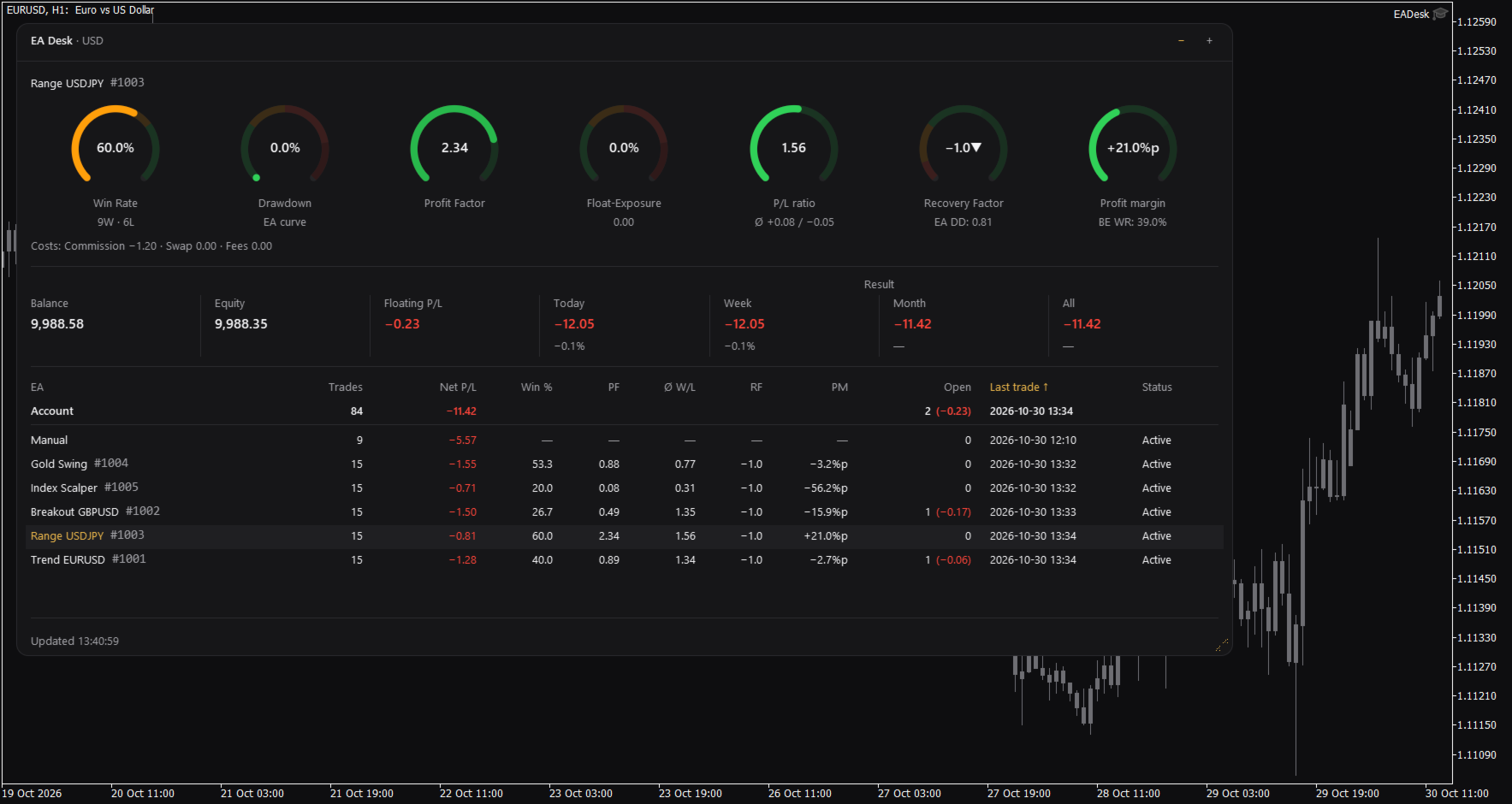
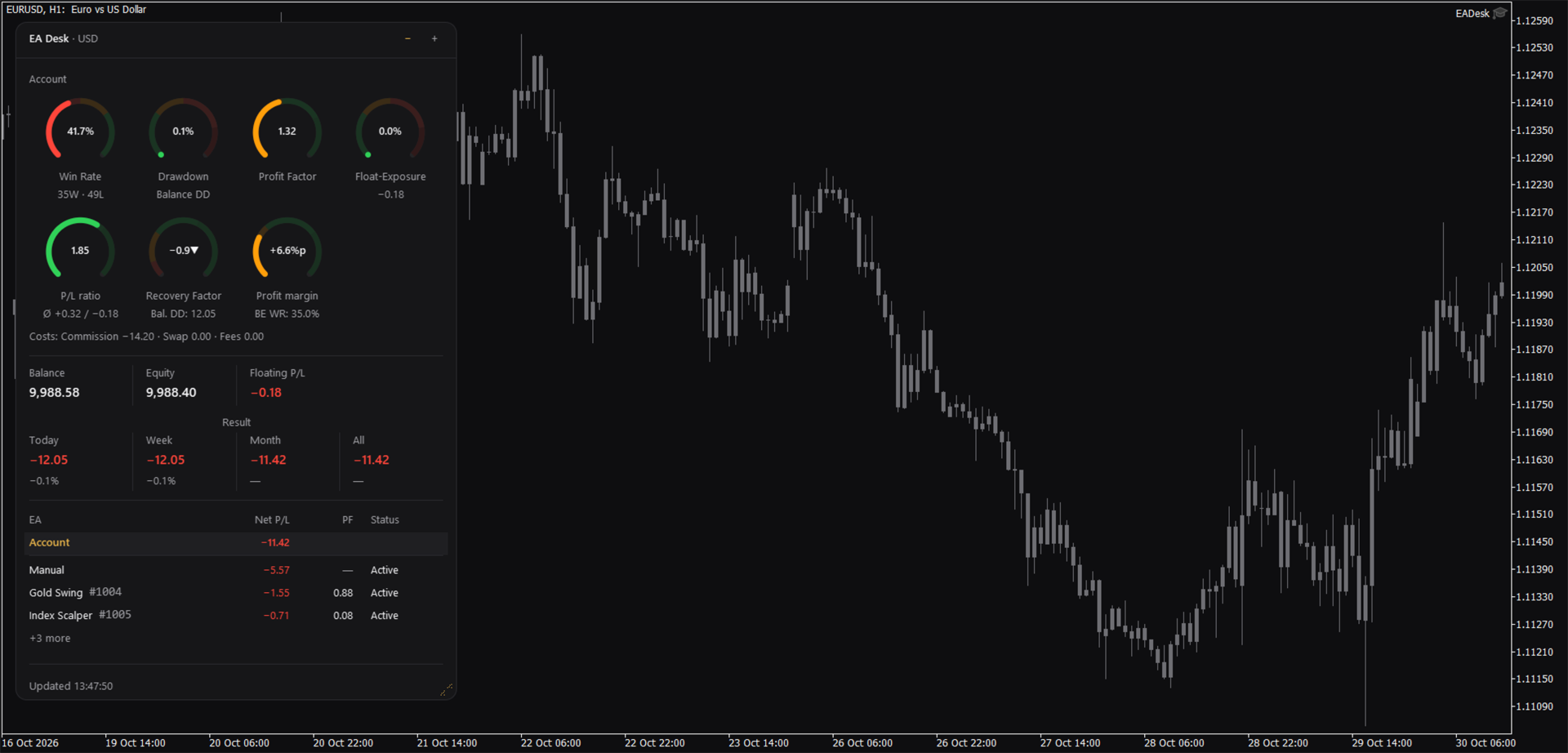
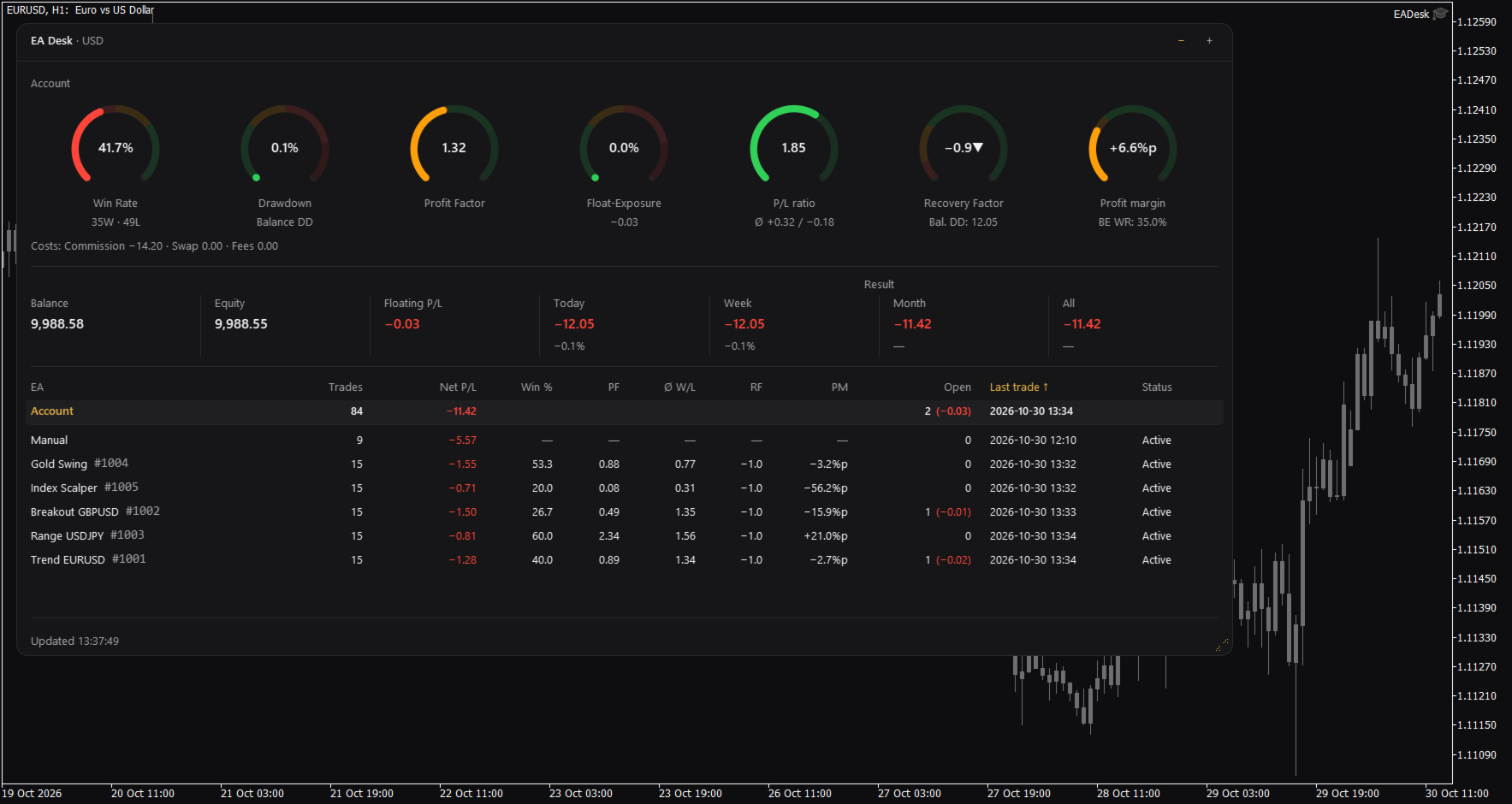
EA Desk is a small dark panel with a clear order: rings at the top, account values in the middle, the table below. Each ring shows one value and its range in colour. The panel uses few colours and no flashing. Text and rings follow the Windows display scaling. You can change width and height of the panel, and narrow panels arrange the rings in two rows.

The panel has these parts:

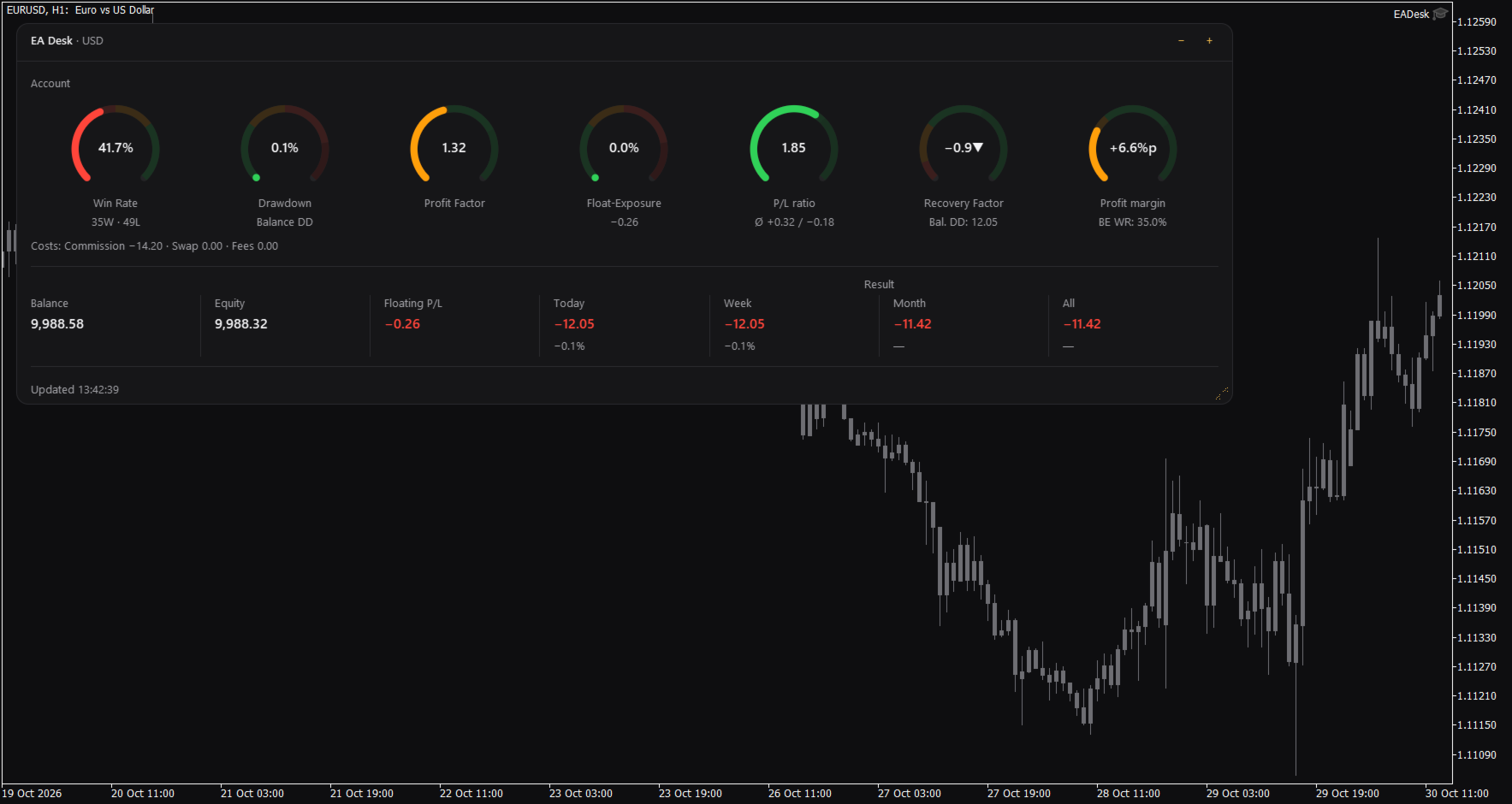
  • Seven rings for the account: Win Rate, Drawdown, Profit Factor, Float-Exposure, P/L ratio, Recovery Factor and Profit margin. Each ring shows a value, a short second line and a coloured range. The colours only mark ranges on the ring. They are not advice.
  • A cost line under the rings: Commission, Swap and Fees.
  • A line with Balance, Equity and Floating P/L, and the Result for Today, Week, Month and All. Today, Week and Month also show the percentage of the balance at the start of that period.
  • A table with one row per Magic Number. A fixed row called Account stays at the top. Each row of an Expert Advisor shows Trades, Net P/L, Win %, Profit Factor (PF), P/L ratio (W/L), Recovery Factor (RF), Profit margin (PM), Open positions, Last trade and Status.
  • Click the row of an Expert Advisor and the seven rings and the cost line switch to that Expert Advisor. Click the row again, or click Account, to go back to the account.

Which Expert Advisor is quiet

The Status column shows Active or Idle. Idle means that the Expert Advisor has had no trading activity for a number of days (setting IdleDays) and has no open position. It does not mean that the Expert Advisor is not loaded on a chart. A loaded Expert Advisor that does not trade also appears as Idle. By default the table lists the oldest last trade first.

Sizes and memory

The panel has three sizes. Use the minus and plus buttons in the header to change them. Full shows everything. Compact hides the table. Collapsed shows only the header with a short line such as "5 EAs, 1 idle".

Drag the grip in the corner to change width and height. A double click on the header sets the size back to the default.

EA Desk remembers size, level and the selected row for each chart, also after you change symbol or timeframe and after a terminal restart. If you remove EA Desk from the chart, this memory is deleted.

Terms used in the panel

The panel uses short labels. They are explained here.

Win Rate is the share of winning trades: wins divided by wins plus losses, times 100. A trade with a result of zero counts as a win.
Float-Exposure is the absolute floating profit or loss divided by the account balance, times 100. It shows how large the open result is compared with the balance.
P/L means profit or loss.
PF is the Profit Factor: gross profit divided by gross loss.
W/L is the P/L ratio: the average winning trade divided by the average losing trade.
RF is the Recovery Factor: total profit divided by the largest drawdown.
PM is the Profit margin: the win rate minus the break-even win rate, shown in percentage points.
DD is drawdown. Balance DD is the largest fall of the daily closing balance from an earlier high point to a later day. The percentage refers to the balance at that high point.
BE WR is the break-even win rate: the win rate at which average win and average loss would give a result of zero.
%p means percentage points. A change from 50 percent to 52.5 percent is +2.5%p.
Idle is described above.

How the numbers are calculated

Some numbers use different bases on purpose.

Result is the trading result: profit, swap, commission and fee of all buy and sell deals in the period. Deposits, withdrawals, credit and bonus are not included. Fees, interest, taxes and dividends that the broker books as separate entries are not included either. Times are server times. A period starts at 00:00 server time.

Net P/L in the table is net. It covers all deals of the positions of that Magic Number. The ratios (Win %, PF, W/L, RF, PM) are gross. They cover closed positions only and do not include swap and commission.

The account rings and the Account row count closing deals. The rows of the Expert Advisors count positions. If you close part of a position, the account counts each closing deal as a trade and the row of the Expert Advisor counts the position as one trade. Both numbers can therefore differ.

The Recovery Factor of the account includes fees and other bookings, such as corrections or interest. Result does not. The Recovery Factor of the account is not the sum of the Recovery Factors of the Expert Advisors.

Withdrawals raise the Balance DD, because the balance curve is not adjusted for deposits and withdrawals. Deposits raise the curve.

Ratios per Expert Advisor are shown from 10 closed positions on. Below this number the table and the rings show a dash.

The cost line follows the selection. If you select an Expert Advisor, Fees contain only fees booked on the trades of that Magic Number. Account fees without a Magic Number are missing there.

Profit Factor and P/L ratio show an infinity sign when there is no losing trade. A dash means that the value cannot be calculated.

Inputs

Display

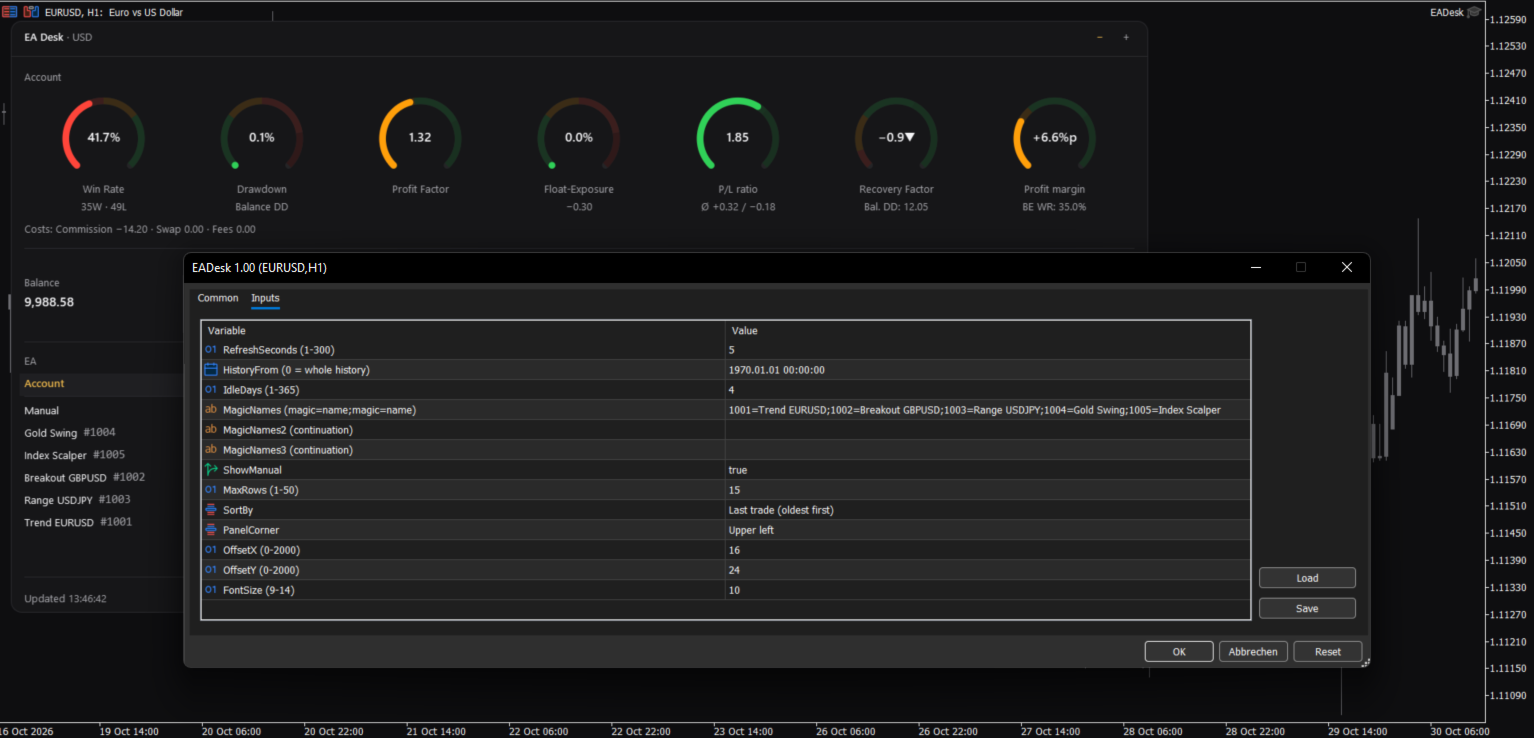
RefreshSeconds: how often the panel is updated, in seconds (1 to 300, default 5).
FontSize: base font size (9 to 14, default 10). The panel also follows the Windows display scaling.
PanelCorner: the chart corner where the panel is anchored (default upper left).
OffsetX and OffsetY: distance to that corner in pixels (default 16 and 24).

Data

HistoryFrom: start date of the evaluation. 0 means the whole history. With a date, the account values count deals from that date. The rows of the Expert Advisors count only positions opened from that date. The sum of Net P/L can then differ from Result All.
IdleDays: days without a deal and without an open position after which a row shows Idle (1 to 365, default 4).

Table

MagicNames, MagicNames2, MagicNames3: names for your Magic Numbers in the form 1001=Trend H1;2002=Grid EURUSD. Use the second and third field if the first is too short. Without a name, a row shows the Magic Number and the comment of the last opening deal.
ShowManual: show the row Manual (Magic Number 0, manual trades and Expert Advisors without a Magic Number).
MaxRows: maximum number of rows of Expert Advisors (1 to 50, default 15). More rows are shown as "+N more".
SortBy: sort order: last trade (oldest first), last trade (newest first), Net P/L, Trades or Magic.

If an input has an invalid value, EA Desk uses the default and writes one line to the Experts tab.

How to use

1. Open a new, empty chart of any symbol and timeframe.
2. Attach EA Desk to this chart. Do not attach it to a chart that already runs an Expert Advisor. MetaTrader allows one Expert Advisor per chart, so the other one would be replaced.
3. Set MagicNames if you want names instead of numbers.
4. Click a row to see the rings of one Expert Advisor.

Use one EA Desk per chart. EA Desk works with Algo Trading switched off, because it does not trade. It runs only inside your terminal. It sends no data, uses no web requests and needs no entry in the list of allowed URLs. Settings are stored inside the terminal. EA Desk writes no files.

EA Desk is not limited to a certain broker or symbol, and it works on hedging and netting accounts. On netting accounts, a reversal closes the position and starts a new one.

In the Strategy Tester, EA Desk does not trade, so a test run has no deals. In visual mode the panel shows the message "No trades in history yet." This is expected.

Limits

EA Desk lists up to 1000 Magic Numbers one by one. All further Magic Numbers are added together in one row called Other.

All numbers come from the deal history that your terminal holds. If your broker provides a shorter history, EA Desk can only use that part. A position whose opening deal is missing from the history is not assigned to a row of an Expert Advisor. It still counts in the account values. If numbers look incomplete, set the History tab of the terminal to All History.

Values refer to the past. EA Desk makes no forecast and gives no advice about trading.

The panel does not show your account number, name or server.

Manual & Questions

The user manual explains every ring, the table, the calculations and common questions: https://www.mql5.com/en/blogs/post/778831
Questions and problem reports are welcome in the product comments or by private message on MQL5.
Produits recommandés
Second Level Candles And Alligator Indicators 每12秒产生一个K线,而且自带Alligator指标,对超短线选手交易非常有帮助。程序启动时可能不成功,是因为MT5 MqlTick 数据加载少的原因。可以通过修改显示的数据参数避免,比如display=100,程序正常之后再将参数调大 display=300 。如果数据不正常,也可以采用重新加载的方式解决。 如果您对这个指标有任何建议,请联系作者。  Second Level Candles And Alligator Indicators  produced a candle per 12 seconds,include Alligator, it's helpful to Short-Term Trading。You'd better reload the indicator every start MT5 or change display parameter to reslove data bug. Please attach author when  you had some su
FREE
- وصف المنتج - مؤشر احترافي متكامل لا يعد KING Fusion MACD-Vol من KING TRADING EA مجرد MACD آخر — فهو عبارة عن مجموعة أدوات تداول كاملة تجمع بين مؤشرات احترافية متعددة في نافذة فرعية واحدة أنيقة. لم تعد بحاجة إلى تحميل مخططك بأدوات منفصلة. يجمع هذا المؤشر بين: MACD مع خطوط مزدوجة ورسم بياني مكبر رسم بياني ملون ومثبت بالحجم ملصقات ديناميكية مع قيم المؤشرات في الوقت الفعلي (ATR، ADX، RSI، Volume) عداد تنازلي للبار التنبيهات المتقاطعة (مرئية + صوتية) كل ما تحتاجه من الوضوح والسرعة والدقة -
FREE
IMPORTANT NOTE: This is a professional Trade Management Utility and on-chart assistant. It is NOT an automated trading robot. It does not open trades on its own. The UltraFast Trade Manager MT5 is the ultimate execution and risk-management suite designed to give you absolute control over your manual and algorithmic trades. When managing multiple positions, calculating complex net break-even points, or constantly monitoring the economic calendar, hesitation can lead to costly mistakes. This utili
FREE
Trade assistant pro v8
Ahmed Mohammed Bakr Bakr
2 (1)
FREE FREE FREE Trade Assistant MT5 – Professional Trading & Risk Management Panel Trade Assistant MT5 is an advanced trading panel designed to help traders execute orders faster, safer, and more professionally . It simplifies manual trading by combining smart order management , precise risk control , and one-click execution , making it ideal for both beginners and advanced traders. This tool does not trade automatically . Instead, it empowers you with full control while applying professional-gra
FREE
FiT Panel Pro
Thonglak Janyakorn
Overview FiT Panel Pro is a professional-grade trade management panel designed for MetaTrader 5 traders who demand speed, precision, and full control over their trades. Built with a modern dark-theme UI, it combines one-click execution with advanced risk management, visual SL/TP drag lines, automatic Fibonacci-based levels, and comprehensive order management — all in a single, compact panel. Whether you are a scalper, day trader, or swing trader, FiT Panel Pro gives you the edge you need to exec
FREE
A simple button to completely close all existing open trades (both Buy and Sell) on the current chart . Warning : Once the button is pressed, all open trades on the current chart will be deleted immediately without any more questions or dialogue. Use this utility very carefully. We recommend that you do a trial of removing open trades on a demo account first, before trying to use this utility on a real account.
FREE
Voici NAS100 Auto SL and TP Maker pour MT5 : Ne manquez plus jamais le réglage du StopLoss et du TakeProfit avec notre NAS100 Auto SL and TP Maker, un assistant indispensable pour les traders qui naviguent sur le marché du Nasdaq 100 sur MetaTrader 5. Cet outil est conçu pour ceux qui recherchent une solution transparente pour automatiser la gestion des niveaux de StopLoss et TakeProfit. Caractéristiques principales : Automatisation sans effort : Surveille automatiquement les transactions sur

FREE
SPECIAL ANNOUNCEMENT: Get the Ultimate Trading Suite! Before you grab this utility, did you know? The LogicLadder Visual Trade Planner is so powerful that it serves as the core visual execution engine for my flagship MT5 trading systems! If you are looking for a massive, all-in-one trading dashboard, advanced trade management, or strict prop-firm guardrails, you can get this exact visual planner already included inside my premium and free full-suite EAs: Pro LTS TradeDashboard MT5 (Paid
FREE
DF Fib Trader Pro DF Fib Trader Pro est un système de trading automatisé conçu pour MetaTrader 5. Il utilise les niveaux de prix basés sur Fibonacci, combinés à une analyse des tendances et des structures, pour définir les points d'entrée et de sortie. L'EA prend en charge les positions longues et courtes et intègre des paramètres de gestion des risques. Fonctionnalités principales : • Utilise la logique de retracement et d'extension de Fibonacci pour tracer les points d'entrée, SL et TP. • Ta
FREE
Backstop enforces the two rules that end funded accounts. A daily loss limit and a maximum loss limit, applied to everything on the account — every Expert Advisor, every symbol, and every trade you place by hand. Attach it to any one chart and it governs the whole terminal. It does not trade. It has no strategy, no signals and no opinion about the market. It is a governor. What it does Daily loss limit — measured from balance at the reset, equity at the reset, or a fixed account size. Firms diff
FREE
Introduction Welcome to the world of Forex trading, where every tick of the market can be influenced by news events. Introducing our expert advisor for MetaTrader, your ultimate tool for navigating the complexities of news trading. This innovative advisor is specifically designed to automate your trading strategy during key macroeconomic releases, ensuring you never miss an opportunity.  When important indicators are announced, volatility often spikes, creating potential for profit. Our expert
FREE
AI Weekly Open Bias Trader
Fadi Hassan Khaled Ghanem
Utilise le prix d'ouverture hebdomadaire comme ligne de biais et trade les rejets de cette ligne dans le sens du biais hebdomadaire. Fonctionnement L'EA évalue ses règles une fois par barre clôturée de l'unité de temps du signal (H1 par défaut), de sorte que les signaux ne se redessinent pas et que la logique est identique dans le testeur et sur un graphique réel. Lorsque la configuration apparaît et qu'aucune position de cet EA n'est ouverte sur le symbole, il ouvre un ordre au marché avec un s
FREE
Donchian Breakout And Rsi
Mattia Impicciatore
4.33 (3)
Description générale Cet indicateur est une version améliorée du Canal Donchian classique, enrichie de fonctionnalités pratiques pour le trading réel. En plus des trois lignes standard (supérieure, inférieure et ligne médiane), le système détecte les cassures et les affiche visuellement avec des flèches sur le graphique, en montrant uniquement la ligne opposée à la direction actuelle de la tendance pour une lecture plus claire. L’indicateur comprend : Signaux visuels : flèches colorées lors des
FREE
Monkey Lite
Dang Cong Duong
Monkey Lite  offers the following array of features: One-click instant order entry (short or long). Track total current orders and total current profit. Instant Close Buy, Close Sell, Close All button. Utility types Risk management, Graphical objects, Panels. Main features Take Profit and Stop Loss by money (not pip). After the price reached the Take Profit threshold, trailing stop 20% of the current profit. After the price reached the Stop Loss threshold, the orders will be closed immediately.
FREE
================================================================ MATRIX CONDITION MONITOR Live Trade Condition Panel for MetaTrader 5 Fully Automatic -- Works with ALL Matrix EAs ================================================================ NEVER MISS A TRADE SETUP AGAIN Matrix Condition Monitor is a free utility that attaches to any chart and automatically checks all 10 trade conditions in real time -- showing you exactly why a trade will or will not open, and alerting you the moment ever
FREE
RiskCompass Panel MT5 1. The Problem and the Approach You have a position idea, and the first real question is always the same: how much of this account am I about to put at risk, and can the account carry it. The information that answers that question is scattered across half a dozen windows. Balance is on one tab. Margin level is somewhere else. The spread you just paid is visible only if you look at the instrument row. The server day, which decides whether your daily loss limit has already be
FREE
XAU VWAP Mean Reversion H4 Expert Advisor for MetaTrader 5 — Gold / XAUUSD focus Version: 1.00 What it is XAU VWAP Mean Reversion H4 is an Expert Advisor for gold on the H4 chart. Intraday VWAP mean-reversion style participation on gold H4. Built for structured automated participation — not grid , not martingale . Evaluate on your broker and risk profile before any live use. This product is a technical system . Exact thresholds and entry equations remain internal product design and are not publ
FREE
My Grid Scalper
Ahmad Aan Isnain Shofwan
3 (2)
MyGrid Scalper Soit vous la menez, soit elle vous mène. Je publie une version MT5 basée sur la version MT4 — qui a été téléchargée plus de 30 000 fois depuis 2022 — sans publicité, sans fanfare ni réductions. Cette application est gratuite et le restera à jamais. Je dédie les bienfaits spirituels qu'elle procure à ma défunte mère dans l'au-delà . Une exécution cohérente entre les mains de ceux qui comprennent Informations de base Symbole : N’importe lequel (optimisé par défaut : XAUUSD) Période
FREE
Révolutionnez votre trading avec notre Gestionnaire de Trades Avancé pour MT4 et MT5 Mt4 Version : https://www.mql5.com/en/market/product/107249 Dynamisez votre stratégie de trading avec l'outil ultime de précision et de contrôle – notre Gestionnaire de Trades Avancé pour MT4 et MT5. Contrairement aux gestionnaires de trades classiques, le nôtre s’adapte dynamiquement aux conditions de marché et définit automatiquement des niveaux de stop-loss et take-profit dès l’entrée en position. Caractéri
FREE
ConsistencyGuard
Vanessa Cristina Ribeiro Dos Anjos
Version 7.04 Mise à jour majeure axée sur le renforcement de la discipline en day trading et la protection du compte. • Mode Post-Session Review avec une durée configurable de 0 à 60 minutes. • Après avoir effectué le nombre d'opérations autorisé, le trader peut laisser MetaTrader 5 ouvert afin d'analyser les graphiques, prendre des captures d'écran et compléter son journal de trading. • Toute tentative d'effectuer une nouvelle opération après avoir atteint la limite quotidienne déclenche la pro
FREE
PropFirm Shield Essential
Sandrine Claudine Laurain
Ce qui tue les challenges, c'est la perte journalière — pas l'objectif de profit. Une nuit de levier excessif, un ordre en attente oublié, un gap. PropFirm Shield Essential est le garde gratuit qui surveille LA règle la plus importante — et verrouille avant la violation. Sur N'IMPORTE QUEL graphique. Surveille tout le compte — symboles, magics, manuels, copieurs, autres EAs. - DAILY LOSS GUARD — ta limite et ton heure de reset. - LOCKDOWN — ferme les positions, supprime les pendings, bloque
FREE
AT Scalper
Maruthupandiyan
3.33 (3)
AT Scalper  Helps trader to place order seamlessly  Close mulitple position at a time Place SL or TP for multiple position in a click Place hedge order same time with predefined SL and TP Place multi layer pending order in a click Place martingale layer Be informed about SL and TP in currency Get to know time remaining in current candle Get to know current spread View PnL, Balance, Equity on screen
FREE
Chart Pro Classic Dark v1.00 Chart Pro Classic Dark is a professional MT5 chart styling and customization tool designed to give your charts a clean, modern, and professional dark appearance. Key Features Dark Black Background — Applies a clean black background to the chart. ️ Candlestick Chart — Automatically configures the chart to use candlesticks. Bullish Candles — Green/Lime bullish candles. Bearish Candles — White bearish candles. Grid Removal — Hides the chart grid for a clean
FREE
Ce petit outil vous aide à définir votre gestion des risques d'un simple glissement de ligne sur le graphique. Il vous montre la taille réelle du lot calculée sur le % du compte ou le montant fixe directement sur la ligne. Tout ce que vous avez à faire est d'activer la ligne en appuyant sur la touche "t" de votre clavier et de faire glisser la ligne jusqu'à votre point stop loss. C'est ça. Dans les paramètres, vous pouvez définir la couleur et la largeur de la ligne et du texte, ainsi que l'es
FREE
PULLBACK IHS PRO is a trend-following Expert Advisor (EA) for MetaTrader 5. It waits for a clear trend to emerge and for the price to undergo a correction (pullback) toward a moving average; it then places a pending Buy Stop or Sell Stop order to capture the price movement as the trend resumes. The EA is designed for major Forex currency pairs as well as synthetic instruments on M1 and M5 timeframes, though it can also be used on higher timeframes. How the strategy works Trend: A fast EMA (defau
FREE
Go Long Advanced
Phantom Trading Inc.
4.78 (9)
Le EA Go Long met en œuvre une stratégie de trading intraday avancée basée sur le principe du trading quotidien systématique avec de multiples confirmations techniques. Alors que de nombreux traders recherchent des algorithmes complexes, cet EA combine des concepts simples mais efficaces avec une gestion sophistiquée des risques et de multiples filtres techniques. L'EA ouvre des positions à une heure spécifique chaque jour, mais uniquement lorsque les conditions du marché s'alignent avec plusi
FREE
Auto BreakEven Pro
Migael Devandre Raseala
5 (1)
Auto BreakEven Pro is a lightweight, no-nonsense Expert Advisor designed to automatically move your Stop Loss to breakeven once your trade reaches a predefined profit level. This EA is ideal for traders who want to protect profits without constantly monitoring the charts.  Key Features: Automatically sets Stop Loss to break-even after a custom number of pips in profit.  Optional break-even offset to lock in small gains (e.g., +0.5 pips). Compatible with any manual or automated strategy – simpl
FREE
Gold Adaptive EA MT5 is an automated Expert Advisor for MetaTrader 5 designed for trading Gold (XAUUSD). The EA uses several internal trading models and market filters to adapt to different phases of Gold price movement. Instead of relying on one fixed entry pattern, Gold Adaptive EA MT5 analyzes market behavior and selects suitable logic for trend continuation, impulse moves, pullbacks and selected recovery conditions. The main goal of the Expert Advisor is to provide a structured Gold tradi
FREE
Most lot size calculators assume one pip is worth ten dollars. That assumption is wrong on gold, wrong on indices, wrong on JPY crosses, and wrong on every account not denominated in USD - which is to say, wrong exactly where oversizing hurts. This one asks your server instead. It reads the tick value, tick size, point size, volume step and margin requirements actually published for the symbol on your chart, so the number it gives you is the number your account will accept. How it works Attach i
FREE
Free automatic Fibonacci is an indicator that automatically plots a Fibonacci retracement based on the number of bars you select on the BarsToScan setting in the indicator. The Fibonacci is automatically updated in real time as new highest and lowest values appears amongst the selected bars. You can select which level values to be displayed in the indicator settings. You can also select the color of the levels thus enabling the trader to be able to attach the indicator several times with differe
FREE
Les acheteurs de ce produit ont également acheté
Trade Assistant MT5
Evgeniy Kravchenko
4.43 (216)
It helps to calculate the risk per trade, the easy installation of a new order, order management with partial closing functions, trailing stop of 7 types and other useful functions. Additional materials and instructions Installation instructions - Application instructions Line function -   shows on the chart the Opening line, Stop Loss, Take Profit. With this function it is easy to set a new order and see its additional characteristics before opening.   Risk management  - The risk calculation
Bienvenue sur Trade Manager EA, l’outil ultime de gestion des risques conçu pour rendre le trading plus intuitif, précis et efficace. Ce n’est pas seulement un outil d’exécution d’ordres ; c’est une solution complète pour la planification des trades, la gestion des positions et le contrôle des risques. Que vous soyez débutant, trader expérimenté ou scalpeur ayant besoin d’une exécution rapide, Trade Manager EA s’adapte à vos besoins, offrant une flexibilité sur tous les marchés, des devises et i
Local Trade Copier EA MT5
Juvenille Emperor Limited
4.94 (149)
Local Trade Copier EA MT5 est un copieur de trades rapide et flexible permettant de copier et de gérer des trades entre plusieurs comptes MetaTrader 5 sur le même ordinateur Windows ou Windows VPS. Il combine la synchronisation locale des trades avec des contrôles côté Receiver pour la taille des lots, la gestion du risque, le filtrage des trades, le mappage des symboles, la gestion des trades et la protection du compte. Configurez vos terminaux Transmitter et Receiver en environ 1 minute et co
Telegram to MT5 Multi-Channel Copier   copie automatiquement les signaux de trading de vos canaux Telegram et Discord directement vers MetaTrader 5. Pas de bots, pas d'extensions de navigateur, pas de copie manuelle. Un signal arrive sur Telegram ou Discord et l'EA ouvre le trade dans votre terminal en quelques secondes. Et avant de copier un canal, le backtester intégré vous montre ce que ce canal aurait fait sur votre compte. Le produit comprend deux composants : une application Windows qui éc
Strategy Ledger Pro
Abdullah Uygar Tuna
5 (14)
Désormais disponible en français. Strategy Ledger Pro est un panneau d'analyse de compte en lecture seule pour MetaTrader 5. Il sépare les résultats du compte par Expert Advisor, stratégie, symbole et numéro magic, pour que vous voyiez ce que chacun apporte réellement. Le panneau est disponible en 11 langues : English, Français, Deutsch, Español, Italiano, Português, Русский, Türkçe, 中文, 日本語 et 한국어. Avant de télécharger la démo. Le Market exécute la démo de tout produit payant uniquement dans l
Copiez les signaux Telegram avec vos propres règles de trading Telegram to MT5 Signal Trader copie automatiquement les signaux de trading au format texte provenant de canaux et de groupes Telegram publics et privés vers MetaTrader 5. Gérez plusieurs fournisseurs et comptes MT5 depuis une seule application de bureau, avec des paramètres de risque et de trading propres à chaque fournisseur . Aucun bot Telegram ni configuration d'API n'est nécessaire pour copier les signaux. Connectez-vous simpleme
TradePanel MT5
Alfiya Fazylova
4.88 (170)
Trade Panel est un assistant commercial multifonction. L'application contient plus de 50 fonctions de trading pour le trading manuel et permet d'automatiser la plupart des tâches commerciales. Instructions d'utilisation : https://www.mql5.com/fr/blogs/post/762589 Version d'essai de l'application pour un compte démo : https://www.mql5.com/fr/blogs/post/762644 Comment installer l'application : https://www.mql5.com/fr/blogs/post/762645 Comment tester l'application en mode visuel : https://www.mql5.
================================================================================ POC BREAKOUT - V20.72. Full Professional Grade Toolkit ================================================================================ POC Breakout is a full MetaTrader 5 trading dashboard for discretionary traders who want breakout signals, Point of Control (POC) context, volume profiles, order flow, market structure, news, alerts, and advanced trade planning in one professional workspace. Attached directly to you
VirtualTradePad PRO SE MT5 — centre de contrôle de trading professionnel pour MetaTrader 5 VirtualTradePad PRO SE est un panneau de trading premium basé sur le graphique et un espace de gestion des trades pour MetaTrader 5 . Il est conçu pour les traders qui souhaitent une exécution plus rapide, un contrôle plus clair des positions, une gestion structurée des trades, une planification visuelle des niveaux et un flux de travail professionnel directement depuis le graphique. Ce n’est pas seulement
MT5 to Telegram Signal Provider est un utilitaire facile à utiliser et entièrement personnalisable qui permet l'envoi de signaux spécifiés vers un chat, un canal ou un groupe Telegram, transformant ainsi votre compte en fournisseur de signaux. Contrairement à la plupart des produits concurrents, il n'utilise pas d'importations DLL. [ Démonstration ] [ Manuel ] [ Version MT4 ] [ Version Discord ] [ Canal Telegram ]  New: [ Telegram To MT5 ] Configuration Un guide utilisateur étape par étape est
Farmed Hedge Yield Farming | All Markets (Manual - Hybrid - Semi/Automated EA) VERIFIED TRADING RESULTS - Farmed Hedge Yield Axi Copy:  https://www.mql5.com/en/signals/2356376 - Farmed Hedge Yield Exn Copy:   https://www.mql5.com/en/signals/2356404 - Farmed Hedge Yield V Copy:  https://www.mql5.com/en/signals/2357156 IMPORTANT NOTICE: FarmedHedge is a MANUAL-FOCUSED TRADING UTILITY ,not a fully automated EA. Results shown on this Signal include manual trades and overall strategic management.
Trade copier MT5
Alfiya Fazylova
4.61 (57)
Trade Copier est un utilitaire professionnel conçu pour copier et synchroniser les commandesentre les comptes de trading. Les commandes sont copiées du compte/terminal du fournisseur vers le compte/terminal du destinataire, qui sont installés sur le même ordinateur ou vps. Avant d'acheter, vous pouvez tester la version démo sur un compte démo. Version démo ici . Instructions complètes ici . Principales fonctionnalités et avantages: Prend en charge la copie des commandes MT5> MT5, MT4> MT5, MT5>
RETAILBERG FOOTPRINT CHART PRO — Order-Flow Workspace for MetaTrader 5 Version 7.00  |  Professional System  |  31 tools  |  One chart A full 150-page illustrated User Manual is included. Please read the full manual to understand this feature packed footprint chart elements and ui. https://www.mql5.com/en/blogs/post/777982 DEMO / STRATEGY TESTER — PLEASE READ FIRST
Exp COPYLOT CLIENT for MT5
Vladislav Andruschenko
3.97 (35)
Copieur professionnel de trades pour MetaTrader 5 Un copieur de trades rapide, professionnel et fiable pour MetaTrader . COPYLOT permet de copier des trades Forex entre les terminaux MT4 et MT5 avec prise en charge des comptes Hedge et Netting . La version MT5 de COPYLOT prend en charge : - MT5 Hedge → MT5 Hedge - MT5 Hedge → MT5 Netting - MT5 Netting → MT5 Hedge - MT5 Netting → MT5 Netting - MT4 → MT5 Hedge - MT4 → MT5 Netting Version MT4 Description complète + DEMO + PDF Comment acheter Comme
News Trade EA MT5
Konstantin Kulikov
4.55 (11)
Je voudrais vous présenter un robot efficace que j'utilise depuis plusieurs années. Il peut être utilisé en mode semi-automatique, comme en mode totalement automatique. >>> Chat <<< Le programme comporte des paramètres souples pour le commerce sur les nouvelles du calendrier économique. Il est impossible de le vérifier dans le testeur des stratégies. Ce qu’il faut, c’est le travail réel. Il faut ajouter à la liste des URL autorisées, dans les paramètres du terminal, un site d'actualités. Cliqu
The Patch
Mian Rameez Ali
The Patch It never opens a trade. It walks behind the ones that did. Every open position, every pending order — checked twice a second for the one thing that's easy to forget: a stop, a target. Found bare, it doesn't ask. It writes the missing number in, measured in points from wherever the position began, and moves on to the next. No strategy, no opinion on direction. Just the quiet assumption that nothing should ever sit on the market unprotected — not because someone decided it shouldn't,
Telegram To MT5 Ultra
Mirel Daniel Gheonu
5 (5)
Telegram To MT5 — Copieur de signaux Transformez les appels de trading de vos canaux Telegram en véritables ordres MT5 — automatiquement, sur autant de comptes que vous le souhaitez, avec le risque et les règles entièrement sous votre contrôle. Telegram To MT5 relie les canaux VIP / de signaux que vous suivez déjà sur Telegram à votre terminal MetaTrader 5. Une application de bureau compagnon gratuite lit les messages (même des canaux qui bloquent les bots), et cet Expert Advisor les exécute sur
Prochaine mise à jour — Version 2.52 bientôt disponible ! [NOUVEAU] Préparez-vous à découvrir 4 nouvelles fonctionnalités majeures conçues pour améliorer votre analyse du marché et votre flux de travail de trading Nous faisons passer l’analyse du marché au niveau supérieur avec 4 nouvelles fonctionnalités conçues pour répondre à vos besoins en trading. Découvrez : 1. TRADE OVERVIEW DASHBOARD 2. CONFLUENCE AT ZONE 3. STRONG & WEAK HIGH/LOW 4. OTE 1. TRADE OVERVIEW DASHBOARD Un tableau de bord qu
HINN MagicEntry Extra
ALGOFLOW OÜ
4.74 (19)
HINN MAGIC ENTRY – the ultimate tool for entry and position management! SIMPLE. FASTEST. INTUITIVE. MAX AUTOMATED. Place orders by selecting a level directly on the chart! full description   ::  demo-version  :: 60-sec-video-description Key features: - Market, limit, and pending orders - Automatic lot size calculation - Automatic spread and commission accounting - Unlimited partitial take-profits  - Breakeven and trailing stop-loss and take-profit  functions - Invalidation leves - Intuitive, a
Anchor Trade Manager
Kalinskie Gilliam
5 (8)
Your EAs cannot see each other, but Anchor can. Anchor gives you one place to coordinate your EAs, manage risk, and decide when trading is allowed. It works alongside the trading bots you already use without any changes to them. The Problem One EA opens a trade. Then another starts trading. The next thing you know, you wake up to multiple grids built across your account. Each EA may be doing exactly what it was designed to do, but together they can place far more risk on your account than you in
Trader Evolution
Siarhei Vashchylka
5 (7)
" Trader Evolution " - A utility designed for traders who use wave and technical analysis in their work. One tab of the utility is capable of money management and opening orders, and the other can help in making Elliott wave and technical analysis. Manual (Be sure to read before purchasing) | Version for MT4 Advantages 1. Trading in a few clicks. Immediate and pending orders are available in the panel 2. Money management. The program automatically selects the appropriate lot size 3. Simplifies
Grid Manual MT5
Alfiya Fazylova
4.73 (22)
Grid Manual est un panneau de trading permettant de travailler avec une grille d'ordres. L'utilitaire est universel, possède des paramètres flexibles et une interface intuitive. Il fonctionne avec une grille d'ordres non seulement dans le sens des pertes, mais aussi dans le sens de l'augmentation des profits. Le commerçant n'a pas besoin de créer et de maintenir une grille d'ordres, l'utilitaire le fera. Il suffit d'ouvrir une ordre et "Grid Manual" créera automatiquement une grille de ordres po
YuClusters
Yury Kulikov
4.93 (43)
Attention: You can view the program operation in the free version  YuClusters DEMO .  YuClusters is a professional market analysis system. The trader has unique opportunities to analyze the flow of orders, trade volumes, price movements using various charts, profiles, indicators, and graphical objects. YuClusters operates on data based on Time&Sales or ticks information, depending on what is available in the quotes of a financial instrument. YuClusters allows you to build graphs by combining da
The product will copy all telegram signal to MT5 ( which you are member) , also it can work as remote copier.  Easy to set up, copy order instant, can work with almost signal formats, image signal,  s upport to translate other language to English Work with all type of channel or group, even channel have "Restrict Saving Content", work with  multi channel, multi MT5 Work as remote copier: with signal have ticket number, it will copy exactly via ticket number. Support to backtest signal. How to s
Timeless Charts
Samuel Manoel De Souza
5 (9)
Timeless Charts est un utilitaire de trading tout-en-un destiné aux traders professionnels. Il combine des types de graphiques personnalisés tels que les graphiques en secondes et Renko avec une analyse avancée du flux d’ordre s utilisant Footprints , Clusters , Profils de Volume , études VWAP et outils d’analyse ancrés pour une compréhension plus approfondie du marché. Le trading et la gestion des positions sont effectués directement depuis le graphique via un panneau intégré de gestion des ord
Floor Watch
Syed Tauqeer Hussain Shah
Floor Watch One number, watched every thirty seconds: how far equity has fallen since the day began — or since its highest point, if it's told to trail the peak instead of the open. Cross the line and it doesn't argue. Every open position closes, every pending order vanishes, and anything that slips through afterward gets shut the moment it appears. Not asked. Removed. The floor holds until the clock turns 5 AM Pakistan time — then, and only then, does the day start over. One rule. No except
Power Candles Strategy Scanner - Outil de recherche de configurations multi-symboles à optimisation automatique Le Power Candles Strategy Scanner utilise le même moteur d'auto-optimisation que celui qui alimente l'indicateur Power Candles, pour chaque symbole de votre Market Watch, en parallèle. Un panneau vous indique quels symboles sont statistiquement négociables à l'instant, quelle stratégie est la plus performante pour chacun, la paire Stop Loss / Take Profit optimale, et vous alerte dès qu
RS Trade Copier - le copieur de trades local ultra-rapide avec une véritable interface graphique. Arrêtez de saisir les numéros de compte manuellement. Fini les listes interminables de 200+ paramètres dans l'onglet Inputs. Un outil fiable et flexible pour copier les opérations de trading entre plusieurs terminaux MT5 et MT4. Il convient aux traders expérimentés, aux services de signaux ainsi qu'aux investisseurs privés. Il permet la synchronisation du trading d'un ou plusieurs Providers vers un
Seconds Chart MT5
Boris Sedov
4.61 (18)
Seconds Chart - un outil unique pour créer des graphiques en secondes dans MetaTrader 5 . Grâce à Seconds Chart , vous pouvez créer un graphique avec une période définie en secondes, offrant une flexibilité et une précision idéales pour l'analyse, indisponibles sur les graphiques standards en minutes ou en heures. Par exemple, la période S15 indique un graphique avec des bougies d'une durée de 15 secondes. Vous pouvez utiliser n'importe quels indicateurs et experts advisors compatibles avec les
[ My Channel ]   ,   [ My Products ]  ,  [ ABOUT ME ]   OMG Market Heat — Scanner multi-symboles de volatilité et de cassures OMG Market Heat est un indicateur de type tableau de bord qui analyse jusqu'à 50 symboles à la fois et montre à quel point chaque marché est « chaud » en ce moment sur l'unité de temps M15, H1, H4 ou D1 . En un coup d'œil, vous voyez quels symboles bougent fortement, lesquels se réveillent après une période calme et lesquels dorment — vous ne consacrez ainsi votre temps
Filtrer:
Aucun avis
Répondre à l'avis