
FX Live Stats Export
- Утилиты
- Версия: 8.10
- Обновлено: 19 ноября 2026

FX Live — Stats Export
Works only with https://fxlive.trading
Monitor all your MetaTrader accounts from a single dashboard, in real time, across every broker — and see what each EA really earns.
FX Live Stats Export is a utility, not a trading robot. It never opens, modifies or closes a position. It reads your account and sends the data to your private FX Live dashboard, so you can follow every account you own from one place — on your computer or your phone — without switching between MetaTrader terminals.
WHAT IT SENDS
Attach it to a single chart per account and it takes care of the rest:
- Balance, equity, floating P/L, margin and drawdown, kept up to date automatically
- Open positions, pending orders and the full closed-trade history
- Deposits, withdrawals, transfers, credits, swaps, commissions, fees and rebates
- Magic numbers and trade comments, so each robot or strategy is reported separately
- The spread paid on every position, at open and at close (the MT5 version also recovers the last 30 days from the tick history)
- Your broker's symbol specifications and swaps, for your account pages and the Broker Directory
- The health of your terminal and machine: Windows version, MetaTrader memory, RAM, free disk, CPU load, open charts and running EAs
THE ON-CHART PANEL
- Three views: Full, Compact and Mini
- Your FX Live account: sync interval, alert status, quotas
- Machine / VPS: memory, disk, CPU, charts and EAs at a glance
- Trading: balance, equity, drawdown, open positions and orders, today's result
- Sync: last send and next export — the panel turns red with the exact reason if sends are suspended (Algo Trading disabled, terminal disconnected from the broker), so a stalled EA never goes unnoticed
LIGHT AND RELIABLE
- Only what changed is sent; the history is checked day by day and only the missing days are resent
- Compressed uploads, API key sent in a request header (never in the URL)
- Recovers on its own after a short site outage — no restart needed
WHAT YOU GET ON FX LIVE
- Dashboard and accounts
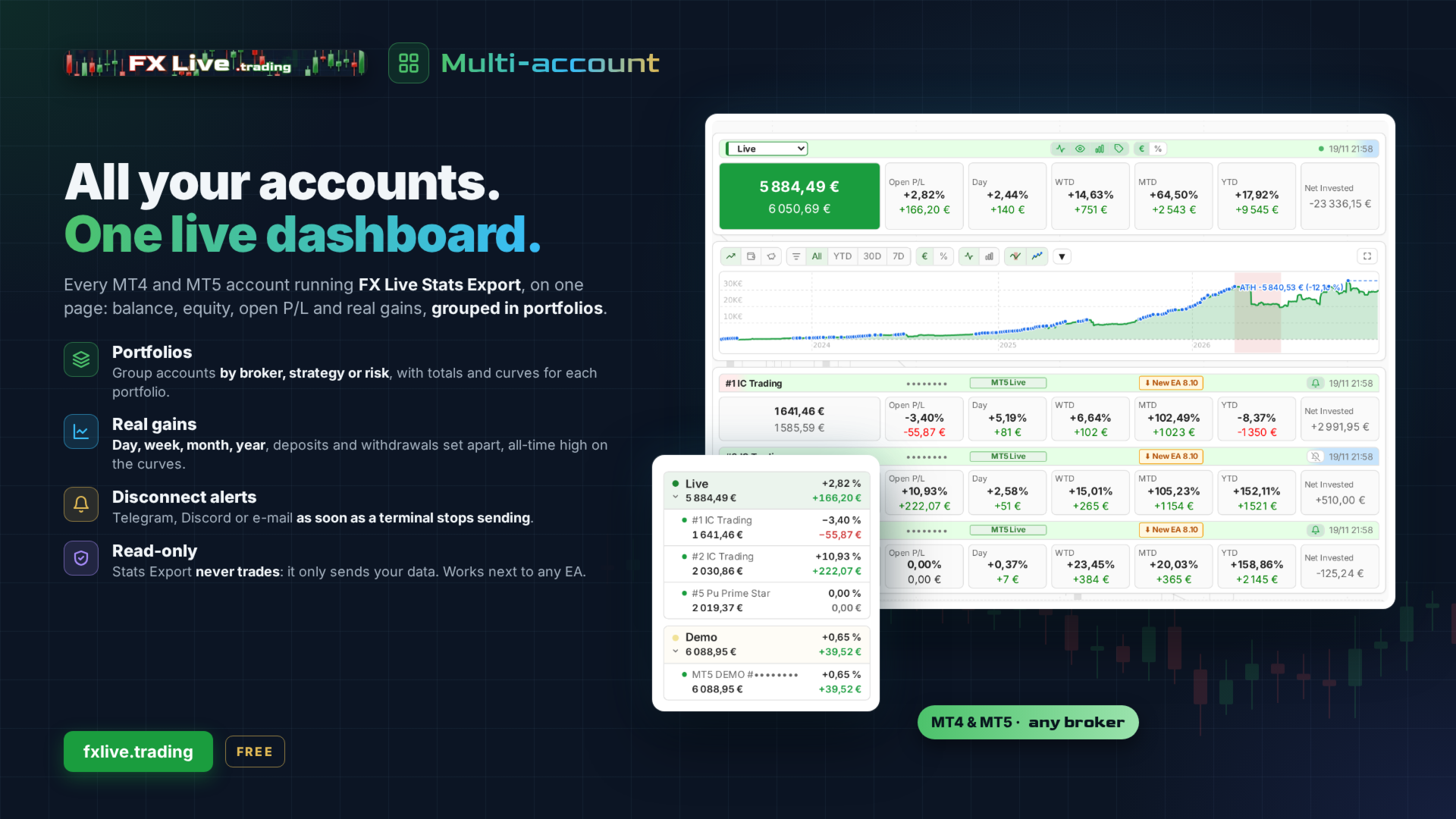
- Multi-account overview: all your accounts side by side, MT4 and MT5 together
- Portfolios: group accounts by broker, strategy or purpose, with consolidated totals and curves
- Real gains by day, week, month and year, deposits and withdrawals set apart, all-time high marked on the curves
- Account pages: positions with the spread paid and the next swap, gain calendar, statistics
- Prop firm accounts recognised and kept apart from your own
EAs and strategies
- EA Scanner: finds the magic numbers not yet linked to an EA, new EAs and duplicates across all your accounts, and links them in one click
- Results per EA: profit factor, recovery factor, win rate and drawdown, filtered by Live / Demo / Prop
- Magic Database: look up any magic number
Broker Directory — NEW, open to members
- The exact symbol names each MT4 and MT5 broker uses: is gold XAUUSD, XAUUSD+, XAUUSD.p or GOLD?
- One asset compared across brokers: symbol name, contract size, minimum lot, average spread
- Each broker's servers, where they are located and the best ping measured by members
- Symbol specifications and swaps, per day and per lot, with their history
- Fed by the accounts connected to FX Live: the more of you run Stats Export, the more complete it gets
Tools
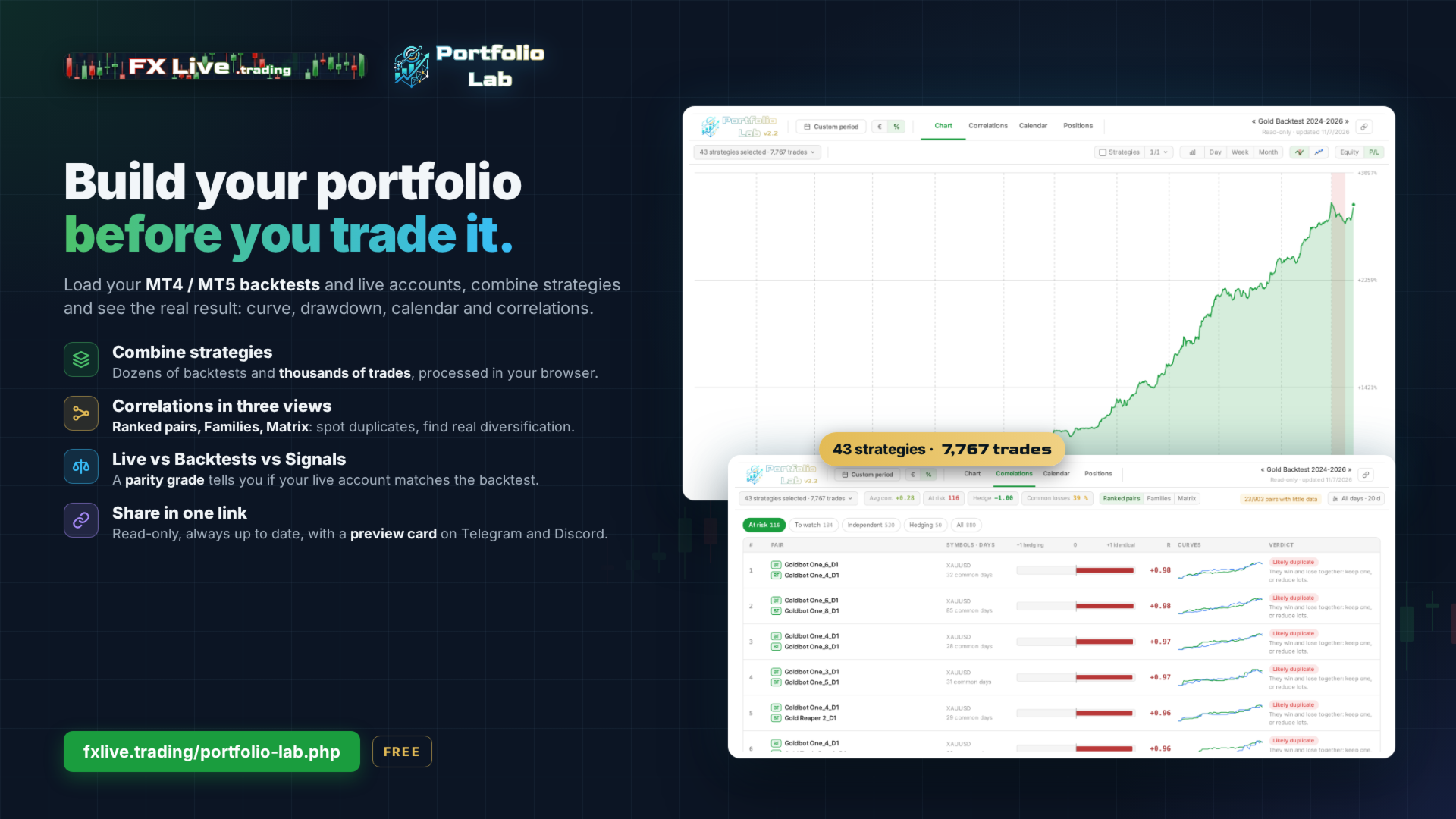
- Portfolio Lab: load MT4 / MT5 backtests and live accounts, combine strategies, check correlations (ranked pairs, families, matrix) and compare Live vs Backtests vs Signals with a parity grade; share an analysis in one link
- Setfile Editor: edit and compare .set files side by side, reformat UBS sets to the latest version, put your broker's symbol names in your sets in one click
- Economic calendar
- Import of past account history (MT4 / MT5 statements, Myfxbook)
Alerts and reports
- Disconnection alerts: opt in per account to be warned by e-mail, Telegram or Discord when your EA stops sending data — a first notice after 15 minutes of silence, a second after 60, and all the accounts of a machine that goes down grouped in one message. Ideal for VPS crashes, MetaTrader freezes, or a platform closed by mistake
- E-mail reports: daily, weekly or monthly summaries delivered to your inbox
- Mobile and desktop: responsive interface, in English and French
SETUP — ABOUT TWO MINUTES
- Create a free account on fxlive.trading and copy your API key from the Dashboard.
- In MetaTrader, go to Tools > Options > Expert Advisors, tick "Allow WebRequest for listed URL" and add https://fxlive.trading
- Attach the EA to any chart of the account you want to monitor, paste your API key, and confirm.
- Repeat step 3 for each account. One chart per account is enough — the symbol and timeframe do not matter.
SETTINGS — Only two inputs: API key, and Server URL (leave on default). Everything else is automatic.
- REQUIREMENTS
- An FX Live account — free, no card required
- The WebRequest URL added to the allowed list, as described in step 2
- An active internet connection on the terminal or VPS running the EA
FREE, WITH GENEROUS LIMITS
- Everything described above is free. A new account comes with 10 active accounts, 20 registered accounts, 2 portfolios and 30 strategies. If you need more, just ask us and we will raise them for you.
- Coming soon: FX Live Pro, an optional plan for heavy users — sync every 60 seconds, disconnection alerts after 3 minutes, VPS Supervisor (all your machines and terminals monitored, with recommendations) and higher limits (30 active accounts, 10 portfolios, 100 strategies). The free version stays free.
NOTES
This EA sends account data only. It never places, changes or closes an order, and it does not need trading permissions to work.
Your trading data is stored in a database dedicated to your account and is never resold or shared. The Broker Directory and the broker comparisons only use anonymous, aggregated data (symbol names, specifications, spreads) — never your account number, balance or trades.
An MT4 version is also available, and both report into the same dashboard.
Questions? contact@fxlive.trading















































What a great piece of kit. Works flawless right from the start, and gives great insights in account/portfolio performance. I have only scratched the surface of what it can do, but a few examples; Show account/portfolio performance for any time period. Import backtests from multiple EA's and strategies, and show correlated strats. Or, use these imports to show the combined backtested graph including stats like profit factor, %dd, etc. Again, these are just a few tools inside FX Live but if you are building a portfolio, optimizing etc, this is a tool woth checking out. The developer also response quickly and accurately. Thank you Jonathan, the tool is priceless despite being free.