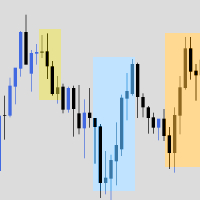
HTF 6 Candles

NareshHTFCandles — Features

  • 6 configurable HTF slots (default: M15 · M30 · H1 · H4 · D1 · W1)
  • Each slot independently enable/disable, set timeframe, candle count, and trace
  • Candles drawn to the right of price as chart objects — no subwindow
  • Bullish/bearish body coloring with separate bull/bear wick colors
  • Adjustable candle width, spacing between candles, and spacing between slot groups
  • Wick thickness control via divisor (thick → thin)
  • Forming (current) candle updates live on every tick
  • FVG detection — fair value gaps highlighted per candle
  • Volume imbalance detection — highlighted per candle
  • Trace lines — per-slot H/L/O/C dotted horizontal lines with individual color and style control
  • Price labels — O/H/L/C values shown on chart left edge, tied to trace (only shows when trace is on)
  • HTF label — timeframe name shown above forming candle
  • Remaining time countdown timer per slot, updates every second
  • I_LblBoth — show label both above and below the forming candle
  • Custom day open hour/minute support
  • HTF slot limit cap ( I_LimitHTF ) to control how many slots render
  • Filters out lower-TF slots automatically (won't draw a TF below chart TF)
  • Full CHARTEVENT_CHART_CHANGE response — redraws on scroll, resize, zoom
  • Clean purge on deinit — no orphaned objects

Другие продукты этого автора
HOW TO USE Draw a profile: Hold CTRL + Left Click and drag across any area on the chart. Release the mouse to generate the volume profile. Delete last profile: Press the DEL key on your keyboard. Delete specific profile: Click the red button at the top-left corner of any profile. Cancel while drawing: Press ESC to abort a drag in progress. Switch timeframes freely: Profiles persist when switching between timeframes (e.g., 4H → 1H → 15M and back). Change settings live: Open indicator properti
FREE
The indicator is a bundle of EIGHT different fundamental functions required for a trader: 1] Forex Session where you can determine your own timings/highlights. 2] High low marking from 1H to 1M 3] Sweetspot 4] Spread and Candle Stick Timer 5] Background logo for branding- You can place the images at any zone of the chart you want 6] Profit and Loss 7] Days names (SUN MON TUE…) on the chart 8] High/low break notification
It estimates the net buying and selling pressure within each price bar by decomposing volume into approximate buy-side and sell-side components, then accumulates this delta over a configurable lookback window. The result is displayed as a color-coded histogram with smoothing moving averages and an integrated divergence detection system. Component 1: Delta Estimation Engine (CLV Method) Component 2: Cumulative Delta Calculation Component 3: Histogram Color Coding Component 4: Moving Averages (Fa
The indicator is a heads-up display (HUD) that consolidates three essential pieces of real-time trading information into a compact, corner-anchored overlay on your chart. It reads live account and market data but does not place, modify, or close any trades. All components update every 500 milliseconds via an internal timer, plus on every new tick and chart change event. Component 1: Current Price & Spread Display format: 2345.67 | Spread: 2.5 Component 2: Candle Timer Display format: 01:22:37
VP-VWAP Pack — Features Session VWAP Volume-Weighted Average Price anchored to your defined session start time ±1 Standard Deviation bands (configurable multiplier) Automatically resets each session — no carryover from previous day Gold solid VWAP line with dotted upper/lower bands Session Volume Profile Price-bucketed volume histogram drawn from session start to current bar Delta-colored bars: green for net buying, pink/red for net selling Configurable row count (default 50) and value area per
Delta Divergence •         Real-Time Market Conviction Tracking — Measures cumulative delta to reveal whether buyers or sellers are truly in control, cutting through price noise to show actual order flow dominance. •         Multi-Timeframe Confluence (30M / H1 / H4 / D1) — Validates lower timeframe signals against higher timeframe trends. When all timeframes align, confidence in the trade is significantly higher. •         Session Strength Percentage — Quantifies how far current delta has pulle
Фильтр:
Нет отзывов
Ответ на отзыв