Zoom MT5 B
- Индикаторы
-
Mariusz Franciszek Szczepanczyk
 I have been trading since 2005. Over the years I have built my own set of tools because I could not find what I actually needed on the market. Not magic entry signals. Not promises. Just clean, reliable trade management that works while I am away from the screen.
 - Версия: 1.10
- Активации: 5
Zoom MT5 — Плавное масштабирование в стиле TradingView + опциональное панорамирование
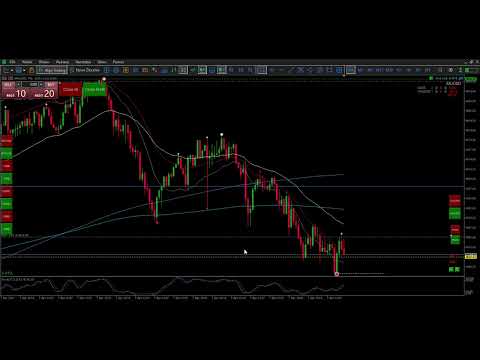
Преобразует навигацию по графикам MT5 в интерфейс TradingView — плавная анимация масштабирования с возможностью горизонтального панорамирования при каждом щелчке колесика мыши. 1 щелчок колесика = 1 масштабирование на панели инструментов + плавное движение.
Основные характеристики:
Плавное масштабирование — постепенное изменение масштаба в течение 8 кадров с плавным сглаживанием.
Дополнительное автоматическое панорамирование с масштабированием — горизонтальное смещение с помощью PanBars=5 предотвращает "масштабирование в пустоту" (LockToRight=false).
Точное управление - ZoomStep=1 (аналог на панели инструментов), PanBars=5 (сдвиг полос)
Защита от блокировки анимации — предотвращает спам во время анимации.
Ограничения масштабирования MT5 — автоматическое ограничение 0-5 (без аварий)
Анимация длительностью в миллисекунды - Время сна = 15 мс (всего 120 мс, сверхплавная анимация)
Нулевая нагрузка на процессор — активен только при прокрутке колесика мыши.
Универсальный — мгновенно работает на ВСЕХ графиках/таймфреймах.
Установка в один клик - появляется навигация перетаскиванием и масштабированием.
Работает как на реальных, так и на демо-счетах.
Поддержка хеджирования/неттинга — работает со всеми типами счетов MT5.
Идеальное воспроизведение с TradingView:
Прокрутка вверх: увеличение масштаба + [опционально] панорамирование вправо (шаг масштабирования + полосы панорамирования)
Колесо прокрутки ВНИЗ: уменьшение масштаба + [опционально] панорамирование ВЛЕВО (Шаг масштабирования - Ползунки панорамирования)
SmoothSteps=8: 8-кадровая анимация с плавным затуханием 0%→20%→44%→72%→92%→100%
Время сна = 15 мс: общая анимация 120 мс (незаметная плавность).
Математическая точность анимации:
current_scale = ChartGetInteger(CHART_SCALE) // 0-5
target_scale = current_scale + ZoomStep * sign // +1/-1 по умолчанию
прогресс = 1-(1-t)² // сглаживание
scale_now = current_scale + (target - current) * progress
ChartNavigate(CHART_CURRENT_POS, -sign * PanBars * progress) // плавное панорамирование
Надежная реализация:
CHART_EVENT_MOUSE_WHEEL = true // захватывает колесо мыши
CHART_EVENT_MOUSE_MOVE = true // перспективная реализация
Блокировка анимации: флаг is_animating предотвращает спам.
Ограничение масштаба: если (цель < 0) целевое значение = 0; если (цель > 5) целевое значение = 5
MathRound(scale_now) = целые числа, точные по пикселям
Настраиваемая плавность:
ZoomStep=1: стандартный масштаб на панели инструментов (можно изменить для опытных пользователей)
PanBars=5: плавное переключение (0 = отключение панорамирования, увеличение - более плавное перемещение)
SmoothSteps=8: невероятно гладко (1=мгновенно, 16=медленно)
SleepTime=15: 15 мс кадров (эквивалент 60 кадров в секунду)
LockToRight=true: отключает панорамирование (false = панорамирование включено)
Идеальное развертывание:
Перетащите курсор на ЛЮБОЙ график — колесико мыши автоматически активирует эту функцию.
Прокрутка колесика мыши ВВЕРХ/ВНИЗ — мгновенное ощущение работы с TradingView.
Установите LockToRight=false для комбинации панорамирования и масштабирования.
Работает мгновенно — перезагрузка не требуется.
Отсутствие визуальных элементов — чистое улучшение навигации.
Техническое превосходство:
Один обработчик OnChartEvent — нулевые накладные расходы — флаг is_animating — идеальная защита от спама — навигация CHART_CURRENT_POS — Sleep(SleepTime) в цикле — покадровая анимация — финализация ChartRedraw() — четкое завершение — Empty OnCalculate() — отсутствие накладных расходов на построение графика
Гарантии совместимости: - Все сборки MT5 - CHART_SCALE 0-5 универсальный - Все символы/таймфреймы - отсутствие конфликтов - Безопасно для нескольких графиков - каждый график независим - Безопасно для советников - не мешает торговой логике - Совместимость с индикаторами - работает в связке с любыми инструментами
Идеальная стабильность: - dparam > 0 = колесо вверх (увеличение масштаба), < 0 = колесо вниз - sign = (int)dparam > 0 ? 1 : -1 // чистое направление - Проверки границ предотвращают сбои - Отсутствие создания объектов = нулевая очистка - Потокобезопасная интеграция Sleep()
Улучшенное обновление MT5 — плавное масштабирование MT5 + опциональное панорамирование в нативной версии MT5. Одно нажатие кнопки колеса мыши — профессиональная навигация. Никакого обучения, мгновенный результат.
Настройки:
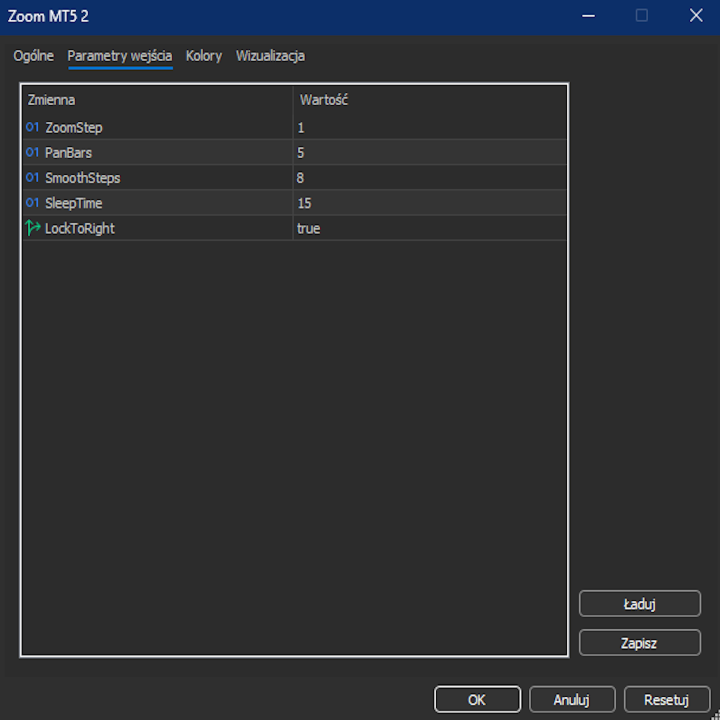
ZoomStep – устанавливает величину изменения масштаба за один шаг колесика мыши (1 = эквивалент одного щелчка мыши для масштабирования на панели инструментов).
PanBars – задает величину горизонтального сдвига графика в столбцах, сопровождающего каждый шаг масштабирования (0 = отключено).
SmoothSteps — определяет количество промежуточных шагов для плавной анимации масштабирования.
SleepTime — устанавливает задержку в миллисекундах между шагами анимации (меньшее значение = более быстрая анимация).
LockToRight – отключает эффект панорамирования сдвига, если значение равно true (по умолчанию: true).
Боты принесут успех только при наличии неограниченного капитала. Только «глаза и разум» превратят ваш счет в прибыльный, и простые, понятные, быстрые и эффективные инструменты помогут вам в этом.
Для достижения настоящего успеха необходим именно ваш мозг, принимающий решения. Мои инструменты — это не боты, а средства для трейдеров, которые умеют мыслить.
Цена закрытия предыдущего дня действует как магнит →Максимум Минимум Закрытие MT5
Азиатская сессия задает направление для сессий в Лондоне и Нью-Йорке →Уровни сессии в Азии
Если вы используете несколько инструментов одновременно:
One Click B3 MT5,Панель расположения символов,Кнопка переключения SL TP,Zoom MT5 B
Если вы снимете старую дорожку с одного инструмента:
One Click B3 MT5,Панель расположения символов,Кнопка переключения SL TP,Метка "Пипс" Последняя сделка,Zoom MT5 B
Если вы инвестируете на долгосрочную перспективу в несколько инструментов:
One Click B3 MT5,Панель расположения символов
Если вы ознакомились с описаниями и вам нужны уточнения, свяжитесь со мной. Я объясню каждую функцию, настройку и сценарий использования, чтобы убедиться, что эти инструменты подходят для вашей торговой стратегии.