KT Alpha Hunter Arrows MT5
- Индикаторы
-
KEENBASE SOFTWARE SOLUTIONS
 Keenbase Trading разрабатывает профессиональные индикаторы и советники (Expert Advisors) для MetaTrader 4 и MetaTrader 5, помогая трейдерам принимать более взвешенные торговые решения.
 - Версия: 1.63
- Обновлено: 1 октября 2026
- Активации: 10
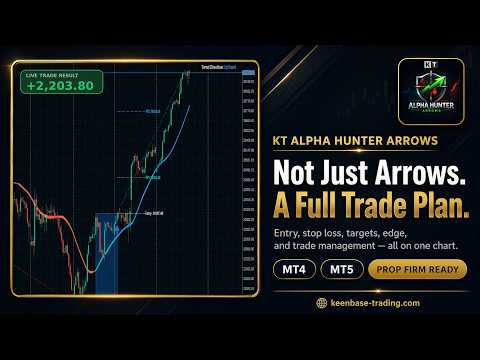
KT Alpha Hunter Arrows is a non-repaint buy and sell arrow indicator that puts the whole trade on your chart: the entry, the stop loss and four take profit levels. Its Edge Dashboard tells you whether the buy signals, the sell signals or both are worth trading on the symbol and timeframe you are looking at.
Every arrow prints when the candle closes and stays exactly where it printed. It never moves and never disappears later.
What you get on every chart
- Non-repaint arrows. Buy and sell arrows on closed candles only.
- A complete trade plan. The entry line, a stop loss placed beyond the recent swing, and four targets from TP1 to TP4 appear together with the arrow.
- Edge Dashboard. Rates the buy signals and the sell signals separately, from No Edge to Strong, and gives one clear verdict: trade both sides, trade buys only, trade sells only, or skip this chart.
- One click Auto Optimize. Tunes the settings to the chart you are on and updates the verdict.
- Prop Firm Panel. Daily drawdown, total drawdown, open risk, the next high-impact news event and the market sessions, live on the chart.
- Trend band and trend badge. The direction of the trend at a glance.
- Alerts. Popup, push notification and email when a new arrow prints.
How to trade it
Attach the indicator and click Auto Optimize. Trade only the side the dashboard rates Tradeable, Good or Strong, and skip the chart when it shows No Edge. When an arrow prints, the entry, the stop loss and the targets are already on the chart. Skip an arrow if price has already reached TP1 before you enter.
After you enter, the Trade Manager EA can manage the trade with one of five plans: Protected Run to TP4, Bank Half and Run to TP4, Take Profit at TP2, Bank Quarter and Run to TP4, or Quick Profit at TP1. The EA never opens a trade on its own.
Recommendations
KT Alpha Hunter Arrows works on any symbol and timeframe your broker offers: forex pairs, gold, indices and crypto. Run Auto Optimize on each chart you watch and focus on the charts the dashboard rates well. The Edge Cheat Sheet lists the symbols and timeframes where the dashboard most often reads Good or Strong.
Input parameters
- Signal Engine: adaptive lookbacks, the adaptive period, and the lookbacks for buy signals, sell signals and their stop losses.
- Buy and Sell Arrows: arrow colors and arrow size.
- Entry, Stop Loss and Take Profit: show or hide the levels, their colors, the TP1 risk fraction, the minimum TP3 gap, the length of the level lines and the maximum run lines.
- Signal Zone Boxes: show or hide the risk zone boxes, their colors and opacity.
- Alerts: popup, push notification and email.
- Optimizer and Edge Dashboard: the Auto Optimize button, the dashboard, the minimum number of signals for optimization, and the option to show signals without an edge as exit marks.
- Prop Firm Dashboard: the panel and the high-impact news guardrail.
- Trend Cloud and Badge: the trend band, the trend badge, the trend band period and colors.
What you receive
MQL5 delivers the indicator with all future updates. The Trade Manager EA, the User Manual PDF and the Edge Cheat Sheet PDF come directly from us: after your purchase, send us a private message on MQL5 and you receive them within one business day.
One indicator gives you the signal, the stop loss, four targets, an honest rating of the edge, and a panel that keeps your account rules in view. Choose KT Alpha Hunter Arrows and trade every arrow with a plan.