CopyMasterPro MT5

5
# CopyMaster Pro Trade Copier

## What Is This

CopyMaster Pro is a local trade copying tool that syncs trades between multiple MT4/MT5 terminals. One account trades, others follow automatically. No server needed, no VPS required. Works on a single computer with multiple terminals.

## What It Does

Copies trades from one account to others. You open a gold position on Account A, Account B and C will follow. You close on A, others close too. Simple as that.

## Why This One

**Free** — No monthly fees, no subscription, no hidden charges. Download it and it is yours.

**Private** — All data stays on your computer. Nothing goes through third party servers. Your trading info remains yours.

**Easy** — Works out of the box. Click a few buttons in the interface and you are set. No config files, no command lines.

**Cross Platform** — MT4 and MT5 can copy from each other. You run MT5 as master, your friend follows on MT4. Works fine.

## Main Features

**Flexible Lot Sizing** — Copy by multiplier, fixed lots, or auto calculate based on balance ratio. Small accounts can safely follow large ones.

**Smart Symbol Matching** — Different brokers name symbols differently. XAUUSD might be GOLD somewhere else, or have a suffix. The system figures it out automatically. You can also set manual mappings.

**Reverse Copy** — Think a signal source always loses money? Turn on reverse mode. They buy, you sell.

**Risk Controls** — Set limits on max lot size, max positions, max drawdown percentage. Copying stops automatically when limits are hit.

**UI Scaling** — Interface size is adjustable from 50% to 200%. Works great on high-DPI screens or small monitors.

**Independent Settings** — Each account saves its own settings file. Multiple receivers won't overwrite each other's configuration.

## Who Should Use This

- Traders managing multiple personal accounts
- Those helping friends or clients with their accounts
- People sharing signals within a small group
- Testing execution speed across different brokers

## Who Should Not

- Those building large scale commercial copy trading services — this is a local tool, no remote support
- Ultra low latency high frequency strategies — local file sync has about 500ms delay
- Anyone needing complex permission management or billing systems

---

## Detailed Usage Guide

### Installation

1. After purchasing from the MQL5 Market, the EA will be installed automatically in your terminal
2. Find CopyMaster Pro under "Expert Advisors" in the Navigator panel
3. Drag the EA onto any chart
4. Confirm the settings in the popup parameters window and click OK

### Input Parameters

When dragging the EA onto a chart, a parameters window will appear:

| Parameter | Default | Description |
|-----------|---------|-------------|
| Language | English | Interface language, English or Chinese |
| Panel X | -1 | Horizontal panel position, -1 means auto-center |
| Panel Y | 10 | Vertical panel position, pixels from top |
| UI Scale % | 100 | Interface scaling, range 50-200. Increase for high-DPI screens, decrease for small monitors |

These parameters are set once at load time. All other configuration is done through the interface.

### Main Interface

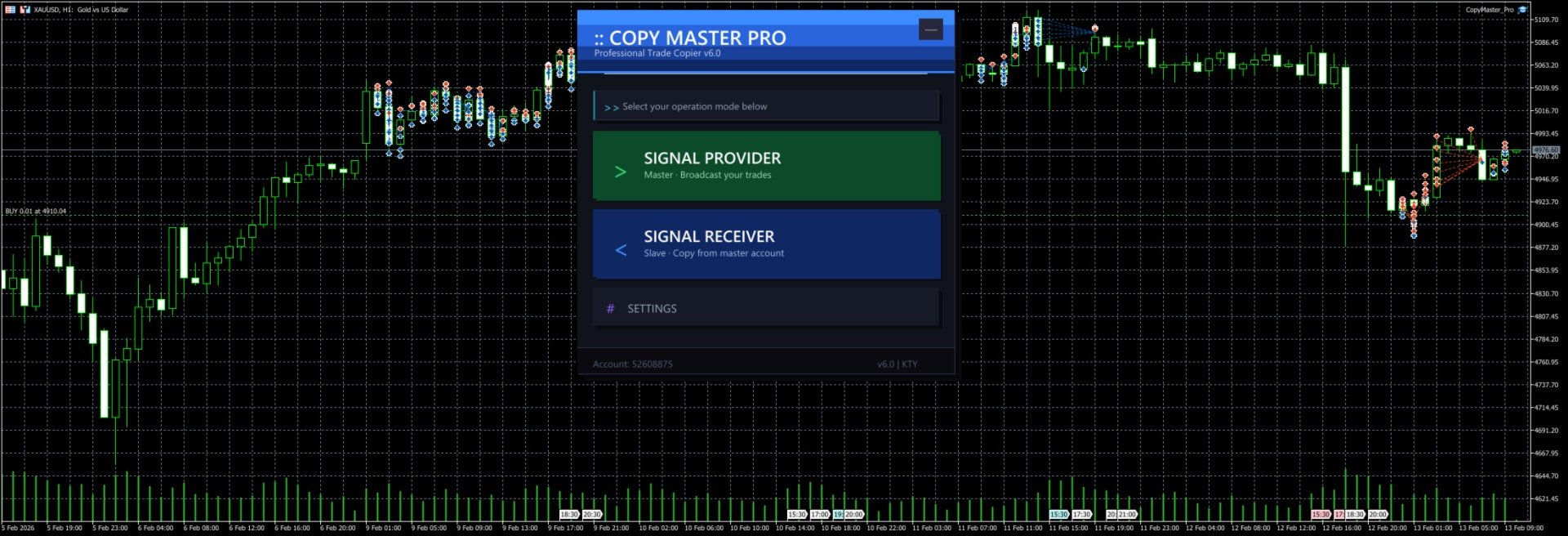
After launch you will see the selection screen with three options:

- **Signal Provider** — Your account acts as the signal source, broadcasting trades to other accounts
- **Signal Receiver** — Your account follows trades from another signal source
- **Settings** — Configure lot sizing, risk controls, symbol mapping and other parameters

The `--` button in the top right corner minimizes the panel to a floating bar. Click `[]` on the floating bar to restore.

### Signal Provider Mode

1. Click "Signal Provider" on the main screen
2. Enter a server name (e.g. `MySignal` or `Gold_Strategy`). This name will appear in the receiver's server list
3. Click the "Start" button
4. Trade normally. All open and close operations are broadcast automatically
5. The panel shows real-time position count and online follower count
6. Click "Stop" to end broadcasting
7. Click "Back to Menu" at the bottom to switch modes

Notes:
- Server name cannot be empty
- Do not start multiple providers with the same server name on the same computer
- Closing the EA or switching charts will automatically stop broadcasting and clean up signal files

### Signal Receiver Mode

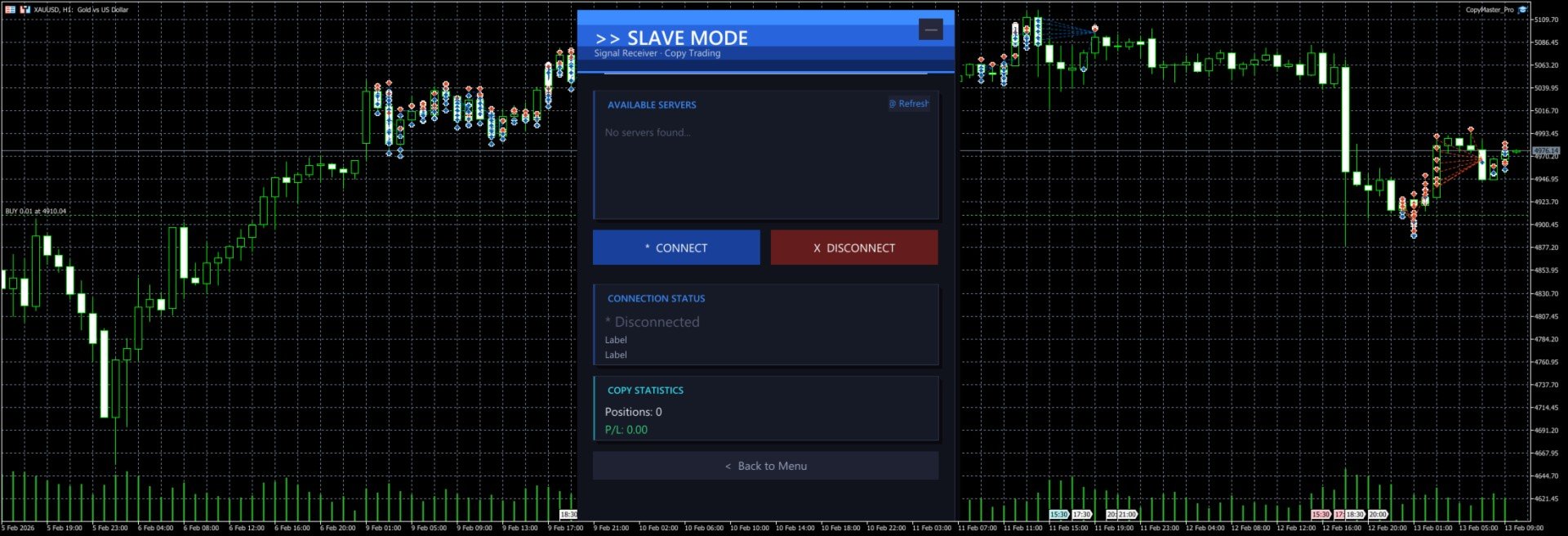
1. Click "Signal Receiver" on the main screen
2. The system automatically scans for available signal servers and displays them in the list
3. Click a server name in the list to select it (selected server is highlighted)
4. Click "Connect" to start copying
5. The panel shows real-time connection status, copied position count and profit/loss
6. Click "Disconnect" to stop copying (existing positions will not be closed automatically)
7. If no servers appear in the list, click "Refresh" to rescan

Notes:
- You must select a server before connecting
- After connecting, new positions from the signal source are copied automatically. When the source closes a position, the copied position is closed too
- Positions that existed before connecting are not copied. Only new trades after connection are processed
- Copied orders have a `CMP_` prefix in their comment field for easy identification

### Settings Panel

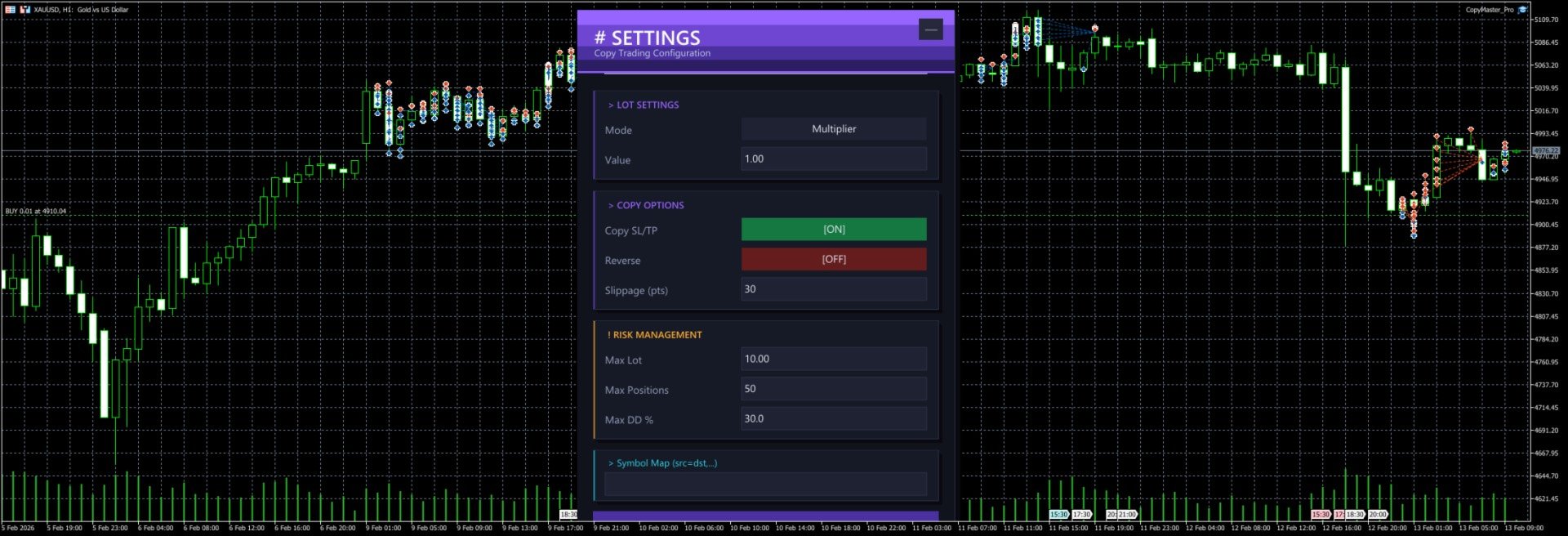
Click "Settings" on the main screen to open the configuration page. All changes require clicking "Save Settings" to take effect.

#### Lot Settings

**Mode** — Click the button to cycle through three modes:

| Mode | Description | Example |
|------|-------------|---------|
| Multiplier | Multiply the source lot size by a factor | Source opens 0.5 lots, multiplier is 2.0, copy opens 1.0 lots |
| Fixed | Use a fixed lot size regardless of source | Source opens 1.0 lots, fixed is 0.1, copy opens 0.1 lots |
| Risk % | Auto-calculate lot size based on account balance and risk percentage | Balance 10000, risk 1%, system calculates appropriate lot size |

**Value** — The number used with the selected mode. For multiplier mode enter the factor (e.g. 1.0, 0.5, 2.0), for fixed mode enter the lot size (e.g. 0.01, 0.1), for risk mode enter the percentage (e.g. 1, 2, 5).

#### Copy Options

**Copy SL/TP** — When enabled, copies the stop loss and take profit from the signal source. When disabled, positions are opened without SL/TP. Enabled by default.

**Reverse** — When enabled, buy signals become sell orders and vice versa. SL and TP are also swapped. Disabled by default.

**Slippage (pts)** — Maximum allowed slippage in points. Too small may cause order failures, too large may result in poor fill prices. Default is 30 points, usually no need to change.

#### Risk Management

**Max Lot** — Maximum lot size per copied trade. Even if the calculated lot exceeds this value, it will be capped. Default 10.0 lots.

**Max Positions** — Maximum number of copied positions. No new positions are opened once this limit is reached. Default 50.

**Max DD %** — Maximum drawdown percentage. When (Balance - Equity) / Balance exceeds this ratio, no new positions are opened. Default 30%.

#### Symbol Mapping

**Symbol Map** — Manually specify symbol mappings in the format `source=destination`, separated by commas for multiple pairs.

Examples:
- `XAUUSD=GOLD` — Signal source's XAUUSD trades as GOLD locally
- `XAUUSD=GOLD,EURUSD=EURUSDm` — Multiple mappings
- `NAS100=USTEC,US30=DJ30` — Index symbol mapping

If left empty, the system will try to match automatically:
1. First tries using the source symbol name directly
2. Tries removing common suffixes (.pro, .ecn, .std, etc.)
3. Tries auto-mapping common symbols (XAUUSD to GOLD, NAS100 to USTEC, etc. across 20 groups)

### Cross-Platform Usage

MT4 and MT5 can copy from each other as long as they run on the same computer.

Common setups:
- MT5 provider → MT4 receiver
- MT4 provider → MT5 receiver
- MT5 provider → Multiple MT4/MT5 receivers

When copying across platforms, symbol names may differ. Configure symbol mappings in settings or rely on the auto-matching feature.

### Typical Use Cases

#### One-to-Many Copying

You run the provider on MT5. Three friends each run a receiver on their own MT4/MT5. You trade normally, their accounts follow automatically. Each person can set their own lot multiplier based on their account size.

#### Multi-Account Sync

You have 3 accounts at different brokers. Run the provider on your main account, receivers on the other two. Open one trade, all three accounts open simultaneously.

#### Reverse Copying

You notice a friend has a very low win rate. Have them run the provider, you run the receiver with reverse mode enabled. They lose, you win.

### FAQ

**Q: Receiver cannot see any servers?**
Make sure the provider is running and shows "Broadcasting" status. Both terminals must be on the same computer. Click the Refresh button to retry.

**Q: Orders fail to open?**
Check if the symbol is matched correctly, if the account balance is sufficient, and if the lot size is within the broker's allowed range. Check the Journal tab in MT4/MT5 for detailed error messages.

**Q: How much latency?**
Typically around 500 milliseconds (timer interval). Perfectly fine for intraday and swing trading. Not suitable for millisecond-level high frequency strategies.

**Q: What happens to existing positions after disconnecting?**
After disconnecting, copied positions that are already open will not be closed automatically. You need to manage them manually.

**Q: Where are settings saved?**
Settings are saved in `CopyMaster/settings_{account_number}.ini` in the MT4/MT5 common data folder. Each account has its own file, so multiple receivers won't overwrite each other.

**Q: Interface too big or too small?**
Adjust the `UI Scale %` parameter in the EA settings. Range is 50-200. 100 is default size, 150 enlarges by 50%, 75 shrinks by 25%. Requires reloading the EA after changing.

---

CopyMaster Pro v1.2 | Copyright 2026, KUM TONG YU
Değerlendirmeler 3
MQchez1
45
MQchez1 2026.02.14 04:17 

It works very well, simple and effective. Thank you for this. :)

Önerilen ürünler
Easy Correlations Indicator The Easy Correlations Indicator is designed to help traders analyze the relationship between two correlated instruments. By monitoring the distance between their Relative Strength Index (RSI) values, the indicator highlights situations where one instrument has moved significantly further than the other. This creates potential trading opportunities: Sell the stronger instrument (overstretched RSI) Buy the weaker instrument (lagging RSI) Because the positions are opened
FREE
PositionMap Pro — MT5 Hesap Genel Bakış Paneli Tüm açık pozisyonları sembol bazında gruplayan gerçek zamanlı panel — Buy/Sell lot toplamları ve net kâr/zarar doğrudan grafiğinizde, tek bakışta. Terminal sekmesinde sembol sembol lot saymak yerine PositionMap Pro her şeyi otomatik olarak gruplar. Hangi sembolde ne kadar pozisyonunuz olduğunu, yönlere göre ayrılmış şekilde anında görürsünüz. Panel örneği Sembol Buy Lot Sell Lot Net K/Z EURUSD 0.50 — +12.30 XAUUSD — 1.00 −45.00 GBPUSD 0.20 0.30 +3.1
FREE
PROMETHEUS TECHNICAN VERSION Free | By THE SONS A gift from The Sons — no strings, no trial, no expiry. Every trader deserves access to professional-grade market intelligence. That belief is why Prometheus Technical Version exists, and why it costs nothing. Consider it our handshake to the trading community. What You're Getting This is not a simplified tool dressed up as a gift. Prometheus Technican Version is a fully built, institutional-quality technical analysis indicator running a dual-model
FREE
FibRetrace Zones Son Salınımın Fibonacci Düzeltme Bölgeleri FibRetrace Zones, FibRetrace Uzman Danışmanının ücretsiz görsel yardımcısıdır. Fibonacci düzeltme seviyelerini çizer ve son salınımdaki geri çekilme bölgesini vurgular; böylece işlem yapmadan önce giriş noktalarının nerede olduğunu görürsünüz. Bölge yöne göre renklendirilir: yükseliş kurulumları için yeşil, düşüş kurulumları için kırmızı. Her sembolde ve her zaman diliminde çalışır. TEMEL ÖZELLİKLER Ayarlanabilir geriye bakış ile otomat
FREE
GOM Trade Manager helps you execute trades the way you want it. Works on all instruments Forex, Commodities, & Crypto. It helps you with lot calculations, spread addition and balance calculations so you can just focus on actual trading. For full automatic planned management, stackable triggers and spread widening protection >> check out GOM Trade Manager Pro . ------------------------------------------NOTABLE FEATURES------------------------------------------ You set everything based on bid
FREE
Free automatic Fibonacci is an indicator that automatically plots a Fibonacci retracement based on the number of bars you select on the BarsToScan setting in the indicator. The Fibonacci is automatically updated in real time as new highest and lowest values appears amongst the selected bars. You can select which level values to be displayed in the indicator settings. You can also select the color of the levels thus enabling the trader to be able to attach the indicator several times with differe
FREE
Deviation Trend Profile Overview Deviation Trend Profile is a MetaTrader 5 chart indicator that combines three visual layers in a single chart window: a moving average with momentum-based coloring, deviation bands calculated from volatility, and a horizontal distribution profile drawn to the right of the current price. The indicator is an analytical tool. It does not open, modify or close trades, and it is not a complete trading system. It is designed to help the user observe trend direction, mo
FREE
TrendVision AI
Murtadha Majid Jeyad Al-Khuzaie
TrendVision AI – Smart Trend Channels & Price Forecasting for MetaTrader 5 Discover market structure and explore potential future price direction with TrendVision AI, an advanced technical indicator for MetaTrader 5 that combines automatic trendline analysis with a machine-learning-based price forecasting model. How Does TrendVision AI Work? TrendVision AI analyzes historical candlestick data within a configurable lookback window. It automatically draws two trendlines directly on the chart:
FREE
Donchian Breakout And Rsi
Mattia Impicciatore
4.5 (2)
Genel Açıklama Bu gösterge, klasik Donchian Kanalı ’nın geliştirilmiş bir versiyonudur ve gerçek işlem için pratik işlevlerle zenginleştirilmiştir. Standart üç çizgiye (üst, alt ve orta çizgi) ek olarak sistem breakout (fiyat kırılımı) noktalarını tespit eder ve bunları grafikte oklarla görsel olarak gösterir. Ayrıca grafiği sadeleştirmek için mevcut trend yönünün tersindeki çizgi yalnızca görüntülenir. Gösterge şunları içerir: Görsel sinyaller : Kırılım sırasında renkli oklar Otomatik bildiriml
FREE
MT5 için NAS100 Auto SL ve TP Maker ile tanışın: MetaTrader 5'te Nasdaq 100 piyasasında gezinen yatırımcılar için vazgeçilmez bir yardımcı olan NAS100 Auto SL ve TP Maker ile StopLoss ve TakeProfit ayarlarını bir daha asla kaçırmayın. Bu araç, StopLoss ve TakeProfit seviyelerinin yönetimini otomatikleştirmek için sorunsuz bir çözüm arayanlar için tasarlanmıştır. Temel Özellikler: Zahmetsiz Otomasyon: StopLoss ve/veya TakeProfit olmadan Nasdaq 100 işlemlerini otomatik olarak izler. Kullanıcı ta
FREE
Protect your funded accounts and personal capital with military-grade precision. This utility continuously monitors your floating equity against your daily starting balance. The moment your custom drawdown threshold is breached, it instantly liquidates all open positions, deletes pending orders, and completely unloads from the chart. Stop revenge trading and never fail a prop firm evaluation due to a margin breach again.
FREE
Draggable Volume Profile
Basharat Umar Khan
5 (1)
Short Description Drag two lines to any chart range for an instant Fixed-Range Volume Profile (POC, Value Area VAH/VAL) featuring Delta Coloring, Developing Profile tracking, Initial Balance, HVN/LVN, and Retest Rays. Detailed Description The Fixed-Range Volume Profile & Delta Analyzer answers a foundational market structure question: At which price did the most trading activity actually occur within a specific timeframe? Simply drag the two vertical reference lines ( START and END ) anywhere o
FREE
Trade Behavior Mirror, yalnızca kendi hesabınızın kapanmış işlem geçmişini okur ve tek bir örüntüyü sayar: gerçekleşen bir zarardan kısa süre sonra, kendi olağan hacminizden daha büyük bir lotla yeni bir pozisyon açmak. Araç hiçbir şey tahmin etmez ve hiçbir öneride bulunmaz. Panelde görünen her rakam, bu hesapta zaten gerçekleşmiş bir şeydir. Rakamlar nasıl hesaplanır: Tüm sembollerde ve tüm sihirli numaralarda, en fazla 31 günlük kapanmış işlemi okur - bu, grafikteki sembole değil, hesabın ta
FREE
Swing Points Pro v2 – Enhanced Highs and Lows Indicator with Push Notifications Overview : The Swing Points Pro v2 indicator is a powerful and reliable tool designed to help traders identify critical swing highs and lows on their charts. Whether you trade Forex, Stocks, or Crypto, this updated version provides advanced features to enhance your market analysis, with real-time push notifications for key market movements. Key Features : Accurate Swing Identification : Pinpoints major swing highs a
FREE
Fvg Edge
Ahmad Meftah Abdulsalam Alawwami
5 (3)
FVG Smart Zones – Ücretsiz Sürüm MetaTrader 5 (MT5) için Adil Değer Boşlukları (FVG) Algılama Göstergesi Sadece başka bir rastgele gösterge değil, gerçek bir ticaret aracı mı arıyorsunuz? FVG Smart Zones – Ücretsiz Sürüm , Adil Değer Boşluklarını (FVG) otomatik olarak algılar ve grafiğinizde yüksek olasılıklı ticaret bölgelerini vurgulayarak profesyonel piyasa içgörüsü sağlar. Bu gösterge şu traderlar için tasarlanmıştır: Akıllı Para Konseptleri (SMC) ICT Ticaret Konseptleri Fiyat H
FREE
Rating Meter: 26 göstergeden tek bir birleşik derecelendirme Rating Meter , 26 popüler göstergenin sinyallerini sizin yerinize hesaplar ve bunları "sat / nötr / al" şeklinde basit bir derecelendirmede toplar. Gösterge pencerelerini tek tek açıp değerleri elle karşılaştırmanıza gerek yoktur. Panele bir kez bakmak, seçili zaman diliminde piyasanın hangi yöne eğilimli olduğunu görmeye yeter. Our products: https://www.mql5.com/en/users/trendhunter/seller Panelde neler görüntülenir Oscillators göster
FREE
VM Auto SLTP Basic - Intelligent Trade Management for Scalpers Enhance your scalping strategy to a higher level. VM Auto SLTP Basic automatically manages Stop Loss and Take Profit for orders that are opened manually or by other Expert Advisors. This tool does not open trades on its own, allowing you to maintain full control while enjoying precise risk management. Full documentation available in the product blog:   [User Guide] Key Features SL/TP based on ATR or fixed price Automatic SL move to B
FREE
Chart Pro Classic Dark v1.00 Chart Pro Classic Dark is a professional MT5 chart styling and customization tool designed to give your charts a clean, modern, and professional dark appearance. Key Features Dark Black Background — Applies a clean black background to the chart. ️ Candlestick Chart — Automatically configures the chart to use candlesticks. Bullish Candles — Green/Lime bullish candles. Bearish Candles — White bearish candles. Grid Removal — Hides the chart grid for a clean
FREE
MT5 Trade Manager is a MetaTrader 5 trade management panel designed to provide order execution, position monitoring, and risk control tools within a single interface. It operates as an on-chart dashboard with multiple pages for different trading functions. The tool is designed to support manual trading by centralizing trade operations and account monitoring in one place without requiring external applications. Interface Structure The dashboard is organized into six main sections: Dashboard Provi
FREE
CandlePro X
Murtadha Majid Jeyad Al-Khuzaie
CandlePro X — Free Professional Candle Visualizer for MetaTrader 5 CandlePro X is a free chart visualization indicator for MetaTrader 5, designed to make candlestick charts cleaner, sharper, and easier to read. If you find it difficult to quickly distinguish bullish and bearish candles, especially on busy charts, CandlePro X helps solve this problem by giving your candles stronger colors, clearer contrast, and a more professional appearance. CandlePro X does not generate trading signals, pred
FREE
======================================================== GOLD WAVE LEVELS (ELLIOTT-ALIGNED) - MQL5/MT5 MARKET DESCRIPTION (formatting: **bold** = Bold button; lines with • = bullet list; UPPERCASE = heading) ======================================================== OVERVIEW ------------------------------------------------------- **Gold Wave Levels** draws a tested wave backbone for gold and validates signals against **Elliott theory hard-rules**, with higher-timeframe context and per-timeframe
FREE
Account Turbo Flip: The Ultimate Manual Trading & Management Assistant Trading successfully isn't just about finding the perfect entry—it is about how you manage the trade once you are in the market. Account Turbo Flip  is a streamlined utility Expert Advisor designed to take the emotion and hesitation out of trade management. Built for traders who prefer to maintain control over their own entries, it acts as your dedicated tactical assistant. You pull the trigger based on your own analysis, an
FREE
Core function Intelligent transaction management one-click opening and closing operation, which supports user-defined lots to set multiple closing modes: all closing, closing by direction and closing by profit and loss status. Professional risk control, real-time risk monitoring and spread control to avoid high-cost trading environment. Visual control panel has an intuitive graphical interface, and all functions can be operated with one button to display position information, profit and loss sta
FREE
Bu küçük araç, grafik üzerinde basit bir çizgi sürükleyerek risk yönetiminizi tanımlamanıza yardımcı olur. Hesap yüzdesi veya sabit para tutarı üzerinden hesaplanan gerçek lot büyüklüğünü doğrudan satırda gösterir. Tek yapmanız gereken klavyenizdeki "t" tuşuna basarak hattı aktif hale getirmek ve hattı stoploss noktanıza sürüklemek. Bu kadar. Ayarlarda çizgi ve metnin rengini ve genişliğini, ayrıca metinden satıra kadar olan boşluğu ve sağı tanımlayabilir ve riski hesap yüzdesi veya sabit para
FREE
Risk5Percent is a custom indicator for MetaTrader 5 designed to help you manage your risk exposure precisely. By entering the desired risk percentage and the number of lots used, it calculates and displays the corresponding price level on the chart that represents your maximum anticipated loss (e.g., 5%), automatically considering contract and tick size for the selected instrument. Key Features: Custom settings for trade direction (long/short), risk percentage, and lot size. Automatic adjus
FREE
VFI Quantum
Nikita Berdnikov
5 (1)
Introducing VFI (Volume Flow Indicator) – a trading indicator that analyzes the relationship between volume and price movement to identify key trading opportunities. The indicator displays the strength and direction of volume flow, providing clear signals about potential entry and exit points. Signals are formed based on zero line crossovers, crossovers between the VFI line and its exponential moving average (EMA), and when the indicator exits overbought and oversold zones. Attention! This stra
FREE
Description of the MonteCarloBands Indicator The   MonteCarloBands   indicator is a forward-looking analytical tool that employs the Monte Carlo method to project potential future price scenarios of a financial asset. It appears as a set of five percentile bands extending into the future, visualizing a "probability cone" based on the historical behavior of the market. Visual Appearance: P50 (Median) : Solid green line at the center, representing the expected median path P25 and P75 : Two orange
FREE
RSI abcd
Francisco Gomes Da Silva
4.33 (3)
RSI ABCD Desen Bulucu: Teknik Strateji 1. Gösterge Nasıl Çalışır? Klasik RSI ile otomatik ABCD harmonik desen tespitini birleştirir. Temel Bileşenler Standart RSI (ayarlanabilir periyot) Tepe ve dip işaretleri (oklar) ABCD desenleri (yeşil/kırmızı çizgiler) Aşırı alım (70) ve aşırı satım (30) filtreleri 2. MT5 Kurulumu period = 14 ; // RSI periyodu size = 4 ; // Maksimum desen boyutu OverBought = 70 ; // Aşırı alım seviyesi OverSold = 30 ; // Aşırı satım seviyesi Filter = USE_FILTER_ YES ; // On
FREE
Important Lines
Terence Gronowski
4.88 (24)
This indicator displays Pivot-Lines, preday high and low, preday close and the minimum and maximum of the previous hour. You just have to put this single indicator to the chart to have all these important lines, no need to setup many single indicators. Why certain lines are important Preday high and low : These are watched by traders who trade in a daily chart. Very often, if price climbs over or falls under a preday low/high there is an acceleration in buying/selling. It is a breakout out of a
FREE
This Tradepanel is an Utility for Traders Who want ot use Basic MoneyManagement for Calculation of Lotsize  I have created the basic edition only to give an Overview with Limited Functionality Full Features are available with  Auto TradePanel  Pro. (This is Only Because it can not be Tested in Strategy Tester ).  Complete Description is available at  "Auto TradePanel Pro".  in This Version Basic Functionality ( Calculation of Lotsize ) open /close Positions is working in the same way as in Pro
FREE
Bu ürünün alıcıları ayrıca şunları da satın alıyor
Trade Assistant MT5
Evgeniy Kravchenko
4.43 (216)
It helps to calculate the risk per trade, the easy installation of a new order, order management with partial closing functions, trailing stop of 7 types and other useful functions. Additional materials and instructions Installation instructions - Application instructions - Trial version of the application for a demo account Line function -   shows on the chart the Opening line, Stop Loss, Take Profit. With this function it is easy to set a new order and see its additional characteristics bef
Trade Manager EA’ye hoş geldiniz! Ticaretin daha sezgisel, hassas ve verimli hale gelmesi için tasarlanmış nihai risk yönetim aracı ile tanışın. Bu sadece bir emir verme aracı değil; ticaret planlaması, pozisyon yönetimi ve risk kontrolü için kapsamlı bir çözüm. İster yeni başlayan bir yatırımcı olun, ister deneyimli bir trader ya da hızlı emir gerektiren bir scalper, Trade Manager EA ihtiyaçlarınıza uyum sağlar ve forex, endeksler, emtialar ve kripto paralar dahil tüm piyasalarda esneklik sunar
Local Trade Copier EA MT5
Juvenille Emperor Limited
4.94 (149)
Local Trade Copier EA MT5, aynı Windows bilgisayarı veya Windows VPS üzerinde çalışan birden fazla MetaTrader 5 hesabı arasında işlemleri kopyalamak ve yönetmek için hızlı ve esnek bir işlem kopyalayıcıdır. Yerel işlem senkronizasyonunu, Receiver tarafında lot büyüklüğü, risk yönetimi, işlem filtreleme, sembol eşleştirme, işlem yönetimi ve hesap koruması kontrolleriyle birleştirir. Transmitter ve Receiver terminallerinizi yaklaşık 1 dakika içinde ayarlayın ve aynı veya farklı brokerlardaki hesa
Telegram to MT5 Multi-Channel Copier   , Telegram ve Discord kanallarınızdaki alım-satım sinyallerini doğrudan MetaTrader 5'e otomatik kopyalar. Bot yok, tarayıcı uzantısı yok, elle kopyalama yok. Sinyal Telegram'a veya Discord'a düşer ve EA birkaç saniye içinde terminalinizde işlemi açar. Ve bir kanalı kopyalamadan önce, yerleşik backtester o kanalın hesabınızda ne yapmış olacağını gösterir. Ürün iki bileşenden oluşur: Telegram kanallarınızı dinleyen bir Windows uygulaması ve sinyalleri MT5 ter
================================================================================ POC BREAKOUT - V20.72. Full Professional Grade Toolkit ================================================================================ POC Breakout is a full MetaTrader 5 trading dashboard for discretionary traders who want breakout signals, Point of Control (POC) context, volume profiles, order flow, market structure, news, alerts, and advanced trade planning in one professional workspace. Attached directly to you
Strategy Ledger Pro
Abdullah Uygar Tuna
5 (11)
Şimdi Türkçe dil desteği ile. Strategy Ledger Pro , MetaTrader 5 için salt okunur bir hesap analiz panelidir. Hesap sonuçlarını Uzman Danışman (EA), strateji, sembol ve magic numaraya göre ayırır; böylece her birinin gerçekte ne kattığını görürsünüz. Panel 11 dilde kullanılabilir: English, Français, Deutsch, Español, Italiano, Português, Русский, Türkçe, 中文, 日本語 ve 한국어. Demoyu indirmeden önce. Market, her ücretli ürünün demosunu yalnızca Strateji Test Cihazında çalıştırır. Bu panel kendi hesabı
TradePanel MT5
Alfiya Fazylova
4.88 (170)
Trade Panel, çok işlevli bir ticaret asistanıdır. Uygulama, manuel ticaret için 50'den fazla ticaret fonksiyonu içerir ve çoğu ticaret görevini otomatikleştirmeyi mümkün kılar. Uygulama talimatları: https://www.mql5.com/en/blogs/post/756482 Demo hesabı için uygulamanın deneme sürümü: https://www.mql5.com/en/blogs/post/750865 Uygulamayı nasıl kurulur: https://www.mql5.com/en/blogs/post/756239 Uygulamayı görsel modda nasıl test edilir: https://www.mql5.com/en/blogs/post/770277 Uygulamayı VPS MetaT
The Patch It never opens a trade. It walks behind the ones that did. Every open position, every pending order — checked twice a second for the one thing that's easy to forget: a stop, a target. Found bare, it doesn't ask. It writes the missing number in, measured in points from wherever the position began, and moves on to the next. No strategy, no opinion on direction. Just the quiet assumption that nothing should ever sit on the market unprotected — not because someone decided it shouldn't,
Telegram sinyallerini kendi işlem kurallarınızla kopyalayın Telegram to MT5 Signal Trader , herkese açık ve özel Telegram kanallarındaki ve gruplarındaki metin tabanlı işlem sinyallerini otomatik olarak MetaTrader 5'e kopyalar. Tek bir masaüstü uygulamasından birden fazla sinyal sağlayıcısını ve MT5 hesabını yönetin; her sağlayıcı için ayrı risk ve işlem ayarları belirleyin. Sinyal kopyalamak için Telegram botu veya API kurulumu gerekmez. Kendi Telegram hesabınızla telefon numarası veya QR kod k
Floor Watch
Syed Tauqeer Hussain Shah
Floor Watch One number, watched every thirty seconds: how far equity has fallen since the day began — or since its highest point, if it's told to trail the peak instead of the open. Cross the line and it doesn't argue. Every open position closes, every pending order vanishes, and anything that slips through afterward gets shut the moment it appears. Not asked. Removed. The floor holds until the clock turns 5 AM Pakistan time — then, and only then, does the day start over. One rule. No except
Power Candles Strateji Tarayıcısı - Kendi Kendini Optimize Eden Çoklu Sembol Kurulum Bulucu Power Candles Strateji Tarayıcısı , Power Candles göstergesini çalıştıran aynı kendinden optimize edici motoru, Piyasa İzleyicinizdeki her sembol üzerinde yan yana çalıştırır. Tek bir panel, şu anda istatistiksel olarak hangi sembollerin işlem yapılabilir olduğunu, her birinde hangi stratejinin kazandığını, en uygun Stop Loss / Take Profit çiftini gösterir ve yeni bir sinyal geldiği anda size bildirim gön
Grid Manual MT5
Alfiya Fazylova
4.73 (22)
Grid Manual, sipariş ızgarasıyla çalışmak için kullanılan bir ticaret yardımcı programıdır. Yardımcı program evrenseldir, esnek ayarlara ve sezgisel bir arayüze sahiptir. Sadece kayıpların ortalaması yönünde değil, aynı zamanda kazanç artışı yönünde de bir emir ızgarası ile çalışır. Tüccarın bir emir ızgarası oluşturmasına ve eşlik etmesine gerek yoktur, bu yardımcı programı yapacaktır. Emri açmanız yeterlidir ve Grid manual otomatik olarak ona bir emir ızgarası oluşturacak ve kapanana kadar ona
Bir kez satın alın. Şu anda sunulan ve gelecekte yayımlayacağım tüm MT4 ve MT5 göstergelerimi ek ücret ödemeden edinin. Satın aldıktan sonra edinme talimatları için benimle iletişime geçin. Her 10 satın alımdan sonra fiyatın 50$ artırılarak en fazla 999$ olması planlanmaktadır. Ödeme sırasında Market’te görünen fiyat geçerlidir. Güvendiğiniz göstergeyi kullanmaya devam edin. Çevresindeki işleri otomatikleştirin. Sizin sinyaliniz. Sizin kurallarınız. Sizin işlem yürütmeniz. Güvendiğiniz bir MT5
Daily Trading Limiter
AL MOOSAWI ABDULLAH JAFFER BAQER
5 (8)
• Please test the product in the Strategy Tester before purchasing to understand how it works. • If you face any issues, contact me via private message—I’m always available to help. • After purchase, send me a screenshot of your order to receive a FREE EA as a gift. Daily Trading Limiter — the rule you cannot break Every trader knows the number. Three trades. Two percent. One bad day and stop. And every trader has watched themselves take the fourth trade anyway. The problem was never knowing th
Welcome to ENTRY IN THE ZONE with SMC MULTI TIMEFRAME SPECIAL BENEFIT / FOR OUR MQL5 CUSTOMERS FREE ACCESS TO THE NEW TOOL  — COMING SOON — Learn more on our official website  : https://www.fableedge.net Entry In The Zone with SMC Multi Timeframe is a real-time market analysis tool based on Smart Money Concepts (SMC), designed to analyze market structure, price direction, and key trading zones. It supports both Single-Timeframe and Multi-Timeframe Analysis, providing a clearer view of overall ma
VirtualTradePad PRO SE MT5 — MetaTrader 5 için profesyonel işlem kontrol merkezi VirtualTradePad PRO SE , MetaTrader 5 için grafik tabanlı premium bir işlem paneli ve trade yönetim çalışma alanıdır. Daha hızlı emir yürütme, daha net pozisyon kontrolü, yapılandırılmış trade yönetimi, görsel seviye planlama ve doğrudan grafik üzerinden profesyonel bir çalışma akışı isteyen traderlar için tasarlanmıştır. Bu yalnızca basit bir BUY / SELL paneli değildir. PRO SE; manuel işlem, bekleyen emirler, pozis
FUTURES ORDERFLOW FOOTPRINT CHART Professional OrderFlow EA for MetaTrader 5 Version 1.01| Professional tool for real traders | Institutional-Grade Visualization STRATEGY TESTER USERS - PLEASE SELECT EVERY REAL TICK WHEN TESTING AND YOU HAVE DOWNLOADED HISTORICAL DATA. IF YOU SEE A WAITING SCREEN AND IT IS NOT DOWNLOADING, IT MEANS YOU HAVE LOW HISTORICAL DATA. TRY 1 MIN AND 5 MIN FIRST ON 1 DAY DATA. ONE DAY DATA SHOULD BE THE NEWEST AND MOST CURRENT DATE. PLEASE WAIT UNTIL THE MARKET HAS ROL
Trading Chaos Expert
Hennadii Stanilevych
5 (11)
This software has no equals in the world and represents a universal trade "console" covering trading signals, automated market entry, setting of Stop Loss and Take Profit, as well as Trailing Profit for multiple trades at the same time in a single open window. Intuitive control of the Expert Advisor in "three clicks" ensures a comprehensive use of all its functions on different computers, including tablets PCs. Interacting with additional signal indicators that mark the chart to give a real mark
Trade copier MT5
Alfiya Fazylova
4.61 (56)
Trade Copier, ticaret hesapları arasındaki işlemleri kopyalamak ve senkronize etmek için tasarlanmış profesyonel bir yardımcı programdır. Kopyalama, tedarikçinin hesabından/terminalinden alıcının aynı bilgisayarda veya vps'de kurulu olan hesabına/terminaline gerçekleşir. Satın almadan önce demo sürümünü bir demo hesabında test edebilirsiniz. Demo versiyonu burada . Tüm talimatlar burada . Ana işlevler ve avantajlar: Emirlerin kopyalanmasını destekler: МТ5> МТ5, МТ4> МТ5, МТ5> МТ4. Emirlerin kopy
MT5 to Telegram Signal Provider , hesabınızı bir sinyal sağlayıcı haline getirerek belirtilen sinyalleri Telegram'ın sohbetine, kanalına veya grubuna göndermeyi sağlayan kullanımı kolay, tamamen özelleştirilebilir bir araçtır. Rakip ürünlerin çoğunun aksine, DLL içe aktarması yapmaz. [ Demo ] [ Kılavuz ] [ MT4 Versiyonu ] [ Discord Versiyonu ] [ Telegram Kanalı ]  New: [ Telegram To MT5 ] Kurulum Adım adım bir kullanıcı kılavuzu mevcuttur. Telegram API'si hakkında bilgi gerekmemektedir; ihtiyac
The product will copy all telegram signal to MT5 ( which you are member) , also it can work as remote copier.  Easy to set up, copy order instant, can work with almost signal formats, image signal,  s upport to translate other language to English Work with all type of channel or group, even channel have "Restrict Saving Content", work with  multi channel, multi MT5 Work as remote copier: with signal have ticket number, it will copy exactly via ticket number. Support to backtest signal. How to s
Exp COPYLOT CLIENT for MT5
Vladislav Andruschenko
3.97 (35)
MetaTrader 5 için profesyonel işlem kopyalayıcı MetaTrader için hızlı, profesyonel ve güvenilir bir işlem kopyalayıcı . COPYLOT , MT4 ve MT5 terminalleri arasında Forex işlemlerini kopyalamanıza olanak tanır ve Hedge ile Netting hesaplarını destekler. COPYLOT MT5 sürümü şunları destekler: - MT5 Hedge → MT5 Hedge - MT5 Hedge → MT5 Netting - MT5 Netting → MT5 Hedge - MT5 Netting → MT5 Netting - MT4 → MT5 Hedge - MT4 → MT5 Netting MT4 sürümü Tam açıklama + DEMO + PDF Nasıl satın alınır Nasıl kurul
Telegram To MT5 — Sinyal Kopyalayıcı Telegram kanallarınızdaki işlem çağrılarını gerçek MT5 emirlerine dönüştürün — otomatik olarak, istediğiniz kadar hesapta ve risk ile kurallar tamamen sizin kontrolünüzde. Telegram To MT5, Telegram'da zaten takip ettiğiniz VIP / sinyal kanallarını MetaTrader 5 terminalinize bağlar. Ücretsiz bir eşlik eden masaüstü uygulaması mesajları okur (botlara izin vermeyen kanallardan bile), ve bu Expert Advisor bunları hesabınızda yürütür — kendi risk ayarlarınızı, sem
Riskinizi otomatik olarak hesaplarken işlemlere hızlı bir şekilde girip çıkmanıza yardımcı olacak Ticaret Yöneticisi. Aşırı Ticaret, İntikam Ticareti ve Duygusal Ticaretten korunmanıza yardımcı olacak özellikler içerir. İşlemler otomatik olarak yönetilebilir ve hesap performans ölçümleri bir grafikte görselleştirilebilir. Bu özellikler, bu paneli tüm manuel yatırımcılar için ideal kılar ve MetaTrader 5 platformunun geliştirilmesine yardımcı olur. Çoklu Dil desteği. MT4 Sürümü  |  Kullanım Kılavu
Signal TradingView to MT5 Pro Automator TradingView ve MetaTrader 5 arasında anında profesyonel uygulama TradingView alarmları ile MT5'teki gerçek uygulama arasındaki en güçlü iletişim köprüsüyle ticaret stratejinizi otomatikleştirin. Hız, esneklik ve kusursuz risk yönetimi talep eden yatırımcılar için tasarlanan bu Uzman Danışman (Expert Advisor), herhangi bir alarm mesajını hassas bir piyasa (market) veya limit emrine dönüştürür. GÜÇLÜ YÖNLER VE AVANTAJLAR Evrensel Ayrıştırma Motoru (Tescilli)
Footprint Chart Pro — Professional OrderFlow EA for MetaTrader 5 Version 6.34 | Professional tool for real traders | Institutional-Grade Visualization DEMO USERS - PLEASE SELECT EVERY TICK / REAL TICK WHEN TESTING AND YOU HAVE DOWNLOADED HISTORICAL DATA. IF YOU SEE A WAITING SCREEN AND IT IS NOT DOWNLOADING, IT MEANS YOU HAVE LOW HISTORICAL DATA. TRY 1 MIN AND 5 MIN FIRST ON 1 DAY DATA. ONE DAY DATA SHOULD BE THE NEWEST AND MOST CURRENT DATE. PLEASE WAIT UNTIL THE MARKET HAS ROLLED OVER PERIOD.
Trade Indicator Assistant   is a powerful MT5 utility designed to turn indicators into automated trading systems. Its main feature is the ability to automatically detect an indicator’s   BUY and SELL signal buffers , without requiring you to know the buffer numbers, search through indicator settings, or modify the indicator source code. Bonus Indicator:   After purchasing Trade Indicator Assistant, contact me to receive   Trade Signal Pro   completely free as a bonus indicator. [Download Demo V
Seconds Chart - MetaTrader 5 için saniye bazlı grafikler oluşturmanıza olanak sağlayan eşsiz bir araçtır. Seconds Chart sayesinde saniye cinsinden zaman dilimleriyle grafik oluşturabilir, standart dakika veya saatlik grafiklerde mümkün olmayan esneklik ve analiz hassasiyetine ulaşabilirsiniz. Örneğin, S15 zaman dilimi 15 saniyelik mum çubuklarını ifade eder. Desteklenen özel sembollerle herhangi bir gösterge ve danışman kullanabilirsiniz. Onlarla çalışmak, standart grafiklerde işlem yapmak kadar
HINN MAGIC ENTRY – the ultimate tool for entry and position management! SIMPLE. FASTEST. INTUITIVE. MAX AUTOMATED. Place orders by selecting a level directly on the chart! full description   ::  demo-version  :: 60-sec-video-description Key features: - Market, limit, and pending orders - Automatic lot size calculation - Automatic spread and commission accounting - Unlimited partitial take-profits  - Breakeven and trailing stop-loss and take-profit  functions - Invalidation leves - Intuitive, a
25% discount on the release of the tool: only for the next 3 buyers Send a message to receive a demo version. AstroTrade Trading Assistant AstroTrade is a comprehensive multi-functional trading utility developed for the MetaTrader 5 platform. It integrates essential tools for trade execution, risk management, and technical monitoring into a single unified interface. The application is designed to assist traders in managing their daily operations through a visual and structured environment. Vi
Yazarın diğer ürünleri
# QuickTrade Panel - Professional Trading Panel ## Overview QuickTrade Panel is a professional quick trading panel designed for MT5, integrating market orders, pending orders, iceberg orders, grid orders, smart close functions, and history statistics analysis. It helps traders execute various trading operations quickly and analyze trading performance in depth. ## Core Features ### 1. Market Orders - One-click buy/sell with real-time Ask/Bid prices - Quick lot switching with 6 preset lot siz
FREE
# CopyMaster Pro Trade Copier ## What Is This CopyMaster Pro is a local trade copying tool that syncs trades between multiple MT4/MT5 terminals. One account trades, others follow automatically. No server needed, no VPS required. Works on a single computer with multiple terminals. ## What It Does Copies trades from one account to others. You open a gold position on Account A, Account B and C will follow. You close on A, others close too. Simple as that. ## Why This One **Free** — No monthl
FREE
# QuickTrade Panel - Professional Trading Panel ## Overview QuickTrade Panel is a professional quick trading panel designed for MT5, integrating market orders, pending orders, iceberg orders, grid orders, smart close functions, and history statistics analysis. It helps traders execute various trading operations quickly and analyze trading performance in depth. ## Core Features ### 1. Market Orders - One-click buy/sell with real-time Ask/Bid prices - Quick lot switching with 6 preset lot siz
FREE
Filtrele:
a5681960
14
a5681960 2026.10.11 14:09 

Kullanıcı değerlendirmeye herhangi bir yorum bırakmadı

tore507
50
tore507 2026.05.18 04:49 

Kullanıcı değerlendirmeye herhangi bir yorum bırakmadı

MQchez1
45
MQchez1 2026.02.14 04:17 

It works very well, simple and effective. Thank you for this. :)

Değerlendirmeye yanıt