Trading Pal MT4

Why choose Trading Pal EA:

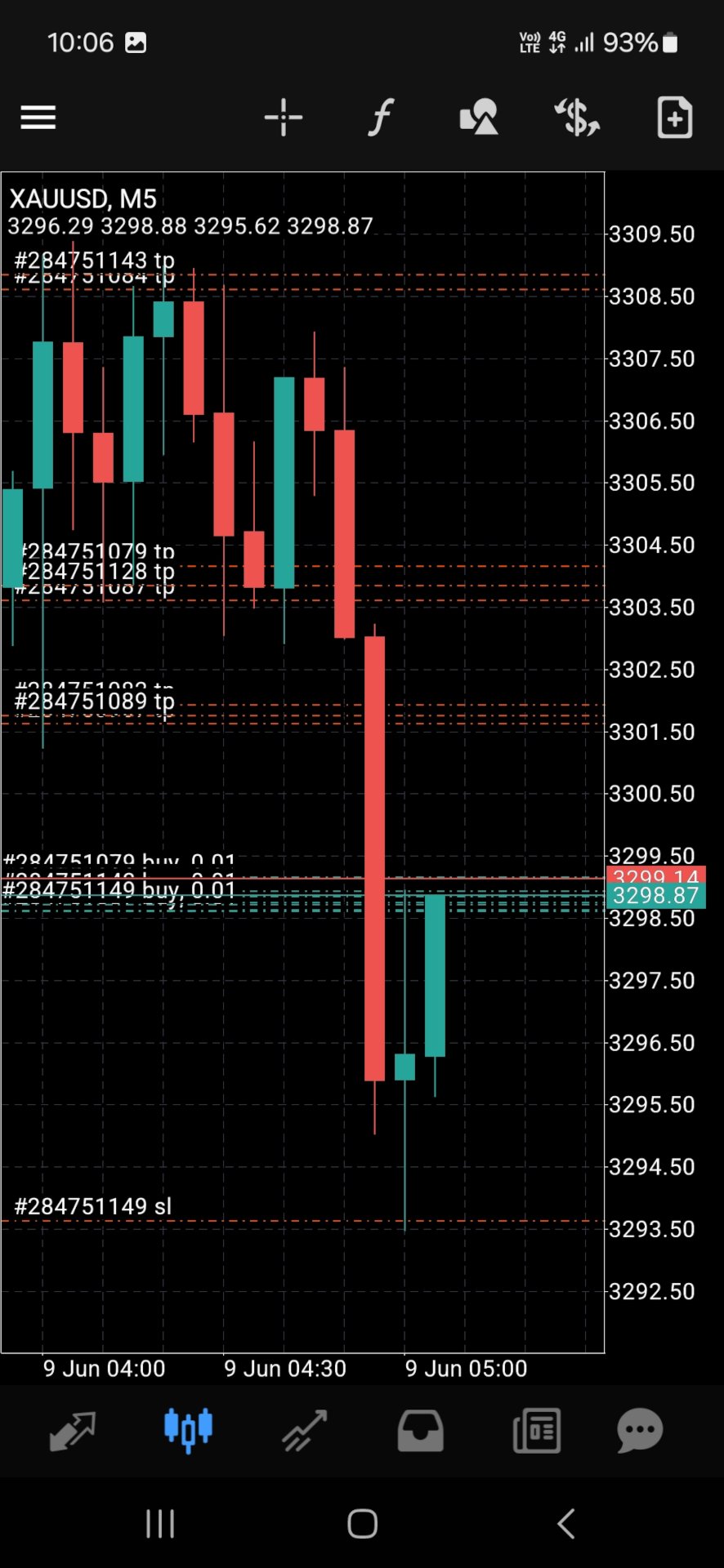
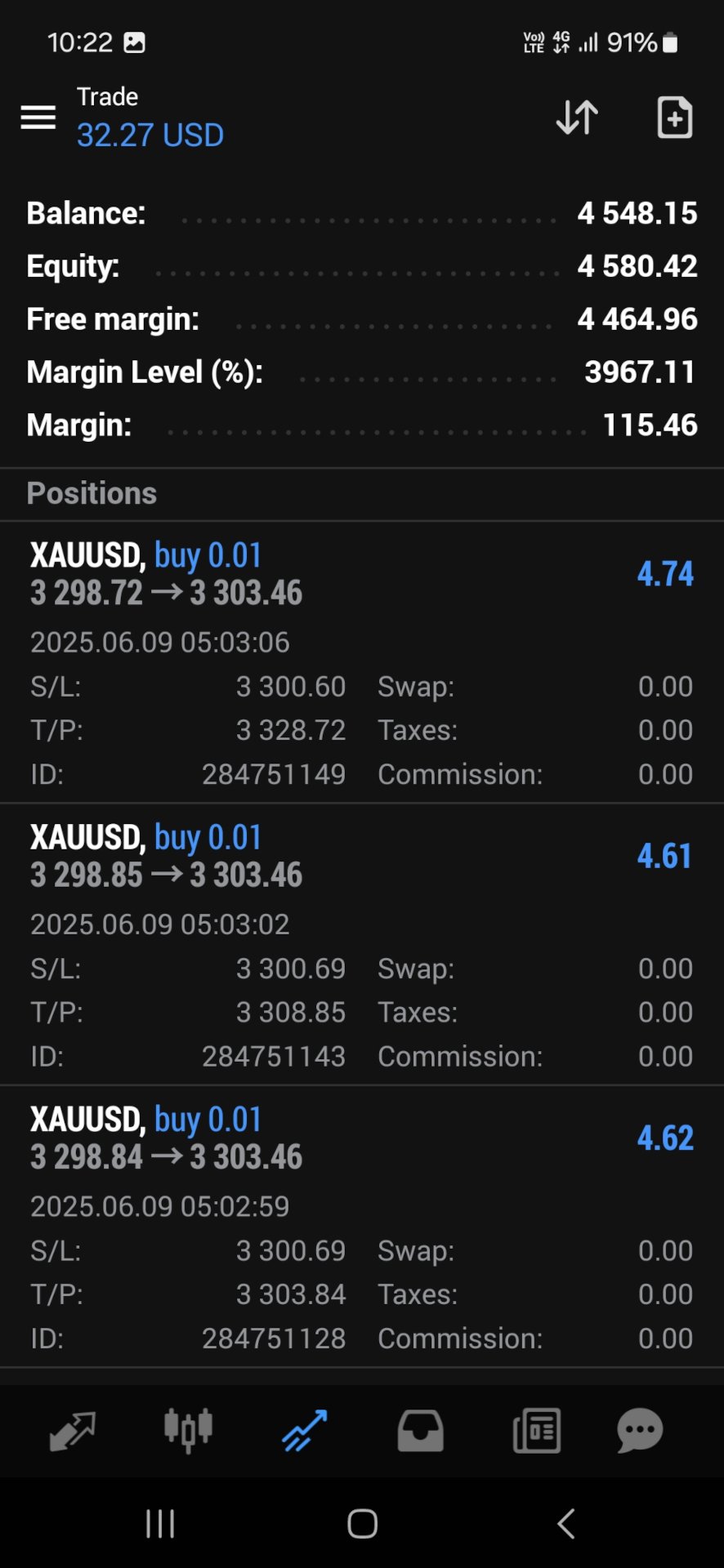
This is a EA utility that auto-manage your positions' Stop-Loss (SL) and Take-Profits (TP) dynamically. When opening a single position, it is easy to set the SL and TP manually. But when dealing with multiple positions, it can be very tedious or overwhelming to fill in so many SL and TP values consistently, especially in a short span of time, like in scalping. Over time and after many such trades, trading itself can become a chore. That is where this EA can serve as a pal or assistant in your semi-automated trading journey by handling the unglamorous aspect of trading.

Whether you are trading on your own, or following signals from other providers, sometimes the situation can easily turn frustrating. For example, a potential trade setup is identified with the following information:

Gold Buy: 3328-3325
SL:   3323
TP-1: 3331
TP-2: 3333
TP-3: 3338

You start to layer multiple positions to fill the indicated zone according to your risk management. While still at it, you try to enter the SL and TP of these positions, one by one. Before you can finish, the market accelerates favorably and a Break-Even is called for these positions to be risk-free. Or the price suddenly reverse much beyond your planned SL, and you realize some positions' SL were not set. Needless to say, a lot of other scenes can happen that require the constant updating of the positions' SL and TP, like in consecutive trade setups. Also, it is difficult to set and manually track the TP of multiple positions according to a planned allocation strategy, e.g. 30% for TP-1, 50% for TP-2, and 20% for TP-3.

When SL and TP are not set upfront, there is usually an emotional tendency to let losing positions run and winning positions cut short. With this EA, SL and TP are set accordingly and sent to the broker for a hands-free outcome. When entering with a single but bigger sized position, the opening price is usually not optimized, and subsequent partial closure at different TP prices also require manual attention and execution. So why not let yourself focus on the most important part of opening your positions, then allow this EA to handle the rest of the trade without any human error or emotion. Moreover, when trading using the MetaTrader app on a mobile phone, cell connection can be dropped while travelling, or your attention may be drawn to other matters at hand. And so, it becomes less stressful if you are backed by a trusted companion EA running in the background, knowingly that your SL and TP settings will be handled systematically.

How Trading Pal EA works:

The Trading Pal EA works on individual symbol by attaching it to that specific symbol's chart, with a set of inputs customized to that symbol if need be. It does not matter which timeframe is selected on the chart, as this EA is pre-set to run either on each tick event, or on a periodic timer. The latter is preferred if the market has not much tick movement, so that the SL and TP can be set on a regular basis. On each pass, the EA will run through all open positions (active trades) to perform specific tasks according to these key features. Note that a pending order (buy/sell limit, etc.) when triggered will become an open position with its opening time set to the latest time. The EA will then treat this as the last position to be managed accordingly.

  1. Smart SL Application:
    Automatically applies SL to all open positions if missing, based on either the default level (in pips) or the last position's SL. For the first position's SL, it can be set manually or left empty for the EA to set using the default level. For subsequent positions with no SL, the EA will either, based on input selection, use the exact SL from the last position to fill them in, or set them using the default level. In other words, a specific SL can be set once manually for the EA to use on subsequent related positions. For this feature, buy and sell positions are handled separately.

  2. Flexible TP Allocation:
    Distribute TP targets among all open positions using a smart allocation algorithm based on percentage, with support for up to 4 levels (in pips, from lowest level 1 to highest level 4), including a default one, e.g. 30% - 40% - 20% - 10%. For positions with no TP, the EA will fill them using the 4 TP levels according to the allocation percentages defined in the inputs. The EA will also respect a manually set TP, which will be automatically allocated into one of the 4 levels by range; A manual TP can also be marked as a potential loss if it is set negatively below/above the open price for a buy/sell position. In sum, profits-taking can be automated according to a pre-defined set of target levels by percentages, and enhanced manually by setting the TP for any position along the way. For this feature, the allocation algorithm encompasses both buy and sell positions.

  3. Advance SL mode [Auto] - Break-Even, Trailing or Trail-TP (optional):
    For all open positions, choose between a fully customizable Break-Even (BE) mechanism to go risk-free, Trailing stop or Trail-TP to lock in profits, as your trade moves favorably. BE is defined using a trigger, and a offset level, measured in pips. Similarly, Trailing is defined using a start, a stop, and a step level, all also measured in pips. To illustrate using a buy position, BE is set when the current price is more than the position's open price by the trigger level, and the stop level is set above the open price by an offset amount; Trailing starts after current price is more than the position's open price by the start input, and the stop level is set at an interval below the current price, which then move upon each step increase in the current price. For Trail-TP, profits are locked in at the 4 different TP levels of each position, i.e. when the current price reaches TP-1 of a position, its SL is moved to BE, then when the current prices reaches the next TP level, its SL is moved to that of the last TP. Each mode in advancing SL can be applied on positions either individually as a buy/sell, or as a layer of buys/sells together. The latter considers the top (for buys) or bottom (for sells) position only when determining whether to advance the SL for the remaining positions.

  4. Order Hotkeys [Manual] (optional):
    "Special" pending orders can be used as hotkeys to manually set the SL and TP of all open positions quickly, or close positions above (for buys) or below (for sells) a specific price in bulk, which is very useful when trading on just the MetaTrader mobile app. Imagine when having to shift the TP of multiple positions, the new TP value has to be keyed into each position individually. But with this hotkey function, the new TP value would only need to be keyed once via a pending order serving as a placeholder. For such orders to work, they are specially created at prices that are unlikely to be triggered in the near future. For example, a buy-limit order for XAUUSD can be set at a price of 123, which is so much lower than the current price that chances of it being triggered is almost nil. The price '123' then acts as a code for enabling the hotkey that can be used to set the TP of all buy positions by setting the TP of the buy-limit order correspondingly. For the full explanation of these order hotkeys, see the section below.

  5. Control-Panel [Manual] (optional):
    A dialog panel can be enabled for interactive management of all open positions or pending orders on the MetaTrader terminal only. It features direct controls over the SL and TP of the open positions, including a special function for closing them. It also has functions to manage limit or stop orders (that match the input Magic Number). This user interface works on an ad-hoc basis via input edits and button clicks, alongside other automated functions. The control-panel can be minimized when not in use, and its text size can be adjusted via the EA inputs. It can be dragged around to avoid overlapping with other objects on the chart window; Otherwise, re-maximizing the control-panel will bring it on top of the existing chart objects. The states of the applicable controls, e.g. SL and TP edits, on the panel will be retained when switching the symbol's timeframe on the chart, or changing the EA inputs. See the section below for more details on the control-panel functions, together with a few screenshots of its display on the chart.

  6. Dashboard Overlay (optional):
    See a summary of your pending orders and open positions that the EA is managing in real-time via a display on the symbol's chart. The mean or average SL and TP of all positions will be computed in pips-per-minimum-lot to reflect the potential loss (if negative) or profit (if positive), and to indicate the current risk and reward ratio. Please see the screenshot of an example dashboard on a symbol's chart, available only on a MetaTrader terminal (not mobile app).

  7. Pip Value Calculation:
    Accurate pip distance handling for XAU/GOLD, Bitcoin, Ethereum and Forex majors (including JPY) by default. For other symbols, there is a pip-price factor input that can be set, which has to be confirmed on a demo account first if unsure. For examples, XAU=0.1, BTC=10, ETH=1, JPY=0.01, MajorFX=0.0001. If the pip-price factor is not set on a symbol not mentioned above, the EA will not run, and no dashboard will be shown even if enabled.

  8. Failsafe Execution and Logging:
    Built-in retry mechanisms and detailed logging to the Experts tab on a MetaTrader terminal to help you track and debug in case of broker rejections. The EA will log messages with prefix "INFO", "WARN" and "ERROR" respectively. If SL or TP cannot be set, try to adjust the default level or related input.

What to expect of this EA:

  1. This is a utility EA, so no results will be shown on MetaTrader strategy tester.
  2. This EA can be run on a home PC or VPS with minimal resources.
  3. This EA can be restarted (inputs changed, etc.) anytime, and still continue to function thereafter.
  4. This EA can also be used to manage open positions from other EA by setting the Magic Number input (default 0 is for manual positions).
  5. This EA does not open nor close positions on its own unless manually instructed via the Control-Panel or Order Hotkey. So for any position that has not touch SL or TP yet, it may incur swap fee or suffer from market gaps overnight.
  6. Positions can still be manually updated/closed, or pending orders placed/deleted manually, even when this EA is running, which will not affect its operation.

Control-Panel Functions:

  • Set the same Stop-Loss (SL) or Take-Profit (TP) price level to all buy or sell positions quickly. For TP input, there are 2 price levels that can be allocated according to an input percentage, e.g. 20% of all positions to TP-1 and remaining 80% to TP-2.
  • Set all buy or sell positions to Break-Even (BE) or Trail by pips, which is similar to the corresponding automated functions.
  • Change the Advance/Auto SL mode (None, BE, Trailing or Trail-TP) on the fly.
  • Close positions above (for buys) or below (for sells) a price margin in bulk quickly, with an option to close only those positions in profit or with losses acceptable. This is slightly different from the bulk close functions that are in-built in MT5, which the native MT4 platform is lacking of.
  • Place multiple limit or stop orders quickly across a specified price range, at regular price gaps, to help with position layering in an organized (and preemptive) manner. To avoid input errors, the maximum lots size per pending order, and the maximum quota number per order placement can be set via the EA inputs.
  • Delete pending orders whose prices fall within a specified price range in bulk quickly.
  • Draw lines or dashes with description on the chart window, to mark key price levels visually with different colors for buy, sell or neither.

Actual usage of the control-panel is quite intuitive, as there is a "[Control Info & Status]" bar to show the info regarding a specific control (if the related edit input is blank), and the status of the corresponding function when applied. This info-status bar will be colored in cyan if the function of a control is executed successfully on all affected positions or orders, and in yellow if some failed due to broker rejections, etc. The font "Consolas" that is used on the control-panel (and dashboard) is a monospaced typeface optimized for screen readability.

    Order Hotkeys Explained:

    A pending order needs to be created specially in order to use it as a hotkey. To enable an order hotkey, its price must be set to match the pre-set code (and also the Magic Number) in the EA inputs. Such orders' expiry can be specified, or set to Good-Till-Cancelled. But once these orders are deleted, the respective hotkey functions will cease. The different types of pending orders have different hotkey functions as described:

    • A Buy-Stop order hotkey is used to set the SL of all buy positions. Set its price much higher than the current price of that symbol, e.g. code 8800 for XAUUSD. As and when needed, set its SL to a specific level below the current price to be 'transferred' to all buy positions. If its TP is non-zero, setting the SL below/equal the current price will cause Break-Even to be set for all applicable buy positions (using the BE offset input). Having the SL above the current price will put the BE hotkey on hold until the current price move above the SL.

    • A Buy-Limit order hotkey is used to set the TP of all buy positions. Set its price much lower than the current price of that symbol, e.g. code 770 for XAUUSD. As and when needed, set its TP to a specific level above the current price to be 'transferred' to all buy positions. If its SL is non-zero, e.g. 3.0 or 30 pips, setting the TP below/equal the current price will shift the SL of all buy positions to an amount below the current price by the indicated SL value. Having the TP above the current price will put the trailing hotkey on hold until the current price move above the TP.

    • A Sell-Stop order hotkey is used to set the SL of all sell positions. Set its price much lower than the current price of that symbol, e.g. code 770 for XAUUSD. As and when needed, set its SL to a specific level above the current price to be 'transferred' to all sell positions. If its TP is non-zero, setting the SL above/equal the current price will cause Break-Even to be set for all applicable sell positions (using the BE offset input). Having the SL below the current price will put the BE hotkey on hold until the current price move below the SL.

    • A Sell-Limit order hotkey is used to set the TP of all sell positions. Set its price much higher than the current price of that symbol, e.g. code 8800 for XAUUSD. As and when needed, set its TP to a specific level below the current price to be 'transferred' to all sell positions. If its SL is non-zero, e.g. 8803.0 or 30 pips more than its price, setting the TP above/equal the current price will shift the SL of all sell positions to an amount above the current price by the indicated SL value. Having the TP below the current price will put the trailing hotkey on hold until the current price move below the TP.

    • A pending order of any of the above types with a unique price code is used as a hotkey to change the Auto/Advance SL mode accordingly. If both its SL and TP are zero, no Auto SL mode will be applied. If only its SL is non-zero, the Auto BE mode will be applied. If only its TP is non-zero, the Auto Trailing mode will be applied. If both its SL and TP are non-zero, the Auto Trail-TP mode will be applied. If this order hotkey is deleted or its price changed, the original input mode will be applied.

    • Buy-Limit or Sell-Limit order hotkey with differing price code is used to close positions above (for buys) or below (for sells) a price margin in bulk quickly. For this buy-limit hotkey, its SL value as "multiplied by 10" represents the price margin, so any position whose open price lies above this margin will be closed. The close action will be applied immediately if its TP is set below/equal the current price, otherwise it will be put on hold until the current price move above the TP. For this sell-limit hotkey, its SL value as "divided by 10" represents the price margin, so any position whose open price falls below this margin will be closed. The close action will be applied immediately if its TP is set above/equal the current price, otherwise it will be put on hold until the current price move below the TP.

    With order hotkeys, SL and TP of open positions can be managed manually in an assisted manner, which is similar to how they are managed automatically by the Trading Pal EA. In fact, certain hotkey functions can still apply (semi-manual) while the EA works autonomously behind the scene. Also, multiple order hotkeys of the same type and price code can be created, e.g. one Buy-Stop for setting SL, and another for setting BE. In the case of trailing stops, multiple hotkeys can be created beforehand to be applied in chrono order so that as the current price moves, each hotkey gets triggered one after another to advance the SL in stages. Although order hotkeys may seem complicated, using them to manage all positions' SL and TP manually is definitely easier and faster! Even the close-positions hotkey is different from the bulk close function in MT5, and which MT4 is lacking of. For a start, practice them on a demo account first. The EA dashboard will help to show whether a specific hotkey is turned on or off, provided this feature is enabled.
    Рекомендуем также
    Одна диаграмма. Полный контроль. Перестаньте тратить время на управление объектами, цветами и настройками для каждой диаграммы отдельно.       Chart Sync Manager   , вы можете       синхронизируйте, копируйте и управляйте всеми вашими графиками MetaTrader       мгновенно — с помощью всего одной панели и нескольких сочетаний клавиш. Нарисуйте один раз и обновляйте везде. Открывайте и закрывайте диаграммы одним щелчком. Поддерживайте чистоту рабочего пространства с помощью       Управление объекта
    SMT Trade Planner — профессиональный калькулятор рисков и панель исполнения ордеров прямо на графике MetaTrader. Он рассчитывает размер лота на основе ваших настроек риска, отображает визуальные линии входа, Stop Loss и Take Profit, которые можно перетаскивать на графике, проверяет сделку по настраиваемым правилам риска и позволяет исполнять сделки одним кликом.   Принцип работы Прикрепите Trade Planner к любому графику. Панель отображает информацию о счете и кнопки быстрого выбора риска. На гра
    Утилита отслеживает ваши текущие советники и управляет стоп-уровнями. Вы можете настроить, какие именно советники и валюты отслеживать. Утилита предназначена в основном для советников, которые, на ваш взгляд, плохо справляются с управлением стоп-уровнями. Установите нулевое магическое число, если вы хотите, чтобы советник отслеживал также и сделки, совершенные вручную. Поддержка скрытых уровней стоп-лосс и тейк-профит Поддержка динамического стоп-лосс на основе ATR Поддержка уровня безубытка для
    Hello, boys and girls! Script allows you either to quickly save opened charts and then close all charts opened by visual tester mode or just faster close all charts. Feel free to take a look at video manual about how to use this script on my YouTube channel. Also, feel free to join my telegram channel , where time to time I publish some exclusive stuffs. Feel free to leave feedback and thoughts how to improve this script - I'd highly appreciate that. All the best.
    Buy The Dip Util is an  halfautomatic  expert advisor (EA), to   buy on dips (days lows) and sell on spikes (days highs). A profit can exceed a loss trade up to 10 times , so the user can have several loss trades and still make profit. Orders are opened at the change of the hour , if a button in the chart is pressed. The  Buy The Dip as EA  does this automaticly. The order stoploss is automaticly set right below the low of the former hour (buy) or right over the high (sell). The position size

    Копирование торговых сигналов из Telegram канала в MetaTrader.  Утилита поможет легко и просто  копировать сделки из  вашего Телеграм  канала или чата в торговый терминал МетаТрейдер практически моментально  MT5 version -  https://www.mql5.com/ru/market/product/62382  Оперативная поддержка в телеграм чате: https://t.me/forex4up_chat Шаблон для сигналов в Телеграм канале, чате (можно изменить в параметрах) SYMBOL=EURUSD, TYPE=SELL, PRICE= 0.00000 , LOT= 0.01 , STOPLOSS= 0.00000 , TAKEPROFIT= 0.00
    Plain MT4
    Ahmed Alaaeldin Abdulrahman Ahmed Elherzawi
    This is a semi-automatic Expert Advisor that opens trades automatically based on the direction you set using the trade sell / buy on the panel. The magic of this EA is that it recognizes the objects that you draw on the chart by closing the open positions at key levels, it will notify you through the mobile notification, then it will wait for the next direction. It opens orders continuously regardless of the time frame of the chart. So you don't have to stay on a lower time frame. Instead, you c
    Extra Martingale
    Vladimir Pokora
    5 (1)
    Is your trade at a loss? Does not matter ! You can use this Extra martingale tool.  In the set loss of your trade or your EA's trade , this tool will open another trade at a better price. It can also open multiple trades at different distances and with different lot sizes. Each trade will be assigned a TakeProfit. This tool has a lot of settings. You can set variable lot sizes, variable trade distances, variable TakeProfit sizes, maximum total profit or loss in money. You can also close trades
    CANADIAN TAIGA - это профессиональный портфельный советник, использующий систему торговли по тренду, основанную на принципах прорыва волатильности и прорыва уровней поддержки/сопротивления. Он работает на всех парах канадского доллара. Основной принцип Canadian Taiga заключается в захвате торговых возможностей на всех парах с канадским долларом, используя сложный модуль хеджирования. Скачайте CANADIAN TAIGA и протестируйте его на всех парах канадского доллара, как рекомендуется, и если он не д
    One Click MT4
    MQL TOOLS SL
    5 (3)
    One Click Close MT4 is an EA which allows you close orders quickly. EA display on chart two buttons. The first button "Close All Positions" is using to close all opened orders. The second button "Close Profit Positions" is using to close only profitable orders. EA is closing orders for all available symbols, not only for chart symbol. In EA params you can set distance from upper chart frame (Y Offset) and from left chart frame (X Offset). For installation EA it is only need to copy One Click Clo
    FREE
    Quick Lines Tool: Удобный индикатор для построения трендовых линий и прямоугольников Quick Lines Tool — это мощный и интуитивно понятный индикатор для MetaTrader 4, предназначенный для трейдеров, которым нужны быстрые и эффективные инструменты для технического анализа. С помощью этого индикатора вы сможете легко создавать трендовые линии, уровни поддержки/сопротивления (AP/DW) и прямоугольники, оптимизируя процесс разметки графиков. Индикатор идеально подходит как для новичков, так и для професс
    Quick Symbols
    Abdulkarim Karazon
    Быстрый символ — это панельный индикатор tybe, у которого имена символов в виде кнопок, а также имеются временные интервалы в виде кликаемых кнопок. Основная цель использования этого индикатора — быстрый просмотр пар, сам по себе панель имеет кнопки скрытия/показа, чтобы не мешать трейдеру; благодаря быстрому времени выведения и бесошибочной работе этот инструмент — самый доступный инструмент для любого типа трейдеров. КАК ИСПОЛЬЗОВАТЬ : просто нажмите на нужную пару, и пара откроется прямо н
    FREE
    Советник DepoControl –   полный контроль над депозитом Closers   –   советник, контролирующий общее состояние счета и закрывающий ВСЕ рыночные ордера на счете при наступлении определенных условий. Советник закрывает ВСЕ ордера на счете при условиях (по прибыли): Закрывать ВСЕ ордера по общей прибыли на счете,   выраженной в деньгах . Например, в настройках указано   –   закрывать позиции при достижении прибыли в 100. Тогда советник закроет все рыночные ордера при общей прибыли на счете в 100 вал
    ProfRoboTrading Dashboard MultiSymbol is Expert Advisor  a lightweight on-chart control panel that provides a clear overview of your trading account and open positions across multiple symbols. The dashboard displays key account metrics, summarizes open BUY/SELL orders and lots per symbol, calculates profit for Day/Week/Month, and offers quick manual close actions directly from the table. Key features Multi-symbol table   (symbols list configurable). Account metrics panel:   Balance, Equity, Mar
    Telegram Bot Signals Parser
    AHMAD ALI MAHER MOHAMAD
    1 (2)
    Эксперт парсит сигналы от телеграм бота.  В настройках эксперта необходимо указать токен телеграм бота, а также ключевые слова, которые будут в сигнале. Вы можете изменять или добавлять ключевые слова. Значения по умолчанию в настройках эксперта используются, если в поступившем сигнале отсутствуют данные значения (размер лота, стопы). В настройках эксперта необходимо указать "Разрешить импорт DLL".
    OpenOrders
    Andrey Chiganaev
    Смысл данного скрипта в том, что вы очень быстро и с легкостью сможете заключать сделки (выставлять ордера) на рынке. Что умеет делать скрипт Покупать и продавать по рыночной цене; Выставлять отложенные ордера: Buy/Sell Limit и Buy/Sell Stop; Откроет сделку с объемом, который вы зададите; Рассчитывать и выставлять TakeProfit; Рассчитывать и выставлять StopLoss; Сам определяет, сколько знаков после запятой; Сам определяет инструмент, на который нанесли скрипт. Что вы получите вместе со скриптом
    The product has a great combination of pending orders and trends to help investors manage capital effectively. The bot does not have a martingale, so it is always safe of capital. Run the D1 timeframe pairs. The main parameters can be installed: Lot -  Startot . Auto-Grid   -    ON/OFF AutoLot  - ON/OFF TP - Takeprofit   -pips. SL - StopLoss  - Pips. Magic -  Number magic. TralllingStop  - ON/OFF Comment  - KING Tralling - pips
    MT4 Local Trade Copier A file-based trade copying system for MetaTrader 4 that synchronizes trades between Master and Client terminals on the same computer or network. Key Features Master/Client Architecture : One Master terminal broadcasts trades, multiple Client terminals can receive and replicate them File-Based Communication : Uses shared folder system for reliable inter-terminal communication Flexible Lot Management : Copy exact lot sizes or use fixed lot sizes on client accounts Customizab
    提供专业的EA编程服务,推出特色仪表盘EA编程,将您的交易策略自动化,可视化,一个图表管理多个交易货币对,详情查看: http://www.ex4gzs.com   Providing quick Developments and Conversion of MT4/MT5 EAs, Indicators, Scripts, and Tools. If you are looking for an Dashboard EA to turn your trading strategy into auto trading algo and to manage multi trades in one chart with visualizing tool, come and visit http://www.ex4gzs.com/en for more details. 如果产品有任何问题或者您需要在此产品上添加功能,请联系我 Contact/message me if you encounter any issue using the product or need extra feat
    Market Monitor
    Rodrigo Rethka Goncalves
    Market Monitor – Smart Asset Performance Dashboard for MT4 Turn your MetaTrader 4 into a professional trading intelligence center! Market Monitor is a powerful monitoring tool that displays, in real time, the most relevant performance metrics of each symbol being traded — helping you make faster, smarter, and more strategic decisions. What Does This Indicator Do? Market Monitor scans all open and historical orders, consolidates the data by symbol, and displays everything in visual pa
    UTralVirtual
    Viktor Shpakovskiy
    Утилита для управления открытыми позициями и отложенными ордерами. Встроенный трейлинг стоп имеет пять режимов и семь инструментов. Есть виртуальный стоп лосс и виртуальный тейк профит, которые можно свободно передвигать по графику. С помощью встроенного симулятора торговли, вы можете проверить, как работает советник в тестере стратегий. Подробное руководство к советнику UTralVirtual можно найти в разделе "Обсуждение". Преимущества 5 режимов трейлинг стопа: виртуальный, обычный, общий, по проце
    Автоматически торговый советник для терминала МТ4. Любые торговые инструменты. Минимум настроек. Подробное отображение стиля и торговых условий на экране вашего терминала. Начинает работать сразу после установки и подключения к вашему счету МТ4. Таймфрейм любой ниже Н4. Рекоментдуемый таймфрейм для отображения торговых сессий Н1. Оптимальное время работы торгового робота выбираете вы. С наилучшими пожеланиями и попутного тренда.
    XeroX
    Vasile Verdes
    Copy transactions from one MT4 account to another MT4 account on the same computer. Option to select with which type of device to perform the copying. The code is minimalistic, without graphic objects, panels, etc., and maximally fast, for a faster copying. Separate Money Management, and other settings. To transmit transactions, attach the expert to the unwanted pair in Master mode. To copy transactions, attach the expert to the same pair in another MT4 terminal, in Slave mode.
    Водяной знак на графике: Символ + Таймфрейм / или ваш собственный текст Многофункциональная утилита:   содержит более 66 функций, включая эту |   Свяжитесь со мной , если у вас есть какие-либо вопросы В настройках индикатора вы можете настроить: Размер шрифта; Цвет текста; Имя шрифта; Угол на графике: 1 = Вверху слева; 2 = Вверху справа; 3 = Внизу слева; 4 = Внизу справа; 5 = По центру; Показ текущего таймфрейма: вкл /выкл; Префикс символа, подлежащего удалению ( n_AUDCAD --> AUDCAD ); Суффикс с
    提供专业的EA编程服务,推出特色仪表盘EA编程,将您的交易策略自动化,可视化,一个图表管理多个交易货币对,详情查看: http://www.ex4gzs.com   Providing quick Developments and Conversion of MT4/MT5 EAs, Indicators, Scripts, and Tools. If you are looking for an Dashboard EA to turn your trading strategy into auto trading algo and to manage multi trades in one chart with visualizing tool, come and visit http://www.ex4gzs.com/en for more details. 如果产品有任何问题或者您需要在此产品上添加功能,请联系我 Contact/message me if you encounter any issue using the product or need extra feat
    Online Accounts Manager MT4
    Kyra Nickaline Watson-gordon
    5 (1)
    OneClick Online Account Manager is a powerful utility that helps you to manage all your accounts from a centralized panel. It is suitable for all single account traders and specially for multiple accounts traders. The utility help you to : Monitor status of all accounts on a private web page. Some information such as account connection status, account profit, DD, Balance, Equity, Margin Level, Number of positions and orders, Daily and Weekly profit/loss and also overall summation of all these p
    News Panel
    Radek Reznicek
    5 (2)
    News Panel  is a fully adjustable utility for Forex News. It can show upcoming news in InfoPanel as well as lable for upcoming and past news labels on the chart.  This utility also enables Upcoming news Alerts and Push notification. User can change number of upcoming news displayed, colors and many others. Instructions Alow WebRequest for Listed URLS in Metatrader Tools -> Options -> Expert Advisors tab (see screen or watch the video) Add " https://ec.forexprostools.com/ " to the list of allo
    Various Trailing Manager EA Various Trailing Manager EA is a professional trader's tool that provides protection of floating profit on open trades. This EA Utility allows you to manage (with advanced filtering) unlimited open orders (manual or EA) with trailing stops based on 7 methods: percent, ATR, Moving Average, Candle, Parabolic, Fractal. The trailing stop can be either real or virtual, and you can exit fully or with a partial close percent on touch or bar close. Visualize all orders and t
    Копировщик сделок через   Telegram     канал.  Поможет моментально публиковать Вашу торговлю в   Телеграм   канал или копировать сделки из   Telegram     канала. Утилита может работать в двух направлениях на примем сигналов в МТ4 и передачу сигналов в   Телеграм . Телеграм-чат для вопросов и обсуждения: https://t.me/forex4up_chat Больше никаких пропущенных сделок  Нет больше паники Управление капиталом Простота использования ПЛАТНАЯ версия: https://www.mql5.com/ru/market/product/56142 Вы мож
    FREE
    Grid MT4
    Volodymyr Hrybachov
    Утилита для полуавтоматической торговли, управления ордерами, может быть использована так-же и  для восстановления убыточных позиций на счете. Имеет функцию уменьшения просадки на счете путем перекрытия убыточных ордеров. Может работать с ручными ордерами, ордерами открытыми с панели или ордерами открытыми другим советником. Имеет минимум параметров, легко настраивается, работает с любым количеством ордеров. Для тестирования используйте визуальный режим в тестере стратегий. MT5 version  https://
    С этим продуктом покупают
    Trade Assistant MT4
    Evgeniy Kravchenko
    4.43 (194)
    Помогает рассчитать риск на сделку, простая установка нового ордера с помощью линий, управление ордерами с функциями частичного закрытия, 7 типов трейлинг-стопа и другие полезные функции. Дополнительные материалы и инструкции Инструкция по установке   -   Инструкция к приложению   -   Пробная версия приложения для демо счета Функция Линии   - отображает на графике линию открытия, стоп-лосс, тейк-профит. С помощью этой функции легко установить новый ордер и увидеть его дополнительные характери
    Local Trade Copier EA MT4
    Juvenille Emperor Limited
    4.96 (109)
    Опыт экстремально быстрого копирования сделок с помощью Local Trade Copier EA MT4 . Благодаря простой установке в течение 1 минуты этот копировщик сделок позволяет вам копировать сделки между несколькими терминалами MetaTrader на одном компьютере с Windows или на Windows VPS с крайне быстрыми скоростями копирования менее 0.5 секунды. Независимо от того, новичок вы или профессиональный трейдер, Local Trade Copier EA MT4 предлагает широкий спектр опций, чтобы настроить его под ваши конкретные пот
    Добро пожаловать в Trade Manager EA — лучший инструмент для управления рисками, предназначенный для упрощения, точности и эффективности торговли. Это не просто инструмент для размещения ордеров; это комплексное решение для удобного планирования торгов, управления позициями и усиленного контроля над рисками. Независимо от того, начинающий вы трейдер, опытный специалист или скальпер, нуждающийся в быстром исполнении, Trade Manager EA адаптируется к вашим потребностям и работает с любыми активами:
    Exp COPYLOT CLIENT for MT4
    Vladislav Andruschenko
    4.65 (66)
    Копировщик позиций/сделок/ордеров для MetaTrader 4 ( Для копирования на терминал MetaTrader 4 ). Копирует сделки, позиции, ордера с любых счетов, в том числе и счетов, открытых по инвест паролю. Один из лучших копировщиков сделок COPYLOT  МТ4 - МТ4, МТ5 - МТ4 для версии  COPYLOT MT4  ( или  МТ4 - МТ5  МТ5 - МТ5 для версии COPYLOT MT5)  на сегодняшний день. Версия МТ5 Полное описание +DEMO +PDF Как купить Как установить    Как получить файлы журналов   Как тестировать и оптимизировать    Все
    TradePanel MT4
    Alfiya Fazylova
    4.85 (93)
    Trade Panel — это многофункциональный торговый помощник. Приложение содержит более 50 торговых функций для ручной торговли и позволяет автоматизировать большинство торговых операций. Внимание! Скидки действуют ограниченное время, каждый вторник цена будет повышаться на 5$ (до 90$). Перед покупкой вы можете протестировать демоверсию на демо-счете. Скачать пробную версию приложения для демонстрационного аккаунта: https://www.mql5.com/ru/blogs/post/750864 . Полная инструкция здесь . Торговля. Позво
    Trading History MT4
    Siarhei Vashchylka
    5 (9)
    Trading History - Программа для торговли и управления капиталом на истории котировок в тестере стратегий. Может работать с отложенными и немедленными ордерами, оснащена функциями трейлинг стопа, безубытка и тейкпрофита. Очень хорошо подходит для тренировок и тестирования различных стратегий. Инструкция/Мануал ( Обязательно читайте перед приобретением ) Преимущества 1. В кратчайшие сроки позволяет протестировать любую торговую стратегию 2. Отличный тренажёр для тренировок трейдинга. Можно получи
    The product will copy all telegram signal to MT4   ( which you are member  ) , also it can work as remote copier.  Easy to set up, copy order instant, can work with almost signal formats, image signal, s upport to translate other language to English Work with all type of channel or group, even channel have "Restrict Saving Content", work with  multi channel, multi MT5 Work as remote copier: with signal have ticket number, it will copy exactly via ticket number. Support to backtest signal. How to
    Copy Cat More Trade Copier MT4 (Копия Кот MT4) — это не просто локальный торговый копировщик; это полноценная система управления рисками и исполнения, созданная для современных условий торговли. От испытаний в prop-фирмах до личного управления счетами — он адаптируется к любой ситуации, сочетая надежное исполнение, защиту капитала, гибкую настройку и расширенные функции обработки сделок. Копировщик работает как в режиме Master (отправитель), так и в режиме Slave (получатель), обеспечивая синхрон
    TradeMirror - это советник-копировщик для платформы MT4/MT5. Почему TradeMirror Мы понимаем важность безопасности, стабильности и конфиденциальности для финансового программного обеспечения, поэтому мы приложили максимум усилий для детального укрепления этих трех элементов: Предоставляет удобный графический интерфейс, которым легко управлять Фокус на конфиденциальности и безопасности, подходит для различных финансовых сценариев с требованиями конфиденциальности при распределении заказов Точная р
    DrawDown Limiter MT4
    Haidar Lionel Haj Ali
    5 (8)
    Drawdown Limiter EA You are in the right place if you were searching for Drawdown control, Drawdown limiter, Balance protection, Equity Protection or Daily Drawdown Limit related to Prop Firm, FTMO, or Funded account trading, or if you want to protect your trading account. Have you suffered from controlling your drawdown when trading funded accounts? This EA is meant for you. Prop firms usually set a rule called “Trader Daily Drawdown”, and if it is not respected, you are disqualified.  I am an

    Grid Manual MT4
    Alfiya Fazylova
    4.71 (17)
    Grid Manual — это торговая панель для работы с сеточными стратегиями. Утилита универсальная, имеет гибкие настройки и понятный интерфейс. Работает с сеткой ордеров не только в сторону усреднения убытков, но и в сторону наращивания прибыли. Трейдеру не нужно создавать и сопровождать сетку ордеров, это сделает утилита. Достаточно открыть ордер и Grid manual автоматически создаст ему сетку ордеров и будет сопровождать его до самого закрытия. Полная инструкция и демо-версия здесь . Основные особенно

    Полная торговая панель для метода No Nonsense Forex: В этой панели собрано практически все, что вам понадобится для реализации собственного алгоритма NNFX, что поможет вам торговать еще быстрее и проще. Она состоит из 3 частей: Панель символов Быстро переключитесь на любой символ в ваших графиках, нажав на его название. На панели может отображаться дополнительная информация: текущие открытые сделки , корреляция этих сделок с другими символами (за исключением случаев, когда их стоп-лосс находится
    Предупреждение: этот советник не будет работать в режиме Тестера, а только на демонстрационных или реальных счетах. Свяжитесь со мной, если вы хотите попробовать демонстрационный режим по ссылке https://www.mql5.com/en/users/abudabi MT5 Version Отправляй ордера быстро в MetaTrader 4 с помощью клавиатуры и мыши: Просто перемести курсор над желаемой ценой, нажми клавишу: Ордер 'Buy Market': E Ордер 'Buy Limit': A Ордер 'Buy Stop': Z Ордер 'Sell Market' : Q Ордер 'Sell Limit': D Ордер 'Sell Sto
    CloseIfProfitorLoss with Trailing
    Vladislav Andruschenko
    4.87 (31)
    Закрытие позиций в MetaTrader 4 по общей прибыли\убытку с трейлингом прибыли. Включите Режим Виртуальных стопов . Закрытие и расчет отдельно по BUY и SELL позициям . Закрытие и расчет по всем символам или только по текущему . Активируйте трейлинг-стоп прибыли. Закрытие по общей прибыли и убытку в валюте депозита, пунктах или % от баланса . Советник предназначен для использования на любом счёте в паре с любым другим советником или при ручной торговле. Версия MT5 Полное описание + DEMO + PDF Как
    VirtualTradePad mt4 Extra
    Vladislav Andruschenko
    4.85 (61)
    Торговая Панель для торговли в 1 клик.  Работа с позициями и ордерами!  Торговля с  чарта  (график) или с  клавиатуры . С помощью нашей торговой панели Вы можете торговать   в один клик с графика   и совершать торговые операции в   30   раз быстрее стандартного управления в MetaTrader.  Автоматические расчеты параметров и функции, которые облегчают жизнь трейдеру и помогают трейдеру вести свою торговую деятельность в разы быстрее и удобнее. Графические подсказки и полная информация по торговым с
    Telegram to MT4 Coppy
    Sergey Batudayev
    3.75 (8)
    Telegram to MT4: Идеальное решение для копирования сигналов Упростите свою торговлю с Telegram to MT4 — современным инструментом, который копирует торговые сигналы прямо из каналов и чатов Telegram на вашу платформу MetaTrader 4, без необходимости использования DLL. Это мощное решение обеспечивает точное исполнение сигналов, широкие возможности настройки, экономит время и повышает вашу эффективность. [ Instructions and DEMO ] [ FAQ ] Ключевые возможности Прямая интеграция с Telegram API Аутентиф
    G-Labs Trade Manager is a professional on-chart trading panel for MetaTrader 4. It helps you plan trades, size positions from risk, manage open trades, and stay informed — while you stay in control of every decision. It is a trading utility, not a black-box signal or automated strategy. WHO IT IS FOR • Traders who want one place to set stop loss, take profit, and risk before clicking buy or sell. • Anyone who trades manually or semi-manually and wants faster execution and clearer risk. • Users w
    Trade Dashboard MT4
    Fatemeh Ameri
    4.92 (53)
    Tired of complex order placement and manual calculations? Trade Dashboard is your solution. With its user-friendly interface, placing orders becomes effortless, by a single click, you can open trades, set stop loss and take profit levels, manage trade lot size, and calculate risk to reward ratios, allowing you to only focus on your strategy. Say goodbye to manual calculations and streamline your trading experience with Trade Dashboard. Download  Demo Version  right now. You can find  Details of
    Virtual SL TP Trailing Pro for MT4 – Client-Side Stop Loss / Take Profit and Trade Management Looking for MetaTrader 5 version?  I t is available separately in the Market:   Virtual SL TP Trailing Pro MT5 Public channel:   CLICK HERE Virtual SL TP Trailing Pro for MT4 is a trade management utility that keeps Stop Loss (SL) and Take Profit (TP) levels on the client side instead of sending them to the trading server. It is designed to help you manage exits in a structured way using a clear on-cha
    The product will copy all  Discord  signal   to MT4   ( which you are member  ) , also it can work as remote copier.  Easy to set up. Work with almost signal formats, support to translate other language to English Work with multi channel, multi MT4. Work with Image signal. Copy order instant, auto detect symbol. Work as remote copier: with signal have ticket number, it will copy exactly via ticket number. How to setup and guide: Let read all details about setup and download Discord To MetaTrader
    EchoTrade Telegram to MT4 Copier
    Perpetual Chinemerem Vincent
    5 (2)
    EchoTrade Telegram to MT5 Copier Seamless, Instant, and Reliable Signal Copying - Direct from Telegram to MetaTrader 4! The product does not run in the strategy tester but you can get free trial version   here  for testing before purchase. Tired of manually executing trades from Telegram signals? EchoTrade automates the process, instantly copying trades from any Telegram channel or group directly into your MT5 account—accurately, efficiently, and without delay. Key Features: Universal Compatib
    ManHedger MT4
    Peter Mueller
    5 (2)
    THIS EA IS A SEMI-AUTO EA, IT NEEDS USER INPUT. Manual & Test Version Please TEST this product before   BUYING  and watch my video about it. Contact me for user support or bug reports, or if you want the MT5 version! MT5 Version I do not guarantee any profits or financial success using this EA. With this Expert Advisor, you can: Implement your own   Zone Recovery   strategy to capitalize on trending markets. Create   Grid   trading strategies, to profit from ranging markets. Place orders easil
    Chart Button
    Chantal Sala
    3 (1)
    Chart Button позволяет перемещаться по всем графикам одним кликом. Утилита располагает символы как по вертикали, так и по горизонтали. Позволяет производить изменения на нескольких графиках одновременно. Утилита оптимизирует навигацию и ускоряет анализ. Значения входных параметров Direction (расположение кнопок символов) Horizontal – горизонтальное Vertical – вертикальное 32 SYMBOLS – 32 символа Forex_Suffix_Symbols – суффикс символа (не отображается на соответствующей кнопке символа) COLORS AN
    Automate Risk Management with Smart Trailing Stop Manager for MetaTrader 4 Looking for MetaTrader 5 version? I t is available separately in the Market:   Smart Trailing Stop Manager MT5 Full User Guide    –  Public channel:   CLICK HERE Struggling with manually adjusting stops and securing profits? Smart Trailing Stop Manager MT4 is an intelligent utility for MetaTrader 4 that automates trailing stops, break-even management, partial closes, and auto SL. Optimized specifically for MT4 users, it e
    MT4 к Telegram Signal Provider - это простой в использовании и полностью настраиваемый инструмент, который позволяет отправлять сигналы в Telegram, превращая ваш аккаунт в поставщика сигналов. Формат сообщений полностью настраиваем! Однако для простого использования вы также можете выбрать предопределенный шаблон и включать или отключать определенные части сообщения. [ Демо ]  [ Руководство ] [ Версия для MT5 ] [ Версия для Discord ] [ Телеграм-канал ]  New: [ Telegram To MT5 ] Настройка Шаг за
    Специальное предложение для трейдеров – скидка 40% Advanced Trade Manager – универсальное решение для более быстрой, умной и безопасной ручной торговли. Преобразуйте свою ручную торговлю с помощью NextGen Trade Manager AI – профессиональной панели на графике, которая объединяет мгновенное исполнение ордеров, визуальное планирование сделок и мощное управление рисками в один интуитивно понятный инструмент. Исполняйте ордера, управляйте рисками и защищайте прибыль быстрее, чем когда-либо, не пок
    Seconds Chart - уникальный инструмент для создания секундных графиков в MetaTrader 4 . С помощью Seconds Chart вы можете построить график с таймфреймом, заданным в секундах, получая идеальную гибкость и точность анализа, недоступную на стандартных минутных или часовых графиках. Например, таймфрейм S15 обозначает график со свечами продолжительностью 15 секунд. Вы можете использовать любые индикаторы, советники и скрипты. Работать с ними так же удобно, как и на стандартных графиках. В отличие от с
    MT4 to Discord Signal Provider — это удобный, полностью настраиваемый инструмент, предназначенный для отправки торговых сигналов напрямую в Discord. Этот инструмент превращает ваш торговый счет в эффективного поставщика сигналов. Настройте формат сообщений под свой стиль! Для удобства выберите из предварительно разработанных шаблонов и решите, какие элементы сообщения включить или исключить. [ Демо ] [ Руководство ] [ Версия MT5 ] [ Версия Telegram ]  New: [ Telegram To MT5 ] Настройка Следуйте
    MT4 Professional Copy Trading System (Версия MT4) Сверхбыстрый LOCAL копир сделок промышленного уровня для профи и мульти-аккаунтов. Промышленная LOCAL-архитектура Работа в одной среде Windows (тот же ПК / та же Windows VPS). Низкая задержка, высокая стабильность, 24/7. Master / Slave / Self + Cross Copy (MT4 ↔ MT5) Master/Slave/Self-Copier. MT4→MT4, MT4→MT5, MT5→MT4, MT5→MT5. Важно: для MT4↔MT5 нужны обе версии (MT4 и MT5). Что делает Копирует открытия/изменения (SL/TP)/закрытия в реальном
    Ultimate Trailing Stop EA
    BLAKE STEVEN RODGER
    4.33 (15)
    This EA Utility allows you to manage (with advanced filtering) unlimited open orders (manual or EA) with 16 trailing stop methods: fixed, percent, ATR Exit, Chandelier Exit, Moving Average, Candle High Low Exit, Bollinger Bands, Parabolic, Envelope, Fractal, Ichimoku Kijun-Sen, Alligator, Exit After X Minutes or Bars, RSI and Stochastic. The trailing stop can be either real or virtual, and you can exit fully or with a partial close percent on touch or bar close.  Moreover, you can add (overrid
    Другие продукты этого автора
    Why choose Trading Pal EA: This is a EA utility that auto-manage your   positions ' Stop-Loss (SL) and Take-Profits (TP) dynamically. When opening a single   position , it is easy to set the SL and TP manually. But when dealing with multiple   positions , it can be very tedious or   overwhelming   to fill in so many SL and TP values consistently, especially in a short span of time, like in scalping. Over time and after many such trades, trading itself can become a chore. That is where this EA c
    Фильтр:
    Нет отзывов
    Ответ на отзыв