Trading Pal MT4

Why choose Trading Pal EA:

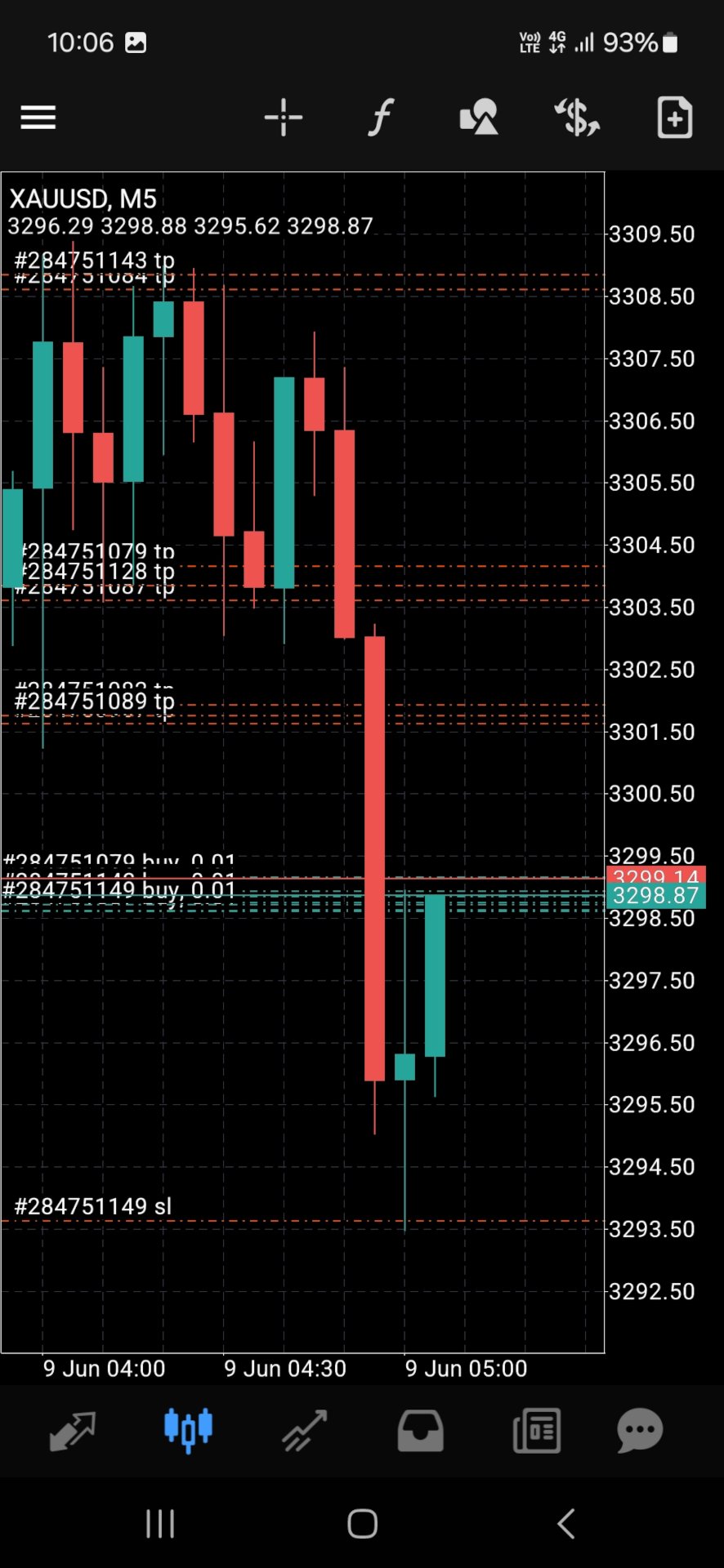
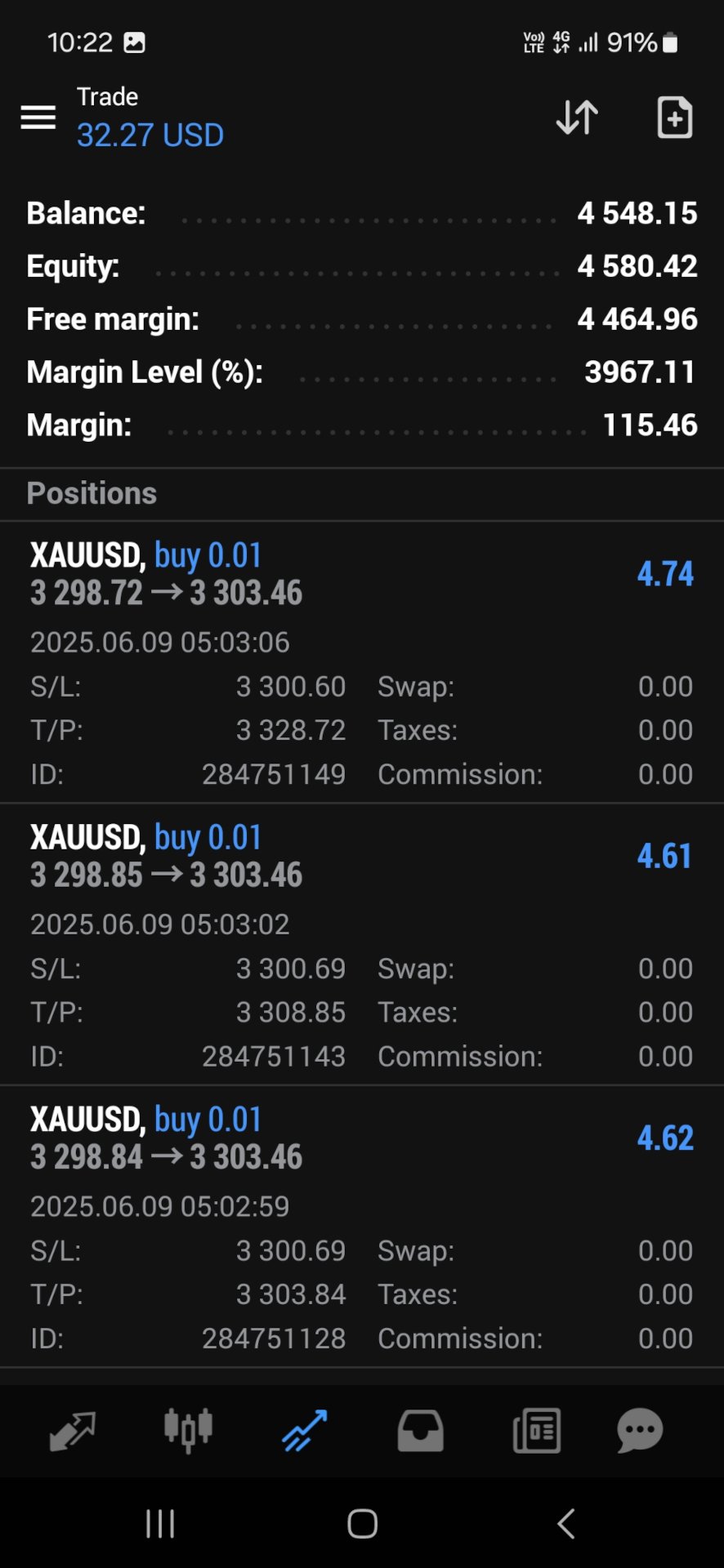
This is a EA utility that auto-manage your positions' Stop-Loss (SL) and Take-Profits (TP) dynamically. When opening a single position, it is easy to set the SL and TP manually. But when dealing with multiple positions, it can be very tedious or overwhelming to fill in so many SL and TP values consistently, especially in a short span of time, like in scalping. Over time and after many such trades, trading itself can become a chore. That is where this EA can serve as a pal or assistant in your semi-automated trading journey by handling the unglamorous aspect of trading.

Whether you are trading on your own, or following signals from other providers, sometimes the situation can easily turn frustrating. For example, a potential trade setup is identified with the following information:

Gold Buy: 3328-3325
SL:   3323
TP-1: 3331
TP-2: 3333
TP-3: 3338

You start to layer multiple positions to fill the indicated zone according to your risk management. While still at it, you try to enter the SL and TP of these positions, one by one. Before you can finish, the market accelerates favorably and a Break-Even is called for these positions to be risk-free. Or the price suddenly reverse much beyond your planned SL, and you realize some positions' SL were not set. Needless to say, a lot of other scenes can happen that require the constant updating of the positions' SL and TP, like in consecutive trade setups. Also, it is difficult to set and manually track the TP of multiple positions according to a planned allocation strategy, e.g. 30% for TP-1, 50% for TP-2, and 20% for TP-3.

When SL and TP are not set upfront, there is usually an emotional tendency to let losing positions run and winning positions cut short. With this EA, SL and TP are set accordingly and sent to the broker for a hands-free outcome. When entering with a single but bigger sized position, the opening price is usually not optimized, and subsequent partial closure at different TP prices also require manual attention and execution. So why not let yourself focus on the most important part of opening your positions, then allow this EA to handle the rest of the trade without any human error or emotion. Moreover, when trading using the MetaTrader app on a mobile phone, cell connection can be dropped while travelling, or your attention may be drawn to other matters at hand. And so, it becomes less stressful if you are backed by a trusted companion EA running in the background, knowingly that your SL and TP settings will be handled systematically.

How Trading Pal EA works:

The Trading Pal EA works on individual symbol by attaching it to that specific symbol's chart, with a set of inputs customized to that symbol if need be. It does not matter which timeframe is selected on the chart, as this EA is pre-set to run either on each tick event, or on a periodic timer. The latter is preferred if the market has not much tick movement, so that the SL and TP can be set on a regular basis. On each pass, the EA will run through all open positions (active trades) to perform specific tasks according to these key features. Note that a pending order (buy/sell limit, etc.) when triggered will become an open position with its opening time set to the latest time. The EA will then treat this as the last position to be managed accordingly.

  1. Smart SL Application:
    Automatically applies SL to all open positions if missing, based on either the default level (in pips) or the last position's SL. For the first position's SL, it can be set manually or left empty for the EA to set using the default level. For subsequent positions with no SL, the EA will either, based on input selection, use the exact SL from the last position to fill them in, or set them using the default level. In other words, a specific SL can be set once manually for the EA to use on subsequent related positions. For this feature, buy and sell positions are handled separately.

  2. Flexible TP Allocation:
    Distribute TP targets among all open positions using a smart allocation algorithm based on percentage, with support for up to 4 levels (in pips, from lowest level 1 to highest level 4), including a default one, e.g. 30% - 40% - 20% - 10%. For positions with no TP, the EA will fill them using the 4 TP levels according to the allocation percentages defined in the inputs. The EA will also respect a manually set TP, which will be automatically allocated into one of the 4 levels by range. In sum, profits-taking can be automated according to a pre-defined set of target levels by percentages, and enhanced manually by setting the TP for any position along the way. For this feature, the allocation algorithm encompasses both buy and sell positions.

  3. Advance SL mode [Auto] - Break-Even, Trailing or Trail-TP (optional):
    For all open positions, choose between a fully customizable Break-Even (BE) mechanism to go risk-free, Trailing stop or Trail-TP to lock in profits, as your trade moves favorably. BE is defined using a trigger, and a offset level, measured in pips. Similarly, Trailing is defined using a start, a stop, and a step level, all also measured in pips. To illustrate using a buy position, BE is set when the current price is more than the position's open price by the trigger level, and the stop level is set above the open price by an offset amount; Trailing starts after current price is more than the position's open price by the start input, and the stop level is set at an interval below the current price, which then move upon each step increase in the current price. For Trail-TP, profits are locked in at the 4 different TP levels of each position, i.e. when the current price reaches TP-1 of a position, its SL is moved to BE, then when the current prices reaches the next TP level, its SL is moved to that of the last TP. Each mode in advancing SL will be applied on positions individually, be it a buy or sell position.

  4. Order Hotkeys [Manual] (optional):
    "Special" pending orders can be used as hotkeys to manually set the SL and TP of all open positions quickly, which is very useful when trading on just the MetaTrader mobile app. Imagine when having to shift the TP of multiple positions, the new TP value has to be keyed into each position individually. But with this hotkey function, the new TP value would only need to be keyed once via a pending order serving as a placeholder. For such orders to work, they are specially created at prices that are unlikely to be triggered in the near future. For example, a buy-limit order for XAUUSD can be set at a price of 123, which is so much lower than the current price that chances of it being triggered is almost nil. The price '123' then acts as a code for enabling the hotkey that can be used to set the TP of all buy positions by setting the TP of the buy-limit order correspondingly. For the full explanation of these order hotkeys, see the section below.

  5. Control-Panel [Manual] (optional):
    A dialog panel can be enabled for interactive management of all open positions or pending orders on the MetaTrader terminal only. It features direct controls over the SL and TP of the open positions, including a special function for closing them. It also has functions to manage limit or stop orders (that match the input Magic Number). This user interface works on an ad-hoc basis via input edits and button clicks, alongside other automated functions. The control-panel can be minimized when not in use, and its text size can be adjusted via the EA inputs. It can be dragged around to avoid overlapping with other objects on the chart window; Otherwise, re-maximizing the control-panel will bring it on top of the existing chart objects. The states of the applicable controls, e.g. SL and TP edits, on the panel will be retained when switching the symbol's timeframe on the chart, or changing the EA inputs. See the section below for more details on the control-panel functions, together with a few screenshots of its display on the chart.

  6. Dashboard Overlay (optional):
    See a summary of your pending orders and open positions that the EA is managing in real-time via a display on the symbol's chart. Please see the screenshot of an example dashboard on a symbol's chart, available only on a MetaTrader terminal (not mobile app).

  7. Pip Value Calculation:
    Accurate pip distance handling for XAU/GOLD, Bitcoin, Ethereum and Forex majors (including JPY) by default. For other symbols, there is a pip-price factor input that can be set, which has to be confirmed on a demo account first if unsure. For examples, XAU=0.1, BTC=10, ETH=1, JPY=0.01, MajorFX=0.0001. If the pip-price factor is not set on a symbol not mentioned above, the EA will not run, and no dashboard will be shown even if enabled.

  8. Failsafe Execution and Logging:
    Built-in retry mechanisms and detailed logging to the Experts tab on a MetaTrader terminal to help you track and debug in case of broker rejections. The EA will log messages with prefix "INFO", "WARN" and "ERROR" respectively. If SL or TP cannot be set, try to adjust the default level or related input.

What to expect of this EA:

  1. This is a utility EA, so no results will be shown on MetaTrader strategy tester.
  2. This EA can be run on a home PC or VPS with minimal resources.
  3. This EA can be restarted (inputs changed, etc.) anytime, and still continue to function thereafter.
  4. This EA can also be used to manage open positions from other EA by setting the Magic Number input (default 0 is for manual positions).
  5. This EA does not open nor close positions on its own (unless manually instructed via the Control-Panel), so for any position that has not touch SL or TP yet, it may incur swap fee or suffer from market gaps overnight.
  6. Positions can still be manually updated or closed even when this EA is running, which will not affect its operation.

Control-Panel Functions:

  • Set the same Stop-Loss (SL) or Take-Profit (TP) price level to all buy or sell positions quickly.
  • Set all buy or sell positions to Break-Even (BE) or Trail by pips, which is similar to the corresponding automated functions.
  • Change the Advance/Auto SL mode (None, BE, Trailing or Trail-TP) on the fly.
  • Close positions above (for buys) or below (for sells) a price margin in bulk quickly, with an option to close only those positions in profit or with losses acceptable. This is slightly different from the bulk close functions that are in-built in MT5, which the native MT4 platform is lacking of.
  • Place multiple limit or stop orders quickly across a specified price range, at regular price gaps, to help with position layering in an organized (and preemptive) manner. To avoid input errors, the maximum lots size per pending order, and the maximum quota number per order placement can be set via the EA inputs.
  • Delete pending orders whose prices fall within a specified price range in bulk quickly.
  • Draw lines or dashes with description on the chart window, to mark key price levels visually.

Actual usage of the control-panel is quite intuitive, as there is a "[Control Info & Status]" bar to show the info regarding a specific control (if the related edit input is blank), and the status of the corresponding function when applied. This info-status bar will be colored in cyan if the function of a control is executed successfully on all affected positions or orders, and in yellow if some failed due to broker rejections, etc.

    Order Hotkeys Explained:

    A pending order needs to be created specially in order to use it as a hotkey. To enable an order hotkey, its price must be set to match the pre-set code (and also the Magic Number) in the EA inputs. Such orders' expiry can be specified, or set to Good-Till-Cancelled. But once these orders are deleted, the respective hotkey functions will cease. The different types of pending orders have different hotkey functions as described:

    • A Buy-Stop order hotkey is used to set the SL of all buy positions. Set its price much higher than the current price of that symbol, e.g. code 8800 for XAUUSD. As and when needed, set its SL to a specific level below the current price to be 'transferred' to all buy positions. If its TP is non-zero, setting the SL below/equal the current price will cause Break-Even to be set for all applicable buy positions (using the BE offset input). Having the SL above the current price will put the BE hotkey on hold until the current price move above the SL.

    • A Buy-Limit order hotkey is used to set the TP of all buy positions. Set its price much lower than the current price of that symbol, e.g. code 770 for XAUUSD. As and when needed, set its TP to a specific level above the current price to be 'transferred' to all buy positions. If its SL is non-zero, e.g. 3.0 or 30 pips, setting the TP below/equal the current price will shift the SL of all buy positions to an amount below the current price by the indicated SL value. Having the TP above the current price will put the trailing hotkey on hold until the current price move above the TP.

    • A Sell-Stop order hotkey is used to set the SL of all sell positions. Set its price much lower than the current price of that symbol, e.g. code 770 for XAUUSD. As and when needed, set its SL to a specific level above the current price to be 'transferred' to all sell positions. If its TP is non-zero, setting the SL above/equal the current price will cause Break-Even to be set for all applicable sell positions (using the BE offset input). Having the SL below the current price will put the BE hotkey on hold until the current price move below the SL.

    • A Sell-Limit order hotkey is used to set the TP of all sell positions. Set its price much higher than the current price of that symbol, e.g. code 8800 for XAUUSD. As and when needed, set its TP to a specific level below the current price to be 'transferred' to all sell positions. If its SL is non-zero, e.g. 8803.0 or 30 pips more than its price, setting the TP above/equal the current price will shift the SL of all sell positions to an amount above the current price by the indicated SL value. Having the TP below the current price will put the trailing hotkey on hold until the current price move below the TP.

    • A pending order of any of the above types with a unique price code is used as a hotkey to change the Auto/Advance SL mode accordingly. If both its SL and TP are zero, no Auto SL mode will be applied. If only its SL is non-zero, the Auto BE mode will be applied. If only its TP is non-zero, the Auto Trailing mode will be applied. If both its SL and TP are non-zero, the Auto Trail-TP mode will be applied. If this order hotkey is deleted or its price changed, the original input mode will be applied.

    With order hotkeys, SL and TP of open positions can be managed manually in an assisted manner, which is similar to how they are managed automatically by the Trading Pal EA. In fact, certain hotkey functions can still apply (semi-manual) while the EA works autonomously behind the scene. Also, multiple order hotkeys of the same type and price code can be created, e.g. one Buy-Stop for setting SL, and another for setting BE. In the case of trailing stops, multiple hotkeys can be created beforehand to be applied in chrono order so that as the current price moves, each hotkey gets triggered one after another to advance the SL in stages. Although order hotkeys may seem complicated, using them to manage all positions' SL and TP manually is definitely easier and faster! For a start, practice them on a demo account first. The EA dashboard will help to show whether a specific hotkey is turned on or off, provided this feature is enabled.
    Prodotti consigliati
    Un grafico. Controllo totale. Smetti di perdere tempo a gestire oggetti, colori e impostazioni su ogni grafico separatamente. Con       Chart Sync Manager   , puoi       sincronizza, copia e controlla tutti i tuoi grafici MetaTrader       all'istante, utilizzando un solo pannello e poche scorciatoie. Disegna una volta, aggiorna ovunque. Apri e chiudi i grafici con un solo clic. Mantieni pulito il tuo spazio di lavoro con       gestione degli oggetti basata sui simboli   . E non perdere mai detta
    Stoploss Supporter
    Ugur Oezcan
    5 (1)
    This tool monitors your current Expert Advisors and manages stop losses and take profits. You can customize which EAs and/or which currencies to monitor. It is primarily meant for EAs that you feel manage stop losses and/or take profits poorly. If you want this tool to be able to monitor manual trades, please use '0' (zero) as the magic number. Supports hidden stoploss and take profit Supports ATR-calculated dynamic stoploss Supports Breakeven for individual trades Supports Trailing stop Lower r
    Hello, boys and girls! Script allows you either to quickly save opened charts and then close all charts opened by visual tester mode or just faster close all charts. Feel free to take a look at video manual about how to use this script on my YouTube channel. Also, feel free to join my telegram channel , where time to time I publish some exclusive stuffs. Feel free to leave feedback and thoughts how to improve this script - I'd highly appreciate that. All the best.
    Buy The Dip Util
    Heiko Kendziorra
    Buy The Dip Util is an  halfautomatic  expert advisor (EA), to   buy on dips (days lows) and sell on spikes (days highs). A profit can exceed a loss trade up to 10 times , so the user can have several loss trades and still make profit. Orders are opened at the change of the hour , if a button in the chart is pressed. The  Buy The Dip as EA  does this automaticly. The order stoploss is automaticly set right below the low of the former hour (buy) or right over the high (sell). The position size

    Copy Telegram to MT4
    Volodymyr Hrybachov
    Copying trading signals from the Telegram channel to MetaTrader. The utility will help you easily and simply copy transactions from your Telegram channel or chat to the MetaTrader trading terminal almost instantly MT5 version - https://www.mql5.com/en/market/product/62382  Operational support in telegram chat: https://t.me/forex4up_chat Template for signals in the Telegram channel, chat (can be changed in the parameters) SYMBOL = EURUSD, TYPE = SELL, PRICE = 0.00000, LOT = 0.01, STOPLOSS
    Plain MT4
    Ahmed Alaaeldin Abdulrahman Ahmed Elherzawi
    This is a semi-automatic Expert Advisor that opens trades automatically based on the direction you set using the trade sell / buy on the panel. The magic of this EA is that it recognizes the objects that you draw on the chart by closing the open positions at key levels, it will notify you through the mobile notification, then it will wait for the next direction. It opens orders continuously regardless of the time frame of the chart. So you don't have to stay on a lower time frame. Instead, you c
    Extra Martingale
    Vladimir Pokora
    5 (1)
    Is your trade at a loss? Does not matter ! You can use this Extra martingale tool.  In the set loss of your trade or your EA's trade , this tool will open another trade at a better price. It can also open multiple trades at different distances and with different lot sizes. Each trade will be assigned a TakeProfit. This tool has a lot of settings. You can set variable lot sizes, variable trade distances, variable TakeProfit sizes, maximum total profit or loss in money. You can also close trades
    Canadian Taiga
    Charbel Abboud
    CANADIAN TAIGA is a professional portfolio EA using trend-following trading system based on principles of volatility breakout and breakouts of support/ resistance levels. It works on all Canadian Dollar pairs. The core principle of the Canadian Taiga is to capture trading opportunities on all CAD pairs, using a sophisticated hedging module. Download CANADIAN TAIGA and test it on all Canadian Dollar Pairs as recommended, and if it does not what it is intended to do as described, do not purchase i
    One Click MT4
    MQL TOOLS SL
    5 (2)
    One Click Close MT4 is an EA which allows you close orders quickly. EA display on chart two buttons. The first button "Close All Positions" is using to close all opened orders. The second button "Close Profit Positions" is using to close only profitable orders. EA is closing orders for all available symbols, not only for chart symbol. In EA params you can set distance from upper chart frame (Y Offset) and from left chart frame (X Offset). For installation EA it is only need to copy One Click Clo
    FREE
    Quick Lines Tool: un pratico indicatore per tracciare linee di tendenza e rettangoli Quick Lines Tool è un indicatore potente e intuitivo per MetaTrader 4 progettato per i trader che desiderano strumenti di analisi tecnica rapidi ed efficienti. Con questo indicatore, sarai in grado di creare facilmente linee di tendenza, livelli di supporto/resistenza (AP/DW) e rettangoli, ottimizzando il processo di layout del grafico. L'indicatore è ideale sia per i principianti che per i trader professionis
    DepoControl
    Evgeniy Zhdan
    DepoControl – Full Control Over the Deposit Closers   Expert Advisor controls the overall account status and closes ALL market orders on the account when certain conditions occur. The trading robot closes ALL orders on the account in the following cases (by profit): Close ALL orders by a total profit on the account   in monetary terms . For example, suppose that the settings specify that   positions should be closed when profit of 100 is reached. In this case, the Expert Advisor closes all mark

    ProfRoboTrading Dashboard MultiSymbol   is   Expert Advisor  a lightweight on-chart control panel that provides a clear overview of your trading account and open positions across multiple symbols. The dashboard displays key account metrics, summarizes open BUY/SELL orders and lots per symbol, calculates profit for Day/Week/Month, and offers quick manual close actions directly from the table. Key features Multi-symbol table   (symbols list configurable). Account metrics panel:   Balance, Equity,
    Telegram Bot Signals Parser
    AHMAD ALI MAHER MOHAMAD
    1 (2)
    MQL4 Expert parsing signals from Telegram bot and executing the orders. Install EA, Telegram. Create a telegram bot which will distribute signal and specify it's token in EA input settings as well as key words which will be used to parse a signal. You can change or add key words by your own. Default values (lot, stops) are used in case the incoming signal don't include them. Specify "Allow DLL imports" in EA Settings.
    OpenOrders
    Andrey Chiganaev
    The script allows you to quickly and easily open trades (place orders) on the market. Features Buy and sell at a market price; Place pending orders: Buy/Sell Limit and Buy/Sell Stop; Open a trade with a custom volume; Calculate and set TakeProfit; Calculate and set StopLoss; Auto defining the number of decimal places; Auto defining a symbol the script has been applied to. What you get with the script Ability to calculate each trade instantly; Ability not to enter all calculated values manually
    Title: Guardian Forex Trade Manager MT4 - Advanced Risk Management & One-Click Trading Panel Automate your trading safety, lock in profits early, and manage risk with precision. The Guardian Forex Trade Manager combines a one-click trading panel with powerful defensive algorithms, including a Daily Loss Limit Circuit Breaker and Smart Profit Taking. Full Description: Take control of your trading destiny with the Guardian Forex Trade Manager . This utility is not just a trade assistant; it is y
    King Box Thor
    Nguyen Cong Hoan
    The product has a great combination of pending orders and trends to help investors manage capital effectively. The bot does not have a martingale, so it is always safe of capital. Run the D1 timeframe pairs. The main parameters can be installed: Lot -  Startot . Auto-Grid   -    ON/OFF AutoLot  - ON/OFF TP - Takeprofit   -pips. SL - StopLoss  - Pips. Magic -  Number magic. TralllingStop  - ON/OFF Comment  - KING Tralling - pips
    MT4 Local Trade Copier A file-based trade copying system for MetaTrader 4 that synchronizes trades between Master and Client terminals on the same computer or network. Key Features Master/Client Architecture : One Master terminal broadcasts trades, multiple Client terminals can receive and replicate them File-Based Communication : Uses shared folder system for reliable inter-terminal communication Flexible Lot Management : Copy exact lot sizes or use fixed lot sizes on client accounts Customizab
    如果产品有任何问题或者您需要在此产品上添加功能,请联系我 Contact/message me if you encounter any issue using the product or need extra feature to add on the base version. Dashboard Super Candle is an intuitive, and handy graphic tool to help you to: Have 28 pairs under control with one dashboard. Monitor candle direction, identify possible price movement and trend. Provide trading signals based on the candle direction selected by you. Automatically manage order once signal are generated. Have the ability to select which p
    Market Monitor
    Rodrigo Rethka Goncalves
    Market Monitor – Smart Asset Performance Dashboard for MT4 Turn your MetaTrader 4 into a professional trading intelligence center! Market Monitor is a powerful monitoring tool that displays, in real time, the most relevant performance metrics of each symbol being traded — helping you make faster, smarter, and more strategic decisions. What Does This Indicator Do? Market Monitor scans all open and historical orders, consolidates the data by symbol, and displays everything in visual pa
    UTralVirtual
    Viktor Shpakovskiy
    Utility per la gestione delle posizioni aperte e degli ordini pendenti. Il trailing stop integrato ha cinque modalità e sette strumenti. C'è uno stop loss virtuale e un take profit virtuale, che possono essere spostati liberamente sul grafico. Con l'aiuto del simulatore di trading integrato, puoi verificare come funziona l'EA nel tester di strategia. La guida all'Advisor UTralVirtual è disponibile nella sezione "Commenti". Beneficio 5 modalità di trailing stop: virtuale, normale, totale, percent
    Next Generation
    Volodymyr Zubov
    Consulente di trading automatico per il terminale MT4. Qualsiasi strumento di trading. Impostazioni minime. Visualizzazione dettagliata dello stile e delle condizioni di trading sullo schermo del tuo terminale. Inizia a funzionare subito dopo l'installazione e la connessione al tuo account MT4. Qualsiasi intervallo di tempo inferiore a H4. Periodo consigliato per la visualizzazione delle sessioni di trading H1. Scegli l'orario di lavoro ottimale per un robot commerciale. I migliori auguri e una
    Watermark Symbol
    Makarii Gubaydullin
    Filigrana sul grafico: Simbolo + Lasso di tempo / o il proprio testo La mia utility #1:   include 66 + funzioni /   Contattami  se hai domande Nelle impostazioni dell'indicatore, è possibile configurare: Dimensione carattere; Colore testo; Nome carattere; Posizione: 1 = In alto a sinistra; 2 = In alto a destra; 3 = In basso a sinistra; 4 = In basso a destra; 5 = Centro; Mostra intervallo di tempo corrente: on / off; Il prefisso del Simbolo da rimuovere ( n_AUDCAD > > AUDCAD ); Il suffisso del s
    Contact/message me if you encounter any issue using the product or need extra feature to add on the base version. There is a demo version of this panel Dashboard Trading Made Simple Demo in my product list, please try it out to get familiar with all functionalities free, LINK . This system basically utilizes TDI as the main indicator to generate trading signal mainly on H1 and H4 timeframes. The signal will be further filtered and trimmed. Stochastic; Heiken Ashi candle direction and candle siz
    Online Accounts Manager MT4
    Kyra Nickaline Watson-gordon
    5 (1)
    OneClick Online Account Manager is a powerful utility that helps you to manage all your accounts from a centralized panel. It is suitable for all single account traders and specially for multiple accounts traders. The utility help you to : Monitor status of all accounts on a private web page. Some information such as account connection status, account profit, DD, Balance, Equity, Margin Level, Number of positions and orders, Daily and Weekly profit/loss and also overall summation of all these p
    News Panel
    Radek Reznicek
    5 (2)
    News Panel  is a fully adjustable utility for Forex News. It can show upcoming news in InfoPanel as well as lable for upcoming and past news labels on the chart.  This utility also enables Upcoming news Alerts and Push notification. User can change number of upcoming news displayed, colors and many others. Instructions Alow WebRequest for Listed URLS in Metatrader Tools -> Options -> Expert Advisors tab (see screen or watch the video) Add " https://ec.forexprostools.com/ " to the list of allo
    Various Trailing Manager EA Various Trailing Manager EA is a professional trader's tool that provides protection of floating profit on open trades. This EA Utility allows you to manage (with advanced filtering) unlimited open orders (manual or EA) with trailing stops based on 7 methods: percent, ATR, Moving Average, Candle, Parabolic, Fractal. The trailing stop can be either real or virtual, and you can exit fully or with a partial close percent on touch or bar close. Visualize all orders and t
    Fundamental Trader
    Sara Sabaghi
    4.82 (17)
    Ziwox Fundamental Trader Ziwox Fundamental trader è un assistente commerciale che aiuta i trader dei mercati finanziari a prendere decisioni intelligenti informate dai dati informativi di EA. Questo EA utilizza fonti online per catturare tutte le informazioni necessarie come la distorsione fondamentale delle valute, il sentimento del rapporto dei trader al dettaglio in tempo reale su una coppia, le previsioni di banche e istituti, i dati del rapporto COT e altri dati in un pannello EA complesso
    Copier of transactions through       Telegram           channel. Will help you instantly publish your trade in       Telegram       channel or copy trades from       Telegram           channel. The utility can work in two directions by receiving signals in MT4 and transmitting signals to       Telegram   . Telegram chat for questions and discussion: https://t.me/forex4up_chat No more missed deals No more panic Capital Management Ease of use PAY version: https://www.mql5.com/en/market/product/
    FREE
    Grid MT4
    Volodymyr Hrybachov
    The utility for semi-automatic trading, order management, can also be used   to restore losing positions on the account. Has the function of reducing the drawdown on the account by overlapping unprofitable orders. It can work with manual orders, orders opened from the panel or orders opened by another EA. It has a minimum of parameters, is easy to configure, and works with any number of orders. For testing, use the visual mode in the strategy tester. MT5 version  https://www.mql5.com/en/market/p
    Signal Provider Utility Pro (Telegram & Discord) The Professional Solution for Signal Providers. Automated Broadcasting | Smart GUI Panel | Performance Reports Stop managing your signals manually.   Signal Provider Utility Pro   is the realiable bridge between your MetaTrader 4 terminal and your community on Telegram and Discord. Designed for high-performance signal services, this tool gives you instant control over your broadcasts without ever needing to open the settings window. From   real-ti
    Gli utenti di questo prodotto hanno anche acquistato
    Local Trade Copier EA MT4
    Juvenille Emperor Limited
    4.96 (105)
    Sperimenta una copia di trading eccezionalmente veloce con il Local Trade Copier EA MT4 . Con la sua facile configurazione in 1 minuto, questo copiatore di trading ti consente di copiare i trades tra diversi terminali di MetaTrader sullo stesso computer Windows o su Windows VPS con velocità di copia ultra veloci inferiori a 0.5 secondi. Che tu sia un trader principiante o professionista, Local Trade Copier EA MT4 offre una vasta gamma di opzioni per personalizzarlo alle tue esigenze specifiche.
    Trade Assistant MT4
    Evgeniy Kravchenko
    4.42 (192)
    It helps to calculate the risk per trade, the easy installation of a new order, order management with partial closing functions, trailing stop of 7 types and other useful functions. Additional materials and instructions Installation instructions   -   Application instructions   -   Trial version of the application for a demo account Line function -   shows on the chart the Opening line, Stop Loss, Take Profit. With this function it is easy to set a new order and see its additional characteris
    Forex Trade Manager MT4
    InvestSoft
    4.98 (425)
    Benvenuto a Trade Manager EA, lo strumento definitivo per la gestione del rischio , progettato per rendere il trading più intuitivo, preciso ed efficiente. Non è solo uno strumento per l'esecuzione degli ordini, ma una soluzione completa per la pianificazione delle operazioni, la gestione delle posizioni e il controllo del rischio. Che tu sia un principiante, un trader avanzato o uno scalper che necessita di esecuzioni rapide, Trade Manager EA si adatta alle tue esigenze, offrendo flessibilità s
    Exp COPYLOT CLIENT for MT4
    Vladislav Andruschenko
    4.69 (65)
    Copiatore commerciale per MetaTrader 4.       Copia le operazioni, le posizioni e gli ordini forex da qualsiasi conto. È uno dei migliori copiatori commerciali       MT4 - MT4, MT5 - MT4       per il       COPYLOT MT4       versione (o       MT4 - MT5 MT5 - MT5       per il       COPYLOT MT5       versione). Versione MT5 Descrizione completa   +DEMO +PDF Come comprare Come installare     Come ottenere i file di registro     Come testare e ottimizzare     Tutti i prodotti di Expforex Versione
    Il MT4 to Telegram Signal Provider è uno strumento facile da usare e completamente personalizzabile che consente l'invio di segnali a Telegram, trasformando il tuo account in un fornitore di segnali. Il formato dei messaggi è completamente personalizzabile! Tuttavia, per un uso semplice, puoi anche optare per un modello predefinito e abilitare o disabilitare parti specifiche del messaggio. [ Dimostrativo ]  [ Manuale ] [ Versione MT5 ] [ Versione Discord ] [ Canale Telegram ]  New: [ Telegram To
    TradePanel MT4
    Alfiya Fazylova
    4.84 (89)
    Trade Panel è un assistente commerciale multifunzionale. L'applicazione contiene più di 50 funzioni di trading per il trading manuale e consente di automatizzare la maggior parte delle operazioni di trading. Attenzione, l'applicazione non funziona nel tester di strategia. Prima dell'acquisto, puoi testare la versione demo su un conto demo. Versione demo qui . Istruzioni complete qui . Commercio. Ti consente di eseguire operazioni di trading con un clic: Apri ordini e posizioni pendenti con calco
    Ultimate Extractor - Professional Trading Analytics for MT4 Ultimate Extractor transforms your MetaTrader 4 trading history into actionable insights with comprehensive analytics, interactive charts, and real-time performance tracking. Ability to combine multiple accounts and MT4 and MT5 into a single dashboard. What It Does Automatically analyzes your MT4 trading history across all Expert Advisors and generates detailed HTML reports with interactive visualizations. Tracks live performance metric
    Discord To MT4 Receiver
    Levi Dane Benjamin
    5 (1)
    Copia i segnali da qualsiasi canale di cui sei membro (   senza la necessità di un Token Bot o Permessi di Amministratore  direttamente nel tuo MT4. È stato progettato con l'utente in mente offrendo molte delle funzionalità di cui hai bisogno Questo prodotto è presentato in un'interfaccia grafica facile da usare e visivamente attraente. Personalizza le tue impostazioni e inizia ad utilizzare il prodotto in pochi minuti! Guida Utente + Demo  | Versione MT5 | Versione Telegram Se desideri provar
    The News Filter
    Leolouiski Gan
    5 (25)
    Questo prodotto filtra tutti gli esperti consulenti e i grafici manuali durante il periodo delle notizie, così non dovrai preoccuparti di improvvisi picchi di prezzo che potrebbero distruggere le tue impostazioni di trading manuali o le negoziazioni effettuate da altri esperti consulenti. Questo prodotto viene fornito anche con un sistema completo di gestione degli ordini che può gestire le tue posizioni aperte e gli ordini in sospeso prima della pubblicazione di qualsiasi notizia. Una volta che
    Telegram Signal pro
    Sara Sabaghi
    4.86 (7)
    What is it? Think about it, you can send all the orders/positions info to your telegram channel or group to create your community or VIP signals on telegram. Position info means this EA forward all of your new positions open details (Open price, Open time, Position Type, position Symbol and volume), positions changes ( SL or TP modifying or pending price changes) and position close (Close price, profit or loss, position duration time) and also EA Send NEWS alert (Economic calendar event) on you
    The product will copy all telegram signal to MT4   ( which you are member  ) , also it can work as remote copier.  Easy to set up, copy order instant, can work with almost signal formats, image signal, s upport to translate other language to English Work with all type of channel or group, even channel have "Restrict Saving Content", work with  multi channel, multi MT5 Work as remote copier: with signal have ticket number, it will copy exactly via ticket number. Support to backtest signal. How to
    Custom Alerts MT4
    Daniel Stein
    5 (7)
    Custom Alerts: Monitora più mercati e non perdere mai un setup importante Panoramica Custom Alerts è una soluzione dinamica per i trader che desiderano monitorare più strumenti da un unico punto centrale. Integrando i dati dei nostri strumenti principali — come FX Power, FX Volume, FX Dynamic, FX Levels e IX Power — Custom Alerts ti avvisa automaticamente degli sviluppi cruciali del mercato, senza dover passare continuamente da un grafico all'altro o rischiare di perdere opportunità importanti
    Copy Cat More Trade Copier MT4 (Copia Gatto MT4) non è solo un semplice copiatore locale di operazioni; è un quadro completo di gestione del rischio ed esecuzione, progettato per le sfide del trading moderno. Dai challenge delle prop firm alla gestione dei conti personali, si adatta a ogni situazione grazie a una combinazione di esecuzione robusta, protezione del capitale, configurazione flessibile e gestione avanzata delle operazioni. Il copiatore funziona sia in modalità Master (mittente) che
    Trade Manager MT4 DaneTrades
    Levi Dane Benjamin
    4.09 (11)
    Trade Manager per aiutarti a entrare e uscire rapidamente dalle operazioni calcolando automaticamente il tuo rischio. Incluse funzionalità che ti aiutano a prevenire l'eccessivo trading, il vendetta trading e il trading emotivo. Le operazioni possono essere gestite automaticamente e i parametri di performance del conto possono essere visualizzati in un grafico. Queste caratteristiche rendono questo pannello ideale per tutti i trader manuali e aiuta a migliorare la piattaforma MetaTrader 4. Suppo
    Alert Msg to Market Order
    Nguyen Quoc Hung
    5 (3)
    This EA is fully automated , it is built based on  the method of catching the pop-up Alert event and Open Market Orders (BUY/SELL) . Download trial version here:  https://www.mql5.com/en/blogs/post/751340 ***NOTE:   It is recommended to remove the available filter settings, only install the filter for your indicator. Parameters of the EA: -------- <EA Settings> -------- Magic Number:   The identifying (magic) number of the currently selected order. Allow Open trade:   Enable/ Disable Open Trade
    Everything for chart Technical Analysis indicator MT4 in one tool Draw your supply demand zone with rectangle and support resistance with trendline and get alerts to mobile phone or email alert -  Risk reward indicator Video tutorials, manuals, DEMO download   here .  Find contacts on my   profile . 1.   Extended rectangles and trendlines Object will be extended to the right edge of the chart when price will draw new candles on chart. This is rectangle extender or trendline extender. 2. Price to
    RedFox Copier Pro
    Rui Manh Tien
    4.7 (10)
    Time saving and fast execution Whether you’re traveling or sleeping, always know that Telegram To Mt4 performs the trades for you. In other words, Our   Telegram MT4 Signal Trader  will analyze the trading signals you receive on your selected Telegram channels and execute them to your Telegram to MT4 account. Reduce The Risk Telegram To Mt4   defines the whole experience of copying signals from   Telegram signal copier to mt4 platforms. Users not only can follow all instructions from the signa
    Smart Keys Sniper Entry
    Stephen Sanjeeve Sahayam
    Questo gestore commerciale 2 in 1 è l'ideale per il trading di breakout di candele. Può costare in media un'operazione inserendo ulteriori ordini limite sui pullback. Questo ti assicura di ottenere il miglior prezzo su tutte le tue posizioni e un RR più alto sulle tue vincite. Il rischio è calcolato dall'altezza della candela chiusa più di recente. I pulsanti dell'assistente commerciale aiutano a gestire tutti gli ordini inseriti manualmente. Usalo con qualsiasi metodo di inserimento; azione d
    Exp4 Duplicator
    Vladislav Andruschenko
    4.5 (22)
    L'Expert Advisor   ripete   operazioni e posizioni un numero prestabilito di volte sul tuo conto   MetaTrader 4   . Copia tutte le operazioni aperte manualmente o da un altro Expert Advisor. Copia i segnali e aumenta il lotto dai segnali   ! Aumenta il numero di altri EA. Sono supportate le seguenti funzioni: lotto personalizzato per operazioni copiate, copia di Stop Loss, Take Profit, utilizzo di trailing stop. Versione MT5 Descrizione completa +DEMO +PDF Come comprare Come installare     C
    Basket EA MT4
    Juvenille Emperor Limited
    5 (5)
    Basket EA MT4 è un potente strumento per la presa di profitto e un sistema completo di protezione del conto, tutto in una soluzione semplice e intuitiva. Il suo scopo principale è quello di offrire un controllo totale sul profitto e la perdita complessiva del conto, gestendo tutte le posizioni aperte a livello di "cestino" (basket) e non singolarmente. L’EA offre una serie completa di funzionalità a livello di basket, come take profit, stop loss, break even e trailing stop. Questi possono essere
    Grid Manual MT4
    Alfiya Fazylova
    4.71 (17)
    Grid Manual è un pannello di trading per lavorare con una griglia di ordini. L'utilità è universale, ha impostazioni flessibili e un'interfaccia intuitiva. Funziona con una griglia di ordini non solo nella direzione delle perdite, ma anche nella direzione dell'aumento dei profitti. Il trader non ha bisogno di creare e mantenere una griglia di ordini, lo farà l'utilità. È sufficiente aprire un ordine e il manuale di Grid creerà automaticamente una griglia di ordini per esso e lo accompagnerà fino
    Exp SafetyLock PRO
    Vladislav Andruschenko
    4.57 (28)
    SAFETYLOCK è lo strumento ideale per i trader che desiderano proteggere le proprie operazioni da improvvise inversioni di mercato, impostando automaticamente un ordine opposto per ogni posizione aperta. Quando un trader o un EA apre una nuova posizione, SAFETYLOCK crea immediatamente un ordine in sospeso opposto. N el caso in cui la posizione inizi a generare perdite, l'ordine pendente viene attivato, bloccando la posizione e limitando così le perdite potenziali. Questo EA offre una gamma compl
    CloseIfProfitorLoss with Trailing
    Vladislav Andruschenko
    4.87 (31)
    Chiusura delle posizioni in MetaTrader 4 al raggiungimento del profitto/perdita totale con la funzione di trailing del profitto. Puoi abilitare le fermate virtuali (ordine separato) . Calcolo e chiusura per le posizioni ACQUISTA e VENDI separatamente (Separate BUY SELL) . Chiusura e calcolo di tutti i simboli o solo del simbolo corrente (Tutti i simboli) . Abilita il trailing per il profitto ( Trailing Profit ). Chiudi su profitti e perdite totali su valuta di deposito, punti, o percentuale del
    Averaging Helper
    Sergey Batudayev
    5 (2)
    Strumento di supporto al trading: questo tipo di strumento di supporto al trading ti aiuterà a calcolare la media delle tue posizioni precedentemente non redditizie utilizzando due tecniche: media standard copertura con successiva apertura di posizioni in base all'andamento L'utility permette   di gestire contemporaneamente diverse posizioni aperte in direzioni diverse, sia per l'acquisto che per la vendita. Ad esempio, se hai aperto una posizione per la vendita e la seconda per l'acquisto, entr
    Il Risk/Reward Tool è un Expert Advisor di livello professionale progettato per rivoluzionare il modo in cui pianifichi, visualizzi ed esegui le operazioni in MetaTrader 4. Che tu sia un trader discrezionale che apprezza una gestione precisa del rischio o uno sviluppatore di strategie che ha bisogno di testare visivamente le configurazioni di trading, questo strumento fornisce tutto ciò di cui hai bisogno in un'interfaccia elegante e intuitiva. A differenza dei calcolatori di posizione di base,
    News Filter EA MT4
    Rashed Samir
    5 (9)
    News Filter EA: Advanced Algo Trading Assistant News Filter EA is an advanced algo trading assistant designed to enhance your trading experience. By using the   News Filter EA , you can integrate a Forex economic news filter into your existing expert advisor, even if you do not have access to its source code. In addition to the news filter, you can also specify   trading days   and   hours   for your expert. The News Filter EA also includes   risk management   and   equity protection   features
    The product will copy all  Discord  signal   to MT4   ( which you are member  ) , also it can work as remote copier.  Easy to set up. Work with almost signal formats, support to translate other language to English Work with multi channel, multi MT4. Work with Image signal. Copy order instant, auto detect symbol. Work as remote copier: with signal have ticket number, it will copy exactly via ticket number. How to setup and guide: Let read all details about setup and download Discord To MetaTrader
    Hedge Trade
    Mothusi Malau
    1 (1)
    ️ Hedge Trade — Smart Fixed-Offset Hedging EA Turn adverse moves into controlled recovery cycles. Hedge Trade is a professional-grade MetaTrader 4 Expert Advisor that protects any open trade by automatically placing and managing one intelligent hedge order. It’s built for traders who prefer to open their own base position but want an automated, disciplined hedging system to manage drawdown and capture counter-moves — safely, transparently, and without martingale. Key Features Automatic Hedg
    Seconds Chart — uno strumento unico per creare grafici in secondi su MetaTrader 4 . Con Seconds Chart , puoi generare grafici con timeframe definiti in secondi, ottenendo una flessibilità e una precisione d'analisi ideali, non disponibili nei grafici standard in minuti o ore. Ad esempio, il timeframe S15 indica un grafico con candele di 15 secondi. Puoi utilizzare qualsiasi indicatore, expert advisor e script. È facile utilizzarli proprio come nei grafici standard. A differenza degli strumenti s
    Telegram to MT4 Coppy
    Sergey Batudayev
    3.75 (8)
    Da Telegram a MT4: la soluzione definitiva per la copia del segnale Semplifica il tuo trading con   Telegram su MT4   , l'utility all'avanguardia progettata per copiare i segnali di trading direttamente dai canali e dalle chat di Telegram sulla tua piattaforma MetaTrader 4, senza bisogno di DLL. Questa soluzione affidabile garantisce un'esecuzione impeccabile dei segnali con una precisione e opzioni di personalizzazione senza pari, risparmiando tempo e aumentando la tua efficienza. [ Instruction
    Altri dall’autore
    Trading Pal MT5
    Tan Bao Shen Chen
    Why choose Trading Pal EA: This is a EA utility that auto-manage your   positions ' Stop-Loss (SL) and Take-Profits (TP) dynamically. When opening a single   position , it is easy to set the SL and TP manually. But when dealing with multiple   positions , it can be very tedious or   overwhelming   to fill in so many SL and TP values consistently, especially in a short span of time, like in scalping. Over time and after many such trades, trading itself can become a chore. That is where this EA c
    Filtro:
    Nessuna recensione
    Rispondi alla recensione