Trading Pal MT4

Why choose Trading Pal EA:

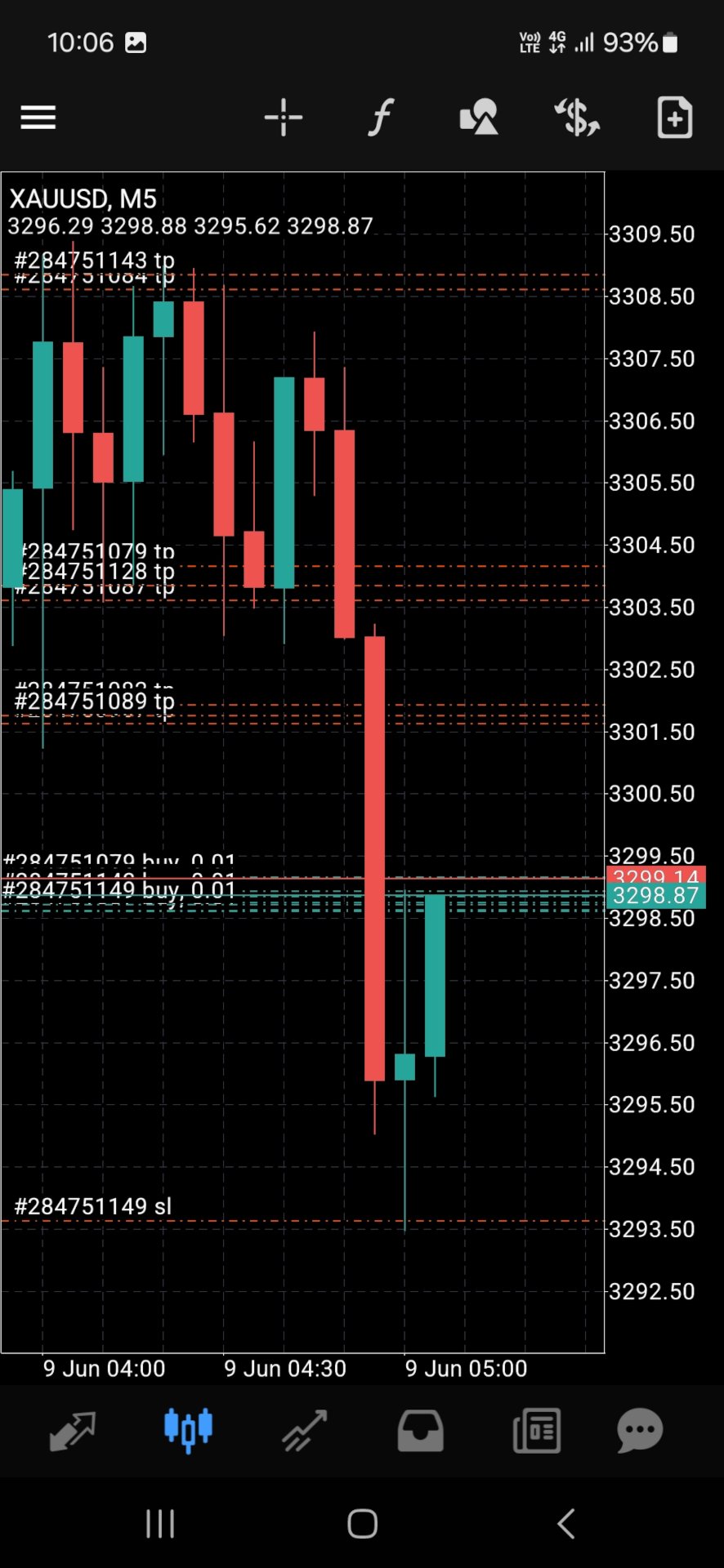
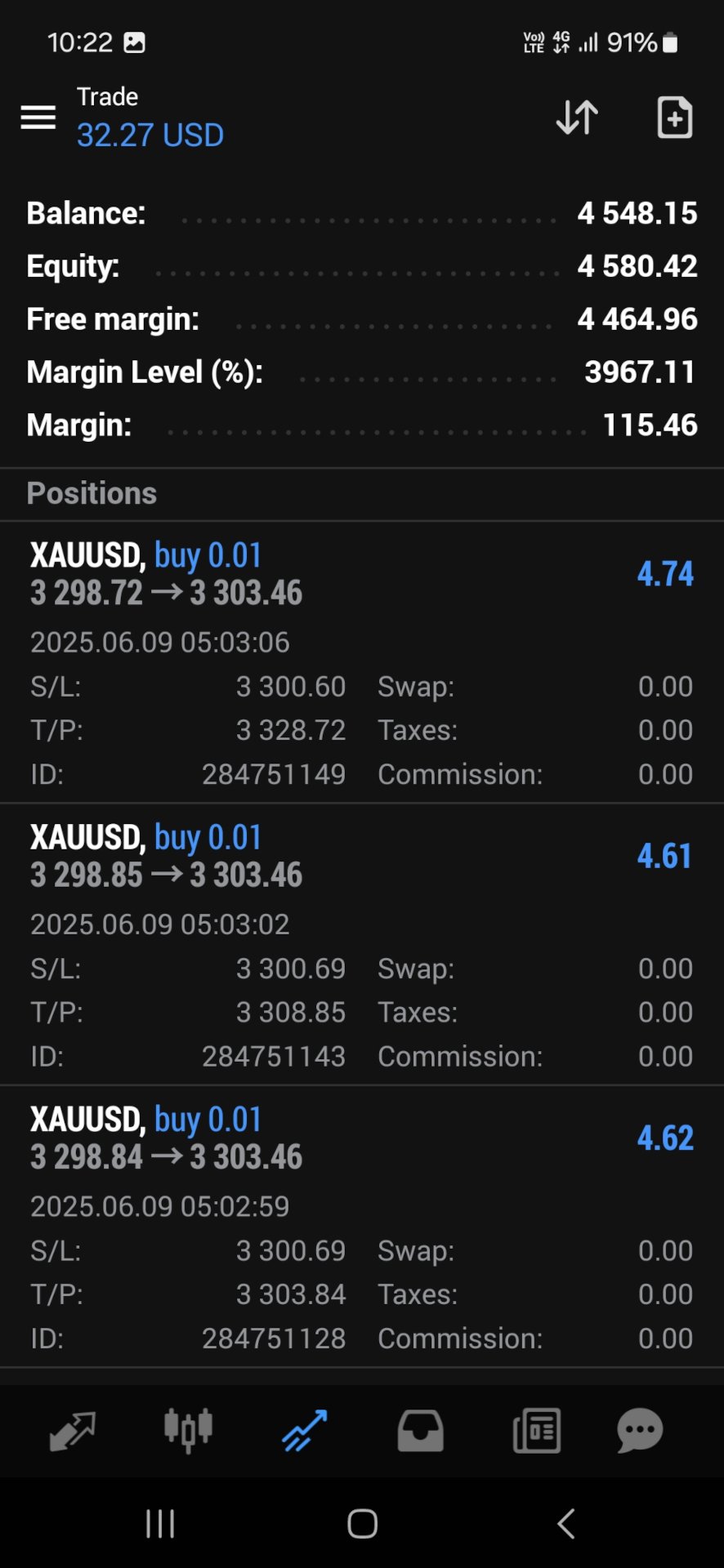
This is a EA utility that auto-manage your positions' Stop-Loss (SL) and Take-Profits (TP) dynamically. When opening a single position, it is easy to set the SL and TP manually. But when dealing with multiple positions, it can be very tedious or overwhelming to fill in so many SL and TP values consistently, especially in a short span of time, like in scalping. Over time and after many such trades, trading itself can become a chore. That is where this EA can serve as a pal or assistant in your semi-automated trading journey by handling the unglamorous aspect of trading.

Whether you are trading on your own, or following signals from other providers, sometimes the situation can easily turn frustrating. For example, a potential trade setup is identified with the following information:

Gold Buy: 3328-3325
SL:   3323
TP-1: 3331
TP-2: 3333
TP-3: 3338

You start to layer multiple positions to fill the indicated zone according to your risk management. While still at it, you try to enter the SL and TP of these positions, one by one. Before you can finish, the market accelerates favorably and a Break-Even is called for these positions to be risk-free. Or the price suddenly reverse much beyond your planned SL, and you realize some positions' SL were not set. Needless to say, a lot of other scenes can happen that require the constant updating of the positions' SL and TP, like in consecutive trade setups. Also, it is difficult to set and manually track the TP of multiple positions according to a planned allocation strategy, e.g. 30% for TP-1, 50% for TP-2, and 20% for TP-3.

When SL and TP are not set upfront, there is usually an emotional tendency to let losing positions run and winning positions cut short. With this EA, SL and TP are set accordingly and sent to the broker for a hands-free outcome. When entering with a single but bigger sized position, the opening price is usually not optimized, and subsequent partial closure at different TP prices also require manual attention and execution. So why not let yourself focus on the most important part of opening your positions, then allow this EA to handle the rest of the trade without any human error or emotion. Moreover, when trading using the MetaTrader app on a mobile phone, cell connection can be dropped while travelling, or your attention may be drawn to other matters at hand. And so, it becomes less stressful if you are backed by a trusted companion EA running in the background, knowingly that your SL and TP settings will be handled systematically.

How Trading Pal EA works:

The Trading Pal EA works on individual symbol by attaching it to that specific symbol's chart, with a set of inputs customized to that symbol if need be. It does not matter which timeframe is selected on the chart, as this EA is pre-set to run either on each tick event, or on a periodic timer. The latter is preferred if the market has not much tick movement, so that the SL and TP can be set on a regular basis. On each pass, the EA will run through all open positions (active trades) to perform specific tasks according to these key features. Note that a pending order (buy/sell limit, etc.) when triggered will become an open position with its opening time set to the latest time. The EA will then treat this as the last position to be managed accordingly.

  1. Smart SL Application:
    Automatically applies SL to all open positions if missing, based on either the default level (in pips) or the last position's SL. For the first position's SL, it can be set manually or left empty for the EA to set using the default level. For subsequent positions with no SL, the EA will either, based on input selection, use the exact SL from the last position to fill them in, or set them using the default level. In other words, a specific SL can be set once manually for the EA to use on subsequent related positions. For this feature, buy and sell positions are handled separately.

  2. Flexible TP Allocation:
    Distribute TP targets among all open positions using a smart allocation algorithm based on percentage, with support for up to 4 levels (in pips, from lowest level 1 to highest level 4), including a default one, e.g. 30% - 40% - 20% - 10%. For positions with no TP, the EA will fill them using the 4 TP levels according to the allocation percentages defined in the inputs. The EA will also respect a manually set TP, which will be automatically allocated into one of the 4 levels by range; A manual TP can also be marked as a potential loss if it is set negatively below/above the open price for a buy/sell position. In sum, profits-taking can be automated according to a pre-defined set of target levels by percentages, and enhanced manually by setting the TP for any position along the way. For this feature, the allocation algorithm encompasses both buy and sell positions.

  3. Advance SL mode [Auto] - Break-Even, Trailing or Trail-TP (optional):
    For all open positions, choose between a fully customizable Break-Even (BE) mechanism to go risk-free, Trailing stop or Trail-TP to lock in profits, as your trade moves favorably. BE is defined using a trigger, and a offset level, measured in pips. Similarly, Trailing is defined using a start, a stop, and a step level, all also measured in pips. To illustrate using a buy position, BE is set when the current price is more than the position's open price by the trigger level, and the stop level is set above the open price by an offset amount; Trailing starts after current price is more than the position's open price by the start input, and the stop level is set at an interval below the current price, which then move upon each step increase in the current price. For Trail-TP, profits are locked in at the 4 different TP levels of each position, i.e. when the current price reaches TP-1 of a position, its SL is moved to BE, then when the current prices reaches the next TP level, its SL is moved to that of the last TP. Each mode in advancing SL can be applied on positions either individually as a buy/sell, or as a layer of buys/sells together. The latter considers the top (for buys) or bottom (for sells) position only when determining whether to advance the SL for the remaining positions.

  4. Order Hotkeys [Manual] (optional):
    "Special" pending orders can be used as hotkeys to manually set the SL and TP of all open positions quickly, or close positions above (for buys) or below (for sells) a specific price in bulk, which is very useful when trading on just the MetaTrader mobile app. Imagine when having to shift the TP of multiple positions, the new TP value has to be keyed into each position individually. But with this hotkey function, the new TP value would only need to be keyed once via a pending order serving as a placeholder. For such orders to work, they are specially created at prices that are unlikely to be triggered in the near future. For example, a buy-limit order for XAUUSD can be set at a price of 123, which is so much lower than the current price that chances of it being triggered is almost nil. The price '123' then acts as a code for enabling the hotkey that can be used to set the TP of all buy positions by setting the TP of the buy-limit order correspondingly. For the full explanation of these order hotkeys, see the section below.

  5. Control-Panel [Manual] (optional):
    A dialog panel can be enabled for interactive management of all open positions or pending orders on the MetaTrader terminal only. It features direct controls over the SL and TP of the open positions, including a special function for closing them. It also has functions to manage limit or stop orders (that match the input Magic Number). This user interface works on an ad-hoc basis via input edits and button clicks, alongside other automated functions. The control-panel can be minimized when not in use, and its text size can be adjusted via the EA inputs. It can be dragged around to avoid overlapping with other objects on the chart window; Otherwise, re-maximizing the control-panel will bring it on top of the existing chart objects. The states of the applicable controls, e.g. SL and TP edits, on the panel will be retained when switching the symbol's timeframe on the chart, or changing the EA inputs. See the section below for more details on the control-panel functions, together with a few screenshots of its display on the chart.

  6. Dashboard Overlay (optional):
    See a summary of your pending orders and open positions that the EA is managing in real-time via a display on the symbol's chart. The mean or average SL and TP of all positions will be computed in pips-per-minimum-lot to reflect the potential loss (if negative) or profit (if positive), and to indicate the current risk and reward ratio. Please see the screenshot of an example dashboard on a symbol's chart, available only on a MetaTrader terminal (not mobile app).

  7. Pip Value Calculation:
    Accurate pip distance handling for XAU/GOLD, Bitcoin, Ethereum and Forex majors (including JPY) by default. For other symbols, there is a pip-price factor input that can be set, which has to be confirmed on a demo account first if unsure. For examples, XAU=0.1, BTC=10, ETH=1, JPY=0.01, MajorFX=0.0001. If the pip-price factor is not set on a symbol not mentioned above, the EA will not run, and no dashboard will be shown even if enabled.

  8. Failsafe Execution and Logging:
    Built-in retry mechanisms and detailed logging to the Experts tab on a MetaTrader terminal to help you track and debug in case of broker rejections. The EA will log messages with prefix "INFO", "WARN" and "ERROR" respectively. If SL or TP cannot be set, try to adjust the default level or related input.

What to expect of this EA:

  1. This is a utility EA, so no results will be shown on MetaTrader strategy tester.
  2. This EA can be run on a home PC or VPS with minimal resources.
  3. This EA can be restarted (inputs changed, etc.) anytime, and still continue to function thereafter.
  4. This EA can also be used to manage open positions from other EA by setting the Magic Number input (default 0 is for manual positions).
  5. This EA does not open nor close positions on its own unless manually instructed via the Control-Panel or Order Hotkey. So for any position that has not touch SL or TP yet, it may incur swap fee or suffer from market gaps overnight.
  6. Positions can still be manually updated/closed, or pending orders placed/deleted manually, even when this EA is running, which will not affect its operation.

Control-Panel Functions:

  • Set the same Stop-Loss (SL) or Take-Profit (TP) price level to all buy or sell positions quickly. For TP input, there are 2 price levels that can be allocated according to an input percentage, e.g. 20% of all positions to TP-1 and remaining 80% to TP-2.
  • Set all buy or sell positions to Break-Even (BE) or Trail by pips, which is similar to the corresponding automated functions.
  • Change the Advance/Auto SL mode (None, BE, Trailing or Trail-TP) on the fly.
  • Close positions above (for buys) or below (for sells) a price margin in bulk quickly, with an option to close only those positions in profit or with losses acceptable. This is slightly different from the bulk close functions that are in-built in MT5, which the native MT4 platform is lacking of.
  • Place multiple limit or stop orders quickly across a specified price range, at regular price gaps, to help with position layering in an organized (and preemptive) manner. To avoid input errors, the maximum lots size per pending order, and the maximum quota number per order placement can be set via the EA inputs.
  • Delete pending orders whose prices fall within a specified price range in bulk quickly.
  • Draw lines or dashes with description on the chart window, to mark key price levels visually with different colors for buy, sell or neither.

Actual usage of the control-panel is quite intuitive, as there is a "[Control Info & Status]" bar to show the info regarding a specific control (if the related edit input is blank), and the status of the corresponding function when applied. This info-status bar will be colored in cyan if the function of a control is executed successfully on all affected positions or orders, and in yellow if some failed due to broker rejections, etc. The font "Consolas" that is used on the control-panel (and dashboard) is a monospaced typeface optimized for screen readability.

    Order Hotkeys Explained:

    A pending order needs to be created specially in order to use it as a hotkey. To enable an order hotkey, its price must be set to match the pre-set code (and also the Magic Number) in the EA inputs. Such orders' expiry can be specified, or set to Good-Till-Cancelled. But once these orders are deleted, the respective hotkey functions will cease. The different types of pending orders have different hotkey functions as described:

    • A Buy-Stop order hotkey is used to set the SL of all buy positions. Set its price much higher than the current price of that symbol, e.g. code 8800 for XAUUSD. As and when needed, set its SL to a specific level below the current price to be 'transferred' to all buy positions. If its TP is non-zero, setting the SL below/equal the current price will cause Break-Even to be set for all applicable buy positions (using the BE offset input). Having the SL above the current price will put the BE hotkey on hold until the current price move above the SL.

    • A Buy-Limit order hotkey is used to set the TP of all buy positions. Set its price much lower than the current price of that symbol, e.g. code 770 for XAUUSD. As and when needed, set its TP to a specific level above the current price to be 'transferred' to all buy positions. If its SL is non-zero, e.g. 3.0 or 30 pips, setting the TP below/equal the current price will shift the SL of all buy positions to an amount below the current price by the indicated SL value. Having the TP above the current price will put the trailing hotkey on hold until the current price move above the TP.

    • A Sell-Stop order hotkey is used to set the SL of all sell positions. Set its price much lower than the current price of that symbol, e.g. code 770 for XAUUSD. As and when needed, set its SL to a specific level above the current price to be 'transferred' to all sell positions. If its TP is non-zero, setting the SL above/equal the current price will cause Break-Even to be set for all applicable sell positions (using the BE offset input). Having the SL below the current price will put the BE hotkey on hold until the current price move below the SL.

    • A Sell-Limit order hotkey is used to set the TP of all sell positions. Set its price much higher than the current price of that symbol, e.g. code 8800 for XAUUSD. As and when needed, set its TP to a specific level below the current price to be 'transferred' to all sell positions. If its SL is non-zero, e.g. 8803.0 or 30 pips more than its price, setting the TP above/equal the current price will shift the SL of all sell positions to an amount above the current price by the indicated SL value. Having the TP below the current price will put the trailing hotkey on hold until the current price move below the TP.

    • A pending order of any of the above types with a unique price code is used as a hotkey to change the Auto/Advance SL mode accordingly. If both its SL and TP are zero, no Auto SL mode will be applied. If only its SL is non-zero, the Auto BE mode will be applied. If only its TP is non-zero, the Auto Trailing mode will be applied. If both its SL and TP are non-zero, the Auto Trail-TP mode will be applied. If this order hotkey is deleted or its price changed, the original input mode will be applied.

    • Buy-Limit or Sell-Limit order hotkey with differing price code is used to close positions above (for buys) or below (for sells) a price margin in bulk quickly. For this buy-limit hotkey, its SL value as "multiplied by 10" represents the price margin, so any position whose open price lies above this margin will be closed. The close action will be applied immediately if its TP is set below/equal the current price, otherwise it will be put on hold until the current price move above the TP. For this sell-limit hotkey, its SL value as "divided by 10" represents the price margin, so any position whose open price falls below this margin will be closed. The close action will be applied immediately if its TP is set above/equal the current price, otherwise it will be put on hold until the current price move below the TP.

    With order hotkeys, SL and TP of open positions can be managed manually in an assisted manner, which is similar to how they are managed automatically by the Trading Pal EA. In fact, certain hotkey functions can still apply (semi-manual) while the EA works autonomously behind the scene. Also, multiple order hotkeys of the same type and price code can be created, e.g. one Buy-Stop for setting SL, and another for setting BE. In the case of trailing stops, multiple hotkeys can be created beforehand to be applied in chrono order so that as the current price moves, each hotkey gets triggered one after another to advance the SL in stages. Although order hotkeys may seem complicated, using them to manage all positions' SL and TP manually is definitely easier and faster! Even the close-positions hotkey is different from the bulk close function in MT5, and which MT4 is lacking of. For a start, practice them on a demo account first. The EA dashboard will help to show whether a specific hotkey is turned on or off, provided this feature is enabled.
    Produits recommandés
    Un seul graphique. Un contrôle total. Ne perdez plus de temps à gérer les objets, les couleurs et les paramètres de chaque graphique séparément.       Gestionnaire de synchronisation de graphiques   , vous pouvez       synchronisez, copiez et contrôlez tous vos graphiques MetaTrader       instantanément, en utilisant un seul panneau et quelques raccourcis. Dessinez une fois, actualisez partout. Ouvrez et fermez vos graphiques d'un simple clic. Gardez votre espace de travail propre grâce à      
    SMT Trade Planner est un calculateur de risque professionnel et un panneau d'execution d'ordres directement sur le graphique MetaTrader. Il calcule la taille du lot, affiche des lignes visuelles d'entree, Stop Loss et Take Profit deplacables sur le graphique, valide le trade contre des regles de risque configurables et permet l'execution en un clic.   Fonctionnement Attachez le Trade Planner a n'importe quel graphique. Le panneau affiche les informations du compte et des boutons de selection rap
    This tool monitors your current Expert Advisors and manages stop losses and take profits. You can customize which EAs and/or which currencies to monitor. It is primarily meant for EAs that you feel manage stop losses and/or take profits poorly. If you want this tool to be able to monitor manual trades, please use '0' (zero) as the magic number. Supports hidden stoploss and take profit Supports ATR-calculated dynamic stoploss Supports Breakeven for individual trades Supports Trailing stop Lower r
    Hello, boys and girls! Script allows you either to quickly save opened charts and then close all charts opened by visual tester mode or just faster close all charts. Feel free to take a look at video manual about how to use this script on my YouTube channel. Also, feel free to join my telegram channel , where time to time I publish some exclusive stuffs. Feel free to leave feedback and thoughts how to improve this script - I'd highly appreciate that. All the best.
    Buy The Dip Util is an  halfautomatic  expert advisor (EA), to   buy on dips (days lows) and sell on spikes (days highs). A profit can exceed a loss trade up to 10 times , so the user can have several loss trades and still make profit. Orders are opened at the change of the hour , if a button in the chart is pressed. The  Buy The Dip as EA  does this automaticly. The order stoploss is automaticly set right below the low of the former hour (buy) or right over the high (sell). The position size

    Copying trading signals from the Telegram channel to MetaTrader. The utility will help you easily and simply copy transactions from your Telegram channel or chat to the MetaTrader trading terminal almost instantly MT5 version - https://www.mql5.com/en/market/product/62382  Operational support in telegram chat: https://t.me/forex4up_chat Template for signals in the Telegram channel, chat (can be changed in the parameters) SYMBOL = EURUSD, TYPE = SELL, PRICE = 0.00000, LOT = 0.01, STOPLOSS
    Plain MT4
    Ahmed Alaaeldin Abdulrahman Ahmed Elherzawi
    This is a semi-automatic Expert Advisor that opens trades automatically based on the direction you set using the trade sell / buy on the panel. The magic of this EA is that it recognizes the objects that you draw on the chart by closing the open positions at key levels, it will notify you through the mobile notification, then it will wait for the next direction. It opens orders continuously regardless of the time frame of the chart. So you don't have to stay on a lower time frame. Instead, you c
    Extra Martingale
    Vladimir Pokora
    5 (1)
    Is your trade at a loss? Does not matter ! You can use this Extra martingale tool.  In the set loss of your trade or your EA's trade , this tool will open another trade at a better price. It can also open multiple trades at different distances and with different lot sizes. Each trade will be assigned a TakeProfit. This tool has a lot of settings. You can set variable lot sizes, variable trade distances, variable TakeProfit sizes, maximum total profit or loss in money. You can also close trades
    Canadian Taiga
    Charbel Abboud
    CANADIAN TAIGA is a professional portfolio EA using trend-following trading system based on principles of volatility breakout and breakouts of support/ resistance levels. It works on all Canadian Dollar pairs. The core principle of the Canadian Taiga is to capture trading opportunities on all CAD pairs, using a sophisticated hedging module. Download CANADIAN TAIGA and test it on all Canadian Dollar Pairs as recommended, and if it does not what it is intended to do as described, do not purchase i
    One Click MT4
    MQL TOOLS SL
    5 (3)
    One Click Close MT4 is an EA which allows you close orders quickly. EA display on chart two buttons. The first button "Close All Positions" is using to close all opened orders. The second button "Close Profit Positions" is using to close only profitable orders. EA is closing orders for all available symbols, not only for chart symbol. In EA params you can set distance from upper chart frame (Y Offset) and from left chart frame (X Offset). For installation EA it is only need to copy One Click Clo
    FREE
    Quick Lines Tool: un indicateur Pratique pour tracer des lignes de tendance et des rectangles Quick Lines Tool est un indicateur puissant et intuitif pour MetaTrader 4, conçu pour les traders qui ont besoin d'outils d'analyse technique rapides et efficaces. Avec cet indicateur, vous pouvez facilement créer des lignes de tendance, des niveaux de support/résistance (AP/DW) et des rectangles, en optimisant le processus de balisage des graphiques. L'indicateur est idéal pour les débutants et les t
    DepoControl – Full Control Over the Deposit Closers   Expert Advisor controls the overall account status and closes ALL market orders on the account when certain conditions occur. The trading robot closes ALL orders on the account in the following cases (by profit): Close ALL orders by a total profit on the account   in monetary terms . For example, suppose that the settings specify that   positions should be closed when profit of 100 is reached. In this case, the Expert Advisor closes all mark

    ProfRoboTrading Dashboard MultiSymbol   is   Expert Advisor  a lightweight on-chart control panel that provides a clear overview of your trading account and open positions across multiple symbols. The dashboard displays key account metrics, summarizes open BUY/SELL orders and lots per symbol, calculates profit for Day/Week/Month, and offers quick manual close actions directly from the table. Key features Multi-symbol table   (symbols list configurable). Account metrics panel:   Balance, Equity,

    Telegram Bot Signals Parser
    AHMAD ALI MAHER MOHAMAD
    1 (2)
    MQL4 Expert parsing signals from Telegram bot and executing the orders. Install EA, Telegram. Create a telegram bot which will distribute signal and specify it's token in EA input settings as well as key words which will be used to parse a signal. You can change or add key words by your own. Default values (lot, stops) are used in case the incoming signal don't include them. Specify "Allow DLL imports" in EA Settings.
    OpenOrders
    Andrey Chiganaev
    The script allows you to quickly and easily open trades (place orders) on the market. Features Buy and sell at a market price; Place pending orders: Buy/Sell Limit and Buy/Sell Stop; Open a trade with a custom volume; Calculate and set TakeProfit; Calculate and set StopLoss; Auto defining the number of decimal places; Auto defining a symbol the script has been applied to. What you get with the script Ability to calculate each trade instantly; Ability not to enter all calculated values manually
    King Box Thor
    Nguyen Cong Hoan
    The product has a great combination of pending orders and trends to help investors manage capital effectively. The bot does not have a martingale, so it is always safe of capital. Run the D1 timeframe pairs. The main parameters can be installed: Lot -  Startot . Auto-Grid   -    ON/OFF AutoLot  - ON/OFF TP - Takeprofit   -pips. SL - StopLoss  - Pips. Magic -  Number magic. TralllingStop  - ON/OFF Comment  - KING Tralling - pips
    MT4 Local Trade Copier A file-based trade copying system for MetaTrader 4 that synchronizes trades between Master and Client terminals on the same computer or network. Key Features Master/Client Architecture : One Master terminal broadcasts trades, multiple Client terminals can receive and replicate them File-Based Communication : Uses shared folder system for reliable inter-terminal communication Flexible Lot Management : Copy exact lot sizes or use fixed lot sizes on client accounts Customizab
    如果产品有任何问题或者您需要在此产品上添加功能,请联系我 Contact/message me if you encounter any issue using the product or need extra feature to add on the base version. Dashboard Super Candle is an intuitive, and handy graphic tool to help you to: Have 28 pairs under control with one dashboard. Monitor candle direction, identify possible price movement and trend. Provide trading signals based on the candle direction selected by you. Automatically manage order once signal are generated. Have the ability to select which p
    Market Monitor
    Rodrigo Rethka Goncalves
    Market Monitor – Smart Asset Performance Dashboard for MT4 Turn your MetaTrader 4 into a professional trading intelligence center! Market Monitor is a powerful monitoring tool that displays, in real time, the most relevant performance metrics of each symbol being traded — helping you make faster, smarter, and more strategic decisions. What Does This Indicator Do? Market Monitor scans all open and historical orders, consolidates the data by symbol, and displays everything in visual pa
    UTralVirtual
    Viktor Shpakovskiy
    Utilitaire de gestion des positions ouvertes et des commandes en attente. Le trailing stop intégré a cinq modes et sept outils. Il existe un stop loss virtuel et un take profit virtuel, qui peuvent être librement déplacés sur le graphique. À l'aide du simulateur de trading intégré, vous pouvez vérifier le fonctionnement de l'EA dans le testeur de stratégie. Un guide détaillé de UTralVirtual peut être trouvé dans la section "Commentaires". Avantages 5 modes trailing stop: virtuel, normal, total,
    Account Profit & Loss Killer Full Account-Level Intelligent Risk Management EA (MT4) ⸻ Product Introduction Account Profit & Loss Killer is a true "overall account control and risk management tool". It does not participate in any trading strategy; it focuses on only one thing: When the total floating profit or total floating loss of all positions in the account reaches your set amount, it immediately and within milliseconds forcibly closes all orders in the account. This is a true "
    FREE
    Next Generation
    Volodymyr Zubov
    Conseiller en trading automatique pour le terminal MT4. Tout instrument de trading. Paramètres minimaux. Affichage détaillé du style et des conditions de trading sur l'écran de votre terminal. Il commence à fonctionner immédiatement après l'installation et la connexion à votre compte MT4. Tout délai inférieur à H4. Délai recommandé pour l'affichage des sessions de trading H1. Vous choisissez le temps de travail optimal pour un robot de trading. Meilleurs voeux et tendance passagère.
    XeroX
    Vasile Verdes
    Copy transactions from one MT4 account to another MT4 account on the same computer. Option to select with which type of device to perform the copying. The code is minimalistic, without graphic objects, panels, etc., and maximally fast, for a faster copying. Separate Money Management, and other settings. To transmit transactions, attach the expert to the unwanted pair in Master mode. To copy transactions, attach the expert to the same pair in another MT4 terminal, in Slave mode.
    Watermark Symbol
    Makarii Gubaydullin
    Filigrane sur le graphique: Symbole + Calendrier / ou votre propre texte Mon utilitaire #1:   comprend plus de 66 fonctions |   Contactez-moi   si vous avez des questions Dans les paramètres de l'indicateur, vous pouvez configurer: Taille de la police; Couleur du texte; Nom de la Police; Position: 1 = En haut à gauche; 2 = En haut à droite; 3 = En bas à gauche; 4 = En bas à droite; 5 = Centre; Afficher la période actuelle: on / off; Le préfixe du symbole à supprimer (n_AUDCAD>> AUDCAD); Le suff
    Contact/message me if you encounter any issue using the product or need extra feature to add on the base version. There is a demo version of this panel Dashboard Trading Made Simple Demo in my product list, please try it out to get familiar with all functionalities free, LINK . This system basically utilizes TDI as the main indicator to generate trading signal mainly on H1 and H4 timeframes. The signal will be further filtered and trimmed. Stochastic; Heiken Ashi candle direction and candle siz
    Online Accounts Manager MT4
    Kyra Nickaline Watson-gordon
    5 (1)
    OneClick Online Account Manager is a powerful utility that helps you to manage all your accounts from a centralized panel. It is suitable for all single account traders and specially for multiple accounts traders. The utility help you to : Monitor status of all accounts on a private web page. Some information such as account connection status, account profit, DD, Balance, Equity, Margin Level, Number of positions and orders, Daily and Weekly profit/loss and also overall summation of all these p
    News Panel
    Radek Reznicek
    5 (2)
    News Panel  is a fully adjustable utility for Forex News. It can show upcoming news in InfoPanel as well as lable for upcoming and past news labels on the chart.  This utility also enables Upcoming news Alerts and Push notification. User can change number of upcoming news displayed, colors and many others. Instructions Alow WebRequest for Listed URLS in Metatrader Tools -> Options -> Expert Advisors tab (see screen or watch the video) Add " https://ec.forexprostools.com/ " to the list of allo
    Various Trailing Manager EA Various Trailing Manager EA is a professional trader's tool that provides protection of floating profit on open trades. This EA Utility allows you to manage (with advanced filtering) unlimited open orders (manual or EA) with trailing stops based on 7 methods: percent, ATR, Moving Average, Candle, Parabolic, Fractal. The trailing stop can be either real or virtual, and you can exit fully or with a partial close percent on touch or bar close. Visualize all orders and t
    Copier of transactions through       Telegram           channel. Will help you instantly publish your trade in       Telegram       channel or copy trades from       Telegram           channel. The utility can work in two directions by receiving signals in MT4 and transmitting signals to       Telegram   . Telegram chat for questions and discussion: https://t.me/forex4up_chat No more missed deals No more panic Capital Management Ease of use PAY version: https://www.mql5.com/en/market/product/
    FREE
    Grid MT4
    Volodymyr Hrybachov
    The utility for semi-automatic trading, order management, can also be used   to restore losing positions on the account. Has the function of reducing the drawdown on the account by overlapping unprofitable orders. It can work with manual orders, orders opened from the panel or orders opened by another EA. It has a minimum of parameters, is easy to configure, and works with any number of orders. For testing, use the visual mode in the strategy tester. MT5 version  https://www.mql5.com/en/market/p
    Les acheteurs de ce produit ont également acheté
    Local Trade Copier EA MT4
    Juvenille Emperor Limited
    4.96 (109)
    Découvrez une expérience exceptionnellement rapide de copie de trades avec le Local Trade Copier EA MT4 . Avec sa configuration facile en 1 minute, ce copieur de trades vous permet de copier des trades entre plusieurs terminaux MetaTrader sur le même ordinateur Windows ou Windows VPS avec des vitesses de copie ultra-rapides de moins de 0.5 seconde. Que vous soyez un trader débutant ou professionnel, le Local Trade Copier EA MT4 offre une large gamme d'options pour le personnaliser en fonction d
    Bienvenue sur Trade Manager EA, l’outil ultime de gestion des risques conçu pour rendre le trading plus intuitif, précis et efficace. Ce n’est pas seulement un outil d’exécution d’ordres ; c’est une solution complète pour la planification des trades, la gestion des positions et le contrôle des risques. Que vous soyez débutant, trader expérimenté ou scalpeur ayant besoin d’une exécution rapide, Trade Manager EA s’adapte à vos besoins, offrant une flexibilité sur tous les marchés, des devises et i
    Trade Assistant MT4
    Evgeniy Kravchenko
    4.43 (195)
    It helps to calculate the risk per trade, the easy installation of a new order, order management with partial closing functions, trailing stop of 7 types and other useful functions. Additional materials and instructions Installation instructions   -   Application instructions   -   Trial version of the application for a demo account Line function -   shows on the chart the Opening line, Stop Loss, Take Profit. With this function it is easy to set a new order and see its additional characteris
    Copy Cat More Trade Copier MT4 (Copie Chat MT4) n’est pas seulement un simple copieur de trades local ; c’est un cadre complet de gestion des risques et d’exécution conçu pour les défis actuels du trading. Des challenges de prop firms à la gestion de comptes personnels, il s’adapte à chaque situation grâce à une combinaison d’exécution robuste, de protection du capital, de configuration flexible et de traitement avancé des opérations. Le copieur fonctionne en mode Master (émetteur) et en mode Sl
    Exp COPYLOT CLIENT for MT4
    Vladislav Andruschenko
    4.65 (66)
    Copieur de trades professionnel pour MetaTrader 4 Un copieur de trades rapide, fiable et professionnel pour MetaTrader 4 . COPYLOT permet de copier des opérations Forex entre les terminaux MetaTrader 4 et MetaTrader 5 , avec une synchronisation flexible adaptée à différents types de comptes et styles de trading. La version COPYLOT MT4 prend en charge : MetaTrader 4 → MetaTrader 4 MetaTrader 5 Hedge → MetaTrader 4 MetaTrader 5 Netting → MetaTrader 4   Version MT5 Description complète + DEMO + PDF
    TradePanel MT4
    Alfiya Fazylova
    4.84 (94)
    Trade Panel est un assistant commercial multifonction. L'application contient plus de 50 fonctions de trading pour le trading manuel et permet d'automatiser la plupart des tâches commerciales. Attention ! Les réductions sont limitées dans le temps, chaque mardi le prix augmentera de 5$ (jusqu'à 90$). Avant l'achat, vous pouvez tester la version de démonstration sur un compte de démonstration. Télécharger la version d'essai de l'application pour un compte de démonstration : https://www.mql5.com/f
    Trading History MT4
    Siarhei Vashchylka
    5 (9)
    Trading History - A program for trading and money management on the history of quotes in stratagy tester. It can work with pending and immediate orders, and is equipped with trailing stop, breakeven and take profit functions. Very good for training and testing different strategies. Manual (Be sure to read before purchasing) Advantages 1. Allows you to test any trading strategy in the shortest possible time 2. An excellent simulator for trading training. You can gain months of trading experience
    Telegram to MT4 Coppy
    Sergey Batudayev
    3.89 (9)
    Télégramme vers MT4 :   la solution ultime pour copier des signaux Simplifiez votre trading avec   Telegram vers MT4   , l'utilitaire de pointe conçu pour copier les signaux de trading directement depuis les canaux et chats Telegram vers votre plateforme MetaTrader 4, sans DLL. Cette solution robuste garantit une exécution fluide des signaux avec une précision et des options de personnalisation inégalées, vous faisant gagner du temps et optimisant votre efficacité. [ Instructions and DEMO ] Cara
    Trade copier MT4
    Alfiya Fazylova
    4.58 (33)
    Trade Copier est un utilitaire professionnel conçu pour copier et synchroniser les commandesentre les comptes de trading. Les commandes sont copiées du compte/terminal du fournisseur vers le compte/terminal du destinataire, qui sont installés sur le même ordinateur ou vps. PROMOTION - Si vous avez déjà acquis le "Trade copier MT5", vous pouvez obtenir le "Trade copier MT4" gratuitement (pour la copie MT4 > MT5 et MT4 < MT5). Pour obtenir des informations plus détaillées sur les conditions, veuil
    The product will copy all telegram signal to MT4   ( which you are member  ) , also it can work as remote copier.  Easy to set up, copy order instant, can work with almost signal formats, image signal, s upport to translate other language to English Work with all type of channel or group, even channel have "Restrict Saving Content", work with  multi channel, multi MT5 Work as remote copier: with signal have ticket number, it will copy exactly via ticket number. Support to backtest signal. How to
    Grid Manual MT4
    Alfiya Fazylova
    4.71 (17)
    Grid Manual est un panneau de trading permettant de travailler avec une grille d'ordres. L'utilitaire est universel, possède des paramètres flexibles et une interface intuitive. Il fonctionne avec une grille d'ordres non seulement dans le sens des pertes, mais aussi dans le sens de l'augmentation des profits. Le commerçant n'a pas besoin de créer et de maintenir une grille d'ordres, l'utilitaire le fera. Il suffit d'ouvrir une ordre et "Grid Manual" créera automatiquement une grille de ordres po
    News Filter EA: Advanced Algo Trading Assistant News Filter EA is an advanced algo trading assistant designed to enhance your trading experience. By using the   News Filter EA , you can integrate a Forex economic news filter into your existing expert advisor, even if you do not have access to its source code. In addition to the news filter, you can also specify   trading days   and   hours   for your expert. The News Filter EA also includes   risk management   and   equity protection   features
    Copy Master mt4
    Evgenii Aksenov
    5 (5)
    Cet utilitaire vous permettra de copier toutes les transactions d'un terminal avec le paramètre maître vers d'autres terminaux avec le paramètre esclave Dans le même temps, vous pouvez choisir les paires à copier, définir la taille de l'ordre copié sur plusieurs paramètres. Définissez une limite de perte sur le retrait ou copiez uniquement les transactions rentables Vous pouvez copier des transactions de MT4 ou MT5 à MT4 ou MT5 d'autres courtiers Maintenant, il ne sera pas difficile de copie
    Exp4 Duplicator
    Vladislav Andruschenko
    4.5 (22)
    Duplicator pour MetaTrader 4 — système professionnel de duplication de trades et d’ordres dans un seul terminal Un Expert Advisor puissant conçu pour les traders qui veulent dupliquer automatiquement des transactions déjà ouvertes, amplifier le volume, appliquer leur propre logique de lot et gérer les duplicatas selon des règles précises. C’est un outil pratique pour le trading manuel, pour les systèmes automatisés et pour la gestion flexible de positions déjà présentes dans le terminal. Duplic
    The News Filter
    Leolouiski Gan
    5 (25)
    Ce produit filtre tous les conseillers experts et les graphiques manuels pendant les heures de publication des actualités, de sorte que vous n'avez pas à vous soucier des pics de prix soudains qui pourraient détruire vos configurations de trading manuelles ou les transactions entrées par d'autres conseillers experts. Ce produit est également livré avec un système de gestion des ordres complet qui peut gérer vos positions ouvertes et vos ordres en attente avant la publication de toute actualité.
    Auto Trade Copier
    Vu Trung Kien
    4.76 (85)
    Auto Trade Copier is designed to copy trades to multiple MT4, MT5 and cTrader accounts/terminals with 100% accuracy. The provider and receiver accounts must be on the same PC/VPS. With this tool, you can copy trades to receiver accounts on the same PC/VPS. All trading actions will be copied from provider to receiver perfectly. This version can be used on MT4 accounts only. For MT5 accounts, you must use Auto Trade Copier for MT5 . Reference: - For MT4 receiver, please download Trade Receiver Fre
    VirtualTradePad mt4 Extra
    Vladislav Andruschenko
    4.85 (61)
    Panneau de trading pour trader en 1 clic.   Travailler avec des positions et des commandes!   Trading à partir du graphique ou du clavier. En utilisant notre panel de trading, vous pouvez trader en un clic à partir du graphique et effectuer des opérations de trading 30 fois plus rapidement que le contrôle MetaTrader standard. Des calculs automatiques de paramètres et de fonctions qui facilitent la vie d'un trader et aident un trader à mener ses activités de trading beaucoup plus rapidement et pl
    Exit Manager
    Victor Christiaanse
    5 (2)
    Enhance Your Trading with the Exit Manager Elevate your trading strategy with the Exit Manager, designed to ensure optimal closure of your trades at precisely the right moments. Once you've placed an order, our Exit Manager steps in and starts monitoring the order based on YOUR predetermined conditions, and can even trail your stop loss to mitigate risk. Key Features: Set & Forget Functionality With the Exit Manager, simply place your trade and let the tool do the rest. It continuously monitor
    Custom Alerts AIO : Surveillez tous les marchés à la fois — sans aucune configuration Présentation Custom Alerts AIO est une solution de surveillance du marché prête à l’emploi, sans configuration nécessaire. Tous les indicateurs requis — FX Power, FX Volume, FX Dynamic, FX Levels, IX Power — sont directement intégrés. Aucun graphique n’est affiché, ce qui rend cet outil idéal pour la génération d’alertes en temps réel. Il prend en charge toutes les classes d’actifs proposées par votre courtie
    The professional indicator of Trading Sessions is now available in MetaTrader4. Also the professional   BROWSER of the NEWS  and Trading Sessions is now available in MetaTrader5. One dial shows the time of the 18 largest stock exchanges in the world. This makes it possible to trace the characteristic movement of the market at the appropriate time of day. Thanks to sound and Push notifications, you will never miss the start of trading on the next exchange! The operating time of each exchange
    Le MT4 to Telegram Signal Provider est un outil facile à utiliser et entièrement personnalisable qui permet d'envoyer des signaux à Telegram, transformant ainsi votre compte en fournisseur de signaux. Le format des messages est entièrement personnalisable ! Cependant, pour une utilisation simple, vous pouvez également opter pour un modèle prédéfini et activer ou désactiver des parties spécifiques du message. [ Démonstration ]   [ Manuel ] [ Version MT5 ] [ Version Discord ] [ Canal Telegram ]  N
    Riskless Pyramid
    Snapdragon Systems Ltd
    5 (1)
    Introduction This powerful MT4 trade mangement EA offers a way potentially to aggressively multiply trade profits in a riskfree manner. Once a trade has been entered with a defined stoploss and take profit target then the EA will add three pyramid add-on trades in order to increase the overall level of profit. The user sets the total combined profit target to be gained if everything works out. This can be specified either as a multiple of the original trade profit or as a total dollar amount. Fo
    ManHedger MT4
    Peter Mueller
    5 (2)
    THIS EA IS A SEMI-AUTO EA, IT NEEDS USER INPUT. Manual & Test Version Please TEST this product before   BUYING  and watch my video about it. Contact me for user support or bug reports, or if you want the MT5 version! MT5 Version I do not guarantee any profits or financial success using this EA. With this Expert Advisor, you can: Implement your own   Zone Recovery   strategy to capitalize on trending markets. Create   Grid   trading strategies, to profit from ranging markets. Place orders easil
    Trade Manager MT4 DaneTrades
    Levi Dane Benjamin
    4.09 (11)
    Trade Manager pour vous aider à entrer et sortir rapidement des transactions tout en calculant automatiquement votre risque. Y compris des fonctionnalités pour vous aider à éviter le sur-trading, le trading de vengeance et le trading émotionnel. Les transactions peuvent être gérées automatiquement et les mesures de performances du compte peuvent être visualisées dans un graphique. Ces fonctionnalités rendent ce panneau idéal pour tous les traders manuels et contribuent à améliorer la plateforme
    Trade Dashboard MT4
    Fatemeh Ameri
    4.96 (53)
    Tired of complex order placement and manual calculations? Trade Dashboard is your solution. With its user-friendly interface, placing orders becomes effortless, by a single click, you can open trades, set stop loss and take profit levels, manage trade lot size, and calculate risk to reward ratios, allowing you to only focus on your strategy. Say goodbye to manual calculations and streamline your trading experience with Trade Dashboard. Download  Demo Version  right now. You can find  Details of
    Seconds Chart - un outil unique pour créer des graphiques en secondes dans MetaTrader 4 . Grâce à Seconds Chart , vous pouvez créer un graphique avec une période définie en secondes, offrant une flexibilité et une précision idéales pour l'analyse, indisponibles sur les graphiques standards en minutes ou en heures. Par exemple, la période S15 indique un graphique avec des bougies d'une durée de 15 secondes. Vous pouvez utiliser n'importe quel indicateur, expert advisor (EA) ou script. Leur utilis
    Risk Manager for MT4
    Sergey Batudayev
    4.6 (10)
    Expert Advisor Risk Manager pour MT4 est un programme très important et, à mon avis, nécessaire pour chaque commerçant. Avec cet Expert Advisor, vous pourrez contrôler le risque de votre compte de trading. Le contrôle des risques et des bénéfices peut être effectué à la fois en termes monétaires et en termes de pourcentage. Pour que l'Expert Advisor fonctionne, attachez-le simplement au tableau des paires de devises et définissez les valeurs de risque acceptables dans la devise du dépôt ou en
    DrawDown Limiter MT4
    Haidar Lionel Haj Ali
    5 (8)
    Expert Advisor "Drawdown Limiter"  Vous êtes au bon endroit si vous recherchez un contrôle de drawdown, un limiteur de drawdown, une protection du solde, une protection de l'équité ou une limite quotidienne de drawdown en rapport avec les entreprises de gestion de capitaux (Prop Firm), FTMO, My Forex Fund, ou si vous souhaitez protéger votre compte de trading. Avez-vous déjà eu du mal à contrôler votre drawdown en tradant sur des comptes financés ? Cet EA est fait pour vous. Les entreprises de
    Coppy Master MT4
    Sergey Batudayev
    4 (3)
    Copieur Master MT4       est un outil de copie de transactions pour les terminaux MetaTrader 4 et MetaTrader 5. Il prend en charge la copie dans les deux sens : de MT4 à MT5, de MT5 à MT4, ainsi qu'entre comptes du même type MT4 à MT4. Pour fonctionner correctement, tous les terminaux doivent fonctionner sur le même PC ou VPS. [ Instruction  and Demo ]  Pour copier vers MetaTrader 4, une version séparée —       Copieur Master MT5       — est requis. Caractéristiques principales : Modes de copie
    Trader Evolution MT4
    Siarhei Vashchylka
    5 (2)
    " Trader Evolution " - A utility designed for traders who use wave and technical analysis in their work. One tab of the utility is capable of money management and opening orders, and the other can help in making Elliott wave and technical analysis. Manual (Be sure to read before purchasing) | Version for MT5 Advantages 1. Trading in a few clicks. Immediate and pending orders are available in the panel 2. Money management. The program automatically selects the appropriate lot size 3. Simplifies
    Plus de l'auteur
    Trading Pal MT5
    Tan Bao Shen Chen
    Why choose Trading Pal EA: This is a EA utility that auto-manage your   positions ' Stop-Loss (SL) and Take-Profits (TP) dynamically. When opening a single   position , it is easy to set the SL and TP manually. But when dealing with multiple   positions , it can be very tedious or   overwhelming   to fill in so many SL and TP values consistently, especially in a short span of time, like in scalping. Over time and after many such trades, trading itself can become a chore. That is where this EA c
    Filtrer:
    Aucun avis
    Répondre à l'avis