Trading Manager Mql5

Plan, execute, and manage your trades from a single panel

Calculating lot size, checking risk, setting Stop Loss and Take Profit levels, and managing multiple positions through MetaTrader’s standard windows takes time and can lead to manual errors.

Trade Manager brings the entire process into one visual panel on the chart. It helps you prepare each trade, understand its real impact before execution, place orders, and manage exposure using manual tools and automated rules.

You decide when to buy or sell. Trade Manager does not generate signals or predict the market—it turns your decisions into structured trades aligned with your risk limits.

What is Trade Manager?

Trade Manager is a manual trading assistant for MetaTrader.

It centralizes the following tools in one interface:

  • Visual trade planning.
  • Position sizing and risk calculation.
  • Market and pending orders.
  • Individual and group position management.
  • Break Even and trailing stop.
  • Partial closes and filtered exits.
  • Exposure monitoring.
  • Daily limits and account protection.

It is not a signal robot and does not decide when to enter the market. Trade direction, entry timing, and strategy always remain under the trader’s control.

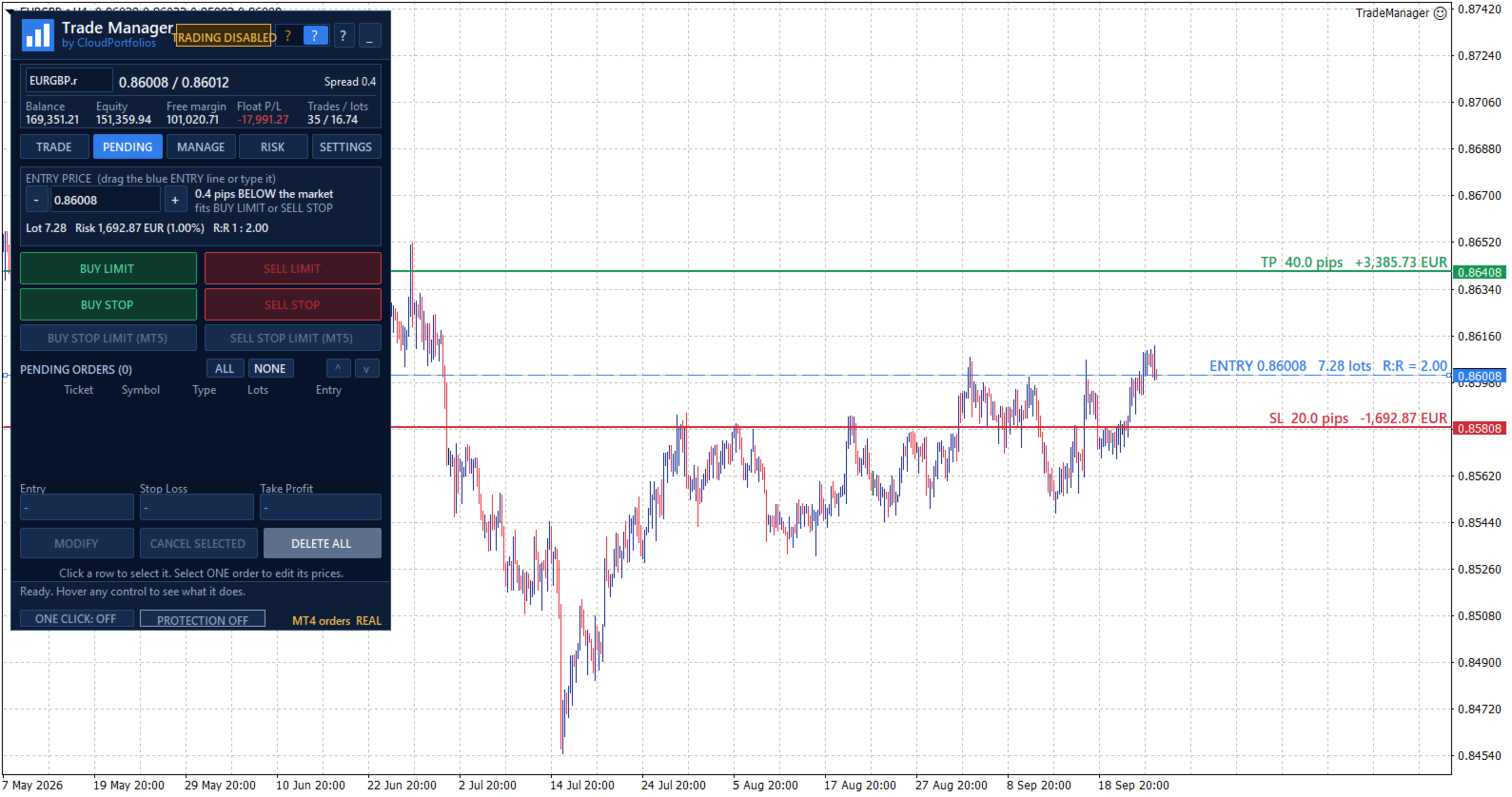
Visual trade planning on the chart

Build your trade using interactive lines for:

  • Entry.
  • Stop Loss.
  • Take Profit.

The SL and TP lines can be moved directly with the mouse. For pending orders, the entry line can also be dragged across the chart.

Every adjustment automatically updates:

  • Entry price.
  • Stop Loss distance in pips.
  • Take Profit distance in pips.
  • Lot size.
  • Monetary risk.
  • Percentage risk.
  • Potential profit.
  • Risk-to-reward ratio.

Optional chart labels display volume, pips, risk, estimated profit, and R:R next to their corresponding levels.

Flexible position sizing

Choose how the volume of each trade should be calculated:

  • Percentage risk based on balance.
  • Percentage risk based on equity.
  • Fixed monetary risk.
  • Manually entered lot size.

When percentage or monetary risk is selected, Trade Manager calculates the lot size using the actual Stop Loss distance and the symbol specifications supplied by the broker.

Volume is adjusted to the symbol’s permitted lot step. If the calculated size falls below the broker’s minimum, you can choose to:

  • Block the order.
  • Use the minimum lot and display the resulting real risk.

The panel always distinguishes between the theoretical volume and the volume that can actually be submitted.

Understand the impact before trading

Before executing an order, you can review:

  • Final lot size.
  • Actual monetary risk.
  • Risk as a percentage of balance or equity.
  • Potential loss at the Stop Loss.
  • Potential profit at the Take Profit.
  • Risk-to-reward ratio.
  • Estimated margin.
  • SL and TP distances.
  • Current spread.

If the spread is large relative to the Stop Loss distance, the panel displays a warning before the trade is placed.

Flexible Stop Loss and Take Profit

Stop Loss and Take Profit can be defined using:

  • An exact price.
  • A distance in pips.
  • Draggable chart lines.
  • An R:R target for Take Profit.

When TP is defined by R:R, its level automatically follows changes to the Stop Loss to preserve the selected ratio.

SL or TP can also be disabled when allowed by the selected sizing mode. Trades without a Stop Loss are explicitly identified as having unlimited risk.

Market orders

Execute BUY and SELL orders from the panel using the previously calculated lot size, Stop Loss, and Take Profit.

Before submission, Trade Manager checks:

  • Connection status.
  • Quote availability.
  • Market status.
  • Symbol trading permissions.
  • Minimum and maximum volume.
  • Permitted volume step.
  • Correct SL and TP placement.
  • Minimum broker distance requirements.
  • Available margin.
  • Active account protection rules.

If the price changes while the confirmation window is open and the risk increases significantly compared with the amount shown, the order is stopped so it can be reviewed again.

Pending orders

Place the following pending orders directly from the panel:

  • Buy Limit.
  • Sell Limit.
  • Buy Stop.
  • Sell Stop.

The entry can be typed, moved using the chart line, or adjusted in one-pip steps.

The panel shows the entry’s distance from the market and helps identify which order types are compatible with its current position.

Pending orders use the same lot, risk, Stop Loss, Take Profit, and R:R calculation engine as market orders.

Pending order management

The pending order table displays:

  • Ticket.
  • Symbol.
  • Order type.
  • Volume.
  • Entry price.

You can:

  • Select one or several orders.
  • Cancel selected orders.
  • Delete every pending order within the current management scope.
  • Modify the entry, Stop Loss, and Take Profit of an order.

Centralized position management

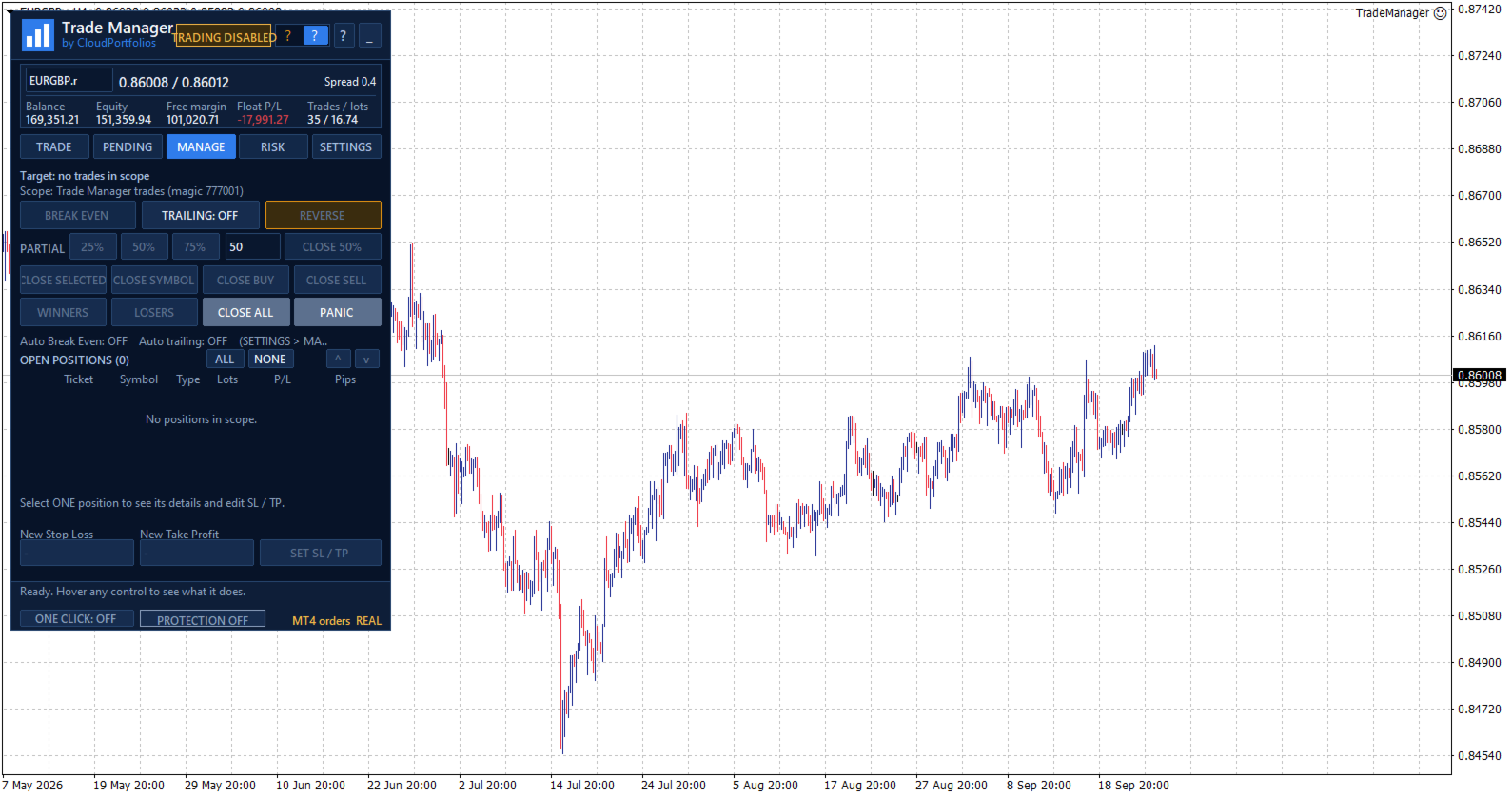
The MANAGE tab displays the positions included in the selected scope, together with:

  • Ticket.
  • Symbol.
  • Direction.
  • Volume.
  • Monetary result.
  • Result in pips.

Positions can be selected individually. If no position is selected, general actions can be applied to every position within the management scope.

Selecting one position also displays its details and allows its Stop Loss and Take Profit to be modified.

Manual and automatic Break Even

Move the Stop Loss to the entry price plus a configurable offset in the profit direction.

Break Even can be applied manually or activated automatically using:

  • Profit reached in pips.
  • A multiple of the initial risk, such as 1R.

Before modifying the position, Trade Manager checks that the price has moved far enough and that the new level complies with the broker’s restrictions.

Automatic trailing stop

The trailing stop can use:

  • A fixed distance in pips.
  • A distance based on a multiple of the initial risk.

You can also configure:

  • The minimum profit required to start trailing.
  • The minimum improvement step before modifying the Stop Loss again.

The trailing stop never increases the existing risk. The Stop Loss only moves in a favorable direction.

Partial closes

Reduce position exposure using:

  • 25%.
  • 50%.
  • 75%.
  • A custom percentage between 1% and 99%.

Trade Manager adjusts the closing volume to the broker’s minimum and permitted lot step. It also checks that the remaining volume will still be valid.

Controlled Reverse

The Reverse function:

  1. Closes the original position.
  2. Waits until the close is confirmed.
  3. Opens the opposite direction with the same volume.
  4. Preserves the original Stop Loss and Take Profit distances.

If the close cannot be confirmed, the opposite position is not opened automatically.

Fast group closing

Close positions using different filters:

  • Selected positions.
  • Current symbol.
  • All BUY positions.
  • All SELL positions.
  • Winning positions.
  • Losing positions.
  • Every position within the management scope.

Actions affecting several positions are processed progressively to avoid sending all requests to the server simultaneously.

PANIC mode

PANIC is designed to remove all exposure within the configured management scope:

  • It closes all included positions.
  • It deletes all included pending orders.
  • It checks afterward that no residual exposure remains.

This action requires two confirmation steps to reduce the risk of accidental activation.

Configurable management scope

Choose exactly which trades Trade Manager is allowed to control:

  • Trades identified by its Magic Number.
  • Trades on the current symbol.
  • All trades in the account.

The selected scope applies to:

  • Break Even.
  • Trailing stop.
  • Partial closes.
  • Reverse.
  • Group closing.
  • Pending order management.
  • Account Protection closing actions.

This makes it possible to keep different strategies separate or deliberately extend control when required.

Global risk overview

The RISK section displays:

  • Monetary risk of positions with a Stop Loss.
  • Potential risk of pending orders with an SL.
  • Risk as a percentage of balance or equity.
  • Positions without a Stop Loss.
  • Pending orders without a Stop Loss.
  • Total open volume.
  • Total pending volume.

Trades without an SL are not treated as having zero risk. They are shown as unlimited exposure through a dedicated warning.

Equity-based daily result

Trade Manager calculates the daily result using a persistent equity baseline and displays:

  • Realized result.
  • Change in floating result since the baseline.
  • Total result.
  • Deposits and withdrawals excluded from the trading result.

If the program is started for the first time during the trading day, the panel clearly identifies that moment as the baseline instead of presenting the result as if it covered the period since midnight.

When the available account history cannot verify balance operations reliably, the daily protection rules remain disabled to avoid acting on incomplete information.

Account Protection

Account Protection is disabled by default and must be enabled explicitly.

It allows you to define:

  • Maximum daily loss in percentage or money.
  • Daily profit target in percentage or money.
  • Maximum total risk.
  • Maximum number of positions and pending orders.
  • Maximum total volume, including pending orders.

When the daily loss or profit target is reached, you can choose to:

  • Block new trades.
  • Close trades within the management scope and delete their pending orders.
  • Block new trades and close the exposure.

The daily lock remains active until the next server day and persists after restarting MetaTrader. It can also be manually overridden for the current day through an explicit confirmation.

The panel displays a warning state when the loss reaches 80% of the configured daily limit.

Protection metrics are calculated using the entire account. Closing actions respect the selected management scope.

Limits before adding exposure

Account Protection can prevent a new trade when it would:

  • Exceed the permitted total risk.
  • Exceed the maximum number of trades.
  • Exceed the configured total volume.
  • Add exposure without a Stop Loss while the total-risk limit is active.
  • Add exposure to an account containing positions without an SL, where total risk cannot be measured.

These limits are checked before the order is submitted.

Symbol information

View the broker’s symbol specifications directly in the panel:

  • Bid, Ask, and spread.
  • Digits and pip size.
  • Tick size and tick value.
  • Contract size.
  • Long and short swap.
  • Minimum and maximum lot.
  • Volume step.
  • Stop level and freeze level.
  • Estimated margin for one lot.
  • Market status.
  • Trading permissions.
  • Account type.

All calculations adapt to these broker-provided properties instead of relying only on the symbol name.

Execution safety and confirmations

Trade Manager includes several operational safeguards:

  • One Click disabled by default.
  • Detailed confirmation before every order.
  • Configurable confirmations for sensitive actions.
  • Two-step confirmation for Close All and PANIC.
  • Double-click protection.
  • Tracking of executions awaiting confirmation.
  • Identification of partial executions.
  • Temporary blocking of new entries when an execution result is uncertain.
  • Visible connection, market, and trading status.
  • Panel messages and warnings.

If an execution remains unconfirmed, Trade Manager avoids sending it again automatically and asks the user to check the account before unlocking new orders.

Chart-integrated interface

The interface is organized into five main sections:

  • TRADE: plan and execute market orders.
  • PENDING: create and manage pending orders.
  • MANAGE: control open positions.
  • RISK: monitor exposure, daily results, protection, and symbol information.
  • SETTINGS: configure trading behavior, automation, and visual options.

The panel also provides:

  • Dark and light themes.
  • Adjustable size.
  • Draggable position.
  • Minimized view.
  • Symbol switching from the panel.
  • Contextual help for every control.
  • Connection and market status indicators.
  • Visible real or demo account identification.
  • English, Spanish, Italian, and French.

Persistent settings and trade plans

Trade Manager automatically saves:

  • Trading settings.
  • Visual theme.
  • Panel position and state.
  • Magic Number and order comment.
  • Break Even and trailing rules.
  • Account Protection configuration.
  • Individual plans for each symbol.
  • Initial-risk memory for managed positions.

The configuration is restored after restarting MetaTrader, and each symbol’s plan is recovered when returning to it.

Key features

✓ Manual trading from the chart
✓ Lot calculation by percentage, money, or manual volume
✓ Risk basis selectable between balance and equity
✓ Stop Loss and Take Profit by price or pips
✓ Draggable Entry, SL, and TP lines
✓ Take Profit based on R:R
✓ Risk, profit, and margin information before execution
✓ Market BUY and SELL orders
✓ Buy Limit, Sell Limit, Buy Stop, and Sell Stop
✓ Pending order modification and cancellation
✓ Management by Magic Number, symbol, or entire account
✓ Multi-symbol open-position table
✓ Manual SL and TP modification
✓ Manual and automatic Break Even
✓ Break Even triggered by pips or R multiples
✓ Trailing stop based on pips or initial risk
✓ Configurable partial closes
✓ Reverse with equivalent volume and SL/TP distances
✓ Close selected, BUY, SELL, winning, or losing positions
✓ Close All and PANIC mode
✓ Account-wide open and pending risk
✓ Identification of exposure without a Stop Loss
✓ Equity-based daily result
✓ Daily and exposure limits
✓ Optional One Click trading
✓ Dark and light themes
✓ Four interface languages
✓ Automatic saving of settings and symbol plans

Trade Manager turns manual trading into a clearer process: define the trade, review its impact, and manage it from the same panel.

You remain in control of every entry while reducing repetitive calculations, centralizing trade management, and applying your risk rules more consistently.

Important: automatic Break Even, trailing stop, and account protection functions require Trade Manager to remain running and MetaTrader to stay connected to the broker.

Produtos recomendados
Close Manager
ELITE FOREX TRADERS LLC
One-Click Trade Manager for MetaTrader 5 The Close Manager Buttons EA is a powerful utility designed to give you full control of your open positions and pending orders with just one click. Forget about manually closing trades one by one during fast market moves—this EA does it instantly, safely, and efficiently. Key Features Close All Trades – instantly close every open position Close Only Buy Trades – exit only BUY positions while keeping SELL trades running Close Only Sell Trades – exit only
FREE
Easy and simple tool which close all trades in defined point of time. It can also close all open trades when opened positions reach defined target profit or stop loss. For all pairs, indexes etc. Works with all instruments. All types of orders. All charts. Users inputs: - close time (hour,min,sec) - take profit (in users currency) - stop loss (in users currency) Save & Load settings option. Fast, simple and reliable. Check out other tools provided by our team!
FREE
Risk Pilot MT5
Valencia Dave Balaba
Risk Pilot MT5 — Fast Trade Execution and Risk Management Panel Take absolute control of your trading risk with Risk Pilot , the ultimate interactive assistant for manual traders on MetaTrader 5. Designed for precision and built for speed, Risk Pilot eliminates manual lot calculations so you can enter trades instantly before the market moves.   ️ IMPORTANT NOTICE: This is a manual trading UTILITY TOOL, not an automated trading robot (EA). This tool WILL NOT auto-trade or execute trades based
FREE
Ind5 InfoPad Information Panel
Vladislav Andruschenko
4.89 (9)
INFOPad é um painel de informações que cria informações sobre o par de moedas selecionado no terminal MetaTrader 5. Existem 5 funções deste indicador: Mostra a informação principal e principal sobre o símbolo selecionado: Pergunte BID, Spread, Stop Nível, Swap, Tick valor, Comissão preços; Mostra os alvos futuros do alvo do SL e do alvo do TP (o número de pontos do stop loss estabelecido e toma o lucro, a quantia em dólar); Mostra o lucro recebido pelos períodos: Hoje, Semana, Mês, Ano, Lucro t
FREE
Signalator Trade Summary Panel MT5 é uma utilidade local gratuita para MetaTrader 5 que oferece diretamente no gráfico uma visão clara da conta, posições, símbolos e risco. Faz parte do Signalator Trading and Analysis Ecosystem — um conjunto crescente de ferramentas práticas para MetaTrader voltadas ao monitoramento da conta, análise de mercado, varredura de símbolos, alertas e melhoria do fluxo de trabalho do trader. O painel combina monitoramento de conta e posições com um Symbol Inspector int
FREE
Trade Panel by RWBTradeLab Trade Panel is an on-chart panel for MetaTrader 5 that places market, pending and straddle orders and manages the open trades of the chart symbol. Overview The panel sits on the chart and has six tabs: Trade, Manage, Settings, Account, Help and About. Every value you set is saved for each symbol, so a chart keeps its own lot, stop loss, take profit and switches after a restart. The panel can be dragged anywhere on the chart and minimised to its title bar. The pane
FREE
Painel profissional de planejamento de posição e controle de volume para MetaTrader 5 Position Control Suite é um painel visual profissional para planejamento de operações no MetaTrader 5. Ele foi criado para traders que desejam preparar ordens diretamente no gráfico, definir o nível exato de Stop Loss e calcular automaticamente o volume da posição com base em um valor de risco na moeda da conta. A ideia principal é simples: defina quanto deseja arriscar, configure a distância do Stop Loss e o p
FREE
Order Assistant is a easy to use trading utility designed to make trade planning, risk management, and order execution simple, fast, and intuitive. The entire interface is built around one principle: keep trading simple and clear . Instead of a complicated trading panel filled with unnecessary information and settings, Order Assistant provides the essential tools in a clean and easy-to-use interface. The goal is to let traders focus on the trade itself rather than managing the platform. Simple a
FREE
The free trade manager — simple but effective. Quickly open positions with preset take profit and stop loss levels. Set everything to breakeven or close all trades with one click. Get plenty of information on your chart about your account, trades, and profit/loss. It speaks for itself — that’s how simple this manager is to use. Check out our other EAs and our Telegram for more information! By traders, for traders!
FREE
Broker Quality Monitor is a free utility that measures the real quality of your broker for trading. What it measures: - Live spread (current, average, min and max) - Real slippage from your own fills, separated by BUY and SELL - Execution latency - Broker Quality Score (0-100) - Suitability verdict for gold scalping Features: - Live panel with all metrics and color-coded status - Per-session spread averages (Asia, London, London+NY, NY close) - Alerts when spread or slippage exceed your configur
FREE
Q Panel
Amon Cheruiyot
Q-Panel : Precision Order Management for MetaTrader 5 Q-Panel is a chart-based order-management tool built for traders who want full control over how a position is placed, tracked, and closed; without leaving the chart. Instead of typing prices into a ticket, you drag your entry, stop loss, and take profit directly on the price axis, and Q-Panel handles the rest: visual zones, live P/L, and one-click management for every trade you open. Key Features Visual Order Placement Drag Take Profit, Stop
FREE
Average Position Price Monitor is a position information indicator designed for MetaTrader 5. When multiple BUY or SELL positions are open on the same symbol, the indicator automatically calculates the volume-weighted average entry price for each direction and displays important position, profit/loss, Stop Loss and Take Profit information directly on the chart. The indicator is designed to help traders manage multiple positions without checking every individual position manually. Main Features V
FREE
ARMOR Risk Calculator Trade with a plan. Calculate your risk before you enter the market. ARMOR Risk Calculator is a professional and easy-to-use risk management tool for MetaTrader 5, designed to help traders calculate their position size and potential trade risk before placing a trade. Instead of manually calculating lot sizes and risk values, ARMOR Risk Calculator provides a clean and intuitive dashboard where you can enter your trade parameters and instantly review the calculated results. Ke
FREE
Basic Theme Builder MT5
Mehran Sepah Mansoor
5 (2)
Basic Theme Builder: Simplifique a Personalização do Seu Gráfico Transforme sua experiência de negociação com o Basic Theme Builder , um indicador versátil projetado para simplificar a personalização da aparência do seu gráfico no MetaTrader 5. Este indicador intuitivo oferece um painel fácil de usar que permite alternar rapidamente entre vários temas e esquemas de cores, melhorando tanto o apelo visual quanto a funcionalidade do seu ambiente de negociação. Free MT4 version O Basic Theme Builde
FREE
WAP TP Stealth EA – Intelligent Basket Management for Precision Exits WAP TP Stealth EA is a specialized trade management expert advisor designed for traders who rely on basket strategies, recovery systems, and multi-position workflows. Instead of closing trades individually, the EA dynamically calculates the Weighted Average Price (WAP) of all open positions and executes a coordinated closure once your defined profit target is reached. This approach enables efficient drawdown management, smooth
FREE
G Spikes Trade Assistant G Spikes Trade Assistant is a MetaTrader 5 utility panel designed to help users manage manual trading actions more efficiently. It provides quick access to order execution, stop-loss settings, target-price settings, and position-management controls from the chart. Main features Buy and Sell market order buttons. Pending order options. Stop-loss and target-price management. Close All and selected close options. Customizable display settings and trade comments. Interface t
FREE
ZyloFx Position Size Calculator MT5 is a free risk management utility designed to calculate the appropriate lot size before opening a trade. The tool calculates position size based on your selected risk, account balance or equity, and Stop Loss distance. It also displays useful information directly on the chart. Explore all available ZyloFx Trading Tools: https://www.mql5.com/en/users/rosamartinez2825/seller Main Features Automatic lot size calculation. Percentage or fixed-money risk mode. Balan
FREE
Simple Position Manager
Mathew Louis Sau Kinminja
Simple Position Manager is a professional-grade MT5 script designed for efficient trade management. This versatile tool allows traders to quickly apply Take Profit, Stop Loss, and Breakeven settings across multiple open positions with precision and reliability. Key Features Multi-Position Management Apply TP/SL to all open positions of the current symbol simultaneously Intelligent position filtering by symbol Batch modification capabilities Smart Breakeven Technology Automated breakeven tri
FREE
Kiwi Spread Monitor MT5 Kiwi Spread Monitor MT5 is a free MetaTrader 5 utility designed to help traders monitor the current bid/ask spread and understand trading costs directly from the chart. Spread can change significantly during volatile market conditions, news events, session changes, rollover periods, or periods of reduced liquidity. Kiwi Spread Monitor provides a clear on-chart dashboard so traders can quickly see whether the current spread is within their preferred trading range. The util
FREE
EasyReverse MT5
Nina Yermolenko
5 (1)
Utility for order reversal. Closes orders on the chart on which it is launched and opens orders with the opposite direction instead of them. Has a simple and intuitive graphical interface. It is also possible to automatically reverse newly opened orders. MT4 version of the utility-  https://www.mql5.com/en/market/product/74771 If you like this utility, take a look at my other products - https://www.mql5.com/en/users/nina_yermolenko/seller
FREE
RTrade panel is easy trading panel use both (Stop Loss & Take Profit) based on pips  with easy interface can be use by anyone Panel Feature: -Open position based on (Lot) size  -Auto detect entry price  -Use Stop Loss based on (pips) -Use Take Profit based on ( pips ) -Close all position in one button click i will add more function in future update if you like it write your review
FREE
ADAPTIVE CLOSER Manage many open positions as one book, from the chart Type: Utility (position manager) Symbols: Any Account: Hedging and Netting Opens trades: Only when you press a button 1. The problem this addresses One position is easy to manage. Six are not. Once several tickets are open — entered by hand, by different Expert Advisors, from a phone — the thing you actually care about is the combined result, and MetaTrader gives you no way to act on it. You end up closing tickets one at a t
FREE
Bybit BTC Scalper
STANTON ROUX
3.9 (10)
BTC Scalper - Automated RSI Breakout Strategy for BTCUSD Unlock the power of automated trading with BTC Scalper! This expert advisor is a fully autonomous trading strategy, designed to capitalize on fast-moving BTCUSD markets. It leverages a potent combination of RSI Breakouts and two Exponential Moving Averages (EMA) to find high-probability trade entries, ensuring optimal confluence for success. Key Features: Fully Automated Trading : Set it, forget it, and let BTC Scalper handle your trades 2
FREE
Account Info EA It is a tool that presents on the graph all the positions of the account, and specific information concerning the positions, but also the account. It enables the user to have an image of his account at a glance. Use like any expert advisor. You can't attach it in the same chart with other expert advisor. It does not have the ability to open or manage positions. You can attach it on any chart and any timeframe.
FREE
Core function Intelligent transaction management one-click opening and closing operation, which supports user-defined lots to set multiple closing modes: all closing, closing by direction and closing by profit and loss status. Professional risk control, real-time risk monitoring and spread control to avoid high-cost trading environment. Visual control panel has an intuitive graphical interface, and all functions can be operated with one button to display position information, profit and loss sta
FREE
Fair Value gap Sweep
Crispin Tibilla
5 (3)
Fair Value Gap Sweep is a unique and powerful indicator that draws fair value gaps on your chart and alerts you when a gap has been swept by the price. A fair value gap is a price gap that occurs when the market opens at a different level than the previous close, creating an imbalance between buyers and sellers. A gap sweep is when the price moves back to fill the gap, indicating a change in market sentiment and a potential trading opportunity. Fair Value Gap Sweep indicator has the following
FREE
Auto TP SL in Pips
Suci Ridha Krismayanti
This utility automates Take Profit (TP) and Stop Loss (SL) levels for your trades, calculated in Pips . It ensures consistent risk management for all your positions. Crucial Note for Manual Traders: If you intend to use this utility on trades opened manually (without an Expert Advisor), you must change the 'Magic Number' setting to 0 (zero) . This allows the utility to correctly identify and manage your manual orders.
FREE
MMTrader Manager
Mateusz Makarewicz
Welcome to my MMTrader Manager product. EA that allows You for simple managing trades and positions. Key Features: Position Opening – Open trades quickly with customizable Take Profit (TP), Stop Loss (SL), and lot size settings. Position Closing – Close trades with one click. Grid System – Automatically create a grid of orders. Recovery Mode – Loss recovery lot calculation. Trade History Data – Acces data to historical positions. User-Friendly Interface – A clear and simple panel designed. This
FREE
AQ RiskOptimizer MT5
HIT HYPERTECH INNOVATIONS LTD
4 (1)
Risk Optimizer is the absolute solution for applying risk management on your account. Bad risk management is the main reason that causes traders to lose money. Risk Optimizer calculates and suggests the correct lot size for each position according to your personal, customized risk profile. You can give directly your preferred risk as percentage (%) for each position or you can trust our algorithms to calculate and optimize according to your risk category selection. But it is not only that! Selec
FREE
Calc for MT5
Radim Kucera
4.83 (6)
This indicator is designed to provide all useful information about symbol, account, positions and profit. It is developed for improving trader's money management. Parameters Calc can be divided to separate blocks. Each block is possible to hide, set its own color and other properties. Block symbol: This block displays information about actual SPREAD, POINT VALUE (in deposit currency for 1 lot), SWAP LONG and SHORT. Show symbol info - display/hide this block Color of symbol info - color of this
FREE
Os compradores deste produto também adquirem
Trade Assistant MT5
Evgeniy Kravchenko
4.43 (216)
Ajuda a calcular o risco por comércio, a fácil instalação de uma nova encomenda, gestão de encomendas com funções de fecho parcial, trailing stop de 7 tipos e outras funções úteis. Materiais e instruções adicionais Instruções de instalação   -   Instruções para a aplicação   -   Versão de teste da aplicação para uma conta de demonstração Função de linha Mostra no gráfico a linha de Abertura, Stop Loss, Take Profit. Com esta função é fácil definir uma nova ordem e ver as suas características ad
Bem-vindo ao Trade Manager EA—uma ferramenta de gestão de risco criada para tornar o trading mais intuitivo, preciso e eficiente. Não é apenas uma ferramenta para executar ordens, mas uma solução abrangente para planejamento de operações, gerenciamento de posições e controle de risco. Seja você um iniciante, trader avançado ou scalper que precisa de execução rápida, o Trade Manager EA adapta-se às suas necessidades, oferecendo flexibilidade em todos os mercados, desde forex e índices até commodi
Local Trade Copier EA MT5
Juvenille Emperor Limited
4.94 (149)
Local Trade Copier EA MT5 é um copiador de operações rápido e flexível para copiar e gerenciar operações entre várias contas MetaTrader 5 no mesmo computador Windows ou Windows VPS. Ele combina a sincronização local de operações com controles no lado do Receiver para tamanho de lote, gerenciamento de risco, filtragem de operações, mapeamento de símbolos, gerenciamento de operações e proteção da conta. Configure seus terminais Transmitter e Receiver em aproximadamente 1 minuto e copie operações
O Telegram to MT5 Multi-Channel Copier copia automaticamente os sinais de trading dos seus canais de Telegram diretamente para o MetaTrader 5. Sem bots, sem extensões de navegador, sem copiar à mão. O sinal chega ao Telegram e o EA abre a operação no seu terminal em poucos segundos. E antes de copiar um canal, o backtester integrado mostra o que esse canal teria feito na sua conta. O produto inclui dois componentes: um aplicativo de Windows que escuta os seus canais de Telegram, e este Expert Ad
TradePanel MT5
Alfiya Fazylova
4.88 (169)
Trade Panel é um assistente de negociação multifuncional. O aplicativo contém mais de 50 funções de negociação para trading manual e permite automatizar a maioria das tarefas de negociação. Instruções para o aplicativo + vídeo-instruções: https://www.mql5.com/pt/blogs/post/772421 Versão de teste do aplicativo para conta demo: https://www.mql5.com/pt/blogs/post/762547 Como instalar o aplicativo: https://www.mql5.com/pt/blogs/post/762548 Como testar o aplicativo no modo visual: https://www.mql5.co
================================================================================ POC BREAKOUT - V20.72. Full Professional Grade Toolkit ================================================================================ POC Breakout is a full MetaTrader 5 trading dashboard for discretionary traders who want breakout signals, Point of Control (POC) context, volume profiles, order flow, market structure, news, alerts, and advanced trade planning in one professional workspace. Attached directly to you
Copie sinais do Telegram com suas próprias regras de negociação Telegram to MT5 Signal Trader copia automaticamente sinais de negociação em texto de canais e grupos públicos e privados do Telegram para o MetaTrader 5. Gerencie vários provedores e contas MT5 em um único aplicativo para desktop, com configurações individuais de risco e de negociação para cada provedor . Você não precisa de um bot do Telegram nem configurar uma API para copiar sinais. Basta entrar com sua própria conta do Telegram
Farmed Hedge Yield Farming | All Markets (Manual - Hybrid - Semi/Automated EA) VERIFIED TRADING RESULTS - Farmed Hedge Yield Axi Copy:  https://www.mql5.com/en/signals/2356376 - Farmed Hedge Yield Exn Copy:   https://www.mql5.com/en/signals/2356404 - Farmed Hedge Yield V Copy:  https://www.mql5.com/en/signals/2357156 IMPORTANT NOTICE: FarmedHedge is a MANUAL-FOCUSED TRADING UTILITY ,not a fully automated EA. Results shown on this Signal include manual trades and overall strategic management.
Power Candles Strategy Scanner - Localizador de configurações multissímbolo com auto-otimização O Power Candles Strategy Scanner utiliza o mesmo motor de auto-otimização que alimenta o indicador Power Candles — em todos os símbolos da sua lista de observação, lado a lado. Um painel indica-lhe quais os símbolos que são estatisticamente negociáveis neste momento, qual a estratégia vencedora para cada um, o par ideal de Stop Loss / Take Profit, e avisa-o assim que um novo sinal é emitido. Esta ferr
Exp COPYLOT CLIENT for MT5
Vladislav Andruschenko
3.97 (35)
Copiador profissional de operações para MetaTrader 5 Um copiador de operações rápido, profissional e confiável para MetaTrader . COPYLOT permite copiar operações de Forex entre terminais MT4 e MT5 com suporte para contas Hedge e Netting . A versão MT5 do COPYLOT oferece suporte a: - MT5 Hedge → MT5 Hedge - MT5 Hedge → MT5 Netting - MT5 Netting → MT5 Hedge - MT5 Netting → MT5 Netting - MT4 → MT5 Hedge - MT4 → MT5 Netting Versão MT4 Descrição completa + DEMO + PDF Como comprar Como instalar Como
Signal TradingView to MT5 Pro Automator Execução profissional instantânea entre TradingView e MetaTrader 5 Automatize a sua estratégia de trading com a ponte de comunicação mais robusta entre os alertas do TradingView e a execução real no MT5. Concebido para traders que exigem velocidade, flexibilidade e uma gestão de risco impecável, este Expert Advisor transforma qualquer mensagem de alerta numa ordem de mercado ou de limite precisa. PONTOS FORTES E VANTAGENS Motor de Parsing Universal (Propri
Premium Trade Manager - O Painel de Operações com um Coach Integrado Premium Trade Manager coloca um coach de trading dentro do seu gráfico, com um motor de execução completo por baixo. Configure a operação da forma que sempre faz e deixe o Max, seu coach de trading com IA, ler exatamente esse setup em relação à sua conta ao vivo e dar um veredicto direto antes de confirmar: se o stop é disciplinado, se o risco faz sentido, se há um evento de alto impacto a minutos de distância, se você está pró
MT5 to Telegram Signal Provider é uma utilidade fácil de usar e totalmente personalizável que permite o envio de sinais especificados para o chat, canal ou grupo do Telegram, tornando sua conta um fornecedor de sinais . Ao contrário da maioria dos produtos concorrentes, ele não usa importações de DLL. [ Demonstração ] [ Manual ] [ Versão MT4 ] [ Versão Discord ] [ Canal do Telegram ]  New: [ Telegram To MT5 ] Configuração Um guia do usuário passo a passo está disponível. Não é necessário conhec
HINN MagicEntry Extra
ALGOFLOW OÜ
4.74 (19)
HINN MAGIC ENTRY – the ultimate tool for entry and position management! SIMPLE. FASTEST. INTUITIVE. MAX AUTOMATED. Place orders by selecting a level directly on the chart! full description   ::  demo-version  :: 60-sec-video-description Key features: - Market, limit, and pending orders - Automatic lot size calculation - Automatic spread and commission accounting - Unlimited partitial take-profits  - Breakeven and trailing stop-loss and take-profit  functions - Invalidation leves - Intuitive, a
MT5 Trading Deck
Manuel Michiels
5 (2)
One button. One trade. MT5 Trading Deck is a hotkey trading panel for MetaTrader 5 that turns the platform into a keyboard-driven execution cockpit. Stop loss, take profit and lot size are pre-calculated for every key; the moment you press, a market order is live on the broker. A complete technical user manual is attached in the product Comments section. It documents every input parameter, the full hotkey map, the recommended Stream Deck XL layout, and the advanced workflows for Pre-Limit orders

EA Slipstream
Stephen J Martret
5 (1)
Your backtest filled every order at the price it asked for. Your account does not. EA Slipstream measures what execution costs your EA, using your own fills, slippages and spreads to show you the true performance of your EA. A backtest prices every trade at the level the EA named. In live trading a pending order fills at whatever price is available when it triggers, a stop closes wherever the market is when it is hit, and the spread at that moment is whatever the account was quoting. The differ
Grid Manual MT5
Alfiya Fazylova
4.73 (22)
"Grid Manual" é um painel comercial para trabalhar com uma grade de ordens. O utilitário é universal, possui configurações flexíveis e uma interface intuitiva. Ele trabalha com uma grade de ordens não apenas na direção da média das perdas, mas também na direção do aumento dos lucros. O trader não precisa criar e manter uma grade de ordens, tudo será feito pelo ""Grid Manual". Basta abrir um orden e o "Grid manual" criará automaticamente uma grade de ordens para ele e trabalhará com ele até que s
EA Overfitter
Stephen J Martret
5 (1)
That backtest looks great. But will it still be making money tomorrow, next week, next month? EA Overfitter re-runs your EA on 100 price histories it has never seen. One score tells you if the edge is real. A backtest tells you what an EA did on one price history — the one that happened to occur. What you cannot tell from it is how much of that result was the strategy and how much was the particular path. EA Overfitter answers that. It builds up to 100 synthetic price histories your EA has n
Trade Manager DaneTrades
Levi Dane Benjamin
4.23 (30)
Trade Manager para ajudá-lo a entrar e sair rapidamente de negociações enquanto calcula automaticamente seu risco. Incluindo recursos para ajudar a evitar negociações excessivas, negociações de vingança e negociações emocionais. As negociações podem ser gerenciadas automaticamente e as métricas de desempenho da conta podem ser visualizadas em um gráfico. Esses recursos tornam este painel ideal para todos os traders manuais e ajudam a aprimorar a plataforma MetaTrader 5. Suporte multilíngue. Vers
Trade Dashboard MT5
Fatemeh Ameri
4.94 (134)
Trade Dashboard simplifies how you open, manage, and control your trades, with built-in lot size calculation. It allows you to execute trades, manage risk, and control positions directly on the chart, with tools such as partial close, breakeven, and trailing stop. Designed to reduce manual work and help you stay focused on your trading decisions. A demo version is available for testing. Detailed explanations of features are provided within the MQL5 platform. Installation instructions are include
Dynamic Fibonacci Grid
Tsvetan Tsvetanov
5 (1)
Apresentando a versão mais recente do Dynamic Fibonacci Grid Dashboard para MT5. Agora repleto de muitos novos recursos, este novo painel transforma sua experiência de trading e permite que você veja o mercado e a ação do preço de uma perspectiva completamente diferente. Descubra novas possibilidades com a análise simultânea de múltiplos timeframes e múltiplos símbolos. Interface amigável para trading manual e gerenciamento de posições, além de uma capacidade ampliada para aplicar estratégias a
Welcome to ENTRY IN THE ZONE AND SMC MULTI TIMEFRAME Entry In The Zone and SMC Multi Timeframe is a real-time market analysis tool based on Smart Money Concepts (SMC), designed to analyze market structure, price direction, and key trading zones. It supports both Single-Timeframe Analysis and Multi-Timeframe Analysis, providing a clearer view of the overall market structure across multiple timeframes, with real-time BUY / SELL signals that do not repaint. It is designed to help filter trading opp
Seconds Chart MT5
Boris Sedov
4.61 (18)
Seconds Chart - uma ferramenta exclusiva para criar gráficos de segundos no MetaTrader 5 . Com o Seconds Chart , você pode criar gráficos com períodos definidos em segundos, proporcionando flexibilidade e precisão ideais para análise, indisponíveis em gráficos padrão de minutos ou horas. Por exemplo, o período S15 indica um gráfico com velas de 15 segundos. Você pode usar qualquer indicador ou Expert Advisor com suporte a símbolos personalizados. Trabalhar com eles é tão conveniente quanto negoc
The product will copy all telegram signal to MT5 ( which you are member) , also it can work as remote copier.  Easy to set up, copy order instant, can work with almost signal formats, image signal,  s upport to translate other language to English Work with all type of channel or group, even channel have "Restrict Saving Content", work with  multi channel, multi MT5 Work as remote copier: with signal have ticket number, it will copy exactly via ticket number. Support to backtest signal. How to s


Anchor Trade Manager
Kalinskie Gilliam
5 (9)
Your EAs cannot see each other, but Anchor can. Anchor gives you one place to coordinate your EAs, manage risk, and decide when trading is allowed. It works alongside the trading bots you already use without any changes to them. The Problem One EA opens a trade. Then another starts trading. The next thing you know, you wake up to multiple grids built across your account. Each EA may be doing exactly what it was designed to do, but together they can place far more risk on your account than you in
Exp5 Duplicator
Vladislav Andruschenko
4.78 (9)
Duplicator para MetaTrader 5 — sistema profissional de duplicação de posições dentro de um único terminal Um Expert Advisor confiável para traders que desejam duplicar automaticamente posições já abertas no MetaTrader 5, aumentar o volume total, aplicar regras personalizadas de lote e gerenciar as duplicatas com lógica precisa. É uma ferramenta prática para trading manual, sistemas automatizados e uma gestão mais flexível de posições já existentes dentro do mesmo terminal. O Duplicator para MT5
Footprint Chart Pro — Professional OrderFlow EA for MetaTrader 5 Version 6.34 | Professional tool for real traders | Institutional-Grade Visualization DEMO USERS - PLEASE SELECT EVERY TICK / REAL TICK WHEN TESTING AND YOU HAVE DOWNLOADED HISTORICAL DATA. IF YOU SEE A WAITING SCREEN AND IT IS NOT DOWNLOADING, IT MEANS YOU HAVE LOW HISTORICAL DATA. TRY 1 MIN AND 5 MIN FIRST ON 1 DAY DATA. ONE DAY DATA SHOULD BE THE NEWEST AND MOST CURRENT DATE. PLEASE WAIT UNTIL THE MARKET HAS ROLLED OVER PERIOD.
YuClusters
Yury Kulikov
4.93 (43)
Atenção: A versão demo para revisão e teste está aqui . YuClusters é um sistema profissional de análise de mercado. O trader tem oportunidades únicas para analisar o fluxo de pedidos, volumes de negociação, movimentos de preços usando vários gráficos, perfis, indicadores e objetos gráficos. O YuClusters opera com base em dados de Tempos e Negócios ou informações de ticks, dependendo do que está disponível nas cotações de um instrumento financeiro. O YuClusters permite que você crie gráficos com
Averager FULL
Vladislav Andruschenko
4.64 (14)
Averager para MetaTrader 5 — sistema profissional de média e gestão de séries de operações Um Expert Advisor poderoso, desenvolvido para fazer média de posições que entraram em drawdown, com suporte para aberturas adicionais tanto contra a tendência quanto a favor da tendência. Este produto foi criado para traders que precisam de mais do que um simples sistema de média — ele oferece uma estrutura flexível para gerenciar uma série de operações, melhorar o preço médio de entrada e conduzir toda a
Painel de Trading para MetaTrader 5 — controle profissional de trading em um clique a partir do gráfico e do teclado Um painel de trading avançado para traders ativos, criado para abrir, gerenciar e fechar operações muito mais rápido do que com a interface padrão do MetaTrader. Esta solução foi desenvolvida para quem deseja controlar posições, ordens pendentes, lucro total e execução em um único espaço de trabalho profissional. Não se trata apenas de mais um utilitário. É um verdadeiro cockpit
Mais do autor
Trading Account Analytics Understand the Real Performance of Your MetaTrader 4 Account Trading Account Analytics transforms your account history into a visual dashboard covering performance, risk, trading costs, funding, and capital evolution. It analyzes closed trades and open positions directly on the chart. It operates exclusively in read-only mode: it never opens, modifies, or closes trades . A Complete View of Your Account The final balance does not always explain how a result was achieved.
Account Risk Guardian A strategy may control every individual trade and still lose control of the account’s total risk. Account Risk Guardian monitors all activity across your account, compares its current state with your predefined limits, and executes the configured response whenever a rule is breached. It does not open trades or generate signals. It works as an independent protection layer that helps you control drawdown, losses, exposure, margin, and trading discipline from a single panel. A
Copy trades between MT4 and MT5 with full control over volume, risk, and execution Managing the same trading activity across multiple terminals should not require you to repeat every opening, reduction, closure, or protection change manually. LocalTradeCopier connects MetaTrader terminals installed on the same computer and supports trade copying in every direction: MetaTrader 4 → MetaTrader 4 MetaTrader 4 → MetaTrader 5 MetaTrader 5 → MetaTrader 4 MetaTrader 5 → MetaTrader 5 Any terminal can ope
Plan, execute, and manage your trades from a single panel Calculating lot size, checking risk, setting Stop Loss and Take Profit levels, and managing multiple positions through MetaTrader’s standard windows takes time and can lead to manual errors. Trade Manager brings the entire process into one visual panel on the chart. It helps you prepare each trade, understand its real impact before execution, place orders, and manage exposure using manual tools and automated rules. You decide when to buy
Stop checking charts one by one to discover which markets deserve your attention. Multi Market Scanner monitors multiple symbols and timeframes from a single panel, compares their technical conditions, and organizes the results by signal, score, alignment, and freshness. This helps you focus your analysis on the most relevant instruments without wasting time reviewing markets with no clear conditions. It is a market analysis and decision-support tool. It does not open, modify, or close trades: t
Understand the Real Performance of Your MetaTrader Account Trading Account Analytics transforms your account history into a visual dashboard covering performance, risk, trading costs, funding, and capital evolution. It analyzes closed trades and open positions directly on the chart. It operates exclusively in read-only mode: it never opens, modifies, or closes trades . A Complete View of Your Account The final balance does not always explain how a result was achieved. Deposits may be mistaken fo
Account Risk Guardian A strategy may control every individual trade and still lose control of the account’s total risk. Account Risk Guardian monitors all activity across your account, compares its current state with your predefined limits, and executes the configured response whenever a rule is breached. It does not open trades or generate signals. It works as an independent protection layer that helps you control drawdown, losses, exposure, margin, and trading discipline from a single panel. A
Copy trades between MT4 and MT5 with full control over volume, risk, and execution Managing the same trading activity across multiple terminals should not require you to repeat every opening, reduction, closure, or protection change manually. LocalTradeCopier connects MetaTrader terminals installed on the same computer and supports trade copying in every direction: MetaTrader 4 → MetaTrader 4 MetaTrader 4 → MetaTrader 5 MetaTrader 5 → MetaTrader 4 MetaTrader 5 → MetaTrader 5 Any terminal can ope
Stop checking charts one by one to discover which markets deserve your attention. Multi Market Scanner monitors multiple symbols and timeframes from a single panel, compares their technical conditions, and organizes the results by signal, score, alignment, and freshness. This helps you focus your analysis on the most relevant instruments without wasting time reviewing markets with no clear conditions. It is a market analysis and decision-support tool. It does not open, modify, or close trades: t
Filtro:
Sem comentários
Responder ao comentário