Trading Manager Mql5

Plan, execute, and manage your trades from a single panel

Calculating lot size, checking risk, setting Stop Loss and Take Profit levels, and managing multiple positions through MetaTrader’s standard windows takes time and can lead to manual errors.

Trade Manager brings the entire process into one visual panel on the chart. It helps you prepare each trade, understand its real impact before execution, place orders, and manage exposure using manual tools and automated rules.

You decide when to buy or sell. Trade Manager does not generate signals or predict the market—it turns your decisions into structured trades aligned with your risk limits.

What is Trade Manager?

Trade Manager is a manual trading assistant for MetaTrader.

It centralizes the following tools in one interface:

  • Visual trade planning.
  • Position sizing and risk calculation.
  • Market and pending orders.
  • Individual and group position management.
  • Break Even and trailing stop.
  • Partial closes and filtered exits.
  • Exposure monitoring.
  • Daily limits and account protection.

It is not a signal robot and does not decide when to enter the market. Trade direction, entry timing, and strategy always remain under the trader’s control.

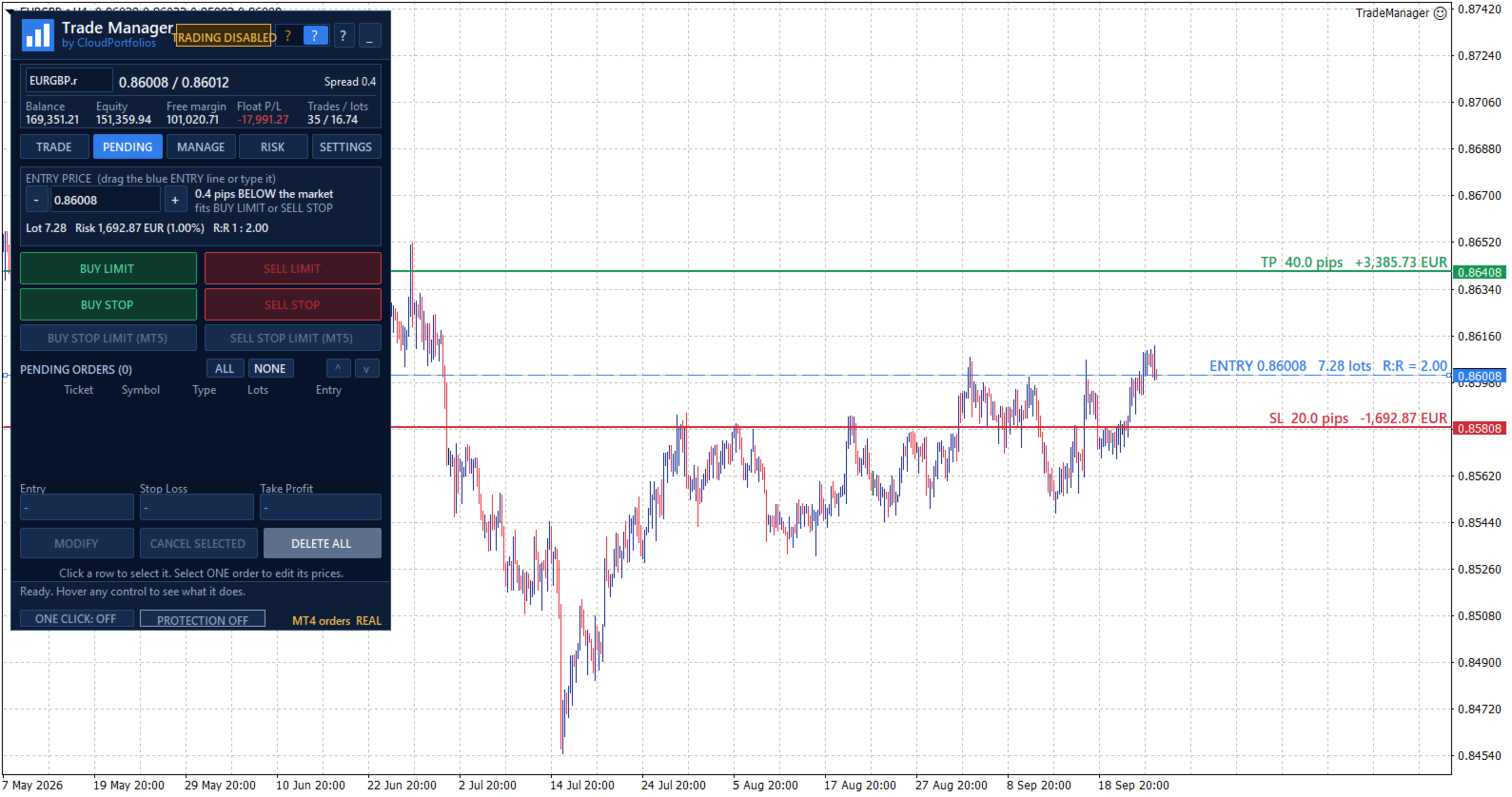
Visual trade planning on the chart

Build your trade using interactive lines for:

  • Entry.
  • Stop Loss.
  • Take Profit.

The SL and TP lines can be moved directly with the mouse. For pending orders, the entry line can also be dragged across the chart.

Every adjustment automatically updates:

  • Entry price.
  • Stop Loss distance in pips.
  • Take Profit distance in pips.
  • Lot size.
  • Monetary risk.
  • Percentage risk.
  • Potential profit.
  • Risk-to-reward ratio.

Optional chart labels display volume, pips, risk, estimated profit, and R:R next to their corresponding levels.

Flexible position sizing

Choose how the volume of each trade should be calculated:

  • Percentage risk based on balance.
  • Percentage risk based on equity.
  • Fixed monetary risk.
  • Manually entered lot size.

When percentage or monetary risk is selected, Trade Manager calculates the lot size using the actual Stop Loss distance and the symbol specifications supplied by the broker.

Volume is adjusted to the symbol’s permitted lot step. If the calculated size falls below the broker’s minimum, you can choose to:

  • Block the order.
  • Use the minimum lot and display the resulting real risk.

The panel always distinguishes between the theoretical volume and the volume that can actually be submitted.

Understand the impact before trading

Before executing an order, you can review:

  • Final lot size.
  • Actual monetary risk.
  • Risk as a percentage of balance or equity.
  • Potential loss at the Stop Loss.
  • Potential profit at the Take Profit.
  • Risk-to-reward ratio.
  • Estimated margin.
  • SL and TP distances.
  • Current spread.

If the spread is large relative to the Stop Loss distance, the panel displays a warning before the trade is placed.

Flexible Stop Loss and Take Profit

Stop Loss and Take Profit can be defined using:

  • An exact price.
  • A distance in pips.
  • Draggable chart lines.
  • An R:R target for Take Profit.

When TP is defined by R:R, its level automatically follows changes to the Stop Loss to preserve the selected ratio.

SL or TP can also be disabled when allowed by the selected sizing mode. Trades without a Stop Loss are explicitly identified as having unlimited risk.

Market orders

Execute BUY and SELL orders from the panel using the previously calculated lot size, Stop Loss, and Take Profit.

Before submission, Trade Manager checks:

  • Connection status.
  • Quote availability.
  • Market status.
  • Symbol trading permissions.
  • Minimum and maximum volume.
  • Permitted volume step.
  • Correct SL and TP placement.
  • Minimum broker distance requirements.
  • Available margin.
  • Active account protection rules.

If the price changes while the confirmation window is open and the risk increases significantly compared with the amount shown, the order is stopped so it can be reviewed again.

Pending orders

Place the following pending orders directly from the panel:

  • Buy Limit.
  • Sell Limit.
  • Buy Stop.
  • Sell Stop.

The entry can be typed, moved using the chart line, or adjusted in one-pip steps.

The panel shows the entry’s distance from the market and helps identify which order types are compatible with its current position.

Pending orders use the same lot, risk, Stop Loss, Take Profit, and R:R calculation engine as market orders.

Pending order management

The pending order table displays:

  • Ticket.
  • Symbol.
  • Order type.
  • Volume.
  • Entry price.

You can:

  • Select one or several orders.
  • Cancel selected orders.
  • Delete every pending order within the current management scope.
  • Modify the entry, Stop Loss, and Take Profit of an order.

Centralized position management

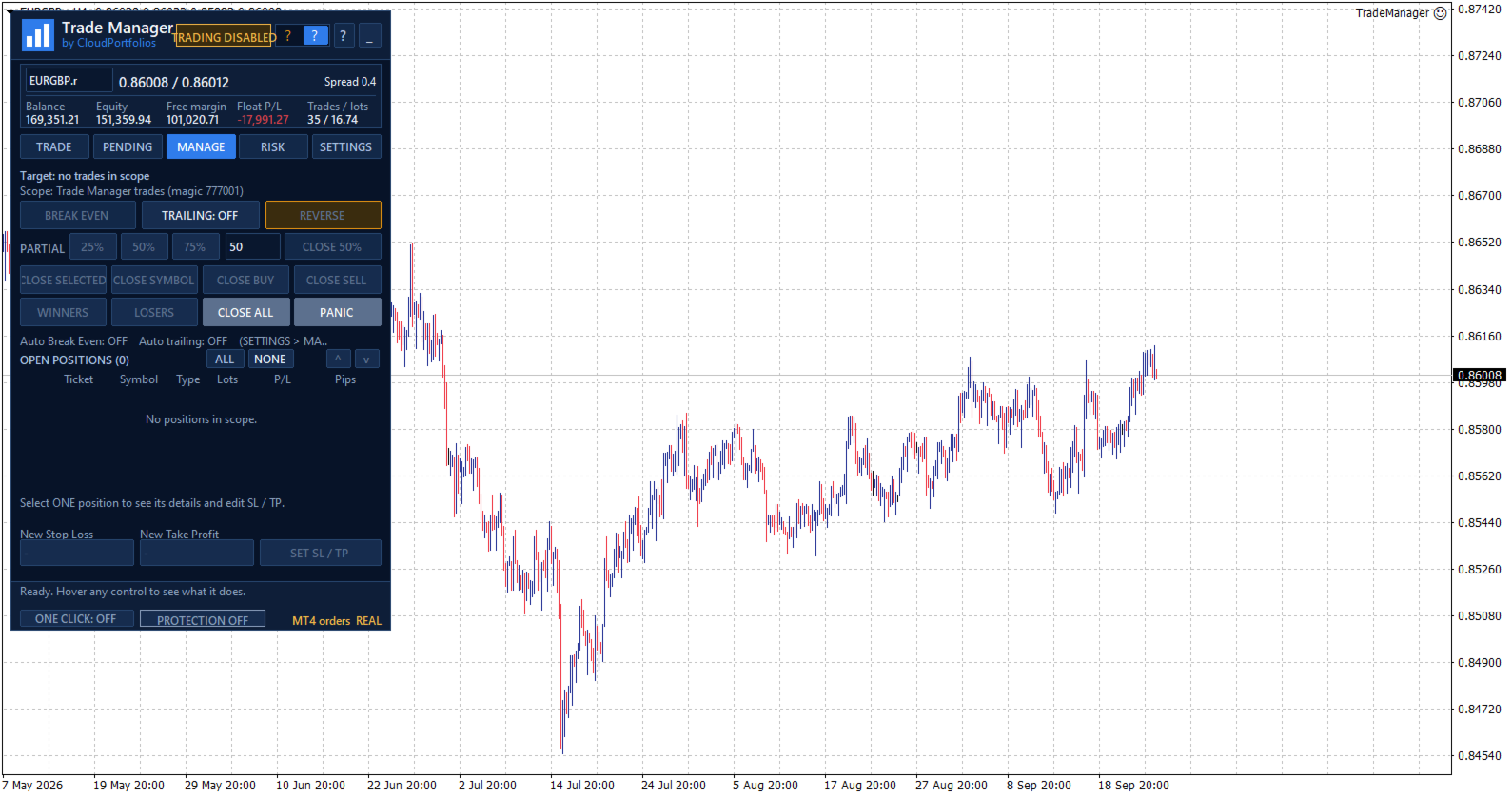
The MANAGE tab displays the positions included in the selected scope, together with:

  • Ticket.
  • Symbol.
  • Direction.
  • Volume.
  • Monetary result.
  • Result in pips.

Positions can be selected individually. If no position is selected, general actions can be applied to every position within the management scope.

Selecting one position also displays its details and allows its Stop Loss and Take Profit to be modified.

Manual and automatic Break Even

Move the Stop Loss to the entry price plus a configurable offset in the profit direction.

Break Even can be applied manually or activated automatically using:

  • Profit reached in pips.
  • A multiple of the initial risk, such as 1R.

Before modifying the position, Trade Manager checks that the price has moved far enough and that the new level complies with the broker’s restrictions.

Automatic trailing stop

The trailing stop can use:

  • A fixed distance in pips.
  • A distance based on a multiple of the initial risk.

You can also configure:

  • The minimum profit required to start trailing.
  • The minimum improvement step before modifying the Stop Loss again.

The trailing stop never increases the existing risk. The Stop Loss only moves in a favorable direction.

Partial closes

Reduce position exposure using:

  • 25%.
  • 50%.
  • 75%.
  • A custom percentage between 1% and 99%.

Trade Manager adjusts the closing volume to the broker’s minimum and permitted lot step. It also checks that the remaining volume will still be valid.

Controlled Reverse

The Reverse function:

  1. Closes the original position.
  2. Waits until the close is confirmed.
  3. Opens the opposite direction with the same volume.
  4. Preserves the original Stop Loss and Take Profit distances.

If the close cannot be confirmed, the opposite position is not opened automatically.

Fast group closing

Close positions using different filters:

  • Selected positions.
  • Current symbol.
  • All BUY positions.
  • All SELL positions.
  • Winning positions.
  • Losing positions.
  • Every position within the management scope.

Actions affecting several positions are processed progressively to avoid sending all requests to the server simultaneously.

PANIC mode

PANIC is designed to remove all exposure within the configured management scope:

  • It closes all included positions.
  • It deletes all included pending orders.
  • It checks afterward that no residual exposure remains.

This action requires two confirmation steps to reduce the risk of accidental activation.

Configurable management scope

Choose exactly which trades Trade Manager is allowed to control:

  • Trades identified by its Magic Number.
  • Trades on the current symbol.
  • All trades in the account.

The selected scope applies to:

  • Break Even.
  • Trailing stop.
  • Partial closes.
  • Reverse.
  • Group closing.
  • Pending order management.
  • Account Protection closing actions.

This makes it possible to keep different strategies separate or deliberately extend control when required.

Global risk overview

The RISK section displays:

  • Monetary risk of positions with a Stop Loss.
  • Potential risk of pending orders with an SL.
  • Risk as a percentage of balance or equity.
  • Positions without a Stop Loss.
  • Pending orders without a Stop Loss.
  • Total open volume.
  • Total pending volume.

Trades without an SL are not treated as having zero risk. They are shown as unlimited exposure through a dedicated warning.

Equity-based daily result

Trade Manager calculates the daily result using a persistent equity baseline and displays:

  • Realized result.
  • Change in floating result since the baseline.
  • Total result.
  • Deposits and withdrawals excluded from the trading result.

If the program is started for the first time during the trading day, the panel clearly identifies that moment as the baseline instead of presenting the result as if it covered the period since midnight.

When the available account history cannot verify balance operations reliably, the daily protection rules remain disabled to avoid acting on incomplete information.

Account Protection

Account Protection is disabled by default and must be enabled explicitly.

It allows you to define:

  • Maximum daily loss in percentage or money.
  • Daily profit target in percentage or money.
  • Maximum total risk.
  • Maximum number of positions and pending orders.
  • Maximum total volume, including pending orders.

When the daily loss or profit target is reached, you can choose to:

  • Block new trades.
  • Close trades within the management scope and delete their pending orders.
  • Block new trades and close the exposure.

The daily lock remains active until the next server day and persists after restarting MetaTrader. It can also be manually overridden for the current day through an explicit confirmation.

The panel displays a warning state when the loss reaches 80% of the configured daily limit.

Protection metrics are calculated using the entire account. Closing actions respect the selected management scope.

Limits before adding exposure

Account Protection can prevent a new trade when it would:

  • Exceed the permitted total risk.
  • Exceed the maximum number of trades.
  • Exceed the configured total volume.
  • Add exposure without a Stop Loss while the total-risk limit is active.
  • Add exposure to an account containing positions without an SL, where total risk cannot be measured.

These limits are checked before the order is submitted.

Symbol information

View the broker’s symbol specifications directly in the panel:

  • Bid, Ask, and spread.
  • Digits and pip size.
  • Tick size and tick value.
  • Contract size.
  • Long and short swap.
  • Minimum and maximum lot.
  • Volume step.
  • Stop level and freeze level.
  • Estimated margin for one lot.
  • Market status.
  • Trading permissions.
  • Account type.

All calculations adapt to these broker-provided properties instead of relying only on the symbol name.

Execution safety and confirmations

Trade Manager includes several operational safeguards:

  • One Click disabled by default.
  • Detailed confirmation before every order.
  • Configurable confirmations for sensitive actions.
  • Two-step confirmation for Close All and PANIC.
  • Double-click protection.
  • Tracking of executions awaiting confirmation.
  • Identification of partial executions.
  • Temporary blocking of new entries when an execution result is uncertain.
  • Visible connection, market, and trading status.
  • Panel messages and warnings.

If an execution remains unconfirmed, Trade Manager avoids sending it again automatically and asks the user to check the account before unlocking new orders.

Chart-integrated interface

The interface is organized into five main sections:

  • TRADE: plan and execute market orders.
  • PENDING: create and manage pending orders.
  • MANAGE: control open positions.
  • RISK: monitor exposure, daily results, protection, and symbol information.
  • SETTINGS: configure trading behavior, automation, and visual options.

The panel also provides:

  • Dark and light themes.
  • Adjustable size.
  • Draggable position.
  • Minimized view.
  • Symbol switching from the panel.
  • Contextual help for every control.
  • Connection and market status indicators.
  • Visible real or demo account identification.
  • English, Spanish, Italian, and French.

Persistent settings and trade plans

Trade Manager automatically saves:

  • Trading settings.
  • Visual theme.
  • Panel position and state.
  • Magic Number and order comment.
  • Break Even and trailing rules.
  • Account Protection configuration.
  • Individual plans for each symbol.
  • Initial-risk memory for managed positions.

The configuration is restored after restarting MetaTrader, and each symbol’s plan is recovered when returning to it.

Key features

✓ Manual trading from the chart
✓ Lot calculation by percentage, money, or manual volume
✓ Risk basis selectable between balance and equity
✓ Stop Loss and Take Profit by price or pips
✓ Draggable Entry, SL, and TP lines
✓ Take Profit based on R:R
✓ Risk, profit, and margin information before execution
✓ Market BUY and SELL orders
✓ Buy Limit, Sell Limit, Buy Stop, and Sell Stop
✓ Pending order modification and cancellation
✓ Management by Magic Number, symbol, or entire account
✓ Multi-symbol open-position table
✓ Manual SL and TP modification
✓ Manual and automatic Break Even
✓ Break Even triggered by pips or R multiples
✓ Trailing stop based on pips or initial risk
✓ Configurable partial closes
✓ Reverse with equivalent volume and SL/TP distances
✓ Close selected, BUY, SELL, winning, or losing positions
✓ Close All and PANIC mode
✓ Account-wide open and pending risk
✓ Identification of exposure without a Stop Loss
✓ Equity-based daily result
✓ Daily and exposure limits
✓ Optional One Click trading
✓ Dark and light themes
✓ Four interface languages
✓ Automatic saving of settings and symbol plans

Trade Manager turns manual trading into a clearer process: define the trade, review its impact, and manage it from the same panel.

You remain in control of every entry while reducing repetitive calculations, centralizing trade management, and applying your risk rules more consistently.

Important: automatic Break Even, trailing stop, and account protection functions require Trade Manager to remain running and MetaTrader to stay connected to the broker.

おすすめのプロダクト
Close Manager
ELITE FOREX TRADERS LLC
One-Click Trade Manager for MetaTrader 5 The Close Manager Buttons EA is a powerful utility designed to give you full control of your open positions and pending orders with just one click. Forget about manually closing trades one by one during fast market moves—this EA does it instantly, safely, and efficiently. Key Features Close All Trades – instantly close every open position Close Only Buy Trades – exit only BUY positions while keeping SELL trades running Close Only Sell Trades – exit only
FREE
Easy and simple tool which close all trades in defined point of time. It can also close all open trades when opened positions reach defined target profit or stop loss. For all pairs, indexes etc. Works with all instruments. All types of orders. All charts. Users inputs: - close time (hour,min,sec) - take profit (in users currency) - stop loss (in users currency) Save & Load settings option. Fast, simple and reliable. Check out other tools provided by our team!
FREE
Risk Pilot MT5 — 高速な約定とリスク管理パネル MetaTrader 5のマニュアルトレーダーのための究極のインタラクティブアシスタント「Risk Pilot」で、取引リスクを完全にコントロールしましょう。精度とスピードを追求して設計されたRisk Pilotは、手動でのロット計算を不要にし、市場が動く前に瞬時に取引を開始できるようにします。 主な機能: 自動ロットサイズ設定 :選択したリスク比率と口座残高に基づいて、リアルタイムでロットサイズを自動的に調整します。 価格ベースのSL/TP:正確な価格の入力やチャートとの直接操作により、ストップロス(SL)とテイクプロフィット(TP)レベルを簡単に設定できます。 カスタムサウンドアラート :重要な瞬間を見逃しません。エントリー時、TP到達時、SL到達時に、それぞれ異なる音で通知します。 ワンタップ・ブレークイーブン :ワンクリックでSLをエントリー価格に移動させ、即座に元本を保護します。 部分決済管理 :ポジションの残りをそのまま保有したまま、50%を部分決済することで、早期に利益を確保できます。 リアルタイ
FREE
INFOPadはMetaTrader 5ターミナルで選択された通貨ペアに関する情報を作成する情報パネルです。 この指標には5つの機能があります。 選択したシンボルの主および主な情報を表示します。売値、スプレッド、ストップレベル、スワップ、ティック値、コミッション価格。 SL目標とTP目標(確立されたストップロスとテイクプロフィットのポイント数、ドル額)の将来の目標を示します。 今日、週、月、年、選択した通貨の総利益などの期間に受け取った利益が表示されます。 それは現在のオープンポジション、そのロット(ボリューム)、ポジション数、ポイントでのポジションの利益、ドル、パーセントを表示します。 オープンディールのチャートに追加情報を表示します。それはストップロスを示し、利益レベルとこれらのストップレベルの目標を取ります。 トランザクションがシンボルに対して開かれたとき、トランザクションが閉じられたとき、トランザクションが変更されたときに、ログファイルに情報を書き込みます。 取引の開始時、取引の終了時、取引の変更時にサウンドファイルを再生します。 トランザクションを開くとき、トランザクション
FREE
Signalator Trade Summary Panel MT5 は、口座、ポジション、シンボル、リスクの状況をチャート上で明確に確認できる無料のローカル MetaTrader 5 ユーティリティです。 Signalator Trading and Analysis Ecosystem の一部であり、口座監視、市場分析、シンボルスキャン、アラート、トレーダーのワークフロー改善を目的とした実用的な MetaTrader ツール群です。 このパネルは、口座・ポジション監視に加えて、統合 Symbol Inspector とトレード前の Lot Size / Risk Calculator を搭載しています。Floating P/L、エクスポージャー、SL/TP カバー状況、ブローカーのシンボル仕様、予定トレードのリスクを複数のターミナルタブを切り替えずに確認できます。 市場スキャン、トレンド確認、multi-timeframe アラートには、関連する Signalator 製品も利用できます: MT4 Summary Panel  -  Multi TF Symbol Scanner
FREE
Trade Panel by RWBTradeLab Trade Panel is an on-chart panel for MetaTrader 5 that places market, pending and straddle orders and manages the open trades of the chart symbol. Overview The panel sits on the chart and has six tabs: Trade, Manage, Settings, Account, Help and About. Every value you set is saved for each symbol, so a chart keeps its own lot, stop loss, take profit and switches after a restart. The panel can be dragged anywhere on the chart and minimised to its title bar. The pane
FREE
MetaTrader 5 向けのプロフェッショナルなポジション計画およびロット管理パネル Position Control Suite は、MetaTrader 5 用の視覚的な取引計画パネルです。 チャート上で直接注文を準備し、Stop Loss の位置を設定し、口座通貨ベースのリスク額から ポジション量を自動計算するために設計されています。 基本的な考え方はシンプルです。許容するリスク額を入力し、Stop Loss の距離を設定すると、 パネルがその取引計画に必要なロットサイズを計算します。これにより、注文準備をより明確で一貫したものにできます。 主な機能 口座通貨ベースのリスク入力: 取引で許容する金額を入力できます。 自動ロット計算: リスク額と Stop Loss 距離からポジション量を計算します。 視覚的な価格レベル: Entry、Stop Loss、Take Profit をチャート上に表示します。 成行注文モード: BUY または SELL に応じて正しい Bid または Ask の実行価格を使用します。 指値・逆指値注文モード: Buy Limit、Buy Stop、
FREE
Order Assistant is a easy to use trading utility designed to make trade planning, risk management, and order execution simple, fast, and intuitive. The entire interface is built around one principle: keep trading simple and clear . Instead of a complicated trading panel filled with unnecessary information and settings, Order Assistant provides the essential tools in a clean and easy-to-use interface. The goal is to let traders focus on the trade itself rather than managing the platform. Simple a
FREE
The free trade manager — simple but effective. Quickly open positions with preset take profit and stop loss levels. Set everything to breakeven or close all trades with one click. Get plenty of information on your chart about your account, trades, and profit/loss. It speaks for itself — that’s how simple this manager is to use. Check out our other EAs and our Telegram for more information! By traders, for traders!
FREE
Broker Quality Monitor is a free utility that measures the real quality of your broker for trading. What it measures: - Live spread (current, average, min and max) - Real slippage from your own fills, separated by BUY and SELL - Execution latency - Broker Quality Score (0-100) - Suitability verdict for gold scalping Features: - Live panel with all metrics and color-coded status - Per-session spread averages (Asia, London, London+NY, NY close) - Alerts when spread or slippage exceed your configur
FREE
Q-Panel : Precision Order Management for MetaTrader 5 Q-Panel is a chart-based order-management tool built for traders who want full control over how a position is placed, tracked, and closed; without leaving the chart. Instead of typing prices into a ticket, you drag your entry, stop loss, and take profit directly on the price axis, and Q-Panel handles the rest: visual zones, live P/L, and one-click management for every trade you open. Key Features Visual Order Placement Drag Take Profit, Stop
FREE
Average Position Price Monitor is a position information indicator designed for MetaTrader 5. When multiple BUY or SELL positions are open on the same symbol, the indicator automatically calculates the volume-weighted average entry price for each direction and displays important position, profit/loss, Stop Loss and Take Profit information directly on the chart. The indicator is designed to help traders manage multiple positions without checking every individual position manually. Main Features V
FREE
ARMOR Risk Calculator Trade with a plan. Calculate your risk before you enter the market. ARMOR Risk Calculator is a professional and easy-to-use risk management tool for MetaTrader 5, designed to help traders calculate their position size and potential trade risk before placing a trade. Instead of manually calculating lot sizes and risk values, ARMOR Risk Calculator provides a clean and intuitive dashboard where you can enter your trade parameters and instantly review the calculated results. Ke
FREE
Basic Theme Builder: チャートカスタマイズを簡単に Basic Theme Builder インジケーターで、MetaTrader 5   のチャート外観のカスタマイズをシンプルに変革しましょう。この直感的なインジケーターは、使いやすいパネルを提供し、さまざまなテーマやカラースキームを簡単に切り替えることができます。これにより、取引環境の視覚的な魅力と機能性が向上します。 Free MT4 version Basic Theme Builder インジケーターは、MetaTrader 5 のチャートを簡単にパーソナライズしたいトレーダーに最適なツールです。シンプルなパネルインターフェースとさまざまなテーマプリセットを使用して、取引スタイルや気分に合わせてチャートの外観をすぐに調整できます。クラシックなルックからモダンな美学まで、多彩なオプションを提供する Basic Theme Builder で、視覚体験を最適化しましょう。 主な機能: 簡単なテーマ管理: 便利なパネルインターフェースを使用して、ワンクリックでチャートのテーマを素早く変更できます。 定義済みのプ
FREE
WAP TP Stealth EA – Intelligent Basket Management for Precision Exits WAP TP Stealth EA is a specialized trade management expert advisor designed for traders who rely on basket strategies, recovery systems, and multi-position workflows. Instead of closing trades individually, the EA dynamically calculates the Weighted Average Price (WAP) of all open positions and executes a coordinated closure once your defined profit target is reached. This approach enables efficient drawdown management, smooth
FREE
G Spikes Trade Assistant G Spikes Trade Assistant is a MetaTrader 5 utility panel designed to help users manage manual trading actions more efficiently. It provides quick access to order execution, stop-loss settings, target-price settings, and position-management controls from the chart. Main features Buy and Sell market order buttons. Pending order options. Stop-loss and target-price management. Close All and selected close options. Customizable display settings and trade comments. Interface t
FREE
ZyloFx Position Size Calculator MT5 is a free risk management utility designed to calculate the appropriate lot size before opening a trade. The tool calculates position size based on your selected risk, account balance or equity, and Stop Loss distance. It also displays useful information directly on the chart. Explore all available ZyloFx Trading Tools: https://www.mql5.com/en/users/rosamartinez2825/seller Main Features Automatic lot size calculation. Percentage or fixed-money risk mode. Balan
FREE
Simple Position Manager is a professional-grade MT5 script designed for efficient trade management. This versatile tool allows traders to quickly apply Take Profit, Stop Loss, and Breakeven settings across multiple open positions with precision and reliability. Key Features Multi-Position Management Apply TP/SL to all open positions of the current symbol simultaneously Intelligent position filtering by symbol Batch modification capabilities Smart Breakeven Technology Automated breakeven tri
FREE
Kiwi Spread Monitor MT5 Kiwi Spread Monitor MT5 is a free MetaTrader 5 utility designed to help traders monitor the current bid/ask spread and understand trading costs directly from the chart. Spread can change significantly during volatile market conditions, news events, session changes, rollover periods, or periods of reduced liquidity. Kiwi Spread Monitor provides a clear on-chart dashboard so traders can quickly see whether the current spread is within their preferred trading range. The util
FREE
Utility for order reversal. Closes orders on the chart on which it is launched and opens orders with the opposite direction instead of them. Has a simple and intuitive graphical interface. It is also possible to automatically reverse newly opened orders. MT4 version of the utility-  https://www.mql5.com/en/market/product/74771 If you like this utility, take a look at my other products - https://www.mql5.com/en/users/nina_yermolenko/seller
FREE
RTrade panel is easy trading panel use both (Stop Loss & Take Profit) based on pips  with easy interface can be use by anyone Panel Feature: -Open position based on (Lot) size  -Auto detect entry price  -Use Stop Loss based on (pips) -Use Take Profit based on ( pips ) -Close all position in one button click i will add more function in future update if you like it write your review
FREE
複数の建玉を1つの book としてチャートから管理する 1. 何のためのツールか 1本なら手で管理できます。6本になると無理です。手動・複数のEA・スマホからと、 建玉が増えたときに気にしているのは 合計の損益 ですが、MetaTrader にはそれを対象に 操作する手段がありません。結局、価格が動くなかで1本ずつ決済し、頭の中で足し算をすることになります。 Adaptive Closer は、その book 全体をチャート上のパネルから操作します。 全決済も片側決済も1クリック、 全ポジションから同じ割合を一度に決済、全ストップを建値へ移動。あるいは、個別のチケットではなく 合計損益と口座資産を見るルール に委ねることもできます。 2. パネルのボタン CLOSE ALL / CLOSE BUY / CLOSE SELL — book 全体、または片側。 CLOSE 50% / CLOSE 25% — 全ポジションから同じ割合を一度に。分割できないものは全決済し、 その件数を表示します。 BREAK EVEN — 全ストップを「建値+設定幅」へ。現在値に近すぎてサーバーが拒否する
FREE
BTC Scalper - Automated RSI Breakout Strategy for BTCUSD Unlock the power of automated trading with BTC Scalper! This expert advisor is a fully autonomous trading strategy, designed to capitalize on fast-moving BTCUSD markets. It leverages a potent combination of RSI Breakouts and two Exponential Moving Averages (EMA) to find high-probability trade entries, ensuring optimal confluence for success. Key Features: Fully Automated Trading : Set it, forget it, and let BTC Scalper handle your trades 2
FREE
Account Info EA It is a tool that presents on the graph all the positions of the account, and specific information concerning the positions, but also the account. It enables the user to have an image of his account at a glance. Use like any expert advisor. You can't attach it in the same chart with other expert advisor. It does not have the ability to open or manage positions. You can attach it on any chart and any timeframe.
FREE
Core function Intelligent transaction management one-click opening and closing operation, which supports user-defined lots to set multiple closing modes: all closing, closing by direction and closing by profit and loss status. Professional risk control, real-time risk monitoring and spread control to avoid high-cost trading environment. Visual control panel has an intuitive graphical interface, and all functions can be operated with one button to display position information, profit and loss sta
FREE
Fair Value Gap Sweep is a unique and powerful indicator that draws fair value gaps on your chart and alerts you when a gap has been swept by the price. A fair value gap is a price gap that occurs when the market opens at a different level than the previous close, creating an imbalance between buyers and sellers. A gap sweep is when the price moves back to fill the gap, indicating a change in market sentiment and a potential trading opportunity. Fair Value Gap Sweep indicator has the following
FREE
This utility automates Take Profit (TP) and Stop Loss (SL) levels for your trades, calculated in Pips . It ensures consistent risk management for all your positions. Crucial Note for Manual Traders: If you intend to use this utility on trades opened manually (without an Expert Advisor), you must change the 'Magic Number' setting to 0 (zero) . This allows the utility to correctly identify and manage your manual orders.
FREE
Welcome to my MMTrader Manager product. EA that allows You for simple managing trades and positions. Key Features: Position Opening – Open trades quickly with customizable Take Profit (TP), Stop Loss (SL), and lot size settings. Position Closing – Close trades with one click. Grid System – Automatically create a grid of orders. Recovery Mode – Loss recovery lot calculation. Trade History Data – Acces data to historical positions. User-Friendly Interface – A clear and simple panel designed. This
FREE
AQ RiskOptimizer MT5
HIT HYPERTECH INNOVATIONS LTD
4 (1)
Risk Optimizer is the absolute solution for applying risk management on your account. Bad risk management is the main reason that causes traders to lose money. Risk Optimizer calculates and suggests the correct lot size for each position according to your personal, customized risk profile. You can give directly your preferred risk as percentage (%) for each position or you can trust our algorithms to calculate and optimize according to your risk category selection. But it is not only that! Selec
FREE
This indicator is designed to provide all useful information about symbol, account, positions and profit. It is developed for improving trader's money management. Parameters Calc can be divided to separate blocks. Each block is possible to hide, set its own color and other properties. Block symbol: This block displays information about actual SPREAD, POINT VALUE (in deposit currency for 1 lot), SWAP LONG and SHORT. Show symbol info - display/hide this block Color of symbol info - color of this
FREE
このプロダクトを購入した人は以下も購入しています
Trade Assistant MT5
Evgeniy Kravchenko
4.43 (216)
取引 ごとのリスクの 計算、新規注文 の 簡単 な 設置、部分的 な 決済機能 を 持 つ 注文管理、 7 種類 のトレーリングストップなど 、便利 な 機能 を 備 えています 。 追加の資料と説明書 インストール手順   -   アプリケーションの手順   -   デモアカウント用アプリケーションの試用版 ライン機能 チャート上にオープニングライン、ストップロス、テイクプロフィットを表示します。この機能により、新規注文を簡単に設定することができ、注文を出す前にその特徴を確認することができます。   リスク計算 リスク計算機能は、設定されたリスクとストップロス注文のサイズを考慮して、新規注文のボリュームを計算します。ストップロスの大きさを自由に設定できると同時に、設定したリスクを守ることができます。 Lot calc ボタン - リスク 計算 を 有効 / 無効 にします 。 Risk フィールドでは 、必要 なリスクの 値 を 0 から 100 までのパーセンテージまたは 預金通貨 で 設定 します 。 設定」 タブで 、 リスク 計算 の 種類 を 選択 します :「 $ 通
Trade Manager EAへようこそ。これは、取引をより直感的、正確、そして効率的にするために設計された究極の リスク管理ツール です。これは単なるオーダー実行ツールではなく、包括的な取引計画、ポジション管理、リスク管理のためのソリューションです。初心者から上級者、迅速な実行を必要とするスキャルパーまで、Trade Manager EAはあらゆるニーズに対応し、為替、指数、商品、暗号通貨などさまざまな市場で柔軟に対応します。 Trade Manager EAを使用すると、複雑な計算が過去のものになります。市場を分析し、エントリーポイント、ストップロス、テイクプロフィットのレベルをチャート上のラインでマークし、リスクを設定するだけで、Trade Managerが最適なポジションサイズを即座に計算し、SLとTPをピップ、ポイント、口座通貨でリアルタイムに表示します。すべての取引が簡単かつ効果的に管理されます。 主な機能: ポジションサイズ計算機 :定義されたリスクに基づいて取引サイズを瞬時に決定します。 簡単な取引計画 :エントリー、ストップロス、テイクプロフィットを設定するためのド
Local Trade Copier EA MT5
Juvenille Emperor Limited
4.94 (149)
Local Trade Copier EA MT5 は、同一の Windows PC または Windows VPS 上で稼働する複数の MetaTrader 5 口座間で、取引をコピーおよび管理するための高速で柔軟なトレードコピーツールです。 ローカルでの取引同期に加え、Receiver 側でロットサイズ、リスク管理、取引フィルター、シンボルマッピング、取引管理、口座保護を個別に設定できます。 Transmitter と Receiver のターミナルは約 1分 で設定でき、同一ブローカーまたは異なるブローカーの口座間で、手動取引や EA による取引をコピーできます。適切な条件下では、ローカルの MetaTrader ターミナル間で取引情報を 0.5秒未満 で同期できます。実際の約定速度は、ブローカーのレイテンシー、ネットワーク状況、PC/VPS の性能、ターミナルの負荷によって異なります。 ご購入前に無料デモをお試しください Local Trade Copier EA MT5 の完全機能版無料デモ を、MT5 デモ口座で 1回につき4時間 テストできます。 Local Trad
Telegram to MT5 Multi-Channel Copier   は、Telegram チャンネルのトレードシグナルを MetaTrader 5 へ自動コピーします。ボット不要、ブラウザ拡張不要、手動コピー不要。Telegram にシグナルが届くと、EA が数秒であなたのターミナルに注文を出します。 さらに、チャンネルをコピーする前に、内蔵バックテスターでそのチャンネルがあなたの口座でどう動いたかを確認できます。 製品は 2 つのコンポーネントで構成されます:Telegram チャンネルを監視する Windows アプリと、MT5 ターミナルでシグナルを執行する本 EA です。MT4 版もあります   こちら . セットアップガイドとアプリのダウンロード:   https://www.mql5.com/en/blogs/post/768988 現在の価格は今後値上げされます。 仕組み アプリはあなた自身の Telegram アカウントで接続するため、フォローしているすべてのチャンネル、グループ、トピック、ボット(プライベートや VIP を含む)を見ることができます。シグナル
TradePanel MT5
Alfiya Fazylova
4.88 (169)
Trade Panelは多機能なトレーディングアシスタントです。アプリには手動取引用の50以上のトレーディング機能が搭載されており、ほとんどの取引作業を自動化することができます。 アプリの説明書+ビデオガイド: https://www.mql5.com/en/blogs/post/772292 デモ口座用アプリの試用版: https://www.mql5.com/en/blogs/post/750865 アプリのインストール方法: https://www.mql5.com/en/blogs/post/756239 アプリをビジュアルモードでテストする方法: https://www.mql5.com/en/blogs/post/770277 VPSのMetaTraderにアプリをインストールする方法: https://www.mql5.com/en/blogs/post/770190 取引。 ワンクリックで取引操作を行うことができます: リスクを自動計算して指値注文やポジションを開く。 複数の注文やポジションをワンクリックで開く。 注文のグリッドを開く。 保留中の注文やポジションをグルー
================================================================================ POC BREAKOUT - V20.72. Full Professional Grade Toolkit ================================================================================ POC Breakout is a full MetaTrader 5 trading dashboard for discretionary traders who want breakout signals, Point of Control (POC) context, volume profiles, order flow, market structure, news, alerts, and advanced trade planning in one professional workspace. Attached directly to you
自分の取引ルールで Telegram のシグナルをコピー Telegram to MT5 Signal Trader は、Telegram の公開・非公開チャンネルやグループから、テキスト形式の取引シグナルを MetaTrader 5 へ自動でコピーします。1つのデスクトップアプリで複数の配信者と MT5 口座を管理し、 配信者ごとにリスクと取引設定を個別に指定 できます。 シグナルのコピーに Telegram ボットや API 設定は必要ありません。 電話番号または QR コードでご自身の Telegram アカウントにログインし、すでに参加しているチャンネルやグループを選ぶだけです。ボットの作成や、Telegram API トークン、API ID、API hash の入力は不要です。 ポジションサイズを選び、複数の利確水準に分けて決済し、建値へのストップ移動やトレーリングストップを自動化できます。配信者のシグナルを受け取りながら、実際の取引方法は自分で管理できます。 本製品は、この MT5 エキスパートアドバイザ(EA)と、必須の Windows 連携アプリで構成されます。 インス
Farmed Hedge Yield Farming | All Markets (Manual - Hybrid - Semi/Automated EA) VERIFIED TRADING RESULTS - Farmed Hedge Yield Axi Copy:  https://www.mql5.com/en/signals/2356376 - Farmed Hedge Yield Exn Copy:   https://www.mql5.com/en/signals/2356404 - Farmed Hedge Yield V Copy:  https://www.mql5.com/en/signals/2357156 IMPORTANT NOTICE: FarmedHedge is a MANUAL-FOCUSED TRADING UTILITY ,not a fully automated EA. Results shown on this Signal include manual trades and overall strategic management.
Power Candles Strategy Scanner - 自動最適化型マルチシンボル設定ファインダー パワーキャンドル・ストラテジー・スキャナーは 、パワーキャンドル・インジケーターを駆動するのと全く同じ自己最適化エンジンを、マーケットウォッチに登録されているすべての銘柄に対して並行して実行します。1つのパネルで、現在統計的に取引可能な銘柄、各銘柄で勝率の高い戦略、最適なストップロス/テイクプロフィットの組み合わせが表示され、新たなシグナルが発生した瞬間に通知が届きます。 このツールは、Stein Investmentsのエコシステムの一部です。  18種類以上のツールをすべて閲覧し、AIを活用したセットアップの推奨を受け取り、  https://stein.investments でコミュニティに参加しましょう 市場動向を網羅。銘柄ごとに3,000件以上の自動最適化。2種類のアラート。ワンクリックでチャートを切り替えて即座にアクション。 なぜこれが必要なのか 多くのマルチ銘柄スキャナーは、 価格の動き (ボラティリティ、変動率、銘柄ごとのRSI)を表示するだけです。それ
Exp COPYLOT CLIENT for MT5
Vladislav Andruschenko
3.97 (35)
MetaTrader 5 用のプロフェッショナル取引コピー機 MetaTrader 向けの高速・高性能・信頼性の高い 取引コピー機 です。 COPYLOT は、MT4 と MT5 のターミナル間で Forex 取引をコピーでき、 Hedge 口座と Netting 口座の両方に対応しています。 COPYLOT MT5 版の対応構成: - MT5 Hedge → MT5 Hedge - MT5 Hedge → MT5 Netting - MT5 Netting → MT5 Hedge - MT5 Netting → MT5 Netting - MT4 → MT5 Hedge - MT4 → MT5 Netting MT4 版 完全な説明 + DEMO + PDF 購入方法 インストール方法 ログファイルの取得方法 テストと最適化の方法 Expforex のすべての製品 MT4 ターミナルへのコピーも可能です(MT4 → MT4、MT5 → MT4): COPYLOT CLIENT for MT4 COPYLOT は、2台、3台、さらには10台のターミナル間で同時に動作できる、プロフェッ
Signal TradingView to MT5 Pro Automator TradingViewとMetaTrader 5間の即時プロフェッショナル実行 TradingViewのシグナル(アラート)とMT5での実際の約定を繋ぐ、最も強固なコミュニケーションブリッジで、取引戦略を自動化します。スピード、柔軟性、そして完璧なリスク管理を求めるトレーダー向けに設計されたこのExpert Advisorは、あらゆるアラートメッセージを正確な成行または指値注文に変換します。 強みと利点 ユニバーサルパーシングエンジン(独自技術): あらゆるアラート形式からデータを自動的に認識し、抽出できる高度なテクノロジー。単一の固定フォーマットに制限されることはありません。システムはシンボル(銘柄)、アクション、価格、SL(ストップロス)、TP(テイクプロフィット)を自動的に理解します。 リアルタイム実行: レイテンシ(遅延)を最小限に抑えるよう最適化された、1秒未満の超高速ポーリング技術。シグナルを受信してから数ミリ秒以内に注文が実行されます。 機関投資家レベルのリスク管理: 以下に基づく自動かつ正確
Premium Trade Manager - コーチ内蔵型トレードパネル Premium Trade Manager は、AIトレーディングコーチをあなたのチャートの中に置き、その下に完全な執行エンジンを備えたツールです。いつも通りにトレードをセットアップし、あなた専任のAIトレーディングコーチ Max にそのセットアップをそのまま読み取らせて、発注前に率直な見解を伝えてもらいましょう。ストップの幅が規律あるアプローチに合っているか、リスクサイズは適切か、高影響のニュースイベントが数分後に迫っていないか、プロップファームの制限に近づいていないか。その下には、クリックの後をすべて処理するエンジンが備わっています。ワンクリックのリスクサイズ計算による発注、チャート上でドラッグして組み立て、発注後も動かせるプラン、最大4段階の分割利確、7種類のトレール方式、リアルタイムのプロップファームコンプライアンス、ニュースガード、そしてコストを自ら採点するスプレッド機能。判断はあなたが下す。Max がもう一度確認する。後のことはすべてパネルが担う。 購入前に実際に触れて試せます。 ブラウザ上でライブ
MT5 to Telegram Signal Provider は、Telegramのチャット、チャンネル、またはグループに 指定された シグナルを送信することができる、完全にカスタマイズ可能な簡単なユーティリティです。これにより、あなたのアカウントは シグナルプロバイダー になります。 競合する製品とは異なり、DLLのインポートは使用していません。 [ デモ ] [ マニュアル ] [ MT4版 ] [ Discord版 ] [ Telegramチャンネル ]  New: [ Telegram To MT5 ] セットアップ ステップバイステップの ユーザーガイド が利用可能です。 Telegram APIの知識は必要ありません。必要な全ては開発者から提供されます。 主な特長 購読者に送信する注文の詳細をカスタマイズする機能 例えば、Bronze、Silver、Goldといった階層型のサブスクリプションモデルを作成できます。Goldサブスクリプションでは、すべてのシグナルが提供されます。 id、シンボル、またはコメントによって注文をフィルターできます 注文が実行されたチャート
HINN MAGIC ENTRY – the ultimate tool for entry and position management! SIMPLE. FASTEST. INTUITIVE. MAX AUTOMATED. Place orders by selecting a level directly on the chart! full description   ::  demo-version  :: 60-sec-video-description Key features: - Market, limit, and pending orders - Automatic lot size calculation - Automatic spread and commission accounting - Unlimited partitial take-profits  - Breakeven and trailing stop-loss and take-profit  functions - Invalidation leves - Intuitive, a
One button. One trade. MT5 Trading Deck is a hotkey trading panel for MetaTrader 5 that turns the platform into a keyboard-driven execution cockpit. Stop loss, take profit and lot size are pre-calculated for every key; the moment you press, a market order is live on the broker. A complete technical user manual is attached in the product Comments section. It documents every input parameter, the full hotkey map, the recommended Stream Deck XL layout, and the advanced workflows for Pre-Limit orders

EA Slipstream
Stephen J Martret
5 (1)
Your backtest filled every order at the price it asked for. Your account does not. EA Slipstream measures what execution costs your EA, using your own fills, slippages and spreads to show you the true performance of your EA. A backtest prices every trade at the level the EA named. In live trading a pending order fills at whatever price is available when it triggers, a stop closes wherever the market is when it is hit, and the spread at that moment is whatever the account was quoting. The differ
Grid Manual MT5
Alfiya Fazylova
4.73 (22)
「Grid Manual」は、注文のグリッドを操作するための取引パネルです。 ユーティリティはユニバーサルで、柔軟な設定と直感的なインターフェイスを備えています。 それは、損失を平均化する方向だけでなく、利益を増やす方向でも注文のグリッドで機能します。 トレーダーは注文のグリッドを作成して維持する必要はありません。 すべてが「Grid Manual」によって行われます。 注文を開くだけで十分であり、「Grid Manual」は注文のグリッドを自動的に作成し、非常に閉じるまでそれに付随します。 完全な説明とデモバージョン ここ。 ユーティリティの主な機能と機能 ユーティリティは、モバイル端末から開かれた注文を含め、あらゆる方法で開かれた注文を処理します。 「制限」と「停止」の2種類のグリッドで機能します。 グリッド間隔の計算には、固定と動的(ATRインジケーターに基づく)の2つの方法で機能します。 オープンオーダーグリッドの設定を変更できます。 チャート上の各注文グリッドの損益分岐点を表示します。 各注文グリッドの利益率を表示します。 ワンクリックでグリッドから収益性の高い注文を閉じるこ
EA Overfitter
Stephen J Martret
5 (1)
That backtest looks great. But will it still be making money tomorrow, next week, next month? EA Overfitter re-runs your EA on 100 price histories it has never seen. One score tells you if the edge is real. A backtest tells you what an EA did on one price history — the one that happened to occur. What you cannot tell from it is how much of that result was the strategy and how much was the particular path. EA Overfitter answers that. It builds up to 100 synthetic price histories your EA has n
Trade Manager は、リスクを自動的に計算しながら、取引を迅速に開始および終了するのに役立ちます。 過剰取引、復讐取引、感情的な取引を防止する機能が含まれています。 取引は自動的に管理され、アカウントのパフォーマンス指標はグラフで視覚化できます。 これらの機能により、このパネルはすべてのマニュアル トレーダーにとって理想的なものとなり、MetaTrader 5 プラットフォームの強化に役立ちます。多言語サポート。 MT4バージョン  |  ユーザーガイド + デモ Trade Manager はストラテジー テスターでは機能しません。 デモについてはユーザーガイドをご覧ください。 危機管理 % または $ に基づくリスクの自動調整 固定ロットサイズを使用するか、ボリュームとピップに基づいた自動ロットサイズ計算を使用するオプション RR、Pips、または価格を使用した損益分岐点ストップロス設定トレーリングストップロス設定 目標に達したときにすべての取引を自動的に終了するための 1 日あたりの最大損失 (%)。 過度のドローダウンからアカウントを保護し、オーバートレードを防ぎます
Trade Dashboard simplifies how you open, manage, and control your trades, with built-in lot size calculation. It allows you to execute trades, manage risk, and control positions directly on the chart, with tools such as partial close, breakeven, and trailing stop. Designed to reduce manual work and help you stay focused on your trading decisions. A demo version is available for testing. Detailed explanations of features are provided within the MQL5 platform. Installation instructions are include
MT5 用 Dynamic Fibonacci Grid Dashboard の最新バージョンを紹介します。 数多くの新機能を搭載したこの新しいダッシュボードは、トレード体験を一新し、市場や価格アクションをまったく新しい視点から見ることができます。複数のタイムフレームと複数のシンボルを同時に分析することで、新たな可能性を発見できます。手動トレードやポジション管理のための使いやすいインターフェース、そしてあらかじめ設定された自動売買戦略を適用するための拡張機能を備えています。さらに、DFGはストラテジーテスター内でトレーディングシミュレーターとして完全に機能し、過去データを使用してさまざまな市場環境を再現できます。ビジュアルモードで手動トレードを練習したり、高速モードで自動売買戦略をテストしたりすることが可能です。 主な特徴 • Dynamic Fibonacci Bands の概念に基づく、複数タイムフレームおよび複数シンボルの高度なテクニカル分析。 リアルタイム市場監視ダッシュボードにより、これまでにない効率性を体験できます。M1、M5、M15、H1 のチャートから得られる複雑な
Seconds Chart - MetaTrader 5で秒足チャートを作成するユニークなツールです。 Seconds Chart を使用すると、秒単位のタイムフレームでチャートを構築でき、標準的な分足や時間足チャートでは得られない柔軟性と分析精度を実現します。例えば、 S15 は15秒足を表します。カスタムシンボルをサポートしているインジケーターやEAをすべて使用できます。標準的なチャートと同様に便利に操作できます。 標準的なツールとは異なり、 Seconds Chart は超短期のタイムフレームでも高い精度と遅延なく作業できるように設計されています。 Free Demo: Seconds Chart v2.29 Demo.ex5 無料デモをダウンロードしてご自身でお確かめください: 完全機能版 - すべての機能が利用可能 24時間テスト - 精度と利便性を評価するのに十分な時間 デモ口座のみ - ほとんどのブローカーで簡単に開設可能 GBPCADチャートのみ - ほとんどの端末で利用可能 これらの制限はデモ版のみに適用されます。製品版は、あらゆる口座タイプ(リアル、デモ、コンテス
The product will copy all telegram signal to MT5 ( which you are member) , also it can work as remote copier.  Easy to set up, copy order instant, can work with almost signal formats, image signal,  s upport to translate other language to English Work with all type of channel or group, even channel have "Restrict Saving Content", work with  multi channel, multi MT5 Work as remote copier: with signal have ticket number, it will copy exactly via ticket number. Support to backtest signal. How to s


Your EAs cannot see each other, but Anchor can. Anchor gives you one place to coordinate your EAs, manage risk, and decide when trading is allowed. It works alongside the trading bots you already use without any changes to them. The Problem One EA opens a trade. Then another starts trading. The next thing you know, you wake up to multiple grids built across your account. Each EA may be doing exactly what it was designed to do, but together they can place far more risk on your account than you in
Exp5 Duplicator
Vladislav Andruschenko
4.78 (9)
Duplicator for MetaTrader 5 — 1つの端末内で動作するプロフェッショナルなポジション複製システム MetaTrader 5 ですでに開かれているポジションを自動で複製し、総ボリュームを拡張し、独自のロット設定を適用しながら、複製ポジションを明確なルールで管理したいトレーダーのための信頼性の高い Expert Advisor です。 手動売買、アルゴリズム売買、そして既存ポジションをより柔軟に管理したい場面に適した実用的なツールです。 Duplicator for MT5 は独自の売買戦略で新規ポジションを開くものではありません。役割は、MetaTrader 5 口座内にすでに存在しているポジションを監視し、指定した条件に従ってその複製を作成することです。複製回数、ロットサイズ、Stop Loss、Take Profit、コメント、追加の管理条件まで細かく設定できます。 異なるプラットフォーム間のコピーではなく、 同じ MetaTrader 5 端末内で ポジションを正確に複製したい場合、この MT5 版 Duplicator はその目的のために作られていま
Footprint Chart Pro — Professional OrderFlow EA for MetaTrader 5 Version 6.34 | Professional tool for real traders | Institutional-Grade Visualization DEMO USERS - PLEASE SELECT EVERY TICK / REAL TICK WHEN TESTING AND YOU HAVE DOWNLOADED HISTORICAL DATA. IF YOU SEE A WAITING SCREEN AND IT IS NOT DOWNLOADING, IT MEANS YOU HAVE LOW HISTORICAL DATA. TRY 1 MIN AND 5 MIN FIRST ON 1 DAY DATA. ONE DAY DATA SHOULD BE THE NEWEST AND MOST CURRENT DATE. PLEASE WAIT UNTIL THE MARKET HAS ROLLED OVER PERIOD.
YuClusters
Yury Kulikov
4.93 (43)
Attention: You can view the program operation in the free version  YuClusters DEMO .  YuClusters is a professional market analysis system. The trader has unique opportunities to analyze the flow of orders, trade volumes, price movements using various charts, profiles, indicators, and graphical objects. YuClusters operates on data based on Time&Sales or ticks information, depending on what is available in the quotes of a financial instrument. YuClusters allows you to build graphs by combining da
Averager FULL
Vladislav Andruschenko
4.64 (14)
MetaTrader 5 用 Averager — プロフェッショナルな平均化とポジションシリーズ管理システム ドローダウンに入ったポジションを平均化し、さらにトレンド方向・逆トレンド方向の両方に追加エントリーできる強力な Expert Advisor です。 これは単なる平均化ツールではありません。取引シリーズ全体の平均価格、共通の利益目標、そしてポジション管理を柔軟にコントロールするための実践的な管理システムです。 Averager は、独立した自動売買戦略ではありません。すでに開かれている取引を監視し、平均化、追加エントリー、共通のトレーリングストップによってポジションシリーズ全体を管理するための専用ツールです。 手動取引を行うトレーダー、自分自身のシグナルを使うトレーダー、または他の売買システムと組み合わせて使いたいトレーダーに向けて設計されています。損失側に動いたポジションや発展中のポジションを、ひとつの明確な仕組みで管理したい方に最適です。 MT4 バージョン | 完全説明 + DEMO + PDF | 購入方法 | インストール方法 | ログファイルの取得方法 | テス
MetaTrader 5 用トレーディングパネル — チャートとキーボードから行うプロフェッショナルなワンクリック取引 アクティブトレーダーのために設計された高機能 Trading Panel。標準の MetaTrader 操作よりも、はるかに速く、直感的に、そして効率的に取引を実行できます。 本パネルは、ポジション管理、未決注文管理、利益コントロール、執行スピードをひとつのプロフェッショナルなワークスペースに集約した実践的なソリューションです。 これは単なる補助ツールではありません。MetaTrader 5 のための本格的な trading cockpit です。チャートから直接操作し、キーボードで素早くコマンドを実行し、自動計算や視覚的なガイドを活用することで、手動トレードをより速く、より明確に、より快適にします。 このパネルを使えば、チャート上からワンクリックで注文を実行でき、標準の MetaTrader コントロールと比べて最大 30 倍速く取引操作を行うことができます。 新しいプレミアム版が利用可能です: VirtualTradePad PRO SE で取引ワークフローを強
作者のその他のプロダクト
Trading Account Analytics Understand the Real Performance of Your MetaTrader 4 Account Trading Account Analytics transforms your account history into a visual dashboard covering performance, risk, trading costs, funding, and capital evolution. It analyzes closed trades and open positions directly on the chart. It operates exclusively in read-only mode: it never opens, modifies, or closes trades . A Complete View of Your Account The final balance does not always explain how a result was achieved.
Account Risk Guardian A strategy may control every individual trade and still lose control of the account’s total risk. Account Risk Guardian monitors all activity across your account, compares its current state with your predefined limits, and executes the configured response whenever a rule is breached. It does not open trades or generate signals. It works as an independent protection layer that helps you control drawdown, losses, exposure, margin, and trading discipline from a single panel. A
Copy trades between MT4 and MT5 with full control over volume, risk, and execution Managing the same trading activity across multiple terminals should not require you to repeat every opening, reduction, closure, or protection change manually. LocalTradeCopier connects MetaTrader terminals installed on the same computer and supports trade copying in every direction: MetaTrader 4 → MetaTrader 4 MetaTrader 4 → MetaTrader 5 MetaTrader 5 → MetaTrader 4 MetaTrader 5 → MetaTrader 5 Any terminal can ope
Plan, execute, and manage your trades from a single panel Calculating lot size, checking risk, setting Stop Loss and Take Profit levels, and managing multiple positions through MetaTrader’s standard windows takes time and can lead to manual errors. Trade Manager brings the entire process into one visual panel on the chart. It helps you prepare each trade, understand its real impact before execution, place orders, and manage exposure using manual tools and automated rules. You decide when to buy
Stop checking charts one by one to discover which markets deserve your attention. Multi Market Scanner monitors multiple symbols and timeframes from a single panel, compares their technical conditions, and organizes the results by signal, score, alignment, and freshness. This helps you focus your analysis on the most relevant instruments without wasting time reviewing markets with no clear conditions. It is a market analysis and decision-support tool. It does not open, modify, or close trades: t
Understand the Real Performance of Your MetaTrader Account Trading Account Analytics transforms your account history into a visual dashboard covering performance, risk, trading costs, funding, and capital evolution. It analyzes closed trades and open positions directly on the chart. It operates exclusively in read-only mode: it never opens, modifies, or closes trades . A Complete View of Your Account The final balance does not always explain how a result was achieved. Deposits may be mistaken fo
Account Risk Guardian A strategy may control every individual trade and still lose control of the account’s total risk. Account Risk Guardian monitors all activity across your account, compares its current state with your predefined limits, and executes the configured response whenever a rule is breached. It does not open trades or generate signals. It works as an independent protection layer that helps you control drawdown, losses, exposure, margin, and trading discipline from a single panel. A
Copy trades between MT4 and MT5 with full control over volume, risk, and execution Managing the same trading activity across multiple terminals should not require you to repeat every opening, reduction, closure, or protection change manually. LocalTradeCopier connects MetaTrader terminals installed on the same computer and supports trade copying in every direction: MetaTrader 4 → MetaTrader 4 MetaTrader 4 → MetaTrader 5 MetaTrader 5 → MetaTrader 4 MetaTrader 5 → MetaTrader 5 Any terminal can ope
Stop checking charts one by one to discover which markets deserve your attention. Multi Market Scanner monitors multiple symbols and timeframes from a single panel, compares their technical conditions, and organizes the results by signal, score, alignment, and freshness. This helps you focus your analysis on the most relevant instruments without wasting time reviewing markets with no clear conditions. It is a market analysis and decision-support tool. It does not open, modify, or close trades: t
フィルタ:
レビューなし
レビューに返信