Trading Manager Mql4

Plan, execute, and manage your trades from a single panel

Calculating lot size, checking risk, setting Stop Loss and Take Profit levels, and managing multiple positions through MetaTrader’s standard windows takes time and can lead to manual errors.

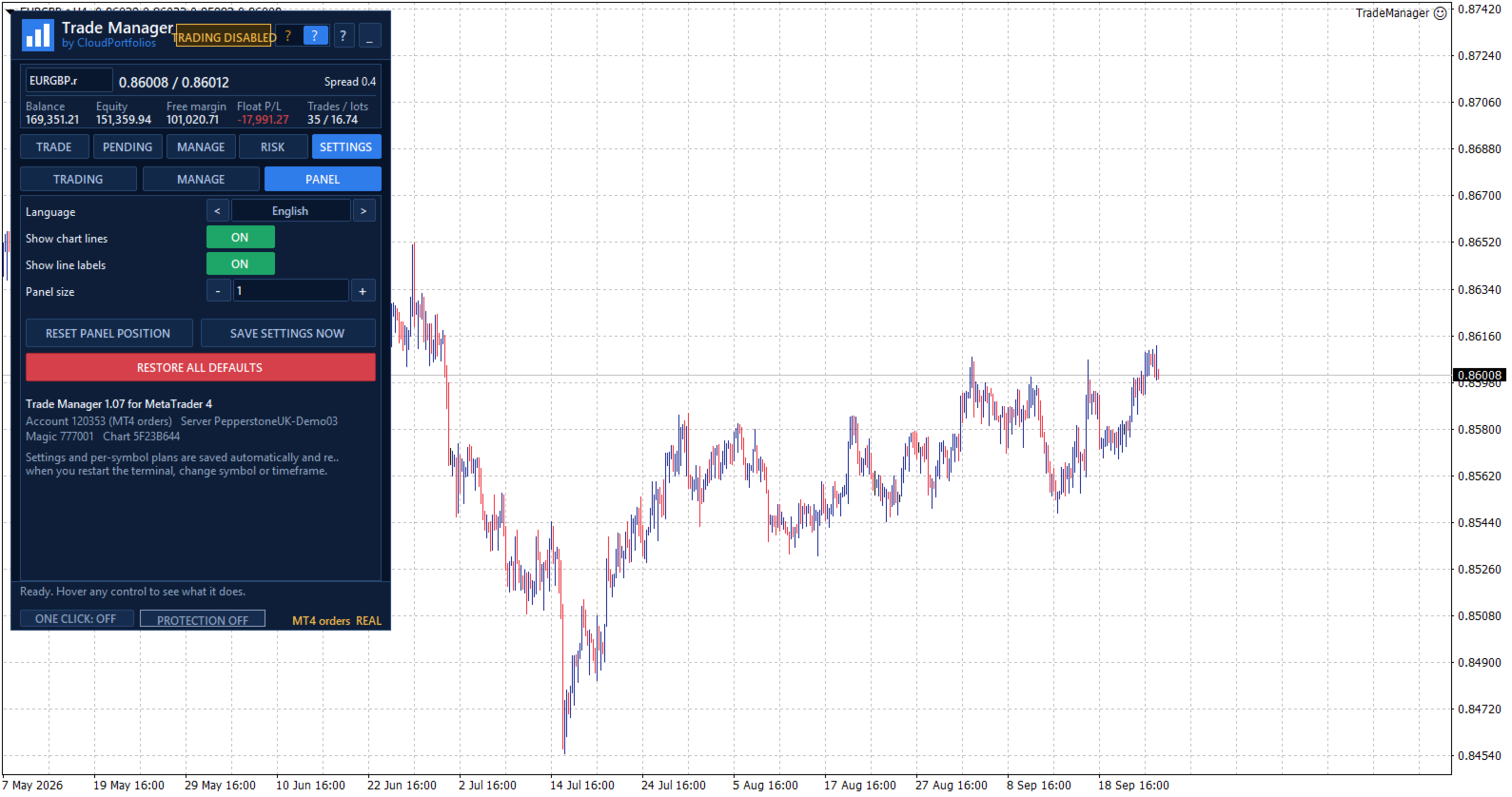
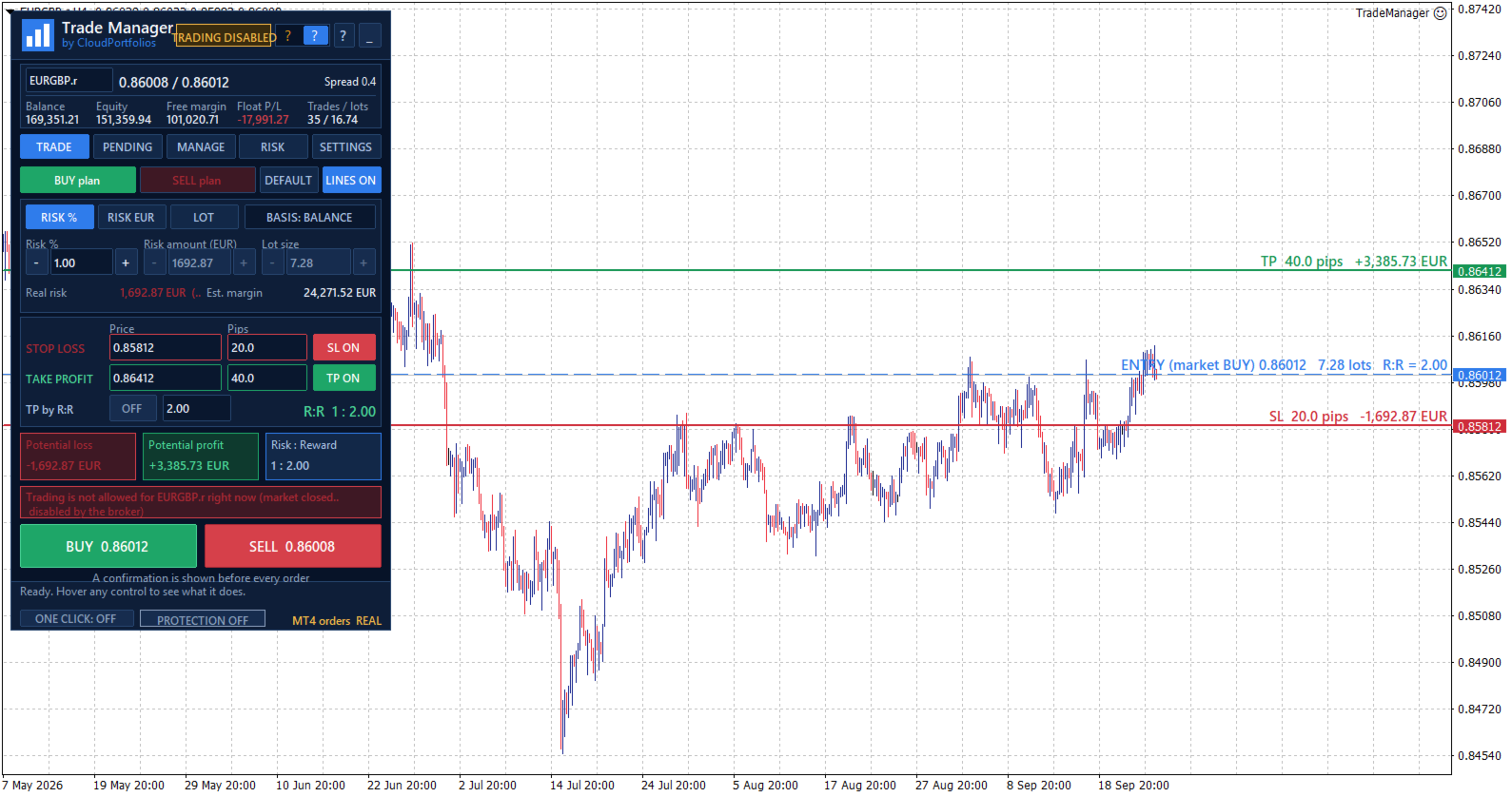
Trade Manager brings the entire process into one visual panel on the chart. It helps you prepare each trade, understand its real impact before execution, place orders, and manage exposure using manual tools and automated rules.

You decide when to buy or sell. Trade Manager does not generate signals or predict the market—it turns your decisions into structured trades aligned with your risk limits.

What is Trade Manager?

Trade Manager is a manual trading assistant for MetaTrader.

It centralizes the following tools in one interface:

  • Visual trade planning.
  • Position sizing and risk calculation.
  • Market and pending orders.
  • Individual and group position management.
  • Break Even and trailing stop.
  • Partial closes and filtered exits.
  • Exposure monitoring.
  • Daily limits and account protection.

It is not a signal robot and does not decide when to enter the market. Trade direction, entry timing, and strategy always remain under the trader’s control.

Visual trade planning on the chart

Build your trade using interactive lines for:

  • Entry.
  • Stop Loss.
  • Take Profit.

The SL and TP lines can be moved directly with the mouse. For pending orders, the entry line can also be dragged across the chart.

Every adjustment automatically updates:

  • Entry price.
  • Stop Loss distance in pips.
  • Take Profit distance in pips.
  • Lot size.
  • Monetary risk.
  • Percentage risk.
  • Potential profit.
  • Risk-to-reward ratio.

Optional chart labels display volume, pips, risk, estimated profit, and R:R next to their corresponding levels.

Flexible position sizing

Choose how the volume of each trade should be calculated:

  • Percentage risk based on balance.
  • Percentage risk based on equity.
  • Fixed monetary risk.
  • Manually entered lot size.

When percentage or monetary risk is selected, Trade Manager calculates the lot size using the actual Stop Loss distance and the symbol specifications supplied by the broker.

Volume is adjusted to the symbol’s permitted lot step. If the calculated size falls below the broker’s minimum, you can choose to:

  • Block the order.
  • Use the minimum lot and display the resulting real risk.

The panel always distinguishes between the theoretical volume and the volume that can actually be submitted.

Understand the impact before trading

Before executing an order, you can review:

  • Final lot size.
  • Actual monetary risk.
  • Risk as a percentage of balance or equity.
  • Potential loss at the Stop Loss.
  • Potential profit at the Take Profit.
  • Risk-to-reward ratio.
  • Estimated margin.
  • SL and TP distances.
  • Current spread.

If the spread is large relative to the Stop Loss distance, the panel displays a warning before the trade is placed.

Flexible Stop Loss and Take Profit

Stop Loss and Take Profit can be defined using:

  • An exact price.
  • A distance in pips.
  • Draggable chart lines.
  • An R:R target for Take Profit.

When TP is defined by R:R, its level automatically follows changes to the Stop Loss to preserve the selected ratio.

SL or TP can also be disabled when allowed by the selected sizing mode. Trades without a Stop Loss are explicitly identified as having unlimited risk.

Market orders

Execute BUY and SELL orders from the panel using the previously calculated lot size, Stop Loss, and Take Profit.

Before submission, Trade Manager checks:

  • Connection status.
  • Quote availability.
  • Market status.
  • Symbol trading permissions.
  • Minimum and maximum volume.
  • Permitted volume step.
  • Correct SL and TP placement.
  • Minimum broker distance requirements.
  • Available margin.
  • Active account protection rules.

If the price changes while the confirmation window is open and the risk increases significantly compared with the amount shown, the order is stopped so it can be reviewed again.

Pending orders

Place the following pending orders directly from the panel:

  • Buy Limit.
  • Sell Limit.
  • Buy Stop.
  • Sell Stop.

The entry can be typed, moved using the chart line, or adjusted in one-pip steps.

The panel shows the entry’s distance from the market and helps identify which order types are compatible with its current position.

Pending orders use the same lot, risk, Stop Loss, Take Profit, and R:R calculation engine as market orders.

Pending order management

The pending order table displays:

  • Ticket.
  • Symbol.
  • Order type.
  • Volume.
  • Entry price.

You can:

  • Select one or several orders.
  • Cancel selected orders.
  • Delete every pending order within the current management scope.
  • Modify the entry, Stop Loss, and Take Profit of an order.

Centralized position management

The MANAGE tab displays the positions included in the selected scope, together with:

  • Ticket.
  • Symbol.
  • Direction.
  • Volume.
  • Monetary result.
  • Result in pips.

Positions can be selected individually. If no position is selected, general actions can be applied to every position within the management scope.

Selecting one position also displays its details and allows its Stop Loss and Take Profit to be modified.

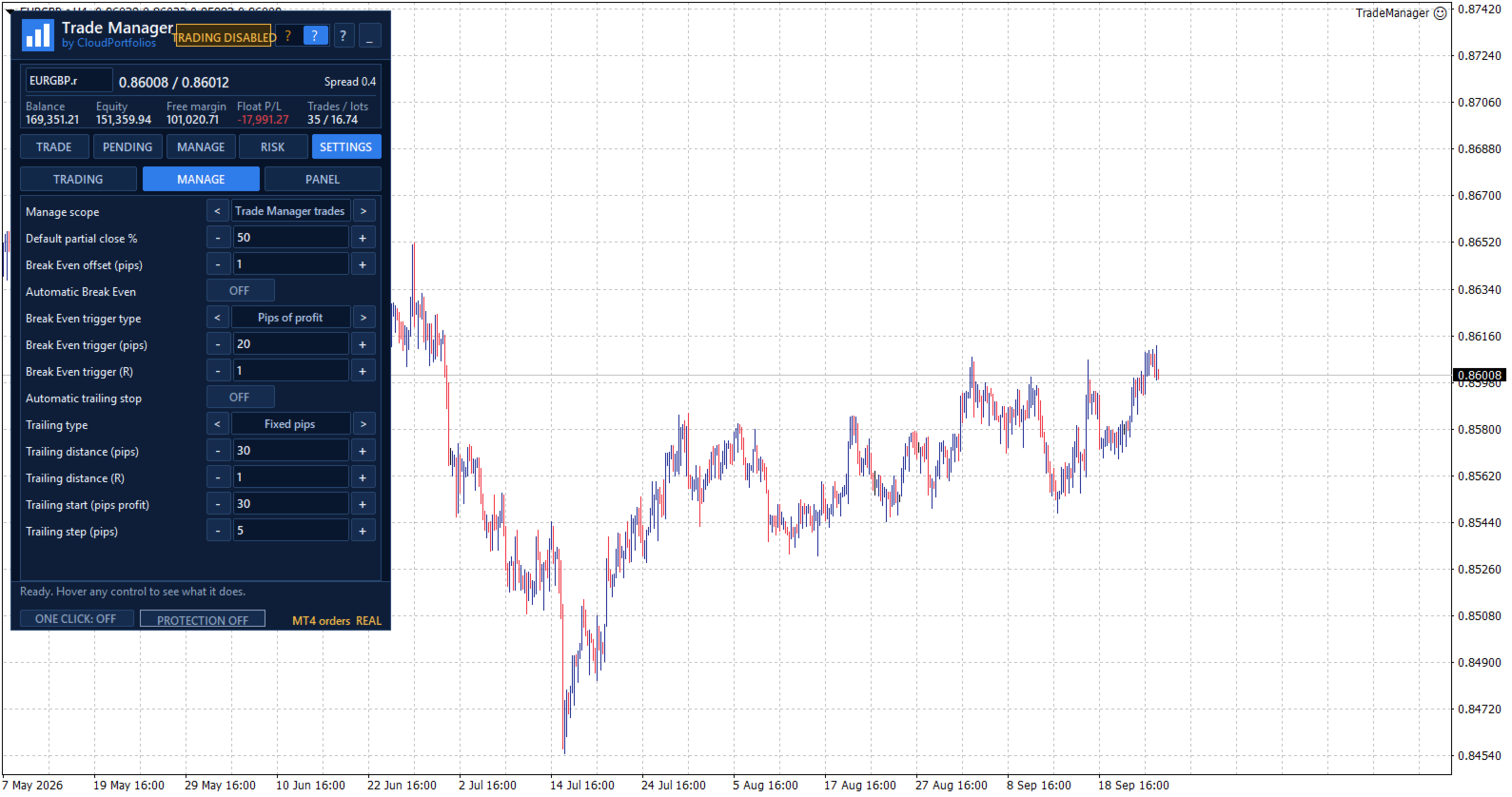
Manual and automatic Break Even

Move the Stop Loss to the entry price plus a configurable offset in the profit direction.

Break Even can be applied manually or activated automatically using:

  • Profit reached in pips.
  • A multiple of the initial risk, such as 1R.

Before modifying the position, Trade Manager checks that the price has moved far enough and that the new level complies with the broker’s restrictions.

Automatic trailing stop

The trailing stop can use:

  • A fixed distance in pips.
  • A distance based on a multiple of the initial risk.

You can also configure:

  • The minimum profit required to start trailing.
  • The minimum improvement step before modifying the Stop Loss again.

The trailing stop never increases the existing risk. The Stop Loss only moves in a favorable direction.

Partial closes

Reduce position exposure using:

  • 25%.
  • 50%.
  • 75%.
  • A custom percentage between 1% and 99%.

Trade Manager adjusts the closing volume to the broker’s minimum and permitted lot step. It also checks that the remaining volume will still be valid.

Controlled Reverse

The Reverse function:

  1. Closes the original position.
  2. Waits until the close is confirmed.
  3. Opens the opposite direction with the same volume.
  4. Preserves the original Stop Loss and Take Profit distances.

If the close cannot be confirmed, the opposite position is not opened automatically.

Fast group closing

Close positions using different filters:

  • Selected positions.
  • Current symbol.
  • All BUY positions.
  • All SELL positions.
  • Winning positions.
  • Losing positions.
  • Every position within the management scope.

Actions affecting several positions are processed progressively to avoid sending all requests to the server simultaneously.

PANIC mode

PANIC is designed to remove all exposure within the configured management scope:

  • It closes all included positions.
  • It deletes all included pending orders.
  • It checks afterward that no residual exposure remains.

This action requires two confirmation steps to reduce the risk of accidental activation.

Configurable management scope

Choose exactly which trades Trade Manager is allowed to control:

  • Trades identified by its Magic Number.
  • Trades on the current symbol.
  • All trades in the account.

The selected scope applies to:

  • Break Even.
  • Trailing stop.
  • Partial closes.
  • Reverse.
  • Group closing.
  • Pending order management.
  • Account Protection closing actions.

This makes it possible to keep different strategies separate or deliberately extend control when required.

Global risk overview

The RISK section displays:

  • Monetary risk of positions with a Stop Loss.
  • Potential risk of pending orders with an SL.
  • Risk as a percentage of balance or equity.
  • Positions without a Stop Loss.
  • Pending orders without a Stop Loss.
  • Total open volume.
  • Total pending volume.

Trades without an SL are not treated as having zero risk. They are shown as unlimited exposure through a dedicated warning.

Equity-based daily result

Trade Manager calculates the daily result using a persistent equity baseline and displays:

  • Realized result.
  • Change in floating result since the baseline.
  • Total result.
  • Deposits and withdrawals excluded from the trading result.

If the program is started for the first time during the trading day, the panel clearly identifies that moment as the baseline instead of presenting the result as if it covered the period since midnight.

When the available account history cannot verify balance operations reliably, the daily protection rules remain disabled to avoid acting on incomplete information.

Account Protection

Account Protection is disabled by default and must be enabled explicitly.

It allows you to define:

  • Maximum daily loss in percentage or money.
  • Daily profit target in percentage or money.
  • Maximum total risk.
  • Maximum number of positions and pending orders.
  • Maximum total volume, including pending orders.

When the daily loss or profit target is reached, you can choose to:

  • Block new trades.
  • Close trades within the management scope and delete their pending orders.
  • Block new trades and close the exposure.

The daily lock remains active until the next server day and persists after restarting MetaTrader. It can also be manually overridden for the current day through an explicit confirmation.

The panel displays a warning state when the loss reaches 80% of the configured daily limit.

Protection metrics are calculated using the entire account. Closing actions respect the selected management scope.

Limits before adding exposure

Account Protection can prevent a new trade when it would:

  • Exceed the permitted total risk.
  • Exceed the maximum number of trades.
  • Exceed the configured total volume.
  • Add exposure without a Stop Loss while the total-risk limit is active.
  • Add exposure to an account containing positions without an SL, where total risk cannot be measured.

These limits are checked before the order is submitted.

Symbol information

View the broker’s symbol specifications directly in the panel:

  • Bid, Ask, and spread.
  • Digits and pip size.
  • Tick size and tick value.
  • Contract size.
  • Long and short swap.
  • Minimum and maximum lot.
  • Volume step.
  • Stop level and freeze level.
  • Estimated margin for one lot.
  • Market status.
  • Trading permissions.
  • Account type.

All calculations adapt to these broker-provided properties instead of relying only on the symbol name.

Execution safety and confirmations

Trade Manager includes several operational safeguards:

  • One Click disabled by default.
  • Detailed confirmation before every order.
  • Configurable confirmations for sensitive actions.
  • Two-step confirmation for Close All and PANIC.
  • Double-click protection.
  • Tracking of executions awaiting confirmation.
  • Identification of partial executions.
  • Temporary blocking of new entries when an execution result is uncertain.
  • Visible connection, market, and trading status.
  • Panel messages and warnings.

If an execution remains unconfirmed, Trade Manager avoids sending it again automatically and asks the user to check the account before unlocking new orders.

Chart-integrated interface

The interface is organized into five main sections:

  • TRADE: plan and execute market orders.
  • PENDING: create and manage pending orders.
  • MANAGE: control open positions.
  • RISK: monitor exposure, daily results, protection, and symbol information.
  • SETTINGS: configure trading behavior, automation, and visual options.

The panel also provides:

  • Dark and light themes.
  • Adjustable size.
  • Draggable position.
  • Minimized view.
  • Symbol switching from the panel.
  • Contextual help for every control.
  • Connection and market status indicators.
  • Visible real or demo account identification.
  • English, Spanish, Italian, and French.

Persistent settings and trade plans

Trade Manager automatically saves:

  • Trading settings.
  • Visual theme.
  • Panel position and state.
  • Magic Number and order comment.
  • Break Even and trailing rules.
  • Account Protection configuration.
  • Individual plans for each symbol.
  • Initial-risk memory for managed positions.

The configuration is restored after restarting MetaTrader, and each symbol’s plan is recovered when returning to it.

Key features

✓ Manual trading from the chart
✓ Lot calculation by percentage, money, or manual volume
✓ Risk basis selectable between balance and equity
✓ Stop Loss and Take Profit by price or pips
✓ Draggable Entry, SL, and TP lines
✓ Take Profit based on R:R
✓ Risk, profit, and margin information before execution
✓ Market BUY and SELL orders
✓ Buy Limit, Sell Limit, Buy Stop, and Sell Stop
✓ Pending order modification and cancellation
✓ Management by Magic Number, symbol, or entire account
✓ Multi-symbol open-position table
✓ Manual SL and TP modification
✓ Manual and automatic Break Even
✓ Break Even triggered by pips or R multiples
✓ Trailing stop based on pips or initial risk
✓ Configurable partial closes
✓ Reverse with equivalent volume and SL/TP distances
✓ Close selected, BUY, SELL, winning, or losing positions
✓ Close All and PANIC mode
✓ Account-wide open and pending risk
✓ Identification of exposure without a Stop Loss
✓ Equity-based daily result
✓ Daily and exposure limits
✓ Optional One Click trading
✓ Dark and light themes
✓ Four interface languages
✓ Automatic saving of settings and symbol plans

Trade Manager turns manual trading into a clearer process: define the trade, review its impact, and manage it from the same panel.

You remain in control of every entry while reducing repetitive calculations, centralizing trade management, and applying your risk rules more consistently.

Important: automatic Break Even, trailing stop, and account protection functions require Trade Manager to remain running and MetaTrader to stay connected to the broker.

Produtos recomendados
TradeBox
Aleksandr Butkov
A small trading panel makes it easier for a trader to visually place pending orders, market,  as well as trailing and unloading the grid of orders.  It is installed as a regular adviser.   Parameters and description:   Lot Volume: 100 - in this field you can set, change the order volume at any time   Line UP - visual horizontal level for pending BuyStop and SellLimit orders   Line DN - visual horizontal level for BuyLimit and SellStop pending orders   Delete Lines - delete all lines from t
FREE
Kiwi Grid Trade Manager MT4 — Manual Grid & Smart Basket Management Utility Kiwi Grid Trade Manager MT4 is a free MetaTrader 4 utility designed to help traders manage manual positions using an automated grid and basket-management system. The concept is simple: You choose the first trade. Kiwi manages the grid. Open a manual BUY or SELL position on the chart and the utility can monitor that position, add additional grid orders according to your selected settings, calculate the combined basket bre
FREE
Ind4 InfoPad Information Panel
Vladislav Andruschenko
4.78 (9)
INFOPad é um painel de informações que cria informações sobre o par de moedas selecionado no terminal MetaTrader 4. Existem 5 funções deste indicador: Mostra a informação principal e principal sobre o símbolo selecionado: Pergunte BID, Spread, Stop Nível, Swap, Tick valor, Comissão preços; Mostra os alvos futuros do alvo do SL e do alvo do TP (o número de pontos do stop loss estabelecido e toma o lucro, a quantia em dólar); Mostra o lucro recebido pelos períodos: Hoje, Semana, Mês, Ano, Lucro t
FREE
MQLTA Auto Close Demo
MQL4 Trading Automation
Auto Close is an expert advisor that can assist you with your money and risk management rules. The EA can monitor your Balance, Equity, Margin, Global Profit and Global Loss and alert you in case any of these reaches a specified threshold. This Demo Version has Notification and Close features disabled, full version can be found https://www.mql5.com/en/market/product/29141 How does it work? Load the Auto Close EA in the chart and set the parameters you want to keep monitored. If any of the risk
FREE
Risk Control Trade Panel  is designed to assist in one-click trading. This tool can automatically calculate the trading lots based on the set risk money, the recommended StopLoss and the recommended TakeProfit. In the information menu, you can view indicators such as the weekly price range and the monthly price range. Followings are highlight features Lotsize is automatically calculated based on the risk money set by the user. The recommended stoploss and recommended takeprofit are automaticall
Trading Panel - Smart Stop Management A free professional trading panel for MT4, built to make manual execution faster, cleaner, and smarter. Trading Panel - Smart Stop Management helps you place Market, Limit, and Stop orders directly from the chart, manage position size, calculate TP/SL from volatility, and protect your execution from temporary spread widening during news, rollovers, or thin market conditions. The panel uses local smart stop logic based on the middle price, helping reduce
FREE
Auto SL TP
Henry Lee Taylor
3.6 (5)
Number one rule to investing is to protect your capital. Never worry about trading without stop loss or take profit with Auto S/L T/P. Auto S/L T/P will automatically  add your preset default stop loss and take profit to any order on the chart it's installed. Be sure to enable auto trading in order for the EA to work. Entering a trade on the go from your mobile is breeze with Auto S/L T/P running on the chart on your desktop. Just enter a trade and your default stop loss and take profit will be
FREE
Order Assistant is a easy to use trading utility designed to make trade planning, risk management, and order execution simple, fast, and intuitive. The entire interface is built around one principle: keep trading simple and clear . Instead of a complicated trading panel filled with unnecessary information and settings, Order Assistant provides the essential tools in a clean and easy-to-use interface. The goal is to let traders focus on the trade itself rather than managing the platform. Simple a
FREE
News Scalping Executor Pro is an utility which helps to trade high impact and huge volatility   news . This utility helps to create two opposite orders with risk management and profit protection. It moves automatically stop loss level to avoid losses as much as possible by using many different algorithms. It helps to avoid trading the news if spread suddenly becomes very huge. It can lock profit by moving stop loss or partially closing of orders. To be profitable with this type of trading you
MerkaStudent is a basic version of an expert advisor that allows us to understand part of the behavior of a chart in historical time. It uses some basic parameters in trading, which allows us to understand mathematically how a chart moves and thus know what is our mathematical expectation in the historical period analyzed. Starting from a mathematical logic, we can create a strategy to evaluate its results.
FREE
Basic Theme Builder
Mehran Sepah Mansoor
5 (1)
Basic Theme Builder: Simplifique a Personalização do Seu Gráfico Transforme sua experiência de negociação com o   Basic Theme Builder , um indicador versátil projetado para simplificar a personalização da aparência do seu gráfico no MetaTrader 4. Este indicador intuitivo oferece um painel fácil de usar que permite alternar rapidamente entre vários temas e esquemas de cores, melhorando tanto o apelo visual quanto a funcionalidade do seu ambiente de negociação.   Free MT5 version O   Basic Theme
FREE
MQLTA Show Magic Numbers
MQL4 Trading Automation
4.14 (7)
The panel displays the list of all orders (market and pending) along with their details, including magic numbers and commentaries. The panel can be moved around the chart. For market orders, the profit listed includes the associated commission and swaps. There aren't any important input parameters, but you can control the panel's initial location via them.
FREE
MQLTA Auto Close
MQL4 Trading Automation
5 (4)
Auto Close is an expert advisor that can assist you with your money and risk management rules. The EA can monitor your Balance, Equity, Margin, Global Profit and Global Loss and alert you in case any of these reaches a specified threshold. Free version with limited features can be found https://www.mql5.com/en/market/product/29179 How does it work Load the Auto Close EA in the chart and set the parameters you want to keep monitored. If any of the risk management parameters is met you can be not
FREE
Utility for order reversal. Closes orders on the chart on which it is launched and opens orders with the opposite direction instead of them. Has a simple and intuitive graphical interface. It is also possible to automatically reverse newly opened orders. MT5 version of the utility -  https://www.mql5.com/en/market/product/74770 If you like this utility, take a look at my other products -   https://www.mql5.com/en/users/nina_yermolenko/seller
FREE
Signalator Trade Summary Panel MT4 is a free local MetaTrader 4 utility that gives traders a clear account and open-trade overview directly on the chart. The standard Trade tab shows individual positions, but it can be difficult to quickly understand the whole account situation when several trades or symbols are open. This panel summarizes the most important information in one compact dashboard. The panel shows current floating profit or loss, floating P/L as a percentage of account balance,
FREE
O indicador Multímetro de intensidade da moeda mostra a força, a direção e a classificação de cada uma das seguintes moedas: AUD CAD CHF EUR GBP JPY NZD USD Além disso, também mostra a força, a direção e a classificação de cada um dos seguintes pares de moedas: AUDCAD AUDCHF AUDJPY AUDNZD AUDUSD CADCHF CADJPY CHFJPY EURAUD EURCAD EURCHF EURGBP EURJPY EURNZD EURUSD GBPAUD GBPCAD GBPCHF GBPJPY GBPNZD GBPUSD NZDCAD NZDCHF NZDJPY NZDUSD USDCAD USDCHF USDJPY O indicador funciona em qualquer gráfico
FREE
IceFX DrawProfit
Norbert Mereg
4.92 (24)
O indicador IceFX DrawProfit pode contribuir eficazmente para aqueles traders que querem ver no gráfico todas as saídas de posições fechadas: lucro ou prejuízo. Se você definir o DrawProfit no seu gráfico gerido por um Expert Advisor (EA), você vai ver claramente o seu desempenho quanto aos lucros e as perdas. Principais características: Exibe as linhas de ordens fechadas Exibe lucros/perdas de ordens fechadas por moeda Resume ordens por candles Filtro MagicNumber para EAs Filtro de Comentário
FREE
This simple but useful script calculates the lot in % of the deposit. It is indispensable for risk management. There is only one customizable parameter: MaxRisk - risk in % for lot calculation. The product works as a standard script. Launch it once on an appropriate chart and start trading using the calculated lot value. Genious is simplicity! Happy trading!
FREE
This is a free demo version for USDJPY only. Here is the link to full version: https://www.mql5.com/en/market/product/25912 This product has no input parameters. The product helps you to open and close orders faster, include instant and pending orders. It helps you to open order faster and easier, to make an order you simply click on the button. Buttons List BUY/SELL: to open instant Buy or Sell orders. BUY STOP/BUY LIMIT/SELL STOP/SELL LIMIT: to open pending order. The distance to the current
FREE
Account Info EA It is a tool that presents on the graph all the positions of the account, and specific information concerning the positions, but also the account. It enables the user to have an image of his account at a glance. Use like any expert advisor. You can't attach it in the same chart with other expert advisor. It does not have the ability to open or manage positions. You can attach it on any chart and any timeframe.
FREE
Fair Value Gap Sweep MT4
Crispin Tibilla
4.8 (5)
Fair Value Gap Sweep is a unique and powerful indicator that draws fair value gaps on your chart and alerts you when a gap has been swept by the price. A fair value gap is a price gap that occurs when the market opens at a different level than the previous close, creating an imbalance between buyers and sellers. A gap sweep is when the price moves back to fill the gap, indicating a change in market sentiment and a potential trading opportunity. Fair Value Gap Sweep indicator has the following
FREE
This is a fully functional evaluation version for working on "CADCHF". Full version - Risk Controller If there are active deals on the account when the robot is launched, then all of them except CADCHF will be closed! Risk controller is a tool allowing you to automatically control orders, losses and emotionally motivated actions. Main advantages Limitation of the total account loss. When the MinimalDepo value is reached, any trade will be closed. Limitation of losses per day. Limitation of los
FREE
CloseDeleteEA
Nikolaos Pantzos
3.5 (2)
This Expert Advisor closes all open positions and pending orders. It is possible to close only buy or sale orders, market or pending orders, positions with profit or loss. You can to get source code from here . Parameters CloseAllBuy - close buy positions. CloseAllSell - close sell positions. CloseMarketOrders - close market orders. DeletePendingOrders - delete pending orders. CloseOnlyProfit - close only profitable orders. CloseOnlyLoss - close only loss-making orders. ClearChart - clear the
FREE
Account Cash Status
Boguslaw Nejmanowski
Account Cash Status This indicator shows actual account balance and equity. Can be placed in any position on chart even in subwindow. Account Balance is displayed in gray color. When there is no opened position the account equity is displayed in dark gray color. When there is opened position and equity value is lower than balance value the color is changed for red. When there is opened position and equity value outperforms balance value the color is changed for lime. Colors may be set freely by
FREE
AQ RiskOptimizer
HIT HYPERTECH INNOVATIONS LTD
5 (1)
Risk Optimizer is the absolute solution for applying risk management on your account. Bad risk management is the main reason that causes traders to lose money. Risk Optimizer calculates and suggests the correct lot size for each position according to your personal, customized risk profile. You can give directly your preferred risk as percentage (%) for each position or you can trust our algorithms to calculate and optimize according to your risk category selection. But it is not only that! Selec
FREE
Calc for MT4
Radim Kucera
5 (2)
This indicator is designed to provide all useful information about symbol, account, positions and profit. It is developed for improving trader's money management. Parameters Calc can be divided to separate blocks. Each block is possible to hide, set its own color and other properties. Block symbol: This block displays information about actual SPREAD, POINT VALUE (in deposit currency for 1 lot), SWAP LONG and SHORT. Show symbol info - display/hide this block Color of symbol info - color of this
FREE
This EA creates two buttons in a panel that you can drag to any part of the chart (simply click on the panel and drag with the mouse to the part of the chart you want) with which you can close all the open operations in the account with a simple click, or close only the trades that are currently in profit. Check out my new trade dashboard assistant :  Simple and Easy MT4 Trade Panel Tell me if you like the product and how it could be improved, Thanks :) 
FREE
Cronômetro regressivo até o fechamento do bar, + status de progresso %:  #1 utilitário multifuncional :   66+ recursos, incluindo esta ferramenta  |   Entre em contato comigo  se tiver alguma dúvida   |    versão MT5 Nas configurações do indicador, você pode configurar: Período de tempo para cálculo; true / false: Opção de período de tempo superior (próximo ao atualmente usado: M15->M30, H4->D1...) Posição: 1 = Canto inferior esquerdo; 2 = Canto inferior direito; 3 = Canto superior esquerdo; 4
FREE
Lot by Risk
Sergey Vasilev
4.83 (23)
O painel de negociação Lot by Risk é projetado para negociação manual. Este é um meio alternativo para enviar ordens. A primeira característica do painel é a colocação conveniente de ordens usando linhas de controle. A segunda característica é o cálculo do volume da transação de acordo com um determinado risco, se houver uma linha stop loss. As linhas de controle são definidas usando as teclas de atalho: take profit-tecla T padrão; price-tecla padrão P; stop loss - tecla padrão S; Você mesmo
FREE
PositionClose
Etsushi Ishizuka
PositionClose | Script para Fechamento de Todas as Posições no MT4 PositionClose é um script utilitário para MetaTrader 4 (MT4) desenvolvido para ajudar traders a gerenciar suas posições de forma eficiente. Com apenas um clique, você pode fechar todas as posições abertas instantaneamente, ou escolher fechar somente as posições de compra (buy) ou somente as de venda (sell). Este recurso é especialmente útil durante movimentos bruscos do mercado, divulgação de notícias importantes ou sempre que fo
FREE
Os compradores deste produto também adquirem
Bem-vindo ao Trade Manager EA—uma ferramenta de gestão de risco criada para tornar o trading mais intuitivo, preciso e eficiente. Não é apenas uma ferramenta para executar ordens, mas uma solução abrangente para planejamento de operações, gerenciamento de posições e controle de risco. Seja você um iniciante, trader avançado ou scalper que precisa de execução rápida, o Trade Manager EA adapta-se às suas necessidades, oferecendo flexibilidade em todos os mercados, desde forex e índices até commodi
Trade Indicator Assistant is a powerful MT4 utility designed to turn indicators into automated trading systems. Its main feature is the ability to automatically detect an indicator’s   BUY and SELL signal buffers , without requiring you to know the buffer numbers, search through indicator settings, or modify the indicator source code. Bonus Indicator: After purchasing Trade Indicator Assistant, contact me to receive Trade Signal Pro completely free as a bonus indicator. [Download Demo Version]
Local Trade Copier EA MT4
Juvenille Emperor Limited
4.96 (112)
Local Trade Copier EA MT4 é um copiador de operações rápido e flexível para copiar e gerenciar operações entre várias contas MetaTrader 4 no mesmo computador Windows ou Windows VPS. Ele combina a sincronização local de operações com controles no lado do Receiver para tamanho de lote, gerenciamento de risco, filtragem de operações, mapeamento de símbolos, gerenciamento de operações e proteção da conta. Configure seus terminais Transmitter e Receiver em aproximadamente 1 minuto e copie operações
O Telegram to MT4 Multi-Channel Copier copia automaticamente os sinais de trading dos seus canais de Telegram diretamente para o MetaTrader 4. Sem bots, sem extensões de navegador, sem copiar à mão. O sinal chega ao Telegram e o EA abre a operação no seu terminal em poucos segundos. E antes de copiar um canal, o backtester integrado mostra o que esse canal teria feito na sua conta. O produto inclui dois componentes: um aplicativo de Windows que escuta os seus canais de Telegram, e este Expert Ad
Trade Assistant MT4
Evgeniy Kravchenko
4.43 (197)
Ajuda a calcular o risco por comércio, a fácil instalação de uma nova encomenda, gestão de encomendas com funções de fecho parcial, trailing stop de 7 tipos e outras funções úteis. Materiais e instruções adicionais Instruções de instalação - Instruções para a aplicação - Versão de teste da aplicação para uma conta de demonstração Função de linha Mostra no gráfico a linha de Abertura, Stop Loss, Take Profit. Com esta função é fácil definir uma nova ordem e ver as suas características adicionais
Exp COPYLOT CLIENT for MT4
Vladislav Andruschenko
4.69 (65)
Copiador profissional de operações para MetaTrader 4 Copiador de operações rápido, profissional e confiável para MetaTrader 4 . COPYLOT permite copiar operações de Forex entre os terminais MetaTrader 4 e MetaTrader 5 , com sincronização flexível para diferentes tipos de conta e cenários de negociação. A versão COPYLOT MT4 oferece suporte para: MetaTrader 4 → MetaTrader 4 MetaTrader 5 Hedge → MetaTrader 4 MetaTrader 5 Netting → MetaTrader 4   Versão MT5 Descrição completa + DEMO + PDF Como compra
O MT4 para Telegram Signal Provider é uma ferramenta fácil de usar e totalmente personalizável que permite o envio de sinais para o Telegram, transformando sua conta em um provedor de sinais. O formato das mensagens é totalmente personalizável! No entanto, para uso simples, você também pode optar por um modelo predefinido e habilitar ou desabilitar partes específicas da mensagem. [ Demonstração ]   [ Manual ] [ Versão MT5 ] [ Versão Discord ] [ Canal do Telegram ]  New: [ Telegram To MT5 ] Conf
Take a Break
Eric Emmrich
5 (31)
Take a Break pauses your Expert Advisors when trading is a bad idea: before news, after a daily loss, outside your trading hours, or when a rule you wrote yourself says so. When the pause is over, your EAs simply continue. Account protection for all your EAs in one tool: news filter, drawdown and equity protection, time filter and custom rules. One EA on one chart protects the whole account, the free indicator gives every chart its own rules on top. Free demo | What is new in 26.09 | Support Ass
VirtualTradePad mt4 Extra
Vladislav Andruschenko
4.85 (61)
Painel de negociação para negociação em 1 clique.  Trabalhando com posições e pedidos!  Negociar a partir do gráfico ou do teclado. Usando nosso painel de negociação, você pode negociar com um clique no gráfico e realizar operações de negociação 30 vezes mais rápido do que o controle MetaTrader padrão. Cálculos automáticos de parâmetros e funções que tornam a vida mais fácil para um trader e ajudam-no a conduzir suas atividades de trading com muito mais rapidez e conveniência. Dicas gráficas e i
Smart Copy Local MT4
Kyra Nickaline Watson-gordon
5 (7)
Smart Copy is an Easy-to-Use EA that supports Multi Copying Metatrader4 and Metatrader5 and Local/Remote Copying. (Remote Version is coming soon) Free version is available on Smart Copy Local Free MT4 Specifications :     Real Time, Multi Terminal - Multi Account - MT4/MT5 trade copying     Copy from netting to hedge and hedge to netting is supported.     Fast and instant copy     All settings are input visually.     Easy modifying symbol names, prefix, suffix     Enable/Disable copying s
Want automatically to put the pending order, take profit and stop loss? This EA will do it on your behalf! The Fibo Heart EA strategy will place limit order after the ‘check point’ breakout. The position will be triggered when the price make a successful retest. If not, the pending order will automatically deleted after price hit certain level. You also have option to enable market order (instant execution) and custom take profit in the inputs setting. This EA must be attached with Fibo Heart In
Baixar versão de teste funcional Copy Cat More (Gato Copião) — Copiador de Trades (Trade Copier) MT4 não é apenas um simples copiador local de trades; é um completo framework de gerenciamento de risco e execução (risk management and execution framework) projetado para os desafios de trading de hoje. De desafios de prop firm ao gerenciamento de portfólio pessoal, ele se adapta a cada situação com sua combinação de execução robusta, proteção de capital, configuração flexível e manuseio avançado
TradePanel MT4
Alfiya Fazylova
4.84 (95)
Trade Panel é um assistente de negociação multifuncional. O aplicativo contém mais de 50 funções de negociação para trading manual e permite automatizar a maioria das tarefas de negociação. Instruções para o aplicativo + vídeo-instruções: https://www.mql5.com/pt/blogs/post/772421 Versão de teste do aplicativo para conta demo: https://www.mql5.com/pt/blogs/post/762547 Como instalar o aplicativo: https://www.mql5.com/pt/blogs/post/762548 Como testar o aplicativo no modo visual: https://www.mql5.co
King Trade Copier MT4
Mohammed Maher Al-sayed Mohammed Ahmed Saleh
5 (1)
O King Trade Copier conecta terminais MetaTrader que funcionam no mesmo computador ou VPS. As operações abertas numa conta aparecem nas outras. O arquivo traz as duas funções, de modo que o mesmo download se torna o emissor ou um receptor, dependendo do valor que você definir em Mode. Em cada gráfico, o painel informa se este terminal está enviando ou recebendo, indica o nome da conta do outro lado, conta os receptores que responderam e mostra a idade do último sinal. Uma ordem que não foi copi
This is a program in the form of an EA that attaches to a chart in MetaTrader 4. Then, by using API from Bittrex, Binance websites, it downloads the history of altcoins. By selecting a pair name, the EA automatically downloads all time frames history (Daily,H12,H4,H2,H1,M30,M15,M5,M3,M1) so there is no need to attach multiple EAs to different charts. You can select one pair from Bittrex and 4 pairs from Binance exchange with one running EA and create up to 15 timeframes for 5 different pairs. Th
Copiadora->Interação de interface conveniente e rápida, os usuários podem usá-la imediatamente       ->>>> Recomendado para uso em computadores Windows ou VPS Windows Características: Configurações de negociação de cópias diversificadas e personalizadas: 1. Diferentes modos de lote podem ser definidos para diferentes fontes de sinal 2. Diferentes fontes de sinal podem ser definidas para negociação de cópias direta e reversa 3. Os sinais podem ser definidos com comentários 4. Se deve calibrar o
News Filter EA: Advanced Algo Trading Assistant News Filter EA is an advanced algo trading assistant designed to enhance your trading experience. By using the   News Filter EA , you can integrate a Forex economic news filter into your existing expert advisor, even if you do not have access to its source code. In addition to the news filter, you can also specify   trading days   and   hours   for your expert. The News Filter EA also includes   risk management   and   equity protection   features
EA Local Trade Copier Pro MT4: O Duplicador de Operações Definitivo Sem DLL Você está cansado de copiadores de operações complicados que exigem DLLs externas inseguras, travam o seu terminal ou confundem você com arquivos separados para "Master" e "Client"? Experimente a próxima geração em cópia de trades com o EA Local Trade Copier Pro MT4. Projetado para máxima estabilidade, execução extremamente rápida e extrema simplicidade, este utilitário permite que você copie operações de forma contínua
X2 Copy MT4
Liubov' Shkandrii
Rápido. Preciso. Inovador. Tecnológico. Descubra a cópia instantânea de negociações com o revolucionário X2 Copy MT4. Com apenas 10 segundos de configuração simples, você obterá uma ferramenta poderosa para sincronizar negociações entre terminais MetaTrader em um único computador ou Windows VPS com velocidade sem precedentes. Quer você gerencie várias contas, siga sinais ou dimensione sua estratégia, o X2 Copy MT4 se adapta ao seu fluxo de trabalho com precisão e controle incomparáveis. Trabalhe
Multi Copy
Kaijun Wang
5 (1)
Copiadora->Interação de interface conveniente e rápida, os usuários podem usá-la imediatamente       ->>>> Recomendado para uso em computadores Windows ou VPS Windows Funções básicas: A velocidade normal de interação do copy trading é inferior a 0,5s Detecte automaticamente fontes de sinal e exiba uma lista de contas de fontes de sinal Correspondência automática de símbolos, 95% dos símbolos de negociação comumente usados em diferentes plataformas (casos especiais, como sufixos diferentes) são c
Trade Dashboard MT4
Fatemeh Ameri
4.96 (54)
Trade Dashboard simplifies how you open, manage, and control your trades, with built-in lot size calculation. It allows you to execute trades, manage risk, and control positions directly on the chart, with tools such as partial close, breakeven, and trailing stop. Designed to reduce manual work and help you stay focused on your trading decisions. A demo version is available for testing. Detailed explanations of features are provided within the MQL5 platform. Installation instructions are include
Risk manager Risk manager - it will simplify the tracking of drawdown and will notify you (alert) when the specified risk is reached, and close/lock orders when the critical DD risk level is reached. If the specified drawdown is exceeded, you can choose two options for actions: All orders will be closed that mean loss will be fixed on depo. The terminal also closes. Instead of fixing the loss on depo, the opposite order will be opened - orders locking will occure. Not a single order will be c
The product will copy all telegram signal to MT4   ( which you are member  ) , also it can work as remote copier.  Easy to set up, copy order instant, can work with almost signal formats, image signal, s upport to translate other language to English Work with all type of channel or group, even channel have "Restrict Saving Content", work with  multi channel, multi MT5 Work as remote copier: with signal have ticket number, it will copy exactly via ticket number. Support to backtest signal. How to
Trade Manager MT4 DaneTrades
Levi Dane Benjamin
4.09 (11)
Trade Manager para ajudá-lo a entrar e sair rapidamente de negociações enquanto calcula automaticamente seu risco. Incluindo recursos para ajudar a evitar negociações excessivas, negociações de vingança e negociações emocionais. As negociações podem ser gerenciadas automaticamente e as métricas de desempenho da conta podem ser visualizadas em um gráfico. Esses recursos tornam este painel ideal para todos os traders manuais e ajudam a aprimorar a plataforma MetaTrader 4. Suporte multilíngue. Vers
Fast Trade MT4
Alexey Valeev
4.8 (5)
This trading panel has been developed for fast and comfortable operation of the financial markets. It is equipped with the necessary functions for manual and semi-automated trading. Due to the presence of the order trailing feature, trailing stop and automatic closure by equity, profit, time. You can use it to automate your trading system. All you have to do is open a position and set the parameters for maintenance, everything else will be handled by the EA. If you want to limit your losses, set
PZ Trade Pad Pro MT4
PZ TRADING SLU
3.67 (3)
Este é um painel de negociação visual que ajuda você a realizar e gerenciar operações facilmente, evitando erros humanos e aprimorando sua atividade comercial. Ele combina uma interface visual fácil de usar com uma abordagem sólida de gerenciamento de riscos e posições. [ Guia de instalação | Guia de atualização | Solução de problemas | FAQ | Todos os produtos ] Surpreendentemente fácil de usar Negocie facilmente a partir do gráfico Negocie com gerenciamento preciso de riscos, sem complicações
Unlimited Trade Copier Pro is a tool to copy trade remotely to multiple MT4, MT5 and cTrader accounts at different computers/locations over internet. This is an ideal solution for you if you are a signal provider and want to copy your trades to other receivers globally on your own rules. One provider can copy trades to multiple receivers and one receiver can get trade from multiple providers as well. The provider can even set the subscription expiry for each receiver, so that receiver will not b
Bar Replay MT4
Hoang The Manh
3.43 (7)
Don't purchase before testing the Demo version first. DEMO version:   https://www.mql5.com/en/market/product/76917 __________________________________________________ This EA  - Tool allow you replay bar in Meta Trader 4 for back test. This Tool can back test in multi timeframe in only one chart. This Tool is very useful for Price action trader. It can work with Indicators, some indicators cannot works. So please download Demo to test before purchase.  Demo Version We do not accept refund in any
Strategy Builder offers an incredible amount of functionality. It combines a trade panel with configurable automation (covert indicators into an EA), real-time statistics (profit & draw down) plus automatic optimization of SL, TP/exit, trading hours, indicator inputs. Multiple indicators can be combined into an single alert/trade signal and can include custom indicators, even if just have ex4 file or purchased from Market. The system is easily configured via a CONFIG button and associated pop-up
Um painel profissional para operação manual que reúne todo o ciclo do trade em uma única janela no gráfico, da entrada precisa à proteção da conta. Calcule o volume exato de cada posição para o risco definido, monte a operação traçando linhas no gráfico com o RR Tool e envie ordens a mercado e pendentes, grids e OCO. O painel assume o acompanhamento da posição: fechamento parcial em até cinco níveis, seis tipos de trailing stop, breakeven e Virtual SL/TP. Limites diários, semanais e mensais prot
Mais do autor
Trading Account Analytics Understand the Real Performance of Your MetaTrader 4 Account Trading Account Analytics transforms your account history into a visual dashboard covering performance, risk, trading costs, funding, and capital evolution. It analyzes closed trades and open positions directly on the chart. It operates exclusively in read-only mode: it never opens, modifies, or closes trades . A Complete View of Your Account The final balance does not always explain how a result was achieved.
Account Risk Guardian A strategy may control every individual trade and still lose control of the account’s total risk. Account Risk Guardian monitors all activity across your account, compares its current state with your predefined limits, and executes the configured response whenever a rule is breached. It does not open trades or generate signals. It works as an independent protection layer that helps you control drawdown, losses, exposure, margin, and trading discipline from a single panel. A
Copy trades between MT4 and MT5 with full control over volume, risk, and execution Managing the same trading activity across multiple terminals should not require you to repeat every opening, reduction, closure, or protection change manually. LocalTradeCopier connects MetaTrader terminals installed on the same computer and supports trade copying in every direction: MetaTrader 4 → MetaTrader 4 MetaTrader 4 → MetaTrader 5 MetaTrader 5 → MetaTrader 4 MetaTrader 5 → MetaTrader 5 Any terminal can ope
Stop checking charts one by one to discover which markets deserve your attention. Multi Market Scanner monitors multiple symbols and timeframes from a single panel, compares their technical conditions, and organizes the results by signal, score, alignment, and freshness. This helps you focus your analysis on the most relevant instruments without wasting time reviewing markets with no clear conditions. It is a market analysis and decision-support tool. It does not open, modify, or close trades: t
Understand the Real Performance of Your MetaTrader Account Trading Account Analytics transforms your account history into a visual dashboard covering performance, risk, trading costs, funding, and capital evolution. It analyzes closed trades and open positions directly on the chart. It operates exclusively in read-only mode: it never opens, modifies, or closes trades . A Complete View of Your Account The final balance does not always explain how a result was achieved. Deposits may be mistaken fo
Account Risk Guardian A strategy may control every individual trade and still lose control of the account’s total risk. Account Risk Guardian monitors all activity across your account, compares its current state with your predefined limits, and executes the configured response whenever a rule is breached. It does not open trades or generate signals. It works as an independent protection layer that helps you control drawdown, losses, exposure, margin, and trading discipline from a single panel. A
Copy trades between MT4 and MT5 with full control over volume, risk, and execution Managing the same trading activity across multiple terminals should not require you to repeat every opening, reduction, closure, or protection change manually. LocalTradeCopier connects MetaTrader terminals installed on the same computer and supports trade copying in every direction: MetaTrader 4 → MetaTrader 4 MetaTrader 4 → MetaTrader 5 MetaTrader 5 → MetaTrader 4 MetaTrader 5 → MetaTrader 5 Any terminal can ope
Plan, execute, and manage your trades from a single panel Calculating lot size, checking risk, setting Stop Loss and Take Profit levels, and managing multiple positions through MetaTrader’s standard windows takes time and can lead to manual errors. Trade Manager brings the entire process into one visual panel on the chart. It helps you prepare each trade, understand its real impact before execution, place orders, and manage exposure using manual tools and automated rules. You decide when to buy
Stop checking charts one by one to discover which markets deserve your attention. Multi Market Scanner monitors multiple symbols and timeframes from a single panel, compares their technical conditions, and organizes the results by signal, score, alignment, and freshness. This helps you focus your analysis on the most relevant instruments without wasting time reviewing markets with no clear conditions. It is a market analysis and decision-support tool. It does not open, modify, or close trades: t
Filtro:
Sem comentários
Responder ao comentário