Equanim Account Shield

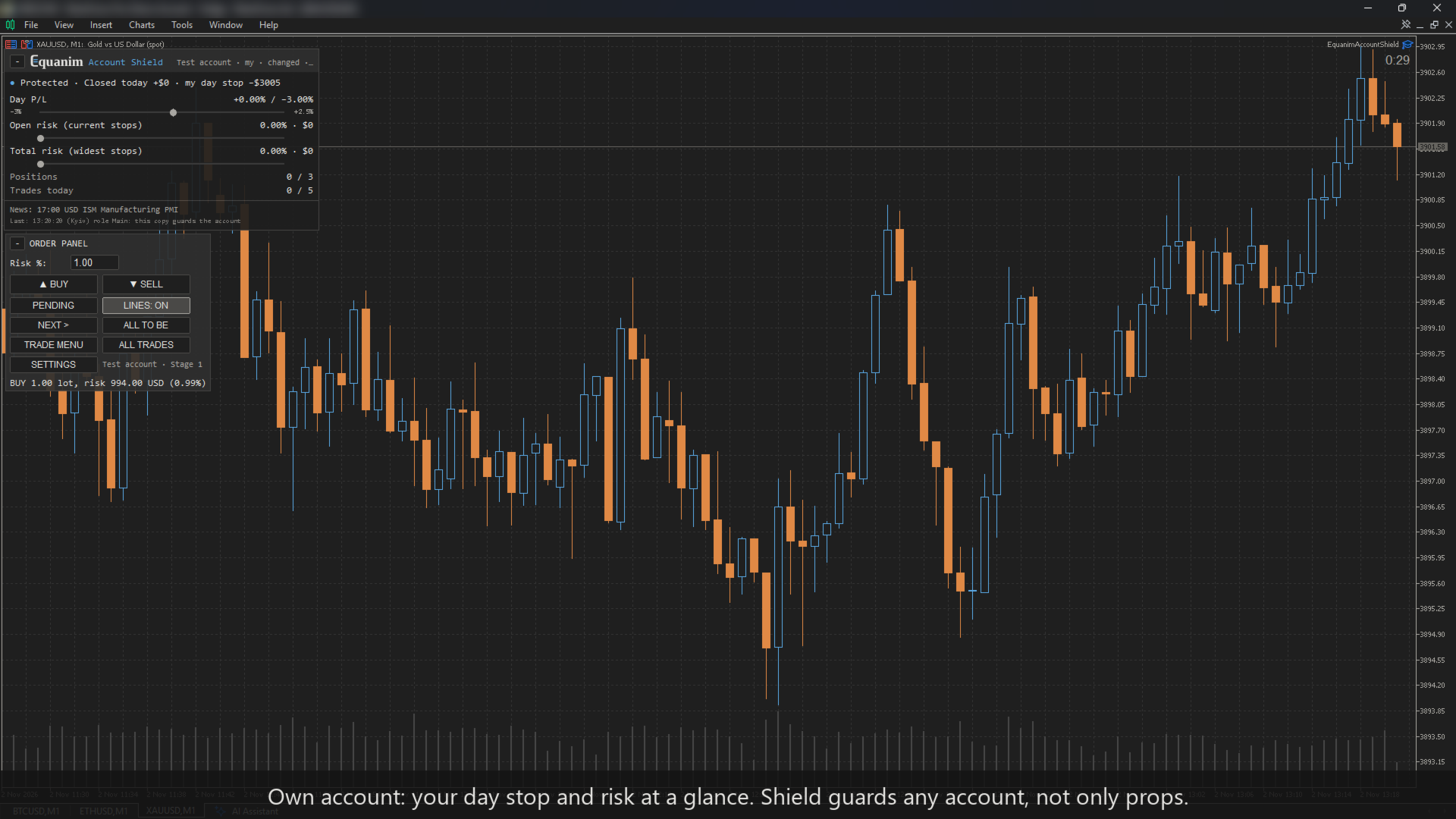
Discipline you don't have to hold by willpower. Account Shield controls the risks on your account — per trade, per day, in total, drawdown, stops, overtrading, trading after a loss — and helps stop you before a bad moment becomes a lost account. Own account or prop firm (15 firm presets included). Never opens trades by itself.

Why

Most accounts are not lost to bad analysis. They are lost to a moment: the daily loss counted on equity, the stop set a minute late, the fourth trade after two losses, the bigger lot to win it back. Account Shield watches all of that — for manual trades, copied trades and other EAs — and makes switching the rules off in the heat of the moment wait until the next trading day.

What it guards

The trade

  • Risk per trade and the max risk of a trade — by the widest stop a trade ever had, with commission in and out; risk per trade idea (where the firm has this rule).
  • A trade above your risk limit: warn only, trim the lot, or do not allow — your choice on an own account; on a prop the lot is always trimmed.
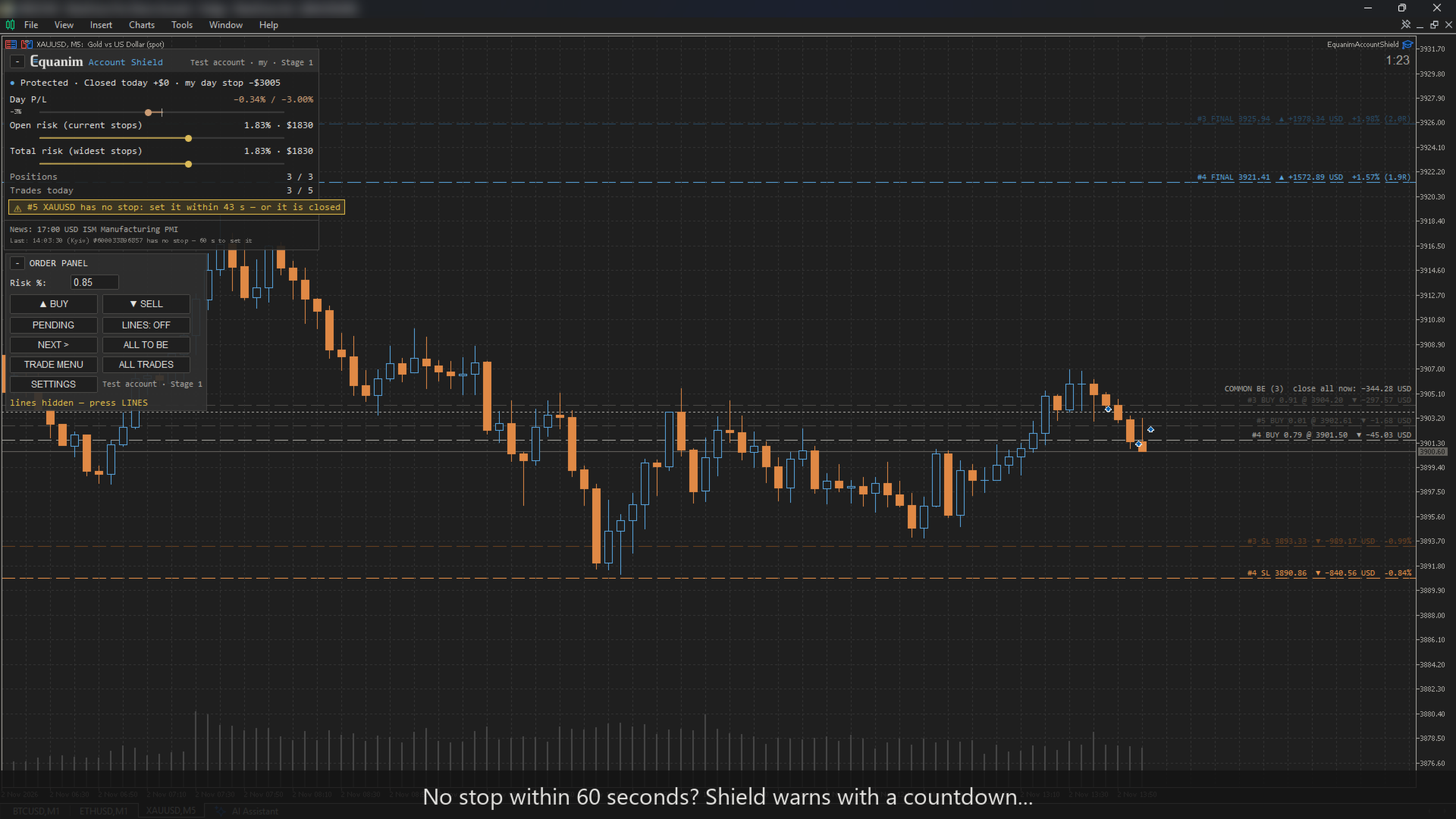
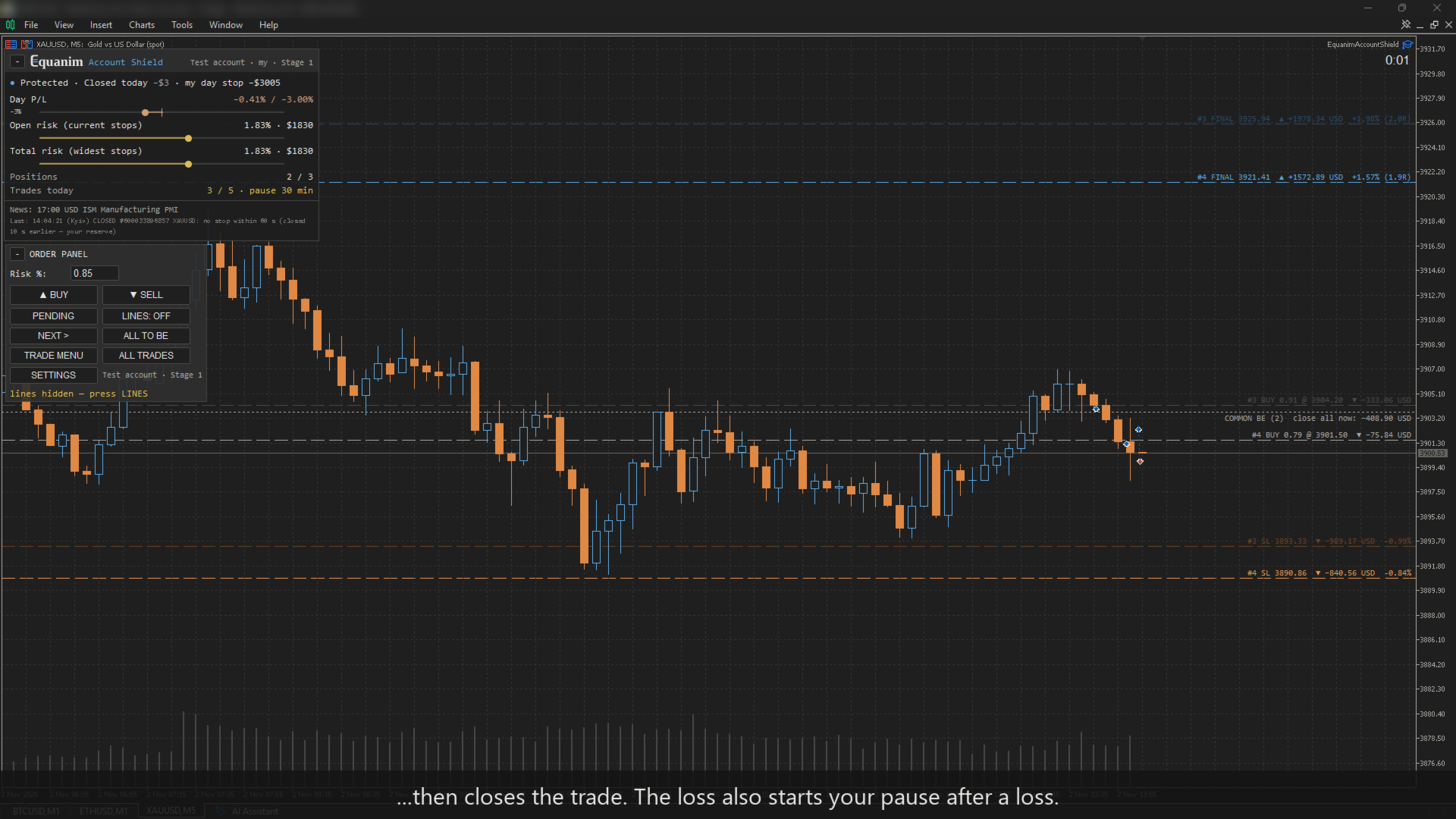
  • Stop loss within N seconds — counted from the position's open time, so a restart of the terminal does not reset it.
  • Minimum trade duration (where the firm has this rule).
  • A trade without a stop: the lot is trimmed at once as if the stop stood 1 ATR away, while you still have the firm's seconds to set it. Shield only ever reduces a lot, never adds to it.

The day

  • Daily loss exactly as your firm counts it: base (initial balance / day-start balance / higher of balance and equity), the firm's reset time and time zone with daylight saving. If Shield was not running at the firm's midnight, the day-start equity is rebuilt from prices.
  • Your personal daily stop (closed trades; the daily limit counts open ones too).
  • News windows (when the news rule blocks, pending orders are cancelled before the window), weekend, gap and long market-break windows for funded accounts.
  • The next important news (MT5 calendar) is always shown at the bottom of the panel — even on an account where the news window is off and nothing is blocked: volatility around a release affects any strategy.

The account

  • Max drawdown: static or trailing (also trailing from the highest closed balance). A safety buffer (80% of the firm's limit by default) stops you before the firm does.
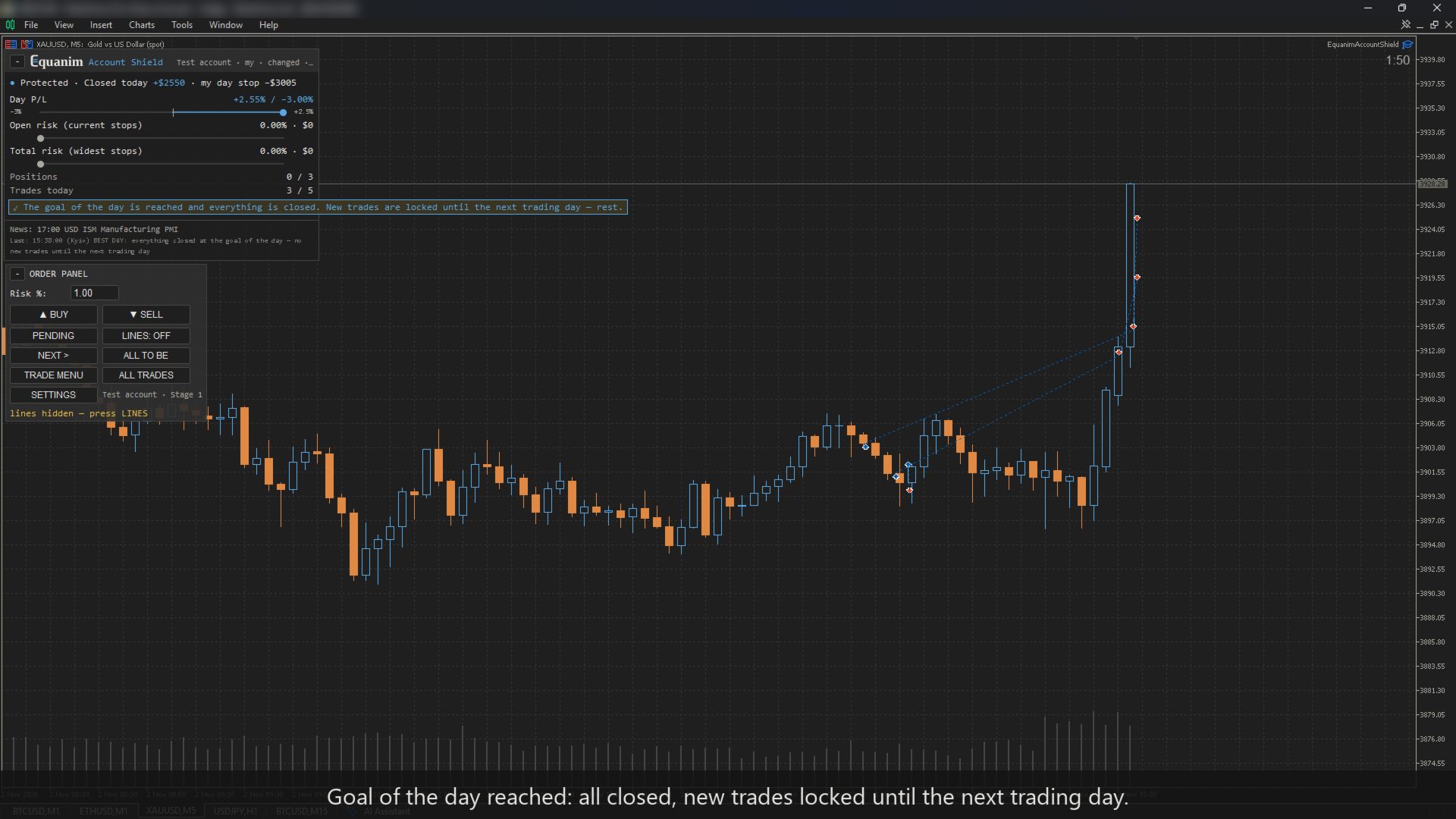
  • Total open risk, max open positions (only the extra ones are closed). By the firm's rules or your own in «Conditions»: hedging on the same and correlated symbols, margin level, total lots. Best day, % of the starting balance — you turn the firm's consistency rule into a day's number yourself (35% of a 10% month = 3.5%): once the day's result by equity (closed and open) reaches it, Shield recommends closing your trades and resting until tomorrow — whether to close or wait for your take is your call; when everything is closed with the day's result still at the goal, new trades are locked until the next trading day (only if you set it in «Conditions»).
  • A warning (or a forced halving) of the risk once the drawdown reaches 40% of the max-drawdown limit (−4% on most props; on an own account without a drawdown limit — −40%). Or, instead, Room to the limit: the risk of a trade shrinks with the room left to the overall limit, never below a floor (0.25% by default) — at −4% of a 10% limit a 1% trade becomes 0.5%, at −8% the floor.

Your behaviour

  • Trades per day, pause after a loss; with Trade Journal also a smaller risk after a loss, trading hours (a trade outside the window is closed) and no stop widening after N seconds (a widened stop is put back) — rules the journal proposes.

The discipline lock

A stricter value acts immediately. A looser one acts from the next trading day, and the panel shows what changes and when; softening a firm's rule in «Conditions» also needs an explicit «I confirm». The same lock applies to the settings window, the «Conditions» window, the order panel and to rules accepted from Trade Journal. «Watch only» and a set-up run again with another firm, stage or size also act from the next trading day. Until your first trade every change acts at once, so the set-up is free. The EA's inputs in the F7 window (including «Watch only» and other robots' magic numbers there) and removing Shield from the chart stay in your hands — MetaTrader does not let an EA forbid that.

Four ways to use it

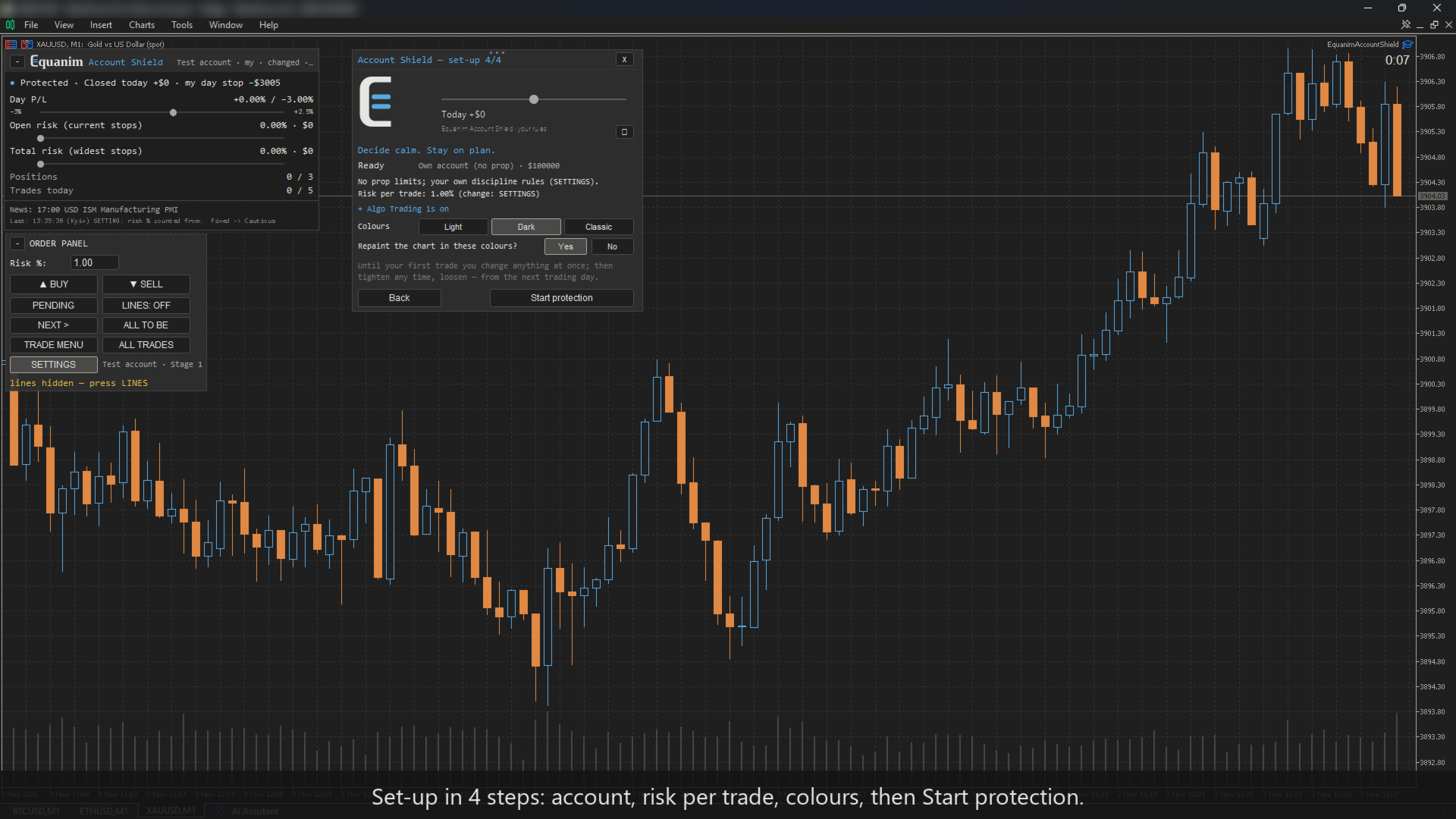
A short setup on the chart — any amount works as the account size, and everything can be changed later from the SETTINGS button on the panel (the firm, stage and size — on a day without trades; after your first trade they act from the next trading day).

  • Own account. Your base rules: risk per trade, max risk of a trade, daily stop, trades per day, pause after a loss, max positions — sensible defaults, adjusted when even the minimum lot is too big for your risk; then any extra rules. The panel shows your own limits ("my day limit").
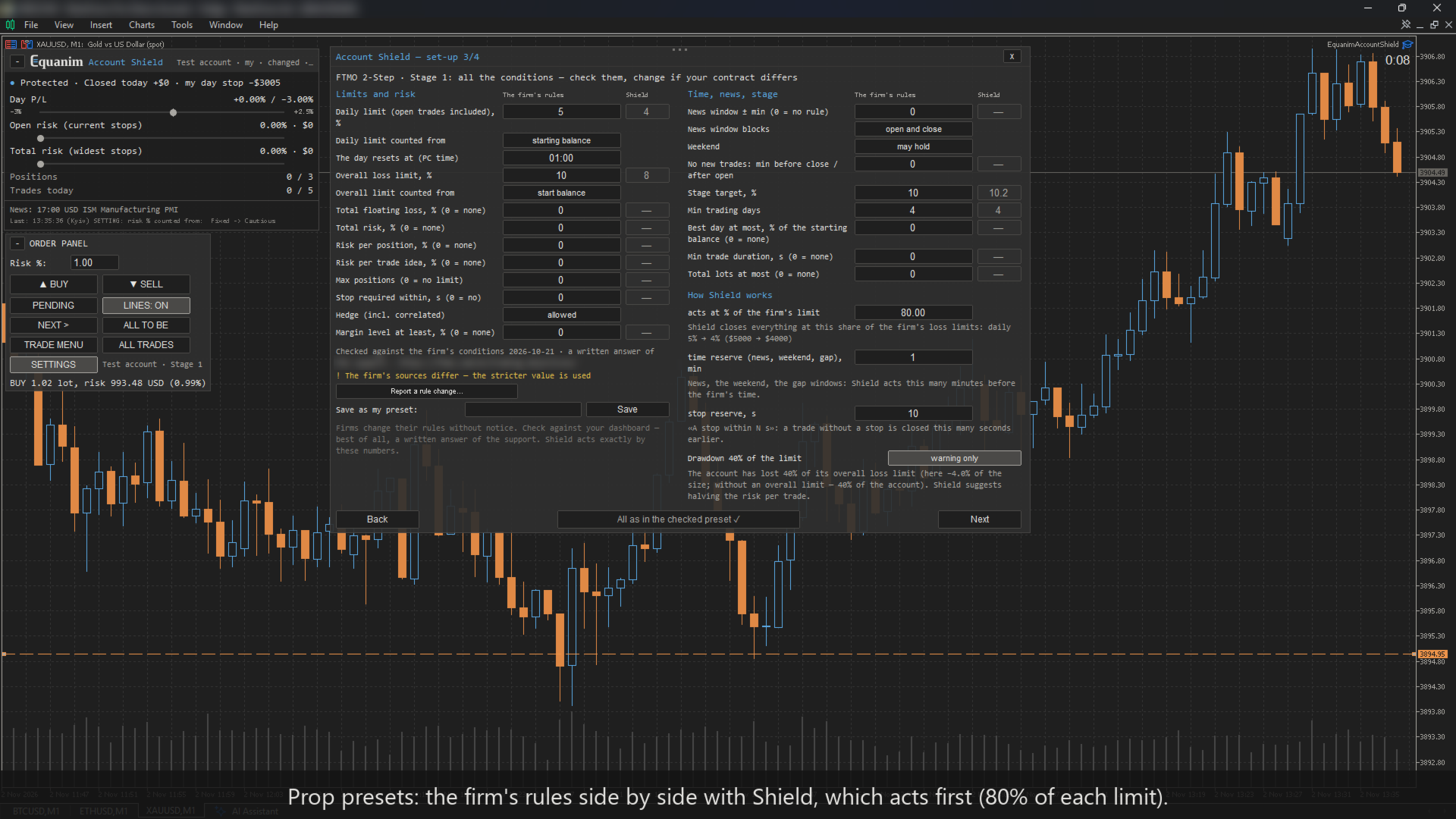
  • Prop challenge. Choose your firm (15 presets with the firm's numbers and the date they were checked), the stage and the account size, then one window with all the firm's rules — check them and correct any if needed; for another firm, fill in the same window. The conditions window shows two columns side by side: the firm's rules and what Shield actually acts on with your reserves (the share of the firm's limit, minutes before news, weekend and gap windows, seconds before the stop deadline) — check them against your contract. When equity reaches the phase target (+0.2% buffer), Shield closes everything so the target is locked in, and that day counts. If the firm still needs trading days, by default the next days run in Economy mode (or your usual rules — your choice in the set-up and in SETTINGS; switching to the usual rules acts from the next trading day): minimum lot only, each day's trade is closed once it is net positive, and the day is counted. When the days are done, the phase is marked passed and the next phase's rules switch on (on the same account).
  • Your presets and letters. Another firm or your own corrections — save them as "My preset" and choose it in the set-up on any account. A firm that restricts EAs — Shield prepares a letter to its support. A firm's rule has changed — "Report a rule change" prepares a message to the author.
  • Funded. News windows, weekend and gap windows, the firm's risk per position. There is no target on funded: nothing is closed for profit.

The firm compatibility table is in the comments.

In numbers

  • Stops at 80% of the firm's limit by default (your own account: at your numbers as entered).
  • The day resets in the firm's own time zone, with daylight saving.
  • Risk by the widest stop a trade ever had, commission in and out.
  • The stop deadline is counted from the open time, so a restart does not reset it.

How the risk % is counted (risk 1%, start size $1000)

Choice Balance $800 Balance $1500 For whom
Cautious — the lower of the start and the balance $8 $10 own account, default: smaller in a loss, not bigger in a profit
Progressive — the current balance $8 $15 own account: grows with profit
Fixed — the start size $10 $10 prop default: the firm's limits count from the start too
Equity — open trades included $8 ± open $15 ± open own account
Room to the limit (limit −10%, Shield stops at −8%) — Shield stopped at $920; at $940 → $2.50 (0.25% floor) $10 prop or own: shrinks with the room, never below the floor

The daily and the overall limit are counted the way your firm counts them (start balance, day-start balance or the higher of balance and equity; start balance, the highest day-end equity or the highest equity) — the conditions window shows all three with the money of now.

A full trade panel — not an add-on

Shield is two tools in one: the rule guard and a complete trade manager.

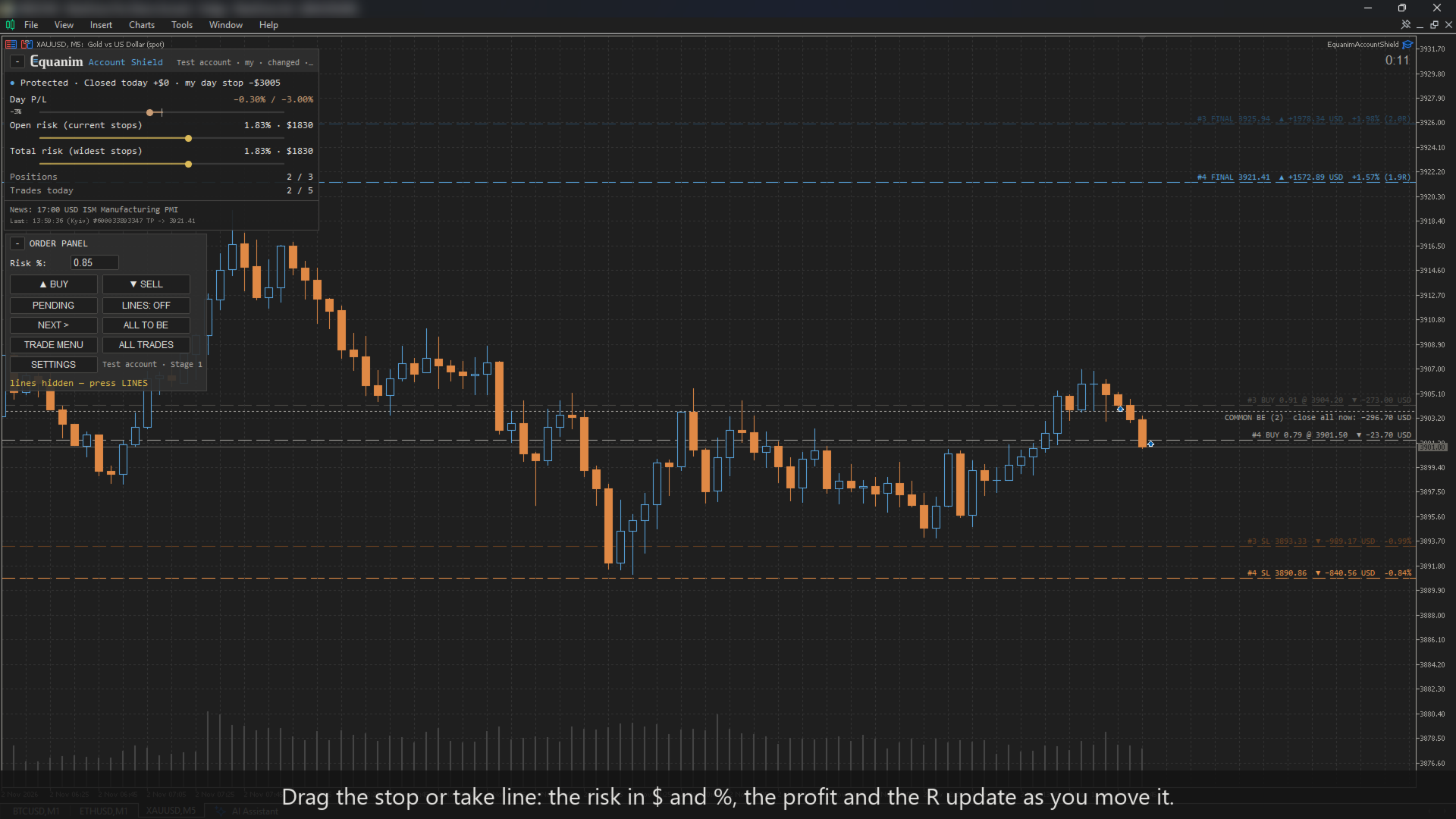
  • Lot from risk: drag the stop line — the lot, the risk in money and in %, and the take in R are shown before you click. Risk as % — own account: Cautious (the lower of the start size and the balance: smaller in a loss, not bigger in a profit), Progressive (the current balance), Fixed (the start size), Equity, or Room to the limit; prop: Fixed or Room to the limit. Or a fixed amount or a fixed lot; commission per lot included (enter it in the inputs).
  • Orders: BUY / SELL at market, or a pending order from an entry line (Limit or Stop chosen by itself); take profit in R; margin and broker stop-level checks; the point value from the terminal's own P/L — correct even where a broker's tick value is wrong.
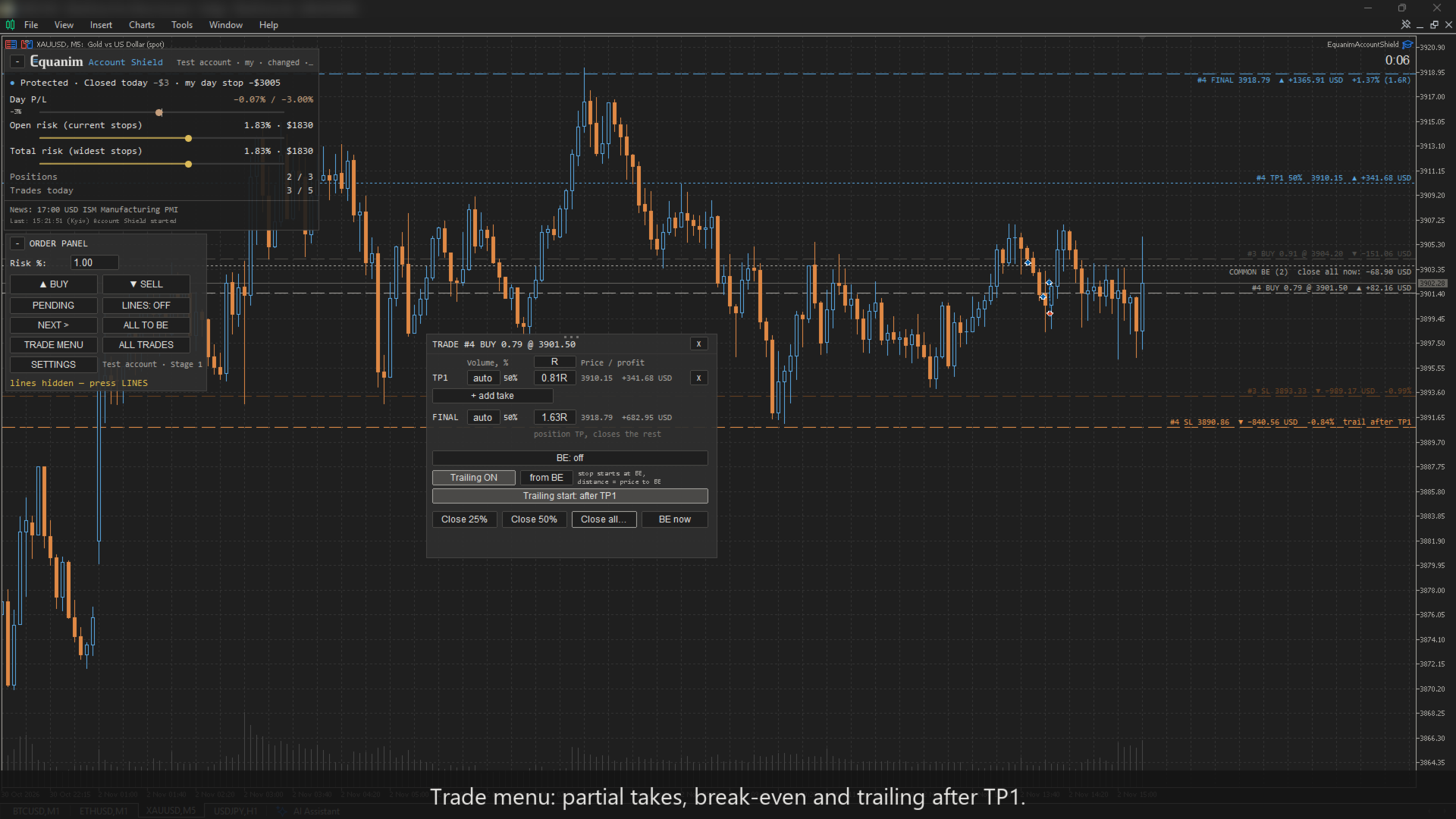
  • Trade menu: any number of partial takes (TP1, TP2 …), each with its volume and a distance in R, points or ATR; the final take moved from the same menu.
  • Break-even after a chosen take or at a level line — entry plus every cost (commission in and out, typical spread, negative swap) plus 0.1 ATR.
  • Trailing stop: points, ATR, the low / high of the last N candles, or from break-even; starts at once, after a take or from a level line; never closer than 3 spreads.
  • One click: close 25 / 50 % / all, all to break-even; the all-trades menu (this symbol or the whole account) — only profitable, only losing, delete pending orders; «close all» asks for a confirmation.
  • Hotkeys (switch on in the inputs): Shift+B buy, Shift+S sell, Shift+L lines, Shift+E all to break-even, Shift+X twice — close all on this symbol.
  • Clean position lines with price, money, % and R that never overlap; a stable number and colour for every trade; candle timer.
  • A stop line dragged beyond a limit is checked before it moves; if a trade does not fit a rule, the lot is reduced and you are told why.

Works with Equanim Trade Journal

The journal finds what costs money. Shield turns it into a rule. You trade. Each works on its own; together the journal proposes a rule, Shield asks you to confirm it, and the journal shows the result before / after.

Try it in the Strategy Tester

The tester demo uses a generic "Demo prop 2-Step" (no real firm) and a built-in trader with bad habits — or a gambler. Every reaction of Shield is shown on the chart. The result depends on the market: Shield does not make trading profitable — it keeps you within the rules.

Who the two demo traders are (built into the EA, they trade the chart's symbol by themselves in the tester (the numbers below were counted on XAUUSD), Monday–Friday 08:00–22:00 server time, deciding on every closed M15 candle; the same pseudo-random sequence in every run)

The trader with bad habits — a trend system that could be decent, spoiled by habits:

  • The plan: trade with the H1 trend (close above / below EMA 50) on a pullback to the M15 EMA 20; stop 1.2 ATR, take 2R; risk 0.3% of the balance; 2 trades a day (3 in the first trading days of a stage).
  • The habits, at random: one trade in seven without a stop; about one in eight with the risk ×4 (1.2%); after a loss — a third of the time «win it back» at once with the risk ×2, even without a signal; one in ten — a second trade at once; after the plan is done, still one signal in four is taken; the first trading days of a stage — the risk ×3.
  • Two tilt days (the 8th and the 30th trading day): against the trend, 1% a trade, often two at once.
  • With Shield he tries twice after a block, then gives up for the day; without Shield he does not know about blocks.

The gambler — no system and no edge:

  • A coin: on about one M15 candle in fourteen (≈ 4 trades a day) a random direction; risk 1–4% of the balance at random; 40% of the trades without a stop (a take of 2R is always set).
  • After a loss — 60% of the time «win it back»: two or three trades at once in one direction, each with the risk ×2–3 (up to ~12%).
  • «It will come back»: now and then he moves an open stop further away by half its distance.
  • He never stops by himself — after any block he keeps opening trades.

Neither of them is a real person. The trader with bad habits is a disciplined plan with typical mistakes; the gambler is the worst case — he shows where Shield's protection ends.

With and without Shield — the same trader, 12 months of the tester (a demo of built-in traders: not real results and not a promise of results)

Built-in trader Shield Challenges Passed Blown Lost on blown Fees of blown ($100)
Bad habits without Shield 122 1 115 $40 467 $11 500
Bad habits after the set-up 30 3 21 $13 357 $2 100
Bad habits + Room to the limit 27 4 17 $12 050 $1 700
Bad habits + strict discipline* 11 1 4 $2 408 $400
Gambler without Shield 216 0 211 $103 512 $21 100
Gambler after the set-up 83 1 76 $43 843 $7 600
Gambler + Room to the limit 70 2 63 $36 479 $6 300
Gambler + strict discipline* 72 0 67 $45 668 $6 700

\* a stricter set the trader may choose; it did not pass our selection rule (fewer passed challenges), shown for comparison.

How it was counted: XAUUSD, six two-month periods of 2023–2026 (12 months), a "Demo prop 2-Step" $10 000 (target 10% / 5%, daily −5%, overall −10%, 4 trading days). A blown or a passed challenge is followed by a new one from $10 000. The same firm rules judge both runs; Shield's own stop at −8% counts as blown. "Room to the limit" is the recommended setting: chosen on four periods by a rule written down before the runs and confirmed once on two new ones; the tester demo starts with it. "Strict discipline" = Room to the limit + risk 0.3% a trade, max risk of a trade 1%, a personal daily stop of 2%, 5 trades a day and a 30-minute pause after a loss, all blocking. In the tester the halving of the risk at 40% of the drawdown limit is enforced; a buyer gets only a warning by default.

Read it honestly: these are built-in traders, not people; the tester has no news. Shield does not make trading profitable — the gambler still almost never passes. Part of the blown challenges with Shield are the trader's own: after the daily stop he keeps opening trades outside the panel, each one is closed at once, but every close costs the spread. The extra rules are your choice: stricter ones blow far fewer challenges but pass slower; Room to the limit keeps the pace and blows fewer.

Good to know

  • MetaTrader must be running (a VPS is recommended). Your stop and final take are on the broker's server and work anyway.
  • Hedging and netting accounts. On netting MetaTrader merges the trades on a symbol into one position: Shield checks every add as a new trade and, if it breaks a rule, closes only the added volume; a reversal is a new trade too.
  • Shield keeps its records (events, the profile, the exchange with Trade Journal) in the terminal's shared folder Common\Files\PGJ; letters to a firm — in MQL5\Files\Equanim.
  • Shield does not open trades and gives no signals. It does not guarantee passing a challenge or a profit.
  • Firms differ in how they treat third-party EAs — see the compatibility table in the comments and ask your firm before buying. For firms that restrict EAs, Shield shows a warning and a ready question for their support, and works in "watch only" mode until you confirm.
  • What Shield cannot protect from — see the FAQ.
  • Not affiliated with, endorsed or sponsored by any prop firm. Firm names are used only to identify their published rules. Rules as of 2026-10 — firms change them; check yours.

Inputs (F7; most settings are made on the chart in the set-up and in SETTINGS)

Setup

  • Account setup — on the chart (prop firm, stage, size; recommended), prop challenge, prop funded, own account, small own account, custom (the fields below).
  • Initial balance — 0 = from the set-up / first deposit.
  • Watch only — warn, never close.
  • Stage target buffer, % of the size — everything is closed at the target + this (commission, slippage).
  • Time reserve before the firm's time rules, min — news, weekend, gap.
  • Other robots on this account — their magic numbers, comma separated; never touched, counted in the account limits.
  • Tester demo: on/off, style (bad habits / gambler), Shield protects or only watches, a new challenge after each one, the price of a challenge, the set-up defaults or the recommended setting, own settings over them («key=value;…»).

Order panel

  • Risk per trade: as %, money or a fixed lot, and its value.
  • Commission per 1 lot, round turn — added to the risk.
  • Take profit, R (0 = none).
  • Push notifications; time until the candle closes; colours; hotkeys (off by default); clock of the panel and trading hours.

Trade Journal

  • Rules proposed by Trade Journal — off, ask me, apply automatically (only ever stricter than yours).

Custom rules (used only for «Custom»; a preset sets them otherwise)

  • Daily loss limit, % — of the starting balance or of a day-start base (day-start balance / higher of balance and equity / equity / day peak), counted on equity or closed trades; personal daily stop, %; trading day start hour.
  • Max drawdown, % and its type (static, trailing intraday, trailing end of day, trailing to the initial balance).
  • Max risk per trade, %; total risk of all positions, %; max open positions; seconds to set a stop.
  • Max trades per day; no positions N hours around the weekend; min trade duration; best day at most, % of the starting balance (advice to close; once all is closed at the goal, no new trades until tomorrow); profit target, %; min trading days; inactivity warning, days; funded rules.
  • Hedge detection (by price correlation / list / both / off); economic news (MT5 calendar) and what happens inside the news window (warn / block new orders / block opening and closing).

Languages: English, Ukrainian, Russian. Colours: light, dark or classic (bright).

Produtos recomendados
CosmiCLab SMC FIBO CosmiCLab SMC FIBO is a professional trading indicator designed for traders who use Smart Money Concepts (SMC), market structure analysis and Fibonacci retracement levels. The indicator automatically detects market swings and builds Fibonacci levels based on the latest impulse movement. It also identifies market structure changes such as BOS (Break of Structure) and CHOCH (Change of Character), helping traders understand the current market direction. CosmiCLab SMC FIBO also pr
Heiken_Ashi_Bars - Visualizador de Tendência Avançado para MT5 Visão Geral Heiken_Ashi_Bars é um indicador poderoso e visualmente intuitivo projetado para filtrar o ruído do mercado e destacar a verdadeira tendência subjacente. Os gráficos de velas tradicionais costumam ser erráticos, levando a sinais falsos. Ao calcular a média dos dados de preços, este indicador suaviza a ação do preço, tornando significativamente mais fácil identificar continuações de tendências, reversões e zonas de entrada
Price Magnet — Price Density and Attraction Levels Indicator Price Magnet is a professional analytical tool designed to identify key support and resistance levels based on statistical Price Density. The indicator analyzes a specified historical period and detects price levels where the market spent the most time. These zones act as “magnets,” attracting price action or forming a structural base for potential reversals. Unlike traditional Volume Profile tools, Price Magnet focuses on price-time d
Trading Utility for Forex Currency Pairs Only not for Gold  Functions Auto Lot Calculation based on Risk Auto stoploss  Auto TakeProfit Breakeven Auto Close Half % Close in percentage with respect to the PIPs Pending Orders BuyLimit Sell Limit with distances BuyStop Sell Stop    with distances Trading Informations Risk in percentage For Multiple trades Combine Takeprofit and Combine Stoplosses
Candlestick Pattern Scanner is a multi-timeframe and multi-symbol dashboard and alert system that checks all timeframes and currency pairs for different candlestick patterns that are formed in them. Scanner is integrated   with support and resistance zones so you can check the candlestick patterns in most important areas of the chart to find breakout and reversal patterns in the price chart. Download demo version   (works on M4,M6,M12,H3,H8 timeframes and 20 symbols of Market Watch window) Read
FiT Panel Pro
Thonglak Janyakorn
Overview FiT Panel Pro is a professional-grade trade management panel designed for MetaTrader 5 traders who demand speed, precision, and full control over their trades. Built with a modern dark-theme UI, it combines one-click execution with advanced risk management, visual SL/TP drag lines, automatic Fibonacci-based levels, and comprehensive order management — all in a single, compact panel. Whether you are a scalper, day trader, or swing trader, FiT Panel Pro gives you the edge you need to exec
FREE
Breakevan Utility
Jose Luis Thenier Villa
BreakEvan Utility  Is a simple tool in a panel with this utilities: This utility will draw a Golden Line in the chart applied showing the breakeven price, considering all the positions opened for that specific symbol. Also the information panel shows: Balance Breakeven Price for that chart Force Breakeven (for that symbol) as ON/OFF Force Breakeven Global (takes into account all trades opened) as ON/OFF Total Lots opened for Symbol Total Lots opened Global And two buttons: Force Breakeven: Whe
GOM Trade Manager
Wannapach Chinnaprapa
GOM Trade Manager helps you execute trades the way you want it. Works on all instruments Forex, Commodities, & Crypto. It helps you with lot calculations, spread addition and balance calculations so you can just focus on actual trading. For full automatic planned management, stackable triggers and spread widening protection >> check out GOM Trade Manager Pro . ------------------------------------------NOTABLE FEATURES------------------------------------------ You set everything based on bid
FREE
Exp5 Duplicator
Vladislav Andruschenko
4.78 (9)
Duplicator para MetaTrader 5 — sistema profissional de duplicação de posições dentro de um único terminal Um Expert Advisor confiável para traders que desejam duplicar automaticamente posições já abertas no MetaTrader 5, aumentar o volume total, aplicar regras personalizadas de lote e gerenciar as duplicatas com lógica precisa. É uma ferramenta prática para trading manual, sistemas automatizados e uma gestão mais flexível de posições já existentes dentro do mesmo terminal. O Duplicator para MT5
Protect your funded accounts and personal capital with military-grade precision. This utility continuously monitors your floating equity against your daily starting balance. The moment your custom drawdown threshold is breached, it instantly liquidates all open positions, deletes pending orders, and completely unloads from the chart. Stop revenge trading and never fail a prop firm evaluation due to a margin breach again.
FREE
The indicator detects and displays М. Gartley's Butterfly pattern. The pattern is plotted by the extreme values of the ZigZag indicator (included in the resources, no need to install). After detecting the pattern, the indicator notifies of that by the pop-up window, a mobile notification and an email. The pattern and wave parameters are displayed on the screenshots. The default parameters are used for demonstration purposes only in order to increase the amount of detected patterns. Parameters z
Fabii Half Trend Baseline
Fabien Georges Andre Guillemaud
Pare de operar contra a tendência do timeframe superior. Duas baselines, um gráfico. Sem repaint. Qualquer par, qualquer timeframe. No seu gráfico em 2 minutos. Demo gratuita no Strategy Tester. Get more indicators here Baselines, volatility filters and oscillators. No repaint. Por que você precisa Você entra em uma operação porque uma linha ficou verde no seu gráfico. Depois abre um timeframe superior e vê que a tendência maior aponta para o outro lado. O sinal era real. A tendência ao redor
Open Risk Budget Cap enforces a total open stop-loss risk budget across your account. It does not choose direction and does not open discretionary trades on a live chart. Attach it to one chart; the symbol and timeframe do not matter. What it measures Every open position and every pending order is priced to its stop-loss in account currency using OrderCalcProfit. Positions or orders without a stop-loss are counted and shown on the panel as "without stop-loss". They are excluded from the budget
RiskGuard Pro enforces a daily loss limit, a profit lock and a maximum drawdown on your account - across your manual trades and any other EA you run. It does not open trades and it does not predict anything. What it does RiskGuard Pro watches your account equity and enforces three limits you set: Daily loss limit - measured against your start-of-day equity. Daily profit lock - stop trading once the day has gone well enough. Maximum drawdown - measured from your account's peak equity, not from to
Manual Assistant MT5
Igor Kotlyarov
4.75 (4)
Bonus when buying an indicator or an advisor from my list. Write to me in private messages to receive a bonus. Manual Assistant MT5 is a professional manual trading tool that will make your trading fast and comfortable. It is equipped with all the necessary functions that will allow you to open, maintain and close orders and positions with one click. It has a simple and intuitive interface and is suitable for both professionals and beginners. The panel allows you to place buy and sell orders w
FREE
DR Trade and Risk Manager: The Foundational Algorithmic Risk Console for MT5 For the discretionary trader, the greatest adversary is not the market; it is the undisciplined self. You have a solid strategy, but in moments of high pressure, do you follow your rules with perfect consistency? Do you cut losses without hesitation? Do you let winners run without cutting them short out of fear? For most, the answer is no. This gap between strategy and execution is where profits are lost. DR Trade and R
RRtoolBox
David Ruiz Moreno
RRtoolbox - Professional Tools: Risk:Reward Trading Tool (SL/TP Horizontals + Pending orders + Diagonals), Alerts set on trend lines (for alerts on diagonal levels), SelfManagement (BE, partials...), close/cancelling by time, Statistics, Info and trading on chart. One-Click Trading with Visual Risk:Reward Management RRtoolbox is a comprehensive trading panel that combines one-click order execution,  statistics and  powerful visual Risk:Reward tools, alerts set with trendlines, on chart butt
Truvana Trend Campaign Manager EA (TCM) Advanced Basket Management & Profit Locking Tool for Trend Traders Short Description Turn strong trends into managed campaigns. Truvana TCM is a professional trade management EA designed for traders who already know how to identify trends and execute entries. The EA automatically manages basket expansion, validates risk before adding positions, and locks profits using a broker-side Basket Stop Price (BSP). No martingale. No grid recovery. No signal genera
This is FVG PRO with our Indication Panel. The FVG LITE is available for free without the side panel. Watch the FVG Indicator v2 work live on the chart. This tool automatically detects Fair Value Gaps,  price imbalances where the market moved too fast and left unfinished business, and flags them as potential support and resistance zones. The panel on the left shows the trend direction across four timeframes simultaneously, so you can see at a glance whether the big picture agrees with what pr
Account Monitor Pro — Your Ultimate Trade Statistics Hub Account Monitor Pro is a professional information dashboard designed for traders who combine Expert Advisors (EAs) and manual trading. The indicator separates statistics in real-time based on your Magic Number, allowing you to clearly see who is driving the profit: the algorithm or yourself. Key Features: Split Monitoring: Instant separation of "Robot" positions (by Magic Number) and "Manual" trades. Multi-language Support: 11 languages in
FREE
Non-Repainting. Non-Redrawing. Non-Lagging. Signals appear only on confirmed bars. What you see on history is exactly what appeared in real time. Built specifically for Gold (XAUUSD) traders. Gold ML Supertrend MT5 is the only Supertrend indicator on MQL5 that learns. Instead of using a fixed multiplier, it runs a K-means clustering algorithm on recent price data to find the optimal band width. Then it adapts that width per trading session (Asia/London/NY) based on what actually worked. The resu
Basic Theme Builder MT5
Mehran Sepah Mansoor
5 (2)
Basic Theme Builder: Simplifique a Personalização do Seu Gráfico Transforme sua experiência de negociação com o Basic Theme Builder , um indicador versátil projetado para simplificar a personalização da aparência do seu gráfico no MetaTrader 5. Este indicador intuitivo oferece um painel fácil de usar que permite alternar rapidamente entre vários temas e esquemas de cores, melhorando tanto o apelo visual quanto a funcionalidade do seu ambiente de negociação. Free MT4 version O Basic Theme Builde
FREE
The Ultimate All-In-One Trade Manager & Prop Firm Guardian for MT5. Nexus Pro Trade Manager is the most advanced, all-in-one trading assistant designed for both manual traders and Prop Firm challengers. Featuring a stunning, lag-free UI (Dark/Light mode), it completely transforms your MT5 into a professional trading terminal. Whether you are trading a personal account or trying to pass evaluations for FTMO, FundedNext, or other prop firms, Nexus Pro protects your capital, automates your risk cal
HedgeSafe Trade Assistant Painel de negociação manual para MetaTrader 5 com foco no controle de risco. O HedgeSafe ajuda a preparar, validar e gerenciar uma operação diretamente no gráfico antes de clicar em BUY ou SELL. O HedgeSafe não é um serviço de sinais, previsor de mercado, robô de IA ou estratégia automática. Ele não escolhe a direção da operação nem promete lucro. Todas as decisões permanecem sob responsabilidade do trader. Principais recursos Cálculo do lote por percentual do saldo ou
Margin Call Shield – Defend Your Margin on Your Terms Margin Call Shield is a tool for MetaTrader 5 traders who want to decide for themselves which open positions are closed during margin call situations before the platform does so automatically based on its internal rules. By default, the broker or platform decides which positions to close, often using undisclosed algorithms. Margin Call Shield lets you set this order according to your own strategy. Why Was Margin Call Shield Created? In a mar
Important Lines
Terence Gronowski
4.88 (24)
This indicator displays Pivot-Lines, preday high and low, preday close and the minimum and maximum of the previous hour. You just have to put this single indicator to the chart to have all these important lines, no need to setup many single indicators. Why certain lines are important Preday high and low : These are watched by traders who trade in a daily chart. Very often, if price climbs over or falls under a preday low/high there is an acceleration in buying/selling. It is a breakout out of a
FREE
Trade assistant pro v8
Ahmed Mohammed Bakr Bakr
2 (1)
FREE FREE FREE Trade Assistant MT5 – Professional Trading & Risk Management Panel Trade Assistant MT5 is an advanced trading panel designed to help traders execute orders faster, safer, and more professionally . It simplifies manual trading by combining smart order management , precise risk control , and one-click execution , making it ideal for both beginners and advanced traders. This tool does not trade automatically . Instead, it empowers you with full control while applying professional-gra
FREE
Local Copy Trader Utility - Professional Copy Trading System Overview Local Copy Trader Utility is the complete solution for mirroring trades between MetaTrader 5 accounts. With both Master and Slave functionality in one powerful Expert Advisor, it delivers reliable, lightning-fast trade copying with zero external dependencies. Perfect for managing multiple accounts, following trading signals, or transferring trades between brokers, this system ensures your positions stay perfectly synchronized
================================================================ MATRIX CONDITION MONITOR Live Trade Condition Panel for MetaTrader 5 Fully Automatic -- Works with ALL Matrix EAs ================================================================ NEVER MISS A TRADE SETUP AGAIN Matrix Condition Monitor is a free utility that attaches to any chart and automatically checks all 10 trade conditions in real time -- showing you exactly why a trade will or will not open, and alerting you the moment ever
FREE
Bastion is a monitor-and-close-only risk manager for prop-firm traders. It watches your account against your firm's daily-loss and maximum-drawdown limits in real time and force-closes your open positions BEFORE you cross a line. It never opens a trade of its own, so it stays fully within the tools allowed by FTMO, FundedNext, The5ers, FTUK and FXIFY. Why traders fail challenges A large share of failed evaluations end on a single daily-loss breach: a moment of inattention, a news spike, one tra
Os compradores deste produto também adquirem
Bem-vindo ao Trade Manager EA—uma ferramenta de gestão de risco criada para tornar o trading mais intuitivo, preciso e eficiente. Não é apenas uma ferramenta para executar ordens, mas uma solução abrangente para planejamento de operações, gerenciamento de posições e controle de risco. Seja você um iniciante, trader avançado ou scalper que precisa de execução rápida, o Trade Manager EA adapta-se às suas necessidades, oferecendo flexibilidade em todos os mercados, desde forex e índices até commodi
Farmed Hedge Yield Farming | All Markets (Manual - Hybrid - Semi/Automated EA) VERIFIED TRADING RESULTS - Farmed Hedge Yield Axi Copy:  https://www.mql5.com/en/signals/2356376 - Farmed Hedge Yield Exn Copy:   https://www.mql5.com/en/signals/2356404 - Farmed Hedge Yield V Copy:  https://www.mql5.com/en/signals/2357156 IMPORTANT NOTICE: FarmedHedge is a MANUAL-FOCUSED TRADING UTILITY ,not a fully automated EA. Results shown on this Signal include manual trades and overall strategic management.
O Telegram to MT5 Multi-Channel Copier copia automaticamente os sinais de trading dos seus canais de Telegram e Discord diretamente para o MetaTrader 5. Sem bots, sem extensões de navegador, sem copiar à mão. O sinal chega ao Telegram ou ao Discord e o EA abre a operação no seu terminal em poucos segundos. E antes de copiar um canal, o backtester integrado mostra o que esse canal teria feito na sua conta. O produto inclui dois componentes: um aplicativo de Windows que escuta os seus canais de Te
Copie sinais do Telegram com suas próprias regras de negociação Telegram to MT5 Signal Trader copia automaticamente sinais de negociação em texto de canais e grupos públicos e privados do Telegram para o MetaTrader 5. Gerencie vários provedores e contas MT5 em um único aplicativo para desktop, com configurações individuais de risco e de negociação para cada provedor . Você não precisa de um bot do Telegram nem configurar uma API para copiar sinais. Basta entrar com sua própria conta do Telegram
TradePanel MT5
Alfiya Fazylova
4.88 (170)
Trade Panel é um assistente de negociação multifuncional. O aplicativo contém mais de 50 funções de negociação para trading manual e permite automatizar a maioria das tarefas de negociação. Instruções para o aplicativo: https://www.mql5.com/pt/blogs/post/762435 Versão de teste do aplicativo para conta demo: https://www.mql5.com/pt/blogs/post/762547 Como instalar o aplicativo: https://www.mql5.com/pt/blogs/post/762548 Como testar o aplicativo no modo visual: https://www.mql5.com/pt/blogs/post/770
VirtualTradePad PRO SE MT5 — centro profissional de controle de trading para MetaTrader 5 VirtualTradePad PRO SE é um painel de trading premium baseado no gráfico e um ambiente de gerenciamento de operações para MetaTrader 5 . Ele foi desenvolvido para traders que desejam execução mais rápida, controle de posições mais claro, gerenciamento de trades estruturado, planejamento visual de níveis e um fluxo de trabalho profissional diretamente no gráfico. Não é apenas um painel de COMPRA / VENDA. O P
================================================================================ POC BREAKOUT - V20.72. Full Professional Grade Toolkit ================================================================================ POC Breakout is a full MetaTrader 5 trading dashboard for discretionary traders who want breakout signals, Point of Control (POC) context, volume profiles, order flow, market structure, news, alerts, and advanced trade planning in one professional workspace. Attached directly to you
REVDEN AI Desk: Conduza Seu Trading a Partir de Uma Conversa com Sua Própria IA, sobre o Contexto de Mercado do REVDEN Imagine conduzir seu trading a partir de uma única conversa. O REVDEN AI Desk traz isso para o MetaTrader 5: você pergunta à sua própria IA como ela lê o mercado, e ela responde a partir do contexto completo do REVDEN sobre os símbolos que você opera, com o estado de cada um, o quadro de risco e as divulgações que vêm pela frente. As propostas dela chegam com entrada, stop, alvo
MT5 to Telegram Signal Provider é uma utilidade fácil de usar e totalmente personalizável que permite o envio de sinais especificados para o chat, canal ou grupo do Telegram, tornando sua conta um fornecedor de sinais . Ao contrário da maioria dos produtos concorrentes, ele não usa importações de DLL. [ Demonstração ] [ Manual ] [ Versão MT4 ] [ Versão Discord ] [ Canal do Telegram ]  New: [ Telegram To MT5 ] Configuração Um guia do usuário passo a passo está disponível. Não é necessário conhec
News Trade EA MT5
Konstantin Kulikov
4.55 (11)
Apresento um robô útil que eu mesmo uso há vários anos. Pode ser usado nos modos semiautomático e totalmente automático. >>> Chat <<< O programa contém configurações flexíveis para negociação nas notícias do calendário econômico. Não pode ser verificado no testador de estratégia. Somente trabalho real. Descarregue o ficheiro mais recente de definições: https://www.mql5.com/en/blogs/post/747929 Monitorização de sinais: https://www.mql5.com/en/signals/author/test-standart Ao criar suas próprias
The Patch
Mian Rameez Ali
The Patch It never opens a trade. It walks behind the ones that did. Every open position, every pending order — checked twice a second for the one thing that's easy to forget: a stop, a target. Found bare, it doesn't ask. It writes the missing number in, measured in points from wherever the position began, and moves on to the next. No strategy, no opinion on direction. Just the quiet assumption that nothing should ever sit on the market unprotected — not because someone decided it shouldn't,
EA Overfitter
Stephen J Martret
5 (1)
That backtest looks great. But will it still be making money tomorrow, next week, next month? EA Overfitter re-runs your EA on 100 price histories it has never seen. One score tells you if the edge is real. A backtest tells you what an EA did on one price history — the one that happened to occur. What you cannot tell from it is how much of that result was the strategy and how much was the particular path. EA Overfitter answers that. It builds up to 100 synthetic price histories your EA has n
Próxima Atualização — Versão 2.52 em Breve! [NOVO] Prepare-se para 4 Grandes Novos Recursos Projetados para Aprimorar sua Análise de Mercado e seu Fluxo de Trabalho de Trading Estamos levando a análise de mercado a um novo nível com 4 novos recursos desenvolvidos para atender às suas necessidades de trading. Apresentamos: 1. TRADE OVERVIEW DASHBOARD 2. CONFLUENCE AT ZONE 3. STRONG & WEAK HIGH/LOW 4. OTE 1. TRADE OVERVIEW DASHBOARD Um painel que ajuda você a compreender mais facilmente o panoram
The product will copy all telegram signal to MT5 ( which you are member) , also it can work as remote copier.  Easy to set up, copy order instant, can work with almost signal formats, image signal,  s upport to translate other language to English Work with all type of channel or group, even channel have "Restrict Saving Content", work with  multi channel, multi MT5 Work as remote copier: with signal have ticket number, it will copy exactly via ticket number. Support to backtest signal. How to s
RETAILBERG FOOTPRINT CHART PRO — Order-Flow Workspace for MetaTrader 5 Version 7.00  |  Professional System  |  31 tools  |  One chart A full 150-page illustrated User Manual is included. Please read the full manual to understand this feature packed footprint chart elements and ui. https://www.mql5.com/en/blogs/post/777982 DEMO / STRATEGY TESTER — PLEASE READ FIRST
Astro Trade MT5
Indra Maulana
5 (8)
25% discount on the release of the tool: only for the next 3 buyers Send a message to receive a demo version. AstroTrade Trading Assistant AstroTrade is a comprehensive multi-functional trading utility developed for the MetaTrader 5 platform. It integrates essential tools for trade execution, risk management, and technical monitoring into a single unified interface. The application is designed to assist traders in managing their daily operations through a visual and structured environment. Vi
Floor Watch
Syed Tauqeer Hussain Shah
Floor Watch One number, watched every thirty seconds: how far equity has fallen since the day began — or since its highest point, if it's told to trail the peak instead of the open. Cross the line and it doesn't argue. Every open position closes, every pending order vanishes, and anything that slips through afterward gets shut the moment it appears. Not asked. Removed. The floor holds until the clock turns 5 AM Pakistan time — then, and only then, does the day start over. One rule. No except
Power Candles Strategy Scanner - Localizador de configurações multissímbolo com auto-otimização O Power Candles Strategy Scanner utiliza o mesmo motor de auto-otimização que alimenta o indicador Power Candles — em todos os símbolos da sua lista de observação, lado a lado. Um painel indica-lhe quais os símbolos que são estatisticamente negociáveis neste momento, qual a estratégia vencedora para cada um, o par ideal de Stop Loss / Take Profit, e avisa-o assim que um novo sinal é emitido. Esta ferr
Trader Evolution
Siarhei Vashchylka
5 (7)
" Trader Evolution " - A utility designed for traders who use wave and technical analysis in their work. One tab of the utility is capable of money management and opening orders, and the other can help in making Elliott wave and technical analysis. Manual (Be sure to read before purchasing) | Version for MT4 Advantages 1. Trading in a few clicks. Immediate and pending orders are available in the panel 2. Money management. The program automatically selects the appropriate lot size 3. Simplifies
MT5 Professional Copy Trading System (Edição MT5) O MT5 Professional Copy Trading System é um copiador de operações LOCAL de nível industrial e ultra rápido, projetado para traders profissionais, provedores de sinais e gestão multi-conta de estilo institucional. Diferentemente das soluções de cópia retail ou baseadas em nuvem, este sistema é construído sobre uma arquitetura LOCAL otimizada para ambientes onde múltiplos terminais operam no mesmo sistema Windows. Arquitetura LOCAL industrial O d
YuClusters
Yury Kulikov
4.93 (43)
Atenção: A versão demo para revisão e teste está aqui . YuClusters é um sistema profissional de análise de mercado. O trader tem oportunidades únicas para analisar o fluxo de pedidos, volumes de negociação, movimentos de preços usando vários gráficos, perfis, indicadores e objetos gráficos. O YuClusters opera com base em dados de Tempos e Negócios ou informações de ticks, dependendo do que está disponível nas cotações de um instrumento financeiro. O YuClusters permite que você crie gráficos com
DrawDown Limiter
Haidar Lionel Haj Ali
5 (23)
DrawDown Limiter v5.0 — Controlador Avançado de Proteção de Conta O DrawDown Limiter v5.0 é um controlador de proteção de conta executado no lado do cliente, desenvolvido para monitorar sua conta de trading e reagir automaticamente quando os limites configurados de risco, lucro, notícias, horário, rollover ou número de posições forem atingidos. Ele pode monitorar operações manuais, estratégias automatizadas, vários Expert Advisors, ordens pendentes e posições abertas a partir de um único gráfico
Anchor Trade Manager
Kalinskie Gilliam
5 (8)
Your EAs cannot see each other, but Anchor can. Anchor gives you one place to coordinate your EAs, manage risk, and decide when trading is allowed. It works alongside the trading bots you already use without any changes to them. The Problem One EA opens a trade. Then another starts trading. The next thing you know, you wake up to multiple grids built across your account. Each EA may be doing exactly what it was designed to do, but together they can place far more risk on your account than you in
Master Your Trading Discipline   Stop losing your hard-earned gains to overtrading and emotional decisions. The Discipline Tool is your ultimate trading assistant, ensuring strict risk management in real-time. Key Protection Features: Advanced Drawdown Defense : Automatically halts trading if your daily drawdown exceeds a preset threshold (percentage or dollar amount). Real-Time Equity Lock : Safeguard profits by referencing peak equity, ensuring drawdown stays within control. Hard Profit Target
Grid Manual MT5
Alfiya Fazylova
4.7 (23)
"Grid Manual" é um painel comercial para trabalhar com uma grade de ordens. O utilitário é universal, possui configurações flexíveis e uma interface intuitiva. Ele trabalha com uma grade de ordens não apenas na direção da média das perdas, mas também na direção do aumento dos lucros. O trader não precisa criar e manter uma grade de ordens, tudo será feito pelo ""Grid Manual". Basta abrir um orden e o "Grid manual" criará automaticamente uma grade de ordens para ele e trabalhará com ele até que s
Dealer's Panel No signal decides anything here — a hand does. One click, and the panel calculates what's underneath: lot size from risk, target from a 30-step balance ladder that remembers exactly how far an account has climbed. Toggle between market and pending without touching an input field. Set a stop, and the take-profit can write itself — a fixed share of the balance, translated into price with no arithmetic left for the trader to get wrong. One trade live at a time; it won't let a seco
Trade Assistant 38 in 1
Makarii Gubaydullin
4.91 (23)
Ferramenta Multifuncional: Calculadora de Lote, Ordens Grid, Proporção R/R, Gerenciador de Negociações, Zonas de Oferta e Demanda, Price Action e muito mais Versão Demo   |   Manual do Usuário O Assistente de Trading   não funciona no testador de estratégias : você pode baixar a   Versão Demo AQUI  para testar a utilidade . Entre em contato   para qualquer dúvida  / ideias de melhoria / caso encontre um erro Se precisar de uma versão MT4, ela está disponível aqui Simplifique, acelere e automati
My Chart Generator
Trade The Volume Waves Single Member P.C.
5 (1)
What if your chart adapted to the market instead of the clock?   THE PROBLEM IT SOLVES   Instead of trying to find the best indicator that fits your timeframe chart, build a chart and find the most appropriate indicator.   My Chart Generator is a MetaTrader 5 background service that builds  live, fully historical three types of custom charts :1. Range/Volume Balanced chart, 2.  Range/Volume Absorption chart and 3. Constant Volume chart from any symbol — Forex pairs, crypto, indices, commodities,
Auto DCA EA
Truong Giang Hoang
5 (1)
All new interface and function Add telegram notify (you have to get Telegram bot API and chat ID). With this ea, you can earn 10-40% even more profit/month! 1. This EA is used to automatically take profit or DCA your orders on MT5 according to the parameters you set. You can enter first order on your phone or MT5 terminal on your computer and it automatically take profit or DCA your orders. 2. Enter buy/sell limit-stop price * Buy limit price/ Sell limit price/ Buy stop price/ Sell stop price:
Trade Manager DaneTrades
Levi Dane Benjamin
4.13 (31)
Trade Manager para ajudá-lo a entrar e sair rapidamente de negociações enquanto calcula automaticamente seu risco. Incluindo recursos para ajudar a evitar negociações excessivas, negociações de vingança e negociações emocionais. As negociações podem ser gerenciadas automaticamente e as métricas de desempenho da conta podem ser visualizadas em um gráfico. Esses recursos tornam este painel ideal para todos os traders manuais e ajudam a aprimorar a plataforma MetaTrader 5. Suporte multilíngue. Vers
Filtro:
Sem comentários
Responder ao comentário