AccountVista

AccountVista — profit and deposit information panel for MetaTrader 5
Version 1.6

INDICATOR DESCRIPTION
=====================

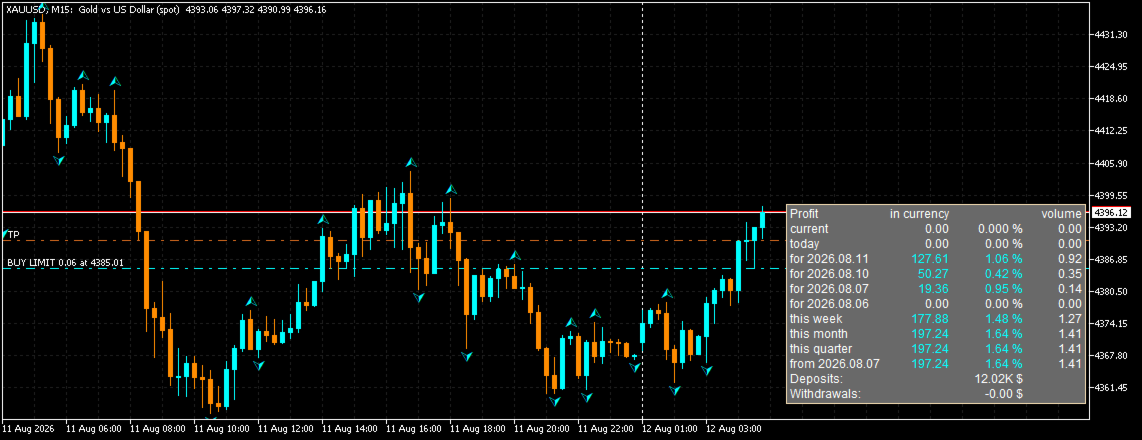
The AccountVista indicator displays a compact information panel on the chart with
the key statistics of your trading account: current floating profit, results for
today, for each of the four previous trading days, for the current week, month,
quarter and year, as well as the volumes of closed deals, deposits and withdrawals.

The panel uses no indicator buffers and does not repaint the chart — it is a fully
independent information module that can be attached to any symbol and any timeframe.

For every period the indicator shows three values:
  • profit in account currency (including commissions and swaps);
  • percentage relative to the balance at the beginning of the period;
  • volume of closed deals (in lots).

Additionally, the panel displays:
  • current floating profit and the volume of open positions;
  • total deposits and withdrawals;
  • current profit percentage relative to the current balance.

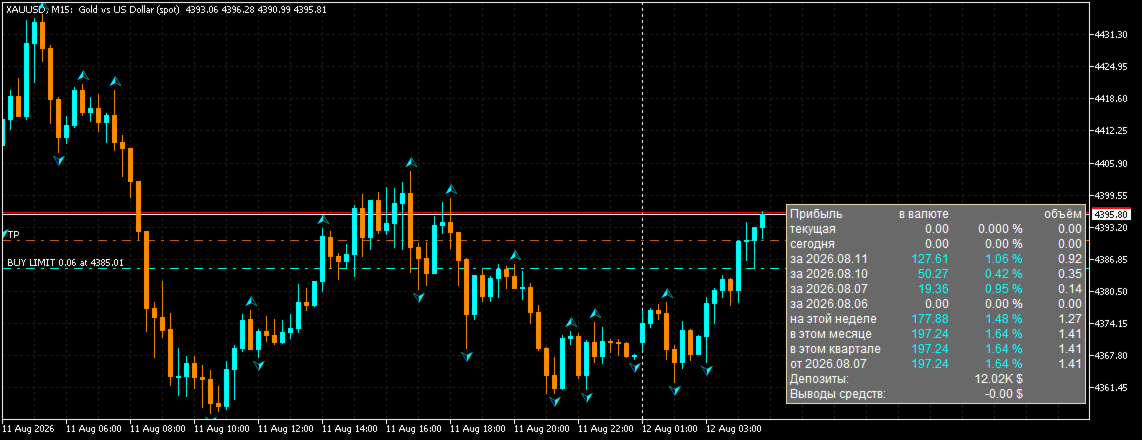
The indicator supports interface language selection (Russian/English), attachment
to any of the four chart corners, mouse-driven panel moving with position saving,
and works on cent accounts.

Version 1.6 adds:
  • panel language selection (Russian/English) — the PanelLang parameter;
  • fully bilingual interface and parameter descriptions;
  • bilingual description in the "Common" tab of the indicator properties.

PERIODS SHOWN BY THE PANEL
==========================

  • current (floating) profit and current volume of positions;
  • today;
  • yesterday (each of the 4 previous trading days separately);
  • this week;
  • this month;
  • this quarter;
  • this year (or the period since a user-defined date).

CALCULATION DETAILS
===================

Profit for each period is calculated from the deal history: the sum of profit,
commission and swap of all closed deals within the period. Volume is counted only
for closing deals (full or partial position closing).

The balance at the beginning of a period is calculated as the current balance
minus the period profit, adjusted for deposits and withdrawals. The percentage is
the ratio of the period profit to the balance at its beginning.

When the user date mode is enabled, the yearly profit is replaced by the profit
since the specified date, and deposit/withdrawal amounts can be entered manually.

ACCOUNTS AND CURRENCIES
=======================

The panel supports both regular and cent accounts (the "Cent account" parameter).
Large numbers are automatically compacted (1,000 → 1.00K, 1,000,000 → 1.00M,
1,000,000,000 → 1.00B) so that any amounts can be displayed compactly.

COLOR INDICATION
================

Values are colored by sign:
  • white — zero value;
  • aqua — profit;
  • pink — loss.

MOVING THE PANEL
================

The panel can be moved with the mouse (if the "Move panel with mouse" parameter
is enabled). Dragging is implemented with custom mouse handling: the panel moves
smoothly without native object selection, and the chart does not scroll or
jitter while the panel is being moved. The panel position is strictly limited to
the visible chart area — it cannot be dragged beyond the chart edges.

The panel position is saved in the terminal global variables and is restored
after the indicator or terminal restart. When the anchor corner is changed, the
saved position is reset so the panel cannot end up outside the chart window.


PERFORMANCE
===========

The indicator is resource-friendly:
  • statistics recalculation is performed only on real changes (a new M1 bar,
    a change in the number of positions or pending orders, a balance change);
  • the panel refreshes no more often than once every 500 ms;
  • chart objects are updated only when text, color or coordinates change
    (caching);
  • the indicator scales correctly on high-DPI monitors.

REQUIREMENTS
============

  • MetaTrader 5 (any build);
  • a trading account connected to the terminal;
  • no additional files or libraries required.

INSTALLATION
============

1. Save the AccountVista.ex5 file into the MQL5\Indicators folder.
2. Restart the terminal or click "Refresh" in the Navigator.
3. Drag the indicator onto a chart of any symbol and timeframe.
4. Adjust the settings in the "Inputs" tab if necessary.


AccountVista v1.6 INDICATOR FEATURES

====================================


STATISTICS BY PERIODS

---------------------

• Current floating profit and the current volume of open positions.

• Profit for today.

• Profit for each of the 4 previous trading days (separately).

• Profit for the current week.

• Profit for the current month.

• Profit for the current quarter.

• Profit for the current year or for the period since a user-defined date.


VALUES FOR EVERY PERIOD

-----------------------

• Profit in account currency, including commissions and swaps.

• Percentage relative to the balance at the beginning of the period.

• Volume of closed deals in lots.


ADDITIONAL INFORMATION

----------------------

• Total deposits and withdrawals.

• Current profit percentage relative to the current balance.


INTERFACE LANGUAGE

------------------

• Bilingual interface: Russian and English.

• Language switching with a single PanelLang parameter.

• Bilingual parameter descriptions and "Common" tab.


PANEL SETTINGS

--------------

• Attachment to any of the four chart corners (top/bottom, left/right).

• Mouse-driven panel moving (movable parameter) — smooth, with custom mouse

  handling and no native object selection.

• The panel always stays within the chart window: it cannot be dragged beyond

  the edges, even in small windows.

• The chart does not scroll or jitter while the panel is being moved.

• Panel position saving in the terminal global variables and restoring after

  the indicator or terminal restart.

• Automatic return of the panel to the base position if it appears outside the

  chart window.

• Adjustable font size.


ACCOUNT SUPPORT

---------------

• Support for regular and cent accounts (cent parameter).

• Compact display of large numbers: 1.00K, 1.00M, 1.00B.

• Manual entry of deposit/withdrawal amounts (AllDeposit, AllWithdraw) for a

  custom period.


VISUALIZATION

-------------

• Color indication by sign: white — zero, aqua — profit, pink — loss.

• Unobtrusive panel background that does not cover the price chart.

• Correct scaling on high-DPI monitors.


PERFORMANCE

-----------

• Statistics recalculation only on real changes (a new M1 bar, a change in the

  number of positions/stop orders, a balance change).

• Panel refresh no more often than once every 500 ms.

• Chart object caching: only changed values are updated.

• A single pass over the deal history to calculate all periods.


VERSATILITY

-----------

• Works on any symbols and timeframes.

• Requires no additional files, libraries or DLLs.

• Uses no indicator buffers and never repaints the history.


AccountVista v1.6 INDICATOR INPUT PARAMETERS

=============================================


1. PanelLang — Panel language

   Type: selection (enumeration)

   Default: LANG_RU (Russian)

   Description: the interface language of the panel. LANG_RU — Russian,

   LANG_EN — English. All panel labels and parameter descriptions switch

   automatically.


2. corner — Chart corner

   Type: selection (enumeration)

   Default: 0 (Upper left)

   Description: the chart corner the panel is attached to:

     0 — upper left corner;

     1 — upper right corner;

     2 — lower left corner;

     3 — lower right corner.

   When the corner is changed, the saved panel position is reset.


3. cent — Cent account

   Type: bool (checkbox)

   Default: true (enabled)

   Description: enable if the account is a cent account. Amounts are shown

   divided by 100 (in dollars) with 4 decimal places. For a regular account

   disable it: amounts are shown as is with 2 decimal places.


4. stUserDate — Use user date

   Type: bool (checkbox)

   Default: false (disabled)

   Description: when enabled, the last panel period is calculated not for

   the year, but from the date specified in the "User date" parameter.


5. edUserDate — User date

   Type: date and time

   Default: 2024.01.01 00:00:00

   Description: the start date of the last statistics period. Used when the

   "Use user date" parameter is enabled. Convenient for calculating the

   result from the date trading on the account started.


6. AllDeposit — Total deposits

   Type: double (floating point number)

   Default: 0.0

   Description: the total amount of deposits to the account over the user

   period. If the value is greater than 0 and the user date is enabled,

   this value is used instead of the automatically calculated one. Allows

   entering deposits manually (for example, when the history is incomplete).


7. AllWithdraw — Total withdrawals

   Type: double (floating point number)

   Default: 0.0

   Description: the total amount of withdrawals from the account over the

   user period. If the value is greater than 0 and the user date is

   enabled, this value is used instead of the automatically calculated one.


8. FontSize — Panel font size

   Type: int (integer)

   Default: 9

   Description: font size of all panel labels in points. Increase it if the

   panel is hard to read on a large monitor.


9. movable — Move panel with mouse

   Type: bool (checkbox)

   Default: true (enabled)

   Description: when enabled, the panel can be dragged with the mouse by its

   background. Moving is smooth: the panel cannot be dragged beyond the chart

   window edges, and the chart itself does not scroll while moving. The

   position is saved in the terminal global variables and restored after the

   indicator or terminal restart. When disabled, the panel is fixed at the

   base position of the corner.

Produtos recomendados
Guardian Magic GT
Carlos Eduardo Rivas Istacuy
Guardian Magic GT - Risk Management Expert Advisor for MetaTrader 5 PROTECT YOUR TRADING CAPITAL WITH INTELLIGENT RISK MANAGEMENT Guardian Magic GT is a professional-grade Expert Advisor designed to safeguard your trading operations by implementing sophisticated risk control mechanisms. Whether you run a single bot or manage multiple automated trading systems simultaneously, Guardian Magic GT provides real-time monitoring and automatic position management to ensure your account stays within your
Quantum Gold Sniper
Victor Eduardo Velazco Delgado
QUANTUM GOLD SNIPER: The Evolution of Institutional Trading Quantum Gold Sniper is not just a regular EA; it is an extreme-precision artificial intelligence model, designed exclusively to dominate Gold's volatility (XAUUSD). Powered by deep neural networks and rigorous mathematical analysis, this system executes sniper-like entries by exploiting market inefficiencies. Most importantly:   This system is 100% safe.     NO GRID.     NO MARTINGALE.   Every single trade has a strict, hard-
O SAB Advance Assistant e um painel de gestao manual de operacoes para o MetaTrader 5. Construa cada operacao visualmente no grafico, controle o seu risco exato e deixe o motor integrado cuidar dos take-profits parciais, do break-even e do trailing, tudo a partir de um unico painel limpo e redimensionavel. Feito para traders discricionarios e ICT/SMC que querem precisao sem planilhas. PRINCIPAIS RECURSOS - Linhas arrastaveis de Entry, Stop Loss, TP1-TP5 e Final TP com rotulos ao vivo   (pips,
The “Summary Risk Target” indicator is designed to show the total number of transactions made on a single pair. The transactions counted include active positions as well as pending orders . By setting a stop loss for each trade, this indicator displays the total potential risk (loss) that may be incurred. This helps traders easily understand their overall risk exposure without the need for manual calculations. Likewise, for take profit , if the TP level is defined—either in terms of pips or at a
FREE
Gann Box MT5
Frederic Jacques Collomb
O indicador Gann Box é uma ferramenta poderosa e versátil projetada para ajudar os traders a identificar e explorar os níveis-chave do mercado. Este indicador permite desenhar um retângulo no gráfico, que é automaticamente dividido em várias zonas com níveis estratégicos 0, 0.25, 0.50, 0.75, 1 . Quando o preço atinge um desses níveis, alarmes são acionados, oferecendo assim uma ajuda valiosa para as decisões de trading. Você sabe instantaneamente como o mercado está evoluindo em relação à zona q
EA Portfolio Analytics Dashboard Pro - Advanced Multi-EA Performance Monitor EA Portfolio Analytics Dashboard Pro is a professional MetaTrader 5 tool designed for advanced portfolio management and real-time performance analytics. Monitor all your Expert Advisors simultaneously with institutional-grade metrics. Key Benefits: Multi-EA Performance Matrix:   Track unlimited EAs and their statistics in a single view. Real-Time Risk Analytics:   Monitor key metrics like Sharpe Ratio, Value at Risk (V
This script analyzes all symbols in Market Watch for a set timeframe. The result is displayed on the Experts tab and in the specified file. For more convenient viewing and editing, the result is displayed in a csv file. For the calculation, the Pearson formula is used. The value of the correlation coefficient of pairs close to 1 means that the pairs move almost identically. A value close to -1 means that the pairs move in the same way. This tool will be useful to those who use hedging due to the
WEALE Price List | Utilitário de Análise de Capital do Wealth Engine para MetaTrader 5 O WEALE Price List é um script utilitário para MetaTrader 5 (MT5) que mostra quanto capital é necessário para preencher a escada DCA completa do Wealth Engine em cada símbolo do seu Market Watch. Este utilitário é o companheiro de planeamento do Expert Advisor FJ Universe Wealth Engine (WEALE). Enquanto o Wealth Engine executa a estratégia, o WEALE Price List ajuda a decidir onde a executar. O script analisa c
What this dashboard does The panel displays: Current Ichimoku signal per symbol Current Ichimoku signal per timeframe Key Ichimoku line values Signal direction summary Instead of switching charts manually, you can analyze the market structure in seconds. Available Ichimoku values Each cell may display: Tenkan-Sen Kijun-Sen Senkou Span A Senkou Span B Chikou Span Span A – Span B difference This allows detailed analysis or quick signal filtering. Signal types The dashboard can detect:
MetaTrade Hub   is an easy-to-use and customizable tool. This product is presented in an attractive   graphical interface  that allows you to send adjustable signals in two ways ( Manual or Automatic ) from   Metatrader5   to the   Telegram channel or Discord channel.   In this case, your account becomes a   Signal Provider.  You can also share N ews reports with others. All   message formats   -   language   -   emojis   can be adjusted and personalized. You can   Enable   or   Disable   certai
Target Smart Order
Markeysuel De Sousa Ferreira
Indicador TARGET SMART ORDER Indicador personalizado para MetaTrader 5 que exibe informações detalhadas de cada operação diretamente no gráfico, mostrando lucro/prejuízo em tempo real, níveis de Take Profit e Stop Loss para cada ordem ativa. Funcionalidades Principais: Exibição de Lucro Real Lucro/Prejuízo em Tempo Real: Mostra o valor atual de cada posição. Atualização Contínua: Valores são atualizados tick a tick Cores Dinâmicas: Verde para lucro, vermelho para prejuízo. Linhas de TP/SL: Dese
http://www.tradepositive.lat Eleva tu Journaling al Nivel Institucional. Olvídate de registrar tus operaciones a mano, de los errores de cálculo y de la recolección tediosa de datos. TPI Notion Sync es la herramienta definitiva desarrollada por el Trade Positive Institute, diseñada para conectar tu plataforma MetaTrader directamente con tu base de datos de Notion en tiempo real. Diseñado originalmente para los traders del ALGO Smart Flow Model , este puente tecnológico extrae la matemática pur
FREE
Shved Position Pips Label   is a professional utility indicator for MetaTrader 5 that displays the real-time floating profit or loss of all your active positions directly on the chart. No more switching to the "Trade" tab at the bottom of the terminal — all crucial information about your running trades is positioned right in front of your eyes next to the current price line! Key Advantages: Smooth Price-Anchored Alignment:   The labels are anchored to the last bar and smoothly slide vertically f
DDKiller Pro
Njaratahiry Michael Randrianiaina
Stop Blowing Your Account. Once and For All. DDKiller Pro is the MT5 risk guardian that runs silently on your chart and shuts down trading the moment you hit a limit — whether you're grinding a prop firm challenge or managing your own CFD account. The problem every trader knows: You set your rules. You break them anyway. One revenge trade. One overleveraged position. One session that erases a month of gains. DDKiller Pro removes that decision from your hands entirely. What it does: The second yo
NNArbitrage
Marius Ovidiu Sunzuiana
In a market flooded with lagging indicators and overfit strategies, this utility offers a fresh edge: real-time statistical arbitrage powered by an adaptive neural network , built entirely in MQL5—no DLLs, no external dependencies. Key Advantages Smart Spread Modeling It dynamically calculates a hedge ratio between two correlated instruments (like EURUSD vs GBPUSD), forming a synthetic spread that reflects true relative value. This isn’t just correlation—it’s cointegration-aware logic. Neur
Kiwi Forex Engine MT5
- Nguyen Ngoc Diep
Kiwi Forex Engine MT5 Overview Kiwi Forex Engine MT5 is a multi-currency Expert Advisor designed for traders who prefer one chart to monitor and trade several Forex pairs. Instead of opening trades on every signal, the EA continuously scans all configured symbols, ranks available opportunities, and selects only the strongest setups that satisfy its internal filters. The focus is on portfolio management, controlled exposure, and disciplined trade selection. Main Features • Multi-pair portfolio sc
FREE
Weekday Stats
Elidio Xavier Guimaraes
Weekday Stats Apresentação O Weekday Stats é um indicador de análise quantitativa desenvolvido para realizar estudos estatísticos sobre o comportamento dos preços, classificando os dados de candles de acordo com o dia da semana em que ocorreram. O indicador processa os candles históricos do ativo e apresenta, de forma individualizada para cada dia da semana, informações estatísticas relacionadas à direção e à variação dos preços. O período de amostragem, o tipo de estatística e os filtros utiliz
Basic Theme Builder MT5
Mehran Sepah Mansoor
5 (2)
Basic Theme Builder: Simplifique a Personalização do Seu Gráfico Transforme sua experiência de negociação com o Basic Theme Builder , um indicador versátil projetado para simplificar a personalização da aparência do seu gráfico no MetaTrader 5. Este indicador intuitivo oferece um painel fácil de usar que permite alternar rapidamente entre vários temas e esquemas de cores, melhorando tanto o apelo visual quanto a funcionalidade do seu ambiente de negociação. Free MT4 version O Basic Theme Builde
FREE
Forget about enabling templates when you launch the window. Auto Template Master Service  is a professional utility tool that runs as a system service in MetaTrader 5, and it will do it for you. Unlike traditional indicators or expert advisors (EAs), the program runs in the background of the entire terminal and doesn't require you to add it to each window individually. As soon as you open a new chart of any instrument (Forex, Stocks, Crypto), the service immediately detects the new window and a
Sessions Killzone
Wafa Mohammed Omar Abou Alwafa
Session Killzone Indicator Indicator that helps you to identify the killzone times of both London and NewYork sessions which usually is the most times for high volatility and taking liquidity from the market. Killzone times are configurable through indicator parameters. The indicator adjusts the range of the killzones based on the daily trading range.
FREE
Stochastic MTF Dashboard
Andres Felipe Carvajal Rodriguez
4.67 (3)
Stochastic MTF Dashboard O Stochastic MTF Dashboard é uma solução visual projetada para buscar eficiência. Ele permite monitorar o estado do oscilador estocástico em até 6 tempos gráficos distintos de forma simultânea, tudo sem sair do seu gráfico atual. Seu objetivo é eliminar a confusão e fornecer uma leitura instantânea da força do mercado: Vermelho: Zona de Sobrecompra: Possível exaustão do preço (Vendas). Verde: Zona de Sobrevenda: Possível recuperação do preço (Compras). Cinza: Zona Neutra
FREE
Free MetaTrader 5 indicator that displays "CALL IT A DAY" when London & New York sessions close. Customizable alerts, session tracking, and a guilt-free reminder to log off. Perfect for workaholic traders! Tired of staring at charts when the market’s already clocked out? Session Guardian   is your sassy trading assistant that slaps a giant   "CALL IT A DAY"   on your screen when both London   and   New York sessions are closed—because even traders deserve happy hour. Key Features:   Big, Bo

FREE
Manual Trade Step Manager for MT5   is a trade management utility designed for traders who open positions manually and want the platform to handle the position afterward according to fixed rules. This utility does not open trades automatically. It is built to manage manual positions already opened by the trader and apply a structured sequence of protection and profit management. The main idea is simple: you open the trade manually the utility monitors the position when profit reaches your chosen
StopLoss and TakeProfit Utility MT5 for automatic setting of stop loss and take profit levels. Created by a professional trader for traders.   The utility   works with any market orders opened by a trader manually or using advisors. Can filter trades by magic number. The utility can work with any number of orders simultaneously. WHAT THE UTILITY CAN DO: Set virtual stop loss and take profit from 1 pip Real   stop loss and take profit W ork with each order separately (   stop loss and take prof
Mfi Pulse Reverser Ultra
Berke Kadir Sinapli
5 (1)
Política de Preços Primeiros 5 usuários: 30 USD Usuários de 6 a 20: 100 USD Do 21º em diante:  300 USD ️ Garanta agora e economize – oferta por tempo limitado! Resumo da Estratégia Confirmação de Tendência: A direção da tendência é confirmada com EMA (Média Móvel Exponencial) e ADX (Índice Direcional Médio) . O robô só negocia na direção de uma tendência forte (ADX > valor mínimo definido). Entrada de Sinal: Utiliza o MFI (Índice de Fluxo Monetário) para identificar condições de sobrecomp
MT4 MT5 Trade Bridge for MetaTrader 5  is the MetaTrader 5 component of the MT4 MT5 Trade Bridge system. It allows a MetaTrader 5 terminal to work either as a  Master  or as a  Slave  in a local bridge connection with MetaTrader 4. When configured as  Master , the MT5 component reads trading activity from the MetaTrader 5 terminal and writes structured trade data into a local bridge file. The connected MT4 component can then read this data and mirror the trading activity according to its selecte
FREE
Symbol Manager for MT5
Taras Slobodyanik
5 (3)
Symbol Manager or Grid Manager, designed to group orders into one position (by Symbol or by Magic Number). This utility will be useful to multi-currency traders (many EAs), who can have multiple orders on several pairs. You will be able to see the total number of lots, the total profit, and set virtual stop loss and virtual take profit. To set a real TP (or SL), you must first set the virtual value, and then enter the command in this cell: "set". If you want to set real TP/SL for all orders at
Visão geral do KS Multiple Independent Strategies Auto Trading 1.9 EA Este é um Expert Advisor (EA) MQL5 de nível profissional, concebido principalmente para a negociação de ouro (XAUUSD) no MetaTrader 5. Suporta múltiplas estratégias de negociação independentes, gestão avançada de risco e diversos filtros para otimizar o desempenho. O EA prioriza a automatização, a proteção de lucros e a integração com ferramentas externas como o Telegram e o Discord. Opera em qualquer período gráfico, mas é c
Telegram EA Manager
Ebunoluwa Abimb Owodunni
All in one Multipurpose Telegram Trade Management , Manage and Copy Trades on the go From Telegram Pro Version MT5:  www.mql5.com/en/market/product/95742 Pro Version MT4:  www.mql5.com/en/market/product/85691 Execute Trades on mobile with fast execution When away from desktop MT5, or scalping the market with mobile device, or needed to copy trades from telegram groups while away, or doing some other activities, Telegram EA Manager is an effective tool to perform any trade operation with swift
FREE
Protect your funded accounts and personal capital with military-grade precision. This utility continuously monitors your floating equity against your daily starting balance. The moment your custom drawdown threshold is breached, it instantly liquidates all open positions, deletes pending orders, and completely unloads from the chart. Stop revenge trading and never fail a prop firm evaluation due to a margin breach again.
FREE
Os compradores deste produto também adquirem
Trade Assistant MT5
Evgeniy Kravchenko
4.41 (215)
Ajuda a calcular o risco por comércio, a fácil instalação de uma nova encomenda, gestão de encomendas com funções de fecho parcial, trailing stop de 7 tipos e outras funções úteis. Materiais e instruções adicionais Instruções de instalação   -   Instruções para a aplicação   -   Versão de teste da aplicação para uma conta de demonstração Função de linha Mostra no gráfico a linha de Abertura, Stop Loss, Take Profit. Com esta função é fácil definir uma nova ordem e ver as suas características ad
Bem-vindo ao Trade Manager EA—uma ferramenta de gestão de risco criada para tornar o trading mais intuitivo, preciso e eficiente. Não é apenas uma ferramenta para executar ordens, mas uma solução abrangente para planejamento de operações, gerenciamento de posições e controle de risco. Seja você um iniciante, trader avançado ou scalper que precisa de execução rápida, o Trade Manager EA adapta-se às suas necessidades, oferecendo flexibilidade em todos os mercados, desde forex e índices até commodi
Local Trade Copier EA MT5
Juvenille Emperor Limited
4.97 (144)
Experimente uma cópia de negociação excepcionalmente rápida com o Local Trade Copier EA MT5 . Com sua fácil configuração de 1 minuto, este copiador de negociações permite que você copie negociações entre vários terminais MetaTrader no mesmo computador Windows ou em um Windows VPS com velocidades de cópia ultra rápidas de menos de 0.5 segundos. Seja você um trader iniciante ou profissional, o   Local Trade Copier EA MT5   oferece uma ampla gama de opções para personalizá-lo de acordo com suas ne
================================================================================ POC BREAKOUT - V20.72. Full Professional Grade Toolkit ================================================================================ POC Breakout is a full MetaTrader 5 trading dashboard for discretionary traders who want breakout signals, Point of Control (POC) context, volume profiles, order flow, market structure, news, alerts, and advanced trade planning in one professional workspace. Attached directly to you
TradePanel MT5
Alfiya Fazylova
4.88 (166)
Trade Panel é um assistente de negociação multifuncional. O aplicativo contém mais de 50 funções de negociação para trading manual e permite automatizar a maioria das tarefas de negociação. Antes da compra, você pode testar a versão de demonstração em uma conta demo. Baixe a versão experimental do aplicativo para uma conta de demonstração: https://www.mql5.com/pt/blogs/post/762547 . Instruções completas aqui . Comércio. Permite realizar operações de negociação com um clique: Abrir ordens pendent
Versão Beta O Telegram to MT5 Signal Trader está quase no lançamento oficial da versão alfa. Alguns recursos ainda estão em desenvolvimento e você pode encontrar pequenos erros. Se tiver problemas, por favor reporte, seu feedback ajuda a melhorar o software para todos. Telegram to MT5 Signal Trader é uma ferramenta poderosa que copia automaticamente sinais de trading de canais ou grupos do Telegram diretamente para sua conta MetaTrader 5 . Suporta canais públicos e privados do Telegram, e você
Farmed Hedge Yield Farming | All Markets (Manual - Hybrid - Semi/Automated EA) MULTI-ASSET SUPPORT Trade any asset available on your broker - Forex: Major, Minor, Exotic pairs - Crypto: BTC, ETH, XRP, SOL, BNB - Stocks: Apple, Tesla, Amazon, Google, etc. - Commodities: Gold, Silver, Oil, Gas - Indices: US30, NAS100, SPX500, DAX40 - Any CFD your broker offers VERIFIED TRADING RESULTS - Farmed Hedge Yield Axi Copy:  https://www.mql5.com/en/signals/2356376 - Farmed Hedge Yield Exn Copy:   https:/
Exp COPYLOT CLIENT for MT5
Vladislav Andruschenko
3.97 (35)
Copiador profissional de operações para MetaTrader 5 Um copiador de operações rápido, profissional e confiável para MetaTrader . COPYLOT permite copiar operações de Forex entre terminais MT4 e MT5 com suporte para contas Hedge e Netting . A versão MT5 do COPYLOT oferece suporte a: - MT5 Hedge → MT5 Hedge - MT5 Hedge → MT5 Netting - MT5 Netting → MT5 Hedge - MT5 Netting → MT5 Netting - MT4 → MT5 Hedge - MT4 → MT5 Netting Versão MT4 Descrição completa + DEMO + PDF Como comprar Como instalar Como
Telegram to MT5 Multi-Channel Copier copia automaticamente sinais de trading dos seus canais do Telegram diretamente para o MetaTrader 5. Sem bots, sem extensões de navegador, sem copiar manualmente. Você recebe um sinal no Telegram e o EA abre a operação no seu terminal em poucos segundos. O produto inclui dois componentes: um aplicativo do Windows que escuta seus canais do Telegram, e este Expert Advisor que executa os sinais no seu terminal MT5. Também está disponível uma versão para MT4. Gui
Footprint Chart Pro — Professional OrderFlow EA for MetaTrader 5 Version 6.34 | Professional tool for real traders | Institutional-Grade Visualization DEMO USERS - PLEASE SELECT EVERY TICK / REAL TICK WHEN TESTING AND YOU HAVE DOWNLOADED HISTORICAL DATA. IF YOU SEE A WAITING SCREEN AND IT IS NOT DOWNLOADING, IT MEANS YOU HAVE LOW HISTORICAL DATA. TRY 1 MIN AND 5 MIN FIRST ON 1 DAY DATA. ONE DAY DATA SHOULD BE THE NEWEST AND MOST CURRENT DATE. PLEASE WAIT UNTIL THE MARKET HAS ROLLED OVER PERIOD.
VirtualTradePad PRO SE MT5 — centro profissional de controle de trading para MetaTrader 5 VirtualTradePad PRO SE é um painel de trading premium baseado no gráfico e um ambiente de gerenciamento de operações para MetaTrader 5 . Ele foi desenvolvido para traders que desejam execução mais rápida, controle de posições mais claro, gerenciamento de trades estruturado, planejamento visual de níveis e um fluxo de trabalho profissional diretamente no gráfico. Não é apenas um painel de COMPRA / VENDA. O P
Premium Trade Manager - O Painel de Operações com um Coach Integrado Premium Trade Manager coloca um coach de trading dentro do seu gráfico, com um motor de execução completo por baixo. Configure a operação da forma que sempre faz e deixe o Max, seu coach de trading com IA, ler exatamente esse setup em relação à sua conta ao vivo e dar um veredicto direto antes de confirmar: se o stop é disciplinado, se o risco faz sentido, se há um evento de alto impacto a minutos de distância, se você está pró
Trade copier MT5
Alfiya Fazylova
4.57 (51)
Trade Copier é um utilitário profissional projetado para copiar e sincronizar negociações entre contas de negociação. A cópia ocorre da conta / terminal do fornecedor para a conta / terminal do destinatário, instalada no mesmo computador ou vps. PROMOÇÃO - Se você já adquiriu o "Trade copier MT5", pode receber o "Trade copier MT4" gratuitamente (para cópia MT4 > MT5 e MT4 < MT5). Para obter informações mais detalhadas sobre os termos, por favor, entre em contato conosco através de mensagens priv
Power Candles Strategy Scanner - Localizador de configurações multissímbolo com auto-otimização O Power Candles Strategy Scanner utiliza o mesmo motor de auto-otimização que alimenta o indicador Power Candles — em todos os símbolos da sua lista de observação, lado a lado. Um painel indica-lhe quais os símbolos que são estatisticamente negociáveis neste momento, qual a estratégia vencedora para cada um, o par ideal de Stop Loss / Take Profit, e avisa-o assim que um novo sinal é emitido. Esta ferr
Anchor Trade Manager
Kalinskie Gilliam
5 (7)
Anchor: The EA Manager Your EAs manage their own trades. Anchor manages the account around them. Anchor gives you one place to control your EAs, manage risk and decide when trading is allowed. Any EA, any vendor, any broker or symbol. No source-code changes required. The Problem Most EAs only know what they are doing. They cannot see when another EA is already trading, when several EAs open and are stacking risk or when the account has reached your loss limit. Even using just one EA, it may not
Telegram To MT5 Ultra
Mirel Daniel Gheonu
5 (3)
Telegram To MT5 — Copiador de sinais Transforme as chamadas de trading dos seus canais do Telegram em ordens reais no MT5 — automaticamente, em quantas contas quiser, com o risco e as regras totalmente sob o seu controlo. O Telegram To MT5 liga os canais VIP / de sinais que já segue no Telegram ao seu terminal MetaTrader 5. Um aplicativo de desktop complementar gratuito lê as mensagens (mesmo de canais que bloqueiam bots), e este Expert Advisor executa-as na sua conta — aplicando as suas própria
Astro Trade MT5
Indra Maulana
5 (2)
AstroTrade Trading Assistant AstroTrade is a comprehensive multi-functional trading utility developed for the MetaTrader 5 platform. It integrates essential tools for trade execution, risk management, and technical monitoring into a single unified interface. The application is designed to assist traders in managing their daily operations through a visual and structured environment. Visual Trade Execution and Risk Management The application includes a specialized trading panel that assists in c
Timeless Charts
Samuel Manoel De Souza
5 (7)
Timeless Charts é um utilitário de trading tudo-em-um para traders profissionais. Ele combina tipos de gráficos personalizados, como Gráficos por Segundos e Renko , com análise avançada de fluxo de ordens utilizando Footprints , Clusters , Perfis de Volume , estudos VWAP e ferramentas de análise ancorada para uma visão mais profunda do mercado. O gerenciamento de ordens e posições é realizado diretamente no gráfico por meio de um painel integrado de gerenciamento de operações , enquanto o Market
Trade Manager DaneTrades
Levi Dane Benjamin
4.23 (30)
Trade Manager para ajudá-lo a entrar e sair rapidamente de negociações enquanto calcula automaticamente seu risco. Incluindo recursos para ajudar a evitar negociações excessivas, negociações de vingança e negociações emocionais. As negociações podem ser gerenciadas automaticamente e as métricas de desempenho da conta podem ser visualizadas em um gráfico. Esses recursos tornam este painel ideal para todos os traders manuais e ajudam a aprimorar a plataforma MetaTrader 5. Suporte multilíngue. Vers
YuClusters
Yury Kulikov
4.93 (43)
Atenção: A versão demo para revisão e teste está aqui . YuClusters é um sistema profissional de análise de mercado. O trader tem oportunidades únicas para analisar o fluxo de pedidos, volumes de negociação, movimentos de preços usando vários gráficos, perfis, indicadores e objetos gráficos. O YuClusters opera com base em dados de Tempos e Negócios ou informações de ticks, dependendo do que está disponível nas cotações de um instrumento financeiro. O YuClusters permite que você crie gráficos com
Welcome to ENTRY IN THE ZONE WITH SMC MULTI TIMEFRAME Entry In The Zone and SMC Multi Timeframe is a real-time market analysis tool based on Smart Money Concepts (SMC), designed to analyze market structure, price direction, and key trading zones. It supports both Single-Timeframe Analysis and Multi-Timeframe Analysis, providing a clearer view of the overall market structure across multiple timeframes, with real-time BUY / SELL signals that do not repaint. It is designed to help filter trading op
EA Auditor
Stephen J Martret
5 (4)
EA Auditor is an independent analysis tool for traders evaluating Expert Advisors and trading signals on MetaTrader 5. It audits backtest reports, reviews posted developer signals, and cross-verifies the two against each other to help traders assess strategies before committing capital. The MQL5 market offers a wide range of Expert Advisors from many developers, with varying approaches, quality, and transparency. EA Auditor provides a consistent, data-driven framework for reviewing them, answer
Trade Command Center
Nguyen Thanh Trieu
5 (2)
Materiais e instruções adicionais Instruções de instalação - Versão de teste do aplicativo para conta demo ; Informações Oficiais Canal oficial Perfil do vendedor Trade Command Center — Painel de Execução Profissional & Proteção Risk Guard em Tempo Real Trade Command Center é um utilitário de alta performance para execução visual de ordens, calculadora de tamanho de lote e gerenciamento de risco no MetaTrader 5. Desenvolvido para traders manuais que necessitam de disciplina rigorosa de ri
Painel de Trading para MetaTrader 5 — controle profissional de trading em um clique a partir do gráfico e do teclado Um painel de trading avançado para traders ativos, criado para abrir, gerenciar e fechar operações muito mais rápido do que com a interface padrão do MetaTrader. Esta solução foi desenvolvida para quem deseja controlar posições, ordens pendentes, lucro total e execução em um único espaço de trabalho profissional. Não se trata apenas de mais um utilitário. É um verdadeiro cockpit
Baixar demo funcional Copy Cat More (Gato Copião) — Copiador de Trades (Trade Copier) MT5 é um copiador local de trades e um completo framework de gerenciamento de risco e execução, projetado para os desafios de trading de hoje. De desafios de prop firm ao gerenciamento de portfólio pessoal, ele se adapta a cada situação com uma combinação de execução robusta, proteção de capital, configuração flexível e manuseio avançado de trades. O copiador funciona em ambos os modos — Mestre (Master, emiss
Trade Dashboard MT5
Fatemeh Ameri
4.95 (132)
Trade Dashboard simplifies how you open, manage, and control your trades, with built-in lot size calculation. It allows you to execute trades, manage risk, and control positions directly on the chart, with tools such as partial close, breakeven, and trailing stop. Designed to reduce manual work and help you stay focused on your trading decisions. A demo version is available for testing. Detailed explanations of features are provided within the MQL5 platform. Installation instructions are include
Eleve seus sinais de trading com nosso avançado Telegram Bridge EA É hora de cativar seu público com atualizações de trading em tempo real que são profissionais e visualmente atraentes. Entre em contato comigo para ver a demonstração e obter uma versão de teste Investimos significativamente em recursos amigáveis ao usuário que criam uma experiência única para clientes e provedores.  SIGNAL BRIDGE é capaz de entregar SINAIS 100% COMPATÍVEIS COM COPIADORES para todos os casos de negócio, até cont
Quant AI Agents
Ho Tuan Thang
5 (1)
Quant AI Agents are independent trading Expert Advisors. Instead of trading using a fixed strategy like other conventional EAs, Quant AI Agents   is a   multi-agent AI trading framework   that turns natural-language strategy prompts into live.  WANT THE SAME RESULTS AS MY LIVE SIGNAL?   Use the exact same brokers I do:   IC MARKETS , IC TRADING   .  Unlike the centralized stock market, Forex has no single, unified price feed.  Every broker sources liquidity from different providers, creating un
The product will copy all telegram signal to MT5 ( which you are member) , also it can work as remote copier.  Easy to set up, copy order instant, can work with almost signal formats, image signal,  s upport to translate other language to English Work with all type of channel or group, even channel have "Restrict Saving Content", work with  multi channel, multi MT5 Work as remote copier: with signal have ticket number, it will copy exactly via ticket number. Support to backtest signal. How to s
Trade Panel PRO MT5 Trade Panel PRO MT5 e um painel de trading manual para MetaTrader 5 projetado para preparar, executar e gerenciar posicoes diretamente do grafico, com controle visual do risco em cada etapa. A ferramenta combina em uma unica interface a preparacao de ordens, o calculo automatico do tamanho da posicao com base no risco, as zonas interativas Entry, Stop Loss e Take Profit, alem de varias funcoes de gestao de trade apos a execucao. Novidades da versao 2.0 A versao 2.0 introduz v
Filtro:
Sem comentários
Responder ao comentário