AccountVista

AccountVista — profit and deposit information panel for MetaTrader 5
Version 1.6

INDICATOR DESCRIPTION
=====================

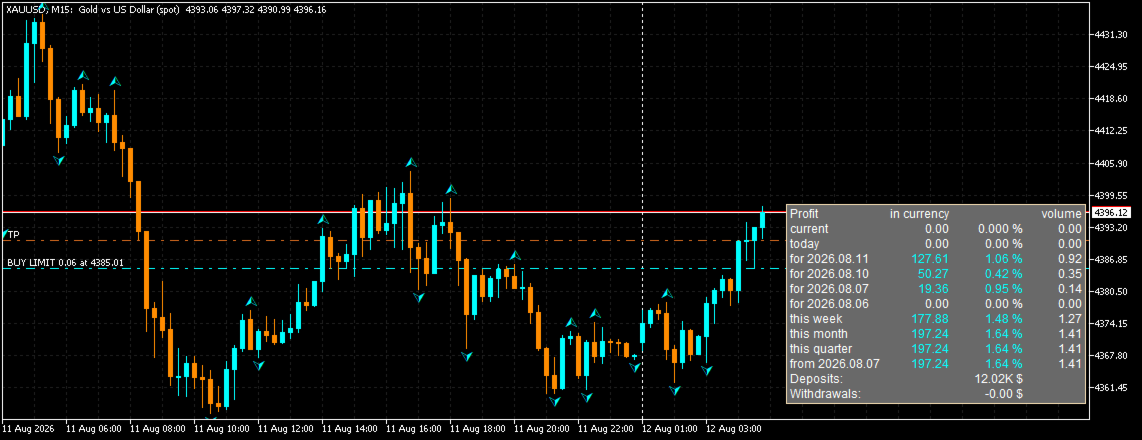
The AccountVista indicator displays a compact information panel on the chart with
the key statistics of your trading account: current floating profit, results for
today, for each of the four previous trading days, for the current week, month,
quarter and year, as well as the volumes of closed deals, deposits and withdrawals.

The panel uses no indicator buffers and does not repaint the chart — it is a fully
independent information module that can be attached to any symbol and any timeframe.

For every period the indicator shows three values:
  • profit in account currency (including commissions and swaps);
  • percentage relative to the balance at the beginning of the period;
  • volume of closed deals (in lots).

Additionally, the panel displays:
  • current floating profit and the volume of open positions;
  • total deposits and withdrawals;
  • current profit percentage relative to the current balance.

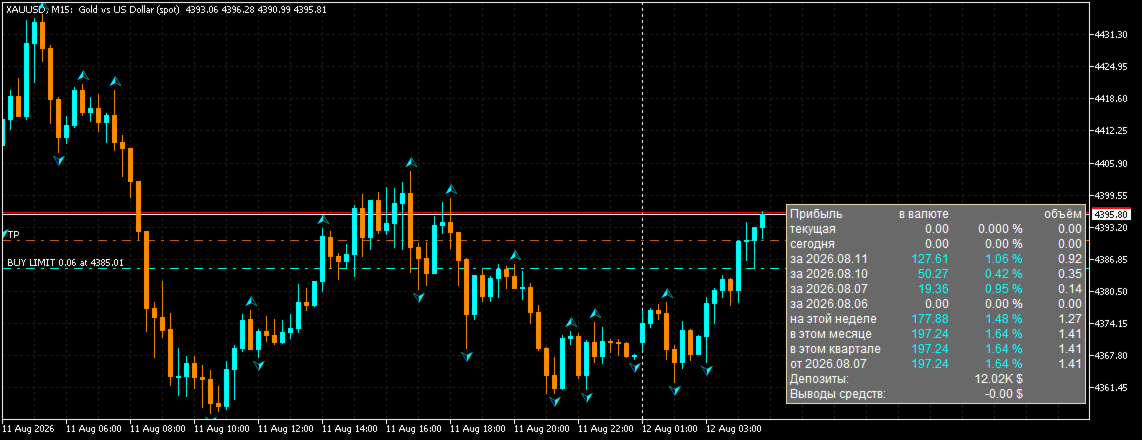
The indicator supports interface language selection (Russian/English), attachment
to any of the four chart corners, mouse-driven panel moving with position saving,
and works on cent accounts.

Version 1.6 adds:
  • panel language selection (Russian/English) — the PanelLang parameter;
  • fully bilingual interface and parameter descriptions;
  • bilingual description in the "Common" tab of the indicator properties.

PERIODS SHOWN BY THE PANEL
==========================

  • current (floating) profit and current volume of positions;
  • today;
  • yesterday (each of the 4 previous trading days separately);
  • this week;
  • this month;
  • this quarter;
  • this year (or the period since a user-defined date).

CALCULATION DETAILS
===================

Profit for each period is calculated from the deal history: the sum of profit,
commission and swap of all closed deals within the period. Volume is counted only
for closing deals (full or partial position closing).

The balance at the beginning of a period is calculated as the current balance
minus the period profit, adjusted for deposits and withdrawals. The percentage is
the ratio of the period profit to the balance at its beginning.

When the user date mode is enabled, the yearly profit is replaced by the profit
since the specified date, and deposit/withdrawal amounts can be entered manually.

ACCOUNTS AND CURRENCIES
=======================

The panel supports both regular and cent accounts (the "Cent account" parameter).
Large numbers are automatically compacted (1,000 → 1.00K, 1,000,000 → 1.00M,
1,000,000,000 → 1.00B) so that any amounts can be displayed compactly.

COLOR INDICATION
================

Values are colored by sign:
  • white — zero value;
  • aqua — profit;
  • pink — loss.

MOVING THE PANEL
================

The panel can be moved with the mouse (if the "Move panel with mouse" parameter
is enabled). Dragging is implemented with custom mouse handling: the panel moves
smoothly without native object selection, and the chart does not scroll or
jitter while the panel is being moved. The panel position is strictly limited to
the visible chart area — it cannot be dragged beyond the chart edges.

The panel position is saved in the terminal global variables and is restored
after the indicator or terminal restart. When the anchor corner is changed, the
saved position is reset so the panel cannot end up outside the chart window.


PERFORMANCE
===========

The indicator is resource-friendly:
  • statistics recalculation is performed only on real changes (a new M1 bar,
    a change in the number of positions or pending orders, a balance change);
  • the panel refreshes no more often than once every 500 ms;
  • chart objects are updated only when text, color or coordinates change
    (caching);
  • the indicator scales correctly on high-DPI monitors.

REQUIREMENTS
============

  • MetaTrader 5 (any build);
  • a trading account connected to the terminal;
  • no additional files or libraries required.

INSTALLATION
============

1. Save the AccountVista.ex5 file into the MQL5\Indicators folder.
2. Restart the terminal or click "Refresh" in the Navigator.
3. Drag the indicator onto a chart of any symbol and timeframe.
4. Adjust the settings in the "Inputs" tab if necessary.


AccountVista v1.6 INDICATOR FEATURES

====================================


STATISTICS BY PERIODS

---------------------

• Current floating profit and the current volume of open positions.

• Profit for today.

• Profit for each of the 4 previous trading days (separately).

• Profit for the current week.

• Profit for the current month.

• Profit for the current quarter.

• Profit for the current year or for the period since a user-defined date.


VALUES FOR EVERY PERIOD

-----------------------

• Profit in account currency, including commissions and swaps.

• Percentage relative to the balance at the beginning of the period.

• Volume of closed deals in lots.


ADDITIONAL INFORMATION

----------------------

• Total deposits and withdrawals.

• Current profit percentage relative to the current balance.


INTERFACE LANGUAGE

------------------

• Bilingual interface: Russian and English.

• Language switching with a single PanelLang parameter.

• Bilingual parameter descriptions and "Common" tab.


PANEL SETTINGS

--------------

• Attachment to any of the four chart corners (top/bottom, left/right).

• Mouse-driven panel moving (movable parameter) — smooth, with custom mouse

  handling and no native object selection.

• The panel always stays within the chart window: it cannot be dragged beyond

  the edges, even in small windows.

• The chart does not scroll or jitter while the panel is being moved.

• Panel position saving in the terminal global variables and restoring after

  the indicator or terminal restart.

• Automatic return of the panel to the base position if it appears outside the

  chart window.

• Adjustable font size.


ACCOUNT SUPPORT

---------------

• Support for regular and cent accounts (cent parameter).

• Compact display of large numbers: 1.00K, 1.00M, 1.00B.

• Manual entry of deposit/withdrawal amounts (AllDeposit, AllWithdraw) for a

  custom period.


VISUALIZATION

-------------

• Color indication by sign: white — zero, aqua — profit, pink — loss.

• Unobtrusive panel background that does not cover the price chart.

• Correct scaling on high-DPI monitors.


PERFORMANCE

-----------

• Statistics recalculation only on real changes (a new M1 bar, a change in the

  number of positions/stop orders, a balance change).

• Panel refresh no more often than once every 500 ms.

• Chart object caching: only changed values are updated.

• A single pass over the deal history to calculate all periods.


VERSATILITY

-----------

• Works on any symbols and timeframes.

• Requires no additional files, libraries or DLLs.

• Uses no indicator buffers and never repaints the history.


AccountVista v1.6 INDICATOR INPUT PARAMETERS

=============================================


1. PanelLang — Panel language

   Type: selection (enumeration)

   Default: LANG_RU (Russian)

   Description: the interface language of the panel. LANG_RU — Russian,

   LANG_EN — English. All panel labels and parameter descriptions switch

   automatically.


2. corner — Chart corner

   Type: selection (enumeration)

   Default: 0 (Upper left)

   Description: the chart corner the panel is attached to:

     0 — upper left corner;

     1 — upper right corner;

     2 — lower left corner;

     3 — lower right corner.

   When the corner is changed, the saved panel position is reset.


3. cent — Cent account

   Type: bool (checkbox)

   Default: true (enabled)

   Description: enable if the account is a cent account. Amounts are shown

   divided by 100 (in dollars) with 4 decimal places. For a regular account

   disable it: amounts are shown as is with 2 decimal places.


4. stUserDate — Use user date

   Type: bool (checkbox)

   Default: false (disabled)

   Description: when enabled, the last panel period is calculated not for

   the year, but from the date specified in the "User date" parameter.


5. edUserDate — User date

   Type: date and time

   Default: 2024.01.01 00:00:00

   Description: the start date of the last statistics period. Used when the

   "Use user date" parameter is enabled. Convenient for calculating the

   result from the date trading on the account started.


6. AllDeposit — Total deposits

   Type: double (floating point number)

   Default: 0.0

   Description: the total amount of deposits to the account over the user

   period. If the value is greater than 0 and the user date is enabled,

   this value is used instead of the automatically calculated one. Allows

   entering deposits manually (for example, when the history is incomplete).


7. AllWithdraw — Total withdrawals

   Type: double (floating point number)

   Default: 0.0

   Description: the total amount of withdrawals from the account over the

   user period. If the value is greater than 0 and the user date is

   enabled, this value is used instead of the automatically calculated one.


8. FontSize — Panel font size

   Type: int (integer)

   Default: 9

   Description: font size of all panel labels in points. Increase it if the

   panel is hard to read on a large monitor.


9. movable — Move panel with mouse

   Type: bool (checkbox)

   Default: true (enabled)

   Description: when enabled, the panel can be dragged with the mouse by its

   background. Moving is smooth: the panel cannot be dragged beyond the chart

   window edges, and the chart itself does not scroll while moving. The

   position is saved in the terminal global variables and restored after the

   indicator or terminal restart. When disabled, the panel is fixed at the

   base position of the corner.

추천 제품
Guardian Magic GT
Carlos Eduardo Rivas Istacuy
Guardian Magic GT - Risk Management Expert Advisor for MetaTrader 5 PROTECT YOUR TRADING CAPITAL WITH INTELLIGENT RISK MANAGEMENT Guardian Magic GT is a professional-grade Expert Advisor designed to safeguard your trading operations by implementing sophisticated risk control mechanisms. Whether you run a single bot or manage multiple automated trading systems simultaneously, Guardian Magic GT provides real-time monitoring and automatic position management to ensure your account stays within your
Quantum Gold Sniper
Victor Eduardo Velazco Delgado
QUANTUM GOLD SNIPER: The Evolution of Institutional Trading Quantum Gold Sniper is not just a regular EA; it is an extreme-precision artificial intelligence model, designed exclusively to dominate Gold's volatility (XAUUSD). Powered by deep neural networks and rigorous mathematical analysis, this system executes sniper-like entries by exploiting market inefficiencies. Most importantly:   This system is 100% safe.     NO GRID.     NO MARTINGALE.   Every single trade has a strict, hard-
SAB Advance Assistant는 MetaTrader 5용 수동 트레이드 관리 패널입니다. 모든 거래를 차트에서 시각적으로 구성하고, 리스크를 정확히 통제하며, 내장 엔진이 부분 익절, 본전(브레이크이븐), 트레일링을 처리하도록 맡기세요. 모두 깔끔하고 크기 조절이 가능한 하나의 패널에서. 스프레드시트 없이 정밀함을 원하는 재량 트레이더와 ICT/SMC 트레이더를 위해 설계되었습니다. 주요 기능 - 드래그 가능한 Entry, Stop Loss, TP1-TP5, Final TP 라인과 실시간 라벨 (핍, 금액, R:R, %, 가격) - 잔고의 리스크 % 또는 고정 금액에서 랏 자동 계산 - 최대 5개의 부분 익절 (TP별 % 또는 정확한 랏 배분)과 나머지를 청산하는 Final TP - 이동 가능한 본전 라인 (TP1 또는 SL 기준 트리거), 마우스로 조정 - % 또는 핍 단위의 트레일링 스톱, TP1 이후 작동 - Link 모드: 전체 설정을 준비하고 R:R을 유지한
Summary Risk Target
Kholil Lurrohman
The “Summary Risk Target” indicator is designed to show the total number of transactions made on a single pair. The transactions counted include active positions as well as pending orders . By setting a stop loss for each trade, this indicator displays the total potential risk (loss) that may be incurred. This helps traders easily understand their overall risk exposure without the need for manual calculations. Likewise, for take profit , if the TP level is defined—either in terms of pips or at a
FREE
Gann Box MT5
Frederic Jacques Collomb
Gann Box 지표는 트레이더가 시장의 핵심 수준을 식별하고 활용할 수 있도록 설계된 강력하고 다재다능한 도구입니다. 이 지표는 차트에 직사각형을 그릴 수 있게 해주며, 자동으로 전략적 수준인 0, 0.25, 0.50, 0.75, 1 로 여러 영역으로 나뉩니다. 가격이 이 중 하나의 수준에 도달하면 경고가 활성화되어 거래 결정을 내리는 데 귀중한 도움을 제공합니다. 그리신 영역에 대한 시장의 변화를 즉시 알 수 있습니다. 영역을 그리려면 간단한 직사각형을 그리고 이름을 GannBox 로 바꾸기만 하면 됩니다. 이 지표는 지지 및 저항 , 공급 및 수요 개념을 사용하는 트레이더, ICT 기술을 사용하는 트레이더, 또는 공정 가치 갭 (FVG) 전문가 등 모든 유형의 트레이더를 위해 설계되었습니다. 일일 거래자, 스윙 거래자 또는 포지션 거래자이든, Gann Box 는 시장의 움직임을 더 잘 이해하고 예측하는 데 도움을 주어 반응성과 성과를 향상시킵니다. MT4 버전 Gann Box
EA Portfolio Analytics Dashboard Pro - Advanced Multi-EA Performance Monitor EA Portfolio Analytics Dashboard Pro is a professional MetaTrader 5 tool designed for advanced portfolio management and real-time performance analytics. Monitor all your Expert Advisors simultaneously with institutional-grade metrics. Key Benefits: Multi-EA Performance Matrix:   Track unlimited EAs and their statistics in a single view. Real-Time Risk Analytics:   Monitor key metrics like Sharpe Ratio, Value at Risk (V
This script analyzes all symbols in Market Watch for a set timeframe. The result is displayed on the Experts tab and in the specified file. For more convenient viewing and editing, the result is displayed in a csv file. For the calculation, the Pearson formula is used. The value of the correlation coefficient of pairs close to 1 means that the pairs move almost identically. A value close to -1 means that the pairs move in the same way. This tool will be useful to those who use hedging due to the
WEALE Price List | MetaTrader 5용 Wealth Engine 자본 스캐너 유틸리티 WEALE Price List는 Market Watch에 있는 모든 심볼에 대해 완전한 Wealth Engine DCA 사다리를 채우는 데 필요한 자본이 얼마인지 보여주는 MetaTrader 5(MT5) 유틸리티 스크립트입니다. 이 유틸리티는 FJ Universe Wealth Engine(WEALE) Expert Advisor의 계획 수립용 동반 도구입니다. Wealth Engine이 전략을 실행하는 반면, WEALE Price List는 그것을 어디에서 실행할지 결정하는 데 도움을 줍니다. 스크립트는 Market Watch의 각 심볼을 스캔하고 실시간 계약 사양을 읽어 깔끔한 CSV 보고서를 작성합니다. 기존의 최소 랏 비용 옆에 새로운 값 하나인 WEALE Price를 추가하고, 그런 다음 전체 목록을 필요한 자본이 가장 적은 것부터 가장 많은 것 순으로 정렬합니다. 이것은
What this dashboard does The panel displays: Current Ichimoku signal per symbol Current Ichimoku signal per timeframe Key Ichimoku line values Signal direction summary Instead of switching charts manually, you can analyze the market structure in seconds. Available Ichimoku values Each cell may display: Tenkan-Sen Kijun-Sen Senkou Span A Senkou Span B Chikou Span Span A – Span B difference This allows detailed analysis or quick signal filtering. Signal types The dashboard can detect:
MetaTrade Hub   is an easy-to-use and customizable tool. This product is presented in an attractive   graphical interface  that allows you to send adjustable signals in two ways ( Manual or Automatic ) from   Metatrader5   to the   Telegram channel or Discord channel.   In this case, your account becomes a   Signal Provider.  You can also share N ews reports with others. All   message formats   -   language   -   emojis   can be adjusted and personalized. You can   Enable   or   Disable   certai
Target Smart Order
Markeysuel De Sousa Ferreira
TARGET SMART ORDER Indicator Custom indicator for MetaTrader 5 that displays detailed information about each trade directly on the chart, showing real-time profit/loss, Take Profit and Stop Loss levels for each active order. Main Features: Real Profit Display Real-Time Profit/Loss: Shows the current value of each position. Continuous Update: Values ​​are updated tick by tick Dynamic Colors: Green for profit, red for loss. TP/SL Lines: Draws horizontal targets at Take Profit and Stop Loss l

http://www.tradepositive.lat Eleva tu Journaling al Nivel Institucional. Olvídate de registrar tus operaciones a mano, de los errores de cálculo y de la recolección tediosa de datos. TPI Notion Sync es la herramienta definitiva desarrollada por el Trade Positive Institute, diseñada para conectar tu plataforma MetaTrader directamente con tu base de datos de Notion en tiempo real. Diseñado originalmente para los traders del ALGO Smart Flow Model , este puente tecnológico extrae la matemática pur
FREE
Shved Position Pips Label   is a professional utility indicator for MetaTrader 5 that displays the real-time floating profit or loss of all your active positions directly on the chart. No more switching to the "Trade" tab at the bottom of the terminal — all crucial information about your running trades is positioned right in front of your eyes next to the current price line! Key Advantages: Smooth Price-Anchored Alignment:   The labels are anchored to the last bar and smoothly slide vertically f
DDKiller Pro
Njaratahiry Michael Randrianiaina
Stop Blowing Your Account. Once and For All. DDKiller Pro is the MT5 risk guardian that runs silently on your chart and shuts down trading the moment you hit a limit — whether you're grinding a prop firm challenge or managing your own CFD account. The problem every trader knows: You set your rules. You break them anyway. One revenge trade. One overleveraged position. One session that erases a month of gains. DDKiller Pro removes that decision from your hands entirely. What it does: The second yo
NNArbitrage
Marius Ovidiu Sunzuiana
In a market flooded with lagging indicators and overfit strategies, this utility offers a fresh edge: real-time statistical arbitrage powered by an adaptive neural network , built entirely in MQL5—no DLLs, no external dependencies. Key Advantages Smart Spread Modeling It dynamically calculates a hedge ratio between two correlated instruments (like EURUSD vs GBPUSD), forming a synthetic spread that reflects true relative value. This isn’t just correlation—it’s cointegration-aware logic. Neur
Kiwi Forex Engine MT5
- Nguyen Ngoc Diep
Kiwi Forex Engine MT5 Overview Kiwi Forex Engine MT5 is a multi-currency Expert Advisor designed for traders who prefer one chart to monitor and trade several Forex pairs. Instead of opening trades on every signal, the EA continuously scans all configured symbols, ranks available opportunities, and selects only the strongest setups that satisfy its internal filters. The focus is on portfolio management, controlled exposure, and disciplined trade selection. Main Features • Multi-pair portfolio sc
FREE
Weekday Stats
Elidio Xavier Guimaraes
Weekday Stats Overview Weekday Stats is a quantitative analysis indicator designed to perform statistical studies of price behavior by classifying candle data according to the day of the week on which each candle occurred. The indicator processes the historical candles of the selected asset and provides statistical information for each day of the week, allowing the user to analyze price direction and price variation separately for each weekday. The sampling period, statistical parameters, and da
Basic Theme Builder MT5
Mehran Sepah Mansoor
5 (2)
Basic Theme Builder: 차트 맞춤화를 간편하게 Basic Theme Builder 지표로 거래 경험을 혁신하세요. 이 다용도 도구는 MetaTrader 5 에서 차트의 외관을 간편하게 사용자 맞춤화할 수 있도록 설계된 직관적인 패널을 제공합니다. 다양한 테마와 색상 스킴을 간단히 전환하여 거래 환경의 시각적 매력과 기능성을 향상시킬 수 있습니다. Free MT4 version Basic Theme Builder 지표는 MetaTrader 5 차트를 손쉽게 개인화하려는 거래자에게 최적의 도구입니다. 간단한 패널 인터페이스와 다양한 테마 프리셋을 통해 거래 스타일이나 기분에 맞게 차트의 외관을 빠르게 조정할 수 있습니다. 클래식한 룩부터 현대적인 미학까지, Basic Theme Builder는 시각적 경험을 향상시키고 집중력을 높이는 데 도움이 되는 다양한 옵션을 제공합니다. 오늘 이 실용적이고 사용하기 쉬운 지표로 거래 환경을 최적화하세요. 주요 기능: 간편한 테마 관
FREE
Forget about enabling templates when you launch the window. Auto Template Master Service  is a professional utility tool that runs as a system service in MetaTrader 5, and it will do it for you. Unlike traditional indicators or expert advisors (EAs), the program runs in the background of the entire terminal and doesn't require you to add it to each window individually. As soon as you open a new chart of any instrument (Forex, Stocks, Crypto), the service immediately detects the new window and a
Sessions Killzone
Wafa Mohammed Omar Abou Alwafa
Session Killzone Indicator Indicator that helps you to identify the killzone times of both London and NewYork sessions which usually is the most times for high volatility and taking liquidity from the market. Killzone times are configurable through indicator parameters. The indicator adjusts the range of the killzones based on the daily trading range.
FREE
Stochastic MTF Dashboard
Andres Felipe Carvajal Rodriguez
4.67 (3)
Stochastic MTF Dashboard (스토캐스틱 멀티 타임프레임 대시보드) Stochastic MTF Dashboard 는 효율성을 극대화하기 위해 설계된 시각적 솔루션입니다. 현재 차트를 벗어나지 않고도 최대 6가지의 서로 다른 타임프레임 에서 스토캐스틱 보조지표의 상태를 동시에 모니터링할 수 있습니다. 이 도구의 목표는 분석의 혼란을 제거하고 시장의 강도를 즉각적으로 파악할 수 있도록 돕는 것입니다. 빨간색: 과매수 구간 — 가격 상승 동력 소진 가능성 (매도 고려). 초록색: 과매도 구간 — 가격 회복 가능성 (매수 고려). 회색: 중립 구간 — 가격이 중간 범위 내에서 유지됨. 이 대시보드를 선택해야 하는 이유 다중 타임프레임의 명확성: M5(5분봉)부터 일봉(Daily)까지의 타임프레임을 단일 패널에서 시각화합니다. 몇 초 만에 상위 프레임의 추세를 파악하기에 이상적입니다. 초고속 판독: 복잡한 선들의 교차를 해석할 필요가 없습니다. 색상과 숫자 값이 시장의 정확한
FREE
Free MetaTrader 5 indicator that displays "CALL IT A DAY" when London & New York sessions close. Customizable alerts, session tracking, and a guilt-free reminder to log off. Perfect for workaholic traders! Tired of staring at charts when the market’s already clocked out? Session Guardian   is your sassy trading assistant that slaps a giant   "CALL IT A DAY"   on your screen when both London   and   New York sessions are closed—because even traders deserve happy hour. Key Features:   Big, Bo
FREE
Manual Trade Step Manager for MT5   is a trade management utility designed for traders who open positions manually and want the platform to handle the position afterward according to fixed rules. This utility does not open trades automatically. It is built to manage manual positions already opened by the trader and apply a structured sequence of protection and profit management. The main idea is simple: you open the trade manually the utility monitors the position when profit reaches your chosen
StopLoss and TakeProfit Utility MT5 for automatic setting of stop loss and take profit levels. Created by a professional trader for traders.   The utility   works with any market orders opened by a trader manually or using advisors. Can filter trades by magic number. The utility can work with any number of orders simultaneously. WHAT THE UTILITY CAN DO: Set virtual stop loss and take profit from 1 pip Real   stop loss and take profit W ork with each order separately (   stop loss and take prof
Mfi Pulse Reverser Ultra
Berke Kadir Sinapli
5 (1)
가격 정책 처음 5명: 30 USD 6–20번째 사용자: 100 USD 21번째 이후:  300 USD ️ 지금 구매하고 절약하세요 – 한정 제공입니다! 전략 요약 트렌드 확인: EMA 및 ADX 로 트렌드 방향 확인 ADX > 최소값 인 강한 추세에서만 거래 진입 조건: MFI 로 과매수/과매도 감지: 매수: MFI < 50 - 임계값, 저가 상승 매도: MFI > 50 + 임계값, 고가 하락 추가 필터: PSAR 위치 EMA/ADX 일치 여부 리스크 & 거래 관리: SL/TP = ATR 기반으로 자동 계산 PSAR 반전 시 자동 종료 로트 크기 자동 정규화 추가 옵션: 일일 최대 거래 수 연속 손실 시 중지 거래당 최대 마진 위험 제한 ️ 입력 파라미터 입력 설명 Signal_Timeframe 신호 시간 프레임 (기본: M15) Trend_Timeframe 트렌드 확인 시간 프레임 (기본: H1) MFI_Period MFI 기간 MFI_Threshold 50 기준
MT4 MT5 Trade Bridge for MetaTrader 5  is the MetaTrader 5 component of the MT4 MT5 Trade Bridge system. It allows a MetaTrader 5 terminal to work either as a  Master  or as a  Slave  in a local bridge connection with MetaTrader 4. When configured as  Master , the MT5 component reads trading activity from the MetaTrader 5 terminal and writes structured trade data into a local bridge file. The connected MT4 component can then read this data and mirror the trading activity according to its selecte
FREE
Symbol Manager for MT5
Taras Slobodyanik
5 (3)
Symbol Manager or Grid Manager, designed to group orders into one position (by Symbol or by Magic Number). This utility will be useful to multi-currency traders (many EAs), who can have multiple orders on several pairs. You will be able to see the total number of lots, the total profit, and set virtual stop loss and virtual take profit. To set a real TP (or SL), you must first set the virtual value, and then enter the command in this cell: "set". If you want to set real TP/SL for all orders at
KS Multiple Independent Strategies Auto Trading 1.9 EA 개요 이 EA(Expert Advisor)는 MetaTrader 5 플랫폼에서 주로 금(XAUUSD) 거래를 위해 설계된 전문가 수준의 MQL5 자동매매 프로그램입니다. 다수의 독립적인 거래 전략, 정교한 리스크 관리 기능, 그리고 성과 최적화를 위한 다양한 필터 기능을 지원합니다. 이 EA는 자동화, 수익 보호, 그리고 Telegram 및 Discord와 같은 외부 도구와의 연동 기능을 중점적으로 강조합니다. 모든 시간봉(timeframe)에서 작동 가능하며, 특정 거래 세션이나 주요 뉴스 이벤트에 맞춰 설정을 조정할 수도 있습니다. 주요 기능들은 아래와 같이 분류되어 있습니다. **핵심 거래 전략** 이 EA는 입력(Inputs) 설정을 통해 하나 이상의 독립적인 전략을 동시에 활성화할 수 있도록 지원합니다: - **Persistence/Anti-Persistence**: 특정
Telegram EA Manager
Ebunoluwa Abimb Owodunni
All in one Multipurpose Telegram Trade Management , Manage and Copy Trades on the go From Telegram Pro Version MT5:  www.mql5.com/en/market/product/95742 Pro Version MT4:  www.mql5.com/en/market/product/85691 Execute Trades on mobile with fast execution When away from desktop MT5, or scalping the market with mobile device, or needed to copy trades from telegram groups while away, or doing some other activities, Telegram EA Manager is an effective tool to perform any trade operation with swift
FREE
Protect your funded accounts and personal capital with military-grade precision. This utility continuously monitors your floating equity against your daily starting balance. The moment your custom drawdown threshold is breached, it instantly liquidates all open positions, deletes pending orders, and completely unloads from the chart. Stop revenge trading and never fail a prop firm evaluation due to a margin breach again.
FREE
이 제품의 구매자들이 또한 구매함
Trade Assistant MT5
Evgeniy Kravchenko
4.41 (215)
거래당 위험 계산, 라인을 사용한 손쉬운 신규 주문, 부분 청산 기능을 통한 주문 관리, 7가지 유형의 트레일링 스탑 및 기타 유용한 기능을 제공합니다. 추가 자료 및 지침 설치 지침   -   애플리케이션 지침   -   데모 계정용 애플리케이션 평가판 라인 기능       - 차트에 개시선, 손절매, 차익실현을 표시합니다. 이 기능을 사용하면 새로운 주문을 쉽게 하고 개봉 전에 추가 특성을 볼 수 있습니다. 위기 관리       -       위험 계산 기능은 설정된 위험과 손절매 주문의 크기를 고려하여 새 주문의 볼륨을 계산합니다. 이를 통해 손절매 크기를 설정하고 동시에 설정된 위험을 존중할 수 있습니다. 로트 계산 버튼 - 위험 계산을 활성화/비활성화합니다. 필요한 위험 값은 위험 필드에 0에서 100 사이의 백분율 또는 예금 통화로 설정됩니다. 설정 탭에서 위험 계산 옵션을 선택합니다. $ 통화, % 잔액, % 지분, % 자유 마진, % 사용자 정의, % AB 이전
Trade Manager EA에 오신 것을 환영합니다. 이 도구는 거래를 보다 직관적이고 정확하며 효율적으로 만들기 위해 설계된 궁극적인 리스크 관리 도구 입니다. 단순한 주문 실행 도구가 아닌, 원활한 거래 계획, 포지션 관리 및 리스크 제어를 위한 종합 솔루션입니다. 초보자부터 고급 트레이더, 빠른 실행이 필요한 스캘퍼에 이르기까지 Trade Manager EA는 외환, 지수, 상품, 암호화폐 등 다양한 시장에서 유연성을 제공합니다. Trade Manager EA를 사용하면 복잡한 계산은 이제 과거의 일이 됩니다. 시장을 분석하고 진입, 손절 및 익절 수준을 차트의 수평선으로 표시한 후 리스크를 설정하면, Trade Manager가 이상적인 포지션 크기를 즉시 계산하고 SL 및 TP 값을 실시간으로 표시합니다. 모든 거래가 간편하게 관리됩니다. 주요 기능: 포지션 크기 계산기 : 정의된 리스크에 따라 거래 크기를 즉시 결정합니다. 간단한 거래 계획 : 진입, 손절, 익절을 위한
Local Trade Copier EA MT5
Juvenille Emperor Limited
4.97 (144)
Local Trade Copier EA MT5 를 사용하여 매우 빠른 거래 복사 경험을 해보세요. 1분 안에 간편하게 설정할 수 있으며, 이 거래 복사기를 사용하면 Windows 컴퓨터 또는 Windows VPS에서 여러 개의 MetaTrader 터미널 간에 거래를 0.5초 미만의 초고속 복사 속도로 복사할 수 있습니다. 초보자든 전문가든   Local Trade Copier EA MT5 는 다양한 옵션을 제공하여 사용자의 특정 요구에 맞게 맞춤 설정할 수 있습니다. 이는 수익 잠재력을 높이려는 모든 사람을 위한 최고의 솔루션입니다. 지금 사용해보시고 이것이 왜 시장에서 가장 빠르고 쉬운 무역용 복사기인지 알아보세요! 팁: 여기 에서 데모 계정에서 Local Trade Copier EA MT5 데모 버전을 다운로드하여 사용해 볼 수 있습니다. 다운로드한 무료 데모 파일을 MT5 >> File >> Open Data Folder >> MQL5 >> Experts 폴더에 붙여넣고 터
================================================================================ POC BREAKOUT - V20.72. Full Professional Grade Toolkit ================================================================================ POC Breakout is a full MetaTrader 5 trading dashboard for discretionary traders who want breakout signals, Point of Control (POC) context, volume profiles, order flow, market structure, news, alerts, and advanced trade planning in one professional workspace. Attached directly to you
TradePanel MT5
Alfiya Fazylova
4.88 (166)
Trade Panel은 다기능 거래 도우미입니다. 이 애플리케이션에는 50개 이상의 수동 거래 기능이 포함되어 있으며 대부분의 거래 작업을 자동화할 수 있습니다. 구매하기 전에 데모 계정에서 데모 버전을 테스트할 수 있습니다. 데모 계정용 애플리케이션 체험판 다운로드: https://www.mql5.com/en/blogs/post/750865 . 전체 지침 여기 . 거래. 한 번의 클릭으로 거래를 수행할 수 있습니다: 리스크 자동 계산과 함께 예약 주문 및 포지션 열기. 한 번의 클릭으로 여러 주문 및 포지션 열기. 주문 그리드 열기. 예약 주문 및 포지션을 그룹별로 닫기. 포지션 방향 전환 (Buy 닫기 > Sell 열기, Sell 닫기 > Buy 열기). 포지션 잠금 (부족한 포지션을 열어 Buy와 Sell 포지션의 수량을 동일하게 만들기). 모든 포지션 한 번의 클릭으로 부분적으로 닫기. 모든 포지션의 테이크 프로핏과 스톱로스를 같은 가격 수준에 설정. 모든 포지션의 스톱로스를
베타 출시 Telegram to MT5 Signal Trader 는 곧 공식 알파 버전을 출시할 예정입니다. 일부 기능은 아직 개발 중이며, 작은 버그가 발생할 수 있습니다. 문제가 있으면 꼭 보고해 주세요. 여러분의 피드백은 소프트웨어 개선에 도움이 됩니다. Telegram to MT5 Signal Trader 는 Telegram 채널 또는 그룹의 거래 신호를 자동으로 MetaTrader 5 계정으로 복사하는 강력한 도구입니다. 공개 및 비공개 채널을 모두 지원하며, 여러 신호 제공자를 여러 MT5 계정에 연결할 수 있습니다. 소프트웨어는 빠르고 안정적으로 동작하며, 복사된 거래를 완벽히 제어할 수 있습니다. 인터페이스는 깔끔하며 대시보드와 차트가 시각적으로 구성되어 있고, 직관적인 네비게이션이 가능합니다. 여러 Signal Account를 관리하고, 공급자별 설정을 세밀하게 조정하며, 모든 동작을 실시간으로 모니터링할 수 있습니다. 필수 조건 MQL의 제한으로 인해 EA는 Te
Farmed Hedge Yield Farming | All Markets (Manual - Hybrid - Semi/Automated EA) MULTI-ASSET SUPPORT Trade any asset available on your broker - Forex: Major, Minor, Exotic pairs - Crypto: BTC, ETH, XRP, SOL, BNB - Stocks: Apple, Tesla, Amazon, Google, etc. - Commodities: Gold, Silver, Oil, Gas - Indices: US30, NAS100, SPX500, DAX40 - Any CFD your broker offers VERIFIED TRADING RESULTS - Farmed Hedge Yield Axi Copy:  https://www.mql5.com/en/signals/2356376 - Farmed Hedge Yield Exn Copy:   https:/
Exp COPYLOT CLIENT for MT5
Vladislav Andruschenko
3.97 (35)
MetaTrader 5용 전문 트레이드 복사기 MetaTrader 용 빠르고 전문적이며 신뢰할 수 있는 트레이드 복사기 입니다. COPYLOT 은 MT4와 MT5 터미널 간의 Forex 거래 복사를 지원하며, Hedge 및 Netting 계좌를 모두 지원합니다. COPYLOT MT5 버전 지원 구성: - MT5 Hedge → MT5 Hedge - MT5 Hedge → MT5 Netting - MT5 Netting → MT5 Hedge - MT5 Netting → MT5 Netting - MT4 → MT5 Hedge - MT4 → MT5 Netting MT4 버전 전체 설명 + DEMO + PDF 구매 방법 설치 방법 로그 파일 확인 방법 테스트 및 최적화 방법 Expforex의 모든 제품 MT4 터미널로도 거래를 복사할 수 있습니다(MT4 → MT4, MT5 → MT4): COPYLOT CLIENT for MT4 COPYLOT은 2개, 3개, 심지어 10개의 터미널과 동시에 작동할
Telegram to MT5 Multi-Channel Copier 는 Telegram 채널의 트레이딩 신호를 자동으로 MetaTrader 5로 직접 복사합니다. 봇도, 브라우저 확장 프로그램도, 수동 복사도 필요 없습니다. Telegram에서 신호를 받으면 EA가 몇 초 안에 터미널에서 거래를 엽니다. 본 제품은 두 가지 구성 요소로 구성되어 있습니다: Telegram 채널을 감시하는 Windows 애플리케이션과 MT5 터미널에서 신호를 실행하는 이 Expert Advisor입니다. MT4 버전도 제공됩니다. 설정 가이드 및 애플리케이션 다운로드: https://www.mql5.com/en/blogs/post/768988 작동 방식 Windows 애플리케이션은 봇이 아닌 사용자 자신의 API 자격 증명을 사용하여 Telegram에 연결됩니다. 이는 프라이빗 및 VIP 채널을 포함하여 구독 중인 모든 채널, 그룹 또는 주제를 읽을 수 있음을 의미합니다. 신호를 감지하면 이를 파싱하여
Footprint Chart Pro — Professional OrderFlow EA for MetaTrader 5 Version 6.34 | Professional tool for real traders | Institutional-Grade Visualization DEMO USERS - PLEASE SELECT EVERY TICK / REAL TICK WHEN TESTING AND YOU HAVE DOWNLOADED HISTORICAL DATA. IF YOU SEE A WAITING SCREEN AND IT IS NOT DOWNLOADING, IT MEANS YOU HAVE LOW HISTORICAL DATA. TRY 1 MIN AND 5 MIN FIRST ON 1 DAY DATA. ONE DAY DATA SHOULD BE THE NEWEST AND MOST CURRENT DATE. PLEASE WAIT UNTIL THE MARKET HAS ROLLED OVER PERIOD.
VirtualTradePad PRO SE MT5 — MetaTrader 5용 전문 트레이딩 컨트롤 센터 VirtualTradePad PRO SE 는 MetaTrader 5 용 프리미엄 차트 기반 트레이딩 패널이자 거래 관리 워크스페이스입니다. 더 빠른 주문 실행, 더 명확한 포지션 관리, 구조화된 거래 관리, 시각적인 레벨 계획, 그리고 차트에서 직접 작업하는 전문적인 워크플로를 원하는 트레이더를 위해 설계되었습니다. 이 제품은 단순한 BUY / SELL 패널이 아닙니다. PRO SE는 수동 트레이딩, 예약 주문, 포지션 관리, 부분 청산, 바스켓 손익 관리, 평균가 레벨, ATM 규칙, 신호 모니터링, 실시간 시장 정보, 전략 테스터 (Strategy Tester) 워크플로, VPS 중심 운용을 하나의 연결된 인터페이스로 통합합니다. MT4 버전 | 전체 설명 및 스크린샷 | 구입 방법 | 설치 방법 | 로그 파일을 얻는 방법 | 테스트 및 최적화 방법 | Expforex의 모든
Premium Trade Manager - 코치가 내장된 트레이딩 패널 Premium Trade Manager 는 차트 안에 트레이딩 코치를 심어놓은 도구입니다. 주문을 확정하기 전에, AI 트레이딩 코치 Max가 설정된 거래를 직접 읽고 명확한 판단을 내려줍니다. 스톱이 규율 있는 접근 방식에 맞는지, 리스크 크기가 합리적인지, 고영향 뉴스 이벤트가 몇 분 후에 있는지, 프롭 펌 한도에 근접했는지. 그 아래에는 완전한 실행 엔진이 있습니다. 원클릭 리스크 기반 진입, 차트에서 드래그로 세우고 거래가 진행되는 동안에도 계속 움직일 수 있는 플랜, 최대 4단계 분할 익절, 7가지 트레일링 방식, 실시간 프롭 펌 컴플라이언스, 뉴스 가드, 그리고 자체 비용을 평가하는 스프레드까지. 결정은 당신이 내립니다. Max가 두 번째 시선으로 확인합니다. 패널이 그 이후의 모든 것을 처리합니다. 구매 전에 직접 체험해 보세요. 브라우저에서 라이브 패널을 직접 클릭해볼 수 있습니다. 구매 전에 실제
Trade copier MT5
Alfiya Fazylova
4.57 (51)
Trade Copier는 거래 계정 간의 거래를 복사하고 동기화하도록 설계된 전문 유틸리티입니다. 복사는 공급자의 계정/단말기에서 동일한 컴퓨터 또는 vps에 설치된 수신자의 계정/단말기로 발생합니다. 프로모션 - 이미 "Trade copier MT5"를 구매하셨다면, "Trade copier MT4"를 무료로 받으실 수 있습니다 (MT4 → MT5 및 MT4 ← MT5 복사용). 조건에 대한 자세한 정보를 원하시면, 개인 메시지를 통해 저희에게 문의해 주시기 바랍니다! 구매하기 전에 데모 계정에서 데모 버전을 테스트할 수 있습니다. 데모 버전 여기 . 전체 지침 여기 . 주요 기능 및 이점: 복사기는 "МТ5> МТ5", "МТ4> МТ5", "МТ5> МТ4" 복사를 지원합니다. 복사기는 데모 계정 > 실 계정, 실 계정 > 데모 계정, 데모 계정 > 데모 계정 및 실제 계정 > 실 계정 복사를 지원합니다. 복사기는 읽기 전용 암호가 적용된 투자자 계정에서 복사를 지원합니다. 하
파워 캔들 전략 스캐너 - 자체 최적화 다중 종목 설정 찾기 도구 파워 캔들 전략 스캐너는 마켓 워치에 등록된 모든 종목에 대해 파워 캔들 지표와 동일한 자체 최적화 엔진을 동시에 실행합니다. 하나의 패널에서 현재 통계적으로 거래 가능한 종목, 각 종목별 최적의 전략, 최적의 손절매/익절 조합을 알려주며, 새로운 신호가 발생하면 즉시 알림을 전송합니다. 이 도구는 Stein Investments 에코시스템의 일부입니다. 18개 이상의 도구와 함께 당신의 1대1 AI 트레이딩 멘토 Max.  항상 대기 중, 모든 인디케이터를 깊이 있게 이해, 무언가를 차근차근 생각해보고 싶은 순간에 도움을 줍니다.  https://stein.investments 에서 만나보세요 완벽한 시장 모니터링. 종목당 3,000건 이상의 자동 최적화. 2가지 알림 유형. 한 번의 클릭으로 차트를 전환하고 바로 거래하세요. 이 도구가 필요한 이유 대부분의 다중 종목 스캐너는 가격 변동만 보여줍니다. 티커별
Anchor Trade Manager
Kalinskie Gilliam
5 (7)
Anchor: The EA Manager Your EAs manage their own trades. Anchor manages the account around them. Anchor gives you one place to control your EAs, manage risk and decide when trading is allowed. Any EA, any vendor, any broker or symbol. No source-code changes required. The Problem Most EAs only know what they are doing. They cannot see when another EA is already trading, when several EAs open and are stacking risk or when the account has reached your loss limit. Even using just one EA, it may not
Telegram To MT5 Ultra
Mirel Daniel Gheonu
5 (3)
Telegram To MT5 — 시그널 카피어 텔레그램 채널의 트레이딩 콜을 실제 MT5 주문으로 바꿔 드립니다 — 자동으로, 원하는 만큼의 계좌에서, 리스크와 규칙을 완전히 당신의 통제 아래 둡니다. Telegram To MT5는 이미 텔레그램에서 팔로우하고 있는 VIP / 시그널 채널을 당신의 MetaTrader 5 터미널에 연결합니다. 무료 동반 데스크톱 앱이 메시지를 읽고(봇을 차단하는 채널에서도 가능), 이 EA가 당신의 계좌에서 이를 실행합니다 — 당신만의 리스크 설정, 심볼 매핑, 익절(TP) 처리, 세션 및 뉴스 필터를 적용합니다. 이것은 블랙박스 전략이 아니라 시그널 카피어입니다. 어떤 채널을 신뢰할지, 각 거래의 수량과 관리 방식을 당신이 결정합니다. 단계별 설정 및 동반 앱 설치 가이드 작동 방식 [당신의 텔레그램 채널] -> [동반 데스크톱 앱] -> [MT5 + 이 EA] -> 주문 동반 데스크톱 앱(무료, 포함)은 당신의 텔레그램 계정으로 로그인하여 선택한
Astro Trade MT5
Indra Maulana
5 (2)
AstroTrade Trading Assistant AstroTrade is a comprehensive multi-functional trading utility developed for the MetaTrader 5 platform. It integrates essential tools for trade execution, risk management, and technical monitoring into a single unified interface. The application is designed to assist traders in managing their daily operations through a visual and structured environment. Visual Trade Execution and Risk Management The application includes a specialized trading panel that assists in c
Timeless Charts
Samuel Manoel De Souza
5 (7)
Timeless Charts is an all-in-one trading utility for professional traders. It combines custom chart types such as Seconds Charts and Renko with advanced order flow analysis using Footprints , Clusters , Volume Profiles , VWAP studies, and anchored analysis tools for deeper market insight. Trading and position management are handled directly from the chart through an integrated trade management panel , while Market Replay and Virtual Accounts provide environments for practicing trading skills and
Trade Manager DaneTrades
Levi Dane Benjamin
4.23 (30)
거래 관리자는 위험을 자동으로 계산하는 동시에 거래를 빠르게 시작하고 종료하는 데 도움을 줍니다. 과잉 거래, 복수 거래 및 감정 거래를 방지하는 데 도움이 되는 기능이 포함되어 있습니다. 거래를 자동으로 관리할 수 있으며 계정 성과 지표를 그래프로 시각화할 수 있습니다. 이러한 기능은 이 패널을 모든 수동 거래자에게 이상적으로 만들고 MetaTrader 5 플랫폼을 향상시키는 데 도움이 됩니다. 다중 언어 지원. MT4 버전  |  사용자 가이드 + 데모 트레이드 매니저는 전략 테스터에서 작동하지 않습니다. 데모를 보려면 사용자 가이드로 이동하세요. 위기 관리 % 또는 $를 기준으로 위험 자동 조정 고정 로트 크기 또는 거래량과 핍을 기반으로 한 자동 로트 크기 계산을 사용하는 옵션 RR, Pips 또는 Price를 사용한 손익분기점 손실 설정 추적 중지 손실 설정 목표 달성 시 모든 거래를 자동으로 마감하는 최대 일일 손실률(%)입니다. 과도한 손실로부터 계정을 보호하고 과도한
YuClusters
Yury Kulikov
4.93 (43)
Attention: You can view the program operation in the free version  YuClusters DEMO .  YuClusters is a professional market analysis system. The trader has unique opportunities to analyze the flow of orders, trade volumes, price movements using various charts, profiles, indicators, and graphical objects. YuClusters operates on data based on Time&Sales or ticks information, depending on what is available in the quotes of a financial instrument. YuClusters allows you to build graphs by combining da
Welcome to ENTRY IN THE ZONE WITH SMC MULTI TIMEFRAME Entry In The Zone and SMC Multi Timeframe is a real-time market analysis tool based on Smart Money Concepts (SMC), designed to analyze market structure, price direction, and key trading zones. It supports both Single-Timeframe Analysis and Multi-Timeframe Analysis, providing a clearer view of the overall market structure across multiple timeframes, with real-time BUY / SELL signals that do not repaint. It is designed to help filter trading op
EA Auditor
Stephen J Martret
5 (4)
EA Auditor is an independent analysis tool for traders evaluating Expert Advisors and trading signals on MetaTrader 5. It audits backtest reports, reviews posted developer signals, and cross-verifies the two against each other to help traders assess strategies before committing capital. The MQL5 market offers a wide range of Expert Advisors from many developers, with varying approaches, quality, and transparency. EA Auditor provides a consistent, data-driven framework for reviewing them, answer
Trade Command Center
Nguyen Thanh Trieu
5 (2)
추가 자료 및 안내서 설치 안내서 - 데모 계좌용 체험 버전 ; 공식 정보 공식 채널 판매자 프로필 Trade Command Center — 전문 주문 실행 및 실시간 Risk Guard 관리 패널 Trade Command Center 는 MetaTrader 5용 고성능 비주얼 주문 실행, 랏 수 계산 및 리스크 관리 유틸리티입니다. 일일 손실 및 최대 드로우다운 제한이 있는 자금 관리 계좌나 라이브 포트폴리오에서 엄격한 리스크 통제, 자본 보호, 실시간 드로우다운 모니터링을 필요로 하는 수동 트레이더들을 위해 특별히 설계되었습니다. 단일 차트 패널에 통합된 5가지 기능 탭을 통해 외부 DLL이나 네트워크 의존 없이 기관급 리스크 관리, 자동화된 포지션 제어, 정밀한 주문 계획 도구를 제공합니다. 인터페이스 및 모듈 아키텍처 컨트롤 패널은 원활한 조작과 효율적인 차트 공간 활용을 위해 5개의 전용 탭으로 구성되어 있습니다: 탭 / 모듈 핵심 기능 화면 제어 및 표시 지표
MetaTrader 5용 트레이딩 패널 — 차트와 키보드에서 실행하는 프로페셔널 원클릭 트레이딩 활동적인 트레이더를 위해 설계된 고급 Trading Panel로, MetaTrader 기본 인터페이스보다 훨씬 빠르고 직관적으로 포지션과 주문을 열고, 관리하고, 종료할 수 있습니다. 이 패널은 포지션 관리, 대기 주문 제어, 총수익 관리, 체결 속도를 하나의 전문적인 작업 공간에 통합하고 싶은 트레이더를 위한 솔루션입니다. 이것은 단순한 보조 유틸리티가 아닙니다. MetaTrader 5를 위한 진정한 trading cockpit입니다. 차트에서 직접 거래하고, 키보드로 빠르게 명령을 실행하며, 자동 계산과 시각적 가이드를 통해 수동 트레이딩을 더 빠르고, 더 명확하고, 더 편리하게 만들어 줍니다.  이 패널을 사용하면 차트에서 단 한 번의 클릭으로 거래를 실행할 수 있으며, 표준 MetaTrader 컨트롤보다 최대 30배 빠르게 거래 작업을 수행할 수 있습니다. 새로운 프리미엄 버전
작동 데모 다운로드 Copy Cat More (카피캣) MT5 트레이드 카피어 (Trade Copier) 는 로컬 트레이드 카피어이자, 오늘날의 트레이딩 과제를 위해 설계된 완전한 리스크 관리 및 실행 프레임워크입니다. 프롭 펌 (prop firm) 챌린지부터 개인 포트폴리오 관리까지, 견고한 실행, 자본 보호, 유연한 설정, 고급 트레이드 처리의 조합으로 모든 상황에 적응합니다. 이 카피어는 마스터 (Master, 송신측) 와 슬레이브 (Slave, 수신측) 두 모드 모두에서 작동하며, 시장가 주문과 대기 주문, 트레이드 수정, 부분 청산, 상호 청산 (Close By) 작업을 실시간으로 동기화합니다. 데모 및 실거래 계좌, 트레이딩 또는 인베스터 로그인 모두와 호환되며, EA·터미널·VPS가 재시작되더라도 영구 트레이드 메모리 (Persistent Trade Memory) 시스템을 통해 복구를 보장합니다. 고유 ID로 여러 마스터와 슬레이브를 동시에 관리할 수 있으며, 브로커
Trade Dashboard MT5
Fatemeh Ameri
4.95 (132)
Trade Dashboard simplifies how you open, manage, and control your trades, with built-in lot size calculation. It allows you to execute trades, manage risk, and control positions directly on the chart, with tools such as partial close, breakeven, and trailing stop. Designed to reduce manual work and help you stay focused on your trading decisions. A demo version is available for testing. Detailed explanations of features are provided within the MQL5 platform. Installation instructions are include
고급 Telegram Bridge EA로 거래 신호를 향상시키세요 전문적이고 시각적으로 매력적인 실시간 거래 업데이트로 청중을 사로잡을 시간입니다. 데모를 보고 체험판을 받으려면 저에게 연락하세요 우리는 고객과 제공업체에 독특한 경험을 만드는 사용자 친화적인 기능에 상당한 투자를 했습니다.  SIGNAL BRIDGE는 다른 EA가 어려움을 겪는 Metatrader 로직을 우회하면서도 모든 비즈니스 케이스에 대해 100% 복사기 친화적인 신호를 전달할 수 있습니다! 우리의 Telegram Bridge EA는 자동화된 신호, 차트 스냅샷, 상세한 성과 보고서를 손가락 하나 까딱하지 않고도 Telegram 그룹에 직접 전달합니다. 기능 입력에 대한 자세한 설명이 포함된 매뉴얼은 여기를 확인하세요! 주요 기능 및 장점 포괄적인 거래 데이터 각 메시지에 표시할 내용을 결정하세요: 핍, 진입가, SL, TP, 랏, 위험 및 RR. 팔로워에게 완전한 투명성을 제공하세요. 새 주문 보내기,
Quant AI Agents
Ho Tuan Thang
5 (1)
Quant AI Agents are independent trading Expert Advisors. Instead of trading using a fixed strategy like other conventional EAs, Quant AI Agents   is a   multi-agent AI trading framework   that turns natural-language strategy prompts into live.  WANT THE SAME RESULTS AS MY LIVE SIGNAL?   Use the exact same brokers I do:   IC MARKETS , IC TRADING   .  Unlike the centralized stock market, Forex has no single, unified price feed.  Every broker sources liquidity from different providers, creating un
The product will copy all telegram signal to MT5 ( which you are member) , also it can work as remote copier.  Easy to set up, copy order instant, can work with almost signal formats, image signal,  s upport to translate other language to English Work with all type of channel or group, even channel have "Restrict Saving Content", work with  multi channel, multi MT5 Work as remote copier: with signal have ticket number, it will copy exactly via ticket number. Support to backtest signal. How to s
Trade Panel PRO MT5 Trade Panel PRO MT5 는 MetaTrader 5 용 수동 트레이딩 패널로, 각 단계에서 시각적으로 리스크를 통제하면서 차트에서 직접 포지션을 준비, 실행 및 관리하도록 설계되었습니다. 이 도구는 주문 준비, 리스크에 따른 자동 포지션 크기 계산, 인터랙티브한 Entry, Stop Loss, Take Profit 영역, 실행 후 여러 트레이드 관리 기능을 단일 인터페이스에 결합합니다. 버전 2.0 업데이트 2.0 버전은 실행 워크플로우를 원활하게 하기 위해 여러 개선 사항을 도입합니다: 자동 방향 전환: Take Profit 또는 Stop Loss 를 진입 가격을 넘어 드래그하면 셋업이 반대 방향으로 전환되고 다른 레벨이 자동으로 재계산됩니다 SL 및 TP 레벨을 히스토리 방향으로 연장하는 가벼운 점선으로 이전 고점 및 저점에 대한 보정을 용이하게 합니다 방향에 따라 색상이 지정되는 실행 셀, 계산된 랏이 중앙에 표시됩니다 트레일링 거
필터:
리뷰 없음
리뷰 답변