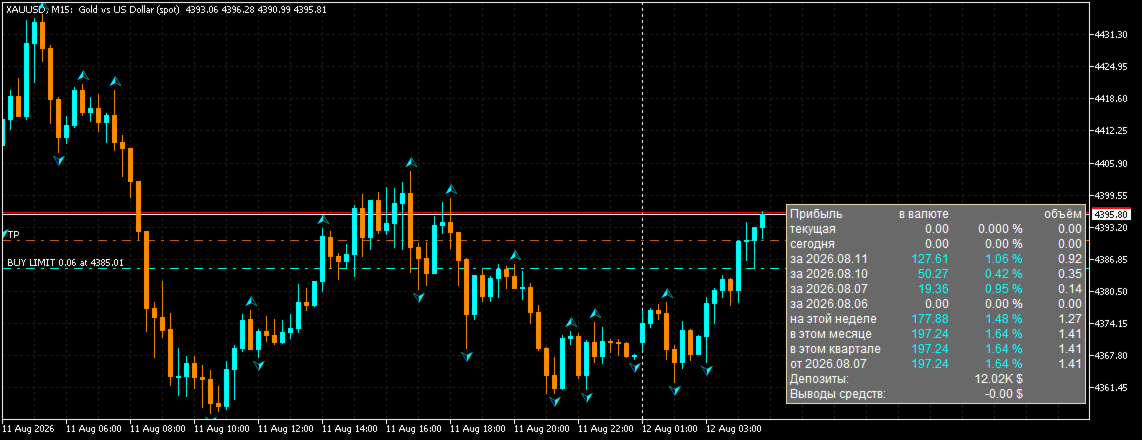
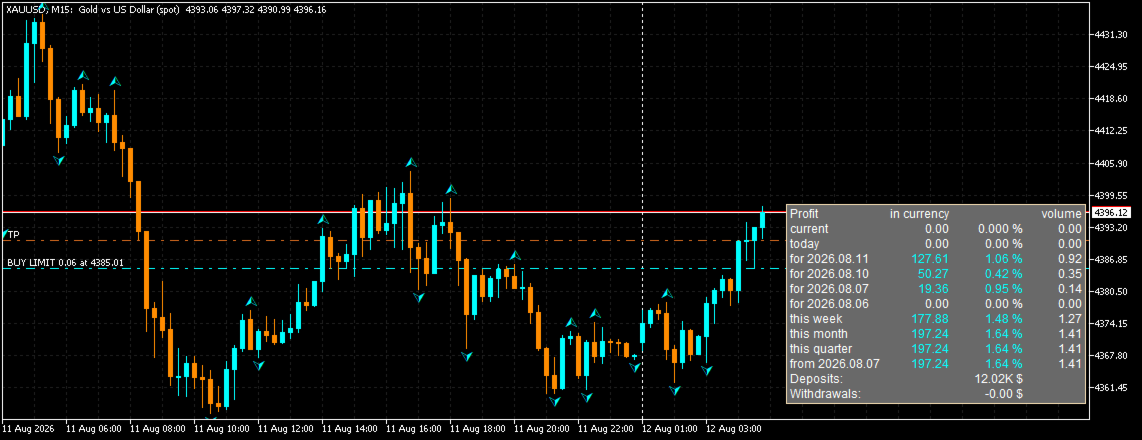
AccountVista
- Yardımcı programlar
- Sürüm: 1.6
- Etkinleştirmeler: 5

AccountVista v1.6 INDICATOR FEATURES
====================================
STATISTICS BY PERIODS
---------------------
• Current floating profit and the current volume of open positions.
• Profit for today.
• Profit for each of the 4 previous trading days (separately).
• Profit for the current week.
• Profit for the current month.
• Profit for the current quarter.
• Profit for the current year or for the period since a user-defined date.
VALUES FOR EVERY PERIOD
-----------------------
• Profit in account currency, including commissions and swaps.
• Percentage relative to the balance at the beginning of the period.
• Volume of closed deals in lots.
ADDITIONAL INFORMATION
----------------------
• Total deposits and withdrawals.
• Current profit percentage relative to the current balance.
INTERFACE LANGUAGE
------------------
• Bilingual interface: Russian and English.
• Language switching with a single PanelLang parameter.
• Bilingual parameter descriptions and "Common" tab.
PANEL SETTINGS
--------------
• Attachment to any of the four chart corners (top/bottom, left/right).
• Mouse-driven panel moving (movable parameter) — smooth, with custom mouse
handling and no native object selection.
• The panel always stays within the chart window: it cannot be dragged beyond
the edges, even in small windows.
• The chart does not scroll or jitter while the panel is being moved.
• Panel position saving in the terminal global variables and restoring after
the indicator or terminal restart.
• Automatic return of the panel to the base position if it appears outside the
chart window.
• Adjustable font size.
ACCOUNT SUPPORT
---------------
• Support for regular and cent accounts (cent parameter).
• Compact display of large numbers: 1.00K, 1.00M, 1.00B.
• Manual entry of deposit/withdrawal amounts (AllDeposit, AllWithdraw) for a
custom period.
VISUALIZATION
-------------
• Color indication by sign: white — zero, aqua — profit, pink — loss.
• Unobtrusive panel background that does not cover the price chart.
• Correct scaling on high-DPI monitors.
PERFORMANCE
-----------
• Statistics recalculation only on real changes (a new M1 bar, a change in the
number of positions/stop orders, a balance change).
• Panel refresh no more often than once every 500 ms.
• Chart object caching: only changed values are updated.
• A single pass over the deal history to calculate all periods.
VERSATILITY
-----------
• Works on any symbols and timeframes.
• Requires no additional files, libraries or DLLs.
• Uses no indicator buffers and never repaints the history.
AccountVista v1.6 INDICATOR INPUT PARAMETERS
=============================================
1. PanelLang — Panel language
Type: selection (enumeration)
Default: LANG_RU (Russian)
Description: the interface language of the panel. LANG_RU — Russian,
LANG_EN — English. All panel labels and parameter descriptions switch
automatically.
2. corner — Chart corner
Type: selection (enumeration)
Default: 0 (Upper left)
Description: the chart corner the panel is attached to:
0 — upper left corner;
1 — upper right corner;
2 — lower left corner;
3 — lower right corner.
When the corner is changed, the saved panel position is reset.
3. cent — Cent account
Type: bool (checkbox)
Default: true (enabled)
Description: enable if the account is a cent account. Amounts are shown
divided by 100 (in dollars) with 4 decimal places. For a regular account
disable it: amounts are shown as is with 2 decimal places.
4. stUserDate — Use user date
Type: bool (checkbox)
Default: false (disabled)
Description: when enabled, the last panel period is calculated not for
the year, but from the date specified in the "User date" parameter.
5. edUserDate — User date
Type: date and time
Default: 2024.01.01 00:00:00
Description: the start date of the last statistics period. Used when the
"Use user date" parameter is enabled. Convenient for calculating the
result from the date trading on the account started.
6. AllDeposit — Total deposits
Type: double (floating point number)
Default: 0.0
Description: the total amount of deposits to the account over the user
period. If the value is greater than 0 and the user date is enabled,
this value is used instead of the automatically calculated one. Allows
entering deposits manually (for example, when the history is incomplete).
7. AllWithdraw — Total withdrawals
Type: double (floating point number)
Default: 0.0
Description: the total amount of withdrawals from the account over the
user period. If the value is greater than 0 and the user date is
enabled, this value is used instead of the automatically calculated one.
8. FontSize — Panel font size
Type: int (integer)
Default: 9
Description: font size of all panel labels in points. Increase it if the
panel is hard to read on a large monitor.
9. movable — Move panel with mouse
Type: bool (checkbox)
Default: true (enabled)
Description: when enabled, the panel can be dragged with the mouse by its
background. Moving is smooth: the panel cannot be dragged beyond the chart
window edges, and the chart itself does not scroll while moving. The
position is saved in the terminal global variables and restored after the
indicator or terminal restart. When disabled, the panel is fixed at the
base position of the corner.