AccountVista

AccountVista — profit and deposit information panel for MetaTrader 5
Version 1.6

INDICATOR DESCRIPTION
=====================

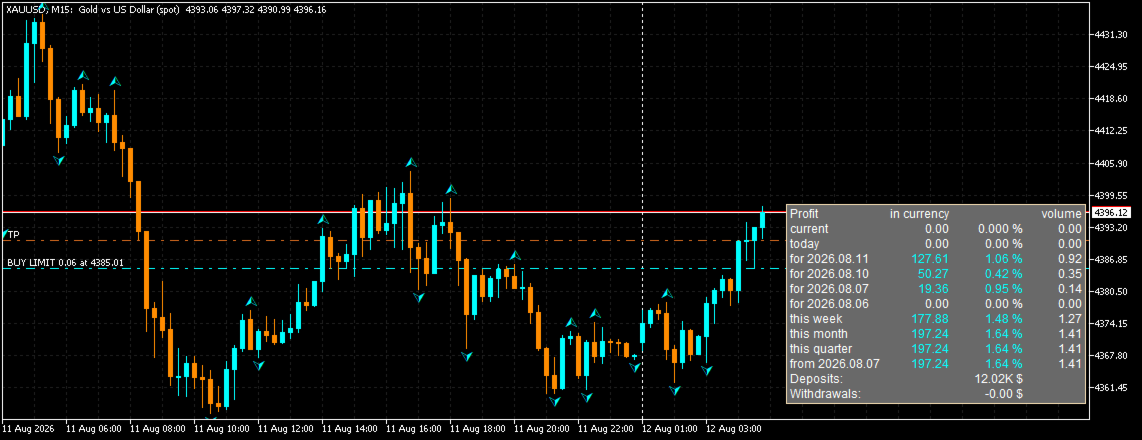
The AccountVista indicator displays a compact information panel on the chart with
the key statistics of your trading account: current floating profit, results for
today, for each of the four previous trading days, for the current week, month,
quarter and year, as well as the volumes of closed deals, deposits and withdrawals.

The panel uses no indicator buffers and does not repaint the chart — it is a fully
independent information module that can be attached to any symbol and any timeframe.

For every period the indicator shows three values:
  • profit in account currency (including commissions and swaps);
  • percentage relative to the balance at the beginning of the period;
  • volume of closed deals (in lots).

Additionally, the panel displays:
  • current floating profit and the volume of open positions;
  • total deposits and withdrawals;
  • current profit percentage relative to the current balance.

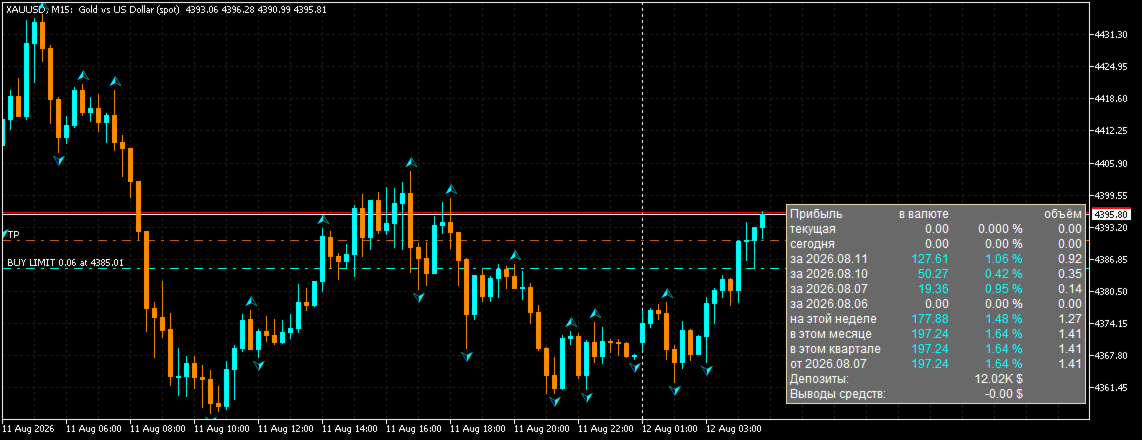
The indicator supports interface language selection (Russian/English), attachment
to any of the four chart corners, mouse-driven panel moving with position saving,
and works on cent accounts.

Version 1.6 adds:
  • panel language selection (Russian/English) — the PanelLang parameter;
  • fully bilingual interface and parameter descriptions;
  • bilingual description in the "Common" tab of the indicator properties.

PERIODS SHOWN BY THE PANEL
==========================

  • current (floating) profit and current volume of positions;
  • today;
  • yesterday (each of the 4 previous trading days separately);
  • this week;
  • this month;
  • this quarter;
  • this year (or the period since a user-defined date).

CALCULATION DETAILS
===================

Profit for each period is calculated from the deal history: the sum of profit,
commission and swap of all closed deals within the period. Volume is counted only
for closing deals (full or partial position closing).

The balance at the beginning of a period is calculated as the current balance
minus the period profit, adjusted for deposits and withdrawals. The percentage is
the ratio of the period profit to the balance at its beginning.

When the user date mode is enabled, the yearly profit is replaced by the profit
since the specified date, and deposit/withdrawal amounts can be entered manually.

ACCOUNTS AND CURRENCIES
=======================

The panel supports both regular and cent accounts (the "Cent account" parameter).
Large numbers are automatically compacted (1,000 → 1.00K, 1,000,000 → 1.00M,
1,000,000,000 → 1.00B) so that any amounts can be displayed compactly.

COLOR INDICATION
================

Values are colored by sign:
  • white — zero value;
  • aqua — profit;
  • pink — loss.

MOVING THE PANEL
================

The panel can be moved with the mouse (if the "Move panel with mouse" parameter
is enabled). Dragging is implemented with custom mouse handling: the panel moves
smoothly without native object selection, and the chart does not scroll or
jitter while the panel is being moved. The panel position is strictly limited to
the visible chart area — it cannot be dragged beyond the chart edges.

The panel position is saved in the terminal global variables and is restored
after the indicator or terminal restart. When the anchor corner is changed, the
saved position is reset so the panel cannot end up outside the chart window.


PERFORMANCE
===========

The indicator is resource-friendly:
  • statistics recalculation is performed only on real changes (a new M1 bar,
    a change in the number of positions or pending orders, a balance change);
  • the panel refreshes no more often than once every 500 ms;
  • chart objects are updated only when text, color or coordinates change
    (caching);
  • the indicator scales correctly on high-DPI monitors.

REQUIREMENTS
============

  • MetaTrader 5 (any build);
  • a trading account connected to the terminal;
  • no additional files or libraries required.

INSTALLATION
============

1. Save the AccountVista.ex5 file into the MQL5\Indicators folder.
2. Restart the terminal or click "Refresh" in the Navigator.
3. Drag the indicator onto a chart of any symbol and timeframe.
4. Adjust the settings in the "Inputs" tab if necessary.


AccountVista v1.6 INDICATOR FEATURES

====================================


STATISTICS BY PERIODS

---------------------

• Current floating profit and the current volume of open positions.

• Profit for today.

• Profit for each of the 4 previous trading days (separately).

• Profit for the current week.

• Profit for the current month.

• Profit for the current quarter.

• Profit for the current year or for the period since a user-defined date.


VALUES FOR EVERY PERIOD

-----------------------

• Profit in account currency, including commissions and swaps.

• Percentage relative to the balance at the beginning of the period.

• Volume of closed deals in lots.


ADDITIONAL INFORMATION

----------------------

• Total deposits and withdrawals.

• Current profit percentage relative to the current balance.


INTERFACE LANGUAGE

------------------

• Bilingual interface: Russian and English.

• Language switching with a single PanelLang parameter.

• Bilingual parameter descriptions and "Common" tab.


PANEL SETTINGS

--------------

• Attachment to any of the four chart corners (top/bottom, left/right).

• Mouse-driven panel moving (movable parameter) — smooth, with custom mouse

  handling and no native object selection.

• The panel always stays within the chart window: it cannot be dragged beyond

  the edges, even in small windows.

• The chart does not scroll or jitter while the panel is being moved.

• Panel position saving in the terminal global variables and restoring after

  the indicator or terminal restart.

• Automatic return of the panel to the base position if it appears outside the

  chart window.

• Adjustable font size.


ACCOUNT SUPPORT

---------------

• Support for regular and cent accounts (cent parameter).

• Compact display of large numbers: 1.00K, 1.00M, 1.00B.

• Manual entry of deposit/withdrawal amounts (AllDeposit, AllWithdraw) for a

  custom period.


VISUALIZATION

-------------

• Color indication by sign: white — zero, aqua — profit, pink — loss.

• Unobtrusive panel background that does not cover the price chart.

• Correct scaling on high-DPI monitors.


PERFORMANCE

-----------

• Statistics recalculation only on real changes (a new M1 bar, a change in the

  number of positions/stop orders, a balance change).

• Panel refresh no more often than once every 500 ms.

• Chart object caching: only changed values are updated.

• A single pass over the deal history to calculate all periods.


VERSATILITY

-----------

• Works on any symbols and timeframes.

• Requires no additional files, libraries or DLLs.

• Uses no indicator buffers and never repaints the history.


AccountVista v1.6 INDICATOR INPUT PARAMETERS

=============================================


1. PanelLang — Panel language

   Type: selection (enumeration)

   Default: LANG_RU (Russian)

   Description: the interface language of the panel. LANG_RU — Russian,

   LANG_EN — English. All panel labels and parameter descriptions switch

   automatically.


2. corner — Chart corner

   Type: selection (enumeration)

   Default: 0 (Upper left)

   Description: the chart corner the panel is attached to:

     0 — upper left corner;

     1 — upper right corner;

     2 — lower left corner;

     3 — lower right corner.

   When the corner is changed, the saved panel position is reset.


3. cent — Cent account

   Type: bool (checkbox)

   Default: true (enabled)

   Description: enable if the account is a cent account. Amounts are shown

   divided by 100 (in dollars) with 4 decimal places. For a regular account

   disable it: amounts are shown as is with 2 decimal places.


4. stUserDate — Use user date

   Type: bool (checkbox)

   Default: false (disabled)

   Description: when enabled, the last panel period is calculated not for

   the year, but from the date specified in the "User date" parameter.


5. edUserDate — User date

   Type: date and time

   Default: 2024.01.01 00:00:00

   Description: the start date of the last statistics period. Used when the

   "Use user date" parameter is enabled. Convenient for calculating the

   result from the date trading on the account started.


6. AllDeposit — Total deposits

   Type: double (floating point number)

   Default: 0.0

   Description: the total amount of deposits to the account over the user

   period. If the value is greater than 0 and the user date is enabled,

   this value is used instead of the automatically calculated one. Allows

   entering deposits manually (for example, when the history is incomplete).


7. AllWithdraw — Total withdrawals

   Type: double (floating point number)

   Default: 0.0

   Description: the total amount of withdrawals from the account over the

   user period. If the value is greater than 0 and the user date is

   enabled, this value is used instead of the automatically calculated one.


8. FontSize — Panel font size

   Type: int (integer)

   Default: 9

   Description: font size of all panel labels in points. Increase it if the

   panel is hard to read on a large monitor.


9. movable — Move panel with mouse

   Type: bool (checkbox)

   Default: true (enabled)

   Description: when enabled, the panel can be dragged with the mouse by its

   background. Moving is smooth: the panel cannot be dragged beyond the chart

   window edges, and the chart itself does not scroll while moving. The

   position is saved in the terminal global variables and restored after the

   indicator or terminal restart. When disabled, the panel is fixed at the

   base position of the corner.

Produits recommandés
Guardian Magic GT
Carlos Eduardo Rivas Istacuy
Guardian Magic GT - Risk Management Expert Advisor for MetaTrader 5 PROTECT YOUR TRADING CAPITAL WITH INTELLIGENT RISK MANAGEMENT Guardian Magic GT is a professional-grade Expert Advisor designed to safeguard your trading operations by implementing sophisticated risk control mechanisms. Whether you run a single bot or manage multiple automated trading systems simultaneously, Guardian Magic GT provides real-time monitoring and automatic position management to ensure your account stays within your
Quantum Gold Sniper
Victor Eduardo Velazco Delgado
QUANTUM GOLD SNIPER: The Evolution of Institutional Trading Quantum Gold Sniper is not just a regular EA; it is an extreme-precision artificial intelligence model, designed exclusively to dominate Gold's volatility (XAUUSD). Powered by deep neural networks and rigorous mathematical analysis, this system executes sniper-like entries by exploiting market inefficiencies. Most importantly:   This system is 100% safe.     NO GRID.     NO MARTINGALE.   Every single trade has a strict, hard-
SAB Advance Assistant est un panneau de gestion de trades manuel pour MetaTrader 5. Construisez chaque trade visuellement sur le graphique, maîtrisez votre risque au centime près, et laissez le moteur intégré gérer les prises de profit partielles, le break-even et le trailing — le tout depuis un panneau clair et redimensionnable. Conçu pour les traders discrétionnaires et ICT/SMC qui veulent de la précision sans tableur. FONCTIONNALITÉS CLÉS - Lignes Entrée, Stop Loss, TP1-TP5 et TP Final dép
The “Summary Risk Target” indicator is designed to show the total number of transactions made on a single pair. The transactions counted include active positions as well as pending orders . By setting a stop loss for each trade, this indicator displays the total potential risk (loss) that may be incurred. This helps traders easily understand their overall risk exposure without the need for manual calculations. Likewise, for take profit , if the TP level is defined—either in terms of pips or at a
FREE
Gann Box MT5
Frederic Jacques Collomb
L'indicateur Gann Box est un outil puissant et polyvalent conçu pour aider les traders à identifier et exploiter les niveaux clés du marché. Cet indicateur permet de dessiner un rectangle sur le graphique, qui est automatiquement divisé en plusieurs zones avec des niveaux stratégiques  0, 0.25, 0.50, 075, 1 . Lorsque le prix touche un de ces niveaux, des alertes se déclenchent, offrant ainsi une aide précieuse pour les décisions de trading. Vous savez instantanément l'évolution du marché par ra
EA Portfolio Analytics Dashboard Pro - Advanced Multi-EA Performance Monitor EA Portfolio Analytics Dashboard Pro is a professional MetaTrader 5 tool designed for advanced portfolio management and real-time performance analytics. Monitor all your Expert Advisors simultaneously with institutional-grade metrics. Key Benefits: Multi-EA Performance Matrix:   Track unlimited EAs and their statistics in a single view. Real-Time Risk Analytics:   Monitor key metrics like Sharpe Ratio, Value at Risk (V
This script analyzes all symbols in Market Watch for a set timeframe. The result is displayed on the Experts tab and in the specified file. For more convenient viewing and editing, the result is displayed in a csv file. For the calculation, the Pearson formula is used. The value of the correlation coefficient of pairs close to 1 means that the pairs move almost identically. A value close to -1 means that the pairs move in the same way. This tool will be useful to those who use hedging due to the
WEALE Price List | Utilitaire de scan du capital Wealth Engine pour MetaTrader 5 WEALE Price List est un script utilitaire MetaTrader 5 (MT5) qui indique le capital nécessaire pour remplir l'échelle DCA complète du Wealth Engine sur chaque symbole présent dans votre Market Watch. Cet utilitaire est le compagnon de planification de l'Expert Advisor FJ Universe Wealth Engine (WEALE). Là où le Wealth Engine exécute la stratégie, le WEALE Price List vous aide à décider où l'exécuter. Le script analy
What this dashboard does The panel displays: Current Ichimoku signal per symbol Current Ichimoku signal per timeframe Key Ichimoku line values Signal direction summary Instead of switching charts manually, you can analyze the market structure in seconds. Available Ichimoku values Each cell may display: Tenkan-Sen Kijun-Sen Senkou Span A Senkou Span B Chikou Span Span A – Span B difference This allows detailed analysis or quick signal filtering. Signal types The dashboard can detect:
MetaTrade Hub   is an easy-to-use and customizable tool. This product is presented in an attractive   graphical interface  that allows you to send adjustable signals in two ways ( Manual or Automatic ) from   Metatrader5   to the   Telegram channel or Discord channel.   In this case, your account becomes a   Signal Provider.  You can also share N ews reports with others. All   message formats   -   language   -   emojis   can be adjusted and personalized. You can   Enable   or   Disable   certai

Target Smart Order
Markeysuel De Sousa Ferreira
TARGET SMART ORDER Indicator Custom indicator for MetaTrader 5 that displays detailed information about each trade directly on the chart, showing real-time profit/loss, Take Profit and Stop Loss levels for each active order. Main Features: Real Profit Display Real-Time Profit/Loss: Shows the current value of each position. Continuous Update: Values ​​are updated tick by tick Dynamic Colors: Green for profit, red for loss. TP/SL Lines: Draws horizontal targets at Take Profit and Stop Loss l
http://www.tradepositive.lat Eleva tu Journaling al Nivel Institucional. Olvídate de registrar tus operaciones a mano, de los errores de cálculo y de la recolección tediosa de datos. TPI Notion Sync es la herramienta definitiva desarrollada por el Trade Positive Institute, diseñada para conectar tu plataforma MetaTrader directamente con tu base de datos de Notion en tiempo real. Diseñado originalmente para los traders del ALGO Smart Flow Model , este puente tecnológico extrae la matemática pur
FREE
Shved Position Pips Label   is a professional utility indicator for MetaTrader 5 that displays the real-time floating profit or loss of all your active positions directly on the chart. No more switching to the "Trade" tab at the bottom of the terminal — all crucial information about your running trades is positioned right in front of your eyes next to the current price line! Key Advantages: Smooth Price-Anchored Alignment:   The labels are anchored to the last bar and smoothly slide vertically f
DDKiller Pro
Njaratahiry Michael Randrianiaina
Arrête de faire sauter ton compte. Une bonne fois pour toutes. DDKiller Pro est le gardien du risque MT5 qui tourne silencieusement sur ton graphique et coupe le trading dès qu'une limite est atteinte — que tu passes un challenge prop firm ou que tu gères ton propre compte CFD. Le problème que tout trader connaît : Tu fixes tes règles. Tu les enfreins quand même. Un trade de vengeance. Une position surleviéragée. Une session qui efface un mois de gains. DDKiller Pro retire cette décision de tes
NNArbitrage
Marius Ovidiu Sunzuiana
In a market flooded with lagging indicators and overfit strategies, this utility offers a fresh edge: real-time statistical arbitrage powered by an adaptive neural network , built entirely in MQL5—no DLLs, no external dependencies. Key Advantages Smart Spread Modeling It dynamically calculates a hedge ratio between two correlated instruments (like EURUSD vs GBPUSD), forming a synthetic spread that reflects true relative value. This isn’t just correlation—it’s cointegration-aware logic. Neur
Kiwi Forex Engine MT5
- Nguyen Ngoc Diep
Kiwi Forex Engine MT5 Overview Kiwi Forex Engine MT5 is a multi-currency Expert Advisor designed for traders who prefer one chart to monitor and trade several Forex pairs. Instead of opening trades on every signal, the EA continuously scans all configured symbols, ranks available opportunities, and selects only the strongest setups that satisfy its internal filters. The focus is on portfolio management, controlled exposure, and disciplined trade selection. Main Features • Multi-pair portfolio sc
FREE
Weekday Stats
Elidio Xavier Guimaraes
Weekday Stats Présentation Weekday Stats est un indicateur d’analyse quantitative conçu pour réaliser des études statistiques du comportement des prix, en classant les données des bougies selon le jour de la semaine au cours duquel chaque bougie s’est formée. L’indicateur traite les bougies historiques de l’actif sélectionné et fournit des informations statistiques pour chaque jour de la semaine, permettant d’analyser séparément la direction et la variation des prix pour chaque jour. La période
Basic Theme Builder MT5
Mehran Sepah Mansoor
5 (2)
Basic Theme Builder : Simplifiez la personnalisation de vos graphiques Transformez votre expérience de trading avec l'indicateur Basic Theme Builder , un outil polyvalent conçu pour simplifier la personnalisation de l'apparence de vos graphiques sur MetaTrader 5. Cet indicateur intuitif offre un panneau facile à utiliser qui vous permet de passer d'un thème à l'autre et de changer les schémas de couleurs en toute simplicité, améliorant ainsi l'apparence visuelle et la fonctionnalité de votre en
FREE
Forget about enabling templates when you launch the window. Auto Template Master Service  is a professional utility tool that runs as a system service in MetaTrader 5, and it will do it for you. Unlike traditional indicators or expert advisors (EAs), the program runs in the background of the entire terminal and doesn't require you to add it to each window individually. As soon as you open a new chart of any instrument (Forex, Stocks, Crypto), the service immediately detects the new window and a
Sessions Killzone
Wafa Mohammed Omar Abou Alwafa
Session Killzone Indicator Indicator that helps you to identify the killzone times of both London and NewYork sessions which usually is the most times for high volatility and taking liquidity from the market. Killzone times are configurable through indicator parameters. The indicator adjusts the range of the killzones based on the daily trading range.
FREE
Stochastic MTF Dashboard
Andres Felipe Carvajal Rodriguez
4.67 (3)
Stochastic MTF Dashboard Le Stochastic MTF Dashboard est une solution visuelle conçue pour optimiser votre efficacité. Il vous permet de surveiller l'état de l'oscillateur stochastique sur jusqu'à 6 unités de temps différentes simultanément, le tout sans quitter votre graphique actuel. Son objectif est d'éliminer toute confusion et de vous offrir une lecture instantanée de la force du marché : Rouge : Zone de Surachat : Épuisement potentiel du prix (Ventes). Vert : Zone de Survente : Récupératio
FREE
Free MetaTrader 5 indicator that displays "CALL IT A DAY" when London & New York sessions close. Customizable alerts, session tracking, and a guilt-free reminder to log off. Perfect for workaholic traders! Tired of staring at charts when the market’s already clocked out? Session Guardian   is your sassy trading assistant that slaps a giant   "CALL IT A DAY"   on your screen when both London   and   New York sessions are closed—because even traders deserve happy hour. Key Features:   Big, Bo
FREE
Manual Trade Manager and Trailing
Yusuf Mohamed Noor Hasa Saleh
Manual Trade Step Manager for MT5   is a trade management utility designed for traders who open positions manually and want the platform to handle the position afterward according to fixed rules. This utility does not open trades automatically. It is built to manage manual positions already opened by the trader and apply a structured sequence of protection and profit management. The main idea is simple: you open the trade manually the utility monitors the position when profit reaches your chosen
StopLoss and TakeProfit Utility MT5 for automatic setting of stop loss and take profit levels. Created by a professional trader for traders.   The utility   works with any market orders opened by a trader manually or using advisors. Can filter trades by magic number. The utility can work with any number of orders simultaneously. WHAT THE UTILITY CAN DO: Set virtual stop loss and take profit from 1 pip Real   stop loss and take profit W ork with each order separately (   stop loss and take prof
Mfi Pulse Reverser Ultra
Berke Kadir Sinapli
5 (1)
Politique de Prix Premiers 5 utilisateurs : 30 USD Utilisateurs 6 à 20 : 100 USD À partir du 21ᵉ utilisateur :  300 USD ️ Profitez de cette offre limitée – Économisez dès maintenant ! Résumé de la Stratégie Confirmation de la Tendance : La direction de la tendance est confirmée par EMA (moyenne mobile exponentielle) et ADX . Le robot ne traite que dans le sens d’une forte tendance (ADX > seuil minimal). Entrée en Position : Utilise le MFI (Indice de Flux Monétaire) pour détecter les zones
MT4 MT5 Trade Bridge for MetaTrader 5  is the MetaTrader 5 component of the MT4 MT5 Trade Bridge system. It allows a MetaTrader 5 terminal to work either as a  Master  or as a  Slave  in a local bridge connection with MetaTrader 4. When configured as  Master , the MT5 component reads trading activity from the MetaTrader 5 terminal and writes structured trade data into a local bridge file. The connected MT4 component can then read this data and mirror the trading activity according to its selecte
FREE
Symbol Manager for MT5
Taras Slobodyanik
5 (3)
Symbol Manager or Grid Manager, designed to group orders into one position (by Symbol or by Magic Number). This utility will be useful to multi-currency traders (many EAs), who can have multiple orders on several pairs. You will be able to see the total number of lots, the total profit, and set virtual stop loss and virtual take profit. To set a real TP (or SL), you must first set the virtual value, and then enter the command in this cell: "set". If you want to set real TP/SL for all orders at
Aperçu de l'Expert Advisor (EA) KS Multiple Independent Strategies Auto Trading 1.9 Il s'agit d'un Expert Advisor (EA) MQL5 de niveau professionnel, conçu principalement pour le trading de l'or (XAUUSD) sur la plateforme MetaTrader 5. Il prend en charge de multiples stratégies de trading indépendantes, une gestion des risques avancée ainsi que divers filtres visant à optimiser les performances. Cet EA met l'accent sur l'automatisation, la protection des bénéfices et l'intégration avec des outil
Telegram EA Manager
Ebunoluwa Abimb Owodunni
All in one Multipurpose Telegram Trade Management , Manage and Copy Trades on the go From Telegram Pro Version MT5:  www.mql5.com/en/market/product/95742 Pro Version MT4:  www.mql5.com/en/market/product/85691 Execute Trades on mobile with fast execution When away from desktop MT5, or scalping the market with mobile device, or needed to copy trades from telegram groups while away, or doing some other activities, Telegram EA Manager is an effective tool to perform any trade operation with swift
FREE
Protect your funded accounts and personal capital with military-grade precision. This utility continuously monitors your floating equity against your daily starting balance. The moment your custom drawdown threshold is breached, it instantly liquidates all open positions, deletes pending orders, and completely unloads from the chart. Stop revenge trading and never fail a prop firm evaluation due to a margin breach again.
FREE
Les acheteurs de ce produit ont également acheté
Trade Assistant MT5
Evgeniy Kravchenko
4.41 (215)
It helps to calculate the risk per trade, the easy installation of a new order, order management with partial closing functions, trailing stop of 7 types and other useful functions. Additional materials and instructions Installation instructions - Application instructions - Trial version of the application for a demo account Line function -   shows on the chart the Opening line, Stop Loss, Take Profit. With this function it is easy to set a new order and see its additional characteristics bef
Bienvenue sur Trade Manager EA, l’outil ultime de gestion des risques conçu pour rendre le trading plus intuitif, précis et efficace. Ce n’est pas seulement un outil d’exécution d’ordres ; c’est une solution complète pour la planification des trades, la gestion des positions et le contrôle des risques. Que vous soyez débutant, trader expérimenté ou scalpeur ayant besoin d’une exécution rapide, Trade Manager EA s’adapte à vos besoins, offrant une flexibilité sur tous les marchés, des devises et i
Local Trade Copier EA MT5
Juvenille Emperor Limited
4.97 (144)
Découvrez une expérience exceptionnellement rapide de copie de trades avec le   Local Trade Copier EA MT5 . Avec sa configuration facile en 1 minute, ce copieur de trades vous permet de copier des trades entre plusieurs terminaux MetaTrader sur le même ordinateur Windows ou Windows VPS avec des vitesses de copie ultra-rapides de moins de 0.5 seconde. Que vous soyez un trader débutant ou professionnel, le   Local Trade Copier EA MT5   offre une large gamme d'options pour le personnaliser en fonc
================================================================================ POC BREAKOUT - V20.72. Full Professional Grade Toolkit ================================================================================ POC Breakout is a full MetaTrader 5 trading dashboard for discretionary traders who want breakout signals, Point of Control (POC) context, volume profiles, order flow, market structure, news, alerts, and advanced trade planning in one professional workspace. Attached directly to you
TradePanel MT5
Alfiya Fazylova
4.88 (166)
Trade Panel est un assistant commercial multifonction. L'application contient plus de 50 fonctions de trading pour le trading manuel et permet d'automatiser la plupart des tâches commerciales. Avant l'achat, vous pouvez tester la version de démonstration sur un compte de démonstration. Télécharger la version d'essai de l'application pour un compte de démonstration : https://www.mql5.com/fr/blogs/post/762644 . Instructions complètes ici . Commerce. Permet d'effectuer des opérations commerciales e
Version Bêta Le Telegram to MT5 Signal Trader est presque prêt pour la sortie officielle en version alpha. Certaines fonctionnalités sont encore en développement et vous pourriez rencontrer de petits bugs. Si vous rencontrez des problèmes, merci de les signaler, vos retours aident à améliorer le logiciel pour tout le monde. Telegram to MT5 Signal Trader est un outil puissant qui copie automatiquement les signaux de trading depuis des chaînes ou groupes Telegram vers votre compte MetaTrader 5 .
Farmed Hedge Yield Farming | All Markets (Manual - Hybrid - Semi/Automated EA) MULTI-ASSET SUPPORT Trade any asset available on your broker - Forex: Major, Minor, Exotic pairs - Crypto: BTC, ETH, XRP, SOL, BNB - Stocks: Apple, Tesla, Amazon, Google, etc. - Commodities: Gold, Silver, Oil, Gas - Indices: US30, NAS100, SPX500, DAX40 - Any CFD your broker offers VERIFIED TRADING RESULTS - Farmed Hedge Yield Axi Copy:  https://www.mql5.com/en/signals/2356376 - Farmed Hedge Yield Exn Copy:   https:/
Exp COPYLOT CLIENT for MT5
Vladislav Andruschenko
3.97 (35)
Copieur professionnel de trades pour MetaTrader 5 Un copieur de trades rapide, professionnel et fiable pour MetaTrader . COPYLOT permet de copier des trades Forex entre les terminaux MT4 et MT5 avec prise en charge des comptes Hedge et Netting . La version MT5 de COPYLOT prend en charge : - MT5 Hedge → MT5 Hedge - MT5 Hedge → MT5 Netting - MT5 Netting → MT5 Hedge - MT5 Netting → MT5 Netting - MT4 → MT5 Hedge - MT4 → MT5 Netting Version MT4 Description complète + DEMO + PDF Comment acheter Comme
Telegram to MT5 Multi-Channel Copier copie automatiquement les signaux de trading de vos canaux Telegram directement vers MetaTrader 5. Pas de bots, pas d'extensions de navigateur, pas de copie manuelle. Vous recevez un signal sur Telegram et l'EA ouvre l'opération sur votre terminal en quelques secondes. Le produit comprend deux composants : une application Windows qui écoute vos canaux Telegram, et cet Expert Advisor qui exécute les signaux sur votre terminal MT5. Une version MT4 est également
Footprint Chart Pro — Professional OrderFlow EA for MetaTrader 5 Version 6.34 | Professional tool for real traders | Institutional-Grade Visualization DEMO USERS - PLEASE SELECT EVERY TICK / REAL TICK WHEN TESTING AND YOU HAVE DOWNLOADED HISTORICAL DATA. IF YOU SEE A WAITING SCREEN AND IT IS NOT DOWNLOADING, IT MEANS YOU HAVE LOW HISTORICAL DATA. TRY 1 MIN AND 5 MIN FIRST ON 1 DAY DATA. ONE DAY DATA SHOULD BE THE NEWEST AND MOST CURRENT DATE. PLEASE WAIT UNTIL THE MARKET HAS ROLLED OVER PERIOD.
VirtualTradePad PRO SE MT5 — centre de contrôle de trading professionnel pour MetaTrader 5 VirtualTradePad PRO SE est un panneau de trading premium basé sur le graphique et un espace de gestion des trades pour MetaTrader 5 . Il est conçu pour les traders qui souhaitent une exécution plus rapide, un contrôle plus clair des positions, une gestion structurée des trades, une planification visuelle des niveaux et un flux de travail professionnel directement depuis le graphique. Ce n’est pas seulement
Premium Trade Manager - Le panneau de trading avec un coach intégré Premium Trade Manager intègre un coach de trading directement dans votre graphique, avec un moteur d'exécution complet en dessous. Configurez le trade comme vous le faites toujours, puis laissez Max, votre coach de trading IA, analyser ce setup exact par rapport à votre compte en direct et vous donner un verdict clair avant de vous engager : le stop est-il discipliné, le risque est-il raisonnable, une publication à fort impact e
Trade copier MT5
Alfiya Fazylova
4.57 (51)
Trade Copier est un utilitaire professionnel conçu pour copier et synchroniser les commandesentre les comptes de trading. Les commandes sont copiées du compte/terminal du fournisseur vers le compte/terminal du destinataire, qui sont installés sur le même ordinateur ou vps. PROMOTION - Si vous avez déjà acquis le "Trade copier MT5", vous pouvez obtenir le "Trade copier MT4" gratuitement (pour la copie MT4 > MT5 et MT4 < MT5). Pour obtenir des informations plus détaillées sur les conditions, veuil
Power Candles Strategy Scanner - Outil de recherche de configurations multi-symboles à optimisation automatique Le Power Candles Strategy Scanner utilise le même moteur d'auto-optimisation que celui qui alimente l'indicateur Power Candles, pour chaque symbole de votre Market Watch, en parallèle. Un panneau vous indique quels symboles sont statistiquement négociables à l'instant, quelle stratégie est la plus performante pour chacun, la paire Stop Loss / Take Profit optimale, et vous alerte dès qu
Anchor Trade Manager
Kalinskie Gilliam
5 (7)
Anchor: The EA Manager Your EAs manage their own trades. Anchor manages the account around them. Anchor gives you one place to control your EAs, manage risk and decide when trading is allowed. Any EA, any vendor, any broker or symbol. No source-code changes required. The Problem Most EAs only know what they are doing. They cannot see when another EA is already trading, when several EAs open and are stacking risk or when the account has reached your loss limit. Even using just one EA, it may not
Telegram To MT5 Ultra
Mirel Daniel Gheonu
5 (3)
Telegram To MT5 — Copieur de signaux Transformez les appels de trading de vos canaux Telegram en véritables ordres MT5 — automatiquement, sur autant de comptes que vous le souhaitez, avec le risque et les règles entièrement sous votre contrôle. Telegram To MT5 relie les canaux VIP / de signaux que vous suivez déjà sur Telegram à votre terminal MetaTrader 5. Une application de bureau compagnon gratuite lit les messages (même des canaux qui bloquent les bots), et cet Expert Advisor les exécute sur
Astro Trade MT5
Indra Maulana
5 (2)
AstroTrade Trading Assistant AstroTrade is a comprehensive multi-functional trading utility developed for the MetaTrader 5 platform. It integrates essential tools for trade execution, risk management, and technical monitoring into a single unified interface. The application is designed to assist traders in managing their daily operations through a visual and structured environment. Visual Trade Execution and Risk Management The application includes a specialized trading panel that assists in c
Timeless Charts
Samuel Manoel De Souza
5 (7)
Timeless Charts est un utilitaire de trading tout-en-un destiné aux traders professionnels. Il combine des types de graphiques personnalisés tels que les graphiques en secondes et Renko avec une analyse avancée du flux d’ordre s utilisant Footprints , Clusters , Profils de Volume , études VWAP et outils d’analyse ancrés pour une compréhension plus approfondie du marché. Le trading et la gestion des positions sont effectués directement depuis le graphique via un panneau intégré de gestion des ord
Trade Manager DaneTrades
Levi Dane Benjamin
4.23 (30)
Trade Manager pour vous aider à entrer et sortir rapidement des transactions tout en calculant automatiquement votre risque. Y compris des fonctionnalités pour vous aider à éviter le sur-trading, le trading de vengeance et le trading émotionnel. Les transactions peuvent être gérées automatiquement et les mesures de performances du compte peuvent être visualisées dans un graphique. Ces fonctionnalités rendent ce panneau idéal pour tous les traders manuels et contribuent à améliorer la plateforme
YuClusters
Yury Kulikov
4.93 (43)
Attention: You can view the program operation in the free version  YuClusters DEMO .  YuClusters is a professional market analysis system. The trader has unique opportunities to analyze the flow of orders, trade volumes, price movements using various charts, profiles, indicators, and graphical objects. YuClusters operates on data based on Time&Sales or ticks information, depending on what is available in the quotes of a financial instrument. YuClusters allows you to build graphs by combining da
Welcome to ENTRY IN THE ZONE WITH SMC MULTI TIMEFRAME Entry In The Zone and SMC Multi Timeframe is a real-time market analysis tool based on Smart Money Concepts (SMC), designed to analyze market structure, price direction, and key trading zones. It supports both Single-Timeframe Analysis and Multi-Timeframe Analysis, providing a clearer view of the overall market structure across multiple timeframes, with real-time BUY / SELL signals that do not repaint. It is designed to help filter trading op
EA Auditor
Stephen J Martret
5 (4)
EA Auditor is an independent analysis tool for traders evaluating Expert Advisors and trading signals on MetaTrader 5. It audits backtest reports, reviews posted developer signals, and cross-verifies the two against each other to help traders assess strategies before committing capital. The MQL5 market offers a wide range of Expert Advisors from many developers, with varying approaches, quality, and transparency. EA Auditor provides a consistent, data-driven framework for reviewing them, answer
Trade Command Center
Nguyen Thanh Trieu
5 (2)
Matériels et instructions supplémentaires Instructions d'installation - Version d'essai de l'application pour un compte démo ; Informations Officielles Chaîne officielle Profil du vendeur Trade Command Center — Exécution Professionnelle des Ordres & Panneau Risk Guard en Temps Réel Trade Command Center est un utilitaire haute performance d'exécution visuelle des ordres, de calcul des tailles de lots et de gestion des risques pour MetaTrader 5. Conçu pour les traders manuels exigeant un co
Panneau de trading pour MetaTrader 5 — contrôle professionnel du trading en un clic depuis le graphique et le clavier Un panneau de trading avancé conçu pour les traders actifs, afin d’ouvrir, gérer et clôturer des positions bien plus rapidement qu’avec l’interface standard de MetaTrader. Cette solution s’adresse à ceux qui veulent contrôler positions, ordres en attente, profit global et exécution depuis un seul espace de travail professionnel. Il ne s’agit pas d’un simple utilitaire. C’est un
Télécharger la démo fonctionnelle Copy Cat More (Chat Copieur) — Copieur de Trades (Trade Copier) MT5 est un copieur de trades local et un cadre complet de gestion du risque et d'exécution, conçu pour les défis du trading d'aujourd'hui. Des challenges de prop firm à la gestion de portefeuille personnel, il s'adapte à chaque situation grâce à une combinaison d'exécution robuste, de protection du capital, de configuration flexible et de gestion avancée des trades. Le copieur fonctionne dans les
Trade Dashboard MT5
Fatemeh Ameri
4.95 (132)
Trade Dashboard simplifies how you open, manage, and control your trades, with built-in lot size calculation. It allows you to execute trades, manage risk, and control positions directly on the chart, with tools such as partial close, breakeven, and trailing stop. Designed to reduce manual work and help you stay focused on your trading decisions. A demo version is available for testing. Detailed explanations of features are provided within the MQL5 platform. Installation instructions are include
Améliorez vos signaux de trading avec notre Telegram Bridge EA avancé Il est temps de captiver votre audience avec des mises à jour de trading en temps réel à la fois professionnelles et visuellement attrayantes. Contactez-moi pour voir la démo et obtenir une version d'essai Nous avons investi considérablement dans des fonctionnalités conviviales qui créent une expérience unique pour les clients et les fournisseurs.  SIGNAL BRIDGE est capable de livrer des SIGNAUX 100% COMPATIBLES AVEC LES COPI
Quant AI Agents
Ho Tuan Thang
5 (1)
Quant AI Agents are independent trading Expert Advisors. Instead of trading using a fixed strategy like other conventional EAs, Quant AI Agents   is a   multi-agent AI trading framework   that turns natural-language strategy prompts into live.  WANT THE SAME RESULTS AS MY LIVE SIGNAL?   Use the exact same brokers I do:   IC MARKETS , IC TRADING   .  Unlike the centralized stock market, Forex has no single, unified price feed.  Every broker sources liquidity from different providers, creating un
The product will copy all telegram signal to MT5 ( which you are member) , also it can work as remote copier.  Easy to set up, copy order instant, can work with almost signal formats, image signal,  s upport to translate other language to English Work with all type of channel or group, even channel have "Restrict Saving Content", work with  multi channel, multi MT5 Work as remote copier: with signal have ticket number, it will copy exactly via ticket number. Support to backtest signal. How to s
Trade Panel PRO MT5 Trade Panel PRO MT5 est un panneau de trading manuel pour MetaTrader 5 conçu pour préparer, exécuter et gérer les positions directement depuis le graphique, avec un contrôle visuel du risque à chaque étape. L'outil regroupe dans une interface unique la préparation des ordres, le calcul automatique de la taille de position selon le risque, les zones interactives Entry, Stop Loss et Take Profit, ainsi que plusieurs fonctions de gestion de trade après exécution. Nouveautés de la
Filtrer:
Aucun avis
Répondre à l'avis