RiskPad Pro

LAUNCH PRICE — First 20 buyers only: $99 (regular price $129)
RiskPad Pro — Feature Details

Trade Safe. Stay Funded.

RiskPad is an MT5 order panel that helps you follow your own trading rules — tracking Daily/Total Drawdown, locking new orders after consecutive losses, and warning you before a trade could breach your risk limit. Whether you're taking on a prop firm challenge, protecting funded capital after passing one, or simply trading your own account, RiskPad keeps your risk rules in view and enforces them before emotions take over.

Drawdown Protection

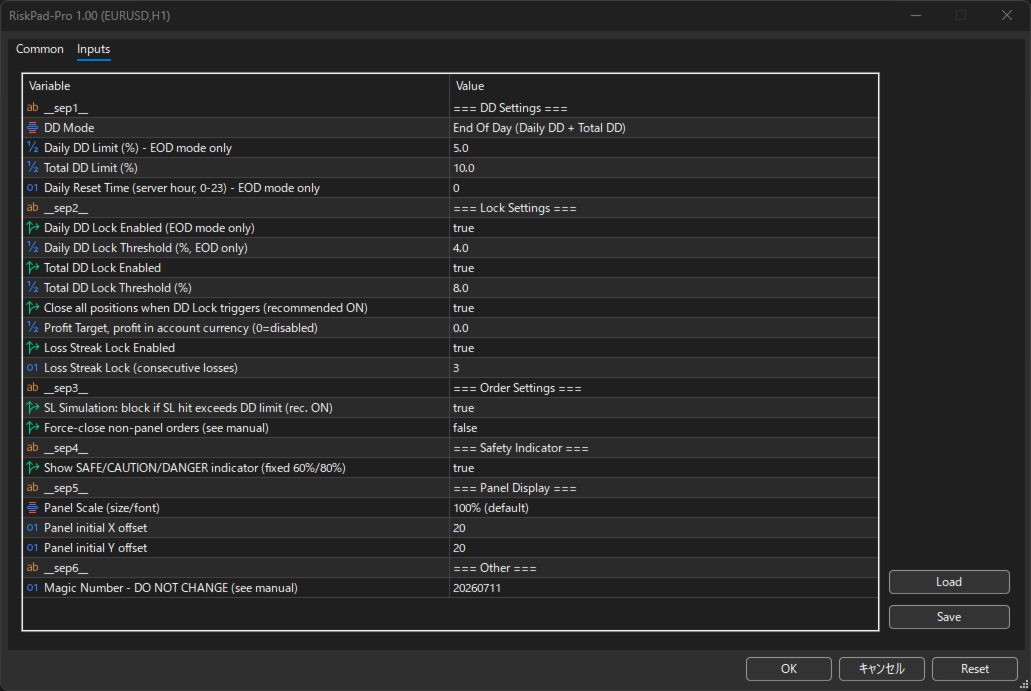
RiskPad tracks both Daily Drawdown and Total Drawdown in real time, based on your current Equity. Set your own limits to match your prop firm's rules (or your personal risk plan) — RiskPad does the rest.

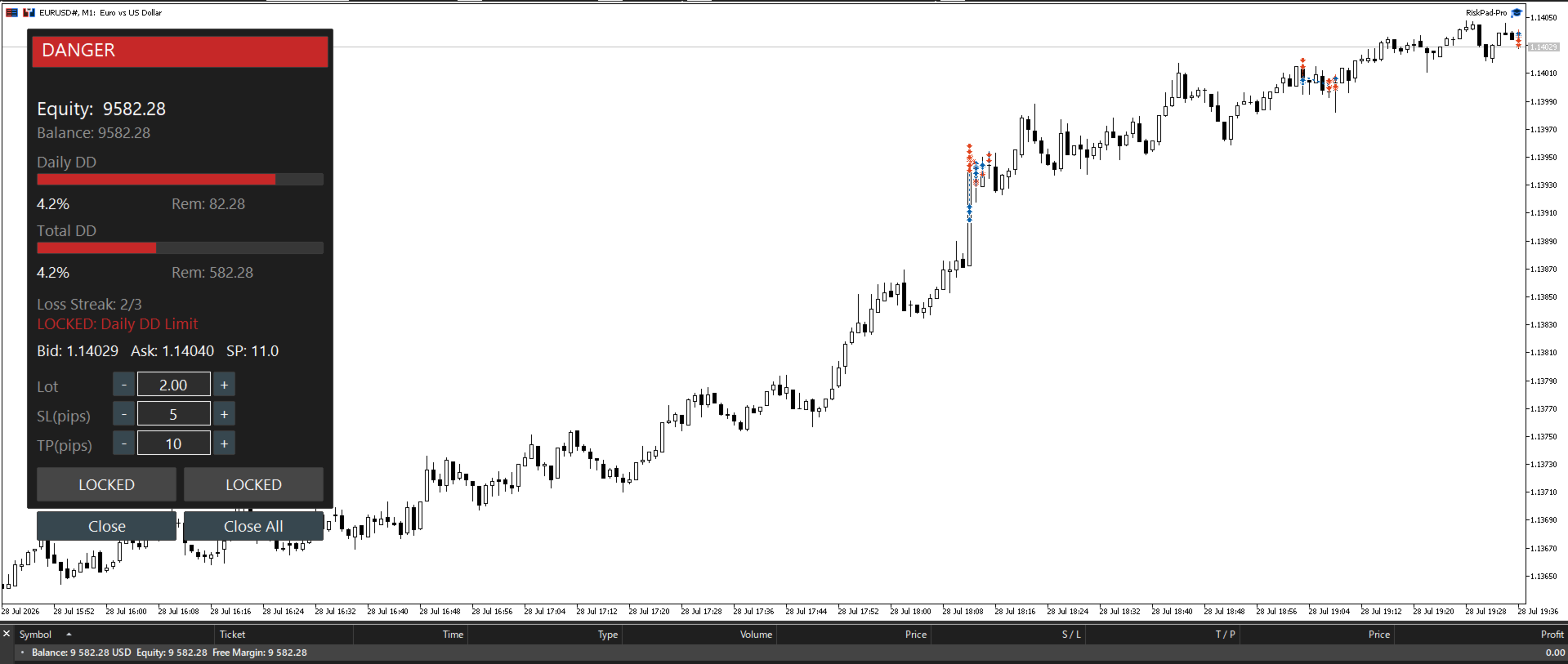
  • DD Lock (early warning): Set an independent threshold for Daily and Total DD. When either is reached, RiskPad locks new orders before you get anywhere near your actual limit.
  • SL Simulation (last line of defense): Before you place a trade, RiskPad simulates what your Equity would look like if the Stop Loss were hit — and blocks the order if it would breach your DD limit. This check can be switched to warning-only if you prefer.
  • Lock reasons are always visible. If more than one condition is triggered, RiskPad shows all of them — no guessing why you're locked.

Loss Streak Lock

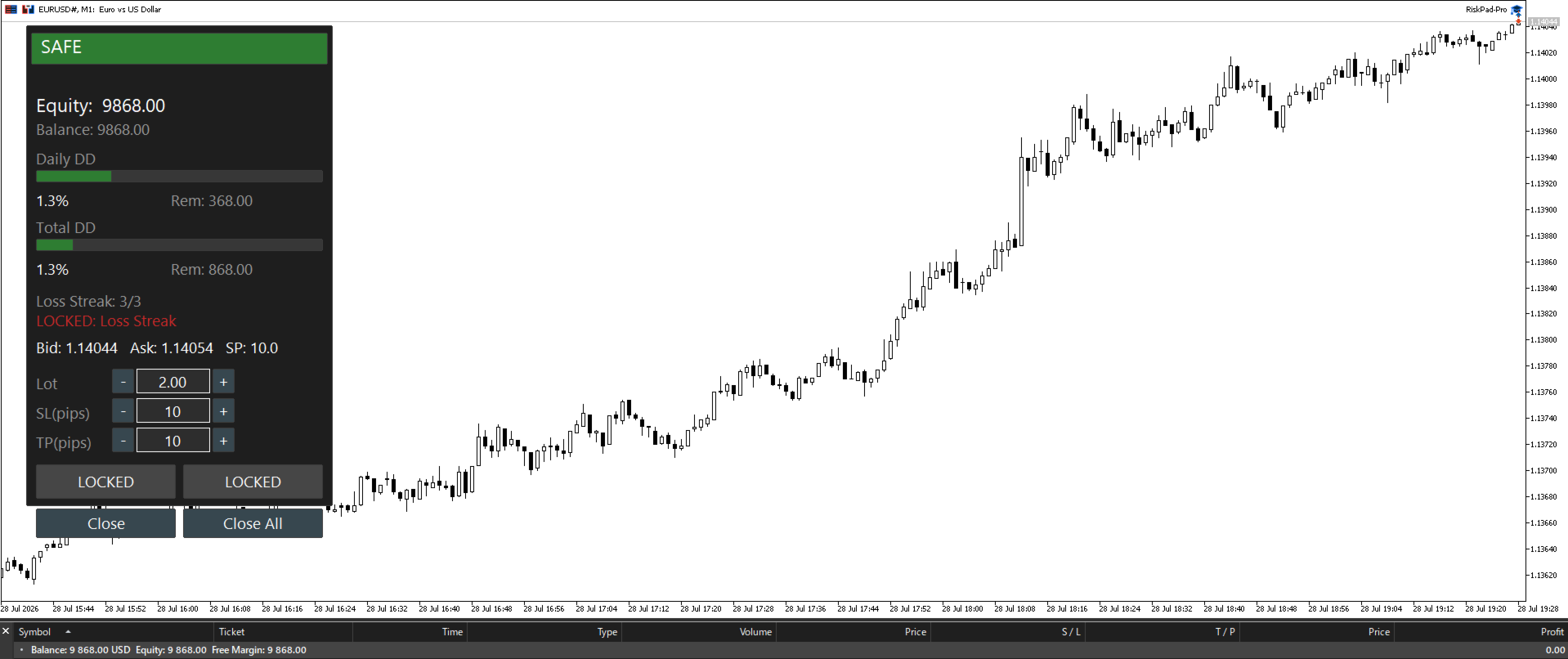
Three losses in a row is when discipline usually breaks down. RiskPad counts consecutive losing trades (break-even and partial closes are excluded from the count) and locks new orders once your configured streak limit is hit — resetting automatically at your account's daily rollover.

Profit Target

Set a target profit amount. The moment your Equity reaches it, RiskPad closes all open positions instantly. Useful for enforcing a daily profit goal or a challenge's target — no more "just one more trade" after you've already hit your number.

Safety Indicator

A simple status bar — SAFE / CAUTION / DANGER — gives you an at-a-glance read on how close you are to your Daily or Total DD limit, using whichever is more severe. No need to do the math yourself mid-trade. Can be hidden entirely if you'd rather not see it.

Quick Order Panel

Place market and pending orders directly from the panel:

  • Lot, Stop Loss, and Take Profit fields, each with + / – quick-adjust buttons
  • SL/TP entered in pips — no manual price calculation
  • Your last-used Lot/SL/TP values are remembered automatically between sessions

Foreign Order Watcher

If a position is opened outside RiskPad on the same chart, RiskPad can automatically close it and warn you — helpful for staying disciplined about the only way you trade. This can be switched off if your prop firm enforces a minimum holding time.

Live Account Info

Equity and Balance are both shown on the panel at all times, alongside live Bid / Ask / Spread for the current symbol — so the numbers that matter are always in view, without switching windows.

Important to Know Before You Buy

  • Foreign Order Watcher detects and closes orders placed outside the panel — it cannot prevent them from opening (a limitation of MT5 itself).
  • Total DD Lock does not always release automatically the next day, since Total DD is measured against your account's original balance. If you ever need to release it — or prefer to rely on the visual DD display and make your own judgment calls — you can turn off Total DD Lock Enabled at any time. Full details are in the guide linked below.
  • Settings do not sync automatically across charts — save your configuration with MT5's built-in .set file feature so you're never trading on default limits by accident.
  • RiskPad's protections are active only while MT5 is running with the chart open. Your broker-side Stop Loss / Take Profit orders remain active independently, even if MT5 is closed.
  • RiskPad requires "Algo Trading" to be enabled in MT5 to place orders — this is a standard MT5 setting, covered in the install guide.
  • One panel per chart, by design — for multiple symbols, attach RiskPad to multiple charts.
  • Panel position is fixed at setup (drag-to-move is not supported in this version).

Additional materials and instructions

RiskPad Pro User Guide
Produtos recomendados
MT5toTLGRM
Fernando Morales
4.2 (5)
Do not use Windows 7 with this EA MT5toTLGRM EA only sends text messages to a Telegram group or channel of your choice. The messages are customizable to show information about any trading activity in the account. Also it shows a daily PnL report. Several instances of this EA can be used simultaneously in the same MT5 terminal for sending messages to different Telegram group/channel but ensure that each one has a different number in [B13] setting. Following are the features of MT5toTLGRM EA send
FREE
This tool will assist all those who trade the forex market manually. It will help them in a sense that it will calculate the required margin in order to initiate a trade. This calculator is so simple to use that a  that the user only inputs only 2 pieces of information. which are   Price   and   Lot size   the trader wishes to take. All other information needed to calculate the calculator will work it out by itself. It will run or calculate  on the current opened chart. As the name suggest it's
Trade Desk
Mostafa Saad Saeed Shawara
Trade Desk é um painel de trading ( trade panel ) e um gestor de operações ( trade manager ) para o MetaTrader. Planeje a entrada no gráfico, calcule o tamanho com uma calculadora de lotes ( lot size calculator ) e gerencie as posições abertas ( open positions ) no mesmo painel: stop loss , vários alvos ( multiple take profit ), ponto de equilíbrio ( break even ) e trailing stop . Instruções adicionais: Versão de teste para contas demo — Trade Desk para MetaTrader 4 A maioria das ferramentas do
Este produto é um EA de apoio ao fechamento automático que ajuda traders discricionários a executar as regras de fechamento que já decidiram. Você pode configurar condições de fechamento com base em um horário especificado, confirmação de candle ou cruzamento/aproximação de MA, e usar TIME, CANDLE e MA CROSS separadamente ou ao mesmo tempo. Também é possível exibir as MA de 1H, 4H, diário, semanal e mensal no gráfico atual. Não é um produto que automatiza decisões de negociação ou a abertura de
This Expert Advisor monitors all open positions across all symbols in MetaTrader 5. Whenever a Stop Loss (SL) or Take Profit (TP) is manually set or adjusted on any position, the EA automatically applies that value to all other open positions , regardless of symbol or order type (Buy/Sell). This ensures consistent and synchronized SL and TP levels across your account. Perfect for mobile trading via tablet or smartphone!
FREE
Trade Control Panel
Jerry Jilun Anak Liban
Trade Control Panel Function Normal One Click Function Close All Close All Profit Close All Loss Close All Pending Order Close All Sell Close All Buy Advance One Click Function 1.  Close Partial Lot Sell by Percent It will help you partial close for all open position by desire percent you wanted. No longer partial close one by one for every open position Manual input for desire percent 2. Close Partial Lot Buy by Percent It will help you partial close for all open position by desire percent
HotkeyTrader Pro — Expert Advisor for MetaTrader 5 HotkeyTrader Pro is an Expert Advisor that allows executing and managing trades through configurable keyboard shortcuts, with integrated risk management tools and position tracking. Keyboard execution The EA includes 11 predefined keyboard shortcuts for opening buy and sell orders, managing open positions, and executing partial or full closes. It is compatible with external macro software such as AutoHotKey and with programmable input devices. R
FREE
JYPF Trade Panel is a professional, interactive trading assistant for MT5. It features dynamic 3-line synchronization (Entry/SL/TP) with "Instant Click-and-Drag" technology. Avoid mouse blockages with our cutting-edge translucent trend-zone visualization. Real-time floating profit/loss projections and Risk-to-Reward (R:R) ratios are calculated instantly on your chart. Complete with one-click break-even, 50% partial close, trailing pips, and global equity protection—the ultimate toolkit for scalp
FREE
This EA help trader to manage his pending orders, when you place many Pending Orders this utility monitor them and when of them get filed (executed) the EA cancel and delete all rest of pending orders, to avoid  opening of all of pending orders at the same time , and lose your risk management. this utility is very useful for trader when he /she is not available on the desk.
FOX WAVE EXPOSURE COMMAND CENTER MT5 See the Entire Account. Control Every Position. Act with Confidence. FOX WAVE Exposure Command Center MT5 is a premium account-monitoring and position-management utility designed for traders who need a clear, immediate overview of their total market exposure. Instead of switching between charts, searching through the terminal, and calculating exposure manually, the Command Center consolidates the most important account and position information into one profes
Title : Trade Assistant Manager MT5 Trade Assistant Manager — See your risk before you click Visual Risk Manager is a MetaTrader 5 chart utility for discretionary traders who want a clear, visual way to size positions . Place your Entry, Stop Loss, and Take Profit directly on the chart. The panel shows the lot size, the money at risk, the profit target in money, and the reward-to-risk ratio — updated as you move the lines. What you gain   Faster decisions   : - Automatically calculate the volum
FREE
Check an MQL5 signal before you subscribe. A signal can look convincing on the provider page and still be a poor fit for your account. Different symbol names, minimum lots, leverage, hedging or netting, copy latency and a fixed monthly fee can materially change what happens on your account. MT5 Signal Sentinel is not a trading robot and not a signal. It does not trade. It analyzes available data and explains technical and historical risks in plain language. Why this tool was created Many problem
O KS Hotkey Trading Panel Pro é um Expert Advisor para MetaTrader 5 que oferece uma negociação rápida por teclado, bem como um painel interativo no gráfico. Principais Recursos Negociação por teclas de atalho — Ações com uma única tecla para: Compra/Venda a Mercado Compra Limitada/Venda Limitada Compra Stop/Venda Stop Fechar todas as posições Fechar apenas as compras/Fechar apenas as vendas Apagar todas as ordens pendentes Aumentar/Diminuir o tamanho do lote (Seta para cima/Seta para ba
Session panel
Timo Mario Hoffmann
Session Panel for MT5 Session Panel is a free MT5 indicator that gives you a fast and convenient live overview of the major trading sessions directly from the chart. Monitor Tokyo, London, and New York session times, see which session is currently active, track countdowns to the next session, and view session overlap information in one compact dashboard. Built for traders who want better market timing, clearer session awareness, and a cleaner chart workflow in live market conditions. Session Pan
FREE
TradeRazor: One-Click Trade Execution Panel It calculates your risk before every trade, places market and pending orders in one click, and manages open positions with partial closing, breakeven, and close-all functions with one click. Order Execution One-Click Execution Place market Buy or Sell orders instantly. Lot size, stop loss, and take profit are all pre-set before you click. Preset Buttons Four customizable lot size, stop loss, and take profit presets each, ready in one click. Universal
Olá, comerciantes! Sou o seu assistente comercial. Para não falar muito, deixe-me lhe dizer a minha especialidade: 1. Eu sou bom em gerenciar suas posições, não importa em qual extremidade você coloca uma ordem, eu posso ajudá-lo a adicionar uma linha de stop-loss razoável e um stop-loss móvel pela primeira vez. 2. Eu posso ajudá-lo a evitar a subida e a queda e a erradicar as fraquezas humanas das raízes dos princípios. 3. Eu lhe enviarei uma mensagem de notificação para o cliente MT5 do seu d
Smart Trade Manager Pro is the ultimate all-in-one trading panel designed to give you complete control over your manual trading. Built for both professional traders and prop-firm challenges (like FTMO), it brings TradingView-style visual planning directly into your MetaTrader 5 charts. KEY FEATURES: 1. Visual Chart Planning (TradingView Style) Plan your trades visually before execution! The EA draws interactive Profit/Loss boxes directly on the chart. Drag the edges of the boxes to seamlessly
This QuickClose help you to close all orders having profit immediately with only ONE CLICK, its work is very fast. You can choose which symbol you want or close all symbols so it will helpful for you in your trading to manage trading faster. This EA can quick close all Buy and Sell Orders by a selected symbol or total, And delete all pending orders. This SymbolButton is designed for closing orders. There is available Manual and Automatic closing functions. Automatic closing function will close t
Xiao Dan Kuai Pao is a fast and clean one-click order panel for MetaTrader 5. Open and manage your trades instantly, with Stop Loss and Take Profit placed automatically — no more typing TP distances by hand. Key features: - One-click buttons: BUY, SELL, CLOSE, BREAK EVEN - Custom Stop Loss and Take Profit (in points) — set any distance you want - Flexible risk/reward — combine SL and TP freely to build any ratio, such as 1:1, 1:2, 1:3, 1:4 or 1:5 - Real-time price display (Bid) - Bar countdown t
Blade Position Manager Pro – MT5 Trade Management Utility Take Control of Your Trades with One Professional Dashboard Blade Position Manager Pro is a MetaTrader 5 trade management utility designed to help traders manage open positions, control risk, protect floating profits, and simplify everyday trading operations. Whether you trade Gold (XAUUSD), Forex, indices, or other supported instruments, Blade Position Manager Pro provides practical tools for managing your trades from a compact, easy-to-
MultiChart Pro
Pablo Filipe Soares De Almeida
MultiChart Pro – Ferramenta de Gerenciamento de Gráficos para MetaTrader 5 Este Expert Advisor (EA) permite automatizar a abertura e configuração de gráficos no MetaTrader 5. Ele suporta a configuração de até quatro gráficos com períodos e modelos (templates) específicos, incluindo gráficos offline. Funcionalidades Abertura de Gráficos: Abre até três gráficos adicionais (por exemplo, D1, M1, M15) e um gráfico offline (por exemplo, 10 segundos), configurando também o gráfico atual (por exemplo, M
Panel Trade Basic
Juan Pablo Sanchez Correa
Panel Trade Basic: Speed and Total Control It is the ultimate tool for high-speed manual trading. Trade directly from the chart with a single click or thru keyboard shortcuts, eliminating unnecessary menus. Key Functions Instant execution: Market and Pending Orders (Limit/Stop). Quick management: Total control of Batch, SL, and TP instantly. Pro Interface: Floating, draggable panel and real-time P&L/Margin visualization. Keyboard Shortcuts (Hotkeys) C / V: Buy / Sell. X / Z: Close all / Cle
FREE
Close All Pro MT5 – Fast PnL Control is a powerful trade manager MT5 utility that gives you total control over your trades. With a single click, you can close all MT5 orders, monitor real-time profit and loss, and manage your floating PnL directly from a clean on-chart panel. The tool is lightweight, responsive, and built to help traders save time, reduce emotional stress, and maintain focus. Whether you trade manually or through an EA, this MT5 profit panel provides the visibility and precisio
Correlation Risk Manager
Eugenio Gustavo Guilarte Homayden
You think you're diversified. Your correlations say otherwise. MetaTrader shows you every position you hold. The margin, the floating P/L, the lot size, all of it. What it doesn't show you is whether your trades are secretly the same bet. And that's usually what takes the account down. Say you open five trades, 1% risk on each. Feels like 5% at stake. Spread out, sensible. But three of them are long the same dollar move under different tickers, so when one bad print hits, all three drop together
Order Flow Footprint Workspace is a read-only order-flow and market microstructure workspace for MetaTrader 5. It transforms the tick data provided by your broker into an interactive session-based footprint view with price-level activity, profiles, historical navigation and diagnostics. The workspace automatically adapts to the information actually available in the broker feed and does not invent trade direction when the source data cannot support it. MAIN FEATURES • Footprint candles with S
Risk Basket Planner
Mohamed Qosyairy Bin Shamsuddin
Risk Basket Planner Risk Basket Planner é uma utilidade de planejamento manual de risco para MetaTrader 5. Ela ajuda o trader a planejar várias entradas, definir um Stop Loss técnico e calcular o lote e o risco real de cada camada antes da execução manual. Principais recursos Planejamento de 1 a 5 camadas de entrada . Direção BUY ou SELL . Risco definido como percentual do equity da conta . Preços L1-L5 podem ser digitados ou arrastados no gráfico. Um Stop Loss técnico comum para a cesta. Modo A
FREE
O Signals Executor for Telegram é um Utilitário que permite executar e gerenciar posições a partir de mensagens enviadas em Chats de Telegram. As mensagens do chat são processadas para verificar a existência de comandos, e o comando será executado se seus parâmetros forem válidos. Você precisa do Token do Bot do Telegram e o Chat Id para configurar os parâmetros de entrada. É possível restringir o envio de comandos através do User Id , que deve ser configurado nos parâmetros de entrada. Comando
Telegram Notify MT5 Telegram Notify MT5 is an utility tool to bridge your MetaTrader 5 activities to your Telegram chat/channel. It is useful for monitoring your MetaTrader 5 account by sending a notification to your particular Telegram chat/channel when someone/EA is placing trades, modifying order's TP/SL, closing trades and etc. This EA does not place any trade for your account. This EA also could be a convenient tool for monitoring other's EA trading activities or a tool for publishing your
DGem Trade Manager Panel
Damien Jean Michel Gremillet
Trade Manager Panel ## Short description  Manage your manual trades with one click: automatic break-even, trailing stop, two-level partial close and risk-based lot sizing — all from a single on-chart panel. --- ## Full description Trade Manager Panel is an on-chart utility that takes care of your open trades so you can focus on the market instead of the order ticket. Drop it on any chart and it manages every position on that symbol automatically, while an interactive panel lets you size new
One Click Trader  is a tool designed for MetaTrader 4 platform, which enables you to take your trading to the next level. It enables you to open, manage and close your trades in simple an efficient way by just one click of your mouse button. "-"   ,  "+"  change OCT window size  Up arrow minimizes the OCT panel Down arrow maximizes the OCT panel Right arrow displays the next panel with additional features Left arrow hides the panel with additional features Red  SELL  button enables you to open s
Os compradores deste produto também adquirem
Trade Assistant MT5
Evgeniy Kravchenko
4.43 (216)
Ajuda a calcular o risco por comércio, a fácil instalação de uma nova encomenda, gestão de encomendas com funções de fecho parcial, trailing stop de 7 tipos e outras funções úteis. Materiais e instruções adicionais Instruções de instalação   -   Instruções para a aplicação   -   Versão de teste da aplicação para uma conta de demonstração Função de linha Mostra no gráfico a linha de Abertura, Stop Loss, Take Profit. Com esta função é fácil definir uma nova ordem e ver as suas características ad
O Telegram to MT5 Multi-Channel Copier copia automaticamente os sinais de trading dos seus canais de Telegram e Discord diretamente para o MetaTrader 5. Sem bots, sem extensões de navegador, sem copiar à mão. O sinal chega ao Telegram ou ao Discord e o EA abre a operação no seu terminal em poucos segundos. E antes de copiar um canal, o backtester integrado mostra o que esse canal teria feito na sua conta. O produto inclui dois componentes: um aplicativo de Windows que escuta os seus canais de Te
================================================================================ POC BREAKOUT - V20.72. Full Professional Grade Toolkit ================================================================================ POC Breakout is a full MetaTrader 5 trading dashboard for discretionary traders who want breakout signals, Point of Control (POC) context, volume profiles, order flow, market structure, news, alerts, and advanced trade planning in one professional workspace. Attached directly to you
The Patch
Mian Rameez Ali
The Patch It never opens a trade. It walks behind the ones that did. Every open position, every pending order — checked twice a second for the one thing that's easy to forget: a stop, a target. Found bare, it doesn't ask. It writes the missing number in, measured in points from wherever the position began, and moves on to the next. No strategy, no opinion on direction. Just the quiet assumption that nothing should ever sit on the market unprotected — not because someone decided it shouldn't,
Floor Watch
Syed Tauqeer Hussain Shah
Floor Watch One number, watched every thirty seconds: how far equity has fallen since the day began — or since its highest point, if it's told to trail the peak instead of the open. Cross the line and it doesn't argue. Every open position closes, every pending order vanishes, and anything that slips through afterward gets shut the moment it appears. Not asked. Removed. The floor holds until the clock turns 5 AM Pakistan time — then, and only then, does the day start over. One rule. No except
Uma única compra. Todos os meus indicadores para MT4 e MT5, atuais e futuros, sem custo adicional. Após a compra, entre em contato comigo para saber como recebê-los. Está previsto aumentar o preço em 50$ a cada 10 compras, até 999$. Vale o preço do Market no momento do pagamento. Mantenha o indicador em que você confia. Automatize o trabalho ao redor dele. Seu sinal. Suas regras. Sua execução. Você já tem um indicador MT5 em que confia, mas ainda precisa acompanhar o gráfico, esperar sinais, ca
Power Candles Strategy Scanner - Localizador de configurações multissímbolo com auto-otimização O Power Candles Strategy Scanner utiliza o mesmo motor de auto-otimização que alimenta o indicador Power Candles — em todos os símbolos da sua lista de observação, lado a lado. Um painel indica-lhe quais os símbolos que são estatisticamente negociáveis neste momento, qual a estratégia vencedora para cada um, o par ideal de Stop Loss / Take Profit, e avisa-o assim que um novo sinal é emitido. Esta ferr
Daily Trading Limiter
AL MOOSAWI ABDULLAH JAFFER BAQER
5 (8)
• Please test the product in the Strategy Tester before purchasing to understand how it works. • If you face any issues, contact me via private message—I’m always available to help. • After purchase, send me a screenshot of your order to receive a FREE EA as a gift. Daily Trading Limiter — the rule you cannot break Every trader knows the number. Three trades. Two percent. One bad day and stop. And every trader has watched themselves take the fourth trade anyway. The problem was never knowing th
Footprint Chart Pro — Professional OrderFlow EA for MetaTrader 5 Version 6.34 | Professional tool for real traders | Institutional-Grade Visualization DEMO USERS - PLEASE SELECT EVERY TICK / REAL TICK WHEN TESTING AND YOU HAVE DOWNLOADED HISTORICAL DATA. IF YOU SEE A WAITING SCREEN AND IT IS NOT DOWNLOADING, IT MEANS YOU HAVE LOW HISTORICAL DATA. TRY 1 MIN AND 5 MIN FIRST ON 1 DAY DATA. ONE DAY DATA SHOULD BE THE NEWEST AND MOST CURRENT DATE. PLEASE WAIT UNTIL THE MARKET HAS ROLLED OVER PERIOD.
Welcome to ENTRY IN THE ZONE with SMC MULTI TIMEFRAME SPECIAL BENEFIT / FOR OUR MQL5 CUSTOMERS FREE ACCESS TO THE NEW TOOL  — COMING SOON — Learn more on our official website  : https://www.fableedge.net Entry In The Zone with SMC Multi Timeframe is a real-time market analysis tool based on Smart Money Concepts (SMC), designed to analyze market structure, price direction, and key trading zones. It supports both Single-Timeframe and Multi-Timeframe Analysis, providing a clearer view of overall ma
VirtualTradePad PRO SE MT5 — centro profissional de controle de trading para MetaTrader 5 VirtualTradePad PRO SE é um painel de trading premium baseado no gráfico e um ambiente de gerenciamento de operações para MetaTrader 5 . Ele foi desenvolvido para traders que desejam execução mais rápida, controle de posições mais claro, gerenciamento de trades estruturado, planejamento visual de níveis e um fluxo de trabalho profissional diretamente no gráfico. Não é apenas um painel de COMPRA / VENDA. O P
Trading Chaos Expert
Hennadii Stanilevych
5 (11)
Não existe software igual no mundo e que represente um "console" universal de negociação informando sinais para operar, entrada automatizada do mercado, configurando o Stop Loss e o Take Profit, assim como o Trailling Profit para diversas negociações em apenas uma janela aberta. O controle intuitivo do Expert Advisor em "três cliques" garante um uso abrangente de todas as suas funções em diferentes computadores, incluindo tablets. Interagindo com indicadores de sinal adicionais que marcam o gráf
Copy your MT5 trades to Interactive Brokers You keep using MT5. Every order you open or close is sent to your IB account. In real time. No coding. No changes to your strategy or EA. Try it first Rent 1 month: $30. Test on a live or paper account. What it does Real-time copying: same direction, reverse, or one side only. Map any MT5 symbol to any IB symbol. Set a lot ratio for each. Forex, Futures, Stocks, CFDs, Metals and Crypto. Position sync: both accounts checked, any difference fixed. Optio
Premium Trade Manager - O Painel de Operações com um Coach Integrado Premium Trade Manager coloca um coach de trading dentro do seu gráfico, com um motor de execução completo por baixo. Configure a operação da forma que sempre faz e deixe o Max, seu coach de trading com IA, ler exatamente esse setup em relação à sua conta ao vivo e dar um veredicto direto antes de confirmar: se o stop é disciplinado, se o risco faz sentido, se há um evento de alto impacto a minutos de distância, se você está pró
Trade Indicator Assistant   is a powerful MT5 utility designed to turn indicators into automated trading systems. Its main feature is the ability to automatically detect an indicator’s   BUY and SELL signal buffers , without requiring you to know the buffer numbers, search through indicator settings, or modify the indicator source code. Bonus Indicator:   After purchasing Trade Indicator Assistant, contact me to receive   Trade Signal Pro   completely free as a bonus indicator. [Download Demo V
EA Overfitter
Stephen J Martret
5 (1)
That backtest looks great. But will it still be making money tomorrow, next week, next month? EA Overfitter re-runs your EA on 100 price histories it has never seen. One score tells you if the edge is real. A backtest tells you what an EA did on one price history — the one that happened to occur. What you cannot tell from it is how much of that result was the strategy and how much was the particular path. EA Overfitter answers that. It builds up to 100 synthetic price histories your EA has n
Farmed Hedge Yield Farming | All Markets (Manual - Hybrid - Semi/Automated EA) VERIFIED TRADING RESULTS - Farmed Hedge Yield Axi Copy:  https://www.mql5.com/en/signals/2356376 - Farmed Hedge Yield Exn Copy:   https://www.mql5.com/en/signals/2356404 - Farmed Hedge Yield V Copy:  https://www.mql5.com/en/signals/2357156 IMPORTANT NOTICE: FarmedHedge is a MANUAL-FOCUSED TRADING UTILITY ,not a fully automated EA. Results shown on this Signal include manual trades and overall strategic management.
YuClusters
Yury Kulikov
4.93 (43)
Atenção: A versão demo para revisão e teste está aqui . YuClusters é um sistema profissional de análise de mercado. O trader tem oportunidades únicas para analisar o fluxo de pedidos, volumes de negociação, movimentos de preços usando vários gráficos, perfis, indicadores e objetos gráficos. O YuClusters opera com base em dados de Tempos e Negócios ou informações de ticks, dependendo do que está disponível nas cotações de um instrumento financeiro. O YuClusters permite que você crie gráficos com
The product will copy all telegram signal to MT5 ( which you are member) , also it can work as remote copier.  Easy to set up, copy order instant, can work with almost signal formats, image signal,  s upport to translate other language to English Work with all type of channel or group, even channel have "Restrict Saving Content", work with  multi channel, multi MT5 Work as remote copier: with signal have ticket number, it will copy exactly via ticket number. Support to backtest signal. How to s
FUTURES ORDERFLOW FOOTPRINT CHART Professional OrderFlow EA for MetaTrader 5 Version 1.01| Professional tool for real traders | Institutional-Grade Visualization STRATEGY TESTER USERS - PLEASE SELECT EVERY REAL TICK WHEN TESTING AND YOU HAVE DOWNLOADED HISTORICAL DATA. IF YOU SEE A WAITING SCREEN AND IT IS NOT DOWNLOADING, IT MEANS YOU HAVE LOW HISTORICAL DATA. TRY 1 MIN AND 5 MIN FIRST ON 1 DAY DATA. ONE DAY DATA SHOULD BE THE NEWEST AND MOST CURRENT DATE. PLEASE WAIT UNTIL THE MARKET HAS ROL
AI Arbitron — an MT5 Spot vs Future Gold Arbitrage Bot designed to capture price discrepancies between correlated Spot and Future instruments through hedged, non-directional trading. Platform: MT5 Asset: Mainly Gold (XAUUSD) using Spot + Future/CFD price feeds. Core strategy: It monitors the price gap between Spot and Future. When the gap reaches your defined threshold, it opens hedged positions—typically Buy Spot + Sell Future (or the reverse depending on the gap). Exit: Positions are closed
EasyInsight AIO MT5
Alain Verleyen
4.92 (12)
EASY Insight AIO – A solução tudo-em-um para trading inteligente e sem esforço Visão geral Imagine analisar todo o mercado — Forex, Ouro, Cripto, Índices e até Ações — em segundos, sem precisar examinar gráficos manualmente, instalar indicadores ou lidar com configurações complicadas. EASY Insight AIO é sua ferramenta definitiva de exportação para trading com IA, pronta para usar. Ela oferece um panorama completo do mercado em um único arquivo CSV limpo — pronto para análise imediata no ChatGP
Timeless Charts
Samuel Manoel De Souza
5 (8)
Timeless Charts é um utilitário de trading tudo-em-um para traders profissionais. Ele combina tipos de gráficos personalizados, como Gráficos por Segundos e Renko , com análise avançada de fluxo de ordens utilizando Footprints , Clusters , Perfis de Volume , estudos VWAP e ferramentas de análise ancorada para uma visão mais profunda do mercado. O gerenciamento de ordens e posições é realizado diretamente no gráfico por meio de um painel integrado de gerenciamento de operações , enquanto o Market
MT5 Trading Deck
Manuel Michiels
5 (2)
One button. One trade. MT5 Trading Deck is a hotkey trading panel for MetaTrader 5 that turns the platform into a keyboard-driven execution cockpit. Stop loss, take profit and lot size are pre-calculated for every key; the moment you press, a market order is live on the broker. A complete technical user manual is attached in the product Comments section. It documents every input parameter, the full hotkey map, the recommended Stream Deck XL layout, and the advanced workflows for Pre-Limit orders
Custom Timeframe Manager Pro: timeframes ilimitados no MetaTrader 5 As configurações padrão do terminal costumam ocultar detalhes importantes do movimento dos preços. Ao limitar a análise apenas aos períodos clássicos, o trader corre o risco de perder os momentos de início de uma tendência e os níveis reais de volatilidade. Custom Timeframe Manager Pro é um utilitário profissional que expande os limites do MetaTrader 5. Crie quaisquer períodos personalizados, incluindo fracionários e exóticos,
EA Slipstream
Stephen J Martret
5 (1)
Your backtest filled every order at the price it asked for. Your account does not. EA Slipstream measures what execution costs your EA, using your own fills, slippages and spreads to show you the true performance of your EA. A backtest prices every trade at the level the EA named. In live trading a pending order fills at whatever price is available when it triggers, a stop closes wherever the market is when it is hit, and the spread at that moment is whatever the account was quoting. The differ
Dynamic Fibonacci Grid
Tsvetan Tsvetanov
5 (1)
Apresentando a versão mais recente do Dynamic Fibonacci Grid Dashboard para MT5. Agora repleto de muitos novos recursos, este novo painel transforma sua experiência de trading e permite que você veja o mercado e a ação do preço de uma perspectiva completamente diferente. Descubra novas possibilidades com a análise simultânea de múltiplos timeframes e múltiplos símbolos. Interface amigável para trading manual e gerenciamento de posições, além de uma capacidade ampliada para aplicar estratégias a
Quant Panel
Kevin Craig E Gittins
Quant Panel Pro O Painel Definitivo de Desempenho Multi-EA para Traders Quantitativos Pare de alternar entre múltiplos gráficos ou ferramentas externas para monitorar suas estratégias algorítmicas! O Quant Panel Pro oferece monitoramento de portfólio em nível institucional em uma interface profissional e elegante. Principais Recursos Análise Quantitativa ao Seu Alcance Agregação de lucros/perdas (P&L) em tempo real para todos seus Expert Advisors Análise estatística de taxa de acerto com métric
Mentfx Mmanage mt5
Anton Jere Calmes
4.25 (8)
The added video will showcase all functionality, effectiveness, and uses of the trade manager. Drag and Drop Trade Manager. Draw your entry and have the tool calculate the rest. Advanced targeting and close portions of a trade directly available in tool (manage trades while you sleep). Market order or limit order on either side with factored spread. Just draw the entry, the tool does the rest. Hotkey setup to make it simple. Draw where you want to enter, and the stop loss, the tool calculates al
This Expert Advisor waits a position to be opened, no matter if you open manually or with the EA buttons or eventually via mobile: it creates a Grid in Anti Martingale with pending stop orders in the same direction of the first position. You can specify the number of orders, the size and the distance between the orders. You can also adjust the Monetary Target of the Grid, the monetary Stop Loss, the Intermediate Target (when reached the EA insert an order with opposite direction of the total pos
Filtro:
Sem comentários
Responder ao comentário