Neuron Sniper ICT
- Indicadores
-
Muhammad Hassaan
 I'm a quant-minded trader and developer. I build MetaTrader tools the way a quant builds models — deterministic, rules-based and non-repainting. No black boxes and no hype: every level and signal comes from defined price-structure logic you can see, tune and verify.
 - Versão: 1.20
- Ativações: 5
NeuronSniper is a complete ICT (Inner Circle Trader / smart-money) workspace and setup engine for MetaTrader 5 from Neuron Systems. It maps the whole picture, market structure, liquidity, order blocks, fair value gaps and premium/discount, and then marks one strict, high-quality reversal setup with a fixed risk:reward plan. It is an indicator for chart analysis only: it draws on the chart, it does not place, modify or close trades, it does not send orders, and it does not manage positions or accounts.
It is the setup/signal companion to NeuronFlow (trend continuation) and sits on top of NeuronStructure, NeuronLiquidity and NeuronSessions. Native MQL5, no DLLs, non-repainting closed-bar logic, on forex, gold and metals, indices and crypto across any intraday timeframe.
=== THE SETUP (strict, closed-bar, non-repainting) ===
Every NeuronSniper setup is built from three confirmed ICT events, in order:
- Liquidity sweep. Price runs a prior swing high or low (a stop hunt) and closes back inside.
- Market-structure shift. A closed-bar break of structure in the new direction confirms the turn.
- Entry. From the fair value gap or order block left by that move, filtered by premium/discount so longs enter in discount and shorts in premium.
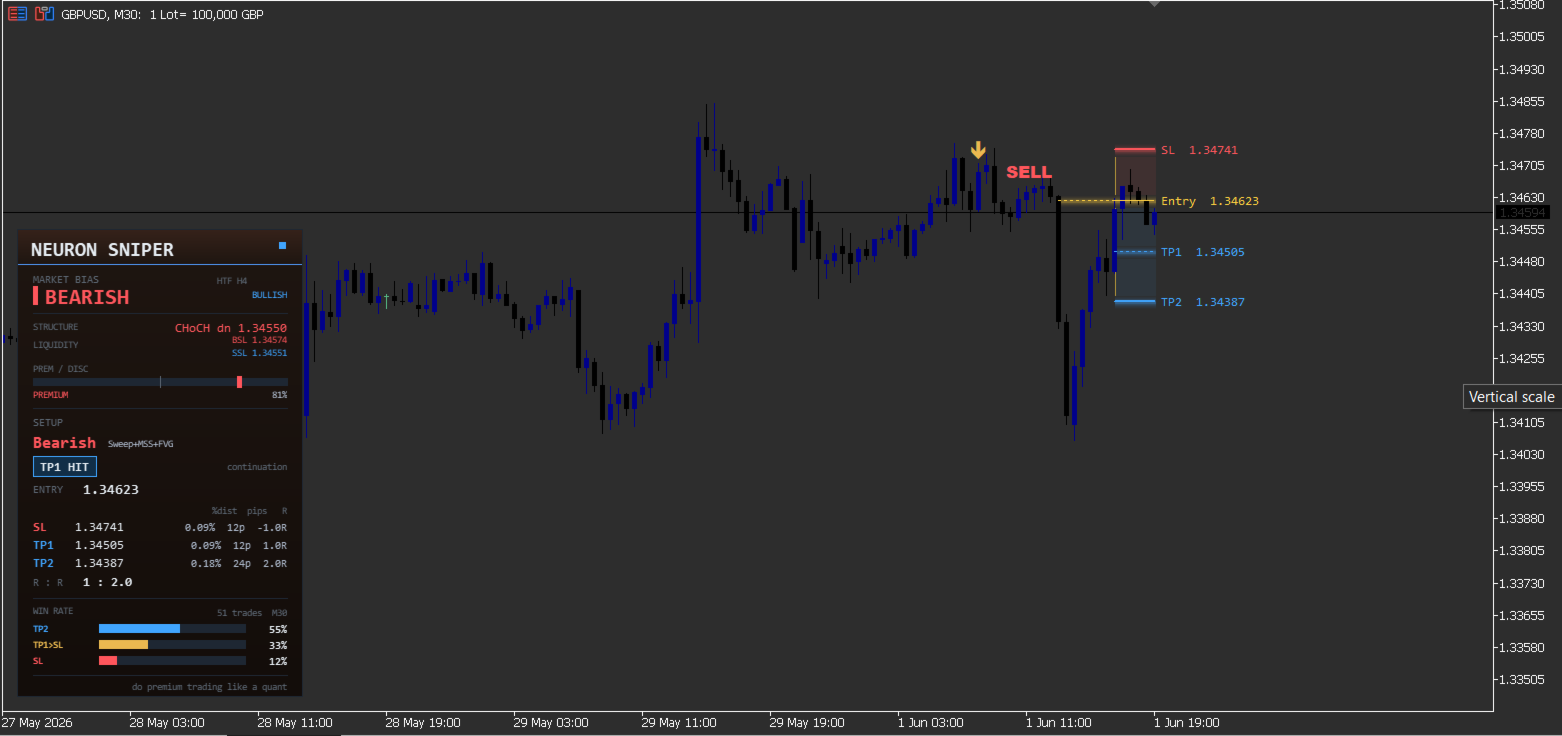
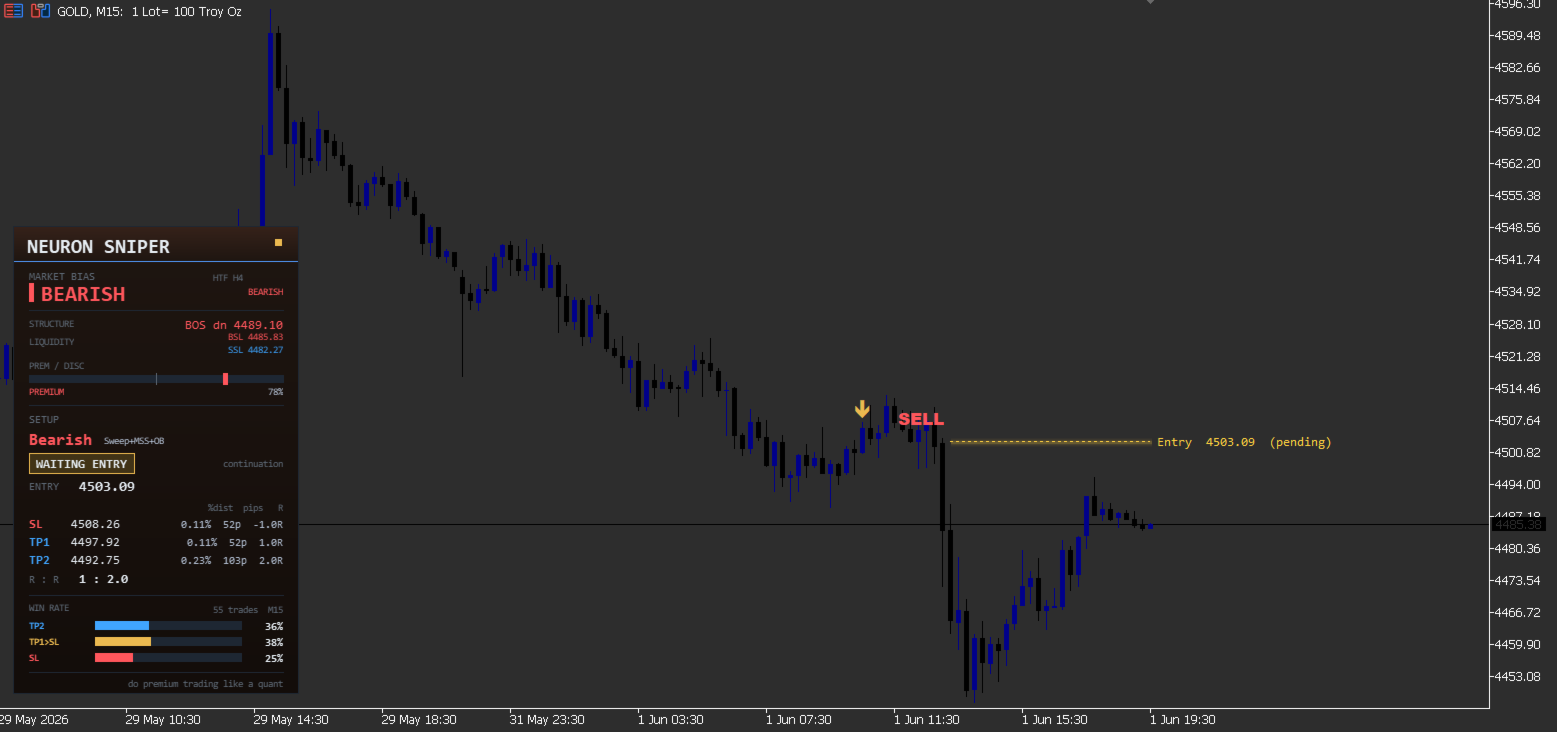
Once a setup is confirmed on a closed bar, its Entry, Stop Loss and Targets are locked and never move. The stop sits just beyond the swept extreme; TP1 and TP2 are a fixed 1:1 and 1:2 reward. The setup is drawn as a clean risk:reward trade box, red risk zone to the stop, blue reward zone to the targets, that begins at the candle the entry actually fills.
=== LIVE TRADE TRACKING ===
The active setup updates on every tick: WAITING ENTRY while the limit is pending, RUNNING once price fills, then TP1 HIT / TP2 HIT / SL HIT the moment price reaches a level, so the result is always current while the levels stay locked (non-repainting). Optional pop-up, push and email alerts fire on the setup forming, the entry triggering, and each TP or SL.
=== WHAT IS INCLUDED ===
| Module | What it does |
|---|---|
| Strict ICT setup engine | Three confirmed events in order, liquidity sweep, market-structure shift, then entry from the fresh FVG or order block, filtered by premium/discount. Locked entry, stop and 1:1 / 1:2 targets. Closed-bar, non-repainting. |
| Risk:reward trade box | A clean box: red risk zone to the stop (just beyond the swept extreme), blue reward zone to the targets, starting at the candle the entry fills. Locked once the setup forms. |
| Live trade tracking | WAITING ENTRY, RUNNING, then TP1 HIT / TP2 HIT / SL HIT on every tick, so the status is always current while the levels stay fixed. |
| Command dashboard | Market bias and higher-timeframe bias, the last structure event, the nearest buy/sell-side liquidity, a premium/discount meter, and the live setup (direction, type, status, entry, stop and targets as distance %, pips and R, with the overall R:R). Plus a descriptive breakdown of how past setups on this chart and timeframe resolved. |
| Full ICT map (optional layers) | Market structure (BOS / CHoCH with HH/HL/LH/LL tags), liquidity (buy/sell-side levels, equal highs/lows and sweep markers), order blocks and fair value gaps, and premium/discount (dealing range, 50% equilibrium and the OTE zone). |
| Back-read (optional) | Past setups drawn as subtle dark neon boxes, each tagged with its outcome and the percentage move, for a quick visual review. |
| Alerts | Setup formed, entry triggered, TP1, TP2 and SL, via pop-up, push and platform email, with de-duplication. |
=== HOW TO READ IT ===
- The setup is a three-step story. A sweep (stop hunt) runs liquidity, a structure shift confirms the turn, and the entry comes from the fresh FVG or order block.
- Read the trade box. The red zone is the risk to the stop beyond the swept extreme; the blue zone is the reward to TP1 and TP2.
- Follow the status. WAITING ENTRY means the limit is pending; RUNNING means price filled; then TP1 / TP2 / SL HIT shows the outcome, while the levels stay locked.
- Premium and discount matter. Longs are taken in discount, shorts in premium, so the entry is on the right side of the dealing range.
- Check the higher-timeframe bias. A reversal that turns into agreement with the HTF bias is with the bigger picture.
- The levels are study levels, not instructions. Entry, stop and targets frame the idea in pips and R.
=== SUGGESTED SETTINGS (starting points) ===
These are starting points to match your style and the market you trade; they are configuration preferences, not performance recommendations. Adjust and test on your own charts.
| If you want... | Try |
|---|---|
| The classic, clean setup | Defaults: all extra ICT layers off, dashboard and current setup on, premium/discount filter on, TP1 1.0, TP2 2.0, higher timeframe H4. |
| Stricter, rarer setups | Turn on "only major sweeps", raise the major swing strength, and tighten the maximum sweep penetration. |
| More setups to study | Keep "only major sweeps" off and widen the sweep lookback and the sweep-to-shift window. |
| The full ICT read | Turn on structure, liquidity, order blocks, fair value gaps, and premium/discount with OTE. |
| A tighter or wider stop | Lower or raise the SL buffer (ATR fraction); the pip floor keeps it sensible on quiet symbols. |
| A different higher-timeframe bias | Set the higher timeframe to D1 for swing context or H1 for faster intraday context. |
| To review past setups | Turn on the history back-read; keep the max-trades count low so the chart stays light. |
| A minimal chart | Keep every context layer off; only the dashboard and the live setup show. |
=== SPECIFICATIONS ===
| Type | Indicator (chart analysis only) |
| Platform | MetaTrader 5, any build |
| Markets | Forex, gold and metals, indices, crypto |
| Timeframes | Any intraday timeframe |
| Engine | Native MQL5, no DLLs, non-repainting closed-bar logic |
| Setup | Reversal: liquidity sweep, market-structure shift, then FVG / order-block entry |
| Filter | Premium/discount: longs in discount, shorts in premium |
| Targets | Locked entry, stop and 1:1 / 1:2 targets, drawn as a risk:reward box |
| Tracking | WAITING / RUNNING / TP1 / TP2 / SL on every tick, levels stay locked |
| Alerts | Setup, entry, TP1, TP2, SL via pop-up, push and platform email |
=== INPUTS ===
| Group | Input | Default | Purpose |
|---|---|---|---|
| Signal engine | InpFractalN | 2 | Minor swing strength (pools / MSS / liquidity) |
| Signal engine | InpMajorFractalN | 5 | Major swing strength (structure / bias) |
| Signal engine | InpLookback | 2500 | Bars to scan (history depth) |
| Signal engine | InpSweepLookback | 60 | Max bars back a swept pool may sit |
| Signal engine | InpOnlyMajorSweeps | false | Only sweep major swings (stricter) |
| Signal engine | InpMaxBarsSweepToMSS | 12 | Max bars from sweep to the structure shift |
| Signal engine | InpMinDisplaceBars | 3 | Minimum displacement-leg span (FVG needs >= 3) |
| Signal engine | InpMaxSweepPenetrATR | 2.5 | Reject sweep if wick penetration > this x ATR (0 = off) |
| Entry + targets | InpUseOrderBlock | true | Use an order block when there is no clean FVG |
| Entry + targets | InpEnforcePremDisc | true | Long entry in discount; short in premium |
| Entry + targets | InpEquilibriumPct | 50.0 | Dealing-range split (%) |
| Entry + targets | InpSLBufferATRfrac | 0.10 | SL buffer = max(this x ATR, pip floor) |
| Entry + targets | InpATRPeriod | 14 | ATR period (SL buffer only) |
| Entry + targets | InpMinBufferPips | 2.0 | SL buffer floor (pips) |
| Entry + targets | InpTP1_R | 1.0 | TP1 reward multiple (1.0 = 1:1) |
| Entry + targets | InpTP2_R | 2.0 | TP2 reward multiple (2.0 = 1:2) |
| Entry + targets | InpTargetTolPips | 3.0 | Equal high/low tolerance (pips) |
| Entry + targets | InpEntryExpiryBars | 30 | Bars a setup waits for entry before it expires |
| Entry + targets | InpShowHistory | false | Show historical trades on the chart (back-read) |
| Entry + targets | InpHistoryMax | 12 | Max historical trades drawn (lower = lighter) |
| ICT layers | InpShowStructure | false | Market structure: BOS / CHoCH |
| ICT layers | InpShowSwingTags | false | HH / HL / LH / LL swing tags |
| ICT layers | InpShowLiquidity | false | Buy/sell-side liquidity lines + EQH/EQL |
| ICT layers | InpLiqPerSide | 5 | Liquidity lines drawn per side |
| ICT layers | InpShowOB | false | Order-block zones |
| ICT layers | InpShowFVG | false | Fair value gap zones |
| ICT layers | InpShowPD | false | Premium / discount range + equilibrium |
| ICT layers | InpShowOTE | false | OTE (optimal trade entry) zone |
| Dashboard | InpShowDashboard | true | Command-center panel |
| Dashboard | InpShowHTF | true | Higher-timeframe bias row |
| Dashboard | InpHTF | H4 | Higher timeframe for the bias row |
| Dashboard | InpRR_UsesTP2 | true | Headline R:R uses TP2 (false = TP1) |
| Style | InpShowOnChart | true | Master switch for all chart drawings |
| Style | InpBull / InpBear / InpEntryClr | blue / red / yellow | Profit-TP / risk-SL / entry colours |
| Style | InpZoneAlpha | 22 | Trade-box fill opacity (0 to 255) |
| Alerts | InpAlertFormed / Entry / TP1 / TP2 / SL | true | Alert on setup, entry, and each target / stop |
| Alerts | InpAlertPopup / InpAlertPush / InpAlertEmail | true / false / false | Alert channels |
=== COMPATIBILITY ===
- MetaTrader 5, any build.
- Any symbol: forex, gold and metals, indices, crypto.
- Any intraday timeframe.
- Native MQL5, no DLLs and no external dependencies.
- Non-repainting closed-bar logic: a setup is confirmed on the bar close and its levels do not change after the fact.
=== PAIRS WITH THE NEURON SUITE ===
NeuronSniper is the reversal setup engine; NeuronFlow trades the continuation. Together they cover both sides of the move. NeuronStructure, NeuronLiquidity and NeuronSessions add the deeper structure, liquidity and session context, and NeuronTrend, NeuronCloud, NeuronIchimoku and NeuronQuant add trend, volatility and regime (each sold separately). Run them together for the full smart-money workspace on one chart.
=== SUPPORT ===
Customisation requests and questions are welcome through the Comments tab on this product page.
NOTE: NeuronSniper is an indicator for chart analysis and decision support only. It draws on the chart, it does not place, modify or close trades, it does not send orders, and it does not manage positions or accounts. The dashboard outcome breakdown and the back-read are descriptive history of past behaviour, not a forecast or a profitable system. All trading decisions and execution remain entirely with you.