Enhanced Telegram Position Tracker MT5

Enhanced Telegram Position Tracker — Real-Time Trade Monitoring & Reporting for MT5

━━━━━━━━━━━━━━━━━━━━━━━━━━━━━━━━━━━━━━━━━━━━━━━━━━━━━━━━━━━━━━━━━━━━━━━━━━━━━━━━━━━━━━━━━━━━━━━━━━━━━━━━

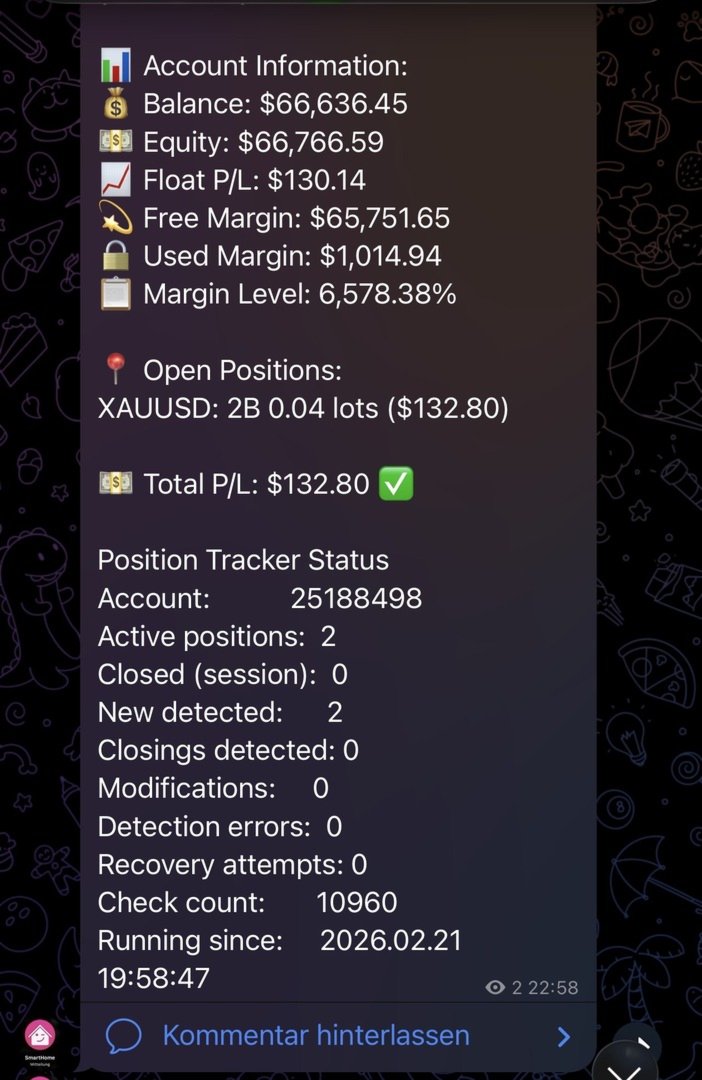
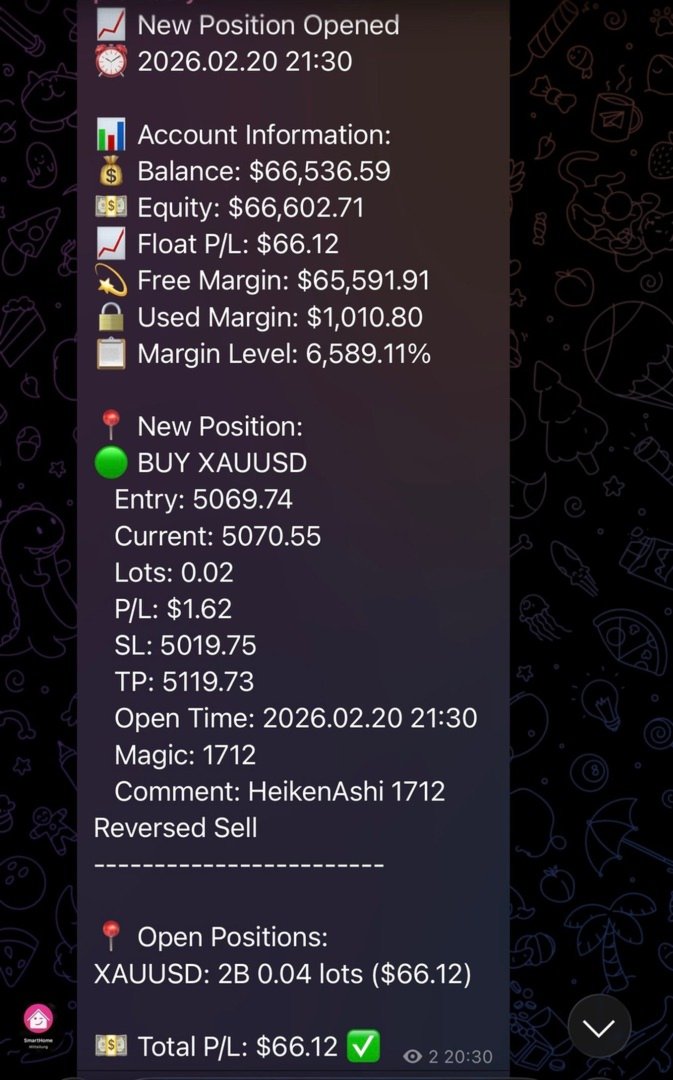
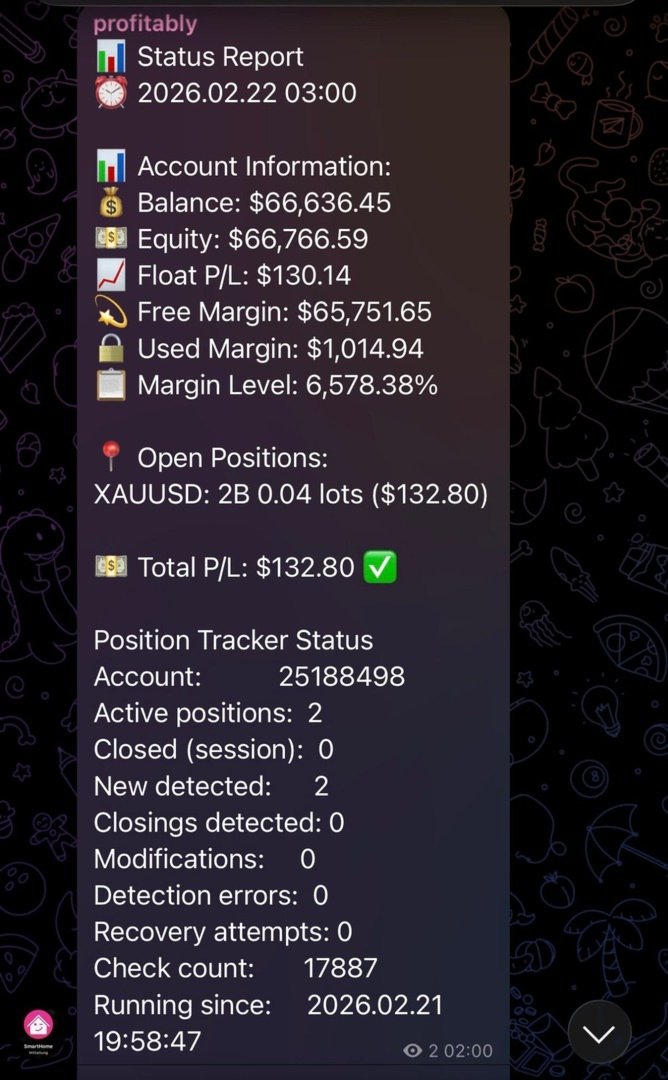
The most complete Telegram reporting solution for MetaTrader 5. Every trade, every update, every alert — delivered instantly to your Telegram channel, group, and forum topics. No missed closures, no duplicates, no spam.

━━━━━━━━━━━━━━━━━━━━━━━━━━━━━━━━━━━━━━━━━━━━━━━━━━━━━━━━━━━━━━━━━━━━━━━━━━━━━━━━━━━━━━━━━━━━━━━━━━━━━━━━

WHY THIS EA STANDS OUT

Most Telegram EAs send a message when a trade opens and another when it closes. That is all.
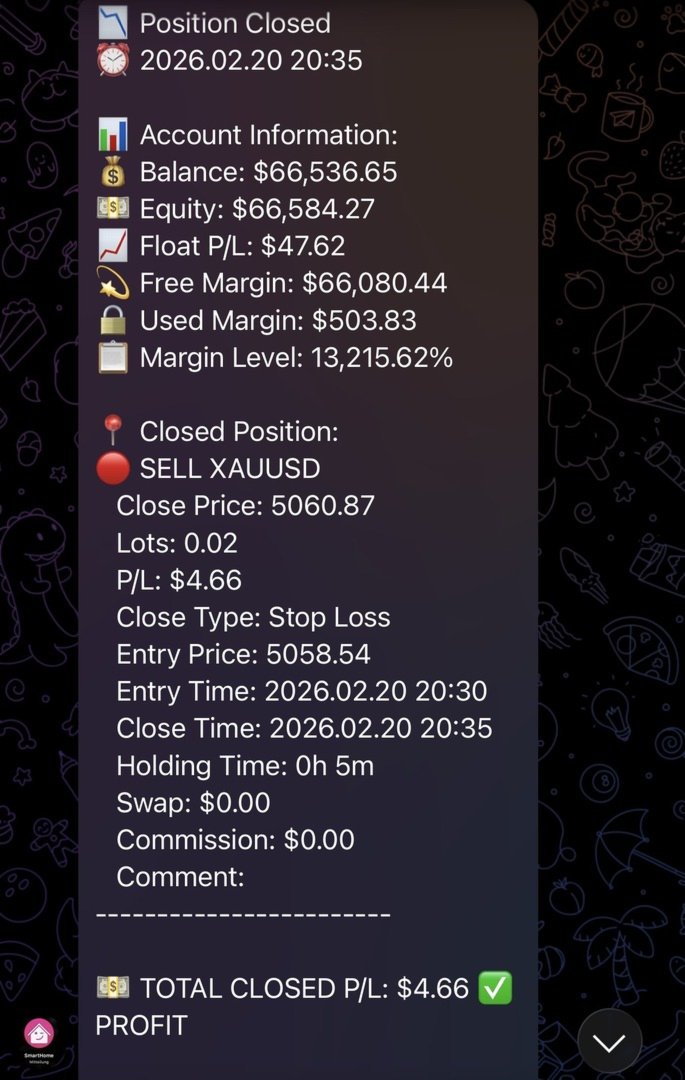
This EA tracks the complete lifecycle of every position — open, SL/TP modification, partial close, and final close — and reports every event with full context, in real time, to exactly the right destination. Every closure reason is labelled: Stop Loss, Take Profit, Close By, or Other.

What makes it unique:

    ✦ Live Streaming Messages — Open positions are tracked as single editable Telegram messages that update their P/L every 30 seconds. No message flood. One message per trade, continuously updated until the trade closes.

    ✦ Dual-Posting Architecture — Your public channel receives every message in classic sequential style. Your private Telegram group with Forum Topics receives the same messages automatically sorted into dedicated topics: Live Trades, Daily P&L, EA Status, Commands. Both destinations are updated simultaneously without any extra configuration.

    ✦ 15-Button Interactive Dashboard — Followers type /menu in the Commands topic and get an instant Telegram keyboard with live account data on demand: open positions, P&L, performance stats, risk overview, live trade details, SL/TP distances. Read-only. No write access to MT5.

    ✦ EA Offline State — When MT5 shuts down, the EA edits all active live messages to an ⏸ EA OFFLINE state with a last-seen timestamp. On the next startup, live tracking resumes automatically from the same messages.

    ✦ Zero Missed Closures — Startup reconciliation detects any position that closed while the EA was offline (weekend restart, MT5 update, VPS reboot) and immediately sends the missed close report.

    ✦ Crash Detection — Session flag system distinguishes clean shutdowns from crashes. Your next startup message tells you exactly what happened.

    ✦ HFT Protection — Built-in burst detection prevents Telegram rate limiting during scalping sessions. Individual reports are automatically batched when event rates exceed your configured threshold, then restored to individual mode once the burst ends.

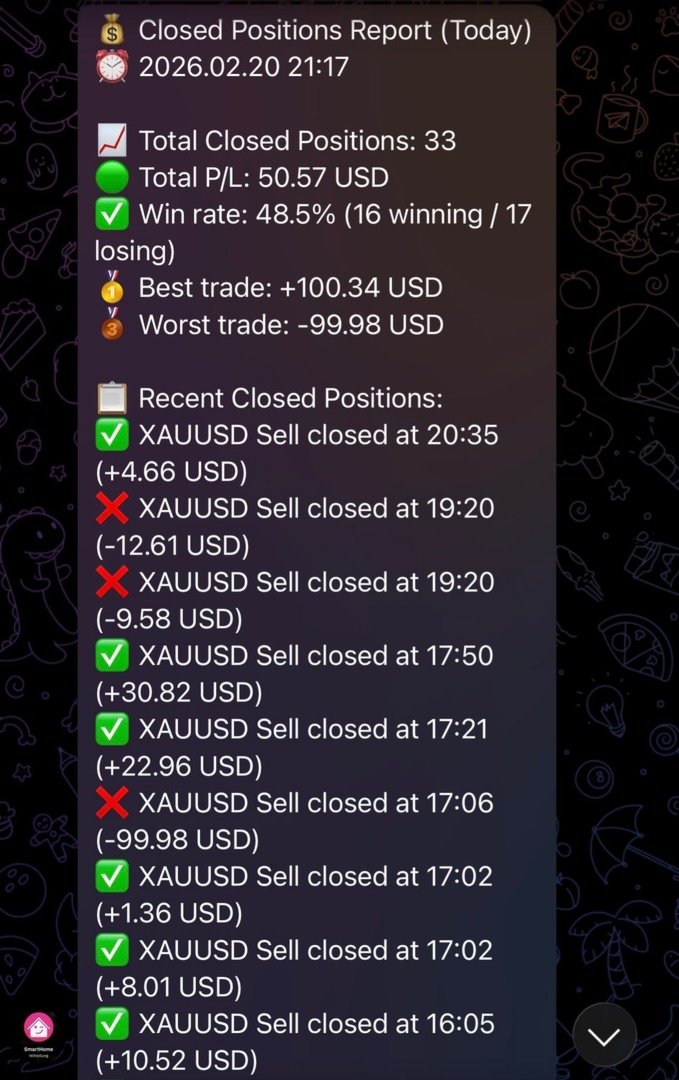
    ✦ Automatic Daily, Weekly & Monthly Reports — End-of-day P&L summary sent every night at 23:59, full weekly performance report every Friday at 22:00, and monthly report on the last day of every month at 22:00 —all delivered to your channel and P&L Reports topic automatically. All three reports consistently show: closed P&L for the period, float P&L of all currently open positions regardless of when they were opened, and a combined total — giving a complete picture of realised performance and live exposure in a single report.

    ✦ Full Backward Compatibility — Only ChatID required. All new features are optional. Existing users upgrading from any previous version need zero configuration changes.

━━━━━━━━━━━━━━━━━━━━━━━━━━━━━━━━━━━━━━━━━━━━━━━━━━━━━━━━━━━━━━━━━━━━━━━━━━━━━━━━━━━━━━━━━━━━━━━━━━━━━━━━

FEATURES

Live Trade Streaming
    — Each new position creates a single Telegram message in the Live Trades topic
    — Message updates automatically every 30 seconds with current price, pts, P/L, SL/TP, and hold time
    — SL/TP modifications edit the live message — no new message is sent
    — Partial closes (volume reductions) update the live message with new lot size
    — On position close: live message is edited to compact CLOSED state (entry, close price, P/L, reason, hold duration) — no full close report is posted to the Live Trades topic; full report goes to your classic channel only

Complete Position Lifecycle Tracking
    — Every event in a position's life is captured and reported — nothing is missed
    — Supports both position types: BUY (long) and SELL (short)
    — Tracks every closure reason with individual labels in the report:
        🔴 Stop Loss — SL level hit
        🟢 Take Profit — TP level hit
        🔄 Close By — hedge close, both positions reported as paired event
        ⬜ Other — manual, EA-controlled, Stop Out, or any other reason
    — Pending orders (Buy/Sell Limit, Buy/Sell Stop) are captured the moment they execute
    — Works on all account types: Standard, ECN, Hedge, Netting

Dual-Posting: Channel + Group Topics
    — Classic channel (ChatID) receives every message in sequential style
    — Telegram Supergroup with Forum Topics receives messages sorted by type:
     📊 Live Trades topic — new positions, closes, P/L updates
     📊 P&L Reports topic — EOD daily (23:59), weekly (Friday 22:00), monthly (last day 22:00)
     🔧 EA Status topic — startup, stop, health reports, HFT alerts
     💬 Commands topic — follower interactive menu and bot replies
    — All four topic slots are independent and optional
    — Input format: -1001234567890:111 (GroupID:TopicThreadID)
    — Plain ChatID without colon works exactly as before — full backward compatibility

Follower Interactive Menu
    — Type /menu or /start in the Commands topic to open a 15-button inline keyboard
    — 📅 Today, 📆 Weekly, 🏆 Monthly buttons show simple P&L summary; full detailed reports are sent automatically to the P&L Reports topic
    — All responses are live data from the running MT5 instance, delivered in seconds
    — Read-only — no write access to MT5 positions from Telegram

     📅 Today Result — closed P/L for the current trading day
     📆 Weekly Stats — full weekly P&L report on demand: total P&L, trades, win rate, avg win/loss, profit factor, best/worst trade
     🏆 Monthly Stats — closed P/L for the current calendar month
     📋 Closed Today — list of up to 10 closed trades today with direction, symbol, P&L and close time
     📍 Open Positions — all open trades with symbol, direction, lots, entry price, current P/L
     📈 Live Trades — up to 10 open positions with lots, entry, P/L incl. swap, runtime, total float P/L
     🎯 SL/TP Levels — current price, SL and TP level with distance in points for each open trade
     💹 Breakeven — per-position BE status: ✅ set, ⏳ not yet with points remaining to entry, ❌ no SL — plus summary count
     💼 Account Info — balance, equity, floating P/L, free margin (hidden if SendAccountInfo=false)
     ⚠️ Risk — open drawdown $/%, margin used %, free margin, margin level, total lots, net exposure (hidden if SendAccountInfo=false)
     📊 Performance — win rate, avg win, avg loss, profit factor for today and this month
     ⚡ Last Trade — symbol, P/L, and close time of the most recent closed trade
     ℹ️ EA Info — EA version, uptime, fi.con Investment Group
     🕐 EA Uptime — running time in days/hours/minutes/seconds, start timestamp, account number (hidden if SendAccountInfo=false)
     🔄 Refresh Menu — re-sends the button keyboard at any time

    — Configurable menu title via FollowerMenuTitle input parameter
    — Offset persistence ensures no duplicate callbacks after EA restart
    — Command logging at LogLevel 1: every button press and response length recorded in MT5 journal

Zero Missed Closures
    — Open position snapshot written after every deal event and at every verification interval
    — On startup: snapshot compared against current open positions
    — Any position that closed while EA was offline is detected, looked up in 7-day history, and reported immediately
    — Startup message shows count of recovered closures

Crash Detection
    — Session flag file written at startup (instance-specific, multi-terminal safe)
    — Deleted only on clean shutdown after successful stop message
    — Startup message shows warning if previous session ended without clean stop

HFT Protection
    — Configurable event rate threshold (default: 10 events/minute)
    — Automatic switch to batch reporting during burst periods
    — Telegram send interval throttle with message queue
    — Separate alert sent to EA Status topic when HFT mode activates and deactivates
    — Individual reporting automatically restored after configurable quiet period

Fully Configurable Trade Reports
    — 17 individual field toggles for opened and closed position reports
    — Opened: Lots, Entry Price, Current Price, SL, TP, Open Time, P/L, Comment, Magic
    — Closed: Lots, Close Price, Entry Price, Close Reason, Opened Time, Closed Time, Hold Duration, Swap, Commission, P/L, Comment, Magic
    — All fields default true — zero impact on existing users

Health & Status Monitoring
    — Configurable health reports (default: every 12 hours)
    — Includes: uptime, messages sent, win rate today, message queue status, server ping, connection state, trade permissions, free margin
    — Seven chart buttons for manual triggers, stacked bottom-left: [Verify Positions], [Status Report], [Health Report], [Send EOD Report], [Send Weekly Report], [Send Monthly Report], [Reseed Live Msgs]
    — Connection Test button (bottom-center, separate): pings Telegram API, shows result as chart label for 10 seconds + details in MT5 Journal
    — Manual Position Verification report goes to EA Status topic + channel

Smart Batch Reporting
    — Configurable minimum positions and time window for batch mode (default: 4 positions / 10 seconds)
    — Batch summaries sent when threshold exceeded — individual reports otherwise
    — Close-By detection: paired positions reported as single combined close event

Message Safety
    — Automatic message splitting at 4000 characters (Telegram HTML limit)
    — Priority queue: critical alerts bypass rate limiting
    — HTML escaping prevents tag collisions in broker comments
    — Smart Comment extraction: EA name + [sl]/[tp]/[tp1] from deal comments

━━━━━━━━━━━━━━━━━━━━━━━━━━━━━━━━━━━━━━━━━━━━━━━━━━━━━━━━━━━━━━━━━━━━━━━━━━━━━━━━━━━━━━━━━━━━━━━━━━━━━━━━

PARAMETERS

Telegram Settings
   InpChannelName   —   Display name for your channel (documentation only)
   TelegramToken   —   Bot token from @BotFather — required
   ChatID   —   Channel ID(s), comma-separated for multiple channels — required
   MessageInterval   —   Status report interval in minutes (default: 60)

Multi-Channel Broadcasting
   LiveChannelID   —   Live trades: GroupID:TopicID or plain ChatID (blank = use ChatID)
   DailyChannelID   —   P&L Reports topic (daily EOD, weekly, monthly): GroupID:TopicID or plain ChatID (blank = use ChatID)
   StatusChannelID   —   EA status + health: GroupID:TopicID or plain ChatID (blank = use ChatID)
   FollowerChatID   —   Follower interactive menu: GroupID:TopicID (blank = disabled)
   FollowerMenuTitle   —   Title text shown at the top of the follower menu keyboard
   LiveUpdateInterval   —   Live P/L refresh interval in seconds (default: 30, 0 = disabled)

Position Tracking Settings
   SendEAStartedMessage   —   Send startup message (default: true)
   SendAccountInfo   —   Include account info in reports; when false: 💼 Account Info button returns unavailable message, 🕐 EA Uptime omits account number (default: true)
   SendTradeUpdates   —   Send trade open/close notifications (default: true)
   SendClosedPositionsReport   —   Include closed P/L in hourly status reports and health reports (default: true)
   SendAutoReports   —   Send automatic EOD/Weekly/Monthly P&L reports (default: true)
   TrackPositionModifications   —   Track and report SL/TP changes (default: true)

Trade Report Fields — General
   ShowField_Lots   —   Show lot size (default: true)
   ShowField_PL   —   Show P/L (default: true)
   ShowField_Comment   —   Show trade comment field (default: true)
   ShowField_Magic   —   Show magic number (default: true)

Trade Report Fields — Opened Position
   ShowField_EntryPrice   —   Entry price (default: true)
   ShowField_CurrentPrice   —   Current price (default: true)
   ShowField_SL   —   Stop Loss (default: true)
   ShowField_TP   —   Take Profit (default: true)
   ShowField_OpenTime   —   Open time (default: true)

Trade Report Fields — Closed Position
   ShowField_ClosePrice   —   Close price (default: true)
   ShowField_EntryOnClose   —   Entry price on close report (default: true)
   ShowField_Reason   —   Close reason: Stop Loss / Take Profit / Close By / Other (default: true)
   ShowField_OpenedTime   —   Time position was opened (default: true)
   ShowField_ClosedTime   —   Time position was closed (default: true)
   ShowField_Hold   —   Hold duration (default: true)
   ShowField_Swap   —   Swap (default: true)
   ShowField_Commission   —   Commission (default: true)

Health & Reliability Settings
   SendHealthReports   —   Enable periodic health reports (default: true)
   HealthReportInterval   —   Health report interval in hours (default: 12)
   SendHealthReportOnStartup   —   Send health report on EA start (default: false)
   ShowVerifyButton   —   Show [Verify Positions] chart button (default: true)
   ShowStatusButton   —   Show [Status Report] chart button (default: true)
   ShowHealthButton   —   Show [Health Report] chart button (default: true)
   ShowEODButton   —   Show [Send EOD Report] chart button (default: true)
   ShowWeeklyButton   —   Show [Send Weekly Report] chart button (default: true)
   ShowMonthlyButton   —   Show [Send Monthly Report] chart button (default: true)
   ShowReseedButton   —   Show [Reseed Live Msgs] chart button (default: true)
   ShowConnTestButton   —   Show [Connection Test] chart button (default: true)
   ButtonYOffset   —   Button distance from chart bottom in pixels (default: 30)
   ButtonWidth   —   Chart button width in pixels (default: 235)
   ConnTestButtonX   —   X position of Connection Test button from left in pixels (default: 400)

Logging & Check Interval
   EnableRobustTracking   —   Tick-based position tracking (default: true)
   LoggingLevel   —   0=Minimal, 1=Normal, 2=Verbose, 3=Trace (default: 0)
   VerificationInterval   —   Position verification interval in seconds (default: 300)
   PositionCheckInterval   —   Tick-based check interval in seconds (default: 1)
   DataFolderPath   —   Custom data folder path (blank = default account folder)

HFT Protection
   HFT_Threshold   —   Events/minute to trigger HFT mode (default: 10)
   HFT_CooldownMultiplier   —   Send cooldown multiplier in HFT mode (default: 5)
   HFT_ModeDuration   —   Quiet seconds before HFT mode deactivates (default: 120)
   HFT_MinSendInterval   —   Minimum milliseconds between sends (default: 200)
   HFT_QueueMaxSize   —   Max queued messages before dropping low-priority (default: 50)

Message Length Control
   MaxPositionsInReport   —   Maximum positions in a single report (default: 10)
   UseCompactReporting   —   Compact position format for large accounts (default: true)
   ShowTrackerStatus   —   Show Position Tracker diagnostics block (default: true)

Batch Reporting
   Batch_MinPositions   —   Minimum positions to trigger batch mode (default: 4)
   Batch_TimeWindowSec   —   Time window in seconds to collect batch (default: 10)

━━━━━━━━━━━━━━━━━━━━━━━━━━━━━━━━━━━━━━━━━━━━━━━━━━━━━━━━━━━━━━━━━━━━━━━━━━━━━━━━━━━━━━━━━━━━━━━━━━━━━━━━

INSTALLATION

    1. Copy EnhancedTelegramEA.mq5 to your MT5 Experts folder
    2. Compile in MetaEditor (F7)
    3. Create a Telegram bot via @BotFather and copy the token
    4. Add the bot to your channel as Admin with Post Messages permission
    5. Attach the EA to any chart and enter TelegramToken and ChatID
    6. All other settings are optional — defaults work out of the box

Optional: Telegram Group with Forum Topics

    1. Create a Supergroup and enable Topics in Group Settings
    2. Add your bot as Admin — disable Privacy Mode to allow reading messages
    3. Create four topics: Live Trades, P&L Reports, EA Status, Commands
    4. For each topic: tap the topic name → copy the link → note the number at the end
    5. Enter: GroupID:TopicNumber in LiveChannelID, DailyChannelID, StatusChannelID, FollowerChatID
    6. Group ID: send any message in the group, reply with /json via @getidsbot — find "id" in the chat object

Allow WebRequest for: https://api.telegram.org in MT5 Tools → Options → Expert Advisors

━━━━━━━━━━━━━━━━━━━━━━━━━━━━━━━━━━━━━━━━━━━━━━━━━━━━━━━━━━━━━━━━━━━━━━━━━━━━━━━━━━━━━━━━━━━━━━━━━━━━━━━━

MORE TOOLS FROM fi.con INVESTMENT GROUP

We offer a complete MT5 toolkit built by traders. If you trade actively and want more automation, reporting, and control, these tools extend your MT5 setup significantly: 

    📡  MT5 to Telegram Informer — sends every trade open and close to your Telegram channel in real time. Full position lifecycle: pending order execution, SL/TP changes, partial closes, close reason labelling. Multiple channels, Topics support, configurable report fields. If you share your trades with a Telegram audience, this is your tool. 

    📊  Telegram Trading Reporter MT5 — automated performance reports delivered to Telegram on schedule: daily EOD summary, weekly stats, monthly overview. Analyses your full trade history and sends structured reports with P&L, win rate, profit factor, best/worst trade — all without you having to open MT5. 

    🛠️  Chart Order Trade Manager MT5 — professional on-chart trade management panel for active traders. Visual SL/TP placement, automatic lot size calculation from risk %, one-click breakeven, trailing stop, partial close. Designed for traders who manage positions manually while running EAs in parallel. 

    🚫  Position Closure Management MT5 — automatically resolves hedged position pairs and locks in the net result at exactly the right moment. Essential for grid and martingale strategies, prop firm challenge rules that prohibit hedging, and any setup where open buy/sell pairs need controlled resolution. 


Version 2.65  |  fi.con Investment Group  |  MQL5 Marketplace
Produtos recomendados
Episode Health Monitor Episode Health Monitor is a trading utility for MetaTrader 5 designed to analyze the real-time condition of active trading positions directly on the chart. The tool evaluates the current “trading episode” - a group of open positions - and provides a structured view of risk, stability, and distance to potential failure. Instead of relying only on profit/loss or price movement, it helps identify whether the current position is stable, weakening, or approaching a critical st
Trading Utility for Forex Currency Pairs Only not for Gold  Functions Auto Lot Calculation based on Risk Auto stoploss  Auto TakeProfit Breakeven Auto Close Half % Close in percentage with respect to the PIPs Pending Orders BuyLimit Sell Limit with distances BuyStop Sell Stop    with distances Trading Informations Risk in percentage For Multiple trades Combine Takeprofit and Combine Stoplosses
Trade Assistant 38 in 1
Makarii Gubaydullin
4.91 (23)
Ferramenta Multifuncional: Calculadora de Lote, Ordens Grid, Proporção R/R, Gerenciador de Negociações, Zonas de Oferta e Demanda, Price Action e muito mais Versão Demo   |   Manual do Usuário O Assistente de Trading   não funciona no testador de estratégias : você pode baixar a   Versão Demo AQUI  para testar a utilidade . Entre em contato   para qualquer dúvida  / ideias de melhoria / caso encontre um erro Se precisar de uma versão MT4, ela está disponível aqui Simplifique, acelere e automati
Expert TP SL v04 - Professional Trading Assistant with AI Motivation System Advanced manual trading tool with automatic risk management, overtrading protection, and intelligent psychological support for disciplined trading. PRODUCT OVERVIEW Expert TP SL v04 is a comprehensive trading assistant designed for manual traders who want to maintain emotional discipline while automating risk calculations. This isn't just another order placement tool - it's a complete trading psychology system that pr
This tool will perform Trailing stop loss and Break even management for orders. Helps you limit or reduce the time spend watching orders on the screen, especially when you need to go to sleep. Just add this EA to 1 chart, you can manage all pairs. You can filter orders by comment, magic number, symbol and order ticket number. When Breakeven it can add shift/offset pips (to cover the commission...). You can try in strategy tester before purchase. The EA will add Buy and Sell alternately, so you
CoPilot dashboard MT5
Frederic Jacques Collomb
CoPilot — Painel de trading diário Conheça os seus números. Opere com clareza. Versão MT4 O que é o CoPilot? O CoPilot é um assistente de trading de nível profissional que exibe em tempo real todas as estatísticas de desempenho diário diretamente no gráfico — com uma curva de equidade ao vivo que se atualiza operação por operação. Desenvolvido para traders ativos que precisam de visibilidade instantânea da sua sessão sem sair do gráfico, o CoPilot agrega cada operação fechada do dia em todos os
TradePilotmt5
Hossein Khalil Alishir
TradePilot Expert Advisor (EA) for MetaTrader 5 TradePilot is a professional and user-friendly Expert Advisor (EA) for MetaTrader 5 (MT5) . It simplifies automated trading , risk management , and trade execution with a smart trading panel . Perfect for beginners and experienced traders looking for a reliable trade manager EA with automated lot size calculation and smart position management. Key Advantages User-Friendly Trading Panel: Customizable panel with buttons and hotkeys for fast ex
RRtoolBox
David Ruiz Moreno
RRtoolbox - Professional Tools: Risk:Reward Trading Tool (SL/TP Horizontals + Pending orders + Diagonals), Alerts set on trend lines (for alerts on diagonal levels), SelfManagement (BE, partials...), close/cancelling by time, Statistics, Info and trading on chart. One-Click Trading with Visual Risk:Reward Management RRtoolbox is a comprehensive trading panel that combines one-click order execution,  statistics and  powerful visual Risk:Reward tools, alerts set with trendlines, on chart butt
Candlestick Pattern Scanner is a multi-timeframe and multi-symbol dashboard and alert system that checks all timeframes and currency pairs for different candlestick patterns that are formed in them. Scanner is integrated   with support and resistance zones so you can check the candlestick patterns in most important areas of the chart to find breakout and reversal patterns in the price chart. Download demo version   (works on M4,M6,M12,H3,H8 timeframes and 20 symbols of Market Watch window) Read
Trade Assistant Risk Calculator is the ultimate all-in-one floating trading panel designed for professional manual traders. It combines Visual Chart Trading , Automatic Risk Calculation , and Advanced Position Management into a single, sleek interface. Stop calculating lot sizes manually. Stop guessing your Risk:Reward ratio. With Trade Assistant Risk Calculator, you simply drag lines on the chart, and the EA calculates the exact lot size to match your risk percentage, equity, or money target.
Breakevan Utility
Jose Luis Thenier Villa
BreakEvan Utility  Is a simple tool in a panel with this utilities: This utility will draw a Golden Line in the chart applied showing the breakeven price, considering all the positions opened for that specific symbol. Also the information panel shows: Balance Breakeven Price for that chart Force Breakeven (for that symbol) as ON/OFF Force Breakeven Global (takes into account all trades opened) as ON/OFF Total Lots opened for Symbol Total Lots opened Global And two buttons: Force Breakeven: Whe
King ElChart Manual Trade Panel
Mohammed Maher Al-sayed Mohammed Ahmed Saleh
King Chart – Manual Trading Panel for MetaTrader 5 Overview King Chart is a simple yet powerful manual trading panel built for traders who want speed, precision, and clarity. It enables quick order execution, clear lot control, and real-time account monitoring  all directly on your MT5 chart. Main Features Multi-Lot Trade Execution 3 Buy and 3 Sell buttons for instant execution Each button is tied to a custom lot size field Designed for flexible scaling in or out of trades Position Management D
CosmiCLab SMC FIBO CosmiCLab SMC FIBO is a professional trading indicator designed for traders who use Smart Money Concepts (SMC), market structure analysis and Fibonacci retracement levels. The indicator automatically detects market swings and builds Fibonacci levels based on the latest impulse movement. It also identifies market structure changes such as BOS (Break of Structure) and CHOCH (Change of Character), helping traders understand the current market direction. CosmiCLab SMC FIBO also pr
Smart TP SL Manager MT5 Smart TP SL Manager MT5 is a trade management utility for MetaTrader 5 designed to monitor and manage position protection directly from the chart through a compact panel. The tool focuses on a common problem in manual trading: loss of control over stop loss, take profit, and position risk when multiple trades are active. Instead of relying on manual checking or switching between terminal windows, the panel provides a structured view of protection status and risk conditio
TradePad
Ruslan Khasanov
5 (1)
O TradePad é uma ferramenta para negociação manual e algorítmica. Apresentamos uma solução simples para operações de negociação rápida e controlo de posições em diversos instrumentos de negociação. Atenção, a aplicação não funciona no testador de estratégias! Versão de teste da aplicação para uma conta de demonstração e uma descrição de todas as ferramentas A interface da aplicação está adaptada para monitores de alta resolução, simples e intuitiva. Para um trabalho confortável, o comerciante re
Inverted_Chart_EA Utility Expert Advisor Inverted_Chart_EA creates and maintains a mirror-inverted chart of any symbol and timeframe. It automatically generates a custom instrument (e.g. US30_INV ) and keeps its price history updated in real time, with bars mirrored around a chosen pivot. This utility gives traders a new way to analyze the market from a different perspective by flipping the chart upside down. Why use an inverted chart? Highlight hidden patterns – price formations that look ordin
SLTPSetter
Raphael Djangmah Osro Agbo
SLTPSetter - StopLoss Take Profit Setter HOW DOES IT WORK? Risk and account management is a very critical aspect of trading. Before entering a position, you must be fully aware how much you will be willing to loss both in percentage and value. This is where SLTPSetter gets you covered.  All you need to do is attach the indicator on the chart and PRESS BUY OR SELL automatically, all parameters needed for placing the trades will be provided at the top left corner of the screen. Feel free to adjust
Overview Mirror Signals Service EA (Text only)   is a powerful monitoring Expert Advisor that automatically sends   real-time Telegram notifications   for all important trade events on your MetaTrader 5 account. It is engineered specifically for   signal providers ,   trade-copier operators ,   auditors ,   educators , and   professional trading services   that require immediate, detailed, and reliable reporting. Everything from   entries, exits, SL/TP changes, comment changes, trailing sto
Fast execution utility for manual traders. Drag-and-drop visual trading, split take-profits, and single-ticket management system. Speed, Precision, and Risk Control. KAB Trade Manager is built for traders who need to execute fast but keep risk tight. It integrates all essential tools into floating, collapsible windows. Core Functions: Instant Order Execution:   Market and Pending orders with automatic Lot sizing based on SL distance. Focus Ticket Manager:   A dedicated window to monitor and mana
Volume Profile V6
Andrey Kolesnik
4.67 (3)
Indicador de perfil de volume de mercado + oscilador inteligente. Funciona em praticamente todos os instrumentos — pares de moedas, ações, futuros, criptomoedas, tanto em volumes reais quanto em ticks. É possível configurar a definição automática do intervalo de construção do perfil (por exemplo, por uma semana ou um mês, etc.), bem como definir o intervalo manualmente movendo os limites (duas linhas verticais: vermelha e azul). É exibido na forma de um histograma. A largura do histograma em um
You can change the time period of the chart at the touch of a button. You can also change multiple charts at the touch of a button. You can also change multiple charts at the touch of a button,   saving you the trouble of changing time periods. We are live-streaming the actual operation of the system. Please check for yourself if it is usable. Please check it out for yourself. https://www.youtube.com/@ganesha_forex We do not guarantee your investment results. Investments should be made at you
RSI Currency Strength Meter is a powerful and elegant multi-currency indicator that measures the real-time relative strength of the 8 major currencies using RSI logic. By calculating the smoothed performance of each currency across its major pairs and applying the RSI formula, it delivers clean and responsive strength lines that make it easy to spot which currencies are truly strong or weak at any moment. This indicator is particularly useful for visualizing currency correlations and divergence
Trade Manager DaneTrades
Levi Dane Benjamin
4.36 (28)
Trade Manager para ajudá-lo a entrar e sair rapidamente de negociações enquanto calcula automaticamente seu risco. Incluindo recursos para ajudar a evitar negociações excessivas, negociações de vingança e negociações emocionais. As negociações podem ser gerenciadas automaticamente e as métricas de desempenho da conta podem ser visualizadas em um gráfico. Esses recursos tornam este painel ideal para todos os traders manuais e ajudam a aprimorar a plataforma MetaTrader 5. Suporte multilíngue. Vers
This EA is there to take your trade closing stress away. Quickly close as many trades as you have opened at the click of a button, INCLUDING PENDING ORDERS. This works on the MT5 platform whether it be currencies, Indices, stocks or Deriv synthetic indices. I have saved it under utilities as it is a utility, however, to install this, you have to save the file in you "EA" folder. That is; Go to "File", then "Open Data Folder", "MQL5" and then "Experts". Paste this file there. Restart MT5 and you'
Click Trading
Jawad Tauheed
5 (2)
One Click Trading – Auto TP SL Developer TraderLinkz Version 1.00 Category Utility What it does Adds missing TP and SL to your manual trades and pending orders Sets them once per ticket Lets you move TP and SL afterward Works on hedging and netting accounts Scans on every tick and reacts on trade events Why you want it You place faster entries You get consistent risk and exit targets You reduce fat finger errors You keep full manual control Quick start Attach the EA to any chart Keep TP and SL e

FREE
Headline ShikaaTraders Gold Grid Pro is a high-performance trade management utility designed specifically for XAUUSD (Gold) and high-volatility pairs. It allows traders to execute complex grid-layering strategies with a single click, ensuring you never miss an entry during fast market moves. Why Choose Gold Grid Pro? Manual trading on Gold requires speed. Manually calculating distances and opening multiple positions takes too much time. This utility automates the "Scaling-In" process, allowing y
Trading Assistent is a multifunctional trading panel that combines all necessary tools for professional trading. The panel provides complete control over positions, in-depth risk analysis, and fast order execution. MAIN FUNCTIONAL BLOCKS Position Management: - Real-time viewing of all open positions - Sorting by symbol, profit, volume, and type - Visual indication of profitable and losing positions - Bulk closing operations - Breakeven function for profit protection Trading Operations: - I
Noize Absorption Index - is the manual trading system that measures the difference of pressure between bears forces and bulls forces. Green line - is a noize free index that showing curent situation. Zero value of index shows totally choppy/flat market.Values above zero level shows how powerfull bullish wave is and values below zero measures bearish forces.Up arrow appears on bearish market when it's ready to reverse, dn arrow appears on weak bullish market, as a result of reverse expectation.
This indicator presents an alternative approach to identify Market Structure. The logic used is derived from learning material created by   DaveTeaches (on X) Upgrade v1.10: + add option to put protected high/low value to buffer (figure 11, 12) + add  Retracements  value to buffer when Show Retracements When quantifying Market Structure, it is common to use fractal highs and lows to identify "significant" swing pivots. When price closes through these pivots, we may identify a Market Structure S
Os compradores deste produto também adquirem
Trade Assistant MT5
Evgeniy Kravchenko
4.42 (207)
Ajuda a calcular o risco por comércio, a fácil instalação de uma nova encomenda, gestão de encomendas com funções de fecho parcial, trailing stop de 7 tipos e outras funções úteis. Materiais e instruções adicionais Instruções de instalação   -   Instruções para a aplicação   -   Versão de teste da aplicação para uma conta de demonstração Função de linha Mostra no gráfico a linha de Abertura, Stop Loss, Take Profit. Com esta função é fácil definir uma nova ordem e ver as suas características ad
VERIFIED TRADING RESULTS - Farmed Hedge Yield Axi Copy:  https://www.mql5.com/en/signals/2356376 - Farmed Hedge Yield Exn Copy:   https://www.mql5.com/en/signals/2356404 - Farmed Hedge Yield V Copy:  https://www.mql5.com/en/signals/2357156 Contact me via private message to receive the User Manual and Setup Video. * Thai Lauguage Support Available Farmed Hedge Yield Farming - Professional Pair Trading Dashboard (Manual - Hybrid - Semi/Automated EA) VERSION 3 - WILD HARVEST UPDATE Trading A
Footprint Chart Pro — Professional OrderFlow EA for MetaTrader 5 Version 6.34 | Professional tool for real traders | Institutional-Grade Visualization DEMO USERS - PLEASE SELECT EVERY TICK / REAL TICK WHEN TESTING AND YOU HAVE DOWNLOADED HISTORICAL DATA. IF YOU SEE A WAITING SCREEN AND IT IS NOT DOWNLOADING, IT MEANS YOU HAVE LOW HISTORICAL DATA. TRY 1 MIN AND 5 MIN FIRST ON 1 DAY DATA. ONE DAY DATA SHOULD BE THE NEWEST AND MOST CURRENT DATE. PLEASE WAIT UNTIL THE MARKET HAS ROLLED OVER PERIOD.
Ultimate Extractor
Clifton Creath
5 (9)
Ultimate Extractor - Professional Trading Analytics for MT5 *****this is the local HTML version of Ultimate Extractor. For the online version please reach out to me directly****** Ultimate Extractor transforms your MetaTrader 5 trading history into actionable insights with comprehensive analytics, interactive charts, and real-time performance tracking. What It Does Automatically analyzes your MT5 trading history across all Expert Advisors and generates detailed HTML reports with interactive vi
HINN Lazy Trader
ALGOFLOW OÜ
5 (2)
The core idea: using the user interface, you configure the parameters the chart must meet before entering a position (or positions), choose which entry models to use, and set the rules for when trading and planning should end. Lazy Trader  handles the rest: it  takes over all the routine chart watching and execution! full description  :: 3 key videos [1] ->  [2]   ->  [3] What can it do? - Understands Larry Williams market structure - Understands swing market structure by Michael Huddleston
Crystal Trade Manager – Advanced MT5 Risk and Trade Control Utility Overview Crystal Trade Manager (CTM) is a professional MetaTrader 5 utility designed for risk management, trade automation, and instant execution control. It provides traders with an integrated system for protecting equity, managing daily drawdowns, controlling lot sizes, and applying automation features such as automatic SL/TP, break-even, and trailing stop. The tool is suitable for manual traders, prop-firm challenge particip
Telegram To MT5 Receiver
Levi Dane Benjamin
4.31 (16)
Copie os sinais de qualquer canal do qual você seja membro (incluindo privados e restritos) diretamente para o seu MT5.  Esta ferramenta foi projetada com o usuário em mente, oferecendo muitos recursos que você precisa para gerenciar e monitorar as negociações. Este produto é apresentado em uma interface gráfica fácil de usar e visualmente atraente. Personalize suas configurações e comece a usar o produto em minutos! Guia do usuário + Demo  | Versão MT4 | Versão Discord Se deseja experimentar
The product will copy all telegram signal to MT5 ( which you are member) , also it can work as remote copier.  Easy to set up, copy order instant, can work with almost signal formats, image signal,  s upport to translate other language to English Work with all type of channel or group, even channel have "Restrict Saving Content", work with  multi channel, multi MT5 Work as remote copier: with signal have ticket number, it will copy exactly via ticket number. Support to backtest signal. How to s
YuClusters
Yury Kulikov
4.93 (43)
Atenção: A versão demo para revisão e teste está aqui . YuClusters é um sistema profissional de análise de mercado. O trader tem oportunidades únicas para analisar o fluxo de pedidos, volumes de negociação, movimentos de preços usando vários gráficos, perfis, indicadores e objetos gráficos. O YuClusters opera com base em dados de Tempos e Negócios ou informações de ticks, dependendo do que está disponível nas cotações de um instrumento financeiro. O YuClusters permite que você crie gráficos com
ManHedger MT5
Peter Mueller
4.83 (6)
THIS EA IS A SEMI-AUTO EA, IT NEEDS USER INPUT. Manual & Test Version Please TEST this product before BUYING  and watch my video about it. The price of the ManHedger will increase to 250$ after 20 copies sold. Contact me for user support or bug reports or if you want the MT4 version! MT4 Version  I do not guarantee any profits or financial success using this EA. With this Expert Advisor, you can: Implement your own Zone Recovery strategy to capitalize on trending markets. Create Grid trading s
EasyInsight AIO MT5
Alain Verleyen
4.92 (12)
EASY Insight AIO – A solução tudo-em-um para trading inteligente e sem esforço Visão geral Imagine analisar todo o mercado — Forex, Ouro, Cripto, Índices e até Ações — em segundos, sem precisar examinar gráficos manualmente, instalar indicadores ou lidar com configurações complicadas. EASY Insight AIO é sua ferramenta definitiva de exportação para trading com IA, pronta para usar. Ela oferece um panorama completo do mercado em um único arquivo CSV limpo — pronto para análise imediata no ChatGP
Trend Cue Basket Manager
Mohammadreza Faghanimakrani
Trend Cue is a basket-management utility for MetaTrader 5 hedging accounts. You open the first trade. You choose the direction, the timing, and the lot size. Trend Cue then manages the basket that forms around that decision — setting take-profit levels based on real market volatility, optionally building a grid of additional entries, tracking your average price, and protecting your account with drawdown limits that act on the entire basket rather than on individual positions. It works on any ins
Crypto Charting
Rajesh Kumar Nait
5 (5)
Crypto Charting for MT5 – Integração de gráficos de criptomoedas no MetaTrader 5 Visão geral Crypto Charting for MT5 oferece gráficos OHLC em tempo real através de WebSocket. Suporta múltiplas corretoras e atualizações automáticas no MT5. Funcionalidades Dados em tempo real via WebSocket Sincronização automática de histórico Atualizações programadas após falhas de conexão Compatível com todos os timeframes do MT5 Dados OHLCV completos Suporte ao testador de estratégias Reconexão automática Corr
The product will copy all  Discord  signal   to MT5   ( which you are member  ) , also it can work as remote copier.  Easy to set up. Work with almost signal formats, support to translate other language to English Work with multi channel, multi MT5. Work with Image signal. Copy order instant, auto detect symbol. Work as remote copier: with signal have ticket number, it will copy exactly via ticket number. How to setup and guide: Let read all details about setup and download Discord To MetaTrader
Neowave Chart Plotter
Bahador Baradari
5 (1)
This Expert Advisor is applicable to plot wave charts as per the NeoWave  method (Neely Extension of Wave Theory).  NeoWave is a scientific, objective and revolutionary style of Elliott Wave Theory that was invented by Glenn Neely in 1990 in the “Mastering Elliott Wave” book. To start analyzing with this method, we need a particular chart called the Wave Chart or Cash Data chart . This is the first step for a good wave analysis. To draw this chart, Highs and Lows should be plotted in the order t
Custom Alerts AIO: Monitoramento inteligente de múltiplos mercados – pronto para uso, sem configuração Visão geral Custom Alerts AIO é uma ferramenta avançada de varredura de mercado que funciona imediatamente após a instalação — sem necessidade de configurar indicadores adicionais. Inclui internamente todos os principais indicadores da Stein Investments (FX Power, FX Volume, FX Dynamic, FX Levels e IX Power), permitindo que você monitore facilmente todas as principais classes de ativos: Forex
Custom Timeframe Manager Pro: Timeframes ilimitados no MetaTrader 5 As configurações padrão do terminal muitas vezes ocultam detalhes importantes do movimento do preço. Ao limitar a análise apenas aos períodos clássicos, o trader corre o risco de perder os momentos de origem da tendência e os verdadeiros níveis de volatilidade. Custom Timeframe Manager Pro é uma solução profissional que remove quaisquer restrições na construção de gráficos. Crie quaisquer períodos personalizados, incluindo fraci
******************************* ***************** ********************** ***************** ********************** ************************* GoldMine Train é uma estratégia de trading Trend EA for Gold. O operador determina a direção da tendência principal e instrui o comboio para partir. O comboio comprará/venderá continuamente na direção. O volume do lote dependerá do saldo da conta e da taxa de alavancagem predefinida. Quando o Operador mudar a direção da tendência, o Comboio irá parar
The Expert Advisor will help you forward all alert from  MetaTrader 5 to Telegram channel/ group.  All alert must save to folder <Data folder>MQL5\Files\Alerts\ , text file with format *.txt and screenshot with format *.gif or *.png. Parameters: - Telegram Bot Token: - create bot on Telegram and get token. - Telegram Chat ID:  - input your Telegram user ID,  group / channel ID - Forward Alert: - default true, to forward alert. - Send message as caption of Screenshot: - default false, set true t
The product is used to trade base on any Alert signal in MT5 Easy to setup, simple format with custom keyword All option to management orders as trailing stop, breakeen, partial close, time filter, news filter ... Option to auto open grid orders How to setup and guide: Let read all details about setup and download indicator for auto get   Alert Signal   here Do not buy if you even can not install demo EA to your VPS ( some VPS block download EA from mql5 market) We always bring customers high q
Unlimited Trade Copier Pro MT5 is a tool to copy trade remotely to multiple MT4, MT5 and cTrader accounts at different computers/locations over internet. This is an ideal solution for you if you are a signal provider and want to copy your trades to other receivers globally on your own rules. One provider can copy trades to multiple receivers and one receiver can get trade from multiple providers as well. The provider can even set the subscription expiry for each receiver, so that receiver will n
Dynamic Fibonacci Grid
Tsvetan Tsvetanov
5 (1)
Apresentando a versão mais recente do Dynamic Fibonacci Grid Dashboard para MT5. Agora repleto de muitos novos recursos, este novo painel transforma sua experiência de trading e permite que você veja o mercado e a ação do preço de uma perspectiva completamente diferente. Descubra novas possibilidades com a análise simultânea de múltiplos timeframes e múltiplos símbolos. Interface amigável para trading manual e gerenciamento de posições, além de uma capacidade ampliada para aplicar estratégias a
Mt5 To InterativeBrokers Copier allows you to copy deals from MT5 account to Interactive Brokers. With this, you can run your EA strategy on a MT5 Demo/Real Account, then copy all the deals to Interactive Brokers account real time. Features: 1. Copy or Invert-Copy deals Realtime from MT5 to IB Account. 2. Synchronizing positions of both accounts periodicaly, in case any missing copying. 3. You can choose only Buy position or Sell position. Symbols Setup: General Format:  {MT Symbol} -> {IB S
Mentfx Mmanage mt5
Anton Jere Calmes
4.25 (8)
The added video will showcase all functionality, effectiveness, and uses of the trade manager. Drag and Drop Trade Manager. Draw your entry and have the tool calculate the rest. Advanced targeting and close portions of a trade directly available in tool (manage trades while you sleep). Market order or limit order on either side with factored spread. Just draw the entry, the tool does the rest. Hotkey setup to make it simple. Draw where you want to enter, and the stop loss, the tool calculates al
Ultimate Trailing Stop EA MT5
BLAKE STEVEN RODGER
4.13 (8)
This EA Utility allows you to manage (with advanced filtering) unlimited open orders (manual or EA) with 16 trailing stop methods: fixed, percent, ATR Exit, Chandelier Exit, Moving Average, Candle High Low Exit, Bollinger Bands, Parabolic, Envelope, Fractal, Ichimoku Kijun-Sen, Alligator, Exit After X Minutes or Bars, RSI and Stochastic. The trailing stop can be either real or virtual, and you can exit fully or with a partial close percent on touch or bar close.  Moreover, you can add (override
GRat Crypto
Ivan Titov
4.5 (2)
Trade on crypto exchanges in MT5! GRat_Crypto is a tool for manual and automated trading , including ANY available EA, ANY  cryptocurrency  on most popular crypto exchanges in the familiar MT5 environment 24/7. Features 1. ALL instruments of the 9 most popular crypto exchanges are available: Binance, BingX, Bybit, Coinbase, CoinEx, Kraken,   KuCoin, MEXC and OKX . 2. The ability to place ANY type of order available in MT5, both market and pending, to modify orders and positions, to delete order
Features   With MT5 to Interactive Brokers(IB) Trader, you can: 1. Load chart data from IB to MT5, and Analyze with all standard or customer Indicators. 2. Place Orders to IB Account Directly in MT5. 3. Make your Own EAs upon IB Securities by only making minus changes of the trading function. Usage 1) Installation Copy the "Mt5ToIBTraderEn.ex4" and sample files to [MT5 Data Folder]->MQL5->Experts.  2)  MT5 Settings Add the IP Address to the MT5 Allowed URLs in 'Tools->Options->Expert Adviso
HYT utility
Sergey Batudayev
HYT (Help Your Trading)   é uma ferramenta projetada para ajudar você   a reduzir   suas posições perdedoras usando duas técnicas principais: Média padrão. Hedge com posterior abertura de posições na direção da tendência. Esta ferramenta permite que você gerencie múltiplas posições abertas em diferentes direções, tanto para compra quanto para venda. O HYT calcula automaticamente o tamanho da próxima posição, o preço do pedido, a direção para a média e o fechamento da posição com um nível de lucr
CRT Pro Trading EA Ultimate v10 - Scanner Profissional de Padrões Visão Geral O CRT Pro Trading EA Ultimate v10 é um Expert Advisor multisímbolo avançado desenvolvido pela Helios Technologies que se especializa em detectar e negociar padrões CRT (Consolidação-Manipulação-Distribuição) com alinhamento inteligente de tendência. Este EA combina conceitos de negociação institucional com gestão inteligente de sinais para fornecer oportunidades de negociação de alta probabilidade em múltiplos mercad
Ferramenta de Trading Binance para MT5 1. Este produto inclui gráfico ao vivo via websocket, gráfico histórico, atualizações automáticas ao reiniciar o terminal MT5 para que funcione sem problemas, sem intervenção manual, permitindo-lhe negociar na Binance sem problemas. Negociação, gráfico ao vivo e dados históricos disponíveis para Spot e Futuros Recursos do gráfico: 1. Gráfico OHLC ao vivo via Websocket (WSS) 2. Atualizar histórico via API 3.º Atualizar automaticamente o histórico nos gráf
Mais do autor
Trading Reporter Dashboard MT5
Juergen Marcus Wolfgang Rosswinkel
Trading Reporter — Visual Performance Dashboard for MT5 A complete account performance dashboard rendered directly on your MT5 chart — no browser, no external tool, no subscription. Attach it once, resize it to fit your screen, and every key metric updates automatically on each new bar — configurable via InpRefreshBars. Free. No limitations. No trial period. Full source transparency.
FREE
Chart Order Trade Manager MT5
Juergen Marcus Wolfgang Rosswinkel
Enhanced Trade Manager Professional Order & Position Management Panel for MetaTrader 5 OVERVIEW Trade Manager is a professional order and position management panel for MetaTrader 5. It significantly simplifies manual order entry, automatically calculates lot size, Stop Loss and Take Profit based on the configured risk budget, and displays all relevant parameters clear
Telegram Trading Reporter MT5
Juergen Marcus Wolfgang Rosswinkel
Telegram Trading Reporter Automated Performance Reports & Chart Delivery for MetaTrader 5 OVERVIEW The Telegram Trading Reporter is a pure analysis and reporting Expert Advisor for MetaTrader 5. It does not open, close, or modify any positions. Instead, it analyzes your account's trading history, generates structured performance reports, and delivers them automatical
MT5 to Telegram Informer
Juergen Marcus Wolfgang Rosswinkel
MT5 to Telegram Signal Provider Real-Time Trade Notifications for MetaTrader 5 OVERVIEW MT5 to Telegram Signal Provider is a utility Expert Advisor for MetaTrader 5 that automatically sends trade notifications to one or more Telegram chats or channels. Every trade event on the account is captured and delivered as a formatted message in real time. The EA runs on any
Position Closure Management MT5
Juergen Marcus Wolfgang Rosswinkel
NOHEDGE Automated Hedge Manager & Risk Controller for MetaTrader 5 OVERVIEW Running grid, martingale, or manual hedging strategies means you constantly carry open buy/sell pairs that need to be resolved at exactly the right moment — before the spread widens at rollover, before a news spike blows your account, or exactly at your daily profit target. Doing that manuall
Filtro:
Sem comentários
Responder ao comentário