Enhanced Telegram Position Tracker MT5

Enhanced Telegram Position Tracker — Real-Time Trade Monitoring & Reporting for MT5

━━━━━━━━━━━━━━━━━━━━━━━━━━━━━━━━━━━━━━━━━━━━━━━━━━━━━━━━━━━━━━━━━━━━━━━━━━━━━━━━━━━━━━━━━━━━━━━━━━━━━━━━

The most complete Telegram reporting solution for MetaTrader 5. Every trade, every update, every alert — delivered instantly to your Telegram channel, group, and forum topics. No missed closures, no duplicates, no spam.

━━━━━━━━━━━━━━━━━━━━━━━━━━━━━━━━━━━━━━━━━━━━━━━━━━━━━━━━━━━━━━━━━━━━━━━━━━━━━━━━━━━━━━━━━━━━━━━━━━━━━━━━

WHY THIS EA STANDS OUT

Most Telegram EAs send a message when a trade opens and another when it closes. That is all.
This EA tracks the complete lifecycle of every position — open, SL/TP modification, partial close, and final close — and reports every event with full context, in real time, to exactly the right destination. Every closure reason is labelled: Stop Loss, Take Profit, Close By, or Other.

What makes it unique:

    ✦ Live Streaming Messages — Open positions are tracked as single editable Telegram messages that update their P/L every 30 seconds. No message flood. One message per trade, continuously updated until the trade closes.

    ✦ Dual-Posting Architecture — Your public channel receives every message in classic sequential style. Your private Telegram group with Forum Topics receives the same messages automatically sorted into dedicated topics: Live Trades, Daily P&L, EA Status, Commands. Both destinations are updated simultaneously without any extra configuration.

    ✦ 15-Button Interactive Dashboard — Followers type /menu in the Commands topic and get an instant Telegram keyboard with live account data on demand: open positions, P&L, performance stats, risk overview, live trade details, SL/TP distances. Read-only. No write access to MT5.

    ✦ EA Offline State — When MT5 shuts down, the EA edits all active live messages to an ⏸ EA OFFLINE state with a last-seen timestamp. On the next startup, live tracking resumes automatically from the same messages.

    ✦ Zero Missed Closures — Startup reconciliation detects any position that closed while the EA was offline (weekend restart, MT5 update, VPS reboot) and immediately sends the missed close report.

    ✦ Crash Detection — Session flag system distinguishes clean shutdowns from crashes. Your next startup message tells you exactly what happened.

    ✦ HFT Protection — Built-in burst detection prevents Telegram rate limiting during scalping sessions. Individual reports are automatically batched when event rates exceed your configured threshold, then restored to individual mode once the burst ends.

    ✦ Automatic Daily, Weekly & Monthly Reports — End-of-day P&L summary sent every night at 23:59, full weekly performance report every Friday at 22:00, and monthly report on the last day of every month at 22:00 —all delivered to your channel and P&L Reports topic automatically. All three reports consistently show: closed P&L for the period, float P&L of all currently open positions regardless of when they were opened, and a combined total — giving a complete picture of realised performance and live exposure in a single report.

    ✦ Full Backward Compatibility — Only ChatID required. All new features are optional. Existing users upgrading from any previous version need zero configuration changes.

━━━━━━━━━━━━━━━━━━━━━━━━━━━━━━━━━━━━━━━━━━━━━━━━━━━━━━━━━━━━━━━━━━━━━━━━━━━━━━━━━━━━━━━━━━━━━━━━━━━━━━━━

FEATURES

Live Trade Streaming
    — Each new position creates a single Telegram message in the Live Trades topic
    — Message updates automatically every 30 seconds with current price, pts, P/L, SL/TP, and hold time
    — SL/TP modifications edit the live message — no new message is sent
    — Partial closes (volume reductions) update the live message with new lot size
    — On position close: live message is edited to compact CLOSED state (entry, close price, P/L, reason, hold duration) — no full close report is posted to the Live Trades topic; full report goes to your classic channel only

Complete Position Lifecycle Tracking
    — Every event in a position's life is captured and reported — nothing is missed
    — Supports both position types: BUY (long) and SELL (short)
    — Tracks every closure reason with individual labels in the report:
        🔴 Stop Loss — SL level hit
        🟢 Take Profit — TP level hit
        🔄 Close By — hedge close, both positions reported as paired event
        ⬜ Other — manual, EA-controlled, Stop Out, or any other reason
    — Pending orders (Buy/Sell Limit, Buy/Sell Stop) are captured the moment they execute
    — Works on all account types: Standard, ECN, Hedge, Netting

Dual-Posting: Channel + Group Topics
    — Classic channel (ChatID) receives every message in sequential style
    — Telegram Supergroup with Forum Topics receives messages sorted by type:
     📊 Live Trades topic — new positions, closes, P/L updates
     📊 P&L Reports topic — EOD daily (23:59), weekly (Friday 22:00), monthly (last day 22:00)
     🔧 EA Status topic — startup, stop, health reports, HFT alerts
     💬 Commands topic — follower interactive menu and bot replies
    — All four topic slots are independent and optional
    — Input format: -1001234567890:111 (GroupID:TopicThreadID)
    — Plain ChatID without colon works exactly as before — full backward compatibility

Follower Interactive Menu
    — Type /menu or /start in the Commands topic to open a 15-button inline keyboard
    — 📅 Today, 📆 Weekly, 🏆 Monthly buttons show simple P&L summary; full detailed reports are sent automatically to the P&L Reports topic
    — All responses are live data from the running MT5 instance, delivered in seconds
    — Read-only — no write access to MT5 positions from Telegram

     📅 Today Result — closed P/L for the current trading day
     📆 Weekly Stats — full weekly P&L report on demand: total P&L, trades, win rate, avg win/loss, profit factor, best/worst trade
     🏆 Monthly Stats — closed P/L for the current calendar month
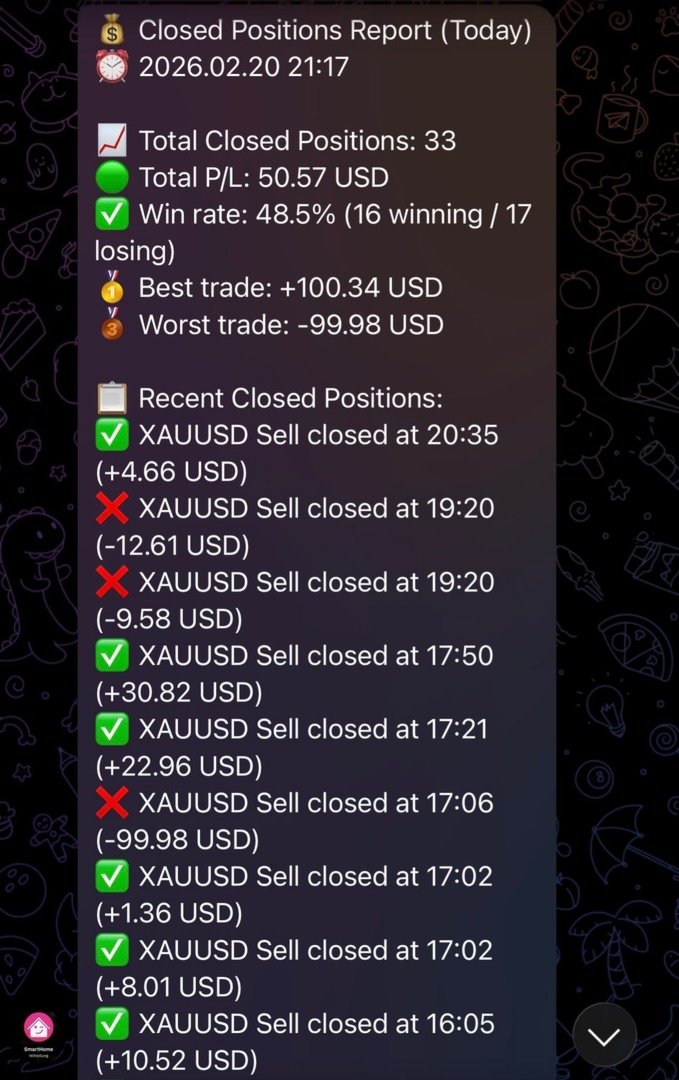
     📋 Closed Today — list of up to 10 closed trades today with direction, symbol, P&L and close time
     📍 Open Positions — all open trades with symbol, direction, lots, entry price, current P/L
     📈 Live Trades — up to 10 open positions with lots, entry, P/L incl. swap, runtime, total float P/L
     🎯 SL/TP Levels — current price, SL and TP level with distance in points for each open trade
     💹 Breakeven — per-position BE status: ✅ set, ⏳ not yet with points remaining to entry, ❌ no SL — plus summary count
     💼 Account Info — balance, equity, floating P/L, free margin (hidden if SendAccountInfo=false)
     ⚠️ Risk — open drawdown $/%, margin used %, free margin, margin level, total lots, net exposure (hidden if SendAccountInfo=false)
     📊 Performance — win rate, avg win, avg loss, profit factor for today and this month
     ⚡ Last Trade — symbol, P/L, and close time of the most recent closed trade
     ℹ️ EA Info — EA version, uptime, fi.con Investment Group
     🕐 EA Uptime — running time in days/hours/minutes/seconds, start timestamp, account number (hidden if SendAccountInfo=false)
     🔄 Refresh Menu — re-sends the button keyboard at any time

    — Configurable menu title via FollowerMenuTitle input parameter
    — Offset persistence ensures no duplicate callbacks after EA restart
    — Command logging at LogLevel 1: every button press and response length recorded in MT5 journal

Zero Missed Closures
    — Open position snapshot written after every deal event and at every verification interval
    — On startup: snapshot compared against current open positions
    — Any position that closed while EA was offline is detected, looked up in 7-day history, and reported immediately
    — Startup message shows count of recovered closures

Crash Detection
    — Session flag file written at startup (instance-specific, multi-terminal safe)
    — Deleted only on clean shutdown after successful stop message
    — Startup message shows warning if previous session ended without clean stop

HFT Protection
    — Configurable event rate threshold (default: 10 events/minute)
    — Automatic switch to batch reporting during burst periods
    — Telegram send interval throttle with message queue
    — Separate alert sent to EA Status topic when HFT mode activates and deactivates
    — Individual reporting automatically restored after configurable quiet period

Fully Configurable Trade Reports
    — 17 individual field toggles for opened and closed position reports
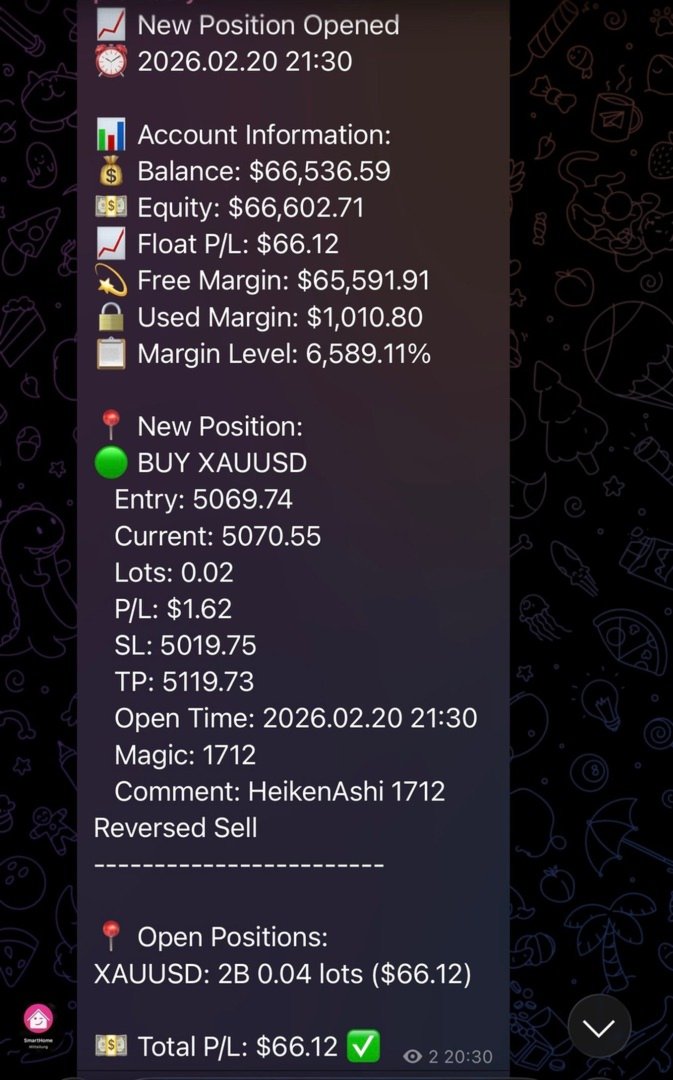
    — Opened: Lots, Entry Price, Current Price, SL, TP, Open Time, P/L, Comment, Magic
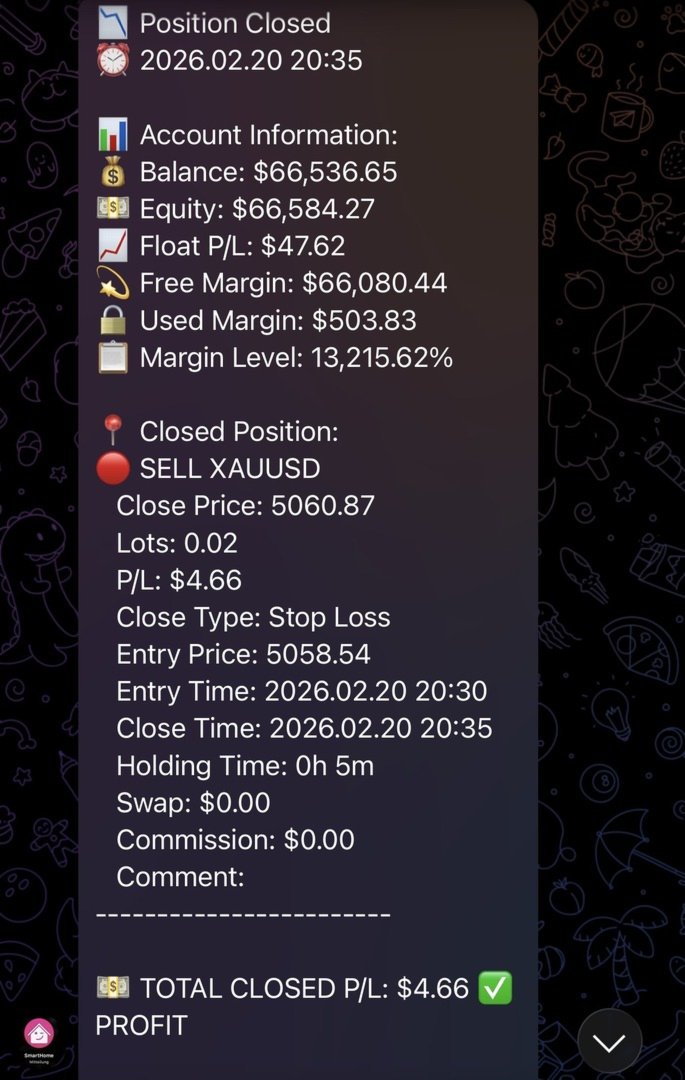
    — Closed: Lots, Close Price, Entry Price, Close Reason, Opened Time, Closed Time, Hold Duration, Swap, Commission, P/L, Comment, Magic
    — All fields default true — zero impact on existing users

Health & Status Monitoring
    — Configurable health reports (default: every 12 hours)
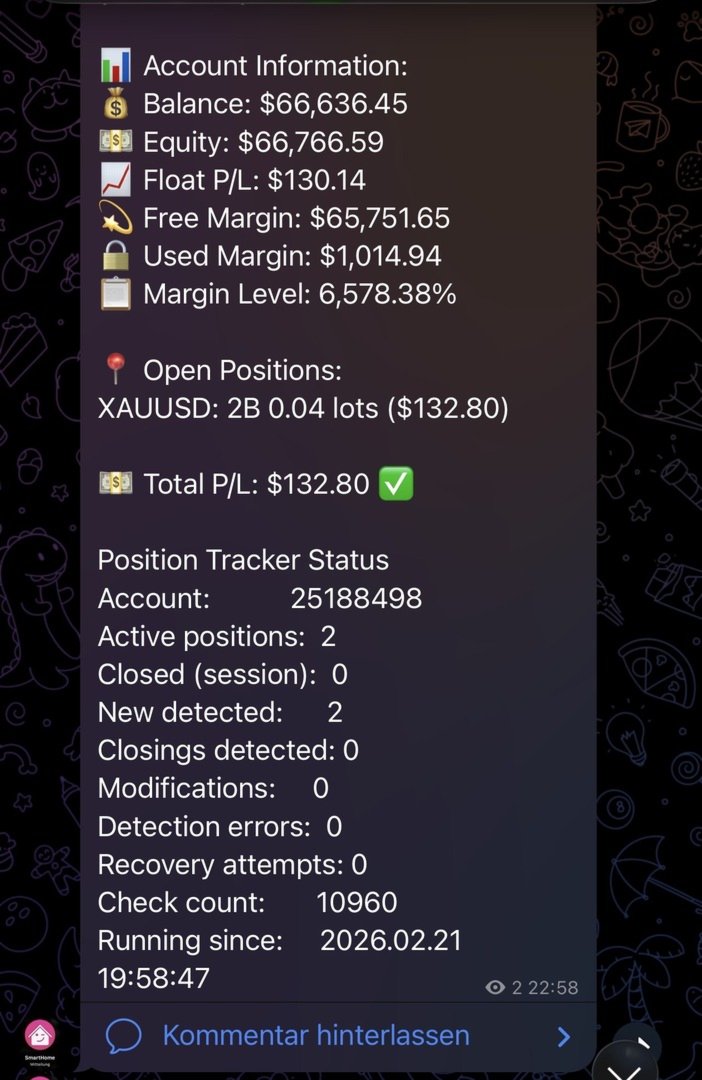
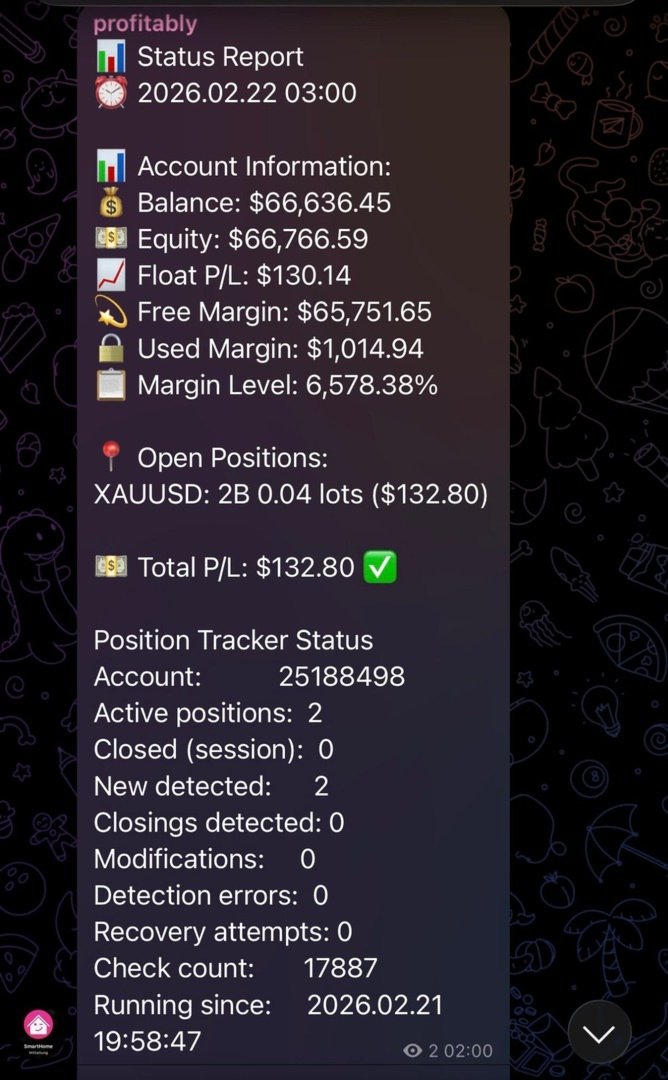
    — Includes: uptime, messages sent, win rate today, message queue status, server ping, connection state, trade permissions, free margin
    — Seven chart buttons for manual triggers, stacked bottom-left: [Verify Positions], [Status Report], [Health Report], [Send EOD Report], [Send Weekly Report], [Send Monthly Report], [Reseed Live Msgs]
    — Connection Test button (bottom-center, separate): pings Telegram API, shows result as chart label for 10 seconds + details in MT5 Journal
    — Manual Position Verification report goes to EA Status topic + channel

Smart Batch Reporting
    — Configurable minimum positions and time window for batch mode (default: 4 positions / 10 seconds)
    — Batch summaries sent when threshold exceeded — individual reports otherwise
    — Close-By detection: paired positions reported as single combined close event

Message Safety
    — Automatic message splitting at 4000 characters (Telegram HTML limit)
    — Priority queue: critical alerts bypass rate limiting
    — HTML escaping prevents tag collisions in broker comments
    — Smart Comment extraction: EA name + [sl]/[tp]/[tp1] from deal comments

━━━━━━━━━━━━━━━━━━━━━━━━━━━━━━━━━━━━━━━━━━━━━━━━━━━━━━━━━━━━━━━━━━━━━━━━━━━━━━━━━━━━━━━━━━━━━━━━━━━━━━━━

PARAMETERS

Telegram Settings
   InpChannelName   —   Display name for your channel (documentation only)
   TelegramToken   —   Bot token from @BotFather — required
   ChatID   —   Channel ID(s), comma-separated for multiple channels — required
   MessageInterval   —   Status report interval in minutes (default: 60)

Multi-Channel Broadcasting
   LiveChannelID   —   Live trades: GroupID:TopicID or plain ChatID (blank = use ChatID)
   DailyChannelID   —   P&L Reports topic (daily EOD, weekly, monthly): GroupID:TopicID or plain ChatID (blank = use ChatID)
   StatusChannelID   —   EA status + health: GroupID:TopicID or plain ChatID (blank = use ChatID)
   FollowerChatID   —   Follower interactive menu: GroupID:TopicID (blank = disabled)
   FollowerMenuTitle   —   Title text shown at the top of the follower menu keyboard
   LiveUpdateInterval   —   Live P/L refresh interval in seconds (default: 30, 0 = disabled)

Position Tracking Settings
   SendEAStartedMessage   —   Send startup message (default: true)
   SendAccountInfo   —   Include account info in reports; when false: 💼 Account Info button returns unavailable message, 🕐 EA Uptime omits account number (default: true)
   SendTradeUpdates   —   Send trade open/close notifications (default: true)
   SendClosedPositionsReport   —   Include closed P/L in hourly status reports and health reports (default: true)
   SendAutoReports   —   Send automatic EOD/Weekly/Monthly P&L reports (default: true)
   TrackPositionModifications   —   Track and report SL/TP changes (default: true)

Trade Report Fields — General
   ShowField_Lots   —   Show lot size (default: true)
   ShowField_PL   —   Show P/L (default: true)
   ShowField_Comment   —   Show trade comment field (default: true)
   ShowField_Magic   —   Show magic number (default: true)

Trade Report Fields — Opened Position
   ShowField_EntryPrice   —   Entry price (default: true)
   ShowField_CurrentPrice   —   Current price (default: true)
   ShowField_SL   —   Stop Loss (default: true)
   ShowField_TP   —   Take Profit (default: true)
   ShowField_OpenTime   —   Open time (default: true)

Trade Report Fields — Closed Position
   ShowField_ClosePrice   —   Close price (default: true)
   ShowField_EntryOnClose   —   Entry price on close report (default: true)
   ShowField_Reason   —   Close reason: Stop Loss / Take Profit / Close By / Other (default: true)
   ShowField_OpenedTime   —   Time position was opened (default: true)
   ShowField_ClosedTime   —   Time position was closed (default: true)
   ShowField_Hold   —   Hold duration (default: true)
   ShowField_Swap   —   Swap (default: true)
   ShowField_Commission   —   Commission (default: true)

Health & Reliability Settings
   SendHealthReports   —   Enable periodic health reports (default: true)
   HealthReportInterval   —   Health report interval in hours (default: 12)
   SendHealthReportOnStartup   —   Send health report on EA start (default: false)
   ShowVerifyButton   —   Show [Verify Positions] chart button (default: true)
   ShowStatusButton   —   Show [Status Report] chart button (default: true)
   ShowHealthButton   —   Show [Health Report] chart button (default: true)
   ShowEODButton   —   Show [Send EOD Report] chart button (default: true)
   ShowWeeklyButton   —   Show [Send Weekly Report] chart button (default: true)
   ShowMonthlyButton   —   Show [Send Monthly Report] chart button (default: true)
   ShowReseedButton   —   Show [Reseed Live Msgs] chart button (default: true)
   ShowConnTestButton   —   Show [Connection Test] chart button (default: true)
   ButtonYOffset   —   Button distance from chart bottom in pixels (default: 30)
   ButtonWidth   —   Chart button width in pixels (default: 235)
   ConnTestButtonX   —   X position of Connection Test button from left in pixels (default: 400)

Logging & Check Interval
   EnableRobustTracking   —   Tick-based position tracking (default: true)
   LoggingLevel   —   0=Minimal, 1=Normal, 2=Verbose, 3=Trace (default: 0)
   VerificationInterval   —   Position verification interval in seconds (default: 300)
   PositionCheckInterval   —   Tick-based check interval in seconds (default: 1)
   DataFolderPath   —   Custom data folder path (blank = default account folder)

HFT Protection
   HFT_Threshold   —   Events/minute to trigger HFT mode (default: 10)
   HFT_CooldownMultiplier   —   Send cooldown multiplier in HFT mode (default: 5)
   HFT_ModeDuration   —   Quiet seconds before HFT mode deactivates (default: 120)
   HFT_MinSendInterval   —   Minimum milliseconds between sends (default: 200)
   HFT_QueueMaxSize   —   Max queued messages before dropping low-priority (default: 50)

Message Length Control
   MaxPositionsInReport   —   Maximum positions in a single report (default: 10)
   UseCompactReporting   —   Compact position format for large accounts (default: true)
   ShowTrackerStatus   —   Show Position Tracker diagnostics block (default: true)

Batch Reporting
   Batch_MinPositions   —   Minimum positions to trigger batch mode (default: 4)
   Batch_TimeWindowSec   —   Time window in seconds to collect batch (default: 10)

━━━━━━━━━━━━━━━━━━━━━━━━━━━━━━━━━━━━━━━━━━━━━━━━━━━━━━━━━━━━━━━━━━━━━━━━━━━━━━━━━━━━━━━━━━━━━━━━━━━━━━━━

INSTALLATION

    1. Copy EnhancedTelegramEA.mq5 to your MT5 Experts folder
    2. Compile in MetaEditor (F7)
    3. Create a Telegram bot via @BotFather and copy the token
    4. Add the bot to your channel as Admin with Post Messages permission
    5. Attach the EA to any chart and enter TelegramToken and ChatID
    6. All other settings are optional — defaults work out of the box

Optional: Telegram Group with Forum Topics

    1. Create a Supergroup and enable Topics in Group Settings
    2. Add your bot as Admin — disable Privacy Mode to allow reading messages
    3. Create four topics: Live Trades, P&L Reports, EA Status, Commands
    4. For each topic: tap the topic name → copy the link → note the number at the end
    5. Enter: GroupID:TopicNumber in LiveChannelID, DailyChannelID, StatusChannelID, FollowerChatID
    6. Group ID: send any message in the group, reply with /json via @getidsbot — find "id" in the chat object

Allow WebRequest for: https://api.telegram.org in MT5 Tools → Options → Expert Advisors

━━━━━━━━━━━━━━━━━━━━━━━━━━━━━━━━━━━━━━━━━━━━━━━━━━━━━━━━━━━━━━━━━━━━━━━━━━━━━━━━━━━━━━━━━━━━━━━━━━━━━━━━

MORE TOOLS FROM fi.con INVESTMENT GROUP

We offer a complete MT5 toolkit built by traders. If you trade actively and want more automation, reporting, and control, these tools extend your MT5 setup significantly: 

    📡  MT5 to Telegram Informer — sends every trade open and close to your Telegram channel in real time. Full position lifecycle: pending order execution, SL/TP changes, partial closes, close reason labelling. Multiple channels, Topics support, configurable report fields. If you share your trades with a Telegram audience, this is your tool. 

    📊  Telegram Trading Reporter MT5 — automated performance reports delivered to Telegram on schedule: daily EOD summary, weekly stats, monthly overview. Analyses your full trade history and sends structured reports with P&L, win rate, profit factor, best/worst trade — all without you having to open MT5. 

    🛠️  Chart Order Trade Manager MT5 — professional on-chart trade management panel for active traders. Visual SL/TP placement, automatic lot size calculation from risk %, one-click breakeven, trailing stop, partial close. Designed for traders who manage positions manually while running EAs in parallel. 

    🚫  Position Closure Management MT5 — automatically resolves hedged position pairs and locks in the net result at exactly the right moment. Essential for grid and martingale strategies, prop firm challenge rules that prohibit hedging, and any setup where open buy/sell pairs need controlled resolution. 


Version 2.65  |  fi.con Investment Group  |  MQL5 Marketplace
推荐产品
Episode Health Monitor Episode Health Monitor is a trading utility for MetaTrader 5 designed to analyze the real-time condition of active trading positions directly on the chart. The tool evaluates the current “trading episode” - a group of open positions - and provides a structured view of risk, stability, and distance to potential failure. Instead of relying only on profit/loss or price movement, it helps identify whether the current position is stable, weakening, or approaching a critical st
Trading Utility for Forex Currency Pairs Only not for Gold  Functions Auto Lot Calculation based on Risk Auto stoploss  Auto TakeProfit Breakeven Auto Close Half % Close in percentage with respect to the PIPs Pending Orders BuyLimit Sell Limit with distances BuyStop Sell Stop    with distances Trading Informations Risk in percentage For Multiple trades Combine Takeprofit and Combine Stoplosses
DDKiller Pro
Njaratahiry Michael Randrianiaina
Stop Blowing Your Account. Once and For All. DDKiller Pro is the MT5 risk guardian that runs silently on your chart and shuts down trading the moment you hit a limit — whether you're grinding a prop firm challenge or managing your own CFD account. The problem every trader knows: You set your rules. You break them anyway. One revenge trade. One overleveraged position. One session that erases a month of gains. DDKiller Pro removes that decision from your hands entirely. What it does: The second yo
Exp5 Duplicator
Vladislav Andruschenko
4.78 (9)
Duplicator for MetaTrader 5 —— 单终端内的专业持仓复制系统 这是一款面向专业交易者的可靠 Expert Advisor,用于在 MetaTrader 5 中自动复制已经打开的持仓、放大总仓位、应用自定义手数规则,并按照明确的逻辑管理复制出来的持仓。 它非常适合手动交易者、自动化系统使用者,以及希望在同一个终端内更灵活地管理已有持仓的用户。 Duplicator for MT5 并不会依靠自己的交易策略主动开仓。它的职责是监控 MetaTrader 5 账户中已经存在的持仓,并根据你的设置创建对应副本,包括复制次数、手数、Stop Loss、Take Profit、注释以及额外的管理条件。 如果你需要的是 同一个 MetaTrader 5 终端内部 的持仓复制工具,而不是不同平台或不同终端之间的复制系统,那么 MT5 版 Duplicator 正是为这种需求而设计。 MT4 版本 详细描述 + DEMO + PDF 如何购买 如何安装 如何获取日志文件 如何测试和优化 Expforex 的所有产品 链接 如果你需要 MetaTrader 终端之间 的交易复
TradeControl Pro —— 适用于 MetaTrader 的高级交易管理工具 TradeControl Pro 是一款用于 MetaTrader 的交易管理工具,可在图表中直接实现结构化且高效的持仓管理。该应用结合了清晰的用户界面、自动化计算功能以及灵活的控制选项,适用于不同的交易方式。 内置的图表面板采用表格布局,并划分为三个主要区域(标签): Execution 、 Close 和 Info 。界面设计注重清晰性与直接交互。 结构清晰,功能分组合理 关键交易数据实时动态更新 无需额外窗口,直接在图表中操作 标签:Execution(交易规划与执行) Execution 区域用于新交易的规划与执行。 Open Calc(挂单设置) 通过 Open Calc 可在图表中自动生成三条价格线: 入场价格(Entry) 止损(SL) 止盈(TP) 这些价格线可自由拖动调整。系统将基于当前价格水平实时计算: 止损价格及潜在亏损 止盈价格及潜在盈利 仓位大小(手数) 风险回报比 在该模式下仅用于设置挂单(Pending Orders)。通过 Execute 和 Confirm 按钮执
Expert TP SL v04 - Professional Trading Assistant with AI Motivation System Advanced manual trading tool with automatic risk management, overtrading protection, and intelligent psychological support for disciplined trading. PRODUCT OVERVIEW Expert TP SL v04 is a comprehensive trading assistant designed for manual traders who want to maintain emotional discipline while automating risk calculations. This isn't just another order placement tool - it's a complete trading psychology system that pr
This tool will perform Trailing stop loss and Break even management for orders. Helps you limit or reduce the time spend watching orders on the screen, especially when you need to go to sleep. Just add this EA to 1 chart, you can manage all pairs. You can filter orders by comment, magic number, symbol and order ticket number. When Breakeven it can add shift/offset pips (to cover the commission...). You can try in strategy tester before purchase. The EA will add Buy and Sell alternately, so you
CoPilot dashboard MT5
Frederic Jacques Collomb
CoPilot — 每日交易仪表板 掌握你的数据。清晰地交易。 MT4 版本 什么是 CoPilot? CoPilot 是一款 专业级 交易助手,可将您每日的交易绩效统计数据 实时 显示在图表上——配备 实时权益曲线 ,逐笔更新。专为需要在不离开图表的情况下即时了解交易状态的活跃交易者而设计,CoPilot 汇总 当日所有交易品种的每笔已平仓交易 ,并以简洁、色码化的交互面板呈现。 无需再切换到终端历史选项卡,无需手动计算。CoPilot 就像您的 副驾驶 ——时刻守候,持续计算,始终在您眼前。 实时统计面板 CoPilot 显示完整的每日绩效指标,分为三个部分: 活动 — 今日总交易数、已平仓交易、持仓数量、盈利/亏损笔数、 胜率 (%) 及保本交易。胜率颜色动态调整:高于 50% 显示绿色,低于 50% 显示红色。 盈亏 — 净盈亏 、 盈利因子 、每笔平均盈利和平均亏损、 平均风险回报比 、当日最佳交易和最差交易。每个数值根据其含义以绿色或红色显示。 时间与点数 — 平均持仓时间、最短和最长持仓时间、所有交易品种累计 总点数 ,以及 最大连续盈利/亏损次数 。 所有统计数据均基于
TradePilotmt5
Hossein Khalil Alishir
TradePilot Expert Advisor (EA) for MetaTrader 5 TradePilot is a professional and user-friendly Expert Advisor (EA) for MetaTrader 5 (MT5) . It simplifies automated trading , risk management , and trade execution with a smart trading panel . Perfect for beginners and experienced traders looking for a reliable trade manager EA with automated lot size calculation and smart position management. Key Advantages User-Friendly Trading Panel: Customizable panel with buttons and hotkeys for fast ex
Timeframe Trading Limiter
AL MOOSAWI ABDULLAH JAFFER BAQER
Timeframe Trading Limiter is a professional risk management and trade discipline utility designed for MetaTrader 5. It empowers traders to enforce strict, automated limits on the number of trades and the maximum allowable drawdown within each trading period, based directly on the chart timeframe selected. Whether you are a discretionary trader prone to overtrading, a prop firm challenge participant needing to adhere to strict rules, or an algorithmic trader running multiple strategies, this tool
Candlestick Pattern Scanner is a multi-timeframe and multi-symbol dashboard and alert system that checks all timeframes and currency pairs for different candlestick patterns that are formed in them. Scanner is integrated   with support and resistance zones so you can check the candlestick patterns in most important areas of the chart to find breakout and reversal patterns in the price chart. Download demo version   (works on M4,M6,M12,H3,H8 timeframes and 20 symbols of Market Watch window) Read
Breakevan Utility
Jose Luis Thenier Villa
BreakEvan Utility  Is a simple tool in a panel with this utilities: This utility will draw a Golden Line in the chart applied showing the breakeven price, considering all the positions opened for that specific symbol. Also the information panel shows: Balance Breakeven Price for that chart Force Breakeven (for that symbol) as ON/OFF Force Breakeven Global (takes into account all trades opened) as ON/OFF Total Lots opened for Symbol Total Lots opened Global And two buttons: Force Breakeven: Whe
King ElChart Manual Trade Panel
Mohammed Maher Al-sayed Mohammed Ahmed Saleh
King Chart – Manual Trading Panel for MetaTrader 5 Overview King Chart is a simple yet powerful manual trading panel built for traders who want speed, precision, and clarity. It enables quick order execution, clear lot control, and real-time account monitoring  all directly on your MT5 chart. Main Features Multi-Lot Trade Execution 3 Buy and 3 Sell buttons for instant execution Each button is tied to a custom lot size field Designed for flexible scaling in or out of trades Position Management D
CosmiCLab FIBO
Kirils Subins
CosmiCLab SMC FIBO CosmiCLab SMC FIBO is a professional trading indicator designed for traders who use Smart Money Concepts (SMC), market structure analysis and Fibonacci retracement levels. The indicator automatically detects market swings and builds Fibonacci levels based on the latest impulse movement. It also identifies market structure changes such as BOS (Break of Structure) and CHOCH (Change of Character), helping traders understand the current market direction. CosmiCLab SMC FIBO also pr
Smart TP SL Manager MT5 Smart TP SL Manager MT5 is a trade management utility for MetaTrader 5 designed to monitor and manage position protection directly from the chart through a compact panel. The tool focuses on a common problem in manual trading: loss of control over stop loss, take profit, and position risk when multiple trades are active. Instead of relying on manual checking or switching between terminal windows, the panel provides a structured view of protection status and risk conditio
TradePad
Ruslan Khasanov
5 (1)
TradePad 是一種既可用於手動交易又可用於演算法交易的工具。我們為您提供一個簡單的解決方案,用於快速交易操作和控制多種交易工具的持股。 注意,該應用程式不適用於策略測試器! 模擬帳戶應用程式的試用版和所有工具的描述 應用程式介面適應高解析度顯示器,簡單直覺。為了方便工作,我們為交易者提供了以下工具: 熱鍵管理器,用於管理交易操作、在主圖表的週期之間切換、在 TradePad 工具之間切換; 標記交易等級的工具,用於在開倉或設定掛單時評估虧損風險並計算潛在利潤; MultiCharts 工具用於直觀地監控多個交易符號,以及接收演算法交易的交易訊號。為了方便起見,您可以組織交易對的集合,這將使您有機會在多個時間範圍內監控價格並進行多幣種交易; 用於查看任何歷史時期的交易統計資料的資訊模組,能夠產生擴展的 HTML 報告、查看交易符號的特徵和有關交易帳戶的資訊; 掛單管理器用於管理掛單 - 設定單一或一組(網路)掛單,可按訂單類型和單一符號或交易帳戶上的所有類型進行分組刪除; 設定賣出停損限價和買入停損限價掛單的工具; 頭寸管理器用於管理一個或多個頭寸(取決於帳戶類型) - 全部
Inverted_Chart_EA Utility Expert Advisor Inverted_Chart_EA creates and maintains a mirror-inverted chart of any symbol and timeframe. It automatically generates a custom instrument (e.g. US30_INV ) and keeps its price history updated in real time, with bars mirrored around a chosen pivot. This utility gives traders a new way to analyze the market from a different perspective by flipping the chart upside down. Why use an inverted chart? Highlight hidden patterns – price formations that look ordin
SLTPSetter
Raphael Djangmah Osro Agbo
SLTPSetter - StopLoss Take Profit Setter HOW DOES IT WORK? Risk and account management is a very critical aspect of trading. Before entering a position, you must be fully aware how much you will be willing to loss both in percentage and value. This is where SLTPSetter gets you covered.  All you need to do is attach the indicator on the chart and PRESS BUY OR SELL automatically, all parameters needed for placing the trades will be provided at the top left corner of the screen. Feel free to adjust
Smart trail sl Pro
Emerson Capiral Romero
Smart Trail SL Pro Advanced algorithmic trailing stop-loss & breakeven manager for Gold (XAUUSD). Fully customizable milestone parameters, safety filters, and manual/EA trade tracking. Full Description Smart Trail SL Pro is the ultimate institutional-grade risk and trade management utility engineered specifically for the unique volatility of Gold (XAUUSD). While the free version locked you into fixed parameters, the Pro Version hands you complete control over your protection matrix. Whether you
Overview Mirror Signals Service EA (Text only)   is a powerful monitoring Expert Advisor that automatically sends   real-time Telegram notifications   for all important trade events on your MetaTrader 5 account. It is engineered specifically for   signal providers ,   trade-copier operators ,   auditors ,   educators , and   professional trading services   that require immediate, detailed, and reliable reporting. Everything from   entries, exits, SL/TP changes, comment changes, trailing sto
专业的 MT5 模块化交易面板。集成了自动风控计算、分批止盈(PTP)、移动止损及独创的“订单焦点管理”功能。支持中英阿日四国语言。 让手动交易像量化一样精准。 KAB 操盘指挥中心 (V33) 专为日内交易者设计,彻底告别繁琐的手动计算和默认下单面板的局限性。 核心亮点: 可视化下单 (Ghost Lines):   下单前在图表上直接拖拽“幽灵线”设定入场、止损和止盈,所见即所得。 智能风控:   输入您愿意承担的金额风险(例如 $50),面板自动计算合适的手数,防止重仓。 独创“焦点管理 (Focus Mode)”:   多数面板只能全平或全改,我们允许您锁定一张特定的订单,对其进行独立的反手、部分平仓或保本操作。 分批止盈 (PTP):   设置多级隐形止盈位,价格触碰自动平仓部分手数,落袋为安。 界面模块化:   下单、风控、工具箱均为独立悬浮窗,可随意拖动或关闭,不遮挡K线。 多语言适配:   完美支持中文、英语、阿拉伯语(修正字体显示)和日语。 智能风控计算 (Smart Risk Calculation) – 在考虑止损距离的情况下,自动计算新订单的成交量(手数)。它允
RRtoolBox
David Ruiz Moreno
RRtoolbox - Professional Tools: Risk:Reward Trading Tool (SL/TP Horizontals + Pending orders + Diagonals), Alerts set on trend lines (for alerts on diagonal levels), SelfManagement (BE, partials...), close/cancelling by time, Statistics, Info and trading on chart. One-Click Trading with Visual Risk:Reward Management RRtoolbox is a comprehensive trading panel that combines one-click order execution,  statistics and  powerful visual Risk:Reward tools, alerts set with trendlines, on chart butt
ChangePeriod MT5
Kazuya Yamaoka
You can change the time period of the chart at the touch of a button. You can also change multiple charts at the touch of a button. You can also change multiple charts at the touch of a button,   saving you the trouble of changing time periods. We are live-streaming the actual operation of the system. Please check for yourself if it is usable. Please check it out for yourself. https://www.youtube.com/@ganesha_forex We do not guarantee your investment results. Investments should be made at you
Trade Assistant 38 in 1
Makarii Gubaydullin
4.91 (23)
多功能工具:手数计算器,网格订单,风险回报比,交易管理器,供求区域,价格行为等等 演示版本   |   用户手册 交易助手   不能在策略测试器中工作 :您可以下载   此处的演示版本  来测试此 工具 。 联系我   如有任何问题  / 改进建议 / 发现错误 如需MT4版本,请访问 此处 简化、加速并自动化您的交易   流程 。通过此   仪表板 扩展标准终端功能。 交易面板  适用于任何交易品种:外汇、股票、指数、加密货币等。 1. 开立新交易 :手数 / 风险 / 风险回报比计算 :手动交易的风险管理 手数计算器(根据风险大小计算交易量) 风险计算器(根据手数大小计算风险金额) 风险回报   比率 网格订单:  + 动态距离选项,及拆分手数选项 订单激活触发器,+ 买入止损限价 / 卖出止损限价 虚拟止损,虚拟止盈(隐藏止损,隐藏止盈:经纪商不可见) 智能止损 / 入场价位:若K线收盘突破则避免虚假触发 隐藏订单(虚拟挂单) 计划订单:即使市场休市也可挂单交易(周末计划器) 额外多级止盈价位 具有不同ID的OCO(一单取消另一单)订单 图表上的交易可视化 + 调整 止损 /
Trade Risk Manager MT5
Muhammad Asyraf Bin Mohd Zaffarullah
Introductory Launch Price – Only $49 USD (Limited Time!)** *This special price is available for the first 30 days only. After that, the price will increase to $99 USD. Get it now! Trade Risk Manager MT5   Welcome to Trade Risk Manager MT5 – a simple but complete risk management tool that helps you trade smarter. It is not just an order panel. It helps you plan your trade, manage your risk, and control your positions without any complex calculations. Whether you are a beginner or an exp
RSI Currency Strength Meter is a powerful and elegant multi-currency indicator that measures the real-time relative strength of the 8 major currencies using RSI logic. By calculating the smoothed performance of each currency across its major pairs and applying the RSI formula, it delivers clean and responsive strength lines that make it easy to spot which currencies are truly strong or weak at any moment. This indicator is particularly useful for visualizing currency correlations and divergence
Trade Manager DaneTrades
Levi Dane Benjamin
4.28 (29)
交易管理器可帮助您快速进入和退出交易,同时自动计算风险。 包括帮助您防止过度交易、报复性交易和情绪化交易的功能。 交易可以自动管理,账户绩效指标可以在图表中可视化。 这些功能使该面板成为所有手动交易者的理想选择,并有助于增强 MetaTrader 5 平台。多语言支持。 MT4版本  |  用户指南+演示 交易经理在策略测试器中不起作用。 如需演示,请参阅用户指南 风险管理 根据%或$自动调整风险 可选择使用固定手数或根据交易量和点自动计算手数 使用 RR、点数或价格设置盈亏平衡止损 追踪止损设置 最大每日损失百分比,在达到目标时自动平仓所有交易。 保护账户免遭过多提款并阻止您过度交易 最大每日损失(以美元为单位)在达到目标时自动关闭所有交易。 保护账户免遭过多提款并阻止您过度交易 一键实现所有交易的盈亏平衡 自动计算从手机/电话发送的交易的风险 OCO 在设置中可用 交易和头寸管理 通过设置每月、每周、每天、每小时或每分钟的最大交易次数,停止过度交易和报复性交易。 高级挂单管理。 调整何时关闭挂单的规则 追踪挂单 支持市价订单和挂单 每日最大利润目标(以美元为单位)以确保头寸并停止
This EA is there to take your trade closing stress away. Quickly close as many trades as you have opened at the click of a button, INCLUDING PENDING ORDERS. This works on the MT5 platform whether it be currencies, Indices, stocks or Deriv synthetic indices. I have saved it under utilities as it is a utility, however, to install this, you have to save the file in you "EA" folder. That is; Go to "File", then "Open Data Folder", "MQL5" and then "Experts". Paste this file there. Restart MT5 and you'
Click Trading
Jawad Tauheed
5 (2)
One Click Trading – Auto TP SL Developer TraderLinkz Version 1.00 Category Utility What it does Adds missing TP and SL to your manual trades and pending orders Sets them once per ticket Lets you move TP and SL afterward Works on hedging and netting accounts Scans on every tick and reacts on trade events Why you want it You place faster entries You get consistent risk and exit targets You reduce fat finger errors You keep full manual control Quick start Attach the EA to any chart Keep TP and SL e


FREE
Headline ShikaaTraders Gold Grid Pro is a high-performance trade management utility designed specifically for XAUUSD (Gold) and high-volatility pairs. It allows traders to execute complex grid-layering strategies with a single click, ensuring you never miss an entry during fast market moves. Why Choose Gold Grid Pro? Manual trading on Gold requires speed. Manually calculating distances and opening multiple positions takes too much time. This utility automates the "Scaling-In" process, allowing y
该产品的买家也购买
Trade Assistant MT5
Evgeniy Kravchenko
4.42 (211)
它有助于计算每笔交易的风险,容易安装新的订单,具有部分关闭功能的订单管理, 7 种类型的追踪止损和其他有用的功能。   附加材料和说明 安装说明   -   应用程序说明   -   模拟账户应用程序的试用版 线条功能  - 在图表上显示开仓线、止损线、止盈线。 有了这个功能,就可以很容易地设置一个新的订单,并在开仓前看到它的附加特性。   风险管理  - 风险计算功能在考虑到设定的风险和止损单的大小的情况下,计算新订单的成交量。它允许你设置任何大小的止损,同时观察设定的风险。 批量计算按钮 - 启用 / 禁用风险计算。 在 " 风险 " 一栏中设置必要的风险值,从 0 到 100 的百分比或存款的货币。 在 " 设置 " 选项卡上选择风险计算的变量: $ 货币, % 余额, % 资产, % 自由保证金, % 自定义, %AB 前一天, %AB 前一周, %AB 前一个月。   R/TP 和 R/SL - 设置止盈和止损的关系。 这允许你设置相对于损失的利润大小。 例如, 1 : 1 - 这决定了 TP = SL 的大小。 2 : 1 - 这意味着 TP 是 SL 的两倍。 RR -
Quant AI Agents is NOT AN Expert Advisor. Quant AI Agents   is a   multi-agent AI trading framework   that turns natural-language strategy prompts into live.  WANT THE SAME RESULTS AS MY LIVE SIGNAL?   Use the exact same brokers I do:   IC MARKETS , IC TRADING   .  Unlike the centralized stock market, Forex has no single, unified price feed.  Every broker sources liquidity from different providers, creating unique data streams. Other brokers can only achieve trading performance equivalent to 60
TradePanel MT5
Alfiya Fazylova
4.87 (155)
交易面板是一款多功能交易助手。该应用包含超过50种手动交易功能,并允许您自动执行大多数交易任务。 在购买之前,您可以在演示账户上测试演示版本。下载用于演示账户的试用版应用程序: https://www.mql5.com/zh/blogs/post/762579 。 完整说明 这里 。 贸易. 只需单击一下即可执行交易操作: 打開掛單和頭寸,並自動計算風險。 一鍵打開多個訂單和頭寸。 打開訂單網格。 按組別關閉掛單和頭寸。 反轉頭寸方向(關閉買入>打開賣出,關閉賣出>打開買入)。 鎖定頭寸(通過開啟缺少的頭寸,使買入和賣出頭寸的數量相等)。 一鍵部分關閉所有頭寸。 將所有頭寸的止盈和止損設置在同一價格水平。 將所有頭寸的止損設置在盈虧平衡水平。 開倉時,可使用以下功能: 在多個訂單或倉位之間分配計算出的數量(在單擊一次時開啟多個訂單和倉位)。 在開啟訂單前在圖表上可視化交易水平。 僅在當前點差不超過設定值時才開啟倉位。 止盈和止損之間的自動比例。 虛擬止損和止盈。 自動將止損和止盈的大小增加為當前點差的大小。 基於ATR指標讀數計算止盈和止損。 設置掛單的到期日期。 為掛單設置追蹤(掛單
Farmed Hedge Yield Farming | All Markets (Manual - Hybrid - Semi/Automated EA) MULTI-ASSET SUPPORT Trade any asset available on your broker - Forex: Major, Minor, Exotic pairs - Crypto: BTC, ETH, XRP, SOL, BNB - Stocks: Apple, Tesla, Amazon, Google, etc. - Commodities: Gold, Silver, Oil, Gas - Indices: US30, NAS100, SPX500, DAX40 - Any CFD your broker offers VERIFIED TRADING RESULTS - Farmed Hedge Yield Axi Copy:  https://www.mql5.com/en/signals/2356376 - Farmed Hedge Yield Exn Copy:   https:/
Power Candles 策略扫描器——自优化多符号设置查找器 Power Candles策略扫描器 采用与Power Candles指标相同的自优化引擎,可同时扫描您“市场观察”中的所有交易品种。一个面板即可显示当前哪些品种在统计上具备交易价值、每种策略的最佳应用方向、最优止损/止盈组合,并在新信号触发时立即向您发送提醒。 本工具是 Stein Investments 生态系统的一部分 - 18+ 款工具,加上 Max,您的一对一 AI 交易导师。  随时在线,深入了解每一款指标,在您需要梳理思路的那一刻就在那里。  立即认识他: https://stein.investments 您的全面市场监控。每个交易品种超过3,000次自动优化。2种警报类型。一键切换图表并采取行动。 为何您需要此工具 大多数多标的扫描器仅展示价格 波动 。每只股票的波动率、百分比变化、RSI。您仍需自行摸索正确的策略、合适的止损位以及理想的入场阈值。Power Candles策略扫描器针对每只股票自动解答这些问题,仅在数学验证过的交易设置中触发实际入场信号时才会向您发出提示。这就是全部卖点。 自动
YuClusters
Yury Kulikov
4.93 (43)
Attention: You can view the program operation in the free version  YuClusters DEMO .  YuClusters is a professional market analysis system. The trader has unique opportunities to analyze the flow of orders, trade volumes, price movements using various charts, profiles, indicators, and graphical objects. YuClusters operates on data based on Time&Sales or ticks information, depending on what is available in the quotes of a financial instrument. YuClusters allows you to build graphs by combining da
AntiOverfit PRO MT5
Enrique Enguix
5 (5)
在购买 EA 之前,先确认它到底是真的扛得住,还是只是刚好在回测里走运。 大多数机器人都是靠一份漂亮的回测卖出去的。 曲线一路向上。 Profit Factor 很好看。 看起来几乎没有疑点。 但即便如此,很多 EA 只要市场不再按照那段历史那样运行,很快就会出问题。 为什么? 因为回测只能证明一件事: 这个策略曾经在某一条特定的价格路径上有效。 它不能证明它在其他路径下也能扛住。 不能证明它足够稳健。 更不能证明它值得你花钱。 因为你买 EA,不是为了欣赏过去那条漂亮的曲线。 你买它,是为了在会变化的市场里使用它。 AntiOverfit PRO 是做什么的 AntiOverfit PRO 帮你判断一个 MetaTrader 5 Expert Advisor 到底是真的够扎实,还是只是恰好适配某一段特定历史。 它的原理其实很容易理解: 它拿真实历史数据,生成许多与原始历史相似、但路径不同的版本,然后让你看到当市场不再完全照着原来的路线走时,这个 EA 会有什么表现。 如果你只是稍微改变一下市场路径,这个机器人就开始失效,那就是个坏信号。 而如果它在许多与原始历史相似的场景里都能稳住
Ultimate Extractor
Clifton Creath
5 (9)
Ultimate Extractor - Professional Trading Analytics for MT5 *****this is the local HTML version of Ultimate Extractor. !!!!!it is not compatible with Cloud!!!! For the online version please reach out to me directly****** Ultimate Extractor transforms your MetaTrader 5 trading history into actionable insights with comprehensive analytics, interactive charts, and real-time performance tracking. What It Does Automatically analyzes your MT5 trading history across all Expert Advisors and generates
Custom Alerts AIO:多市场智能监控,一键启动,无需设置 概述 Custom Alerts AIO 是一款“开箱即用”的高级市场扫描工具,无需额外安装任何其他指标或进行复杂设置。它内置了 Stein Investments 的所有核心指标(FX Power、FX Volume、FX Dynamic、FX Levels 和 IX Power),可帮助您轻松监控所有主要资产类别,如外汇、黄金、指数和加密货币。如果您的经纪商支持股票,您也可以手动添加个股进行监控。 1. 为什么选择 Custom Alerts AIO? 无需额外购买任何指标 • 所有关键指标均已内置,开箱即用。 • 专注于实时预警,不包含任何图形元素,性能高效,界面简洁。 全面覆盖所有主要市场 • 支持监控外汇、金属、加密货币和指数市场。 • 无需手动输入任何交易品种,只需在设置中勾选资产类别即可启用。 • 股票并不属于默认类别,如有需要可手动通过参数输入添加。 高效、专业、便捷 • 无需图表模板和手动加载,适合自动化或远程交易环境。 • 非常适合 VPS 上长期运行,或作为后台市场预警工具使用。 2
Footprint Chart Pro — Professional OrderFlow EA for MetaTrader 5 Version 6.34 | Professional tool for real traders | Institutional-Grade Visualization DEMO USERS - PLEASE SELECT EVERY TICK / REAL TICK WHEN TESTING AND YOU HAVE DOWNLOADED HISTORICAL DATA. IF YOU SEE A WAITING SCREEN AND IT IS NOT DOWNLOADING, IT MEANS YOU HAVE LOW HISTORICAL DATA. TRY 1 MIN AND 5 MIN FIRST ON 1 DAY DATA. ONE DAY DATA SHOULD BE THE NEWEST AND MOST CURRENT DATE. PLEASE WAIT UNTIL THE MARKET HAS ROLLED OVER PERIOD.
The product will copy all telegram signal to MT5 ( which you are member) , also it can work as remote copier.  Easy to set up, copy order instant, can work with almost signal formats, image signal,  s upport to translate other language to English Work with all type of channel or group, even channel have "Restrict Saving Content", work with  multi channel, multi MT5 Work as remote copier: with signal have ticket number, it will copy exactly via ticket number. Support to backtest signal. How to s
FUTURES ORDERFLOW FOOTPRINT CHART Professional OrderFlow EA for MetaTrader 5 Version 1.01| Professional tool for real traders | Institutional-Grade Visualization STRATEGY TESTER USERS - PLEASE SELECT EVERY REAL TICK WHEN TESTING AND YOU HAVE DOWNLOADED HISTORICAL DATA. IF YOU SEE A WAITING SCREEN AND IT IS NOT DOWNLOADING, IT MEANS YOU HAVE LOW HISTORICAL DATA. TRY 1 MIN AND 5 MIN FIRST ON 1 DAY DATA. ONE DAY DATA SHOULD BE THE NEWEST AND MOST CURRENT DATE. PLEASE WAIT UNTIL THE MARKET HAS ROL
Telegram To MT5 Receiver
Levi Dane Benjamin
4.31 (16)
将信号从您所属的任何渠道(包括私人和受限渠道)直接复制到您的 MT5。 该工具在设计时充分考虑了用户的需求,同时提供了管理和监控交易所需的许多功能。 该产品采用易于使用且具有视觉吸引力的图形界面。 自定义您的设置并在几分钟内开始使用该产品! 用户指南 + 演示  |   MT4版本  |   不和谐版本 如果您想尝试演示,请参阅用户指南。 Telegram To MT5 接收器在策略测试器中不起作用! Telegram 至 MT5 功能 一次复制多个通道的信号 从私人和受限频道复制信号 不需要机器人令牌或聊天 ID(如果出于某种原因需要,您仍然可以使用这些) 使用风险百分比或固定手数进行交易 排除特定符号 选择复制所有信号或自定义要复制的信号 配置单词和短语以识别所有信号(默认值应适用于 99% 的信号提供商) 配置时间和日期设置以仅在需要时复制信号 设置一次打开的最大交易量 交易和头寸管理 使用信号或自动设置的管理 通过设置每月、每周、每天、每小时或每分钟的最大交易次数,停止过度交易和报复性交易。 支持市价订单和挂单 每日最大利润目标(以美元为单位)以确保头寸并停止过度交易 确
The product will copy all  Discord  signal   to MT5   ( which you are member  ) , also it can work as remote copier.  Easy to set up. Work with almost signal formats, support to translate other language to English Work with multi channel, multi MT5. Work with Image signal. Copy order instant, auto detect symbol. Work as remote copier: with signal have ticket number, it will copy exactly via ticket number. How to setup and guide: Let read all details about setup and download Discord To MetaTrader
Bots Builder Pro MT5
Andrey Barinov
4.17 (6)
This is exactly what the name says. Visual strategy builder . One of a kind. Turn your trading strategies and ideas into Expert Advisors without writing single line of code. Generate mql source code files with a few clicks and get your fully functional Expert Advisors, which are ready for live execution, strategy tester and cloud optimization. There are very few options for those who have no programming skills and can not create their trading solutions in the MQL language. Now, with Bots Builde
RiskGuard Management
MONTORIO MICHELE
5 (22)
注意 :要获取免费试用版,请访问我的网站。 使用手册 用户手册 RiskGuard Management — 您进行无妥协交易的终极盟友。 Lot Calculator — 自动计算手数。 Quantum — 自动风险控制,最大化利润并减少回撤。 Automatic Journal — 包含并可从我的网站免费下载。 Automatic Screenshot — 两张截图:开仓时一张,平仓时一张。 Partial Profit — 智能管理的部分平仓功能。 Smartphone Trading — 可通过手机下单,自动管理。 Stop Loss & DD Block — 每日资金的全面保护。 Automatic Break-Even — 轻松降低风险。 Closing Time — 精准控制交易时间。 Automatic Spread — 实时正确设置止损和止盈。 详细的多语言文档以及意大利语和英语的视频教程,可在我的网站上获取。
HINN Lazy Trader
ALGOFLOW OÜ
5 (2)
The core idea: using the user interface, you configure the parameters the chart must meet before entering a position (or positions), choose which entry models to use, and set the rules for when trading and planning should end. Lazy Trader  handles the rest: it  takes over all the routine chart watching and execution! full description  :: 3 key videos [1] ->  [2]   ->  [3] What can it do? - Understands Larry Williams market structure - Understands swing market structure by Michael Huddleston
Ultimate Trailing Stop EA MT5
BLAKE STEVEN RODGER
4.13 (8)
This EA Utility allows you to manage (with advanced filtering) unlimited open orders (manual or EA) with 16 trailing stop methods: fixed, percent, ATR Exit, Chandelier Exit, Moving Average, Candle High Low Exit, Bollinger Bands, Parabolic, Envelope, Fractal, Ichimoku Kijun-Sen, Alligator, Exit After X Minutes or Bars, RSI and Stochastic. The trailing stop can be either real or virtual, and you can exit fully or with a partial close percent on touch or bar close.  Moreover, you can add (override
该工具可以帮助你一键平仓所有持仓订单,只需要点击“Close all”.如果你只想平仓盈利中的订单时,就点击“Close profitable"按钮,点击之后,所有浮盈中的订单都会被全部平掉;如果你只想平仓浮亏中的订单,就点击“Close losable”按钮,点击之后,所有浮亏中的订单就会被全部平掉。 该工具经过一年的真实测试,一键平仓功能非常完善,平仓及时,延迟范围较小,当然,延迟和你所处的地区以及网络环境也有关系,这一点还请注意。 在历史数据的回测过程中,该工具表现更加完美,100张订单全部平仓完成最多只需要0.495秒。在真实交易过程中,本人最多持仓订单数量只有26笔,全部平仓完成的时间是1.28秒。
EA Performance Logger Telegram
Abdulqudus Tomiwa Akande-owoo
The Performance Logger is a utility for MetaTrader 5 designed to track and report account metrics. It identifies trades based on specific criteria and provides summaries of account activity. Main Functions Automated Reporting : Generates summaries of account performance and sends them to specified communication channels (Telegram or Discord) on a weekly, monthly, or yearly basis. Strategy Analysis : Organizes performance data based on the specific Expert Advisor or strategy used for each trade.
发现信号很好,但提供商的信号太小?您需要更大的持仓量,但终端设置太差?信号手数管理器将通过所需交易量的重复订单来增加提供商的头寸交易量。 只需设置手数大小和用于复制订单的信号名称即可。 Signal Lot Manager 是一个批量乘数实用程序,用于在您的终端上复制订单。来源可以选择任何顾问、手动交易、单独的交易信号。它具有广泛的功能、简单的设置以及高速度和可靠性。 Signal Lot Manager 安装和输入指南 如果您想获取有关 EA 的通知,请将我们的 URL 添加到 MT4/MT5 终端(参见屏幕截图)。 MT4版本     https://www.mql5.com/en/market/product/34864 MT5版本     https://www.mql5.com/en/market/product/41610 一般输入: 信号标题:信号的名称(您可以从信号顺序注释中复制它)。 最大限度。滑点:开仓交易可接受的最大滑点。因此,如果当前价格超过最高价格。与信号订单的入场价格相比的滑点距离,交易不会被复制。这对于防止复制交易出现不必要的滑点非常有用,特别是在高波动
Gamma Edge Pro MT5 — GexBot Classic API Integration Gamma Edge Pro   brings institutional-grade   Gamma Exposure (GEX) data   directly onto your MetaTrader 5 chart — the same data used by professional options traders to anticipate price magnets, hedging flows, and dealer positioning. Powered by the   GexBot Classic API , this indicator automatically maps options market data from US-listed instruments onto any   MT5 CFD instrument   — Forex pairs, Gold, indices, and more — with intelligent price
Custom Timeframe Manager Pro:MetaTrader 5 中的无限时间周期 终端的默认设置通常会隐藏价格变动的重要细节。如果仅将分析局限于经典周期,交易者可能会错失趋势形成的时刻和真实的波动水平。 Custom Timeframe Manager Pro 是一款扩展 MetaTrader 5 边界的专业工具。您可以创建任何自定义周期(包括分数和稀有周期),并像操作终端原生图表一样使用它们。 可选周期类型: 秒级 :任何数值(例如 S1、S5、S15、S30)。 分数级 :用于精细化分析的非标准间隔(例如 M1.5、H1.5、D1.2)。 自定义 :用于战略分析的多日和多周大周期。 您将获得: 全功能图表 :创建的周期像 MT5 原生图表一样工作——您可以在其上应用任何指标、震荡指标、模板和 EA。这不是“覆盖层”,也不是视觉模拟。 即时更新 :行情实时传输,无明显延迟。您的市场观察速度与标准图表一致。 指标稳定运行 :专有技术确保 RSI、MACD 等震荡指标运行流畅,无伪影、无跳动、无重置。实时 K 线更新无需重新计算全部历史数据。 自动恢复 :断网后,工
Trade Copier Pro MT5 is a tool to copy trade remotely to multiple MT4, MT5 and cTradfer accounts at different computers/locations over internet. This is an ideal solution for you if you are a signal provider and want to copy your trades to other receivers globally on your own rules. One provider can copy trades to multiple receivers and one receiver can get trade from multiple providers as well. The provider can even set the subscription expiry for each receiver, so that receiver will not be abl
The product is used to trade base on any Alert signal in MT5 Easy to setup, simple format with custom keyword All option to management orders as trailing stop, breakeen, partial close, time filter, news filter ... Option to auto open grid orders How to setup and guide: Let read all details about setup and download indicator for auto get   Alert Signal   here Do not buy if you even can not install demo EA to your VPS ( some VPS block download EA from mql5 market) We always bring customers high q
What Exactly Is A Smart Trading Tool? Smart Trading Tool   was developed for fast and comfortable trading of the financial markets especially for   ORDER BLOCKS TRADERS .   It provides traders functionalities, such as: A Drawing Tool One-Click Trading Panel Automated Lot Sizes Calculation   based on your risk appetite & Money Management ( Watch this video , how this tool can help manage your risk per trade better!) Built in PRICE LEVELS (Fibonacci, Round Numbers, Daily hi-low, etc) Shows Trading
Mt5 To InterativeBrokers Copier allows you to copy deals from MT5 account to Interactive Brokers. With this, you can run your EA strategy on a MT5 Demo/Real Account, then copy all the deals to Interactive Brokers account real time. Features: 1. Copy or Invert-Copy deals Realtime from MT5 to IB Account. 2. Synchronizing positions of both accounts periodicaly, in case any missing copying. 3. You can choose only Buy position or Sell position. Symbols Setup: General Format:  {MT Symbol} -> {IB S
ManHedger MT5
Peter Mueller
4.83 (6)
THIS EA IS A SEMI-AUTO EA, IT NEEDS USER INPUT. Manual & Test Version Please TEST this product before BUYING  and watch my video about it. The price of the ManHedger will increase to 250$ after 20 copies sold. Contact me for user support or bug reports or if you want the MT4 version! MT4 Version  I do not guarantee any profits or financial success using this EA. With this Expert Advisor, you can: Implement your own Zone Recovery strategy to capitalize on trending markets. Create Grid trading s
EasyInsight AIO MT5
Alain Verleyen
4.92 (12)
EASY Insight AIO – 全能智能交易一站式解决方案 概述 想象一下,您可以在几秒钟内扫描整个市场——外汇、黄金、加密货币、指数,甚至股票——无需手动筛选图表、繁琐安装或配置指标。 EASY Insight AIO 是您专为 AI 交易打造的即装即用数据导出工具。它将整个市场快照一次性输出为简洁的 CSV 文件,直接支持 ChatGPT、Claude、Gemini、Perplexity 等各类 AI 平台的即时分析。 无需窗口切换,无需图表叠加,也没有任何杂乱。只需纯净、结构化的数据自动导出,让您专注于基于数据的高效决策,无需再盯盘耗时。 为什么选择 EASY Insight AIO? 真正的一体化 • 无需设置,无需安装指标,无图表叠加。只需安装、运行并导出——就是这么简单。 多资产全覆盖 • 扫描分析外汇、金属、加密货币、指数、股票——您的券商所能提供的一切市场。 AI 专属数据导出 • 高度结构化、针对 AI 优化的 CSV 文件,直接适配主流智能工具和平台。 完整导出内容: • 三个可选周期的货币强度分析 • 净多头头寸变化体现市场情绪 • 成交量变化、
Active Lines
Yury Kulikov
5 (2)
Attention: Demo version for review and testing can be downloaded here . It does not allow trading and can only be run on one chart. Active Lines - a powerful professional tool for operations with lines on charts. Active Lines provides a wide range of actions for events when the price crosses lines. For example: notify, open/modify/close a position, place/remove pending orders. With Active Lines you can assign several tasks to one line, for each of which you can set individual trigger conditions
作者的更多信息
Trading Reporter Dashboard MT5
Juergen Marcus Wolfgang Rosswinkel
5 (1)
Trading Reporter — Visual Performance Dashboard for MT5 A complete account performance dashboard rendered directly on your MT5 chart — no browser, no external tool, no subscription. Attach it once, resize it to fit your screen, and every key metric updates automatically on each new bar — configurable via InpRefreshBars. Free. No limitations. No trial period. Full source transparency.
FREE
Chart Order Trade Manager MT5
Juergen Marcus Wolfgang Rosswinkel
Enhanced Trade Manager Professional Order & Position Management Panel for MetaTrader 5 OVERVIEW Trade Manager is a professional order and position management panel for MetaTrader 5. It significantly simplifies manual order entry, automatically calculates lot size, Stop Loss and Take Profit based on the configured risk budget, and displays all relevant parameters clear
Telegram Trading Reporter MT5
Juergen Marcus Wolfgang Rosswinkel
Telegram Trading Reporter Automated Performance Reports & Chart Delivery for MetaTrader 5 OVERVIEW The Telegram Trading Reporter is a pure analysis and reporting Expert Advisor for MetaTrader 5. It does not open, close, or modify any positions. Instead, it analyzes your account's trading history, generates structured performance reports, and delivers them automatical
MT5 to Telegram Informer
Juergen Marcus Wolfgang Rosswinkel
MT5 to Telegram Signal Provider Real-Time Trade Notifications for MetaTrader 5 OVERVIEW MT5 to Telegram Signal Provider is a utility Expert Advisor for MetaTrader 5 that automatically sends trade notifications to one or more Telegram chats or channels. Every trade event on the account is captured and delivered as a formatted message in real time. The EA runs on any
Position Closure Management MT5
Juergen Marcus Wolfgang Rosswinkel
NOHEDGE Automated Hedge Manager & Risk Controller for MetaTrader 5 OVERVIEW Running grid, martingale, or manual hedging strategies means you constantly carry open buy/sell pairs that need to be resolved at exactly the right moment — before the spread widens at rollover, before a news spike blows your account, or exactly at your daily profit target. Doing that manuall
筛选:
无评论
回复评论