GoldenShield MT5
- Utilitários
- Versão: 1.0
- Ativações: 5

📌 Golden Shield – Account Protection Utility
Golden Shield is a professional risk management utility that automatically closes ALL open positions when your account equity falls below a critical level. It works as a "circuit breaker" for your trading account.
🔥 Key Features
| Feature | Description |
|---|---|
| Equity Protection | Closes all positions when Equity ≤ STOP level |
| Instant Monitoring | Checks equity every 50 milliseconds – immediate reaction |
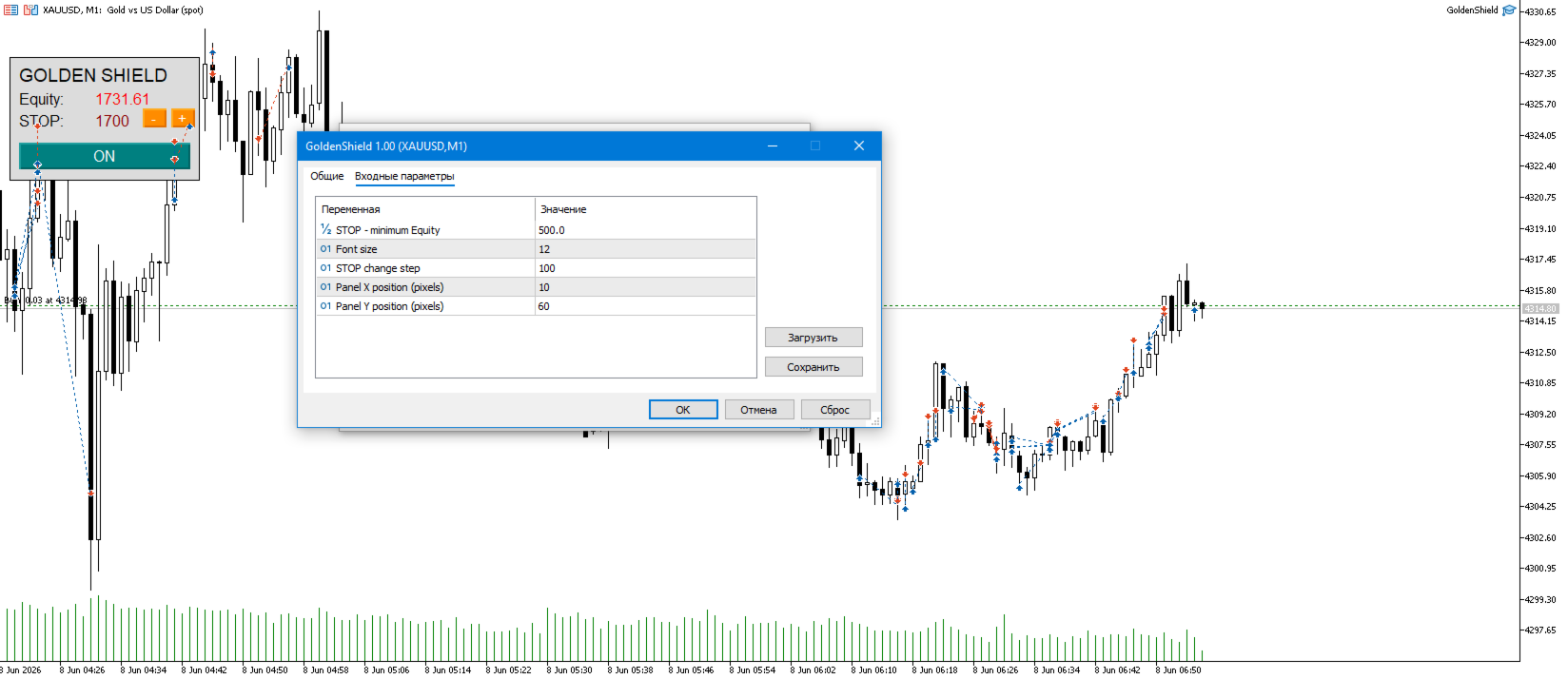
| Interactive Panel | Gainsboro panel with Teal ON / Red OFF buttons |
| Adjustable STOP | Change protection level on the fly with +/- buttons |
| Automatic Switch-off | Protection turns OFF automatically after triggering |
| Universal | Works with ANY Expert Advisors on ANY symbols |
⭐ Key Advantage
Golden Shield is installed on a separate parallel chart and does not conflict with your main trading robot. You can freely trade with any Expert Advisor on one chart, while the protection utility works independently on another chart, instantly closing all positions when critical drawdown occurs.
🛡️ How It Works
-
Set your STOP level (minimum equity for protection)
-
Golden Shield monitors your account equity in real time
-
If Equity ≤ STOP → ALL positions are closed immediately
-
Protection automatically switches to OFF mode
-
Panel turns light pink – activation signal
📊 Input Parameters
| Parameter | Default | Description |
|---|---|---|
| STOP - minimum Equity | 500.0 | Critical equity level (in deposit currency) |
| Font size | 12 | Panel font size |
| STOP change step | 100 | Step value for +/- buttons |
| Panel X position | 10 | Horizontal panel position (pixels) |
| Panel Y position | 60 | Vertical panel position (pixels) |
🎮 How to Use
-
Drag Golden Shield onto ANY chart (e.g., EURUSD)
-
Set your desired STOP level
-
Click ON (Teal button) to activate protection
-
Your trading robot works on other charts
-
If equity drops to STOP level → ALL positions close automatically
-
Restart the utility to enable protection again
Important: Enable "Automated Trading" in MT5 settings!
✅ Advantages
-
✅ Instant protection – 50ms reaction time
-
✅ No conflicts – Works alongside any EAs on other charts
-
✅ Full transparency – See Equity and STOP in real time
-
✅ Easy to use – One-click ON/OFF control