Enhanced Telegram Position Tracker MT5
- ユーティリティ
- バージョン: 2.730
- アップデート済み: 13 8月 2026
- アクティベーション: 10

Enhanced Telegram Position Tracker — Real-Time Trade Monitoring and Reporting for MT5
The most complete Telegram reporting solution for MetaTrader 5. Every trade, every update, every alert is delivered to your Telegram channel, group and forum topics. No missed closures, no duplicates, no spam.
OVERVIEW
Most Telegram tools send one message when a trade opens and another when it closes. That is all they do.
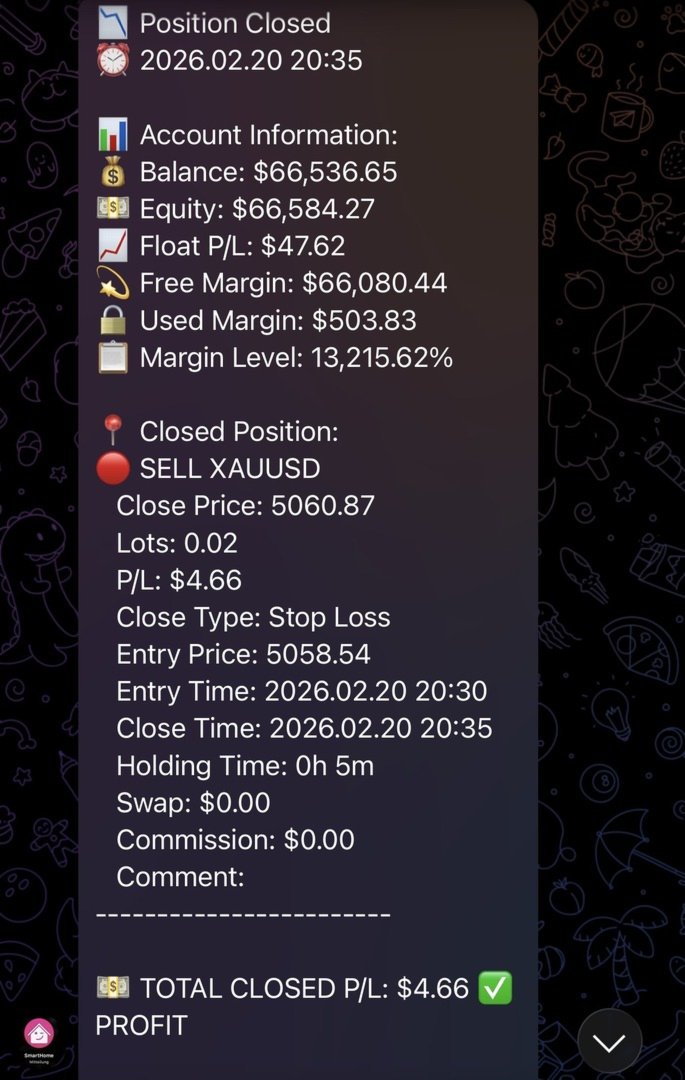
This EA tracks the complete lifecycle of every position — open, SL/TP modification, partial close and final close — and reports each event with full context, in real time, to exactly the right destination. Every closure is labelled with its reason: Stop Loss, Take Profit, Close By or Other.
Open positions are tracked as single editable Telegram messages that refresh their P/L every 30 seconds, so one trade produces one message instead of a flood. Your public channel receives every message in classic sequential form, while a private group with Forum Topics receives the same content automatically sorted into Live Trades, P&L Reports, EA Status and Commands. Both destinations stay in sync without extra configuration.
Followers open an inline keyboard with fifteen buttons and pull live account data on demand. All responses are read-only. The EA never accepts write access to your MT5 positions from Telegram.
FEATURES
Live trade streaming
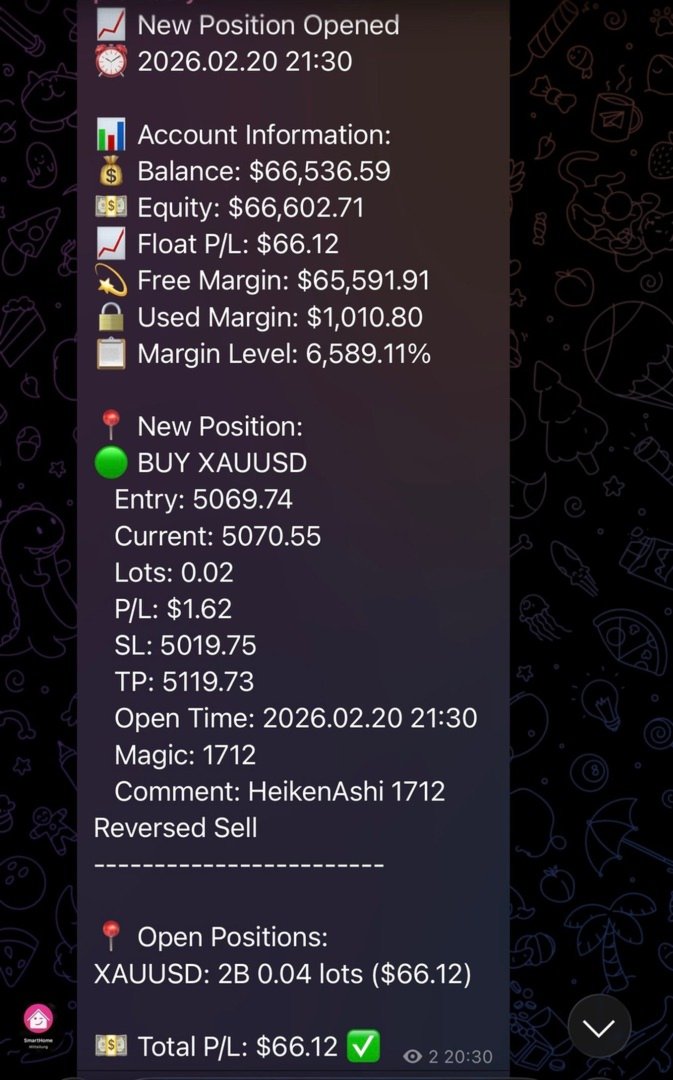
Each new position creates a single message in the Live Trades topic and updates automatically with current price, points, P/L, SL/TP and hold time. SL/TP modifications edit that message rather than sending a new one, and partial closes update it with the reduced lot size. On close, the message becomes a compact CLOSED summary showing entry, close price, P/L, reason and duration.
The closing update is sent no matter how the position ended: by stop, by target, manually, or by a close-by against an opposite position — the way hedge-closing tools terminate trades. The last known state of every live message is stored on disk, so a message still receives its closing update after an EA restart, a terminal update or a VPS reboot. No live message is left standing in an open state.
Every live message stays bound to its position, on a slow connection and under load alike [improved in v2.71]. The link is captured when the message is sent and protected by a generous timeout. A message posted into a forum topic is edited through the same resolved destination as the initial send, so a topic updates exactly like a plain channel. And when several positions close within the same second — a hedge basket cleared at once, a stop level swept — the EA respects Telegram's rate limit, waits the time it asks for and retries, keeping each message bound to its position until the closing update is confirmed. On a high-latency VPS or a saturated network this is the difference between messages that keep up and messages that stop at their last open state.
Complete position lifecycle tracking
Every event in a position's life is captured. Both directions are supported, pending orders are picked up the moment they execute, and each closure carries its own label for Stop Loss, Take Profit, Close By or Other. Close By pairs are reported as a single combined event, and a close-by is now recognised as a closing deal on every path through the EA, so it appears in the notification and in every P&L figure alike [improved in v2.73].
Works on all account types: Standard, ECN, Hedge and Netting. Position reversals on netting accounts are recognised as closing deals and counted in every P&L figure [improved in v2.67].
Net or gross P/L, your choice [new in v2.73]
One setting decides how every figure is calculated. Net counts profit, swap and commission; gross reports what the broker booked on the close alone. The choice applies to all reports at once — closing report, daily, weekly and monthly, health report, close notifications and every menu button — so no two numbers can contradict each other, and each report states which basis it used.
Net P/L is reconstructed across the full deal chain of every position [improved in v2.67]. Both sides of the commission are summed rather than assumed, so brokers charging on entry, on exit or split across both are all handled correctly without configuration. A position closed in several parts applies its entry commission exactly once, and a position filled in several parts counts every fill. The totals reconcile with your MT5 account history to the cent.
This matters more than it sounds. A trade that gains less than its own commission is a winner on the gross basis and a loser on the net one — on a gross win rate, those trades quietly inflate the figure you judge your strategy by.
Dual posting to channel and group topics
Your classic channel receives everything sequentially. A Telegram supergroup with Forum Topics receives the same messages sorted by type across four independent, optional topic slots. The input format is GroupID:TopicThreadID. A plain ChatID without a colon behaves exactly as before, so existing setups keep working untouched.
Follower menu with fifteen buttons
Typing /menu or /start in the Commands topic opens an inline keyboard. Available views cover the result for today, weekly stats with win rate, average win and loss, profit factor and best and worst trade, monthly result, the last ten closed trades, all open positions, live trades including swap and runtime, SL and TP levels with distance in points, per-position breakeven status, account info, risk overview with drawdown and margin figures, performance ratios for today and the current month, the most recent closed trade, EA version and uptime, and a menu refresh.
Account info and risk views are hidden automatically when SendAccountInfo is disabled. Offset persistence prevents duplicate callbacks after a restart.
Automatic daily, weekly and monthly reports
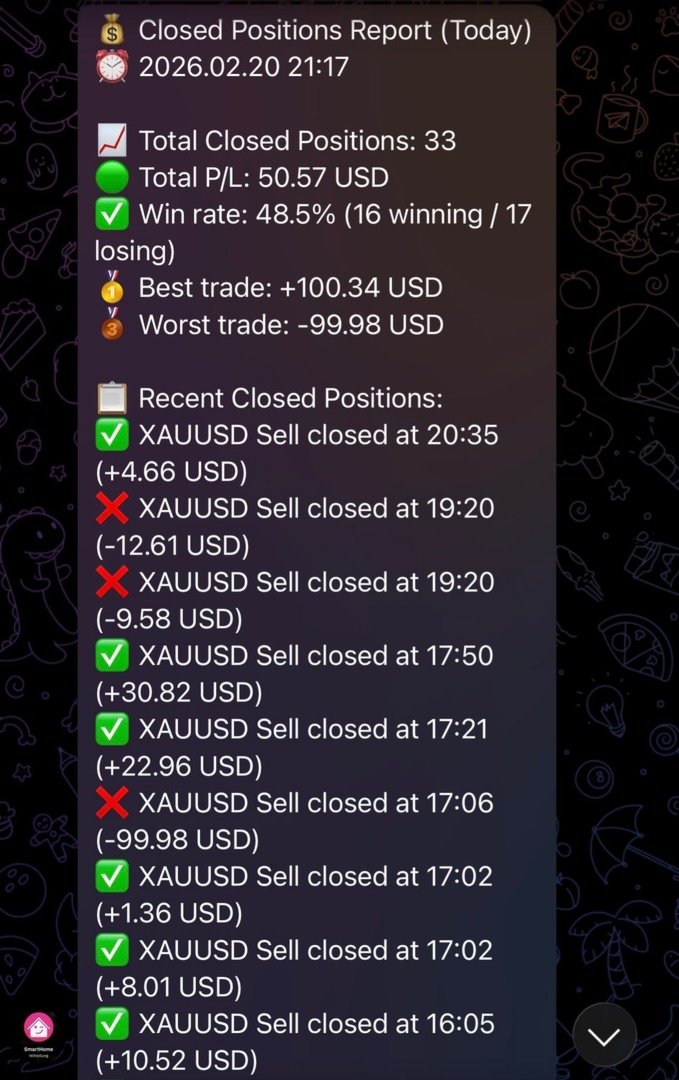
An end-of-day summary is sent every night at 23:59, a full weekly report every Friday at 22:00, and a monthly report on the last day of the month at 22:00. All three go to your channel and the P&L Reports topic, and all three show the same three figures: closed P&L for the period, float P&L of every currently open position regardless of when it was opened, and the combined total.
Zero missed closures and crash detection
A snapshot of open positions is written after every deal event. On startup it is compared against the live account, and any position that closed while the EA was offline — weekend restart, MT5 update, VPS reboot — is detected in the 7-day history and reported immediately. The startup message shows how many closures were recovered.
A session flag distinguishes clean shutdowns from crashes, so the next startup message tells you what actually happened. When MT5 shuts down, active live messages are edited to an offline state with a last-seen timestamp and resume automatically on the next start.
HFT protection and batch reporting
Burst detection prevents Telegram rate limiting during scalping sessions. When the event rate exceeds your threshold, individual reports are batched automatically and restored once the burst ends, with a separate alert to the EA Status topic on each switch. Batch mode is configurable by minimum position count and time window.
Configurable reports and message safety
Seventeen individual field toggles control what appears in opened and closed position reports, covering lots, prices, SL, TP, times, hold duration, swap, commission, P/L, comment and magic number. All default to enabled, so existing users see no change.
Messages are split automatically at 4000 characters, a priority queue lets critical alerts bypass rate limiting, and HTML escaping prevents tag collisions in broker comments.
Health and status monitoring
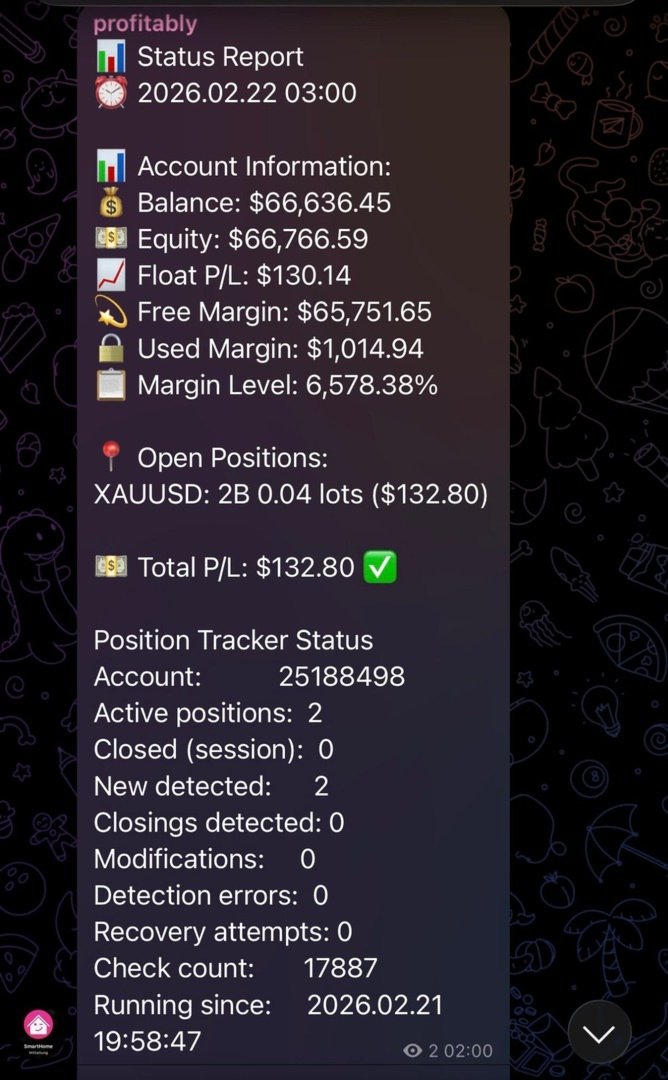
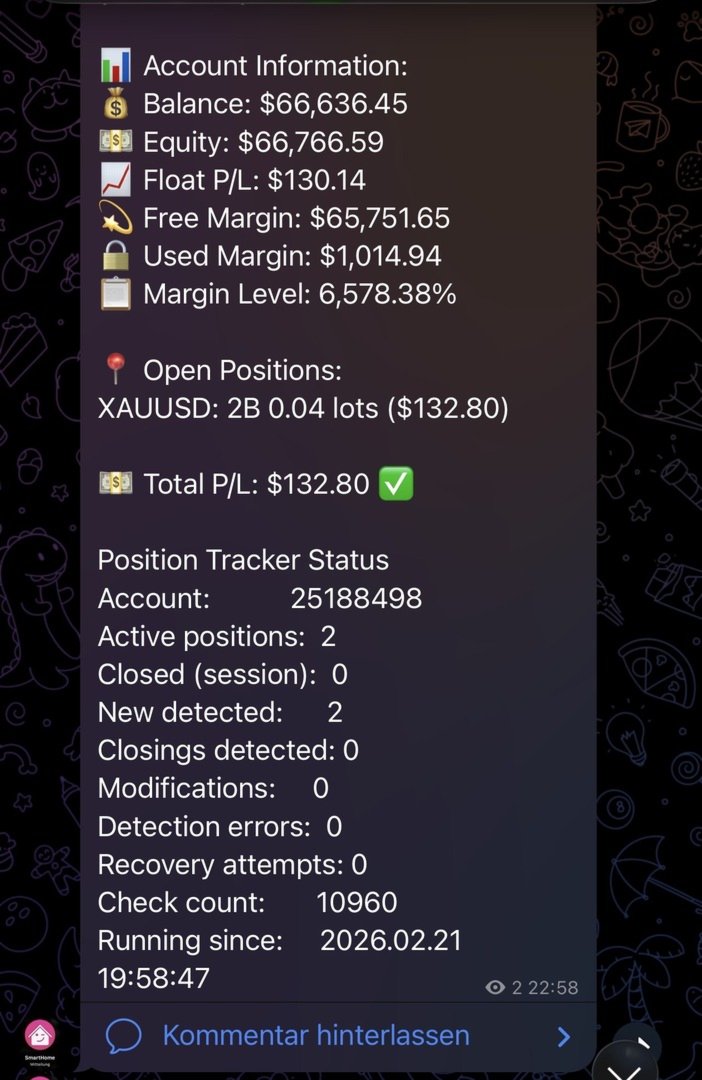
Periodic health reports cover uptime, messages sent, win rate, queue status, server ping, connection state, trade permissions and free margin. Chart buttons trigger position verification, status, health and the three P&L reports manually, plus a connection test that pings the Telegram API and shows the result on the chart and in the journal.
PARAMETERS
Only TelegramToken and ChatID are required. Everything else is optional and ships with working defaults.
Telegram settings. TelegramToken takes the bot token from BotFather, ChatID one or more channel IDs separated by commas. InpChannelName is a display name for documentation only, and MessageInterval sets the status report interval in minutes, 60 by default.
Multi-channel broadcasting. LiveChannelID, DailyChannelID, StatusChannelID and FollowerChatID address live trades, P&L reports, EA status and the follower menu. Each accepts GroupID:TopicID or a plain ChatID, and each falls back to ChatID when left blank, except FollowerChatID which disables the menu. FollowerMenuTitle sets the keyboard header text, LiveUpdateInterval the live P/L refresh in seconds, 30 by default and 0 to disable.
Position tracking. SendEAStartedMessage, SendTradeUpdates, SendClosedPositionsReport, SendAutoReports and TrackPositionModifications switch startup message, trade notifications, closed P/L in status reports, the automatic EOD, weekly and monthly reports, and SL/TP change tracking. All default to enabled. UseNetPnL selects the basis for every P/L the EA reports, net by default, set to false for gross. SendAccountInfo controls whether account data appears at all; with it disabled the Account Info button reports unavailable and EA Uptime omits the account number.
Report fields. Seventeen switches, all enabled by default. General fields are ShowField_Lots, ShowField_PL, ShowField_Comment and ShowField_Magic. For opened positions there are ShowField_EntryPrice, ShowField_CurrentPrice, ShowField_SL, ShowField_TP and ShowField_OpenTime. For closed positions ShowField_ClosePrice, ShowField_EntryOnClose, ShowField_Reason, ShowField_OpenedTime, ShowField_ClosedTime, ShowField_Hold, ShowField_Swap and ShowField_Commission.
Health and chart buttons. SendHealthReports enables periodic reports, HealthReportInterval sets the interval in hours with a default of 12, and SendHealthReportOnStartup adds one at launch, disabled by default. Each chart button has its own switch: ShowVerifyButton, ShowStatusButton, ShowHealthButton, ShowEODButton, ShowWeeklyButton, ShowMonthlyButton, ShowReseedButton and ShowConnTestButton. ButtonYOffset, ButtonWidth and ConnTestButtonX control placement in pixels, defaulting to 30, 235 and 400.
HFT protection and batching. HFT_Threshold sets the events per minute that trigger HFT mode, 10 by default, with HFT_CooldownMultiplier at 5, HFT_ModeDuration at 120 quiet seconds before it deactivates, HFT_MinSendInterval at 200 milliseconds and HFT_QueueMaxSize at 50 queued messages. Batch_MinPositions and Batch_TimeWindowSec govern batch mode with defaults of 4 positions and 10 seconds.
Message length. MaxPositionsInReport caps positions per report at 10, UseCompactReporting enables a compact format for large accounts, and ShowTrackerStatus toggles the diagnostics block.
Logging and intervals. EnableRobustTracking switches on tick-based tracking, LoggingLevel offers minimal, normal, verbose and trace from 0 to 3 with 0 as default, VerificationInterval runs position checks every 300 seconds, PositionCheckInterval the tick-based check every second, and DataFolderPath allows a custom data folder.
INSTALLATION
Copy the EA to your MT5 Experts folder and compile it in MetaEditor. Create a bot through BotFather, copy the token, and add the bot to your channel as an administrator with permission to post messages. Attach the EA to any chart, enter TelegramToken and ChatID, and you are running. All other settings are optional.
To use forum topics, create a supergroup and enable Topics in the group settings. Add your bot as an administrator and disable privacy mode so it can read messages. Create the four topics, open each one and note the number at the end of its link, then enter GroupID:TopicNumber in the corresponding parameter.
In MT5 under Tools, Options, Expert Advisors, allow WebRequest for the address api.telegram.org
COMPATIBILITY
MetaTrader 5, all account types including Standard, ECN, Hedge and Netting. No functional restrictions, no time limits, no symbol limits. A one-month rental is available alongside the full purchase.
Version 2.73 | fi.con Investment Group | MQL5 Marketplace