Enhanced Telegram Position Tracker MT5

Enhanced Telegram Position Tracker — Real-Time Trade Monitoring & Reporting for MT5

━━━━━━━━━━━━━━━━━━━━━━━━━━━━━━━━━━━━━━━━━━━━━━━━━━━━━━━━━━━━━━━━━━━━━━━━━━━━━━━━━━━━━━━━━━━━━━━━━━━━━━━━

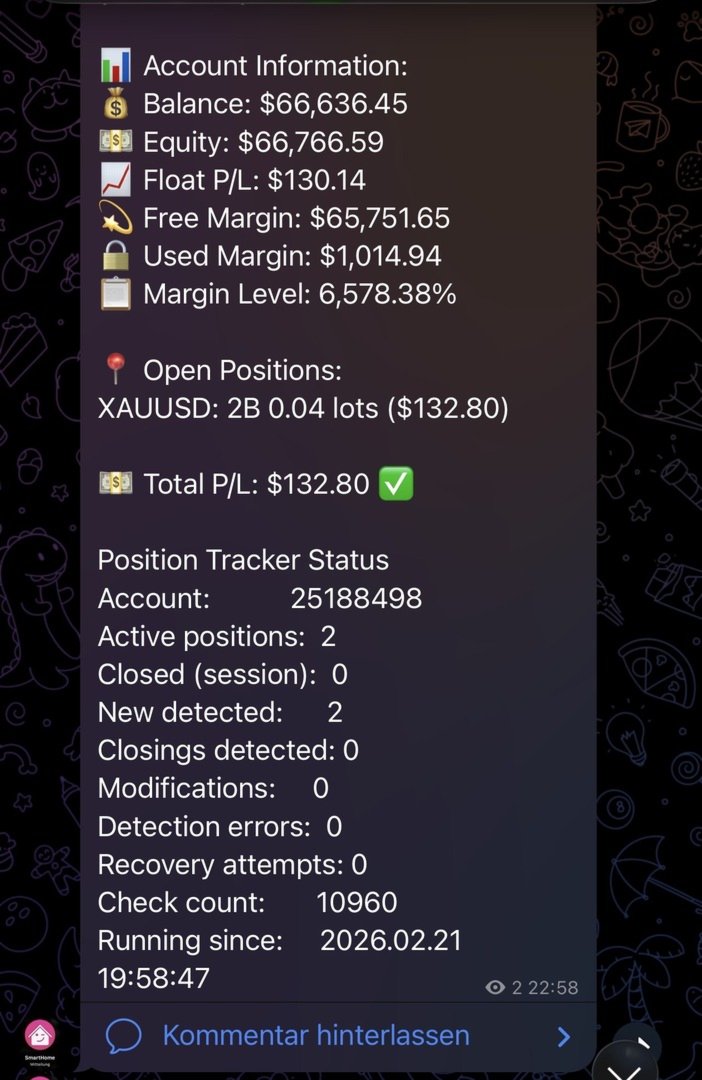
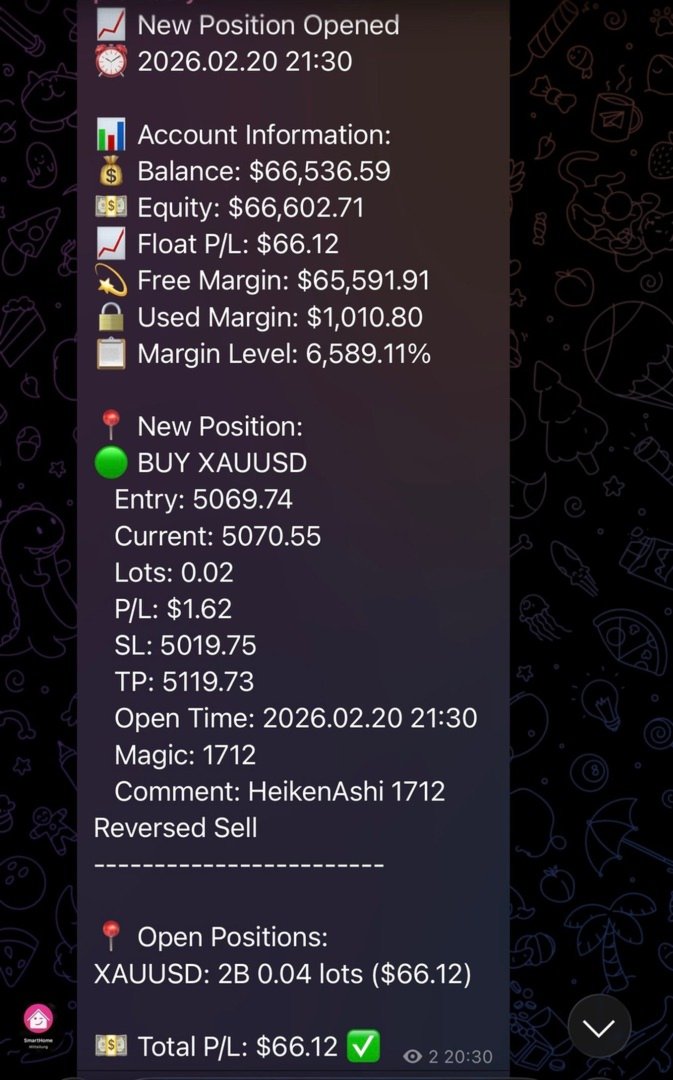
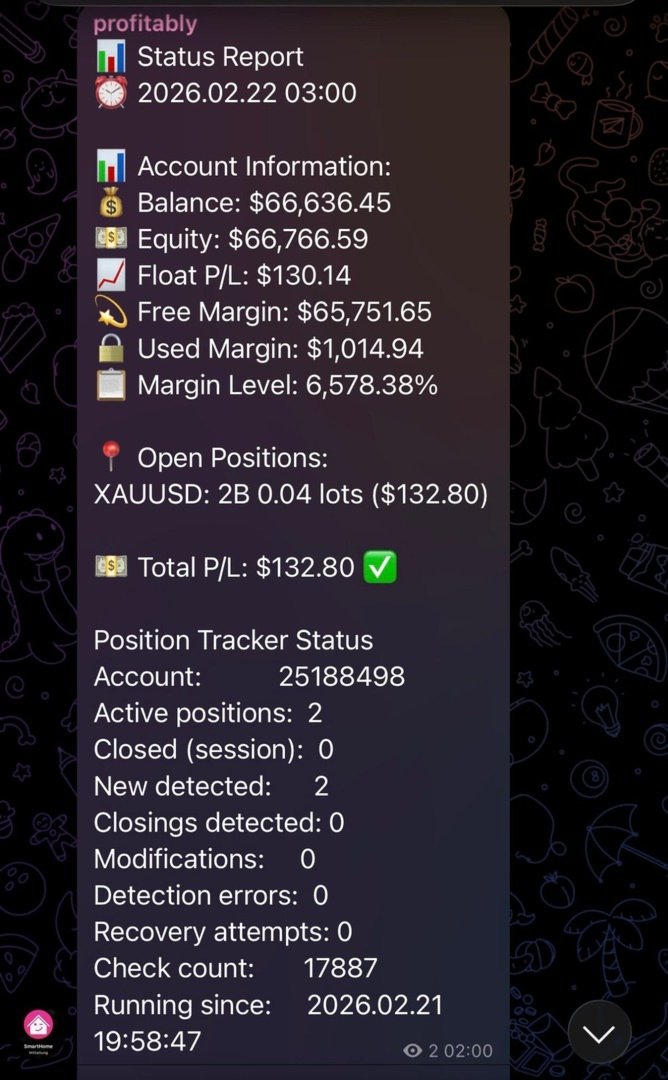
The most complete Telegram reporting solution for MetaTrader 5. Every trade, every update, every alert — delivered instantly to your Telegram channel, group, and forum topics. No missed closures, no duplicates, no spam.

━━━━━━━━━━━━━━━━━━━━━━━━━━━━━━━━━━━━━━━━━━━━━━━━━━━━━━━━━━━━━━━━━━━━━━━━━━━━━━━━━━━━━━━━━━━━━━━━━━━━━━━━

WHY THIS EA STANDS OUT

Most Telegram EAs send a message when a trade opens and another when it closes. That is all.
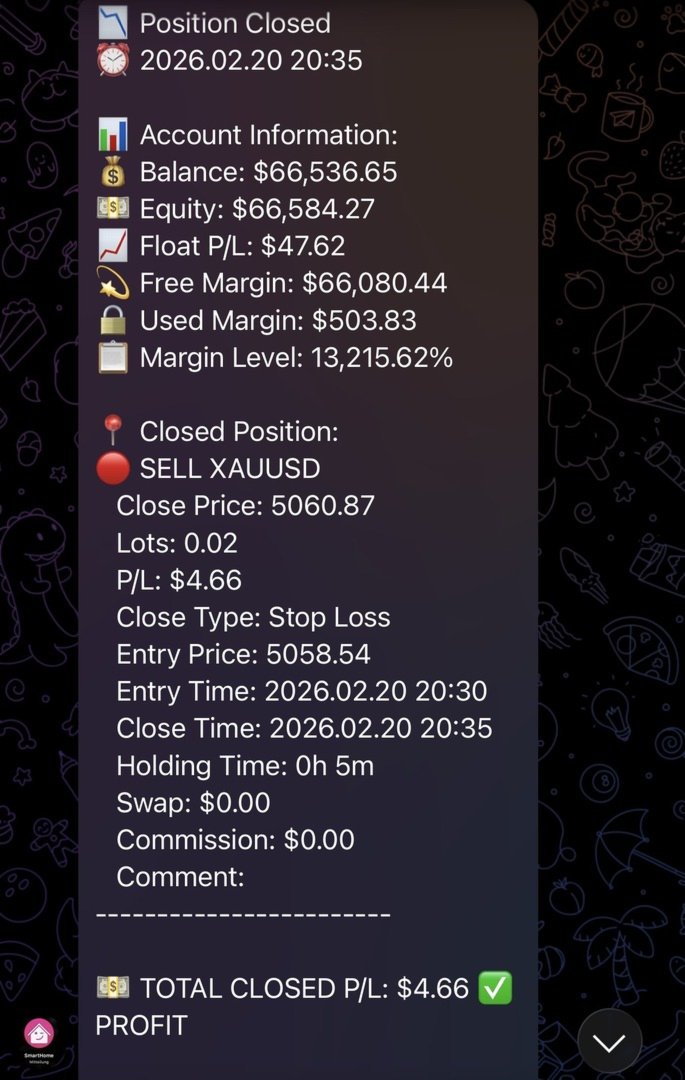
This EA tracks the complete lifecycle of every position — open, SL/TP modification, partial close, and final close — and reports every event with full context, in real time, to exactly the right destination. Every closure reason is labelled: Stop Loss, Take Profit, Close By, or Other.

What makes it unique:

    ✦ Live Streaming Messages — Open positions are tracked as single editable Telegram messages that update their P/L every 30 seconds. No message flood. One message per trade, continuously updated until the trade closes.

    ✦ Dual-Posting Architecture — Your public channel receives every message in classic sequential style. Your private Telegram group with Forum Topics receives the same messages automatically sorted into dedicated topics: Live Trades, Daily P&L, EA Status, Commands. Both destinations are updated simultaneously without any extra configuration.

    ✦ 15-Button Interactive Dashboard — Followers type /menu in the Commands topic and get an instant Telegram keyboard with live account data on demand: open positions, P&L, performance stats, risk overview, live trade details, SL/TP distances. Read-only. No write access to MT5.

    ✦ EA Offline State — When MT5 shuts down, the EA edits all active live messages to an ⏸ EA OFFLINE state with a last-seen timestamp. On the next startup, live tracking resumes automatically from the same messages.

    ✦ Zero Missed Closures — Startup reconciliation detects any position that closed while the EA was offline (weekend restart, MT5 update, VPS reboot) and immediately sends the missed close report.

    ✦ Crash Detection — Session flag system distinguishes clean shutdowns from crashes. Your next startup message tells you exactly what happened.

    ✦ HFT Protection — Built-in burst detection prevents Telegram rate limiting during scalping sessions. Individual reports are automatically batched when event rates exceed your configured threshold, then restored to individual mode once the burst ends.

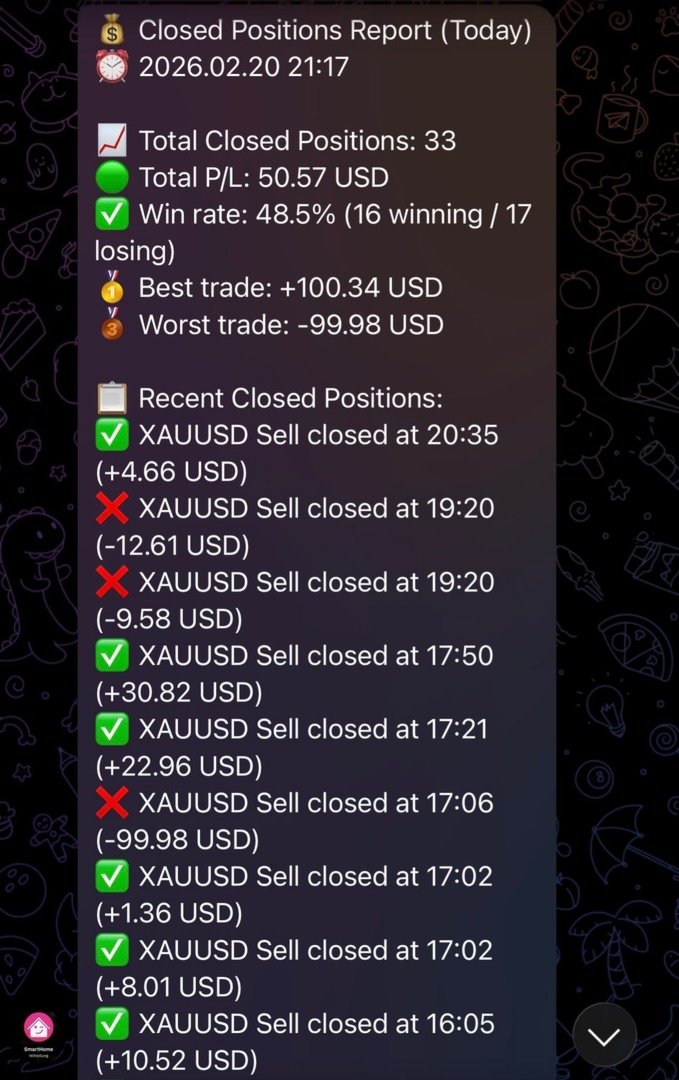
    ✦ Automatic Daily, Weekly & Monthly Reports — End-of-day P&L summary sent every night at 23:59, full weekly performance report every Friday at 22:00, and monthly report on the last day of every month at 22:00 —all delivered to your channel and P&L Reports topic automatically. All three reports consistently show: closed P&L for the period, float P&L of all currently open positions regardless of when they were opened, and a combined total — giving a complete picture of realised performance and live exposure in a single report.

    ✦ Full Backward Compatibility — Only ChatID required. All new features are optional. Existing users upgrading from any previous version need zero configuration changes.

━━━━━━━━━━━━━━━━━━━━━━━━━━━━━━━━━━━━━━━━━━━━━━━━━━━━━━━━━━━━━━━━━━━━━━━━━━━━━━━━━━━━━━━━━━━━━━━━━━━━━━━━

FEATURES

Live Trade Streaming
    — Each new position creates a single Telegram message in the Live Trades topic
    — Message updates automatically every 30 seconds with current price, pts, P/L, SL/TP, and hold time
    — SL/TP modifications edit the live message — no new message is sent
    — Partial closes (volume reductions) update the live message with new lot size
    — On position close: live message is edited to compact CLOSED state (entry, close price, P/L, reason, hold duration) — no full close report is posted to the Live Trades topic; full report goes to your classic channel only

Complete Position Lifecycle Tracking
    — Every event in a position's life is captured and reported — nothing is missed
    — Supports both position types: BUY (long) and SELL (short)
    — Tracks every closure reason with individual labels in the report:
        🔴 Stop Loss — SL level hit
        🟢 Take Profit — TP level hit
        🔄 Close By — hedge close, both positions reported as paired event
        ⬜ Other — manual, EA-controlled, Stop Out, or any other reason
    — Pending orders (Buy/Sell Limit, Buy/Sell Stop) are captured the moment they execute
    — Works on all account types: Standard, ECN, Hedge, Netting

Dual-Posting: Channel + Group Topics
    — Classic channel (ChatID) receives every message in sequential style
    — Telegram Supergroup with Forum Topics receives messages sorted by type:
     📊 Live Trades topic — new positions, closes, P/L updates
     📊 P&L Reports topic — EOD daily (23:59), weekly (Friday 22:00), monthly (last day 22:00)
     🔧 EA Status topic — startup, stop, health reports, HFT alerts
     💬 Commands topic — follower interactive menu and bot replies
    — All four topic slots are independent and optional
    — Input format: -1001234567890:111 (GroupID:TopicThreadID)
    — Plain ChatID without colon works exactly as before — full backward compatibility

Follower Interactive Menu
    — Type /menu or /start in the Commands topic to open a 15-button inline keyboard
    — 📅 Today, 📆 Weekly, 🏆 Monthly buttons show simple P&L summary; full detailed reports are sent automatically to the P&L Reports topic
    — All responses are live data from the running MT5 instance, delivered in seconds
    — Read-only — no write access to MT5 positions from Telegram

     📅 Today Result — closed P/L for the current trading day
     📆 Weekly Stats — full weekly P&L report on demand: total P&L, trades, win rate, avg win/loss, profit factor, best/worst trade
     🏆 Monthly Stats — closed P/L for the current calendar month
     📋 Closed Today — list of up to 10 closed trades today with direction, symbol, P&L and close time
     📍 Open Positions — all open trades with symbol, direction, lots, entry price, current P/L
     📈 Live Trades — up to 10 open positions with lots, entry, P/L incl. swap, runtime, total float P/L
     🎯 SL/TP Levels — current price, SL and TP level with distance in points for each open trade
     💹 Breakeven — per-position BE status: ✅ set, ⏳ not yet with points remaining to entry, ❌ no SL — plus summary count
     💼 Account Info — balance, equity, floating P/L, free margin (hidden if SendAccountInfo=false)
     ⚠️ Risk — open drawdown $/%, margin used %, free margin, margin level, total lots, net exposure (hidden if SendAccountInfo=false)
     📊 Performance — win rate, avg win, avg loss, profit factor for today and this month
     ⚡ Last Trade — symbol, P/L, and close time of the most recent closed trade
     ℹ️ EA Info — EA version, uptime, fi.con Investment Group
     🕐 EA Uptime — running time in days/hours/minutes/seconds, start timestamp, account number (hidden if SendAccountInfo=false)
     🔄 Refresh Menu — re-sends the button keyboard at any time

    — Configurable menu title via FollowerMenuTitle input parameter
    — Offset persistence ensures no duplicate callbacks after EA restart
    — Command logging at LogLevel 1: every button press and response length recorded in MT5 journal

Zero Missed Closures
    — Open position snapshot written after every deal event and at every verification interval
    — On startup: snapshot compared against current open positions
    — Any position that closed while EA was offline is detected, looked up in 7-day history, and reported immediately
    — Startup message shows count of recovered closures

Crash Detection
    — Session flag file written at startup (instance-specific, multi-terminal safe)
    — Deleted only on clean shutdown after successful stop message
    — Startup message shows warning if previous session ended without clean stop

HFT Protection
    — Configurable event rate threshold (default: 10 events/minute)
    — Automatic switch to batch reporting during burst periods
    — Telegram send interval throttle with message queue
    — Separate alert sent to EA Status topic when HFT mode activates and deactivates
    — Individual reporting automatically restored after configurable quiet period

Fully Configurable Trade Reports
    — 17 individual field toggles for opened and closed position reports
    — Opened: Lots, Entry Price, Current Price, SL, TP, Open Time, P/L, Comment, Magic
    — Closed: Lots, Close Price, Entry Price, Close Reason, Opened Time, Closed Time, Hold Duration, Swap, Commission, P/L, Comment, Magic
    — All fields default true — zero impact on existing users

Health & Status Monitoring
    — Configurable health reports (default: every 12 hours)
    — Includes: uptime, messages sent, win rate today, message queue status, server ping, connection state, trade permissions, free margin
    — Seven chart buttons for manual triggers, stacked bottom-left: [Verify Positions], [Status Report], [Health Report], [Send EOD Report], [Send Weekly Report], [Send Monthly Report], [Reseed Live Msgs]
    — Connection Test button (bottom-center, separate): pings Telegram API, shows result as chart label for 10 seconds + details in MT5 Journal
    — Manual Position Verification report goes to EA Status topic + channel

Smart Batch Reporting
    — Configurable minimum positions and time window for batch mode (default: 4 positions / 10 seconds)
    — Batch summaries sent when threshold exceeded — individual reports otherwise
    — Close-By detection: paired positions reported as single combined close event

Message Safety
    — Automatic message splitting at 4000 characters (Telegram HTML limit)
    — Priority queue: critical alerts bypass rate limiting
    — HTML escaping prevents tag collisions in broker comments
    — Smart Comment extraction: EA name + [sl]/[tp]/[tp1] from deal comments

━━━━━━━━━━━━━━━━━━━━━━━━━━━━━━━━━━━━━━━━━━━━━━━━━━━━━━━━━━━━━━━━━━━━━━━━━━━━━━━━━━━━━━━━━━━━━━━━━━━━━━━━

PARAMETERS

Telegram Settings
   InpChannelName   —   Display name for your channel (documentation only)
   TelegramToken   —   Bot token from @BotFather — required
   ChatID   —   Channel ID(s), comma-separated for multiple channels — required
   MessageInterval   —   Status report interval in minutes (default: 60)

Multi-Channel Broadcasting
   LiveChannelID   —   Live trades: GroupID:TopicID or plain ChatID (blank = use ChatID)
   DailyChannelID   —   P&L Reports topic (daily EOD, weekly, monthly): GroupID:TopicID or plain ChatID (blank = use ChatID)
   StatusChannelID   —   EA status + health: GroupID:TopicID or plain ChatID (blank = use ChatID)
   FollowerChatID   —   Follower interactive menu: GroupID:TopicID (blank = disabled)
   FollowerMenuTitle   —   Title text shown at the top of the follower menu keyboard
   LiveUpdateInterval   —   Live P/L refresh interval in seconds (default: 30, 0 = disabled)

Position Tracking Settings
   SendEAStartedMessage   —   Send startup message (default: true)
   SendAccountInfo   —   Include account info in reports; when false: 💼 Account Info button returns unavailable message, 🕐 EA Uptime omits account number (default: true)
   SendTradeUpdates   —   Send trade open/close notifications (default: true)
   SendClosedPositionsReport   —   Include closed P/L in hourly status reports and health reports (default: true)
   SendAutoReports   —   Send automatic EOD/Weekly/Monthly P&L reports (default: true)
   TrackPositionModifications   —   Track and report SL/TP changes (default: true)

Trade Report Fields — General
   ShowField_Lots   —   Show lot size (default: true)
   ShowField_PL   —   Show P/L (default: true)
   ShowField_Comment   —   Show trade comment field (default: true)
   ShowField_Magic   —   Show magic number (default: true)

Trade Report Fields — Opened Position
   ShowField_EntryPrice   —   Entry price (default: true)
   ShowField_CurrentPrice   —   Current price (default: true)
   ShowField_SL   —   Stop Loss (default: true)
   ShowField_TP   —   Take Profit (default: true)
   ShowField_OpenTime   —   Open time (default: true)

Trade Report Fields — Closed Position
   ShowField_ClosePrice   —   Close price (default: true)
   ShowField_EntryOnClose   —   Entry price on close report (default: true)
   ShowField_Reason   —   Close reason: Stop Loss / Take Profit / Close By / Other (default: true)
   ShowField_OpenedTime   —   Time position was opened (default: true)
   ShowField_ClosedTime   —   Time position was closed (default: true)
   ShowField_Hold   —   Hold duration (default: true)
   ShowField_Swap   —   Swap (default: true)
   ShowField_Commission   —   Commission (default: true)

Health & Reliability Settings
   SendHealthReports   —   Enable periodic health reports (default: true)
   HealthReportInterval   —   Health report interval in hours (default: 12)
   SendHealthReportOnStartup   —   Send health report on EA start (default: false)
   ShowVerifyButton   —   Show [Verify Positions] chart button (default: true)
   ShowStatusButton   —   Show [Status Report] chart button (default: true)
   ShowHealthButton   —   Show [Health Report] chart button (default: true)
   ShowEODButton   —   Show [Send EOD Report] chart button (default: true)
   ShowWeeklyButton   —   Show [Send Weekly Report] chart button (default: true)
   ShowMonthlyButton   —   Show [Send Monthly Report] chart button (default: true)
   ShowReseedButton   —   Show [Reseed Live Msgs] chart button (default: true)
   ShowConnTestButton   —   Show [Connection Test] chart button (default: true)
   ButtonYOffset   —   Button distance from chart bottom in pixels (default: 30)
   ButtonWidth   —   Chart button width in pixels (default: 235)
   ConnTestButtonX   —   X position of Connection Test button from left in pixels (default: 400)

Logging & Check Interval
   EnableRobustTracking   —   Tick-based position tracking (default: true)
   LoggingLevel   —   0=Minimal, 1=Normal, 2=Verbose, 3=Trace (default: 0)
   VerificationInterval   —   Position verification interval in seconds (default: 300)
   PositionCheckInterval   —   Tick-based check interval in seconds (default: 1)
   DataFolderPath   —   Custom data folder path (blank = default account folder)

HFT Protection
   HFT_Threshold   —   Events/minute to trigger HFT mode (default: 10)
   HFT_CooldownMultiplier   —   Send cooldown multiplier in HFT mode (default: 5)
   HFT_ModeDuration   —   Quiet seconds before HFT mode deactivates (default: 120)
   HFT_MinSendInterval   —   Minimum milliseconds between sends (default: 200)
   HFT_QueueMaxSize   —   Max queued messages before dropping low-priority (default: 50)

Message Length Control
   MaxPositionsInReport   —   Maximum positions in a single report (default: 10)
   UseCompactReporting   —   Compact position format for large accounts (default: true)
   ShowTrackerStatus   —   Show Position Tracker diagnostics block (default: true)

Batch Reporting
   Batch_MinPositions   —   Minimum positions to trigger batch mode (default: 4)
   Batch_TimeWindowSec   —   Time window in seconds to collect batch (default: 10)

━━━━━━━━━━━━━━━━━━━━━━━━━━━━━━━━━━━━━━━━━━━━━━━━━━━━━━━━━━━━━━━━━━━━━━━━━━━━━━━━━━━━━━━━━━━━━━━━━━━━━━━━

INSTALLATION

    1. Copy EnhancedTelegramEA.mq5 to your MT5 Experts folder
    2. Compile in MetaEditor (F7)
    3. Create a Telegram bot via @BotFather and copy the token
    4. Add the bot to your channel as Admin with Post Messages permission
    5. Attach the EA to any chart and enter TelegramToken and ChatID
    6. All other settings are optional — defaults work out of the box

Optional: Telegram Group with Forum Topics

    1. Create a Supergroup and enable Topics in Group Settings
    2. Add your bot as Admin — disable Privacy Mode to allow reading messages
    3. Create four topics: Live Trades, P&L Reports, EA Status, Commands
    4. For each topic: tap the topic name → copy the link → note the number at the end
    5. Enter: GroupID:TopicNumber in LiveChannelID, DailyChannelID, StatusChannelID, FollowerChatID
    6. Group ID: send any message in the group, reply with /json via @getidsbot — find "id" in the chat object

Allow WebRequest for: https://api.telegram.org in MT5 Tools → Options → Expert Advisors

━━━━━━━━━━━━━━━━━━━━━━━━━━━━━━━━━━━━━━━━━━━━━━━━━━━━━━━━━━━━━━━━━━━━━━━━━━━━━━━━━━━━━━━━━━━━━━━━━━━━━━━━

MORE TOOLS FROM fi.con INVESTMENT GROUP

We offer a complete MT5 toolkit built by traders. If you trade actively and want more automation, reporting, and control, these tools extend your MT5 setup significantly: 

    📡  MT5 to Telegram Informer — sends every trade open and close to your Telegram channel in real time. Full position lifecycle: pending order execution, SL/TP changes, partial closes, close reason labelling. Multiple channels, Topics support, configurable report fields. If you share your trades with a Telegram audience, this is your tool. 

    📊  Telegram Trading Reporter MT5 — automated performance reports delivered to Telegram on schedule: daily EOD summary, weekly stats, monthly overview. Analyses your full trade history and sends structured reports with P&L, win rate, profit factor, best/worst trade — all without you having to open MT5. 

    🛠️  Chart Order Trade Manager MT5 — professional on-chart trade management panel for active traders. Visual SL/TP placement, automatic lot size calculation from risk %, one-click breakeven, trailing stop, partial close. Designed for traders who manage positions manually while running EAs in parallel. 

    🚫  Position Closure Management MT5 — automatically resolves hedged position pairs and locks in the net result at exactly the right moment. Essential for grid and martingale strategies, prop firm challenge rules that prohibit hedging, and any setup where open buy/sell pairs need controlled resolution. 


Version 2.65  |  fi.con Investment Group  |  MQL5 Marketplace
Önerilen ürünler
Ultimate Pro Trading Panel — All-In-One Manual & Grid Trading Dashboard Pro Trading Panel   is an all-in-one on-chart control panel that gives discretionary and semi-automated traders a complete toolkit for entries, exits, risk management, and grid trading — without leaving the chart. Every function is visual, draggable, and updates in real time. If you want to test this utility feel free to download the basic preview version of this tool here:  https://www.mql5.com/en/market/product/181435 Who
Trading Utility for Forex Currency Pairs Only not for Gold  Functions Auto Lot Calculation based on Risk Auto stoploss  Auto TakeProfit Breakeven Auto Close Half % Close in percentage with respect to the PIPs Pending Orders BuyLimit Sell Limit with distances BuyStop Sell Stop    with distances Trading Informations Risk in percentage For Multiple trades Combine Takeprofit and Combine Stoplosses
Exp5 Duplicator
Vladislav Andruschenko
4.78 (9)
Duplicator for MetaTrader 5 — tek terminal içinde profesyonel pozisyon çoğaltıcı MetaTrader 5 içinde önceden açılmış pozisyonları otomatik olarak çoğaltmak, hacmi artırmak, özel lot ayarları uygulamak ve kopyaları hassas kurallarla yönetmek isteyen yatırımcılar için güvenilir bir Expert Advisor. Manuel işlem, algoritmik sistemler ve tek terminal içinde mevcut pozisyonların esnek yönetimi için pratik bir araçtır. Duplicator for MT5 kendi işlem stratejisine göre pozisyon açmaz. Görevi, MetaTrader
DDKiller Pro
Njaratahiry Michael Randrianiaina
Stop Blowing Your Account. Once and For All. DDKiller Pro is the MT5 risk guardian that runs silently on your chart and shuts down trading the moment you hit a limit — whether you're grinding a prop firm challenge or managing your own CFD account. The problem every trader knows: You set your rules. You break them anyway. One revenge trade. One overleveraged position. One session that erases a month of gains. DDKiller Pro removes that decision from your hands entirely. What it does: The second yo
CYGNIX RISK GLADIATOR — Professional Trade Manager & Risk Guardian for MT5 Guard every position. Manage every trade. Sleep at night. Cygnix Risk Gladiator is a professional-grade position management Expert Advisor that watches every open trade on your account and automatically applies institutional-level risk controls in real time. It does not generate signals — it protects, manages, and exits trades opened by you, your strategies, or any other EA. Built for IC Markets and fully compatible w
TradeControl Pro – MetaTrader için Gelişmiş Trade Yönetim Aracı TradeControl Pro , MetaTrader platformu için geliştirilmiş bir trade yönetim aracıdır ve işlemlerin doğrudan grafik üzerinden düzenli ve verimli bir şekilde yönetilmesini sağlar. Uygulama, açık ve anlaşılır bir kullanıcı arayüzünü otomatik hesaplamalar ve farklı işlem yaklaşımlarına uygun esnek kontrol seçenekleri ile birleştirir. Grafik üzerine entegre edilen panel, tablo yapısında tasarlanmış olup üç ana sekmeden oluşur: Execution
Expert TP SL v04 - Professional Trading Assistant with AI Motivation System Advanced manual trading tool with automatic risk management, overtrading protection, and intelligent psychological support for disciplined trading. PRODUCT OVERVIEW Expert TP SL v04 is a comprehensive trading assistant designed for manual traders who want to maintain emotional discipline while automating risk calculations. This isn't just another order placement tool - it's a complete trading psychology system that pr
This tool will perform Trailing stop loss and Break even management for orders. Helps you limit or reduce the time spend watching orders on the screen, especially when you need to go to sleep. Just add this EA to 1 chart, you can manage all pairs. You can filter orders by comment, magic number, symbol and order ticket number. When Breakeven it can add shift/offset pips (to cover the commission...). You can try in strategy tester before purchase. The EA will add Buy and Sell alternately, so you
CoPilot — Günlük Trading Panosu Sayılarınızı bilin. Netlikle işlem yapın. MT4 Sürümü CoPilot Nedir? CoPilot, tüm günlük performans istatistiklerinizi doğrudan grafik üzerinde gerçek zamanlı olarak görüntüleyen profesyonel düzeyde bir trading asistanıdır — her işlemde güncellenen bir canlı öz sermaye eğrisi ile birlikte. Grafikten ayrılmadan serinye anında görünürlük ihtiyacı duyan aktif yatırımcılar için tasarlanan CoPilot, tüm sembollerdeki günün her kapatılmış işlemini toplar ve temiz, renk ko
TradePilotmt5
Hossein Khalil Alishir
TradePilot Expert Advisor (EA) for MetaTrader 5 TradePilot is a professional and user-friendly Expert Advisor (EA) for MetaTrader 5 (MT5) . It simplifies automated trading , risk management , and trade execution with a smart trading panel . Perfect for beginners and experienced traders looking for a reliable trade manager EA with automated lot size calculation and smart position management. Key Advantages User-Friendly Trading Panel: Customizable panel with buttons and hotkeys for fast ex
Timeframe Trading Limiter
AL MOOSAWI ABDULLAH JAFFER BAQER
Timeframe Trading Limiter is a professional risk management and trade discipline utility designed for MetaTrader 5. It empowers traders to enforce strict, automated limits on the number of trades and the maximum allowable drawdown within each trading period, based directly on the chart timeframe selected. Whether you are a discretionary trader prone to overtrading, a prop firm challenge participant needing to adhere to strict rules, or an algorithmic trader running multiple strategies, this tool
Candlestick Pattern Scanner is a multi-timeframe and multi-symbol dashboard and alert system that checks all timeframes and currency pairs for different candlestick patterns that are formed in them. Scanner is integrated   with support and resistance zones so you can check the candlestick patterns in most important areas of the chart to find breakout and reversal patterns in the price chart. Download demo version   (works on M4,M6,M12,H3,H8 timeframes and 20 symbols of Market Watch window) Read
BreakEvan Utility  Is a simple tool in a panel with this utilities: This utility will draw a Golden Line in the chart applied showing the breakeven price, considering all the positions opened for that specific symbol. Also the information panel shows: Balance Breakeven Price for that chart Force Breakeven (for that symbol) as ON/OFF Force Breakeven Global (takes into account all trades opened) as ON/OFF Total Lots opened for Symbol Total Lots opened Global And two buttons: Force Breakeven: Whe
King ElChart Manual Trade Panel
Mohammed Maher Al-sayed Mohammed Ahmed Saleh
King Chart – Manual Trading Panel for MetaTrader 5 Overview King Chart is a simple yet powerful manual trading panel built for traders who want speed, precision, and clarity. It enables quick order execution, clear lot control, and real-time account monitoring  all directly on your MT5 chart. Main Features Multi-Lot Trade Execution 3 Buy and 3 Sell buttons for instant execution Each button is tied to a custom lot size field Designed for flexible scaling in or out of trades Position Management D
CosmiCLab SMC FIBO CosmiCLab SMC FIBO is a professional trading indicator designed for traders who use Smart Money Concepts (SMC), market structure analysis and Fibonacci retracement levels. The indicator automatically detects market swings and builds Fibonacci levels based on the latest impulse movement. It also identifies market structure changes such as BOS (Break of Structure) and CHOCH (Change of Character), helping traders understand the current market direction. CosmiCLab SMC FIBO also pr
TradePad
Ruslan Khasanov
5 (1)
TradePad hem manuel hem de algoritmik ticaret için bir araçtır. Size hızlı ticaret işlemleri ve çeşitli ticaret enstrümanlarındaki pozisyonların kontrolü için basit bir çözüm sunuyoruz. Dikkat, uygulama strateji test cihazında çalışmıyor! Demo hesabı için uygulamanın deneme sürümü ve tüm araçların açıklaması Uygulama arayüzü yüksek çözünürlüklü monitörler için uyarlanmıştır, basit ve sezgiseldir. Rahat bir çalışma için, tüccara aşağıdaki araç seti sunulur: Ticaret işlemlerini yönetmek, ana grafi
Trade Analyzer Panel is a real-time dashboard utility for MetaTrader 5. It brings position monitoring, risk analysis, profit/loss simulation, target planning, break-even visualization and quick-close controls into a single scrollable on-chart panel. Features Position scanner: lists every open position with symbol, direction, lot size, open price and live profit/loss. Account summary: balance, equity, used and free margin, and margin level updated in real time. Break-even visualization: draws a l
Inverted_Chart_EA Utility Expert Advisor Inverted_Chart_EA creates and maintains a mirror-inverted chart of any symbol and timeframe. It automatically generates a custom instrument (e.g. US30_INV ) and keeps its price history updated in real time, with bars mirrored around a chosen pivot. This utility gives traders a new way to analyze the market from a different perspective by flipping the chart upside down. Why use an inverted chart? Highlight hidden patterns – price formations that look ordin
SLTPSetter
Raphael Djangmah Osro Agbo
SLTPSetter - StopLoss Take Profit Setter HOW DOES IT WORK? Risk and account management is a very critical aspect of trading. Before entering a position, you must be fully aware how much you will be willing to loss both in percentage and value. This is where SLTPSetter gets you covered.  All you need to do is attach the indicator on the chart and PRESS BUY OR SELL automatically, all parameters needed for placing the trades will be provided at the top left corner of the screen. Feel free to adjust
Overview Mirror Signals Service EA (Text only)   is a powerful monitoring Expert Advisor that automatically sends   real-time Telegram notifications   for all important trade events on your MetaTrader 5 account. It is engineered specifically for   signal providers ,   trade-copier operators ,   auditors ,   educators , and   professional trading services   that require immediate, detailed, and reliable reporting. Everything from   entries, exits, SL/TP changes, comment changes, trailing sto
Fast execution utility for manual traders. Drag-and-drop visual trading, split take-profits, and single-ticket management system. Speed, Precision, and Risk Control. KAB Trade Manager is built for traders who need to execute fast but keep risk tight. It integrates all essential tools into floating, collapsible windows. Core Functions: Instant Order Execution:   Market and Pending orders with automatic Lot sizing based on SL distance. Focus Ticket Manager:   A dedicated window to monitor and mana
Spread Candle Clock is a clock that displays the remaining time of the current candle along with the spread in real time directly on the chart. Features: Real-time candle countdown. Live spread (SP) display. Adjustable size. Customizable colors. Configurable position in all four corners. Compatible with all symbols and timeframes. Includes a button to minimize to a small panel.
FREE
RRtoolbox - Professional Tools: Risk:Reward Trading Tool (SL/TP Horizontals + Pending orders + Diagonals), Alerts set on trend lines (for alerts on diagonal levels), SelfManagement (BE, partials...), close/cancelling by time, Statistics, Info and trading on chart. One-Click Trading with Visual Risk:Reward Management RRtoolbox is a comprehensive trading panel that combines one-click order execution,  statistics and  powerful visual Risk:Reward tools, alerts set with trendlines, on chart butt
You can change the time period of the chart at the touch of a button. You can also change multiple charts at the touch of a button. You can also change multiple charts at the touch of a button,   saving you the trouble of changing time periods. We are live-streaming the actual operation of the system. Please check for yourself if it is usable. Please check it out for yourself. https://www.youtube.com/@ganesha_forex We do not guarantee your investment results. Investments should be made at you
Trade Assistant 38 in 1
Makarii Gubaydullin
4.91 (23)
Çok Fonksiyonlu Araç: Lot Hesaplayıcı, Grid Emirleri, R/R Oranı, İşlem Yöneticisi, Arz ve Talep Bölgeleri, Fiyat Hareketi ve çok daha fazlası Demo Sürüm   |   Kullanım Kılavuzu İşlem Asistanı   strateji test cihazında çalışmaz :   Demo Sürümü BURADAN indirerek   aracı test edebilirsiniz. Herhangi bir sorunuz / iyileştirme fikriniz / bulunan bir hata için benimle iletişime geçin MT4 sürümüne ihtiyacınız varsa burada mevcuttur İşlem   sürecinizi basitleştirin, hızlandırın ve otomatikleştirin. Sta
Easy Trade Executor, MT5 için hızlı pozisyon büyüklüğü hesaplama, emir yürütme ve işlem yönetimi aracıdır. Open Price, Stop Loss ve Take Profit seviyelerini doğrudan grafik üzerine yerleştirin, pozisyon büyüklüğünü otomatik olarak hesaplayın ve yalnızca birkaç tıklamayla kontrollü risk altında işlemler açın. Neden Easy Trade Executor? Easy Trade Executor, yalnızca risk hesaplamakla kalmayıp işlemlerini doğrudan grafik üzerinden hızlı ve verimli şekilde yönetmek isteyen yatırımcılar için tasarla
RSI Currency Strength Meter is a powerful and elegant multi-currency indicator that measures the real-time relative strength of the 8 major currencies using RSI logic. By calculating the smoothed performance of each currency across its major pairs and applying the RSI formula, it delivers clean and responsive strength lines that make it easy to spot which currencies are truly strong or weak at any moment. This indicator is particularly useful for visualizing currency correlations and divergence
Riskinizi otomatik olarak hesaplarken işlemlere hızlı bir şekilde girip çıkmanıza yardımcı olacak Ticaret Yöneticisi. Aşırı Ticaret, İntikam Ticareti ve Duygusal Ticaretten korunmanıza yardımcı olacak özellikler içerir. İşlemler otomatik olarak yönetilebilir ve hesap performans ölçümleri bir grafikte görselleştirilebilir. Bu özellikler, bu paneli tüm manuel yatırımcılar için ideal kılar ve MetaTrader 5 platformunun geliştirilmesine yardımcı olur. Çoklu Dil desteği. MT4 Sürümü  |  Kullanım Kılavu
King Trade Copier
Mohammed Maher Al-sayed Mohammed Ahmed Saleh
KingCopier – Lightning-Fast Local Trade Copier for MetaTrader (Master + Slave) KingCopier is a professional local trade copier that mirrors every trading action from one Master account to unlimited Slave accounts on the same PC or VPS — with an internal copy latency of just a few milliseconds. It was built by a real trader for daily real-money use, with one goal: whatever happens on the Master must happen on the Slave, instantly and without exceptions. Watch the demo video to see the real cop
This EA is there to take your trade closing stress away. Quickly close as many trades as you have opened at the click of a button, INCLUDING PENDING ORDERS. This works on the MT5 platform whether it be currencies, Indices, stocks or Deriv synthetic indices. I have saved it under utilities as it is a utility, however, to install this, you have to save the file in you "EA" folder. That is; Go to "File", then "Open Data Folder", "MQL5" and then "Experts". Paste this file there. Restart MT5 and you'
Bu ürünün alıcıları ayrıca şunları da satın alıyor
Trade Assistant MT5
Evgeniy Kravchenko
4.43 (213)
It helps to calculate the risk per trade, the easy installation of a new order, order management with partial closing functions, trailing stop of 7 types and other useful functions. Additional materials and instructions Installation instructions - Application instructions - Trial version of the application for a demo account Line function -   shows on the chart the Opening line, Stop Loss, Take Profit. With this function it is easy to set a new order and see its additional characteristics bef
TradePanel MT5
Alfiya Fazylova
4.88 (160)
Trade Panel, çok işlevli bir ticaret asistanıdır. Uygulama, manuel ticaret için 50'den fazla ticaret fonksiyonu içerir ve çoğu ticaret görevini otomatikleştirmeyi mümkün kılar. Satın almadan önce demo hesapta demo sürümü test edebilirsiniz. Demo hesap için uygulamanın deneme sürümünü indirin: https://www.mql5.com/en/blogs/post/750865 . Talimatların tamamı buraya . Ticaret. Tek tıklamayla ticaret işlemleri yapmayı sağlar: Risk otomatik hesaplaması ile bekleyen emirleri ve pozisyonları açmak. Bird
Farmed Hedge Yield Farming | All Markets (Manual - Hybrid - Semi/Automated EA) MULTI-ASSET SUPPORT Trade any asset available on your broker - Forex: Major, Minor, Exotic pairs - Crypto: BTC, ETH, XRP, SOL, BNB - Stocks: Apple, Tesla, Amazon, Google, etc. - Commodities: Gold, Silver, Oil, Gas - Indices: US30, NAS100, SPX500, DAX40 - Any CFD your broker offers VERIFIED TRADING RESULTS - Farmed Hedge Yield Axi Copy:  https://www.mql5.com/en/signals/2356376 - Farmed Hedge Yield Exn Copy:   https:/
Power Candles Strateji Tarayıcısı - Kendi Kendini Optimize Eden Çoklu Sembol Kurulum Bulucu Power Candles Strateji Tarayıcısı , Power Candles göstergesini çalıştıran aynı kendinden optimize edici motoru, Piyasa İzleyicinizdeki her sembol üzerinde yan yana çalıştırır. Tek bir panel, şu anda istatistiksel olarak hangi sembollerin işlem yapılabilir olduğunu, her birinde hangi stratejinin kazandığını, en uygun Stop Loss / Take Profit çiftini gösterir ve yeni bir sinyal geldiği anda size bildirim gön
================================================================================ POC BREAKOUT - V20.72. Full Professional Grade Toolkit ================================================================================ POC Breakout is a full MetaTrader 5 trading dashboard for discretionary traders who want breakout signals, Point of Control (POC) context, volume profiles, order flow, market structure, news, alerts, and advanced trade planning in one professional workspace. Attached directly to you
Quant AI Agents are independent trading Expert Advisors. Instead of trading using a fixed strategy like other conventional EAs, Quant AI Agents   is a   multi-agent AI trading framework   that turns natural-language strategy prompts into live.  WANT THE SAME RESULTS AS MY LIVE SIGNAL?   Use the exact same brokers I do:   IC MARKETS , IC TRADING   .  Unlike the centralized stock market, Forex has no single, unified price feed.  Every broker sources liquidity from different providers, creating un
YuClusters
Yury Kulikov
4.93 (43)
Attention: You can view the program operation in the free version  YuClusters DEMO .  YuClusters is a professional market analysis system. The trader has unique opportunities to analyze the flow of orders, trade volumes, price movements using various charts, profiles, indicators, and graphical objects. YuClusters operates on data based on Time&Sales or ticks information, depending on what is available in the quotes of a financial instrument. YuClusters allows you to build graphs by combining da
LIMITED SUMMER SALE -40% ! ONLY $470 insead of $790!  Maximum real discount! The core idea: using the user interface, you configure the parameters the chart must meet before entering a position (or positions), choose which entry models to use, and set the rules for when trading and planning should end. Lazy Trader  handles the rest: it  takes over all the routine chart watching and execution! full description  :: 3 key videos [1] ->  [2]   ->  [3] What can it do? - Understands Larry Williams
Premium Trade Manager - İçine Koç Yerleştirilmiş İşlem Paneli Premium Trade Manager , grafiğinizin içine bir trading koçu yerleştirir; altında tam bir yürütme motoru çalışır. İşlemi her zamanki gibi kurun, ardından yapay zeka trading koçunuz Max, o kurulumu tam olarak okusun ve canlı hesabınıza göre taahhüt etmeden önce size net bir değerlendirme sunsun: stop disiplinli bir yaklaşıma uyuyor mu, risk büyüklüğü makul mü, yüksek etkili bir haber dakikalar sonra mı geliyor, prop firm limitinize yakl
The product will copy all telegram signal to MT5 ( which you are member) , also it can work as remote copier.  Easy to set up, copy order instant, can work with almost signal formats, image signal,  s upport to translate other language to English Work with all type of channel or group, even channel have "Restrict Saving Content", work with  multi channel, multi MT5 Work as remote copier: with signal have ticket number, it will copy exactly via ticket number. Support to backtest signal. How to s
AI Agent Supervisor is NOT an Expert Advisor. AI Agent Supervisor   is a   multi-agent AI risk & portfolio supervisor   that watches every EA on your account and intervenes in real time.  WANT AN AI PORTFOLIO MANAGER WATCHING YOUR FLEET 24/7?   Run your fleet on the same brokers I do:   IC MARKETS , IC TRADING   .  Unlike the centralized stock market, Forex has no single, unified price feed.  Every broker sources liquidity from different providers, creating unique data streams. The Supervisor r
Footprint Chart Pro — Professional OrderFlow EA for MetaTrader 5 Version 6.34 | Professional tool for real traders | Institutional-Grade Visualization DEMO USERS - PLEASE SELECT EVERY TICK / REAL TICK WHEN TESTING AND YOU HAVE DOWNLOADED HISTORICAL DATA. IF YOU SEE A WAITING SCREEN AND IT IS NOT DOWNLOADING, IT MEANS YOU HAVE LOW HISTORICAL DATA. TRY 1 MIN AND 5 MIN FIRST ON 1 DAY DATA. ONE DAY DATA SHOULD BE THE NEWEST AND MOST CURRENT DATE. PLEASE WAIT UNTIL THE MARKET HAS ROLLED OVER PERIOD.
Ultimate Extractor - Professional Trading Analytics for MT5 *****this is the local HTML version of Ultimate Extractor. !!!!!it is not compatible with Cloud!!!! For the online version please reach out to me directly****** Ultimate Extractor transforms your MetaTrader 5 trading history into actionable insights with comprehensive analytics, interactive charts, and real-time performance tracking. What It Does Automatically analyzes your MT5 trading history across all Expert Advisors and generates
VirtualTradePad PRO SE MT5 — MetaTrader 5 için profesyonel işlem kontrol merkezi VirtualTradePad PRO SE , MetaTrader 5 için grafik tabanlı premium bir işlem paneli ve trade yönetim çalışma alanıdır. Daha hızlı emir yürütme, daha net pozisyon kontrolü, yapılandırılmış trade yönetimi, görsel seviye planlama ve doğrudan grafik üzerinden profesyonel bir çalışma akışı isteyen traderlar için tasarlanmıştır. Bu yalnızca basit bir BUY / SELL paneli değildir. PRO SE; manuel işlem, bekleyen emirler, pozis
FUTURES ORDERFLOW FOOTPRINT CHART Professional OrderFlow EA for MetaTrader 5 Version 1.01| Professional tool for real traders | Institutional-Grade Visualization STRATEGY TESTER USERS - PLEASE SELECT EVERY REAL TICK WHEN TESTING AND YOU HAVE DOWNLOADED HISTORICAL DATA. IF YOU SEE A WAITING SCREEN AND IT IS NOT DOWNLOADING, IT MEANS YOU HAVE LOW HISTORICAL DATA. TRY 1 MIN AND 5 MIN FIRST ON 1 DAY DATA. ONE DAY DATA SHOULD BE THE NEWEST AND MOST CURRENT DATE. PLEASE WAIT UNTIL THE MARKET HAS ROL
VOLUME BUBBLES ORDERFLOW FOOTPRINT PROFESSIONAL Expert Advisor for MetaTrader 5 Complete Feature Documentation Introduction: Volume Bubbles OrderFlow Footprint Professional is an advanced order flow visualization tool designed for the MetaTrader 5 platform. It provides institutional-grade market analysis through real-time volume bubbles visualization, volume profiling, and sophisticated order flow analysis. This Expert Advisor transforms raw market data into actionable trading intelligence, hel
Üye olduğunuz herhangi bir kanaldan (özel ve kısıtlı olanlar dahil) sinyalleri doğrudan MT5'inize kopyalayın.  Bu araç, kullanıcıyı göz önünde bulundurarak tasarlanmış olup işlemleri yönetmek ve izlemek için ihtiyacınız olan birçok özelliği sunar. Bu ürün, kullanıcı dostu ve görsel olarak çekici bir arayüzde sunulmaktadır. Ayarlarınızı özelleştirin ve ürünü dakikalar içinde kullanmaya başlayın! Kullanıcı Kılavuzu + Demo  | MT4 Sürümü | Discord Sürümü Demo denemek isterseniz lütfen kullanıcı kı
Discord Signal Notifications — это мощный инструмент для трейдеров, проповодов и управляющих счетами, который автоматически отправляет все ваши торговые события в канал или чат Discord. Главное преимущество — Глобальный мониторинг. Вам не нужно устанавливать советник на каждый график. Достаточно запустить одну копию утилиты на одном любом окне, и она будет отслеживать действия по всем инструментам и всем счетам в вашем терминале одновременно. Основные возможности Глобальный мониторинг счёта Ути
Telegram to MT5 Pro — Advanced Telegram Signal Copier with Auto-Fix, Multi-TP, Risk Control and Full Trade Management Telegram to MT5 Pro — Profesyonel Telegram Sinyal Kopyalayıcı Telegram to MT5 Pro, Telegram’dan gelen sinyalleri MetaTrader 5 hesabına otomatik olarak doğrudan uygulayan yüksek performanslı bir trade kopyalayıcıdır ve risk, işlem yürütme ve trade yönetimi üzerinde tam kontrol sağlar. Sistem iki bileşenden oluşur: • MetaTrader 5 içinde çalışan Expert Advisor (EA) • Telegram’a bağ
EASY Insight AIO – Akıllı ve zahmetsiz yatırım için hepsi bir arada çözüm Genel Bakış Tüm piyasayı — Forex, Altın, Kripto, Endeksler ve hatta Hisseler — saniyeler içinde, manuel grafik incelemesi, gösterge kurulumu ya da karmaşık ayarlar olmadan analiz edebildiğinizi hayal edin. EASY Insight AIO , yapay zekâ destekli yatırım için nihai, kullanıma hazır dışa aktarma aracınızdır. Tüm piyasanın kapsamlı bir anlık görüntüsünü tek bir temiz CSV dosyasında sunar; bu dosya ChatGPT, Claude, Gemini, Pe
Double X Trade
Gayathiri Gopalakrishnan
5 (2)
DOUBLE X TRADE  SIGNAL MULTIPLIER DOUBLE X TRADE is a MetaTrader 5 Expert Advisor designed to operate alongside existing Expert Advisors and provide additional trade-management functionality. The EA can monitor trading activity on the account and perform actions according to user-defined settings, risk parameters, and operating mode configuration. DOUBLE X TRADE is intended for traders who want an additional management layer while continuing to use their existing Expert Advisors. The product doe
# If you have any other requirements or are interested in collaboration, please contact  dev.quantech.london@gmail.com . Flash Trade (FT) Most friendly manual trading tool. Easy operation to secure your funds. Features of FT Click the chart to trade fast FT supports market orders and pending orders Click twice to complete the order and set SL and TP Click trice to complete the pending order and set SL and TP Automatically set the stop-loss amount of each order to a fixed percentage of the bala
Prop Firm Os
Gayathiri Gopalakrishnan
5 (1)
PROP FIRM OS Structured Trading Assistant for MetaTrader 5 PROP FIRM OS is a structured trading assistant designed for MetaTrader 5 users who prefer rule-based market analysis and organized trading workflows. The Expert Advisor combines market analysis tools, scanner functions, dashboard monitoring, alerts, risk-control settings, and trade management features inside one system. PROP FIRM OS is designed to help traders follow selected rules, filters, and monitoring conditions during trading activ
DİKKAT : Ücretsiz deneme sürümü için web sitemi ziyaret edin. Kullanım Kılavuzu RiskGuard Management — Tavizsiz bir ticaret için nihai yardımcınız. Lot Calculator — Otomatik lot büyüklüğü hesaplama. Quantum — Kârı maksimize etmek ve drawdown'u azaltmak için otomatik risk. Automatic Journal — Dahil edilmiştir ve web sitemden ücretsiz indirilebilir. Automatic Screenshot — İki ekran görüntüsü: biri işlem açılışında, diğeri kapanışında. Partial Profit — Akıllı şekilde yönetilen kısmi çıkışlar. Sma
Royal Copier
Janet Abu Khalil
5 (1)
Royal Copier — Profesyonel MT5 Trade Copier Royal Copier, MetaTrader 5 için profesyonel, gerçek zamanlı yerel bir trade copier çözümüdür. Artık her iki işlev de tek bir MT5 Expert Advisor içinde yer almaktadır. Giriş ayarlarından EA’nın Master Modu veya Client Modu ile çalışmasını seçmeniz yeterlidir. Bu, aynı EA’nın kaynak hesapta da alıcı hesapta da kullanılabileceği ve orijinal copier davranışının korunacağı anlamına gelir. Royal Copier, hesaplar arasında en yaygın tüm kopyalama kombinasyonla
Global Investing FX Terminal , MetaTrader 5'te tek bir canvas katmanı üzerinde on üç analitik panel sunar — merkez bankası politika faizleri, CFTC COT pozisyonlanması, carry sıralamaları, ekonomik sürprizler, opsiyon skew'u, perakende duyarlılığı ve korelasyonlar — tek bir ekli EA'dan her 10 saniyede bir güncellenir. Harici yazılım gerekmez. Profesyonel FX analizi, normalde ayrı platformlarda bulunan verilere eş zamanlı erişim gerektirir: faiz türevleri, devlet veri portalları, aracı kurum swap
QCML Assistant
Maxime Turcotte-lafreniere
QCML Assistant MT5 Your Trading. Our Assistant. Your Edge. Looking for a tool that completely transforms your experience on MetaTrader 5? QCML Assistant is the all-in-one solution built by traders, for traders. Just one tool installed on your chart, and you get access to an ultra-complete, ultra-fast, and ultra-simple trading platform. No more hours wasted setting up your workspace. No more complicated trade entries. With QCML Assistant, everything becomes simple, smooth, and efficient right fro
Custom Alerts AIO: Tüm Piyasaları Takip Et — Hiçbir Kurulum Gerekmez Genel Bakış Custom Alerts AIO , hiçbir ek yapılandırma gerektirmeyen, kullanıma hazır bir piyasa izleme çözümüdür. Gerekli tüm göstergeler — FX Power, FX Volume, FX Dynamic, FX Levels, IX Power — iç yapısına gömülüdür. Grafik görüntülemesi olmadan çalışır, bu da onu sessiz ve verimli bir şekilde gerçek zamanlı alarm üretimi için mükemmel hale getirir. Brokerınızın sunduğu tüm varlık sınıflarını destekler: Forex, Metaller, End
The real‑time view of what is happening inside the market. Footprint Secrets brings detailed analysis directly into MetaTrader 5. It shows where volume is trading, how buyers and sellers are interacting, and how liquidity shifts as the market evolves. Designed for traders who want a precise, real‑time understanding of market behavior. Check out the free preview version here:  https://www.mql5.com/en/market/product/172398 Benefits for the Trader See the real activity behind price . Footprint ch
ManHedger MT5
Peter Mueller
4.83 (6)
THIS EA IS A SEMI-AUTO EA, IT NEEDS USER INPUT. Manual & Test Version Please TEST this product before BUYING  and watch my video about it. The price of the ManHedger will increase to 250$ after 20 copies sold. Contact me for user support or bug reports or if you want the MT4 version! MT4 Version  I do not guarantee any profits or financial success using this EA. With this Expert Advisor, you can: Implement your own Zone Recovery strategy to capitalize on trending markets. Create Grid trading s
Yazarın diğer ürünleri
Trading Reporter Dashboard MT5
Juergen Marcus Wolfgang Rosswinkel
5 (1)
Trading Reporter — Visual Performance Dashboard for MT5 A complete account performance dashboard rendered directly on your MT5 chart — no browser, no external tool, no subscription. Attach it once, resize it to fit your screen. Balance and Live Drawdown update every second; trade statistics refresh on each new bar (configurable via InpRefreshBars). Free. No limitations. No trial period. F
FREE
Chart Order Trade Manager MT5
Juergen Marcus Wolfgang Rosswinkel
Enhanced Trade Manager Professional Order & Position Management Panel for MetaTrader 5 OVERVIEW Trade Manager is a professional order and position management panel for MetaTrader 5. It significantly simplifies manual order entry, automatically calculates lot size, Stop Loss and Take Profit based on the configured risk budget, and displays all relevant parameters clear
Telegram Trading Reporter MT5
Juergen Marcus Wolfgang Rosswinkel
Telegram Trading Reporter Automated Performance Reports & Chart Delivery for MetaTrader 5 OVERVIEW The Telegram Trading Reporter is a pure analysis and reporting Expert Advisor for MetaTrader 5. It does not open, close, or modify any positions. Instead, it analyzes your account's trading history, generates structured performance reports, and delivers them automatical
MT5 to Telegram Informer
Juergen Marcus Wolfgang Rosswinkel
MT5 to Telegram Signal Provider Real-Time Trade Notifications for MetaTrader 5 OVERVIEW MT5 to Telegram Signal Provider is a utility Expert Advisor for MetaTrader 5 that automatically sends trade notifications to one or more Telegram chats or channels. Every trade event on the account is captured and delivered as a formatted message in real time. The EA runs on any
Position Closure Management MT5
Juergen Marcus Wolfgang Rosswinkel
NOHEDGE Automated Hedge Manager & Risk Controller for MetaTrader 5 OVERVIEW Running grid, martingale, or manual hedging strategies means you constantly carry open buy/sell pairs that need to be resolved at exactly the right moment — before the spread widens at rollover, before a news spike blows your account, or exactly at your daily profit target. Doing that manuall
Filtrele:
Değerlendirme yok
Değerlendirmeye yanıt