Trade Panel Pro by RunwiseFX MT5

4.7

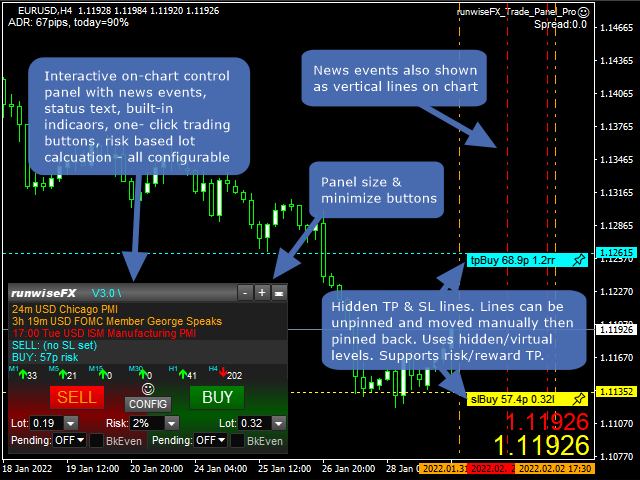
Fully functional manual trade panel with lot size calculation, one-click trading, hidden (virtual) stop loss/take profit and pending orders, scale in and out of trades (partial close), auto SL/TP and more. Works with all symbols not just currency pairs. Brings an incredible amount of functionality to MetaTrader for free and for both demo and live accounts.

Features

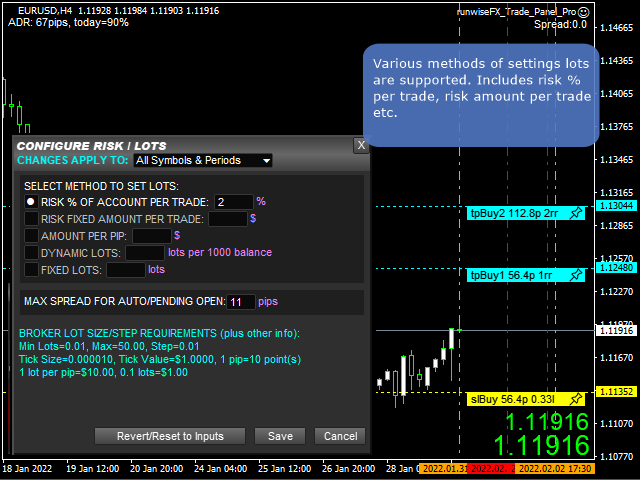
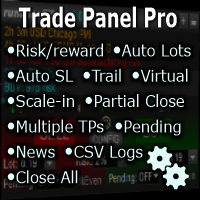
  • Lot size calculation - based on % of account to risk, fixed amount or dynamic lots
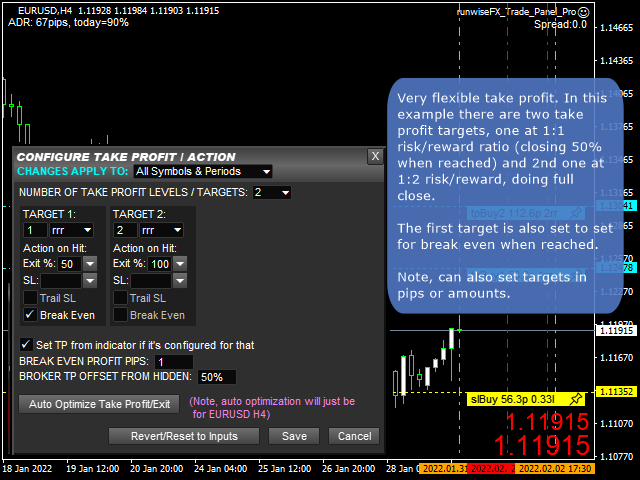
  • Automatic take profit based on risk reward ratios, pips or amount
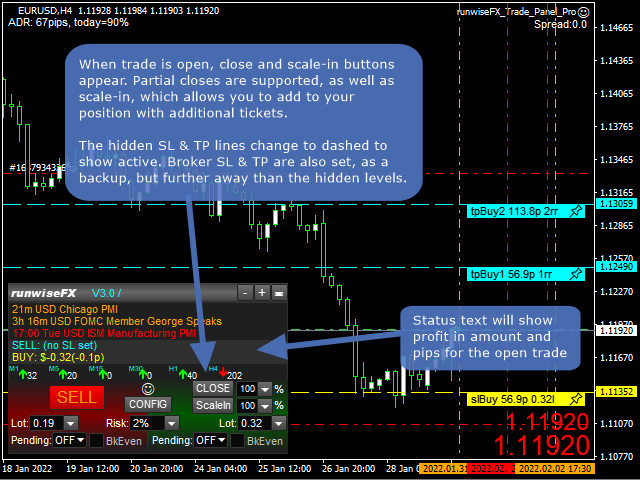
  • Partial closes (scale-out)
  • Hidden (stealth) stop loss, take profit and pending orders
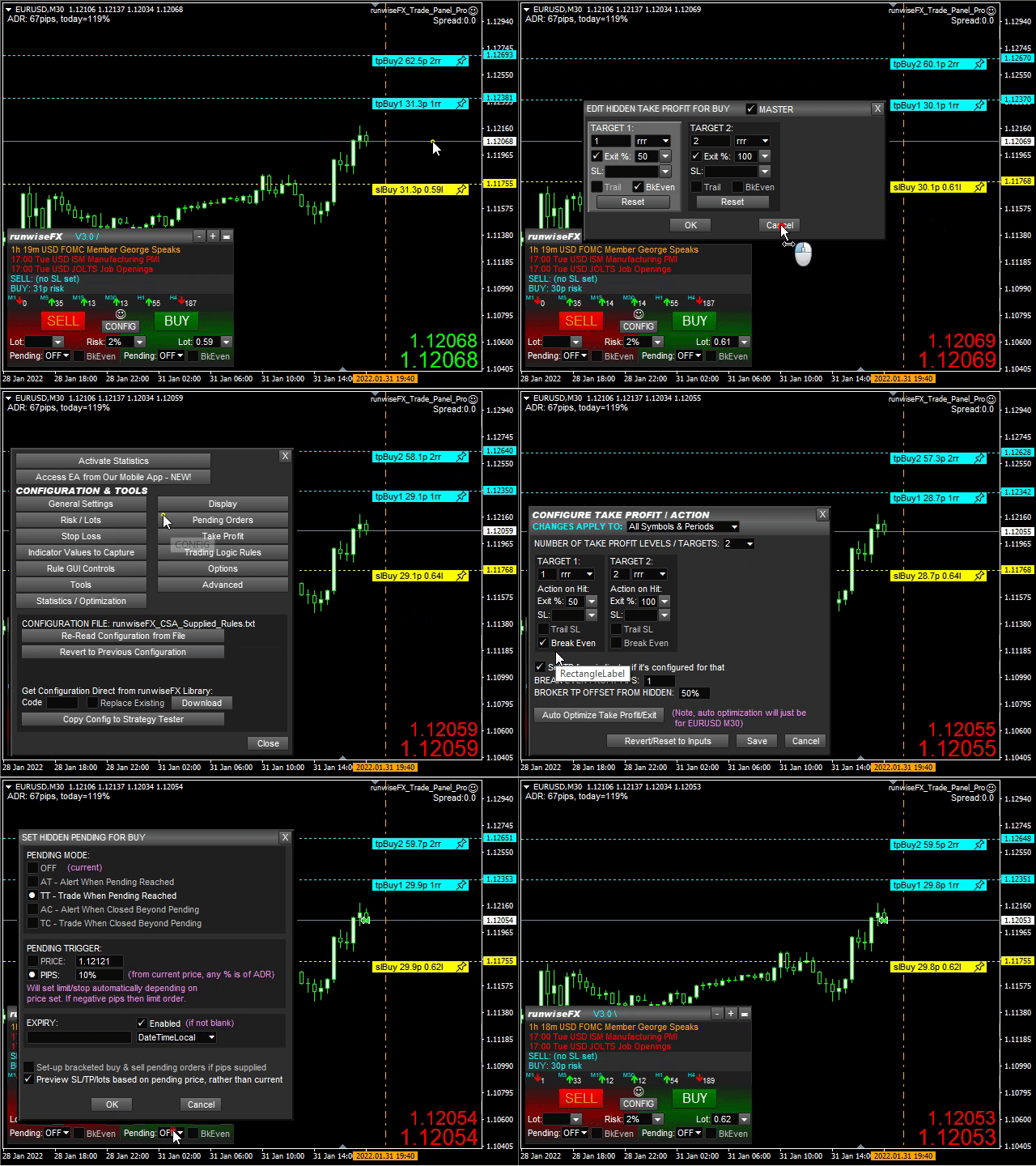
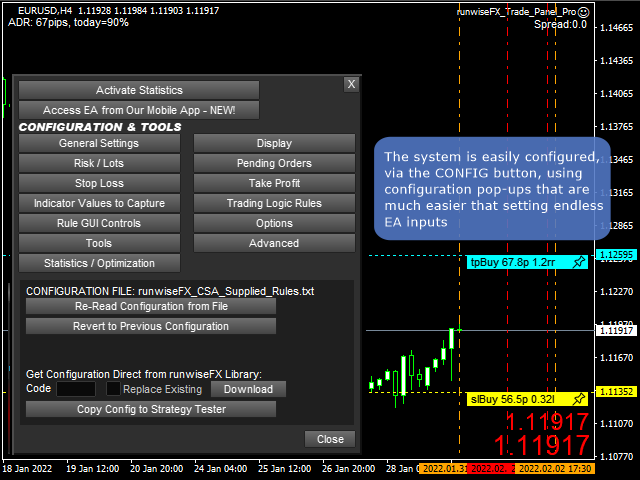
  • Easy to use configuration pop-up forms via CONFIG button
  • Stop loss, take profit lines can be positioned manually on the chart
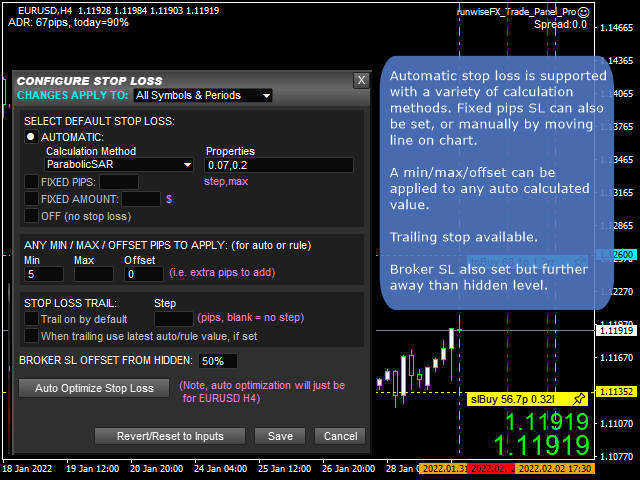
  • Automatic stop loss - variety of calculation methods can be selected
  • Trailing stop loss and break even, which can be triggered when target reached
  • Trail with latest indicator value, e.g. trail SL with Parabolic SAR
  • Sets broker SL/TP as backup but further away than hidden level
  • Hidden pending lines can be set to alert or trade, based on market price or candle close. Can be set with expiry and auto One Cancels Other (OCO).
  • Scale in (open additional tickets), plus automatic scale-in when target reached
  • News events (both text and vertical lines)
  • Optional multi-trade mode for multiple trades / pending orders on the same chart/symbol, all with separate SL/TP
  • Can be configured on a per symbol and/or timeframe basis, e.g. to have different SL for different symbols or timeframes
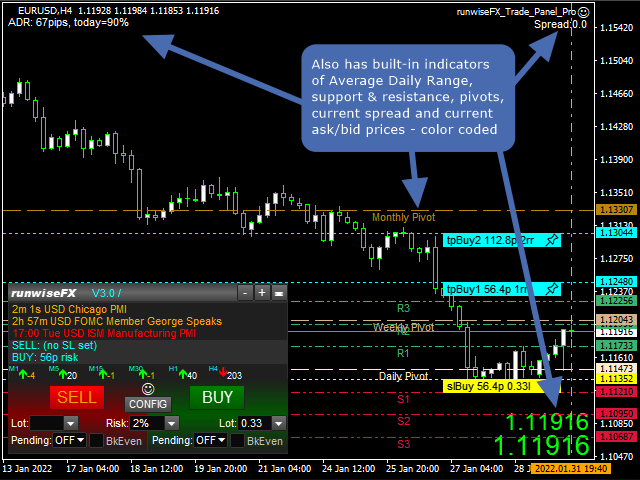
  • Includes indicators providing multiple timeframe trend, support/resistance, pivots, average daily range (or average true range - configurable), current spread and ask/bid prices in large text, color coded as price changes
  • Logs trades including execution time, slippage and profit, in a spreadsheet CSV file
  • Robust error handling
  • Additionally: Can download configuration from our library to give a Close All Trades button on account
  • Underlying code base has been in live use since 2015

    Important: If you have problem with EA then please message us before writing a review. It's usually a simple matter to address. If it turns out to be a bug then we have a good track record of issuing a new version quickly. Thank you.


    Usage

    See video below. Also, see our product manual in pdf format.

    EA Inputs

    The system is configured via the panel's CONFIG button rather than relying on inputs. However, here are a few inputs you may wish to change:

    • Important_brokerSLTPSetOnOrderSend - set to true if broker requires SL to be set on Order Send (can also be set in CONFIGU button | Options), e.g. some European brokers require this, where classic ECN brokers require this to be false (default)
    • Main_confirm* - set to false to turn off confirmation dialogs on trade close click, for example
    • Main_selection* - change what is shown in the various selection lists
    • Main_panelShowSingleLotSetting - set to true to show single lots box on panel
    • Gen_forcePointToPipDivider - set to 100 if trading indices so 1 pip is 1 basis point for most brokers (can also be set in CONFIG button | Advanced)
    • Color_* - change color of the various lines
    • Style_line* - change style of the various lines
    • Gen_color* - change color of other items


    리뷰 87
    TosinFxTrade
    14
    TosinFxTrade 2025.09.05 00:35 
     

    Amazing product and definitely worth the upgrade if you have the spare cash

    jcpnc
    24
    jcpnc 2025.07.02 13:23 
     

    I noticed that when calculating tp (rrr), the spread value is considered.Ex: (rrr=3) tp=3x(sl+spread). Thanks

    You are absolutely right, the spread is part of the risk but it is not paid 3x so I found it strange that the calculation is not Ex: (rrr=3) tp=(3xsl)+spread. Thanks for the excellent EA and unparalleled support.

    Benjamin Afedzie
    3392
    Benjamin Afedzie 2025.06.11 18:55 
     

    works for me

    추천 제품
    Alligator Window
    Anderson De Assis
    5 (1)
    Alligator Window Indicator : Potencialize suas análises no MetaTrader com o Alligator Window. Este indicador coloca o clássico Alligator de Bill Williams em uma janela separada, permitindo uma visualização mais clara e organizada. Ideal para traders que buscam precisão e eficiência em suas operações, o Alligator Window proporciona insights nítidos e facilita a identificação de tendências sem poluir o gráfico principal. Experimente agora e leve suas estratégias de trading a um novo patamar!

    FREE
    Bundle Risk Manager Pro EA "Risk Manager Pro EA is an all-in-one trading utility that combines advanced risk management tools, ensuring full control over your trading account while protecting your capital and complying with trading regulations. By bundling Limit Positions , Concurrent Risk Capital , and the newly added Limit Profit , this EA is the ultimate solution for disciplined trading and achieving evaluation goals. Key Features: 1. Limit Positions : Enforces a maximum number of open posi
    FREE
    TrendLine Manager
    Mirel Daniel Gheonu
    4 (1)
    TrendLine Manager - Professional Trading Assistant TrendLine Manager is a smart trading tool that helps you manage your trades using trendlines drawn directly on your charts. Instead of manually watching every line you draw, this Expert Advisor does the monitoring for you. What it does: Converts any trendline you draw into an active trading trigger Automatically closes positions when price hits your stop loss or take profit lines Opens new trades when price crosses your entry lines Works with sl
    FREE
    RSI abcd
    Francisco Gomes Da Silva
    3 (1)
    RSI ABCD 패턴 파인더: 기술적 전략 1. 지표 작동 방식 클래식 RSI 와 ABCD 하모닉 패턴 자동 감지를 결합합니다. 주요 구성 요소 표준 RSI (조정 가능한 기간) 고점 및 저점 마커 (화살표) ABCD 패턴 (초록/빨강 선) 과매수 (70) 및 과매도 (30) 필터 2. MT5 설정 period = 14 ; // RSI 기간 size = 4 ; // 최대 패턴 크기 OverBought = 70 ; // 과매수 수준 OverSold = 30 ; // 과매도 수준 Filter = USE_FILTER_ YES ; // 확인 필터 3. 트레이딩 전략 3.1. 매수 진입 (강세 ABCD) 조건: RSI가 다음을 형성: 저점 ( A ) → 고점 ( B ) → 더 높은 저점 ( C ) D 는 과매도 (30) 위지만 C 아래 확인: A-B-C-D 연결 초록 선 목표: TP1: B-C의 61.8% TP2: B-C의 100% 손절: D 아래 3.2. 매도 진입 (약세 ABCD) 조건:
    FREE
    Reversal Oscillator — Advanced Momentum Shift Detector Reversal Oscillator is a free indicator designed to highlight price zones that are statistically outside their normal movement patterns, helping traders anticipate potential turning points before they occur. Unlike traditional oscillators that react mainly to overbought/oversold conditions, this indicator applies third derivative analysis (the "acceleration of the acceleration" of price) calculated using two independent methods within a n
    FREE
    The RSI-Based Automatic Buy Strategy Expert Advisor (EA) is designed to automatically open buy positions when the RSI indicator enters the oversold zone. It smartly spaces new trades by maintaining a minimum distance between open positions to prevent excessive exposure. With adjustable take profit (TP) levels and lot sizes, this EA is specifically tailored for the XAUUSD (Gold) pair on the M5 timeframe. This Expert Advisor offers reliable and disciplined trade management for traders who want to
    FREE
    CandleBot
    Mithlesh Kumar Mandal
    CandleBot 소개 - 캔들스틱 패턴 식별 및 거래의 궁극적인 무료 도구! CandleBot을 사용하여 시장에서 유리하게 나가세요. 간편하게 상승 및 하락하는 흡수, 아침 및 저녁 별, 그리고 망치 신호를 인식하세요. 일정 기간 동안의 시가, 고가, 저가 및 종가에서 유래한 캔들스틱 패턴은 가격 움직임의 시각적 표현으로, 시장 센티먼트를 분석하고 잠재적인 추세 반전이나 지속을 예측하는 데 도움을 줍니다. 캔들스틱 패턴 이해하기: 흡수 패턴: 두 개의 캔들스틱으로 이루어져 있으며, 두 번째 캔들이 첫 번째를 완전히 덮습니다. 하락 트렌드 종료 시 나타나는 상승 흡수는 잠재적인 상승 트렌드 반전을 나타내며, 상승 트렌드 종료 시 나타나는 하락 흡수는 가능한 하락 트렌드 반전을 시사합니다. 흡수 캔들의 몸통이 클수록 신호가 강합니다. 망치 패턴: 상단 근처에 작은 몸통과 긴 아래 그림자를 가진 단일 캔들스틱으로 망치를 닮았습니다. 망치가 나타나면 하락 트렌드 후의 반전이 예상되며,
    FREE
    Calc for MT5
    Radim Kucera
    4.83 (6)
    This indicator is designed to provide all useful information about symbol, account, positions and profit. It is developed for improving trader's money management. Parameters Calc can be divided to separate blocks. Each block is possible to hide, set its own color and other properties. Block symbol: This block displays information about actual SPREAD, POINT VALUE (in deposit currency for 1 lot), SWAP LONG and SHORT. Show symbol info - display/hide this block Color of symbol info - color of this
    FREE
    EA Pivot SR mt5 Fr
    Oleg Pavlenko
    3 (2)
    EA Pivot SR is a free version of a fully automatic Expert Advisor for MT5. There are no sewn-in deals, as is the case with most fraudulent advisors. Transactions in the tester and in real trading will correspond exactly to 99.99%. The strategy of the Expert Advisor is based on trading from levels, which is the most acceptable solution than focusing on indicators that are usually late and give signals several bars late. Support and resistance levels are calculated using the Pivot Point system
    FREE
    Tenet Support and Resistance Pro
    Lucas De Melo Carvalho Cruz
    Ideal for scalpers, day traders and swing trades. Automatically identifies key support and resistance levels based on historical price data. It displays real-time trading zones and a precise countdown timer for each candle, helping traders make faster and more confident decisions. Fully customizable for multiple timeframes and instruments. The indicator analyzes historical price data to draw horizontal levels that represent key trading areas. It also displays, in real time, the current zone whe
    FREE
    PZ The Zone MT5
    PZ TRADING SLU
    5 (1)
    This indicator displays buy or sell signals according to Bill Williams' definition of the Trading Zone. [ Installation Guide | Update Guide | Troubleshooting | FAQ | All Products ] Easy to use and understand Avoid trading flat markets Deterministic indicator with clear rules The indicator is non-repainting It implements alerts of all kinds It has straightforward trading implications. A blue arrow is a buy signal A red arrow is a sell signal According to Bill Williams trading in the zone helps t
    FREE
    PZ Penta O MT5
    PZ TRADING SLU
    3.5 (4)
    The Penta-O is a 6-point retracement harmonacci pattern which usually precedes big market movements. Penta-O patterns can expand and repaint quite a bit. To make things easier this indicator implements a twist: it waits for a donchian breakout in the right direction before signaling the trade. The end result is an otherwise repainting indicator with a very reliable trading signal. The donchian breakout period is entered as an input. [ Installation Guide | Update Guide | Troubleshooting | FAQ | A
    FREE
    Alpha Edge Pro
    Jestoni Santiago
    Alpha Edge Pro – The Manual Trader’s Edge - If you prefer trading manually without stress, this indicator is for you. Get your copy now. Tired of missing the big moves or holding on to losing trades too long? Alpha Edge Pro is your new secret weapon. This high-performance, plug-and-play MT5 indicator gives you crystal-clear BUY and SELL signals — so you can trade with confidence, precision, and speed. If you prefer manual trading profitably , this indicator is made for you. Alpha Edge Pro does
    FREE
    MT5용 NAS100 Auto SL 및 TP 메이커를 소개합니다: 메타트레이더 5에서 나스닥 100 시장을 탐색하는 트레이더에게 없어서는 안될 보조 도구인 NAS100 Auto SL 및 TP 메이커로 손절 및 테이크프로핏 설정을 다시는 놓치지 마세요. 이 도구는 손절 및 테이크프로핏 레벨을 자동으로 관리할 수 있는 원활한 솔루션을 찾는 분들을 위해 설계되었습니다. 주요 특징: 손쉬운 자동화: 스톱로스 및/또는 테이크프로핏 없이 나스닥 100 거래를 자동으로 모니터링합니다. 사용자가 구성한 설정에 따라 레벨을 동적으로 조정합니다. 다양한 주문 유형: 나스닥 100의 시장가 및 지정가 주문 모두와 호환됩니다. 메타트레이더 5에서 사용할 수 있는 다양한 주문 유형을 지원합니다. 맞춤형 구성: 사용자 친화적인 매개변수 설정으로 추적 기본 설정 및 손절/익절 수준을 사용자 지정할 수 있습니다. 유연한 범위: 실행되는 특정 NAS100 상품 또는 거래되는 모든 상품에 대해 손절 및 테이크프
    FREE
    Premium trend entry pro TZ Trade Logics, presents you,  the enhance version of Premium trend entry  This release, bring you much more relaxed trading state with advanced features for trend filtering and premium signal entry timings. For us, is not the creating of the product which matters! but continued maintenance and education to users. through our dedicated means of reaching to us, you will enjoy close guide on how to use the product and other relevant training related to trading.  This tradi
    FREE
    DynamicTrader 1
    Markus Christer Ekengren
    Smart Trade Manager EA – Simple, Visual, and Risk-Based Trading Take control of your trades with ease! This free Expert Advisor is designed for traders who want a fast, intuitive, and risk-based way to manage entries directly from the chart. Risk-Based Position Sizing – Just set your preferred % risk in the EA settings, and lot size is calculated automatically. One-Click Trading – Place trades instantly with two simple buttons: BUY or SELL . Interactive SL & TP Lines – Drag and drop stop-
    FREE
    GridWeaverFX
    Watcharapon Sangkaew
    Introducing GridWeaverFX  - A Grid/Martingale EA for XAUUSD | Free Download! Hello, fellow traders of the MQL5 community! I am excited to share an Expert Advisor (EA) that I have developed and refined, and I'm making it available for everyone to use and build upon. It's called GridWeaverFX , and most importantly, it is completely FREE! This EA was designed to manage volatile market conditions using a well-known strategy, but with enhanced and clear safety features. It is particularly suited fo
    FREE
    WaPreviousCandleLevelsMT5
    Wachinou Lionnel Pyrrhus Sovi Guidi
    !!!This Free Version just works on EURUSD!!! Wa Previous Candle Levels MT5 shows the previous candle levels, it shows the previous candle Open High Low Close levels (OHLC Levels) in different time frame. It's designed to help the trader to analyse the market and pay attention to the previous candle levels in different time frame.  We all know that the OHLC Levels in Monthly, Weekly and Daily are really strong and must of the time, the price strongly reacts at those levels. In the technical anal
    FREE
    SL TP Entry tooling
    Supattra Sumethasorn
    위험 보상 도구 - 스마트 거래 계획 지표 위험 보상 도구는 트레이더가 모든 거래를 자신 있게 계획할 수 있도록 설계된 간단하면서도 강력한 지표입니다. 진입가, 손절매가, 이익실현가, 그리고 위험 대비 보상 비율(RR 비율)을 차트에 즉시 계산하여 표시합니다. 몇 번의 클릭만으로 다음을 확인할 수 있습니다. 손절매(Stop Loss)에 도달했을 때 위험 부담액 이익실현(Take Profit)에 도달했을 때 얻을 수 있는 수익 ️ 정확한 위험-보상 비율을 통해 거래의 가치 판단 가능 주요 기능 드래그 앤 드롭 라인 - 진입, 손절매(SL), 이익실현(TP) 라인을 차트에서 직접 이동 즉각적인 계산 - 위험, 보상, 이익실현 비율이 실시간으로 업데이트 시각적 명확성 - 색상으로 구분된 라인(파란색 = 진입, 빨간색 = 손절매, 녹색 = 이익실현) 범용성 - 모든 종목, 모든 시간대, 모든 브로커에서 사용 가능 스마트 거래 계획 - 감정적인 거래를 피
    FREE
    The "   YK Find Support And Resistance " indicator is a technical analysis tool used to identify key support and resistance levels on a price chart. Its features and functions are as follows: 1. Displays support and resistance levels using arrow lines and colored bands, with resistance in red and support in green. 2. Can be adjusted to calculate and display results from a specified timeframe using the forced_tf variable. If set to 0, it will use the current timeframe of the chart. 3. Uses th
    FREE
    (This is the free version of our trade manager, download it for free and test it, and provide feedback. If you are satisfied with its capabilities, you can try out its bigger brother the Deriv Scalp Manager also available from us.) EA Summary If you are a scalping trader who wants to place and close trades quickly and efficiently, you need a powerful tool that can help you achieve your goals. That's why we created the   Deriv Trade Assistant   EA, a smart and easy-to-use expert advisor that au
    FREE
    Basic Harmonic Pattern MT5
    Mehran Sepah Mansoor
    4.79 (86)
    이 지표는 시장 반전 시점을 예측하는 가장 인기 있는 하모닉 패턴을 식별합니다. 이러한 하모닉 패턴은 외환 시장에서 지속적으로 반복되는 가격 형성이며 향후 가능한 가격 움직임을 제안합니다 /   무료 MT4 버전 또한 이 보조지표에는 시장 진입 신호와 다양한 이익실현 및 손절매 신호가 내장되어 있습니다. 하모닉 패턴 지표는 자체적으로 매수/매도 신호를 제공할 수 있지만 다른 기술 지표를 사용하여 이러한 신호를 확인하는 것이 좋습니다. 예를 들어, 매수/매도하기 전에 추세의 방향과 모멘텀의 강도를 확인하기 위해 RSI 또는 MACD와 같은 오실레이터를 사용하는 것을 고려할 수 있습니다. 이 인디케이터의 대시보드 스캐너: ( Basic Harmonic Patterns Dashboard ) 포함된 하모닉 패턴 가틀리 버터플라이 박쥐 게 Shark Cypher ABCD 주요 입력 Max allowed deviation (%):   이 매개변수는 하모닉 패턴의 형성에 허용되는 허
    FREE
    EasyClose MT5
    Nina Yermolenko
    5 (1)
    A simple and convenient utility for closing orders. It can close both all orders together as well as buy, sell or pending orders separately. Has an intuitive graphical interface. MT4 version of the utility -  https://www.mql5.com/en/market/product/78601 If you like this utility, take a look at my other products -   https://www.mql5.com/en/users/nina_yermolenko/seller
    FREE
    Manual Assistant MT5
    Igor Kotlyarov
    4.67 (3)
    Bonus when buying an indicator or an advisor from my list. Write to me in private messages to receive a bonus. Manual Assistant MT5 is a professional manual trading tool that will make your trading fast and comfortable. It is equipped with all the necessary functions that will allow you to open, maintain and close orders and positions with one click. It has a simple and intuitive interface and is suitable for both professionals and beginners. The panel allows you to place buy and sell orders w
    FREE
    The SMC Market Structure indicator tracks key price action shifts using Smart Money Concepts (SMC), helping traders identify institutional behavior and overall trend direction. It automatically detects and displays: Break of Structure (BOS) – Signals continuation of trend Change of Character (CHOCH) – Indicates potential reversal Swing Highs and Lows – Used to define market structure and directional bias Each structural event is clearly marked on the chart, allowing traders to visualize momentu
    FREE
    FVG Finder
    Amrullah Khan
    Fair Value Gaps (FVG) and Liquidity Voids are price ranges you can exploit for better entries and exits on your trades. They're similar concepts, so let's look at them from the top and break it down. Think of FVG and Liquidity voids as soft-spots in the market. They are paths of least resistance. That doesn't mean price will go through them, but price could go through them more easily.  To find and locate it is easy but tidiest to repeat the same thing all over again. This helps to boost your t
    FREE
    Cluster Viewer V2
    Marco Antonio Rodrigues
    5 (7)
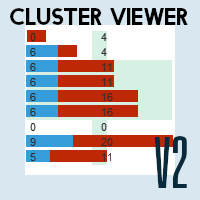
    정확한 인사이트로 시장을 장악하세요: Metatrader 5용 Cluster Viewer V2를 만나보세요! 가장 성공적인 트레이더들은 어떻게 최고의 거래 기회를 포착하는지 궁금했던 적이 있으신가요? Cluster Viewer V2를 사용하면 금융 시장에 대한 정확하고 심층적인 인사이트를 제공하도록 설계된 포괄적인 분석 도구를 활용할 수 있습니다. Metatrader 5 플랫폼용으로 개발된 EA는 트레이딩 전략을 한 단계 더 발전시켜 줍니다. 특징: 가격 범위별 매수 및 매도량: 매수자와 매도자 간의 가장 큰 갈등이 발생하는 가격 영역을 확인합니다. 시장 역학을 기반으로 주요 지지선과 저항선을 파악합니다. 시간, 틱 거래량, 실제 거래량(브로커 제공 시) 및 가격 변동(렌코 차트)별로 그룹화된 데이터를 확인할 수 있습니다. 강력한 통합 지표: 이동 평균: 이동 평균 지표를 통해 시장 추세를 파악합니다. 볼린저 밴드: 시장 변동성과 잠재적 반전 지점을 파악합니다. 포물
    FREE
    새 버전을 다운로드하고 프로페셔널 버전에 접근하세요. 한정 시간 특별 할인! 리스크 매니저 – MT5용 트레이드 어시스턴트 개요 리스크 매니저 – 트레이드 어시스턴트는 거래 실행을 향상시키고, 리스크 관리를 자동화하며, 트레이딩 성과를 최적화하도록 설계된 고급 도구입니다. 이 도구는 동적 로트 크기 계산, 숨겨진 손절 보호, 거래 자동화 및 실시간 트레이딩 저널을 통합하여 시장에서 우위를 점할 수 있도록 지원합니다. 직관적인 인터페이스와 자동화 기능을 갖춘 리스크 매니저는 스캘퍼, 데이 트레이더 및 스윙 트레이더가 리스크를 효과적으로 관리하면서 신속하게 거래를 실행하는 데 이상적입니다. 주요 기능 거래 실행 및 주문 관리 지능형 주문 실행 패널   – 시장가, 대기 주문, 스나이프 주문을 신속하게 배치 동적 로트 크기 계산   – 리스크 비율 또는 사전 설정된 금액을 기준으로 로트 크기 자동 조정 부분 청산(TP) 및 손절(SL)   – 체계적으로 수익
    FREE
    ATR Dynamic Pivot Signals Indicator
    SkyBlue Fintech Solutions LLP
    Unlock Precision Trading: The ATR Dynamic Pivot System Download this free   ATR Pivot Signals   indicator and instantly gain an edge against market noise. This is the ultimate tool for traders who demand high-conviction entry points based on genuine market swing reversals, not guesswork. The   ATR Pivot Signals   system   is an innovative technical indicator that utilizes the Average True Range (ATR) to dynamically filter volatility, ensuring that a signal is triggered only when a price move is
    FREE
    Gm Volumes
    Antonio Augusto Barreto De Melo
    4 (3)
    A simple volume indicator according to the color of the candle! - Custom background! - Supports Volume by Ticks or Real Volume. The original Metatrader Volume indicator does not show the colors of the bar according to the color of the Candle, it only changes color when the volume of a candle is greater than the previous one, this sometimes creates confusion for beginners and does not know the real reason for the color change. Free indicator, support may take a while to respond!
    FREE
    이 제품의 구매자들이 또한 구매함
    Trade Assistant MT5
    Evgeniy Kravchenko
    4.42 (204)
    거래당 위험 계산, 라인을 사용한 손쉬운 신규 주문, 부분 청산 기능을 통한 주문 관리, 7가지 유형의 트레일링 스탑 및 기타 유용한 기능을 제공합니다. 추가 자료 및 지침 설치 지침   -   애플리케이션 지침   -   데모 계정용 애플리케이션 평가판 라인 기능       - 차트에 개시선, 손절매, 차익실현을 표시합니다. 이 기능을 사용하면 새로운 주문을 쉽게 하고 개봉 전에 추가 특성을 볼 수 있습니다. 위기 관리       -       위험 계산 기능은 설정된 위험과 손절매 주문의 크기를 고려하여 새 주문의 볼륨을 계산합니다. 이를 통해 손절매 크기를 설정하고 동시에 설정된 위험을 존중할 수 있습니다. 로트 계산 버튼 - 위험 계산을 활성화/비활성화합니다. 필요한 위험 값은 위험 필드에 0에서 100 사이의 백분율 또는 예금 통화로 설정됩니다. 설정 탭에서 위험 계산 옵션을 선택합니다. $ 통화, % 잔액, % 지분, % 자유 마진, % 사용자 정의, % AB 이전
    Trade Manager EA에 오신 것을 환영합니다. 이 도구는 거래를 보다 직관적이고 정확하며 효율적으로 만들기 위해 설계된 궁극적인 리스크 관리 도구 입니다. 단순한 주문 실행 도구가 아닌, 원활한 거래 계획, 포지션 관리 및 리스크 제어를 위한 종합 솔루션입니다. 초보자부터 고급 트레이더, 빠른 실행이 필요한 스캘퍼에 이르기까지 Trade Manager EA는 외환, 지수, 상품, 암호화폐 등 다양한 시장에서 유연성을 제공합니다. Trade Manager EA를 사용하면 복잡한 계산은 이제 과거의 일이 됩니다. 시장을 분석하고 진입, 손절 및 익절 수준을 차트의 수평선으로 표시한 후 리스크를 설정하면, Trade Manager가 이상적인 포지션 크기를 즉시 계산하고 SL 및 TP 값을 실시간으로 표시합니다. 모든 거래가 간편하게 관리됩니다. 주요 기능: 포지션 크기 계산기 : 정의된 리스크에 따라 거래 크기를 즉시 결정합니다. 간단한 거래 계획 : 진입, 손절, 익절을 위한
    Local Trade Copier EA MT5
    Juvenille Emperor Limited
    4.96 (116)
    Local Trade Copier EA MT5 를 사용하여 매우 빠른 거래 복사 경험을 해보세요. 1분 안에 간편하게 설정할 수 있으며, 이 거래 복사기를 사용하면 Windows 컴퓨터 또는 Windows VPS에서 여러 개의 MetaTrader 터미널 간에 거래를 0.5초 미만의 초고속 복사 속도로 복사할 수 있습니다. 초보자든 전문가든   Local Trade Copier EA MT5 는 다양한 옵션을 제공하여 사용자의 특정 요구에 맞게 맞춤 설정할 수 있습니다. 이는 수익 잠재력을 높이려는 모든 사람을 위한 최고의 솔루션입니다. 지금 사용해보시고 이것이 왜 시장에서 가장 빠르고 쉬운 무역용 복사기인지 알아보세요! 팁: 여기 에서 데모 계정에서 Local Trade Copier EA MT5 데모 버전을 다운로드하여 사용해 볼 수 있습니다. 다운로드한 무료 데모 파일을 MT5 >> File >> Open Data Folder >> MQL5 >> Experts 폴더에 붙여넣고 터
    TradePanel MT5
    Alfiya Fazylova
    4.86 (143)
    Trade Panel은 다기능 거래 보조원입니다. 이 애플리케이션에는 수동 거래를 위한 50개 이상의 거래 기능이 포함되어 있으며 대부분의 거래 작업을 자동화할 수 있습니다. 전략 테스터에서는 애플리케이션이 작동하지 않습니다. 구매하기 전에 데모 계정에서 데모 버전을 테스트할 수 있습니다. 데모 버전 여기 . 전체 지침 여기 . 거래. 한 번의 클릭으로 거래 작업을 수행할 수 있습니다: 자동 위험 계산을 통해 지정가 주문 및 포지션을 엽니다. 한 번의 클릭으로 여러 주문과 포지션을 열 수 있습니다. 주문 그리드를 엽니다. 그룹별 대기 주문 및 포지션을 마감합니다. 포지션 반전(매수 청산 후 매도 개시 또는 매도 청산 후 매수 개시). 포지션 고정(매수 포지션과 매도 포지션의 양을 동일하게 하는 추가 포지션 개설). 한 번의 클릭으로 모든 포지션을 부분 청산합니다. 모든 포지션의 이익실현과 손절매를 동일한 가격 수준으로 설정합니다. 모든 포지션에 대한 손절매를 해당 포지션의 손익 분기
    Trade Dashboard MT5
    Fatemeh Ameri
    4.96 (103)
    Tired of complex order placement and manual calculations? Trade Dashboard is your solution. With its user-friendly interface, placing orders becomes effortless, by a single click, you can open trades, set stop loss and take profit levels, manage trade lot size, and calculate risk to reward ratios, allowing you to only focus on your strategy. Say goodbye to manual calculations and streamline your trading experience with Trade Dashboard. Download  Demo Version  right now. You can find  Details of
    Ultimate Extractor
    Clifton Creath
    5 (7)
    Ultimate Extractor - Professional Trading Analytics for MT5 Ultimate Extractor transforms your MetaTrader 5 trading history into actionable insights with comprehensive analytics, interactive charts, and real-time performance tracking. What It Does Automatically analyzes your MT5 trading history across all Expert Advisors and generates detailed HTML reports with interactive visualizations. Tracks live performance metrics including open positions, floating P/L, and drawdown in real-time. Supports
    베타 출시 Telegram to MT5 Signal Trader 는 곧 공식 알파 버전을 출시할 예정입니다. 일부 기능은 아직 개발 중이며, 작은 버그가 발생할 수 있습니다. 문제가 있으면 꼭 보고해 주세요. 여러분의 피드백은 소프트웨어 개선에 도움이 됩니다. 가격은 20건 판매 후 인상됩니다. 남은 $90 카피: 2/20 . Telegram to MT5 Signal Trader 는 Telegram 채널 또는 그룹의 거래 신호를 자동으로 MetaTrader 5 계정으로 복사하는 강력한 도구입니다. 공개 및 비공개 채널을 모두 지원하며, 여러 신호 제공자를 여러 MT5 계정에 연결할 수 있습니다. 소프트웨어는 빠르고 안정적으로 동작하며, 복사된 거래를 완벽히 제어할 수 있습니다. 인터페이스는 깔끔하며 대시보드와 차트가 시각적으로 구성되어 있고, 직관적인 네비게이션이 가능합니다. 여러 Signal Account를 관리하고, 공급자별 설정을 세밀하게 조정하며, 모든 동작을 실시간으로
    Smart Stop Scanner – 실제 시장 구조 기반의 멀티자산 스톱로스 분석 시스템 개요 Smart Stop Scanner는 여러 시장에서 스톱로스 구조를 전문적으로 모니터링하기 위해 설계된 강력한 도구입니다. 실제 시장 구조, 핵심 브레이크아웃, 가격 행동 로직을 기반으로 가장 의미 있는 스톱 영역을 자동으로 감지하며, 고해상도(DPI 지원)의 깔끔하고 일관된 패널에 모든 정보를 표시합니다. 포렉스(FOREX), 금, 지수, 금속, 암호화폐 등 다양한 자산군을 지원합니다. 스톱 레벨 계산 방식 이 시스템은 기존의 인디케이터 공식을 사용하지 않습니다. 대신 브레이크아웃, 더 높은 고점, 더 낮은 저점 과 같은 실제 시장 구조 이벤트를 분석합니다. 스톱 레벨은 이러한 구조적 지점에서 직접 생성되므로 시장의 실제 움직임과 자연스럽게 일치하며, 더 신뢰도 높은 스톱 시스템을 제공합니다. 주요 기능 • 고정밀 멀티자산 호환성 포렉스, 금속, 금, 지수, 암호화폐 등 다양한
    Copy Cat More Trade Copier MT5 (복사 고양이 MT5) 는 오늘날의 거래 과제를 위해 설계된 로컬 거래 복사기이자 완전한 위험 관리 및 실행 프레임워크입니다. 프롭펌 챌린지부터 개인 포트폴리오 관리까지, 견고한 실행, 자본 보호, 유연한 구성 및 고급 거래 처리의 조합으로 모든 상황에 적응합니다. 복사기는 마스터(송신자)와 슬레이브(수신자) 모드 모두에서 작동하며, 시장 주문과 예약 주문, 거래 수정, 부분 청산 및 헷지 청산 작업의 실시간 동기화를 제공합니다. 데모 및 실계좌, 거래 또는 투자자 로그인과 호환되며, EA, 터미널 또는 VPS가 재시작되어도 지속적인 거래 메모리 시스템을 통해 복구를 보장합니다. 고유 ID로 여러 마스터와 슬레이브를 동시에 관리할 수 있으며, 브로커 간 차이는 접두사/접미사 조정 또는 사용자 정의 심볼 매핑을 통해 자동으로 처리됩니다. 매뉴얼/설정  | Copy Cat More MT4 | 채널  특별 기능: 설정이 간편함 —
    Smart Stop Manager – 전문 트레이더 수준의 자동 스톱로스 실행 개요 Smart Stop Manager는 Smart Stop 라인업의 실행 계층으로, 여러 개의 오픈 포지션을 보유한 트레이더를 위해 설계된 구조적이고 신뢰할 수 있으며 완전 자동화된 스톱로스 관리 시스템입니다. 모든 활성 거래를 지속적으로 모니터링하고, Smart Stop 시장 구조 로직을 사용해 최적의 스톱레벨을 계산하며, 명확하고 투명한 규칙에 따라 스톱을 자동으로 업데이트합니다. 단일 자산부터 전체 멀티심볼 포트폴리오까지, Smart Stop Manager는 모든 거래에 규율, 일관성, 그리고 완전한 리스크 가시성을 제공합니다. 감정적 판단을 제거하고, 수동 작업을 줄이며, 모든 스톱이 항상 시장 구조 기반의 논리적 진행을 따르도록 보장합니다. 하이라이트 시장 구조 기반 자동 스톱 배치 • 모든 오픈 포지션을 평가하여 Smart Stop 로직에 기반한 최적의 스톱로스를 자동 적용합니다. 포트폴
    Trade Manager DashPlus
    Henry Lyubomir Wallace
    5 (11)
    DashPlus 는 MetaTrader 5 플랫폼에서 거래 효율성과 효과를 향상시키기 위해 설계된 고급 거래 관리 도구입니다. 리스크 계산, 주문 관리, 고급 그리드 시스템, 차트 기반 도구 및 성과 분석 등 포괄적인 기능을 제공합니다. 주요 기능 1. 리커버리 그리드 불리한 시장 상황에서 거래를 관리하기 위한 평균화 및 유연한 그리드 시스템을 구현합니다. 거래 회복을 최적화할 수 있도록 전략적인 진입 및 종료 포인트를 제공합니다. 2. 스택 그리드 강한 시장 움직임 동안 포지션을 추가하여 유리한 거래에서 잠재적 수익을 극대화하도록 설계되었습니다. 유리한 시장 트렌드에서 승률을 높이며 거래를 확장할 수 있도록 합니다. 3. 손익(P&L) 라인 차트에서 잠재적인 수익 및 손실 시나리오를 시각적으로 표현합니다. 설정을 조정하고 P&L 라인을 드래그하여 실행 전에 다양한 거래 결과를 평가할 수 있습니다. 4. 바스켓 모드 동일한 심볼에 여러 포지션을 단일 집계 포지션으로 결합하여 관리합니
    MT5 to Telegram Signal Provider 는 사용하기 쉽고 완전히 커스터마이즈 가능한 유틸리티로, 특정 신호를 Telegram의 채팅, 채널 또는 그룹으로 전송하고, 귀하의 계정을 신호 제공자 로 만듭니다. 경쟁 제품과 달리 DLL 임포트를 사용하지 않습니다. [ 데모 ] [ 매뉴얼 ] [ MT4 버전 ] [ 디스코드 버전 ] [ 텔레그램 채널 ]  New: [ Telegram To MT5 ] 설정 단계별 사용자 가이드 가 제공됩니다. 텔레그램 API에 대한 지식은 필요하지 않습니다; 개발자가 제공하는 모든 것이 필요합니다. 주요 특징 구독자에게 보낸 주문 상세 정보를 커스터마이즈할 수 있습니다. 예를 들어, 브론즈, 실버, 골드와 같은 계층 구독 모델을 만들 수 있습니다. 골드 구독에서는 모든 신호를 받습니다. id, 심볼, 또는 코멘트로 주문을 필터링할 수 있습니다. 주문이 실행된 차트의 스크린샷이 포함됩니다 보낸 스크린샷에 닫힌 주문을 그려 추가 검증을 합니다
    Grid Manual MT5
    Alfiya Fazylova
    4.9 (20)
    "Grid Manual"은 주문 그리드 작업을 위한 거래 패널입니다. 이 유틸리티는 보편적이며 유연한 설정과 직관적인 인터페이스를 제공합니다. 그것은 손실을 평균화하는 방향뿐만 아니라 이익을 증가시키는 방향으로 주문 그리드와 함께 작동합니다. 거래자는 주문 그리드를 만들고 유지할 필요가 없으며 유틸리티에서 수행합니다. 거래자가 주문을 시작하는 것으로 충분하며 "Grid Manual"는 자동으로 그를 위한 주문 그리드를 생성하고 거래가 마감될 때까지 그와 동행할 것입니다. 전체 설명 및 데모 버전 여기 . 유틸리티의 주요 기능: 모바일 터미널을 포함하여 어떤 방식으로든 열린 주문과 함께 작동합니다. "제한" 및 "중지"의 두 가지 유형의 그리드와 함께 작동합니다. 고정 및 동적(ATR 표시기 기반)의 두 가지 유형의 그리드 간격 계산과 함께 작동합니다. 오픈 오더 그리드의 설정을 변경할 수 있습니다. 차트에서 각 주문 그리드의 손익분기점 수준을 표시합니다. 각 주문 그리드에 대한 이익
    Seconds Chart MT5
    Boris Sedov
    4.59 (17)
    Seconds Chart — MetaTrader 5에서 초 단위 차트를 생성하는 독특한 도구입니다. Seconds Chart 를 사용하면 초 단위로 설정된 타임프레임으로 차트를 작성할 수 있어, 표준 분 또는 시간 단위 차트에서는 불가능한 유연성과 정밀한 분석이 가능합니다. 예를 들어, S15 타임프레임은 15초 동안의 캔들로 구성된 차트를 의미합니다. 사용자 정의 심볼을 지원하는 모든 인디케이터와 전문가 어드바이저를 사용할 수 있습니다. 이를 사용하는 것은 표준 차트에서 거래하는 것만큼 편리합니다. 표준 도구와 달리, Seconds Chart 는 초고속 타임프레임에서도 높은 정확도와 지연 없이 작업할 수 있도록 지원합니다. Seconds Chart의 장점 1초부터 900초까지 의 타임프레임 지원. 내장 틱 데이터베이스 덕분에 역사 데이터 즉시 로딩 . 실시간 데이터 업데이트로 지연이나 차이 없음 . 여러 초 단위 차트를 동시에 생성 가능. Seconds Chart가 이상적인 경우
    HINN MAGIC ENTRY – the ultimate tool for entry and position management! Place orders by selecting a level directly on the chart! Key features: - Market, limit, and pending orders - Automatic lot size calculation - Automatic spread and commission accounting - Unlimited partitial take-profits  - Breakeven and trailing stop-loss  functions - Intuitive, adaptive, and customizable interface - Session and strong algorithmic level visualization - Works with any assets and account types Join the   ALG
    Exp COPYLOT CLIENT for MT5
    Vladislav Andruschenko
    3.82 (34)
    MT5용 트레이드 복사기는 metaТrader 5 플랫폼용 트레이드 복사기입니다   . 그것은 사이의   외환 거래를 복사합니다       모든 계정   COPYLOT MT5 버전의 경우   MT5   -   MT5, MT4   -   MT5 (또는 COPYLOT MT4 버전의 경우   MT4 -   MT4 MT5   -  MT4) 믿을 수 있는 복사기! MT4 버전 전체 설명   +DEMO +PDF 구입 방법 설치하는 방법     로그 파일을 얻는 방법     테스트 및 최적화 방법     Expforex의 모든 제품 МТ4 터미널에서 거래를 복사할 수도 있습니다(   МТ4   -   МТ4, МТ5   -   МТ4   ):   COPYLOT CLIENT for MT4 이 버전은 МТ5   -   МТ5, МТ4   -   МТ5   터미널 간을 포함합니다. 거래 복사기는 2/3/10 터미널 사이의 거래/포지션을 복사하기 위해 만들어졌습니다. 데모 계정 및 투자 계정에서
    ChartSync MT5
    Alfiya Fazylova
    5 (2)
    차트 동기화 표시기 - 터미널 창의 그래픽 개체를 동기화하도록 설계되었습니다. TradePanel 에 추가로 사용할 수 있습니다. 구매하기 전에 데모 계정에서 데모 버전을 테스트할 수 있습니다. 데모는 여기 에서 확인하세요. 객체를 다른 차트로 복사하려는 차트에 표시기를 설치하세요. 이 차트에 생성된 그래픽 개체는 표시기에 의해 동일한 기호가 있는 모든 차트에 자동으로 복사됩니다. 표시기는 그래픽 개체의 변경 사항도 복사합니다. 입력 매개변수: exception - 복사할 필요가 없는 그래픽 개체 이름의 접두사입니다. 여러 접두사를 ';'으로 구분하여 입력하여 지정할 수 있습니다. SyncVLINE - 수직선을 동기화합니다. SyncHLINE - 수평선. SyncTREND - 추세선. SyncTRENDBYANGLE - 각도별 추세선 SyncCYCLES - 순환 라인. SyncCHANNEL - 등거리 채널. SyncSTDDEVCHANNEL - 표준 편차 채널. SyncREGRESSIO
    KT Equity Protector MT5
    KEENBASE SOFTWARE SOLUTIONS
    4.25 (4)
    쉽고 간편하게 거래 자본을 보호하세요 거래 자본을 보호하는 것은 자본을 키우는 것만큼 중요합니다. KT Equity Protector는 귀하의 개인 리스크 매니저로서, 계좌의 순자산(에퀴티)을 지속적으로 모니터링하며, 사전에 설정한 손절 또는 수익 목표에 도달하면 모든 보유 및 예약 주문을 자동으로 종료하여 손실을 방지하거나 수익을 고정합니다. 감정적인 결정이나 추측은 이제 그만—KT Equity Protector가 24시간 내내 믿을 수 있는 자본 보호를 제공합니다. KT Equity Protector는 모든 차트를 자동으로 닫아 다른 전문가용 자동매매 프로그램(EA)의 거래를 중단시킬 수 있습니다. 이를 통해 EA를 수동으로 다시 시작할 때까지 어떠한 추가 거래도 이루어지지 않으며, 사용자는 완전한 통제권과 심리적 안정을 얻게 됩니다. 작동 방식 에퀴티 손절(손실 방지): 예를 들어 계좌 잔고가 $10,000이고 에퀴티 손절을 $1,000로 설정한 경우, 순자산이 $9,000로
    Trade Manager DaneTrades
    Levi Dane Benjamin
    4.33 (27)
    거래 관리자는 위험을 자동으로 계산하는 동시에 거래를 빠르게 시작하고 종료하는 데 도움을 줍니다. 과잉 거래, 복수 거래 및 감정 거래를 방지하는 데 도움이 되는 기능이 포함되어 있습니다. 거래를 자동으로 관리할 수 있으며 계정 성과 지표를 그래프로 시각화할 수 있습니다. 이러한 기능은 이 패널을 모든 수동 거래자에게 이상적으로 만들고 MetaTrader 5 플랫폼을 향상시키는 데 도움이 됩니다. 다중 언어 지원. MT4 버전  |  사용자 가이드 + 데모 트레이드 매니저는 전략 테스터에서 작동하지 않습니다. 데모를 보려면 사용자 가이드로 이동하세요. 위기 관리 % 또는 $를 기준으로 위험 자동 조정 고정 로트 크기 또는 거래량과 핍을 기반으로 한 자동 로트 크기 계산을 사용하는 옵션 RR, Pips 또는 Price를 사용한 손익분기점 손실 설정 추적 중지 손실 설정 목표 달성 시 모든 거래를 자동으로 마감하는 최대 일일 손실률(%)입니다. 과도한 손실로부터 계정을 보호하고 과도한
    EasyInsight AIO MT5
    Alain Verleyen
    4.91 (11)
    EASY Insight AIO – 스마트하고 손쉬운 트레이딩을 위한 올인원 솔루션 개요 외환, 금, 암호화폐, 지수, 심지어 주식까지 — 전 시장을 몇 초 만에, 수동 차트 확인이나 복잡한 설치, 인디케이터 설정 없이 스캔할 수 있다고 상상해 보세요. EASY Insight AIO 는 AI 기반 트레이딩을 위한 궁극의 플러그 앤 플레이(Plug & Play) 데이터 내보내기 도구입니다. 단 하나의 깔끔한 CSV 파일로 전체 시장 스냅샷을 제공하며, ChatGPT, Claude, Gemini, Perplexity 등 다양한 AI 플랫폼에서 즉시 분석할 수 있습니다. 창 전환, 복잡함, 차트 오버레이는 더 이상 필요 없습니다. 자동으로 내보내지는 순수하고 구조화된 데이터 인사이트만으로, 반복적인 차트 감시 대신 데이터 기반의 스마트한 의사결정에 집중할 수 있습니다. 왜 EASY Insight AIO인가요? 진정한 올인원 • 별도의 설정, 인디케이터 설치, 차트 오버레이가 필요 없습
    Cerberus Equity Watcher
    Samuel Bandi Roccatello
    5 (3)
    Cerberus the Equity Watcher는 귀하의 계정 자산을 지속적으로 모니터링하고 잘못된 EA 또는 재량 트레이더인 경우 감정적 행동으로 인해 발생하는 주요 손실을 방지하는 위험 관리 도구입니다. 버그가 있을 수 있거나 예상치 못한 시장 상황에서 잘 수행되지 않을 수 있는 EA에 의존하는 체계적 거래자에게 매우 유용합니다. Cerberus를 사용하면 최소 자산 가치와 (선택적으로) 최대 가치를 설정할 수 있습니다. 둘 중 하나에 도달하면 모든 위치가 평평해지고 모든 보류 중인 주문이 닫히고 모든 EA가 "죽습니다". 모든 위치를 평평하게 하면 알림이 사용자 휴대폰으로 전송되고 명확한 메시지가 화면에 표시됩니다. "평평화" 이후에 Cerberus는 주식 가치를 계속 주시하고 다시 초기화될 때까지 추가 거래 시도를 중단합니다. Cerberus가 수행하는 모든 작업은 화면에 명확하게 표시되고 Expert Advisor 탭에 보고되며 사용자에게 알림이 전송됩니다. 사용자의 실수
    한 번의 클릭으로 거래할 수 있는 거래 패널.   위치 및 주문 작업!   차트 또는 키보드에서 거래. 당사의 거래 패널을 사용하면 차트에서 직접 클릭 한 번으로 거래를 실행할 수 있으며 표준 MetaTrader 컨트롤보다 30배 빠르게 거래 작업을 수행할 수 있습니다. 매개변수와 기능의 자동 계산을 통해 트레이더는 더욱 빠르고 편리하게 거래할 수 있습니다. 그래픽 팁, 정보 라벨, 무역 거래에 대한 전체 정보는 MetaTrader 차트에 있습니다. MT4 버전 전체 설명   +DEMO +PDF 구입 방법 설치하는 방법     로그 파일을 얻는 방법     테스트 및 최적화 방법     Expforex의 모든 제품 열기 및 닫기, 반전 및 잠금, 부분 닫기/오토로트. 가상/실제 손절매/이익 실현/후행 정지/손익분기점, 주문 그리드 ... MetaТrader 5   의 주요 주문 거래 컨트롤 패널: 구매, 판매, 구매 중지, 구매 제한, 판매 중지, 판매 제한, 닫기, 삭제, 수
    Telegram to MT5 Coppy
    Sergey Batudayev
    5 (7)
    Telegram에서 MT5로:   최고의 신호 복사 솔루션 DLL 없이도 Telegram 채널과 채팅에서 MetaTrader 5 플랫폼으로 거래 신호를 직접 복사하는 최신 도구인 Telegram to MT5를 사용하여 거래를 간소화하세요. 이 강력한 솔루션은 정밀한 신호 실행, 광범위한 사용자 정의 옵션을 제공하고 시간을 절약하며 효율성을 높여줍니다. [ Instructions and DEMO ] 주요 특징 직접 Telegram API 통합 전화번호와 보안 코드를 통해 인증하세요. 사용자 친화적인 EXE 브리지를 통해 채팅 ID를 쉽게 관리하세요. 여러 채널/채팅을 추가, 삭제, 새로 고침하여 동시에 신호를 복사합니다. 고급 필터를 사용한 신호 파싱 예외 단어(예: "보고서", "결과")가 포함된 원치 않는 신호를 건너뜁니다. 유연한 SL 및 TP 형식을 지원합니다: 가격, 핍 또는 포인트. 가격 대신 포인트를 지정하는 신호에 대한 진입 포인트를 자동으로 계산합니다. 주문 맞춤화 및
    Trade Assistant 38 in 1
    Makarii Gubaydullin
    4.91 (22)
    Ultimate Trade Assistant MT5 — 다기능 트레이딩 어시스턴트 66개 이상의 전문 기능을 하나의 인터페이스로 통합. 더 빠르고 안전한 트레이딩을 경험하세요. 리스크 관리, 주문 자동화, 포지션 제어, 시장 분석 을 한 번에 수행할 수 있는 강력한 도구입니다. 초보자부터 전문 트레이더까지 모두에게 적합합니다. 트레이더가 선택하는 이유 원클릭으로 빠른 주문 실행 및 관리 자동 로트 및 리스크 계산 스마트 주문: 그리드, OCO, 가상 SL/TP, 숨김 주문 포지션 관리: 부분 청산, 브레이크이븐, 자동 트레일링 스톱 시장 분석: 수요/공급 구역, 변동성, 통화 강도, 세션 상세 통계 및 다중 심볼 지원 Telegram 알림 기능 주요 기능 (66+) 리스크 관리: 자동 로트 계산, 손익비 관리 주문 관리: SL/TP, 트레일링 스톱(11가지 모드), 부분 청산 스마트 주문: 그리드, OCO, 가상 및 예약 주문 시장 분석: 변동성, 지지/저항, 세션 인디케이터 통계:
    Trade copier MT5
    Alfiya Fazylova
    4.58 (33)
    Trade Copier는 거래 계정 간의 거래를 복사하고 동기화하도록 설계된 전문 유틸리티입니다. 복사는 공급자의 계정/단말기에서 동일한 컴퓨터 또는 vps에 설치된 수신자의 계정/단말기로 발생합니다. 구매하기 전에 데모 계정에서 데모 버전을 테스트할 수 있습니다. 데모 버전 여기 . 전체 지침 여기 . 주요 기능 및 이점: 복사기는 "МТ5> МТ5", "МТ4> МТ5", "МТ5> МТ4" 복사를 지원합니다. 복사기는 데모 계정 > 실 계정, 실 계정 > 데모 계정, 데모 계정 > 데모 계정 및 실제 계정 > 실 계정 복사를 지원합니다. 복사기는 읽기 전용 암호가 적용된 투자자 계정에서 복사를 지원합니다. 하나의 공급자 터미널은 여러 수신 터미널로 트랜잭션을 보낼 수 있고 하나의 수신 터미널은 여러 공급자 터미널에서 트랜잭션을 수신할 수 있습니다. 복사기는 귀하 또는 귀하의 고문이 거래하는 동일한 터미널에서 작동할 수 있습니다. 높은 복사 속도(0.5초 미만). 복사기에는 간편
    Zentral Trading Manager
    Ray Zeanrik Parreno Fredeluces
    5 (4)
    Zentral Trading Manager Your Command Center for Precision Trading — Now Stronger than Ever Take control of your trades like never before. Zentral Trading Manager is your all-in-one manual trading panel for MetaTrader 5 — built for scalpers, day traders, and serious strategy execution. Fully compatible with both Mac and Windows laptops. High-DPI safe. No more layout issues. Key Features (Latest 2025 Update): • One-Click Close – Instantly close Buy/Sell, winning/losing trades, or even half positi
    복사기->편리하고 빠른 인터페이스 상호작용으로 사용자가 바로 사용 가능       ->>>> Windows 컴퓨터 또는 VPS Windows에서 사용하는 것이 좋습니다. 특징: 다양하고 개인화된 복사 거래 설정: 1. 다양한 신호 소스에 대해 다양한 로트 모드를 설정할 수 있습니다. 2. 다양한 신호 소스를 포워드 및 리버스 복사 거래에 대해 설정할 수 있습니다. 3. 신호는 주석으로 설정할 수 있습니다. 4. 계약 로트에 따라 로트를 교정할지 여부 다양하고 개인화된 복사 주문 설정 2: 1. 다양한 품종에 대해 다양한 로트 모드를 설정할 수 있습니다. 2. 정방향 및 역방향 복사 주문에 대해 다양한 품종을 설정할 수 있습니다. 3. 주석으로 신호를 설정할 수 있습니다. 4. 계약 로트에 따라 로트를 교정할지 여부 댓글 필터링, MAGIC 필터링, 시그널 로트 필터링, 로컬 제품 필터링 근무시간 설정 역동기화 SLAVE 닫힘 주문 바인딩 기능: 모든 주문은 설정된 신호 소스 주문
    MT5 To Tradovate
    Laurent Xavier Richer
    MT5 → Tradovate Bridge (Prop-Firm Ready) Mirror your MT5 trades into Tradovate in real time—perfect for running your favorite indices/gold EA on MT5 while meeting the rules of top prop firms like Apex , etc. What it does Live mirroring: Replicates MT5 market executions (open/close) to Tradovate as market orders. Symbol routing:  Map your chart (e.g., US100/USTEC) to the right futures contract (MNQ/NQ/MES/ES/…); roll-aware (quarterly/monthly). Position cap: Limit how many MT5 positions are mirro
    The product will copy all telegram signal to MT5 ( which you are member) , also it can work as remote copier.  Easy to set up, copy order instant, can work with almost signal formats, image signal,  s upport to translate other language to English Work with all type of channel or group, even channel have "Restrict Saving Content", work with  multi channel, multi MT5 Work as remote copier: with signal have ticket number, it will copy exactly via ticket number. Support to backtest signal. How to s
    OrderManager MT5
    Lukas Roth
    4.83 (24)
    OrderManager   소개: MT5용 혁신적인 유틸리티 MetaTrader 5용 새로운 Order Manager 유틸리티를 통해 전문가처럼 거래를 관리하세요. 단순성과 사용 편의성을 염두에 두고 설계된 Order Manager는 각 거래와 관련된 위험을 쉽게 정의하고 시각화할 수 있습니다. 이를 통해 보다 효과적인 결정을 내리고 거래 전략을 최적화할 수 있습니다. OrderManager에 대한 자세한 정보는 매뉴얼을 참조하십시오. [ 매뉴얼 ] [ MT4 버전 ] [ 텔레그램 채널 ]  New: [ Telegram To MT5 ] 주요 특징: 위험 관리: 거래의 위험을 빠르고 쉽게 정의하여 더 나은 결정을 내리고 거래 성능을 향상시킵니다. 시각적 표현: 열린 포지션을 명확하고 간결하게 이해하기 위해 거래와 관련된 위험을 그래픽으로 볼 수 있습니다. 주문 수정: 몇 번의 클릭만으로 주문을 쉽게 수정하거나 닫아, 거래 과정을 간소화하고 소중한 시간을 절약합니다. 손끝의 뉴스: 한
    제작자의 제품 더 보기
    Comprehensive on chart trade panel with the unique ability to be controllable from mobile as well. Plus has a library of downloadable configuration, e.g. exit rules, extra panel buttons, pending order setup and more. Please see our product video. Works with all symbols not just currency pairs. Features On chart panel plus controllable from free app for Windows, iPhone and Android Built-in script engine with library of downloadable configuration, e.g. add 'Close All Trades in Profit' button, exit
    Strategy Builder offers an incredible amount of functionality. It combines a trade panel with configurable automation (covert indicators into an EA), real-time statistics (profit & draw down) plus automatic optimization of SL, TP/exit, trading hours, indicator inputs. Multiple indicators can be combined into an single alert/trade signal and can include custom indicators, even if just have ex4 file or purchased from Market. The system is easily configured via a CONFIG button and associated pop-u
    Fully functional manual trade panel with risk/reward, auto SL, lot size calculation, one-click trading, hidden (virtual) stop loss/take profit and pending orders, scale in and out of trades (partial close), news events and more. Works with all symbols not just currency pairs. Brings an incredible amount of functionality to MetaTrader for free and for both demo and live accounts. Features Lot size calculation - based on % of account to risk, fixed amount or dynamic lots Automatic take profit base
    FREE
    The first currency based indicator to draw a distinction between map and strength. The map shows the currencies in terms of oversold/overbought levels and gives the direction of travel. The currency strength calculates and shows the strength of that move. Alerts are included for changes in currency direction on the map (confirmed over two bars) and also when the strength reached the appropriate level.  The currency map is useful for finding currency pairs to trade and in which direction. Look fo
    The indicator displays a matrix of indicators across multiple timeframes with a sum total and optional alert. Custom indicators can also be added to the matrix, in a highly configurable way. The alert threshold can be set to say what percentage of indicators need to be in agreement for an alert to happen. The alerts can turned on/off via on chart tick boxes and can be set to notify to mobile or sent to email, in addition to pop-up. The product offers a great way to create an alert when multiple
    Description Shows Heikin-Ashi candles (often misspelled Heiken-Ashi) on the chart and can alert when candles change color. The alert is useful for both entry and exit. The number of candles of the new color before an alert is raised can be set. The alert can be controlled interactively, directly from the chart. Also includes bonus indicators of current spread and ask/bid prices in large text, color coded as price changes. Usage Heikin-Ashi candles give a much better insight to the underlying tre
    Description The product draws lines on the chart to show daily support, resistance and pivot plus weekly and monthly pivot. An alert can be set when the price reaches one of the lines or the price closes above/below it. This can be useful for both entry and exit. The alerts can be controlled interactively directly from the chart. The product also includes bonus indicators of Average Daily Range (or Average True Range - configurable), current spread and ask/bid prices in large text, color coded a
    Description Shows whether market is trending or not, to what extent, which direction, and if the trend is increasing. The indicator is very useful for trend following strategies. The indicator can also alert when the market transitions from being flat to trending, which can serve as a great entry point. The alert is controllable directly from the chart, with an on-chart tick box to enable the alert. Also includes bonus indicators of current spread and ask/bid prices in large text, color coded as
    Provides the simplicity of binary options but addresses the shortcomings of regular binary options, namely: Poor risk reward ratio, fixed duration trades, poor broker choice, poor indicators/alerts, no hidden (stealth) stop loss/take profit, etc. Features 1 to 1 risk reward ratio, calculated automatically (configurable) Manual (with alert) or automatic trade entry (on alert conditions) Lot size calculation (money management) - based on % of account to risk or fixed amount Compact interactive on
    The product combines a manual trade panel with the ability to perform actions automatically in a highly configurable way. Actions include capturing indicator values and then based on those values raising alerts, open/close or partially close trades, scale-in, setting up pending orders, adjusting stop loss, take profit and more. On-chart controls can be configured, such as tick boxes and buttons, so can be fully interactive. The EA also handles money management, news events, hidden stop loss, tak
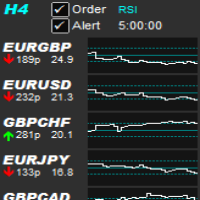
    Allows symbols/currency pairs to be ordered based on a configured indicator, with the best performing symbols shown at the top. This helps you to select the symbol with better prospects from a given list of symbols. Can optionally alert when a symbol moves into the top two (configurable). Also shown is the number of pips that the symbol has moved in its current direction, allowing you to tell if you've 'missed the boat'. Further, a graph is shown, per symbol, of the indicator value over time all
    The indicator displays trend strength, including showing the transition from buy to sell and visa versa. It is ideal for trend following strategies and also highlights possible reversals/flattening trend with a yellow X on the indicator window. By default, the indicator does not repaint/flicker, however, there is an option to calculate on the live candle but even then the indicator will not repaint unduly. The indicator can also be used for exit. Usage Enter long/buy trade when the indicator tr
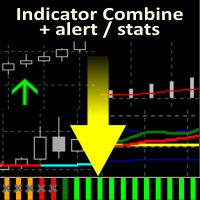
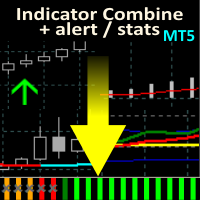
    Allows multiple indicators to be combined into a single indicator, both visually and in terms of an alert. Indicators can include standard indicators, e.g. RSI, CCI, etc., and also Custom Indicators, even those purchased through Market, or where just have the ex4 file. An early alert is provided, say when 4 out 5 indicators have lined up, and a confirmed alert when all are in agreement. A‌lso features a statistics panel reporting the success of the combined indicator by examining the current cha
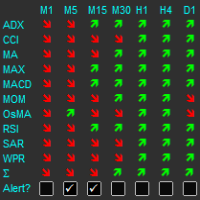
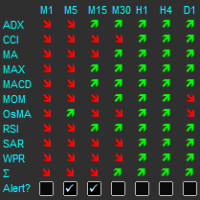
    Displays multiple indicators, across multiple timeframes and symbols to give a comprehensive overview of the market. Uniquely, the indicators are configurable and can include custom indicators, even those where you just have the ex4 file or those purchased from Market. Standard indicators can also be selected, the default being ADX, CCI, market price above/below Moving Average (MA), Moving Average Cross (MAX), MACD, Momentum (MOM), OsMA, RSI, Parabolic SAR, William's Percentage Range (WPR). Use
    Strategy Builder offers an incredible amount of functionality. It combines a trade panel with configurable automation (covert indicators into an EA), real-time statistics (profit & draw down) plus automatic optimization of SL, TP/exit, trading hours, indicator inputs. Multiple indicators can be combined into an single alert/trade signal and can include custom indicators, even if just have ex4 file or purchased from Market. The system is easily configured via a CONFIG button and associated pop-up
    The product combines a manual trade panel with the ability to perform actions automatically in a highly configurable way. Actions include capturing indicator values and then based on those values raising alerts, open/close or partially close trades, scale-in, setting up pending orders, adjusting stop loss, take profit and more. On-chart controls can be configured, such as tick boxes and buttons, so can be fully interactive. The EA also handles money management, news events, hidden stop loss, tak
    The indicator displays a matrix of indicators across multiple timeframes with a sum total and optional alert. Custom indicators can also be added to the matrix, in a highly configurable way. The alert threshold can be set to say what percentage of indicators need to be in agreement for an alert to happen. The alerts can turned on/off via on chart tick boxes and can be set to notify to mobile or sent to email, in addition to pop-up. The product offers a great way to create an alert when multiple
    Shows whether market is trending or not, to what extent, which direction, and if the trend is increasing. The indicator is very useful for trend following strategies, where it can filter out flat/choppy markets. The indicator can also alert when the market transitions from being flat to trending, which can serve as a great trade entry point. The alert is controllable directly from the chart, via a tick box. Also, the product includes bonus indicators of the current spread and ask/bid prices in l
    Allows multiple indicators to be combined into a single indicator, both visually and in terms of an alert. Indicators can include standard indicators, e.g. RSI, CCI, etc., and also Custom Indicators, even those purchased through Market, or where just have the ex4 file. An early alert is provided, say when 4 out 5 indicators have lined up, and a confirmed alert when all are in agreement. A‌lso features a statistics panel reporting the success of the combined indicator by examining the current cha
    Displays multiple indicators, across multiple timeframes and symbols to give a comprehensive overview of the market. Uniquely, the indicators are configurable and can include custom indicators, even those where you just have the ex4 file or those purchased from Market. Standard indicators can also be selected, the default being ADX, CCI, market price above/below Moving Average (MA), Moving Average Cross (MAX), MACD, Momentum (MOM), OsMA, RSI, Parabolic SAR, William's Percentage Range (WPR). Use
    Comprehensive on chart trade panel with the unique ability to be controllable from mobile as well. Plus has a library of downloadable configuration, e.g. exit rules, extra panel buttons, pending order setup and more. Please see our product video. Works with all symbols not just currency pairs. Features On chart panel plus controllable from free app for Windows, iPhone and Android Built-in script engine with library of downloadable configuration, e.g. add 'Close All Trades in Profit' button, exit
    The first currency based indicator to draw a distinction between map and strength. The map shows the currencies in terms of oversold/overbought levels and gives the direction of travel. The currency strength calculates and shows the strength of that move. Alerts are included for changes in currency direction on the map (confirmed over two bars) and also when the strength reached the appropriate level.  The currency map is useful for finding currency pairs to trade and in which direction. Look fo
    필터:
    peterb2
    14
    peterb2 2025.11.14 17:20 
     

    Sorry it freezes up and I have to remove it or something similar. Using MT5 Client Terminal Version 5.00 build 5370 from 17 Oct 2025. I tried the free version.

    Runwise Limited
    67197
    개발자의 답변 Mark Mather 2025.11.14 17:47
    Shame you didn't message us about this. We've got a few things you try if you get in touch, e.g try on a blank chart in case an indicator you have is (say) deleting objects on the chart like our panel that causes problems.
    kazuhide777
    24
    kazuhide777 2025.09.23 09:24 
     

    残念ながらインストールできませんでした。

    Runwise Limited
    67197
    개발자의 답변 Mark Mather 2025.09.23 20:23
    Your review says "Unfortunately I was unable to install it." Shame you didn't message us about this. Try installing directly from the Market tab in the MetaTrader platform - the download links on the mql5.com website are notriously problematic. Note, as developers we have no direct control over the mql5.com install mechanism, as it is managed by MetaQuotes/mql5.com. If need anymore help then please message us.
    TosinFxTrade
    14
    TosinFxTrade 2025.09.05 00:35 
     

    Amazing product and definitely worth the upgrade if you have the spare cash

    jcpnc
    24
    jcpnc 2025.07.02 13:23 
     

    I noticed that when calculating tp (rrr), the spread value is considered.Ex: (rrr=3) tp=3x(sl+spread). Thanks

    You are absolutely right, the spread is part of the risk but it is not paid 3x so I found it strange that the calculation is not Ex: (rrr=3) tp=(3xsl)+spread. Thanks for the excellent EA and unparalleled support.

    Runwise Limited
    67197
    개발자의 답변 Mark Mather 2025.07.04 13:35
    If risk reward ratio is 3 then a win needs to be 3 times bigger than a loss, i.e. what was risked. So, as risk=SL + spread then TP should be the 3*(SL + spread) that we use. Note, we also add spread to TP, as will need to pay spread on winning trade as well. However, it's all configurable, e.g. you can set EA input Obscure_addSpreadToSLWhenDeterminingRisk to false not to add spread to SL for risk, but then don't expect a win to be 3 times bigger than a loss for rrr=3.
    Benjamin Afedzie
    3392
    Benjamin Afedzie 2025.06.11 18:55 
     

    works for me

    amutzig
    36
    amutzig 2025.03.26 13:40 
     

    Fantastic EA with loads of functionality. And it's free!!! Thank you

    akshaygb
    29
    akshaygb 2025.01.13 13:47 
     

    Great Product

    1shot
    14
    1shot 2025.01.13 10:37 
     

    Works great on my MT4 but unfortunately I can not make it work on my MT5, no smiling face! Even though Algo trading is on and setting are to allow DLL imports etc. Could you please help?

    Runwise Limited
    67197
    개발자의 답변 Mark Mather 2025.01.13 10:55
    Sure, please email support@runwisefx.com or DM us
    Paulina Andrea Madariaga Figueroa
    4192
     

    Thank you very much for the EA, I have a question, when I use trailing stop with a defined number of points it is kept hidden from the broker?

    Runwise Limited
    67197
    개발자의 답변 Mark Mather 2024.12.28 18:37
    Yes if you set EA input Main_brokerStopLossMoveWithHidden to false. Otherwise, broker stop loss will be moved with hidden level. Thanks for the review.
    Luis Neto
    380
    Luis Neto 2024.11.18 15:13 
     

    Perfect until now.

    Runwise Limited
    67197
    개발자의 답변 Mark Mather 2024.12.08 10:38
    Thank you for the review. When say 'until now' do you mean 'so far', or have you hit a problem? Even though it's a free product, very happy to help if you've hit an issue - do get in touch if need be.
    [삭제] 2024.07.02 03:01 
     

    사용자가 평가에 대한 코멘트를 남기지 않았습니다

    aljinaahi
    54
    aljinaahi 2024.05.29 12:52 
     

    Despite my high rating for it, I still have difficulty using it and I only used pending orders

    Runwise Limited
    67197
    개발자의 답변 Mark Mather 2024.05.29 13:51
    Do get in touch if having trouble. Even though it's a free product, still happy to provide support. Indeed, folk have told us we offer better support for a free product than other developers do for their paid products. You can DM us or email us at support@runwisefx.com
    AaravDahal
    69
    AaravDahal 2024.05.17 09:56 
     

    사용자가 평가에 대한 코멘트를 남기지 않았습니다

    Grigory Mankov
    215
    Grigory Mankov 2024.05.11 10:18 
     

    Perfect

    Antonio Mazzilli
    60
    Antonio Mazzilli 2024.05.08 12:50 
     

    ottimo expert grazie mille

    5513462
    24
    5513462 2024.04.25 21:18 
     

    Excellent order entry tool! Just what I needed.

    Seth Tetteh
    2108
    Seth Tetteh 2024.04.25 11:42 
     

    cool

    Hubex
    236
    Hubex 2024.04.25 02:41 
     

    사용자가 평가에 대한 코멘트를 남기지 않았습니다

    Runwise Limited
    67197
    개발자의 답변 Mark Mather 2025.07.03 19:34
    We have seen one or two cases where a particular indicator has been periodically deleting all objects on the chart, including for our EA's panel and consequently we've had to keep re-creating our panel, which is very costly performance wise. It sounds like that is what you are experiencing, as it's fine when you run our EA on charts without the indicator. However, it's the indicator that is at fault, as it ought not to be deleting objects of other programs like ours.
    ponti123
    16
    ponti123 2024.04.24 11:20 
     

    I have a question. I apologize if this has already been answered due to my lack of understanding. question. Is there a way to automatically close a position and lock in profits? What I want to do is close a position using a specific MA. The position will be automatically closed when the candlestick closes and crosses a certain MA. Ideally, it would be even better if you could choose to close all or part of your position. Please allow me to take this opportunity to express my gratitude. Thank you for the wonderful tool, although I haven't mastered it yet.

    Runwise Limited
    67197
    개발자의 답변 Mark Mather 2024.04.24 12:04
    You would need our paid for version for that: 'Ultimate Trade Manager + Mobile'. This gives you access to our trade rules library ( http://runwisefx.com/library ) where there is a rule called e-ma that can exit on Moving Average.
    Calogero Vella
    589
    Calogero Vella 2024.03.24 02:20 
     

    very nice!!! thank you so much!!!

    리뷰 답변