Super Assistant

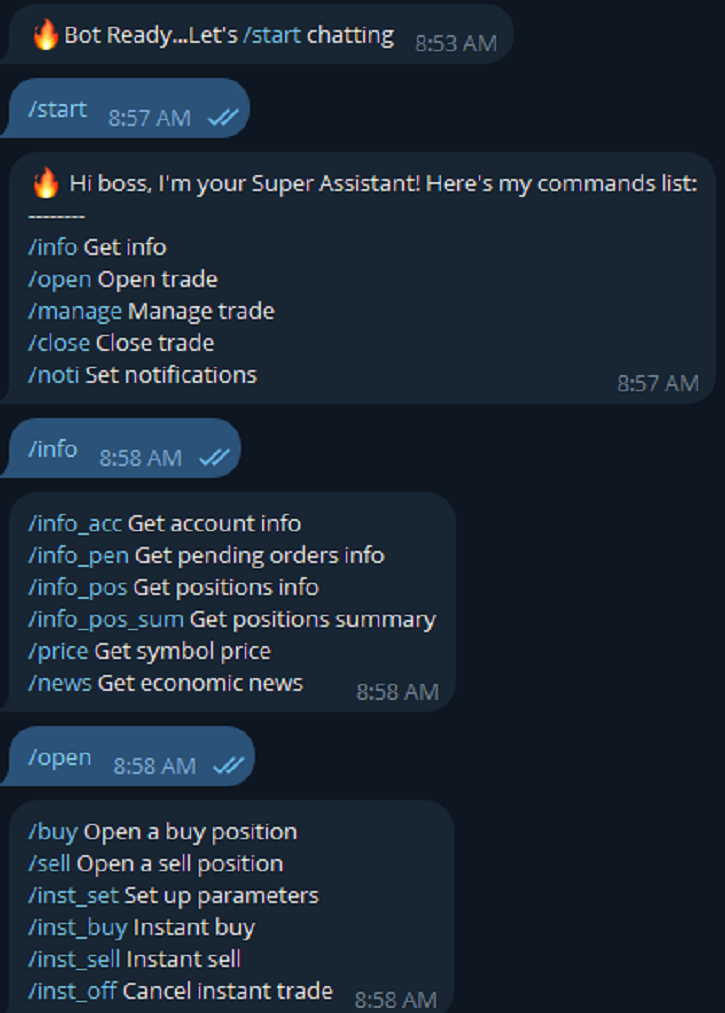
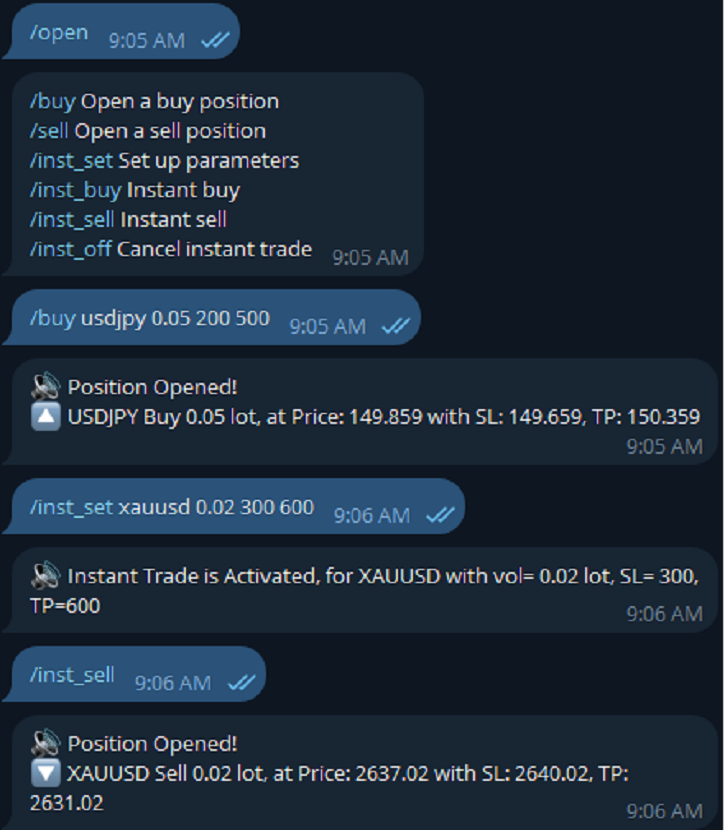
* Super Assistant is an useful management tool that helps traders perform management tasks on MT4/MT5 account remotely via Telegram such as:
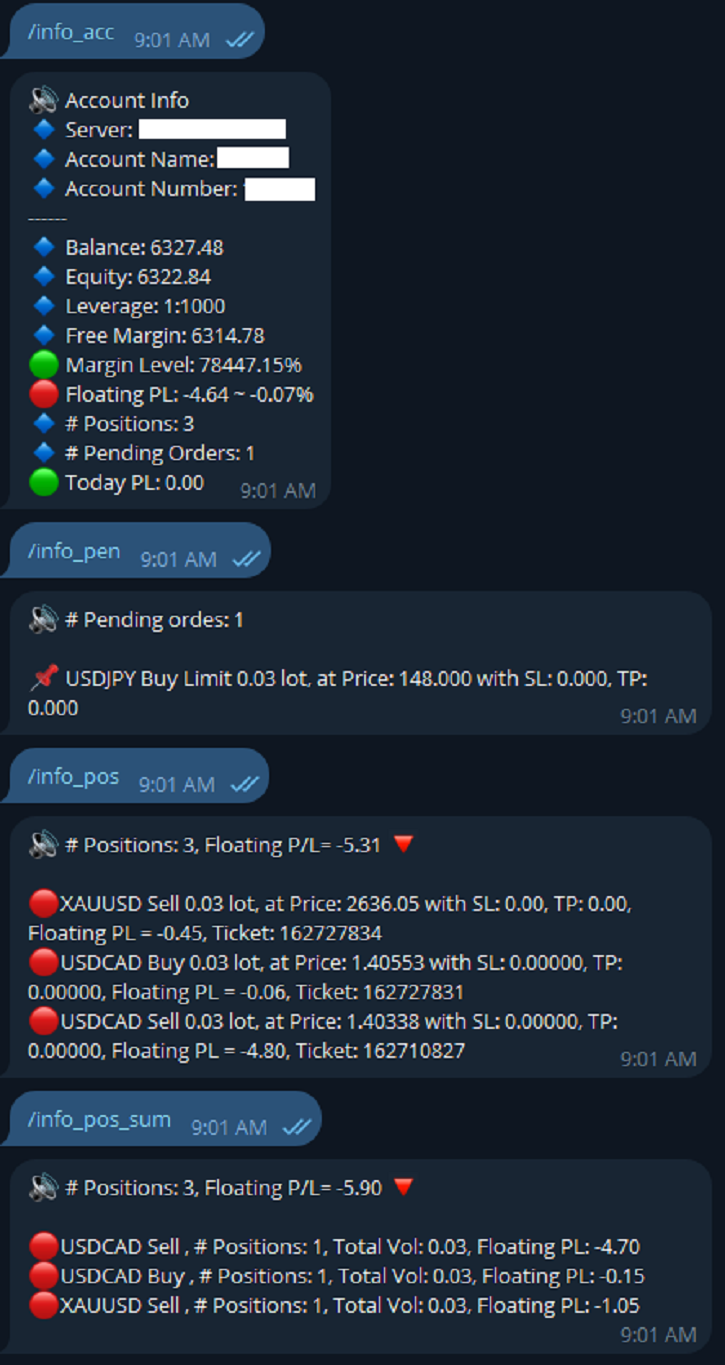
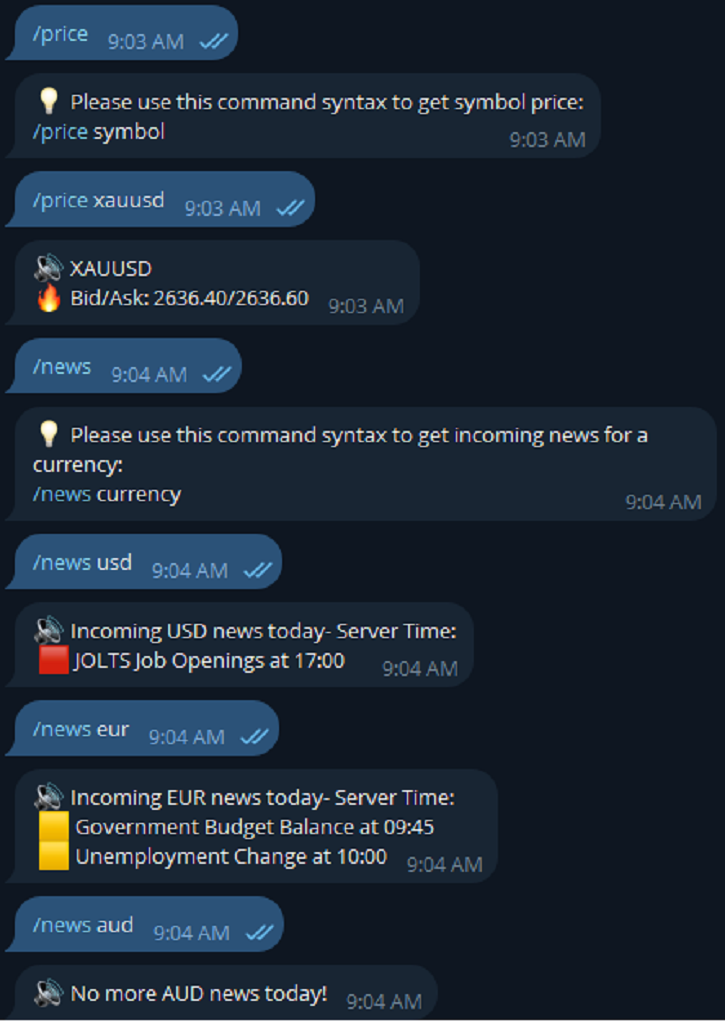
- Get info (account, details of positions, pending orders, floating PL, price, economic news, etc)
- Open trade (open instantly with preset parameters)
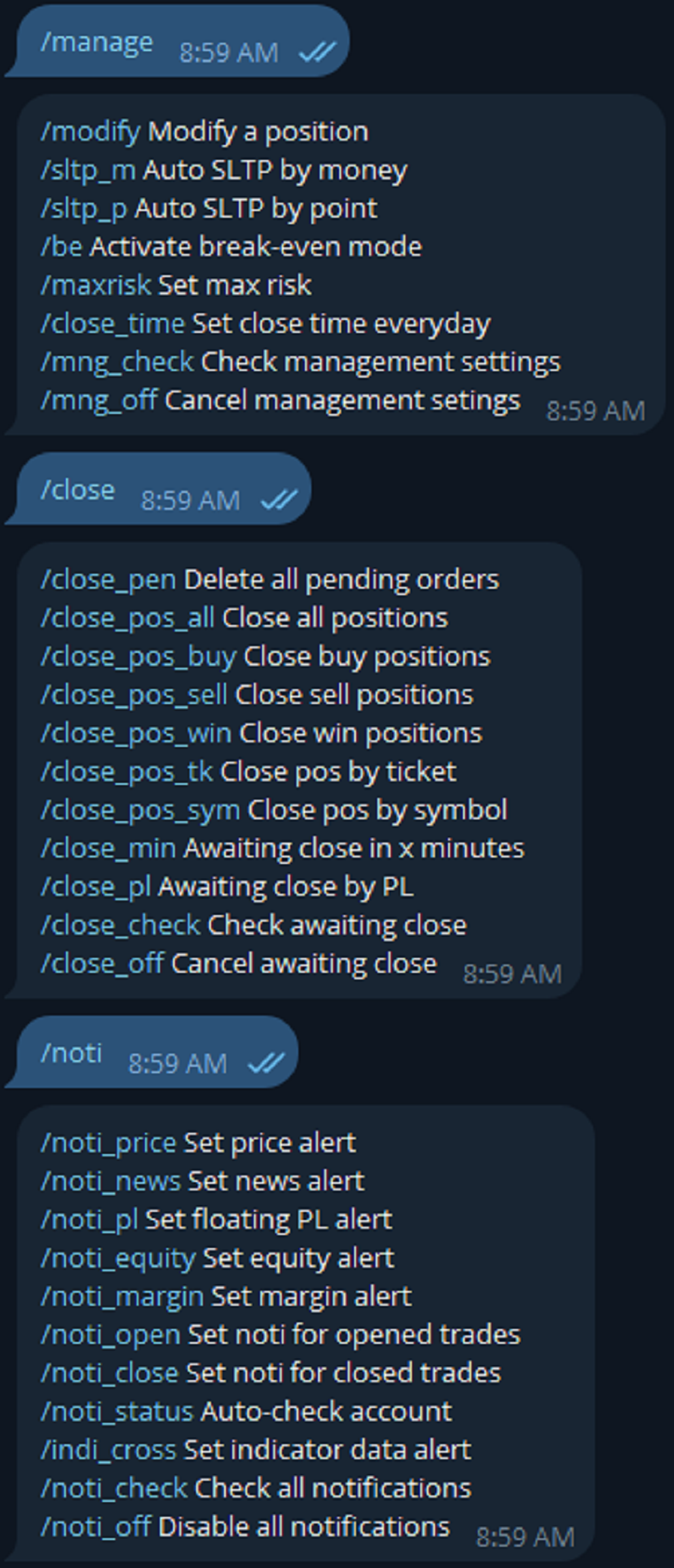
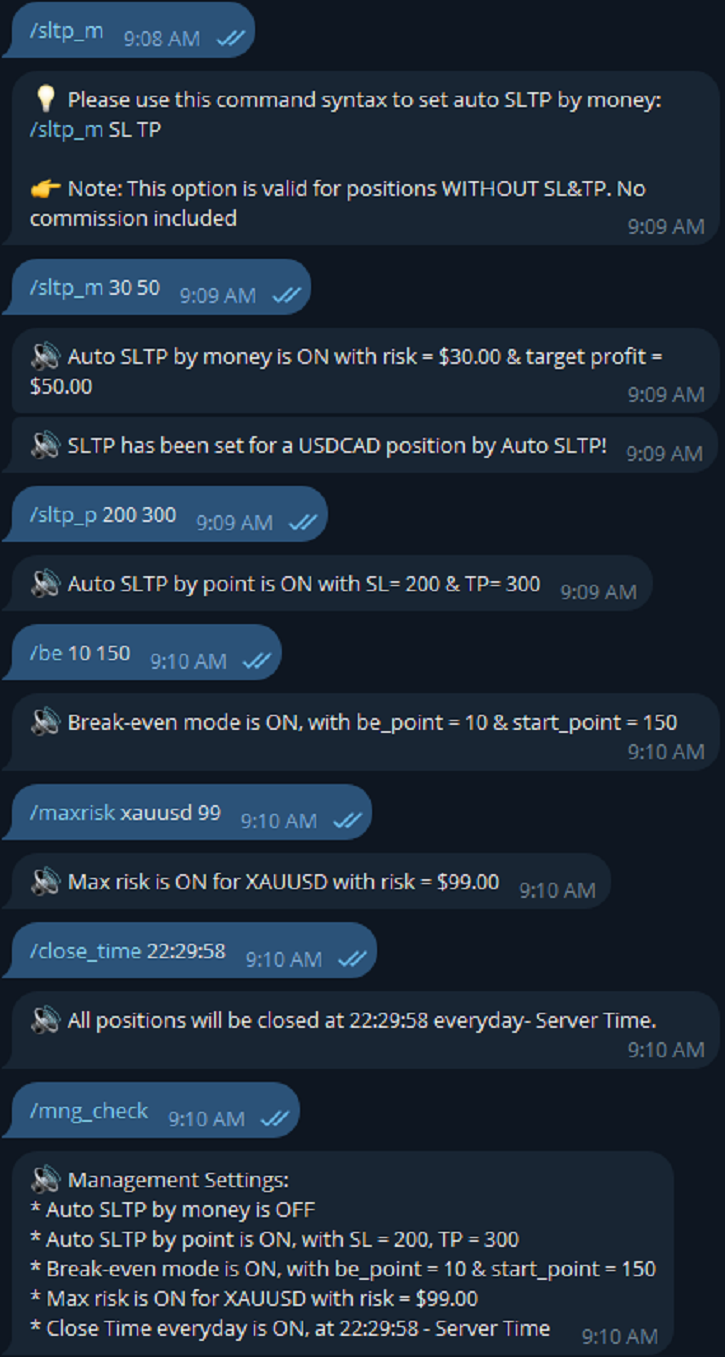
- Manage trade (set SLTP automatically, break-even mode, max risk, close time every day, etc)
- Close trade (close all, buy, sell, win positions by one click, set awaiting close by PL, time)

- Set up notifications to Telegram (opened, closed trades, price alert, PL alert, etc.)

* Easy to set up & use! See User Manual & Try Demo version here, thank you!

LIST OF COMMANDS:

==========GET INFO============

info_acc - Get account info

info_pen - Get pending orders details

info_pos - Get positions details

info_pos_sum - Get positions summary

price - Get symbol price

news - Get economic news (only MT5)

============OPEN TRADE==========

buy - Open a buy position 

sell - Open a sell position 

inst_set - Set up parameters  

inst_buy - Instant buy 

inst_sell - Instant sell 

inst_off - Cancel instant trade

============MANAGE TRADE========

modify - Modify a position 

sltp_m - Auto SLTP by money 

sltp_p - Auto SLTP by point 

be - Activate break-even mode 

maxrisk - Set max risk 

close_time - Set close time everyday 

mng_check - Check management settings 

mng_off - Cancel management setings

============CLOSE TRADE==========

close_pen - Delete all pending orders

close_pos_all - Close all positions

close_pos_buy - Close all Buy positions

close_pos_sell - Close all Sell positions

close_pos_win - Close all Win positions 

close_pos_sym - Close all positions by symbol

close_pos_tk - Close a position by ticket

close_min - Awaiting close in x minutes

close_pl - Awaiting close by floating PL

close_check - Check all awaiting close status

close_off - Cancel all awaiting close

==========NOTIFICATION=============

noti_price - Set price alert 

noti_news - Set news alert (only MT5)

noti_pl - Set floating PL alert 

noti_equity - Set equity alert 

noti_margin - Set margin alert 

noti_open - Set noti for opened trades 

noti_close - Set noti for closed trades 

noti_status - Auto-check account 

indi_cross - Set indicator data alert (only MT5)

noti_check - Check all notifications 

noti_off - Disable all notifications

********************************************************************************************

INPUTS:

Telegram Bot Token

Telegram User ID

*********************************************************************************************

HOW TO SET UP?

* Get inputs for EA:

- Create a Telegram bot by @BotFather , and save your Bot Token. Find your bot by username & press "start".

- Get your Telegram User ID by chatting with @userinfobot 

* Setup on your MT4/MT5:

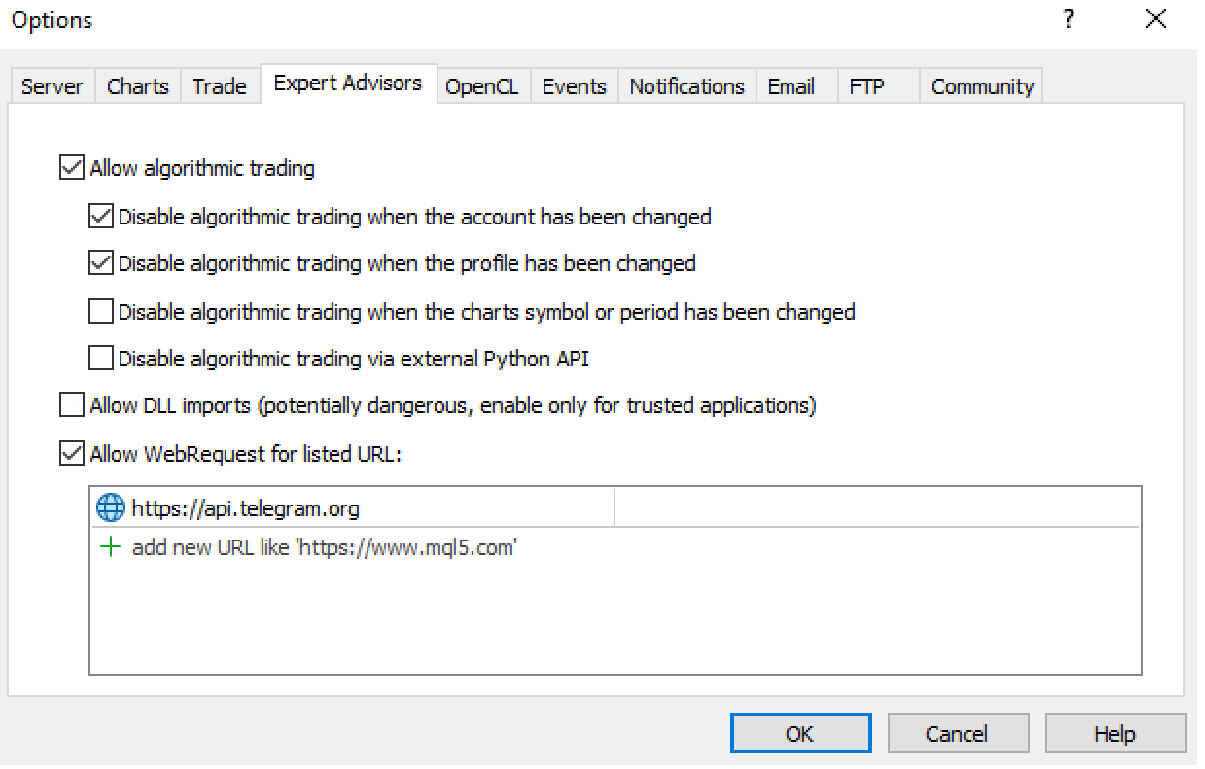
- MT4/MT5 => Tools => Options => Expert Advisors => Tick on Allow Algo Trading & Allow WebRequest, add  API Telegram to WebRequest

- Allow Algo Trading on EA 

* Create a command menu for your Telegram bot:

- Chat with @BotFather => /mybots => Select your bot => Edit Bot => Edit Commands => Copy/Paste command list above (You can set all the commands or just some common commands like start, info_acc, info_pos, close_pos_all)

추천 제품
Instructions for Using Reverse Copier EA Attach EA to Charts Open MetaTrader and attach the EA to any chart on both accounts (master & slave). Make sure AutoTrading is enabled. Master Account (Signal Sender) Set Mode = Master in EA settings. This account will send trade signals. Slave Account (Signal Receiver) Set Mode = Slave in EA settings. This account will receive trades in reverse (opposite direction). Lot Multiplier In Slave EA settings, set Multiplier to control lot size. Example: 1.0
This utility provides the ability to use hot keys in manual trading instantly responding to the current market situation. You can assign hot keys to open/close positions by their type, open/close all positions on the current chart and remove all orders on the current chart. You can also assign hot keys for five predefined trade volumes and switch between them if necessary with no need to change the volume manually from time to time. It is also possible to set the auto calculation of a trade volu
This Expert Advisor monitors all open positions across all symbols in MetaTrader 5. Whenever a Stop Loss (SL) or Take Profit (TP) is manually set or adjusted on any position, the EA automatically applies that value to all other open positions , regardless of symbol or order type (Buy/Sell). This ensures consistent and synchronized SL and TP levels across your account. Perfect for mobile trading via tablet or smartphone!
거래원 여러분 안녕하세요!저는 당신의 거래 조수입니다.더 이상 말하지 말고, 내가 너에게 나의 특기를 알려줄게. 1.나는 당신의 창고를 관리하는 데 능숙하다, 당신이 어느 쪽에서 주문하든, 나는 가장 먼저 당신을 도와 합리적인 손실 방지선과 이동 손실 방지선을 추가할 수 있습니다. 2.나는 너를 도와 상승과 하락을 회피하고 원칙을 지키지 못하는 인간성의 약점을 근원적으로 근절할 수 있다. 3. 귀하가 참고할 수 있도록 최적 지점에서 귀하의 모바일 MT5 클라이언트에 알림 메시지를 보냅니다. 물론 귀하는 모바일 장치 내의 MetaTrader 5 APP의 MetaQuotes ID를 MetaTrader 5 클라이언트 --> 옵션 --> 알림 --> MetaQuotes ID의 편집 상자에 등록하고 알림 지점 확인을 눌러야 합니다. 4. 정책 테스트에서 수동 시뮬레이션 디스크 연습을 잘 지원합니다. 5. 저에게 연락하면 추가 AI 보조 클라이언트 슈퍼 보조 프로그램을 얻을 수 있습니다. 참
Trailing Stop Manager PRO — 전문적인 트레일링 스톱 관리 (MT5) Trailing Stop Manager PRO는 MetaTrader 5용 전문가 조언자(Expert Advisor)로, 보유 중인 포지션에 대한 트레일링 스톱 관리를 자동화합니다. 계좌의 모든 포지션을 관리할 수도 있고, 심볼 및/또는 MagicNumber로 필터링된 포지션만 선택적으로 관리할 수도 있습니다. 이 EA는 고정 pips 기반 트레일링, ATR 기반 트레일링, 자동 브레이크이븐, 부분 청산 및 시각적 대시보드 기능을 제공합니다. 도구의 목적 모든 포지션에 대한 트레일링 스톱 관리를 표준화합니다. 브레이크이븐과 시장 상황에 맞는 트레일링을 통해 이익을 보호합니다. 심볼 및 MagicNumber 필터를 통해 수동 매매와 다른 EA 전략의 포지션을 함께 관리할 수 있습니다. 통합 대시보드를 통해 포지션 상태를 실시간으로 모니터링할 수 있습니다. 주요 기능 pips 기반 트레일링 스톱 :
Spread and Swap monitor
Gennadiy Stanilevych
5 (1)
The indicator is intended for determining the spread and swap size, the distance for setting stop orders and stop losses from the current price allowed and the risk per 1 point in the deposit currency. The indicator informs a trader about possible additional expenses and profits connected with transferring a position to the next trade session of the financial instrument. It also informs about the spread size and the distance of pending orders, stop loss and trailing from the current price. In ad
Horizontal Line Trade Assistant EA  Semi-Automated Trading Assistant      IMPORTANT :     On the main/purchased program a user can click on the Horizontal line and change it to Buy or Sell, and drag by double clicking on it. Please keep in mind that this option is not available on demo version, due to some restrictions/limitations of Strategy Tester, some Object related operations are not available in the  Strategy Tester. But, it will not prevent you from Testing, please drop an Object to chart
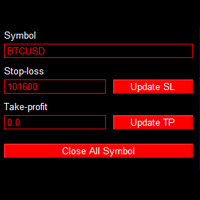
This is an EA that can help you set stop loss, take profit or close order for all open orders of any Symbol. Simply use it by entering the Symbol you are trading, then fill in the stop loss or take profit price and click the Update button. Similar to the batch order closing function, just enter the symbol you want to close the order, then click the "Close All Symbol" button. Immediately your orders will be closed gradually until all orders are closed. This tool is suitable for those of you wh
이 도구를 사용하면 한 번의 클릭으로 열려 있는 모든 주문을 닫을 수 있습니다. "모두 닫기"를 클릭하기만 하면 됩니다. 수익성 있는 주문만 청산하려면 "수익성 있는 청산" 버튼을 클릭하세요. 클릭한 후 모든 변동 주문이 청산됩니다. 변동 손실이 있는 주문만 종료하려면 "손실 가능 청산" 버튼을 클릭하세요. 클릭한 후 변동 손실이 있는 모든 주문이 종료됩니다. 이 도구는 1년 동안 테스트를 거쳤으며 원클릭 포지션 청산 기능이 매우 완벽합니다. 포지션 청산은 적시에 이루어지며 지연 범위는 작습니다. 물론 지연은 귀하가 속한 지역 및 네트워크 환경과도 관련이 있습니다. 이에 주의하시기 바랍니다. 과거 데이터의 백테스트 과정에서 도구는 더욱 완벽하게 작동했으며 100개의 주문을 모두 마감하는 데 최대 0.495초밖에 걸리지 않았습니다. 실제 거래 과정에서 나의 최대 포지션 주문 수는 26개에 불과했고, 모든 포지션이 청산되는 데 걸리는 시간은 1.28초였습니다.
Size calculator by soa
Laurentiu Marian Bordian
Introduction to SWARM CALCULATOR The SWARM CALCULATOR is a revolutionary tool designed for traders who prioritize effective risk management and optimized trading strategies. With its advanced features and intuitive interface, the SWARM CALCULATOR enhances your trading experience, allowing you to make informed and precise decisions. Key Features: Customized Risk Management: Automatic Position Size Calculation: Automatically determine the optimal position size based on the percentage of risk you a
Script for deleting pending orders If you need to delete all pending orders you placed, this script will do it for you! Allow AutoTrading before running the script. Usage: Run the script on a chart. Input parameters: Language of messages displayed (EN, RU, DE, FR, ES) - language of messages displayed (English, Russian, German, French, Spanish). Use Magic: (0 - ignore Magic, else - only this Magic) - if set to zero, the magic number is not considered. Otherwise the script deletes only orders wit
Itrade Manager
Nestor Smill Soler Olivero
Itrade manager expert advisor (EA) is a type of software that can be programmed to perform a variety of tasks related to managing trades in the financial markets. Some of the ways in which the Itrade manager EA can help you trade better include: Itrade manager EA can automatically modify, and close trades based on predefined rules and conditions, freeing you up to focus on other aspects of your trading strategy. Managing risk: Itrade manager EA can help you manage risk by placing stop-loss and t
Powerful and beautiful trading panel helps you in scheduling or placing multiple trades based on your presets in a single click. It is designed to execute orders immediately or schedule trades in advance to be executed at certain time using multiple filters to avoid non favorable market conditions (wide spread, reduced leverage etc.). Additional functionality developed to sycnhronize two instances of the expert over the internet (Master - Slave Mode), which means trader can open the panel in loc
SL Maker
Linas Kucinskas
EA Functionality -------------------------------------------------------------------------------------------------------------------------------- - The EA automatically sets SL (Stop Loss) of the specified size in points for each position immediately after opening position; - EA will close all open positions if their losses exceed the set amount; - Close all positions biggest then set limit; Position automatically closed if it bigger than set limit; - New function how much you can loss per day.
Close Buttons Utility는 차트에서 직접 포지션과 보류 주문을 수동으로 관리할 수 있는 간편하고 유연한 MQL5 유틸리티입니다. 이 패널을 사용하면 현재 또는 선택한 종목 그룹에 대한 주문 및 포지션 그룹을 한 번의 클릭으로 종료할 수 있습니다. 모든 주문뿐만 아니라 지정된 매직 넘버 목록이나 수동 주문에도 사용할 수 있습니다. 패널은 최소화하거나 화면에서 이동할 수 있습니다. 밝고 어두운 테마, 사용자 지정 가능한 크기, 행 높이, 버튼 열 개수가 지원되며, 각 버튼에 원하는 단축키를 지정할 수 있습니다. 종목 및 매직 넘버(모두, 목록 또는 수동)별 필터링 기능을 통해 대량 거래에 필요한 포지션과 주문을 정확하게 선택할 수 있습니다. 장점 기술 패널: 차트에서 패널을 원하는 모서리로 드래그할 수 있습니다. 패널은 상단 부분을 당겨서 이동할 수 있으며, 최소화할 수도 있습니다. 간략한 개요: 모든 주요 데이터(포지션 수, 거래량, 손익)를 간결한 형태로 제공합니다
Risk Control Utility MT5 designed for manual trading. It helps to calculate and control your risks, transfer transactions to breakeven and accompany positions with trailing stop. Easy to set up and use. It can be used for calculating a trading lot, calculating stop loss and take profit levels. Works with currency pairs, CFDs, stocks, indices, futures, cryptocurrencies Displays   volume,   potential loss and profit before   placing an order Ability to set the expiration time of a pending order Tr
!!ご自身の戦略と合っているのか必ず確認してください!! プロップファーム特化の自動ロット計算と、軽量コピー機能を備えた補助EAです。 現在、低スペックPCでコピー元口座→コピー先口座(6口座)で運用しています。 ※Intel(R) Core(TM) i5-4460  CPU @ 3.20GHz プロップトレーディングで複数口座を扱うと 一度はこう思ったことがあるはずです。 沢山の口座を扱う為、同じタイミングでエントリーするのが大変 市販のものは設定項目が多いのでシンプルなものが使いたい そこで Prop Sizing EAに コピー機能を付けました。 Prop Sizing EA についてはリンクを参照してください。 Prop Sizing EA https://www.mql5.com/ja/market/product/161432 このEAでできること Prop Sizing EA の機能全て シンプルなコピー機能(Master / Client) 同一PC内のMT5(Master)からMT5(Client)にトレードコピーします。 Master / Client を選
키보드 트레이딩 MT5는 핫키 MT5 유틸리티입니다. 단축키로 거래하려면 EA가 로드된 차트가 활성 차트(마우스로 클릭)여야 합니다. 다수의 포지션이 오픈된 경우 이동한 손절매는 첫 번째 거래의 손절매가 되며 나머지는 마우스로 조정해야 합니다.   선택할 입력:   1. 왼쪽 상단에 표시할 메모 1과 2를 추가합니다. 1. 로트 크기(최소 0.01) 2. 포인트 단위 StopLoss 및 TakeProfit(0 = 비활성화됨): 모든 주문에 적용 3. 사전 정의된 거리(포인트): 지정가 및 중지 주문을 할 현재 가격으로부터의 거리입니다(시장 주문 아님: 단축키 1 및 2). 4. 이동 중지 손실까지의 거리(포인트)(틱 최소 이동의 배수여야 함) 기기가 25포인트 단위로 이동하는 경우 설정한 거리는 25의 배수여야 하며 그렇지 않으면 작동하지 않습니다. 5. 매직넘버 : 위의 모든 키보드 거래와 주문은 모두 동일한 매직넘버를 가집니다. 6. 키보드 단축키:
This is a utility designed to automatically set the stop loss levels of orders according to the specified condition. Two price levels serve as the condition for setting stop loss: Trigger level - when this level is reached, an order is placed. The stop loss value of an order. It is possible to enable or disable traling stop loss. Input parameters Order type for execution - type of orders to be processed by the expert. It can either be BUY, SELL or auto-select. Trigger Level Points - level to pl
Unified Panel v5: Your Personal Command Center in MetaTrader 5 Tired of Missing Opportunities? Take Full Control of the Market! Every trader knows the pain: Fatigue from Waiting: You spend hours staring at the monitor, switching between dozens of charts and timeframes in search of the perfect setup. You get distracted for a moment—and the best opportunity is gone. Fear of a Margin Call: You have several positions open, possibly on different instruments or in a "lock". How do you know where the
Trade Manager EA에 오신 것을 환영합니다. 이 도구는 거래를 보다 직관적이고 정확하며 효율적으로 만들기 위해 설계된 궁극적인 리스크 관리 도구 입니다. 단순한 주문 실행 도구가 아닌, 원활한 거래 계획, 포지션 관리 및 리스크 제어를 위한 종합 솔루션입니다. 초보자부터 고급 트레이더, 빠른 실행이 필요한 스캘퍼에 이르기까지 Trade Manager EA는 외환, 지수, 상품, 암호화폐 등 다양한 시장에서 유연성을 제공합니다. Trade Manager EA를 사용하면 복잡한 계산은 이제 과거의 일이 됩니다. 시장을 분석하고 진입, 손절 및 익절 수준을 차트의 수평선으로 표시한 후 리스크를 설정하면, Trade Manager가 이상적인 포지션 크기를 즉시 계산하고 SL 및 TP 값을 실시간으로 표시합니다. 모든 거래가 간편하게 관리됩니다. 주요 기능: 포지션 크기 계산기 : 정의된 리스크에 따라 거래 크기를 즉시 결정합니다. 간단한 거래 계획 : 진입, 손절, 익절을 위한
Traders Panel
Timothy George Wright
Trader's Panel is a simple EA for managing trades once open. Your options for managing open trades are to close an entire open trade, close a percent of an open trade, which can be input from the trader panel, and then set stop loss to break even on an open trade. The Trader's Panel hovers at top left of screen right below the one click order buttons. **Note that this EA does not open trades. It only manages trades once they are open.
This Utility EA is a simple solution for editing many trades with ease , good for traders that ladder into positions. Syncs TP and SL Across All Trades Detects the TP and SL any trade. Updates all trades to match the highest trade's TP and SL if they change. Calculates Expected Profit and Loss Computes the total expected profit and loss in USD by considering TP, SL, lot size, and tick value.
EA SB8 Panel Trade
Juan Manuel Bernal Martin
SB-8 – Manual Trading Panel with Fixed Risk & TradingView-Style Visualization for MT5 SB-8 is an advanced manual trading panel for MetaTrader 5 , designed to execute trades visually, quickly and without calculations . It is especially built for traders coming from TradingView , who often find MT5 confusing when it comes to risk management and trade visualization. With SB-8, you don’t calculate lot size, percentages or risk . You simply move the Stop Loss line , and the panel handles everything a
Trailing Stop loss last X candles swing high and low.  X is a value of candles you can set as an input parameter. This Trailing stop loss moves the SL below the last X candles low(if BUY positions) or high(for SELL positions) If we are in a trend and we open a position following the trend, the SL will be automatically placed at the low or high of the last X bars. contact me if you need further assistence
One Click Trader  is a tool designed for MetaTrader 4 platform, which enables you to take your trading to the next level. It enables you to open, manage and close your trades in simple an efficient way by just one click of your mouse button. "-"   ,  "+"  change OCT window size  Up arrow minimizes the OCT panel Down arrow maximizes the OCT panel Right arrow displays the next panel with additional features Left arrow hides the panel with additional features Red  SELL  button enables you to open s
Close All Pro MT5 – Fast PnL Control is a powerful trade manager MT5 utility that gives you total control over your trades. With a single click, you can close all MT5 orders, monitor real-time profit and loss, and manage your floating PnL directly from a clean on-chart panel. The tool is lightweight, responsive, and built to help traders save time, reduce emotional stress, and maintain focus. Whether you trade manually or through an EA, this MT5 profit panel provides the visibility and precisio
For MT4: TP SL Calculator for MT4 This tool helps you to automatically calculate profit at Take - Profit price and loss at Stop - Loss price. Feature: - Calculate profit at TP price. Apply to all operators (BUY / BUY LIMIT / BUY STOP / SELL / SELL LIMIT / SELL STOP), with TP price is greater than 0. Profit is expressed in money and points. - Calculate loss at SL price. Apply to all operators (BUY / BUY LIMIT / BUY STOP / SELL / SELL LIMIT / SELL STOP), with SL price is greater than 0.   Loss is
T Manager for Price action Traders
Haidar, Lionel Haj Ali
4.5 (10)
T Manager, the ultimate trade management solution designed by traders for traders. If you are searching for a simple and efficient trade panel, trade manager, or trade assistant, you are at the right place.   The market contains a diverse number of those tools , but this one is designed by traders for traders . I designed this tool, and I am using it daily. Take my advice and stop buying tools blended with un-useful features that you will never use,   T Manager provides you with the essential y
Executor Trader Panel (Sta) - Standard Version   is a multi-functional trading tool designed for traders. The trading panel integrates over 30 individual functions and more than 10 combined functions, providing traders with a highly flexible operational approach. Main Features of the Executor: Instant Connection Status:   Immediately know if the connection with the broker is lost. Time Synchronization:   Instantly know the current local time and the time of the trading server. Universal Compati
이 제품의 구매자들이 또한 구매함
The product will copy all telegram signal to MT5 ( which you are member) , also it can work as remote copier.  Easy to set up, copy order instant, can work with almost signal formats, image signal,  s upport to translate other language to English Work with all type of channel or group, even channel have "Restrict Saving Content", work with  multi channel, multi MT5 Work as remote copier: with signal have ticket number, it will copy exactly via ticket number. Support to backtest signal. How to s
Ultimate Extractor
Clifton Creath
5 (9)
Ultimate Extractor - Professional Trading Analytics for MT5 *****this is the local HTML version of Ultimate Extractor. Check out Ultimate Extractor Cloud on mql5 for the Cloud version****** Ultimate Extractor transforms your MetaTrader 5 trading history into actionable insights with comprehensive analytics, interactive charts, and real-time performance tracking. What It Does Automatically analyzes your MT5 trading history across all Expert Advisors and generates detailed HTML reports with inte
YuClusters
Yury Kulikov
4.93 (43)
Attention: You can view the program operation in the free version  YuClusters DEMO .  YuClusters is a professional market analysis system. The trader has unique opportunities to analyze the flow of orders, trade volumes, price movements using various charts, profiles, indicators, and graphical objects. YuClusters operates on data based on Time&Sales or ticks information, depending on what is available in the quotes of a financial instrument. YuClusters allows you to build graphs by combining da
Mentfx Mmanage mt5
Anton Jere Calmes
4.25 (8)
The added video will showcase all functionality, effectiveness, and uses of the trade manager. Drag and Drop Trade Manager. Draw your entry and have the tool calculate the rest. Advanced targeting and close portions of a trade directly available in tool (manage trades while you sleep). Market order or limit order on either side with factored spread. Just draw the entry, the tool does the rest. Hotkey setup to make it simple. Draw where you want to enter, and the stop loss, the tool calculates al
Professional Footprint Chart EA - Complete Order Flow Trading Suite DEMO USERS - PLEASE SELECT EVERY TICK WHEN TESTING  See What Market Makers See! The most comprehensive order flow analysis tool for MetaTrader 5. Get institutional-grade volume analysis, real-time DOM, Time & Sales, and intelligent trade signals - all in one powerful EA. 6 Professional Panels - Complete order flow analysis suite Real-Time Tick Data - Live bid/ask volume at every price level Automatic Imbalance Detection - Spot
HINN Lazy Trader
ALGOFLOW OÜ
5 (2)
Lazy Trader is your personal risk management assistant that independently finds the best market entries, manages positions, and helps you extract maximum profit from every trading idea! It monitors charts from M1 to W1 , finds optimal entry points based on your parameters, and manages trades without your involvement: - Got an idea on the daily chart? No need to wait for lower timeframes to form a signal — Lazy Trader will check everything and open all necessary positions while you live your lif
MT5용 Dynamic Fibonacci Grid Dashboard 최신 버전을 소개합니다. 많은 새로운 기능이 추가된 이번 대시보드는 거래 경험을 완전히 변화시키며, 시장과 가격 움직임을 완전히 새로운 관점에서 볼 수 있게 합니다. 여러 시간대와 여러 심볼을 동시에 분석하여 새로운 가능성을 발견하세요. 수동 거래와 포지션 관리에 친화적인 사용자 인터페이스와 미리 정의된 자동 전략을 적용할 수 있는 확장된 기능을 제공합니다. 또한 DFG는 이제 전략 테스터(Strategy Tester)에서 트레이딩 시뮬레이터로 완벽하게 작동하며, 과거 데이터를 사용하여 다양한 거래 조건을 재현할 수 있습니다. 시각 모드에서 수동 거래를 연습하고, 고속 모드에서 자동 전략을 테스트할 수 있습니다. 주요 기능 • Dynamic Fibonacci Bands 개념을 기반으로 한 다중 시간대 및 다중 심볼 고급 기술 분석 실시간 시장 모니터링 대시보드를 통해 탁월한 효율성을 경험할 수 있습니다. M1,
EasyInsight AIO MT5
Alain Verleyen
4.91 (11)
EASY Insight AIO – 스마트하고 손쉬운 트레이딩을 위한 올인원 솔루션 개요 외환, 금, 암호화폐, 지수, 심지어 주식까지 — 전 시장을 몇 초 만에, 수동 차트 확인이나 복잡한 설치, 인디케이터 설정 없이 스캔할 수 있다고 상상해 보세요. EASY Insight AIO 는 AI 기반 트레이딩을 위한 궁극의 플러그 앤 플레이(Plug & Play) 데이터 내보내기 도구입니다. 단 하나의 깔끔한 CSV 파일로 전체 시장 스냅샷을 제공하며, ChatGPT, Claude, Gemini, Perplexity 등 다양한 AI 플랫폼에서 즉시 분석할 수 있습니다. 창 전환, 복잡함, 차트 오버레이는 더 이상 필요 없습니다. 자동으로 내보내지는 순수하고 구조화된 데이터 인사이트만으로, 반복적인 차트 감시 대신 데이터 기반의 스마트한 의사결정에 집중할 수 있습니다. 왜 EASY Insight AIO인가요? 진정한 올인원 • 별도의 설정, 인디케이터 설치, 차트 오버레이가 필요 없습
Farmed Hedge Yield Farming - Professional Pair Trading Dashboard (Manual - Hybrid - Fully Automated EA) Launch Price: $359 (Regular: $599) VERIFIED TRADING RESULTS - Farmed Hedge Yield Axi Copy: https://www.mql5.com/en/signals/2356376 - Farmed Hedge Yield Exn Copy: https://www.mql5.com/en/signals/2356404 DOWNLOAD PRESET v2.6+ Compatible with Version 3 (H4 Settings)  - Preset 01: Conservative Trading - Preset 02: Position management - Preset 03: Aggressive Trading >> View Statistic Tester <<
ManHedger MT5
Peter Mueller
4.8 (5)
THIS EA IS A SEMI-AUTO EA, IT NEEDS USER INPUT. Manual & Test Version Please TEST this product before BUYING  and watch my video about it. The price of the ManHedger will increase to 250$ after 20 copies sold. Contact me for user support or bug reports or if you want the MT4 version! MT4 Version  I do not guarantee any profits or financial success using this EA. With this Expert Advisor, you can: Implement your own Zone Recovery strategy to capitalize on trending markets. Create Grid trading s
The product will copy all  Discord  signal   to MT5   ( which you are member  ) , also it can work as remote copier.  Easy to set up. Work with almost signal formats, support to translate other language to English Work with multi channel, multi MT5. Work with Image signal. Copy order instant, auto detect symbol. Work as remote copier: with signal have ticket number, it will copy exactly via ticket number. How to setup and guide: Let read all details about setup and download Discord To MetaTrader
Mt5 To InterativeBrokers Copier allows you to copy deals from MT5 account to Interactive Brokers. With this, you can run your EA strategy on a MT5 Demo/Real Account, then copy all the deals to Interactive Brokers account real time. Features: 1. Copy or Invert-Copy deals Realtime from MT5 to IB Account. 2. Synchronizing positions of both accounts periodicaly, in case any missing copying. 3. You can choose only Buy position or Sell position. Symbols Setup: General Format:  {MT Symbol} -> {IB S
Unlimited Trade Copier Pro MT5 is a tool to copy trade remotely to multiple MT4, MT5 and cTrader accounts at different computers/locations over internet. This is an ideal solution for you if you are a signal provider and want to copy your trades to other receivers globally on your own rules. One provider can copy trades to multiple receivers and one receiver can get trade from multiple providers as well. The provider can even set the subscription expiry for each receiver, so that receiver will n
Crypto Charting
Rajesh Kumar Nait
5 (5)
Crypto Charting for MT5 – MetaTrader 5용 암호화폐 차트 통합 도구 개요 Crypto Charting for MT5는 WebSocket을 통해 실시간 OHLC 차트 데이터를 제공합니다. 여러 거래소를 지원하며 MT5에서 자동으로 데이터가 동기화됩니다. 기능 WebSocket을 통한 실시간 차트 자동 역사 데이터 업데이트 네트워크 중단 시 예약된 동기화 모든 MT5 타임프레임 지원 OHLCV 데이터 지원 전략 테스터 지원 자동 재연결 기능 지원 거래소 Binance, Bybit, OKX, KuCoin, MEXC, Gate.io, Bitget, XT.com 추가 정보 Crypto Ticks 라는 별도 제품에서 틱 데이터와 오더북 정보를 제공합니다. 참고 사항 DLL 미사용, VPS 환경에 적합합니다. Strategy Tester에서는 WebRequest 기능이 작동하지 않습니다. 데모가 필요하신 경우 MQL5의 개인 메시지를 통해 문의하십시오. Full
MT5용 바이낸스 거래 도구 1. 이 제품은 웹소켓 실시간 차트, 과거 차트, 그리고 MT5 터미널 재시작 시 자동 업데이트 기능을 제공하여 수동 개입 없이 원활하게 작동하여 바이낸스 거래를 원활하게 진행할 수 있도록 지원합니다. 현물 및 선물 거래, 실시간 차트 및 과거 데이터 제공 차트 기능: 1. 웹소켓(WSS)을 통한 실시간 OHLC 차트 2. API를 통한 과거 데이터 업데이트 3. MT5를 열 때마다 차트에 과거 데이터 자동 업데이트 4. M1부터 MN1까지 모든 시간대 지원 5. 사용 가능한 데이터: 시가 고점, 저점, 종가, 실제 거래량 및 틱 거래량 6. 전략 테스터를 사용하여 암호화폐 데이터를 기반으로 모든 전략을 EA(Expert Advisor)로 백테스트할 수 있습니다. 차트 및 과거 데이터 지침: 1. MT5 옵션에 URL을 추가합니다. 2. 모든 차트에 유틸리티를 로드하고 모드를 라이브로 선택한 후, 거래소(예: 바이낸스 현물)를 선택하고, 최초
Custom Alerts AIO: 다중 시장을 동시에 모니터링 – 설정 없이 즉시 사용 가능 개요 Custom Alerts AIO 는 복잡한 설정 없이 즉시 사용할 수 있는 통합 시장 모니터링 도구입니다. FX Power, FX Volume, FX Dynamic, FX Levels, IX Power 등 필요한 모든 지표가 내장되어 있어 별도의 설치나 구성 없이 알림 기능을 바로 사용할 수 있습니다. 차트 그래픽 없이 작동하며, Forex, 금속, 지수, 암호화폐 등 주요 자산군을 모두 지원합니다. 주식(Symbols)은 별도로 입력하여 추가할 수 있으나, MetaTrader에서는 일반적으로 제한적으로만 사용됩니다. 1. 왜 Custom Alerts AIO를 선택해야 하나요? 추가 라이선스가 필요 없습니다 • 모든 Stein Investments 지표가 내장되어 있어 별도 구매가 필요 없습니다. • 즉시 알림 기능을 시작할 수 있어 빠르고 간편합니다. 모든 시장을 하나의 도구로
Crystal Trade Manager – Advanced MT5 Risk and Trade Control Utility Overview Crystal Trade Manager (CTM) is a professional MetaTrader 5 utility designed for risk management, trade automation, and instant execution control. It provides traders with an integrated system for protecting equity, managing daily drawdowns, controlling lot sizes, and applying automation features such as automatic SL/TP, break-even, and trailing stop. The tool is suitable for manual traders, prop-firm challenge particip
The product will copy all WhatsApp signal to MT5 ( which you are member).  Easy to set up, copy order instant, can work with almost signal formats,  image signal. Work with all type of channel or group, work with  multi channel, multi MT5 Support to translate other language to English How to setup and guide: Let read all details about setup and download WhatsAppCopier apps   here Recommend to all: try install demo version from market to your PC/ VPS because some time you maybe have problem with
Bots Builder Pro MT5
Andrey Barinov
4.17 (6)
This is exactly what the name says. Visual strategy builder . One of a kind. Turn your trading strategies and ideas into Expert Advisors without writing single line of code. Generate mql source code files with a few clicks and get your fully functional Expert Advisors, which are ready for live execution, strategy tester and cloud optimization. There are very few options for those who have no programming skills and can not create their trading solutions in the MQL language. Now, with Bots Builde
Strategy Builder offers an incredible amount of functionality. It combines a trade panel with configurable automation (covert indicators into an EA), real-time statistics (profit & draw down) plus automatic optimization of SL, TP/exit, trading hours, indicator inputs. Multiple indicators can be combined into an single alert/trade signal and can include custom indicators, even if just have ex4 file or purchased from Market. The system is easily configured via a CONFIG button and associated pop-u
The  Easy Strategy Builder (ESB)  is a " Do It Yourself " solution that allows you to create a wide range of the automated trading strategies without any line of codes. This is the world’s easiest method to automate your strategies that can be used in STP, ECN and FIFO brokers. No drag and drop is needed. Just by set conditions of your trading strategy and change settings on desired values and let it work in your account. ESB has hundreds of modules to define unlimited possibilities of strategi
What Exactly Is A Smart Trading Tool? Smart Trading Tool   was developed for fast and comfortable trading of the financial markets especially for   ORDER BLOCKS TRADERS .   It provides traders functionalities, such as: A Drawing Tool One-Click Trading Panel Automated Lot Sizes Calculation   based on your risk appetite & Money Management ( Watch this video , how this tool can help manage your risk per trade better!) Built in PRICE LEVELS (Fibonacci, Round Numbers, Daily hi-low, etc) Shows Trading
FiboPlusWaves MT5
Sergey Malysh
5 (1)
FiboPlusWave Series products Ready-made trading system based on Elliott waves and Fibonacci retracement levels . It is simple and affordable. Display of the marking of Elliott waves (main or alternative option) on the chart. Construction of horizontal levels, support and resistance lines, a channel. Superposition of Fibonacci levels on waves 1, 3, 5, A Alert system (on-screen, E-Mail, Push notifications).    Features: without delving into the Elliott wave theory, you can immediately open one of
Remote Trade Copier is an advanced tool designed for efficiently copying trades between accounts in both local and remote modes. It allows for lightning-fast order replication from a master account to a slave account. In local mode, trades are copied instantly, while in remote mode, the copying process takes less than 1 second. MT4 Version (Only Local) MT5 Version (Only Local) MT4 Full Version (Local & Remote) Local mode refers to both MetaTrader platforms being installed on the same system,
GRat Crypto
Ivan Titov
4.5 (2)
Trade on crypto exchanges in MT5! GRat_Crypto is a tool for manual and automated trading , including ANY available EA, ANY  cryptocurrency  on most popular crypto exchanges in the familiar MT5 environment 24/7. Features 1. ALL instruments of the 9 most popular crypto exchanges are available: Binance, BingX, Bybit, Coinbase, CoinEx, Kraken,   KuCoin, MEXC and OKX . 2. The ability to place ANY type of order available in MT5, both market and pending, to modify orders and positions, to delete order
A ready-made multitimeframe trading system based on automatic plotting and tracking of Fibonacci levels for buying and selling any symbol. Advantages Determines the trend direction based on a complex of 14 indicators ( Cx ), extremums of ZigZag ( Z ), RSI ( R ), Impulse ( I ) Displaying the values of 14 indicators comprising the trend direction ( Cx ) Plotting horizontal levels, support and resistance lines, channels View the plotting option of Fibonacci levels on any timeframe, with the abilit
FTMO Protector 8
Vyacheslav Izvarin
PROTECT YOUR FTMO Account in a simplest way Must-Have Account Protector for any Prop-trading Account and Challenge MT4 / MT5 Expert Advisor that protects your Forex Prop Trading account from an unexpected drawdown! FTMO Protector  is a Tool that lets you manage trades and control your profit and loss across multiple Robots and currency pairs using a simple parameters and settings. Use as many EAs and Instruments you need, the Protector will: 1.   Calculate your midnight (01:00 System time) Balan
HYT utility
Sergey Batudayev
HYT(Help Your Trading)   는 두 가지 주요 기술을 사용하여 손실 포지션의   평균을 낮추는 데   도움이 되도록 설계된 도구입니다. 표준 평균화. 추세 방향으로 포지션을 개시하여 헤지하는 방식입니다. 이 도구를 사용하면 매수와 매도 모두에서 여러 방향으로 개설된 여러 포지션을 관리할 수 있습니다. HYT는 다음 포지션의 크기, 주문 가격, 평균화 방향, 지정된 이익 실현 수준으로 포지션을 마감하는 것을 자동으로 계산합니다. 또한 매수 및 매도 버튼을 사용하여 포지션을 개설하고, 원하는 이익 실현 수준과 초기 로트를 지정하는 옵션도 제공합니다. 사용을 시작   하려면 도구를 차트로 끌어다 놓고, 이익 실현 수준을 설정한 후 "평균화 시작" 버튼을 클릭하면 됩니다. 초기 포지션이 너무 크지 않도록   주의하고, 평균화할 때 도구가 포지션 크기를 늘리므로 추가 비용이 발생할 수 있음을 대비하세요. HYT는   자동 거래   도 가능합니다. 자동 거래가 활성화되면, 도구
RiskGuard Management
MONTORIO MICHELE
5 (22)
ATTENTION For a free trial version, visit my website. Manual QUANTUM RiskGuard Management — Your ultimate ally for uncompromising trading. Lot Calculator — Automatic lot size calculation. Quantum — Automatic risk to maximize profits and reduce drawdowns. Automatic Journal — Included and freely downloadable from my website. Automatic Screenshot — Two screenshots: one at entry and one at exit. Partial Profit — Smartly managed partial exits. Smartphone Trading — Place orders from your mobile, mana
Trade Copier Pro MT5 is a tool to copy trade remotely to multiple MT4, MT5 and cTradfer accounts at different computers/locations over internet. This is an ideal solution for you if you are a signal provider and want to copy your trades to other receivers globally on your own rules. One provider can copy trades to multiple receivers and one receiver can get trade from multiple providers as well. The provider can even set the subscription expiry for each receiver, so that receiver will not be abl
제작자의 제품 더 보기
Auto SLTP Pro
Tuan Nghia Phan
5 (1)
Auto SLTP Pro can help you setSL & TP automatically for positions & pending orders * 2 modes: - Points - USD * Symbol Filter:  Select All or a specific symbol * For pending orders: Select true to set SLTP for pending orders Note: Only valid for positions (pending orders) without SL&TP! Join my channel here for more useful management tools: * Remote Tools via Telegram: Super Assistant, Master Close, Master Control, Master Notify * Free Tools: Tele Notify, Price Alert, Quick Close
FREE
Auto SLTP Pro for MT4
Tuan Nghia Phan
3.33 (3)
Auto SLTP Pro can help you setSL & TP automatically for positions & pending orders * 2 modes: - Points - USD * Symbol Filter:  Select All or a specific symbol * For pending orders: Select true to set SLTP for pending orders Note: Only valid for positions (pending orders) without SL&TP! Join my channel   here   for more useful management tools: * Remote Tools via Telegram: Super Assistant, Master Close, Master Control, Master Notify * Free Tools: Tele Notify, Price Alert, Quick Close 
FREE
Master Notify via Telegram can help you perform some management tasks on MT4/MT5 remotely via your Telegram by one click, easy to set up & use. Demo here (see more Master Close   Master Control ) ************************************************************************************ LIST OF COMMANDS: info_acc -  Get account info info_pos -   Get positions details price -   Get symbol price noti_price   - Set price alert  noti_pl   - Set floating PL alert noti_equity - Set equity alert  noti_margin
Master Notify via Telegram can help you perform some management tasks on MT4/MT5 remotely via your Telegram by one click, easy to set up & use. Especially now this tool can work with indicator & send alert to Telegram. Demo here (see more Master Close   Master Control ) ************************************************************************************ LIST OF COMMANDS: info_acc -  Get account info info_pos -   Get positions details price -   Get symbol price news -   Get economic news noti_pri
Tele Notify
Tuan Nghia Phan
Tele Notify can help you send notifications for opened & closed trades to a Telegram channel or your personal Telegram. (see Master Notify for full options of notifications/alerts: indicator data, price, news, etc. Get more EAs  here ) Update: Now you can check your account info anytime from your Telegram by simple command: /check. This option is only valid when you use your Telegram User ID on EA inputs *******************************************************************************************
FREE
Break-Even Pro  * 3 BE modes:    - RewardRisk_Single for single trade (only valid for positions with SL)    - Points_Single for single trade    - Points_DCA for multiple DCA trade * Start Value: value of RR or # points to start SL moving * Offset: distance in points between BE level & entry  * Symbol Filter: Select All or a specific symbol * Partial Close (%): Close % initial volume when moving SL to BE (0 for no partial close) Join my telegram channel here  for more useful free EAs. Thank you!
FREE
Price Aler t can help you send notifications to your personal Telegram when the price crosses a preset value. Additionally, you can check your MT4/5 account info anytime from your Telegram by simple command: /check.  Get more free useful EAs  here ! HOW TO SET UP?   * Get inputs for EA: - Telegram Bot Token: Create a Telegram bot by   @BotFather   ,   and save your Bot Token. Find your bot by username & press "start". - Telegram User ID: Use your User ID by chatting with @ userinfobot   * Setup
FREE
Equity Aler t can help you send notifications to your personal Telegram when your account equity reaches/ drops below a preset value. Additionally,   you can check your MT4/5 account info anytime from your Telegram by simple command: /check .    Get more free useful EAs  here ! HOW TO SET UP?   * Get inputs for EA: - Telegram Bot Token: Create a Telegram bot by   @BotFather   ,   and save your Bot Token. Find your bot by username & press "start". - Telegram User ID: Use your User ID by chatting
FREE
Break-Even Pro   * 3 BE modes:    - RewardRisk_Single for single trade (only valid for positions with SL)    - Points_Single for single trade    - Points_DCA for multiple DCA trade * Start Value: value of RR or # points to start SL moving * Offset: distance in points between BE level & entry  * Symbol Filter: Select All or a specific symbol * Partial Close (%): Close % initial volume when moving SL to BE (0 for no partial close) Join my telegram channel   here  for more useful free EAs. Thank yo
FREE
IndiSig by Buffer Detect Signals from a Custom Indicator by Buffer & Send notifications to Telegram Channel or Open orders * Buy/Sell Buffer: You may get this info on MT4/5 Data Window (CTRL + D) * MT5 version: Add the indicator first, then the EA * MT4 version: Only works properly with default settings of the indicator Join https://t.me/fxassistant_vn for more useful EAs!
FREE
Quick Close Pro by one click: * Close Buy positions * Close Sell positions * Close Win positions * Close All positions * Close All pending orders To close all positions by one click from your Telegram, please refer  Master Close . Thank you! Join my channel   here   for more useful EAs: - Tele Notify, Price Alert, Equity Alert, Remote Algo OnOff - Auto SLTP, Close Timer
FREE
Equity Aler t can help you send notifications to your personal Telegram when your account equity reaches/ drops below a preset value. Additionally,   you can check your MT4/5 account info anytime from your Telegram by simple command:   /check .    Get more free useful EAs  here ! HOW TO SET UP?   * Get inputs for EA: - Telegram Bot Token: Create a Telegram bot by   @BotFather   ,   and save your Bot Token. Find your bot by username & press "start". - Telegram User ID: Use your User ID by chatti
FREE
Quick Close Pro by one click: * Close Buy positions * Close Sell positions * Close Win positions * Close All positions * Close All pending orders * Close All by Mobile: Select true to close all positions quicky from your Mobile by closing any position on Mobile. To close all positions by one click from your Telegram, please refer  Master Close . Join my channel here for more useful EAs.  Thank you!
FREE
IndiSig by Buffer Detect Signals from a Custom Indicator by Buffer & Send notifications to Telegram Channel or Open orders * Buy/Sell Buffer: You may get this info on MT4/5 Data Window (CTRL + D) * MT5 version: Add the indicator first, then the EA * MT4 version: Only works properly with default settings of the indicator Join  https://t.me/fxassistant_vn for more useful EAs!
FREE
Price Aler t can help you send notifications to your personal Telegram when the price crosses a preset value. Additionally,   you can check your MT4/5 account info anytime from your Telegram by simple command: /check .    Get more free useful EAs  here ! HOW TO SET UP?   * Get inputs for EA: - Telegram Bot Token: Create a Telegram bot by   @BotFather   ,   and save your Bot Token. Find your bot by username & press "start". - Telegram User ID: Use your User ID by chatting with @ userinfobot   *
FREE
Tele Notify can help you send notifications for opened & closed trades to a Telegram channel or your personal Telegram. (see Master Notify for more options of notifications: price, equity, profit, etc. Get more EAs here ) Update: Now you can check your account info anytime from your Telegram by simple command: /check. This option is only valid when you use your Telegram User ID on EA inputs ******************************************************************************************** HOW TO SET U
FREE
Master Close via Telegram can help you perform some management tasks on MT4/MT5 remotely via your Telegram by one click, easy to set up & use. Demo here (see more Master Notify   Master Control  ) ************************************************************************************ LIST OF COMMANDS: info_acc -  Get account info info_pen -   Get pending orders details info_pos -   Get positions details info_pos_sum -   Get positions summary close_pen -   Delete all pending orders close_pos_all -
Master Control via Telegram can help you perform some management tasks on MT4/MT5 remotely via your Telegram by one click, easy to set up & use. Demo here (see more Master Close   Master Notify  ) ************************************************************************************ LIST OF COMMANDS: info_acc -   Get account info info_pos -   Get positions details price -   Get symbol price buy  -   Open a buy position sell  -   Open a sell position inst_set  -   Set parameters for instant trade i
* Super Assistant   is an useful management tool that helps traders perform management tasks on MT4/MT5 account remotely via  Telegram  such as: - Get info (account, details of positions, pending orders, floating PL, price, economic news, etc) - Open trade (open instantly with preset parameters) - Manage trade (set SLTP automatically, break-even mode, max risk, close time every day, etc) - Close trade (close all, buy, sell, win positions by one click, set awaiting close by PL, time) - Set up no
Copy signals from Telegram channel to MT4/MT5 (Telegram bot must be added as an Admin in the channel)  Input * Telegram bot token: Get your bot token by chatting with @BotFather * Multi- order for multi-tp signals * Signals filter by "not included text" * Option to Modify/Close by Reply message * Range Entry Mode: No open order if the price is out of range  Setup on your MT4/MT5: - MT4/MT5 => Tools => Options => Expert Advisors => Tick on Allow Algo Trading & Allow WebRequest, add  API Telegram
Master Close via Telegram can help you perform some management tasks on MT4/MT5 remotely via your Telegram by one click, easy to set up & use. Demo here (see more Master Notify   Master Control ) ************************************************************************************ LIST OF COMMANDS: info_acc -  Get account info info_pen -   Get pending orders details info_pos -   Get positions details info_pos_sum -   Get positions summary close_pen -   Delete all pending orders close_pos_all -  
Master Control via Telegram can help you perform some management tasks on MT4/MT5 remotely via your Telegram by one click, easy to set up & use. Demo here (see more  Master Close     Master Notify  ) ************************************************************************************ LIST OF COMMANDS: info_acc -  Get account info info_pos -   Get positions details price -   Get symbol price buy  -   Open a buy position sell  -   Open a sell position inst_set  -   Set parameters for instant trade
TeleCopy
Tuan Nghia Phan
Copy signals from Telegram channel to MT4/MT5 (Telegram bot must be added as an Admin in the channel) Input * Telegram bot token: Get your bot token by chatting with @BotFather * Multi- order for multi-tp signals * Signals filter by "not included text" * Option to Modify/Close by Reply message * Range Entry Mode: No open order if the price is out of range  Setup on your MT4/MT5: - MT4/MT5 => Tools => Options => Expert Advisors => Tick on Allow Algo Trading & Allow WebRequest, add  API Telegram  
필터:
리뷰 없음
리뷰 답변