Auto Trade Manager MT5 OnScreen Panel TAQMagicKey

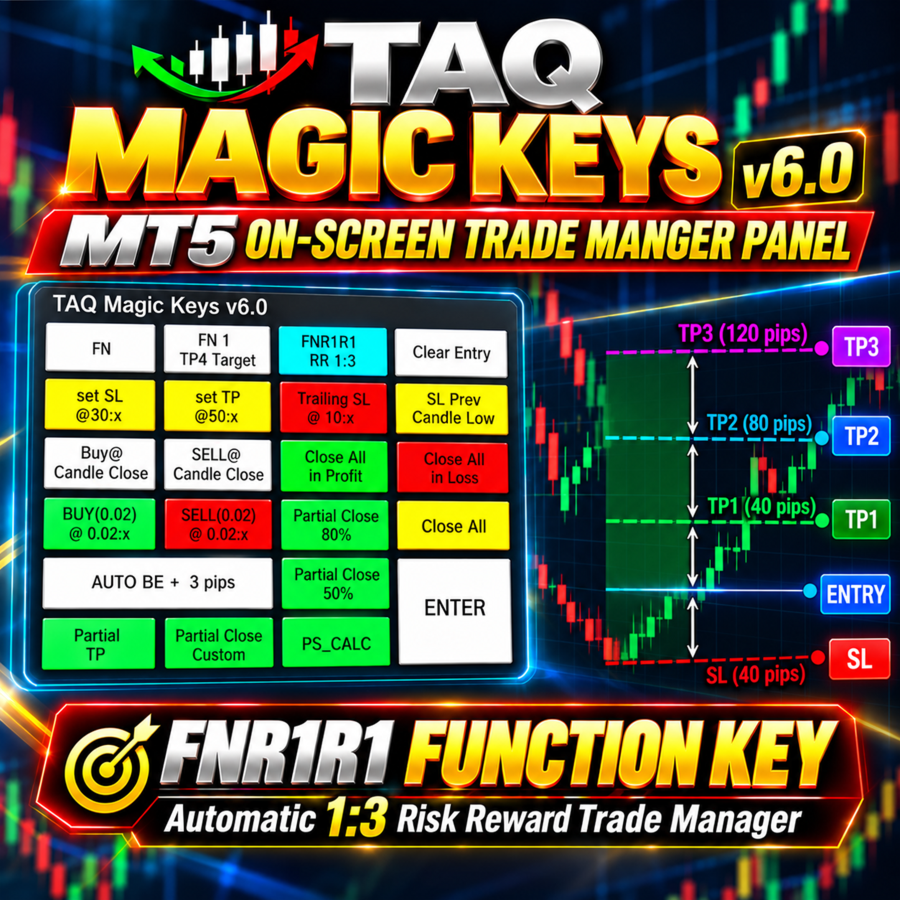
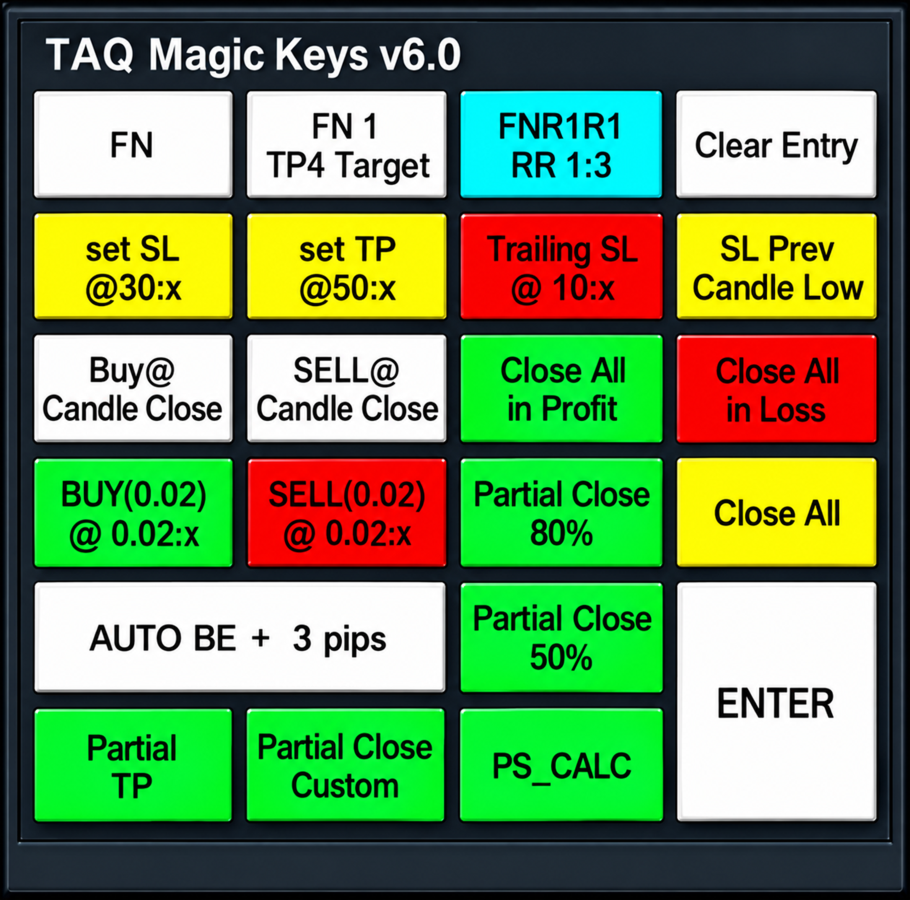
TAQ Magic Keys v6.0 Auto Trade Manager is an advanced trade management tool for MetaTrader 5 (MT5), featuring one-click trade management functions and an integrated Position Size Calculator.

🚀 New Feature In V6.0 — FNR1R1 Function Key

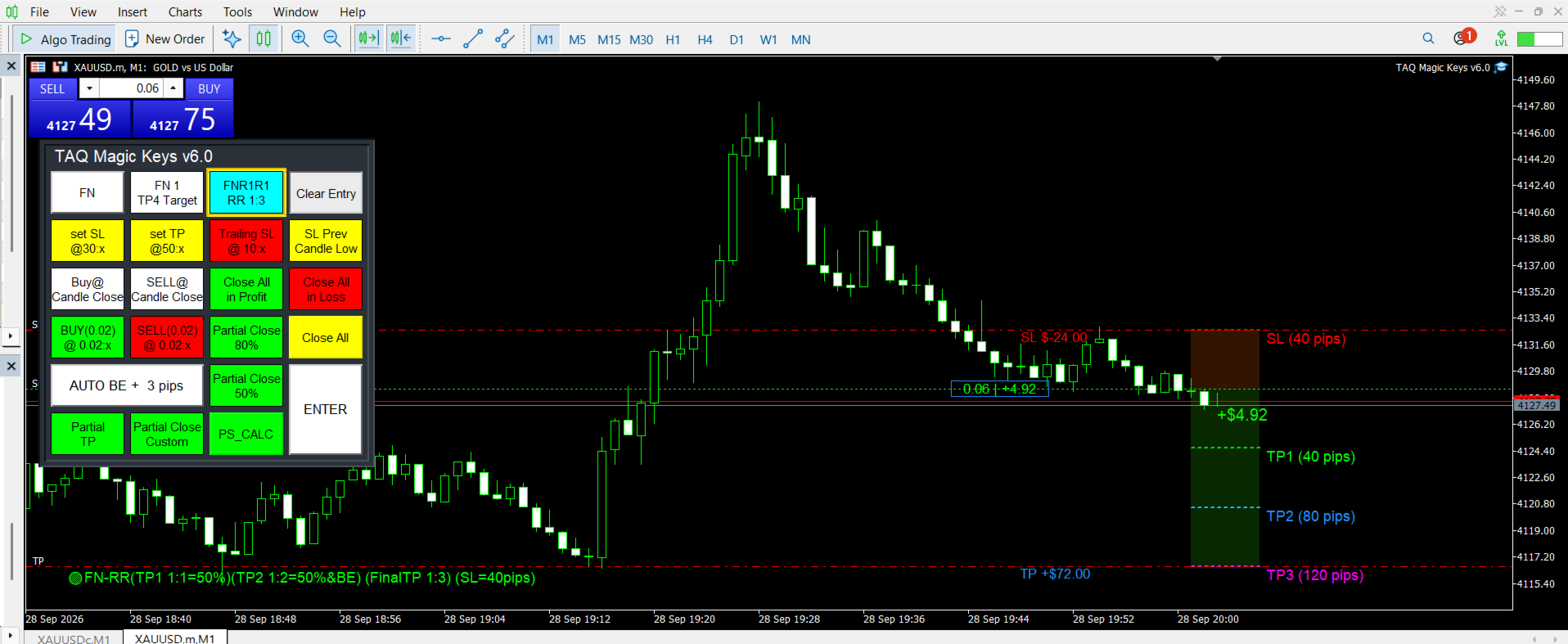
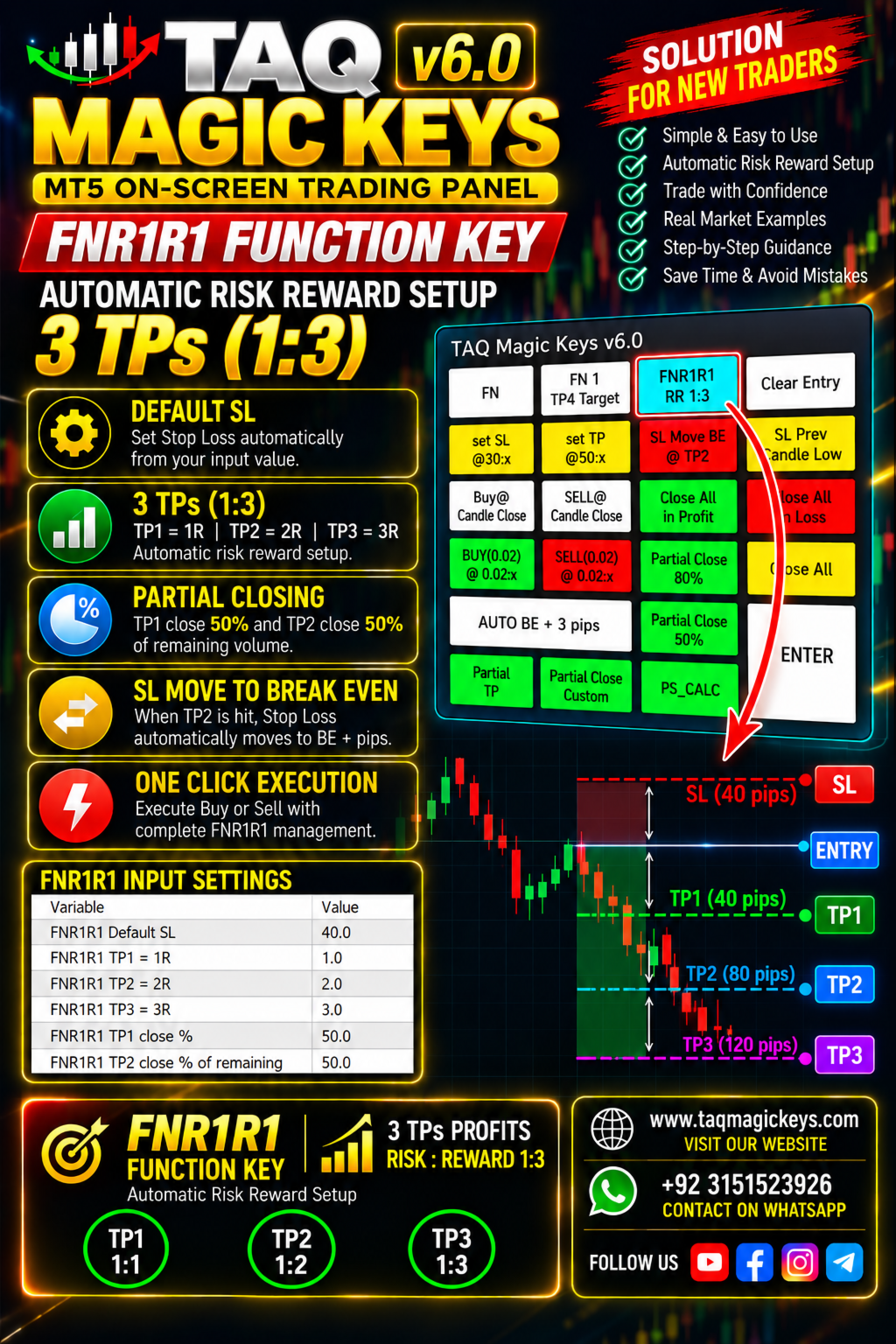
The new FNR1R1 Function Key provides an automated 1:3 Risk Reward trade management system, allowing traders to manage an open position through three predefined profit targets.

Set your initial Stop Loss, and the system automatically calculates:

  • TP1 = 1:1 Risk Reward
  • TP2 = 1:2 Risk Reward
  • TP3 = 1:3 Risk Reward

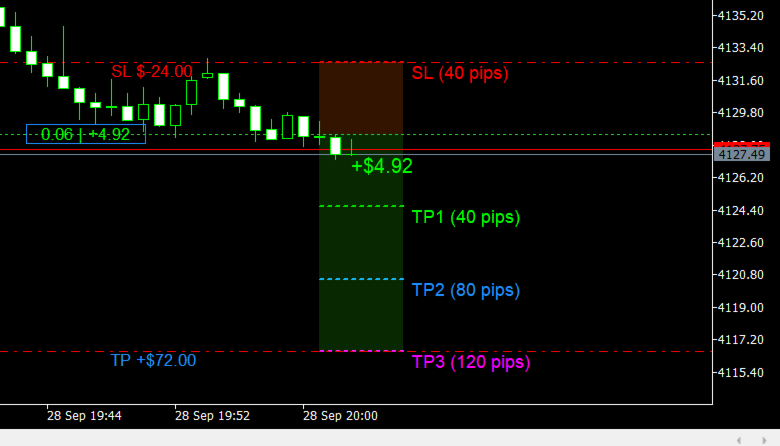
For example, with a 40-pip Stop Loss:

SL = 40 pips → TP1 = 40 pips → TP2 = 80 pips → TP3 = 120 pips

🎯 Dynamic SL & TP Management

The Stop Loss can be adjusted directly from the chart by dragging the SL line up or down.

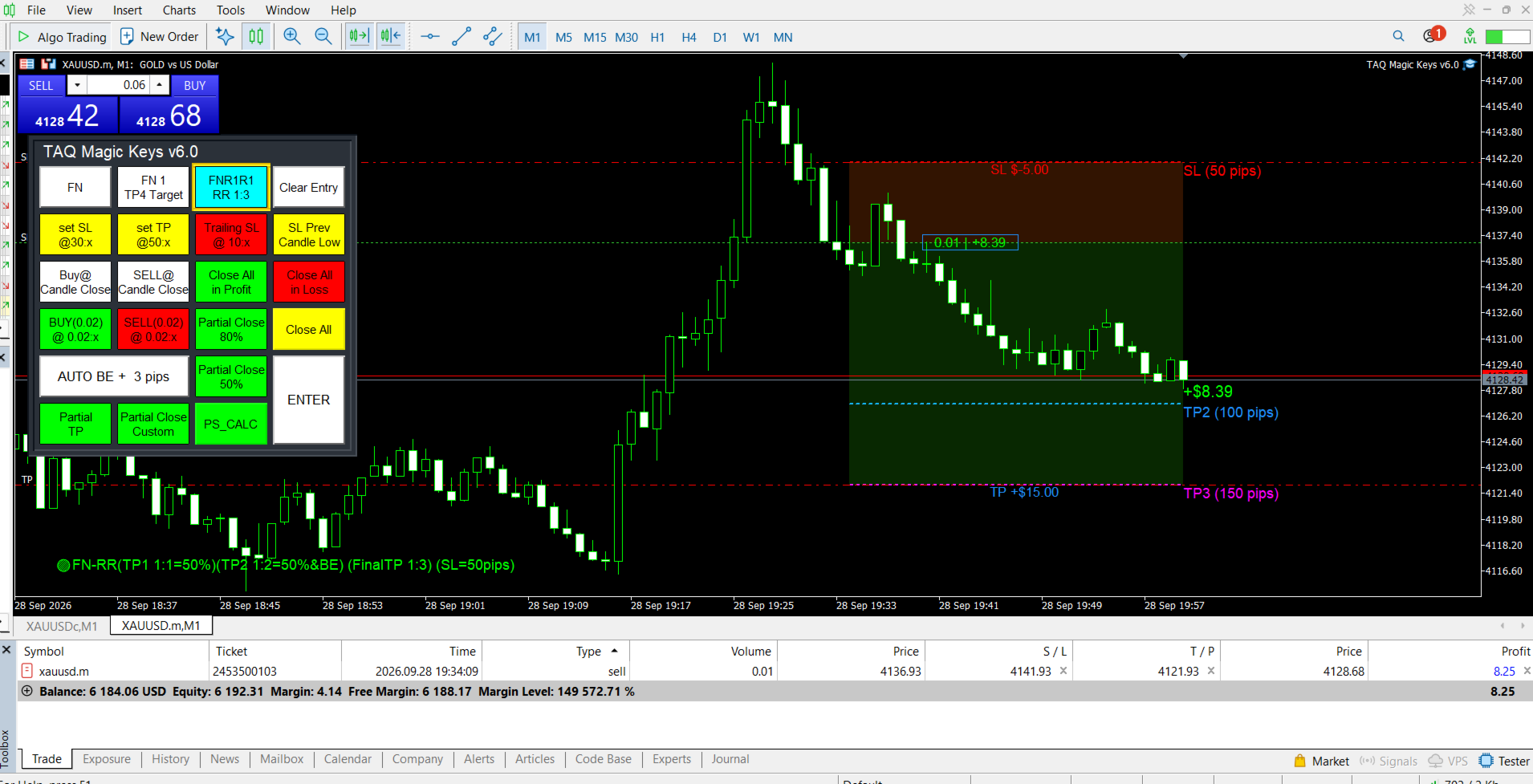
When the SL is changed, the TP1, TP2 and TP3 levels automatically adjust according to the selected Risk Reward ratios.

This makes it easier to maintain a consistent risk-to-reward structure while managing an active trade.

⚙️ How FNR1R1 Trade Management Works

FNR1R1 TP1 — 1:1

  • 50% of the original lot size is closed at TP1.
  • The remaining position stays open.
  • The trade is then managed toward the next target.

FNR1R1 TP2 — 1:2

  • 50% of the remaining lot size is closed at TP2.
  • The Stop Loss is automatically moved to Break Even.

FNR1R1 TP3 — 1:3

  • TP3 is the final profit target.
  • The remaining open position is fully closed at TP3.

📊 Example

With:

if Initial SL = 60 pips

Level Risk Reward Distance
SL — 60 pips
TP1 1:1 60pips
TP2 1:2 120pips
TP3 1:3 180pips

🔧 Customizable Settings

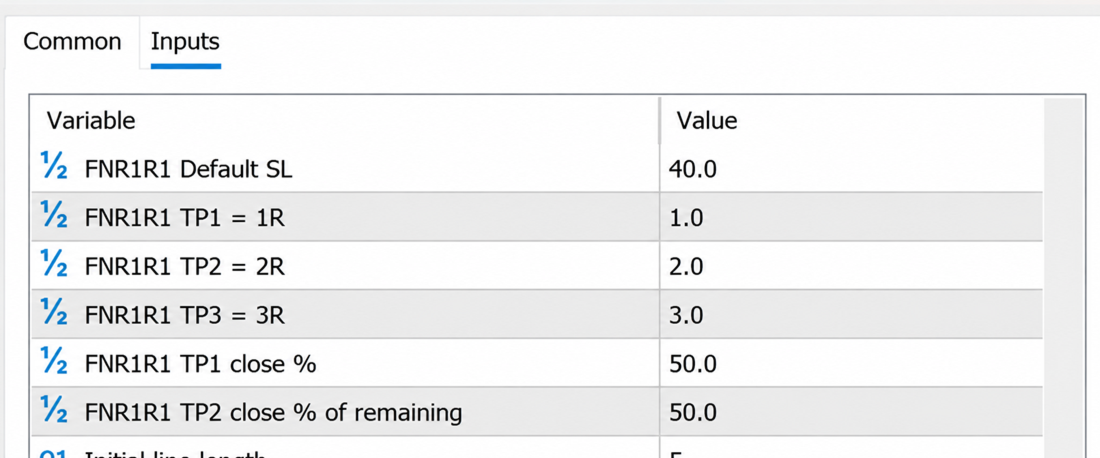
You can change the FNR1R1 values from the MT5 Inputs according to your trading strategy and requirements.

You can customize parameters such as:

  • Initial Stop Loss
  • TP1 partial-close percentage
  • TP2 partial-close percentage

-----------------------------------------------------------------------------------------

Demo 3 Days Free Trial

https://taqmagickeys.com/product/taq-magic-keys-v5-0-demo-3days-free-trial/

To activate License , please message us:-

1. Broker trading account ID number

2. TAQMagicKeys Version in which you are interested

so we can securely register it in our online licensing system. 

Please note that the software will not function on any unregistered or unauthorized accounts. 


details for all keys available here
https://taqmagickeys.com


추천 제품
Telegram to mt5 pro
Janet Abu Khalil
4 (4)
Telegram to MT5 Pro — Advanced Telegram Signal Copier with Auto-Fix, Multi-TP, Risk Control and Full Trade Management Telegram to MT5 Pro — 전문 텔레그램 신호 복사기 Telegram to MT5 Pro는 텔레그램 신호를 MetaTrader 5 계정으로 자동으로 직접 실행하는 고성능 트레이드 복사기로, 리스크, 실행, 트레이드 관리에 대한 완전한 제어를 제공합니다. 이 시스템은 두 가지 구성 요소로 이루어져 있습니다: • MetaTrader 5 내부에서 실행되는 Expert Advisor (EA) • 텔레그램에 연결되어 신호를 로컬로 EA에 전송하는 데스크톱 브리지 애플리케이션 두 구성 요소는 동일한 컴퓨터에서 실행되어야 합니다. MQL5 플랫폼 제한으로 인해 EA는 텔레그램에 직접 연결할 수 없습니다. 브리지는 텔레그램을 처리하고 EA는 거래를 실행합니다. 지원 및 설치
This Expert Advisor monitors all open positions across all symbols in MetaTrader 5. Whenever a Stop Loss (SL) or Take Profit (TP) is manually set or adjusted on any position, the EA automatically applies that value to all other open positions , regardless of symbol or order type (Buy/Sell). This ensures consistent and synchronized SL and TP levels across your account. Perfect for mobile trading via tablet or smartphone!
Atlas Trade Desk
Bernhard Wurzlbauer
Atlas Trade Desk MT5 Atlas Trade Desk MT5 is a visual trade panel, risk manager and lot calculator for manual MetaTrader 5 traders. Plan market and pending orders directly on the chart, calculate position size from your selected risk, adjust Entry, Stop Loss and Take Profit visually, and manage open positions from one clean dashboard. The tool is built for discretionary traders who want faster order preparation, clearer risk control and safer position management without switching between multipl
**Forex Trade Manager Pro MT5** **Trade Manager MT5**는 MetaTrader 5용 종합 거래 관리 유틸리티로, 거래를 계획하는 순간부터 마감하는 순간까지 포지션의 모든 측면을 완벽하게 제어할 수 있도록 합니다. 규율을 갖추려는 초보자부터 여러 포지션에 걸쳐 즉각적인 실행이 필요한 전문 스캘퍼에 이르기까지 위험을 진지하게 생각하는 모든 트레이더를 위해 설계되었습니다. 이 도구는 모든 차트에 첨부되며 깔끔하고 컴팩트한 패널을 표시합니다. 차트에서 직접 드래그 가능한 수평선을 사용하여 계획된 진입점, 손절매, 이익 실현 수준을 표시합니다. Trade Manager는 정의된 위험을 기반으로 올바른 포지션 크기를 즉시 계산하고, 손절매 및 이익 실현 값을 핍 및 계좌 통화로 실시간 표시하며, 계획된 거래의 위험-보상 비율을 보여줍니다. 수동 계산이 필요하지 않습니다. 위험을 한 번 정의하면 도구가 나머지 모든 것을 처리합니다. **포지션 사이징
Trade Control Panel
Jerry Jilun Anak Liban
Trade Control Panel Function Normal One Click Function Close All Close All Profit Close All Loss Close All Pending Order Close All Sell Close All Buy Advance One Click Function 1.  Close Partial Lot Sell by Percent It will help you partial close for all open position by desire percent you wanted. No longer partial close one by one for every open position Manual input for desire percent 2. Close Partial Lot Buy by Percent It will help you partial close for all open position by desire percent
Bring the TradingView experience to your MetaTrader 5! Magic Entry Pro is a professional visual trading assistant designed for manual traders, scalpers, and Prop Firm funded traders. It allows you to execute trades with lightning speed, calculate risk automatically, and visually project your Stop Loss and Take Profit zones directly on the chart before you open a position. Tired of manually calculating lot sizes or guessing your Risk-to-Reward (RR) ratio? Magic Entry does it all in seconds! KE
이 도구를 사용하면 한 번의 클릭으로 열려 있는 모든 주문을 닫을 수 있습니다. "모두 닫기"를 클릭하기만 하면 됩니다. 수익성 있는 주문만 청산하려면 "수익성 있는 청산" 버튼을 클릭하세요. 클릭한 후 모든 변동 주문이 청산됩니다. 변동 손실이 있는 주문만 종료하려면 "손실 가능 청산" 버튼을 클릭하세요. 클릭한 후 변동 손실이 있는 모든 주문이 종료됩니다. 이 도구는 1년 동안 테스트를 거쳤으며 원클릭 포지션 청산 기능이 매우 완벽합니다. 포지션 청산은 적시에 이루어지며 지연 범위는 작습니다. 물론 지연은 귀하가 속한 지역 및 네트워크 환경과도 관련이 있습니다. 이에 주의하시기 바랍니다. 과거 데이터의 백테스트 과정에서 도구는 더욱 완벽하게 작동했으며 100개의 주문을 모두 마감하는 데 최대 0.495초밖에 걸리지 않았습니다. 실제 거래 과정에서 나의 최대 포지션 주문 수는 26개에 불과했고, 모든 포지션이 청산되는 데 걸리는 시간은 1.28초였습니다.
Trade Copilot - 금(XAUUSD) 및 모든 상품을 위한 반자동 리스크 관리 패널 Trade Copilot는 자신의 진입 결정권을 유지하면서도 EA와 같은 규율을 원하는 재량 트레이더를 위해 설계된 반자동 트레이딩 패널입니다. 방향과 가격대는 사용자가 결정하고, 리스크 사이징, 손절 설정, 익절 관리, 포지션 보호는 패널이 자동으로 처리합니다. 주요 기능 - 리스크 기반 로트 계산 - Risk %, Risk $, 고정 로트 중 선택 가능; 손절 거리에 따라 패널이 포지션 크기를 자동 계산 - 3가지 손절 모드 - ATR 배수, 고정 포인트, 고정 $ 거리 - 원클릭 시장가/예약 주문(Buy/Sell Now, Pending Buy/Sell), 드래그 가능한 진입가/SL/TP 라인 - 그리드 트레이딩 - 가격 범위에 걸쳐 벨커브 로트 분배로 다수의 예약 주문 배치(마틴게일이 아님 - 로트 크기는 중심으로부터의 거리로 고정되며 손실 시 절대 두 배로 늘어나지 않음) -
Multi-EA Risk Manager for MT5 - Drawdown Guard and Exposure Control for Prop Firm and Funded Accounts Guardian Coordinator is a risk-coordination tool — it does not trade and promises no profit. It sits above all the Expert Advisors on your account and stops them from stacking hidden risk against each other. If you run more than one EA, this is the piece most traders are missing: two robots can quietly build correlated exposure, open opposite positions on the same symbol, or together push your
ApexForge Trade Risk Manager MT5 Trade Manager | Risk Manager | Visual Trade Planner | Order Manager | Position Manager ApexForge Trade Risk Manager는 MetaTrader 5 수동 트레이더를 위해 설계된 시각적 트레이딩 관리 워크스페이스입니다. 데모 버전 정식 버전을 구매하기 전에 MT5 데모 계정에서 ApexForge Trade Risk Manager 의 기능을 직접 테스트할 수 있습니다. 거래 계획, 리스크 계산, 주문 실행 및 포지션 관리 등의 주요 기능을 테스트할 수 있습니다. 데모 버전 다운로드, 설치 방법 및 사용자 가이드: ApexForge Trade Risk Manager – MT5 Demo Version 전체 거래 과정을 하나의 인터페이스에 통합합니다. 거래 계획 → 리스크 계산 → 주문 실행 → 포지션 탐색 → 부분 청산 → 포지션 관리
Trade HotKeys 는 키보드 단축키를 사용하여 트레이딩 작업을 즉시 실행할 수 있는 수동 트레이딩 유틸리티입니다. MetaTrader 5 인터페이스 버튼 없이 빠른 주문 제어가 필요한 재량 트레이더 및 스캘퍼를 위해 설계되었습니다. 차트 버튼을 클릭하거나 메뉴를 탐색하는 대신, 키보드에서 직접 트레이딩 작업을 실행할 수 있습니다. 가능한 기능 단축키로 BUY / SELL 즉시 실행 BUY 또는 SELL 포지션 개별 청산 한 번의 키 입력으로 모든 포지션 청산 포지션 반전 (방향 즉시 전환) 실수 실행 방지를 위한 트레이딩 일시정지 차트에서 BUY/SELL 볼륨 및 실시간 손익 표시 트레이더가 사용하는 이유 결정과 실행 사이의 지연 감소 더 빠른 수동 트레이딩을 위한 근육 기억 형성 스캘핑 및 빠른 시장 상황에 유용 트레이딩 중 터미널 UI 조작 최소화 모든 브로커 및 계좌 유형 지원 (netting / hedging) 가볍고 안정적임 (무거운 계산 없음) 인터페이스 UI 위
FREE
Smart Trade Manager Pro is the ultimate all-in-one trading panel designed to give you complete control over your manual trading. Built for both professional traders and prop-firm challenges (like FTMO), it brings TradingView-style visual planning directly into your MetaTrader 5 charts. KEY FEATURES: 1. Visual Chart Planning (TradingView Style) Plan your trades visually before execution! The EA draws interactive Profit/Loss boxes directly on the chart. Drag the edges of the boxes to seamlessly
HedgeSafe Trade Assistant 위험 관리를 우선하는 MetaTrader 5용 수동 매매 패널입니다. HedgeSafe는 BUY 또는 SELL을 누르기 전에 차트에서 거래를 준비하고 검증하며 관리할 수 있도록 돕습니다. HedgeSafe는 신호 서비스, 시장 예측 도구, AI 봇 또는 자동매매 전략이 아닙니다. 거래 방향을 선택하거나 수익을 보장하지 않습니다. 모든 거래 결정은 트레이더의 책임입니다. 주요 기능 계좌 잔액 비율 또는 계좌 통화의 고정 금액으로 랏 계산. Stop Loss를 포인트 또는 가격으로, Take Profit을 포인트, 가격 또는 R 배수로 설정. 금액 위험, 예상 보상, 거래량 및 위험/보상 비율 미리 보기. Entry, Stop Loss, Take Profit 차트 라인을 패널 값과 동기화. BUY와 SELL 준비 상태를 별도로 표시하고 실행 직전에 방향별 검증 수행. 최소/최대 거래량, 거래량 단계, tick size, tick value,
BerelzBridge
Barend Willem Van Den Berg
BerelzBridge Pro 계정 정보를 포함한 모든 시간대를 위한 MT5-to-JSON 데이터 브리지입니다. 개요 BerelzBridge Pro는 실시간 시장 데이터를 디스크의 JSON 파일로 내보내는 MT5 인디케이터입니다. 매수/매도 호가, 스프레드, 틱 볼륨, 일간 통계, 계정 정보 및 9개 모든 시간대에 대한 OHLCV 봉을 기록합니다. 파일은 구성 가능한 간격(기본값 2초)으로 업데이트됩니다. 이 인디케이터는 동일 차트에서 Expert Advisors와 충돌 없이 함께 실행됩니다. DLL, WebRequest 또는 기타 외부 종속성을 사용하지 않습니다. 여러 인스턴스를 다른 차트에서 실행하여 동시에 여러 종목의 데이터를 내보낼 수 있습니다. 내보내는 데이터 전체 소수점 정밀도를 갖는 매수/매도 호가 포인트 단위의 스프레드 현재 봉의 틱 볼륨 일간 고가, 저가 및 시가 M1, M5, M15, M30, H1, H4, D1, W1 및 MN1에 대한 OHLCV 봉 시간대당 최
Risk calculator for MetaTrader 5. Precision Position Calculator is a MetaTrader 5 utility that helps calculate trade volume based on the risk configured by the user. The panel allows the user to work with Entry, Stop Loss and up to three Take Profit levels directly on the chart. Main description Precision Position Calculator is a utility for MetaTrader 5 designed to help calculate the volume of a trade before opening it. The panel allows the user to configure risk, select the order type, set th
FREE
ArgosWatch Prop News and Volatility Guard MT5 — Institutional News and Spread Restriction Monitor Many prop trading firms enforce a High-Impact News Trading Restriction: no opening or closing trades within a set window (commonly 2 minutes) before or after red-folder news events (NFP, CPI, FOMC, Rate Decisions). The exact rule and window length vary by firm — always verify against your firm's rulebook and configure the inputs accordingly. ArgosWatch Prop News & Volatility Guard is engineered s
FREE
AutoLot Trade Panel
Fabian Maurice Schwarz
AutoLot Trade Panel은 차트 기반 MT5 트레이딩 패널로, 더 빠른 주문 실행, 자동 랏 계산, 실시간 리스크 표시, 시각적인 SL/TP 계획, 그리고 차트에서 직접 포지션 관리를 원하는 수동 트레이더를 위해 만들어졌습니다. 빠른 시작 가이드: https://www.mql5.com/en/blogs/post/769949 ! 무료 데모 사용 가능 ! 정식 버전을 구매하기 전에 패널 워크플로우, AutoLot 계산 및 Visual Tool을 테스트할 수 있는 무료 데모 버전이 제공됩니다. 데모 버전: https://www.mql5.com/en/market/product/176387 ====================================================================================================================================================================
Trade manager gtm
Gayan Indika Honnanthara Acharige
GTM Panel 은 MetaTrader 5 전용 수동 트레이딩 관리 패널입니다. 자체적으로 신호를 생성하거나 자동으로 주문을 진입하지 않습니다. 트레이더가 직접 매매 여부와 시점을 결정하며, 패널은 단 한 번의 클릭으로 주문을 배치, 보호, 추적 및 청산합니다. 본 패널은 기존 도구들이 간과하기 쉬운 핵심 기능인 대기 주문(Pending Orders) 을 중심으로 설계되었습니다. MARKET 영역 옆에는 4개의 독립된 지정가 슬롯(L1~L4)이 제공됩니다. 각 슬롯은 고유한 색상, 가격, 롯(Lot), SL, TP 및 전용 차트 라인을 보유합니다. 5개 영역을 동시에 시각적으로 확인할 수 있어 수정 중인 주문을 혼동할 염려가 없습니다. 구매 전 필수 확인 — 제품 안내 본 제품은 트레이딩 관리 유틸리티 입니다. 자동매매 EA, 봇, 신호 제공 서비스, 또는 매매 전략이 아닙니다. 진입 로직이 포함되어 있지 않으며, 수익을 보장하지 않습니다. 관리 도구가 손실 전략을 수익 전략으
Close All Pro MT5 – Fast PnL Control is a powerful trade manager MT5 utility that gives you total control over your trades. With a single click, you can close all MT5 orders, monitor real-time profit and loss, and manage your floating PnL directly from a clean on-chart panel. The tool is lightweight, responsive, and built to help traders save time, reduce emotional stress, and maintain focus. Whether you trade manually or through an EA, this MT5 profit panel provides the visibility and precisio
PropFirm Challenge Risk Control EA Introduction Close all positions when reaching maximum capital loss percentage/amount Close all positions when reaching daily maximum capital loss percentage/amount Close single orders when reaching single trade maximum loss percentage/amount Filter & close restricted symbols positions during high-impact economic news events(Support optional modes for FTMO / The 5%ers and other prop trading platforms) Liquidate positions upon reaching profit target percentage
Risk Manager Custom
Sergey Batudayev
5 (1)
Risk Manager Custom Version for MetaTrader 5 Risk Manager is a professional risk-control utility for MT5. It does not open trades by itself and does not generate trading signals. The tool is designed to monitor already opened positions and help the trader control risk, position size, stop loss, take profit, and trading restrictions. Main features: Individual Max Lot for selected symbols — set a separate maximum lot for up to 5 instruments. For example: EURUSD = 1.2 lot, XAGUSD = 0.1 lot. All
AW Metatrader to Telegram MT5
AW Trading Software Limited
5 (1)
귀하의 구독자가 귀하의 거래 터미널에서 귀하의 거래 이벤트를 놓치지 않도록 알림을 보내는 자동화된 시스템. 계정의 모든 거래 작업에 대해 Telegram 메신저에 알림을 보내는 유틸리티입니다. Telegram ->   HERE   / MT4 ->   HERE   의 채널에 유틸리티를 연결하는 단계별 지침 장점: 쉬운 설정과 자세한 설명, 조정 가능한 스크린샷을 보낼 수 있습니다. 이모티콘을 사용하여 사용자 정의 가능한 알림 텍스트, 오픈, 전체 또는 부분 마감에 대한 알림 조정 및 주문 수정, 기본적으로 알림을 보낼 때 텍스트 파일이 자동으로 다운로드되며, 대기 중인 주문의 배치 또는 삭제에 대한 알림 조정, 기호 및 매직 넘버로 편리한 필터링. 입력 변수: TELEGRAM BOT AND CHAT SETTINGS Telegram bot token - Enter the token number received after registering the bot in "BotFather" Te
Basket Risk Planner MT5 is a chart-based utility for monitoring and planning existing MetaTrader 5 position baskets. It does not generate trading signals and it does not open or add trades. Attach it to the chart of the symbol whose positions you want to review. The panel updates with current market quotes and presents the basket in account currency. What the utility shows Basket Risk Planner MT5 displays the current position count, floating profit/loss and estimated net basket result. Open p
Use for risk management and opening positions as per the user settings. The user is allowed to set the stop loss and take profits in pips. The user can also choose the risk percentage per trade that he/she wants to use while opening the trade. The volume of the trade that the user wants to sent shall be calculator according to the stoploss and the risk percentage that the user has selected.
Trade Assistant MT5 Pro – One Click Trading Panel | Auto Lot Size | Risk Management Tool Short Description Trade Assistant MT5 Pro is a professional trading utility for MetaTrader 5 that allows traders to execute trades with one click, manage risk automatically, and improve trading accuracy using advanced tools like ATR stop loss, risk reward ratios, breakeven, and trailing stop. Full Description Trade Assistant MT5 Pro is a powerful manual trading panel designed for traders who want speed, prec
Telegram to mt5 signal copier
Chukwuemeka Kingsley Anyanwu
5 (2)
Here is the translation into **Korean**: --- **모든 텔레그램 채널에서 신호를 복사하여 관리자 권한 없이 MT5에서 즉시 거래를 실행하세요!** 텔레그램에서 트레이딩 신호를 수신하고 이를 메타트레이더 5에서 즉시 실행되길 원하시나요? **Telegram to MT5 Signal Copier**는 텔레그램 신호 채널과 메타트레이더 5 사이의 강력한 브리지입니다. 특정 텔레그램 채널의 메시지를 모니터링하고 트레이딩 신호(심볼, 매수/매도 방향, 진입가, 손절가, 익절가 포함)를 자동으로 추출하여 즉시 실행합니다. 프리미엄 신호 제공자를 팔로우하든 자체 텔레그램 알림을 자동화하든, 이 도구는 트레이딩 워크플로우를 간소화하고 수동 작업을 줄이며 기회를 놓치는 것을 방지하는 데 도움을 드립니다. ️ **주요 기능:** 텔레그램 채널에 직접 연결 주요 거래 지시사항(매수/매도 또는 예약주문, 심볼, 진입가, SL, TP) 파싱 MQL
Equity Expiration MT5
Frank William Jr Colbert
A time-based position expiration system that moves trades to a "watch list" after they reach a certain age. It does not close them immediately but waits for them to hit a profit target (or loss target) before exiting. Features: Global and Magic-specific expiration periods (format: HH:MM:SS). Tracks expired trades separately and only closes them when a `MIN_PROFIT_CLOSE` target is met (or loss target if "Close Only Profitable" is false). Includes a manual control and statistics reporting functi
Session panel
Timo Mario Hoffmann
Session Panel for MT5 Session Panel is a free MT5 indicator that gives you a fast and convenient live overview of the major trading sessions directly from the chart. Monitor Tokyo, London, and New York session times, see which session is currently active, track countdowns to the next session, and view session overlap information in one compact dashboard. Built for traders who want better market timing, clearer session awareness, and a cleaner chart workflow in live market conditions. Session Pan
FREE
Trade Assistant AI MT5 Trade Assistant AI MT5 is a professional manual trading assistant for MetaTrader 5, created for traders who want a cleaner, faster, and more structured way to manage their trading workflow from one chart panel. This tool helps you plan trades, calculate risk, place manual orders, manage open positions, and stay more organized during live market conditions. It is built for traders who want better control, not unnecessary complexity. Important: Trade Assistant AI MT5 is not
Horizontal Line Trade Assistant EA  Semi-Automated Trading Assistant      IMPORTANT :     On the main/purchased program a user can click on the Horizontal line and change it to Buy or Sell, and drag by double clicking on it. Please keep in mind that this option is not available on demo version, due to some restrictions/limitations of Strategy Tester, some Object related operations are not available in the  Strategy Tester. But, it will not prevent you from Testing, please drop an Object to chart
이 제품의 구매자들이 또한 구매함
Trade Assistant MT5
Evgeniy Kravchenko
4.43 (216)
거래당 위험 계산, 라인을 사용한 손쉬운 신규 주문, 부분 청산 기능을 통한 주문 관리, 7가지 유형의 트레일링 스탑 및 기타 유용한 기능을 제공합니다. 추가 자료 및 지침 설치 지침   -   애플리케이션 지침   -   데모 계정용 애플리케이션 평가판 라인 기능       - 차트에 개시선, 손절매, 차익실현을 표시합니다. 이 기능을 사용하면 새로운 주문을 쉽게 하고 개봉 전에 추가 특성을 볼 수 있습니다. 위기 관리       -       위험 계산 기능은 설정된 위험과 손절매 주문의 크기를 고려하여 새 주문의 볼륨을 계산합니다. 이를 통해 손절매 크기를 설정하고 동시에 설정된 위험을 존중할 수 있습니다. 로트 계산 버튼 - 위험 계산을 활성화/비활성화합니다. 필요한 위험 값은 위험 필드에 0에서 100 사이의 백분율 또는 예금 통화로 설정됩니다. 설정 탭에서 위험 계산 옵션을 선택합니다. $ 통화, % 잔액, % 지분, % 자유 마진, % 사용자 정의, % AB 이전
Telegram to MT5 Multi-Channel Copier   는 Telegram 채널의 트레이딩 시그널을 MetaTrader 5로 자동 복사합니다. 봇도, 브라우저 확장도, 수동 복사도 필요 없습니다. Telegram에 시그널이 도착하면 EA가 몇 초 안에 터미널에서 주문을 실행합니다. 그리고 채널을 복사하기 전에, 내장 백테스터가 그 채널이 내 계좌에서 어떤 결과를 냈을지 보여줍니다. 제품은 두 가지 구성 요소로 이루어집니다: Telegram 채널을 수신하는 Windows 애플리케이션과, MT5 터미널에서 시그널을 실행하는 본 EA입니다. MT4 버전도 제공됩니다   여기 . 설정 가이드와 앱 다운로드:   https://www.mql5.com/en/blogs/post/768988 텔레그램 시그널 채널을 백테스트하는 방법 을 확인하세요. 현재 가격은 향후 인상될 예정입니다. 작동 방식 앱은 여러분 자신의 Telegram 계정으로 연결되므로, 팔로우하는 모든 채널, 그룹,
================================================================================ POC BREAKOUT - V20.72. Full Professional Grade Toolkit ================================================================================ POC Breakout is a full MetaTrader 5 trading dashboard for discretionary traders who want breakout signals, Point of Control (POC) context, volume profiles, order flow, market structure, news, alerts, and advanced trade planning in one professional workspace. Attached directly to you
Farmed Hedge Yield Farming | All Markets (Manual - Hybrid - Semi/Automated EA) VERIFIED TRADING RESULTS - Farmed Hedge Yield Axi Copy:  https://www.mql5.com/en/signals/2356376 - Farmed Hedge Yield Exn Copy:   https://www.mql5.com/en/signals/2356404 - Farmed Hedge Yield V Copy:  https://www.mql5.com/en/signals/2357156 IMPORTANT NOTICE: FarmedHedge is a MANUAL-FOCUSED TRADING UTILITY ,not a fully automated EA. Results shown on this Signal include manual trades and overall strategic management.
Footprint Chart Pro — Professional OrderFlow EA for MetaTrader 5 Version 6.34 | Professional tool for real traders | Institutional-Grade Visualization DEMO USERS - PLEASE SELECT EVERY TICK / REAL TICK WHEN TESTING AND YOU HAVE DOWNLOADED HISTORICAL DATA. IF YOU SEE A WAITING SCREEN AND IT IS NOT DOWNLOADING, IT MEANS YOU HAVE LOW HISTORICAL DATA. TRY 1 MIN AND 5 MIN FIRST ON 1 DAY DATA. ONE DAY DATA SHOULD BE THE NEWEST AND MOST CURRENT DATE. PLEASE WAIT UNTIL THE MARKET HAS ROLLED OVER PERIOD.
파워 캔들 전략 스캐너 - 자체 최적화 다중 종목 설정 찾기 도구 파워 캔들 전략 스캐너는 마켓 워치에 등록된 모든 종목에 대해 파워 캔들 지표와 동일한 자체 최적화 엔진을 동시에 실행합니다. 하나의 패널에서 현재 통계적으로 거래 가능한 종목, 각 종목별 최적의 전략, 최적의 손절매/익절 조합을 알려주며, 새로운 신호가 발생하면 즉시 알림을 전송합니다. 이 도구는 Stein Investments 에코시스템의 일부입니다. 18개 이상의 도구와 함께 당신의 1대1 AI 트레이딩 멘토 Max.  항상 대기 중, 모든 인디케이터를 깊이 있게 이해, 무언가를 차근차근 생각해보고 싶은 순간에 도움을 줍니다.  https://stein.investments 에서 만나보세요 완벽한 시장 모니터링. 종목당 3,000건 이상의 자동 최적화. 2가지 알림 유형. 한 번의 클릭으로 차트를 전환하고 바로 거래하세요. 이 도구가 필요한 이유 대부분의 다중 종목 스캐너는 가격 변동만 보여줍니다. 티커별
Copy your MT5 trades to Interactive Brokers You keep using MT5. Every order you open or close is sent to your IB account. In real time. No coding. No changes to your strategy or EA. Try it first Rent 1 month: $30. Test on a live or paper account. What it does Real-time copying: same direction, reverse, or one side only. Map any MT5 symbol to any IB symbol. Set a lot ratio for each. Forex, Futures, Stocks, CFDs, Metals and Crypto. Position sync: both accounts checked, any difference fixed. Optio
Welcome to ENTRY IN THE ZONE AND SMC MULTI TIMEFRAME  SPECIAL BENEFIT FOR OUR MQL5 CUSTOMERS  FREE ACCESS TO THE NEW TOOL —COMING SOON —   Learn More on Our Official Website : https://www.fableedge.net Entry In The Zone and SMC Multi Timeframe is a real-time market analysis tool based on Smart Money Concepts (SMC), designed to analyze market structure, price direction, and key trading zones. It supports both Single-Timeframe Analysis and Multi-Timeframe Analysis, providing a clearer view of the
Premium Trade Manager - 코치가 내장된 트레이딩 패널 Premium Trade Manager 는 차트 안에 트레이딩 코치를 심어놓은 도구입니다. 주문을 확정하기 전에, AI 트레이딩 코치 Max가 설정된 거래를 직접 읽고 명확한 판단을 내려줍니다. 스톱이 규율 있는 접근 방식에 맞는지, 리스크 크기가 합리적인지, 고영향 뉴스 이벤트가 몇 분 후에 있는지, 프롭 펌 한도에 근접했는지. 그 아래에는 완전한 실행 엔진이 있습니다. 원클릭 리스크 기반 진입, 차트에서 드래그로 세우고 거래가 진행되는 동안에도 계속 움직일 수 있는 플랜, 최대 4단계 분할 익절, 7가지 트레일링 방식, 실시간 프롭 펌 컴플라이언스, 뉴스 가드, 그리고 자체 비용을 평가하는 스프레드까지. 결정은 당신이 내립니다. Max가 두 번째 시선으로 확인합니다. 패널이 그 이후의 모든 것을 처리합니다. 구매 전에 직접 체험해 보세요. 브라우저에서 라이브 패널을 직접 클릭해볼 수 있습니다. 구매 전에 실제
Trade Indicator Assistant   is a powerful MT5 utility designed to turn indicators into automated trading systems. Its main feature is the ability to automatically detect an indicator’s   BUY and SELL signal buffers , without requiring you to know the buffer numbers, search through indicator settings, or modify the indicator source code. Bonus Indicator:   After purchasing Trade Indicator Assistant, contact me to receive   Trade Signal Pro   completely free as a bonus indicator. [Download Demo V
Quant Panel
Kevin Craig E Gittins
QUANT PANEL Independent per-algo analytics, protected MT5 history and professional PDF reporting Quant Panel is built for traders who run several Expert Advisors or strategies on one MT5 account and need to know how each algo is actually performing. Instead of treating the terminal as one combined portfolio, Quant Panel groups closed positions by EA comment or magic number and calculates every strategy independently. It gives you one clear dashboard for comparing algos, finding weak systems and
YuClusters
Yury Kulikov
4.93 (43)
Attention: You can view the program operation in the free version  YuClusters DEMO .  YuClusters is a professional market analysis system. The trader has unique opportunities to analyze the flow of orders, trade volumes, price movements using various charts, profiles, indicators, and graphical objects. YuClusters operates on data based on Time&Sales or ticks information, depending on what is available in the quotes of a financial instrument. YuClusters allows you to build graphs by combining da
Mentfx Mmanage mt5
Anton Jere Calmes
4.25 (8)
The added video will showcase all functionality, effectiveness, and uses of the trade manager. Drag and Drop Trade Manager. Draw your entry and have the tool calculate the rest. Advanced targeting and close portions of a trade directly available in tool (manage trades while you sleep). Market order or limit order on either side with factored spread. Just draw the entry, the tool does the rest. Hotkey setup to make it simple. Draw where you want to enter, and the stop loss, the tool calculates al
The product will copy all telegram signal to MT5 ( which you are member) , also it can work as remote copier.  Easy to set up, copy order instant, can work with almost signal formats, image signal,  s upport to translate other language to English Work with all type of channel or group, even channel have "Restrict Saving Content", work with  multi channel, multi MT5 Work as remote copier: with signal have ticket number, it will copy exactly via ticket number. Support to backtest signal. How to s


EasyInsight AIO MT5
Alain Verleyen
4.92 (12)
EASY Insight AIO – 스마트하고 손쉬운 트레이딩을 위한 올인원 솔루션 개요 외환, 금, 암호화폐, 지수, 심지어 주식까지 — 전 시장을 몇 초 만에, 수동 차트 확인이나 복잡한 설치, 인디케이터 설정 없이 스캔할 수 있다고 상상해 보세요. EASY Insight AIO 는 AI 기반 트레이딩을 위한 궁극의 플러그 앤 플레이(Plug & Play) 데이터 내보내기 도구입니다. 단 하나의 깔끔한 CSV 파일로 전체 시장 스냅샷을 제공하며, ChatGPT, Claude, Gemini, Perplexity 등 다양한 AI 플랫폼에서 즉시 분석할 수 있습니다. 창 전환, 복잡함, 차트 오버레이는 더 이상 필요 없습니다. 자동으로 내보내지는 순수하고 구조화된 데이터 인사이트만으로, 반복적인 차트 감시 대신 데이터 기반의 스마트한 의사결정에 집중할 수 있습니다. 왜 EASY Insight AIO인가요? 진정한 올인원 • 별도의 설정, 인디케이터 설치, 차트 오버레이가 필요 없습
MT5 Trading Deck
Manuel Michiels
5 (2)
One button. One trade. MT5 Trading Deck is a hotkey trading panel for MetaTrader 5 that turns the platform into a keyboard-driven execution cockpit. Stop loss, take profit and lot size are pre-calculated for every key; the moment you press, a market order is live on the broker. A complete technical user manual is attached in the product Comments section. It documents every input parameter, the full hotkey map, the recommended Stream Deck XL layout, and the advanced workflows for Pre-Limit orders
VERON LINK MASTER MT5 — Real-time Multi-Account Dashboard & Sync Controller Veron Link Master is a high-performance, centralized monitoring and synchronization control center designed for MetaTrader 5. Built specifically for traders managing multiple accounts, prop firm portfolios, grid/martingale EAs, or client networks, Veron Link Master provides a seamless, ultra-modern dark-themed GUI dashboard directly on your MT5 terminal. ️ Important Requirement / System Usage: To use this system, yo
FUTURES ORDERFLOW FOOTPRINT CHART Professional OrderFlow EA for MetaTrader 5 Version 1.01| Professional tool for real traders | Institutional-Grade Visualization STRATEGY TESTER USERS - PLEASE SELECT EVERY REAL TICK WHEN TESTING AND YOU HAVE DOWNLOADED HISTORICAL DATA. IF YOU SEE A WAITING SCREEN AND IT IS NOT DOWNLOADING, IT MEANS YOU HAVE LOW HISTORICAL DATA. TRY 1 MIN AND 5 MIN FIRST ON 1 DAY DATA. ONE DAY DATA SHOULD BE THE NEWEST AND MOST CURRENT DATE. PLEASE WAIT UNTIL THE MARKET HAS ROL
EA Slipstream
Stephen J Martret
5 (1)
Your backtest filled every order at the price it asked for. Your account does not. EA Slipstream measures what execution costs your EA, using your own fills, slippages and spreads to show you the true performance of your EA. A backtest prices every trade at the level the EA named. In live trading a pending order fills at whatever price is available when it triggers, a stop closes wherever the market is when it is hit, and the spread at that moment is whatever the account was quoting. The differ
Veron Link Slave – Synchronized Grid, Martingale & Breakout Management Short Description Advanced synchronization tool designed to manage Grid, Martingale, and Breakout EAs. Automatically sends close-basket signals to the Master account upon profit target completion, minimizing slippage across different brokers. Full Description Veron Link Slave is a specialized utility developed to enhance the execution efficiency and risk management of multi-account or multi-broker trading setups. It is desig
EA Overfitter
Stephen J Martret
5 (1)
That backtest looks great. But will it still be making money tomorrow, next week, next month? EA Overfitter re-runs your EA on 100 price histories it has never seen. One score tells you if the edge is real. A backtest tells you what an EA did on one price history — the one that happened to occur. What you cannot tell from it is how much of that result was the strategy and how much was the particular path. EA Overfitter answers that. It builds up to 100 synthetic price histories your EA has n
Telegram To MT5 Receiver
Levi Dane Benjamin
4.53 (15)
가입한 모든 채널에서 (개인 및 제한된 채널 포함) 시그널을 바로 MT5로 복사합니다.   이 도구는 사용자를 고려하여 설계되었으며 거래를 관리하고 모니터하는 데 필요한 많은 기능을 제공합니다. 이 제품은 사용하기 쉽고 시각적으로 매력적인 그래픽 인터페이스로 제공됩니다. 설정을 사용자 정의하고 제품을 몇 분 안에 사용할 수 있습니다! 사용자 가이드 + 데모  | MT4 버전 | 디스코드 버전 데모를 시도하려면 사용자 가이드로 이동하십시오. Telegram To MT5 수신기는 전략 테스터에서 작동하지 않습니다! Telegram To MT5 특징 여러 채널에서 동시에 신호를 복사합니다. 개인 및 제한된 채널에서 신호를 복사합니다. Bot 토큰이나 채팅 ID가 필요하지 않습니다.   (원하는 경우에는 사용할 수 있습니다) 위험 % 또는 고정된 로트로 거래합니다. 특정 심볼을 제외합니다. 모든 신호를 복사할지 또는 복사할 신호를 사용자 정의할지 선택할 수 있습니다. 모든 신호를 인
Dynamic Fibonacci Grid
Tsvetan Tsvetanov
5 (1)
MT5용 Dynamic Fibonacci Grid Dashboard 최신 버전을 소개합니다. 많은 새로운 기능이 추가된 이번 대시보드는 거래 경험을 완전히 변화시키며, 시장과 가격 움직임을 완전히 새로운 관점에서 볼 수 있게 합니다. 여러 시간대와 여러 심볼을 동시에 분석하여 새로운 가능성을 발견하세요. 수동 거래와 포지션 관리에 친화적인 사용자 인터페이스와 미리 정의된 자동 전략을 적용할 수 있는 확장된 기능을 제공합니다. 또한 DFG는 이제 전략 테스터(Strategy Tester)에서 트레이딩 시뮬레이터로 완벽하게 작동하며, 과거 데이터를 사용하여 다양한 거래 조건을 재현할 수 있습니다. 시각 모드에서 수동 거래를 연습하고, 고속 모드에서 자동 전략을 테스트할 수 있습니다. 주요 기능 • Dynamic Fibonacci Bands 개념을 기반으로 한 다중 시간대 및 다중 심볼 고급 기술 분석 실시간 시장 모니터링 대시보드를 통해 탁월한 효율성을 경험할 수 있습니다. M1,
Quant AI Agents
Ho Tuan Thang
5 (1)
Quant AI Agents are independent trading Expert Advisors. Instead of trading using a fixed strategy like other conventional EAs, Quant AI Agents   is a   multi-agent AI trading framework   that turns natural-language strategy prompts into live.  WANT THE SAME RESULTS AS MY LIVE SIGNAL?   Use the exact same brokers I do:   IC MARKETS , IC TRADING   .  Unlike the centralized stock market, Forex has no single, unified price feed.  Every broker sources liquidity from different providers, creating un
VirtualTradePad PRO SE MT5 — MetaTrader 5용 전문 트레이딩 컨트롤 센터 VirtualTradePad PRO SE 는 MetaTrader 5 용 프리미엄 차트 기반 트레이딩 패널이자 거래 관리 워크스페이스입니다. 더 빠른 주문 실행, 더 명확한 포지션 관리, 구조화된 거래 관리, 시각적인 레벨 계획, 그리고 차트에서 직접 작업하는 전문적인 워크플로를 원하는 트레이더를 위해 설계되었습니다. 이 제품은 단순한 BUY / SELL 패널이 아닙니다. PRO SE는 수동 트레이딩, 예약 주문, 포지션 관리, 부분 청산, 바스켓 손익 관리, 평균가 레벨, ATM 규칙, 신호 모니터링, 실시간 시장 정보, 전략 테스터 (Strategy Tester) 워크플로, VPS 중심 운용을 하나의 연결된 인터페이스로 통합합니다. MT4 버전 | 전체 설명 및 스크린샷 | 구입 방법 | 설치 방법 | 로그 파일을 얻는 방법 | 테스트 및 최적화 방법 | Expforex의 모든
EA Auditor
Stephen J Martret
5 (5)
EA Auditor is an independent analysis tool for traders evaluating Expert Advisors and trading signals on MetaTrader 5. It audits backtest reports, reviews posted developer signals, and cross-verifies the two against each other to help traders assess strategies before committing capital. The MQL5 market offers a wide range of Expert Advisors from many developers, with varying approaches, quality, and transparency. EA Auditor provides a consistent, data-driven framework for reviewing them, answer
This Expert Advisor waits a position to be opened, no matter if you open manually or with the EA buttons or eventually via mobile: it creates a Grid in Anti Martingale with pending stop orders in the same direction of the first position. You can specify the number of orders, the size and the distance between the orders. You can also adjust the Monetary Target of the Grid, the monetary Stop Loss, the Intermediate Target (when reached the EA insert an order with opposite direction of the total pos
HINN Lazy Trader
ALGOFLOW OÜ
5 (1)
The core idea: using the user interface, you configure the parameters the chart must meet before entering a position (or positions), choose which entry models to use, and set the rules for when trading and planning should end. Lazy Trader  handles the rest: it  takes over all the routine chart watching and execution! full description  :: 3 key videos [1] ->  [2]   ->  [3] What can it do? - Understands Larry Williams market structure - Understands swing market structure by Michael Huddleston
The Expert Advisor will help you forward all alert from  MetaTrader 5 to Telegram channel/ group.  All alert must save to folder <Data folder>MQL5\Files\Alerts\ , text file with format *.txt and screenshot with format *.gif or *.png. Parameters: - Telegram Bot Token: - create bot on Telegram and get token. - Telegram Chat ID:  - input your Telegram user ID,  group / channel ID - Forward Alert: - default true, to forward alert. - Send message as caption of Screenshot: - default false, set true t
Features   With MT5 to Interactive Brokers(IB) Trader, you can: 1. Load chart data from IB to MT5, and Analyze with all standard or customer Indicators. 2. Place Orders to IB Account Directly in MT5. 3. Make your Own EAs upon IB Securities by only making minus changes of the trading function. Usage 1) Installation Copy the "Mt5ToIBTraderEn.ex4" and sample files to [MT5 Data Folder]->MQL5->Experts.  2)  MT5 Settings Add the IP Address to the MT5 Allowed URLs in 'Tools->Options->Expert Adviso
제작자의 제품 더 보기
TAQ Magic Keys Trade Manager is for MetaTrader5 (MT5). It has an advanced trade management tool and Lot size calculator for MetaTrader 5.  It is designed to help traders to trades faster, precise and manage open positions directly with one click. Demo 3 Days Free Trial https://taqmagickeys.com/product/taq-magic-keys-v5-0-demo-3days-free-trial/ FN key is the best functions which automatically manage trades up to TP4 with auto partial closing and trailing SL. Define your trade strategy in FN keys
필터:
리뷰 없음
리뷰 답변