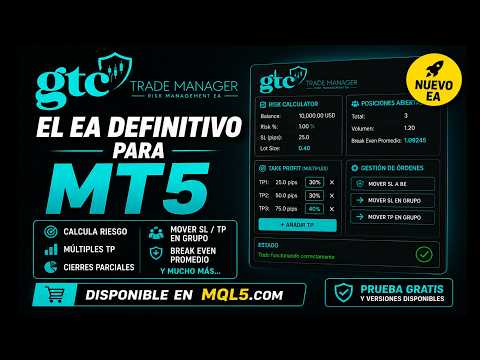
GTC Trade Manager

COMMERCIAL DESCRIPTION

🚀 Why GTC Trade Manager?

How many times have you entered a trade without knowing exactly how much you were risking? How many times have you moved your stop too late, or panic-closed without a plan? GTC Trade Manager was built by traders, for traders who refuse to guess.

GTC TRADE MANAGER — User Guide / Guía de Usuario

GTC Trade Manager is a visual trading panel for MetaTrader 5 that centralizes everything you need to

execute, manage and protect your trades with pinpoint precision — all in one interface. No more

opening a lot-size calculator, editing stops by hand, or losing trades to a lack of discipline.

Install the EA on any chart and it acts as a true trading cockpit: it calculates position size in real time,

deploys draggable visual lines with instant R:R ratios, automates Break Even and Trailing Stop with

four distinct algorithms, and protects you with daily discipline rules that activate automatically.

What makes GTC Trade Manager different?

Smart Combo Break Even: the only BE type on the market that calculates the exact price at

which a group of positions — even hedged ones — reaches real equilibrium, accounting for

swap, commissions, and each position's volume. One click.

Chandelier Exit Trailing (CHDL): a professional trailing algorithm used by institutional traders.

Anchors the stop to the highest/lowest of N candles minus a multiple of ATR, protecting you from

noise without exiting strong trends.

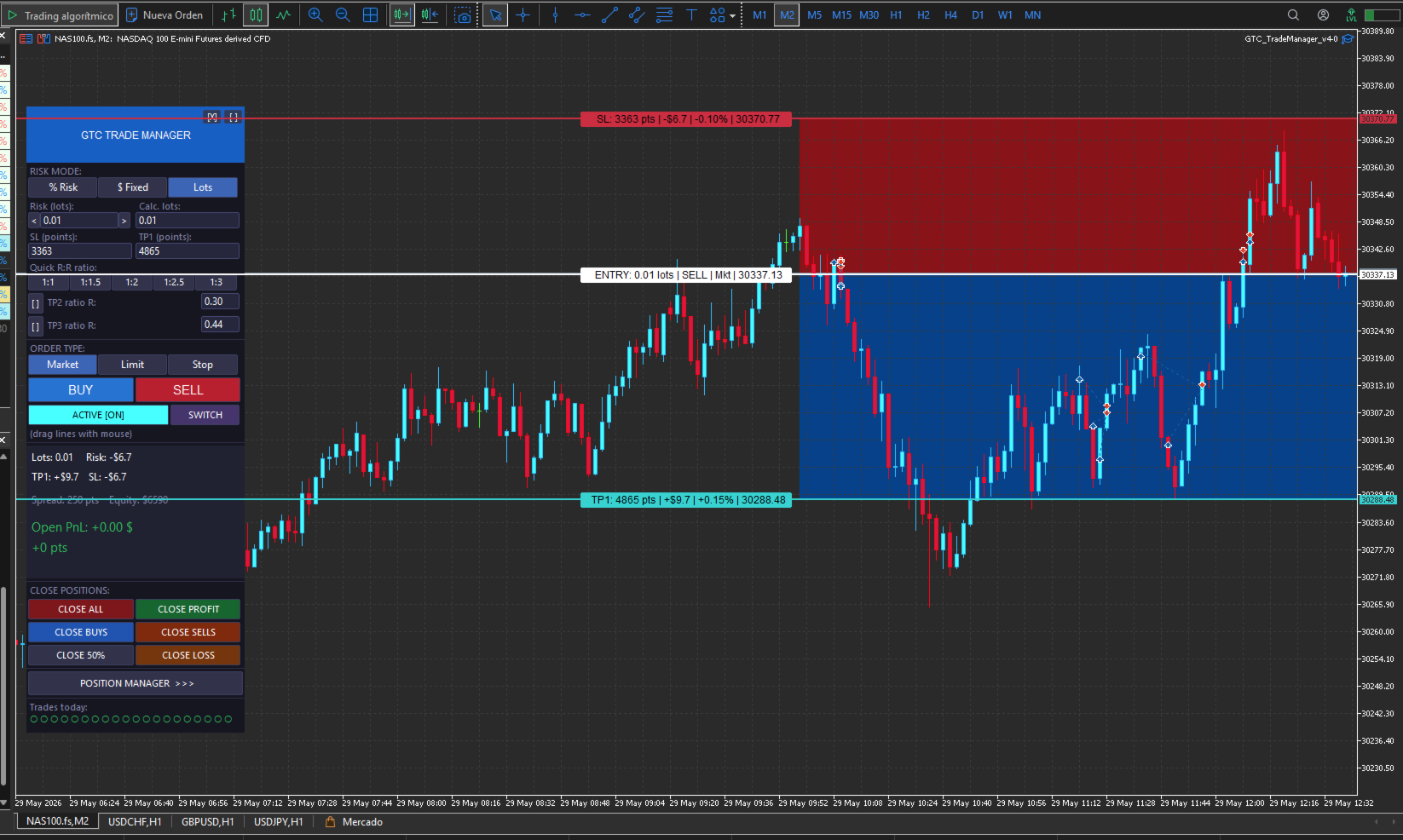
Draggable visual lines with color zones: drag entry, stop and TP lines directly on the chart.

The panel instantly recalculates lot size, R:R and USD risk. Perfect for scalping where every

second matters.

Multi-position manager: select any group of trades and apply individual BE, combo BE, trailing

or partial close in a single click. Professional basket management — no coding needed.

Automated discipline rules: set a max trades per day, max daily loss and profit target. The EA

automatically blocks new entries — or closes everything — when limits are hit, hands-free.

Bilingual ES/EN: switch the panel language with a single parameter. Ideal for traders working in

teams or teaching students in different languages.

Async close optimized for scalping: mass-close buttons send all orders simultaneously

without waiting for confirmation. In scalping, every millisecond matters.

Scalable interface: adjust the panel size to your screen resolution with a single parameter.

From 1080p to 4K setups.

Whether you are an intraday trader, scalper or swing trader, if you want to execute like a professional

from day one, GTC Trade Manager is the tool you have been looking for.

## 🇬🇧 ENGLISH


### Overview


GTC Trade Manager is a visual trading tool for MetaTrader 5 developed by GTC Media Capital. It allows you to open, manage and close trades quickly and intuitively from a floating panel directly on the chart, without opening additional windows. Designed for active traders, scalpers and swing traders who need full control of their positions in real time.


---


### ✅ MAIN FEATURES


#### 📐 Automatic risk calculation

- Three risk modes: **% of equity/balance**, **fixed USD amount** or **fixed lots**

- Configurable calculation base: account equity or balance

- Automatic lot size calculation based on the defined SL distance

- Quick adjustment buttons `< >` to increment/decrement risk without typing


#### 📏 Interactive chart lines

- **ENT / SL / TP1 / TP2 / TP3** lines drawn directly on the chart

- Freely drag each line with the mouse — the panel updates in real time

- Automatic BUY/SELL direction detection based on SL position relative to ENT

- **SWITCH** button to flip the trade direction

- **ACTIVATE** button to toggle lines on/off with a single click

- Color zones between ENT-SL (red) and ENT-TP1/TP2/TP3 (blue) for visual clarity

- Price labels with opaque background on each line (ENT, SL, TP1, TP2, TP3)


#### 📊 Quick R:R ratio buttons

- 5 configurable R:R ratio buttons: `1:1 | 1:1.5 | 1:2 | 1:2.5 | 1:3` (fully customizable in inputs)

- TP1 updates instantly when any ratio is pressed


#### 🛒 Order types

- **Market**, **Limit** and **Stop** selectable directly from the panel

- **BUY** (blue) and **SELL** (red) execution buttons


#### 📈 Multiple TPs (TP2 and TP3)

- Optional TP2 and TP3 with configurable R ratio (e.g. 2R, 3R)

- Configurable partial close % of lots at TP1 and TP2


#### 💛 Breakeven average line on chart

- Yellow line on the chart showing the weighted breakeven of all open positions

- Enable/disable via input parameter


---


### 🗂️ REAL-TIME INFORMATION PANEL


The main panel shows in real time:

- Calculated lots and risk lots

- TP1 in $ and SL in $

- Current spread in points

- Account equity

- Total open P&L in $


---


### 📋 POSITION MANAGER


Floating secondary panel for advanced multi-position management:


- **Open positions list** showing ticket, direction (BUY/SELL), lots, P&L and SL for each

- **Individual or mass selection** (SEL. ALL / DESEL. ALL) with checkboxes

- **Automatic scroll** (▲/▼) for more than 12 open positions

- **Selection indicator** with combined P&L of selected positions

- **Combo BE**: calculates and applies breakeven to the combined set of selected positions — uses TP if in loss, SL if in profit

- **Individual BE**: moves the SL to breakeven for each selected position individually

- **Auto BE**: automatically moves SL to BE when price travels a configurable % of the ENT→TP1 distance (runs in the background for all positions)

- **SL in Profit**: instead of moving to exact BE, places the SL at a configurable profit level (R ratio: 0 = pure BE, 0.5 = 50%R, 1 = 1:1R, etc.)


---


### 🔁 TRAILING STOP (4 modes)


**Trailing by selection** (applies only to selected positions):

- **BE**: moves SL to breakeven when the configured trigger is reached

- **Classic TS**: fixed-distance trailing step in points

- **ATR**: dynamic trailing based on ATR(N) × multiplier

- **Chandelier**: trailing based on highest high / lowest low of N bars


**Global Trailing**: automatically applied to all positions on the symbol (same 4 modes)


Configurable parameters: BE trigger distance, BE offset, TS distance, TS step, ATR period, ATR multiplier, Chandelier bars.


---


### ❌ QUICK CLOSE FUNCTIONS


From the main panel with a single click:

- **CLOSE ALL**: closes all positions on the symbol

- **CLOSE PROFIT**: closes only profitable positions

- **CLOSE BUYS**: closes only buy positions

- **CLOSE SELLS**: closes only sell positions

- **CLOSE 50%**: closes 50% of the volume of each position

- **CLOSE LOSS**: closes only losing positions


All close functions use async mode for maximum speed (ideal for scalping).


---


### 📏 DAILY RULES (advanced risk management)


Automatic account protection with configurable daily limits:

- **Max trades per day**: blocks new entries once the limit is reached

- **Max daily loss %**: closes all positions and blocks trading until the next day

- **Max daily profit %**: blocks new entries once the target is reached


Each rule can be enabled/disabled independently.


---


### 🎛️ INTERFACE & USABILITY


- Main panel **draggable** from the header to any position on the chart

- Panel **minimizable** with `[-]` button to save screen space

- **Configurable UI scale** (80% – 200%) to adapt to any screen resolution

- **Bilingual**: full interface in **Spanish** or **English** (selectable in inputs)

- Two independent panels: Main Panel + Position Manager (opened/closed with a button)

- Compatible with any symbol and timeframe

- Configurable magic number to identify EA trades


---


### ⚙️ CONFIGURABLE PARAMETERS (inputs)


| Group | Parameters |

|---|---|

| General | Magic number, slippage, comment, language |

| Risk | Mode (%, USD, Lots), base (equity/balance), values |

| SL/TP | SL in points, TP1 in points, TP2/TP3 R ratio, partial close % |

| R:R Ratios | 5 fully customizable ratios |

| Trailing | Mode, BE trigger, BE offset, TS distance, TS step, ATR, Chandelier |

| SL/BE Management | Auto BE (%, on/off), SL in profit (R ratio, on/off) |

| Rules | Max trades/day, max loss %, max profit % (each individually on/off) |

| Panel | X/Y position, UI scale % |


GTC Trade Manager  — Input Parameters Guide

This guide explains every configurable parameter of the EA so you can adapt it to your trading style from the very first session. The parameters are grouped exactly as they appear in MetaTrader 5 when you load the EA.

GENERAL

Magic Number — A unique identifier that the EA stamps on every order it places. It allows MetaTrader to distinguish this EA's trades from manual trades or those placed by other EAs running at the same time. If you run multiple EAs simultaneously, each one must have a different Magic Number to avoid interference. The default value works fine; only change it if you experience a conflict with another EA.

Slippage — The maximum allowed price slippage in points when executing a market order. If the price moves more than this value between the moment you press the button and the moment the broker fills the order, the order is rejected. A value of 10 points is reasonable for most instruments. During high-volatility events or major news releases you can increase it to 20–30 to avoid unnecessary rejections.

Comment — The text that appears in the comment column of your open positions in MetaTrader. Useful for visually identifying the EA's trades in the history tab. The default is "GTC"; you can change it to any short text you prefer.

Language — Selects the language of the panel interface. You can choose between Spanish (LANG_ES) and English (LANG_EN). All button labels, text fields, and panel messages will switch automatically based on this setting.

RISK

This group defines how the EA calculates position size before each trade.

Risk Basis — Determines which account value the risk percentage is applied to. If you choose EQUITY, the calculation is based on the current account equity (balance plus or minus any floating profit or loss from open positions). If you choose BALANCE, it is based on the closed balance, ignoring open positions. Using EQUITY is generally more conservative, because if you have open losing positions the next trade will automatically be sized smaller.

Risk Mode — Defines the position sizing method. You have three options. RISK_PERCENT calculates lot size automatically so that if the stop loss is hit you lose no more than a fixed percentage of your account. RISK_USD does the same but uses a fixed dollar amount instead of a percentage. RISK_LOTS ignores automatic calculation entirely and executes with exactly the number of lots you specify, regardless of the stop loss distance.

Risk % (InpRiskPct) — Only active when the mode is RISK_PERCENT. Sets the maximum percentage of the account you risk per trade. For example, with a value of 1.0 on a $10,000 account, the EA will calculate the lot size so that hitting the stop loss results in exactly a $100 loss. This is the most important parameter for sound risk management.

Risk USD (InpRiskUSD) — Only active when the mode is RISK_USD. Sets the fixed dollar amount you risk per trade, regardless of account size. With a value of 100, every trade risks $100 if the stop loss is hit.

Risk Lots (InpRiskLots) — Only active when the mode is RISK_LOTS. Directly sets the number of lots for each trade. The EA performs no risk calculation in this mode; it simply opens the position with the size you specify here.

SL / TP

This group sets the default Stop Loss and Take Profit values when the EA starts. You can adjust them at any time from the panel or by dragging the lines on the chart.

SL Points (InpSLPts) — Initial distance of the Stop Loss from the entry price, in points. For most forex pairs with 5-decimal pricing, 1 point equals 0.00001 (so 500 points = 50 pips). For indices like the S&P 500 or Nasdaq, 1 point equals 1 index point. Adjust this value to match the instrument you trade most frequently.

TP1 Points (InpTP1Pts) — Initial distance of the first Take Profit from the entry price, in points. When you press any of the R:R ratio buttons on the panel, this value is recalculated automatically.

Use TP2 — Enables or disables the second Take Profit. When active, a TP2 line appears on the chart that you can drag freely. Disabled by default.

TP2 Ratio R (InpTP2R) — Sets the TP2 distance as a multiple of the risk. With a value of 2.0 and a 100-point stop loss, TP2 will be placed 200 points from the entry. Only has effect when Use TP2 is enabled.

TP1 Close % (InpTP1ClosePct) — The percentage of the position that is automatically closed when price hits TP1. With a value of 50, half the lots are closed at the first target, leaving the rest to run toward TP2 or TP3.

Use TP3 — Enables or disables the third Take Profit. Works the same as Use TP2 but for a third target level. Disabled by default.

TP3 Ratio R (InpTP3R) — Sets the TP3 distance as a multiple of the risk. Same logic as TP2 Ratio R but for the third level.

TP2 Close % (InpTP2ClosePct) — The percentage of the position closed when price hits TP2. The remaining portion continues toward TP3.

R:R RATIOS

This group customizes the five risk-to-reward ratio buttons that appear on the main panel under "Quick R:R ratio".

QR1, QR2, QR3, QR4, QR5 — Each value sets the multiplier for one button. A value of 1.0 means 1:1 (TP1 at the same distance as the SL), 1.5 means 1:1.5, 2.0 means 1:2, and so on. When you press one of these buttons on the panel, TP1 is instantly recalculated by multiplying the stop loss distance by that ratio. For example, if your SL is 100 points away and you press the button set to 2.0, TP1 moves to 200 points from entry. Configure all five ratios to match your usual profit targets.

TRAILING

This group configures all available trailing stop modes. The parameters defined here apply to both the Global Trailing (which acts on all open positions) and the per-selection trailing from the Position Manager.

Trail Mode (InpTrailMode) — Sets the trailing mode active when the EA starts. Options are TRAIL_OFF (disabled), TRAIL_BE (moves the SL to breakeven once price reaches the trigger), TRAIL_CLS (classic trailing at a fixed point distance), TRAIL_ATR (dynamic trailing based on the ATR indicator) and TRAIL_CHDL (Chandelier trailing based on candle highs and lows). You can change this mode at any time from the Position Manager panel without restarting the EA.

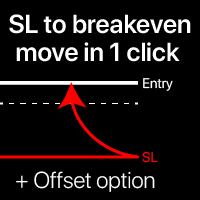
BE Trigger Points (InpBETrigPts) — Only active in BE trailing mode. Defines how many points price must move in your favor before the EA moves the SL to breakeven. With a value of 200, once price travels 200 points in the direction of your trade, the SL is automatically shifted to the entry price plus the offset.

BE Offset Points (InpBEOffPts) — Extra points added on top of the exact breakeven price when the SL is moved. With a value of 5, when the BE is triggered the SL lands not exactly at the entry price but 5 points beyond it (above entry for a buy), locking in a small minimum profit even if price reverses all the way back. With a value of 0 the SL sits exactly at the entry price.

TS Distance Points (InpTSDistPts) — Only active in Classic Trailing mode. Sets the gap in points between the current price and the trailing SL while the trail is active. The SL follows price maintaining this distance but never moves backward. With 300 points, if price rises 400 points from entry the SL will have moved to 100 points above the entry price.

TS Step Points (InpTSStepPts) — Sets the minimum additional price movement required before the EA updates the SL in classic trailing mode. Prevents the SL from being updated on every single tick and reduces broker server load. With a value of 10, the SL only adjusts when price moves at least an additional 10 points in your favor.

ATR Period (InpATRPeriod) — Only active in ATR trailing mode. Sets the number of candles the ATR indicator uses to calculate current market volatility. The standard value is 14 candles. A smaller number makes the trailing more reactive to recent price action; a larger number smooths it out.

ATR Multiplier (InpATRMult) — Only active in ATR trailing mode. The ATR value is multiplied by this number to determine the SL distance. With an ATR of 50 points and a multiplier of 2.0, the SL is placed 100 points from price. Increase this value to give the position more breathing room and avoid early stop-outs in volatile markets.

Chandelier Bars (InpChanBars) — Only active in Chandelier trailing mode. Defines how many candles back the EA looks to find the highest high (for buys) or lowest low (for sells) on which to anchor the SL. With 22 bars, the EA finds the highest high of the last 22 candles and places the SL one ATR distance below that high. This is a structure-based trailing approach rather than a fixed-distance one.

CHART

Show BE Line (InpShowBELine) — Enables or disables the yellow breakeven line that appears on the chart whenever you have open positions. This line shows the exact price at which your entire set of open positions would be at zero profit or loss, weighted by the volume of each trade. It is particularly useful when you have several positions in the same direction or positions on both sides of the market at once.

SL/BE MANAGEMENT

This group controls two automatic functions that work in the background on all your open positions without any manual intervention required.

Auto BE Enable (InpAutoBEEnable) — Enables or disables the automatic breakeven system. When active, the EA continuously monitors all open positions and moves the SL to breakeven automatically as soon as price has traveled the configured percentage of the distance from entry to TP1. You do not need to be at the screen for it to trigger. If you prefer to manage the BE manually from the Position Manager, leave this option disabled.

Auto BE % (InpAutoBEPct) — Sets the percentage of the entry-to-TP1 distance that price must complete before the Auto BE fires. With a value of 80, if your TP1 is 100 points from entry, the BE will trigger automatically once price has traveled 80 points in your favor. With 50 it would trigger halfway to TP1, with 100 only upon reaching TP1.

SL In Profit Enable (InpSLInProfitEnable) — Activates a variation of Auto BE where instead of moving the SL exactly to the entry price (pure breakeven), it is moved to a price that guarantees a minimum profit. When disabled, Auto BE moves the SL to the entry price. When enabled, the SL is moved to the entry price plus the ratio configured in the next parameter.

SL In Profit R (InpSLInProfitR) — Defines how much minimum profit the SL locks in when SL In Profit is active, expressed as a ratio of the original risk. With a value of 0.0 the result is identical to pure breakeven (SL at entry). With 0.5 the SL lands half a risk-unit above entry, guaranteeing a 0.5R profit even if price reverses all the way back. With 1.0 the SL locks in a full 1R profit. This parameter has no effect if SL In Profit Enable is disabled.

RULES

This group lets you activate automatic daily protection limits that the EA enforces to guard your account against losing streaks or over-trading.

Max Trades Enable (InpMaxTradesEnable) — Enables or disables the daily trade limit. When active, the EA counts the trades placed during the session and blocks the BUY and SELL buttons once the configured limit is reached. The counter resets automatically the following day. Useful for traders who tend to over-trade after a run of losses.

Max Trades Day (InpMaxTradesDay) — The maximum number of trades allowed per day when the limit is enabled. With a value of 5, the EA blocks new entries after the fifth trade of the day, win or lose.

Max Loss Enable (InpMaxLossEnable) — Enables or disables the maximum daily loss limit. This is the most important protective rule. When active, the EA continuously monitors the cumulative percentage loss during the session. If the total loss exceeds the configured threshold, the EA automatically closes all open positions and blocks any new entries until the next day. It eliminates the risk of continuing to lose after a bad session.

Max Loss % (InpMaxLossPct) — The daily loss percentage that triggers the automatic close and trading block. It is calculated against the equity at the start of the trading day. With a value of 2.0, if equity drops 2% from the opening value of the day the EA closes everything and locks trading. A common range in professional risk management is 1% to 3% depending on trading style.

Max Profit Enable (InpMaxProfitEnable) — Enables or disables the daily profit cap. When active, the EA blocks new entries (without closing existing positions) as soon as cumulative profit for the day exceeds the configured percentage. This is designed to protect a good day's gains and avoid the risk of giving them back by continuing to trade after the daily target is reached.

Max Profit % (InpMaxProfitPct) — The daily profit percentage that triggers the block on new entries. With a value of 5.0, once the account is up 5% on the day, no new trades will be allowed. Any positions already open continue with their normal management until they close.

PANEL

Panel X (InpPanelX) — The initial horizontal position of the panel in pixels from the left edge of the chart window. Once the EA is loaded, you can drag the panel to any position by clicking and dragging from its header. This value is only used the first time the EA loads or after a restart.

Panel Y (InpPanelY) — The initial vertical position of the panel in pixels from the top edge of the chart window. Works the same way as Panel X.

UI Scale % (InpUIScale) — Global scale of the panel interface expressed as a percentage. A value of 100 corresponds to the base size designed for standard Full HD resolution. If you use high-resolution screens (2K, 4K) or if the panel feels too small or too large for your display, adjust this value. At 80 the panel takes up less screen space; at 140 (the default) it is 40% larger than the base size; at 200 it doubles in size. All panel elements — buttons, text, spacing — scale proportionally with this parameter.


추천 제품
BulkOp Trade Manager
Ahmed Jumaa Saif Ali Almheiri
BulkOp Trade Manager Trade faster. Manage smarter. Close with confidence. BulkOp Trade Manager is a powerful MT5 utility EA built for traders who need speed, control, and clean execution directly from the chart. It is designed for active manual traders, scalpers, gold traders, and anyone who wants to manage multiple positions with less delay and fewer clicks. Why BulkOp? Ultra-fast Buy and Sell execution One-click Bulk Close Profit One-click Bulk Close Loss Keyboard trading control Bulk order e
TradePilotmt5
Hossein Khalil Alishir
TradePilot Expert Advisor (EA) for MetaTrader 5 TradePilot is a professional and user-friendly Expert Advisor (EA) for MetaTrader 5 (MT5) . It simplifies automated trading , risk management , and trade execution with a smart trading panel . Perfect for beginners and experienced traders looking for a reliable trade manager EA with automated lot size calculation and smart position management. Key Advantages User-Friendly Trading Panel: Customizable panel with buttons and hotkeys for fast ex
Episode Health Monitor Episode Health Monitor is a trading utility for MetaTrader 5 designed to analyze the real-time condition of active trading positions directly on the chart. The tool evaluates the current “trading episode” - a group of open positions - and provides a structured view of risk, stability, and distance to potential failure. Instead of relying only on profit/loss or price movement, it helps identify whether the current position is stable, weakening, or approaching a critical st
Dr Gauss EURUSD
Roberto Alvarez
Expert Advisor for EURUSD – MQL5 Expert Advisor simple and robust , designed for use by both beginner and experienced traders , with a primary focus on stability , risk management , and operational consistency . The system does not use martingale , grid , or any progressive risk-increasing techniques. Each trade is independent and executed under strict control rules, with particular attention to equity curve protection . The trading logic is based on classical principles of probability and risk
Bober Real MT5
Arnold Bobrinskii
4.88 (16)
Bober Real MT5 is a fully automatic Forex trading Expert Advisor. This robot was made in 2014 year and did a lot of profitbale trades during this period. So far over 7000% growth on my personal account. There was many updates but 2019 update is the best one. The robot can run on any instrument, but the results are better with EURGBP, GBPUSD, on the M5 timeframe. Robot doesn't show good results in tester or live account if you run incorrect sets. Set files for Live accounts availible only for cu
Basic working principles of EA will have 2 main systems. 1. Timed order opening means that at the specified time the EA will open 1 Buy order and 1 Sell order. 2. When the graph is strong, the EA will remember the speed of the graph. is the number of points per second which can be determined You can set the number of orders in the function ( Loop Order ). The order closing system uses the trailling moneym Loss system, but I set it as a percentage to make it easier to calculate when the capital
Margin Call Shield – Defend Your Margin on Your Terms Margin Call Shield is a tool for MetaTrader 5 traders who want to decide for themselves which open positions are closed during margin call situations before the platform does so automatically based on its internal rules. By default, the broker or platform decides which positions to close, often using undisclosed algorithms. Margin Call Shield lets you set this order according to your own strategy. Why Was Margin Call Shield Created? In a mar
Supporto Per assistenza o personalizzazioni contattare l'autore tramite   Email: otay.ezzeddine@gmail.com                    Telegramma :   https://t.me/goldkiller2022 Profilo MQL5: ezzeddine ️ Avvertenza:  Il trading Forex e CFD comporta un alto rischio di perdita. Non investire mai fondi che non ci si può permettere di perdere. Le performance passate non garantiscono risultati futuri. Copyright 2025 Otay Ezzeddine - OtayQuantumTraderEA
Gifted FX
Michael Prescott Burney
Gifted FX for GBPUSD H1 Chart Overview: Gifted FX for GBPUSD on the H1 chart is an advanced trading system designed for precision and profitability. It is engineered to adapt to various market conditions, ensuring consistent performance. Key Features: 100 Strategy Index: Leveraging a robust index of 100 unique strategies to cover a wide range of market scenarios. High Win Rate: Boasts an exceptionally high win rate, ensuring frequent successful trades. Super Low Drawdown (DD): Designed to mainta
GoldEdge Quantum Grid Scalper
Vittaya Klangpimanarkart
Short Description A smart grid scalping system designed to generate consistent profits from market fluctuations, combining precision entries with adaptive grid recovery and controlled risk management. Full Description GoldEdge Grid Scalper Pro is a high-efficiency trading system built to capitalize on small price movements using a structured grid and precision scalping logic. Unlike traditional grid systems that carry high risk, this EA is engineered with controlled exposure and intelligen
Classic SNR MetaTrader 5 Expert Advisor | Multi-Symbol Support & Resistance Trading with Trend-Based Logic Overview Classic SNR Breakout EA is a professional trading robot that identifies structural Support & Resistance levels using daily swing points and executes trades based on H1 price action relative to these levels. The EA applies   dual logic : in an uptrend, it sells on H1 rejection below an SNR level; in a downtrend, it buys on H1 rejection above an SNR level. Breakout confirmations are
Yellowstone FX
Michael Prescott Burney
4 (5)
옐로스톤 FX: 가장 안전한 금 거래 로봇, MT5 플랫폼 및 올해 상반기 XAUUSD 차트. 옐로스톤의 특수 효과       정교한 디자인이 특징입니다.       가장 안전한 MT5 금 거래 로봇       이 솔루션은 자본 보존, 체계적인 거래 실행 및 관리 가능한 수준의 위험을 중시하는 트레이더를 대상으로 합니다.       XAUUSD 시장은   다음과 같은 목적을 위해 특별히 설계되었습니다...       메타트레이더 5       최적화는 다음 영역에서 수행되었습니다.       상반기 XAUUSD   : 이 고급 자동 거래 시스템은 공격적이고 예측 불가능한 거래 행태보다는 안정성과 체계적인 자동화에 중점을 둡니다. 운영자를 찾고 계신 분들을 위해       SafeGold EA MT5       MT5 저위험 금 거래 로봇   또는       Yellowstone FX   는 MT5 플랫폼에서 금 거래를 위한 전문가 자문 시스템(Expert Advisor)으로, 강력한
Gyroscopes mt5
Nadiya Mirosh
5 (2)
Gyroscope        professional forex expert   (for EURUSD, GBPUSD, USDJPY, AUDUSD, USDCHF, EURGBP, EURJPY, NZDUSD, USDCAD, EURCHF, AUDJPY, CADJPY pairs)   alyzing the market using the Elliot Wave Index. Elliott wave theory is the interpretation of processes in financial markets through a system of visual models (waves) on price charts. The author of the theory, Ralph Elliott, identified eight variants of alternating waves (of which five are in the trend and three are against the trend). The mov
Introducing Neural Bitcoin Impulse - an innovative trading bot created using neural network training technology on voluminous market data sets. The built-in mathematical model of artificial intelligence searches for the potential impulse of each next market bar and uses the resulting patterns of divergence and convergence between the predictive indicators and the price to form high-precision reversal points for opening trading positions. The trading robot is based on the Neural Bar Impulse ind
Perfect Trade EA Indicator 2026 for XAUUSD MT5 Премиальный многоуровневый самообучающийся индикатор с режимом автоторговли для XAUUSD Perfect Trade EA Indicator 2026 — это не просто индикатор и не обычный советник с примитивным входом по шаблону. Это премиальный торговый комплекс для MetaTrader 5, созданный для работы с XAUUSD, который объединяет в себе: - многоуровневый анализ рынка; - интеллектуальную фильтрацию сигналов; - режим автоматической торговли; - продвинутое сопровождение сделки;
RRtoolBox
David Ruiz Moreno
RRtoolbox - Professional Tools: Risk:Reward Trading Tool (SL/TP Horizontals + Pending orders + Diagonals), Alerts set on trend lines (for alerts on diagonal levels), SelfManagement (BE, partials...), close/cancelling by time, Statistics, Info and trading on chart. One-Click Trading with Visual Risk:Reward Management RRtoolbox is a comprehensive trading panel that combines one-click order execution,  statistics and  powerful visual Risk:Reward tools, alerts set with trendlines, on chart butt
TradeStats Pro – Lot & Risk Analytics Panel for MT5 TradeStats Pro is an analytics panel for MetaTrader 5 that displays trading history and account statistics in a structured, readable format directly on the chart. Account Overview The panel shows real-time account data including balance, equity, margin, free margin, floating profit/loss, win rate, profit factor, and maximum drawdown in both value and percentage. Lot Exposure Tracking Total buy lot, sell lot, and net lot exposure from open posi
FREE
Majd Qatuni exp
Majd Ahmad Mahmoud Qatuni
MAJD QATUNI Trend Reversal EA v1.27 A fully automated Expert Advisor tested specifically on Gold (XAUUSD) , designed to capture potential market reversals after strong momentum periods. It uses a consecutive candlestick pattern , enhanced by multi-indicator filters and advanced risk management for precise entries and profit protection. Current price is for demo use only. Key Features: Momentum-Based Reversal Strategy: Detects N consecutive bullish/bearish candles, then waits for a correction
Net Exposure & Net Average Price is a lightweight utility Expert Advisor for MetaTrader 5 hedge accounts . This tool helps traders instantly understand their true market exposure when multiple Buy and Sell positions are open on the same symbol. What the EA Does The EA displays a clear on-chart panel showing: Total Buy Trades Total Buy Lots Total Sell Trades Total Sell Lots Net Lots (Net Exposure) Net Average Price (hedge-adjusted breakeven) The Net Average Price represents the true breakeven
Crystal Trade Manager
Muhammad Jawad Shabir
4.33 (3)
Crystal Trade Manager – MT5 트레이드 매니저 개요 Crystal Trade Manager (CTM) 는 MetaTrader 5 용 리스크 관리 및 거래 제어 도구입니다 . Prop Firm, 스캘핑 , 수동 트레이더 모두에 적합합니다 . 기능 일일 최대 손실 제한 (1–70%) + 자동 종료 . 목표 이익 / 손실 시 전체 포지션 청산 . SL/TP 자동 적용 . Break-Even 자동 이동 . 트레일링 스탑 . 최대 로트 제한 . 6 버튼 Magic Keys 패널 . 계좌 상태 패널 . 알림 : 팝업 / 푸시 / 사운드 . 호환성 플랫폼 : MT5 모든 브로커 / 계정 지원 키워드 MT5 트레이드 매니저 , 리스크 관리 EA, Prop Firm EA, FTMO 도구 , SL TP EA, Break-Even, 트레일링 스탑
FREE
Atomic GBP FX
Michael Prescott Burney
Atomic GBP — GBPUSD H1 고급 거래 시스템 Atomic GBP는 GBPUSD H1 차트 전용으로 설계된 전문가급 Expert Advisor(EA)입니다. 깊이 있는 역사적 분석과 다수 브로커 검증을 기반으로 개발되었습니다. 이 고급 거래 시스템은 GBPUSD 통화쌍의 독특한 변동성과 특성을 효과적으로 다루기 위해 제작되었습니다. Atomic GBP는 5년간의 역사적 시장 데이터 를 활용한 철저한 연구 결과물입니다. 고위험 뉴스 이벤트, 고변동성 구간, 강한 추세 등 다양한 시장 상황을 분석하여 GBPUSD 가격 움직임에 대한 견고한 이해를 갖추었습니다. 시스템의 핵심은 수백 가지 개별 거래 전략 을 활용하는 동적 엔진입니다. 이러한 다중 전략 접근 방식으로 Atomic GBP는 실시간으로 최적의 전술을 선택하여 높은 승률을 추구하면서 리스크를 적극 관리합니다. 주요 목표는 안정적이고 일관된 성장과 낮은 드로우다운 유지로 모든 시장 상황에서 자본을 보호하는 것입니다.
Product introduction : Trade Manager Tool for MT5 Trade Manager Tool will help trader calculate almost exactly the risk based on your account automatically. Along with that, there are features to support capital preservation with Trailing Stop, BreakEven, Risk Limit such as Daily Limit Profit/Loss,etc.. helps you avoid overtrading.In particular, the panel is simply designed with many interactive buttons inside the panel and outside the chart to help trader interact more easily.These features re
Live Gold EA
Prabir Sarkar
Live Gold EA - Professional XAUUSD Gold Trading Robot Live Gold EA is a professional MetaTrader 5 Expert Advisor designed for XAUUSD / Gold trading with smart trade management, adaptive risk control, drawdown protection, and a clean professional dashboard. It is built for traders who want a structured automated gold trading system with optimized internal logic and user-friendly risk controls. Limited Launch Offer The price will increase step by step as more users purchase the EA. First 3 buyers:
SolarTrade Suite Financial Robot: LaunchPad Market Expert - 거래를 시작하도록 설계되었습니다! 이 거래 로봇은 특별하고 혁신적이며 고급 알고리즘을 사용하여 가치를 계산합니다. 금융 시장의 세계에서 여러분의 조수입니다. SolarTrade Suite 시리즈의 지표 세트를 사용하여 이 로봇을 시작할 순간을 더 잘 선택하세요. 설명 하단에서 SolarTrade Suite 시리즈의 다른 제품을 확인하세요. 투자와 금융 시장의 세계를 자신 있게 탐색하고 싶으신가요? SolarTrade Suite Financial Robot: LaunchPad Market Expert는 정보에 입각한 투자 결정을 내리고 수익을 늘리는 데 도움이 되도록 만들어진 혁신적인 소프트웨어입니다. SolarTrade Suite Financial Robot: LaunchPad Market Expert의 장점: - 정확한 계산: 로봇은 고급 알고리즘과 분석 방법을 사
Timeframe Trading Limiter
AL MOOSAWI ABDULLAH JAFFER BAQER
Timeframe Trading Limiter is a professional risk management and trade discipline utility designed for MetaTrader 5. It empowers traders to enforce strict, automated limits on the number of trades and the maximum allowable drawdown within each trading period, based directly on the chart timeframe selected. Whether you are a discretionary trader prone to overtrading, a prop firm challenge participant needing to adhere to strict rules, or an algorithmic trader running multiple strategies, this tool
Auto TP and SL MT5
Volodymyr Hrybachov
3.67 (3)
손절매 및 이익실현 수준의 자동 설정을 위한 유틸리티. 상인을 위해 전문 상인이 만들었습니다. 유틸리티는 거래자가 수동으로 또는 고문을 사용하여 개설한 모든 시장 주문과 함께 작동합니다. 매직 넘버로 거래를 필터링할 수 있습니다. 유틸리티는 동시에 원하는 수의 주문을 처리할 수 있습니다. MT4 버전 https://www.mql5.com/en/market/product/56485 유틸리티가 할 수 있는 일: 가상 손절매를 설정하고 1핍에서 이익을 얻습니다. 실제 손절매 및 이익 실현 각 주문에 대해 별도로 작업(손절매 및 이익실현은 각 주문에 별도로 배치됨) 단방향 주문 바스켓으로 작업(손절매 및 이익실현은 모든 주문에 대해 공통으로 설정되고 별도로 구매 및 판매) 다방향 주문 바구니로 작업(손절매 및 이익실현은 모든 주문에 대해 공통으로 설정되고 BUY 및 SELL 함께) 테스트 및 작업을 위해 차트의 버튼을 사용할 수 있습니다. 옵션: STOPLOSS - 핍 손실을 중
Gold Decision Assistant Gold Decision Assistant is a chart-based utility for MetaTrader 5 designed to help traders understand whether current market conditions are suitable for taking a trade. Instead of generating frequent entry signals, the tool focuses on decision clarity. It summarizes multiple conditions such as spread, session state, trend strength, structure, and short-term movement into a single, readable panel. This is particularly relevant when trading XAUUSD, where price can move qui
Gold Momentum Grid
Ronnapat Parasapan
GOLDMOMENTUMGRID - Intelligent Gold Trading System GoldMomentumGrid is a professional Expert Advisor designed for Gold (XAUUSD) trading. It uses proprietary momentum detection combined with an adaptive grid system that automatically adjusts to market volatility. KEY FEATURES ATR-Adaptive Technology    Automatically adjusts to current market conditions Smart Entry System    Proprietary momentum filter for optimal e
Nano Machine
William Brandon Autry
5 (13)
Nano Machine GPT Version 2 (Generation 2) – 지속적 풀백 인텔리전스 우리는 2024년 말 Mean Machine으로 이 변화를 시작했습니다. 실제 최첨단 AI를 라이브 리테일 외환 트레이딩에 도입한 최초의 시스템 중 하나입니다. Nano Machine GPT Version 2는 그 라인의 다음 진화입니다. 대부분의 AI 도구는 한 번 답하고 모든 것을 잊습니다. Nano Machine GPT Version 2는 잊지 않습니다. 분석한 모든 풀백 셋업, 실행한 모든 진입, 거부한 모든 신호, 각 결정 뒤의 논리, 시장의 반응, 그리고 각 Machine Symmetry 바스켓의 실제 성과를 기억합니다. 매 세션의 완전한 컨텍스트. 시간이 지남에 따라 축적되는 집중된 인텔리전스. 이것은 마케팅을 위해 AI를 덧붙인 또 하나의 EA가 아닙니다. 이것은 풀백 트레이딩을 위해 구축된 지속적 전문 인텔리전스입니다. 기존 EA는 고정된 규칙 안에 갇혀 있습니다.
Short Description: FTMO Protector PRO MT5 is an EA designed to protect your funded account by managing risk and ensuring compliance with the Prop Firm's trading rules. This EA automatically monitors equity levels, closes trades when profit targets or drawdown limits are reached, and provides a visual display of key account metrics.  EA w orks with all different Prop Firm service providers. Overview: FTMO Protector PRO MT5 is an Drawdown Safeguard Expert Advisor meticulously crafted for trade

이 제품의 구매자들이 또한 구매함
Trade Assistant MT5
Evgeniy Kravchenko
4.42 (211)
거래당 위험 계산, 라인을 사용한 손쉬운 신규 주문, 부분 청산 기능을 통한 주문 관리, 7가지 유형의 트레일링 스탑 및 기타 유용한 기능을 제공합니다. 추가 자료 및 지침 설치 지침   -   애플리케이션 지침   -   데모 계정용 애플리케이션 평가판 라인 기능       - 차트에 개시선, 손절매, 차익실현을 표시합니다. 이 기능을 사용하면 새로운 주문을 쉽게 하고 개봉 전에 추가 특성을 볼 수 있습니다. 위기 관리       -       위험 계산 기능은 설정된 위험과 손절매 주문의 크기를 고려하여 새 주문의 볼륨을 계산합니다. 이를 통해 손절매 크기를 설정하고 동시에 설정된 위험을 존중할 수 있습니다. 로트 계산 버튼 - 위험 계산을 활성화/비활성화합니다. 필요한 위험 값은 위험 필드에 0에서 100 사이의 백분율 또는 예금 통화로 설정됩니다. 설정 탭에서 위험 계산 옵션을 선택합니다. $ 통화, % 잔액, % 지분, % 자유 마진, % 사용자 정의, % AB 이전
Quant AI Agents is NOT AN Expert Advisor. Quant AI Agents   is a   multi-agent AI trading framework   that turns natural-language strategy prompts into live.  WANT THE SAME RESULTS AS MY LIVE SIGNAL?   Use the exact same brokers I do:   IC MARKETS , IC TRADING   .  Unlike the centralized stock market, Forex has no single, unified price feed.  Every broker sources liquidity from different providers, creating unique data streams. Other brokers can only achieve trading performance equivalent to 60
TradePanel MT5
Alfiya Fazylova
4.87 (155)
Trade Panel은 다기능 거래 도우미입니다. 이 애플리케이션에는 50개 이상의 수동 거래 기능이 포함되어 있으며 대부분의 거래 작업을 자동화할 수 있습니다. 구매하기 전에 데모 계정에서 데모 버전을 테스트할 수 있습니다. 데모 계정용 애플리케이션 체험판 다운로드: https://www.mql5.com/en/blogs/post/750865 . 전체 지침 여기 . 거래. 한 번의 클릭으로 거래를 수행할 수 있습니다: 리스크 자동 계산과 함께 예약 주문 및 포지션 열기. 한 번의 클릭으로 여러 주문 및 포지션 열기. 주문 그리드 열기. 예약 주문 및 포지션을 그룹별로 닫기. 포지션 방향 전환 (Buy 닫기 > Sell 열기, Sell 닫기 > Buy 열기). 포지션 잠금 (부족한 포지션을 열어 Buy와 Sell 포지션의 수량을 동일하게 만들기). 모든 포지션 한 번의 클릭으로 부분적으로 닫기. 모든 포지션의 테이크 프로핏과 스톱로스를 같은 가격 수준에 설정. 모든 포지션의 스톱로스를
Farmed Hedge Yield Farming | All Markets (Manual - Hybrid - Semi/Automated EA) MULTI-ASSET SUPPORT Trade any asset available on your broker - Forex: Major, Minor, Exotic pairs - Crypto: BTC, ETH, XRP, SOL, BNB - Stocks: Apple, Tesla, Amazon, Google, etc. - Commodities: Gold, Silver, Oil, Gas - Indices: US30, NAS100, SPX500, DAX40 - Any CFD your broker offers VERIFIED TRADING RESULTS - Farmed Hedge Yield Axi Copy:  https://www.mql5.com/en/signals/2356376 - Farmed Hedge Yield Exn Copy:   https:/
YuClusters
Yury Kulikov
4.93 (43)
Attention: You can view the program operation in the free version  YuClusters DEMO .  YuClusters is a professional market analysis system. The trader has unique opportunities to analyze the flow of orders, trade volumes, price movements using various charts, profiles, indicators, and graphical objects. YuClusters operates on data based on Time&Sales or ticks information, depending on what is available in the quotes of a financial instrument. YuClusters allows you to build graphs by combining da
파워 캔들 전략 스캐너 - 자체 최적화 다중 종목 설정 찾기 도구 파워 캔들 전략 스캐너는 마켓 워치에 등록된 모든 종목에 대해 파워 캔들 지표와 동일한 자체 최적화 엔진을 동시에 실행합니다. 하나의 패널에서 현재 통계적으로 거래 가능한 종목, 각 종목별 최적의 전략, 최적의 손절매/익절 조합을 알려주며, 새로운 신호가 발생하면 즉시 알림을 전송합니다. 이 도구는 Stein Investments 에코시스템의 일부입니다. 18개 이상의 도구와 함께 당신의 1대1 AI 트레이딩 멘토 Max.  항상 대기 중, 모든 인디케이터를 깊이 있게 이해, 무언가를 차근차근 생각해보고 싶은 순간에 도움을 줍니다.  https://stein.investments 에서 만나보세요 완벽한 시장 모니터링. 종목당 3,000건 이상의 자동 최적화. 2가지 알림 유형. 한 번의 클릭으로 차트를 전환하고 바로 거래하세요. 이 도구가 필요한 이유 대부분의 다중 종목 스캐너는 가격 변동만 보여줍니다. 티커별
The product will copy all telegram signal to MT5 ( which you are member) , also it can work as remote copier.  Easy to set up, copy order instant, can work with almost signal formats, image signal,  s upport to translate other language to English Work with all type of channel or group, even channel have "Restrict Saving Content", work with  multi channel, multi MT5 Work as remote copier: with signal have ticket number, it will copy exactly via ticket number. Support to backtest signal. How to s
Custom Alerts AIO: 다중 시장을 동시에 모니터링 – 설정 없이 즉시 사용 가능 개요 Custom Alerts AIO 는 복잡한 설정 없이 즉시 사용할 수 있는 통합 시장 모니터링 도구입니다. FX Power, FX Volume, FX Dynamic, FX Levels, IX Power 등 필요한 모든 지표가 내장되어 있어 별도의 설치나 구성 없이 알림 기능을 바로 사용할 수 있습니다. 차트 그래픽 없이 작동하며, Forex, 금속, 지수, 암호화폐 등 주요 자산군을 모두 지원합니다. 주식(Symbols)은 별도로 입력하여 추가할 수 있으나, MetaTrader에서는 일반적으로 제한적으로만 사용됩니다. 1. 왜 Custom Alerts AIO를 선택해야 하나요? 추가 라이선스가 필요 없습니다 • 모든 Stein Investments 지표가 내장되어 있어 별도 구매가 필요 없습니다. • 즉시 알림 기능을 시작할 수 있어 빠르고 간편합니다. 모든 시장을 하나의 도구로
AntiOverfit PRO MT5
Enrique Enguix
5 (5)
EA를 구매하기 전에, 이 시스템이 정말 버티는지 아니면 백테스트에서 운 좋게 좋아 보였던 것뿐인지 먼저 확인하세요. 대부분의 로봇은 보기 좋은 백테스트와 함께 판매됩니다. 우상향 곡선. 좋은 Profit Factor. 의심할 이유가 거의 없어 보입니다. 그런데도 그런 EA들 중 많은 수가 시장이 그 과거 구간처럼 움직이지 않기 시작하는 순간 무너지기 시작합니다. 왜 그럴까요? 백테스트가 증명하는 것은 딱 한 가지뿐이기 때문입니다. 그 전략이 특정한 하나의 가격 경로에서는 작동했다는 것. 다른 경로에서도 버틴다는 뜻은 아닙니다. 견고하다는 뜻도 아닙니다. 당연히 당신의 돈을 쓸 가치가 있다는 뜻도 아닙니다. 당신이 EA를 사는 이유는 과거의 예쁜 곡선을 감상하기 위해서가 아닙니다. 계속 변하는 시장에서 실제로 쓰기 위해서입니다. AntiOverfit PRO가 하는 일 AntiOverfit PRO는 MetaTrader 5용 Expert Advisor가 정말 탄탄한지, 아니면 특정한
Ultimate Extractor
Clifton Creath
5 (9)
Ultimate Extractor - Professional Trading Analytics for MT5 *****this is the local HTML version of Ultimate Extractor. !!!!!it is not compatible with Cloud!!!! For the online version please reach out to me directly****** Ultimate Extractor transforms your MetaTrader 5 trading history into actionable insights with comprehensive analytics, interactive charts, and real-time performance tracking. What It Does Automatically analyzes your MT5 trading history across all Expert Advisors and generates
Footprint Chart Pro — Professional OrderFlow EA for MetaTrader 5 Version 6.34 | Professional tool for real traders | Institutional-Grade Visualization DEMO USERS - PLEASE SELECT EVERY TICK / REAL TICK WHEN TESTING AND YOU HAVE DOWNLOADED HISTORICAL DATA. IF YOU SEE A WAITING SCREEN AND IT IS NOT DOWNLOADING, IT MEANS YOU HAVE LOW HISTORICAL DATA. TRY 1 MIN AND 5 MIN FIRST ON 1 DAY DATA. ONE DAY DATA SHOULD BE THE NEWEST AND MOST CURRENT DATE. PLEASE WAIT UNTIL THE MARKET HAS ROLLED OVER PERIOD.
MT5 Trading Deck
Manuel Michiels
5 (2)
One button. One trade. MT5 Trading Deck is a hotkey trading panel for MetaTrader 5 that turns the platform into a keyboard-driven execution cockpit. Stop loss, take profit and lot size are pre-calculated for every key; the moment you press, a market order is live on the broker. A complete technical user manual is attached in the product Comments section. It documents every input parameter, the full hotkey map, the recommended Stream Deck XL layout, and the advanced workflows for Pre-Limit orders
FUTURES ORDERFLOW FOOTPRINT CHART Professional OrderFlow EA for MetaTrader 5 Version 1.01| Professional tool for real traders | Institutional-Grade Visualization STRATEGY TESTER USERS - PLEASE SELECT EVERY REAL TICK WHEN TESTING AND YOU HAVE DOWNLOADED HISTORICAL DATA. IF YOU SEE A WAITING SCREEN AND IT IS NOT DOWNLOADING, IT MEANS YOU HAVE LOW HISTORICAL DATA. TRY 1 MIN AND 5 MIN FIRST ON 1 DAY DATA. ONE DAY DATA SHOULD BE THE NEWEST AND MOST CURRENT DATE. PLEASE WAIT UNTIL THE MARKET HAS ROL
Telegram To MT5 Receiver
Levi Dane Benjamin
4.31 (16)
가입한 모든 채널에서 (개인 및 제한된 채널 포함) 시그널을 바로 MT5로 복사합니다.   이 도구는 사용자를 고려하여 설계되었으며 거래를 관리하고 모니터하는 데 필요한 많은 기능을 제공합니다. 이 제품은 사용하기 쉽고 시각적으로 매력적인 그래픽 인터페이스로 제공됩니다. 설정을 사용자 정의하고 제품을 몇 분 안에 사용할 수 있습니다! 사용자 가이드 + 데모  | MT4 버전 | 디스코드 버전 데모를 시도하려면 사용자 가이드로 이동하십시오. Telegram To MT5 수신기는 전략 테스터에서 작동하지 않습니다! Telegram To MT5 특징 여러 채널에서 동시에 신호를 복사합니다. 개인 및 제한된 채널에서 신호를 복사합니다. Bot 토큰이나 채팅 ID가 필요하지 않습니다.   (원하는 경우에는 사용할 수 있습니다) 위험 % 또는 고정된 로트로 거래합니다. 특정 심볼을 제외합니다. 모든 신호를 복사할지 또는 복사할 신호를 사용자 정의할지 선택할 수 있습니다. 모든 신호를 인
Bots Builder Pro MT5
Andrey Barinov
4.17 (6)
This is exactly what the name says. Visual strategy builder . One of a kind. Turn your trading strategies and ideas into Expert Advisors without writing single line of code. Generate mql source code files with a few clicks and get your fully functional Expert Advisors, which are ready for live execution, strategy tester and cloud optimization. There are very few options for those who have no programming skills and can not create their trading solutions in the MQL language. Now, with Bots Builde
RiskGuard Management
MONTORIO MICHELE
5 (22)
ATTENTION For a free trial version, visit my website. Manual QUANTUM RiskGuard Management — Your ultimate ally for uncompromising trading. Lot Calculator — Automatic lot size calculation. Quantum — Automatic risk to maximize profits and reduce drawdowns. Automatic Journal — Included and freely downloadable from my website. Automatic Screenshot — Two screenshots: one at entry and one at exit. Partial Profit — Smartly managed partial exits. Smartphone Trading — Place orders from your mobile, mana
HINN Lazy Trader
ALGOFLOW OÜ
5 (2)
The core idea: using the user interface, you configure the parameters the chart must meet before entering a position (or positions), choose which entry models to use, and set the rules for when trading and planning should end. Lazy Trader  handles the rest: it  takes over all the routine chart watching and execution! full description  :: 3 key videos [1] ->  [2]   ->  [3] What can it do? - Understands Larry Williams market structure - Understands swing market structure by Michael Huddleston
Ultimate Trailing Stop EA MT5
BLAKE STEVEN RODGER
4.13 (8)
This EA Utility allows you to manage (with advanced filtering) unlimited open orders (manual or EA) with 16 trailing stop methods: fixed, percent, ATR Exit, Chandelier Exit, Moving Average, Candle High Low Exit, Bollinger Bands, Parabolic, Envelope, Fractal, Ichimoku Kijun-Sen, Alligator, Exit After X Minutes or Bars, RSI and Stochastic. The trailing stop can be either real or virtual, and you can exit fully or with a partial close percent on touch or bar close.  Moreover, you can add (override
이 도구를 사용하면 한 번의 클릭으로 열려 있는 모든 주문을 닫을 수 있습니다. "모두 닫기"를 클릭하기만 하면 됩니다. 수익성 있는 주문만 청산하려면 "수익성 있는 청산" 버튼을 클릭하세요. 클릭한 후 모든 변동 주문이 청산됩니다. 변동 손실이 있는 주문만 종료하려면 "손실 가능 청산" 버튼을 클릭하세요. 클릭한 후 변동 손실이 있는 모든 주문이 종료됩니다. 이 도구는 1년 동안 테스트를 거쳤으며 원클릭 포지션 청산 기능이 매우 완벽합니다. 포지션 청산은 적시에 이루어지며 지연 범위는 작습니다. 물론 지연은 귀하가 속한 지역 및 네트워크 환경과도 관련이 있습니다. 이에 주의하시기 바랍니다. 과거 데이터의 백테스트 과정에서 도구는 더욱 완벽하게 작동했으며 100개의 주문을 모두 마감하는 데 최대 0.495초밖에 걸리지 않았습니다. 실제 거래 과정에서 나의 최대 포지션 주문 수는 26개에 불과했고, 모든 포지션이 청산되는 데 걸리는 시간은 1.28초였습니다.
EA Performance Logger Telegram
Abdulqudus Tomiwa Akande-owoo
The Performance Logger is a utility for MetaTrader 5 designed to track and report account metrics. It identifies trades based on specific criteria and provides summaries of account activity. Main Functions Automated Reporting : Generates summaries of account performance and sends them to specified communication channels (Telegram or Discord) on a weekly, monthly, or yearly basis. Strategy Analysis : Organizes performance data based on the specific Expert Advisor or strategy used for each trade.
VOLUME BUBBLES ORDERFLOW FOOTPRINT PROFESSIONAL Expert Advisor for MetaTrader 5 Complete Feature Documentation Introduction: Volume Bubbles OrderFlow Footprint Professional is an advanced order flow visualization tool designed for the MetaTrader 5 platform. It provides institutional-grade market analysis through real-time volume bubbles visualization, volume profiling, and sophisticated order flow analysis. This Expert Advisor transforms raw market data into actionable trading intelligence, hel
훌륭한 신호를 찾았지만 공급자의 로트가 너무 작습니까? 더 큰 위치 볼륨이 필요하지만 터미널 설정이 너무 좋지 않습니까? Signal Lot Manager는 필요한 볼륨의 중복 주문을 통해 공급자의 포지션 볼륨을 증가시킵니다. 주문을 복사하기 위한 로트 크기와 신호 이름을 설정하기만 하면 됩니다. Signal Lot Manager는 터미널에서 주문을 복제하기 위한 로트 승수 유틸리티입니다. 소스는 고문, 수동 거래, 별도의 거래 신호를 선택할 수 있습니다. 간단한 설정으로 다양한 기능을 제공할 뿐만 아니라 빠른 속도와 안정성을 제공합니다. Signal Lot Manager 설치 및 입력 가이드 EA에 대한 알림을 받으려면 MT4/MT5 터미널에 URL을 추가하십시오(스크린샷 참조). MT4 버전       https://www.mql5.com/en/market/product/34864 MT5 버전       https://www.mql5.com/en/market/product/416
Custom Timeframe Manager Pro: MetaTrader 5의 무제한 타임프레임 터미널의 표준 설정은 종종 가격 움직임의 중요한 세부 사항을 숨깁니다. 분석을 클래식한 주기로만 제한하면 트레이더는 추세의 시작점과 진정한 변동성 수준을 놓칠 위험이 있습니다. Custom Timeframe Manager Pro 는 MetaTrader 5의 한계를 확장하는 전문가용 유틸리티입니다. 분수 및 이국적인 주기를 포함하여 모든 커스텀 주기를 생성하고 터미널의 기본 차트처럼 작업할 수 있습니다. 사용 가능한 주기 유형: 초 단위 : 모든 값 (예: S1, S5, S15, S30). 분수 단위 : 정밀 분석을 위한 비표준 간격 (예: M1.5, H1.5, D1.2). 커스텀 : 전략적 분석을 위한 다일 및 다주 단위의 확장 주기. 주요 장점: 완전한 차트 기능 : 생성된 주기는 MT5 기본 차트처럼 작동합니다. 모든 지표, 오실레이터, 템플릿 및 EA를 적용할 수 있습니다. 이는
Trade Copier Pro MT5 is a tool to copy trade remotely to multiple MT4, MT5 and cTradfer accounts at different computers/locations over internet. This is an ideal solution for you if you are a signal provider and want to copy your trades to other receivers globally on your own rules. One provider can copy trades to multiple receivers and one receiver can get trade from multiple providers as well. The provider can even set the subscription expiry for each receiver, so that receiver will not be abl
The product is used to trade base on any Alert signal in MT5 Easy to setup, simple format with custom keyword All option to management orders as trailing stop, breakeen, partial close, time filter, news filter ... Option to auto open grid orders How to setup and guide: Let read all details about setup and download indicator for auto get   Alert Signal   here Do not buy if you even can not install demo EA to your VPS ( some VPS block download EA from mql5 market) We always bring customers high q
What Exactly Is A Smart Trading Tool? Smart Trading Tool   was developed for fast and comfortable trading of the financial markets especially for   ORDER BLOCKS TRADERS .   It provides traders functionalities, such as: A Drawing Tool One-Click Trading Panel Automated Lot Sizes Calculation   based on your risk appetite & Money Management ( Watch this video , how this tool can help manage your risk per trade better!) Built in PRICE LEVELS (Fibonacci, Round Numbers, Daily hi-low, etc) Shows Trading
The product will copy all  Discord  signal   to MT5   ( which you are member  ) , also it can work as remote copier.  Easy to set up. Work with almost signal formats, support to translate other language to English Work with multi channel, multi MT5. Work with Image signal. Copy order instant, auto detect symbol. Work as remote copier: with signal have ticket number, it will copy exactly via ticket number. How to setup and guide: Let read all details about setup and download Discord To MetaTrader
Mt5 To InterativeBrokers Copier allows you to copy deals from MT5 account to Interactive Brokers. With this, you can run your EA strategy on a MT5 Demo/Real Account, then copy all the deals to Interactive Brokers account real time. Features: 1. Copy or Invert-Copy deals Realtime from MT5 to IB Account. 2. Synchronizing positions of both accounts periodicaly, in case any missing copying. 3. You can choose only Buy position or Sell position. Symbols Setup: General Format:  {MT Symbol} -> {IB S
ManHedger MT5
Peter Mueller
4.83 (6)
THIS EA IS A SEMI-AUTO EA, IT NEEDS USER INPUT. Manual & Test Version Please TEST this product before BUYING  and watch my video about it. The price of the ManHedger will increase to 250$ after 20 copies sold. Contact me for user support or bug reports or if you want the MT4 version! MT4 Version  I do not guarantee any profits or financial success using this EA. With this Expert Advisor, you can: Implement your own Zone Recovery strategy to capitalize on trending markets. Create Grid trading s
EasyInsight AIO MT5
Alain Verleyen
4.92 (12)
EASY Insight AIO – 스마트하고 손쉬운 트레이딩을 위한 올인원 솔루션 개요 외환, 금, 암호화폐, 지수, 심지어 주식까지 — 전 시장을 몇 초 만에, 수동 차트 확인이나 복잡한 설치, 인디케이터 설정 없이 스캔할 수 있다고 상상해 보세요. EASY Insight AIO 는 AI 기반 트레이딩을 위한 궁극의 플러그 앤 플레이(Plug & Play) 데이터 내보내기 도구입니다. 단 하나의 깔끔한 CSV 파일로 전체 시장 스냅샷을 제공하며, ChatGPT, Claude, Gemini, Perplexity 등 다양한 AI 플랫폼에서 즉시 분석할 수 있습니다. 창 전환, 복잡함, 차트 오버레이는 더 이상 필요 없습니다. 자동으로 내보내지는 순수하고 구조화된 데이터 인사이트만으로, 반복적인 차트 감시 대신 데이터 기반의 스마트한 의사결정에 집중할 수 있습니다. 왜 EASY Insight AIO인가요? 진정한 올인원 • 별도의 설정, 인디케이터 설치, 차트 오버레이가 필요 없습
필터:
리뷰 없음
리뷰 답변