RiskMate MT5 Manual Trade Panel
- ユーティリティ
- バージョン: 1.1
- アップデート済み: 19 10月 2026
- アクティベーション: 5

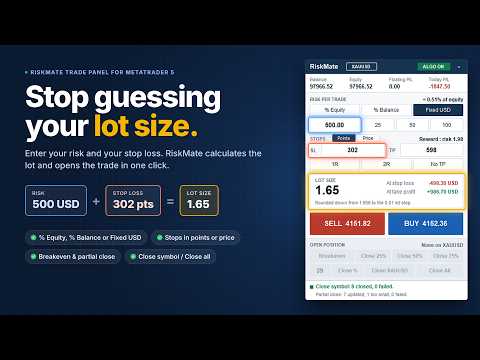
RiskMate Trade Panel MT5 is a manual trading utility for MetaTrader 5. It is designed for traders who want a clean chart panel for risk-based lot calculation, manual order placement, and simple position management.
RiskMate does not generate trading signals. It does not predict market direction. It does not open trades automatically based on a strategy. Every trading action starts from a button clicked by the user.
The purpose of RiskMate is simple: calculate the position size from your selected risk and stop-loss distance, place a market Buy or Sell order with planned Stop Loss and Take Profit, and help manage open positions from the chart.
Main Features:
- Clean on-chart trading panel
- Risk-based lot calculation
- Risk from equity, balance, or a fixed amount
- Risk presets: 0.5%, 1%, 2%, or fixed amounts such as 25, 50, and 100
- Buy and Sell market buttons
- Stop Loss and Take Profit in points or as prices
- 1R, 2R, and No TP shortcuts
- Calculated lot size display
- Estimated amount at Stop Loss and Take Profit
- Breakeven action
- Partial close: 25%, 50%, 75%
- Custom partial close percentage from 1 to 99
- Close positions for the current chart symbol
- Close All positions with optional second-click confirmation
- Balance, equity, floating P/L, and today P/L display
- Algo Trading status badge
- Minimize and scroll support for compact chart usage
Risk-Based Lot Calculation
RiskMate calculates lot size from your selected risk amount and stop-loss distance.
You can choose:
- % Equity
- % Balance
- Fixed amount in the account currency
The panel calculates the lot size and normalizes it according to the broker’s symbol settings, including minimum volume, maximum volume, and volume step.
If the calculated lot is below the broker’s minimum, the trade is blocked with a message. If the calculated lot is above the broker’s maximum, the lot is capped and the panel informs you.
The displayed amount at Stop Loss and Take Profit is an estimate based on the selected settings, current symbol data, and calculated lot. It is not a forecast or guarantee.
Stop Loss and Take Profit
RiskMate supports two ways to enter Stop Loss and Take Profit:
1. Points Mode
SL and TP are entered in MetaTrader points.
Important: points are not always the same as pips. On many 5-digit Forex symbols, 10 points equals 1 pip. For gold, indices, commodities, and other symbols, point value depends on the broker’s symbol settings.
2. Price Mode
SL and TP are entered as prices.
In Price Mode, the distance between the market price and the Stop Loss price is used for lot calculation. A stop below the market prepares a Buy. A stop above the market prepares a Sell. If the stop is inside the spread or on the wrong side of the market, the action is blocked with a message.
Reward Shortcuts
RiskMate includes quick reward buttons:
- 1R: sets Take Profit equal to the Stop Loss distance
- 2R: sets Take Profit to twice the Stop Loss distance
- No TP: removes Take Profit
These buttons are useful for traders who plan trades based on risk-to-reward ratios.
Manual Buy and Sell
RiskMate places market orders only when you click Buy or Sell.
Before sending an order, the panel checks:
- Algo Trading status
- Symbol trading mode
- Stop Loss validity
- Take Profit validity
- Volume limits
- Broker stop level
- Broker freeze level
- Margin availability
- Buy/Sell side validity
On a netting account, RiskMate can refuse a new order against an existing opposite position, so the new Stop Loss does not conflict with the remaining net position.
Position Management
After a position is open, RiskMate can help manage it from the panel.
Available actions include:
- Breakeven
- Close 25%
- Close 50%
- Close 75%
- Custom Close %
- Close current symbol
- Close All
Breakeven:
The Breakeven button attempts to move the Stop Loss to the entry price when the broker’s stop distance and freeze level allow it.
RiskMate does not worsen an existing Stop Loss. If breakeven is not possible yet, the panel shows a message.
Partial Close:
RiskMate supports fixed partial close buttons:
- Close 25%
- Close 50%
- Close 75%
It also supports a custom partial close percentage from 1 to 99.
Custom close percentage is useful when you want to close a different portion of a position, such as 30%, 40%, 60%, or 80%.
A custom value of 100 is refused. Use Close current symbol for a full close.
Partial close actions follow the selected scope. By default, position management is focused on the chart symbol. If the input to manage all positions is enabled, breakeven and partial close actions can also affect other open symbols.
Close Current Symbol
The Close Symbol button closes positions for the current chart symbol.
For example, if the panel is attached to EURUSD, Close EURUSD closes EURUSD positions only.
Close All
The Close All button can close every open position on the account.
If confirmation is enabled, the first click changes the button to a confirmation state for a few seconds. A second click within that time closes all open positions.
This is designed to help reduce accidental full-account closing.
Account Information
RiskMate displays useful account information directly on the panel:
- Balance
- Equity
- Floating P/L
- Today P/L
Today P/L is calculated from realized account activity since the broker server day start, including items such as profit, commission, swap, and fees where available from the terminal history.
These values are for information only.
Algo Trading Badge
The panel shows an Algo Trading status badge.
ALGO ON means MetaTrader currently allows the panel to send trade requests after a user clicks a trading button.
ALGO OFF means trading actions are blocked until Algo Trading is enabled in MetaTrader.
This badge does not mean RiskMate is running an automated trading strategy.
Who Can Use RiskMate
RiskMate may be useful for:
- Manual Forex traders
- Gold traders
- Index traders
- Commodity traders
- Prop firm challenge traders
- Scalpers
- Intraday traders
- Traders who already use their own strategy but want structured risk calculation and trade management
RiskMate is not for traders looking for automatic entries, trading signals, or guaranteed results.
How To Use
1. Attach RiskMate Trade Panel MT5 to a chart.
2. Enable Algo Trading in MetaTrader 5.
3. Select % Equity, % Balance, or Fixed risk.
4. Enter the risk value or use a preset.
5. Choose Points or Price mode for SL and TP.
6. Enter Stop Loss and Take Profit values.
7. Use 1R, 2R, or No TP if needed.
8. Check the calculated lot size and estimated amount at SL/TP.
9. Click Buy or Sell only when you want to place the trade.
10. Manage the open position using Breakeven, partial close, custom close, Close Symbol, or Close All.
Inputs Overview
Risk mode
Selects the starting risk mode: percent or fixed money.
Risk percent
Default percentage risk used for lot calculation.
Fixed risk amount
Fixed account-currency amount used in fixed risk mode.
Use equity for risk
Selects whether equity or balance is used as the starting percent-risk base.
Stop Loss points
Default Stop Loss distance in MetaTrader points.
Take Profit points
Default Take Profit distance in MetaTrader points.
Slippage points
Maximum allowed price deviation when sending an order.
Magic number
Identifier used for orders sent by RiskMate.
Manage all positions
Controls whether breakeven and partial close actions are limited to the chart symbol or can affect other positions.
Confirm Close All
Requires a second click before all open positions are closed.
Panel corner
Starting chart corner for the panel.
Important Notes
RiskMate is a utility, not a trading strategy.
It does not provide financial advice, trading signals, or automatic trade entries.
It does not guarantee profit or reduce trading risk by itself. It only applies the calculations and actions selected by the user.
Stop Loss and Take Profit in Points Mode are entered in MetaTrader points, not pips. Always check your broker’s symbol specifications, especially for gold, indices, and symbols with unusual tick sizes.
Broker conditions such as spread, slippage, commission, swap, margin, stop level, freeze level, volume step, and market execution can affect final trading results.
RiskMate attempts to validate orders before sending them, but the broker can still reject an order depending on real-time conditions.
Before using RiskMate on a live account, test it on a demo account and confirm that lot size, Stop Loss, Take Profit, breakeven, partial close, and close functions behave correctly with your broker.
Risk Warning
Trading Forex, metals, indices, commodities, and other leveraged instruments involves significant risk. You can lose part or all of your capital.
RiskMate Trade Panel MT5 is a manual execution and risk-management utility. It does not provide financial advice, trading signals, or guaranteed trading results.
All trading decisions are made by the user. You are responsible for every order you place and for every position affected by the panel buttons.
Use demo testing before live trading.