Trading Manager Mql4

Plan, execute, and manage your trades from a single panel

Calculating lot size, checking risk, setting Stop Loss and Take Profit levels, and managing multiple positions through MetaTrader’s standard windows takes time and can lead to manual errors.

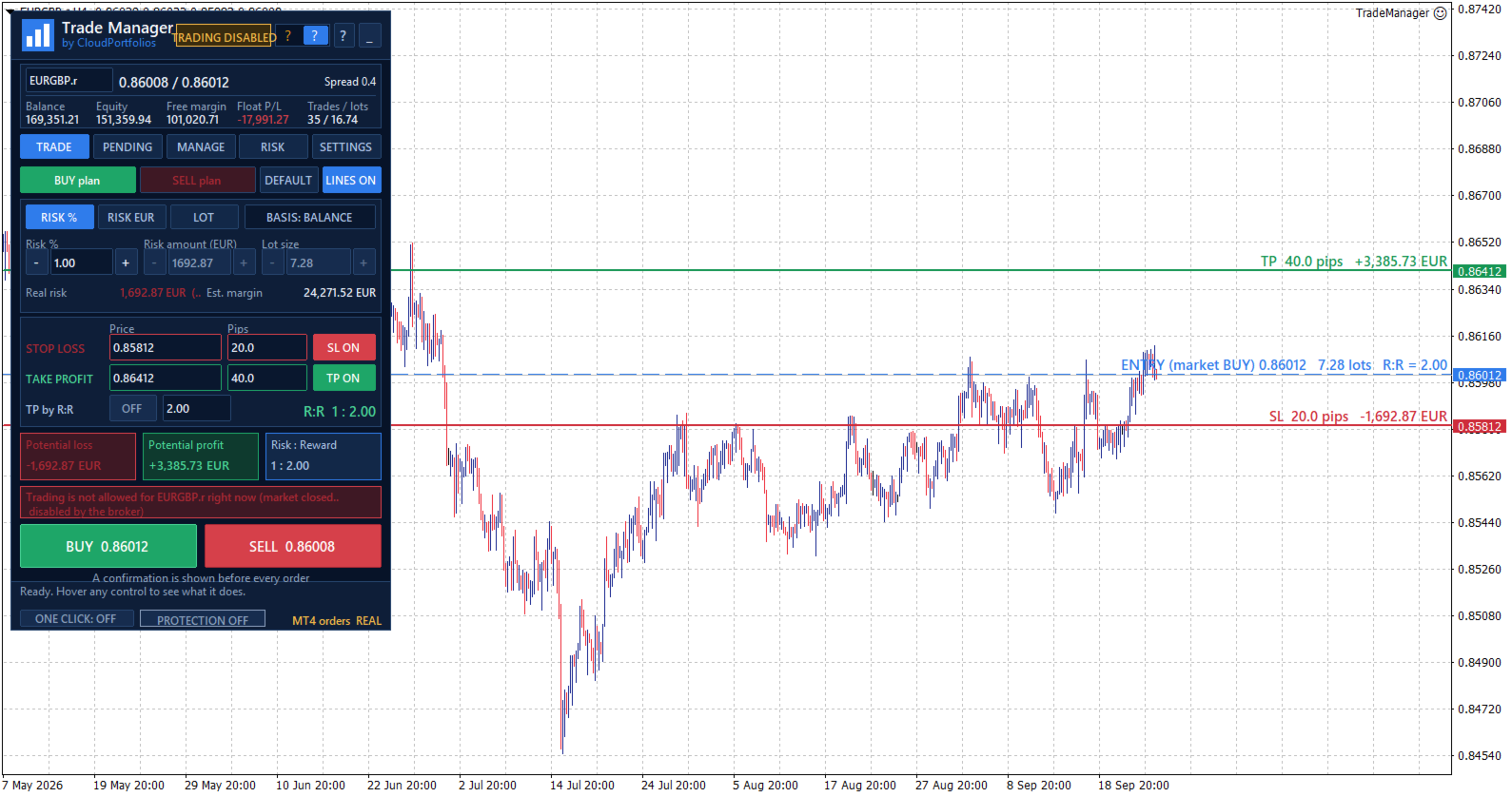
Trade Manager brings the entire process into one visual panel on the chart. It helps you prepare each trade, understand its real impact before execution, place orders, and manage exposure using manual tools and automated rules.

You decide when to buy or sell. Trade Manager does not generate signals or predict the market—it turns your decisions into structured trades aligned with your risk limits.

What is Trade Manager?

Trade Manager is a manual trading assistant for MetaTrader.

It centralizes the following tools in one interface:

  • Visual trade planning.
  • Position sizing and risk calculation.
  • Market and pending orders.
  • Individual and group position management.
  • Break Even and trailing stop.
  • Partial closes and filtered exits.
  • Exposure monitoring.
  • Daily limits and account protection.

It is not a signal robot and does not decide when to enter the market. Trade direction, entry timing, and strategy always remain under the trader’s control.

Visual trade planning on the chart

Build your trade using interactive lines for:

  • Entry.
  • Stop Loss.
  • Take Profit.

The SL and TP lines can be moved directly with the mouse. For pending orders, the entry line can also be dragged across the chart.

Every adjustment automatically updates:

  • Entry price.
  • Stop Loss distance in pips.
  • Take Profit distance in pips.
  • Lot size.
  • Monetary risk.
  • Percentage risk.
  • Potential profit.
  • Risk-to-reward ratio.

Optional chart labels display volume, pips, risk, estimated profit, and R:R next to their corresponding levels.

Flexible position sizing

Choose how the volume of each trade should be calculated:

  • Percentage risk based on balance.
  • Percentage risk based on equity.
  • Fixed monetary risk.
  • Manually entered lot size.

When percentage or monetary risk is selected, Trade Manager calculates the lot size using the actual Stop Loss distance and the symbol specifications supplied by the broker.

Volume is adjusted to the symbol’s permitted lot step. If the calculated size falls below the broker’s minimum, you can choose to:

  • Block the order.
  • Use the minimum lot and display the resulting real risk.

The panel always distinguishes between the theoretical volume and the volume that can actually be submitted.

Understand the impact before trading

Before executing an order, you can review:

  • Final lot size.
  • Actual monetary risk.
  • Risk as a percentage of balance or equity.
  • Potential loss at the Stop Loss.
  • Potential profit at the Take Profit.
  • Risk-to-reward ratio.
  • Estimated margin.
  • SL and TP distances.
  • Current spread.

If the spread is large relative to the Stop Loss distance, the panel displays a warning before the trade is placed.

Flexible Stop Loss and Take Profit

Stop Loss and Take Profit can be defined using:

  • An exact price.
  • A distance in pips.
  • Draggable chart lines.
  • An R:R target for Take Profit.

When TP is defined by R:R, its level automatically follows changes to the Stop Loss to preserve the selected ratio.

SL or TP can also be disabled when allowed by the selected sizing mode. Trades without a Stop Loss are explicitly identified as having unlimited risk.

Market orders

Execute BUY and SELL orders from the panel using the previously calculated lot size, Stop Loss, and Take Profit.

Before submission, Trade Manager checks:

  • Connection status.
  • Quote availability.
  • Market status.
  • Symbol trading permissions.
  • Minimum and maximum volume.
  • Permitted volume step.
  • Correct SL and TP placement.
  • Minimum broker distance requirements.
  • Available margin.
  • Active account protection rules.

If the price changes while the confirmation window is open and the risk increases significantly compared with the amount shown, the order is stopped so it can be reviewed again.

Pending orders

Place the following pending orders directly from the panel:

  • Buy Limit.
  • Sell Limit.
  • Buy Stop.
  • Sell Stop.

The entry can be typed, moved using the chart line, or adjusted in one-pip steps.

The panel shows the entry’s distance from the market and helps identify which order types are compatible with its current position.

Pending orders use the same lot, risk, Stop Loss, Take Profit, and R:R calculation engine as market orders.

Pending order management

The pending order table displays:

  • Ticket.
  • Symbol.
  • Order type.
  • Volume.
  • Entry price.

You can:

  • Select one or several orders.
  • Cancel selected orders.
  • Delete every pending order within the current management scope.
  • Modify the entry, Stop Loss, and Take Profit of an order.

Centralized position management

The MANAGE tab displays the positions included in the selected scope, together with:

  • Ticket.
  • Symbol.
  • Direction.
  • Volume.
  • Monetary result.
  • Result in pips.

Positions can be selected individually. If no position is selected, general actions can be applied to every position within the management scope.

Selecting one position also displays its details and allows its Stop Loss and Take Profit to be modified.

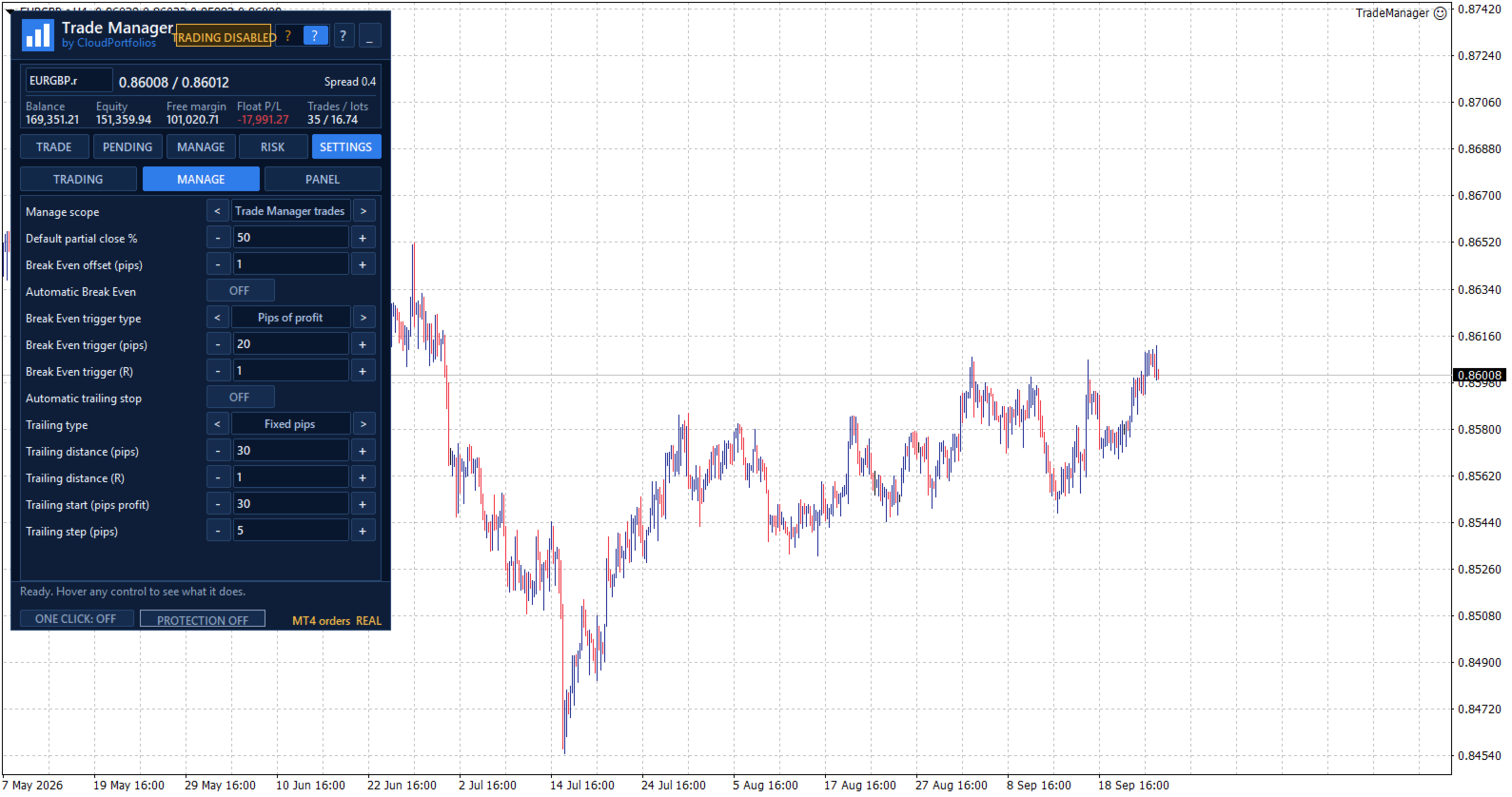
Manual and automatic Break Even

Move the Stop Loss to the entry price plus a configurable offset in the profit direction.

Break Even can be applied manually or activated automatically using:

  • Profit reached in pips.
  • A multiple of the initial risk, such as 1R.

Before modifying the position, Trade Manager checks that the price has moved far enough and that the new level complies with the broker’s restrictions.

Automatic trailing stop

The trailing stop can use:

  • A fixed distance in pips.
  • A distance based on a multiple of the initial risk.

You can also configure:

  • The minimum profit required to start trailing.
  • The minimum improvement step before modifying the Stop Loss again.

The trailing stop never increases the existing risk. The Stop Loss only moves in a favorable direction.

Partial closes

Reduce position exposure using:

  • 25%.
  • 50%.
  • 75%.
  • A custom percentage between 1% and 99%.

Trade Manager adjusts the closing volume to the broker’s minimum and permitted lot step. It also checks that the remaining volume will still be valid.

Controlled Reverse

The Reverse function:

  1. Closes the original position.
  2. Waits until the close is confirmed.
  3. Opens the opposite direction with the same volume.
  4. Preserves the original Stop Loss and Take Profit distances.

If the close cannot be confirmed, the opposite position is not opened automatically.

Fast group closing

Close positions using different filters:

  • Selected positions.
  • Current symbol.
  • All BUY positions.
  • All SELL positions.
  • Winning positions.
  • Losing positions.
  • Every position within the management scope.

Actions affecting several positions are processed progressively to avoid sending all requests to the server simultaneously.

PANIC mode

PANIC is designed to remove all exposure within the configured management scope:

  • It closes all included positions.
  • It deletes all included pending orders.
  • It checks afterward that no residual exposure remains.

This action requires two confirmation steps to reduce the risk of accidental activation.

Configurable management scope

Choose exactly which trades Trade Manager is allowed to control:

  • Trades identified by its Magic Number.
  • Trades on the current symbol.
  • All trades in the account.

The selected scope applies to:

  • Break Even.
  • Trailing stop.
  • Partial closes.
  • Reverse.
  • Group closing.
  • Pending order management.
  • Account Protection closing actions.

This makes it possible to keep different strategies separate or deliberately extend control when required.

Global risk overview

The RISK section displays:

  • Monetary risk of positions with a Stop Loss.
  • Potential risk of pending orders with an SL.
  • Risk as a percentage of balance or equity.
  • Positions without a Stop Loss.
  • Pending orders without a Stop Loss.
  • Total open volume.
  • Total pending volume.

Trades without an SL are not treated as having zero risk. They are shown as unlimited exposure through a dedicated warning.

Equity-based daily result

Trade Manager calculates the daily result using a persistent equity baseline and displays:

  • Realized result.
  • Change in floating result since the baseline.
  • Total result.
  • Deposits and withdrawals excluded from the trading result.

If the program is started for the first time during the trading day, the panel clearly identifies that moment as the baseline instead of presenting the result as if it covered the period since midnight.

When the available account history cannot verify balance operations reliably, the daily protection rules remain disabled to avoid acting on incomplete information.

Account Protection

Account Protection is disabled by default and must be enabled explicitly.

It allows you to define:

  • Maximum daily loss in percentage or money.
  • Daily profit target in percentage or money.
  • Maximum total risk.
  • Maximum number of positions and pending orders.
  • Maximum total volume, including pending orders.

When the daily loss or profit target is reached, you can choose to:

  • Block new trades.
  • Close trades within the management scope and delete their pending orders.
  • Block new trades and close the exposure.

The daily lock remains active until the next server day and persists after restarting MetaTrader. It can also be manually overridden for the current day through an explicit confirmation.

The panel displays a warning state when the loss reaches 80% of the configured daily limit.

Protection metrics are calculated using the entire account. Closing actions respect the selected management scope.

Limits before adding exposure

Account Protection can prevent a new trade when it would:

  • Exceed the permitted total risk.
  • Exceed the maximum number of trades.
  • Exceed the configured total volume.
  • Add exposure without a Stop Loss while the total-risk limit is active.
  • Add exposure to an account containing positions without an SL, where total risk cannot be measured.

These limits are checked before the order is submitted.

Symbol information

View the broker’s symbol specifications directly in the panel:

  • Bid, Ask, and spread.
  • Digits and pip size.
  • Tick size and tick value.
  • Contract size.
  • Long and short swap.
  • Minimum and maximum lot.
  • Volume step.
  • Stop level and freeze level.
  • Estimated margin for one lot.
  • Market status.
  • Trading permissions.
  • Account type.

All calculations adapt to these broker-provided properties instead of relying only on the symbol name.

Execution safety and confirmations

Trade Manager includes several operational safeguards:

  • One Click disabled by default.
  • Detailed confirmation before every order.
  • Configurable confirmations for sensitive actions.
  • Two-step confirmation for Close All and PANIC.
  • Double-click protection.
  • Tracking of executions awaiting confirmation.
  • Identification of partial executions.
  • Temporary blocking of new entries when an execution result is uncertain.
  • Visible connection, market, and trading status.
  • Panel messages and warnings.

If an execution remains unconfirmed, Trade Manager avoids sending it again automatically and asks the user to check the account before unlocking new orders.

Chart-integrated interface

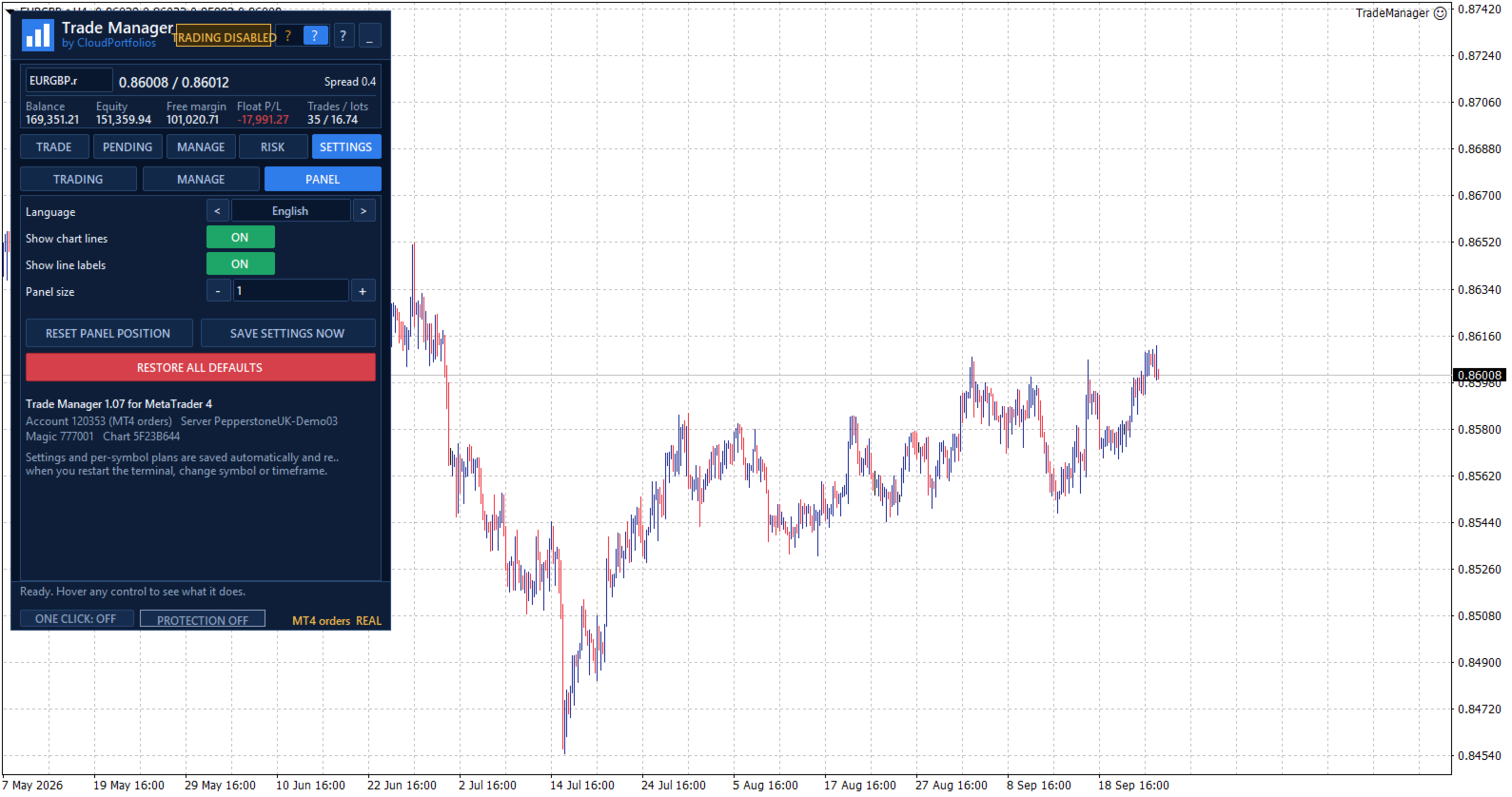
The interface is organized into five main sections:

  • TRADE: plan and execute market orders.
  • PENDING: create and manage pending orders.
  • MANAGE: control open positions.
  • RISK: monitor exposure, daily results, protection, and symbol information.
  • SETTINGS: configure trading behavior, automation, and visual options.

The panel also provides:

  • Dark and light themes.
  • Adjustable size.
  • Draggable position.
  • Minimized view.
  • Symbol switching from the panel.
  • Contextual help for every control.
  • Connection and market status indicators.
  • Visible real or demo account identification.
  • English, Spanish, Italian, and French.

Persistent settings and trade plans

Trade Manager automatically saves:

  • Trading settings.
  • Visual theme.
  • Panel position and state.
  • Magic Number and order comment.
  • Break Even and trailing rules.
  • Account Protection configuration.
  • Individual plans for each symbol.
  • Initial-risk memory for managed positions.

The configuration is restored after restarting MetaTrader, and each symbol’s plan is recovered when returning to it.

Key features

✓ Manual trading from the chart
✓ Lot calculation by percentage, money, or manual volume
✓ Risk basis selectable between balance and equity
✓ Stop Loss and Take Profit by price or pips
✓ Draggable Entry, SL, and TP lines
✓ Take Profit based on R:R
✓ Risk, profit, and margin information before execution
✓ Market BUY and SELL orders
✓ Buy Limit, Sell Limit, Buy Stop, and Sell Stop
✓ Pending order modification and cancellation
✓ Management by Magic Number, symbol, or entire account
✓ Multi-symbol open-position table
✓ Manual SL and TP modification
✓ Manual and automatic Break Even
✓ Break Even triggered by pips or R multiples
✓ Trailing stop based on pips or initial risk
✓ Configurable partial closes
✓ Reverse with equivalent volume and SL/TP distances
✓ Close selected, BUY, SELL, winning, or losing positions
✓ Close All and PANIC mode
✓ Account-wide open and pending risk
✓ Identification of exposure without a Stop Loss
✓ Equity-based daily result
✓ Daily and exposure limits
✓ Optional One Click trading
✓ Dark and light themes
✓ Four interface languages
✓ Automatic saving of settings and symbol plans

Trade Manager turns manual trading into a clearer process: define the trade, review its impact, and manage it from the same panel.

You remain in control of every entry while reducing repetitive calculations, centralizing trade management, and applying your risk rules more consistently.

Important: automatic Break Even, trailing stop, and account protection functions require Trade Manager to remain running and MetaTrader to stay connected to the broker.

おすすめのプロダクト
A small trading panel makes it easier for a trader to visually place pending orders, market,  as well as trailing and unloading the grid of orders.  It is installed as a regular adviser.   Parameters and description:   Lot Volume: 100 - in this field you can set, change the order volume at any time   Line UP - visual horizontal level for pending BuyStop and SellLimit orders   Line DN - visual horizontal level for BuyLimit and SellStop pending orders   Delete Lines - delete all lines from t
FREE
Kiwi Grid Trade Manager MT4 — Manual Grid & Smart Basket Management Utility Kiwi Grid Trade Manager MT4 is a free MetaTrader 4 utility designed to help traders manage manual positions using an automated grid and basket-management system. The concept is simple: You choose the first trade. Kiwi manages the grid. Open a manual BUY or SELL position on the chart and the utility can monitor that position, add additional grid orders according to your selected settings, calculate the combined basket bre
FREE
INFOPadはMetaTrader 4ターミナルで選択された通貨ペアに関する情報を作成する情報パネルです。 この指標には5つの機能があります。 選択したシンボルの主および主な情報を表示します。売値、スプレッド、ストップレベル、スワップ、ティック値、コミッション価格。 SL目標とTP目標(確立されたストップロスとテイクプロフィットのポイント数、ドル額)の将来の目標を示します。 今日、週、月、年、選択した通貨の総利益などの期間に受け取った利益が表示されます。 それは現在のオープンポジション、そのロット(ボリューム)、ポジション数、ポイントでのポジションの利益、ドル、パーセントを表示します。 オープンディールのチャートに追加情報を表示します。それはストップロスを示し、利益レベルとこれらのストップレベルの目標を取ります。 トランザクションがシンボルに対して開かれたとき、トランザクションが閉じられたとき、トランザクションが変更されたときに、ログファイルに情報を書き込みます。 取引の開始時、取引の終了時、取引の変更時にサウンドファイルを再生します。 トランザクションを開くとき、トランザクション
FREE
Auto Close is an expert advisor that can assist you with your money and risk management rules. The EA can monitor your Balance, Equity, Margin, Global Profit and Global Loss and alert you in case any of these reaches a specified threshold. This Demo Version has Notification and Close features disabled, full version can be found https://www.mql5.com/en/market/product/29141 How does it work? Load the Auto Close EA in the chart and set the parameters you want to keep monitored. If any of the risk
FREE
Risk Control Trade Panel  is designed to assist in one-click trading. This tool can automatically calculate the trading lots based on the set risk money, the recommended StopLoss and the recommended TakeProfit. In the information menu, you can view indicators such as the weekly price range and the monthly price range. Followings are highlight features Lotsize is automatically calculated based on the risk money set by the user. The recommended stoploss and recommended takeprofit are automaticall
Trading Panel - Smart Stop Management A free professional trading panel for MT4, built to make manual execution faster, cleaner, and smarter. Trading Panel - Smart Stop Management helps you place Market, Limit, and Stop orders directly from the chart, manage position size, calculate TP/SL from volatility, and protect your execution from temporary spread widening during news, rollovers, or thin market conditions. The panel uses local smart stop logic based on the middle price, helping reduce
FREE
Auto SL TP
Henry Lee Taylor
3.6 (5)
Number one rule to investing is to protect your capital. Never worry about trading without stop loss or take profit with Auto S/L T/P. Auto S/L T/P will automatically  add your preset default stop loss and take profit to any order on the chart it's installed. Be sure to enable auto trading in order for the EA to work. Entering a trade on the go from your mobile is breeze with Auto S/L T/P running on the chart on your desktop. Just enter a trade and your default stop loss and take profit will be
FREE
Order Assistant is a easy to use trading utility designed to make trade planning, risk management, and order execution simple, fast, and intuitive. The entire interface is built around one principle: keep trading simple and clear . Instead of a complicated trading panel filled with unnecessary information and settings, Order Assistant provides the essential tools in a clean and easy-to-use interface. The goal is to let traders focus on the trade itself rather than managing the platform. Simple a
FREE
News Scalping Executor Pro is an utility which helps to trade high impact and huge volatility   news . This utility helps to create two opposite orders with risk management and profit protection. It moves automatically stop loss level to avoid losses as much as possible by using many different algorithms. It helps to avoid trading the news if spread suddenly becomes very huge. It can lock profit by moving stop loss or partially closing of orders. To be profitable with this type of trading you
MerkaStudent is a basic version of an expert advisor that allows us to understand part of the behavior of a chart in historical time. It uses some basic parameters in trading, which allows us to understand mathematically how a chart moves and thus know what is our mathematical expectation in the historical period analyzed. Starting from a mathematical logic, we can create a strategy to evaluate its results.
FREE
Basic Theme Builder
Mehran Sepah Mansoor
5 (1)
Basic Theme Builder: チャートカスタマイズを簡単に Basic Theme Builder   インジケーターで、MetaTrader 4     のチャート外観のカスタマイズをシンプルに変革しましょう。この直感的なインジケーターは、使いやすいパネルを提供し、さまざまなテーマやカラースキームを簡単に切り替えることができます。これにより、取引環境の視覚的な魅力と機能性が向上します。 Free MT5 version Basic Theme Builder   インジケーターは、MetaTrader 4 のチャートを簡単にパーソナライズしたいトレーダーに最適なツールです。シンプルなパネルインターフェースとさまざまなテーマプリセットを使用して、取引スタイルや気分に合わせてチャートの外観をすぐに調整できます。クラシックなルックからモダンな美学まで、多彩なオプションを提供する   Basic Theme Builder   で、視覚体験を最適化しましょう。 主な機能: 簡単なテーマ管理:   便利なパネルインターフェースを使用して、ワンクリックでチャートのテーマを素早く変更
FREE
MQLTA Show Magic Numbers
MQL4 Trading Automation
4.14 (7)
The panel displays the list of all orders (market and pending) along with their details, including magic numbers and commentaries. The panel can be moved around the chart. For market orders, the profit listed includes the associated commission and swaps. There aren't any important input parameters, but you can control the panel's initial location via them.
FREE
MQLTA Auto Close
MQL4 Trading Automation
5 (4)
Auto Close is an expert advisor that can assist you with your money and risk management rules. The EA can monitor your Balance, Equity, Margin, Global Profit and Global Loss and alert you in case any of these reaches a specified threshold. Free version with limited features can be found https://www.mql5.com/en/market/product/29179 How does it work Load the Auto Close EA in the chart and set the parameters you want to keep monitored. If any of the risk management parameters is met you can be not
FREE
Utility for order reversal. Closes orders on the chart on which it is launched and opens orders with the opposite direction instead of them. Has a simple and intuitive graphical interface. It is also possible to automatically reverse newly opened orders. MT5 version of the utility -  https://www.mql5.com/en/market/product/74770 If you like this utility, take a look at my other products -   https://www.mql5.com/en/users/nina_yermolenko/seller
FREE
Signalator Trade Summary Panel MT4 is a free local MetaTrader 4 utility that gives traders a clear account and open-trade overview directly on the chart. The standard Trade tab shows individual positions, but it can be difficult to quickly understand the whole account situation when several trades or symbols are open. This panel summarizes the most important information in one compact dashboard. The panel shows current floating profit or loss, floating P/L as a percentage of account balance,
FREE
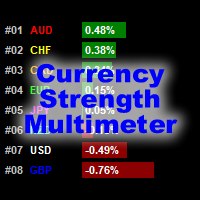
通貨強度マルチメーターインジケーターは、以下の各通貨の強度、方向、ランクを示します。 AUD CAD CHF EUR GBP JPY NZD USD さらに、次の各通貨ペアの強さ、方向、ランクも表示されます。 AUDCAD AUDCHF AUDJPY AUDNZD AUDUSD CADCHF CADJPY CHFJPY EURAUD EURCAD EURCHF EURGBP EURJPY EURNZD EURUSD GBPAUD GBPCAD GBPCHF GBPJPY GBPNZD GBPUSD NZDCAD NZDCHF NZDJPY NZDUSD USDCAD USDCHF USDJPY インジケーターは、任意のチャートおよび任意の時間枠で機能します。各通貨と通貨ペアの強さ、方向、ランクデータは、インジケーターバッファーを通じてアクセスできます。チャートにインジケーターをドロップしてすべての情報を表示するか、インジケーターを設定して、それが表示されている特定のチャートの通貨と通貨ペアのみを表示することができます。 データは、通貨と通貨ペアの横棒グラフとして表示されます。また、
FREE
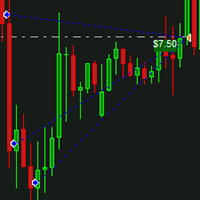
IceFX DrawProfit indicator can efficiently help those traders who want to see on the chart all closed positions output: profit or loss. If you set DrawProfit on your chart managed by an Expert Advisor (EA), you will clearly see its performance by its profits & losses. Main Features: Draws closed order lines Draws profit/loss of closed orders in currency Sums orders by candles MagicNumber filter for EAs Comment filter Input parameters: ShowProfitLabels : show profit of orders with a label Profi
FREE
This simple but useful script calculates the lot in % of the deposit. It is indispensable for risk management. There is only one customizable parameter: MaxRisk - risk in % for lot calculation. The product works as a standard script. Launch it once on an appropriate chart and start trading using the calculated lot value. Genious is simplicity! Happy trading!
FREE
This is a free demo version for USDJPY only. Here is the link to full version: https://www.mql5.com/en/market/product/25912 This product has no input parameters. The product helps you to open and close orders faster, include instant and pending orders. It helps you to open order faster and easier, to make an order you simply click on the button. Buttons List BUY/SELL: to open instant Buy or Sell orders. BUY STOP/BUY LIMIT/SELL STOP/SELL LIMIT: to open pending order. The distance to the current
FREE
Account Info EA It is a tool that presents on the graph all the positions of the account, and specific information concerning the positions, but also the account. It enables the user to have an image of his account at a glance. Use like any expert advisor. You can't attach it in the same chart with other expert advisor. It does not have the ability to open or manage positions. You can attach it on any chart and any timeframe.
FREE
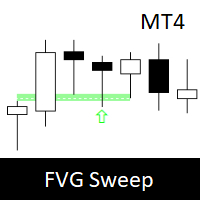
Fair Value Gap Sweep is a unique and powerful indicator that draws fair value gaps on your chart and alerts you when a gap has been swept by the price. A fair value gap is a price gap that occurs when the market opens at a different level than the previous close, creating an imbalance between buyers and sellers. A gap sweep is when the price moves back to fill the gap, indicating a change in market sentiment and a potential trading opportunity. Fair Value Gap Sweep indicator has the following
FREE
This is a fully functional evaluation version for working on "CADCHF". Full version - Risk Controller If there are active deals on the account when the robot is launched, then all of them except CADCHF will be closed! Risk controller is a tool allowing you to automatically control orders, losses and emotionally motivated actions. Main advantages Limitation of the total account loss. When the MinimalDepo value is reached, any trade will be closed. Limitation of losses per day. Limitation of los
FREE
CloseDeleteEA
Nikolaos Pantzos
3.5 (2)
This Expert Advisor closes all open positions and pending orders. It is possible to close only buy or sale orders, market or pending orders, positions with profit or loss. You can to get source code from here . Parameters CloseAllBuy - close buy positions. CloseAllSell - close sell positions. CloseMarketOrders - close market orders. DeletePendingOrders - delete pending orders. CloseOnlyProfit - close only profitable orders. CloseOnlyLoss - close only loss-making orders. ClearChart - clear the
FREE
Account Cash Status This indicator shows actual account balance and equity. Can be placed in any position on chart even in subwindow. Account Balance is displayed in gray color. When there is no opened position the account equity is displayed in dark gray color. When there is opened position and equity value is lower than balance value the color is changed for red. When there is opened position and equity value outperforms balance value the color is changed for lime. Colors may be set freely by
FREE
AQ RiskOptimizer
HIT HYPERTECH INNOVATIONS LTD
5 (1)
Risk Optimizer is the absolute solution for applying risk management on your account. Bad risk management is the main reason that causes traders to lose money. Risk Optimizer calculates and suggests the correct lot size for each position according to your personal, customized risk profile. You can give directly your preferred risk as percentage (%) for each position or you can trust our algorithms to calculate and optimize according to your risk category selection. But it is not only that! Selec
FREE
This indicator is designed to provide all useful information about symbol, account, positions and profit. It is developed for improving trader's money management. Parameters Calc can be divided to separate blocks. Each block is possible to hide, set its own color and other properties. Block symbol: This block displays information about actual SPREAD, POINT VALUE (in deposit currency for 1 lot), SWAP LONG and SHORT. Show symbol info - display/hide this block Color of symbol info - color of this
FREE
This EA creates two buttons in a panel that you can drag to any part of the chart (simply click on the panel and drag with the mouse to the part of the chart you want) with which you can close all the open operations in the account with a simple click, or close only the trades that are currently in profit. Check out my new trade dashboard assistant :  Simple and Easy MT4 Trade Panel Tell me if you like the product and how it could be improved, Thanks :) 
FREE
バー閉店までのカウントダウンタイマー、+ 進捗状況 %:  #1 多機能ユーティリティ :   66+ の機能を含むこのツール  |   質問があれば私に連絡  してください   |    MT5 バージョン インジケーターの設定で、以下の項目を調整できます: 計算用の時間枠; true / false: より高い時間枠オプション(現在使用中の次のもの:M15->M30, H4->D1...) 位置: 1 = 左下隅; 2 = 右下隅; 3 = 左上隅; 4 = 右上隅; フォントサイズ; 色; フォントスタイル; #1 多機能ユーティリティ :   66+ の機能を含むこのツール  |   質問があれば私に連絡  してください   |    MT5 バージョン #1 多機能ユーティリティ :   66+ の機能を含むこのツール  |   質問があれば私に連絡  してください   |    MT5 バージョン
FREE
Lot by Risk
Sergey Vasilev
4.83 (23)
Lot by Risk tradingパネルは、手動取引用に設計されています。 これは、注文を送信するための代替手段です。 パネルの最初の特徴は、管理線を使用した注文の便利な配置です。 第二の特徴は、ストップロスラインの存在下で与えられたリスクのための取引量の計算です。 制御線はホットキーを使用して設定されます: 利益を取る-デフォルトではTキー; 価格-デフォルトではPキー; ストップロス-デフォルトでは、Sキー; 取引パネルの設定で自分でキーを設定できます。 操作のアルゴリズム: 1)-レベルを希望の場所に配置します(すべてのレベルを配置する必要はありません); 2)-リスクを指定します(オプション); 3)-緑の送信注文ボタンをクリックします; 4)-注文が行われるのを待っているか、エラーメッセージ付きのアラートが表示されます; 5)-マジックでExpert Advisorにリンクされている現在のシンボルのすべての注文を閉じる場合は、注文を閉じるボタンをクリックします。 注文を送信ボタンを何度も押すべきではありません。 一度で十分です。 注文後、ボタンは「
FREE
PositionClose|MT4 ポジション一括決済スクリプト PositionCloseは、MetaTrader 4(MT4)上で稼働するユーティリティスクリプトです。 全ての保有ポジションをワンクリックで一括決済 できるだけでなく、「買いポジションのみ」「売りポジションのみ」の選択的決済もサポートします。急激な相場変動や重要経済指標の発表時など、 迅速なリスク回避やポジション整理が必要な場面で特に活躍 します。裁量トレードだけでなく、自動売買(EA)運用時の緊急手動決済や、デモ環境でのトレード検証など幅広く利用できます。 主な機能と特長 ワンクリックで全ポジションを一括決済 保有しているすべてのポジションを瞬時に決済。複数通貨・複数ポジションでも対応可能です。 買い/売りポジションのみの個別決済 「買いだけ」「売りだけ」といった片側だけの一括決済も選択できます。ヘッジや戦略変更時にも便利です。 2段階確認ダイアログで誤操作防止 実行前に決済内容の確認メッセージを2回表示し、誤操作による意図しない全決済を防ぎます。 エラー発生時の詳細ログ出力 決済が失敗した場合は、原因やエ
FREE
このプロダクトを購入した人は以下も購入しています
Trade Manager EAへようこそ。これは、取引をより直感的、正確、そして効率的にするために設計された究極の リスク管理ツール です。これは単なるオーダー実行ツールではなく、包括的な取引計画、ポジション管理、リスク管理のためのソリューションです。初心者から上級者、迅速な実行を必要とするスキャルパーまで、Trade Manager EAはあらゆるニーズに対応し、為替、指数、商品、暗号通貨などさまざまな市場で柔軟に対応します。 Trade Manager EAを使用すると、複雑な計算が過去のものになります。市場を分析し、エントリーポイント、ストップロス、テイクプロフィットのレベルをチャート上のラインでマークし、リスクを設定するだけで、Trade Managerが最適なポジションサイズを即座に計算し、SLとTPをピップ、ポイント、口座通貨でリアルタイムに表示します。すべての取引が簡単かつ効果的に管理されます。 主な機能: ポジションサイズ計算機 :定義されたリスクに基づいて取引サイズを瞬時に決定します。 簡単な取引計画 :エントリー、ストップロス、テイクプロフィットを設定するためのド
Trade Indicator Assistant is a powerful MT4 utility designed to turn indicators into automated trading systems. Its main feature is the ability to automatically detect an indicator’s   BUY and SELL signal buffers , without requiring you to know the buffer numbers, search through indicator settings, or modify the indicator source code. Bonus Indicator: After purchasing Trade Indicator Assistant, contact me to receive Trade Signal Pro completely free as a bonus indicator. [Download Demo Version]
Local Trade Copier EA MT4
Juvenille Emperor Limited
4.96 (112)
Local Trade Copier EA MT4 は、同一の Windows PC または Windows VPS 上で稼働する複数の MetaTrader 4 口座間で、取引をコピーおよび管理するための高速で柔軟なトレードコピーツールです。 ローカルでの取引同期に加え、Receiver 側でロットサイズ、リスク管理、取引フィルター、シンボルマッピング、取引管理、口座保護を個別に設定できます。 Transmitter と Receiver のターミナルは約 1分 で設定でき、同一ブローカーまたは異なるブローカーの口座間で、手動取引や EA による取引をコピーできます。適切な条件下では、ローカルの MetaTrader ターミナル間で取引情報を 0.5秒未満 で同期できます。実際の約定速度は、ブローカーのレイテンシー、ネットワーク状況、PC/VPS の性能、ターミナルの負荷によって異なります。 ご購入前に無料デモをお試しください Local Trade Copier EA MT4 の完全機能版無料デモ を、MT4 デモ口座で 1回につき4時間 テストできます。 Local Trad
Telegram to MT4 Multi-Channel Copier   は、Telegram チャンネルのトレードシグナルを MetaTrader 4 へ自動コピーします。ボット不要、ブラウザ拡張不要、手動コピー不要。Telegram にシグナルが届くと、EA が数秒であなたのターミナルに注文を出します。 さらに、チャンネルをコピーする前に、内蔵バックテスターでそのチャンネルがあなたの口座でどう動いたかを確認できます。 製品は 2 つのコンポーネントで構成されます:Telegram チャンネルを監視する Windows アプリと、MT4 ターミナルでシグナルを執行する本 EA です。MT5 版もあります   こちら . セットアップガイドとアプリのダウンロード:   https://www.mql5.com/en/blogs/post/768988 現在の価格は今後値上げされます。 仕組み アプリはあなた自身の Telegram アカウントで接続するため、フォローしているすべてのチャンネル、グループ、トピック、ボット(プライベートや VIP を含む)を見ることができます。シグナル
Trade Assistant MT4
Evgeniy Kravchenko
4.43 (197)
取引 ごとのリスクの 計算、新規注文 の 簡単 な 設置、部分的 な 決済機能 を 持 つ 注文管理、 7 種類 のトレーリングストップなど 、便利 な 機能 を 備 えています 。 追加の資料と説明書 インストール手順 - アプリケーションの手順 - デモアカウント用アプリケーションの試用版 ライン機能 チャート上にオープニングライン、ストップロス、テイクプロフィットを表示します。この機能により、新規注文を簡単に設定することができ、注文を出す前にその特徴を確認することができます。   リスク計算 リスク計算機能は、設定されたリスクとストップロス注文のサイズを考慮して、新規注文のボリュームを計算します。ストップロスの大きさを自由に設定できると同時に、設定したリスクを守ることができます。 Lot calc ボタン - リスク 計算 を 有効 / 無効 にします 。 Risk フィールドでは 、必要 なリスクの 値 を 0 から 100 までのパーセンテージまたは 預金通貨 で 設定 します 。 設定」 タブで 、 リスク 計算 の 種類 を 選択 します :「 $ 通貨」、「 % 残
Exp COPYLOT CLIENT for MT4
Vladislav Andruschenko
4.69 (65)
MetaTrader 4向け 高機能トレードコピーソフト MetaTrader 4 用の、高速・安定・高機能なトレードコピーソフトです。 COPYLOT は、 MetaTrader 4 と MetaTrader 5 間でFX取引をコピーでき、さまざまな口座タイプや運用スタイルに合わせて柔軟に同期できます。 COPYLOT MT4版の対応コピー方式: MetaTrader 4 → MetaTrader 4 MetaTrader 5 Hedge → MetaTrader 4 MetaTrader 5 Netting → MetaTrader 4   MT5版 詳細説明 + DEMO + PDF 購入方法 インストール方法 ログファイルの取得方法 テストと最適化の方法 Expforexの全製品 MetaTrader 5版 を使えば、 MetaTrader 5 → MetaTrader 5 および MetaTrader 4 → MetaTrader 5 のコピーにも対応します: COPYLOT CLIENT for MT5 COPYLOT は、2台、3台、さらには10台規模のターミナル環境でも
MT4 to Telegram Signal Provider は使いやすく、完全にカスタマイズ可能なツールで、Telegramに信号を送信し、あなたのアカウントを信号提供者に変えることができます。 メッセージのフォーマットは 完全にカスタマイズ可能です! しかし、簡単な使用のために、あらかじめ定義されたテンプレートを選択し、メッセージの特定の部分を有効または無効にすることもできます。 [ デモ ]   [ マニュアル ] [ MT5バージョン ] [ Discordバージョン ] [ Telegramチャンネル ]  New: [ Telegram To MT5 ] セットアップ ステップバイステップの ユーザーガイド が利用可能です。 Telegram APIの知識は必要ありません。開発者が必要なものをすべて提供します。 主要機能 購読者に送信される注文の詳細をカスタマイズする機能 例えばブロンズ、シルバー、ゴールドなど、階層型のサブスクリプションモデルを作成できます。ゴールドサブスクリプションでは、すべての信号が得られますなど。 ID、シンボル、またはコメントによる注文のフ
Take a Break pauses your Expert Advisors when trading is a bad idea: before news, after a daily loss, outside your trading hours, or when a rule you wrote yourself says so. When the pause is over, your EAs simply continue. Account protection for all your EAs in one tool: news filter, drawdown and equity protection, time filter and custom rules. One EA on one chart protects the whole account, the free indicator gives every chart its own rules on top. Free demo | What is new in 26.09 | Support Ass
VirtualTradePad mt4 Extra
Vladislav Andruschenko
4.85 (61)
ワンクリックで取引できるトレーディングパネル。ポジションと注文の操作!チャートまたはキーボードから取引。 手動取引用の取引パネル。チャート(チャートウィンドウ)またはキーボードから取引できます。開閉、リバース、ロックポジションと注文を処理する МetaТrader4のメインオーダーのトレーディングコントロールパネル:売買、売却、売却、売却、売却、閉じる、削除、修正、トレーリングストップ、ストップロス、takeproft 新しいプレミアム版が利用可能です: VirtualTradePad PRO SE   で取引ワークフローを強化できます。 MetaTrader 5   と   MetaTrader 4   に対応した次世代のプロ向け取引パネルです。 MT5のバージョン 完全な説明 +DEMO +PDF 購入する方法 インストールする方法    ログファイルの取得方法    テストと最適化の方法    Expforex のすべての製品 シンボルウィンドウからの取引とキーボードからの取引! あなたはMetaTrader 4ターミナル - バーチャルコントロールパネルVirtualTr
Smart Copy Local MT4
Kyra Nickaline Watson-gordon
5 (7)
Smart Copy is an Easy-to-Use EA that supports Multi Copying Metatrader4 and Metatrader5 and Local/Remote Copying. (Remote Version is coming soon) Free version is available on Smart Copy Local Free MT4 Specifications :     Real Time, Multi Terminal - Multi Account - MT4/MT5 trade copying     Copy from netting to hedge and hedge to netting is supported.     Fast and instant copy     All settings are input visually.     Easy modifying symbol names, prefix, suffix     Enable/Disable copying s
Want automatically to put the pending order, take profit and stop loss? This EA will do it on your behalf! The Fibo Heart EA strategy will place limit order after the ‘check point’ breakout. The position will be triggered when the price make a successful retest. If not, the pending order will automatically deleted after price hit certain level. You also have option to enable market order (instant execution) and custom take profit in the inputs setting. This EA must be attached with Fibo Heart In
無料トライアル版ダウンロード Copy Cat More (コピーキャット・モア) MT4 トレードコピー (Trade Copier) は単なるローカルのトレードコピーではありません。今日のトレード課題のために設計された 完全なリスク管理・執行フレームワーク (risk management and execution framework) です。プロップファーム (prop firm) のチャレンジから個人のポートフォリオ管理まで、堅牢な執行、資金保護、柔軟な設定、高度なトレード処理の組み合わせによって、あらゆる状況に適応します。 このコピーは   マスター (Master、送信側) と スレーブ (Slave、受信側)   の両モードで動作し、成行注文・指値注文、トレードの変更、部分決済、そして両建て決済 (Close By) 操作をリアルタイムで同期します。デモ口座と実口座、トレード用ログインと投資家ログインの両方に対応し、永続的トレードメモリ (Persistent Trade Memory) システムにより、EA・端末・VPS が再起動しても復旧を保証します。一意の
TradePanel MT4
Alfiya Fazylova
4.84 (95)
Trade Panelは多機能なトレーディングアシスタントです。アプリには手動取引用の50以上のトレーディング機能が搭載されており、ほとんどの取引作業を自動化することができます。 アプリの説明書+ビデオガイド: https://www.mql5.com/en/blogs/post/772452 デモ口座用アプリの試用版: https://www.mql5.com/en/blogs/post/750865 アプリのインストール方法: https://www.mql5.com/en/blogs/post/756239 アプリをビジュアルモードでテストする方法: https://www.mql5.com/en/blogs/post/770277 VPSのMetaTraderにアプリをインストールする方法: https://www.mql5.com/en/blogs/post/770190 取引。 ワンクリックで取引操作を行うことができます: リスクを自動計算して指値注文やポジションを開く。 複数の注文やポジションをワンクリックで開く。 注文のグリッドを開く。 保留中の注文やポジションをグルー
King Trade Copier MT4
Mohammed Maher Al-sayed Mohammed Ahmed Saleh
5 (1)
King Trade Copier は、同じコンピューターまたは VPS 上で動作する MetaTrader ターミナル同士を接続します。ある口座で建てた取引が、ほかの口座にも現れます。このファイルは両方の役割を備えているため、同じダウンロードでも、Mode に設定した値によって送信側にも受信側にもなります。 各チャートでは、パネルがこのターミナルが送信中か受信中かを表示し、相手側の口座名を示し、応答した受信側の数を数え、最後のシグナルからの経過時間を表示します。コピーされなかった注文は、消えてしまうのではなく、その理由がパネルに残ります。 コピーされる内容 成行注文、新規と決済 指値・逆指値注文:発注、変更、削除 Stop Loss と Take Profit、最初の値とその後のすべての変更 部分決済と追加ボリューム 変更は一つずつ個別に追跡されるため、建値に移動してからトレールされるストップも、注文が建っている間は同じように受信側の口座に届きます。 速度と無人運用 送信側では、スケジュールに基づく定期的な確認は行いません。注文が変わった瞬間に更新が書き込まれ、受信側は 1 ミリ秒
This is a program in the form of an EA that attaches to a chart in MetaTrader 4. Then, by using API from Bittrex, Binance websites, it downloads the history of altcoins. By selecting a pair name, the EA automatically downloads all time frames history (Daily,H12,H4,H2,H1,M30,M15,M5,M3,M1) so there is no need to attach multiple EAs to different charts. You can select one pair from Bittrex and 4 pairs from Binance exchange with one running EA and create up to 15 timeframes for 5 different pairs. Th
コピー機->便利で高速なインターフェースインタラクション、ユーザーはすぐに使用できます     ->>>> WindowsコンピュータまたはVPS Windowsでの使用を推奨 特徴: 多様でパーソナライズされたコピー取引設定:1. 異なるシグナルソースに異なるロットモードを設定できます。2. フォワードコピー取引とリバースコピー取引に異なるシグナルソースを設定できます。3. シグナルはコメントで設定できます。4. 契約ロットに応じてロットを調整するかどうか 多様でパーソナライズされたコピー注文設定2:1.品種ごとに異なるロットモードを設定できます2.順方向コピー注文と逆方向コピー注文に異なる品種を設定できます3.コメントでシグナルを設定できます4.契約ロットに応じてロットを調整するかどうか コメントフィルタリング、MAGICフィルタリング、シグナルロットフィルタリング、ローカル製品フィルタリング 勤務時間設定 逆同期SLAVE終了 注文バインド機能: 任意の注文を設定されたシグナルソース注文にバインドできます (テーブルをダブルクリックして編集します) アカウントリスク管理 基本
News Filter EA: Advanced Algo Trading Assistant News Filter EA is an advanced algo trading assistant designed to enhance your trading experience. By using the   News Filter EA , you can integrate a Forex economic news filter into your existing expert advisor, even if you do not have access to its source code. In addition to the news filter, you can also specify   trading days   and   hours   for your expert. The News Filter EA also includes   risk management   and   equity protection   features
EA Local Trade Copier Pro MT4:究極のDLL不要トレードコピアー 安全でない外部DLLを必要としたり、ターミナルをクラッシュさせたり、「Master」と「Client」の別々のファイルで混乱させるような複雑なトレードコピアーにうんざりしていませんか? EA Local Trade Copier Pro MT4で次世代のトレードコピーを体験してください。最大限の安定性、電光石火の実行速度、そして究極のシンプルさを追求して設計されたこのユーティリティを使用すると、同一のWindows PCまたはVPS上の複数のMetaTraderターミナル間でシームレスにトレードをコピーできます。 複数のプロップファーム(プロップ口座)の管理、シグナルの共有、投資家資金の管理など、いかなる用途でも、EA Local Trade Copier Proは遅延のない完璧な同期を提供します。 LOCAL TRADE COPIER PROの利点(問題解決) 市場に出回っているほとんどのコピアーとは異なり、EA Local Trade Copier Proは100%ネイティブのMQL5コー
高速。正確。革新的。テクノロジー駆動。画期的なX2 Copy MT4で、瞬時のトレードコピーを体験してください。わずか10秒の簡単セットアップで、一台のコンピューターまたはWindows VPS上のMetaTrader端末間でトレードをかつてない速度で同期する強力なツールを手に入れられます。 複数の口座を管理している場合、シグナルに従っている場合、または戦略を拡大している場合でも、X2 Copy MT4は比類のない精度と制御でワークフローに適応します。最もテクノロジー駆動なトレードコピーソリューションで、より速く、より確実に作業できます。無料トライアル版をお試しいただき、お使いのシステムでその速度を体感してください。 *重要:MT5端末での作業には、別途 X2 Copy MT5 バージョンが必要です X2 Copy MT4/5 の設定と機能の説明 | X2 Copy トライアル版のインストール方法 特徴 高速コピー — 0.1秒未満でのトレード転送 すべてのコピータイプをユニバーサルサポート: MT4>MT4, MT4>MT5, MT5>MT4, MT5>MT5 直感的なインターフェー
コピー機->便利で高速なインターフェースインタラクション、ユーザーはすぐに使用できます     ->>>> WindowsコンピュータまたはVPS Windowsでの使用を推奨 基本機能: コピートレードの通常のインタラクション速度は0.5秒未満です。 シグナルソースを自動的に検出し、シグナルソースアカウントのリストを表示します シンボルを自動的に一致させます。異なるプラットフォームでよく使用される取引シンボルの95%(異なるサフィックスなどの特別なケース)が自動的に一致し、基本的に手動設定は必要なく、シンボルマッピングテーブルをダブルクリックして対応するシンボルを変更できます。(マッピングテーブルにはクイック検索シンボル機能があります) 4つのロット計算モード(1. 乗数 2. 固定ロット 3. 適応リスク 4. シグナル 適応リスク ) 特別ロットモード: ストップロス資本リスクに基づいてロットサイズを計算できます (ストップロスが小さすぎる場合や、計算されたロットサイズが大きすぎる場合がありますので、注意して使用してください) 複数のプラットフォーム、複数の信号源(マスター)、複
Trade Dashboard simplifies how you open, manage, and control your trades, with built-in lot size calculation. It allows you to execute trades, manage risk, and control positions directly on the chart, with tools such as partial close, breakeven, and trailing stop. Designed to reduce manual work and help you stay focused on your trading decisions. A demo version is available for testing. Detailed explanations of features are provided within the MQL5 platform. Installation instructions are include
Risk manager Risk manager - it will simplify the tracking of drawdown and will notify you (alert) when the specified risk is reached, and close/lock orders when the critical DD risk level is reached. If the specified drawdown is exceeded, you can choose two options for actions: All orders will be closed that mean loss will be fixed on depo. The terminal also closes. Instead of fixing the loss on depo, the opposite order will be opened - orders locking will occure. Not a single order will be c
The product will copy all telegram signal to MT4   ( which you are member  ) , also it can work as remote copier.  Easy to set up, copy order instant, can work with almost signal formats, image signal, s upport to translate other language to English Work with all type of channel or group, even channel have "Restrict Saving Content", work with  multi channel, multi MT5 Work as remote copier: with signal have ticket number, it will copy exactly via ticket number. Support to backtest signal. How to
Trade Manager は、リスクを自動的に計算しながら、取引を迅速に開始および終了するのに役立ちます。 過剰取引、復讐取引、感情的な取引を防止する機能が含まれています。 取引は自動的に管理され、アカウントのパフォーマンス指標はグラフで視覚化できます。 これらの機能により、このパネルはすべてのマニュアル トレーダーにとって理想的なものとなり、MetaTrader 4 プラットフォームの強化に役立ちます。多言語サポート。 MT5バージョン  |  ユーザーガイド + デモ Trade Manager はストラテジー テスターでは機能しません。 デモについてはユーザーガイドをご覧ください。 危機管理 % または $ に基づくリスクの自動調整 固定ロットサイズを使用するか、ボリュームとピップに基づいた自動ロットサイズ計算を使用するオプション RR、Pips、または価格を使用した損益分岐点ストップロス設定 トレーリングストップロス設定 目標に達したときにすべての取引を自動的に終了するための 1 日あたりの最大損失 (%)。 過度のドローダウンからアカウントを保護し、オーバートレードを防ぎま
This trading panel has been developed for fast and comfortable operation of the financial markets. It is equipped with the necessary functions for manual and semi-automated trading. Due to the presence of the order trailing feature, trailing stop and automatic closure by equity, profit, time. You can use it to automate your trading system. All you have to do is open a position and set the parameters for maintenance, everything else will be handled by the EA. If you want to limit your losses, set
これは視覚的な取引パネルであり、取引を簡単に配置および管理し、人為的エラーを回避し、取引活動を強化するのに役立ちます。使いやすい視覚的なインターフェースと、健全なリスクおよび位置管理アプローチを組み合わせています。 [ インストールガイド | 更新ガイド | トラブルシューティング | よくある質問 | すべての製品 ] 驚くほど使いやすい チャートから簡単に取引 正確なリスク管理との取引、手間のかからない 資本の保存が最優先事項です 気をつけずに利益を上げましょう できるだけ早くリスクのない取引をお楽しみください 開かれているすべての取引の自動トレーリングストップ 最初のストップロスは、取引が行われるとすぐに配置されます EAは、取引を行った後に次のタスクを実行します。 最初のストップロス/テイクプロフィットは自動的に配置されます できるだけ早くフリーライドにロックします(オプション) ストップロスを初めて損益分岐点に移動します(オプション) 停止するまで、希望の方法を使用してストップロスを追跡します その他のクールな機能は次のとおりです。 優れたターミナルアクティビティレポート
Unlimited Trade Copier Pro is a tool to copy trade remotely to multiple MT4, MT5 and cTrader accounts at different computers/locations over internet. This is an ideal solution for you if you are a signal provider and want to copy your trades to other receivers globally on your own rules. One provider can copy trades to multiple receivers and one receiver can get trade from multiple providers as well. The provider can even set the subscription expiry for each receiver, so that receiver will not b
Bar Replay MT4
Hoang The Manh
3.43 (7)
Don't purchase before testing the Demo version first. DEMO version:   https://www.mql5.com/en/market/product/76917 __________________________________________________ This EA  - Tool allow you replay bar in Meta Trader 4 for back test. This Tool can back test in multi timeframe in only one chart. This Tool is very useful for Price action trader. It can work with Indicators, some indicators cannot works. So please download Demo to test before purchase.  Demo Version We do not accept refund in any
Strategy Builder offers an incredible amount of functionality. It combines a trade panel with configurable automation (covert indicators into an EA), real-time statistics (profit & draw down) plus automatic optimization of SL, TP/exit, trading hours, indicator inputs. Multiple indicators can be combined into an single alert/trade signal and can include custom indicators, even if just have ex4 file or purchased from Market. The system is easily configured via a CONFIG button and associated pop-up
手動トレードのための、本格的なトレードパネル。正確なエントリーから口座の保護まで、トレードの全工程をチャート上のひとつのウィンドウで完結させます。設定したリスクに正確に合わせてロット数を計算し、RR Tool でチャートに線を引きながらトレードを組み立て、成行注文・待機注文・Grid・OCO を発注できます。ポジションの管理はパネルが引き受けます。最大5段階の分割決済、6種類のトレーリングストップ、建値、Virtual SL/TP を搭載。日次・週次・月次の上限が資金を守り、上限を超えると自動で作動します。 ガイドと無料の Live デモ 無料の Live デモ版はこちらでご利用いただけます ( Free Live Demo )。 製品の操作ガイドはこちらです ( User Manual )。 NT Trade Manager は、トレーダーの作業の流れ全体を、チャート上のコンパクトなパネルひとつにまとめます。ターミナルのウィンドウを行き来する必要も、エントリーのたびに手計算する必要もありません。自分の意思で手動トレードする人のためのツールです。裁量トレーダーからスキャルパー、スイ
作者のその他のプロダクト
Trading Account Analytics Understand the Real Performance of Your MetaTrader 4 Account Trading Account Analytics transforms your account history into a visual dashboard covering performance, risk, trading costs, funding, and capital evolution. It analyzes closed trades and open positions directly on the chart. It operates exclusively in read-only mode: it never opens, modifies, or closes trades . A Complete View of Your Account The final balance does not always explain how a result was achieved.
Account Risk Guardian A strategy may control every individual trade and still lose control of the account’s total risk. Account Risk Guardian monitors all activity across your account, compares its current state with your predefined limits, and executes the configured response whenever a rule is breached. It does not open trades or generate signals. It works as an independent protection layer that helps you control drawdown, losses, exposure, margin, and trading discipline from a single panel. A
Copy trades between MT4 and MT5 with full control over volume, risk, and execution Managing the same trading activity across multiple terminals should not require you to repeat every opening, reduction, closure, or protection change manually. LocalTradeCopier connects MetaTrader terminals installed on the same computer and supports trade copying in every direction: MetaTrader 4 → MetaTrader 4 MetaTrader 4 → MetaTrader 5 MetaTrader 5 → MetaTrader 4 MetaTrader 5 → MetaTrader 5 Any terminal can ope
Stop checking charts one by one to discover which markets deserve your attention. Multi Market Scanner monitors multiple symbols and timeframes from a single panel, compares their technical conditions, and organizes the results by signal, score, alignment, and freshness. This helps you focus your analysis on the most relevant instruments without wasting time reviewing markets with no clear conditions. It is a market analysis and decision-support tool. It does not open, modify, or close trades: t
Understand the Real Performance of Your MetaTrader Account Trading Account Analytics transforms your account history into a visual dashboard covering performance, risk, trading costs, funding, and capital evolution. It analyzes closed trades and open positions directly on the chart. It operates exclusively in read-only mode: it never opens, modifies, or closes trades . A Complete View of Your Account The final balance does not always explain how a result was achieved. Deposits may be mistaken fo
Account Risk Guardian A strategy may control every individual trade and still lose control of the account’s total risk. Account Risk Guardian monitors all activity across your account, compares its current state with your predefined limits, and executes the configured response whenever a rule is breached. It does not open trades or generate signals. It works as an independent protection layer that helps you control drawdown, losses, exposure, margin, and trading discipline from a single panel. A
Copy trades between MT4 and MT5 with full control over volume, risk, and execution Managing the same trading activity across multiple terminals should not require you to repeat every opening, reduction, closure, or protection change manually. LocalTradeCopier connects MetaTrader terminals installed on the same computer and supports trade copying in every direction: MetaTrader 4 → MetaTrader 4 MetaTrader 4 → MetaTrader 5 MetaTrader 5 → MetaTrader 4 MetaTrader 5 → MetaTrader 5 Any terminal can ope
Plan, execute, and manage your trades from a single panel Calculating lot size, checking risk, setting Stop Loss and Take Profit levels, and managing multiple positions through MetaTrader’s standard windows takes time and can lead to manual errors. Trade Manager brings the entire process into one visual panel on the chart. It helps you prepare each trade, understand its real impact before execution, place orders, and manage exposure using manual tools and automated rules. You decide when to buy
Stop checking charts one by one to discover which markets deserve your attention. Multi Market Scanner monitors multiple symbols and timeframes from a single panel, compares their technical conditions, and organizes the results by signal, score, alignment, and freshness. This helps you focus your analysis on the most relevant instruments without wasting time reviewing markets with no clear conditions. It is a market analysis and decision-support tool. It does not open, modify, or close trades: t
フィルタ:
レビューなし
レビューに返信