Professional SpreadMonitor

  • ユーティリティ
  • Musa Khunarikov
    Musa Khunarikov
    2014年からのプロトレーダー(10年以上の経験)。市場:Forex、株式、MOEX、金属。
    MQL4-MQL5開発者。専門:ボリューム分析、クラスター分析、フットプリント、デルタ、ボリュームプロファイル。
    経験とアプローチ:
    2014年からATASを使用—注文フロー、フットプリント、デルタ、ボリュームプロファイルを分析。大口プレイヤーの論理を理解し、ボリュームに基づく戦略をMQL5で動作するアドバイザーとインジケーターに変換します。トレーダーの言語を話します—「吸収」や「デルタダイバージェンス」が何かを説明する必要はありません。
    サービス:
  • バージョン: 1.0
📊 SpreadMonitor

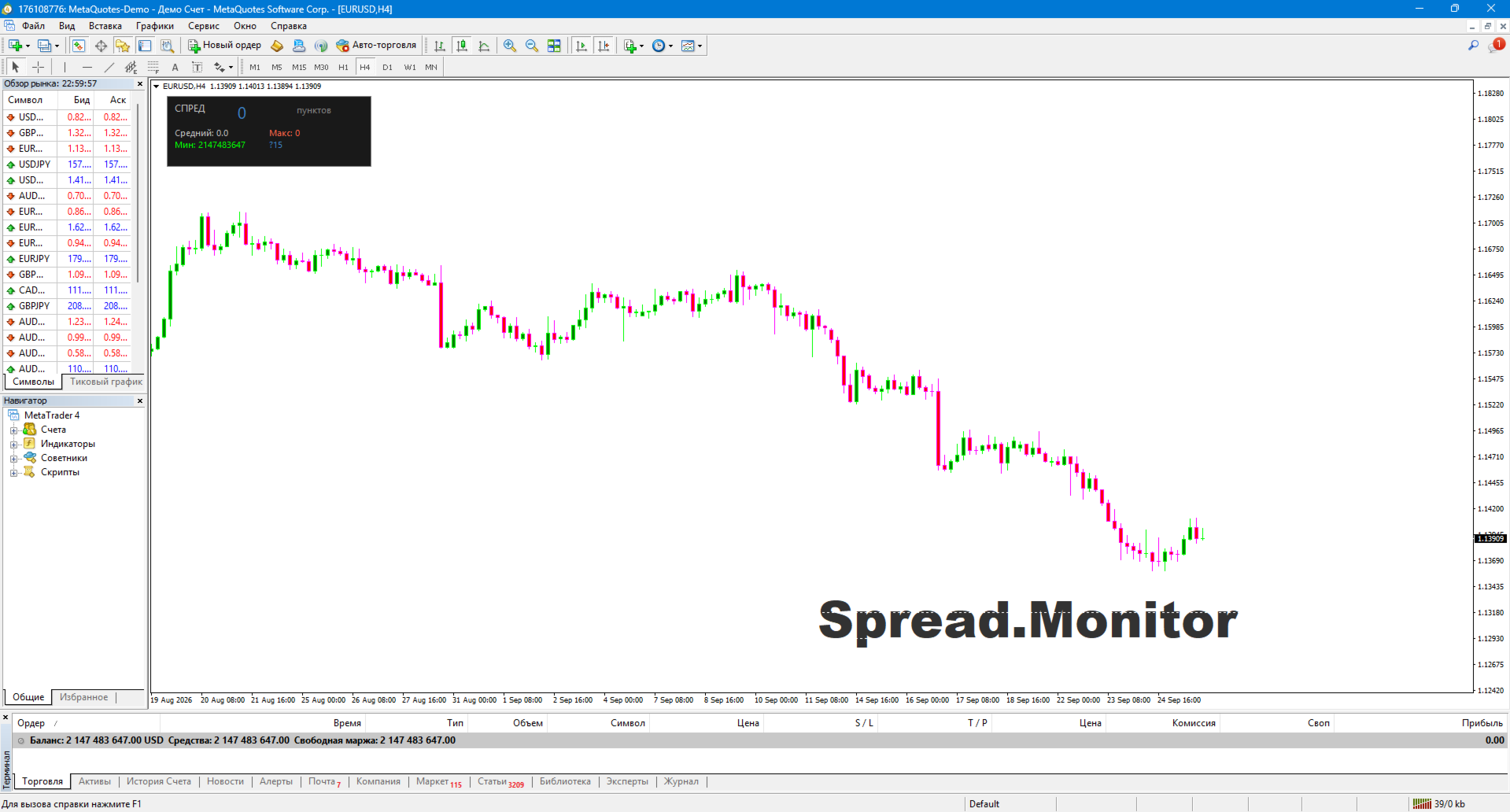
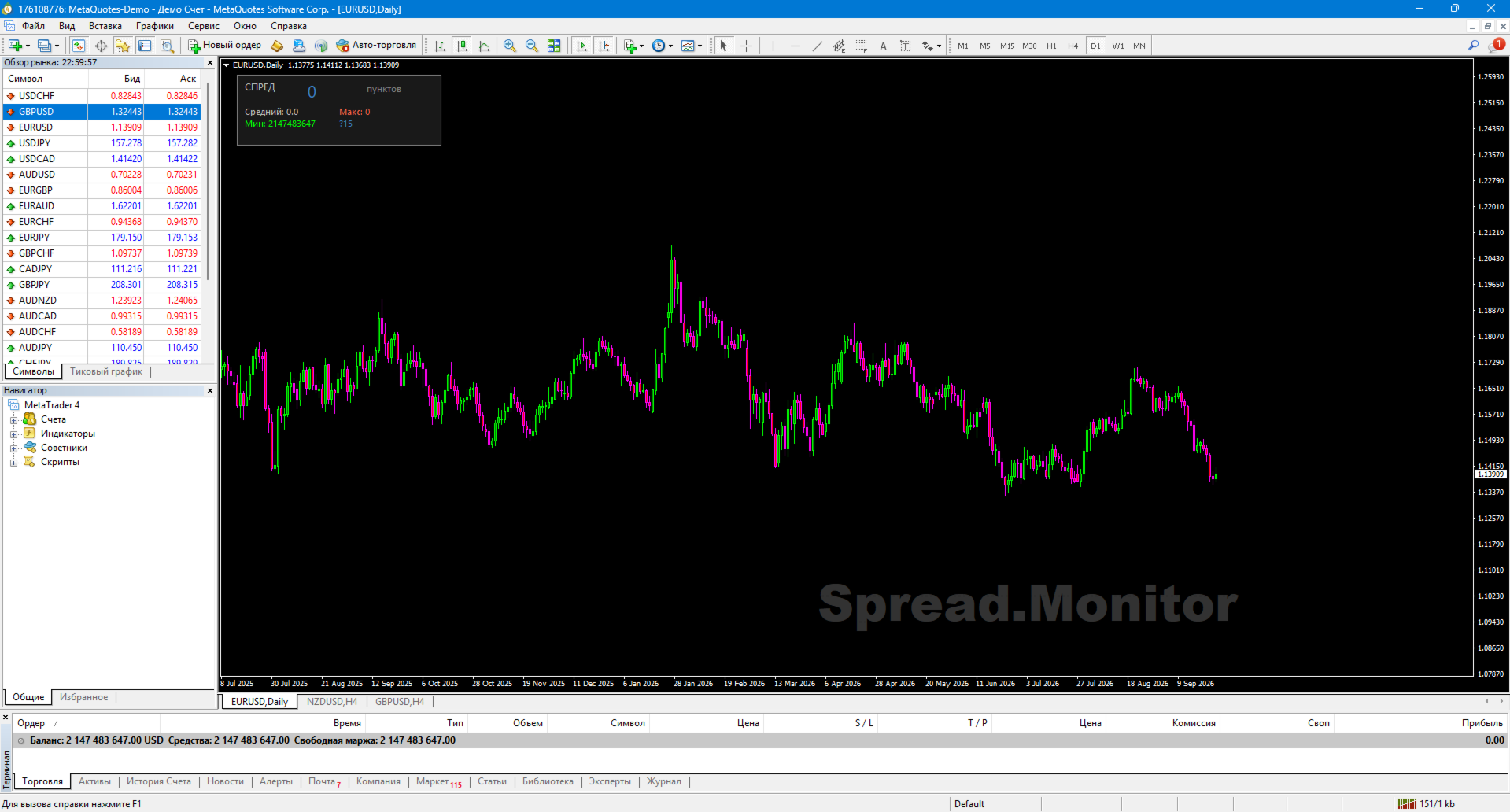
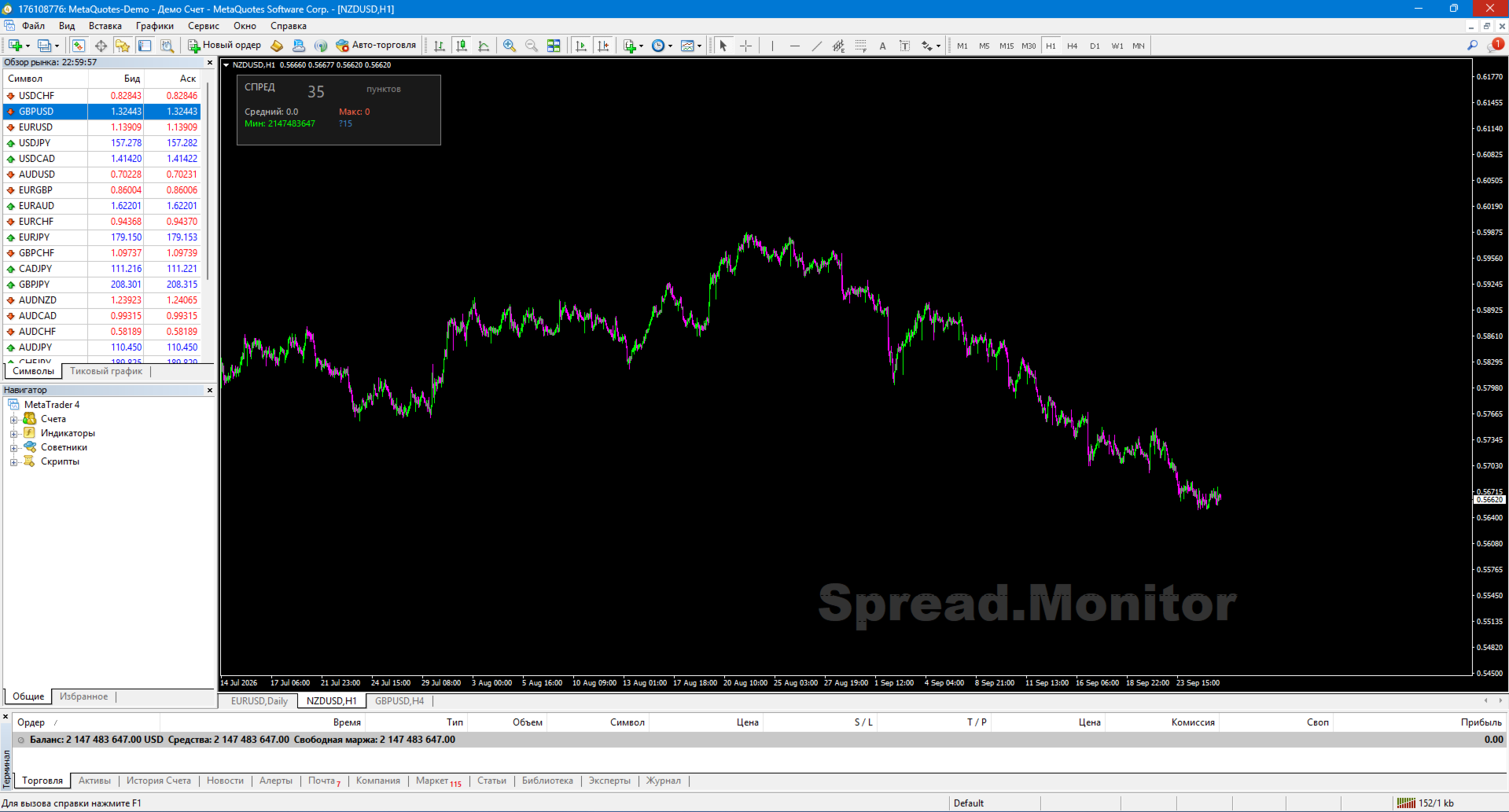
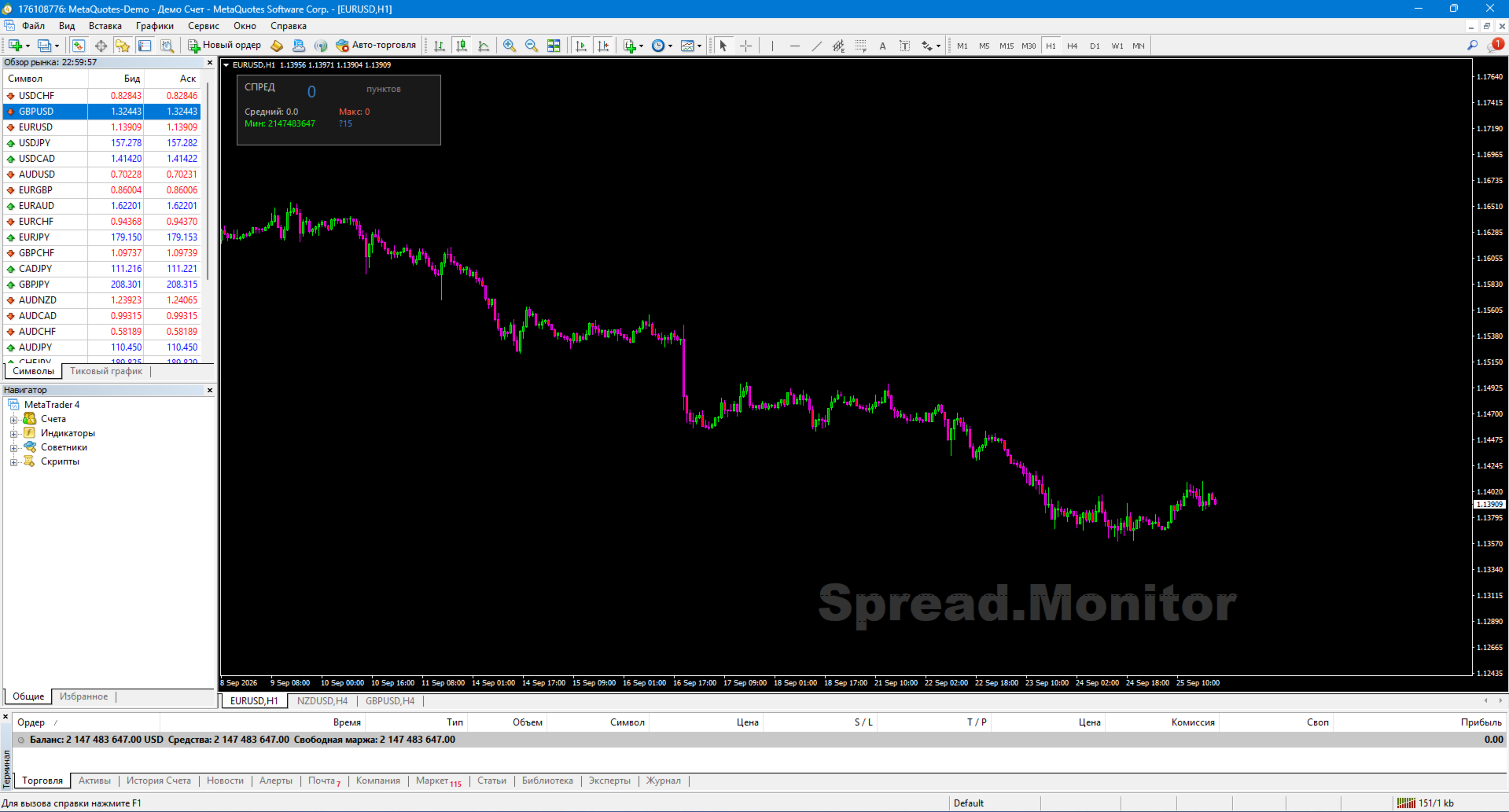
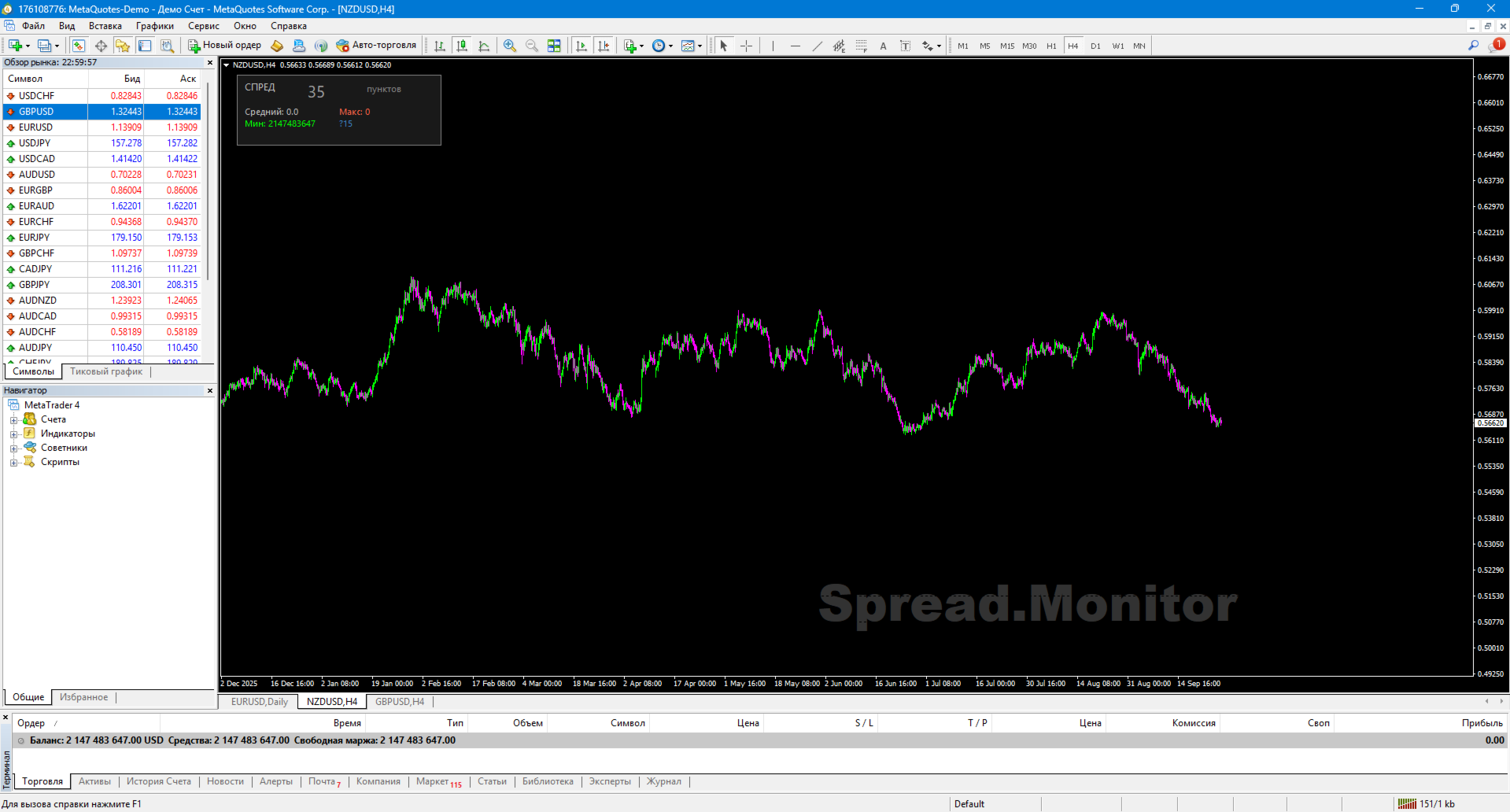
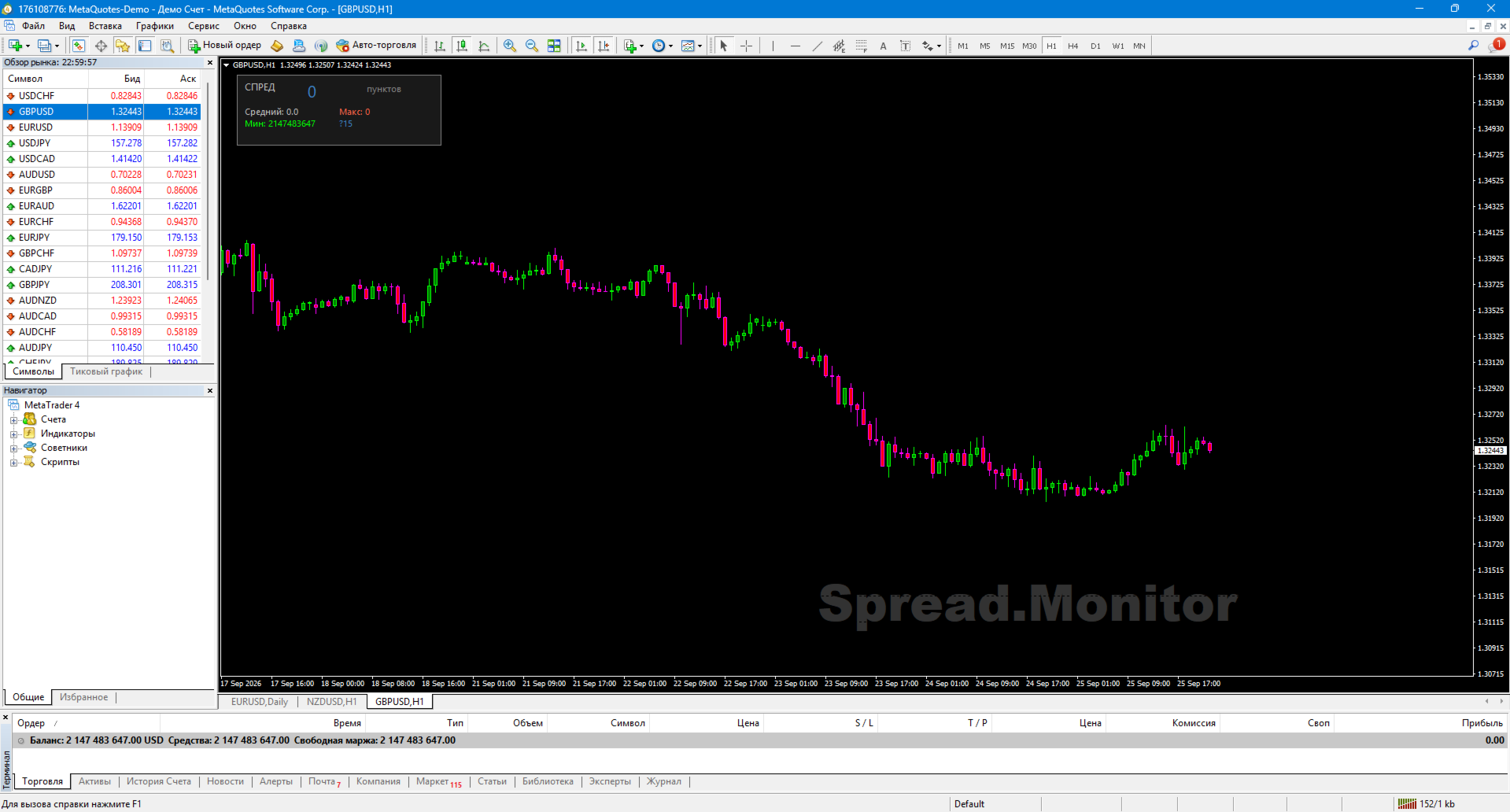
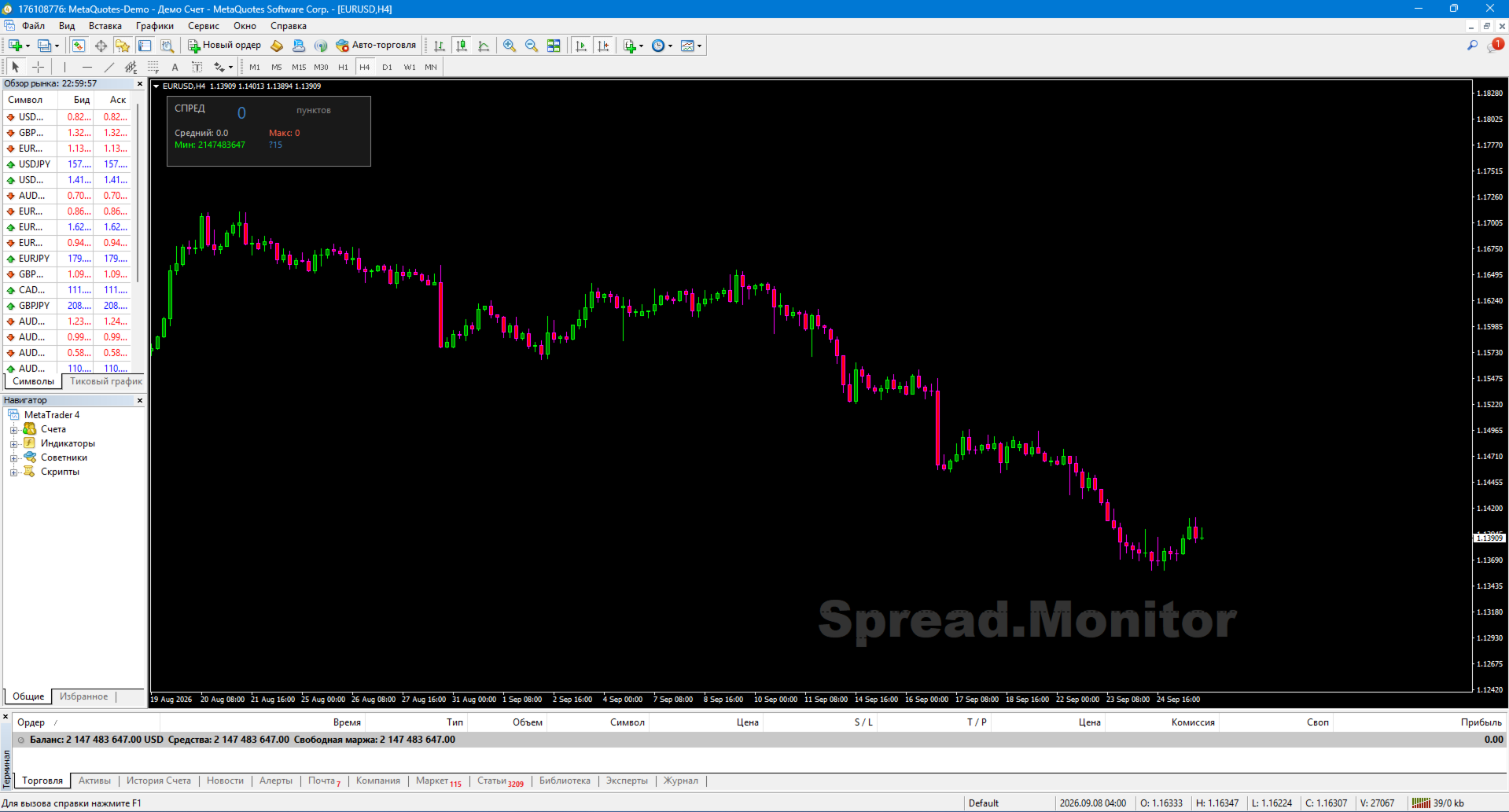
SpreadMonitor is a professional indicator for MetaTrader 4 that color-codes candlesticks based on spread levels and displays a monitoring panel on the chart showing the current value, statistics, and history.

The indicator was created by an active trader with 12 years of experience. It helps you avoid entering the market when the spread is abnormally high and allows you to see actual trading costs at any given moment.

⚠️ MetaTrader 4 Limitation: MT4 does not provide access to historical spread data for individual bars. Therefore, the indicator begins accumulating history only from the moment it is attached to the chart. Closed bars are colored based on the spread recorded at the time of their closure. If you remove and re-attach the indicator, the history starts over.

🎯 What the indicator displays

Candlestick coloring based on spread levels:

🟦 Blue — normal spread

🟧 Orange — elevated

⬜ Gray — high (do not trade)

Monitoring panel with the current spread value in large font

Statistics: average, maximum, and minimum spread over N bars

Spread history — a real-time mini-histogram of recent bars

Watermark — a semi-transparent "Spread.Monitor" label on the chart

✨ Key features

🎨 Visualization in the style of professional trading terminals

Candlesticks are colored based on spread levels rather than open/close prices. This allows you to instantly see where the broker widened the spread. In MT4, the current bar is colored in real-time, and subsequent closed bars are colored as data arrives. 📊 Comprehensive Statistics

The panel displays:

Current spread value (in points)

Average spread over the observation period

Maximum value

Minimum value

📈 Spread History

A mini-histogram shows the last N bars, allowing you to see when the spread widened and when it was normal. The color of each bar corresponds to the spread level. History tracking begins when the indicator is launched.

🌍 Automatic Language Detection (11 languages)

The indicator automatically adjusts to your terminal's language: Russian, English, German, Spanish, French, Portuguese, Italian, Turkish, Chinese, Japanese, Korean.

⚙️ Flexible Settings

Spread thresholds (normal / elevated / high)

Colors for each level

Panel position and size

Watermark text and color

Option to disable any element

🛠️ How to Use

1. Installation

Copy SpreadMonitor.ex4 to the MQL4/Indicators/ folder

Restart MT4

Drag onto the chart

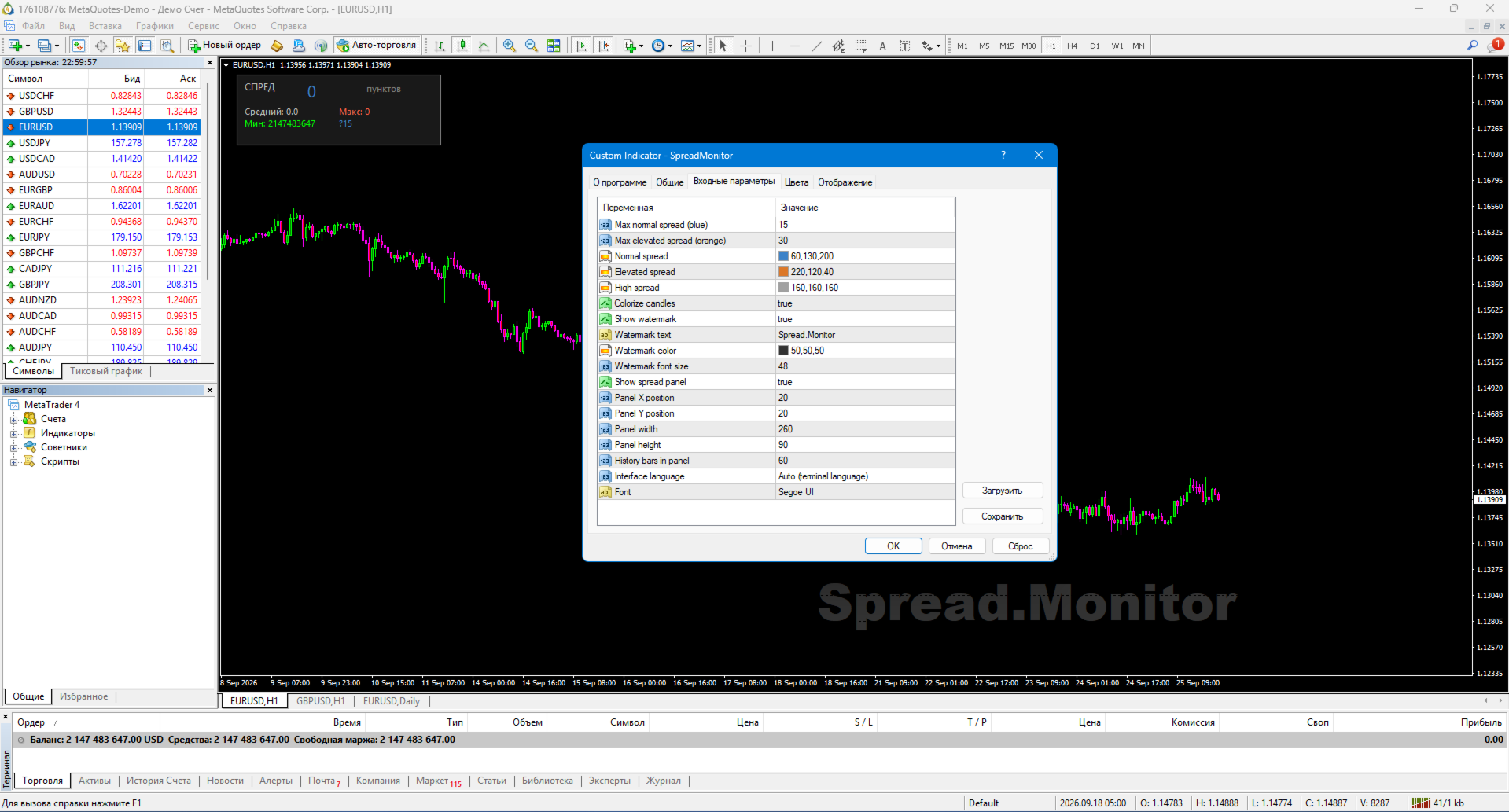
2. Threshold Configuration

InpNormalMax — upper limit for normal spread (default: 15 points)

InpElevatedMax — upper limit for elevated spread (default: 30 points)

Anything above this is considered high spread (gray)

Thresholds depend on the instrument:

Instrument Normal Elevated
EURUSD 10 20
GBPUSD 15 30
XAUUSD 20 50
Crypto 50 150

3. Trading Applications

Check the panel before entering a trade. If spread > Elevated → wait

During news events — gray candles indicate that trading should be avoided

At night / during the Asian session — spread widening is immediately apparent

Historical analysis — see when the broker "widens" the spread (usually before news releases)

Scalping — critical for strategies involving frequent entries

📋 Implementation features

Recalculation on every tick — the current bar updates in real-time

History accumulates based on closed bars — starting from the moment of installation

Pure MQL4 — no DLLs or external dependencies

Works on any instrument — Forex, metals, indices, stocks, crypto

No repainting — the color does not change after the bar closes

Supports all timeframes — from M1 to MN

⚠️ Important warning

SpreadMonitor is not a trading system; it is a cost-monitoring tool. The indicator does not provide buy or sell signals; instead, it displays the actual cost of entering the market at any given moment.

Using the indicator does not guarantee profit. All trading decisions are made by the trader.

🏆 About the developer

The indicator was created by Musa Khunarikov, a practicing trader with 12 years of experience trading live accounts (Forex, stocks, MOEX, metals). He holds 51 certificates from the Finam Training Center covering trading, algorithmic trading, and MetaTrader 5.

Services: development of Expert Advisors (EAs), indicators, and panels; trading system audits

📞 Support

30 days of free support after publication.
Bug fixes — within 48 hours.
おすすめのプロダクト
Macd Martin
Roman Yablonskiy
2.5 (2)
Double Breakout   is an automatic expert advisor with two separate strateges that uses martingale. The MACD indicator with adjustable parameters is used as inputs for each flow of orders. The specified takeprofit and stoploss levels are used to exit the position.  General recommendation The minimum recommended deposit is 1000 cents. Spread is recommended not more than 3 points. It is better to use trend currency pairs. The martingale parameter can be set from 0.1 to any value. When martingale i

FREE
Free automatic Fibonacci is an indicator that automatically plots a Fibonacci retracement based on the number of bars you select on the BarsToScan setting in the indicator. The Fibonacci is automatically updated in real time as new highest and lowest values appears amongst the selected bars. You can select which level values to be displayed in the indicator settings. You can also select the color of the levels thus enabling the trader to be able to attach the indicator several times with differe
FREE
Morning Luck
Pavel Predein
4.8 (5)
Automatic trading system based on the morning Flat indicator, puts pending orders on the borders of the night channel .All trades have a fixed stop loss and take profit .The traded pair GBPUSD H1, can be used on other instruments after optimization. The EA contains a switchable flat indicator . The robot's operating time in the input parameters corresponds to (+2GMT). when switching to daylight saving time,you need to adjust the time manually. * Use default settings  * Does not use dangerous
FREE
This is a multi-timeframe version of the popular Hull Moving Average (HMA). The Double HMA MTF Light indicator combines two timeframes on a single chart. The HMA of the higher timeframe defines the trend, and the HMA of the current timeframe defines short-term price movements. The indicator is freely distributed and hasn't audio signals or messages. Its main function is the visualization of price movements. If you need advanced functionality of the HMA multi-timeframe indicator (information ab
FREE
Эксперт  MACD_LevelTrader создан для торговле валютной пары XAUUSD. Данная версия это наработки того, что можно извлечь  из  индикатора MACD и Moving Average.   Важно перед тестированием изменить настройку с 1000 на 5000                       Offset in points UP from SMA200 for sell            5000                       Offset in points DOWN from SMA200 for buy        5000   Тайм фрейм  М5. Два варианта логики, П араметр  true=вход по уровню  MACD + SMA200, false=вход по MACD  Тестируйте на демо
FREE
DF Fib Trader Pro DF Fib Trader Proは、MetaTrader 4向けに設計された自動取引システムです。 フィボナッチベースの価格水準とトレンドおよびストラクチャー分析を組み合わせ、エントリーポイントとエグジットポイントを決定します。このEAはロングポジションとショートポジションの両方をサポートし、リスク管理パラメータも組み込まれています。 主な機能: • フィボナッチ・リトレースメントとエクステンション・ロジックを用いて、エントリーポイント、SLポイント、TPポイントをプロットします。 • ロットサイズと損切り/利益確定レベルを設定可能 • エントリーポイントは1つまたは2つから選択可能 • 市場状況に応じて、固定または動的な損切り/利益確定をサポート • 複数の時間枠と通貨ペアに対応 • 最大スプレッド、スリッページ、取引頻度の制御オプションを搭載 • 自動取引管理:損益分岐点、トレーリングストップ、部分決済オプション • 希望に応じて成行注文もサポート入力項目の概要: • リスク管理:ロットサイズ、取引ごとのリスク、最大取引回数 • エントリー
FREE
Indicator Test Report MT4
Narayanan Mohanan Mohanan Krishnan
MetaTrader 4 のIndicator Test Report — インジケーターが実際にどのように動作するかを示す MT4 再描画チェッカーおよびインジケーター テスター コンパイルされたインジケーターの内部を見ることはできません。Indicator Test Reportは、購入、作成、または MetaTrader に組み込まれたあらゆるインジケーターを読み込み、再描画するのか、どのくらいの履歴が必要なのか、実際に何を公開するのかなど、説明では説明できない質問に答えます。行動を報告してくれます。採点はしません。 ストラテジーテスターに​​任意のインジケーターをロードすると、その動作の 12 の側面に関する平易な言語のレポートが得られます。つまり、発行するバッファーの数、値が意味を持つ前にどれだけの履歴が必要か、閉じたバーの値がその後変更されるかどうか、読み取りにかかるコストなどです。 指標が優れているかどうかについてのスコアや合格点、評決はありません。観察されたことと、それが何を証明し、何が証明しないのかだけが考慮されます。 答えは何ですか 1. バッファー。 インジケータ
FREE
Proftrader Free
Alexander Nikolaev
4 (3)
This Expert Advisor analyzes the last candles and determines whether there will be a reversal or a large correction. Also, the readings of some indicators are analyzed (their parameters can be adjusted). Is a free version of Proftrader . Unlike the full version, in the free version of the adviser the initial lot cannot be higher than 0.1, trading pair only EURUSD and also it has fewer configurable parameters. Input parameters Lots - lot size (at 0, the lot will be calculated from the percentage
FREE
Candle Countdown — MT4用 正確なローソク足カウントダウン Candle Countdown は、 現在のローソク足が閉じるまでの残り時間 をチャート上に表示するシンプルで正確なツールです。 エントリーがローソク足のクローズに依存する場合、数秒の違いが重要になります。 このインジケーターは正確な時間を表示し、焦らずに判断できるようサポートします。 ローソク足のクローズ時間を正確に把握するためのインジケーターです。 表示内容: ローソク足が閉じるまでの残り時間 サーバー現在時刻 スプレッド ストップレベル(Stop Level) タイマーはティックに依存せず、プラットフォームの内部タイマーによって更新されるため、市場の動きが少ない場合でも安定した表示を維持します。 これにより、低ボラティリティの環境でも滑らかで安定したカウントダウンを実現します。 情報は背景付きのブロック内に表示されるため、どのチャートカラーでも見やすく、分析の妨げになりません。 ローソク足のクローズが近づくと、タイマーの色が変化し、視覚的に状況を把握しやすくなります。 MT5版はこちら: Cand
FREE
Harvest FX
Sayan Vandenhout
4.56 (9)
Harvest FX USES THE TREND WAVE INDICATOR AND IT CAN IDENTIFY THE BEGINNING AND THE END OF A NEW WAVE TREND MOVEMENT. AS AN OSCILLATOR, THE INDICATOR IDENTIFIES THE OVERBOUGHT AND OVERSOLD ZONES. IT WORKS GREAT TO CATCH THE SHORT TERM PRICE REVERSALS AND USES A MARTINGALE STRATEGY TO CLOSE ALL TRADES IN PROFIT. USE DEFAULT SETTINGS ON H1 OR HIGHER TIME FRAME ON ANY PAIR FOR MORE ACCURATE TRADES WHY THIS EA : Smart entries calculated by 3 great strategies The EA can be run on even a $30000 a
FREE
Show Pips
Roman Podpora
4.27 (59)
この情報インジケーターは、アカウントの現在の状況を常に把握したい人にとって役立ちます。このインジケーターには、ポイント、パーセンテージ、通貨での利益、現在のペアのスプレッド、現在の時間枠でバーが閉じるまでの時間などのデータが表示されます。 バージョンMT5 -   より便利なインジケーター チャート上に情報線を配置するには、いくつかのオプションがあります。 価格の右側 (価格の後ろにあります); コメントとして (グラフの左上隅に); 画面の選択した隅。 情報区切り記号を選択することもできます。 | / 。 \ # インジケーターにはホットキーが組み込まれています。 キー 1 - 情報表示の種類に戻ります (価格、コメント、コーナーの右側) キー 2 - 情報表示の種類を 1 つ進みます。 キー 3 - 情報ライン表示の位置を変更します。 ホットキーは設定で再割り当てできます。 このインジケーターは使いやすく、非常に有益です。設定で不要な情報項目を無効にすることも可能です。 設定 表示された情報を置き換えるホット キー (戻る)   - 情報表示の種類に戻ります。 表示情報を切り替
FREE
This indicator alerts you when/before new 1 or 5 minute bar candle formed. In other words,this indicator alerts you every 1/5 minutes. This indicator is especially useful for traders who trade when new bars formed. *This indicator don't work propery in strategy tester.Use this in live trading to check functionality. There is more powerful Pro version .In Pro version,you can choose more timeframe and so on. Input Parameters Alert_Or_Sound =Sound ----- Choose alert or sound or both to notify y
FREE
Update:ver1.53 (2023/08/16) ・概要と必要環境 手動発注もしくは他ツール等からの発注に対し、指値発注予約の複製を生成します。こちらは「発注操作の簡易化」に特化したものになります。発注判断となる分析は、資料を漁る、経験則を導く、他の分析ツールやEAを併用する等、利用者ご自身で頑張ってください。なお、ver1.28より、「決済後、自動で再発注する」機能が実装されました。(有償版でのみ有効化できます) ・導入と導入後の操作 導入そのものは簡単です。「自動売買可能なEA」として、適当なチャートにて動作させるだけです。(チャートの対象相場は問いません。このEAは、チャートを見ていません)。あとは、「このEAでのローカルコピー以外の発注」があれば、それに応じて「損失が出た場合に備えての追加取引の予約」という形で、指値発注が自動生成されます。 導入操作上の注意として、「本EAを、複数のチャートで動作」はできません。EAがチャート自体を見ておらず、注文状況だけを見ているため、複数のチャートで動かす意味もありません。また、ターミナルとEAの設定として「自動売買」を許可しない
FREE
Are you tired of drawing trendlines every time you're analyzing charts? Or perhaps you would like more consistency in your technical analysis. Then this is for you. This indicator will draw trend lines automatically when dropped on a chart. How it works Works similar to standard deviation channel found on mt4 and mt5. It has 2 parameters: 1. Starting Bar 2. Number of bars for calculation The   starting bar   is the bar which drawing of the trend lines will begin, while the   number of bars for c
FREE
Grid Assistant Pro – Utility for Managing Grid Strategies on MetaTrader 4 Grid Assistant Pro is a professional utility that helps traders manage and monitor unidirectional grid strategies directly from the MT4 chart. It provides a visual dashboard , clear controls, and automated risk protection features for precise and efficient grid operation. Key Features Visual Dashboard Real-time metrics: Balance, Equity, Floating P/L, Drawdown %, Free Margin Grid status: active and pending or
FREE
The indicator displays signals according to the strategy of Bill Williams on the chart. Demo version of the indicator has the same features as the paid, except that it can work only on a demo account . Signal "First Wise Man" is formed when there is a divergent bar with angulation.  Bullish divergent bar - with lower minimum and closing price in the upper half. Bearish divergent bar - higher maximum and the closing price at the bottom half. Angulation is formed when all three lines of Alligator
FREE
Follow The Line
Oliver Gideon Amofa Appiah
3.94 (16)
FOLLOW THE LINE GET THE FULL VERSION HERE: https://www.mql5.com/en/market/product/36024 This indicator obeys the popular maxim that: "THE TREND IS YOUR FRIEND" It paints a GREEN line for BUY and also paints a RED line for SELL.  It gives alarms and alerts of all kinds. IT DOES NOT REPAINT and can be used for all currency pairs and timeframes. Yes, as easy and simple as that. Even a newbie can use it to make great and reliable trades. NB: For best results, get my other premium indicators for more
FREE
Golden Sizer By SKPAD
Matthias Hubert Patrick Snidaro
Golden Sizer By SKPAD – Calculateur et Gestionnaire de Position Intelligent Golden Sizer est bien plus qu'un simple outil de trading : c'est un assistant stratégique complet pour la gestion des risques et des positions. Conçu pour s'adapter à tous les styles de trading – du débutant au professionnel, du swing trader au scalpeur – il transforme votre approche des marchés grâce à une interface intuitive, une précision de calcul optimale et une exécution rapide. Compatible avec tous les marchés (F
FREE
PZ Heiken Ashi EA
PZ TRADING SLU
4.64 (11)
This EA trades using the Heiken Ashi Smoothed Indicator. It offers many trading scenarios and flexible position management settings, plus many useful features like customizable trading sessions, a martingale and inverse martingale mode. [ Installation Guide | Update Guide | Troubleshooting | FAQ | All Products  |  Get Help ] Easy to use and supervise It implements three different entry strategies Customizable break-even, SL, TP and trailing-stop Works for ECN/Non-ECN brokers Works for 2-3-4-5
FREE
このプロジェクトが好きなら、5つ星レビューを残してください。 このインジケータは、指定されたためのオープン、ハイ、ロー、クローズ価格を描画します 特定のタイムゾーンの期間と調整が可能です。 これらは、多くの機関や専門家によって見られた重要なレベルです トレーダーは、彼らがより多くのかもしれない場所を知るために有用であり、 アクティブ。 利用可能な期間は次のとおりです。 前の日。 前週。 前の月。 前の四半期。 前年。 または: 現在の日。 現在の週。 現在の月。 現在の四半期。 現年。
FREE
Automatic trading Advisor .This is a free version of the expert Advisor "Trend Analyzer Pro" https://www.mql5.com/ru/market/product/42792.В the robot is based on 2 strategies: at the intersection of moving averages and Bollinger bands indicator .In the paid version, three strategies are available, which increases profitability several times .Designed for the EURUSD H1 currency pair.It is possible to use it on other tools after optimization.Test only on tick data. ** Does not use such dangerous
FREE
PZ Penta O MT4
PZ TRADING SLU
2.33 (3)
The Penta-O is a 6-point retracement harmonacci pattern which usually precedes big market movements. Penta-O patterns can expand and repaint quite a bit. To make things easier this indicator implements a twist: it waits for a donchian breakout in the right direction before signaling the trade. The end result is an otherwise repainting indicator with a very reliable trading signal. The donchian breakout period is entered as an input. [ Installation Guide | Update Guide | Troubleshooting | FAQ | A
FREE
Signalator Lot Size Evaluator MT4 is a free local MetaTrader 4 utility for manual traders. It helps calculate an estimated lot size before opening a trade manually. The calculation is based on account size, trade direction, entry price, stop loss, risk percentage or fixed money risk, and broker symbol settings. The main purpose is simple: Enter your setup → define your risk → get the suggested lot size. The panel also shows useful pre-trade information such as spread, risk amount, SL/TP distance
FREE
Introductory Pricing for one month Brute force trader is specially designed to find the best entry point and exit point with the regular tested and proven indicators. The EA will automatically analyse the market and will follow trends with the right entry exit points. Since the timeframe it is using is 30 minutes, the chances that you are stuck into a long trade is very low. Thought it does not use stoploss but it has the
FREE
Your chart. One glance. Total clarity. Built by @Ash_TheTrader for traders who are tired of guessing, Extreme Trading Dashboard is a professional-grade heads-up display that sits quietly in the corner of your chart — dark charcoal, rounded, semi-transparent, and genuinely easy on the eyes — until the moment it matters. Dual Session Highlighter Shade up to two independent time windows directly on your chart — London, New York, or your own custom kill-zone. Each gets its own color, so overlappi
FREE
OrderBlock TS Roman
Vladislav Vlastovskii
4 (6)
Индикатор строит блоки заказов (БЗ) по торговой системе (ТС) Романа. Поиск блоков осуществляется одновременно на двух таймфремах: текущем и старшем (определяемым в настройках). Для оптимизации и игнорирования устаревших блоков в настройках задается ограничение количества дней в пределах которых осуществляется поиск блоков. Блоки строятся по правилам ТС состоящем из трех шагов: какую свечу вынесли (что?); какой свечой вынесли (чем?); правило отрисовки (как?).
FREE
Multi-TF MA Levels plots a single moving average across multiple timeframes directly on your chart, giving you instant context at every level of the market. No switching charts. No mental maths. Just clean, flat lines showing exactly where the MA sits on M15, M30, H1, H4 and D1 — all updated on confirmed bar close so there is no repainting. Features Plots the local timeframe MA plus up to 5 higher timeframe MAs simultaneously HTF lines only update on confirmed bar close — no repainting Higher ti
FREE
This is a light version of OneClickWonder. It has a limitation of lotsize ( 0.01 ) and also the trade direction (only SELL ) and magic number is fiexd (magic number = 11 ) ------------------------------------ OneClickWonder manages open trades by   Magic Number   and   Symbol , providing: ·            Individual or Basket Trailing Stop ·            Optional Averaging system   (adds new trades automatically) ·            OneClickOrder buttons   (BUY / SELL directly from chart) ·            Works
FREE
Universal TradingView to MT4 Webhook Connector Automatically execute your TradingView alerts inside MetaTrader 4 — fast, reliable, and hands-free. This connector bridges TradingView and MT4, allowing BUY, SELL, and CLOSE alerts from any TradingView indicator or strategy to be converted into real MT4 trades with advanced risk management . Stop fighting with complex python scripts or unreliable copiers. This tool pulls signals directly from any webhook server you choose and executes them with lig
FREE
Tipu Heikin-Ashi Panel is the modified version of the original Heiken Ashi indicator published by MetaQuotes here . A professional version of this indicator is available here . Features An easy to use Panel that shows the Heiken Ashi trend of selected timeframe. Customizable Buy/Sell alerts, push alerts, email alerts, or visual on-screen alerts. Customizable Panel. The panel can be moved to any place on the chart or minimized to allow more space. Heikin means "the average", and Ashi means "foot
FREE
このプロダクトを購入した人は以下も購入しています
Trade Manager EAへようこそ。これは、取引をより直感的、正確、そして効率的にするために設計された究極の リスク管理ツール です。これは単なるオーダー実行ツールではなく、包括的な取引計画、ポジション管理、リスク管理のためのソリューションです。初心者から上級者、迅速な実行を必要とするスキャルパーまで、Trade Manager EAはあらゆるニーズに対応し、為替、指数、商品、暗号通貨などさまざまな市場で柔軟に対応します。 Trade Manager EAを使用すると、複雑な計算が過去のものになります。市場を分析し、エントリーポイント、ストップロス、テイクプロフィットのレベルをチャート上のラインでマークし、リスクを設定するだけで、Trade Managerが最適なポジションサイズを即座に計算し、SLとTPをピップ、ポイント、口座通貨でリアルタイムに表示します。すべての取引が簡単かつ効果的に管理されます。 主な機能: ポジションサイズ計算機 :定義されたリスクに基づいて取引サイズを瞬時に決定します。 簡単な取引計画 :エントリー、ストップロス、テイクプロフィットを設定するためのド
Trade Indicator Assistant is a powerful MT4 utility designed to turn indicators into automated trading systems. Its main feature is the ability to automatically detect an indicator’s   BUY and SELL signal buffers , without requiring you to know the buffer numbers, search through indicator settings, or modify the indicator source code. Bonus Indicator: After purchasing Trade Indicator Assistant, contact me to receive Trade Signal Pro completely free as a bonus indicator. [Download Demo Version]
Telegram to MT4 Multi-Channel Copier   は、Telegram チャンネルのトレードシグナルを MetaTrader 4 へ自動コピーします。ボット不要、ブラウザ拡張不要、手動コピー不要。Telegram にシグナルが届くと、EA が数秒であなたのターミナルに注文を出します。 さらに、チャンネルをコピーする前に、内蔵バックテスターでそのチャンネルがあなたの口座でどう動いたかを確認できます。 製品は 2 つのコンポーネントで構成されます:Telegram チャンネルを監視する Windows アプリと、MT4 ターミナルでシグナルを執行する本 EA です。MT5 版もあります   こちら . セットアップガイドとアプリのダウンロード:   https://www.mql5.com/en/blogs/post/768988 現在の価格は今後値上げされます。 仕組み アプリはあなた自身の Telegram アカウントで接続するため、フォローしているすべてのチャンネル、グループ、トピック、ボット(プライベートや VIP を含む)を見ることができます。シグナル
Exp COPYLOT CLIENT for MT4
Vladislav Andruschenko
4.69 (65)
MetaTrader 4向け 高機能トレードコピーソフト MetaTrader 4 用の、高速・安定・高機能なトレードコピーソフトです。 COPYLOT は、 MetaTrader 4 と MetaTrader 5 間でFX取引をコピーでき、さまざまな口座タイプや運用スタイルに合わせて柔軟に同期できます。 COPYLOT MT4版の対応コピー方式: MetaTrader 4 → MetaTrader 4 MetaTrader 5 Hedge → MetaTrader 4 MetaTrader 5 Netting → MetaTrader 4   MT5版 詳細説明 + DEMO + PDF 購入方法 インストール方法 ログファイルの取得方法 テストと最適化の方法 Expforexの全製品 MetaTrader 5版 を使えば、 MetaTrader 5 → MetaTrader 5 および MetaTrader 4 → MetaTrader 5 のコピーにも対応します: COPYLOT CLIENT for MT5 COPYLOT は、2台、3台、さらには10台規模のターミナル環境でも
Local Trade Copier EA MT4
Juvenille Emperor Limited
4.96 (112)
Local Trade Copier EA MT4 は、同一の Windows PC または Windows VPS 上で稼働する複数の MetaTrader 4 口座間で、取引をコピーおよび管理するための高速で柔軟なトレードコピーツールです。 ローカルでの取引同期に加え、Receiver 側でロットサイズ、リスク管理、取引フィルター、シンボルマッピング、取引管理、口座保護を個別に設定できます。 Transmitter と Receiver のターミナルは約 1分 で設定でき、同一ブローカーまたは異なるブローカーの口座間で、手動取引や EA による取引をコピーできます。適切な条件下では、ローカルの MetaTrader ターミナル間で取引情報を 0.5秒未満 で同期できます。実際の約定速度は、ブローカーのレイテンシー、ネットワーク状況、PC/VPS の性能、ターミナルの負荷によって異なります。 ご購入前に無料デモをお試しください Local Trade Copier EA MT4 の完全機能版無料デモ を、MT4 デモ口座で 1回につき4時間 テストできます。 Local Trad
Trade Assistant MT4
Evgeniy Kravchenko
4.43 (197)
取引 ごとのリスクの 計算、新規注文 の 簡単 な 設置、部分的 な 決済機能 を 持 つ 注文管理、 7 種類 のトレーリングストップなど 、便利 な 機能 を 備 えています 。 追加の資料と説明書 インストール手順 - アプリケーションの手順 - デモアカウント用アプリケーションの試用版 ライン機能 チャート上にオープニングライン、ストップロス、テイクプロフィットを表示します。この機能により、新規注文を簡単に設定することができ、注文を出す前にその特徴を確認することができます。   リスク計算 リスク計算機能は、設定されたリスクとストップロス注文のサイズを考慮して、新規注文のボリュームを計算します。ストップロスの大きさを自由に設定できると同時に、設定したリスクを守ることができます。 Lot calc ボタン - リスク 計算 を 有効 / 無効 にします 。 Risk フィールドでは 、必要 なリスクの 値 を 0 から 100 までのパーセンテージまたは 預金通貨 で 設定 します 。 設定」 タブで 、 リスク 計算 の 種類 を 選択 します :「 $ 通貨」、「 % 残
TelegramからMT4へ: 究極のシグナルコピーソリューション Telegram to MT4 は、DLLを必要とせず、TelegramのチャンネルやチャットからMetaTrader 4プラットフォームに取引シグナルを直接コピーできる最先端のユーティリティです。この堅牢なソリューションは、比類のない精度とカスタマイズオプションにより、シグナルのシームレスな実行を保証し、時間を節約し、効率性を向上させます。 [ Instructions and DEMO ] 主な特徴 直接的なTelegram API統合 電話番号とセキュアコードで認証します。 ユーザーフレンドリーな EXE ブリッジを使用して、チャット ID を簡単に取得および管理します。 複数のチャネル/チャットを追加、削除、更新して、同時に信号をコピーします。 高度なフィルターによる信号解析 カスタム例外語 (例: 「レポート」、「概要」) を含む不要な信号をスキップします。 柔軟な SL および TP 形式 (価格、ピップ、ポイント) をサポートします。 シグナルが価格ではなくポイントを指定する場合、エントリ ポイントを自動
MT4 to Telegram Signal Provider は使いやすく、完全にカスタマイズ可能なツールで、Telegramに信号を送信し、あなたのアカウントを信号提供者に変えることができます。 メッセージのフォーマットは 完全にカスタマイズ可能です! しかし、簡単な使用のために、あらかじめ定義されたテンプレートを選択し、メッセージの特定の部分を有効または無効にすることもできます。 [ デモ ]   [ マニュアル ] [ MT5バージョン ] [ Discordバージョン ] [ Telegramチャンネル ]  New: [ Telegram To MT5 ] セットアップ ステップバイステップの ユーザーガイド が利用可能です。 Telegram APIの知識は必要ありません。開発者が必要なものをすべて提供します。 主要機能 購読者に送信される注文の詳細をカスタマイズする機能 例えばブロンズ、シルバー、ゴールドなど、階層型のサブスクリプションモデルを作成できます。ゴールドサブスクリプションでは、すべての信号が得られますなど。 ID、シンボル、またはコメントによる注文のフ
Trade copier MT4
Alfiya Fazylova
4.61 (36)
Trade Copierは、取引口座間の取引をコピーして同期するように設計された専門的なユーティリティです。 コピーは、同じコンピューターまたはvps にインストールされている、サプライヤーのアカウント/端末から受信者のアカウント/端末に行われます。 キャンペーン - すでに「Trade copier MT4」をご購入の方は、「Trade copier MT5」を無料で入手できます(MT4 → MT5 および MT4 ← MT5 のコピー用)。詳細な条件については、どうぞ個別メッセージでお問い合わせください。 購入する前に、デモ アカウントでデモ バージョンをテストできます。 デモ版 こちら 。 詳細な説明は こちら 。 主な機能と利点: MT5ネッティングアカウントを含む、MT4> MT4、MT4> MT5、MT5> MT4のコピーをサポートします。 高いコピー速度(0.5秒未満)。 ベンダーモードと受信者モードは同じ製品内に実装されています。 チャートから直接リアルタイムでコピーを制御できる、簡単で直感的なインターフェイス。 接続が切断されたり、端末が再起動されたりしても、設定と位
Take a Break pauses your Expert Advisors when trading is a bad idea: before news, after a daily loss, outside your trading hours, or when a rule you wrote yourself says so. When the pause is over, your EAs simply continue. Account protection for all your EAs in one tool: news filter, drawdown and equity protection, time filter and custom rules. One EA on one chart protects the whole account, the free indicator gives every chart its own rules on top. Free demo | What is new in 26.09 | Support Ass
VirtualTradePad mt4 Extra
Vladislav Andruschenko
4.85 (61)
ワンクリックで取引できるトレーディングパネル。ポジションと注文の操作!チャートまたはキーボードから取引。 手動取引用の取引パネル。チャート(チャートウィンドウ)またはキーボードから取引できます。開閉、リバース、ロックポジションと注文を処理する МetaТrader4のメインオーダーのトレーディングコントロールパネル:売買、売却、売却、売却、売却、閉じる、削除、修正、トレーリングストップ、ストップロス、takeproft 新しいプレミアム版が利用可能です: VirtualTradePad PRO SE   で取引ワークフローを強化できます。 MetaTrader 5   と   MetaTrader 4   に対応した次世代のプロ向け取引パネルです。 MT5のバージョン 完全な説明 +DEMO +PDF 購入する方法 インストールする方法    ログファイルの取得方法    テストと最適化の方法    Expforex のすべての製品 シンボルウィンドウからの取引とキーボードからの取引! あなたはMetaTrader 4ターミナル - バーチャルコントロールパネルVirtualTr
Partial Closure EA MT4
Juvenille Emperor Limited
5 (3)
Partial Closure EA MT4 は、口座内のあらゆる取引を部分的に決済できます。ロットサイズの選択した割合やチケット番号で手動決済することも、TP/SLレベルの指定された割合で自動決済することも可能で、最大10のテイクプロフィットと10のストップロスレベルで初期ロットサイズの一部を決済します。特定のマジックナンバー、コメント、または銘柄を指定または除外することで、アカウント内のすべてまたは選択した取引を管理できます。。 ヒント:Partial Closure EA MT4 の無料デモバージョンをダウンロードして、デモアカウントで試してみてください: こちら ダウンロードした無料のデモ ファイルを MT4 >> ファイル >> データ フォルダを開く >> MQL4 >> Experts フォルダに貼り付けて、ターミナルを再起動します。  無料のデモ版は、デモ アカウントでのみ、一度に 4 時間完全に機能します。 試用期間をリセットするには、MT4 >> ツール >> グローバル変数 >> Control + A >> 削除に移動します。 この操作は重要ではないデモ口座
Close If Profit or Loss with Trailing for MetaTrader 4 — 総利益または総損失で自動決済 MetaTrader 4 用の実用的な取引管理ツールです。設定した総利益または総損失に到達すると、選択されたポジションを自動的に決済できます。 Expert Advisor は保有中の取引を監視し、含み損益を計算し、Trailing Profit を使用して、手動操作より素早くポジション管理を行うことができます。 MetaTrader 4 は現在でも、裁量トレーダー、スキャルピング、グリッド取引、EA 運用で広く使用されています。しかし、MT4 には複数ポジションを「合計結果」で簡単に自動決済する標準機能がありません。このユーティリティは、その不足している管理機能を追加します。 Close If Profit or Loss with Trailing は、裁量取引、他の Expert Advisors、グリッドシステム、ナンピン、リカバリー戦略、複数シンボルの取引と組み合わせて使用できます。ルールを設定すれば、EA が結果を監視し、条件に到
Smart Copy Local MT4
Kyra Nickaline Watson-gordon
5 (7)
Smart Copy is an Easy-to-Use EA that supports Multi Copying Metatrader4 and Metatrader5 and Local/Remote Copying. (Remote Version is coming soon) Free version is available on Smart Copy Local Free MT4 Specifications :     Real Time, Multi Terminal - Multi Account - MT4/MT5 trade copying     Copy from netting to hedge and hedge to netting is supported.     Fast and instant copy     All settings are input visually.     Easy modifying symbol names, prefix, suffix     Enable/Disable copying s
KT Equity Protector MT4
KEENBASE SOFTWARE SOLUTIONS
3.75 (4)
すべての MetaTrader トレーダーが稼働させておくべきなのに、多くの人がまだ使っていないEA。 多くの口座が破綻するのは、戦略そのものが間違っていたからではありません。悪い瞬間に、損失を放置して拡大させたり、さらにポジションを増やしたり、週末までポジションを持ち越したり、せっかくの一週間の利益を市場に返してしまったり、たった一度のクリックミスでプロップファームの1日損失制限を忘れてしまうからです。 KT Equity Protector は、そうした事態を防ぐための自動アカウント保護EAです。 1つのチャートにインストールするだけです。ガイド付きのわかりやすいウィザードで、日次損失、最大ドローダウン、利益目標、エクイティ・トレーリングストップ、週末前の決済など、あなたのルールを一度だけ設定します。その瞬間から、このEAはMetaTrader口座全体をリアルタイムで監視します。すべてのポジション。すべての銘柄。すべてのティック。設定したラインを超えた瞬間、EAはあなたが選んだアクションを実行します。アラート、損失中の取引の決済、利益中の取引の決済、全取引の決済、または全取引を決済
Want automatically to put the pending order, take profit and stop loss? This EA will do it on your behalf! The Fibo Heart EA strategy will place limit order after the ‘check point’ breakout. The position will be triggered when the price make a successful retest. If not, the pending order will automatically deleted after price hit certain level. You also have option to enable market order (instant execution) and custom take profit in the inputs setting. This EA must be attached with Fibo Heart In
The product will copy all telegram signal to MT4   ( which you are member  ) , also it can work as remote copier.  Easy to set up, copy order instant, can work with almost signal formats, image signal, s upport to translate other language to English Work with all type of channel or group, even channel have "Restrict Saving Content", work with  multi channel, multi MT5 Work as remote copier: with signal have ticket number, it will copy exactly via ticket number. Support to backtest signal. How to
Easy Trade Executor は、MT4 における迅速なポジションサイズ計算、注文執行、およびトレード管理のためのツールです。 エントリー価格、Stop Loss、Take Profit レベルをチャート上に直接配置し、ポジションサイズを自動計算して、リスクを管理しながら数回のクリックでトレードを開始できます。 なぜ Easy Trade Executor を選ぶのか? Easy Trade Executor は、単なるリスク計算以上の機能を求めるトレーダーのために設計されています。トレーダーはチャート上から迅速かつ効率的にトレードを管理したいと考えています。 このツールは、ポジションサイズ計算、注文執行、トレード管理を1つのワークフローに統合し、手動計算やターミナルウィンドウの切り替えではなく、トレードそのものに集中できる環境を提供します。 Easy Trade Executor の主な機能: リスクベースの自動ポジションサイズ計算; チャートから直接行う成行注文および指値・逆指値注文の発注; 自動トレード管理のための Trailing Stop; ワンクリックでのポジシ
無料トライアル版ダウンロード Copy Cat More (コピーキャット・モア) MT4 トレードコピー (Trade Copier) は単なるローカルのトレードコピーではありません。今日のトレード課題のために設計された 完全なリスク管理・執行フレームワーク (risk management and execution framework) です。プロップファーム (prop firm) のチャレンジから個人のポートフォリオ管理まで、堅牢な執行、資金保護、柔軟な設定、高度なトレード処理の組み合わせによって、あらゆる状況に適応します。 このコピーは   マスター (Master、送信側) と スレーブ (Slave、受信側)   の両モードで動作し、成行注文・指値注文、トレードの変更、部分決済、そして両建て決済 (Close By) 操作をリアルタイムで同期します。デモ口座と実口座、トレード用ログインと投資家ログインの両方に対応し、永続的トレードメモリ (Persistent Trade Memory) システムにより、EA・端末・VPS が再起動しても復旧を保証します。一意の
TradePanel MT4
Alfiya Fazylova
4.84 (95)
Trade Panelは多機能なトレーディングアシスタントです。アプリには手動取引用の50以上のトレーディング機能が搭載されており、ほとんどの取引作業を自動化することができます。 アプリの説明書+ビデオガイド: https://www.mql5.com/en/blogs/post/772452 デモ口座用アプリの試用版: https://www.mql5.com/en/blogs/post/750865 アプリのインストール方法: https://www.mql5.com/en/blogs/post/756239 アプリをビジュアルモードでテストする方法: https://www.mql5.com/en/blogs/post/770277 VPSのMetaTraderにアプリをインストールする方法: https://www.mql5.com/en/blogs/post/770190 取引。 ワンクリックで取引操作を行うことができます: リスクを自動計算して指値注文やポジションを開く。 複数の注文やポジションをワンクリックで開く。 注文のグリッドを開く。 保留中の注文やポジションをグルー
King Trade Copier MT4
Mohammed Maher Al-sayed Mohammed Ahmed Saleh
5 (1)
King Trade Copier は、同じコンピューターまたは VPS 上で動作する MetaTrader ターミナル同士を接続します。ある口座で建てた取引が、ほかの口座にも現れます。このファイルは両方の役割を備えているため、同じダウンロードでも、Mode に設定した値によって送信側にも受信側にもなります。 各チャートでは、パネルがこのターミナルが送信中か受信中かを表示し、相手側の口座名を示し、応答した受信側の数を数え、最後のシグナルからの経過時間を表示します。コピーされなかった注文は、消えてしまうのではなく、その理由がパネルに残ります。 コピーされる内容 成行注文、新規と決済 指値・逆指値注文:発注、変更、削除 Stop Loss と Take Profit、最初の値とその後のすべての変更 部分決済と追加ボリューム 変更は一つずつ個別に追跡されるため、建値に移動してからトレールされるストップも、注文が建っている間は同じように受信側の口座に届きます。 速度と無人運用 送信側では、スケジュールに基づく定期的な確認は行いません。注文が変わった瞬間に更新が書き込まれ、受信側は 1 ミリ秒
MetaTrader 4 用の通貨強弱インジケーター この 通貨強弱インジケーター は最大 28 の主要通貨ペアを読み取り、USD、EUR、GBP、JPY、CHF、CAD、AUD、NZD の 8 通貨それぞれについて 1 つの数値を出します。どの通貨が主導しているかを調べるためにチャートを次々と開く必要はなく、MetaTrader 4 のチャート上の 1 つのパネルを見るだけで、買われている通貨と売られている通貨が分かります。 パネルに表示される内容 8 通貨それぞれの強弱バーとパーセンテージ(強い順) マルチタイムフレーム マトリクス:通貨ごとに 3 つの時間足を横並びで表示し、M15、H1、H4 が一致しているかをエントリー前に確認できます 各行の強弱履歴。20 から 60 まで上げてきた通貨と、90 から 60 まで下げてきた通貨は同じではありません ベストペア :強弱差が最も大きい組み合わせを並べ替えて表示。クリックするとそのペアのチャートが開きます 避けるペア :2 つの通貨が同じ方向に動くと取引の余地がありません。隠さず一覧に出します ワンクリックで開く 28 ペアパネル。
ATTENTION: The Indicator cannot be backtested, as it is generated exclusively from live intraday calculations based on options flow. GEX Level Converter – Gamma Exposure Mapping for CFD Charts NASDAQ-100 edition — for US100 · NDX · NAS100 · USTECH and every Nasdaq-100 CFD equivalent Instantly see professional options-market levels directly on your MetaTrader Nasdaq-100 CFD chart. The GEX Level Converter translates the daily Gamma Exposure (GEX) zones of the NDX options market into precise pri
天机跟单系统-MT4接收端 天机文件跟单系统是一款专业的跨平台跟单EA,让您在MT4和MT5之间自由复制交易。无论您是管理多个账户、在模拟盘与实盘之间验证策略,还是在不同券商之间迁移交易,天机都能为您提供稳定、灵活、安全的跟单体验。 重要提示:本系统由「发送端 + 接收端」两个EA文件组成,缺一不可,需成对使用。请确保下载了对应您平台(MT4或MT5)的两个文件。 下载   MT5发送端   访问: https://www.mql5.com/zh/market/product/187073 下载   MT5接收端   访问: https://www.mql5.com/zh/market/product/187071 下载   MT4发送端   访问: https://www.mql5.com/zh/market/product/187078 下载   MT4接收端   访问: https://www.mql5.com/zh/market/product/187074 如果这个跟单系统对你有帮助,请给个好评,你的认可是我持续更新最大的动力 核心功能 真正的
天机跟单系统 -MT4发送端 天机文件跟单系统是一款专业的跨平台跟单EA,让您在MT4和MT5之间自由复制交易。无论您是管理多个账户、在模拟盘与实盘之间验证策略,还是在不同券商之间迁移交易,天机都能为您提供稳定、灵活、安全的跟单体验。 重要提示:本系统由「发送端 + 接收端」两个EA文件组成,缺一不可,需成对使用。请确保下载了对应您平台(MT4或MT5)的两个文件。 下载   MT5发送端   访问: https://www.mql5.com/zh/market/product/187073 下载   MT5接收端   访问: https://www.mql5.com/zh/market/product/187071 下载   MT4发送端   访问: https://www.mql5.com/zh/market/product/187078 下载   MT4接收端   访问: https://www.mql5.com/zh/market/product/187074 如果这个跟单系统对你有帮助,请给个好评,你的认可是我持续更新最大的动力 核心功能 真正的跨
This is a program in the form of an EA that attaches to a chart in MetaTrader 4. Then, by using API from Bittrex, Binance websites, it downloads the history of altcoins. By selecting a pair name, the EA automatically downloads all time frames history (Daily,H12,H4,H2,H1,M30,M15,M5,M3,M1) so there is no need to attach multiple EAs to different charts. You can select one pair from Bittrex and 4 pairs from Binance exchange with one running EA and create up to 15 timeframes for 5 different pairs. Th
コピー機->便利で高速なインターフェースインタラクション、ユーザーはすぐに使用できます     ->>>> WindowsコンピュータまたはVPS Windowsでの使用を推奨 特徴: 多様でパーソナライズされたコピー取引設定:1. 異なるシグナルソースに異なるロットモードを設定できます。2. フォワードコピー取引とリバースコピー取引に異なるシグナルソースを設定できます。3. シグナルはコメントで設定できます。4. 契約ロットに応じてロットを調整するかどうか 多様でパーソナライズされたコピー注文設定2:1.品種ごとに異なるロットモードを設定できます2.順方向コピー注文と逆方向コピー注文に異なる品種を設定できます3.コメントでシグナルを設定できます4.契約ロットに応じてロットを調整するかどうか コメントフィルタリング、MAGICフィルタリング、シグナルロットフィルタリング、ローカル製品フィルタリング 勤務時間設定 逆同期SLAVE終了 注文バインド機能: 任意の注文を設定されたシグナルソース注文にバインドできます (テーブルをダブルクリックして編集します) アカウントリスク管理 基本
News Filter EA: Advanced Algo Trading Assistant News Filter EA is an advanced algo trading assistant designed to enhance your trading experience. By using the   News Filter EA , you can integrate a Forex economic news filter into your existing expert advisor, even if you do not have access to its source code. In addition to the news filter, you can also specify   trading days   and   hours   for your expert. The News Filter EA also includes   risk management   and   equity protection   features
Prop Guardian Risk Manager MT4 – Drawdown, Risk & Hedge Protection for Prop Firm and Managed Accounts Prop Guardian Risk Manager is a professional risk-control utility for MetaTrader 4, designed for prop firm traders, money managers and anyone who wants strict account-level risk protection. It does not generate trading signals, strategy entries or trading decisions. Instead, it runs in the background, monitors your account risk and can automatically block new exposure, close managed trades or ac
EA Local Trade Copier Pro MT4:究極のDLL不要トレードコピアー 安全でない外部DLLを必要としたり、ターミナルをクラッシュさせたり、「Master」と「Client」の別々のファイルで混乱させるような複雑なトレードコピアーにうんざりしていませんか? EA Local Trade Copier Pro MT4で次世代のトレードコピーを体験してください。最大限の安定性、電光石火の実行速度、そして究極のシンプルさを追求して設計されたこのユーティリティを使用すると、同一のWindows PCまたはVPS上の複数のMetaTraderターミナル間でシームレスにトレードをコピーできます。 複数のプロップファーム(プロップ口座)の管理、シグナルの共有、投資家資金の管理など、いかなる用途でも、EA Local Trade Copier Proは遅延のない完璧な同期を提供します。 LOCAL TRADE COPIER PROの利点(問題解決) 市場に出回っているほとんどのコピアーとは異なり、EA Local Trade Copier Proは100%ネイティブのMQL5コー
作者のその他のプロダクト
MA Crossover EA - advisor at the intersection of moving averages The advisor opens trades when two moving averages (Fast and Slow) cross. Works on any symbol and timeframe. Features: Opening BUY when crossing the Fast MA from bottom to top Opening SELL when crossing the Fast MA from top to bottom Setting Stop Loss and Take Profit Only one position at a time Working only on a new bar (optional) Customizable parameters Parameters: Lot - lot size FastMAPeriod, SlowMAPeriod - periods of MA StopLoss,
FREE
VolumeAnalysis is a professional library designed to integrate advanced volume analysis into your MQL5 Expert Advisors and indicators. The library was created by an active trader and developer with 10 years of experience in financial markets and 51 MQL5 certifications. It encapsulates complex volume calculations into simple, intuitive functions, allowing you to focus on building trading logic rather than routine data gathering. Key library features: Average volume analysis. Rapid calculation of
FREE
Professional VolumeProfile v1.0 A professional Volume Profile indicator for MetaTrader 5. Builds a horizontal histogram of volume distribution by price levels and identifies key zones of institutional interest. Created by a practicing trader with 12 years of real-account experience . Understands trader's logic, not just programming. What the indicator shows Volume Histogram — trading volume distribution across price levels POC (Point of Control) — the price level with maximum volume VAH (V
Relative Volume — Relative Volume Indicator This indicator displays current volume as a percentage of the average volume over N bars. It helps identify abnormal volume spikes that often precede significant price movements. Features: Relative volume line displayed in a separate pane Levels for 100% (average volume) and 200% (abnormal volume) Color coding: blue / orange / red Customizable averaging period Parameters: AvgPeriod — volume averaging period (default: 20) ColorNormal, ColorHig
FREE
VolumeMonitorUtility — professional real-time volume monitoring tool VolumeMonitorUtility is a service utility for the MetaTrader 5 terminal that displays key volume analysis metrics directly on the chart as a compact information panel. The utility was created by a practicing trader and developer with 10 years of experience in financial markets and 51 MQL5 certificates. The utility is built on top of the open-source VolumeAnalysis library and is designed for traders who make decisions based on
FREE
Professional VolumeProfile Professional VolumeProfile is a professional indicator for MetaTrader 4 that builds a volume profile by price directly on the chart: it shows POC (Point of Control), VAH/VAL (boundaries of the value zone), and a histogram of volume distribution across price levels. The indicator was created by a practicing trader with 12 years of experience. It helps to see where the volume is actually concentrated, identify areas of interest for large capital, and determine the f
SpreadMonitor SpreadMonitor is a professional MetaTrader 5 indicator that colorizes candles by spread level and displays an on-chart monitoring panel with current value, statistics, and history. Created by a practicing trader with 12 years of real-account experience. Helps you avoid entering the market when spreads are abnormally high and see the real cost of trading at every moment. What the indicator shows Candle coloring by spread level: Blue — normal spread Orange — elevated Gr
FREE
Liquidity + Volume Pro (MT4) Liquidity + Volume Pro is a professional MetaTrader 4 indicator that combines liquidity and volume analysis into one system. Detects level sweeps, filters by volume, scores signal strength, and builds Support/Resistance levels. Full MT5 functionality adapted for MT4. Identical signals, unified logic, same visualization. What the indicator shows Liquidity Sweeps: Green arrow — bullish sweep (Buy) Red arrow — bearish sweep (Sell) Signal Strength (0–100):
SM Structure PR SM Structure PR is a professional indicator for MetaTrader 4 that automatically identifies market structure using Smart Money Concepts (SMC) and ICT methodology. It detects BOS (Break of Structure), CHoCH (Change of Character), Order Blocks, Fair Value Gaps (FVG) and Premium/Discount zones — all in one tool. Built by a trader with 12 years of live experience. Helps see market structure the way institutional players see it, and find entries in the direction of "smart money". Wh
Professional Delta Volume is a professional indicator for MetaTrader 4 and MetaTrader 5 that shows the difference between buy and sell volume (Delta Volume) and cumulative delta. Helps to see who dominates the market — buyers or sellers — and to find hidden divergences between price and volume. What the indicator shows Buy Volume (blue bars) — estimated buy volume per bar Sell Volume (orange bars) — estimated sell volume Delta (histogram) — Buy − Sell. Green = buyers dominate, red = sellers C
MTF DashboardX MTF DashboardX is a professional scanner panel for MetaTrader 5 that shows market structure state across multiple symbols and timeframes in one window. Automatically detects BOS (Break of Structure) and CHoCH (Change of Character) signals so you don't miss important events and don't waste time switching between charts. Built by a trader with 12 years of live experience. Helps see the whole market picture at a glance. What the indicator shows Table panel with rows (symbols) and
Liquidity + Volume Pro (MT5) Liquidity + Volume Pro is a professional MetaTrader 5 indicator that combines liquidity analysis with volume filtering into a single trading system. It detects sweeps of key levels, filters them by volume, scores signal strength on a 100-point scale, and automatically builds Support/Resistance levels. Built by a trader with 12 years of live experience. Helps separate false breakouts from true ones, find Smart Money entry points, and see the real market picture wit
SM Structure SM Structure is a professional indicator for MetaTrader 5 that automatically identifies market structure using Smart Money Concepts (SMC) and ICT methodology. It detects BOS (Break of Structure), CHoCH (Change of Character), Order Blocks, Fair Value Gaps (FVG) and Premium/Discount zones — all in one tool. Built by a trader with 12 years of live experience. Helps see market structure the way institutional players see it, and find entries in the direction of "smart money". What the
Professional Delta Volume is a professional indicator MetaTrader 5 that shows the difference between buy and sell volume (Delta Volume) and cumulative delta. Helps to see who dominates the market — buyers or sellers — and to find hidden divergences between price and volume. What the indicator shows Buy Volume (blue bars) — estimated buy volume per bar Sell Volume (orange bars) — estimated sell volume Delta (histogram) — Buy − Sell. Green = buyers dominate, red = sellers Cumulative Delta (gold
MTF Dashboard is a professional scanner panel for MetaTrader 5 that shows market structure state across multiple symbols and timeframes in one window. Automatically detects BOS (Break of Structure) and CHoCH (Change of Character) signals so you don't miss important events and don't waste time switching between charts. Built by a trader with 12 years of live experience. Helps see the whole market picture at a glance. What the indicator shows Table panel with rows (symbols) and columns (timefra
フィルタ:
レビューなし
レビューに返信