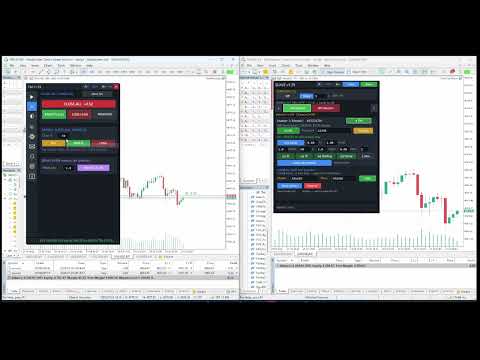
Trade Manager Ultimate Risk Alarms CopyTrade

Trade Manager Ultimate is an on-chart trading utility for discretionary traders who want faster execution, consistent risk, clean position control, and reliable notifications — without leaving the chart.

It is NOT a signal EA and does not open trades by itself. You stay in full control. The panel helps you plan, size, place, manage, get alerts/alarms, and (optionally) publish trades for local copy slaves.


🇮🇳🎉 🎁 INDEPENDENCE DAY MEGA GIVEAWAY 🎁 🎉🇮🇳
Regular Price: $149 👉 FREE!
Celebrate India's Independence with this special limited-time offer. Download FREE until 31st August!

The companion Receiver Utility is available as a FREE download:
TMU Copier – Trade Copy Receiver Utility
https://www.mql5.com/en/market/product/186618
═══════════════════════════════════════
WHY USE THIS TRADE MANAGER
═══════════════════════════════════════

• Calculate lot size from risk % of balance/equity, fixed cash, or fixed lot
• Plan trades with draggable Entry / SL / TP lines (price-first, broker-correct sizing)
• Place market and pending orders (Buy/Sell Limit & Stop auto-detected)
• Manage open risk: Break Even, Trailing Stop, Partial Close, Reverse (Half / Same / Double)
• One-click close groups: All / Profit / Loss / Buys / Sells / Pendings
• MULTI-CHANNEL notifications for order events AND price/candle alarms
• Channels: Telegram · Pushover · ntfy.sh · Custom Webhook · MT5 Mobile Push · Terminal Alert
• Local Copy MASTER: AES-encrypt and publish account state for Slave EAs (same PC/VPS)
• Modern dark UI with vertical icon tabs + UI zoom for 4K / HiDPI / Mac-style screens
• Settings persist across symbol change, EA restart, and terminal restart

═══════════════════════════════════════
TRADE TAB — PLAN & EXECUTE
═══════════════════════════════════════

CHART PLAN
• Lines / Clear — place Plan Entry, Plan SL, Plan TP on the chart
• Drag Entry, SL and TP freely on the chart
• Follow — keep entry stuck to Bid/Ask
• Freeze — keep SL/TP fixed while entry moves
• R:R lock — maintain risk-reward when dragging levels
• After drawing lines, a popup offers Buy Pending or Sell Pending (enabled by price layout)
• Labels stay neutral (Plan Entry) until you choose side

POSITION SIZE (F9-style accuracy)
• Fixed lot
• Risk % of Balance
• Risk % of Equity
• Fixed cash risk
• SL/TP in Pips or absolute Price
• Live lot, risk $, reward $, and R:R display
• Lot math uses OrderCalcProfit / tick value for multi-asset (FX, Gold, indices, crypto CFDs)

ORDERS
• BUY MARKET / SELL MARKET
• Buy Pending / Sell Pending (Limit vs Stop chosen from price vs market)
• Move SL to BE, Reverse tools

REVERSE TOOLS
• Rev Half — close and reopen opposite at 50% volume
• Rev Same — reverse 100% volume
• Rev Double — reverse at 200% volume

═══════════════════════════════════════
MANAGE TAB — CLOSE & PARTIAL
═══════════════════════════════════════

• Close All / Profit / Loss (or Buys / Sells view)
• Delete pending orders
• Partial close by %
• Manual Move SL to Break Even with offset

═══════════════════════════════════════
PROTECT TAB — AUTOMATION
═══════════════════════════════════════

• Auto Break Even (start + lock profit; units: pips / %TP / RR)
• Trailing Stop (start, trail, step)
• Auto partial take-profit
• Daily equity protect (max daily loss / max daily profit)

═══════════════════════════════════════
ACCOUNT TAB — NOTIFICATION CHANNELS
═══════════════════════════════════════

One place to store credentials used by both Order Alerts and Price Alarms.

TELEGRAM
• Bot Token + Chat ID
• Messages via official Bot API

PUSHOVER
• User Key + Application API Token
• Fast mobile push (iOS / Android / desktop clients)
• Ideal when you want priority phone alerts without Telegram

NTFY.SH
• Topic name or full HTTPS URL
• Free/simple push to phone apps and desktop
• Self-hosted ntfy URL also supported if you paste full URL

CUSTOM WEBHOOK
• Any HTTPS endpoint (JSON POST)
• Connect Discord/Slack bots, Zapier, Make, your own server

MT5 MOBILE PUSH
• Uses MetaTrader 5 push (terminal must be connected to MQL5 account with mobile push enabled)

TERMINAL ALERT
• On-chart / terminal Alert() for local sound/popup while you sit at the PC

Also includes channel Test so you can verify Telegram, Pushover, ntfy, webhook, MT5, and terminal in one click.

═══════════════════════════════════════
ALERT TAB — ORDER EVENT NOTIFICATIONS
═══════════════════════════════════════

Send trade lifecycle messages to the channels you tick.

• Master Notify ON/OFF
• Events (toggle each):
  – Order Placed
  – Order / position Modified
  – Position Closed
  – Pending Created
  – Pending Deleted
  – Pending Modified
• Per-event routing to Account channels:
  Telegram · Webhook · Pushover · ntfy · MT5 Mobile · Terminal
• Settings saved and restored on restart
• Requires WebRequest allow-list for external platforms (see Requirements)

═══════════════════════════════════════
ALARM TAB — PRICE & CANDLE ALARMS
═══════════════════════════════════════

Independent from order alerts. Watch any symbol (with symbol suggestions) and fire to your selected channels.

TYPE 1 — PRICE LEVEL ALARMS (up to 30)
• Conditions:
  – Above  (Bid reaches/stays at or above level)
  – Below  (Bid reaches/stays at or below level)
  – Cross Up through level
  – Cross Down through level
• Optional comment per alarm
• Enable / disable / delete from Saved Alerts list
• Symbol autocomplete from Market Watch + full symbol list

TYPE 2 — CANDLE HIGH / LOW BREAK (up to 15)
• Watch closed candle High / Low / Both
• Timeframes: M1, M5, M15, M30, H1, H4, D1, W1
• Max alerts per candle (spam control)
• Ideal for breakout / range / session level watching

ALARM CHANNELS (per Alarm tab routing)
• Same platforms as Account: Telegram, Pushover, ntfy, Webhook, MT5 Mobile, Terminal
• Saved Alarms popup with pages, edit, enable toggle
• Alarm list and settings persist in Common Files

Use cases:
• Gold hits a round number while you sleep → Pushover + Telegram
• EURUSD breaks previous H4 high → ntfy + MT5 push
• Watchlist levels without sitting on every chart

═══════════════════════════════════════
COPY TAB — LOCAL MASTER
═══════════════════════════════════════

Use this account as a COPY MASTER for other terminals on the same computer or VPS.

• Enable / disable MASTER from the panel (state is SAVED — survives symbol change, EA restart, terminal restart)
• Master name + encryption password
• Export all symbols or chart symbol only
• Heartbeat publish + instant publish on trade transactions
• AES-encrypted files in Terminal Common Files (TMCopy folder)
• Companion Slave EA: multi-master, lot modes, Risk%, symbol map, Emergency Day/Trade SL, UI zoom

Note: Local file channel (same PC/VPS). Not a cloud social-trading network.

═══════════════════════════════════════
INFO TAB
═══════════════════════════════════════

• Account / symbol summary and utility status at a glance

═══════════════════════════════════════
UI & USABILITY
═══════════════════════════════════════

• Vertical icon tab rail: Trade · Manage · Protect · Copy · Account · Alert · Alarm · Info
• Hover tooltips on controls
• UI zoom A− / % / A+ for 4K and Mac-style HiDPI (100–200%)
• Minimize panel, draggable header
• Status bar with live feedback
• Dark modern theme

═══════════════════════════════════════
WHO IT IS FOR
═══════════════════════════════════════

• Manual Forex / Gold / Index / Crypto CFD traders on MT5
• Traders who size every trade by risk
• Prop-style risk discipline (consistent %)
• Traders who need mobile alerts (Telegram / Pushover / ntfy / MT5 push)
• Multi-account users on one VPS (with Slave EA)
• Anyone who wants price alarms without a separate alert indicator stack

═══════════════════════════════════════
REQUIREMENTS
═══════════════════════════════════════

• MetaTrader 5 (hedging or netting — test on your broker demo)
• Algo Trading enabled for order execution
• EA must remain on a chart for BE / Trailing / Partial / Equity protect / Alarms / Copy publish

WebRequest allow list (Tools → Options → Expert Advisors → Allow WebRequest for listed URL):

https://api.telegram.org          (Telegram)
https://api.pushover.net          (Pushover)
https://ntfy.sh                   (ntfy public; add your host if self-hosted)
• Your webhook host HTTPS URL       (if using custom webhook)

• For Copy Master: companion Slave EA + shared password + same PC/VPS Common Files
• For MT5 Mobile Push: MQL5 account linked + MetaQuotes ID / mobile push configured in terminal

═══════════════════════════════════════
IMPORTANT
═══════════════════════════════════════

• This is a trading UTILITY, not an automated strategy.
• Past performance of your manual trades is not related to this tool.
• Always test on a demo account first.
• Virtual/hidden SL features (if used) require the EA to keep running.
• Notification delivery depends on third-party services (Telegram, Pushover, ntfy) and your network.

• You are responsible for your risk and broker conditions.
Ensure you are aware of and comply with your local trading and regulatory guidelines.
The developer is not responsible for any financial losses, misuse, or regulatory violations related to this tool.
No profit guarantee: Trading involves risk. Past performance does not guarantee future results.


おすすめのプロダクト
IMPORTANT NOTE: This is a professional Trade Management Utility and on-chart assistant. It is NOT an automated trading robot. It does not open trades on its own. The UltraFast Trade Manager MT5 is the ultimate execution and risk-management suite designed to give you absolute control over your manual and algorithmic trades. When managing multiple positions, calculating complex net break-even points, or constantly monitoring the economic calendar, hesitation can lead to costly mistakes. This utili
FREE
One Click Trading – Auto TP SL Developer TraderLinkz Version 1.00 Category Utility What it does Adds missing TP and SL to your manual trades and pending orders Sets them once per ticket Lets you move TP and SL afterward Works on hedging and netting accounts Scans on every tick and reacts on trade events Why you want it You place faster entries You get consistent risk and exit targets You reduce fat finger errors You keep full manual control Quick start Attach the EA to any chart Keep TP and SL e
FREE
Trade assistant pro v8
Ahmed Mohammed Bakr Bakr
2 (1)
FREE FREE FREE Trade Assistant MT5 – Professional Trading & Risk Management Panel Trade Assistant MT5 is an advanced trading panel designed to help traders execute orders faster, safer, and more professionally . It simplifies manual trading by combining smart order management , precise risk control , and one-click execution , making it ideal for both beginners and advanced traders. This tool does not trade automatically . Instead, it empowers you with full control while applying professional-gra
FREE
Manage All Trades for MT5 Manage All Trades is a free MT5 utility that gives you fast and convenient control over open positions directly from the chart. Close all trades, BUY trades, SELL trades, profitable trades, losing trades, or positions on the current symbol with one click. Built for traders who want speed, simplicity, and better trade management in live market conditions. Manage All Trades is a lightweight and practical trade management utility for MetaTrader 5 that helps you close open
FREE
作業ロジック ストップアウトユーティリティは、ストップアウトレベルまで残っているポイント数を示すシンプルですが非常に便利なインジケーターです。 その利点は、多くのトレーダーが利益を追求して取引する際のリスクを故意に過大評価し、利用可能なマージンを最大限に使用するという事実にあります。この場合、ブローカーがあなたのポジションを強制的に閉じることができる場所を知ることは非常に重要です。 チャートにインジケーターを配置するだけで、買いまたは売りのオープンポジションに応じて、チャート上にこの取引の価格の境界マークが表示されます。 ポジションを開くまで、ラインはチャートに表示されません。 チャートに線が表示されない場合、これはユーティリティが機能しないことを意味するものではなく、おそらく取引のリスクが最小限であり、預金が大きい場合は、ストップアウトラインをはるかに高く探す必要があります/現在のリスクではストップアウトから遠く離れているため、トレードよりも低くなります。 ご不明な点がございましたら、ディスカッションセクションにご記入ください。幸せな取引。 Recommended Ro
FREE
no Trade operation, Robot Set auto SL to every manually Trade from a Phone Automatic Phone TradeManager Need just Set on 1 Symbol Auto BE Trigger is added that immediately sets a stop-loss for every () But does NOT calculate position size based on risk, allows the fixed  SL to   adjusted dynamically drag on Chart or Menu. It protects capital around the clock, reduces emotional mistakes, and ensures consistent risk management.
FREE
PZ Trade Pad MT5
PZ TRADING SLU
4.46 (24)
This simple visual expert advisor allows you to trade easily from the chart. It handles risk management for you and can perform several useful tasks with your existing trades, saving time and making risk-management for each individual trade easier.  [ Installation Guide | Update Guide | Troubleshooting | FAQ | All Products  |  Get Help ] Trade easily from the chart Trade with precise risk management, hassle free Trade pending order with drag and drop price selection Set SL and TP levels with d
FREE
Core function Intelligent transaction management one-click opening and closing operation, which supports user-defined lots to set multiple closing modes: all closing, closing by direction and closing by profit and loss status. Professional risk control, real-time risk monitoring and spread control to avoid high-cost trading environment. Visual control panel has an intuitive graphical interface, and all functions can be operated with one button to display position information, profit and loss sta
FREE
NS Financas Automatic Clear All Chart Indicators Script Automatically remove all indicators from your chart offered for free by NS Financas! Don't waste any more time deleting the indicators one by one. With this script it is possible in one click to remove all indicators from the screen to adjust your new strategy while still using the settings of your graph, in addition to the possibility of configuring keyboard shortcuts for quick access to the script. Take the opportunity to visit our cha
FREE
This expert advisor can enter and exit trades at specific times and on specific weekdays, expressed in GMT Time. It offers weekday selection, trade management settings, a martingale function and money management features. [ Installation Guide | Update Guide | Troubleshooting | FAQ | All Products  |  Get Help ] Easy to use and supervise Fully configurable entry and exit times (up to 5 trades) Enable or disable trading weekdays in inputs Customizable break-even, stop-loss, take-profit and traili
FREE
================================================================ MATRIX CONDITION MONITOR Live Trade Condition Panel for MetaTrader 5 Fully Automatic -- Works with ALL Matrix EAs ================================================================ NEVER MISS A TRADE SETUP AGAIN Matrix Condition Monitor is a free utility that attaches to any chart and automatically checks all 10 trade conditions in real time -- showing you exactly why a trade will or will not open, and alerting you the moment ever
FREE
概要 このインジケーターは、クラシックな ドンチャンチャネル を強化したバージョンで、実践的なトレード機能を追加しています。 標準の3本線(上限、下限、中央線)に加え、 ブレイクアウト を検出し、チャート上に矢印で視覚的に表示します。また、チャートを見やすくするために、 現在のトレンド方向と逆側のラインのみを表示 します。 インジケーターの機能: 視覚的シグナル :ブレイクアウト時にカラフルな矢印を表示 自動通知 :ポップアップ、プッシュ通知、Eメール RSIフィルター :市場の相対的な強弱に基づいてシグナルを検証 カスタマイズ可能 :色、ラインの太さ、矢印コード、RSI閾値など 動作原理 ドンチャンチャネルは次のように計算します: 上限線 :直近N本のクローズ済みローソク足の最高値 下限線 :直近N本のクローズ済みローソク足の最安値 中央線 :最高値と最安値の平均値 上方ブレイクアウト は終値が上限線を超えたときに発生し、 下方ブレイクアウト は終値が下限線を下回ったときに発生します。 インジケーターは以下を行います: 3本のドンチャンラインを描画 方向転換後の最初のブレイクアウト
FREE
Manual position management. Missing SL. Price moves against you. No protection. Trade Manager Lite automates Stop Loss, Take Profit, Trailing Stop, and Break-Even for your open positions. Attach to one chart. Configure your default SL/TP distance. Let it manage your positions automatically. What's Included (FREE Version) Auto SL/TP: Applies missing Stop Loss and Take Profit to positions based on your configured distance in points Trailing Stop: Adjusts SL dynamically as price moves in your favor
FREE
The idea of the system is to indentify the reversal patterns using the calculation of the composite candle. The reversal patterns is similar to the "Hammer" and "Hanging Man" patterns in Japanese candlestick analysis. But it uses the composite candle instead the single candle and doesn't need the small body of the composite candle to confirm the reversal. Input parameters: Range - maximal number of bars, used in the calculation of the composite candle. Minimum - minimal size of the composite can
FREE
Equity monitor This is a simple means change informer. I wrote it for myself, maybe someone will need it... 1. Displays the change in funds for the day. Every day, when the terminal is first launched, it remembers the current funds and monitors changes throughout the day. 2. The first day of the month, well remembers the money and, within months, to monitor changes. 3. Well, it displays the profit of the open position. To work, you need to create 4 global variables: gvarEqityDay , gvarEq
FREE
Prop Firm Protector Basic
Janitha Sandaruwan Amaradasa Wickramasingha Arachchilage
5 (1)
Prop Firm Protector Lite - Essential Risk Management Tool A risk management utility designed to help traders monitor their trading activity according to predefined rules and limits. This tool runs in the background on any chart and monitors all trades regardless of their source, including manual trades, signal subscriptions, or other Expert Advisors. --- Core Features Symbol and Lot Monitoring: The symbol monitoring module allows you to define which currency pairs are permitted for trading.

FREE
MultiTimeframe Info Feed (MIF) Indicator Description: MultiTimeframe Info Feed (MIF) is a smart MQL5 indicator that displays a dynamic, real-time info panel directly on your chart, offering powerful insight into current market conditions. Key features include: Real-time display of Open, High, Low, Close, and live Tick price Tick Rate (ticks per second) for assessing market activity Auto-calculated Entry Price on new candle formation Signal direction detection (BUY / SELL) Price action pattern re
FREE
TradeInfo MT5
Manuraj Dhanda
4.38 (16)
TradeInfo is a utility indicator which displays the most important information of the current account and position. Displayed information: Information about the current account (Balance, Equity, Free Margin). Current spread, current drawdown (DD), planned profit, expected losses, etc. Number of open position(s), volume (LOT), profit. Today’s and yesterday’s range. Remaining time to the next candle. Last day profit information. MagicNumber filter. Comment filter. Indicator parameters: ShowPro
FREE
Friend of the Trend: Your Trend Tracker Master the market with Friend of the Trend , the indicator that simplifies trend analysis and helps you identify the best moments to buy, sell, or wait. With an intuitive and visually striking design, Friend of the Trend analyzes price movements and delivers signals through a colorful histogram: Green Bars : Signal an uptrend, indicating buying opportunities. Red Bars : Alert to a downtrend, suggesting potential selling points. Orange Bars : Represent cons
FREE
Calmer chart context, kept practical Northstar Flow Candles MT5 is a chart-window indicator that presents Heikin Ashi candles with a five-state trend context. It is designed for traders who want a quieter view of price while keeping the native chart available as an optional reference. Visual-only indicator: Northstar Flow Candles MT5 does not place trades and does not send popup, push, or email notifications. What appears on the chart Five candle states: strong bullish, bullish, balanced, bearis
FREE
Trade Behavior Mirror は、自分の口座の確定した取引履歴だけを読み、「損失が確定した直後に、自分のふだんの水準より大きいロットで新規ポジションを開いた」というパターンを1つだけ数えるツールです。予測も助言もしません。パネルに出るのは、すでにこの口座で起きたことの実測値だけです。 数字の作り方: 全銘柄・全マジック番号を対象に、最大31日分の確定した約定を読み込みます(チャートの銘柄に限らない、口座全体の集計です)。当日より前の30日間から、1日あたりの新規エントリー件数の中央値と、そのエントリーのロットの中央値を求めます。平均ではなく中央値を使うのは、1件だけ大きな取引があっても基準値全体が引きずられないようにするためです。その30日間のエントリーが5件に満たない場合は、十分な標本が無いということなので、無理に数字を出さず「Collecting history」と表示します。 核となる集計(画面では Entries within 10min of a loss, at above-median lot: の行): 新しいエントリーのたびに、その直前10分以内に損
FREE
MT5用NAS100 Auto SL and TP Makerをご紹介します: MetaTrader5でナスダック100市場をナビゲートするトレーダーにとって不可欠なアシスタントであるNAS100オートSLおよびTPメーカーで、ストップロスおよびテイクプロフィットの設定をもう見逃すことはありません。このツールは、ストップロスとテイクプロフィットのレベル管理を自動化するシームレスなソリューションを求める方々のために設計されています。 主な特徴 簡単な自動化: ストップロスやテイクプロフィットのないナスダック100取引を自動的に監視します。 ユーザーが構成した設定に基づいてレベルを動的に調整します。 注文タイプの多様性: Nasdaq100の成行注文と未決済注文の両方に対応。 MetaTrader 5で利用可能なさまざまな注文タイプをサポートします。 カスタマイズされた設定: ユーザーフレンドリーなパラメータ設定により、トラッキング設定とストップロス/テイクプロフィットレベルのカスタマイズが可能です。 柔軟な範囲: 実行する特定のNAS100商品または取引されるすべての商品に対してスト
FREE
Fimathe PCM Indicador
Cristiano Rodrigo Olegini
5 (1)
Velas Forex FIMATHE PCM Indicator(無料) Velas Forex FIMATHE PCM Indicator は、市場をシンプルかつ迅速、そして分かりやすく分析できるように設計された無料のインジケーターです。 明確な視覚シグナルによって市場状況を把握しやすくし、トレーダーがより自信を持って取引判断を行えるようサポートします。 XAUUSD の最良結果: 時間足: 5分足(5M) MT5サーバー時間: 02:00 リスク管理: Take Profitを1回達成したら: 取引を停止し、翌日まで待機します。 Stop Lossを2回達成したら: 取引を停止し、翌日まで待機します。 主な特徴 シンプルで直感的なインターフェース インストールと設定が簡単 MetaTrader 5で利用可能なすべての金融商品に対応 複数の時間足で使用可能 初心者から上級者まで幅広いトレーダーに最適 プラットフォームのリソース消費を最小限に抑えた軽量設計 無料 本インジケーターは、MQL5コミュニティ向けに 100%無料 で提供されています。 お役に立ちましたら、ぜひ評価とレビュ
FREE
CC CopyCopy
Luiz Eduardo Teodoro De Carvalho
*** Free Version: Maximum Lot 0.10 *** CopyCopy: Smart Replication Manager for MT5 CopyCopy is the ultimate tool for those who want to replicate trades with complete autonomy. Many signals and EAs operate with minimum lots (0.01) that do not match your account size or your growth strategy. With CopyCopy, you turn this limitation into an opportunity, taking full control over volume and risk. The difference? You don't have to copy "all or nothing." You decide exactly where the orders come from.
FREE
Overview FiT Panel Pro is a professional-grade trade management panel designed for MetaTrader 5 traders who demand speed, precision, and full control over their trades. Built with a modern dark-theme UI, it combines one-click execution with advanced risk management, visual SL/TP drag lines, automatic Fibonacci-based levels, and comprehensive order management — all in a single, compact panel. Whether you are a scalper, day trader, or swing trader, FiT Panel Pro gives you the edge you need to exec
FREE
<h2>Helmsman Trade Manager</h2> <h3><i>無料、そしてこれからも無料</i></h3> <h3>何を取引したいかは、すでにご自身で分かっているはずです。難しいのはその周辺</h3> <h3>――リスクに本当に見合ったロット、自動で動く損切り、取るはずだった分割決済、</h3> <h3>深夜に自分と交わし朝に破った約束。</h3> <p>Helmsman がその部分を引き受けます。あなたの注意は、あるべき場所――チャート</p> <h3>へ戻ります。</h3> <h3>計算せず、描く</h3> <h3>チャート上でエントリー・損切り・利確をドラッグするだけ。各ラインが自分の距離、</h3> <h3>金額、リスクリワード比を、動かしている最中もリアルタイムで表示します。タグを</h3> <h3>一つ押せば発注され、しかも押す前に何を出すか(成行・逆指値・指値)を告げます。</h3> <h3>まずリスク、次にロット</h3> <h3>「残高の 1%」または「50 ドル」と決めれば、ロットは損切り幅とこのブローカーの</h3> <h3>契約から算出されます。
FREE
Main purpose:   "Pin Bars"   is designed to automatically detect pin bars on financial market charts. A pin bar is a candle with a characteristic body and a long tail, which can signal a trend reversal or correction. How it works:   The indicator analyzes each candle on the chart, determining the size of the body, tail and nose of the candle. When a pin bar corresponding to predefined parameters is detected, the indicator marks it on the chart with an up or down arrow, depending on the directi
FREE
https://youtu.be/KHhg88fXWTk?si=ZoVtpc-wpfTVImSL 5-Minute Trading Strategy | Quick & Effective for Beginners Welcome to our trading channel- the deepak trading In this video, we'll be exploring a simple 5-minute trading strategy that can help you capture quick market movements and make profitable trades. Whether you're a beginner or an experienced trader, this strategy is designed to give you clear entry and exit points using technical indicators like EMA, RSI, and Stochastic Oscillator.
FREE
Trade With Price is a powerful and user-friendly MetaTrader 5 Expert Advisor designed to simplify and accelerate your trading execution. This EA provides a smart one-click trading panel that allows traders to instantly place BUY, SELL, and pending orders directly at the current market price—eliminating the need to calculate distances in pips. Key Features One-click BUY & SELL execution Place pending orders based on market price instead of pips Clean and intuitive trading panel interface
FREE
POC・Value Area・Naked POC トラッキング付きのセッション Volume Profile——マーケットのオークションマップをあなたのチャートに。 • 任意のアンカー時間足によるセッション(デフォルトは日次):各セッションごとに POC (point of control)、VAH/VAL(Value Area の境界)、セッション高値・安値を計算し、レベルとして描画。 • Naked POC:過去セッションの未テスト POC は、価格が最終的にタッチするまで右へ延長——市場が記憶しているマグネットです。 • チャート右端のライブプロファイルヒストグラム:価格帯ごとの出来高を、チャートのローソクと同じ配色の買い/売り分割で表示。 • 設定可能:バケットの分数、Value Area のパーセント、履歴セッション数、ヒストグラムの行数と幅、実出来高またはティック出来高、計算時間足。 • ライブ POC/VAH/VAL と Naked POC のレベルタッチアラート(デフォルトはオフ)。 • ヒストグラムはズーム・スクロールのたびに自動で再描画。 チャート上のコントロールパ
FREE
このプロダクトを購入した人は以下も購入しています
Trade Assistant MT5
Evgeniy Kravchenko
4.41 (216)
取引 ごとのリスクの 計算、新規注文 の 簡単 な 設置、部分的 な 決済機能 を 持 つ 注文管理、 7 種類 のトレーリングストップなど 、便利 な 機能 を 備 えています 。 追加の資料と説明書 インストール手順   -   アプリケーションの手順   -   デモアカウント用アプリケーションの試用版 ライン機能 チャート上にオープニングライン、ストップロス、テイクプロフィットを表示します。この機能により、新規注文を簡単に設定することができ、注文を出す前にその特徴を確認することができます。   リスク計算 リスク計算機能は、設定されたリスクとストップロス注文のサイズを考慮して、新規注文のボリュームを計算します。ストップロスの大きさを自由に設定できると同時に、設定したリスクを守ることができます。 Lot calc ボタン - リスク 計算 を 有効 / 無効 にします 。 Risk フィールドでは 、必要 なリスクの 値 を 0 から 100 までのパーセンテージまたは 預金通貨 で 設定 します 。 設定」 タブで 、 リスク 計算 の 種類 を 選択 します :「 $ 通
================================================================================ POC BREAKOUT - V20.72. Full Professional Grade Toolkit ================================================================================ POC Breakout is a full MetaTrader 5 trading dashboard for discretionary traders who want breakout signals, Point of Control (POC) context, volume profiles, order flow, market structure, news, alerts, and advanced trade planning in one professional workspace. Attached directly to you
TradePanel MT5
Alfiya Fazylova
4.88 (167)
Trade Panelは多機能なトレーディングアシスタントです。アプリには手動取引用の50以上のトレーディング機能が搭載されており、ほとんどの取引作業を自動化することができます。 アプリの説明書+ビデオガイド: https://www.mql5.com/en/blogs/post/756482 デモ口座用アプリの試用版: https://www.mql5.com/en/blogs/post/750865 アプリのインストール方法: https://www.mql5.com/en/blogs/post/756239 アプリをビジュアルモードでテストする方法: https://www.mql5.com/en/blogs/post/770277 VPSのMetaTraderにアプリをインストールする方法: https://www.mql5.com/en/blogs/post/770190 取引。 ワンクリックで取引操作を行うことができます: リスクを自動計算して指値注文やポジションを開く。 複数の注文やポジションをワンクリックで開く。 注文のグリッドを開く。 保留中の注文やポジションをグルー
Premium Trade Manager - コーチ内蔵型トレードパネル Premium Trade Manager は、AIトレーディングコーチをあなたのチャートの中に置き、その下に完全な執行エンジンを備えたツールです。いつも通りにトレードをセットアップし、あなた専任のAIトレーディングコーチ Max にそのセットアップをそのまま読み取らせて、発注前に率直な見解を伝えてもらいましょう。ストップの幅が規律あるアプローチに合っているか、リスクサイズは適切か、高影響のニュースイベントが数分後に迫っていないか、プロップファームの制限に近づいていないか。その下には、クリックの後をすべて処理するエンジンが備わっています。ワンクリックのリスクサイズ計算による発注、チャート上でドラッグして組み立て、発注後も動かせるプラン、最大4段階の分割利確、7種類のトレール方式、リアルタイムのプロップファームコンプライアンス、ニュースガード、そしてコストを自ら採点するスプレッド機能。判断はあなたが下す。Max がもう一度確認する。後のことはすべてパネルが担う。 購入前に実際に触れて試せます。 ブラウザ上でライブ
Ultimate Extractor - Professional Trading Analytics for MT5 *****this is the local HTML version of Ultimate Extractor. !!!!!it is not compatible with Cloud!!!! For the online version please reach out to me directly****** Ultimate EA manager also now available when you use cloud pro and above for free!! Ultimate Extractor transforms your MetaTrader 5 trading history into actionable insights with comprehensive analytics, interactive charts, and real-time performance tracking. What It Does Automa
Farmed Hedge Yield Farming | All Markets (Manual - Hybrid - Semi/Automated EA) VERIFIED TRADING RESULTS - Farmed Hedge Yield Axi Copy:  https://www.mql5.com/en/signals/2356376 - Farmed Hedge Yield Exn Copy:   https://www.mql5.com/en/signals/2356404 - Farmed Hedge Yield V Copy:  https://www.mql5.com/en/signals/2357156 * Before purchasing, please feel free to send me a message if you have any questions about the product or setup. ** After purchase,  Contact me via private message to receive t
The product will copy all telegram signal to MT5 ( which you are member) , also it can work as remote copier.  Easy to set up, copy order instant, can work with almost signal formats, image signal,  s upport to translate other language to English Work with all type of channel or group, even channel have "Restrict Saving Content", work with  multi channel, multi MT5 Work as remote copier: with signal have ticket number, it will copy exactly via ticket number. Support to backtest signal. How to s
YuClusters
Yury Kulikov
4.93 (43)
Attention: You can view the program operation in the free version  YuClusters DEMO .  YuClusters is a professional market analysis system. The trader has unique opportunities to analyze the flow of orders, trade volumes, price movements using various charts, profiles, indicators, and graphical objects. YuClusters operates on data based on Time&Sales or ticks information, depending on what is available in the quotes of a financial instrument. YuClusters allows you to build graphs by combining da
Power Candles Strategy Scanner - 自動最適化型マルチシンボル設定ファインダー パワーキャンドル・ストラテジー・スキャナーは 、パワーキャンドル・インジケーターを駆動するのと全く同じ自己最適化エンジンを、マーケットウォッチに登録されているすべての銘柄に対して並行して実行します。1つのパネルで、現在統計的に取引可能な銘柄、各銘柄で勝率の高い戦略、最適なストップロス/テイクプロフィットの組み合わせが表示され、新たなシグナルが発生した瞬間に通知が届きます。 このツールは、Stein Investmentsのエコシステムの一部です。  18種類以上のツールをすべて閲覧し、AIを活用したセットアップの推奨を受け取り、  https://stein.investments でコミュニティに参加しましょう 市場動向を網羅。銘柄ごとに3,000件以上の自動最適化。2種類のアラート。ワンクリックでチャートを切り替えて即座にアクション。 なぜこれが必要なのか 多くのマルチ銘柄スキャナーは、 価格の動き (ボラティリティ、変動率、銘柄ごとのRSI)を表示するだけです。それ
That backtest looks great. But will it still be making money tomorrow, next week, next month? EA Overfitter re-runs your EA on 100 price histories it has never seen. One score tells you if the edge is real. A backtest tells you what an EA did on one price history — the one that happened to occur. What you cannot tell from it is how much of that result was the strategy and how much was the particular path. EA Overfitter answers that. It builds up to 100 synthetic price histories your EA has n
Quant AI Agents are independent trading Expert Advisors. Instead of trading using a fixed strategy like other conventional EAs, Quant AI Agents   is a   multi-agent AI trading framework   that turns natural-language strategy prompts into live.  WANT THE SAME RESULTS AS MY LIVE SIGNAL?   Use the exact same brokers I do:   IC MARKETS , IC TRADING   .  Unlike the centralized stock market, Forex has no single, unified price feed.  Every broker sources liquidity from different providers, creating un
Footprint Chart Pro — Professional OrderFlow EA for MetaTrader 5 Version 6.34 | Professional tool for real traders | Institutional-Grade Visualization DEMO USERS - PLEASE SELECT EVERY TICK / REAL TICK WHEN TESTING AND YOU HAVE DOWNLOADED HISTORICAL DATA. IF YOU SEE A WAITING SCREEN AND IT IS NOT DOWNLOADING, IT MEANS YOU HAVE LOW HISTORICAL DATA. TRY 1 MIN AND 5 MIN FIRST ON 1 DAY DATA. ONE DAY DATA SHOULD BE THE NEWEST AND MOST CURRENT DATE. PLEASE WAIT UNTIL THE MARKET HAS ROLLED OVER PERIOD.
This is exactly what the name says. Visual strategy builder . One of a kind. Turn your trading strategies and ideas into Expert Advisors without writing single line of code. Generate mql source code files with a few clicks and get your fully functional Expert Advisors, which are ready for live execution, strategy tester and cloud optimization. There are very few options for those who have no programming skills and can not create their trading solutions in the MQL language. Now, with Bots Builde
The real‑time view of what is happening inside the market. Footprint Secrets brings detailed analysis directly into MetaTrader 5. It shows where volume is trading, how buyers and sellers are interacting, and how liquidity shifts as the market evolves. Designed for traders who want a precise, real‑time understanding of market behavior. Check out the free preview version here:  https://www.mql5.com/en/market/product/172398 Benefits for the Trader See the real activity behind price . Footprint ch
This EA Utility allows you to manage (with advanced filtering) unlimited open orders (manual or EA) with 16 trailing stop methods: fixed, percent, ATR Exit, Chandelier Exit, Moving Average, Candle High Low Exit, Bollinger Bands, Parabolic, Envelope, Fractal, Ichimoku Kijun-Sen, Alligator, Exit After X Minutes or Bars, RSI and Stochastic. The trailing stop can be either real or virtual, and you can exit fully or with a partial close percent on touch or bar close.  Moreover, you can add (override
Custom Alerts AIO:マルチマーケット監視を一括で実現 — 設定不要ですぐに使えるインテリジェントツール 概要 Custom Alerts AIO は、追加のインジケーター設定が不要で、インストール後すぐに利用できる高機能マーケットスキャナーです。FX Power、FX Volume、FX Dynamic、FX Levels、IX Power を内部にすべて統合し、主要なすべての資産クラス(為替、金属、指数、暗号資産)を一括監視できます。MetaTrader の仕様により、株式は個別のシンボルとして追加可能ですが、一般的には利用頻度は低めです。 1. なぜ Custom Alerts AIO を選ぶべきか 追加ライセンス不要 • 必要なすべての Stein Investments インジケーターが内蔵されており、すぐに使用可能です。 • チャートに表示されるグラフィックは省略されており、アラート生成に特化した構成です。 市場を広範囲にカバー • 為替、金属、暗号資産、株価指数に対応(株式は手動追加可能)。 • シンボル名を入力する必要はなく、プロパティで資産クラス
MT5 was never built to draw a footprint chart. Orderflow Atlas replaces the chart entirely. It blanks the native price display and renders everything itself on a canvas, owning its own coordinate system. Two things follow from that: you can zoom far past MT5's six native scale steps — the per-candle magnification a footprint actually needs — and the whole view repaints in about 10 milliseconds , because the chart is pixels rather than thousands of graphical objects. The footprint Three cell styl
AI Agent Supervisor is NOT an Expert Advisor. AI Agent Supervisor   is a   multi-agent AI risk & portfolio supervisor   that watches every EA on your account and intervenes in real time.  WANT AN AI PORTFOLIO MANAGER WATCHING YOUR FLEET 24/7?   Run your fleet on the same brokers I do:   IC MARKETS , IC TRADING   .  Unlike the centralized stock market, Forex has no single, unified price feed.  Every broker sources liquidity from different providers, creating unique data streams. The Supervisor r
EASY Insight AIO – スマートで手間いらずな取引のオールインワンソリューション 概要 数秒で市場全体——FX、ゴールド、暗号資産、指数、さらには株式まで——を、手作業のチャート確認や複雑なセットアップ・インジケーター導入なしにスキャンできたらどうでしょうか? EASY Insight AIO はAIトレードのための究極のプラグ&プレイ型エクスポートツールです。市場全体のスナップショットを、クリーンなCSVファイルで一括出力。ChatGPT、Claude、Gemini、Perplexityなど、さまざまなAIプラットフォームで即座に解析できます。 ウィンドウの切り替えやグラフのごちゃごちゃしたオーバーレイはもう不要。自動エクスポートされる純粋で構造化されたインサイトだけで、無駄なチャート監視に悩まされず、スマートなデータ主導の判断に集中できます。 なぜEASY Insight AIOなのか? 本当のオールインワン • セットアップ不要、インジケーターのインストール不要、チャートへのオーバーレイ不要。インストールして起動し、エクスポートするだけです。 マルチアセット対
VirtualTradePad PRO SE MT5 — MetaTrader 5向けプロフェッショナル取引コントロールセンター VirtualTradePad PRO SE は、 MetaTrader 5 向けのプレミアムなチャートベースの取引パネルであり、トレード管理ワークスペースです。より速い執行、明確なポジション管理、構造化されたトレード管理、視覚的なレベル計画、そしてチャート上で完結するプロフェッショナルなワークフローを求めるトレーダー向けに設計されています。 これは単なる BUY / SELL パネルではありません。PRO SE は、手動取引、予約注文、ポジション管理、部分決済、バスケット損益管理、平均化レベル、ATMルール、シグナル監視、リアルタイム市場情報、ストラテジーテスター (Strategy Tester) ワークフロー、VPS向け運用を、1つの連携されたインターフェースに統合します。 MT4版 | 完全な説明とスクリーンショット | 購入方法 | インストール方法 | ログファイルの取得方法 | テストと最適化の方法 | Expforex のすべての製品 PRO
Global Investing FX Terminal は、MetaTrader 5 向けのオールインワン FX ダッシュボードです——中央銀行政策金利、CFTC COT ポジション、キャリーランキング、経済サプライズ、オプションスキュー、リテールセンチメント、相関まで、合計 13 のアナリティクスパネルを、ちらつきのない単一キャンバス上に表示し、単一の EA から 10 秒ごとに更新します。外部ソフトウェア不要です。 プロの FX 分析には、通常は別々のプラットフォームに分散しているデータへの同時アクセスが欠かせません。レートデリバティブ、政府統計ポータル、ブローカーのスワップ仕様、オプションデスク——このEAはそれらすべてを、実際に売買判断を下すトレーディングターミナルの単一画面に集約します。 ダッシュボードの表示内容 マーケットオーバービュー FX ペアテーブル — G10 全 28 ペアに加え、ブローカーの Market Watch に NOK/SEK クロスが存在する場合はそれも含めた最大 36 ペアのリアルタイム Bid/Ask。各行にはスプレッド、日次・週次変化、pip
EA Auditor
Stephen J Martret
5 (5)
EA Auditor is an independent analysis tool for traders evaluating Expert Advisors and trading signals on MetaTrader 5. It audits backtest reports, reviews posted developer signals, and cross-verifies the two against each other to help traders assess strategies before committing capital. The MQL5 market offers a wide range of Expert Advisors from many developers, with varying approaches, quality, and transparency. EA Auditor provides a consistent, data-driven framework for reviewing them, answer
Trading Chaos Expert
Gennadiy Stanilevych
5 (11)
This software has no equals in the world and represents a universal trade "console" covering trading signals, automated market entry, setting of Stop Loss and Take Profit, as well as Trailing Profit for multiple trades at the same time in a single open window. Intuitive control of the Expert Advisor in "three clicks" ensures a comprehensive use of all its functions on different computers, including tablets PCs. Interacting with additional signal indicators that mark the chart to give a real mark
FUTURES ORDERFLOW FOOTPRINT CHART Professional OrderFlow EA for MetaTrader 5 Version 1.01| Professional tool for real traders | Institutional-Grade Visualization STRATEGY TESTER USERS - PLEASE SELECT EVERY REAL TICK WHEN TESTING AND YOU HAVE DOWNLOADED HISTORICAL DATA. IF YOU SEE A WAITING SCREEN AND IT IS NOT DOWNLOADING, IT MEANS YOU HAVE LOW HISTORICAL DATA. TRY 1 MIN AND 5 MIN FIRST ON 1 DAY DATA. ONE DAY DATA SHOULD BE THE NEWEST AND MOST CURRENT DATE. PLEASE WAIT UNTIL THE MARKET HAS ROL
Features   With MT5 to Interactive Brokers(IB) Trader, you can: 1. Load chart data from IB to MT5, and Analyze with all standard or customer Indicators. 2. Place Orders to IB Account Directly in MT5. 3. Make your Own EAs upon IB Securities by only making minus changes of the trading function. Usage 1) Installation Copy the "Mt5ToIBTraderEn.ex4" and sample files to [MT5 Data Folder]->MQL5->Experts.  2)  MT5 Settings Add the IP Address to the MT5 Allowed URLs in 'Tools->Options->Expert Adviso
The core idea: using the user interface, you configure the parameters the chart must meet before entering a position (or positions), choose which entry models to use, and set the rules for when trading and planning should end. Lazy Trader  handles the rest: it  takes over all the routine chart watching and execution! full description  :: 3 key videos [1] ->  [2]   ->  [3] What can it do? - Understands Larry Williams market structure - Understands swing market structure by Michael Huddleston
Check EA performance  https://www.mql5.com/en/signals/2376164?source=Site +Profile+Seller Spot vs Future Arbitrage EA for MT5 Spot vs Future Arbitrage EA is an automated Expert Advisor designed for MetaTrader 5 that operates using price differences between Gold spot and Gold futures instruments. The strategy opens positions on both instruments simultaneously to take advantage of temporary differences between spot and futures prices. Requirements The trading account must provide both Gold spot
The Expert Advisor will help you forward all alert from  MetaTrader 5 to Telegram channel/ group.  All alert must save to folder <Data folder>MQL5\Files\Alerts\ , text file with format *.txt and screenshot with format *.gif or *.png. Parameters: - Telegram Bot Token: - create bot on Telegram and get token. - Telegram Chat ID:  - input your Telegram user ID,  group / channel ID - Forward Alert: - default true, to forward alert. - Send message as caption of Screenshot: - default false, set true t
あなたがメンバーである任意のチャネルから(プライベートおよび制限されたものを含む)シグナルを直接あなたのMT5にコピーします。  このツールは、トレードを管理し監視するために必要な多くの機能を提供しながら、ユーザーを考慮して設計されています。 この製品は使いやすく、視覚的に魅力的なグラフィカルインターフェースで提供されています。設定をカスタマイズして、数分で製品を使用を開始できます! ユーザーガイド + デモ  | MT4版 | Discord版 デモを試してみたい場合は、ユーザーガイドにアクセスしてください。 Telegram To MT5 受信機は、ストラテジーテスターで動作しません! Telegram To MT5の特徴 複数のチャネルから一度にシグナルをコピー プライベートおよび制限されたチャネルからシグナルをコピー BotトークンまたはChat IDは必要ありません   (必要に応じて使用することができます) リスク%または固定ロットを使用して取引 特定のシンボルを除外 すべてのシグナルをコピーするか、コピーするシグナルをカスタマイズするかを選択 すべてのシグナルを認
作者のその他のプロダクト
️ Trade Manager oneclick  ( Reverse Trade,  Partial Close,  Breakeven, Close All Running Trade )   control – Smart Manual Trade Control for MT5 Trade Manager oneclick control is a powerful yet lightweight trade management utility built for manual traders who want precise control over their open positions — directly from the MT5 chart. This EA does not open or close trades automatically based on any strategy. It simply provides one-click management tools to handle your running trades efficient
FREE
Time Dashboard MT5 is a powerful and user-friendly MetaTrader 5 indicator designed to provide real-time time zone and clock information directly on your trading chart. Ideal for forex traders and global market participants, this tool displays server time, local time, and the time difference between them, enhancing your ability to manage trades across different time zones. Key Features : Real-Time Time Display : Shows current server time, local time, and their respective time zones with precise o
FREE
Trade With Price is a powerful and user-friendly MetaTrader 5 Expert Advisor designed to simplify and accelerate your trading execution. This EA provides a smart one-click trading panel that allows traders to instantly place BUY, SELL, and pending orders directly at the current market price—eliminating the need to calculate distances in pips. Key Features One-click BUY & SELL execution Place pending orders based on market price instead of pips Clean and intuitive trading panel interface
FREE
TMU Copier – Copy Receiver Utility for MetaTrader 5 TMU Copier is a professional Copy Receiver Utility for MetaTrader 5 that works exclusively with Trade Manager Ultimate – Risk, Alarms & CopyTrade (Master Utility) . It receives and executes trades published by one or more Master Utilities running on the same Windows computer or VPS , providing fast local synchronization, flexible lot scaling, symbol mapping, and advanced copy controls. This is NOT a standalone utility. It does not generate tra
FREE
Xpert Gold EA — Professional Gold Trading Expert Advisor for MetaTrader 5 Xpert Gold EA is a specialized MetaTrader 5 Expert Advisor designed for XAUUSD (Gold) trading with a selective, low-frequency trading approach. Instead of continuously opening trades, the EA focuses on quality setups and controlled exposure. Key Features Gold-focused trading strategy — Designed specifically for XAUUSD. Low trading frequency — Approximately 7–10 trades per month on the tested configuration. No trading on
️   Trade Manager oneclick  ( Reverse Trade,  Partial Close,  Breakeven, Close All Running Trade )   control   – Smart Manual Trade Control for MT5 Enjoy lightning-fast trade management with instant execution. Trade Manager oneclick control is a powerful yet lightweight trade management utility built for manual traders who want precise control over their open positions — directly from the MT5 chart. This EA does not open or close trades automatically based on any strategy. It simply provide
フィルタ:
レビューなし
レビューに返信