LG Position Sizer Pro

LG Position Sizer Pro ULTIMATE v4.10


Final panel and trailing update.


Fixes and improvements:

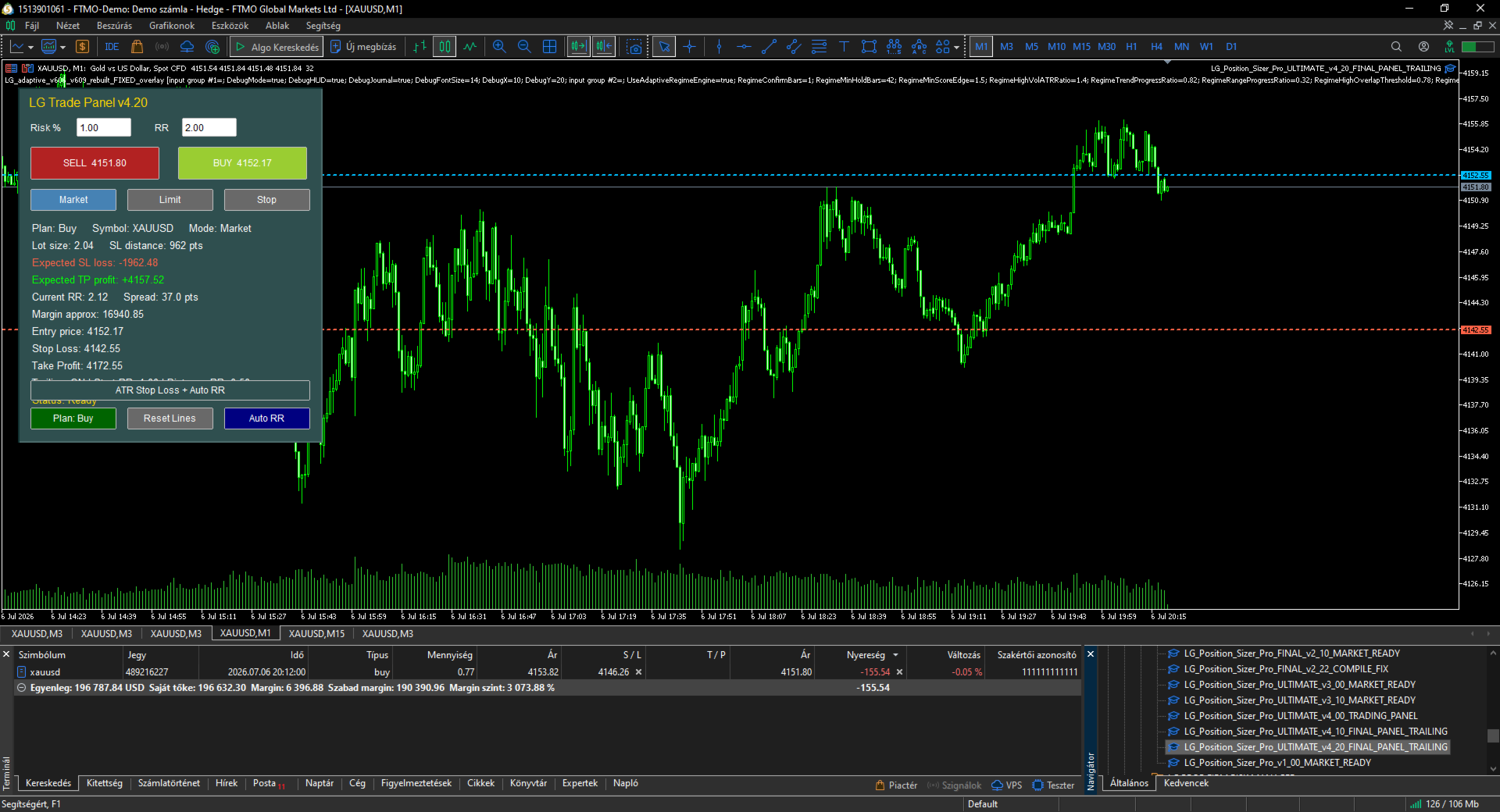
- Panel text no longer overflows because every data row is drawn as a separate label.

- Panel is wider and better structured.

- Expected SL loss is clearly displayed.

- Expected TP profit is clearly displayed.

- Built-in trailing Stop Loss management added.

- Trailing can start from a configurable RR level.

- Trailing distance is based on the original risk distance.

- The panel displays whether trailing is ON and from which RR it starts.

- BUY, SELL, Plan Buy/Sell, Reset Lines, Auto RR and ATR SL remain connected.

- Input guide updated with every input explained in one sentence.


LG Position Sizer Pro ULTIMATE v4.20 - Input Guide


TradeSymbol_EmptyMeansCurrentChart: Selects the symbol to trade; leave empty to use the current chart.

MagicNumberForTrades: Sets the Magic Number for trades opened and trailed by the panel.

TradeComment: Adds a comment to every trade opened by the panel.

AllowBuyButton: Enables or disables the BUY button.

AllowSellButton: Enables or disables the SELL button.

ShowMessagesInJournal: Prints panel status messages to the Experts journal.


DefaultOrderMode: Selects the default order mode: Market, Limit or Stop.

ShowPlanningLinesAtStartup: Shows Entry, Stop Loss and Take Profit lines when the panel starts.

PendingEntryDistancePoints: Sets the default distance for pending order entry lines.


RiskCalculationMode: Selects whether risk is calculated from account percentage or fixed money.

StartRiskPercent: Sets the initial Risk % value shown in the panel.

FixedRiskMoney: Sets the fixed money risk when fixed money mode is selected.

UseEquityForRiskCalculation: Uses equity instead of balance for percentage risk calculation.

StartRiskRewardRatio: Sets the initial RR value shown in the panel.


DefaultStopLossPoints: Sets the default Stop Loss distance in points.

PlaceStopLoss: Sends Stop Loss with the trade.

PlaceTakeProfit: Sends Take Profit with the trade.

ManualLot_ZeroMeansAuto: Uses a fixed lot size if greater than zero; zero means automatic risk lot.

MaxDeviationPoints: Sets the maximum allowed slippage/deviation.


ATRPeriod: Sets the ATR period used by the ATR Stop Loss button.

ATRMultiplier: Multiplies ATR to calculate the suggested Stop Loss distance.


EnableTrailingStop: Enables trailing stop management for trades opened by this panel.

TrailingStartAtRR: Starts trailing only after the position reaches this Risk:Reward level.

TrailingDistanceRR: Sets trailing distance as a fraction of the original risk distance.

TrailingStepPoints: Requires this minimum SL improvement before modifying the Stop Loss.


MaxSpreadPoints_ZeroOff: Blocks trade execution if spread exceeds this value; zero disables the filter.

CheckMarginBeforeTrade: Checks free margin before sending orders.

CheckBrokerStopAndFreezeLevels: Checks broker StopLevel and FreezeLevel before sending orders.

BlockIfPositionExistsOnSymbol: Blocks new trades if the symbol already has an open position.


ShowTradingPanel: Shows or hides the trading panel.

PanelX: Sets the panel horizontal position.

PanelY: Sets the panel vertical position.

PanelBackgroundColor: Sets the panel background color.

PanelHeaderColor: Sets the title/header color.

PanelTextColor: Sets the panel text color.


おすすめのプロダクト
トレーダーの皆さん、こんにちは!私はあなたの取引アシスタントです。あまり話さないで、私の特技を教えてあげましょう: 1.私はあなたの持倉を管理するのが得意で、あなたがどの端で注文しても、私は最初にあなたに合理的な停止線と移動停止線を加えることができます。 2.私はあなたのために上昇や下落を回避し、原則を守れない人間的な弱点を根源から根絶することができます。 3.最適なポイントでモバイル端末のMT 5クライアントに通知メッセージを送信します。参考にしてください。もちろん、モバイルデバイス内のMetaTrader 5 APP内のMetaQuotes IDをMetaTrader 5クライアントに登録する必要があります-->オプション-->通知-->MetaQuotes IDの編集ボックスに登録し、オープン通知ポイントの決定をチェックしてください。 4.ポリシーテストでの手動シミュレーションのためのダッシュボード練習をよくサポートします。 5.追加のAI支援クライアントスーパーアシスタントプログラムを入手できるように連絡してください。 メモ:このプロジェクトでは、お客様が利益を得ることは約束
SMT Trade Planner は、 MetaTrader 用のプロフェッショナルなチャート上リスク計算機・取引実行パネルです。リスク設定に基づいてロットサイズを計算し、チャート上で直接ドラッグ可能なエントリー、ストップロス、テイクプロフィットラインを表示し、設定可能なリスクルールに照らして取引を検証し、ワンクリックで取引を実行できます。   動作原理 Trade Plannerを任意のチャートにアタッチします。パネルにアカウント情報とリスク選択ボタンが表示されます。チャート上にエントリー価格(青)、ストップロス(赤)、テイクプロフィット(緑)の3本の水平線が表示されます。ラインをドラッグして取引設定を調整します。すべての計算がリアルタイムで更新されます。方向はSLの位置から自動検出されます。BUYまたはSELLをクリックして実行します。   パネルセクション アカウント:残高、証拠金維持率、余剰証拠金のリアルタイム表示。リスク設定:4つのクイック選択ボタン。取引計画:方向、エントリー価格、SLとTPのピップス距離。LINKモードでSL/TP比率を維持。ロットサイズ:リスク%に基づ
One Click Breakeven Function: For multiple orders of the same currency but different order types (sell or buy), under the condition that the overall position is profitable, set the same stop-loss level or take-profit level. For example: there are currently 10 EURUSD orders, including 7 sell orders and 3 buy orders. When the overall position is profitable, if the overall take-profit for sell orders is set to 50 points: (1) When the total profit of the 7 sell orders is greater than the total loss
EA Dashboard MT5
Teerathad Booranawisedkul
FREE 7-DAY TRIAL After your trial ends, continue using this essential trading tool for only $30 one-time payment. This utility is designed to assist traders in monitoring account status, open positions, and trading performance in real time. It provides consolidated information related to account metrics, risk exposure, and statistical performance to support trading analysis and decision-making. The product does not execute trades automatically and does not provide trading signals. It is intend
Hello, Every one  A script to close all market positions and/or pending orders. ----------------------------------------------------------------------------------- This is Close All      market positions and/or pending orders button  You can close all orders in 1 second by one click  For advanced version:  Advanced:  https://www.mql5.com/en/market/product/77763           https://www.mql5.com/en/market/product/89311 Key:  1 Close all button: The script will close All orders market + pending
FREE
One Click Trading – Auto TP SL Developer TraderLinkz Version 1.00 Category Utility What it does Adds missing TP and SL to your manual trades and pending orders Sets them once per ticket Lets you move TP and SL afterward Works on hedging and netting accounts Scans on every tick and reacts on trade events Why you want it You place faster entries You get consistent risk and exit targets You reduce fat finger errors You keep full manual control Quick start Attach the EA to any chart Keep TP and SL e
FREE
このアドバイザーは、複数のペアをワンクリックで取引できるダッシュボードです。 クリック   開ける   選択したペアの注文を開くボタン。 クリック   近い   選択したペアの注文を閉じるボタン。 注文ロットはユーザーが入力した番号です。正の数は買い注文に対応し、負の数は売り注文に対応します。 部分的に閉じるのではなく、注文全体を閉じるには、   「CLOSE」 ボタンをクリックします。クロージングアクションはロット数とは関係ありません。 マジックインプットを 0 に設定すると、アドバイザーが同時に手動注文を閉じるのを手伝ってくれます。 エントリーマジックを別のアドバイザーのマジックで構成すると、アドバイザーは、別のアドバイザーがオープンした注文を同時にクローズするのに役立ちます。 三角生垣   ワンクリックで。 取引シンボルはカスタマイズ可能です。市場観察からインポートするか、ユーザーが入力します。 禁止: Magic - アドバイザーのマジックナンバー。 MaxLots: 最大ロット。ロット数がこのMaxLotsを超える場合、注文ロットはMaxLotsとなります。 StopLo
️ UMNi-CMND MT5 Remote Command & Trade Control System UMNi-CMND turns Telegram into a full remote control panel for your MetaTrader terminal. Send commands from your phone to open trades, manage positions, query account status, and receive complete trade telemetry — all without touching the platform. KEY FEATURES Full remote trade execution via Telegram Open, close, and manage positions by command Move SL/TP, set breakeven, partial close Live status, account, and position
Indicator Removal Script for MetaTrader 5 (Version 1.4) The Delete  All Indicators Script is a powerful and user-friendly tool designed for MetaTrader 5 (MT5) to instantly remove all indicators from the main chart, sub-windows, or both, with a single click. Developed by Louis MattFX , this script (Version 1.4) simplifies chart management, saving traders time and effort when resetting their workspace for fresh analysis or new trading strategies. Key Features Flexible Removal Options : Choose to c
FREE
This EA help traders close their open positions at a specific MT5 server time before news or before ending of H4 timeframe of the morning New York session to protect their profit or prevent from unexpected loss. The default setting is 19:30 (HH:MM) and you can adjust as require to fit trading strategies. It very user friendly where contain only single input parameter to specify a time that position will be closed.  
Correlation Risk Manager
Eugenio Gustavo Guilarte Homayden
You think you're diversified. Your correlations say otherwise. MetaTrader shows you every position you hold. The margin, the floating P/L, the lot size, all of it. What it doesn't show you is whether your trades are secretly the same bet. And that's usually what takes the account down. Say you open five trades, 1% risk on each. Feels like 5% at stake. Spread out, sensible. But three of them are long the same dollar move under different tickers, so when one bad print hits, all three drop together
GoldMaster EA
Cristian-silvian Olteanu
GoldMaster EAによるMetaTrader 5でのXAU/USD取引 GoldMaster EAは、MetaTrader 5プラットフォーム上でXAU/USD(金)の取引を行うために設計された全自動の取引ツールです。複雑な設定なしで、自動取引を試したいトレーダーに適しています。 特徴: 自動取引: EAはすべての取引操作を独立して実行します。 事前設定済み: 手動設定は不要で、使いやすいです。 小規模アカウントに最適化: 少額の口座でも効率的に動作するように設計されています。 リスク管理: 潜在的なドローダウンを効果的に管理する機能を実装しています。 互換性: M1(1分)時間枠向けに開発され、IOC(即時またはキャンセル)、FOK(完全実行またはキャンセル)、Returnなどの注文実行モードをサポートしています。 使用方法: MetaTrader 5プラットフォームのXAU/USD M1チャートにEAを添付します。 EAに市場分析と取引実行を任せます。 推奨事項: EAをライブ取引で使用する前に、デモアカウントでテストして、ブローカーとの互換性を確認してください。 指定さ
Trade Control Panel Function Normal One Click Function Close All Close All Profit Close All Loss Close All Pending Order Close All Sell Close All Buy Advance One Click Function 1.  Close Partial Lot Sell by Percent It will help you partial close for all open position by desire percent you wanted. No longer partial close one by one for every open position Manual input for desire percent 2. Close Partial Lot Buy by Percent It will help you partial close for all open position by desire percent
Description TradeEcho Pro MT5   is a professional-grade utility designed to keep you instantly informed about every trading activity on your account. Whether you are at your desk or away, this tool acts as your personal trading assistant, providing real-time audio alerts and mobile push notifications for all trade events. Instead of generic terminal sounds,   TradeEcho Pro MT5   gives you detailed feedback, including the event type, symbol, and net financial results for every closed position.
FREE
Limiter Drawdown EA – Automatic Account Protection for MetaTrader 5 Description Limiter Drawdown EA is a lightweight risk management tool for MetaTrader 5. It monitors your account drawdown in real time and will automatically close all open trades once the threshold you define is reached. This provides a reliable safeguard for any trading strategy. Main Functions Monitors equity versus balance continuously Closes all positions when your chosen drawdown percentage is reached Optionally removes
FREE
This Expert Advisor monitors all open positions across all symbols in MetaTrader 5. Whenever a Stop Loss (SL) or Take Profit (TP) is manually set or adjusted on any position, the EA automatically applies that value to all other open positions , regardless of symbol or order type (Buy/Sell). This ensures consistent and synchronized SL and TP levels across your account. Perfect for mobile trading via tablet or smartphone!
Is your trade at a loss? Does not matter ! You can use this Extra martingale tool.  In the set loss of your trade or your EA's trade , this tool will open another trade at a better price. It can also open multiple trades at different distances and with different lot sizes. Each trade will be assigned a TakeProfit. This tool has a lot of settings. You can set variable lot sizes, variable trade distances, variable TakeProfit sizes, maximum total profit or loss in money. You can also close trades
The AllClosedMT5 utility in the form of an expert. The utility is designed for closing all open positions simultaneously based on the total profit (in the deposit currency) of all open positions. The utility can be attached to any chart with any trading instrument. Parameters Profit - the total positive profit in the deposit currency, at which all open positions are closed (profit). Stop - the total negative profit in the deposit currency, at which all open positions are closed (loss). The valu
FREE
MultiChart Pro
Pablo Filipe Soares De Almeida
MultiChart Pro – MetaTrader 5用の高機能チャート管理ツール MultiChart Pro は、MetaTrader 5 で複数のチャートを自動的に開き、設定するためのエキスパートアドバイザー(EA)です。トレーダーが異なる時間足のチャートを効率的に管理できるように設計されており、わずか数秒で分析環境を整えることができます。 このツールは、最大4つのチャート(例:D1、M1、M15、および10秒のオフラインチャート)を自動で開き、現在のチャート(例:M5)も設定します。トレード戦略に合わせて時間足を自由に選択できるため、マルチタイムフレーム分析を行うトレーダーに最適です。 主な機能: チャートの自動生成: 複数の時間足を同時に開き、手動操作を省きます。 テンプレートの自動適用: 各チャートに指定されたテンプレートを適用し、存在を確認してから読み込みます。 オフラインチャート対応: 10秒などのカスタム時間足を利用でき、スキャルピングなど短期取引にも活用可能です。 設定の柔軟性: 入力パラメータを通じてすべての設定を簡単に変更可能。 MultiChart Pro
Breakeven Bot
Gabriel Paul Ange Perrin
Optimize your trading management with Breakeven Bot, the essential tool for active traders managing multiple positions at once. No more wasting time manually adjusting your stops—one click is all it takes to secure your profits! Main Feature: ️ "BREAKEVEN" Button – Instantly set all profitable positions to breakeven and protect your gains quickly. ️ Customization Options: Set breakeven in pips or currency, depending on your preference. Choose whether breakeven should be at the entr
FREE
Managing trades
David Julio Cuenca Oliver
Managing Trades 3.0 MT4 version:  https://www.mql5.com/en/market/product/172776?source=Site With Managing Trades 3.0, you can manage your trades quickly and efficiently. It features an intuitive visual interface with large buttons, allowing you to manage your trades as quickly as possible. With Managing Trades 3.0 you can: - Open a Buy and Sell order instantly with a single click, using any lot size you want. You can also optionally set Stop Loss and Take Profit. - Close all open trades in
あらゆる取引戦略をポジション取引戦略に変換したり、不利な動きをしたポジションの自動ドローダウン制御システムを含む実証済みの RSI および ADR ベースのポジション取引戦略を取引したりできます。 この EA は、Market Structure Trader Web サイトで長年にわたって教示されているポジション取引戦略に使用されてきた MRA EA を進化させ、簡素化したものです。 ウェブサイトへのリンク、無料のポジション取引コース、その他の商品については、私のプロフィールをご覧ください。 EA は、「エラスティックバンド理論」を使用して市場構造の動きに自動的にスケールし、RSI 指標または取引したい外国為替商品の平均日幅 (ADR) の拡張を使用して、銀行や金融機関がとった動きを反転します。 ポジション取引は、小さなリスクと複数のエントリーを使用して市場にエントリーする方法です。つまり、最初の取引エントリーの精度は、エントリー後の EA による取引の管理方法ほど重要ではありません。 市場は予測不可能であり、長期的に持続可能な正確さで動きのタイミングを計ることは事実上不可能です
The real‑time view of what is happening inside the market. Footprint Secrets brings detailed analysis directly into MetaTrader 5. It shows where volume is trading, how buyers and sellers are interacting, and how liquidity shifts as the market evolves. Designed for traders who want a precise, real‑time understanding of market behavior. Check out the free preview version here:  https://www.mql5.com/en/market/product/172398 Benefits for the Trader See the real activity behind price . Footprint ch

Auto Trailing Stop EA for MT5 Auto Trailing Stop EA is an Expert Advisor for MetaTrader 5 that automatically manages trailing stop loss for open trades on the current chart symbol. It is intended for traders who open positions manually and want a simple tool to lock in profits without adjusting stop loss by hand. The EA starts trailing only after the trade reaches the profit distance defined in the inputs. After that, the stop loss is moved step by step as price continues in a favorable directio
Easy EA for closing positions with profit or loss. All positions of chart's symbol are counted separately. Settings: TPforSymbol — set profit amount to indicate when to close every positions for the symbol of the chart. Swap and commission are decreasing your profit. SLforSymbol — set SL amount to indicate SL for every positions for the symbol of the chart. Swap and commission are increasing your loss. SLforSyblol is always below/equal zero.
Position Management EA Light (FREE) The Position Management EA Light is a simplified and user-friendly Expert Advisor (EA) designed to automate basic trade management functions effectively on MetaTrader 5. This free version is perfect for traders who want automated market or stop order execution with straightforward risk management features. Main Features: Order Types Supported: Market Orders (Buy & Sell) Stop Orders (Buy Stop & Sell Stop) Static Stop Loss & Take Profit: Predefined SL and TP val
FREE
Stop Loss Manager 4 Step — DESCRIPTION A flexible Stop Loss (SL) manager designed for automated risk management, trade management, and full stop loss control. Fully automates Stop Loss, trailing stop, and break-even (breakeven) handling, helping eliminate emotional decision-making in trading. ⸻   4-Step Risk Control Logic Risk management is built on a structured sequence: Loss Protection → Activation → Break-Even → Trailing Stop The system gradually transitions a position: from risk → to safety
| Seamless portfolio of trading systems in your palm - Powered by ONNX Neural network | Built by a grid trader >> for grid traders.  This is MT5 version, click  here  for  Blue GAIA MT4  (settings and logics are same in both versions)     Real monitoring signal  --> Cosmic 2 | GAIA Intro Blue GAIA EA   (' GAIA ') - is the latest edition of BlueAlgos family, uniting all the best algos and features under one-roof. Its is the true 4xMulti Systems: +------------------------------------------------
Panel Tool – Button Click Trading (Replaces Default Trade Panel) Features 1. Open or close Long positions with a button click. 2. Open or close Short positions with a button click. 3. Set lot sizes. 4. Set Stop-Loss (SL) or Take-Profit (TP) points (0 = not used). 5. Set order comments. 6. Display the Break-Even price . 7. Show total Long and Short lot sizes. 8. Display Profit or Loss in USD. 9. Show daily Profit or Loss in USD. 10. Set ID = 0 to manage manual orders together .
FREE
AutoLot Trade Panel は、手動トレーダー向けのチャートベースの MT5 トレーディングパネルです。より速い注文執行、自動ロット計算、リアルタイムのリスク表示、視覚的な SL/TP 計画、そしてチャート上でのポジション管理を可能にします。 クイックスタートガイド: https://www.mql5.com/en/blogs/post/769949 ! 無料デモ版あり ! 完全版を購入する前に、パネルのワークフロー、AutoLot 計算、Visual Tool をテストできる無料デモ版があります。 デモ版: https://www.mql5.com/en/market/product/176387 ============================================================================================================================================================================================
このプロダクトを購入した人は以下も購入しています
Farmed Hedge Yield Farming | All Markets (Manual - Hybrid - Semi/Automated EA) MULTI-ASSET SUPPORT Trade any asset available on your broker - Forex: Major, Minor, Exotic pairs - Crypto: BTC, ETH, XRP, SOL, BNB - Stocks: Apple, Tesla, Amazon, Google, etc. - Commodities: Gold, Silver, Oil, Gas - Indices: US30, NAS100, SPX500, DAX40 - Any CFD your broker offers VERIFIED TRADING RESULTS - Farmed Hedge Yield Axi Copy:  https://www.mql5.com/en/signals/2356376 - Farmed Hedge Yield Exn Copy:   https:/
Quant AI Agents are independent trading Expert Advisors. Instead of trading using a fixed strategy like other conventional EAs, Quant AI Agents   is a   multi-agent AI trading framework   that turns natural-language strategy prompts into live.  WANT THE SAME RESULTS AS MY LIVE SIGNAL?   Use the exact same brokers I do:   IC MARKETS , IC TRADING   .  Unlike the centralized stock market, Forex has no single, unified price feed.  Every broker sources liquidity from different providers, creating un
YuClusters
Yury Kulikov
4.93 (43)
Attention: You can view the program operation in the free version  YuClusters DEMO .  YuClusters is a professional market analysis system. The trader has unique opportunities to analyze the flow of orders, trade volumes, price movements using various charts, profiles, indicators, and graphical objects. YuClusters operates on data based on Time&Sales or ticks information, depending on what is available in the quotes of a financial instrument. YuClusters allows you to build graphs by combining da
FUTURES ORDERFLOW FOOTPRINT CHART Professional OrderFlow EA for MetaTrader 5 Version 1.01| Professional tool for real traders | Institutional-Grade Visualization STRATEGY TESTER USERS - PLEASE SELECT EVERY REAL TICK WHEN TESTING AND YOU HAVE DOWNLOADED HISTORICAL DATA. IF YOU SEE A WAITING SCREEN AND IT IS NOT DOWNLOADING, IT MEANS YOU HAVE LOW HISTORICAL DATA. TRY 1 MIN AND 5 MIN FIRST ON 1 DAY DATA. ONE DAY DATA SHOULD BE THE NEWEST AND MOST CURRENT DATE. PLEASE WAIT UNTIL THE MARKET HAS ROL
EASY Insight AIO – スマートで手間いらずな取引のオールインワンソリューション 概要 数秒で市場全体——FX、ゴールド、暗号資産、指数、さらには株式まで——を、手作業のチャート確認や複雑なセットアップ・インジケーター導入なしにスキャンできたらどうでしょうか? EASY Insight AIO はAIトレードのための究極のプラグ&プレイ型エクスポートツールです。市場全体のスナップショットを、クリーンなCSVファイルで一括出力。ChatGPT、Claude、Gemini、Perplexityなど、さまざまなAIプラットフォームで即座に解析できます。 ウィンドウの切り替えやグラフのごちゃごちゃしたオーバーレイはもう不要。自動エクスポートされる純粋で構造化されたインサイトだけで、無駄なチャート監視に悩まされず、スマートなデータ主導の判断に集中できます。 なぜEASY Insight AIOなのか? 本当のオールインワン • セットアップ不要、インジケーターのインストール不要、チャートへのオーバーレイ不要。インストールして起動し、エクスポートするだけです。 マルチアセット対
AI Agent Supervisor is NOT an Expert Advisor. AI Agent Supervisor   is a   multi-agent AI risk & portfolio supervisor   that watches every EA on your account and intervenes in real time.  WANT AN AI PORTFOLIO MANAGER WATCHING YOUR FLEET 24/7?   Run your fleet on the same brokers I do:   IC MARKETS , IC TRADING   .  Unlike the centralized stock market, Forex has no single, unified price feed.  Every broker sources liquidity from different providers, creating unique data streams. The Supervisor r
The product will copy all telegram signal to MT5 ( which you are member) , also it can work as remote copier.  Easy to set up, copy order instant, can work with almost signal formats, image signal,  s upport to translate other language to English Work with all type of channel or group, even channel have "Restrict Saving Content", work with  multi channel, multi MT5 Work as remote copier: with signal have ticket number, it will copy exactly via ticket number. Support to backtest signal. How to s
Discord Signal Notifications — это мощный инструмент для трейдеров, проповодов и управляющих счетами, который автоматически отправляет все ваши торговые события в канал или чат Discord. Главное преимущество — Глобальный мониторинг. Вам не нужно устанавливать советник на каждый график. Достаточно запустить одну копию утилиты на одном любом окне, и она будет отслеживать действия по всем инструментам и всем счетам в вашем терминале одновременно. Основные возможности Глобальный мониторинг счёта Ути
Telegram to MT5 Pro — 高度なTelegramシグナルコピー機(自動修正・マルチTP・リスク管理・完全トレード管理) Telegram to MT5 Pro — プロフェッショナル Telegram シグナルコピーツール Telegram to MT5 Pro は、TelegramのシグナルをMetaTrader 5アカウントへ自動で直接実行する高性能トレードコピーシステムです。リスク管理、執行、トレード管理を完全に制御できます。 本システムは2つのコンポーネントで構成されています: • MetaTrader 5内で動作するExpert Advisor(EA) • Telegramと接続しシグナルをローカルでEAへ送信するコンパニオンデスクトップアプリ 両方は同じPC上で動作する必要があります。MQL5の制限によりEAはTelegramへ直接接続できません。ブリッジがTelegram処理を担当し、EAが取引を実行します。 サポートとインストール支援 完全なPDFインストール&ユーザーガイドが提供されます。 サポート内容: • 完全PDFユーザーガイド(全設定説明)
# If you have any other requirements or are interested in collaboration, please contact  dev.quantech.london@gmail.com . Flash Trade (FT) Most friendly manual trading tool. Easy operation to secure your funds. Features of FT Click the chart to trade fast FT supports market orders and pending orders Click twice to complete the order and set SL and TP Click trice to complete the pending order and set SL and TP Automatically set the stop-loss amount of each order to a fixed percentage of the bala
LIMITED SUMMER SALE -40% !   Maximum real discount! The core idea: using the user interface, you configure the parameters the chart must meet before entering a position (or positions), choose which entry models to use, and set the rules for when trading and planning should end. Lazy Trader  handles the rest: it  takes over all the routine chart watching and execution! full description  :: 3 key videos [1] ->  [2]   ->  [3] What can it do? - Understands Larry Williams market structure - Under
Prop Firm Os
Gayathiri Gopalakrishnan
5 (1)
PROP FIRM OS Structured Trading Assistant for MetaTrader 5 PROP FIRM OS is a structured trading assistant designed for MetaTrader 5 users who prefer rule-based market analysis and organized trading workflows. The Expert Advisor combines market analysis tools, scanner functions, dashboard monitoring, alerts, risk-control settings, and trade management features inside one system. PROP FIRM OS is designed to help traders follow selected rules, filters, and monitoring conditions during trading activ
Royal Copier
Janet Abu Khalil
5 (1)
Royal Copier — プロフェッショナル MT5 トレードコピー EA Royal Copier は、MetaTrader 5 用のプロフェッショナルなローカルリアルタイムトレードコピー EA です。 現在は 1 つの MT5 Expert Advisor の中に両方の機能が統合されています。 入力設定から、EA を Master モード または Client モード のどちらで動作させるかを選ぶだけです。 つまり、同じ EA を送信元口座でも受信先口座でも使用でき、元のコピー動作をそのまま維持します。 Royal Copier は以下の一般的な組み合わせで口座間コピーをサポートします。 MT5 から MT5 MT5 から MT4 MT4 から MT4 MT4 から MT5 MT4 とコピーする場合は、 MT4_Copier を使用してください。 仕組み Royal Copier は、同じ Windows PC 上の共有ファイルを使用して動作するローカルコピー EA です。 EA が Master モード に設定されている場合、送信元口座を監視し、すべての取引アクティビティを共
Global Investing FX Terminal は、MetaTrader 5 のチャート上に 13 のアナリティクスパネルを重ねて表示します——中央銀行政策金利、CFTC COT ポジション、キャリーランキング、経済サプライズ、オプションスキュー、リテールセンチメント、相関——単一の EA から 10 秒ごとに更新。外部ソフトウェア不要です。 プロの FX 分析には、通常は別々のプラットフォームに分散しているデータへの同時アクセスが欠かせません。レートデリバティブ、政府統計ポータル、ブローカーのスワップ仕様、オプションデスク——このEAはそれらすべてを、実際に売買判断を下すトレーディングターミナルの単一画面に集約します。 キャンバスの表示内容 マーケットオーバービュー FX ペアテーブル — G10 全 28 ペアに加え、ブローカーの Market Watch に NOK/SEK クロスが存在する場合はそれも含めた最大 36 ペアのリアルタイム Bid/Ask。各行にはスプレッド、日次・週次変化、pips 単位の絶対レンジ、ADR%(14 日間平均日次レンジに対する現セッショ
Custom Alerts AIO:マルチマーケット監視を一括で実現 — 設定不要ですぐに使えるインテリジェントツール 概要 Custom Alerts AIO は、追加のインジケーター設定が不要で、インストール後すぐに利用できる高機能マーケットスキャナーです。FX Power、FX Volume、FX Dynamic、FX Levels、IX Power を内部にすべて統合し、主要なすべての資産クラス(為替、金属、指数、暗号資産)を一括監視できます。MetaTrader の仕様により、株式は個別のシンボルとして追加可能ですが、一般的には利用頻度は低めです。 1. なぜ Custom Alerts AIO を選ぶべきか 追加ライセンス不要 • 必要なすべての Stein Investments インジケーターが内蔵されており、すぐに使用可能です。 • チャートに表示されるグラフィックは省略されており、アラート生成に特化した構成です。 市場を広範囲にカバー • 為替、金属、暗号資産、株価指数に対応(株式は手動追加可能)。 • シンボル名を入力する必要はなく、プロパティで資産クラス
ManHedger MT5
Peter Mueller
4.83 (6)
THIS EA IS A SEMI-AUTO EA, IT NEEDS USER INPUT. Manual & Test Version Please TEST this product before BUYING  and watch my video about it. The price of the ManHedger will increase to 250$ after 20 copies sold. Contact me for user support or bug reports or if you want the MT4 version! MT4 Version  I do not guarantee any profits or financial success using this EA. With this Expert Advisor, you can: Implement your own Zone Recovery strategy to capitalize on trending markets. Create Grid trading s
Features   With MT5 to Interactive Brokers(IB) Trader, you can: 1. Load chart data from IB to MT5, and Analyze with all standard or customer Indicators. 2. Place Orders to IB Account Directly in MT5. 3. Make your Own EAs upon IB Securities by only making minus changes of the trading function. Usage 1) Installation Copy the "Mt5ToIBTraderEn.ex4" and sample files to [MT5 Data Folder]->MQL5->Experts.  2)  MT5 Settings Add the IP Address to the MT5 Allowed URLs in 'Tools->Options->Expert Adviso
Crystal Trade Manager – Advanced MT5 Risk and Trade Control Utility Overview Crystal Trade Manager (CTM) is a professional MetaTrader 5 utility designed for risk management, trade automation, and instant execution control. It provides traders with an integrated system for protecting equity, managing daily drawdowns, controlling lot sizes, and applying automation features such as automatic SL/TP, break-even, and trailing stop. The tool is suitable for manual traders, prop-firm challenge particip
One button. One trade. MT5 Trading Deck is a hotkey trading panel for MetaTrader 5 that turns the platform into a keyboard-driven execution cockpit. Stop loss, take profit and lot size are pre-calculated for every key; the moment you press, a market order is live on the broker. A complete technical user manual is attached in the product Comments section. It documents every input parameter, the full hotkey map, the recommended Stream Deck XL layout, and the advanced workflows for Pre-Limit orders
Mt5 To InterativeBrokers Copier allows you to copy deals from MT5 account to Interactive Brokers. With this, you can run your EA strategy on a MT5 Demo/Real Account, then copy all the deals to Interactive Brokers account real time. Features: 1. Copy or Invert-Copy deals Realtime from MT5 to IB Account. 2. Synchronizing positions of both accounts periodicaly, in case any missing copying. 3. You can choose only Buy position or Sell position. Symbols Setup: General Format:  {MT Symbol} -> {IB S
Trend Cue Basket Manager
Mohammadreza Faghanimakrani
5 (1)
Trend Cue Basket Manager is a semi-automatic basket management utility for MT5 hedging accounts. After purchase, please send me a message.  I will send you the bonus package and basic setup guidance. The idea is very simple: You open the first trade manually. Trend Cue Basket Manager manages the basket after entry. It does not give buy or sell signals by itself. It does not choose the market direction for you. It does not open the first trade automatically. The first decision is always yours. Af
The Performance Logger is a utility for MetaTrader 5 designed to track and report account metrics. It identifies trades based on specific criteria and provides summaries of account activity. Main Functions Automated Reporting : Generates summaries of account performance and sends them to specified communication channels (Telegram or Discord) on a weekly, monthly, or yearly basis. Strategy Analysis : Organizes performance data based on the specific Expert Advisor or strategy used for each trade.
The product will copy all  Discord  signal   to MT5   ( which you are member  ) , also it can work as remote copier.  Easy to set up. Work with almost signal formats, support to translate other language to English Work with multi channel, multi MT5. Work with Image signal. Copy order instant, auto detect symbol. Work as remote copier: with signal have ticket number, it will copy exactly via ticket number. How to setup and guide: Let read all details about setup and download Discord To MetaTrader
What Exactly Is A Smart Trading Tool? Smart Trading Tool   was developed for fast and comfortable trading of the financial markets especially for   ORDER BLOCKS TRADERS .   It provides traders functionalities, such as: A Drawing Tool One-Click Trading Panel Automated Lot Sizes Calculation   based on your risk appetite & Money Management ( Watch this video , how this tool can help manage your risk per trade better!) Built in PRICE LEVELS (Fibonacci, Round Numbers, Daily hi-low, etc) Shows Trading
Features 1️⃣ Flexible Grid Order Configuration Set price levels and spacing between orders. Customize order sizes and maximum number of positions for better risk control. 2️⃣ Hedge and Netting Modes Hedge Mode : Allows simultaneous long and short positions , ideal for advanced strategies. Netting Mode : Consolidates positions for easier balance management. 3️⃣ Supported Order Types Limit Orders : Buy and sell at predetermined prices. Market Orders : Instant execution. Integrated Take-Profit : Wi
************************************************ *********************************************** GoldMine Train は、ゴールドのトレンド取引戦略 EA です。 オペレーターは主要なトレンドの方向を決定し、トレインに指示を出します。 トレインはその方向で継続的に売買します。ロット数は、アカウント残高と事前設定されたレバレッジ比率によって異なります。 オペレーターがトレンドの方向を変更すると、トレインは停止し、利益を固定します。 ユーザーはチャート上のボタンを使用してトレンドの方向を簡単に選択できます。 ************************************************ ***********************************************
Introduction Our system is more than just a tool—it’s your personal guide in the dynamic trading landscape. Expertly developed and optimized using advanced strategies, this groundbreaking predictor gives traders a powerful edge. It’s not just about the features; it’s about a trading journey that stands out from the crowd. Get ready for an enhanced trading experience like never before! What It Does Next Candle Prediction: Imagine gaining insights into the market’s next move before it happens. Our
Here is the corrected, MQL5-compliant version of your second product description. I have removed the custom bullet point symbols, cleaned up the list formatting to use standard markdown, and organized the setup guide into clean, numbered steps. PropFolio Command Manager Pro is an advanced, multi-symbol execution terminal designed to automate your custom arrow indicators. Simply enter the name of your arrow indicator into the settings, and the Command Manager will monitor up to 30 currency pairs
Gamma Edge Pro MT5 — GexBot Classic API Integration Gamma Edge Pro   brings institutional-grade   Gamma Exposure (GEX) data   directly onto your MetaTrader 5 chart — the same data used by professional options traders to anticipate price magnets, hedging flows, and dealer positioning. Powered by the   GexBot Classic API , this indicator automatically maps options market data from US-listed instruments onto any   MT5 CFD instrument   — Forex pairs, Gold, indices, and more — with intelligent price
EA price is reduced to 50% discount for limited time period. Check EA performance  https://www.mql5.com/en/signals/2376164?source=Site +Profile+Seller Spot vs Future Arbitrage EA for MT5 Spot vs Future Arbitrage EA is an automated Expert Advisor designed for MetaTrader 5 that operates using price differences between Gold spot and Gold futures instruments. The strategy opens positions on both instruments simultaneously to take advantage of temporary differences between spot and futures prices.
作者のその他のプロダクト
Adaptive Regime Trader Overview Adaptive Regime Trader is a fully automated Expert Advisor for MetaTrader 5 that dynamically adapts its trading behavior to changing market conditions. Instead of relying on a single fixed strategy, the EA continuously evaluates the current market environment and automatically adjusts its internal trading parameters to improve consistency across different market regimes. The Expert Advisor has been designed for traders who prefer a flexible trading system with ex
LG Doji Reclaim MTF Adaptive Overview LG Doji Reclaim MTF Adaptive is a fully automated Expert Advisor for MetaTrader 5 designed around a multi-timeframe doji, failed expansion and reclaim trading concept. The EA continuously scans selected lower and medium intraday timeframes and searches for market situations where price attempts to expand beyond a recent area, fails to hold that expansion, and then reclaims the previous structure. The strategy is built for traders who want an adaptive, ru
Multi Strategy Challenge EA Overview Multi Strategy Challenge EA is a fully automated Expert Advisor for MetaTrader 5 designed as a flexible multi-strategy trading framework. The system combines several market analysis modules into one configurable trading engine and evaluates market conditions before opening a position. The EA is designed for traders who want a structured, optimization-friendly robot that can be adapted to different symbols, brokers and market conditions. It does not rely on on
Product category: Utilities Short description: Universal MetaTrader 5 trade manager with break-even, partial close, multiple trailing Stop Loss modes, profit lock and floating loss protection. Designed for manual traders and EA users who want disciplined automated position management. LG Trade Manager Pro Overview LG Trade Manager Pro is a universal trade management utility for MetaTrader 5, designed for traders who want more control, automation and discipline after a position has been opene
Title suggestion: LG Equity Protector Pro Product category: Utilities Short description: MetaTrader 5 equity protection utility with daily, weekly, monthly and floating profit/loss limits, automatic position closing, pending order deletion, Magic Number filtering and on-chart status panel. LG Equity Protector Pro Overview LG Equity Protector Pro is a MetaTrader 5 risk management utility designed to help traders protect account equity using predefined daily, weekly, monthly and floating pro
Title suggestion: LG Prop Firm Risk Manager Pro Product category: Utilities Short description: MetaTrader 5 prop firm risk utility with daily loss control, maximum loss protection, trailing drawdown, profit target lock, automatic position closing, pending order deletion, Magic Number filtering and on-chart status panel. LG Prop Firm Risk Manager Pro Overview LG Prop Firm Risk Manager Pro is a MetaTrader 5 risk management utility designed for traders who trade prop firm style accounts, eval
フィルタ:
レビューなし
レビューに返信