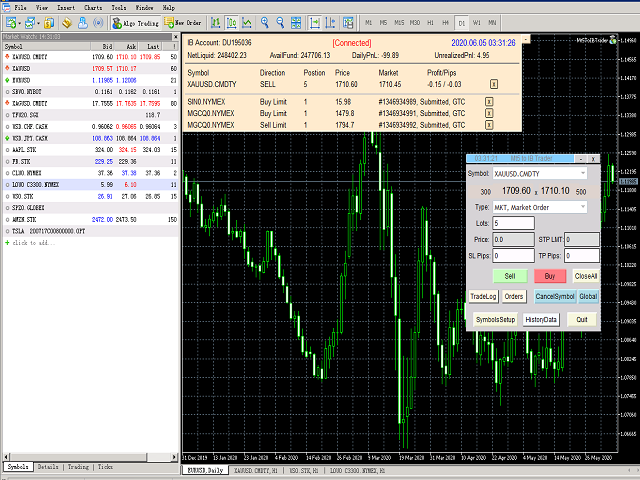
MT5 To Interactivebrokers Trader

3.67

Features 

With MT5 to Interactive Brokers(IB) Trader, you can:
1. Load chart data from IB to MT5, and Analyze with all standard or customer Indicators.
2. Place Orders to IB Account Directly in MT5.
3. Make your Own EAs upon IB Securities by only making minus changes of the trading function.

Usage

1) Installation
Copy the "Mt5ToIBTraderEn.ex4" and sample files to [MT5 Data Folder]->MQL5->Experts. 


2)  MT5 Settings
Add the IP Address to the MT5 Allowed URLs in 'Tools->Options->Expert Advisor'. 


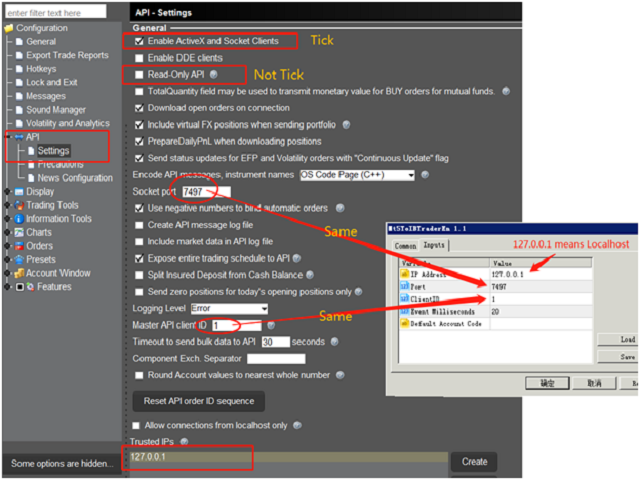
3) TWS Configuration
Find “Global Configuration” in Menu of TWS. Tick “Enable ActiveX and Socket Clients”. Delete the tick of “Read-Only Api”. 


4) Input Parameters
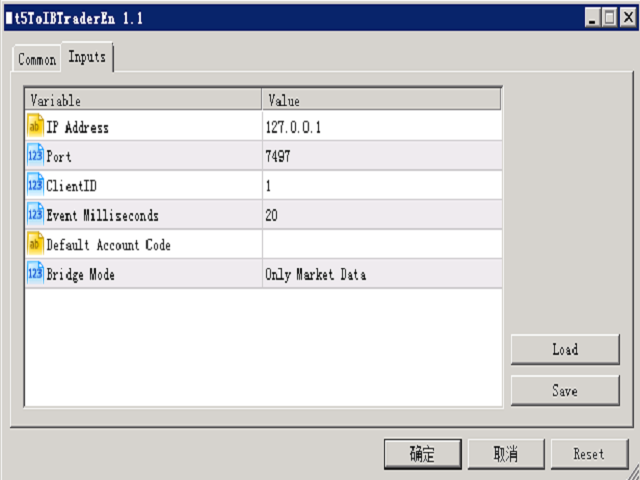
Drag “Mt5ToIBTraderEn” to MT5 Chart. Fill the input parameters.  

Variable Description
IP Address IP Address of host in which TWS or IBGateway is opened.
Fill “127.0.0.1” if the same computer is used.
Port Socket Port.
ClientID Identifier of connection to TWS. Any positive integer.  Please use different number for multiple connections.
Event Milliseconds Periodical timer to process the program. 
Default Account Code Account code must be specified if the TWS account has multiple Account Code(e.g. U123456). The program will use the first one obtained if not filled in the field.
Bridge Mode
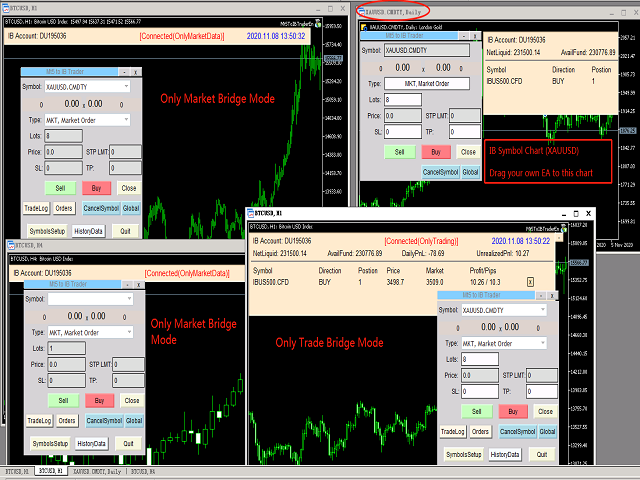
  • Market Mode:Only receive data feed from IB TWS, including realtime market data and history data. Multiple connection of Market mode can be created for an IB Account Code.
  • Trading Mode:Receive orders, executions, positions from IB TWS and place orders to IB Accounts. Only one connection can be created for an IB Account Code.
  • Both Trading and Market:Full market and trading mode.
*Note:
1. Please fill different Client ID for different connections to the same IB Account Code.
2. Since the mt5 program can only be run in the mode of single thread, the big data flow of the bridge may be blocked and delayed. So we suggest users to create the one connection of Trading Mode and multiple Market Mode.It is suggested to select less than five symbols for each market-mode connection.
Reconnect Wait Seconds(Should Differ from other Bridges) Auto Re-connect waiting seconds. Should be filled with different number to avoid simultaneous requests, which may cause potential abnormal.
Font Size Enlarge  Font size Zoom ratio


5) Multiple Bridge Mode
When creating multiple bridge mode, different ClientID number should be filled in parameters.
Recommendation on multiple bridge mode:
i. Open One connection(one chart) with Trading Bridge Mode.
ii. One or more connections of Market Bridge Mode in different chart.
iii. Less than 5 symbols for one market bridge is suggested. Less than 3 symbols is best.


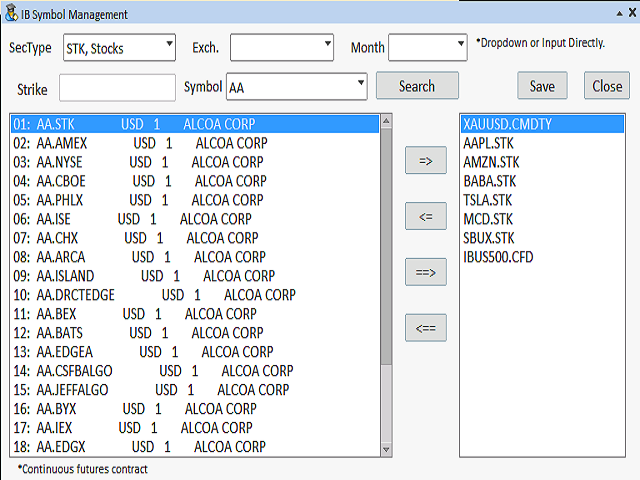
IB Symbol Management

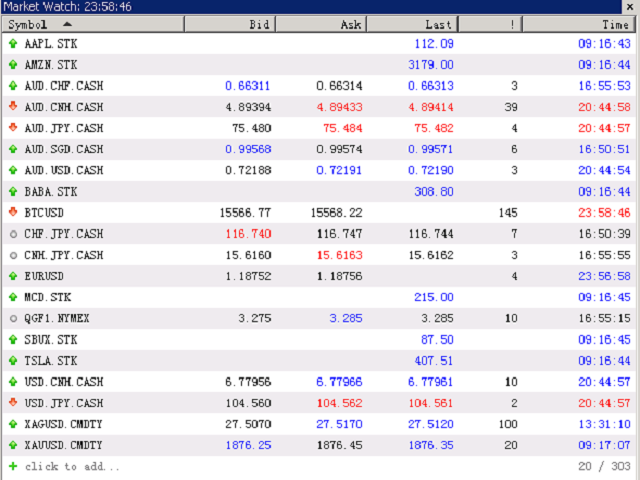
After click “SymbolsSetup” in the chart control, then you can search IB Symbols and add to the watch list of MT5.


Trading

1) Order Type

Supported order types are as below:

  •    MKT, Market Order
  •    LMT, Limit Order
  •    STP, Stop Order
  •    MTL, Market to Limit
  •    STP LMT, Stop Limit


2) Basic trading function
  •    Buy / Sell
  •    CloseAll: Close all the position of the Selected Symbol
  •    Cancel: Cancel all the pending orders of the Selected Symbol
  •    CancelGlobal: Cancel all the pending orders of the account.
  •    Stoploss/Takeprofit: Place Stoploss or Takeprofit Order simultaneously when click Buy /Sell
3) Drag to Modify
  • Drag Pending Order Line to Modify the Price
  • Drag Position Line to Generate Stoploss or Takeproft Order

(Note: Please select(double click) the line before dragging.)


Making IB EAs

The attached file “Header_MT5ToIB.mqh” has listed all the IB functions as reference.
Trading and Account Functions of MT5 cannot send orders to IB account directly. We need to replace these function to IB functions.
Most of them can be simply add a prefix “IB_” to MT5 functions, such as IB_AccountInfoInteger.
The account structure of IB is similar to the “Netting” mode of MT5 account, so the usage of functions will be similar to Netting mode of MT5.
For IB EAs made by IB functions, users can run “Strategy Tester” commonly with any charts, including those fed by IB data.
Besides, during the usage of IB function, please be noted position_id(or position identifier)are always the Contract ID of the symbol.

Relevent sample files: https://www.mql5.com/en/blogs/post/742377

レビュー 5
zijian_trader
19
zijian_trader 2024.03.30 01:39 

Hi I find two problem,1.MGC,GC future is not queried 2.in simulation environment ,quote data can not be updated

jamesfang2018
26
jamesfang2018 2025.10.21 06:59 

Hi Shaoping, I bought the MT5 To IB EA Trader. But I could not find the "Mt5ToINTrader.ex5" library file. Where is this file located? When I tried to run the examples that come with the MT5 to Interactivebrokers Trader package, the system tried to open the library file "Mt5ToIBTrader.ex5", but cannot open that file. So the example EA failed to load. Please help. Thanks. James

おすすめのプロダクト
Master Editionは、ボリュームとマネーフローの視点を通じて市場構造を可視化するために設計されたプロフェッショナルグレードの分析ツールです。標準のボリュームインジケーターとは異なり、このツールはチャート上に日足ボリュームプロファイルを直接表示し、価格発見がどこで行われたか、そして「スマートマネー」がどこに位置しているかを正確に確認できます。 このMaster Editionは、明確さとスピードを考慮して設計されており、ロード時にチャートレイアウトを即座に美化するユニークな自動テーマ同期システムを備えています。 主な機能: 真のマネーフロー計算: 標準のティックボリュームを超えます。「Use Money Flow」を有効にすると、ボリュームは価格によって重み付けされ、特定の価格レベルでの実際の資本コミットメントが明らかになります。 バリューエリア (VA) の可視化: バリューエリア(デフォルトではボリュームの70%)を自動的に計算します。 VA Fill: コントロールゾーンを即座に識別するために、バリューエリアの背景をシェーディングします。 主要レベル: コントロールポイン
VWAP Trinity
Roberto Da Silveira Gomes
How it works The indicator calculates VWAP (Volume Weighted Average Price) — the average price weighted by traded volume, widely used by institutional traders as the intraday "fair price" benchmark. Unlike a regular moving average, VWAP gives more weight to periods with higher volume, showing where most of the money was actually traded. The product combines three ways of calculating this average in a single indicator, so there is no need to install separate tools: Daily: the sum resets every da
Volume Footprint & Heatmap Indicator This indicator combines Volume Footprint and Heatmap visualization, inspired by the Order Flow and Heatmap concepts found in Bookmap. Unlike futures markets, the Forex market does not provide real exchange-traded volume data. Instead, it only offers Tick Volume . This indicator is designed to simulate Bookmap-style market visualization as closely as possible using the available Tick Volume data. Because the indicator relies on Tick Volume, the quality and acc
LuoMo Volume & Price Structure 8.98 A multi-function chart indicator for   MetaTrader 4 and MetaTrader 5 , designed to display key volume, volatility, sentiment, and price-structure information directly on the main chart. Main Features Volume and price-based Support & Resistance Volume spike and exhaustion signals ATR volatility expansion alerts Volume Profile with HVN and LVN Bullish and bearish sentiment distribution Developing or fixed POC VAH and VAL levels Supply and Demand zones Volume-wei
SuperAgent v7.0 Diamond Pro - 定量的スコアリングとダイナミックリスク 説明: SuperAgent v7.0 Diamond Proは、高度なPython金融アルゴリズムをMT5用に忠実に移植したプロフェッショナルなエキスパートアドバイザー(EA)です。 定量的スコアリングエンジン と ダイナミックリスク管理 を組み合わせ、機関投資家レベルのポートフォリオ管理を実現します。 主な特徴: 多層決定エンジン:   「低遅延シグナル処理」「トレンドバイアス確認」「モメンタムスコアリング」の3つの次元で市場を評価します。 Auto-Lot(ダイナミックリスク):   余剰証拠金に対するリスクの割合に基づいてロット数を自動計算し、「資金不足」エラーを防止します。 StopLevel Guard:   ブローカーの「ストップレベル」と「フリーズレベル」をリアルタイムで監視。SLおよびTPを自動的に正規化し、ブローカーの制限を遵守します。 プロアクティブ・マージンチェック:   注文実行前に必要証拠金を計算し、残高不足の場合はログを汚さずにトレードをスキップします。
ElohimTrade Ultimate Confluence Pro — 世界で最も強力なマルチタイムフレーム・コンフルエンスインジケーター ElohimTrade Ultimate Confluence Pro で、あなたのトレーディングの真の可能性を解き放ちましょう。精度・信頼性・市場の深い洞察を追求するトレーダーのために設計された、テクニカル分析ツールの最高峰です。 この最先端インジケーターは、EMA、RSI、MACD、ボリンジャーバンド、ストキャスティクス、ADX などの主要インジケーターを巧みに組み合わせ、M15、H1、H4 といった3つの主要タイムフレームを同時に分析します。その結果、市場ノイズを排除し、最も利益を生むチャンスを明確に示す「コンフルエンススコア」を提供します。 なぜ推測で取引するのですか?次のようにできます: マルチタイムフレームのシナジーを活用: 複数の時間軸を同時に分析し、トレンドや反転の精度を飛躍的に向上させます。 シグナルの品質を最大化: 複数のインジケーターとタイムフレームの確認を統合した高度なスコアリングにより、偽シグナルを大幅に削減。 リアル
TECHNICAL SPECIFICATION — PRICE CONTEXT, VOLUME AND MARKET INTEREST REGIONS INDICATOR Develop an indicator based on the analysis of price context, volume, and market structure , with the purpose of identifying and visually representing areas of market interest on the chart. The system should use lines, zones, and arrow markers to highlight relevant areas of the market, including situations where a significant buying or selling effort has occurred, providing the user with a clear visual represent
CRT Candle Range Theory HTF MT5 - Ultimate CRT Indicator: 高度なICTコンセプトとMalaysian SnRトレーディングシステム 最も先進的なCandle Range Theoryインジケーターでマーケットメーカーの足跡をマスターしましょう。Ultimate CRT Indicatorを使用して、Smart Money Concepts (SMC)の真の力を解き放ち、機関投資家のように正確にトレードします。真剣なトレーダー専用に構築されたこのインジケーターは、ICT Concepts (Inner Circle Trader)の核となる柱である、非常に効果的なCandle Range Theory (CRT)を自動化し、Malaysian Support and Resistance (SnR)エントリー手法とFVG (Imbalance)ゾーンの致命的な精度でそれを強化します。 MT5でForex、Crypto、Indicesのいずれを取引している場合でも、このアルゴリズムは市場のノイズを取り除き、ダマシ(fakeout)を
VOLATILITY SNIPER MT5 – Smart RSI & Volatility Adaptive Trading System Your Ultimate Trading Companion Built for Precision and Profitability. VOLATILITY SNIPER   is a next-generation Expert Advisor designed for traders who demand performance, control, and strategic edge in volatile market conditions. Powered by a highly optimized RSI strategy and dynamic ATR-based volatility filter, this EA is capable of identifying high-probability reversal zones while minimizing false signals through int
DeepInsight
Gustavo Santos Pedrosa
Title: DeepInsight: Flow and Market Context Analysis What is DeepInsight? DeepInsight is a technical analysis tool for MetaTrader 5, developed to assist in reading market dynamics. The indicator processes volume and price movement data to generate objective visual references, facilitating the identification of areas of interest on the chart. The tool functions as an auxiliary analysis dashboard, offering support for manual decision-making without performing automatic order execution. Operationa
Double Blow Scalping EA: An Innovative Advisor for MT5, Inspired by Quantum Technologies - Limited Edition!!! Description: Double Blow Scalping EA is a revolutionary trading algorithm for MetaTrader 5 that combines advanced principles of quantum computing and scalping strategy. His work is based on a unique imitation of qubits, the key elements of quantum computers that allow processing multiple market scenarios simultaneously. This gives the Expert Advisor unprecedented analysis speed and acc
Product Description: The Storm Rider XAUUSD - Ride the Golden Waves with Confidence. After almost 6 months of continuous development, testing, and refinement, I created The Storm Rider_  a low-risk, high-performance Expert Advisor built exclusively for XAUUSD (Gold).  This EA is designed for traders who want consistent results without constantly watching the screen. Simply set it on a VPS, let it run, and focus on what truly matters. Core Trading Approach: Price Action The robot makes decisions
VWAP Z-Score (Rolling) Positive values indicate price trading above VWAP, while negative values indicate price trading below VWAP. Typical Use Cases Mean-reversion strategies Overbought / oversold detection VWAP-based statistical analysis Confirmation tool for discretionary or algorithmic trading Risk-aware trade entries and exits Notes Uses tick volume for VWAP weighting (standard for Forex symbols). The indicator does not repaint. Designed for analytical and decision-support purposes only.
Volume Profile Multiple — アルゴリズム取引対応バッファ付き マルチブロック・ボリュームプロファイル 時間足を変えるたびにボリュームプロファイルを一つずつ描き直し、再計算する手間にうんざりしていませんか? Volume Profile Multiple は、チャート上に複数の連続したボリュームプロファイルを自動的に描画し、直近の表示範囲だけでなく、相場の各区間で機関投資家の関心が実際にどこにあったのかを明らかにします。 この指標が行うこと 本指標は価格履歴をN本のローソク足ごとのブロックに分割し(ブロック数と1ブロックあたりの本数は自由に設定可能)、各ブロックについて完全なボリュームプロファイルを計算します:コントロールポイント(POC)、バリューエリアの上限・下限(VAH/VAL)、高出来高ゾーンと低出来高ゾーン(HVN/LVN)です。結果として、ブロックごとの市場構造を視覚化したマップが得られ、実出来高に基づく蓄積ゾーン、サポート・レジスタンス、バリューエリア間の価格ローテーションの特定に役立ちます。 アルゴリズム取引にも対応 多くのボリュームプロファイル系
Breakout Boxes with Volume Pressure This indicator automates the identification of key consolidation zones (Supply and Demand) based on Market Pivots and Volatility (ATR). Unlike standard support/resistance tools, this indicator provides a unique   Volume Pressure Analysis   inside every box, giving you insight into the battle between Buyers and Sellers before a breakout occurs. Key Features Automated Supply & Demand Zones:   Automatically detects significant Pivot Highs and Lows to draw dyna
Strategy description can be seen in the attached video( https://www.youtube.com/watch?v=JzN1fEZmc40 ). This hedging strategy strictly follows what is presented in the video. The strategy works on any pair of forex, crypto, indices and other derivatives. Through the settings, you can customize the size of lots, add pairs for operation, and profit and loss points. The distance between sell and buy orders must be configured according to the number of decimal places of the pairs that will be tra
Renko Plus
Eadvisors Software Inc.
With Renko Plus you can use the features in the Indicator functionality, just add it to the Metatrader5 chart.             The Renko chart is a type of chart, developed by the Japanese, that is constructed using price movement rather than standardized prices and time intervals like most charts. It is believed to be named after the Japanese word for bricks, "renga", as the graphic looks like a series of bricks.             A new brick is created when the price moves a specified pri
Magic EA MT5
Kyra Nickaline Watson-gordon
Magic EA is an Expert Advisor based on Scalping, Elliot Waves and with filters such as RSI, Stochastic and 3 other strategies managed and decided with the robot smartly. Large number of inputs and settings are tested and optimized and embedded in the program thus inputs are limited and very simple. Using EA doesn't need any professional information or Forex Trading Knowledge. EA can trade on all symbols and all time frames, using special and unique strategies developed by the author. The EA w
Vwap Candles Matrix
Thales Bitencourt De Souza
Vwap Candles Matrix See what price alone cannot show. Vwap Candles Matrix is a professional market-flow analysis system for MetaTrader 5, created to transform complex volume and directional information into a clear visual structure. This is not a conventional buy/sell indicator. It is an analytical framework designed to reveal market participation, directional pressure, liquidity behavior and flow structure through a proprietary synthetic candle environment. Instead of adding more noise to the c
FREE
ENGLISH DESCRIPTION (MQL5 Standard Optimized) Product Name: Nightveil Orbital Hangar EM AI (MT5) [Subtitle: Cognitive Q-Learning | 17-Sensor Gravitational Matrix | L2 Order Flow Delta] IMPORTANT! After your purchase, simply send me a private message and I’ll provide you with the installation guide and setup instructions. Introduction: Master the Laws of Market Gravity Welcome to the absolute pinnacle of institutional quantitative engineering. Nightveil Orbital Hangar EM AI is a highly advance
WAPV Weis Wave Chart Forex
Eduardo Da Costa Custodio Santos
The Weis Wave Chart Forex for MT5 is a Price and Volume indicator. The Price and Volume reading was widely disseminated through Richard Demille Wyckoff based on the three laws created by him: Supply and Demand, Cause and Effect and Effort vs. Result. In 1900 R.Wyckoff already used the wave chart in his analyses. Many years later, around 1990, David Weis Automated R. Wyckoff's wave chart and today we bring you the evolution of David Weis' wave chart. It shows the amount of Volume and the amount o
Tma Poc Gold
Ignacio Agustin Mene Franco
POC + TMA SCALPER GOLD - Expert Advisor Professional DESCRIPTION: Automated trading system designed specifically for XAU/USD, combining Point of Control (POC) with Triangular Moving Average (TMA) to identify high-volume and trending zones. It uses advanced risk management with dynamic trailing stops and an intelligent grid system. TECHNICA
XAUUSD OrderFlow Structure AutoPOC Pro is an advanced MetaTrader 5 indicator designed to analyze market structure, order flow, buying and selling pressure, liquidity, and volume distribution directly on the chart. The indicator is especially focused on XAUUSD (Gold) analysis, although it can also be used with other instruments available in MetaTrader 5. Its objective is to bring together several analytical tools that would normally require multiple indicators: market structure, BOS and CHOCH, Or
This system is very useful for trading because it solves several classic problems: 1. Objectivity & Precision Benefit: It eliminates the trader's personal bias. Every trader might draw a trendline slightly differently, but this indicator uses a precise mathematical logic (Fractals) to find the pivot points. The resulting lines are objective and consistent every time. 2. ️ Dynamic Updates Benefit: Your chart is always current. As soon as a new pivot is confirmed, the new trendline is drawn au
Phantom Edge SMC — The Ultimate Smart Money Indicator for MT5 Tired of manually drawing structures while trading SMC or ICT concepts? Let Phantom Edge SMC do the heavy lifting for you. Key Features Internal & Swing Structure: Automatically detects BOS and CHoCH across two structural levels. Order Blocks (OB): Identifies Internal and Swing OBs with automated mitigation tracking. Equal Highs / Lows: Highlights EQH / EQL to pinpoint Liquidity pools. Fair Value Gaps (FVG): Displays FVGs with
Short Description Swing Timing Breakout EA is a smart Expert Advisor for MetaTrader 5 that combines trend filtering, momentum timing, and dynamic risk management to capture high-probability swing and breakout opportunities. Full Description Swing Timing Breakout EA is a professional trading robot designed for MetaTrader 5, suitable for traders who want a balance between automation, control, and disciplined risk management. This EA uses a trend-following and momentum confirmation approach ,
MTF VWAP Indicator - Quick Overview   This indicator shows you where institutional money is flowing across multiple timeframes using Volume Weighted Average Price (VWAP) to identify high-probability trading zones. New version has VWAP bands plotting capability if user enabled and display panel (whose background changes colour on confluence) can be toggled on/off.      What It Actually Does:     1. Tracks Smart Money Levels: - Shows Daily, Weekly, and Monthly VWAP lines where big players (banks,
Here   our more valuable tools SMC Trend Trading   ,  Easy SMC Trading  ,  Institutional SMC Architect Volume Analysis Tools  ,  Volume flow Profile  ,  Market volume profile  , FVG with Volume  , Liquidity Heatmap Profile  ,  Volume Spread Analysis Deriv boom and crash index spike killer system you can use it only on m5 timeframe  follow the structure and get signal with alert on phone open trade set sl tp and enjoy easy analysis and trading made simple 
The Trade Manager Pro
AL MOOSAWI ABDULLAH JAFFER BAQER
Trade Manager Pro Professional trade management. Smarter execution. Complete control. Trade Manager Pro is an all-in-one MetaTrader trading utility designed to simplify and enhance manual trading. From precise order execution and advanced position management to intelligent risk control and real-time trade monitoring, Trade Manager Pro provides everything you need to manage your trades efficiently from a single, intuitive interface. Whether you're a scalper, day trader, swing trader, or prop firm
Value Chart Candlesticks
Flavio Javier Jarabeck
4.57 (14)
The idea of a Value Chart indicator was presented in the very good book I read back in 2020 , " Dynamic Trading Indicators: Winning with Value Charts and Price Action Profile ", from the authors Mark Helweg and David Stendahl. The idea is simple and the result is pure genius: Present candlestick Price analysis in a detrended way! HOW TO READ THIS INDICATOR Look for Overbought and Oversold levels. Of course, you will need to test the settings a lot to find the "correct" one for your approach. It
FREE
このプロダクトを購入した人は以下も購入しています
The Patch It never opens a trade. It walks behind the ones that did. Every open position, every pending order — checked twice a second for the one thing that's easy to forget: a stop, a target. Found bare, it doesn't ask. It writes the missing number in, measured in points from wherever the position began, and moves on to the next. No strategy, no opinion on direction. Just the quiet assumption that nothing should ever sit on the market unprotected — not because someone decided it shouldn't,
Floor Watch
Syed Tauqeer Hussain Shah
Floor Watch One number, watched every thirty seconds: how far equity has fallen since the day began — or since its highest point, if it's told to trail the peak instead of the open. Cross the line and it doesn't argue. Every open position closes, every pending order vanishes, and anything that slips through afterward gets shut the moment it appears. Not asked. Removed. The floor holds until the clock turns 5 AM Pakistan time — then, and only then, does the day start over. One rule. No except
一度の購入で、現在提供中および今後リリースする私のすべての MT4・MT5 インジケーターを追加料金なしで受け取れます。 購入後、受け取り方法について私にお問い合わせください。 10 件の購入ごとに 50$ ずつ、最大 999$ まで値上げする予定です。購入手続き時に Market に表示される価格が適用されます。 信頼するインジケーターをそのままに。周辺の取引作業を自動化。 あなたのシグナル。あなたのルール。あなたの取引執行。 信頼する MT5 インジケーターはあるのに、チャートの監視、シグナル待ち、ロット計算、発注、各ポジションの管理を手作業で行っていませんか? Stratiora Signal Engine MT5 は、これらの作業をつなぎます。対応する買い・売りバッファのシグナルを、エントリー、取引量計算、Stop Loss、Take Profit、フィルター、ポジション管理、口座保護までの自動処理に変換できます。 インジケーターや取引アイデアを変えるたびに別の EA を依頼する代わりに、柔軟な一つのエンジンで各シグナルの取引方法を決められます。 あなたのシグナル。あなたのル
Trading Chaos Expert
Hennadii Stanilevych
5 (11)
This software has no equals in the world and represents a universal trade "console" covering trading signals, automated market entry, setting of Stop Loss and Take Profit, as well as Trailing Profit for multiple trades at the same time in a single open window. Intuitive control of the Expert Advisor in "three clicks" ensures a comprehensive use of all its functions on different computers, including tablets PCs. Interacting with additional signal indicators that mark the chart to give a real mark
YuClusters
Yury Kulikov
4.93 (43)
Attention: You can view the program operation in the free version  YuClusters DEMO .  YuClusters is a professional market analysis system. The trader has unique opportunities to analyze the flow of orders, trade volumes, price movements using various charts, profiles, indicators, and graphical objects. YuClusters operates on data based on Time&Sales or ticks information, depending on what is available in the quotes of a financial instrument. YuClusters allows you to build graphs by combining da
Farmed Hedge Yield Farming | All Markets (Manual - Hybrid - Semi/Automated EA) VERIFIED TRADING RESULTS - Farmed Hedge Yield Axi Copy:  https://www.mql5.com/en/signals/2356376 - Farmed Hedge Yield Exn Copy:   https://www.mql5.com/en/signals/2356404 - Farmed Hedge Yield V Copy:  https://www.mql5.com/en/signals/2357156 IMPORTANT NOTICE: FarmedHedge is a MANUAL-FOCUSED TRADING UTILITY ,not a fully automated EA. Results shown on this Signal include manual trades and overall strategic management.
AI Arbitron — an MT5 Spot vs Future Gold Arbitrage Bot designed to capture price discrepancies between correlated Spot and Future instruments through hedged, non-directional trading. Platform: MT5 Asset: Mainly Gold (XAUUSD) using Spot + Future/CFD price feeds. Core strategy: It monitors the price gap between Spot and Future. When the gap reaches your defined threshold, it opens hedged positions—typically Buy Spot + Sell Future (or the reverse depending on the gap). Exit: Positions are closed
One button. One trade. MT5 Trading Deck is a hotkey trading panel for MetaTrader 5 that turns the platform into a keyboard-driven execution cockpit. Stop loss, take profit and lot size are pre-calculated for every key; the moment you press, a market order is live on the broker. A complete technical user manual is attached in the product Comments section. It documents every input parameter, the full hotkey map, the recommended Stream Deck XL layout, and the advanced workflows for Pre-Limit orders
Mentfx Mmanage mt5
Anton Jere Calmes
4.25 (8)
The added video will showcase all functionality, effectiveness, and uses of the trade manager. Drag and Drop Trade Manager. Draw your entry and have the tool calculate the rest. Advanced targeting and close portions of a trade directly available in tool (manage trades while you sleep). Market order or limit order on either side with factored spread. Just draw the entry, the tool does the rest. Hotkey setup to make it simple. Draw where you want to enter, and the stop loss, the tool calculates al
The core idea: using the user interface, you configure the parameters the chart must meet before entering a position (or positions), choose which entry models to use, and set the rules for when trading and planning should end. Lazy Trader  handles the rest: it  takes over all the routine chart watching and execution! full description  :: 3 key videos [1] ->  [2]   ->  [3] What can it do? - Understands Larry Williams market structure - Understands swing market structure by Michael Huddleston
Quant AI Agents are independent trading Expert Advisors. Instead of trading using a fixed strategy like other conventional EAs, Quant AI Agents   is a   multi-agent AI trading framework   that turns natural-language strategy prompts into live.  WANT THE SAME RESULTS AS MY LIVE SIGNAL?   Use the exact same brokers I do:   IC MARKETS , IC TRADING   .  Unlike the centralized stock market, Forex has no single, unified price feed.  Every broker sources liquidity from different providers, creating un
Unlimited Trade Copier Pro MT5 is a tool to copy trade remotely to multiple MT4, MT5 and cTrader accounts at different computers/locations over internet. This is an ideal solution for you if you are a signal provider and want to copy your trades to other receivers globally on your own rules. One provider can copy trades to multiple receivers and one receiver can get trade from multiple providers as well. The provider can even set the subscription expiry for each receiver, so that receiver will n
# If you have any other requirements or are interested in collaboration, please contact  dev.quantech.london@gmail.com . Flash Trade (FT) Most friendly manual trading tool. Easy operation to secure your funds. Features of FT Click the chart to trade fast FT supports market orders and pending orders Click twice to complete the order and set SL and TP Click trice to complete the pending order and set SL and TP Automatically set the stop-loss amount of each order to a fixed percentage of the bala
Adam FTMO MT5
Vyacheslav Izvarin
5 (2)
ADAM EA Special Version for FTMO Please use ShowInfo= false for backtesting ! Our 1st EA created using ChatGPT technology Trade only GOOD and checked PROP FIRMS  Default parameters for Challenge $100,000 Tested on EURUSD and GBPUSD only  Use 15MIN Time Frame Close all deals and Auto-trading  before Weekend at 12:00 GMT+3  Friday For Prop Firms MUST use special Protector  https://www.mql5.com/en/market/product/94362 --------------------------------------------------------------------------------
QCML Assistant
Maxime Turcotte-lafreniere
QCML Assistant MT5 Your Trading. Our Assistant. Your Edge. Looking for a tool that completely transforms your experience on MetaTrader 5? QCML Assistant is the all-in-one solution built by traders, for traders. Just one tool installed on your chart, and you get access to an ultra-complete, ultra-fast, and ultra-simple trading platform. No more hours wasted setting up your workspace. No more complicated trade entries. With QCML Assistant, everything becomes simple, smooth, and efficient right fro
TradePad
Ruslan Khasanov
5 (1)
TradePad は、手動取引とアルゴリズム取引の両方に使用できるツールです。複数の取引商品での迅速な取引操作とポジション管理のためのシンプルなソリューションを提供します。 注意: アプリケーションは戦略テスターでは動作しません。 デモアカウント用のアプリケーションの試用版とすべてのツールの説明 アプリケーション インターフェイスは高解像度のモニターに適応しており、シンプルで直感的です。快適な作業のために、トレーダーには次のツール セットが提供されます: 取引操作の管理、メイン チャートの期間の切り替え、TradePad 商品の切り替えを行うホット キー マネージャー。 ポジションを開くときや保留中の注文を設定するときに、ドローダウンのリスクを評価し、潜在的な利益を計算するために取引レベルをマークするツール。 複数の取引シンボルを視覚的に監視し、アルゴリズム取引の取引シグナルを受信するための MultiCharts ツール。利便性のために、取引ペアのセットを整理できます。これにより、複数の時間枠で価格を監視し、複数の通貨取引を行うことができます。 履歴の任意の期間の取引統計を表示するた
FRATO Smart GEXで、トレーディングを機関投資家レベルへと引き上げましょう。これは、移動平均線や遅行オシレーターに基づく単なるテクニカル指標ではありません。リアルタイムのGEX(ガンマエクスポージャー)と建玉(OI)分析を通して、主要マーケットメーカーのポジションを読み取る定量分析ツールです。 大口投資家が価格を押し上げているポイントを把握し、一般的なローソク足チャートでは見えないサポートラインとレジスタンスラインを特定できます。 主な機能: リアルタイムGEX分析:コールウォール、プットウォール、ガンマフリップレベルを視覚化し、価格の真の磁石または障壁として機能します。 0DTEモジュール:当日満期オプション(0DTE)に特化しており、日中のボラティリティが高いデイトレーダーに最適です。 ディーラーセンチメント:マーケットメーカーがロングかショートかを把握し、加速的な動き(ガンマスクイーズ)を予測できます。 プレミアムミニマリストダッシュボード:画面解像度に合わせて自動的に調整される、洗練されたフローティングダッシュボード。ライトテーマとダークテーマを
Hedge Trimmer & Roll-Over EA Managing a hedged position means carrying two opposing trades simultaneously. Over time, the losing side grows while the profitable side offsets it. The standard problem is that closing the loser costs money you may not have sitting in cash — it has to come from somewhere. Hedge Trimmer EA solves this by using the floating profit on your winning trades as the funding source to progressively close down the losing side. It identifies which trades are in profit, uses a
Gamma Edge Pro MT5 — GexBot Classic API Integration Gamma Edge Pro brings institutional-grade Gamma Exposure (GEX) data directly onto your MetaTrader 5 chart — the same data used by professional options traders to anticipate price magnets, hedging flows, and dealer positioning. Powered by the GexBot Classic API, this indicator automatically maps options market data from US-listed instruments onto any MT5 CFD instrument — Forex pairs, Gold, indices, and more — with intelligent price conversion bu
News Trader Pro is a unique robot that allows you to trade the news by your predefined strategy. It loads every piece of news from several popular Forex websites. You can choose any news and preset the strategy to trade it, and then News Trader Pro will trade that news by selected strategy automatically when the news comes. News release gives opportunity to have pips since the price usually has big move at that time. Now, with this tool, trading news becomes easier, more flexible and more exciti
If you wish to draw Support and Resistance lines, view: daily market opening, classical pivot levels, Fibonacci pivot levels, trend lines, Fibonacci levels, the remaining time to candle closing, and current spread. If you seek to place your orders with the exact lot that meets your desired stop loss risk. If you wish to do all this and more with just one click, then this is the perfect tool to use. This tool will allow you to feel more relaxed when deciding to open orders, as well as predicting
The new version of  MirrorSoftware 2021  has been completely rewriten and optimized.  This version requires to be loaded only on a single chart because  it can detect all actions on every symbol and not only the actions of symbol where it is loaded. Even the  graphics and the configuration mode  have been completely redesigned. The MirrorSoftware is composed of two components (all components are required to work):  MirrorController  (free indicator): This component must be loaded into the MASTER
ClusterSecond
Rafil Nurmukhametov
4.78 (32)
The utility allows you to build different types of graphs: Seconds chart from 1 second to 86400 seconds Tick chart from 1 tick and above The volume chart Delta chart Renko chart Range chart Demo version of the utility https://www.mql5.com/ru/channels/clustersecond Built-in indicators for volumetric analysis: daily market profile and market profile of the selected timeframe, Cluster Search Imbalance VWAP Dynamic POC, VAH, VAL the profile depth of the market vertical volume with various display op
The script displays info about the share's corporate reports and dividends. The data is downloaded from   investing.com : Report date Profit per share (EPS) Revenue Market capitalization Amount of dividends Date of payment of dividends Dividend income The product cannot be tested in the tester (since it is not possible to receive data from the Internet). Before launching:  Add 2   URL   https://ru.investing.com/earnings-calendar/Service/getCalendarFilteredData  and   https://ru.investing.com/di
Telegram Notify MT5 Telegram Notify MT5 is an utility tool to bridge your MetaTrader 5 activities to your Telegram chat/channel. It is useful for monitoring your MetaTrader 5 account by sending a notification to your particular Telegram chat/channel when someone/EA is placing trades, modifying order's TP/SL, closing trades and etc. This EA does not place any trade for your account. This EA also could be a convenient tool for monitoring other's EA trading activities or a tool for publishing your
Telegram ChartSnap MT5 is an utility tool to bridge your MetaTrader 5 activities to your Telegram chat/group/channel. It will screen shot your MetaTrader 5 chart and send it to your dedicated Telegram chat/group/channel through a Telegram bot. The whole process will keep repeating based on a time cycle that predetermined by the user. It is a convenient tool for those who like to get access to their favorite system/dashboard that only available at MetaTrader Desktop. Beside that, trader can easi
The  Easy Strategy Builder (ESB)  is a " Do It Yourself " solution that allows you to create a wide range of the automated trading strategies without any line of codes. This is the world’s easiest method to automate your strategies that can be used in STP, ECN and FIFO brokers. No drag and drop is needed. Just by set conditions of your trading strategy and change settings on desired values and let it work in your account. ESB has hundreds of modules to define unlimited possibilities of strategi
Quick operation, quick purchase, sale, empty operation. Provide three buttons: Buy, Sell, empty. Buy: Quickly place more orders after clicking, default 1 hand, profit point and stop-loss point are 110 points, after successful order can be manually modified. Sell: Quickly place an empty order after clicking, default 1 hand, profit point and stop-loss point are 110 points, can be manually modified after the order is successful. Empty: Quickly clear all orders, including purchase and s
1. Record the price data for each Tick transaction. Data file contents: "Tick time", "ASK price", "BID price", "SPREAD SPREAD", "Tick quoted quantity". 2. Meanwhile, generate a quotation data file with a 1-minute period. Content of 1min data file: "ASK time", "ASK OPEN price", "ASK HIGH price", "ASK LOW price", "ASK CLOSE price", "BID time", "BID OPEN price", "BID HIGH price", "BID LOW price", "BID CLOSE price", "Tick quoted quantity". 3. Save all quotation data in one file every day, which is c
私は連星の利用に対するその商用戦略をMT5で自動化しました、そして、我々のMt5BridgeBinaryで、私はそのBinary口座に命令を送りました、そして、私は以下をリストします:簡単なもののこの方法を操作し始めてください! 専門家のアドバイザーは、頑健さテストを最適化して、認識するために、作るのが簡単です;また、テストでは、その長期の収益性(我々がその最高の戦略をBinaryに接続するためにMt5BridgeBinaryをつくった理由です)を、我々は推定することができます。 特徴: - それは、私が望んだくらい多くの戦略を使用することができます。(専門家のアドバイザー)。 - 彼は、更なるプログラムを必要としません。 - 時間枠を輸入することなく、我々のEAを囲んでください。 - それは、すべての開いた活動を視覚化することができます。 - 彼だけは、すべての命令を受けるために1つのグラフだけの中で我々のEAを実行する必要があります。 - 我々のEAが働くように、それは複雑な構成を必要としません。 入場パラメータ: - メール:電子メールは、Binaryのその報告に関するも
作者のその他のプロダクト
Copy your MT5 trades to Interactive Brokers You keep using MT5. Every order you open or close is sent to your IB account. In real time. No coding. No changes to your strategy or EA. Try it first Rent 1 month: $30. Test on a live or paper account. What it does Real-time copying: same direction, reverse, or one side only. Map any MT5 symbol to any IB symbol. Set a lot ratio for each. Forex, Futures, Stocks, CFDs, Metals and Crypto. Position sync: both accounts checked, any difference fixed. Optio
フィルタ:
jamesfang2018
26
jamesfang2018 2025.10.21 06:59 

Hi Shaoping, I bought the MT5 To IB EA Trader. But I could not find the "Mt5ToINTrader.ex5" library file. Where is this file located? When I tried to run the examples that come with the MT5 to Interactivebrokers Trader package, the system tried to open the library file "Mt5ToIBTrader.ex5", but cannot open that file. So the example EA failed to load. Please help. Thanks. James

Shaoping Kuang
965
開発者からの返信 Shaoping Kuang 2025.10.24 02:54
Hi, Mt5ToIBTrader.ex5 was the file that you have downloaded. Sorry for the confusion.
Silver Nikolay Fraga Lopez
261
Silver Nikolay Fraga Lopez 2024.08.28 02:36 

Hello Shaoping, yesterday I rented the program, but so far it does not work, the graphics are not loaded in Mt5 with the IB data, so I cannot operate from the Mt5 charts, nor can I place an Ea. Please help me solve these problems since until now I have not had any use of the program, and if the program meets what you indicate in the description of the program, I would be interested in buying once it is working. Thank you very much. Please 1 day ago I left you a message and so far you have not responded, I need the program that I rented for 4 months to work, it is not working as I explained to you 1 day ago.

EYUAN-biubiu
20
EYUAN-biubiu 2024.05.27 10:26 

ユーザーは評価に対して何もコメントを残しませんでした

Shaoping Kuang
965
開発者からの返信 Shaoping Kuang 2024.05.27 16:29
The pipe may need to be clear after connection resumed. We will try to locate and fix it for next version. Thank you for your comments.
zijian_trader
19
zijian_trader 2024.03.30 01:39 

Hi I find two problem,1.MGC,GC future is not queried 2.in simulation environment ,quote data can not be updated

Shaoping Kuang
965
開発者からの返信 Shaoping Kuang 2024.03.30 02:44
Hi. 1. The exchange of MGC and GC had been changed to COMEX. I just tested them and they wre ok.
2. Quotes of IB are charged. Instead of trial account, you could apply the paper account of IB, which could be share market data with real account.
Please take as the reference: https://www.interactivebrokers.com/lib/cstools/faq/#/content/60341604
Jesus Victor Lerga Bezunartea
1083
Jesus Victor Lerga Bezunartea 2022.10.10 09:13 

ユーザーは評価に対して何もコメントを残しませんでした

Shaoping Kuang
965
開発者からの返信 Shaoping Kuang 2022.10.10 17:07
Hi, please get it at this link https://www.mql5.com/en/blogs/post/742377
レビューに返信