LG Position Sizer Pro
- Utilità
- Versione: 4.20
- Attivazioni: 5

LG Position Sizer Pro ULTIMATE v4.10
Final panel and trailing update.
Fixes and improvements:
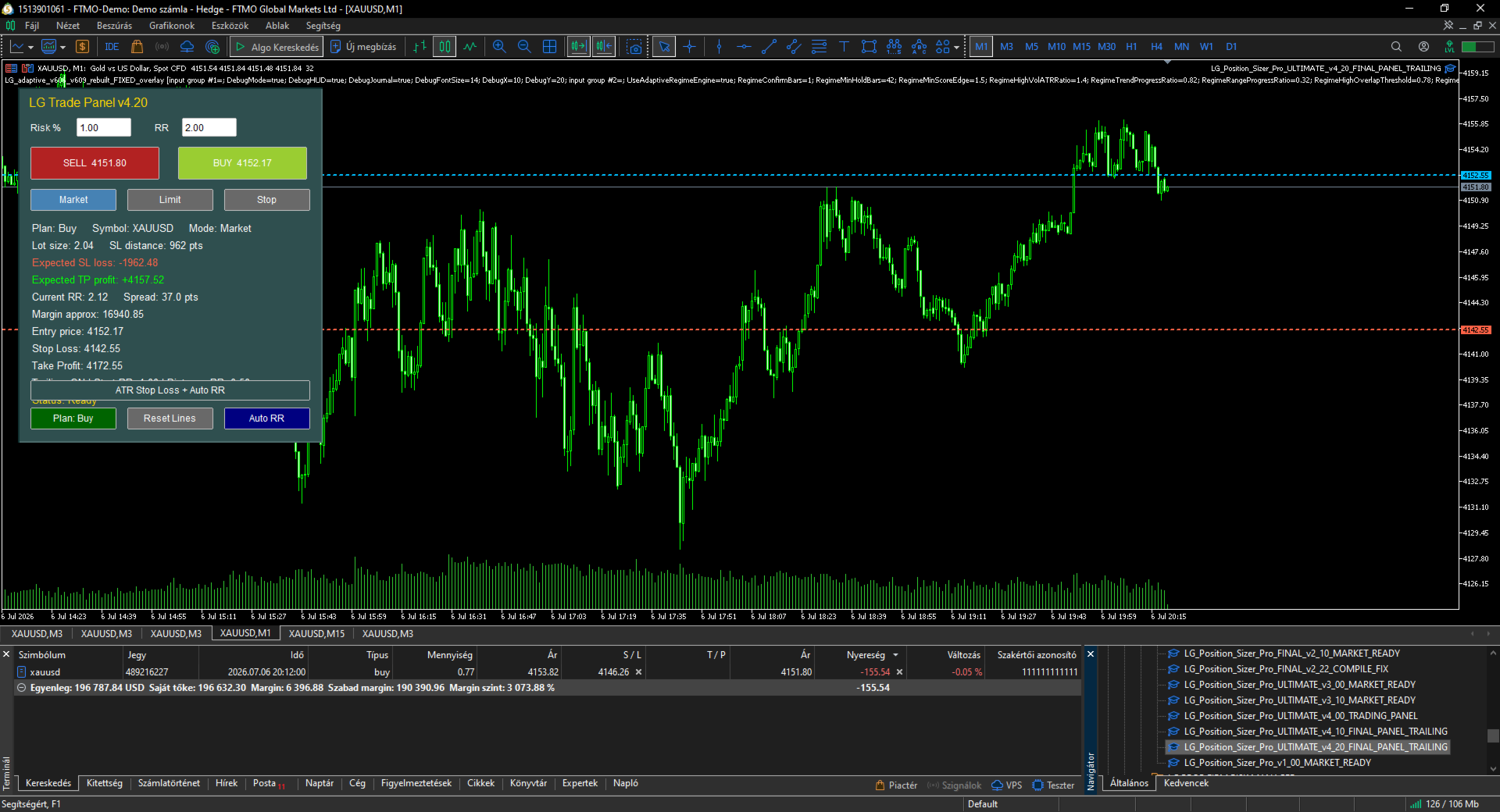
- Panel text no longer overflows because every data row is drawn as a separate label.
- Panel is wider and better structured.
- Expected SL loss is clearly displayed.
- Expected TP profit is clearly displayed.
- Built-in trailing Stop Loss management added.
- Trailing can start from a configurable RR level.
- Trailing distance is based on the original risk distance.
- The panel displays whether trailing is ON and from which RR it starts.
- BUY, SELL, Plan Buy/Sell, Reset Lines, Auto RR and ATR SL remain connected.
- Input guide updated with every input explained in one sentence.
LG Position Sizer Pro ULTIMATE v4.20 - Input Guide
TradeSymbol_EmptyMeansCurrentChart: Selects the symbol to trade; leave empty to use the current chart.
MagicNumberForTrades: Sets the Magic Number for trades opened and trailed by the panel.
TradeComment: Adds a comment to every trade opened by the panel.
AllowBuyButton: Enables or disables the BUY button.
AllowSellButton: Enables or disables the SELL button.
ShowMessagesInJournal: Prints panel status messages to the Experts journal.
DefaultOrderMode: Selects the default order mode: Market, Limit or Stop.
ShowPlanningLinesAtStartup: Shows Entry, Stop Loss and Take Profit lines when the panel starts.
PendingEntryDistancePoints: Sets the default distance for pending order entry lines.
RiskCalculationMode: Selects whether risk is calculated from account percentage or fixed money.
StartRiskPercent: Sets the initial Risk % value shown in the panel.
FixedRiskMoney: Sets the fixed money risk when fixed money mode is selected.
UseEquityForRiskCalculation: Uses equity instead of balance for percentage risk calculation.
StartRiskRewardRatio: Sets the initial RR value shown in the panel.
DefaultStopLossPoints: Sets the default Stop Loss distance in points.
PlaceStopLoss: Sends Stop Loss with the trade.
PlaceTakeProfit: Sends Take Profit with the trade.
ManualLot_ZeroMeansAuto: Uses a fixed lot size if greater than zero; zero means automatic risk lot.
MaxDeviationPoints: Sets the maximum allowed slippage/deviation.
ATRPeriod: Sets the ATR period used by the ATR Stop Loss button.
ATRMultiplier: Multiplies ATR to calculate the suggested Stop Loss distance.
EnableTrailingStop: Enables trailing stop management for trades opened by this panel.
TrailingStartAtRR: Starts trailing only after the position reaches this Risk:Reward level.
TrailingDistanceRR: Sets trailing distance as a fraction of the original risk distance.
TrailingStepPoints: Requires this minimum SL improvement before modifying the Stop Loss.
MaxSpreadPoints_ZeroOff: Blocks trade execution if spread exceeds this value; zero disables the filter.
CheckMarginBeforeTrade: Checks free margin before sending orders.
CheckBrokerStopAndFreezeLevels: Checks broker StopLevel and FreezeLevel before sending orders.
BlockIfPositionExistsOnSymbol: Blocks new trades if the symbol already has an open position.
ShowTradingPanel: Shows or hides the trading panel.
PanelX: Sets the panel horizontal position.
PanelY: Sets the panel vertical position.
PanelBackgroundColor: Sets the panel background color.
PanelHeaderColor: Sets the title/header color.
PanelTextColor: Sets the panel text color.