LG Position Sizer Pro

LG Position Sizer Pro ULTIMATE v4.10


Final panel and trailing update.


Fixes and improvements:

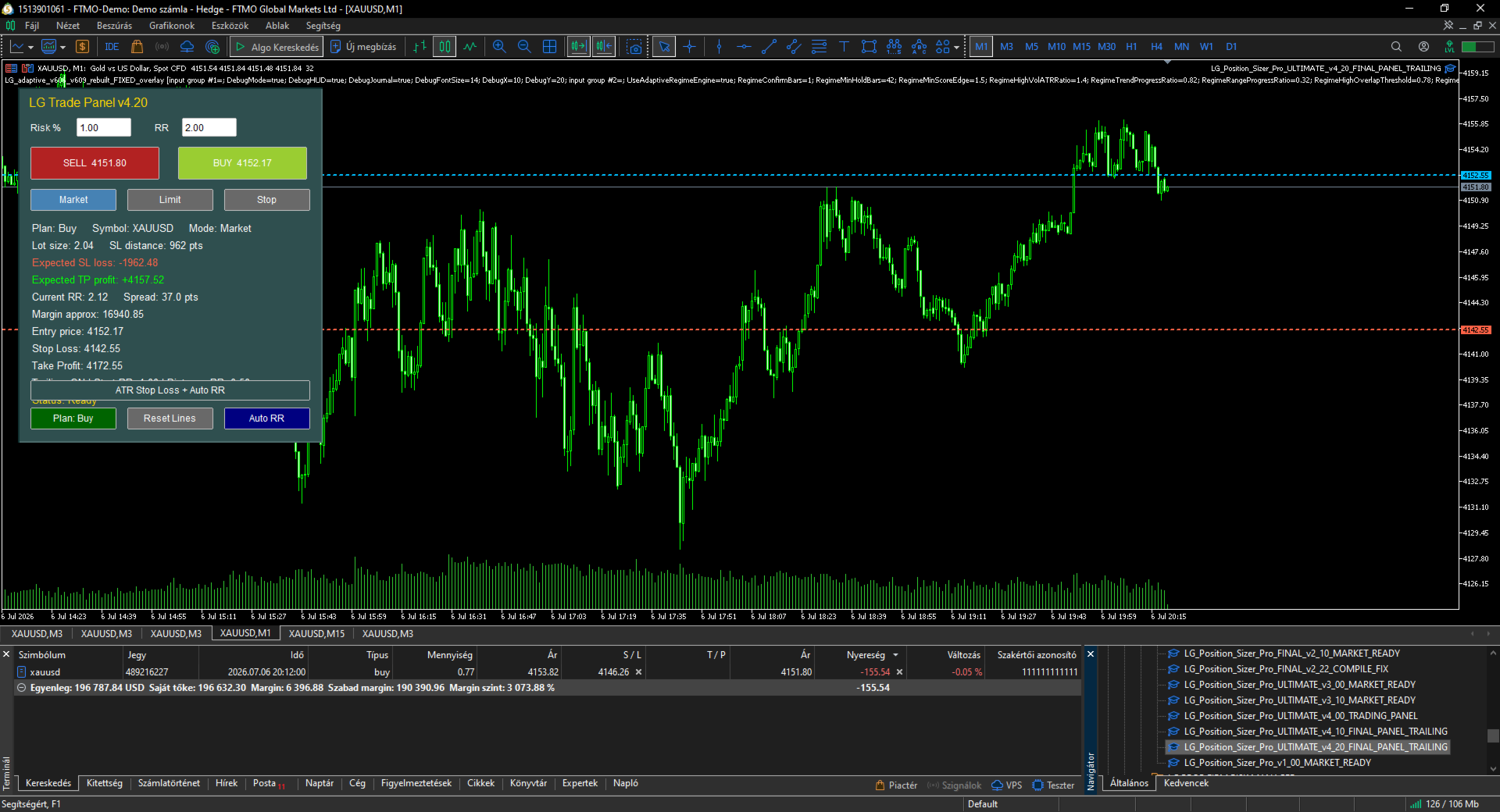
- Panel text no longer overflows because every data row is drawn as a separate label.

- Panel is wider and better structured.

- Expected SL loss is clearly displayed.

- Expected TP profit is clearly displayed.

- Built-in trailing Stop Loss management added.

- Trailing can start from a configurable RR level.

- Trailing distance is based on the original risk distance.

- The panel displays whether trailing is ON and from which RR it starts.

- BUY, SELL, Plan Buy/Sell, Reset Lines, Auto RR and ATR SL remain connected.

- Input guide updated with every input explained in one sentence.


LG Position Sizer Pro ULTIMATE v4.20 - Input Guide


TradeSymbol_EmptyMeansCurrentChart: Selects the symbol to trade; leave empty to use the current chart.

MagicNumberForTrades: Sets the Magic Number for trades opened and trailed by the panel.

TradeComment: Adds a comment to every trade opened by the panel.

AllowBuyButton: Enables or disables the BUY button.

AllowSellButton: Enables or disables the SELL button.

ShowMessagesInJournal: Prints panel status messages to the Experts journal.


DefaultOrderMode: Selects the default order mode: Market, Limit or Stop.

ShowPlanningLinesAtStartup: Shows Entry, Stop Loss and Take Profit lines when the panel starts.

PendingEntryDistancePoints: Sets the default distance for pending order entry lines.


RiskCalculationMode: Selects whether risk is calculated from account percentage or fixed money.

StartRiskPercent: Sets the initial Risk % value shown in the panel.

FixedRiskMoney: Sets the fixed money risk when fixed money mode is selected.

UseEquityForRiskCalculation: Uses equity instead of balance for percentage risk calculation.

StartRiskRewardRatio: Sets the initial RR value shown in the panel.


DefaultStopLossPoints: Sets the default Stop Loss distance in points.

PlaceStopLoss: Sends Stop Loss with the trade.

PlaceTakeProfit: Sends Take Profit with the trade.

ManualLot_ZeroMeansAuto: Uses a fixed lot size if greater than zero; zero means automatic risk lot.

MaxDeviationPoints: Sets the maximum allowed slippage/deviation.


ATRPeriod: Sets the ATR period used by the ATR Stop Loss button.

ATRMultiplier: Multiplies ATR to calculate the suggested Stop Loss distance.


EnableTrailingStop: Enables trailing stop management for trades opened by this panel.

TrailingStartAtRR: Starts trailing only after the position reaches this Risk:Reward level.

TrailingDistanceRR: Sets trailing distance as a fraction of the original risk distance.

TrailingStepPoints: Requires this minimum SL improvement before modifying the Stop Loss.


MaxSpreadPoints_ZeroOff: Blocks trade execution if spread exceeds this value; zero disables the filter.

CheckMarginBeforeTrade: Checks free margin before sending orders.

CheckBrokerStopAndFreezeLevels: Checks broker StopLevel and FreezeLevel before sending orders.

BlockIfPositionExistsOnSymbol: Blocks new trades if the symbol already has an open position.


ShowTradingPanel: Shows or hides the trading panel.

PanelX: Sets the panel horizontal position.

PanelY: Sets the panel vertical position.

PanelBackgroundColor: Sets the panel background color.

PanelHeaderColor: Sets the title/header color.

PanelTextColor: Sets the panel text color.


추천 제품
거래원 여러분 안녕하세요!저는 당신의 거래 조수입니다.더 이상 말하지 말고, 내가 너에게 나의 특기를 알려줄게. 1.나는 당신의 창고를 관리하는 데 능숙하다, 당신이 어느 쪽에서 주문하든, 나는 가장 먼저 당신을 도와 합리적인 손실 방지선과 이동 손실 방지선을 추가할 수 있습니다. 2.나는 너를 도와 상승과 하락을 회피하고 원칙을 지키지 못하는 인간성의 약점을 근원적으로 근절할 수 있다. 3. 귀하가 참고할 수 있도록 최적 지점에서 귀하의 모바일 MT5 클라이언트에 알림 메시지를 보냅니다. 물론 귀하는 모바일 장치 내의 MetaTrader 5 APP의 MetaQuotes ID를 MetaTrader 5 클라이언트 --> 옵션 --> 알림 --> MetaQuotes ID의 편집 상자에 등록하고 알림 지점 확인을 눌러야 합니다. 4. 정책 테스트에서 수동 시뮬레이션 디스크 연습을 잘 지원합니다. 5. 저에게 연락하면 추가 AI 보조 클라이언트 슈퍼 보조 프로그램을 얻을 수 있습니다. 참
SMT Trade Planner 는 MetaTrader 용 전문 차트 상 리스크 계산기 및 거래 실행 패널입니다 . 리스크 설정에 따라 랏 사이즈를 계산하고 , 차트에서 직접 드래그할 수 있는 진입가 , 손절매 , 이익실현 라인을 표시하며 , 설정 가능한 리스크 규칙으로 거래를 검증하고 , 원클릭으로 거래를 실행할 수 있습니다 .   작동 원리 Trade Planner 를 차트에 부착합니다 . 패널에 계좌 정보와 빠른 리스크 선택 버튼이 표시됩니다 . 차트에 진입가 ( 파란색 ), 손절매 ( 빨간색 ), 이익실현 ( 초록색 ) 세 개의 수평선이 나타납니다 . 라인을 드래그하여 설정을 조정합니다 . 모든 계산이 실시간으로 업데이트됩니다 . BUY 또는 SELL 을 클릭하여 실행합니다 .   패널 섹션 계좌 : 잔고 , 자산 , 여유 증거금 실시간 표시 . 리스크 설정 : 4 개의 빠른 선택 버튼 . 거래 계획 : 방향 , 진입가 , SL/TP 와 핍 거리 . LINK 모드로 SL/TP
One Click Breakeven Function: For multiple orders of the same currency but different order types (sell or buy), under the condition that the overall position is profitable, set the same stop-loss level or take-profit level. For example: there are currently 10 EURUSD orders, including 7 sell orders and 3 buy orders. When the overall position is profitable, if the overall take-profit for sell orders is set to 50 points: (1) When the total profit of the 7 sell orders is greater than the total loss
EA Dashboard MT5
Teerathad Booranawisedkul
FREE 7-DAY TRIAL After your trial ends, continue using this essential trading tool for only $30 one-time payment. This utility is designed to assist traders in monitoring account status, open positions, and trading performance in real time. It provides consolidated information related to account metrics, risk exposure, and statistical performance to support trading analysis and decision-making. The product does not execute trades automatically and does not provide trading signals. It is intend
Close All in 1s
Seng Yang
4.7 (23)
Hello, Every one  A script to close all market positions and/or pending orders. ----------------------------------------------------------------------------------- This is Close All      market positions and/or pending orders button  You can close all orders in 1 second by one click  For advanced version:  Advanced:  https://www.mql5.com/en/market/product/77763           https://www.mql5.com/en/market/product/89311 Key:  1 Close all button: The script will close All orders market + pending
FREE
Click Trading
Jawad Tauheed
5 (2)
One Click Trading – Auto TP SL Developer TraderLinkz Version 1.00 Category Utility What it does Adds missing TP and SL to your manual trades and pending orders Sets them once per ticket Lets you move TP and SL afterward Works on hedging and netting accounts Scans on every tick and reacts on trade events Why you want it You place faster entries You get consistent risk and exit targets You reduce fat finger errors You keep full manual control Quick start Attach the EA to any chart Keep TP and SL e
FREE
이 어드바이저는 한 번의 클릭으로 여러 쌍을 거래할 수 있는 대시보드입니다. 딸깍 하는 소리       열려 있는       선택한 쌍에 대한 주문을 여는 버튼입니다. 딸깍 하는 소리       닫다       선택한 쌍의 주문을 마감하는 버튼입니다. 주문 로트는 사용자가 입력한 번호입니다. 양수는 매수 주문에 해당하고, 음수는 매도 주문에 해당합니다. 일부 주문이 아닌 전체 주문을 종료하려면   닫기 버튼을   클릭하세요. 최종 조치는 티켓 번호에 따라 달라지지 않습니다. 매직 입력을 0으로 설정하면 어드바이저가 수동 주문 마감을 동시에 도와줍니다. 다른 Advisor의 매직으로 Entry Magic을 구성함으로써 Advisor는 다른 Advisor가 개설한 주문을 동시에 마감할 수 있습니다. 삼각형 울타리       단 한 번의 클릭으로. 거래 기호는 사용자 정의 가능합니다. 시장 관찰에서 가져오거나 사용자가 입력합니다. 반: Magic – 조언자의 매직 넘버입니다. MaxLo
️ UMNi-CMND MT5 Remote Command & Trade Control System UMNi-CMND turns Telegram into a full remote control panel for your MetaTrader terminal. Send commands from your phone to open trades, manage positions, query account status, and receive complete trade telemetry — all without touching the platform. KEY FEATURES Full remote trade execution via Telegram Open, close, and manage positions by command Move SL/TP, set breakeven, partial close Live status, account, and position
Indicator Removal Script for MetaTrader 5 (Version 1.4) The Delete  All Indicators Script is a powerful and user-friendly tool designed for MetaTrader 5 (MT5) to instantly remove all indicators from the main chart, sub-windows, or both, with a single click. Developed by Louis MattFX , this script (Version 1.4) simplifies chart management, saving traders time and effort when resetting their workspace for fresh analysis or new trading strategies. Key Features Flexible Removal Options : Choose to c
FREE
This EA help traders close their open positions at a specific MT5 server time before news or before ending of H4 timeframe of the morning New York session to protect their profit or prevent from unexpected loss. The default setting is 19:30 (HH:MM) and you can adjust as require to fit trading strategies. It very user friendly where contain only single input parameter to specify a time that position will be closed.  
Correlation Risk Manager
Eugenio Gustavo Guilarte Homayden
You think you're diversified. Your correlations say otherwise. MetaTrader shows you every position you hold. The margin, the floating P/L, the lot size, all of it. What it doesn't show you is whether your trades are secretly the same bet. And that's usually what takes the account down. Say you open five trades, 1% risk on each. Feels like 5% at stake. Spread out, sensible. But three of them are long the same dollar move under different tickers, so when one bad print hits, all three drop together
GoldMaster EA
Cristian-silvian Olteanu
GoldMaster EA를 이용한 MetaTrader 5에서의 XAU/USD 거래 GoldMaster EA는 MetaTrader 5 플랫폼에서 XAU/USD(금) 거래를 위해 설계된 완전 자동화된 거래 도구입니다. 복잡한 설정 없이 자동 거래를 탐색하고자 하는 트레이더에게 적합합니다. 주요 특징: 자동 거래: EA가 모든 거래 작업을 독립적으로 처리합니다. 사전 설정: 수동 설정이 필요 없으며 사용이 간편합니다. 소규모 계좌 최적화: 적은 예치금으로도 효율적으로 작동하도록 설계되었습니다. 위험 관리: 잠재적인 손실을 효과적으로 관리하는 기능이 포함되어 있습니다. 호환성: M1(1분) 시간대에 최적화되어 있으며, IOC(즉시 실행 또는 취소), FOK(전량 실행 또는 취소), Return과 같은 다양한 주문 실행 모드를 지원합니다. 사용 방법: MetaTrader 5 플랫폼의 XAU/USD M1 차트에 EA를 부착합니다. 시장 분석과 거래 실행을 EA에 맡깁니다. 추천 사항: EA
Trade Control Panel
Jerry Jilun Anak Liban
Trade Control Panel Function Normal One Click Function Close All Close All Profit Close All Loss Close All Pending Order Close All Sell Close All Buy Advance One Click Function 1.  Close Partial Lot Sell by Percent It will help you partial close for all open position by desire percent you wanted. No longer partial close one by one for every open position Manual input for desire percent 2. Close Partial Lot Buy by Percent It will help you partial close for all open position by desire percent
Description TradeEcho Pro MT5   is a professional-grade utility designed to keep you instantly informed about every trading activity on your account. Whether you are at your desk or away, this tool acts as your personal trading assistant, providing real-time audio alerts and mobile push notifications for all trade events. Instead of generic terminal sounds,   TradeEcho Pro MT5   gives you detailed feedback, including the event type, symbol, and net financial results for every closed position.
FREE
Limiter Drawdown EA – Automatic Account Protection for MetaTrader 5 Description Limiter Drawdown EA is a lightweight risk management tool for MetaTrader 5. It monitors your account drawdown in real time and will automatically close all open trades once the threshold you define is reached. This provides a reliable safeguard for any trading strategy. Main Functions Monitors equity versus balance continuously Closes all positions when your chosen drawdown percentage is reached Optionally removes
FREE
This Expert Advisor monitors all open positions across all symbols in MetaTrader 5. Whenever a Stop Loss (SL) or Take Profit (TP) is manually set or adjusted on any position, the EA automatically applies that value to all other open positions , regardless of symbol or order type (Buy/Sell). This ensures consistent and synchronized SL and TP levels across your account. Perfect for mobile trading via tablet or smartphone!
Is your trade at a loss? Does not matter ! You can use this Extra martingale tool.  In the set loss of your trade or your EA's trade , this tool will open another trade at a better price. It can also open multiple trades at different distances and with different lot sizes. Each trade will be assigned a TakeProfit. This tool has a lot of settings. You can set variable lot sizes, variable trade distances, variable TakeProfit sizes, maximum total profit or loss in money. You can also close trades
AllClosedMT5
Andrey Spiridonov
The AllClosedMT5 utility in the form of an expert. The utility is designed for closing all open positions simultaneously based on the total profit (in the deposit currency) of all open positions. The utility can be attached to any chart with any trading instrument. Parameters Profit - the total positive profit in the deposit currency, at which all open positions are closed (profit). Stop - the total negative profit in the deposit currency, at which all open positions are closed (loss). The valu
FREE
MultiChart Pro
Pablo Filipe Soares De Almeida
MultiChart Pro – MetaTrader 5용 차트 관리 전문가 도구 MultiChart Pro는 MetaTrader 5 플랫폼에서 여러 차트를 자동으로 열고 설정할 수 있는 전문가용 어드바이저(EA)입니다. 이 도구는 트레이더가 다양한 시간 프레임에서 시장을 효율적으로 분석할 수 있도록 설계되었으며, 매번 수동으로 차트를 여는 번거로움을 제거합니다. 이 EA는 최대 네 개의 차트를 자동으로 설정할 수 있습니다. 예를 들어, D1, M1, M15 차트와 함께 10초 오프라인 차트를 생성할 수 있으며, 현재 활성 차트(M5 등)도 함께 구성합니다. 모든 차트는 사용자가 지정한 템플릿으로 자동 구성되어, 동일한 스타일과 지표 구성을 유지합니다. 주요 기능: 자동 차트 생성: EA 실행 시 여러 시간대 차트를 자동으로 엽니다. 템플릿 자동 적용: 사용자가 지정한 템플릿을 각 차트에 적용하고, 파일 존재 여부를 자동 확인합니다. 시간 프레임 선택: 입력 매개변수를 통해 손쉽게 원하
Breakeven Bot
Gabriel Paul Ange Perrin
Optimize your trading management with Breakeven Bot, the essential tool for active traders managing multiple positions at once. No more wasting time manually adjusting your stops—one click is all it takes to secure your profits! Main Feature: ️ "BREAKEVEN" Button – Instantly set all profitable positions to breakeven and protect your gains quickly. ️ Customization Options: Set breakeven in pips or currency, depending on your preference. Choose whether breakeven should be at the entr
FREE
Managing trades
David Julio Cuenca Oliver
Managing Trades 3.0 MT4 version:  https://www.mql5.com/en/market/product/172776?source=Site With Managing Trades 3.0, you can manage your trades quickly and efficiently. It features an intuitive visual interface with large buttons, allowing you to manage your trades as quickly as possible. With Managing Trades 3.0 you can: - Open a Buy and Sell order instantly with a single click, using any lot size you want. You can also optionally set Stop Loss and Take Profit. - Close all open trades in
모든 거래 전략을 포지션 거래 전략으로 바꾸거나, 자신에게 불리하게 움직이는 포지션에 대한 자동 하락 제어 시스템을 포함하여 검증된 RSI 및 ADR 기반 포지션 거래 전략을 거래하세요. 이 EA는 수년 동안 Market Structure Trader 웹사이트에서 강의된 포지션 거래 전략에 사용되어 온 MRA EA를 발전시키고 단순화한 것입니다. 웹사이트, 무료 포지션 트레이딩 코스 및 기타 제품에 대한 링크는 내 프로필을 참조하세요. EA는 "탄성 밴드 이론"을 사용하여 시장 구조 움직임으로 자동으로 확장되며 RSI 지표 또는 거래하려는 외환 상품의 ADR(평균 일일 범위) 확장을 사용하여 은행 및 기관이 취한 되돌리기 움직임을 의미합니다. 포지션 트레이딩은 작은 위험과 다중 진입을 통해 시장에 진입하는 방법입니다. 즉, 초기 거래 진입의 정확성이 진입 후 EA에서 거래를 관리하는 방식보다 덜 중요하다는 의미입니다. 시장은 예측할 수 없으며 장기적으로 지속 가능한 모든 종류의
The real‑time view of what is happening inside the market. Footprint Secrets brings detailed analysis directly into MetaTrader 5. It shows where volume is trading, how buyers and sellers are interacting, and how liquidity shifts as the market evolves. Designed for traders who want a precise, real‑time understanding of market behavior. Check out the free preview version here:  https://www.mql5.com/en/market/product/172398 Benefits for the Trader See the real activity behind price . Footprint ch

Auto Trailing Stop bot
Marc Henning Hruschka
Auto Trailing Stop EA for MT5 Auto Trailing Stop EA is an Expert Advisor for MetaTrader 5 that automatically manages trailing stop loss for open trades on the current chart symbol. It is intended for traders who open positions manually and want a simple tool to lock in profits without adjusting stop loss by hand. The EA starts trailing only after the trade reaches the profit distance defined in the inputs. After that, the stop loss is moved step by step as price continues in a favorable directio
Easy EA for closing positions with profit or loss. All positions of chart's symbol are counted separately. Settings: TPforSymbol — set profit amount to indicate when to close every positions for the symbol of the chart. Swap and commission are decreasing your profit. SLforSymbol — set SL amount to indicate SL for every positions for the symbol of the chart. Swap and commission are increasing your loss. SLforSyblol is always below/equal zero.
Position Management EA Light (FREE) The Position Management EA Light is a simplified and user-friendly Expert Advisor (EA) designed to automate basic trade management functions effectively on MetaTrader 5. This free version is perfect for traders who want automated market or stop order execution with straightforward risk management features. Main Features: Order Types Supported: Market Orders (Buy & Sell) Stop Orders (Buy Stop & Sell Stop) Static Stop Loss & Take Profit: Predefined SL and TP val
FREE
Stop Loss Manager 4 Step — DESCRIPTION A flexible Stop Loss (SL) manager designed for automated risk management, trade management, and full stop loss control. Fully automates Stop Loss, trailing stop, and break-even (breakeven) handling, helping eliminate emotional decision-making in trading. ⸻   4-Step Risk Control Logic Risk management is built on a structured sequence: Loss Protection → Activation → Break-Even → Trailing Stop The system gradually transitions a position: from risk → to safety
Blue GAIA MT5
Duc Anh Le
5 (1)
| Seamless portfolio of trading systems in your palm - Powered by ONNX Neural network | Built by a grid trader >> for grid traders.  This is MT5 version, click  here  for  Blue GAIA MT4  (settings and logics are same in both versions)     Real monitoring signal  --> Cosmic 2 | GAIA Intro Blue GAIA EA   (' GAIA ') - is the latest edition of BlueAlgos family, uniting all the best algos and features under one-roof. Its is the true 4xMulti Systems: +------------------------------------------------
Panel Tool – Button Click Trading (Replaces Default Trade Panel) Features 1. Open or close Long positions with a button click. 2. Open or close Short positions with a button click. 3. Set lot sizes. 4. Set Stop-Loss (SL) or Take-Profit (TP) points (0 = not used). 5. Set order comments. 6. Display the Break-Even price . 7. Show total Long and Short lot sizes. 8. Display Profit or Loss in USD. 9. Show daily Profit or Loss in USD. 10. Set ID = 0 to manage manual orders together .
FREE
AutoLot Trade Panel
Fabian Maurice Schwarz
AutoLot Trade Panel은 차트 기반 MT5 트레이딩 패널로, 더 빠른 주문 실행, 자동 랏 계산, 실시간 리스크 표시, 시각적인 SL/TP 계획, 그리고 차트에서 직접 포지션 관리를 원하는 수동 트레이더를 위해 만들어졌습니다. 빠른 시작 가이드: https://www.mql5.com/en/blogs/post/769949 ! 무료 데모 사용 가능 ! 정식 버전을 구매하기 전에 패널 워크플로우, AutoLot 계산 및 Visual Tool을 테스트할 수 있는 무료 데모 버전이 제공됩니다. 데모 버전: https://www.mql5.com/en/market/product/176387 ====================================================================================================================================================================
이 제품의 구매자들이 또한 구매함
Farmed Hedge Yield Farming | All Markets (Manual - Hybrid - Semi/Automated EA) MULTI-ASSET SUPPORT Trade any asset available on your broker - Forex: Major, Minor, Exotic pairs - Crypto: BTC, ETH, XRP, SOL, BNB - Stocks: Apple, Tesla, Amazon, Google, etc. - Commodities: Gold, Silver, Oil, Gas - Indices: US30, NAS100, SPX500, DAX40 - Any CFD your broker offers VERIFIED TRADING RESULTS - Farmed Hedge Yield Axi Copy:  https://www.mql5.com/en/signals/2356376 - Farmed Hedge Yield Exn Copy:   https:/
Quant AI Agents
Ho Tuan Thang
5 (1)
Quant AI Agents are independent trading Expert Advisors. Instead of trading using a fixed strategy like other conventional EAs, Quant AI Agents   is a   multi-agent AI trading framework   that turns natural-language strategy prompts into live.  WANT THE SAME RESULTS AS MY LIVE SIGNAL?   Use the exact same brokers I do:   IC MARKETS , IC TRADING   .  Unlike the centralized stock market, Forex has no single, unified price feed.  Every broker sources liquidity from different providers, creating un
YuClusters
Yury Kulikov
4.93 (43)
Attention: You can view the program operation in the free version  YuClusters DEMO .  YuClusters is a professional market analysis system. The trader has unique opportunities to analyze the flow of orders, trade volumes, price movements using various charts, profiles, indicators, and graphical objects. YuClusters operates on data based on Time&Sales or ticks information, depending on what is available in the quotes of a financial instrument. YuClusters allows you to build graphs by combining da
FUTURES ORDERFLOW FOOTPRINT CHART Professional OrderFlow EA for MetaTrader 5 Version 1.01| Professional tool for real traders | Institutional-Grade Visualization STRATEGY TESTER USERS - PLEASE SELECT EVERY REAL TICK WHEN TESTING AND YOU HAVE DOWNLOADED HISTORICAL DATA. IF YOU SEE A WAITING SCREEN AND IT IS NOT DOWNLOADING, IT MEANS YOU HAVE LOW HISTORICAL DATA. TRY 1 MIN AND 5 MIN FIRST ON 1 DAY DATA. ONE DAY DATA SHOULD BE THE NEWEST AND MOST CURRENT DATE. PLEASE WAIT UNTIL THE MARKET HAS ROL
EasyInsight AIO MT5
Alain Verleyen
4.92 (12)
EASY Insight AIO – 스마트하고 손쉬운 트레이딩을 위한 올인원 솔루션 개요 외환, 금, 암호화폐, 지수, 심지어 주식까지 — 전 시장을 몇 초 만에, 수동 차트 확인이나 복잡한 설치, 인디케이터 설정 없이 스캔할 수 있다고 상상해 보세요. EASY Insight AIO 는 AI 기반 트레이딩을 위한 궁극의 플러그 앤 플레이(Plug & Play) 데이터 내보내기 도구입니다. 단 하나의 깔끔한 CSV 파일로 전체 시장 스냅샷을 제공하며, ChatGPT, Claude, Gemini, Perplexity 등 다양한 AI 플랫폼에서 즉시 분석할 수 있습니다. 창 전환, 복잡함, 차트 오버레이는 더 이상 필요 없습니다. 자동으로 내보내지는 순수하고 구조화된 데이터 인사이트만으로, 반복적인 차트 감시 대신 데이터 기반의 스마트한 의사결정에 집중할 수 있습니다. 왜 EASY Insight AIO인가요? 진정한 올인원 • 별도의 설정, 인디케이터 설치, 차트 오버레이가 필요 없습
AI Agent Supervisor is NOT an Expert Advisor. AI Agent Supervisor   is a   multi-agent AI risk & portfolio supervisor   that watches every EA on your account and intervenes in real time.  WANT AN AI PORTFOLIO MANAGER WATCHING YOUR FLEET 24/7?   Run your fleet on the same brokers I do:   IC MARKETS , IC TRADING   .  Unlike the centralized stock market, Forex has no single, unified price feed.  Every broker sources liquidity from different providers, creating unique data streams. The Supervisor r
The product will copy all telegram signal to MT5 ( which you are member) , also it can work as remote copier.  Easy to set up, copy order instant, can work with almost signal formats, image signal,  s upport to translate other language to English Work with all type of channel or group, even channel have "Restrict Saving Content", work with  multi channel, multi MT5 Work as remote copier: with signal have ticket number, it will copy exactly via ticket number. Support to backtest signal. How to s
Discord Signal Notifications — это мощный инструмент для трейдеров, проповодов и управляющих счетами, который автоматически отправляет все ваши торговые события в канал или чат Discord. Главное преимущество — Глобальный мониторинг. Вам не нужно устанавливать советник на каждый график. Достаточно запустить одну копию утилиты на одном любом окне, и она будет отслеживать действия по всем инструментам и всем счетам в вашем терминале одновременно. Основные возможности Глобальный мониторинг счёта Ути
Telegram to mt5 pro
Janet Abu Khalil
4 (4)
Telegram to MT5 Pro — Advanced Telegram Signal Copier with Auto-Fix, Multi-TP, Risk Control and Full Trade Management Telegram to MT5 Pro — 전문 텔레그램 신호 복사기 Telegram to MT5 Pro는 텔레그램 신호를 MetaTrader 5 계정으로 자동으로 직접 실행하는 고성능 트레이드 복사기로, 리스크, 실행, 트레이드 관리에 대한 완전한 제어를 제공합니다. 이 시스템은 두 가지 구성 요소로 이루어져 있습니다: • MetaTrader 5 내부에서 실행되는 Expert Advisor (EA) • 텔레그램에 연결되어 신호를 로컬로 EA에 전송하는 데스크톱 브리지 애플리케이션 두 구성 요소는 동일한 컴퓨터에서 실행되어야 합니다. MQL5 플랫폼 제한으로 인해 EA는 텔레그램에 직접 연결할 수 없습니다. 브리지는 텔레그램을 처리하고 EA는 거래를 실행합니다. 지원 및 설치
# If you have any other requirements or are interested in collaboration, please contact  dev.quantech.london@gmail.com . Flash Trade (FT) Most friendly manual trading tool. Easy operation to secure your funds. Features of FT Click the chart to trade fast FT supports market orders and pending orders Click twice to complete the order and set SL and TP Click trice to complete the pending order and set SL and TP Automatically set the stop-loss amount of each order to a fixed percentage of the bala
HINN Lazy Trader
ALGOFLOW OÜ
5 (1)
LIMITED SUMMER SALE -40% !   Maximum real discount! The core idea: using the user interface, you configure the parameters the chart must meet before entering a position (or positions), choose which entry models to use, and set the rules for when trading and planning should end. Lazy Trader  handles the rest: it  takes over all the routine chart watching and execution! full description  :: 3 key videos [1] ->  [2]   ->  [3] What can it do? - Understands Larry Williams market structure - Under
Prop Firm Os
Gayathiri Gopalakrishnan
5 (1)
PROP FIRM OS Structured Trading Assistant for MetaTrader 5 PROP FIRM OS is a structured trading assistant designed for MetaTrader 5 users who prefer rule-based market analysis and organized trading workflows. The Expert Advisor combines market analysis tools, scanner functions, dashboard monitoring, alerts, risk-control settings, and trade management features inside one system. PROP FIRM OS is designed to help traders follow selected rules, filters, and monitoring conditions during trading activ
Royal Copier
Janet Abu Khalil
5 (1)
Royal Copier — 전문 MT5 트레이드 복사기 Royal Copier는 MetaTrader 5용 전문 로컬 실시간 트레이드 복사기입니다. 이제 두 기능이 하나의 MT5 Expert Advisor 안에 통합되었습니다. 입력값에서 EA를 Master 모드 로 실행할지 Client 모드 로 실행할지 선택하면 됩니다. 즉, 동일한 EA를 원본 계정과 수신 계정 모두에서 사용할 수 있으며, 기존 복사기의 동작 방식은 그대로 유지됩니다. Royal Copier는 다음과 같은 일반적인 계정 간 복사를 지원합니다. MT5에서 MT5 MT5에서 MT4 MT4에서 MT4 MT4에서 MT5 MT4와 복사하려면 MT4_Copier 를 사용하십시오. 작동 방식 Royal Copier는 동일한 Windows PC의 공유 파일을 통해 작동하는 로컬 복사기입니다. EA가 Master 모드 로 설정되면 원본 계정을 모니터링하고 모든 거래 활동을 공유 파일에 기록합니다. EA가 Client 모드 로 설정되
Global Investing FX Terminal
Santiago Nicolas Pla Casuriaga
Global Investing FX Terminal 은 MetaTrader 5의 단일 캔버스 오버레이에 열세 개의 분석 패널을 렌더링합니다 — 중앙은행 정책금리, CFTC COT 포지션, 캐리 순위, 경제 서프라이즈, 옵션 스큐, 소매 심리, 상관관계 — 단일 EA에서 10초마다 갱신됩니다. 외부 소프트웨어가 필요 없습니다. 전문적인 FX 분석은 일반적으로 별도의 플랫폼에 분산된 데이터에 동시에 접근해야 합니다: 금리 파생상품, 정부 데이터 포털, 브로커 스왑 명세, 옵션 데스크. 이 EA는 이 모든 것을 거래 결정이 실행되는 거래 터미널 내 단일 화면에 통합합니다. 캔버스에서 보이는 것 시장 개요 FX 페어 테이블 — 28개 G10 통화쌍 전체에, 브로커의 Market Watch에 NOK/SEK 크로스가 있을 경우 이를 더한 최대 36개 통화쌍의 실시간 매수/매도 가격. 각 행은 스프레드, 일간·주간 변화, 핍 단위의 절대 범위, ADR% — 14일 평균 일일 범위 대비 현재 세션
Custom Alerts AIO: 다중 시장을 동시에 모니터링 – 설정 없이 즉시 사용 가능 개요 Custom Alerts AIO 는 복잡한 설정 없이 즉시 사용할 수 있는 통합 시장 모니터링 도구입니다. FX Power, FX Volume, FX Dynamic, FX Levels, IX Power 등 필요한 모든 지표가 내장되어 있어 별도의 설치나 구성 없이 알림 기능을 바로 사용할 수 있습니다. 차트 그래픽 없이 작동하며, Forex, 금속, 지수, 암호화폐 등 주요 자산군을 모두 지원합니다. 주식(Symbols)은 별도로 입력하여 추가할 수 있으나, MetaTrader에서는 일반적으로 제한적으로만 사용됩니다. 1. 왜 Custom Alerts AIO를 선택해야 하나요? 추가 라이선스가 필요 없습니다 • 모든 Stein Investments 지표가 내장되어 있어 별도 구매가 필요 없습니다. • 즉시 알림 기능을 시작할 수 있어 빠르고 간편합니다. 모든 시장을 하나의 도구로
ManHedger MT5
Peter Mueller
4.83 (6)
THIS EA IS A SEMI-AUTO EA, IT NEEDS USER INPUT. Manual & Test Version Please TEST this product before BUYING  and watch my video about it. The price of the ManHedger will increase to 250$ after 20 copies sold. Contact me for user support or bug reports or if you want the MT4 version! MT4 Version  I do not guarantee any profits or financial success using this EA. With this Expert Advisor, you can: Implement your own Zone Recovery strategy to capitalize on trending markets. Create Grid trading s
Features   With MT5 to Interactive Brokers(IB) Trader, you can: 1. Load chart data from IB to MT5, and Analyze with all standard or customer Indicators. 2. Place Orders to IB Account Directly in MT5. 3. Make your Own EAs upon IB Securities by only making minus changes of the trading function. Usage 1) Installation Copy the "Mt5ToIBTraderEn.ex4" and sample files to [MT5 Data Folder]->MQL5->Experts.  2)  MT5 Settings Add the IP Address to the MT5 Allowed URLs in 'Tools->Options->Expert Adviso
Crystal Trade Manager – Advanced MT5 Risk and Trade Control Utility Overview Crystal Trade Manager (CTM) is a professional MetaTrader 5 utility designed for risk management, trade automation, and instant execution control. It provides traders with an integrated system for protecting equity, managing daily drawdowns, controlling lot sizes, and applying automation features such as automatic SL/TP, break-even, and trailing stop. The tool is suitable for manual traders, prop-firm challenge particip
MT5 Trading Deck
Manuel Michiels
5 (2)
One button. One trade. MT5 Trading Deck is a hotkey trading panel for MetaTrader 5 that turns the platform into a keyboard-driven execution cockpit. Stop loss, take profit and lot size are pre-calculated for every key; the moment you press, a market order is live on the broker. A complete technical user manual is attached in the product Comments section. It documents every input parameter, the full hotkey map, the recommended Stream Deck XL layout, and the advanced workflows for Pre-Limit orders
Mt5 To InterativeBrokers Copier allows you to copy deals from MT5 account to Interactive Brokers. With this, you can run your EA strategy on a MT5 Demo/Real Account, then copy all the deals to Interactive Brokers account real time. Features: 1. Copy or Invert-Copy deals Realtime from MT5 to IB Account. 2. Synchronizing positions of both accounts periodicaly, in case any missing copying. 3. You can choose only Buy position or Sell position. Symbols Setup: General Format:  {MT Symbol} -> {IB S
Trend Cue Basket Manager
Mohammadreza Faghanimakrani
5 (1)
Trend Cue Basket Manager is a semi-automatic basket management utility for MT5 hedging accounts. After purchase, please send me a message.  I will send you the bonus package and basic setup guidance. The idea is very simple: You open the first trade manually. Trend Cue Basket Manager manages the basket after entry. It does not give buy or sell signals by itself. It does not choose the market direction for you. It does not open the first trade automatically. The first decision is always yours. Af
EA Performance Logger Telegram
Abdulqudus Tomiwa Akande-owoo
The Performance Logger is a utility for MetaTrader 5 designed to track and report account metrics. It identifies trades based on specific criteria and provides summaries of account activity. Main Functions Automated Reporting : Generates summaries of account performance and sends them to specified communication channels (Telegram or Discord) on a weekly, monthly, or yearly basis. Strategy Analysis : Organizes performance data based on the specific Expert Advisor or strategy used for each trade.
The product will copy all  Discord  signal   to MT5   ( which you are member  ) , also it can work as remote copier.  Easy to set up. Work with almost signal formats, support to translate other language to English Work with multi channel, multi MT5. Work with Image signal. Copy order instant, auto detect symbol. Work as remote copier: with signal have ticket number, it will copy exactly via ticket number. How to setup and guide: Let read all details about setup and download Discord To MetaTrader
What Exactly Is A Smart Trading Tool? Smart Trading Tool   was developed for fast and comfortable trading of the financial markets especially for   ORDER BLOCKS TRADERS .   It provides traders functionalities, such as: A Drawing Tool One-Click Trading Panel Automated Lot Sizes Calculation   based on your risk appetite & Money Management ( Watch this video , how this tool can help manage your risk per trade better!) Built in PRICE LEVELS (Fibonacci, Round Numbers, Daily hi-low, etc) Shows Trading
Features 1️⃣ Flexible Grid Order Configuration Set price levels and spacing between orders. Customize order sizes and maximum number of positions for better risk control. 2️⃣ Hedge and Netting Modes Hedge Mode : Allows simultaneous long and short positions , ideal for advanced strategies. Netting Mode : Consolidates positions for easier balance management. 3️⃣ Supported Order Types Limit Orders : Buy and sell at predetermined prices. Market Orders : Instant execution. Integrated Take-Profit : Wi
************************************************************************************************************************************** GoldMine Train은 Gold를 위한 트렌드 트레이딩 전략 EA입니다. 운영자는 주요 트렌드 방향을 결정하고 Train에 이동을 지시합니다. Train은 해당 방향으로 지속적으로 매수/매도를 합니다. Lot 볼륨은 계정 잔액과 사전 설정된 레버리지 비율에 따라 달라집니다. 운영자가 트렌드 방향을 변경하면 Train이 멈추고 이익을 잠급니다. 사용자는 차트의 버튼을 사용하여 트렌드 방향을 쉽게 선택할 수 있습니다. ******************************* ***************** ********************** ***************** ********************** *********
Introduction Our system is more than just a tool—it’s your personal guide in the dynamic trading landscape. Expertly developed and optimized using advanced strategies, this groundbreaking predictor gives traders a powerful edge. It’s not just about the features; it’s about a trading journey that stands out from the crowd. Get ready for an enhanced trading experience like never before! What It Does Next Candle Prediction: Imagine gaining insights into the market’s next move before it happens. Our
Here is the corrected, MQL5-compliant version of your second product description. I have removed the custom bullet point symbols, cleaned up the list formatting to use standard markdown, and organized the setup guide into clean, numbered steps. PropFolio Command Manager Pro is an advanced, multi-symbol execution terminal designed to automate your custom arrow indicators. Simply enter the name of your arrow indicator into the settings, and the Command Manager will monitor up to 30 currency pairs
Gamma Edge Pro MT5 — GexBot Classic API Integration Gamma Edge Pro   brings institutional-grade   Gamma Exposure (GEX) data   directly onto your MetaTrader 5 chart — the same data used by professional options traders to anticipate price magnets, hedging flows, and dealer positioning. Powered by the   GexBot Classic API , this indicator automatically maps options market data from US-listed instruments onto any   MT5 CFD instrument   — Forex pairs, Gold, indices, and more — with intelligent price
EA price is reduced to 50% discount for limited time period. Check EA performance  https://www.mql5.com/en/signals/2376164?source=Site +Profile+Seller Spot vs Future Arbitrage EA for MT5 Spot vs Future Arbitrage EA is an automated Expert Advisor designed for MetaTrader 5 that operates using price differences between Gold spot and Gold futures instruments. The strategy opens positions on both instruments simultaneously to take advantage of temporary differences between spot and futures prices.
제작자의 제품 더 보기
Adaptive Regime Trader Overview Adaptive Regime Trader is a fully automated Expert Advisor for MetaTrader 5 that dynamically adapts its trading behavior to changing market conditions. Instead of relying on a single fixed strategy, the EA continuously evaluates the current market environment and automatically adjusts its internal trading parameters to improve consistency across different market regimes. The Expert Advisor has been designed for traders who prefer a flexible trading system with ex
LG Doji Reclaim MTF Adaptive Overview LG Doji Reclaim MTF Adaptive is a fully automated Expert Advisor for MetaTrader 5 designed around a multi-timeframe doji, failed expansion and reclaim trading concept. The EA continuously scans selected lower and medium intraday timeframes and searches for market situations where price attempts to expand beyond a recent area, fails to hold that expansion, and then reclaims the previous structure. The strategy is built for traders who want an adaptive, ru
Multi Strategy Challenge EA Overview Multi Strategy Challenge EA is a fully automated Expert Advisor for MetaTrader 5 designed as a flexible multi-strategy trading framework. The system combines several market analysis modules into one configurable trading engine and evaluates market conditions before opening a position. The EA is designed for traders who want a structured, optimization-friendly robot that can be adapted to different symbols, brokers and market conditions. It does not rely on on
Product category: Utilities Short description: Universal MetaTrader 5 trade manager with break-even, partial close, multiple trailing Stop Loss modes, profit lock and floating loss protection. Designed for manual traders and EA users who want disciplined automated position management. LG Trade Manager Pro Overview LG Trade Manager Pro is a universal trade management utility for MetaTrader 5, designed for traders who want more control, automation and discipline after a position has been opene
Title suggestion: LG Equity Protector Pro Product category: Utilities Short description: MetaTrader 5 equity protection utility with daily, weekly, monthly and floating profit/loss limits, automatic position closing, pending order deletion, Magic Number filtering and on-chart status panel. LG Equity Protector Pro Overview LG Equity Protector Pro is a MetaTrader 5 risk management utility designed to help traders protect account equity using predefined daily, weekly, monthly and floating pro
Title suggestion: LG Prop Firm Risk Manager Pro Product category: Utilities Short description: MetaTrader 5 prop firm risk utility with daily loss control, maximum loss protection, trailing drawdown, profit target lock, automatic position closing, pending order deletion, Magic Number filtering and on-chart status panel. LG Prop Firm Risk Manager Pro Overview LG Prop Firm Risk Manager Pro is a MetaTrader 5 risk management utility designed for traders who trade prop firm style accounts, eval
필터:
리뷰 없음
리뷰 답변