Kalifx Local trade copier

5

Kalifx Local Trade Copier

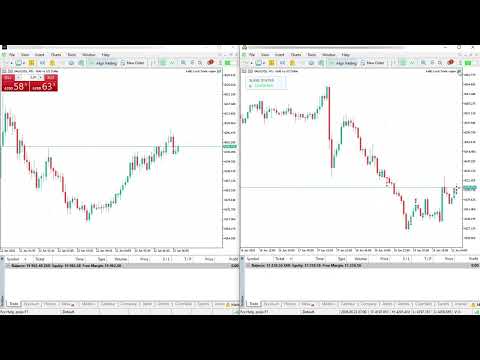
Kalifx Local Trade Copier is built to replicate trades from one trading account (Master) to another (Slave) in real time.
Its main purpose is to copy trading activity—such as opening, modifying, and closing trades—so that multiple accounts can follow the same strategy without manual intervention. This is especially useful for managing multiple accounts, testing strategies across different brokers, or mirroring trades between accounts.

The EA operates in two modes:

MASTER: Monitors trading activity and records all open positions and pending orders.
SLAVE: Reads this information and automatically duplicates the trades on another MT5 terminal, keeping both accounts synchronized.

This EA is designed for local copying between MT5 terminals using the Common Files folder , so both terminals can access the same snapshot file name.

Key Features

  • Single EA utility for both MASTER and SLAVE modes.
  • Copies positions and pending orders.
  • Pending handling modes:
    • Copy as pending orders.
    • Wait for master pending trigger and copy only as market position (via POS record).
  • Trade inversion option (BUY ↔ SELL).
  • Symbol mapping and excluded symbols list.
  • Fixed lot, lot multiplier, risk-% sizing, max lot.
  • Daily risk controls for slave:
    • Max trades per day.
    • Max daily drawdown (% or money).
  • Trade-copy count multiplier (duplicate each master trade into multiple slave trades).
  • Spread filter.
  • status panel displaying connection status between Master and Slave (shows "Connected" in green when both are successfully linked).

Important Notes

  • Designed for MT5 terminals on the same machine/VPS (or environments sharing Common Files).
  • Broker symbol specifications (contract size, step, min lot, digits, stops level) can differ.
    Always test on demo first.
  • Copy speed depends on ticks + timer and terminal responsiveness.

Quick Start (Master/Slave Setup)

1) Install EA

  • Put Local Trade Copier.mq5 in MQL5/Experts .
  • Compile in MetaEditor.

2) MASTER terminal setup

  • Attach EA to any chart.
  • Set Mode = MODE_MASTER .

3) SLAVE terminal setup

  • Attach EA to any chart.
  • Set Mode = MODE_SLAVE .
  • Use the same CopierFileName as master.
  • Configure inputs (symbol mapping, lot/risk, pending mode, filters, daily limits).

4) Verify operation

  • MASTER should keep updating the snapshot.
  • SLAVE should open/modify/close according to MASTER snapshot.
  • The status panel will display “Connected” in green when both Master and Slave are properly synchronized.


Input Settings Reference
------------------------

[Core]
- Mode
  Select MODE_MASTER or MODE_SLAVE.
- SkipExistingTradesOnStart
  When set to true, the EA in Slave mode will ignore any trades that were already open on the Master account at the time the EA starts.
  It will only begin copying new trades opened after initialization.


[Lot Control]
- UseFixedLot
  If true, use FixedLot for copied trades.
- FixedLot
  Fixed lot size.
- LotMultiplier
  If not fixed lot, slave lots = master lots * LotMultiplier.
- MaxLot
  Absolute lot cap.
- UseRiskPercent
  If true, lot is calculated from account risk.
- RiskPercent
  Percent of account balance risked per trade.
- RiskSL_Pips
  Fallback SL distance used for risk lot sizing when SL distance is unavailable.

[Trade Behavior]
- InvertTrades
  Reverse direction (BUY->SELL, SELL->BUY).
- CopyStopLoss
  Copy SL from master when fixed SL is not used.
- CopyTakeProfit
  Copy TP from master when fixed TP is not used.
- UseFixedSL / FixedSL_Pips
  Override SL using fixed pip distance.
- UseFixedTP / FixedTP_Pips
  Override TP using fixed pip distance.

[Pending Handling]
- PendingMode
  PENDING_COPY_AS_PENDING:
    Slave places/modifies pending orders.
  PENDING_EXECUTE_MARKET:
    Slave does NOT open from pending records; it waits until master pending triggers
    and appears as an open position in snapshot.

[Daily Limits] (SLAVE)
- EnableMaxTradesPerDay / MaxTradesPerDay
  Block new entries after daily trade count limit is reached.
- MultiplyCopiedTrades
  Enable trade count replication multiplier.
- CopiedTradesMultiplier
  Number of slave copies per one master trade (e.g. 2 = open 2 slave trades).
- EnableMaxDrawdownPerDay
  Enable daily drawdown guard.
- MaxDrawdownPercent
  Block new entries when daily equity drawdown reaches this percent.
- MaxDrawdownMoney
  Block new entries when daily equity drawdown reaches this money value.

[Spread Filter]
- EnableSpreadFilter
  Enable spread check before new entries.
- MaxSpread
  Maximum allowed spread (points).

[Symbol Mapping]
- SymbolMap
  Map master symbol to slave symbol.
  Format:
    EURUSDm=EURUSD;XAUUSDm=XAUUSD
  Separator between pairs:
    ;
- ExcludedSymbols
  Symbols to skip copying.
  Supports ';' or ',' separators.

[Execution]
- SlaveMagic
  Magic number used by slave trades/orders.
- Slippage
  Deviation/slippage in points for trade execution.

[Misc]  
- CopierFileName

  Snapshot file name in Common Files.

[TradeComments]

- Allows you to add a custom text label to copied trades for easy identification and tracking.

[ShowStatusPanel]

-Enable/disable to hide or show on-chart status panel

Recommended Safe Configuration
------------------------------
- Start on DEMO accounts first.
- Keep UseRiskPercent = true with small RiskPercent (e.g. 0.5% to 1%).
- Use EnableMaxTradesPerDay and EnableMaxDrawdownPerDay.
- EnableSpreadFilter in volatile markets.
- Confirm SymbolMap and ExcludedSymbols before going live.


Troubleshooting
---------------
1) No trades copied
   - Check Mode (master/slave).
   - Check same CopierFileName on both terminals.
   - Check symbol mapping and excluded symbols.
   - Check daily limits and drawdown guard are not blocking entries.

2) Wrong symbols copied
   - Fix SymbolMap pairs.
   - Confirm slave symbol exists and is enabled in Market Watch.

3) Lots not as expected
   - Review UseFixedLot, LotMultiplier, UseRiskPercent, MaxLot.
   - If MultiplyCopiedTrades=true, count of trades increases per master trade.

4) Pending behavior confusion
   - In PENDING_EXECUTE_MARKET, pending records are not copied as pending.
     Slave waits for master pending trigger (position appears in snapshot).

レビュー 2
Rich8989
1008
Rich8989 2026.08.24 06:03 
 

Good Copier. Many thanks for sharing.

Marc Dylan TIOMO
45
Marc Dylan TIOMO 2026.05.30 23:00 
 

Such amazing product

おすすめのプロダクト
Account Sentinel Pro - Monitor, Protect & Analyze Account Sentinel Pro is a professional all-in-one account intelligence EA for MetaTrader 5. It is built for traders who want a clean, full-screen control center to monitor account performance, understand real strategy behavior, evaluate execution quality, and assess drawdown risk with much more clarity than the standard terminal view. Instead of showing only raw trade history or a simple profit summary, Account Sentinel Pro organizes your trading
FREE
Vulcan
Dayana Cubillas Massana
Vulcan – マルチ戦略鍛造システム Vulcan   は、変化する市場の特性に適応するために、3つの独立した取引戦略を統合したモジュール式エキスパートアドバイザー(EA)です。鍛冶屋が金属を鍛えるために異なる技術を習得するように、 Vulcan   は補完的なアプローチを組み合わせ、 200以上の調整可能なパラメータ を提供し、各戦略を思い通りに形成できるようにします。 これにより、 FX、インデックス、コモディティ、暗号資産 など、あらゆる銘柄や時間枠に完全に適応できるツールとなります。各フィルター層の硬度、ハンマーを振るうタイミング、火の温度を決めるのはあなたです。 主な特徴 3つの独立した戦略(それぞれ独自の マジックナンバー を持ち、個別に有効化可能): MA Crossover:   RSI、ADX、BBW フィルターを備えた高速/低速移動平均線のクロス、および DeMarker、Williams %R、OsMA に基づくリスクシステム。 Momentum Breakout:   ボリューム確認、 AMA トレンドフィルター、設定可能な取引時間を備えたブレイクアウト検出
FREE
BTC Scalper - Automated RSI Breakout Strategy for BTCUSD Unlock the power of automated trading with BTC Scalper! This expert advisor is a fully autonomous trading strategy, designed to capitalize on fast-moving BTCUSD markets. It leverages a potent combination of RSI Breakouts and two Exponential Moving Averages (EMA) to find high-probability trade entries, ensuring optimal confluence for success. Key Features: Fully Automated Trading : Set it, forget it, and let BTC Scalper handle your trades 2
FREE
AI Advisor – AI にあなたの本当の取引状況を見せるツール AI Advisor は、あなたのリアルな口座情報から高品質なプロンプトを自動生成し、そのまま任意の AI チャットに貼り付けて使えるツールです。 口座状況を手早く整理し、現在の相場構造を理解し、リスクポイントを把握し、利益チャンスを探るための会話を、AI と効率よく行えるようにします。 クイックリンク Download:      AI Advisor v1.02.ex4      AI Advisor   v1.02.ex5 Installation guide AI Advisor  Version Overview FAQ & troubleshooting 使い方 – 3 ステップ 分析したい銘柄のチャート上で AI Advisor を起動します。 右側の「AI Advisor Modes」リストから、目的に合ったモードを選びます (単一銘柄の分析・ポジションチェック・ポートフォリオリスク・ウォッチリスト・テーマ・マクロ など)。AI Advisor が口座情報・ポジション・銘柄・相場構造を自動でプロ
FREE
RenkoExpert
Andrey Goida
3.67 (6)
Renko Expert Advisor based on Renko bar simulation.    The EA has two options for building Renko bars. Classic and ATR. In the classic version, renko bars are marked with areas on the main chart; in the ATR version, renko bars are modeled and drawn in the indicator window. Modeling renko bars inside the EA allows you to optimize the robot better than drawing renko bars offline. Renko EDGE EA   Set file Golden Delta | Algo Trading Research Updates, research and new developments: https://www.mql5
FREE
SmartGridCloserEA
Leszek Aleksander Mroczek
4.33 (3)
SmartGridCloserEA v.2 – Adaptive Grid Trading with Pair-Based Profit Closures Description: SmartGridCloserEA v.2 is a fully automated Expert Advisor for MetaTrader 5 that applies a dynamic BUY-only grid strategy across multiple asset classes such as Forex, Gold, and Indices . Unlike traditional grid EAs that rely on fixed take-profit levels, this robot introduces an intelligent system for pair-based position closures based on profit differences, helping to lock in gains even during ranging or c
FREE
Helios Breakpoint MT5 Helios Breakpoint MT5 is an independent Expert Advisor for a disciplined breakout workflow. It evaluates a closed signal candle, a recent range, and the selected trend direction. The default configuration uses H1 signals with H4 trend confirmation. How it works An entry requires a closed-candle range break, matching candle direction, a minimum ATR-based body, and optional EMA trend agreement. The EA allows one position per symbol and Magic Number by default. It does not use
FREE
これは、ほぼ10年前に初めて公開された私の有名なスキャルパー、ゴールドフィンチEAの最新版です。短期間で起こる急激なボラティリティの拡大で市場をスキャルピングします。突然の価格上昇の後、価格変動の慣性を利用しようとします。この新しいバージョンは、トレーダーがテスターの最適化機能を簡単に使用して最適な取引パラメーターを見つけられるように簡素化されています。 [ インストールガイド | 更新ガイド | トラブルシューティング | よくある質問 | すべての製品 ] 最適化を容易にするシンプルな入力パラメーター カスタマイズ可能な取引管理設定 取引セッションの選択 平日の選択 資金管理 注意してください... 多くの要因が見返りを台無しにする可能性があるため、ダニのダフ屋は危険です。変動スプレッドとスリッページは、取引の数学的期待値を低下させ、ブローカーからの低いティック密度は幻の取引を引き起こす可能性があり、ストップレベルは利益を確保する能力を損ない、ネットワークラグはリクオートを意味します。注意が必要です。 バックテスト Expert Advisorはティックデータのみを使用します
FREE
The idea of the system is to indentify the reversal patterns using the calculation of the composite candle. The reversal patterns is similar to the "Hammer" and "Hanging Man" patterns in Japanese candlestick analysis. But it uses the composite candle instead the single candle and doesn't need the small body of the composite candle to confirm the reversal. Input parameters: Range - maximal number of bars, used in the calculation of the composite candle. Minimum - minimal size of the composite can
FREE
Trade Anomalo BTC Multi Grid EA   Trade Anomalo  BTC Multi Grid  is an advanced, fully automated Multi-Grid Expert Advisor meticulously designed to navigate the volatility of BTC and other major pairs. Introduces highly requested features, including Multi-Window Time Management and an interactive, upgraded on-chart dashboard. Unlike traditional grids that get trapped in one direction,   Parallel Pro   utilizes a dual-engine architecture (Grid A and an optional inverted mirror Grid B) to simultan
FREE
The Expert Advisor tool has been developed for Nasdaq, based on Vortex and pending orders. The stop loss is based on fixed pips. It has been backtested on more than 10-year long M1 data with high quality of modeling. The enclosed screenshots demonstrate the complexity and coverage of the test by Monte Carlo analysis with 200 simulations. T he Expert Advisor passed via Cluster Analysis, Optimization profile, System parameter Permutation. There is no need to set up parameters - all settings are al
FREE
Brent Trend Bot
Maksim Kononenko
4.5 (16)
The Brent Trend Bot special feature is simple basic tools and logic of operation. There are no many strategies and dozens of settings, like other EAs, it works according to one algorithm. The operating principle is a trend-following strategy with an attempt to get the maximum profitability adjusted for risk. Therefore, it can be recommended for beginners. Its strong point is the principle of closing transactions. Its goal is not to chase profits, but to minimize the number of unprofitable trans
FREE
Discover the power of automated trading with **SimpleTradeGioeste**, an Expert Advisor (EA) designed to optimize your trading operations in the Forex market. This innovative EA combines advanced trading strategies with proven technical indicators, offering an unparalleled trading experience. video backtest :  https://youtu.be/OPqqIbu8d3k?si=xkMX6vwOdfmfsE-A ****Strengths**** - **Multi-Indicator Strategy**: SimpleTradeGioeste employs an integrated approach that combines four main technical ind
FREE
Golden Square X
Huynh Tan Linh N
4.18 (11)
This is my latest Free version for Gold. With optimized parameters and user-friendly features, this version is likely very easy to use and highly effective. You can customize TP and SL parameters as you wish, but the default settings should work well for you without the need for further adjustments.  This version is designed for the M5. This version does not require a large capital investment; only $100-$200 is sufficient for Golden Square X to run and generate profits for you. Based on backtest
FREE
MA EMA Cross Risk EA は、明確で論理的かつ視覚的に分かりやすい移動平均線クロス戦略で取引したいトレーダー向けに開発された、MetaTrader 5用のエキスパートアドバイザーです。 このEAは、テクニカル分析で最もよく知られている考え方の一つである、短期と長期のMA/EMAのクロスを基盤としています。市場の方向が変化した際、移動平均線を利用することで、不要なノイズや感情に影響されることなく、手動でシグナルを探す手間を減らしながら、その変化を捉えることができます。 EAは、Moving AverageまたはExponential Moving Averageのクロスを自動的に監視し、設定されたルールに従って取引を開始します。ユーザーは、移動平均線の種類、期間、Stop Loss、Take Profit、1回の取引におけるリスクを設定できます。そのため、落ち着いたシステムトレードから、さまざまな市場環境での積極的なテストまで、幅広く利用できます。 MA EMA Cross Risk EA の中心となる考え方は、取引規律です。EAは無秩序な取引を行わず、マーチンゲールを使
FREE
批量止損止盈同步管理器 這是一款專為 MT5 多持倉交易者 設計的持倉管理工具。 當同一個商品、同一個方向同時有多張持倉時,只需要手動修改其中一張持倉的 Stop Loss(SL)或 Take Profit(TP) ,工具就會自動把該持倉目前完整的 SL / TP,同步到其他相同商品、相同方向的持倉。 例如: XAUUSD BUY #1 XAUUSD BUY #2 XAUUSD BUY #3 如果將 #1 修改為: SL = 3300 TP = 3500 其他 XAUUSD BUY 持倉會自動同步成相同設定。 主要功能 批量同步 Stop Loss 批量同步 Take Profit 可同時同步 SL + TP 支援將 SL 或 TP 設為 0,批量移除 BUY 與 SELL 分開管理 不同商品分開管理 新開持倉不會立即觸發整批同步 啟動時只記錄現有持倉,不會自動修改 平倉後自動移除內部紀錄 一個圖表即可管理帳戶中的多個商品 分組方式 工具以: 商品 + 交易方向 作為同步群組。 例如: XAUUSD BUY XAUUSD SELL EURUSD BUY EURUSD SELL 全部視
FREE
Welcome to the future of algorithmic trading. The Nascore Scalper EA is a precision-engineered, AI-inspired scalping robot built exclusively for trading NAS100 (US Tech 100 Index) . It analyzes smart money footprints, breakout zones, and high-timeframe bias to capture high-probability scalping entries. Key Features: Optimized for NAS100 (US100) – Fast-moving Nasdaq-based index trading Smart Money Concepts – Integrates structure, breakout logic, and bias Minimal Margin Usage – Ideal for traders
FREE
Guardian Shield EA - Risk & Profit Protection System ️   Ultimate Account Protection Guardian Shield is a specialized utility Expert Advisor designed to provide comprehensive risk management and profit protection for your trading account. It monitors all running positions in real-time and takes immediate action when predefined profit or loss thresholds are reached.   Key Features   Advanced Risk & Profit Guardian Real-time Monitoring : Continuously tracks total P&L across all positions Du
FREE
Black Jack
Amos Tsopotsa
5 (5)
The strategy for this expert advisor works more effectively only if you set buy only or sell only,the most important part I took into consideration are the main market turning points.You would want to say reversals or change in direction in trends,the key to making profitable trades with this advisor is to set your stop loss on the previous high for sell only signal and previous low for buy positions ,This advisor can trade any Market,but mainly was developed for Boom and Crash,vix75 and Jump 25
FREE
Shogun FX
Gonzalo Javier Bardesio Grana
El EA opera el par USDJPY en temporalidad H1. Parametros configurables y completamente optimizables a cada estrategia o gestion del riesgo Solicite archivo .set para FTMO DEMO.  No utiliza grid, hedging, martingale, etc. Cada operacion con SL y TP.  limite de perdida diaria y total para desafios. Realice la optimizacion de cada set en base a su broker o solicite ayuda para cada caso. 
FREE
UsdJpy RangeBot Pro – Expert Advisor for Breakout Trading UsdJpy RangeBot Pro is a breakout-based Expert Advisor developed for the USDJPY pair. It identifies trading opportunities during the early hours of the London session by analyzing a defined range and executing pending orders above or below it. The EA applies fixed logic, clear visual elements, and built-in risk controls. This tool is designed for disciplined breakout trading without the use of breakeven, martingale, or grid systems.
FREE
EA Zone Recovery Assistant เป็น EA ที่ช่วยเปิดออเดอร์ Recovery ตามระดับราคาที่ผู้ใช้กำหนดได้อัตโนมัติ //โดยหลักการทำงานมีดังนี้// เมื่อผู้ใช้เปิดออเดอร์ Buy หรือ Sell (Market Order) EA จะตรวจสอบจุด SL ภายในเวลาที่กำหนดในตัวแปร Input Delay Check for setting Price Recovery ถ้าผู้ใช้วาง SL วางภายในเวลาที่กำหนด ระบบจะลบ SL ออกแล้วใช้จุดที่วาง SL เปิดออเดอร์ Recovery เมื่อกราฟวิ่งผิดทางถึงจุดที่กำหนด //แต่ถ้าผู้ใช้ไม่วาง SL ภายในเวลาที่กำหนดระบบจะไม่มีการทำ Recovery ในออเดอร์นั้นแม้ผู้ใช้มีการวาง SL
FREE
MA Crossover ADX
MetaQuotes Ltd.
4 (13)
The strategy is based on price crossover with Moving Average indicator, confirmed by ADX indicator. The trade signals: Buy: closing price of the last completed bar is higher than moving average, the moving average increases at the current and last completed bars. Sell: closing price of the last completed bar is lower than moving average, the moving average decreases at the current and last completed bars. To filter the false signal, it checks the trend power (ADX>ADXmin) and trend direction usin
FREE
ForceBB_Expert   is structured based on two specifics technical analysis indicators ( Bollinger Bands and  Force Index ). It has many parameters so that each user can find the appropriate settings that suit their investment profile. It can work on 28 different pairs. The default parameter settings are indicative, I recommend that each user experiment to find their own settings.

FREE
FREE SafeGuard Trader EA  - Professional Trend Following Strategy Created by EA Trading Academy team using Expert Advisor Studio , this free trading robot implements a professional trend-following strategy with built-in safety features to protect your account. You can find a detailed documentation about the properties and inputs on our knowledge base . Key Strategy Features: Combines ADX and Bulls Power indicators for precise entry signals Advanced exit strategy based on price action analys
FREE
Trade Panel Manager — Master all trades in one dashboard Stop calculating volume manually, stop worrying about forgetting to set SL/TP. TTrade Panel Manager transforms MetaTrader 5 into a professional trading command center — drag and drop a few lines on the chart, the EA automatically calculates lot sizes according to your desired risk level, displaying SL/TP in pips and currency in real time, right before you press the button. Why download now? Accurate lot size calculation based on risk pe
FREE
### FTBP Telegram Panel - Your On-Chart Notification Center **FTBP Telegram Panel** is not just an Expert Advisor, but a full-featured tool for traders who want to receive instant notifications about their trades in Telegram and manage the visual style of their terminal. The product is completely free! ### Key Features * **Instant Telegram Notifications:** Get alerts for every opened and closed trade, including the ticker, volume, and financial result. * **Interactive Control Panel:** Forget
FREE
This Expert advisor trades any Asset class, Try it on any market, When you download PM so you can be added to my channel for all support related issues. There are three trading strategies available  * The Wyckoff trading strategy, Channel trading and trend trading.  Input Parameters Lots   - the volume of position to open; Stop Loss BUY (in points)   - the stop loss of BUY positions; Stop Loss SELL (in points)   - the stop loss of SELL positions; Take Profit BUY (in points)   - the take profit o
FREE
Overview FiT Panel Pro is a professional-grade trade management panel designed for MetaTrader 5 traders who demand speed, precision, and full control over their trades. Built with a modern dark-theme UI, it combines one-click execution with advanced risk management, visual SL/TP drag lines, automatic Fibonacci-based levels, and comprehensive order management — all in a single, compact panel. Whether you are a scalper, day trader, or swing trader, FiT Panel Pro gives you the edge you need to exec
FREE
Trade assistant pro v8
Ahmed Mohammed Bakr Bakr
2 (1)
FREE FREE FREE Trade Assistant MT5 – Professional Trading & Risk Management Panel Trade Assistant MT5 is an advanced trading panel designed to help traders execute orders faster, safer, and more professionally . It simplifies manual trading by combining smart order management , precise risk control , and one-click execution , making it ideal for both beginners and advanced traders. This tool does not trade automatically . Instead, it empowers you with full control while applying professional-gra
FREE
このプロダクトを購入した人は以下も購入しています
Trade Assistant MT5
Evgeniy Kravchenko
4.41 (216)
取引 ごとのリスクの 計算、新規注文 の 簡単 な 設置、部分的 な 決済機能 を 持 つ 注文管理、 7 種類 のトレーリングストップなど 、便利 な 機能 を 備 えています 。 追加の資料と説明書 インストール手順   -   アプリケーションの手順   -   デモアカウント用アプリケーションの試用版 ライン機能 チャート上にオープニングライン、ストップロス、テイクプロフィットを表示します。この機能により、新規注文を簡単に設定することができ、注文を出す前にその特徴を確認することができます。   リスク計算 リスク計算機能は、設定されたリスクとストップロス注文のサイズを考慮して、新規注文のボリュームを計算します。ストップロスの大きさを自由に設定できると同時に、設定したリスクを守ることができます。 Lot calc ボタン - リスク 計算 を 有効 / 無効 にします 。 Risk フィールドでは 、必要 なリスクの 値 を 0 から 100 までのパーセンテージまたは 預金通貨 で 設定 します 。 設定」 タブで 、 リスク 計算 の 種類 を 選択 します :「 $ 通
Trade Manager EAへようこそ。これは、取引をより直感的、正確、そして効率的にするために設計された究極の リスク管理ツール です。これは単なるオーダー実行ツールではなく、包括的な取引計画、ポジション管理、リスク管理のためのソリューションです。初心者から上級者、迅速な実行を必要とするスキャルパーまで、Trade Manager EAはあらゆるニーズに対応し、為替、指数、商品、暗号通貨などさまざまな市場で柔軟に対応します。 Trade Manager EAを使用すると、複雑な計算が過去のものになります。市場を分析し、エントリーポイント、ストップロス、テイクプロフィットのレベルをチャート上のラインでマークし、リスクを設定するだけで、Trade Managerが最適なポジションサイズを即座に計算し、SLとTPをピップ、ポイント、口座通貨でリアルタイムに表示します。すべての取引が簡単かつ効果的に管理されます。 主な機能: ポジションサイズ計算機 :定義されたリスクに基づいて取引サイズを瞬時に決定します。 簡単な取引計画 :エントリー、ストップロス、テイクプロフィットを設定するためのド
TradePanel MT5
Alfiya Fazylova
4.88 (167)
Trade Panelは多機能なトレーディングアシスタントです。アプリには手動取引用の50以上のトレーディング機能が搭載されており、ほとんどの取引作業を自動化することができます。 アプリの説明書+ビデオガイド: https://www.mql5.com/en/blogs/post/756482 デモ口座用アプリの試用版: https://www.mql5.com/en/blogs/post/750865 アプリのインストール方法: https://www.mql5.com/en/blogs/post/756239 アプリをビジュアルモードでテストする方法: https://www.mql5.com/en/blogs/post/770277 VPSのMetaTraderにアプリをインストールする方法: https://www.mql5.com/en/blogs/post/770190 取引。 ワンクリックで取引操作を行うことができます: リスクを自動計算して指値注文やポジションを開く。 複数の注文やポジションをワンクリックで開く。 注文のグリッドを開く。 保留中の注文やポジションをグルー
================================================================================ POC BREAKOUT - V20.72. Full Professional Grade Toolkit ================================================================================ POC Breakout is a full MetaTrader 5 trading dashboard for discretionary traders who want breakout signals, Point of Control (POC) context, volume profiles, order flow, market structure, news, alerts, and advanced trade planning in one professional workspace. Attached directly to you
ベータリリース Telegram to MT5 Signal Trader はまもなく正式なアルファ版をリリースします。いくつかの機能はまだ開発中で、小さな不具合に遭遇する可能性があります。問題が発生した場合はぜひご報告ください。皆さまのフィードバックがソフトウェア改善に役立ちます。 Telegram to MT5 Signal Trader は、 Telegram のチャンネルやグループからの取引シグナルを自動的に MetaTrader 5 にコピーする強力なツールです。 パブリックおよびプライベートの両方のチャネルに対応し、複数のシグナル提供元を複数のMT5口座に接続可能です。ソフトウェアは高速で安定し、すべての取引を細かく制御できます。 インターフェースは直感的で、ダッシュボードとチャートは見やすく設計されており、リアルタイムで動作状況をモニターできます。 必要環境 MQL の制限により、EA は Telegram と通信するためのデスクトップアプリが必要です。 インストーラーは公式の インストールガイド にあります。 主な機能 マルチプロバイダー: 複数の Telegram
Local Trade Copier EA MT5
Juvenille Emperor Limited
4.94 (148)
Local Trade Copier EA MT5 による、驚くほど高速な取引コピーを体験してください。1分で簡単にセットアップできるこの取引コピー機は、同じWindowsコンピュータまたはWindows VPS上の複数のMetaTrader端末間で取引をコピーすることができ、0.5秒未満の高速コピースピードを実現します。 初心者であろうとプロのトレーダーであろうと、 Local Trade Copier EA MT5 には、あなたの特定のニーズに合わせてカスタマイズするための幅広いオプションが用意されています。これは、利益の可能性を高めたい人にとって究極のソリューションです。 今すぐ試してみて、これが市場で最も速くて簡単なトレードコピー機である理由を理解してください。 ヒント: デモアカウントで Local Trade Copier EA MT5 デモバージョンをダウンロードして試すことができます: ここ ダウンロードした無料のデモ ファイルを MT5 >> ファイル >> データ フォルダを開く >> MQL5 >> Experts フォルダに貼り付けて、ターミナルを再起動しま
Farmed Hedge Yield Farming | All Markets (Manual - Hybrid - Semi/Automated EA) VERIFIED TRADING RESULTS - Farmed Hedge Yield Axi Copy:  https://www.mql5.com/en/signals/2356376 - Farmed Hedge Yield Exn Copy:   https://www.mql5.com/en/signals/2356404 - Farmed Hedge Yield V Copy:  https://www.mql5.com/en/signals/2357156 * Before purchasing, please feel free to send me a message if you have any questions about the product or setup. - You can test the system using Strategy Tester: Visual Mode , a
That backtest looks great. But will it still be making money tomorrow, next week, next month? EA Overfitter re-runs your EA on 100 price histories it has never seen. One score tells you if the edge is real. A backtest tells you what an EA did on one price history — the one that happened to occur. What you cannot tell from it is how much of that result was the strategy and how much was the particular path. EA Overfitter answers that. It builds up to 100 synthetic price histories your EA has n
Telegram to MT5 Multi-Channel Copier   は、Telegram チャンネルのトレードシグナルを MetaTrader 5 へ自動コピーします。ボット不要、ブラウザ拡張不要、手動コピー不要。Telegram にシグナルが届くと、EA が数秒であなたのターミナルに注文を出します。 製品は 2 つのコンポーネントで構成されます:Telegram チャンネルを監視する Windows アプリと、MT5 ターミナルでシグナルを執行する本 EA です。MT4 版もあります   こちら . セットアップガイドとアプリのダウンロード: https://www.mql5.com/en/blogs/post/768988 仕組み Windows アプリは、ボットではなくあなた自身の API 認証情報で Telegram に接続します。そのため、プライベートや VIP を含む、購読中のあらゆるチャンネル・グループ・トピックを読めます。あなたに直接メッセージを送るシグナルボット、個人チャット、さらには自分の「保存済みメッセージ」もソースとして使えます。シグナルを検出すると解
25% discount on the release of the tool: only for the next 3 buyers Send a message to receive a demo version. AstroTrade Trading Assistant AstroTrade is a comprehensive multi-functional trading utility developed for the MetaTrader 5 platform. It integrates essential tools for trade execution, risk management, and technical monitoring into a single unified interface. The application is designed to assist traders in managing their daily operations through a visual and structured environment. Vi
Exp COPYLOT CLIENT for MT5
Vladislav Andruschenko
3.97 (35)
MetaTrader 5 用のプロフェッショナル取引コピー機 MetaTrader 向けの高速・高性能・信頼性の高い 取引コピー機 です。 COPYLOT は、MT4 と MT5 のターミナル間で Forex 取引をコピーでき、 Hedge 口座と Netting 口座の両方に対応しています。 COPYLOT MT5 版の対応構成: - MT5 Hedge → MT5 Hedge - MT5 Hedge → MT5 Netting - MT5 Netting → MT5 Hedge - MT5 Netting → MT5 Netting - MT4 → MT5 Hedge - MT4 → MT5 Netting MT4 版 完全な説明 + DEMO + PDF 購入方法 インストール方法 ログファイルの取得方法 テストと最適化の方法 Expforex のすべての製品 MT4 ターミナルへのコピーも可能です(MT4 → MT4、MT5 → MT4): COPYLOT CLIENT for MT4 COPYLOT は、2台、3台、さらには10台のターミナル間で同時に動作できる、プロフェッ
HINN MAGIC ENTRY – the ultimate tool for entry and position management! SIMPLE. FASTEST. INTUITIVE. MAX AUTOMATED. Place orders by selecting a level directly on the chart! full description   ::  demo-version  :: 60-sec-video-description Key features: - Market, limit, and pending orders - Automatic lot size calculation - Automatic spread and commission accounting - Unlimited partitial take-profits  - Breakeven and trailing stop-loss and take-profit  functions - Invalidation leves - Intuitive, a
Telegram To MT5 — シグナルコピア Telegram チャンネルのトレードコールを、実際の MT5 注文に変換します — 自動で、好きなだけの口座に対応し、リスクとルールは完全にあなたの管理下に置けます。 Telegram To MT5 は、あなたが Telegram で既にフォローしている VIP / シグナルチャンネルを MetaTrader 5 端末に接続します。無料の付属デスクトップアプリがメッセージを読み取り(ボットを禁止しているチャンネルでも可能)、この EA があなたの口座でそれらを執行します — あなた自身のリスク設定、シンボルマッピング、テイクプロフィット処理、セッションおよびニュースフィルターを適用します。 これはシグナルコピアであり、ブラックボックス戦略ではありません。どのチャンネルを信頼するか、各トレードのロットと管理方法をあなたが決めます。 ステップバイステップの設定と付属アプリのインストールガイド 仕組み [あなたの Telegram チャンネル] -> [付属デスクトップアプリ] -> [MT5 + この EA] -> 注文 付属デスクトッ
Premium Trade Manager - コーチ内蔵型トレードパネル Premium Trade Manager は、AIトレーディングコーチをあなたのチャートの中に置き、その下に完全な執行エンジンを備えたツールです。いつも通りにトレードをセットアップし、あなた専任のAIトレーディングコーチ Max にそのセットアップをそのまま読み取らせて、発注前に率直な見解を伝えてもらいましょう。ストップの幅が規律あるアプローチに合っているか、リスクサイズは適切か、高影響のニュースイベントが数分後に迫っていないか、プロップファームの制限に近づいていないか。その下には、クリックの後をすべて処理するエンジンが備わっています。ワンクリックのリスクサイズ計算による発注、チャート上でドラッグして組み立て、発注後も動かせるプラン、最大4段階の分割利確、7種類のトレール方式、リアルタイムのプロップファームコンプライアンス、ニュースガード、そしてコストを自ら採点するスプレッド機能。判断はあなたが下す。Max がもう一度確認する。後のことはすべてパネルが担う。 購入前に実際に触れて試せます。 ブラウザ上でライブ
Anchor: The EA Manager Your EAs cannot see each other, but Anchor can. Anchor gives you one place to coordinate your EAs, manage risk, and decide when trading is allowed. It works alongside the trading bots you already use without any changes to them. The Problem One EA opens a trade. Then another starts trading. The next thing you know, you wake up to multiple grids built across your account. Each EA may be doing exactly what it was designed to do, but together they can place far more risk on y
Power Candles Strategy Scanner - 自動最適化型マルチシンボル設定ファインダー パワーキャンドル・ストラテジー・スキャナーは 、パワーキャンドル・インジケーターを駆動するのと全く同じ自己最適化エンジンを、マーケットウォッチに登録されているすべての銘柄に対して並行して実行します。1つのパネルで、現在統計的に取引可能な銘柄、各銘柄で勝率の高い戦略、最適なストップロス/テイクプロフィットの組み合わせが表示され、新たなシグナルが発生した瞬間に通知が届きます。 このツールは、Stein Investmentsのエコシステムの一部です。  18種類以上のツールをすべて閲覧し、AIを活用したセットアップの推奨を受け取り、  https://stein.investments でコミュニティに参加しましょう 市場動向を網羅。銘柄ごとに3,000件以上の自動最適化。2種類のアラート。ワンクリックでチャートを切り替えて即座にアクション。 なぜこれが必要なのか 多くのマルチ銘柄スキャナーは、 価格の動き (ボラティリティ、変動率、銘柄ごとのRSI)を表示するだけです。それ
Trade Dashboard simplifies how you open, manage, and control your trades, with built-in lot size calculation. It allows you to execute trades, manage risk, and control positions directly on the chart, with tools such as partial close, breakeven, and trailing stop. Designed to reduce manual work and help you stay focused on your trading decisions. A demo version is available for testing. Detailed explanations of features are provided within the MQL5 platform. Installation instructions are include
Ultimate Extractor - Professional Trading Analytics for MT5 *****this is the local HTML version of Ultimate Extractor. !!!!!it is not compatible with Cloud!!!! For the online version please reach out to me directly****** Ultimate EA manager also now available when you use cloud pro and above for free!! Ultimate Extractor transforms your MetaTrader 5 trading history into actionable insights with comprehensive analytics, interactive charts, and real-time performance tracking. What It Does Automa
Grid Manual MT5
Alfiya Fazylova
4.73 (22)
「Grid Manual」は、注文のグリッドを操作するための取引パネルです。 ユーティリティはユニバーサルで、柔軟な設定と直感的なインターフェイスを備えています。 それは、損失を平均化する方向だけでなく、利益を増やす方向でも注文のグリッドで機能します。 トレーダーは注文のグリッドを作成して維持する必要はありません。 すべてが「Grid Manual」によって行われます。 注文を開くだけで十分であり、「Grid Manual」は注文のグリッドを自動的に作成し、非常に閉じるまでそれに付随します。 完全な説明とデモバージョン ここ。 ユーティリティの主な機能と機能 ユーティリティは、モバイル端末から開かれた注文を含め、あらゆる方法で開かれた注文を処理します。 「制限」と「停止」の2種類のグリッドで機能します。 グリッド間隔の計算には、固定と動的(ATRインジケーターに基づく)の2つの方法で機能します。 オープンオーダーグリッドの設定を変更できます。 チャート上の各注文グリッドの損益分岐点を表示します。 各注文グリッドの利益率を表示します。 ワンクリックでグリッドから収益性の高い注文を閉じるこ
Signal TradingView to MT5 Pro Automator TradingViewとMetaTrader 5間の即時プロフェッショナル実行 TradingViewのシグナル(アラート)とMT5での実際の約定を繋ぐ、最も強固なコミュニケーションブリッジで、取引戦略を自動化します。スピード、柔軟性、そして完璧なリスク管理を求めるトレーダー向けに設計されたこのExpert Advisorは、あらゆるアラートメッセージを正確な成行または指値注文に変換します。 強みと利点 ユニバーサルパーシングエンジン(独自技術): あらゆるアラート形式からデータを自動的に認識し、抽出できる高度なテクノロジー。単一の固定フォーマットに制限されることはありません。システムはシンボル(銘柄)、アクション、価格、SL(ストップロス)、TP(テイクプロフィット)を自動的に理解します。 リアルタイム実行: レイテンシ(遅延)を最小限に抑えるよう最適化された、1秒未満の超高速ポーリング技術。シグナルを受信してから数ミリ秒以内に注文が実行されます。 機関投資家レベルのリスク管理: 以下に基づく自動かつ正確
この製品は、ニュースタイム中にすべてのエキスパートアドバイザーと手動チャートをフィルタリングするため、急激な価格変動によるマニュアルトレードのセットアップの破壊や他のエキスパートアドバイザーによって入力された取引について心配する必要はありません。この製品には、ニュースのリリース前にオープンポジションとペンディングオーダーを処理できる完全な注文管理システムも付属しています。 The News Filter  を購入すると、将来のエキスパートアドバイザーのためにビルトインのニュースフィルターに頼る必要はなく、今後はすべてのエキスパートアドバイザーをここからフィルタリングできます。 ニュース選択 ニュースソースは、Forex Factoryの経済カレンダーから取得されます。 USD、EUR、GBP、JPY、AUD、CAD、CHF、NZD、CNYなど、任意の通貨数に基づいて選択できます。 Non-Farm(NFP)、FOMC、CPIなどのキーワード識別に基づいて選択することもできます。 影響レベルによってフィルタリングするニュースを選択することができ、低、中、高の影響範囲から選択できます。
Trade copier MT5
Alfiya Fazylova
4.59 (54)
Trade Copierは、取引口座間の取引をコピーして同期するように設計された専門的なユーティリティです。 コピーは、同じコンピューターまたはvps にインストールされている、サプライヤーのアカウント/端末から受信者のアカウント/端末に行われます。 キャンペーン - すでに「Trade copier MT5」をご購入の方は、「Trade copier MT4」を無料で入手できます(MT4 → MT5 および MT4 ← MT5 のコピー用)。詳細な条件については、どうぞ個別メッセージでお問い合わせください。 購入する前に、デモ アカウントでデモ バージョンをテストできます。 デモ版 こちら 。 詳細な説明は こちら 。 主な機能と利点: MT5ネッティングアカウントを含む、MT5> MT5、MT4> MT5、MT5> MT4のコピーをサポートします。 高いコピー速度(0.5秒未満)。 ベンダーモードと受信者モードは同じ製品内に実装されています。 チャートから直接リアルタイムでコピーを制御できる、簡単で直感的なインターフェイス。 接続が切断されたり、端末が再起動されたりしても、設定と位
FUTURES ORDERFLOW FOOTPRINT CHART Professional OrderFlow EA for MetaTrader 5 Version 1.01| Professional tool for real traders | Institutional-Grade Visualization STRATEGY TESTER USERS - PLEASE SELECT EVERY REAL TICK WHEN TESTING AND YOU HAVE DOWNLOADED HISTORICAL DATA. IF YOU SEE A WAITING SCREEN AND IT IS NOT DOWNLOADING, IT MEANS YOU HAVE LOW HISTORICAL DATA. TRY 1 MIN AND 5 MIN FIRST ON 1 DAY DATA. ONE DAY DATA SHOULD BE THE NEWEST AND MOST CURRENT DATE. PLEASE WAIT UNTIL THE MARKET HAS ROL
The product will copy all telegram signal to MT5 ( which you are member) , also it can work as remote copier.  Easy to set up, copy order instant, can work with almost signal formats, image signal,  s upport to translate other language to English Work with all type of channel or group, even channel have "Restrict Saving Content", work with  multi channel, multi MT5 Work as remote copier: with signal have ticket number, it will copy exactly via ticket number. Support to backtest signal. How to s
あなたがメンバーである任意のチャネルから(プライベートおよび制限されたものを含む)シグナルを直接あなたのMT5にコピーします。  このツールは、トレードを管理し監視するために必要な多くの機能を提供しながら、ユーザーを考慮して設計されています。 この製品は使いやすく、視覚的に魅力的なグラフィカルインターフェースで提供されています。設定をカスタマイズして、数分で製品を使用を開始できます! ユーザーガイド + デモ  | MT4版 | Discord版 デモを試してみたい場合は、ユーザーガイドにアクセスしてください。 Telegram To MT5 受信機は、ストラテジーテスターで動作しません! Telegram To MT5の特徴 複数のチャネルから一度にシグナルをコピー プライベートおよび制限されたチャネルからシグナルをコピー BotトークンまたはChat IDは必要ありません   (必要に応じて使用することができます) リスク%または固定ロットを使用して取引 特定のシンボルを除外 すべてのシグナルをコピーするか、コピーするシグナルをカスタマイズするかを選択 すべてのシグナルを認
MT5 to Telegram Signal Provider は、Telegramのチャット、チャンネル、またはグループに 指定された シグナルを送信することができる、完全にカスタマイズ可能な簡単なユーティリティです。これにより、あなたのアカウントは シグナルプロバイダー になります。 競合する製品とは異なり、DLLのインポートは使用していません。 [ デモ ] [ マニュアル ] [ MT4版 ] [ Discord版 ] [ Telegramチャンネル ]  New: [ Telegram To MT5 ] セットアップ ステップバイステップの ユーザーガイド が利用可能です。 Telegram APIの知識は必要ありません。必要な全ては開発者から提供されます。 主な特長 購読者に送信する注文の詳細をカスタマイズする機能 例えば、Bronze、Silver、Goldといった階層型のサブスクリプションモデルを作成できます。Goldサブスクリプションでは、すべてのシグナルが提供されます。 id、シンボル、またはコメントによって注文をフィルターできます 注文が実行されたチャート
Prop Firm Os
Gayathiri Gopalakrishnan
5 (1)
PROP FIRM OS Structured Trading Assistant for MetaTrader 5 PROP FIRM OS is a structured trading assistant designed for MetaTrader 5 users who prefer rule-based market analysis and organized trading workflows. The Expert Advisor combines market analysis tools, scanner functions, dashboard monitoring, alerts, risk-control settings, and trade management features inside one system. PROP FIRM OS is designed to help traders follow selected rules, filters, and monitoring conditions during trading activ
News Filter EA: Advanced Algo Trading Assistant News Filter EA is an advanced algo trading assistant designed to enhance your trading experience. By using the News Filter EA , you can integrate a Forex economic news filter into your existing expert advisor, even if you do not have access to its source code. In addition to the news filter, you can also specify trading days and hours for your expert. The News Filter EA also includes risk management  and equity protection features. MT4 Version Ma
EA Auditor
Stephen J Martret
5 (5)
EA Auditor is an independent analysis tool for traders evaluating Expert Advisors and trading signals on MetaTrader 5. It audits backtest reports, reviews posted developer signals, and cross-verifies the two against each other to help traders assess strategies before committing capital. The MQL5 market offers a wide range of Expert Advisors from many developers, with varying approaches, quality, and transparency. EA Auditor provides a consistent, data-driven framework for reviewing them, answer
購入後にメッセージをお送りください。完全版マニュアルキット + AI機能をテストできる3日間のOpenAI APIトライアル + 追加ボーナスギフトをお受け取りいただけます 現在の価格は、8月のリローンチアップデートに伴う期間限定割引価格です — 値上げ前に今すぐエディションを確保してください。 次回価格:$340 これは、あなたが市場で試したことのある、または見たことのあるどのトレーディングパネルともまったく異なります。現在、リテール市場で利用できる最も革新的なAI搭載トレーディングパネルの一つです。 AIをチャートに直接接続することを想像してください   — AIによる推奨、口座監査、AIトレードシグナルの受信、そしてワンクリックでの実行。 Telegramを通じてスマートフォンから   取引口座全体を管理することを想像してください   — AIとのチャット、即時アラートの受信、取引の管理、どこからでも口座を保護できます。   複数のEA   を稼働させ、それぞれのEAのパフォーマンスを個別に監視し、その取引を管理したり、特定のポジションをスマートフォンから直接決済したりできるこ
作者のその他のプロダクト
Kalifx Trade Manager is a smart on-chart trading and risk-management panel for MetaTrader 5. It replaces manual order tickets and spreadsheet risk math with a compact, draggable panel that lets you place, size, and manage trades directly from the chart — including automatic breakeven, trailing stops, and a 3-level partial close (multi-TP) system with draggable on-chart lines. Built for discretionary traders who want the speed of a one-click panel with the discipline of automated risk rules runni
RR Trade Assistant
Calvin Andile Mahlangu
5 (1)
RR Trade Assistant is a utility Expert Advisor for MetaTrader 5 designed to help traders visually define trades and manage risk efficiently. This tool combines a graphical risk-reward interface with manual trade execution, allowing traders to easily set trade parameters directly on the chart. Users can define Entry, Stop-Loss, and Take-Profit levels, calculate lot size based on risk percentage, and execute trades directly from the control panel. Key Features Visual Risk-Reward Tool Drag rectang
FREE
X Tesla EA
Calvin Andile Mahlangu
X Tesla Expert Advisor – Trend-Following System for Tesla Stock Follow the Trend. Filter the Noise. Trade with Precision. The X Tesla EA is a fully automated trading system designed specifically for Tesla (TSLA) . It combines the power of two moving averages , the Parabolic SAR , and a rate of change (ROC) filter to capture strong trends and exit trades at the right moment. The system enters trades when price action aligns with the moving averages and Parabolic SAR, while the ROC filter confirm
Kalifx Trade Manager is a smart on-chart trading and risk-management panel for MetaTrader 4. It replaces manual order tickets and spreadsheet risk math with a compact, draggable panel that lets you place, size, and manage trades directly from the chart — including automatic breakeven, trailing stops, and a 3-level partial close (multi-TP) system with draggable on-chart lines. Built for discretionary traders who want the speed of a one-click panel with the discipline of automated risk rules runn
R R Trade Assistant
Calvin Andile Mahlangu
5 (1)
R R Trade Assistant   is a utility Expert Advisor for   MetaTrader 4  built  to help traders visually define trades and manage risk efficiently. This tool combines a   graphical risk-reward interface   with   manual trade execution , allowing traders to easily set trade parameters directly on the chart. Users can define  Entry, Stop-Loss, and Take-Profit levels , calculate lot size based on risk percentage, and execute trades directly from the control panel. If you like the EA, feel free to lea
FREE
Virtual sl tp Manager
Calvin Andile Mahlangu
5 (2)
Virtual SL/TP Manager manages stop loss and take profit levels as virtual chart objects instead of relying on broker-side SL and TP orders. It draws horizontal lines with Labels showing the projected profit or loss at each virtual exit level. This approach is useful for traders who want hidden exits, flexible post-entry trade management, and visual control over stop loss and take profit levels directly on the chart. The EA does not need to place broker stop loss or take profit orders. Instead
FREE
Kalifx P S Calculator
Calvin Andile Mahlangu
5 (1)
KALIFX POSITION SIZE Calculator  – Risk & Lot Size Tool KALIFX PS Calculator is a chart-based utility designed to help traders calculate position size and manage risk directly from a simple on-screen panel. It provides a structured way to define trade parameters and view calculated results before placing an order. Key Features On-Chart Control Panel:   Manage all inputs and actions from a compact interface on the chart. Mode Switching:   Toggle between   Risk %   and   Fixed Lot   modes. Order T
FREE
KALIFX Trailing Stop Utility for MetaTrader 4 The KALIFX Trailing Stop Utility is a tool for automated stop-loss management on the MetaTrader 4 platform. It monitors open positions and dynamically adjusts the stop-loss level as the price moves in favor of the trade. The utility can also place initial stop-loss and take-profit levels and apply breakeven rules once the trade reaches a defined profit distance. Core Functionality 1. Trailing Stop Logic When the market moves in the direction of an o
FREE
Kalifx Equity Guard EA
Calvin Andile Mahlangu
5 (1)
Kalifx Equity Guard — Account Protection Utility (MT4) Kalifx Equity Guard is a MetaTrader 4 risk-management utility designed to protect trading accounts from excessive losses and uncontrolled drawdowns. It continuously monitors account equity, floating losses, and daily performance, automatically taking protective action when predefined risk limits are reached. The utility operates independently of trade-entry logic and is fully compatible with both manual trading and automated Expert Advisors.
FREE
RR TradePanel is a trade execution and management Expert Advisor for MetaTrader 5. It combines visual trade planning with automated risk management, allowing trades to be planned, executed, and managed directly from the chart. The panel includes an interactive Risk/Reward tool, automatic lot size calculation based on account risk, trade management automation, and manual management controls. It is suitable for traders who want consistent position sizing and faster trade execution. Trade Planning
Auto BE break even EA
Calvin Andile Mahlangu
5 (2)
AUTO BE Utility – Breakeven Manager for MetaTrader 4 The AUTO BE Utility by KALIFX is a compact and efficient trade-management tool for MetaTrader 4. It automatically adjusts the stop-loss level to the breakeven point once the market price reaches a defined profit distance. This ensures that active trades are protected from reversals once they move into profit, without requiring manual intervention. Main Features Automatic Breakeven Control – Moves the stop-loss to breakeven when the price reac
FREE
Kalifx Local Trade Copier mt4 Kalifx Local Trade Copier replicates trades from one trading account (Master) to another (Slave) in real time. It copies opening, modifying, and closing of trades, so multiple accounts can follow the same strategy without manual intervention. It is useful for managing multiple accounts, testing strategies across different brokers, or mirroring trades between accounts. How It Works The EA runs in two modes using a single file. MASTER mode monitors trading activity
FREE
KALIFX POSITION SIZE Calculator  – Risk & Lot Size Tool (MT4) KALIFX PS Calculator is a chart-based utility designed to help traders calculate position size and manage risk directly from a simple on-screen panel. It provides a structured way to define trade parameters and view calculated results before placing an order. Key Features On-Chart Control Panel: Manage all inputs and actions from a compact interface on the chart. Mode Switching: Toggle between Risk % and Fixed Lot modes. Order Type S
FREE
Bella EA
Calvin Andile Mahlangu
BELLA EA – Breakout Trading System for EURUSD Capture Key Level Breakouts. Ride the Trend. Protect Profits. The   BELLA EA   is a fully automated trading system designed to capture   price breakouts   at key levels (highs and lows) in the forex market. By entering trades when price breaks out of these critical points, BELLA EA aims to take advantage of rapid price movements to generate profits. With a   built-in trailing stop   and   partial profit closure   logic, the EA helps secure gains whi
Trade Assistant X is a chart-based trade execution and management EA for MetaTrader 4. It combines one-click trading, draggable Entry/SL/TP lines, and essential trade management tools in a single control panel. Features include automatic lot sizing, ATR-based default levels, partial closes, trailing stop, breakeven, hidden (virtual) Stop Loss and Take Profit, OCO order handling, and a kill switch for drawdown protection. Everything is organized into a movable, minimizable panel with dedicated Tr
RR TradePanel   is a trade execution and management Expert Advisor for MetaTrader 4. It combines visual trade planning with automated risk management, allowing trades to be planned, executed, and managed directly from the chart. The panel includes an interactive Risk/Reward tool, automatic lot size calculation based on account risk, trade management automation, and manual management controls. It is suitable for traders who want consistent position sizing and faster trade execution. Trade Plannin
Bella Scalper
Calvin Andile Mahlangu
BELLA EA – Breakout Trading System for EURUSD Capture Key Level Breakouts. Ride the Trend. Protect Profits. The BELLA EA is a fully automated trading system designed to capture price breakouts at key levels (highs and lows) in the forex market. By entering trades when price breaks out of these critical points, BELLA EA aims to take advantage of rapid price movements to generate profits. With a built-in trailing stop and partial profit closure logic, the EA helps secure gains while reducing risk
Blaq Slug
Calvin Andile Mahlangu
BLAQ SLUG   EXPERT ADVISOR Blaq Slug Scalper  is built to trade breakout movements based on a predefined daily price range and is optimized for GBPUSD on the H1 timeframe  with configurable support for other pairs . The system identifies a morning range and creates a dynamic “box”. Once the range formation period ends, the EA places  pending orders above and below the range to capture potential breakout movements. The EA also includes smart trade management features such as configurable risk pro
Trade Assistant X is a chart-based trade execution and management EA for MetaTrader 5. It combines one-click trading, draggable Entry/SL/TP lines, and essential trade management tools in a single control panel. Features include automatic lot sizing, ATR-based default levels, partial closes, trailing stop, breakeven, hidden (virtual) Stop Loss and Take Profit, OCO order handling, and a kill switch for drawdown protection. Everything is organized into a movable, minimizable panel with dedicated Tr
Kalifx Trade Manager X is a smart order-management EA utility designed for traders who want faster execution from an on-chart panel and safer automated position management using break-even, trailing stop, partial close, auto SL/TP, and equity protection. Core Goals Reduce manual execution errors Standardize risk per trade Lock profits consistently Protect account equity from abnormal drawdowns/floating loss KEY FEATURES A) ON-CHART ORDER PANEL (Optional) A compact trading panel is displayed
フィルタ:
Rich8989
1008
Rich8989 2026.08.24 06:03 
 

Good Copier. Many thanks for sharing.

Marc Dylan TIOMO
45
Marc Dylan TIOMO 2026.05.30 23:00 
 

Such amazing product

Calvin Andile Mahlangu
5333
開発者からの返信 Calvin Andile Mahlangu 2026.05.31 13:14
very delighted to hear that you like the product and truly appreciate your feedback
レビューに返信