Kalifx Local trade copier


Kalifx Local Trade Copier

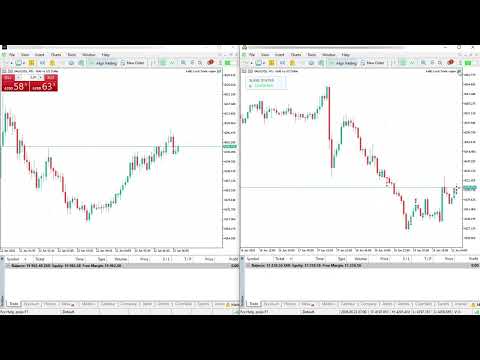
Kalifx Local Trade Copier is built to replicate trades from one trading account (Master) to another (Slave) in real time.
Its main purpose is to copy trading activity—such as opening, modifying, and closing trades—so that multiple accounts can follow the same strategy without manual intervention. This is especially useful for managing multiple accounts, testing strategies across different brokers, or mirroring trades between accounts.

The EA operates in two modes:

MASTER: Monitors trading activity and records all open positions and pending orders.
SLAVE: Reads this information and automatically duplicates the trades on another MT5 terminal, keeping both accounts synchronized.

This EA is designed for local copying between MT5 terminals using the Common Files folder , so both terminals can access the same snapshot file name.

Key Features

  • Single EA utility for both MASTER and SLAVE modes.
  • Copies positions and pending orders.
  • Pending handling modes:
    • Copy as pending orders.
    • Wait for master pending trigger and copy only as market position (via POS record).
  • Trade inversion option (BUY ↔ SELL).
  • Symbol mapping and excluded symbols list.
  • Fixed lot, lot multiplier, risk-% sizing, max lot.
  • Daily risk controls for slave:
    • Max trades per day.
    • Max daily drawdown (% or money).
  • Trade-copy count multiplier (duplicate each master trade into multiple slave trades).
  • Spread filter.
  • status panel displaying connection status between Master and Slave (shows "Connected" in green when both are successfully linked).

Important Notes

  • Designed for MT5 terminals on the same machine/VPS (or environments sharing Common Files).
  • Broker symbol specifications (contract size, step, min lot, digits, stops level) can differ.
    Always test on demo first.
  • Copy speed depends on ticks + timer and terminal responsiveness.

Quick Start (Master/Slave Setup)

1) Install EA

  • Put Local Trade Copier.mq5 in MQL5/Experts .
  • Compile in MetaEditor.

2) MASTER terminal setup

  • Attach EA to any chart.
  • Set Mode = MODE_MASTER .

3) SLAVE terminal setup

  • Attach EA to any chart.
  • Set Mode = MODE_SLAVE .
  • Use the same CopierFileName as master.
  • Configure inputs (symbol mapping, lot/risk, pending mode, filters, daily limits).

4) Verify operation

  • MASTER should keep updating the snapshot.
  • SLAVE should open/modify/close according to MASTER snapshot.
  • The status panel will display “Connected” in green when both Master and Slave are properly synchronized.


Input Settings Reference
------------------------

[Core]
- Mode
  Select MODE_MASTER or MODE_SLAVE.
- SkipExistingTradesOnStart
  When set to true, the EA in Slave mode will ignore any trades that were already open on the Master account at the time the EA starts.
  It will only begin copying new trades opened after initialization.


[Lot Control]
- UseFixedLot
  If true, use FixedLot for copied trades.
- FixedLot
  Fixed lot size.
- LotMultiplier
  If not fixed lot, slave lots = master lots * LotMultiplier.
- MaxLot
  Absolute lot cap.
- UseRiskPercent
  If true, lot is calculated from account risk.
- RiskPercent
  Percent of account balance risked per trade.
- RiskSL_Pips
  Fallback SL distance used for risk lot sizing when SL distance is unavailable.

[Trade Behavior]
- InvertTrades
  Reverse direction (BUY->SELL, SELL->BUY).
- CopyStopLoss
  Copy SL from master when fixed SL is not used.
- CopyTakeProfit
  Copy TP from master when fixed TP is not used.
- UseFixedSL / FixedSL_Pips
  Override SL using fixed pip distance.
- UseFixedTP / FixedTP_Pips
  Override TP using fixed pip distance.

[Pending Handling]
- PendingMode
  PENDING_COPY_AS_PENDING:
    Slave places/modifies pending orders.
  PENDING_EXECUTE_MARKET:
    Slave does NOT open from pending records; it waits until master pending triggers
    and appears as an open position in snapshot.

[Daily Limits] (SLAVE)
- EnableMaxTradesPerDay / MaxTradesPerDay
  Block new entries after daily trade count limit is reached.
- MultiplyCopiedTrades
  Enable trade count replication multiplier.
- CopiedTradesMultiplier
  Number of slave copies per one master trade (e.g. 2 = open 2 slave trades).
- EnableMaxDrawdownPerDay
  Enable daily drawdown guard.
- MaxDrawdownPercent
  Block new entries when daily equity drawdown reaches this percent.
- MaxDrawdownMoney
  Block new entries when daily equity drawdown reaches this money value.

[Spread Filter]
- EnableSpreadFilter
  Enable spread check before new entries.
- MaxSpread
  Maximum allowed spread (points).

[Symbol Mapping]
- SymbolMap
  Map master symbol to slave symbol.
  Format:
    EURUSDm=EURUSD;XAUUSDm=XAUUSD
  Separator between pairs:
    ;
- ExcludedSymbols
  Symbols to skip copying.
  Supports ';' or ',' separators.

[Execution]
- SlaveMagic
  Magic number used by slave trades/orders.
- Slippage
  Deviation/slippage in points for trade execution.

[Misc]  
- CopierFileName

  Snapshot file name in Common Files.

[TradeComments]

- Allows you to add a custom text label to copied trades for easy identification and tracking.

[ShowStatusPanel]

-Enable/disable to hide or show on-chart status panel

Recommended Safe Configuration
------------------------------
- Start on DEMO accounts first.
- Keep UseRiskPercent = true with small RiskPercent (e.g. 0.5% to 1%).
- Use EnableMaxTradesPerDay and EnableMaxDrawdownPerDay.
- EnableSpreadFilter in volatile markets.
- Confirm SymbolMap and ExcludedSymbols before going live.


Troubleshooting
---------------
1) No trades copied
   - Check Mode (master/slave).
   - Check same CopierFileName on both terminals.
   - Check symbol mapping and excluded symbols.
   - Check daily limits and drawdown guard are not blocking entries.

2) Wrong symbols copied
   - Fix SymbolMap pairs.
   - Confirm slave symbol exists and is enabled in Market Watch.

3) Lots not as expected
   - Review UseFixedLot, LotMultiplier, UseRiskPercent, MaxLot.
   - If MultiplyCopiedTrades=true, count of trades increases per master trade.

4) Pending behavior confusion
   - In PENDING_EXECUTE_MARKET, pending records are not copied as pending.
     Slave waits for master pending trigger (position appears in snapshot).

추천 제품
Account Sentinel Pro - Monitor, Protect & Analyze Account Sentinel Pro is a professional all-in-one account intelligence EA for MetaTrader 5. It is built for traders who want a clean, full-screen control center to monitor account performance, understand real strategy behavior, evaluate execution quality, and assess drawdown risk with much more clarity than the standard terminal view. Instead of showing only raw trade history or a simple profit summary, Account Sentinel Pro organizes your trading
FREE
Vulcan
Dayana Cubillas Massana
Vulcan – 다중 전략 단조 시스템 Vulcan 은 끊임없이 변화하는 시장의 특성에 적응하기 위해 세 가지 독립적인 거래 전략을 통합한 모듈식 전문가 고문(Expert Advisor)입니다. 금속을 단조하기 위해 다양한 기술을 마스터한 대장장이처럼,   Vulcan 은 상호 보완적인 접근 방식을 결합하고   200개 이상의 조정 가능한 매개변수 를 제공하여 각 전략을 원하는 대로 형성할 수 있게 합니다. 이로 인해   Forex, 지수, 원자재 또는 암호화폐   등 모든 심볼과 시간대에 완벽하게 적응할 수 있는 도구가 됩니다. 각 필터 층의 강도, 망치를 내리칠 타이밍, 불의 온도는 당신이 결정합니다. 주요 특징 세 가지 독립 전략 (각각 고유한   매직 넘버   보유, 개별 활성화 가능): MA Crossover:   RSI, ADX 및 BBW   필터가 있는 빠른/느린 이동 평균 교차, 그리고   DeMarker, Williams %R 및 OsMA 에 기반한 리스크 시스템.
FREE
Bybit BTC Scalper
STANTON ROUX
3.9 (10)
BTC Scalper - Automated RSI Breakout Strategy for BTCUSD Unlock the power of automated trading with BTC Scalper! This expert advisor is a fully autonomous trading strategy, designed to capitalize on fast-moving BTCUSD markets. It leverages a potent combination of RSI Breakouts and two Exponential Moving Averages (EMA) to find high-probability trade entries, ensuring optimal confluence for success. Key Features: Fully Automated Trading : Set it, forget it, and let BTC Scalper handle your trades 2
FREE
AI Advisor – AI가 당신의 실제 트레이딩 세계를 보게 만드는 도구 AI Advisor는 당신의 실제 계좌 정보를 바탕으로 고품질 프롬프트를 자동 생성해, 어떤 AI 채팅창이든 바로 붙여넣어 쓸 수 있게 해줍니다. 계좌 현황을 빠르게 정리하고, 현재 종목 구조를 이해하며, 위험 지점을 파악하고, 잠재적인 수익 기회를 탐색할 수 있도록 도와줍니다. 즉, AI가 아무 근거 없이 추측하는 것이 아니라, 당신의 실제 트레이딩 상황 을 기반으로 생각하도록 만드는 도구입니다. 빠른 링크 Download:      AI Advisor v1.02.ex4      AI Advisor   v1.02.ex5 Installation guide AI Advisor  Version Overview FAQ & troubleshooting 사용 방법 – 3단계면 충분합니다 분석하고 싶은 종목 차트에서 AI Advisor를 실행합니다. 오른쪽 목록에서 현재 질문에 맞는 “AI Advisor 모드”(AI
FREE
RenkoExpert
Andrey Goida
3.8 (5)
Renko Expert Advisor based on Renko bar simulation.    The EA has two options for building Renko bars. Classic and ATR. In the classic version, renko bars are marked with areas on the main chart; in the ATR version, renko bars are modeled and drawn in the indicator window. Modeling renko bars inside the EA allows you to optimize the robot better than drawing renko bars offline.   Our new product based on artificial intelligence   https://www.mql5.com/ru/market/product/127820   Telegramm channel
FREE
Instructions for Using Reverse Copier EA Attach EA to Charts Open MetaTrader and attach the EA to any chart on both accounts (master & slave). Make sure AutoTrading is enabled. Master Account (Signal Sender) Set Mode = Master in EA settings. This account will send trade signals. Slave Account (Signal Receiver) Set Mode = Slave in EA settings. This account will receive trades in reverse (opposite direction). Lot Multiplier In Slave EA settings, set Multiplier to control lot size. Example: 1.0
FREE
SmartGridCloserEA
Leszek Aleksander Mroczek
4.33 (3)
SmartGridCloserEA v.2 – Adaptive Grid Trading with Pair-Based Profit Closures Description: SmartGridCloserEA v.2 is a fully automated Expert Advisor for MetaTrader 5 that applies a dynamic BUY-only grid strategy across multiple asset classes such as Forex, Gold, and Indices . Unlike traditional grid EAs that rely on fixed take-profit levels, this robot introduces an intelligent system for pair-based position closures based on profit differences, helping to lock in gains even during ranging or c
FREE
PZ Goldfinch Scalper EA MT5
PZ TRADING SLU
3.3 (54)
This is the latest iteration of my famous scalper, Goldfinch EA, published for the first time almost a decade ago. It scalps the market on sudden volatility expansions that take place in short periods of time: it assumes and tries to capitalize of inertia in price movement after a sudden price acceleration. This new version has been simplified to allow the trader use the optimization feature of the tester easily to find the best trading parameters. [ Installation Guide | Update Guide | Troublesh
FREE
Reversal Composite Candles
MetaQuotes Ltd.
3.69 (16)
The idea of the system is to indentify the reversal patterns using the calculation of the composite candle. The reversal patterns is similar to the "Hammer" and "Hanging Man" patterns in Japanese candlestick analysis. But it uses the composite candle instead the single candle and doesn't need the small body of the composite candle to confirm the reversal. Input parameters: Range - maximal number of bars, used in the calculation of the composite candle. Minimum - minimal size of the composite can
FREE
StrategyQuant Vortee Free MT5
StrategyQuant s.r.o.
4.5 (2)
The Expert Advisor tool has been developed for Nasdaq, based on Vortex and pending orders. The stop loss is based on fixed pips. It has been backtested on more than 10-year long M1 data with high quality of modeling. The enclosed screenshots demonstrate the complexity and coverage of the test by Monte Carlo analysis with 200 simulations. T he Expert Advisor passed via Cluster Analysis, Optimization profile, System parameter Permutation. There is no need to set up parameters - all settings are al
FREE
Brent Trend Bot
Maksim Kononenko
4.5 (16)
The Brent Trend Bot special feature is simple basic tools and logic of operation. There are no many strategies and dozens of settings, like other EAs, it works according to one algorithm. The operating principle is a trend-following strategy with an attempt to get the maximum profitability adjusted for risk. Therefore, it can be recommended for beginners. Its strong point is the principle of closing transactions. Its goal is not to chase profits, but to minimize the number of unprofitable trans
FREE
Blue Moon MT5
Michael Prescott Burney
2 (3)
블룸문 MT5 - XAUUSD H1 블룸몬 MT5는 XAUUSD H1을 거래합니다.       이것은 완전 자동화된 금 거래 로봇으로 위험을 엄격하게 관리하고 1:10의 구조화된 손익 비율을 실현하도록 설계되었습니다. 특히…       MT5 Gold Trading Expert Advisor (XAUUSD H1) 시스템은   정확한 진입 로직, 엄격한 정지 손실 및 고급 자동 트레일링 정지 관리를 활용하여 조정 시 이익을 보호합니다. 그것       MetaTrader 5 자동 금 거래 시스템       이 시스템은 잔액 기반 거래량 관리(기본적으로 잔액당 0.01 로트)를 채택하고 위험을 관리하며 장기 계좌 안정성을 유지합니다. 각 거래에는 손실 위험을 줄이고 높은 이익 잠재력을 유지하기 위해 임베디드 다이나믹 스톱 손실이 사용됩니다. 판매자를 위한 최적화       MT5에서 가격 하락이 최소한의 금 전문 컨설턴트.       XAUUSD 용 맞춤 거래 봇   또는      
FREE
SimpleTrade by Gioeste
Giovanni Scelzi
4 (3)
Discover the power of automated trading with **SimpleTradeGioeste**, an Expert Advisor (EA) designed to optimize your trading operations in the Forex market. This innovative EA combines advanced trading strategies with proven technical indicators, offering an unparalleled trading experience. video backtest :  https://youtu.be/OPqqIbu8d3k?si=xkMX6vwOdfmfsE-A ****Strengths**** - **Multi-Indicator Strategy**: SimpleTradeGioeste employs an integrated approach that combines four main technical ind
FREE
Golden Square X
Huynh Tan Linh N
4.1 (10)
This is my latest Free version for Gold. With optimized parameters and user-friendly features, this version is likely very easy to use and highly effective. You can customize TP and SL parameters as you wish, but the default settings should work well for you without the need for further adjustments.  This version is designed for the M5. This version does not require a large capital investment; only $100-$200 is sufficient for Golden Square X to run and generate profits for you. Based on backtest
FREE
Welcome to the future of algorithmic trading. The Nascore Scalper EA is a precision-engineered, AI-inspired scalping robot built exclusively for trading NAS100 (US Tech 100 Index) . It analyzes smart money footprints, breakout zones, and high-timeframe bias to capture high-probability scalping entries. Key Features: Optimized for NAS100 (US100) – Fast-moving Nasdaq-based index trading Smart Money Concepts – Integrates structure, breakout logic, and bias Minimal Margin Usage – Ideal for traders
FREE
Guardian Shield EA - Risk & Profit Protection System ️   Ultimate Account Protection Guardian Shield is a specialized utility Expert Advisor designed to provide comprehensive risk management and profit protection for your trading account. It monitors all running positions in real-time and takes immediate action when predefined profit or loss thresholds are reached.   Key Features   Advanced Risk & Profit Guardian Real-time Monitoring : Continuously tracks total P&L across all positions Du
FREE
Black Jack
Amos Tsopotsa
5 (5)
The strategy for this expert advisor works more effectively only if you set buy only or sell only,the most important part I took into consideration are the main market turning points.You would want to say reversals or change in direction in trends,the key to making profitable trades with this advisor is to set your stop loss on the previous high for sell only signal and previous low for buy positions ,This advisor can trade any Market,but mainly was developed for Boom and Crash,vix75 and Jump 25
FREE
Shogun FX
Gonzalo Javier Bardesio Grana
El EA opera el par USDJPY en temporalidad H1. Parametros configurables y completamente optimizables a cada estrategia o gestion del riesgo Solicite archivo .set para FTMO DEMO.  No utiliza grid, hedging, martingale, etc. Cada operacion con SL y TP.  limite de perdida diaria y total para desafios. Realice la optimizacion de cada set en base a su broker o solicite ayuda para cada caso. 
FREE
UsdJpy RangeBot Pro
Kwaku Appenteng Wiredu
UsdJpy RangeBot Pro – Expert Advisor for Breakout Trading UsdJpy RangeBot Pro is a breakout-based Expert Advisor developed for the USDJPY pair. It identifies trading opportunities during the early hours of the London session by analyzing a defined range and executing pending orders above or below it. The EA applies fixed logic, clear visual elements, and built-in risk controls. This tool is designed for disciplined breakout trading without the use of breakeven, martingale, or grid systems.
FREE
MA Crossover ADX
MetaQuotes Ltd.
4 (13)
The strategy is based on price crossover with Moving Average indicator, confirmed by ADX indicator. The trade signals: Buy: closing price of the last completed bar is higher than moving average, the moving average increases at the current and last completed bars. Sell: closing price of the last completed bar is lower than moving average, the moving average decreases at the current and last completed bars. To filter the false signal, it checks the trend power (ADX>ADXmin) and trend direction usin
FREE
ForceBB Expert
Nikolaos Pantzos
ForceBB_Expert   is structured based on two specifics technical analysis indicators ( Bollinger Bands and  Force Index ). It has many parameters so that each user can find the appropriate settings that suit their investment profile. It can work on 28 different pairs. The default parameter settings are indicative, I recommend that each user experiment to find their own settings.
FREE
SafeGuard Trader EA
Marin Stoyanov
4 (1)
FREE SafeGuard Trader EA  - Professional Trend Following Strategy Created by EA Trading Academy team using Expert Advisor Studio , this free trading robot implements a professional trend-following strategy with built-in safety features to protect your account. You can find a detailed documentation about the properties and inputs on our knowledge base . Key Strategy Features: Combines ADX and Bulls Power indicators for precise entry signals Advanced exit strategy based on price action analys
FREE
Morning Range Breakout (Free Version) Morning Range Breakout (Free Version) is a straightforward trading advisor that implements a breakout strategy based on the morning range. It identifies the high and low within a specified time interval (e.g., 08:00–10:00 UTC) and opens a trade on a breakout upward or downward. The free version includes core functionality without restrictions. All parameters and messages are in English, per MQL5 Market requirements. Key Features Detects morning range based
FREE
This Expert advisor trades any Asset class, Try it on any market, When you download PM so you can be added to my channel for all support related issues. There are three trading strategies available  * The Wyckoff trading strategy, Channel trading and trend trading.  Input Parameters Lots   - the volume of position to open; Stop Loss BUY (in points)   - the stop loss of BUY positions; Stop Loss SELL (in points)   - the stop loss of SELL positions; Take Profit BUY (in points)   - the take profit o
FREE
FiT Panel Pro
Thonglak Janyakorn
Overview FiT Panel Pro is a professional-grade trade management panel designed for MetaTrader 5 traders who demand speed, precision, and full control over their trades. Built with a modern dark-theme UI, it combines one-click execution with advanced risk management, visual SL/TP drag lines, automatic Fibonacci-based levels, and comprehensive order management — all in a single, compact panel. Whether you are a scalper, day trader, or swing trader, FiT Panel Pro gives you the edge you need to exec
FREE
Trade assistant pro v8
Ahmed Mohammed Bakr Bakr
FREE FREE FREE Trade Assistant MT5 – Professional Trading & Risk Management Panel Trade Assistant MT5 is an advanced trading panel designed to help traders execute orders faster, safer, and more professionally . It simplifies manual trading by combining smart order management , precise risk control , and one-click execution , making it ideal for both beginners and advanced traders. This tool does not trade automatically . Instead, it empowers you with full control while applying professional-gra
FREE
Use this expert advisor whose strategy is essentially based on the Relative Strength Index (RSI) indicator as well as a personal touch. Other free expert advisors are available in my personal space as well as signals, do not hesitate to visit and leave a comment, it will make me happy and will make me want to offer content. Expert advisors currently available: LVL Creator LVL Creator Pro LVL Bollinger Bands   Trading is not a magic solution, so before using this expert on a live account, carry
FREE
Demo copier of deals from MetaTrader 5 to MetaTrader 5 ( MetaTrader 4<->MetaTrader 4 version is available ; with both versions, you can copy MetaTrader 5<->MetaTrader 4, MetaTrader 4<->MetaTrader 5, MetaTrader 5<->MetaTrader 5, MetaTrader 4<->MetaTrader 4). Works only in the mode of hedging. Spread filter. Select the best price (start copying positions with a profit or loss). Configure the lot size, fixed or ratio-based (provider signals can be copied with an increased lot). Configure order copy

FREE
Quick Close 1S
Tan Au Phuong
5 (8)
Quick Close 1S 는 빠르고 체계적인 거래 관리를 위해 설계된 유틸리티입니다. 깔끔한 컨트롤 패널을 통해 주문을 즉시 열거나 닫고, 유연한 SL/TP 설정을 적용하며, 바스켓 목표를 관리하고 전체 손익을 제어할 수 있습니다. 정확성, 효율성, 명확한 실행을 중시하는 트레이더에게 적합합니다. 주요 기능 간편한 거래 제어: 직관적인 패널에서 특정 주문 유형 또는 전체 주문을 열거나 닫기. 유연한 SL/TP 설정: 개별 주문 또는 전체 바스켓에 고정 또는 캔들 기반 SL/TP 적용. 바스켓 목표 & 트레일링 스탑: 포인트 기준 TP 설정 및 맞춤형 트레일링 스탑 유지. 글로벌 리스크 관리: 설정된 수익 또는 손실 수준(금액 또는 %)에 도달 시 모든 거래 자동 종료. 맞춤형 인터페이스: 매직 넘버, 슬리피지 한도, 클릭 사운드 설정 가능. 이 유틸리티를 사용해 주셔서 감사합니다. 유용하다고 느끼신다면, 개발자의 노력을 인정하는 긍정적인 평가를 남겨주시면 감사하겠습니다. 이 도구는
FREE
Expert Alligator
MetaQuotes Ltd.
3.17 (6)
The strategy is based on the Alligator technical indicator, described by Bill Williams in "Trading Chaos". The system is based on three moving averages (Lips, Teeth and Jaw lines), and oscillators, calculated using the difference between them. The trading signals are generated after crossover of the Alligator lines, depending on trend, determined by order of these lines. In the case of upward trend the Lips line (with minimal period) is the highest, the next is the Teeth line, and the lowest is
FREE
이 제품의 구매자들이 또한 구매함
Trade Assistant MT5
Evgeniy Kravchenko
4.43 (211)
거래당 위험 계산, 라인을 사용한 손쉬운 신규 주문, 부분 청산 기능을 통한 주문 관리, 7가지 유형의 트레일링 스탑 및 기타 유용한 기능을 제공합니다. 추가 자료 및 지침 설치 지침   -   애플리케이션 지침   -   데모 계정용 애플리케이션 평가판 라인 기능       - 차트에 개시선, 손절매, 차익실현을 표시합니다. 이 기능을 사용하면 새로운 주문을 쉽게 하고 개봉 전에 추가 특성을 볼 수 있습니다. 위기 관리       -       위험 계산 기능은 설정된 위험과 손절매 주문의 크기를 고려하여 새 주문의 볼륨을 계산합니다. 이를 통해 손절매 크기를 설정하고 동시에 설정된 위험을 존중할 수 있습니다. 로트 계산 버튼 - 위험 계산을 활성화/비활성화합니다. 필요한 위험 값은 위험 필드에 0에서 100 사이의 백분율 또는 예금 통화로 설정됩니다. 설정 탭에서 위험 계산 옵션을 선택합니다. $ 통화, % 잔액, % 지분, % 자유 마진, % 사용자 정의, % AB 이전
Trade Manager EA에 오신 것을 환영합니다. 이 도구는 거래를 보다 직관적이고 정확하며 효율적으로 만들기 위해 설계된 궁극적인 리스크 관리 도구 입니다. 단순한 주문 실행 도구가 아닌, 원활한 거래 계획, 포지션 관리 및 리스크 제어를 위한 종합 솔루션입니다. 초보자부터 고급 트레이더, 빠른 실행이 필요한 스캘퍼에 이르기까지 Trade Manager EA는 외환, 지수, 상품, 암호화폐 등 다양한 시장에서 유연성을 제공합니다. Trade Manager EA를 사용하면 복잡한 계산은 이제 과거의 일이 됩니다. 시장을 분석하고 진입, 손절 및 익절 수준을 차트의 수평선으로 표시한 후 리스크를 설정하면, Trade Manager가 이상적인 포지션 크기를 즉시 계산하고 SL 및 TP 값을 실시간으로 표시합니다. 모든 거래가 간편하게 관리됩니다. 주요 기능: 포지션 크기 계산기 : 정의된 리스크에 따라 거래 크기를 즉시 결정합니다. 간단한 거래 계획 : 진입, 손절, 익절을 위한
Local Trade Copier EA MT5
Juvenille Emperor Limited
4.96 (137)
Local Trade Copier EA MT5 를 사용하여 매우 빠른 거래 복사 경험을 해보세요. 1분 안에 간편하게 설정할 수 있으며, 이 거래 복사기를 사용하면 Windows 컴퓨터 또는 Windows VPS에서 여러 개의 MetaTrader 터미널 간에 거래를 0.5초 미만의 초고속 복사 속도로 복사할 수 있습니다. 초보자든 전문가든   Local Trade Copier EA MT5 는 다양한 옵션을 제공하여 사용자의 특정 요구에 맞게 맞춤 설정할 수 있습니다. 이는 수익 잠재력을 높이려는 모든 사람을 위한 최고의 솔루션입니다. 지금 사용해보시고 이것이 왜 시장에서 가장 빠르고 쉬운 무역용 복사기인지 알아보세요! 팁: 여기 에서 데모 계정에서 Local Trade Copier EA MT5 데모 버전을 다운로드하여 사용해 볼 수 있습니다. 다운로드한 무료 데모 파일을 MT5 >> File >> Open Data Folder >> MQL5 >> Experts 폴더에 붙여넣고 터
TradePanel MT5
Alfiya Fazylova
4.87 (154)
Trade Panel은 다기능 거래 도우미입니다. 이 애플리케이션에는 50개 이상의 수동 거래 기능이 포함되어 있으며 대부분의 거래 작업을 자동화할 수 있습니다. 구매하기 전에 데모 계정에서 데모 버전을 테스트할 수 있습니다. 데모 계정용 애플리케이션 체험판 다운로드: https://www.mql5.com/en/blogs/post/750865 . 전체 지침 여기 . 거래. 한 번의 클릭으로 거래를 수행할 수 있습니다: 리스크 자동 계산과 함께 예약 주문 및 포지션 열기. 한 번의 클릭으로 여러 주문 및 포지션 열기. 주문 그리드 열기. 예약 주문 및 포지션을 그룹별로 닫기. 포지션 방향 전환 (Buy 닫기 > Sell 열기, Sell 닫기 > Buy 열기). 포지션 잠금 (부족한 포지션을 열어 Buy와 Sell 포지션의 수량을 동일하게 만들기). 모든 포지션 한 번의 클릭으로 부분적으로 닫기. 모든 포지션의 테이크 프로핏과 스톱로스를 같은 가격 수준에 설정. 모든 포지션의 스톱로스를

베타 출시 Telegram to MT5 Signal Trader 는 곧 공식 알파 버전을 출시할 예정입니다. 일부 기능은 아직 개발 중이며, 작은 버그가 발생할 수 있습니다. 문제가 있으면 꼭 보고해 주세요. 여러분의 피드백은 소프트웨어 개선에 도움이 됩니다. Telegram to MT5 Signal Trader 는 Telegram 채널 또는 그룹의 거래 신호를 자동으로 MetaTrader 5 계정으로 복사하는 강력한 도구입니다. 공개 및 비공개 채널을 모두 지원하며, 여러 신호 제공자를 여러 MT5 계정에 연결할 수 있습니다. 소프트웨어는 빠르고 안정적으로 동작하며, 복사된 거래를 완벽히 제어할 수 있습니다. 인터페이스는 깔끔하며 대시보드와 차트가 시각적으로 구성되어 있고, 직관적인 네비게이션이 가능합니다. 여러 Signal Account를 관리하고, 공급자별 설정을 세밀하게 조정하며, 모든 동작을 실시간으로 모니터링할 수 있습니다. 필수 조건 MQL의 제한으로 인해 EA는 Te
Farmed Hedge Yield Farming | All Markets (Manual - Hybrid - Semi/Automated EA) MULTI-ASSET SUPPORT Trade any asset available on your broker - Forex: Major, Minor, Exotic pairs - Crypto: BTC, ETH, XRP, SOL, BNB - Stocks: Apple, Tesla, Amazon, Google, etc. - Commodities: Gold, Silver, Oil, Gas - Indices: US30, NAS100, SPX500, DAX40 - Any CFD your broker offers VERIFIED TRADING RESULTS - Farmed Hedge Yield Axi Copy:  https://www.mql5.com/en/signals/2356376 - Farmed Hedge Yield Exn Copy:   https:/
파워 캔들 전략 스캐너 - 자체 최적화 다중 종목 설정 찾기 도구 파워 캔들 전략 스캐너는 마켓 워치에 등록된 모든 종목에 대해 파워 캔들 지표와 동일한 자체 최적화 엔진을 동시에 실행합니다. 하나의 패널에서 현재 통계적으로 거래 가능한 종목, 각 종목별 최적의 전략, 최적의 손절매/익절 조합을 알려주며, 새로운 신호가 발생하면 즉시 알림을 전송합니다. 이 도구는 Stein Investments 에코시스템의 일부입니다. 18개 이상의 도구와 함께 당신의 1대1 AI 트레이딩 멘토 Max.  항상 대기 중, 모든 인디케이터를 깊이 있게 이해, 무언가를 차근차근 생각해보고 싶은 순간에 도움을 줍니다.  https://stein.investments 에서 만나보세요 완벽한 시장 모니터링. 종목당 3,000건 이상의 자동 최적화. 2가지 알림 유형. 한 번의 클릭으로 차트를 전환하고 바로 거래하세요. 이 도구가 필요한 이유 대부분의 다중 종목 스캐너는 가격 변동만 보여줍니다. 티커별
Exp COPYLOT CLIENT for MT5
Vladislav Andruschenko
3.91 (33)
MetaTrader 5용 전문 트레이드 복사기 MetaTrader 용 빠르고 전문적이며 신뢰할 수 있는 트레이드 복사기 입니다. COPYLOT 은 MT4와 MT5 터미널 간의 Forex 거래 복사를 지원하며, Hedge 및 Netting 계좌를 모두 지원합니다. COPYLOT MT5 버전 지원 구성: - MT5 Hedge → MT5 Hedge - MT5 Hedge → MT5 Netting - MT5 Netting → MT5 Hedge - MT5 Netting → MT5 Netting - MT4 → MT5 Hedge - MT4 → MT5 Netting MT4 버전 전체 설명 + DEMO + PDF 구매 방법 설치 방법 로그 파일 확인 방법 테스트 및 최적화 방법 Expforex의 모든 제품 MT4 터미널로도 거래를 복사할 수 있습니다(MT4 → MT4, MT5 → MT4): COPYLOT CLIENT for MT4 COPYLOT은 2개, 3개, 심지어 10개의 터미널과 동시에 작동할
Copy Cat More Trade Copier MT5 (복사 고양이 MT5) 는 오늘날의 거래 과제를 위해 설계된 로컬 거래 복사기이자 완전한 위험 관리 및 실행 프레임워크입니다. 프롭펌 챌린지부터 개인 포트폴리오 관리까지, 견고한 실행, 자본 보호, 유연한 구성 및 고급 거래 처리의 조합으로 모든 상황에 적응합니다. 복사기는 마스터(송신자)와 슬레이브(수신자) 모드 모두에서 작동하며, 시장 주문과 예약 주문, 거래 수정, 부분 청산 및 헷지 청산 작업의 실시간 동기화를 제공합니다. 데모 및 실계좌, 거래 또는 투자자 로그인과 호환되며, EA, 터미널 또는 VPS가 재시작되어도 지속적인 거래 메모리 시스템을 통해 복구를 보장합니다. 고유 ID로 여러 마스터와 슬레이브를 동시에 관리할 수 있으며, 브로커 간 차이는 접두사/접미사 조정 또는 사용자 정의 심볼 매핑을 통해 자동으로 처리됩니다. 매뉴얼/설정  | Copy Cat More MT4 | 채널  특별 기능: 설정이 간편함 —
Trade Dashboard MT5
Fatemeh Ameri
4.94 (124)
Trade Dashboard simplifies how you open, manage, and control your trades, with built-in lot size calculation. It allows you to execute trades, manage risk, and control positions directly on the chart, with tools such as partial close, breakeven, and trailing stop. Designed to reduce manual work and help you stay focused on your trading decisions. A demo version is available for testing. Detailed explanations of features are provided within the MQL5 platform. Installation instructions are include
Telegram to MT5 Coppy
Sergey Batudayev
5 (9)
Telegram에서 MT5로:   최고의 신호 복사 솔루션 DLL 없이도 Telegram 채널과 채팅에서 MetaTrader 5 플랫폼으로 거래 신호를 직접 복사하는 최신 도구인 Telegram to MT5를 사용하여 거래를 간소화하세요. 이 강력한 솔루션은 정밀한 신호 실행, 광범위한 사용자 정의 옵션을 제공하고 시간을 절약하며 효율성을 높여줍니다. [ Instructions and DEMO ] 주요 특징 직접 Telegram API 통합 전화번호와 보안 코드를 통해 인증하세요. 사용자 친화적인 EXE 브리지를 통해 채팅 ID를 쉽게 관리하세요. 여러 채널/채팅을 추가, 삭제, 새로 고침하여 동시에 신호를 복사합니다. 고급 필터를 사용한 신호 파싱 예외 단어(예: "보고서", "결과")가 포함된 원치 않는 신호를 건너뜁니다. 유연한 SL 및 TP 형식을 지원합니다: 가격, 핍 또는 포인트. 가격 대신 포인트를 지정하는 신호에 대한 진입 포인트를 자동으로 계산합니다. 주문 맞춤화 및
AntiOverfit PRO MT5
Enrique Enguix
5 (4)
EA를 구매하기 전에, 이 시스템이 정말 버티는지 아니면 백테스트에서 운 좋게 좋아 보였던 것뿐인지 먼저 확인하세요. 대부분의 로봇은 보기 좋은 백테스트와 함께 판매됩니다. 우상향 곡선. 좋은 Profit Factor. 의심할 이유가 거의 없어 보입니다. 그런데도 그런 EA들 중 많은 수가 시장이 그 과거 구간처럼 움직이지 않기 시작하는 순간 무너지기 시작합니다. 왜 그럴까요? 백테스트가 증명하는 것은 딱 한 가지뿐이기 때문입니다. 그 전략이 특정한 하나의 가격 경로에서는 작동했다는 것. 다른 경로에서도 버틴다는 뜻은 아닙니다. 견고하다는 뜻도 아닙니다. 당연히 당신의 돈을 쓸 가치가 있다는 뜻도 아닙니다. 당신이 EA를 사는 이유는 과거의 예쁜 곡선을 감상하기 위해서가 아닙니다. 계속 변하는 시장에서 실제로 쓰기 위해서입니다. AntiOverfit PRO가 하는 일 AntiOverfit PRO는 MetaTrader 5용 Expert Advisor가 정말 탄탄한지, 아니면 특정한
Trade copier MT5
Alfiya Fazylova
4.53 (43)
Trade Copier는 거래 계정 간의 거래를 복사하고 동기화하도록 설계된 전문 유틸리티입니다. 복사는 공급자의 계정/단말기에서 동일한 컴퓨터 또는 vps에 설치된 수신자의 계정/단말기로 발생합니다. 프로모션 - 이미 "Trade copier MT5"를 구매하셨다면, "Trade copier MT4"를 무료로 받으실 수 있습니다 (MT4 → MT5 및 MT4 ← MT5 복사용). 조건에 대한 자세한 정보를 원하시면, 개인 메시지를 통해 저희에게 문의해 주시기 바랍니다! 구매하기 전에 데모 계정에서 데모 버전을 테스트할 수 있습니다. 데모 버전 여기 . 전체 지침 여기 . 주요 기능 및 이점: 복사기는 "МТ5> МТ5", "МТ4> МТ5", "МТ5> МТ4" 복사를 지원합니다. 복사기는 데모 계정 > 실 계정, 실 계정 > 데모 계정, 데모 계정 > 데모 계정 및 실제 계정 > 실 계정 복사를 지원합니다. 복사기는 읽기 전용 암호가 적용된 투자자 계정에서 복사를 지원합니다. 하
Timeless Charts
Samuel Manoel De Souza
5 (5)
Timeless Charts is an advanced charting solution designed for professional traders seeking for custom charts / custom timeframes , including seconds charts / seconds timeframe, renko charts / renko bars, cluster charts / footprint charts and advanced tools present in most of the popular platforms. Unlike traditional offline charts or simplistic custom indicators, this solution constructs fully custom bars with true timestamp accuracy , down to miliseconds, allowing for a powerful and precise tr
The product will copy all telegram signal to MT5 ( which you are member) , also it can work as remote copier.  Easy to set up, copy order instant, can work with almost signal formats, image signal,  s upport to translate other language to English Work with all type of channel or group, even channel have "Restrict Saving Content", work with  multi channel, multi MT5 Work as remote copier: with signal have ticket number, it will copy exactly via ticket number. Support to backtest signal. How to s
Footprint Chart Pro — Professional OrderFlow EA for MetaTrader 5 Version 6.34 | Professional tool for real traders | Institutional-Grade Visualization DEMO USERS - PLEASE SELECT EVERY TICK / REAL TICK WHEN TESTING AND YOU HAVE DOWNLOADED HISTORICAL DATA. IF YOU SEE A WAITING SCREEN AND IT IS NOT DOWNLOADING, IT MEANS YOU HAVE LOW HISTORICAL DATA. TRY 1 MIN AND 5 MIN FIRST ON 1 DAY DATA. ONE DAY DATA SHOULD BE THE NEWEST AND MOST CURRENT DATE. PLEASE WAIT UNTIL THE MARKET HAS ROLLED OVER PERIOD.
Anchor Trade Manager
Kalinskie Gilliam
5 (2)
Anchor: The EA Manager Run your full EA portfolio without conflicts, without stacked risk, and without watching every chart yourself. Anchor coordinates up to 64 Expert Advisors on a single account so only one trades at a time. Attach Anchor to any chart. Type your EA names and magic numbers in one line. Anchor handles the rest. Built for portfolios. Built for discipline. Built for prop firms. The Problem Running multiple EAs on the same account creates risk. Two gold EAs can open opposite posit
Take a Break MT5
Eric Emmrich
4.75 (24)
News filter, equity guard & session control for all your EAs — one tool, full protection Take a Break has evolved from a basic news filter into a comprehensive account protection solution . It pauses your other Expert Advisors during news events or based on custom filters. When trading resumes, it automatically restores your entire chart setup , including all EA settings. Why traders choose Take a Break One news filter for all your EAs — no more relying on individual built-in filters that may o
HINN Lazy Trader
ALGOFLOW OÜ
5 (2)
The core idea: using the user interface, you configure the parameters the chart must meet before entering a position (or positions), choose which entry models to use, and set the rules for when trading and planning should end. Lazy Trader  handles the rest: it  takes over all the routine chart watching and execution! full description  :: 3 key videos [1] ->  [2]   ->  [3] What can it do? - Understands Larry Williams market structure - Understands swing market structure by Michael Huddleston
Risk Manager for MT5
Sergey Batudayev
4.31 (16)
MT5의 Expert Advisor Risk Manager는 매우 중요하며 제 생각에는 모든 거래자에게 필요한 프로그램입니다. 이 Expert Advisor를 사용하면 거래 계정의 위험을 제어할 수 있습니다. 위험 및 이익 통제는 금전적 측면과 백분율 측면에서 모두 수행될 수 있습니다. Expert Advisor가 작동하려면 통화 쌍 차트에 첨부하고 예금 통화 또는 현재 잔액의 %로 허용되는 위험 값을 설정하기만 하면 됩니다. [Instruction for Risk Manager parameters] 어드바이저 기능 이 위험 관리자는 위험을 제어하는 ​​데 도움이 됩니다. - 거래를 위해 - 하루 - 일주일 동안 - 한 달 동안 당신은 또한 제어할 수 있습니다 1) 거래 시 최대 허용 랏 2) 1일 최대 주문 수 3) 하루 최대 수익 4) 지분 인수 이익 설정 그게 다가 아닙니다. 설정에서 자동 설정을 지정하면 고문이 기본 SL 및 TP를 설정할 수도 있습니다. 상
HINN MagicEntry Extra
ALGOFLOW OÜ
4.71 (14)
HINN MAGIC ENTRY – the ultimate tool for entry and position management! Place orders by selecting a level directly on the chart! full description   ::  demo-version  :: 60-sec-video-description Key features: - Market, limit, and pending orders - Automatic lot size calculation - Automatic spread and commission accounting - Unlimited partitial take-profits  - Breakeven and trailing stop-loss and take-profit  functions - Invalidation leves - Intuitive, adaptive, and customizable interface - Works
Seconds Chart MT5
Boris Sedov
4.59 (17)
Seconds Chart - MetaTrader 5에서 초 단위 차트를 생성하는 독특한 도구입니다. Seconds Chart 를 사용하면 초 단위로 설정된 타임프레임으로 차트를 작성할 수 있어, 표준 분 또는 시간 단위 차트에서는 불가능한 유연성과 정밀한 분석이 가능합니다. 예를 들어, S15 타임프레임은 15초 동안의 캔들로 구성된 차트를 의미합니다. 사용자 정의 심볼을 지원하는 모든 인디케이터와 전문가 어드바이저를 사용할 수 있습니다. 이를 사용하는 것은 표준 차트에서 거래하는 것만큼 편리합니다. 표준 도구와 달리, Seconds Chart 는 초고속 타임프레임에서도 높은 정확도와 지연 없이 작업할 수 있도록 지원합니다. Seconds Chart의 장점 1초부터 900초까지 의 타임프레임 지원. 내장 틱 데이터베이스 덕분에 역사 데이터 즉시 로딩 . 실시간 데이터 업데이트로 지연이나 차이 없음 . 여러 초 단위 차트를 동시에 생성 가능. Seconds Chart가 이상적인 경우
Trade Manager DaneTrades
Levi Dane Benjamin
4.28 (29)
거래 관리자는 위험을 자동으로 계산하는 동시에 거래를 빠르게 시작하고 종료하는 데 도움을 줍니다. 과잉 거래, 복수 거래 및 감정 거래를 방지하는 데 도움이 되는 기능이 포함되어 있습니다. 거래를 자동으로 관리할 수 있으며 계정 성과 지표를 그래프로 시각화할 수 있습니다. 이러한 기능은 이 패널을 모든 수동 거래자에게 이상적으로 만들고 MetaTrader 5 플랫폼을 향상시키는 데 도움이 됩니다. 다중 언어 지원. MT4 버전  |  사용자 가이드 + 데모 트레이드 매니저는 전략 테스터에서 작동하지 않습니다. 데모를 보려면 사용자 가이드로 이동하세요. 위기 관리 % 또는 $를 기준으로 위험 자동 조정 고정 로트 크기 또는 거래량과 핍을 기반으로 한 자동 로트 크기 계산을 사용하는 옵션 RR, Pips 또는 Price를 사용한 손익분기점 손실 설정 추적 중지 손실 설정 목표 달성 시 모든 거래를 자동으로 마감하는 최대 일일 손실률(%)입니다. 과도한 손실로부터 계정을 보호하고 과도한
OrderManager MT5
Lukas Roth
4.81 (27)
OrderManager   소개: MT5용 혁신적인 유틸리티 MetaTrader 5용 새로운 Order Manager 유틸리티를 통해 전문가처럼 거래를 관리하세요. 단순성과 사용 편의성을 염두에 두고 설계된 Order Manager는 각 거래와 관련된 위험을 쉽게 정의하고 시각화할 수 있습니다. 이를 통해 보다 효과적인 결정을 내리고 거래 전략을 최적화할 수 있습니다. OrderManager에 대한 자세한 정보는 매뉴얼을 참조하십시오. [ 매뉴얼 ] [ MT4 버전 ] [ 텔레그램 채널 ]  New: [ Telegram To MT5 ] 주요 특징: 위험 관리: 거래의 위험을 빠르고 쉽게 정의하여 더 나은 결정을 내리고 거래 성능을 향상시킵니다. 시각적 표현: 열린 포지션을 명확하고 간결하게 이해하기 위해 거래와 관련된 위험을 그래픽으로 볼 수 있습니다. 주문 수정: 몇 번의 클릭만으로 주문을 쉽게 수정하거나 닫아, 거래 과정을 간소화하고 소중한 시간을 절약합니다. 손끝의 뉴스: 한
MetaTrader 5용 트레이딩 패널 — 차트와 키보드에서 실행하는 프로페셔널 원클릭 트레이딩 활동적인 트레이더를 위해 설계된 고급 Trading Panel로, MetaTrader 기본 인터페이스보다 훨씬 빠르고 직관적으로 포지션과 주문을 열고, 관리하고, 종료할 수 있습니다. 이 패널은 포지션 관리, 대기 주문 제어, 총수익 관리, 체결 속도를 하나의 전문적인 작업 공간에 통합하고 싶은 트레이더를 위한 솔루션입니다. 이것은 단순한 보조 유틸리티가 아닙니다. MetaTrader 5를 위한 진정한 trading cockpit입니다. 차트에서 직접 거래하고, 키보드로 빠르게 명령을 실행하며, 자동 계산과 시각적 가이드를 통해 수동 트레이딩을 더 빠르고, 더 명확하고, 더 편리하게 만들어 줍니다.  이 패널을 사용하면 차트에서 단 한 번의 클릭으로 거래를 실행할 수 있으며, 표준 MetaTrader 컨트롤보다 최대 30배 빠르게 거래 작업을 수행할 수 있습니다. MT4 버전 | 전체
MT5 to Telegram Signal Provider 는 사용하기 쉽고 완전히 커스터마이즈 가능한 유틸리티로, 특정 신호를 Telegram의 채팅, 채널 또는 그룹으로 전송하고, 귀하의 계정을 신호 제공자 로 만듭니다. 경쟁 제품과 달리 DLL 임포트를 사용하지 않습니다. [ 데모 ] [ 매뉴얼 ] [ MT4 버전 ] [ 디스코드 버전 ] [ 텔레그램 채널 ]  New: [ Telegram To MT5 ] 설정 단계별 사용자 가이드 가 제공됩니다. 텔레그램 API에 대한 지식은 필요하지 않습니다; 개발자가 제공하는 모든 것이 필요합니다. 주요 특징 구독자에게 보낸 주문 상세 정보를 커스터마이즈할 수 있습니다. 예를 들어, 브론즈, 실버, 골드와 같은 계층 구독 모델을 만들 수 있습니다. 골드 구독에서는 모든 신호를 받습니다. id, 심볼, 또는 코멘트로 주문을 필터링할 수 있습니다. 주문이 실행된 차트의 스크린샷이 포함됩니다 보낸 스크린샷에 닫힌 주문을 그려 추가 검증을 합니다
DrawDown Limiter
Haidar Lionel Haj Ali
5 (20)
Drawdown Limiter EA You are in the right place if you were searching for Drawdown control, Drawdown limiter, Balance protection, Equity Protection or Daily Drawdown Limit related to Prop Firm, FTMO, or Funded account trading, or if you want to protect your trading account. Have you suffered from controlling your drawdown when trading funded accounts? This EA is meant for you. Prop firms usually set a rule called “Trader Daily Drawdown”, and if it is not respected, you are disqualified.  I am an
YuClusters
Yury Kulikov
4.93 (43)
Attention: You can view the program operation in the free version  YuClusters DEMO .  YuClusters is a professional market analysis system. The trader has unique opportunities to analyze the flow of orders, trade volumes, price movements using various charts, profiles, indicators, and graphical objects. YuClusters operates on data based on Time&Sales or ticks information, depending on what is available in the quotes of a financial instrument. YuClusters allows you to build graphs by combining da
The Ultimate TradingView to MT5 Bridge Automation 수동 매매와 지연 시간(Latency) 문제에서 벗어나세요. TradingView to MT5 Copier PRO 는 트레이딩뷰(TradingView) 알람을 메타트레이더 5(MT5)에서 직접 실행할 수 있는 가장 빠르고 안정적인 브릿지입니다. 사용자 지정 지표, 전략 테스터 스크립트, 수동 작도 등 무엇을 사용하든, 이 EA는 초고속 웹소켓(WebSocket) 기술 을 사용하여 매매를 즉시 실행합니다. 단순한 복사기와 달리, 이 PRO 버전에는 Arena Statistics 가 포함되어 있습니다. 이는 차트에서 직접 매매 성과, 드로다운(Drawdown), 샤프 지수(Sharpe ratio)를 분석할 수 있는 전문적인 내장 대시보드입니다. 주요 기능 트레이드 복사기 (Trade Copier) 초고속 실행: 표준 WebRequest보다 빠른 WebSocket 연결을 사용하여 슬리피지(Slippa
Local Trade Copier EA 는 외부 소스에서 거래 신호를 실행해야 하거나 MAM 또는 PAMM 계정 없이 동시에 여러 계정을 관리해야 하는 개인 거래자 또는 계정 관리자를 위한 솔루션입니다. 최대 8개의 마스터 계정에서 무제한 슬레이브 계정으로 복사합니다. [ 설치 가이드 | 업데이트 가이드 | 문제 해결 | 자주하는 질문 | 모든 제품 ] 100% 자체 호스팅 설치 및 사용이 간편함 설치 프로그램, 구성 파일, 서버, 메모리 파이프 또는 DLL이 사용되지 않음 EA를 영원히 사용하기 위한 1000번의 활성화 로컬 실행, 네트워크 대기 시간 없음 필요한 모든 기능을 구현합니다. 최대 8개의 마스터 계정 및 무제한 슬레이브 계정 모든 브로커 및 DD/NDD/ECN/STP 실행과 함께 작동 다른 계정 통화를 사용하는 계정에서 작동 라이브 계정과 데모 계정 간에 구분 없이 작동 마스터 및 슬레이브 계정에서 기호 이름의 접미사 지원 매직 넘버 및 주문 댓글로 필터링 다른 거래
제작자의 제품 더 보기
RR Trade Assistant
Calvin Andile Mahlangu
RR Trade Assistant is a utility Expert Advisor for MetaTrader 5 designed to help traders visually define trades and manage risk efficiently. This tool combines a graphical risk-reward interface with manual trade execution, allowing traders to easily set trade parameters directly on the chart. Users can define Entry, Stop-Loss, and Take-Profit levels, calculate lot size based on risk percentage, and execute trades directly from the control panel. Key Features Visual Risk-Reward Tool Drag rectang
FREE
Kalifx trailing stop EA
Calvin Andile Mahlangu
5 (7)
KALIFX Trailing Stop Utility for MetaTrader 4 The KALIFX Trailing Stop Utility is a tool for automated stop-loss management on the MetaTrader 4 platform. It monitors open positions and dynamically adjusts the stop-loss level as the price moves in favor of the trade. The utility can also place initial stop-loss and take-profit levels and apply breakeven rules once the trade reaches a defined profit distance. Core Functionality 1. Trailing Stop Logic When the market moves in the direction of an o
FREE
Kalifx P S Calculator
Calvin Andile Mahlangu
KALIFX POSITION SIZE Calculator  – Risk & Lot Size Tool KALIFX PS Calculator is a chart-based utility designed to help traders calculate position size and manage risk directly from a simple on-screen panel. It provides a structured way to define trade parameters and view calculated results before placing an order. Key Features On-Chart Control Panel:   Manage all inputs and actions from a compact interface on the chart. Mode Switching:   Toggle between   Risk %   and   Fixed Lot   modes. Order T
FREE
Virtual sl tp Manager
Calvin Andile Mahlangu
5 (1)
Virtual SL/TP Manager manages stop loss and take profit levels as virtual chart objects instead of relying on broker-side SL and TP orders. It draws horizontal lines with Labels showing the projected profit or loss at each virtual exit level. This approach is useful for traders who want hidden exits, flexible post-entry trade management, and visual control over stop loss and take profit levels directly on the chart. The EA does not need to place broker stop loss or take profit orders. Instead
FREE
Kalifx PS Calculator
Calvin Andile Mahlangu
KALIFX POSITION SIZE Calculator  – Risk & Lot Size Tool (MT4) KALIFX PS Calculator is a chart-based utility designed to help traders calculate position size and manage risk directly from a simple on-screen panel. It provides a structured way to define trade parameters and view calculated results before placing an order. Key Features On-Chart Control Panel: Manage all inputs and actions from a compact interface on the chart. Mode Switching: Toggle between Risk % and Fixed Lot modes. Order Type S
FREE
Auto BE break even EA
Calvin Andile Mahlangu
5 (2)
AUTO BE Utility – Breakeven Manager for MetaTrader 4 The AUTO BE Utility by KALIFX is a compact and efficient trade-management tool for MetaTrader 4. It automatically adjusts the stop-loss level to the breakeven point once the market price reaches a defined profit distance. This ensures that active trades are protected from reversals once they move into profit, without requiring manual intervention. Main Features Automatic Breakeven Control – Moves the stop-loss to breakeven when the price reac
FREE
R R Trade Assistant
Calvin Andile Mahlangu
R R Trade Assistant   is a utility Expert Advisor for   MetaTrader 4  built  to help traders visually define trades and manage risk efficiently. This tool combines a   graphical risk-reward interface   with   manual trade execution , allowing traders to easily set trade parameters directly on the chart. Users can define  Entry, Stop-Loss, and Take-Profit levels , calculate lot size based on risk percentage, and execute trades directly from the control panel. If you like the EA, feel free to lea
FREE
Kalifx Equity Guard EA
Calvin Andile Mahlangu
5 (1)
Kalifx Equity Guard — Account Protection Utility (MT4) Kalifx Equity Guard is a MetaTrader 4 utility that monitors account equity and floating losses and closes open positions when predefined risk limits are reached. It operates independently of trade entry logic and works with both manual trades and Expert Advisors. The utility runs continuously in the background after being attached to any chart and timeframe. Main Functions Monitors account equity drawdown using percentage or monetary thresh
FREE
Kalifx Trade manager
Calvin Andile Mahlangu
Kalifx Trade Manager is a smart order-management EA utility designed for traders who want faster execution from an on-chart panel and safer automated position management using break-even, trailing stop, partial close, auto SL/TP, and equity protection. FREE - 4 Day Trial Version available. Please   contact  me to get your Free trial! Core goals : - Reduce manual execution errors - Standardize risk per trade - Lock profits consistently - Protect account equity from abnormal drawdowns/floating los
Auto BE 2 Edition
Calvin Andile Mahlangu
Auto BE 2 Edition– Trade Exit and ADR Panel Utility (MT4) Auto BE 2 Edition is a MetaTrader 4 utility designed to manage trade exits through automatic stop-loss placement, breakeven protection, and optional partial position closing. It also includes an optional ADR (Average Daily Range) panel that displays market range and volatility data directly on the chart. The tool supports structured and consistent trade management for both manual and Expert Advisor-driven trades. Main Functions Automatic
FREE
Multi-Order Breakeven Manager – Utility for MT4 Overview The Multi-Order Breakeven Manager is a utility for MetaTrader 4 designed primarily for managing XAUUSD (Gold) trades. It automatically moves stop-loss levels to breakeven when open trades reach a predefined profit target. The tool supports multiple positions and includes a grouping system that manages clustered orders within a user-defined pip distance. It is suitable for both manual and automated trading setups. Features Multi-order manag
FREE
Kali Layers Toolbox
Calvin Andile Mahlangu
Kali Layers Toolbox – Smart Zone & Layered Trade Management Utility Layers Toolbox is a very useful and smart MT4 utility EA designed for traders who want precision control over zone-based pending orders and break-even (BE) management . Simply draw your trade zone on the chart, and the EA will automatically place multiple pending orders within that zone according to your settings. It works for both single trades and grouped positions. Main Features Place multiple pending orders inside a drawn tr
FREE
Bella EA
Calvin Andile Mahlangu
BELLA EA – Breakout Trading System for EURUSD Capture Key Level Breakouts. Ride the Trend. Protect Profits. The   BELLA EA   is a fully automated trading system designed to capture   price breakouts   at key levels (highs and lows) in the forex market. By entering trades when price breaks out of these critical points, BELLA EA aims to take advantage of rapid price movements to generate profits. With a   built-in trailing stop   and   partial profit closure   logic, the EA helps secure gains whi
Red Cross Bot
Calvin Andile Mahlangu
Red Cross – USDJPY Breakout Expert Advisor Capture the Morning Breakout. Ride the Trend. Trade Automatically. The   Red Cross EA   is a fully automated trading system designed specifically for the   USDJPY   pair. Using a proven early-morning breakout strategy, it identifies the trading range, detects the breakout, and rides the trend until the optimal exit point — all without manual intervention. Born from a   battle-tested live trading strategy , the Red Cross EA combines precision, speed, an
Kali FX Trade Manager
Calvin Andile Mahlangu
Kalifx Trade Manager   is a smart order-management EA utility designed for traders who want faster execution from an on-chart panel and safer automated position management using break-even, trailing stop, partial close, auto SL/TP, and equity protection. FREE - 4 Day Trial Version available. Please   contact  me to get your Free trial! Core goals : - Reduce manual execution errors - Standardize risk per trade - Lock profits consistently - Protect account equity from abnormal drawdowns/floating
X Tesla EA
Calvin Andile Mahlangu
X Tesla Expert Advisor – Trend-Following System for Tesla Stock Follow the Trend. Filter the Noise. Trade with Precision. The X Tesla EA is a fully automated trading system designed specifically for Tesla (TSLA) . It combines the power of two moving averages , the Parabolic SAR , and a rate of change (ROC) filter to capture strong trends and exit trades at the right moment. The system enters trades when price action aligns with the moving averages and Parabolic SAR, while the ROC filter confirm
Bella Scalper
Calvin Andile Mahlangu
BELLA EA – Breakout Trading System for EURUSD Capture Key Level Breakouts. Ride the Trend. Protect Profits. The BELLA EA is a fully automated trading system designed to capture price breakouts at key levels (highs and lows) in the forex market. By entering trades when price breaks out of these critical points, BELLA EA aims to take advantage of rapid price movements to generate profits. With a built-in trailing stop and partial profit closure logic, the EA helps secure gains while reducing risk
Red Cross
Calvin Andile Mahlangu
Red Cross – USDJPY Breakout Expert Advisor Capture the Morning Breakout. Ride the Trend. Trade Automatically. The Red Cross EA is a fully automated trading system designed specifically for the USDJPY pair. Using a proven early-morning breakout strategy, it identifies the trading range, detects the breakout, and rides the trend until the optimal exit point — all without manual intervention. Born from a battle-tested live trading strategy , the Red Cross EA combines precision, speed, and simplici
Blaq Slug
Calvin Andile Mahlangu
BLAQ SLUG   EXPERT ADVISOR Blaq Slug Scalper  is built to trade breakout movements based on a predefined daily price range and is optimized for GBPUSD on the H1 timeframe  with configurable support for other pairs . The system identifies a morning range and creates a dynamic “box”. Once the range formation period ends, the EA places  pending orders above and below the range to capture potential breakout movements. The EA also includes smart trade management features such as configurable risk pro
Kalifx TradePad
Calvin Andile Mahlangu
KALIFX TRADEPAD – MT5 TRADING PANEL Kalifx TradePad is a smart and user-friendly trading panel for MetaTrader 5 designed to simplify trade execution, risk management, and order control directly from the chart. Instead of manually calculating lot sizes, stop losses, or take profits, TradePad allows traders to visually prepare trades using adjustable lines before sending the order. The panel provides instant access to market orders, pending orders, position management tools, and real-time risk cal
필터:
리뷰 없음
리뷰 답변