Smart mcd

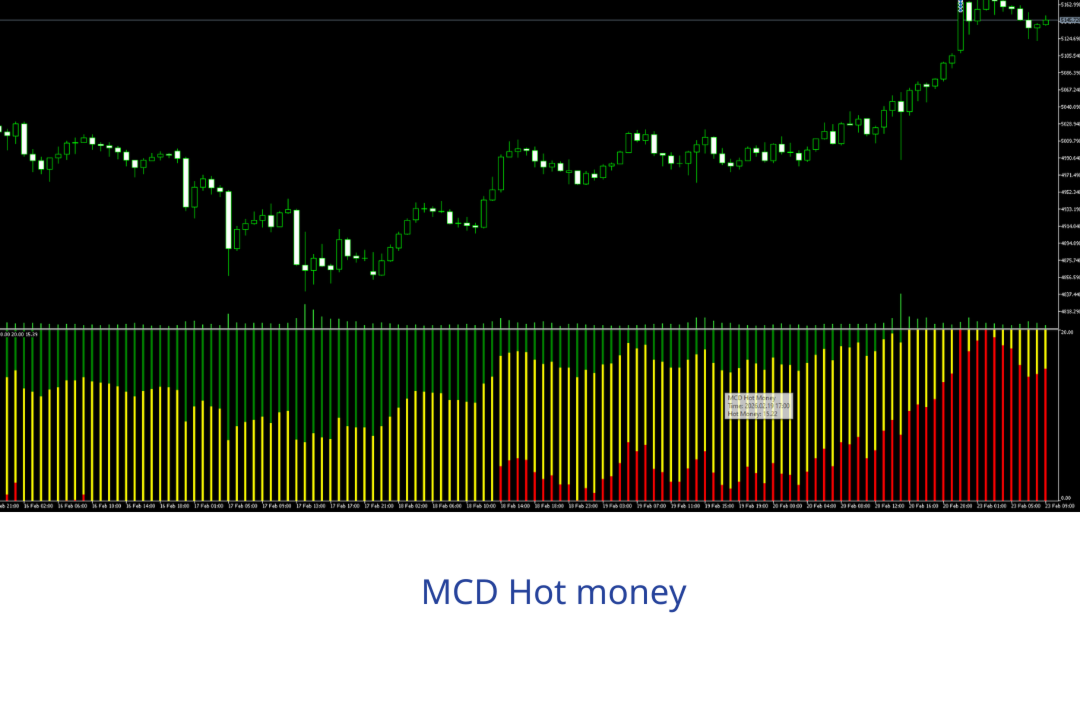
MCD Hot Money visualizes three distinct market participant groups as color-coded histograms in a separate sub-window, all normalized to a 0–20 scale. The indicator uses a sensitivity-weighted, offset-adjusted RSI engine to reveal when large institutional capital is entering or exiting the market.

─── BUFFERS ───

  • Retailer (Green) — fixed at 20, ceiling reference line
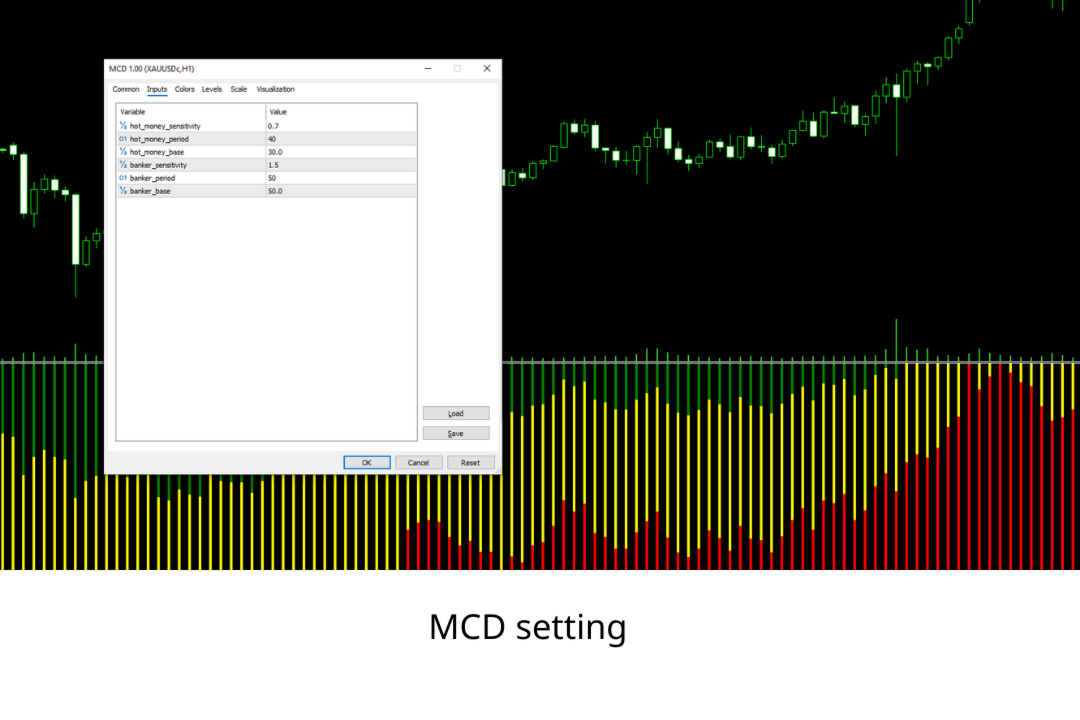
  • Hot Money (Yellow) — short-term institutional flow, based on RSI(40) with base offset 30, sensitivity 0.7
  • Banker (Red) — smart / large money flow, based on RSI(50) with base offset 50, sensitivity 1.5

Formula: Output = sensitivity × (RSI(period) − base) , clamped to [0, 20]

─── MARKET ZONES (read Banker level) ───

  • 15 – 20 → Strong Bull: heavy institutional buying, strong uptrend
  • 10 – 15 → Mild Bull: bullish bias, look for entry confirmation
  • 8 – 12 → Neutral: no clear direction, avoid new positions
  • 5 – 8 → Mild Bear: bearish bias, prepare short setups
  • 0 – 5 → Strong Bear: heavy selling pressure, strong downtrend

─── SIGNALS ───

  • BUY: Banker > 10 AND Hot Money crosses UP above Banker
  • SELL: Banker < 10 AND Hot Money crosses DOWN below Banker
  • Bullish Divergence: price forms lower low + Banker forms higher low (Banker zone < 8)
  • Bearish Divergence: price forms higher high + Banker forms lower high (Banker zone > 12)

Always confirm divergence signals with a Hot Money crossover before entering.

─── STRATEGIES ─── Strategy 1 — Trend Following (Primary) Enter when Banker holds above/below 10 for 2+ bars AND Hot Money crosses in the same direction. Exit when Hot Money crosses back or Banker reverses through 10.

Strategy 2 — Divergence (Counter-Trend) Identify price vs Banker divergence, then wait for Hot Money crossover as entry trigger. Never enter on divergence alone.

Strategy 3 — Combined (Highest Probability) Divergence condition + crossover signal occur within 1–2 bars. Strongest setup, justifies tighter stops and slightly larger sizing.

─── TIMEFRAMES ───

  • M5/M15: Low quality, high noise — scalping only
  • H1: Medium — use H4 as confirmation filter
  • H4: High — primary recommended timeframe
  • D1: Very High — cleanest signals, position trading
  • W1: Best — macro bias and trend confirmation

Multi-timeframe workflow: Check D1 for macro Banker direction → H4 for primary crossover → H1 for entry timing. Only trade when all timeframes agree.

─── INPUT PARAMETERS ───

  • hot_money_sensitivity (0.7): RSI output multiplier for Hot Money
  • hot_money_period (40): RSI lookback for Hot Money
  • hot_money_base (30): RSI midpoint offset for Hot Money
  • banker_sensitivity (1.5): RSI output multiplier for Banker
  • banker_period (50): RSI lookback for Banker
  • banker_base (50): RSI midpoint offset for Banker

Tuning: Reduce sensitivity on volatile pairs (XAUUSD, GBPJPY). Reduce periods on H1 and below. Keep banker_base at 50.

─── FILTERS ───

  • 200 EMA: buy only above it, sell only below it
  • ADX(14) > 20: confirms trend before trend-following entries
  • Avoid trading when Banker is in the 8–12 neutral zone
  • Avoid within 30 min of major news (NFP, FOMC, CPI)

─── RISK MANAGEMENT ───

  • Stop Loss: below/above the nearest swing low/high, minimum 1× ATR(14)
  • Take Profit: target 1.5R–2R minimum, scale out 50% at 1R
  • Position size: risk 1–2% of equity per trade
  • Reduce or skip when Banker is in neutral zone

For educational purposes only. Trading involves significant risk of loss.


作者のその他のプロダクト
SMC Complete Indicator v4 - Trading Guide Introduction The SMC Complete Indicator v4 is a Smart Money Concepts (SMC) trading tool for MetaTrader 5. It automatically identifies institutional trading patterns to help traders align with "smart money" - banks, hedge funds, and market makers. Core Principle: Large institutions need liquidity to fill massive orders. They create predictable patterns: accumulating at key levels, hunting stop losses, leaving footprints (Order Blocks, FVGs), and creating
FREE
Breakout Trend Trading Strategy Guide Table of Contents Core Concepts Breakout & Rejection Rules Entry & Exit Strategies Risk Management Trade Examples Common Mistakes Core Concepts The Breakout Trend Indicator identifies two key market behaviors: Breakouts : Price breaks through support/resistance levels Rejections : Price fails to break through these levels Indicator Calculations Top = Highest high of X candles (excluding current) Top1 = Highest high of X candles (including current) Bottom = L
FREE
# Super Trend Indicator - User Guide **Version:** 1.04 | **Platform:** MetaTrader 5 | **Release:** January 2025 --- ## OVERVIEW The **Grid Trend Indicator** combines Supertrend with Dual EMA filters to identify high-probability trading opportunities. Unlike standard indicators showing only bullish/bearish signals, this adds a crucial third state: **NO TREND**. ### Key Features **Triple-State System**: UPTREND (Green) / DOWNTREND (Red) / NO TREND (Gray)   **Multi-Layer Filtering**: S
FREE
Support Resistance Channels - Trading Guide Table of Contents Overview Indicator Basics Understanding the Channels Trading Strategies Entry and Exit Signals Risk Management Best Practices Common Mistakes to Avoid Overview The Support Resistance Channels indicator automatically identifies and displays the strongest support and resistance zones based on pivot points. Unlike simple horizontal lines, this indicator creates channels (zones) which better represent real market behavior where support an
FREE
CCI VISUAL ENHANCED - MT5 USER GUIDE INTRODUCTION CCI Visual Enhanced for MetaTrader 5 features: Intuitive visual interface Automatic buy/sell signals Smart alert system Dynamic histogram Strong signal & divergence detection INSTALLATION Method 1: MetaEditor (Recommended) Open MT5 → Press F4 (MetaEditor) File → New → Custom Indicator Program Name: CCI_Visual_Enhanced → Finish Delete sample code, paste .mq5 code Press F7 to compile Add to chart: Insert → Indicators → Custom
FREE
EMA Offset Bands Indicator - Description & Trading Guide Description The EMA Offset Bands indicator is a custom technical analysis tool designed for MetaTrader 5 that displays a central Exponential Moving Average (EMA) line surrounded by percentage-based offset bands. This indicator creates dynamic support and resistance levels that automatically adjust based on the EMA value. Key Features: Central EMA line (default: 200-period, displayed in yellow) Four upper offset bands at 1%, 2%, 3%, and 4%
FREE
1. What It Does OrderByMagic is a display-only Indicator for MT5. It reads all open positions on your account and shows them grouped by Magic Number directly on the chart — updated every 2 seconds. It never opens, closes, or modifies any trade. 2. Why You Need It The Magic Number collision problem Every EA stamps a Magic Number on the orders it opens so it can identify and manage them later. When you run multiple EAs at the same time, each one must have a unique Magic Number. In practice this o
FREE
RANGE TRADING METHOD GUIDE Using the MultiTF_TopBottom_Bands Indicator 1. INTRODUCTION 1.1. What is Range Trading? Range Trading is a trading method based on identifying the price oscillation zone (range) of the market and utilizing price movements within this zone to trade. 1.2. Basic Principles Top : Resistance zone - where price typically gets pushed down Bottom : Support zone - where price typically gets pushed up Range : The distance between Top and Bottom % Lines : Important intermediate l
FREE
MACD ADVANCED - BRIEF DESCRIPTION INTRODUCTION MACD Advanced is an enhanced version of the traditional MACD indicator featuring an intelligent 4-color system that helps traders easily identify market trends and momentum. KEY FEATURES 1. Smart 4-Color System Bright Green (Lime) - Strong Bullish: MACD > 0 and MACD > Signal Light Green (DarkSeaGreen) - Weak Bullish: MACD > 0 but MACD < Signal ️ Bright Red (Red) - Strong Bearish: MACD < 0 and MACD < Signal Orange Red (OrangeRed)
FREE
1. Introduction Collective TP Manager v2 is a MetaTrader 5 Expert Advisor designed to automatically manage the collective Take Profit and Stop Loss of multiple open positions on a single symbol. Instead of setting individual TP/SL for each order, this EA monitors the combined profit/loss of all (or filtered) positions and takes action when your targets are reached. 1.1 Why You Need This EA In modern trading, especially scalping and multi-EA environments, manually tracking the net profit of doze
FREE
OneClick Trade Panel v1.0 — MT5 Expert Advisor Professional On-Chart Trading Panel with Built-in Risk Calculator What Is It? OneClick Trade Panel is an all-in-one trading panel that sits directly on your MT5 chart. It replaces the default MT5 one-click window with a full-featured interface combining: order execution, automatic lot calculation, visual SL/TP planning, position monitoring, and batch close operations. Built for speed. Built for risk control. No DLLs, no external dependencies. Key Fe
フィルタ:
レビューなし
レビューに返信