 MetaTrader 5
 エキスパート
 インディケータ
 ライブラリ
ライブラリ
 ユーティリティ
 ウィジェット
 ルール
ルール
YouTubeにあるマーケットチュートリアルビデオをご覧ください
ロボットや指標を購入する
仮想ホスティングで
EAを実行
EAを実行
ロボットや指標を購入前にテストする
マーケットで収入を得る
販売のためにプロダクトをプレゼンテーションする方法
MetaTrader 5用取引ユーティリティ - 16
 以下はMetaTrader5での取引を簡素化する取引プログラムです。ユーティリティにカーソルを合わせると、その説明と目的が表示されます。
EA Master Version any Follow Copy Account (Acc. Number) need a open MT Terminal, download multiple times Step1: Open Master MT5 Terminal = install master- Version (on any Symbol just one Time) Step2: Open Follower MT5 Terminal = install follower- Version (on any Symbol just one Time) Step3: all Trades from any Symbol or any Robot are copy now to follow- Terminal immediately for simple copy set on Chart and Start no optimization. This Robot is a Trade Copier for MT5 that automa
FREE

NewsFilter Pro — News Filter & Economic Calendar EA for MetaTrader 5
Automatically block trading during high-impact news events (NFP, FOMC, CPI). Uses MQL5 built-in Economic Calendar — no DLL, no external API, no configuration. Works with any EA, any broker, any currency pair.
Prop Firm Safe | NFP/CPI/FOMC Filter | Auto-Close Before News | Smart Currency Filter | 15 Activations
---
Why NewsFilter Pro?
Most trading EAs get destroyed during news events — NFP, FOMC, CPI, ECB — when spread

Level Assistant is an expert assistant for manually setting support and resistance levels.
Traders often form their own levels. If there are many charts of different periods, the level will be multiplied by all charts.
When placing a horizontal line on a chart, the Assistant suggests converting this line into a level. At the same time, he himself will determine the color and thickness of the line, depending on the period of the instrument and where it is relative to the price. Mark the level
FREE

Rocket TF Countdown Stay in Sync with Every Candle Rocket TF Countdown is a lightweight utility for MetaTrader 5 that displays the remaining time until the current candle closes. Designed for traders who want a clear and convenient way to monitor candle timing directly on their charts. Key Features Live Candle Countdown: Displays the remaining time until the current candle closes. Flexible Positioning: Choose the chart corner and adjust the horizontal and vertical offsets. Customizable Font Size
FREE
The Equity Closer Bot is a custom MetaTrader 5 (MT5) Expert Advisor (EA) designed to help traders manage their account equity levels automatically. It monitors the account's equity in real-time and closes all open trades when the equity reaches user-defined thresholds. This bot is ideal for traders who want to enforce strict risk management rules, protect their account from excessive losses, or lock in profits at specific equity levels. Key Features Dual Equity Thresholds : Below Equity Clos
FREE

News Guard & Slippage Shield Overview This Expert Advisor is a protective utility for MetaTrader 5 accounts. It pauses trading around high-impact news releases and automatically closes any position that fills with excessive slippage. It runs at account level, so it can protect every Expert Advisor and Magic Number on the same account, not only trades it opens itself. The EA does not place any trades of its own. It is designed to run alongside your existing trading robots as a risk-control layer.
FREE

TimeToClose The "TimeToClose" indicator is an essential tool for traders who need to monitor the remaining time before a candle closes. This indicator displays the remaining time directly on the BID line, providing a clear and precise reference during real-time trading. Key Features: Displays the remaining time for the current candle to close. Direct integration on the BID line for better visualization. Simple and user-friendly configuration. Ideal for all types of traders, from beginners to pro
FREE
Divergence Scanner Pro is an advanced utility designed to detect both regular and hidden divergences across three powerful indicators: RSI , MACD , and Stochastic . With its robust algorithm and user-friendly interface, this tool is perfect for traders seeking an edge in the market. Key Features: Comprehensive Divergence Detection : Identifies regular and hidden divergences to highlight potential trend reversals or continuation opportunities. Multi-Indicator Support : Scans for divergences on RS
FREE

相場が激しく変動している最中に、複数の建玉について手動でストップロスをブレークイーブンに移動させるのは時間がかかり、誤ってまだ含み損の状態にある建玉に適用してしまうこともよくあります。
「Phoenix Breakeven Button」を使えば、ワンクリックで利益が出ているすべての建玉のストップロスをブレークイーブンに移動させ、まだ含み損の状態にある建玉は自動的にスキップします。
利益を守る仕組み
- ワンクリックで、口座内のすべてのオープンポジションにブレークイーブン保護を適用 - 現在損失が出ているポジションを自動的に検出してスキップ - ブレークイーブンでは、ストップを正確なエントリー価格に設定します。ストップがヒットした場合はスプレッドが発生しますが、パネルでは「無料の保護」と暗示することなく、この点を明確に表示します - 成功または失敗時にサウンドアラートが鳴り、変更された内容、スキップされたポジション、すでに保護済みのポジションに関する詳細なログが記録されます
カスタマイズ機能
パネルの配置位置とオフセット、「すでに保護済み」チェックのための調整可能なブレーク
FREE

MetaTrader 5 用のシンプルなリアルタイム情報パネルです。売買ロジックは一切含まれず、ポジションの新規・変更・決済は行いません。お使いの EA の動作にも影響しません。
時刻とセッション • サーバー時刻、ローカル時刻、GMT • シドニー、東京、ロンドン、ニューヨーク各セッションをリアルタイムで表示 • セッションの重複を検出し、次のセッションまでのカウントダウンを表示
マーケットデータ • 銘柄と時間足 • 現在・平均・最大スプレッド
口座 • 残高、有効証拠金、余剰証拠金、含み損益
アクティビティ • 保有ポジション、待機注文、市場での合計ロット
取引履歴 • 銘柄とマジックナンバーでグループ化 • 期間:Today / This week / This month / All time • Trades、Win%、P&L、MaxDD(1 回の取引での最大損失)で並べ替え可能 • 行が収まらない場合は自動的に銘柄のみでグループ化 • 最大 2 つのマジックナンバーでフィルター、手動取引の有無を選択可能
ニュースフィルター • MQL5 経済指標カレンダーを
FREE

Helios Smart Position Manager 概要 Helios Smart Position Manager は MetaTrader 5 向けのプロフェッショナルなトレード同期ツールです。いずれかのポジションのストップロスまたはテイクプロフィットを変更すると、EAが自動的にその変更を検出し、同一シンボルの他のすべてのポジションに適用します。これにより、各ポジションを個別に手動で更新する必要がなくなり、同一銘柄で複数のポジションを管理する際の時間の節約とミスの防止が実現します。 仕組み EAはすべての未決済ポジションを継続的に監視し、現在のストップロスおよびテイクプロフィットのレベルのスナップショットを保持します。いずれかのポジションのSLまたはTPが変更されたことを検出すると、同一シンボルの他のすべてのポジションを特定し、同じ変更を自動的に適用します。同期は一度に一つの変更を処理し、競合を防ぐために内蔵のクールダウン期間を設け、同期ループを避けるために直前に変更したポジションはスキップします。 ストップロスとテイクプロフィットの変更はそれぞれ独立して検出されます。スト
FREE

Spread Profile by Hourは、ブローカー自身のティック履歴から、一つのシンボルのスプレッド分布をサーバー時間の一日の各時間帯ごとに作成し、24本のバーとして描画します。バーの塗りつぶし部分はその時間帯のスプレッドの中央値で、明るい色の上部(キャップ)は90パーセンタイルまで伸びています。普段使っているストップの幅を入力すると、各バーに中央値スプレッドがそのストップに占める割合が表示されるため、コストをリスクと同じ単位で把握できます。 これは測定ツールです。注文は一切出さず、DLLもWebRequestも使用せず、あなたが有効にしたCSVエクスポート以外のファイルは書き込みません。 このツールが必要な理由:デイトレードやスキャルピングのルールでは、エッジが残るかどうかを決めるのは、エントリーシグナルではなくスプレッドであることが少なくありません。ターミナルが表示するのは現時点のスプレッドであり、バー履歴はバーごとに一つのスプレッド値しか保持しないため、その時間内に何が起きたかは見えません。同じルールでも、閑散とした時間帯では機能し、日次ロールオーバーやセッション開始時に
FREE

这是一款专为手动交易者设计的MT5工具。解决了MT5回测只能跑EA自动交易无法手动回测的问题。它通过图形化按钮(Buy / Sell / Close All)让您在图表上快速开平仓,并 自动记录每一笔交易 ,实时计算 胜率、盈亏比、平均盈亏、最大回撤、当前权益 等专业数据,将您的交易行为转化为直观的绩效报告。它将是您不可或缺的辅助利器。
1. 一键交易,操作流畅 Buy / Sell / Close All 按钮 2. 实时交易记录与图表标记 自动绘制买卖箭头 :开仓时在K线图上生成绿色向上(买)或红色向下(卖)箭头,复盘时一目了然。 3. 专业绩效统计面板 完整交易明细 :总交易次数、盈利次数、亏损次数。 胜率 & 盈亏比 :自动计算胜率百分比、平均盈利、平均亏损、盈亏比。 资金管理指标 :总盈利、总亏损、净利润、当前权益、虚拟余额。 风险控制 :基于虚拟余额与浮动盈亏计算最大回撤(金额与百分比),帮助评估策略稳健性。
FREE

ATR Stop Loss and Take Profit Calculator. Know your risk before you take the trade! Click any candle and instantly see your stop loss, take profit, and correct lot size, all calculated from ATR, scaled to your account. A useful back-testing and live trading tool. If you find this indicator useful, please leave a review
How It Works
Click a candle. The indicator reads ATR at that bar, calculates SL and TP using your configured multipliers, and draws the levels on the chart. An info panel shows
FREE
EA Portfolio Analytics Dashboard Pro - Advanced Multi-EA Performance Monitor EA Portfolio Analytics Dashboard Pro is a professional MetaTrader 5 tool designed for advanced portfolio management and real-time performance analytics. Monitor all your Expert Advisors simultaneously with institutional-grade metrics. Key Benefits: Multi-EA Performance Matrix: Track unlimited EAs and their statistics in a single view. Real-Time Risk Analytics: Monitor key metrics like Sharpe Ratio, Value at Risk (V

Smart Sl Tp Manager For Mt5 is a lightweight and reliable trading utility designed to help you manage risk automatically.
It instantly sets Stop Loss and Take Profit levels for every manual trade you open, ensuring your positions are always protected. Perfect for traders who want more discipline, less stress, and consistent risk management. Key Advantages Automatic SL & TP for all manual trades Works with both Netting & Hedging accounts Re-applies SL/TP when you add new positions Simpl
FREE

TradeAssist Lot Calculator — the free position size calculator that cannot touch your account. Drag the stop-loss line on your chart and instantly see the correct lot size for your risk budget. No spreadsheets, no web calculators, no mental math — and no trading permissions needed, because this tool contains zero trading code. It calculates. That is all it does. WHY THIS ONE • 9 risk modes — fixed $, % of Balance / Equity / Free Margin / Custom base, % of previous Day / Week / Month balance, and
FREE

Alert Line Manager – FREE is a simple and reliable MT5 indicator that alerts you when price crosses horizontal lines . Designed for manual traders who work with key price levels. Features: Alerts on horizontal line crossing Popup and sound notifications Alert cooldown to prevent spam Alerts ON / OFF button on chart Works on any symbol and timeframe Limitations: Horizontal lines only No trend lines, channels or Fibonacci No push notifications Alert Settings Alert sound file
Sound file played
FREE

Layer Smart Risk Trade Assistant – MT5 Trade Manager, Risk Management & Order Organizer Utility for MetaTrader 5 Are you looking for the most reliable trade assistant for MetaTrader 5 (MT5) ?
Layer Smart Risk Trade Assistant is the ultimate manual trading utility and trade panel , perfect for both beginner and advanced traders who want smarter risk management , order organization, and effortless multi-order management . Do you ever struggle with: Forgetting to update your stoploss or take profi

Trailing Stop Manager MT5 Trailing Stop Manager MT5 is a flexible trade management utility for MetaTrader 5 that automatically moves the Stop Loss as price moves in your favor. It is designed for traders who want to protect profits and manage open positions automatically while keeping control over how and which positions are managed. The manager currently includes two trailing methods: • Standard Trailing Stop
• Fractals Trailing Stop It also includes a compact trading panel for opening, managi
XXXX ATR (Average True Range) Position Manager: ATR StopLoss, ATR Target, ATR Breakeven, ATR Trailing StopLoss, with Risk % Calculation / Position. More about ATR: www.atr-trading.com
Key takeaways One click does it all: SELL and BUY button automatically places ATR stoploss, ATR target, ATR breakeven, ATR trailing stop and Risk % calculation of equity Entire position is calculated based on ATR No more manual position calculations = No more wasted time = No more late entries Position sizes c

InnovaDash ロットサイズ計算ツール: ワンクリック・リスク管理端末 ロットサイズを当てずっぽうで決めたり、想定以上のリスクを負うのはもうやめましょう。InnovaDashロットサイズ計算ツールは、プロレベルのリスク管理と迅速な注文執行をMT5チャートに直接もたらすために設計された、正確でコンパクトな取引ユーティリティです。 InnovaDash Analyticsのチームによって構築されたこのツールは、あなたのようなトレーダーのために完全に無料でリリースされています。 迅速な執行を必要とするスキャルパーであれ、エントリーを計画するスイングトレーダーであれ、このツールはリアルタイムの市場データ、Bid/Askスプレッド、およびシンボルのティックバリューに基づいて、リスクの計算を瞬時に処理します。 主な機能 動的なリスク計算: 資金のリスク許容度を正確に選択できます。口座残高に対する正確なリスクパーセンテージ(%)か、固定の金額($)を切り替えて使用できます。 スマートレベル検出 (SL & TP): ストップロス (SL): ポイント単位で距離を入力するか、正確な価格を入力しま
FREE

This is a utility panel to assist closing of open Deals. The panel has input filters to assist one select the right trades. The tool displays the number of trades to be closed as well as profits to be realized. One click close, Filter trades to be closed by: symbol, (Filter by a particular symbol in the trade terminal). magic number (If your orders are from particular EA with unique magic numbers). whether in profit, loss or All. (P/L=all trades, profiting = trades in profit, loosing = trades
FREE

Daily Telegram Market Briefing — Professional FX Session Briefing for MT5
Daily Telegram Market Briefing is a MetaTrader 5 Expert Advisor that compiles a clean, actionable morning brief for the instrument on your chart and delivers it to your Telegram group or channel at a time you choose. It combines previous day OHLC levels, an Asia session range computed in your local time, a directional bias and short outlook, and a curated list of today’s high-impact macro events (from the ForexFactory cal

A. Chart Manager: Designed by an experienced trader and web performance engineer. Developed and built with performance, speed and optimization in mind. Uses unique clean outline of events, even when there are multiple events. Restyles your chart with one of five color themes when you click it. Removes background images and the objects other tools leave on the chart. Never removes the rectangle labels that Expert Advisor panels are built from. Shows or hides the grid, volumes, trade levels, price
FREE

ABJ EA DASHBOARD turns your account history into a clean, full-window dashboard on your chart. You can see which Expert Advisors or strategies make money and which lose, without opening the History tab or using spreadsheets. The tool is display-only. It never opens, closes or modifies a trade. Main features Fills the whole chart window. The layout, fonts and buttons scale automatically when you resize or maximize the chart. The A-, Auto and A+ buttons let you adjust the size by hand. Automatic g
FREE

Risk Manager Trade Panel is an on-chart tool that helps you size and manage trades with one click. Set your risk per trade as a percentage (for example 0.5%, 1% or 2%) and the panel instantly shows the correct lot size for your stop distance, taking your symbol's tick value and 3/5-digit pricing into account. One-click actions: Move the open position to breakeven (with a spread-safe offset). Close 50% of the position (partial close). Close the whole position. The tool does not open trades automa
FREE
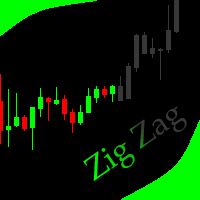
This indicator allows to hide ZigZag indicator (on all MT4 timeframes) from a date define by the user with the vertical line. This indicator can be use with other "Hidden Indicators". Indicator Inputs: Depth Deviation Backstep Information on "ZigZag" indicator is available here: https://www.mql5.com/en/articles/1537 ************************************************************* Hey traders!! Give me your feeds! We are a community here and we have the same objective.... make some money from th
FREE

SuperPositionTerminal is a manual trading terminal for MetaTrader 5, built for discretionary and prop-firm traders who work to fixed daily risk limits. Build, size and execute every trade from one control panel: position sizing by account percentage, fixed money risk or fixed lot, multi-level partial exits, automatic break-even, and daily limits that refuse a trade before the money is at risk. It is not an automated strategy. It does not predict, signal or trade for you. It is the control surfac

The PSM Trading Panel is a comprehensive, all-in-one trade management utility designed for both manual and automated traders. Whether you prefer executing precise manual entries, managing recovery with a Martingale system, or deploying a Grid strategy, this panel provides all the necessary tools directly on your chart. Built with advanced risk management and a highly intuitive interface, the panel minimizes the emotional stress of trading by automating complex calculations like Auto-Candle Stop
FREE

あなたに代わって、あなたの正確なエントリーおよびエグジット条件でトレードできるトレーディング ボットがあるかどうか疑問に思ったことはありませんか。心配する必要はありません。Pebble がここにあります!
RSI トレーディング パネルでトレード パラメータを設定し、[トレード開始] を押すだけで完了です。残りの作業は Pebble が行います。
Pebble を使用する利点は次のとおりです:-
トレードから人間の感情を排除します。
24 時間年中無休でアクティブであり、トレード条件を検索します。
自動的に注文を出し、ストップ ロスを損益分岐点に移動します。
ポジションは、SL と TP だけでなく、RSI 条件に基づいて終了することもできます。 RSI 期間をパネルから直接変更します。
サブウィンドウ 1 に緑と赤の線を配置して、それぞれ購入レベルと販売レベルを簡単に視覚化できるようにします。
FREE

ZeroLogics : Essential tool for trade execution, risk management, and planning—featuring visual levels, TPs, RR, lot sizing, and profit/loss calculation.
User Guide ZeroLogics — MetaTrader 5 (MQL5) • Official Manual 1. Real-Time Account Metrics TOTAL : Live consolidated floating P/L across all open positions on the active instrument. BALANCE : Consolidated account balance and account base currency. DAILY PROFIT : Closed net profit since 00:00 broker server time (includes intraday commissions
FREE

Introduction Welcome to the world of Forex trading, where every tick of the market can be influenced by news events. Introducing our expert advisor for MetaTrader, your ultimate tool for navigating the complexities of news trading. This innovative advisor is specifically designed to automate your trading strategy during key macroeconomic releases, ensuring you never miss an opportunity. When important indicators are announced, volatility often spikes, creating potential for profit. Our expert
FREE

Limiter Drawdown EA – Automatic Account Protection for MetaTrader 5
Description
Limiter Drawdown EA is a lightweight risk management tool for MetaTrader 5.
It monitors your account drawdown in real time and will automatically close all open trades once the threshold you define is reached. This provides a reliable safeguard for any trading strategy. Main Functions Monitors equity versus balance continuously Closes all positions when your chosen drawdown percentage is reached Optionally removes
FREE

• Please test the product in the Strategy Tester before purchasing to understand how it works.
• If you face any issues, contact me via private message—I’m always available to help.
• After purchase, send me a screenshot of your order to receive a FREE EA as a gift. Dual Hedge Trading Panel — Professional Trading & Risk Management for MetaTrader 5 Short Description Professional one-click BUY, SELL, and DUAL hedge execution panel featuring an advanced on-chart trade planner with draggable En

BOLETA ATA is a quick-execution trading panel for MetaTrader 5, built for manual traders who want to buy, sell, and manage positions without leaving the chart. Compact, straightforward, and with built-in protection automations. Main Panel Stop Loss and Take Profit with an on/off checkbox and an editable field — click and type the value directly, no need to open settings Lot size field (Qty) , editable at any time 3 clickable lot presets : a single click applies the value to the Qty field; a doub
FREE

Spectar Daily Loss Limiter is a small, free risk utility for MetaTrader 5. It does exactly one thing: it enforces a daily loss limit that you choose.
Many traders know their daily limit but break it after a bad trade. Many prop-firm style evaluations also measure the daily loss from the broker server's midnight and count floating (open) profit and loss, not only closed trades. This tool follows the same logic, so you can see in real time how much room you have left today.
How it works
1. At t
FREE

[概要] Dynamic Price Countdown は、現在のローソク足が閉じるまでの残り時間を現在の価格のすぐ横に表示する、MT5に不可欠なインジケーターです。チャートの隅に固定された静的なタイマーとは異なり、このインジケーターはリアルタイムの価格の動きに動的に追従します。これにより、トレーダーは完璧なエントリータイミングを逃すことなく、チャートの最も重要な部分に完全に集中することができます。 [主な機能] 動的な価格追従: カウントダウンタイマーは現在のBid価格に自動的に追従し、設定した正確な距離を維持します。 スムーズなティックフリータイマー: 内部の1秒タイマーを使用することで、ティックの流入が非常に少ない低ボラティリティの期間でも、カウントダウンがスムーズかつ正確に実行されます。 完全なカスタマイズ性: テキストのサイズ、色、および正確なX/Y座標のオフセットを調整して、個人のチャート設定と解像度に完全に一致させることができます。 [パラメーター設定] Font Size (フォントサイズ): カウントダウンテキストのサイズを調整します。 Font Co
FREE
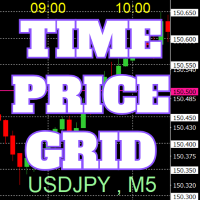
チャート上に、キリの良い数値で価格のグリッド、時刻のグリッドを描画します。
「パラメータの入力」から、各ピリオドごとに、価格の間隔設定が可能。 キリ番(ラウンドナンバー)のグリッドは、ほかの線より太く、目立つのでわかりやすいです。 キリ番(ラウンドナンバー)のグリッドは、ほかの線と異なる色に設定できます。
各所の色は、個別に設定できます。 シンボル、時間足を表示でき、場所も任意に設定できます。 時刻の表示は、上下どちらにするか設定できます。 表示する時刻は、サーバー時刻、ローカル(PCの時刻)、ユーザー設定(サーバーとの時刻差を任意で設定)から選べます。 無料でお使いになれます。 皆さんのトレードのお役に立てれば幸いです。
FREE

Repaint Inspectorは、インジケーターがリペイントするかどうかを、謳い文句を信用するのではなく実際に測定します。チャートに適用し、任意のカスタムインジケーターとそのパラメーターリストを指定すると、既に確定したバーについてそのインジケーターのバッファを繰り返し読み直し、動いた値、現れた値、消えた値をすべて数えます。あわせて、それが履歴のどこまで遡ったバーでなお起きているかも記録します。 これは測定ツールです。チャート上では一切注文を送信しません。ストラテジーテスターでは、開始時に最小ロットのポジションを一つ建てて決済します。MQL5 Marketの自動テストが、エキスパートアドバイザが取引操作を行うことを確認するためです。この取引はその旨が操作ログに出力され、測定には含まれず、入力パラメーターで無効にできます。DLLもネットワークアクセスも使用せず、MQL5\Filesに書き出す二つのCSVファイル以外はディスクに何も書き込みません。 このツールが必要な理由:「リペイントしない」はインジケーターの説明によくある主張ですが、確かめるのは困難です。よくある確認方法は、チャートを
FREE

Overview:
The Drawdown Control Limiter MT5 is a robust and efficient tool designed for traders who aim to monitor and limit drawdown levels in their MetaTrader5 Live/Demo accounts. This Expert Advisor provides real-time tracking of drawdown percentages or amounts and automatically closes positions if the specified limits are exceeded, helping protect your capital. EA account drawdown protector is designed for normal trading Live and Demo accounts (not for Prop Firms) . Key Features: Customiza

The Swap Calculator Panel shows you what holding a position overnight really costs – before you open the trade. • Works with every symbol of your account: forex, indices, shares, commodities, metals, crypto • Enter direction, lots, opening and closing date – from a few days to several years • Counts swap nights automatically, including the triple-swap day (weekend swap) • Total in your account currency, plus swap per lot and night for long and short • Shows the full calculation with the real n
FREE

Strifor Risk-Manager — リアルタイムのプロフェッショナルリスク管理 Strifor Risk-Manager は、厳格なリスク管理と規律を重視するトレーダーのための強力なツールです。
日次・週次・月次の取引結果を自動で監視し、リミット超過を警告、取引システムの安定性を維持します。 対象:
スキャルピング、デイトレード、スイング、中期システム、手動および自動取引に対応。 主な機能: 柔軟なリミットシステム 日次リスク: %またはUSD 週次リスク: %またはUSD 月次リスク: %またはUSD 計算優先度: %または固定値 リミット増加制限 (Cap flex by max limit) 取引結果の追跡 各期間の現在の損益表示 手数料とスワップ考慮 利益を使用して利用可能リミットを増加可能 損失をゼロまで考慮 (Use net loss) 詳細設定 現在の残高または手動設定基準から計算 オープンポジションの含める/除外 シンボル別フィルタリング 週の開始日: 月曜日 / 日曜日 表示モード: 完全 / コンパクト パネル位置: マージンと角選択 チャート上表示
FREE

Click SLTP Manager MT5 is a simple and practical trade management utility designed to help manual traders set Stop Loss and Take Profit levels directly from the chart. Instead of opening the order modification window and manually typing SL and TP prices, traders can manage their existing positions or pending orders with a clean visual panel and a click-based workflow. The tool is made for traders who want faster, clearer, and more convenient order protection management in MetaTrader 5 . Main Fu
FREE

Limit Order Trailing Et — is a utility for trailing limit orders (Buy Limit and Sell Limit) in MetaTrader 5.
It automatically adjusts limit order prices following the market while maintaining a defined offset, allowing entries on pullbacks after price movement.
This tool is designed for working with limit orders in MT5 and can be used in both manual trading and semi-automated trading systems.
Unlike stop orders, limit orders are designed for price retracements (pullbacks) rather than brea
FREE

Latency and connection stability are truly the "lifeblood" of a trader, especially if you do scalping or news trading, where a difference of just a few milliseconds (ms) can determine whether your order experiences slippage or not. Let's break it down step by step so everything is clear, starting from the connection path to how we can implement this dashboard idea in MQL5. 1. Connection Path: What Does the Number in the Bottom-Right Corner Actually Mean? When you see the traffic bars and latenc
FREE

QuickTrade Manager for MT5 Professional One-Click Trade Execution & Management Panel for MetaTrader 5 Trade faster. Manage smarter. Execute with precision. QuickTrade Manager is a powerful chart-side trading panel built for traders who want instant execution, cleaner workflow, and precise control over every position directly from the chart. No more slow manual adjustments.
No more cluttered order management. Everything you need is in one professional panel . NEW IN THIS VERSION Modern Profession
FREE
これはThe News Filterを使用するために必要なスクリプトです。このスクリプトはフィルタリングしたいチャートを選択し、ニュース・フィルタ・プログラムに入力を送信します。すべての入力はそのチャートに固有なので、チャートごとに異なる入力を柔軟に設定できます。ニュース・フィルター(無料デモ)へのリンクは以下にあります: ニュースフィルターガイド+ダウンロードリンク
ニュース選択
ニュースソースは、Forex Factoryの経済カレンダーから取得されます。 USD、EUR、GBP、JPY、AUD、CAD、CHF、NZD、CNYなど、任意の通貨数に基づいて選択できます。 Non-Farm(NFP)、FOMC、CPIなどのキーワード識別に基づいて選択することもできます。 影響レベルによってフィルタリングするニュースを選択することができ、低、中、高の影響範囲から選択できます。 自動モードでは、チャートに関連するニュースのみが選択されます。 ニュースソースは、最新のニュースデータを確実にするために、自動的に1時間ごとに更新されます。 各ニュースの影響レベルごとに別々の入力があり、ニュース
FREE

Live Risk Dashboard MT5 EA Monitor your account risk clearly and trade within your limits Live Risk Dashboard MT5 EA is a practical account-monitoring utility for MetaTrader 5. It displays your most important trading and risk information directly on the chart, helping remove the "math anxiety" of managing open positions. Instead of repeatedly checking different MT5 windows or manually calculating floating profit, drawdown usage, and remaining limits, you can view everything in one clean, compact
FREE

Trading Toolbox for MT5 Faster chart control. Clearer account tracking. Less friction. Trading Toolbox is a lightweight on-chart utility for MetaTrader 5 that brings essential trading controls directly to your chart. Track PnL from a marked balance, manage trade sound alerts, toggle Scale Fix instantly, and keep your preferred setup saved between sessions—all from one clean, compact panel. Main Features Real-Time PnL Tracking
Mark your current account balance and instantly see your profit or lo
FREE

Xauiq ATR Trade Manager is a position management utility designed for manually opened XAUUSD trades. It does not generate entry signals and does not decide whether to buy or sell. After a manual position is detected, the utility manages risk, partial profit taking and the remaining position according to the confirmed settings. Main Features Manual Position Management The utility manages eligible manually opened positions and detects the actual Buy or Sell direction before calculating any level.
FREE

CSV News File Generator MT5 is a script specifically designed for the MQL5 platform. It enables the automated generation of CSV files containing economic calendar news, making it ideal for use in strategy simulators or as data for training artificial intelligence models. How Does It Work? The script gathers economic news directly from the MQL5 calendar, organizes the data into arrays, and converts it into CSV files for later use. Steps to Generate News Identify Event Codes:
Find the event code
FREE

Nomad Trade Panel is a trade panel for MetaTrader 5 that works out the lot size from your stop loss and the risk you choose, then sends the order from the chart. It is for manual traders who decide the risk first and want to see what will be sent before they click.
It is a manual tool. It never opens, changes or closes anything by itself: every action starts with your click, a level you drag, or the close-all key (Ctrl+Shift+F, pressed twice).
To start: attach it to a chart, check the stop lo
FREE

Symbol Cost Monitor は、複数の取引銘柄における取引コストを同時かつ迅速に監視するために開発された、MetaTrader 5向けの高機能分析ユーティリティです。 スプレッドとスワップは、取引の最終的な結果に直接影響します。特にスキャルピング、活発なデイトレード、数日間にわたるポジション保有、複数銘柄の同時取引では、これらのコストを正確に把握することが重要です。MetaTrader 5の標準インターフェースでは、すべての情報を1つの画面で簡単に比較できないため、通常は各銘柄の仕様を個別に開いて確認する必要があります。 Symbol Cost Monitorは、選択された銘柄の主要データを収集し、チャート上のコンパクトなパネルに表示します。スプレッドが拡大している銘柄の確認、スワップの比較、取引条件の変化の監視、ポジションを開く前の潜在的なコストの評価を簡単に行えます。 パネルのデータはリアルタイムで更新され、気配値表示に登録されているすべての銘柄、またはユーザーが指定した銘柄リストを監視できます。色分け表示により取引条件の悪化を素早く確認でき、設定した水準をスプレッドが
FREE

この無料ツールが気に入っていただけましたら、ぜひ5つ星の評価をお願いします!本当にありがとうございます :) 「リスク管理アシスタント」エキスパートアドバイザーコレクションは、様々な市場環境においてリスクを効果的に管理することで、取引戦略を強化するために設計された包括的なツールスイートです。このコレクションは、平均化、スイッチング、ヘッジの3つの主要コンポーネントで構成されており、それぞれが異なる取引シナリオに合わせて独自のメリットを提供します。
このEAは、市場で標準的なリスク管理戦略を発展させたものです。
https://www.mql5.com/en/blogs/post/756961
1. 「平均化アシスタント」EA: MT4: https://www.mql5.com/en/market/product/115468 MT5: https://www.mql5.com/en/market/product/115469 2. 「スイッチングアシスタント」EA: MT4: https://www.mql5.com/en/market/product/115478 MT5:
FREE

Order Entry - Probably the easiest way to enter an order If you like this perhaps you might consider buying the pro version https://www.mql5.com/en/market/product/64353?source=Site +Profile+Seller An aid for entering orders. Features: * Drag & drop tool to adjust price, stop loss and take profit levels. * Calculates lot sizes automatically based on risk entered, currency pair and stop loss / price levels.
Description It enables you to visually enter a trade's price, stop loss and take profit
FREE

Overview
This Expert Advisor (EA) for MetaTrader 5 is a robust tool designed to optimize money and risk management. It allows users to calculate position sizes based on account balance, desired risk percentage, and trade parameters like stop loss and entry points. Additionally, it offers a clear view of reward-to-risk ratios and allows for the inclusion of broker commission, recalculating data accordingly.
Key Features
1. Risk-Based Position Sizing
The EA calculates position sizes by taking
FREE
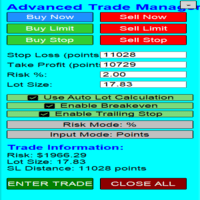
Overview Are you tired of complex manual calculations, emotional execution errors, and the constant fear of risking too much? The Advanced Trade Manager (ATM) is your all-in-one solution, a professional-grade Expert Advisor for MetaTrader 5 designed to give you institutional-level control over every aspect of your trade. From flawless risk calculation to intelligent, one-click execution, the ATM EA streamlines your entire trading process, allowing you to focus on your strategy, not the mechanics
FREE

It is just an alternative fibo lines. mt4 have is a very strange drawing of fibo lines, this utilites was written for mt4, but for mt5 it may not be particularly useful. A simple Box (Rectangle) graphic element with adjustable levels binding: it is possible to specify up to 17 custom levels, all rectangles on the chart with the given prefix in their name are processed. Levels are specified in % of the height of the rectangle. A convenient graphical element for analyzing charts by growth-correct
FREE

TrumpFeed to Telegram – Lightweight News Forwarder especially for Gold-Trader This Expert Advisor reads the Trump Truth Social RSS (mirror feed) , classifies new posts via OpenAI , neatly shortens the quote, and forwards it to your Telegram group/topic – including a compact XAUUSD impact summary . Ideal if you want to be notified immediately of potentially market-moving statements. Key Features Fetch: EA reads the RSS feed https://trumpstruth.org/feed every 30 seconds. Parse & Clean: Removes HTM

See your broker's pending order limit, free margin with margin call and stop out, and your open charts at a glance - read-only, never trades. Limit Monitor shows the limits of your trading account on one clean panel, so you notice a problem before your broker rejects an order. What you see Pending orders – your pending orders right now against the server limit of your account, with the highest value seen, your open positions and the total. If the server reports no limit, the panel says so. Margi
FREE

Trade Panel Manager — Master all trades in one dashboard Stop calculating volume manually, stop worrying about forgetting to set SL/TP. TTrade Panel Manager transforms MetaTrader 5 into a professional trading command center — drag and drop a few lines on the chart, the EA automatically calculates lot sizes according to your desired risk level, displaying SL/TP in pips and currency in real time, right before you press the button.
Why download now?
Accurate lot size calculation based on risk pe
FREE

Monthly Calendar MT5 simply presents your MT5 Trading History Beautifully. Your Entire Trading Month. At a Glance. Key Features
Download:
User can download screenshot by clicking Download icon.
Customizable Title:
Users can change the default “Monthly P/L Calendar” title to their preferred title.
Instant Profit/Loss Recognition:
Live tracking and P\L updates in seconds.
Click-to-Inspect:
Click any trading day to open detailed trade information.
Complete Trade Details:
Review time, sym
FREE

this is DEMO VERISON (for demo acc.) of TRADING OVERLAY with PARTIAL take profit ("virtual TP") and % risk lot size
--- full version available on my 'seller page' as well as version for MT4 Take better control of your trades with ease ! Easy lot size calculation with easy SL/TP setting. Your trading will be much more comfortable with this tool!
Main goal with this tool is very SIMPLE and FAST operation! Works like any EA, add it to selected chart and trade !
Features: start tra
FREE

Unified Scroll – Effortless Multi-Timeframe Chart Synchronization (MQL5)
Tired of manually scrolling through multiple charts? Unified Scroll is the ultimate MQL5 utility that instantly syncs scrolling and panning across all charts of the same symbol—regardless of timeframe. No more misaligned charts, no more wasted time. Just smooth, synchronized analysis at your fingertips.
Seamless Scrolling & Panning – Move one chart, and all others follow in real time .
Works with Any Sym
FREE

TradeBuddy Smart Trade & Breakeven Manager — One-Click Trading, Breakeven Lines & TP/SL Assistant
Tired of opening the order modification dialogue over and over just to tweak Stop Loss and Take Profit? Wondering where your exact zero-profit Breakeven price is when managing multiple grid or scalping positions?
TradeBuddy Smart Trade & Breakeven Manager is an institutional-grade on-chart utility engineered specifically for manual traders, prop firm challengers, and scalpers. Designed with a sl
FREE

Name: Trailing Stop EA Version: 1.1 Author: D. Petru Description: This Expert Advisor (EA) for MetaTrader 5 implements a trailing stop functionality. The EA monitors all open positions and, if the price moves in favor of the position by more than the set TrailingStop value, then the EA will move the stop loss to a distance of TrailingStop from the current price. Key Features: Trailing Stop : The user can set the trailing stop distance in points. When the price moves in favor of the
FREE

MT4バージョン: https://www.mql5.com/ja/market/product/91169 MT5バージョン: https://www.mql5.com/ja/market/product/110193 ライブシグナル: https://www.mql5.com/ja/signals/2345410
「Smart Trader」トレーディングアシスタント・エキスパートアドバイザーのご紹介。比類のない適応性と最先端のリスク管理戦略により、世界中のプロトレーダーから信頼される究極のツールです。
「Smart Trader」の中核を成すのは、常に変化する市場状況に動的に適応するよう綿密に設計された革新的なリスク管理スイッチングシステムです。静的なリスクパラメータに依存する従来のトレーディングアシスタントとは異なり、「Smart Trader」は高度なアルゴリズムを活用して市場データをリアルタイムで継続的に分析し、リスク管理アプローチをインテリジェントに適応させることで、市場のボラティリティの影響を最小限に抑えながら、利益の可能性を最大化します。 「Smart Trad

PropSizer is a free lot calculator on the chart: drag an entry line and a stop line, and one text line shows the broker normalised lot size for your risk, the money on the line and the stop distance. A session candle counter and a news line come with it. Setup takes a minute: attach it to the chart you want to trade, set your risk per trade once, and drag the two lines. It never places an order. Try it first
It is free. Attach it to any chart, drag the lines, read the number. In the strategy te
FREE

ボタン一つ。クリック一回。ネイキッドチャート。 MT4 version
全部描きました。トレンドライン、フィボナッチ、矩形、ゾーン、矢印… チャートはモダンアートのキャンバスのようです。美しい — でも価格がもう見えません。 NAKED CHART がワンクリックで解決します。 1回クリック → すべての描画が即座に消えます もう1回クリック → すべてそのままの状態で戻ります インジケーターは影響なし — 描画オブジェクトのみ非表示 ドラッグ可能なボタン — チャート上の好きな場所に配置 設定不要。複雑さゼロ。ただ、すべてを変えるボタンがあるだけ。------------------- --------------------- 「時に、最もシンプルなチャートが最も強力だ。」
— SPARTACUS2026
FREE
MetaTraderマーケットは、他に類のない自動売買ロボットやテクニカル指標の販売場所です。
MQL5.community ユーザーメモを読んで、取引シグナルのコピー、フリーランサーによるカスタムアプリの開発、支払いシステムを経由した自動支払い、MQL5Cloud Networkなど、当社がトレーダーに対して提供するユニークなサービスについて詳しくご覧ください。

取引の機会を逃しています。
- 無料取引アプリ
- 8千を超えるシグナルをコピー
- 金融ニュースで金融マーケットを探索