 MetaTrader 5
 エキスパート
 インディケータ
 ライブラリ
ライブラリ
 ユーティリティ
 ウィジェット
 ルール
ルール
YouTubeにあるマーケットチュートリアルビデオをご覧ください
ロボットや指標を購入する
仮想ホスティングで
EAを実行
EAを実行
ロボットや指標を購入前にテストする
マーケットで収入を得る
販売のためにプロダクトをプレゼンテーションする方法
MetaTrader 5用取引ユーティリティ - 23
 以下はMetaTrader5での取引を簡素化する取引プログラムです。ユーティリティにカーソルを合わせると、その説明と目的が表示されます。
Free Slave Version – Remote Trade Receiver MT5.
This is the FREE Slave version of our professional Remote Trade Copier system. It allows you to receive trades from a Master account running our full Copy Trade solution. Designed for simplicity and reliability, this version is read-only and cannot send trades or operate independently.
Key Features: One-click setup – simply connect to the Master. Fast and accurate order copying. Supports all symbols, order types, and brokers. Minimal resource us
FREE

Quantum Simulator – Discover the Power of Quantum Dynamic Risk Quantum Simulator is an Expert Advisor designed to demonstrate the effectiveness of the Quantum function, fully integrated into the RiskGuard Management system. Through a simple interface, you can simulate an equity curve starting from a fixed balance of €100,000 , using your own custom statistics: Win Rate (%) Average Risk/Reward Ratio Number of Trades Maximum Allowed Drawdown (Optional) Minimum Accepted Drawdown The EA performs a
FREE

Minimalist Manager is a manual trade-management panel for traders who place their own entries and want precise, fast control over risk, stops, and targets directly on the chart.
It is a discretionary tool. You decide when to enter; Minimalist Manager handles the sizing, stop-loss, take-profit, break-even and trailing mechanics around your decision. Trading several accounts? Its Trade Copier places the same trade on all of them, each at its own risk.
Key features
Risk-based position sizing. Se
FREE
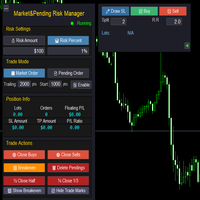
Market & Pending Risk Manager EA Operation Manual Market & Pending Risk Manager is a professional MT5 trading panel EA that integrates multiple functions such as market order trading, pending order trading, risk management, and trailing stop loss, providing traders with a comprehensive trading solution. Core Advantages Intelligent Dual-Mode Trading Market Order Mode: One-click buy/sell for fast execution Pending Order Mode: Precise entry to wait for the optimal timing Seamless Switching:
FREE

— 専用チャートインジ「 Super Fast Second Chart 」と連携する、超短期トレード特化AI判定ツール — 本製品は、 専用チャートインジと完全連携するAI自動判定システム です。 チャートのスクリーンショットを保存するだけで、 AIが 多タイムフレーム総合判断+方向性+確信度+反転条件+次のチャンス を 数秒で返します。 専用チャートインジと組み合わせることで、 画像では読み取れない CSV(10〜20バーの数値データ) をAIに渡すことができ、 精度は“別次元”へと進化します。 専用チャートインジとの完全連携 専用チャートインジは以下の情報をAIに提供します: 15s〜30mの多TF構造 ALMA(短期・長期) 独自CCI MACD(ヒストグラム) 回帰チャネル(reg_upper / reg_lower) 多項式回帰(polyreg) ATR TrueTL 直近10バーの陽線/陰線/同値 CSVによる正確なOHLC・レンジ・実体サイズ・ボラティリティ 秒足の揺れや細かい値動き これらをAIが統合し 「5分足ベースで今足の残り方向(陽線/陰線)」 を高精度
FREE

The only drawdown guardian that stops your other EAs from digging you deeper. PropMarshal monitors your account equity in real time and instantly closes all positions the moment a drawdown or profit target threshold is breached. But it doesn't stop there — it closes every chart on your platform too, cutting off any other Expert Advisors before they can open new trades and compound the damage. The Problem PropMarshal Solves Most prop firm traders run multiple EAs across multiple charts. When a dr
FREE

Imagine what results you could achieve in your manual trading if you had a tool that notifies you of a possible price reversal for all the symbols you are interested in at the same time (futures, stocks, forex or cryptocurrency)?
VSA screener is just the right tool. It was created for traders who value their time and make their own trading decisions on opening or closing a position. The software monitors the presence of trading patterns on the preselected tickers under several timeframes (up to
FREE

Multi-TF Alert System - プロフェッショナル・マルチタイムフレーム・アラートパネル 説明 MetaTrader 5用プロフェッショナル・マルチタイムフレーム・アラートパネル Multi-TF Alert Systemは、常にチャートを切り替えることなく、異なるタイムフレームで複数の市場を追跡する必要があるトレーダーのために設計された包括的なモニタリングツールです。外国為替、ゴールド、インデックス、または暗号通貨を取引する場合でも、このパネルは価格が最近の高値と安値に対してどこに位置しているかの明確で整理されたビューを提供します。 システムは5つのタイムフレーム(M15、M30、H1、H4、日足)で最大10のシンボルを同時に監視します。各組み合わせについて、設定可能なルックバック期間における最高価格と最低価格を計算し、現在の価格がこれらのレベルにどれだけ近いかを追跡します。価格がこれらの重要なレベルに到達または接近すると、サウンドアラート、ポップアップメッセージ、またはモバイルデバイスへのプッシュ通知から選択した方法で即座に通知を受け取ります。 コア機能 マルチマー
FREE

TimeBar TimeBar は、バーが閉じるまでの残り時間、バーが開いてからの経過時間と現在時刻を表示するシンプルな情報インジケーターです。 見やすくするために、グラフの左上隅にコメントの形で表示する方法と、グラフィック オブジェクトの形で表示する 2 種類の表示モードが追加されました。
利点 フォントの選択 フォントサイズ。 どれでも設定できます。 コメントすると小さすぎるので オブジェクトを移動できます。 マウスをダブルクリックして任意の時間を選択し、チャート上の任意の場所に移動すると、通常どおり更新され続けます 視覚的な警告。 現在のバーが閉じるまでの指定秒数を設定でき、その秒数に達すると、設定で指定した警告色に変わります 設定 表示する時間を選択します 各時刻の色 (グラフィック オブジェクトの場合) バーがまもなく閉店することを通知するアラート 取引システムへの追加として TimeBar インジケーターを使用する
市場にある他の製品もお試しください https://www.mql5.com/ru/users/capitalplus/seller
FREE

Risk Rule Sentinel is a risk-management utility. It does not open trades and it does not predict anything. It watches the positions that are already open on your account and enforces four rules on them, so one careless click cannot turn into an account-sized loss.
WHAT IT ENFORCES
1. Maximum lot size. Any position larger than your limit is reported, or closed. 2. Maximum risk per position. Computed from the position's real stop loss, as a percentage of your account balance. 3. Mandatory st
FREE

Mentoria Individual — Manual Trade Execution and Risk Management Mentoria Individual is a free manual trade execution and risk management tool for MetaTrader 5, developed by Gean Patrick. It combines lot size calculation, order preparation, visual Stop Loss and Take Profit adjustment, and position management in an interactive panel directly on the chart. The tool is designed for traders who want to maintain full control over their trading decisions. It does not provide trading signals or execut
FREE

This tool is designed to quickly calculate the lot depending on the Stop Loss.
The control is done by hot keys
By default:
1 - Limit order price level
2 - Stop Loss Level
3 - Take Profit Level
Space Bar - Open an order
Escape - Cancel All 9 - Open 2 orders
Market Order
To open a Market order, click (2) and set up Stop Loss with the mouse If you want to put Take Profit - click (3) and set up Take Profit with the mouse
FREE
Easy and simple tool which close all trades in defined point of time. It can also close all open trades when opened positions reach defined target profit or stop loss.
For all pairs, indexes etc. Works with all instruments.
All types of orders. All charts.
Users inputs:
- close time (hour,min,sec)
- take profit (in users currency)
- stop loss (in users currency)
Save & Load settings option.
Fast, simple and reliable.
Check out other tools provided by our team!
FREE

Rojeryo Trade Manager ATR is a MetaTrader 5 utility Expert Advisor designed to manage already opened trades.
The tool does not generate entry signals and does not open trades by itself. It is built for traders who prefer manual entries but want automatic trade management after the position is opened.
The EA can automatically set protective Stop Loss and Take Profit levels, move the Stop Loss to breakeven, close part of the position, and apply trailing stop management according to the selected
FREE

RealCost Gold Session Zones MT5 is an entry-level session map utility for gold traders using MetaTrader 5. It draws Asia, London and New York session zones on the chart and shows a compact live dashboard for current-session context.
The utility is designed for visual market timing, manual preparation and quick broker-condition checks. It does not trade, does not open or close positions, and does not provide buy or sell signals.
Main features: - Asia, London and New York session zones. - Config
FREE

RiskCompass Panel MT5 1. The Problem and the Approach You have a position idea, and the first real question is always the same: how much of this account am I about to put at risk, and can the account carry it. The information that answers that question is scattered across half a dozen windows. Balance is on one tab. Margin level is somewhere else. The spread you just paid is visible only if you look at the instrument row. The server day, which decides whether your daily loss limit has already be
FREE

Find Your Broker's GMT Offset - Free Tool Not sure what GMT offset your MT5 broker uses? FindBrokerGMTOffset is a free utility that helps you identify your broker's actual server time and GMT offset directly from your MetaTrader 5 terminal. No purchase, subscription, or complicated setup is required. How to use it: Download and install the FindBrokerGMTOffset script in your MT5 terminal. Attach the script to any chart and allow it to run. The tool will display your broker's current server time a
FREE

️ TradeGuard by Brian_Breyli_Vana Your Trading Co-Pilot for MetaTrader 5 TradeGuard is a professional manual trading assistant for MetaTrader 5, designed for traders who want to stay in control of every trading decision while letting the EA handle the repetitive, time-consuming, and error-prone parts of trade management. Built for Price Action, Support & Resistance, Breakout, Swing, and Day Trading, TradeGuard combines fast execution, visual risk management, automated protection, session-based
FREE
コピー機->便利で高速なインターフェースインタラクション、ユーザーはすぐに使用できます ->>>> WindowsコンピュータまたはVPS Windowsでの使用を推奨 特徴: 多様でパーソナライズされたコピー取引設定:1. 異なるシグナルソースに異なるロットモードを設定できます。2. フォワードコピー取引とリバースコピー取引に異なるシグナルソースを設定できます。3. シグナルはコメントで設定できます。4. 契約ロットに応じてロットを調整するかどうか 多様でパーソナライズされたコピー注文設定2:1.品種ごとに異なるロットモードを設定できます2.順方向コピー注文と逆方向コピー注文に異なる品種を設定できます3.コメントでシグナルを設定できます4.契約ロットに応じてロットを調整するかどうか
コメントフィルタリング、MAGICフィルタリング、シグナルロットフィルタリング、ローカル製品フィルタリング 勤務時間設定 逆同期SLAVE終了 注文バインド機能: 任意の注文を設定されたシグナルソース注文にバインドできます (テーブルをダブルクリックして編集します) アカウントリスク管理 基本機
FREE
Introduction to Order Risk Management EA ORM EA is specially designed for fast and accurate market order execution to be used with our Price Action and Econometric Trading strategies listed below. ORM EA is fully automatic and ORM EA is also very easy to use. ORM EA is totally free of charge. You can also use this robust order execution feature of this ORM EA for any other your own trading strategy.
Trading Strategy Guide Order Risk Management EA provides the guide for the risk management for y
FREE

Protect your funded accounts and personal capital with military-grade precision. This utility continuously monitors your floating equity against your daily starting balance. The moment your custom drawdown threshold is breached, it instantly liquidates all open positions, deletes pending orders, and completely unloads from the chart. Stop revenge trading and never fail a prop firm evaluation due to a margin breach again.
FREE

この無料ツールが気に入っていただけましたら、ぜひ5つ星の評価をお願いします!本当にありがとうございます :) 「リスク管理アシスタント」エキスパートアドバイザーコレクションは、様々な市場環境においてリスクを効果的に管理することで、取引戦略を強化するために設計された包括的なツールスイートです。このコレクションは、平均化、スイッチング、ヘッジの3つの主要コンポーネントで構成されており、それぞれが異なる取引シナリオに合わせて独自のメリットを提供します。
このEAは、市場で標準的なリスク管理戦略を発展させたものです。
https://www.mql5.com/en/blogs/post/756961
1. 「平均化アシスタント」EA: MT4: https://www.mql5.com/en/market/product/115468 MT5: https://www.mql5.com/en/market/product/115469 2. 「スイッチングアシスタント」EA: MT4: https://www.mql5.com/en/market/product/115478 MT5:
FREE

Backtesting PRO: Make a review of the market based on the available history of your broker. Practice your strategies and verify them in seconds. Remember to maintain excellent risk management, check your days and hours of operation. R emember to start it in the shortest period to operate. Any questions or suggestions can be sent to this email: autoeducacion0110@gmail.com
FREE

Setting a chart up exactly the way you like it takes a few minutes. Doing it twenty times takes an afternoon. Chart Cloner opens exact copies of the chart you drop it on. Symbol, timeframe, colours, scale and chart mode always carry across, because that is what makes a copy a copy. You decide whether the attached Expert Advisor, the indicators and the drawn objects come with them. Point it at your Market Watch instead of a copy count and it opens one chart per symbol, every pair wearing the same
FREE

Free for a limited time, grab it now! Please, if you like this utility, leave a review, it helps us build more tools like this.
Many retail traders fail because they enter trades when a market session is already "exhausted." Session Monitor gives you the context you need by comparing current price movement against historical session averages.
The utility calculates the absolute range (the distance between the highest and lowest price reached) during the session. It is a MT5 utility that trac
FREE

Tick Database — export of tick database from MT5 terminal to MT4. The utility provides access to the tick database in real time. This is necessary to generate synthetic charts in the MT4 terminal, which initially does not provide for loading a tick database. For example, you can organize permanent access to the tick database for the Seconds Chart utility. If the opening time of the current candle in the terminals is different, then you need to specify the time offset in hours. Example We open M1
FREE

Reflex Panel - 半自動売買の革命! MT5の使いにくい標準インターフェースにうんざりしていませんか?ウィンドウの切り替えや複雑な計算はもう忘れましょう! Chart Revolution EA は、あなたのチャートをトレーダーの本格的なコマンドセンターに変える、次世代のプロフェッショナル取引パネルです! CHART REVOLUTIONが選ばれる理由 すべてを1画面で - 余分なウィンドウはもう不要
即時実行 - ワンクリックで取引を開始
スマートなリスク計算 - 証拠金に対する割合(%)でロットを自動計算
視覚的な管理 - すべてのポジションレベルをチャート上に直接表示
4つのスタイリッシュなテーマ - サイバーパンクからマトリックスまで 主な機能 取引パネル: ワンクリックでBUY/SELLポジションを発注 ロット、SL、TPの迅速な設定 クイック選択ボタン (0.01 - 1.00 ロット) プリセットSL/TPレベル (25, 50, 100, 200 ポイント) 全ポジション決済 / 利益のあるポジションのみ決済 省スペ
FREE

TREND SCANNER Stay With the Trend. Trade With Confidence. Trend Scanner analyzes the market to determine trend direction and strength using a combination of technical indicators. The system combines EMA 150/365, EMA 9/21, RSI, MA to confirm market direction and filter out weak or sideways conditions. Key Features: Bullish and bearish trend detection; EMA 150/365 and EMA 9/21 analysis; RSI confirmation; MACD momentum analysis; ️ ADX ranging-market filter; Trend strength measur
FREE

TRADE PANEL MASTER — Know Your Risk Before You Click
Open your chart. See your panel. Trade with confidence.
Before you click Buy or Sell, Trade Panel Master shows you exactly what you risk, what you gain, and your R:R ratio — in real time. No mental math. No surprises.
FEATURES
- Lot sizing with real-time margin display - SL & TP in 3 modes: Points / Money / Price - Au
FREE

NINJA MT5 DOCTOR 概要 NINJA MT5 Doctorは、ターミナル、口座、開いているチャート、選択時間足の履歴、Doctorを装着した現在チャートの銘柄を一度に確認する、無料・非売買のMT5環境診断ユーティリティーです。MT5上ではExpert Advisor形式ですが、売買EAではなく、インジケーターでもありません。パネルとInputs名は英語です。 確認内容 ブローカーサーバー接続、ターミナルと口座の取引許可、Doctor自身の許可、Trade modeと公開セッション、tickの新しさ、Spread、選択時間足の同期と本数、Volume規則、Reference marginとFree Marginの比較、ブローカー公開の銘柄仕様を確認します。CHARTSは開いている各チャートと取得できる装着EA名を表示します。他EAの非公開ロジックは確認できません。 ダッシュボードと状態 OVERVIEWは主要確認項目、HISTORYは同期と取得本数、CHARTSは開いているチャート、SPECSは現在チャート銘柄の仕様を表示します。READYは、完成したスナップショットの実装
FREE

1秒が重要な場面での高速操作 このトレードパネルは、 秒足を含むカスタムチャート での使用を前提に設計されています。
カスタムチャートの背後にある 実際の取引シンボルを自動で正確に認識 し、
手動での紐付けや追加操作なしに 、そのシンボルへ直接取引を実行します。 このパネルが解決するのは、ただ一つの本質的な課題です。
「判断」と「実行」の間の距離を最小限にすること。 余分なウィンドウはありません。
確認ダイアログもありません。
画面を切り替える必要もありません。 素早いエントリー このパネルでは、主要なトレード操作を チャート上から直接 行えます。 Buy / Sell — ワンクリックでの成行エントリー LIMIT — ダイアログなしでの指値注文設定 ボタンを押せば、即座に実行されます。
メニューを探す必要もなく、チャートから意識を外すこともありません。 チャート上での SL / TP 設定 Stop Loss や Take Profit の設定は非常に直感的です。 ポジションのエントリーラインをクリックし、表示される補助ラインを目的の価格レベルまでドラッグするだけで設定できます。
FREE

Trading Co-Pilot for MetaTrader 5 Advanced Position Management for Manual Traders Trading Co-Pilot is a professional trade management assistant designed for traders who open positions manually and want precise, automated control over risk and profit handling. It does not open trades. It manages them intelligently. You focus on entries. The Co-Pilot protects and optimizes the exit. How It Works Once you open a manual position, Trading Co-Pilot automatically: • Applies Stop Loss
• Sets Take Profit
FREE

LayerGuard Pro - Professional Trade Management EA for MetaTrader 5 Product Description LayerGuard Pro is a sophisticated Expert Advisor designed exclusively for MetaTrader 5 that provides professional-grade trade management automation for your existing positions. Unlike traditional EAs that generate signals or open trades, LayerGuard Pro focuses on one critical aspect of trading: intelligent, automated management of Take Profit and Stop Loss levels. Core Philosophy: Management, Not Generation La
FREE

手動ヘルパーTP (Manual Helper TP) このツールは、利益を保護し、リスクを低減するために設計されています。 取引のストップロスを設定し、トレーリングストップを管理します。 使用方法 取引するシンボルのチャートにアタッチ(適用)すると、あなたのルールに従ってポジションを処理します。 すべての設定はポイント単位です。お使いのシンボルと戦略に合わせて調整することが重要です。デフォルト設定はXAUUSDで動作します。スキャルピングの場合は、より小さなSL、BE、TPを使用することをお勧めします。 このエキスパートアドバイザー(EA)は、決して自動で新規取引を開始しません。 その唯一の仕事は、あなたの個人的な設定に基づいて既存の取引のストップロスを管理することです。手動取引や他のEAによって開かれた取引を管理するための強力なアシスタントです。 主な機能 初期ストップロス: ストップロスなしで取引が開始された場合、このユーティリティは設定に基づいて自動的にストップロスを追加します。 ブレークイーブン保護: 取引が有利な方向に動くと、自動的にストップロスを移動させて少額の利益を確定
FREE
This Expert Advisor is used to send messages from the PCT Multi indicator to Telegram.
The EA has 5 settings: - Channel name: The name of the Telegram channel. - Token: Your bot's Token. - Entries: Entry messages will be sent. - Results: Entry results will be sent. - Alerts: Alerts will be sent.
How to set up: In the Tools -> Options menu, in the "Expert Advisors" tab: - Check the "Allow WebRequest for listed URL:" option. - Click "add new URL" and add " https://api.telegram.org " (without the
FREE

The Quick Style utility is designed for facilitation and acceleration of working with the properties of graphical objects. Left-click a graphical object while holding the Shift key to open the quick access window for configuring the object properties. In the window, you can change the color, style and line width with one click, including those of other graphical objects. All changes are displayed immediately. To close the Quick Style , simply click the free space on the chart. The utility is eas
FREE
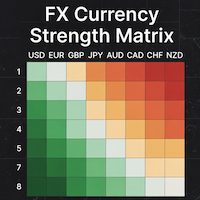
### MQL5 Marketplace Product Description FX Currency Strength Matrix – Professional MT5 Indicator
#### Overview The FX Currency Strength Matrix is a powerful, real-time visual tool that instantly reveals the true strength and weakness of all 8 major currencies in a clean, color-coded matrix format. No more guessing which currency is driving the pair – see the complete strength hierarchy at a glance and trade with institutional-level clarity.
#### Key Features - True 8×8 Currency
FREE

One Click Close Lite 是一款專為 MT5 手動交易者與多持倉使用者設計的簡易平倉工具。
當帳戶中同時存在多張交易持倉時,不需要再逐張點擊關閉,只需要透過圖表上的按鈕,即可快速執行批量平倉。
工具提供三個主要功能:
CLOSE ALL
一鍵關閉帳戶目前所有持倉。
例如帳戶中同時存在:
XAUUSD BUY EURUSD BUY GBPUSD SELL USDJPY BUY 按下:
CLOSE ALL
工具會依序嘗試關閉目前帳戶中的全部持倉。
---
CLOSE BUY
只關閉帳戶目前所有 BUY 持倉。
例如:
XAUUSD BUY EURUSD BUY GBPUSD SELL USDJPY BUY
按下:
CLOSE BUY
則會關閉:
XAUUSD BUY EURUSD BUY USDJPY BUY
而:
GBPUSD SELL
會保持不變。
CLOSE SELL
只關閉帳戶目前所有 SELL 持倉。
BUY 持倉不會受到影響。
---
即時持倉資訊
工具面板會顯示目前帳戶的基本持倉資訊,包括:
* 總持倉
FREE

Profit & Loss Display - MT5 Panel
On chart panel to display profit and loss per product over specified time period View P/L for EA trades only or also with manual trades Note this is a panel, not an indicator or algorithm, it simply displays profit and loss from account history
//---- Install ----// After download, attach indicator to chart from the markets folder which is in navigator window (Cntrl N)
//---- Study ----//
Set target profit for product per week/specified period Set loss limi
FREE

Backstop enforces the two rules that end funded accounts. A daily loss limit and a maximum loss limit, applied to everything on the account — every Expert Advisor, every symbol, and every trade you place by hand. Attach it to any one chart and it governs the whole terminal. It does not trade. It has no strategy, no signals and no opinion about the market. It is a governor. What it does Daily loss limit — measured from balance at the reset, equity at the reset, or a fixed account size. Firms diff
FREE

[Product Overview] Transform RSI into a Precision Trend-Following Weapon Are you tired of traditional RSI indicators generating premature "Overbought/Oversold" reversal signals during strong trends, causing you to trade against the flow and incur losses? 。 signals in trending markets. The core philosophy of this system is: "Follow the Trend, Trade the Pullback, Snipe the Entry." It focuses on finding high-probability pullback entries only when the trend is clear and momentum is stro
FREE

Purse Guard v1.00 — User Manual 1. What Purse Guard Does Purse Guard is a trailing stop manager, Stop Loss manager, trade manager, and position-management utility for MetaTrader 5. It provides practical risk management for existing trades by managing Stop Loss on open positions with two conventional trailing methods: Points Trailing — a fixed-distance points trailing stop that follows price by a selected number of MetaTrader 5 points. Candle Trailing — a candle trailing stop that follows the st
FREE

One-Click Trade Manager for MetaTrader 5 The Close Manager Buttons EA is a powerful utility designed to give you full control of your open positions and pending orders with just one click.
Forget about manually closing trades one by one during fast market moves—this EA does it instantly, safely, and efficiently. Key Features Close All Trades – instantly close every open position Close Only Buy Trades – exit only BUY positions while keeping SELL trades running Close Only Sell Trades – exit only
FREE

All in one Multipurpose Telegram Trade Management , Manage and Copy Trades on the go From Telegram Pro Version MT5: www.mql5.com/en/market/product/95742 Pro Version MT4: www.mql5.com/en/market/product/85691
Execute Trades on mobile with fast execution When away from desktop MT5, or scalping the market with mobile device, or needed to copy trades from telegram groups while away, or doing some other activities, Telegram EA Manager is an effective tool to perform any trade operation with swift
FREE

TRADE WITH MAGIC – Professional One-Click Trading Panel
| Crystal AI Systems
Trade With Magic is a fast, lightweight, and highly efficient one-click trading panel designed for traders who require precise manual execution and full control over magic numbers, comments, and risk parameters. It is suitable for both manual trading and advanced EA testing environments where ac
FREE

Binanceは世界的に有名な暗号通貨取引所です!暗号化されたデジタル通貨市場のリアルタイムデータ分析を容易にするために、プログラムは分析のためにBinanceFuturesのリアルタイムトランザクションデータをMT5に自動的にインポートできます。主な機能は次のとおりです。
1.通貨セキュリティ省のUSD-M先物取引ペアの自動作成をサポートし、基本通貨を個別に設定することもできます。基本通貨BaseCurrencyは空で、すべての通貨を示します。BNBやETCなど、Binanceでサポートされている暗号通貨も個別に設定できます。
2. Binanceの各通貨の価格精度、取引量の精度、および最大取引量を同期します。
3. WebSocketを介してBinanceをリンクすると、すべての先物取引をMt5にプッシュして市場を更新できます。
4.同時に更新されるすべての先物の種類をサポートします。リアルタイムのデータ効率を向上させるために、最大更新グループをカスタマイズできます(更新するには対応するウィンドウを開く必要があります)。ツールのデフォルトは最大数です。グループは4つのグル
FREE

️ Instant Close All Charts – MT5 Utility Script One-Click Solution to Instantly Close Every Chart Window in MetaTrader 5 Managing too many open chart windows in MetaTrader 5 can slow down your platform, clutter your workspace, and reduce productivity. Instant Close All Charts is a lightweight, ultra-fast MT5 utility script designed to close all open chart windows with a single click — clean, safe, and efficient. Download MT5 EA Products Whether you're a trader working with dozens of charts or
FREE

This indicator creates a watermark with the asset symbol (e.g., BTCUSD) in the center of the MetaTrader 5 chart. The text is displayed in Arial Black sans-serif font, with customizable size, color, and opacity through indicator settings. The watermark stays centered both horizontally and vertically on the chart, remaining behind candles and other elements to avoid interfering with visualization. By default, it uses light gray color with 30% opacity, creating a subtle effect that helps quickly id
FREE

[Description] Panel Anywhere is a groundbreaking EA panel, being the first in the market to support browser operations. It addresses a pain point for all MT5 traders, offering a solution that has been lacking in the past. Additionally, the EA itself provides a comprehensive interface to meet all regular operational needs.
[Features] Browser Support: - View EA panel information from the browser, allowing you to manage your account anywhere, unrestricted by a computer or RDP. - WebEA URL: ht
FREE
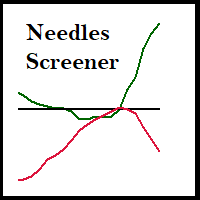
Expert Advisor that tracks assets listed in the Market Watch window by checking which assets are needled (crossing the 3, 8, and 20 moving averages) or are close to crossing. It does not track when there is no crossing of the averages. The EA allows you to choose the timeframe for analyzing the crossings. There is no maximum limit for assets or EAs running simultaneously, but a very large number can lead to system slowdown and freezing. Users should be mindful of their device's capabilities. Th
FREE

Chart Reset – Free MT5 Utility
Reset your MT5 chart settings with one click.
Chart Reset is a simple and lightweight utility designed to quickly restore your chart to a clean, professional setup.
Key Features
- One-click chart reset - Restore white chart background - Restore green bullish candles and red bearish candles - Reset Bid and Ask line colors - Restore candlestick chart mode - Reset grid and chart display settings - Restore Auto Scroll and Chart Shift - Reset chart zoom and view -
FREE

MOST PROP ACCOUNTS DON'T DIE FROM BAD STRATEGIES. THEY DIE FROM BAD DAYS.
The Prop Firm AI Assistant is a professional monitoring dashboard that protects your funded account from the three killers: drawdown breaches, toxic market conditions, and your own emotions.
=== WHAT IT DOES === • CIRCUIT BREAKER — Tracks daily loss & max drawdown exactly like prop firms do. When a limit is hit, it warns you or closes everything instantly. • GROWTH ADVISOR — Tells you your exact risk per trade, your s
FREE

AutoFindBestTrendLine — Detector Automático de Líneas de Tendencia Descripción general: AutoFindBestTrendLine es una utilidad para MetaTrader 5 que analiza el historial del gráfico y detecta automáticamente la mejor línea de tendencia posible, ya sea de máximos (resistencias), mínimos (soportes) o ambos. El script identifica los dos puntos más relevantes y dibuja una línea óptima basada en el número de toques reales sobre el precio. Ventajas principales: Detección automática de líneas de tendenc
FREE

TrendLinesFromFiboAndTrend2 — Proyección Dinámica de Tendencias en Niveles Fibonacci Descripción general: TrendLinesFromFiboAndTrend2 es una herramienta para MetaTrader 5 diseñada para clonar el ángulo y la velocidad de una línea de tendencia existente y proyectarla automáticamente a través de todos los niveles clave (retrocesos y extensiones) de un objeto Fibonacci dibujado en el gráfico. Ventajas principales: Proyección geométrica exacta: Mantiene la inclinación y duración exacta de la línea d
FREE

Gold Precision Execution Panel V5.3 The Ultimate Risk-Controlled Trading Dashboard for XAUUSD Gold Precision Execution Panel is a professional-grade trading tool specifically engineered for gold traders who prioritize speed, accuracy, and rigorous risk management. In the fast-moving XAUUSD market, one mistake can be costly; this panel eliminates human error by automating complex lot calculations and providing a clear visual preview of every trade before execution. Key Features Fixed Risk Managem
FREE

MT5 History Checker Can you trust the historical data behind your MT5 backtest? MT5 History Checker is a diagnostic utility designed to identify missing periods and coverage problems in the historical data supplied by your MetaTrader 5 broker. Select the symbol and date range you want to examine and run the checker. The utility analyses the available history and provides a clear PASS, WARNING or FAIL result. What it checks Historical tick-hour coverage M1 historical-data coverage Missing periods
FREE

VisualRiskTool VisualRiskTool is a professional trade execution panel and risk management utility designed for MetaTrader. It streamlines the process of opening and managing positions by automating complex lot size calculations and providing a visual interface for setting stop-loss and take-profit levels directly on the chart. Core Functionality: Precision Risk Management The primary goal of VisualRiskTool is to eliminate manual calculation errors. By defining a fixed risk percentage (e.g., 0.5%
FREE

See Your Key Trading Measurements at a Glance Smart Pips Meter is a free utility that displays important market measurements directly on your chart—so you can make faster trading decisions without manually calculating pip distances. WHAT IT SHOWS ADR (Average Daily Range)
See the current ADR pip value directly on your chart. Current Candle Size
Instantly see the size of the current candle in pips. Previous Candle Size
Quickly check the size of the last completed candle.
FREE

Introducing the Scalping Expert Advisor (EA) for Short Trades This Expert Advisor (EA) is meticulously designed for short trades scalping, offering a blend of precision and efficiency to maximize your trading performance. Below, we delve into the key functions and features that make this EA an essential tool for scalpers.
Key Features: Automatic Take Profit (TP) and Stop Loss (SL) Settings: Take Profit Input: Allows you to set a specific TP value, enabling precise control over your exit points
FREE

AUTOTRAIL LM PRO MANAGER v3.30 Professional management of manual trades across all symbols Autotrail LM Pro Manager is a MetaTrader 5 Expert Advisor designed to automatically manage all manually opened positions, including trades on symbols other than the chart where the EA is installed. You do not need to attach the manager to every chart. For example, you can install it on a single XAUUSD chart and manage manual trades opened on: XAUUSD Forex pairs Indices Cryptocurrencies Metals Energies Othe
FREE

Trendline Toolbox (MT5) Trendline Toolbox is a utility indicator for MetaTrader 5 that helps manage trendlines and common chart objects. It is a charting tool; it does not provide trading signals and does not guarantee any profit. Main functions Clone the selected trendline (keeps style, angle, and price levels). Toggle the Extend/Ray property for the selected trendline. Delete the selected trendline. Purge all objects on the current chart. Draggable panel: double-click the hand icon and drag t
FREE

Relentless News Guard — Free Economic Calendar and News Warning Panel for MetaTrader 5
Relentless News Guard is a free, on-chart economic calendar panel for MetaTrader 5. It shows the upcoming high-impact news events for the currencies you trade, with a live countdown and a clear on-chart status, so you know when to stay out of the market before you place a trade.
It is free. If it keeps you out of one bad news spike, an honest review helps other traders find it.
It reads the built-in MetaTra
FREE

Live Chart Viewer – Real-Time Trading Chart Anywhere Live Chart Viewer lets you view and share your MetaTrader 5 chart in real time from any modern device.
Whether you are away from your trading desk, monitoring trades remotely, or sharing your analysis live, this tool keeps you and your audience connected to the market instantly. Notice: Charting library by TradingView Demo: https://chartviewer.live/view/ElVTwx9Lf5w • Key Features Real-time chart updates
Price movements, drawings, and char
FREE

NIVELESFIBONACCI2.12 — Órdenes Pendientes sobre Niveles Fibonacci Personalizados Este script para MetaTrader 5 permite colocar automáticamente órdenes pendientes de compra o venta utilizando como referencia los niveles Fibonacci horizontales previamente dibujados en el gráfico. El script está diseñado para funcionar conjuntamente con NIVELESFIBONACCI1.1 , aunque puede utilizar cualquier conjunto de líneas horizontales que siga la misma estructura de nombres mediante el prefijo configurado. La pr
FREE

MT5用 高機能テーマチェンジャー「ThemeChanger」- ワンクリックで理想のチャート環境へ
日々のトレードにおいて、チャートの配色は分析の効率や視認性、さらには心理状態にも影響を与える重要な要素です。しかし、MT5標準の配色設定は手間がかかり、複数のテーマを瞬時に切り替えるのは容易ではありません。
「ThemeChanger」は、そんなトレーダーの皆様の声にお応えして開発された、MT5チャートの配色テーマをボタン一つで簡単に切り替えられる高機能インジケーターです。
複雑な設定は一切不要。直感的な操作で、あらかじめ用意された複数の美しいテーマや、ご自身でカスタマイズしたオリジナルテーマへ瞬時に変更できます。これにより、トレード環境の最適化を素早く行い、より分析に集中できる環境をご提供します。
「ThemeChanger」の主な特徴
ワンクリック・テーマチェンジ: チャート上に表示されるボタンをクリックするだけで、瞬時に配色テーマを切り替え。時間帯や分析手法、あるいは気分に合わせて、ストレスなく最適な表示に変更できます。
豊富なプリセットテーマと自由なカスタマイズ:
FREE
Close all open orders, delete all pending orders, and clear the entire account's orders. Please use caution! After clicking the button, the account order will be 0! Help us quickly clear account orders! As it is a free version, only the function of closing all orders is available. If other functions are needed, customization is required! The paid version has more features!
FREE

input double MaxLossLevel = 500.0; // Max Loss Level in account currency input double SafetyBufferMoney = 10.0; // Safe Buffer. In this case Threshold be 500+10 = 510 input int CheckEverySeconds = 2; input bool is_debugged = false; // Print additional messages in the Terminal
It will checks every CheckEverySeconds. If the total Loss of the account Go below Threshold of MaxLossLevel + SafeBufferMoney, then start Heding: for each open Position, open a new reversed Position with
FREE

The CandleStick Scanner is a tool that allow you to perform a market scan and search any candlestick pattern that you already created in the current chart, You can perform a quick search in the current chart (500 bars will be scanned), This is a lite version of CandleStick Factory for MT5 . The full version video can be found here : https://www.youtube.com/watch?v=fq7pLXqVO94 The full version can be purchased here: https://www.mql5.com/en/market/product/75434
How it works You can
FREE

Title Prop Firm Risk Guardian Short description (one line) Real-time daily-loss and max-drawdown protection that automatically closes your trades and locks trading before you breach your prop firm limits. Full description Passing a prop firm challenge is hard enough — losing a funded account to a single careless trade is worse. Prop Firm Risk Guardian watches your account in real time and steps in before your daily-loss or maximum-drawdown limit is breached. It sits on your chart as a clean, mod
FREE

SmartLotEA – Auto Lot Size Calculator for All Pairs SmartLotEA is a professional-grade MetaTrader 5 Expert Advisor designed to calculate trading lot sizes automatically based on account balance. It helps traders maintain consistent risk control across all trading pairs with minimal configuration. Built for precision and simplicity, SmartLotEA is fully compatible with all symbols — including forex majors, minors, exotics, and synthetic instruments — and adapts its lot sizing logic to your account
FREE
MetaTraderマーケットは、開発者がトレーディングアプリを販売するシンプルで便利なサイトです。
プロダクトを投稿するのをお手伝いし、マーケットのためにプロダクト記載を準備する方法を説明します。マーケットのすべてのアプリは暗号化によって守られ、購入者のコンピュータでしか動作しません。違法なコピーは不可能です。

取引の機会を逃しています。
- 無料取引アプリ
- 8千を超えるシグナルをコピー
- 金融ニュースで金融マーケットを探索