 MetaTrader 5
 エキスパート
 インディケータ
 ライブラリ
ライブラリ
 ユーティリティ
 ウィジェット
 ルール
ルール
YouTubeにあるマーケットチュートリアルビデオをご覧ください
ロボットや指標を購入する
仮想ホスティングで
EAを実行
EAを実行
ロボットや指標を購入前にテストする
マーケットで収入を得る
販売のためにプロダクトをプレゼンテーションする方法
MetaTrader 5用取引ユーティリティ - 18
 以下はMetaTrader5での取引を簡素化する取引プログラムです。ユーティリティにカーソルを合わせると、その説明と目的が表示されます。
Crypto Charts is a Service that connects to cryptocurrency exchanges and delivers three types of market data in a single package: historical and live OHLCV candles, real-time tick data, and Depth of Market (order book). All data is pushed into MT5 as custom symbols that behave like native instruments, accessible on charts, in indicators, Expert Advisors, and the Strategy Tester. Traders who prefer MT5's analysis environment can use Crypto Charts to work with cryptocurrency markets using the same

MetaTrader 5 のIndicator Test Report — インジケーターが実際にどのように動作するかを示す再描画チェッカーおよびインジケーター テスター コンパイルされたインジケーターの内部を見ることはできません。Indicator Test Reportは、購入、作成、または MetaTrader に組み込まれたあらゆるインジケーターを読み込み、再描画するのか、どのくらいの履歴が必要なのか、実際に何を公開するのかなど、説明では説明できない質問に答えます。行動を報告してくれます。採点はしません。 ストラテジーテスターに任意のインジケーターをロードすると、その動作の 12 の側面に関する平易な言語のレポートが得られます。つまり、発行するバッファーの数、値が意味を持つ前にどれだけの履歴が必要か、閉じたバーの値がその後変更されるかどうか、読み取りにかかるコストなどです。 指標が優れているかどうかについてのスコアや合格点、評決はありません。観察されたことと、それが何を証明し、何が証明しないのかだけが考慮されます。 答えは何ですか 1. バッファー。 インジケーターが実際に
FREE

This utility is designed to receive volumes from order books from larger crypto exchanges and transfer information to the indicator RealCryptoLevels . The RealCryptoLevels indicator by downloading the order book of crypt exchanges with maximum depth shows horizontal volumes of popular crypto currencies on the chart, so you can see not only the volumes, but also the levels and them strength (see screenshots), which is very important for successful trading in all strategies from scalping to m
FREE

Level Painter PRO — Professional Manual Chart Markup Tool Level Painter PRO is a powerful and stylish tool for manually drawing support and resistance levels, price zones, rectangles, and vertical areas on the MetaTrader 5 chart. The indicator is designed for traders who value visual analysis and prefer to mark up their charts manually while maintaining full control over the process. Key Features Manual Drawing of Levels and Zones Horizontal Lines — quickly mark key price levels Vertical Line
FREE

StopFirst Lot Calculator answers one question before every trade: how many lots, if this is where my stop goes?
You decide how much you are willing to lose and where the trade is wrong. The calculator turns those two decisions into a lot size, and shows you what that lot really puts at risk, what margin it needs and where the target sits. Drag the stop line and every figure follows.
It is an indicator. It cannot place an order, it needs no Algo Trading permission, and it runs on the same char
FREE

Trading Cockpit is a free, complete trading control panel for MetaTrader 5: watchlists, price & trend alerts, and automatic liquidity levels, all in one compact side panel without leaving your chart. Try everything at no cost.
WATCHLISTS & SYMBOL BASKETS - Unlimited symbols across several lists in one dropdown selector: a live mirror of your Market Watch, a Favorites list, and your own custom lists. - Predefined baskets by correlation cluster - US, Europe, Forex, Metals, Energy, Crypto - that w
FREE

Overview Trade Signal Manager Ultimate v7.0 connects MetaTrader 5 to Telegram, enabling you to share professionally formatted trading signals with your group or channel in seconds. The system auto-detects all open positions, displays them on a clean on-chart dashboard, and lets you select and send signals with a single click. No manual typing, formatting, or data transcription required. How It Works The dashboard displays all open positions with complete details including symbol, direction, lot
FREE

1. Move SL to BE On/Off: allow EA move SL to BE or not allow. 2. BE mode: BE Single order: move SL of single order when condition match. BE multi order: Move Sl of multiple orders base on BE of multiple orders. 3. Move SL to BE when profit >= (pips): set how many pips you want EA move SL to BE when profit. 4. Add value from BE: number of pips you want to add from BE (offset). 5. Audible Alert: Enable audible alert on/off. 6. Push notification: Enable Push notification on/off. 7. Three button hel
FREE

バージョン 7.04 デイトレードの規律と口座保護をさらに強化するための大型アップデートです。 • Post-Session Review モードを追加。レビュー時間は 0~60分の範囲で設定できます。
• 許可された取引回数を完了した後も、MetaTrader 5 を開いたままにして、チャートの確認、スクリーンショットの保存、トレード日誌の記録を行うことができます。
• 1日の取引回数上限に達した後に新しい取引を行うと、Emergency Close 保護機能が作動します。
• Emergency Close は未決済ポジションを決済し、保留中の注文をキャンセルした後、取引セッションをロックして MetaTrader 5 を終了します。
• 永続的なデイリーロックにより、重大なルール違反後に MetaTrader 5 を再起動して取引を続けることを防止します。
• 最大許可ロットの保護機能。
• 最大ロットの引き上げは7日間ロックされます。より小さいロットでの取引は引き続き可能です。
• 取引回数のカウントを改善。
• ポジションの部分決済は新しい取引としてカウントされません。
•
FREE

Risk Monitor Ultimate は、口座の日次損失上限、最大損失上限、利益目標(プロップファームのルールを含む)をチャート上に表示し、ルール違反の前に警告します。取引の発注や決済は一切行いません。
表示内容 - 保有ポジションを含む当日の損益と、今日あといくら損失可能か - 開始からの合計損益と、最大損失上限までの余裕 - 利益目標と残り金額 - すべてのストップロスが約定した場合の損失合計 - ストップロスのないポジションの警告
プリセット FTMO(2-Step Challenge、Verification、FTMO Account、1-Step)、FundedNext、FundingPips、またはカスタムルール(日次%、最大%、固定またはトレーリング、目標、会社の日付切り替え時刻)。
アラート - 損失許容額の 50%、75%、90%で通知(任意の水準、最大5つ) - スマートフォンへのプッシュ通知(MetaQuotes ID)とターミナルのアラート - 同じ水準が繰り返し通知されない待機時間
自動保護 このツールは監視と通知のみを行います。Risk Ma
FREE

"Risk Copilot" is a s imple and powerful tool to manage risk (in % or $), calculate position size, define target based on Risk-Reward and send orders to market automatically.
Input Parameters:
PositionType = Buy ou Sell // Position Type Risk = 0.3 // Risk (%) RiskMoney = 0.0 // Risk ($) RiskReward = 1.0 // Risk/Reward OrderSplit = 1 // Order split (only for HEDGE accounts) SLLineColor = clrGreen // Line Color (SL) SLLineWidth = 1// Line Width (SL) SLLineStyle = STYLE_SOLID // Line Style (SL) T
FREE

Easy Signal Multiplier MT5 Easy Signal Multiplier is a utility Expert Advisor designed to automatically scale up trade volumes from Trade Signals, external EAs, or manual trades. By continuously monitoring active account positions, it dynamically opens supplementary orders, synchronizes Stop Loss and Take Profit levels, and manages position exits in real time to achieve your exact target position size multiplier. Product Features Custom Exposure Multiplier: Specify your target total exposure fac
FREE

Copy trades between MetaTrader 5 terminals on the same computer, with no DLLs and no internet relay. How it works In Master mode the utility writes a snapshot of its open positions (ticket, symbol, direction, volume, SL, TP, magic) to a channel file in the shared Common\Files folder. The file is written under a temporary name, replaced in one step and closed with a checksum line, so a receiver never reads a half written file. In Slave mode it reads the snapshot on a timer, opens copies of new ma
FREE

Description: This utility automates Take Profit (TP) and Stop Loss (SL) levels for your trades, calculated in % of Balance. Example : if you type 1, it means 1% of your Balance . It ensures consistent risk management for all your positions. Crucial Note for Manual Traders: If you intend to use this utility on trades opened manually (without an Expert Advisor), you must change the 'Magic Number' setting to 0 (zero) . This allows the utility to correctly identify and manage your manual orders.
FREE

Shows the live spread, today's range against the daily ATR, the server time, GMT offset, the countdown and the open sessions. FEATURES Live spread in points and pips, colour coded tight, moderate or wide. Optional push alert. Today's range in pips, the daily ATR share, the server time, GMT offset, the countdown and the sessions. HOW TO USE IT 1. Attach it to any chart. 2. Set the spread limits for the symbol. 3. Choose the ATR period and corner. PARAMETERS InpCorner, InpOffsetX, InpOffsetY, InpS
FREE

EA Health Monitor is a free indicator for MetaTrader 5 that shows how each Expert Advisor on your account is doing. It groups the account history by magic number. Every EA gets its own row. Manual trades have a row of their own, and a total sits at the bottom. It only reads the account history and open positions. It never opens, changes or closes a trade. Standalone: Everything is built in. You do not need to buy or install any other product named on this page. Quick start Attach EA Health Monit
FREE

Prop Rules Monitor is a free indicator for MetaTrader 5 that shows how close a prop-firm account is to its daily loss limit and its max loss. It reads live equity, the way firms measure it. It warns you before a limit and when a limit is broken. It only watches. It never opens, closes or changes a trade, so it works without Algo Trading. Standalone: Everything is built in. You do not need to buy or install any other product named on this page. Quick start Attach the indicator to any chart. Enter
FREE

Trade Analyzer & SL TP Optimizer MetaTrader 5 用 実トレード分析・Stop Loss / Take Profit 最適化ツール Trade Analyzer & SL TP Optimizer は、実際の取引履歴を詳しく分析するための MetaTrader 5 ツールです。 通常の取引履歴では、エントリー価格、決済価格、最終的な損益を確認できます。 このツールではさらに、各エントリー後に価格が実際にどのように動いたのかを分析し、取引中に何が起きていたのかを確認できます。 裁量トレードだけでなく、Expert Advisor による取引も分析できます。 Magic Number を使用して、複数の戦略を個別に分析することも可能です。 主な分析項目 Trade Analyzer & SL TP Optimizer では、以下のような情報を分析できます。 エントリー後の実際の価格推移 ポジションに対して最大でどれだけ不利に動いたか ポジションに対して最大でどれだけ有利に動いたか 決済効率 利用できた値動きと実際の利益の比較 利益として確保できなか
FREE

This Tool is designed to automate one of the most critical aspects of trade management — setting and managing Stop Loss, Take Profit , and Trailing Stop levels — directly on your MetaTrader 5 platform.
Key Features:
Automatic SL, TSL and TP Placement: Instantly sets initial Stop Loss and Take Profit levels on any new position based on customizable parameters, helping to enforce disciplined risk and reward management.
Dynamic Trailing Stop: Automatically moves the Stop Loss to lock in profits
FREE

Ultimate Candle Countdown – もう二度とローソク足のクローズを見逃さない! Ultimate Candle Countdown でトレード精度を次のレベルへ。あらゆる時間足と銘柄に対応した、シンプルで軽量かつ強力なローソク足カウントダウンタイマーです。
M1でスキャルピング、H1でスイングトレード、あるいは日足/週足のクローズを監視していても、このツールがあれば次のローソク足が始まるまでの残り時間を正確に把握できます。推測はもう不要 – 常に鋭く、常に一歩先へ。 主な機能 すべての時間足に対応 – 1分足から月足まで、信頼性と精度を両立。 視覚的なカウントダウン – hh:mm:ss 形式で残り時間を表示、毎秒スムーズに更新。 カラーアラート – 通常・警告・クリティカルの色をカスタマイズ可能。残り時間が少ないことを瞬時に認識。 オプションの進行率表示 – ローソク足の進行度を一目で確認。 プログレスバー – カウントダウンの下に表示されるシンプルなバー。 時間足ラベル – 監視しているチャートの時間足を常に明示。 スマート配置 – 最新のローソ
FREE
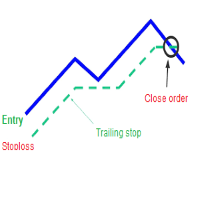
A trailing stop loss is a type of day-trading order that lets you set a maximum value or percentage of loss you can incur on a trade . If the security price rises or falls in your favor, the stop price moves with it. If the security price rises or falls against you, the stop stays in place. With this version, you can run trailing stoploss with currencies (ex start when profit more 1$, trailing stop with 2$...)
FREE

KChrono Timer is a four-mode timing utility for MetaTrader 5. It keeps candle, countdown and trading-session time information visible directly on the chart.
Timer modes
1. Candle Close Timer
Displays the remaining time and progress of the active candle. The current chart timeframe or another candle timeframe can be selected.
2. Custom Countdown
Runs a user-defined countdown with optional automatic restart or reset when a new candle begins. Pause, Resume and Reset controls are available dire
FREE

Settings Change Magic Number at The Top of the Setting to Zero for Manual Trade Profit threshold (pips) : this is the threshold (in pips) an order has to hit, before the SL is set and the SL starts trailing. Before the threshold is hit, the module will have no effect. Example: if this value is set to 30, then the SL will be set (and the trailing will start) when the order has a profit of 30 pips. Trail start value (pips) : the amount of pips where the SL starts trailing. The SL is set at: Open
FREE

YuRaLytics Trade Analyzer reads the trade history of your account and breaks it down. You see which Expert Advisors and symbols make or lose money and how much commission and swap take out of the result. It also tests whether the average trade is large enough to tell apart from luck. The panel only reads history and never opens, changes or closes a trade, so you can run it next to live Expert Advisors. What it shows Summary: trades, win rate, profit factor, average trade, net result, gross resul
FREE

Trade History to Excel turns saved Strategy Tester reports, or the trading history of your account, into a real Excel workbook (.xlsx). Every report goes into the same file: one summary row per report, every closed trade with its entry and exit price, every deal, and the results of each day and month with the balance. Dates are Excel dates, numbers are numbers, the header row is frozen and every sheet has filters, so you can sort, filter, build pivot tables and charts right away. How To Use Back
FREE

MT5 Time Zone Highlighter A simple and practical MetaTrader 5 tool designed to visually highlight up to three customizable trading time zones directly on the chart. Key Features: • Supports up to 3 independent time zones. • Set the start and end time for each zone according to your MT5 broker/server time. • Choose different colors for each time zone. • Adjustable transparency for better chart visibility. • Works directly on the MT5 chart without opening additional windows. • Helps traders quickl
FREE

The utility draws pivot levels based on a selection from day week month The previous candlestick of the selected timeframe is taken and the values for the levels are calculated using the following formulas:
Pivot = (high + close + low) / 3 R1 = ( 2 * Pivot) - low S1 = ( 2 * Pivot) - high R2 = Pivot + (R1 -S1) R3 = high + ( 2 * (Pivot - low)) S2 = Pivot - (R1 - S1) S3 = low - ( 2 * (high - Pivot));
The style and thickness for all lines are adjusted.
The colors for the R, Pivot and S lines ar
FREE

## Version 2.50
I created this EA with the intention of making it free for everyone to use. It serves as a tool to assist in trading with money management, entering order lots according to a percentage of the account balance, and automatically setting TP/SL based on high/low prices.
In Version 2.50, The Auto TP/SL feature adjusts from the Line In (entry point), and Auto price in this version only shifts the entry line to the current price. Input settings: Ato update SL/TP Line >>> In version
FREE

The "Smart Partial TP & Daily Loss Limit Manager" is a versatile and powerful MQL5 indicator designed to help traders manage their trades more effectively. It combines two essential features that improve trading discipline and profitability: partial take-profit (TP) closing based on risk-reward ratios and a fixed daily loss limit to protect your capital. Key Features: Partial Take-Profit (TP) Close: This feature allows traders to set a percentage for partial TP closure (e.g., 50%). Once the pric
FREE

NEW : integration with Ofir Signals to send personalized alerts
Ofir Notify is a tool which send alerts on trades to Telegram Alert on any event concerning a position : Opening, Closing, modification (SL, TP) Send alerts to Chats, Groups and Channel Alert on Equity change Display Risk, Reward and progress of profit/lost for each position Customization of alerts Sending charts screenshots with alerts Send signals from your indicators or experts Multi-lingual NEW : version 2 brings integration
FREE

Program Features 1. Calculation of Margin Call and Liquidation Prices Monitoring all open positions: The program continuously analyzes all open positions on the trading account. Determining critical price levels: Margin Call Price: The price at which additional funds must be deposited to keep positions open. If this does not occur, liquidation follows. Liquidation Price: The price at which positions are automatically closed by the broker to prevent further losses. 2. Display of Prices on the Ch
FREE

THE LOT FROM YOUR STOP. FREE. Picking a lot size by feel is how a normal loss becomes a bad day. ATS Lot Sizer puts two lines on your chart, a stop and a target. Drag them, and the panel tells you the lot size that fits your risk and the money that lot really puts on the line. One click sends the trade with the stop and target attached. HOW IT WORKS Pick LONG or SHORT. A stop line and a target line appear on the chart. Drag them. Lots = your risk (percent of balance, percent of equity, or a fixe
FREE

Hotkey Trader EA is an Expert Advisor for manual and semi-automatic trading in MetaTrader 5, designed for fast trade execution using hotkeys, automatic risk calculation, and convenient position management directly on the chart. The EA helps reduce manual actions during trading, automatically calculates Stop Loss and Take Profit levels, and supports both fixed lot trading and position sizing based on risk percentage. Main Features BUY and SELL order execution with hotkeys; instant market entries;
FREE

Tick Data HTTP Exporter NZDUSD この無料版は NZDUSD のみをエクスポートし、フルバージョンの Tick Data HTTP Exporter は任意の銘柄をエクスポートできます。 説明 この EA は、お使いのターミナルをアプリケーション向けの過去およびリアルタイムのティックデータの提供元にします。
インターネット上には多くのマーケットデータ提供サービスがありますが、実際には提供されるデータの品質が常に良いとは限りません。さらに、こうしたサービスは割高なことが多く、通常は銘柄ごとに月額の利用料がかかります。
この EA を使えば、ターミナルで表示されているものとまったく同じティックデータ、つまり取引や相場分析の根拠としているデータそのものをアプリケーションに提供できます。
レートデータ(OHLC、ローソク足)を提供する Candle Data HTTP Exporter と組み合わせれば、相場分析に必要なデータ一式がそろいます。 機能 あらかじめ設定した外部の HTTP URL へティックデータを送信します。 すべてのティックの配信を保証し、中断時に
FREE

Limit Order Trailing Et — is a utility for trailing limit orders (Buy Limit and Sell Limit) in MetaTrader 5.
It automatically adjusts limit order prices following the market while maintaining a defined offset, allowing entries on pullbacks after price movement.
This tool is designed for working with limit orders in MT5 and can be used in both manual trading and semi-automated trading systems.
Unlike stop orders, limit orders are designed for price retracements (pullbacks) rather than brea
FREE

The Close All Charts utility is designed for quick and convenient closure of all open charts in the MetaTrader 5 (MT5) platform. It will be especially useful for traders who work with a large number of instruments and charts simultaneously, as well as for those who prefer to maintain order in their workspace. When testing advisors in the strategy tester with different parameters, a large number of charts often open. The Close All Charts utility is able to close them in just 1 second, which avoid
FREE

チャレンジを潰すのは利益目標ではなく一日の損失。過剰レバレッジの夜、忘れた指値、ギャップ。
PropFirm Shield Essential は最重要ルールを見張る無料ガード — 違反前に口座をロック。
どのチャートにも。全アカウント監視 — 全シンボル、マジック、手動、コピー、他EA。
- 日内損失ガード — 限度とリセット時間を設定。 - ロックダウン — 決済、指値削除、リセットまで新規禁止。 - バッファ — 限度前に作動。 - ウォッチドッグ — ティックなしでも監視。 - ステータス表示 — 净值、日次PnL、下限、リセット。 - 状態永続化。
なぜ無料? 完全な日内損失エンジン。削られたデモではない。
有料版 PropFirm Shield は追加:最大損失(静的+トレーリング)、プリセット、AUTO-SL、利益ロック、PANIC、最小日数、最悪ケース、パネル、プッシュ。
デモでテスト。ルール違反管理ツール、取引システムではない。
FREE

Sam's Automatic SL-TP System
Take your gold trading to the next level with Sam's Automatic SLTP System! This Expert Advisor (EA) is designed to simplify your trading by automatically applying your predefined Stop Loss (SL) and Take Profit (TP) levels to every trade you place on gold (XAUUSD) – effortlessly and without manual intervention. No more worrying about setting SL and TP for each trade! Once you configure your desired SL and TP values in the EA’s settings, the system takes care of the
FREE

COT Dashboard Basic — スマートマネーの動きをMT5チャートで直接確認。リアルタイムCFTCデータ、手動作業ゼロ。
この版には3銘柄(EUR、ドル指数、ゴールド)と4週間の履歴が含まれます。アップグレード前のテストに最適です。
含まれる機能 - CFTC公式APIからライブデータ——自動更新 - 3銘柄:EUR、DXY(ドル指数)、ゴールド - 銘柄あたり4週間の履歴データ - ロング、ショート、ネット、週間変化(CHG.L / CHG.S) - RANK% — ネットポジションのパーセンタイル - FLIP — 偏向指標 | BIAS — 強気/弱気/中立 - 平均超過変化のカラーハイライトボックス - 日付クリックでその週の高値/安値をチャートに投影
フルバージョンの追加機能 - 49銘柄(金属、エネルギー、穀物、ソフト、畜産、通貨、指数、債券、ビットコイン) - 最大52週間の履歴 - ダイバージェンスアドバイザー:価格とポジショニングの乖離を検出 - 銘柄の折りたたみ/展開 - カスタムブローカーキーワード - ペア両
FREE

1秒が重要な場面での高速操作 このトレードパネルは、 秒足を含むカスタムチャート での使用を前提に設計されています。
カスタムチャートの背後にある 実際の取引シンボルを自動で正確に認識 し、
手動での紐付けや追加操作なしに 、そのシンボルへ直接取引を実行します。 このパネルが解決するのは、ただ一つの本質的な課題です。
「判断」と「実行」の間の距離を最小限にすること。 余分なウィンドウはありません。
確認ダイアログもありません。
画面を切り替える必要もありません。 素早いエントリー このパネルでは、主要なトレード操作を チャート上から直接 行えます。 Buy / Sell — ワンクリックでの成行エントリー LIMIT — ダイアログなしでの指値注文設定 ボタンを押せば、即座に実行されます。
メニューを探す必要もなく、チャートから意識を外すこともありません。 チャート上での SL / TP 設定 Stop Loss や Take Profit の設定は非常に直感的です。 ポジションのエントリーラインをクリックし、表示される補助ラインを目的の価格レベルまでドラッグするだけで設定できます。
FREE

This EA generates custom Line Break charts on a separate symbol using the following input settings: 1. LineBreak input int LineBreak = 3; Use: Defines the number of lines required for a reversal (e.g., 3-line break chart). Set to 1: For 1-line break charts (more responsive). Higher values: Create smoother, trend-following charts. 2. StartDate input datetime StartDate = D'2025.03.01';s Use: Specifies the date from which historical data should be loaded and processed. 3. LineBreakTime input bool L
FREE

Kalman Forecast Helper is an advanced MQL5 Expert Advisor component designed to generate adaptive market forecasts, trend predictions, and trading signals for FX and other financial time series. Powered by a proprietary Kalman filtering engine, the helper continuously analyzes incoming market data and delivers actionable forecast information that can be integrated directly into Expert Advisors, indicators, or quantitative trading systems. After each update, the helper provides: Multi-horizon for
FREE

Manual Trading Assistant is a professional EA designed for manual traders who want institutional-level trade management without losing control. This tool does NOT open trades automatically - you remain in full control of your entries. Once you open a position manually, the EA takes over with advanced features: automatic TP/SL placement based on ATR or fixed pips, dynamic trailing stop that adapts to volatility, break even protection to eliminate risk after initial profit , partial close
FREE

English Description Title: Chart Cleaner (Eye Tool) Subtitle: Clean your charts instantly with 1 click while preserving your technical analysis. Inspired by TradingView's eye tool. Description: Have you ever wanted to look at clean price action without cluttering your chart with trendlines, support/resistance levels, and Fibonacci studies? Deleting and redrawing everything takes too much time. Chart Cleaner (Eye Tool) is designed to solve this exact problem. Featuring a minimalist design—a small
FREE

Drawdown Terminator – Account-wide Equity Guardian for MT5
Protect your capital. Lock your profits. Sleep without watching every tick. ️
1. What is Drawdown Terminator? Drawdown Terminator is an MT5 utility (non-trading Expert Advisor) designed to protect your entire account equity – not just a single EA or symbol. It continuously monitors your total account equity / capital , and when your Equity Profit Target or Equity Loss Limit is reached, it can automatically: Close all open position

ABJ EA DASHBOARD turns your account history into a clean, full-window dashboard on your chart. You can see which Expert Advisors or strategies make money and which lose, without opening the History tab or using spreadsheets. The tool is display-only. It never opens, closes or modifies a trade. Main features Fills the whole chart window. The layout, fonts and buttons scale automatically when you resize or maximize the chart. The A-, Auto and A+ buttons let you adjust the size by hand. Automatic g
FREE

Welcome to my MMTrader Manager product. EA that allows You for simple managing trades and positions. Key Features: Position Opening – Open trades quickly with customizable Take Profit (TP), Stop Loss (SL), and lot size settings. Position Closing – Close trades with one click. Grid System – Automatically create a grid of orders. Recovery Mode – Loss recovery lot calculation. Trade History Data – Acces data to historical positions. User-Friendly Interface – A clear and simple panel designed. This
FREE

History by Magic Number MT5 is a utility that filters trading history based on a selected Magic Number . It’s especially useful on accounts where multiple EA strategies run simultaneously and you need to isolate the performance of a single strategy . This tool is a non‑trading analytical Expert Advisor for MetaTrader 5, designed to provide precise evaluation of trading performance associated with a specific Magic Number within a user‑defined time range . It does not interfere with live trading,
FREE

Mentoria Individual — Manual Trade Execution and Risk Management Mentoria Individual is a free manual trade execution and risk management tool for MetaTrader 5, developed by Gean Patrick. It combines lot size calculation, order preparation, visual Stop Loss and Take Profit adjustment, and position management in an interactive panel directly on the chart. The tool is designed for traders who want to maintain full control over their trading decisions. It does not provide trading signals or execut
FREE
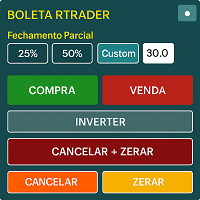
Boleta RTrader - A Boleta Mais Completa para MetaTrader 5 A ferramenta definitiva para traders que buscam precisão, agilidade e controle total sobre suas operações no MetaTrader 5.
**IMPORTANTE**: É aconselhável desabilitar no gráfico do MT5 o histórico de negociações somente quando for usar saídas parcias e precisar movimentar a ordem parcial para evitar delay. --- PRINCIPAIS FUNCIONALIDADES: EXECUÇÃO DE ORDENS **Compra e Venda Instantâneas**: Execute ordens a mercado com um único clique **

is an exit manager for trades you open yourself. It does not open positions and it does not send signals. After a manual buy or sell, it gives that trade a stop and up to six exit stages based on volatility. Three stages come from Average True Range, each with its own timeframe. Three come from completed range: daily (ADR), weekly (AWR), and monthly (AMR). Each stage can be switched on or off. Enabled stages are sorted by distance. Nearer stages trail the stop. The furthest is posted as the take
FREE

AutoTarget Guardian is a trade management utility for MetaTrader 5 that automatically sets Take Profit and Stop Loss levels for newly opened positions. Instead of calculating point distances manually or dragging order lines on the chart, the utility can set target levels based on a specified monetary amount in the account deposit currency, or by fixed points. The target levels are calculated and applied immediately when a position opens. Key Features The utility monitors positions and applies ri
FREE

Bastion Daily Guard は、悪い一日からあなたの口座を守ります。1日の最大取引回数と1日の最大ドローダウンの2つの上限を設定すると、Daily Guard は次の日次リセットまで、口座全体でその上限が守られるようにします。 仕組み 1日の最大取引回数と1日の最大ドローダウン % を設定し、OK を押して防御を有効にします 日次ドローダウンには、決済済みの取引とオープンポジションの含み損益が含まれます 入金と出金は損益として計算されません 上限は口座のすべての銘柄とすべての取引に適用されます。スマートフォンや他の EA から開いた取引も対象です 今日の枠を使うのは今日開いた取引だけです。前日から持ち越したポジションはカウントされません 上限に達したとき 口座は日次リセットまでロックされます ロック中に開かれた新しい取引はすぐに決済され、新しい待機注文はすべて削除されます ちょうど上限に達した取引はそのまま残り、すでに保有していた取引も同様です。引き続きご自身で管理できます 取引を決済しても枠は空きません。取引は開いた時点でカウントされます ロック開始時にスマートフォンへの
FREE

プロップファームの選択 あなたの財務的な可能性を発掘する準備はできていますか?Gold Diggerを今すぐ購入して、真のゴールドディガーになりましょう! Gold Digger EAの説明: よく分析されたグリッドシステムを利用して、月間4-8%のリターンを達成 概要 Gold Diggerは、XAUUSD(ゴールド)を取引するために特別に設計された高度なグリッドトレーディングシステムを使用する洗練されたエキスパートアドバイザー(EA)です。このEAは、月間4-8%の安定したリターンを提供することを目指しています。このEAは、プロのトレーダーや機関投資家のために設計されており、厳密な定量分析、適応アルゴリズム、および包括的なリスク管理戦略を組み合わせて、さまざまな市場状況での取引パフォーマンスを最適化します。 Gold Diggerは、Myfxbookによって検証された実績を誇っています。興味のある方は、以下のリンクから特定の月の詳細なパフォーマンス指標とライブアカウントの状況を確認できます。 グリッドシステムの分析 Gold Diggerの戦略の中心は、その高度に最適化されたグリッ
FREE

This is a demo version of a non-trading expert , which utilizes so called the custom symbols feature ( available in MQL as well ) to build renko charts based on historical quotes of selected standard symbol and to refresh renko in real-time according to new ticks. Also it translates real ticks to the renko charts, which allows other EAs and indicators to trade and analyze renko. Place the EA on a chart of a working instrument. The lesser timeframe of the source chart is, the more precise resulti
FREE

This is a utility panel to assist closing of open Deals. The panel has input filters to assist one select the right trades. The tool displays the number of trades to be closed as well as profits to be realized. One click close, Filter trades to be closed by: symbol, (Filter by a particular symbol in the trade terminal). magic number (If your orders are from particular EA with unique magic numbers). whether in profit, loss or All. (P/L=all trades, profiting = trades in profit, loosing = trades
FREE

### FTBP Telegram Panel - Your On-Chart Notification Center
**FTBP Telegram Panel** is not just an Expert Advisor, but a full-featured tool for traders who want to receive instant notifications about their trades in Telegram and manage the visual style of their terminal. The product is completely free!
### Key Features
* **Instant Telegram Notifications:** Get alerts for every opened and closed trade, including the ticker, volume, and financial result. * **Interactive Control Panel:** Forget
FREE

ChartControl は、手動で素早くチャートを操作するための軽量ユーティリティ・インジケーターです。キーボードのホットキーで現在のチャートの シンボル と 時間足(タイムフレーム) を切り替えられるため、マウス操作なしで素早いマーケットスキャンに最適です。 本製品は EX5(コンパイル済み) のみで配布されます。 主な特徴 Market Watch のリストを使った高速なシンボル切替 事前定義セット(M1…MN1)による高速な時間足切替 CPU負荷が最小(計算なし、描画なし) 手動変更(マウス/メニュー)時の自動同期 ホットキー A — 前のシンボル(Market Watch) D — 次のシンボル(Market Watch) W — 次の時間足(より大きい) S — 前の時間足(より小さい) 時間足の順序:
M1 → M5 → M15 → M30 → H1 → H4 → D1 → W1 → MN1 使い方 インジケーターを任意のチャートに適用 チャートを1回クリックしてフォーカスを当てる A / D / W / S でシンボル/時間足を切替 注意 シンボル切替は Market
FREE

Opening EA - Start Edition
Is a tool to trade the OpeningStrategy! The Opening EA is a semi-automated EA for MetaTrader 5! This means that the trader must actively start the EA using the Start button and stop it using the Stop button.
This EA pursues an opening strategy which, at the start of trading, e.g. on the DAX or Nasdaq, etc., opens a trading channel with predefined TP's (TakeProfit). Two pending orders with the same lot size are set at the beginning. As soon as one of the pending order
FREE

This powerful tool ensures you never miss important trading signals by providing instant Alerts whenever specific indicators generate signals. With its sleek and user-friendly interface, you can effortlessly stay on top of market opportunities. Once an alert is received, you have the flexibility to decide your next move, putting you in full control of your trading decisions.
Does not work in the Strategy Tester!
Indicator Alert Features Automatically get alerted when a chosen indicator produce
FREE
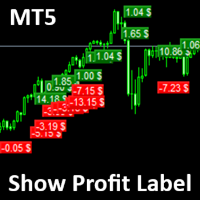
Show Label
Show your profit or loss next to the candle. This is a helpful tool if an EA don't have this feature build in. Support and questions via MQL5 product comments. For questions, updates, and to connect with other traders, join my official MQL5 group ForexEAandMore
Settings: Font color Background color for profits Background color for losses Font size Horizontal shift from candle (pixels) Vertical shift from candle high/low (pixels) Magic number filter (0 = all trades) Comment filter
FREE

SI Connectは、FX VolumeやSIEAの取引システムを利用するために、当社のサーバーへの接続を確立するユーティリティです。
SI Connectを使用するために端末を準備する技術的な手順 Web リクエストを許可し、[ Terminal Options ] -> [Subcategory Expert Advisors ] で許可された URL のリストに https://stein.investments を挿入してください。 ターミナルごとに1つのEAインスタンスを実行する必要がありますが、当社のデータセンターから最新のデータを取得するため、バックグラウンドで常に実行する必要があります。
ご質問がある場合は、プライベートメッセージを送信してください。
FREE

AIX Notifier — Telegram and Discord alerts for AIX Analyst
AIX Notifier is a free companion utility for the AIX Analyst indicator. MetaTrader 5 indicators cannot access the internet by themselves, so AIX Notifier does it for them: it delivers AIX Analyst alerts, reports and the morning overview to Telegram and Discord, with a screenshot of the chart. It does not open, modify or close trades.
What it does • Sends AIX Analyst alerts to Telegram and Discord: price in a scenario zone, objective r
FREE

visual trade planner for MetaTrader 5. It draws multi-timeframe ATR reward and stop zones on the chart so you can judge distance and payoff before you place the trade yourself. It does not send, modify, or close orders. Motive A single ATR on the chart timeframe often hides the larger and smaller ranges a trade is actually working against. This EA stacks three take-profit slices, each from its own timeframe, period, and multiplier, then places an ATR stop and an optional fixed stop beside them.
FREE

GRInvest Breakeven Manager is an MT5 trade-management Expert Advisor designed to manage existing open positions after entry. Its purpose is to automate breakeven protection, staged partial closes, trailing stops and position management while still giving the trader full manual control over individual trades. The EA does not need to open trades itself . It can manage manual trades and trades opened by other Expert Advisors according to the selected symbol, direction and magic-number filters. The
FREE

Dingji Risk Manager MT5
Formal Version V2.00
Author: Dingji [Download and Installation]
Download and install the current version from this product's MQL5 Market page or the MetaTrader 5 terminal. If the Market download is temporarily unavailable, retry from the terminal later. Do not obtain executable files from unofficial links. [Product Description]
Dingji Risk Manager MT5 is a MetaTrader 5 EA for trade planning, risk-based position sizing, order management and visual chart assistance. Enter
FREE

This tool will allow you to export the Historical data (Open, High, Low, Close, Volume) for any financial instrument present in your MetaTrader 5. You can download multiple Symbols and TimeFrames in the same csv file. Also, you can schedule the frequency of download (every 5 minutes, 60 minutes, etc.). No need to open a lot of charts in order to get the last data, the tool will download the data directly. The CSV File will be stored in the folder: \MQL5\Files .
How it works Select the Symbols t
FREE

Trade in the opposite directions with HedgeTerminal HedgeTerminal is a full-featured trading terminal inside MetaTrader 5. This is a graphic panel resembling MetaTrader 4 terminal. It allows you to track oppositely directed positions in the manner it is possible in MetaTrader 4. In other words, we can open unlimited number of positions on a single symbol even if positions are in complete or partial hedge (lock). Thus, you can maintain long and short positions simultaneously, which is impossible
FREE

Product Title: MT5 GoldSilver Trade Panel Lite Short Description:
Free manual trading panel for gold and silver. Market order execution, SL/TP setting, one-click close all, and basic daily statistics. Advanced features are available in the full paid version. Description: MT5 GoldSilver Trade Panel Lite is a free, easy-to-use manual trading panel designed for gold and silver traders. It automatically detects your broker’s gold and silver symbols and lets you place market orders quickly with
FREE

Close All 1 Sec. for MT5 Close All 1 Sec. is a professional trade management Expert Advisor for MetaTrader 5 designed to help traders manage positions quickly and efficiently. The EA provides real-time visualization of important trading levels, including Break-Even and Margin Call estimates, directly on the chart. It also features a powerful Close All button that allows traders to instantly close open positions and remove pending orders with a single click. Whether you are a scalper, day trader
FREE
MetaTraderマーケットが取引戦略とテクニカル指標を販売するための最適な場所である理由をご存じですか?宣伝もソフトウェア保護も必要なく、支払いのトラブルもないことです。これらはすべて、MetaTraderマーケットで提供されます。

取引の機会を逃しています。
- 無料取引アプリ
- 8千を超えるシグナルをコピー
- 金融ニュースで金融マーケットを探索