 MetaTrader 5
 エキスパート
 インディケータ
 ライブラリ
ライブラリ
 ユーティリティ
 ウィジェット
 ルール
ルール
YouTubeにあるマーケットチュートリアルビデオをご覧ください
ロボットや指標を購入する
仮想ホスティングで
EAを実行
EAを実行
ロボットや指標を購入前にテストする
マーケットで収入を得る
販売のためにプロダクトをプレゼンテーションする方法
MetaTrader 5版無料取引ユーティリティ - 19
 以下はMetaTrader5での取引を簡素化する取引プログラムです。ユーティリティにカーソルを合わせると、その説明と目的が表示されます。
This MQL5 indicator creates a customizable grid of horizontal lines on your trading chart. Here's what it does:
**Main Functions:** - Draws equally spaced horizontal lines across the visible price range - Supports two line types: horizontal lines or trend lines with forward projection - Automatically adjusts to price scale changes
**Key Features:** 1. **Customizable Spacing**: Set grid distance in pips (20 pips by default) 2. **Flexible Starting Point**: Auto-calculates starting price or lets
FREE

The Teaching T-INN utility was created to train architecture neural networks (T-INN) Target-IntelNeuroNet adapted to the currency market. The utility file must be placed in the scripts folder and run on the chart and timeframe on which you want to train the neural network. The result of the training will be recorded in a file, and the entire training process is displayed in the console on the chart and an additional log file. Before starting the script, it is necessary to download all the stori
FREE

CHART REVOLUTION EA - 半自動売買の革命! MT5の使いにくい標準インターフェースにうんざりしていませんか?ウィンドウの切り替えや複雑な計算はもう忘れましょう! Chart Revolution EA は、あなたのチャートをトレーダーの本格的なコマンドセンターに変える、次世代のプロフェッショナル取引パネルです! CHART REVOLUTIONが選ばれる理由 すべてを1画面で - 余分なウィンドウはもう不要
即時実行 - ワンクリックで取引を開始
スマートなリスク計算 - 証拠金に対する割合(%)でロットを自動計算
視覚的な管理 - すべてのポジションレベルをチャート上に直接表示
4つのスタイリッシュなテーマ - サイバーパンクからマトリックスまで 主な機能 取引パネル: ワンクリックでBUY/SELLポジションを発注 ロット、SL、TPの迅速な設定 クイック選択ボタン (0.01 - 1.00 ロット) プリセットSL/TPレベル (25, 50, 100, 200 ポイント) 全ポジション決済 / 利益のあるポジションの
FREE

Stop journaling trades manually. Let your terminal do it. Chart Reporter is a free Expert Advisor that turns MetaTrader 5 into a fully automated trading journal. Every position you open, scale, or close is captured in real time — complete with a chart screenshot at the moment of execution — and pushed to a private cloud dashboard you can review from any browser. No spreadsheets. No screenshots dragged into folders. No "I'll log it later" debt at the end of the week. What it does Auto-journals ev
FREE

この製品は PositionRelay TV Slave Subscriber にリブランディングされました。
MQL5 Market から PositionRelay TV Slave Subscriber をインストールしてください。この TradeEcho 出品は後継となり非表示になります。Market のタイトルは変更できません。
同じ User ID とクラウド API です。TradeEcho TV Slave Subscriber を削除し、各フォロワー口座に PositionRelay TV Slave Subscriber を取り付けてください。
関連製品:PositionRelay Master Publisher。
キーワード: コピートレード, トレードコピー, PositionRelay, リブランディング, スレーブ
PositionRelay TV Slave Subscriber は PositionRelay クラウドの TradingView ウェブフックシグナルを MetaTrader 5 のフォロワー口座にミラーします。仮想 Tradi
FREE

Japanese CCI Cross Alert EA for MT5 CCI Cross Alert EA は、 商品チャネル指数(CCI) が一般的な買われ過ぎまたは売られ過ぎのレベルに到達したときに通知する MetaTrader 5 用のシンプルなツールです。チャートを常に監視しなくても CCI の状態を確認できます。 チャートに追加すると、EA が CCI を監視し、重要なレベルをクロスしたときに ポップアップアラート を表示します。これにより、チャートをすばやく確認し、取引の可能性を評価できます。 特徴 CCI が買われ過ぎレベル(デフォルト 100)を上抜けたときに検出
CCI が売られ過ぎレベル(デフォルト -100)を下抜けたときに検出
MetaTrader 5 のポップアップアラート
すべての銘柄と時間足で使用可能
軽量で使いやすい 仕組み EA はチャート上の CCI を監視します。CCI が買われ過ぎレベルを上回るか、売られ過ぎレベルを下回るとポップアップアラートが表示されます。 CCI の期間とアラートレベルは設定で変更できます。 この EA は アラート専用ツ
FREE

Please visit = https://www.mql5.com/en/market/product/186048 for slave EA
MT4 Version = https://www.mql5.com/en/market/product/186079
Free Demo Version = https://c.mql5.com/6/1033/COPYTRADE_BIN7D.zip
User Manual : download here
Best EA Trade Copier for MT5. EA Trade Copier is a powerful and reliable trade copying solution that transfers trades from one Master account to multiple Slave accounts in real time. Whether you manage multiple trading accounts, investor accounts, VPS terminals,
FREE

Recovery Booster ついに登場 – 多くの EAオーナー が待ち望んでいたソリューションです。 お使いの EA は素晴らしいパフォーマンスを発揮しています。しかし、負けトレードの後、「今すぐ少しだけ 大きめのロット で取引できれば完璧なのに」と思うことがよくありませんか?なぜなら、次の取引は高確率で利益になるからです。
「課題のある」EAでのリアル運用パフォーマンス: 多くのEAはバックテストでは完璧に見えますが、 実際のドローダウン では苦戦します。Recovery Boosterは現在、これらの一番人気のある戦略の1つが 深い落ち込み を管理し、そこから回復するのをサポートしています。 結果はこちらでご確認いただけます: Recovery Boosterを使用したリアルシグナル Recovery Booster は、優れたEAが損失からより早く回復できるように支援する MetaTrader 5 用のトレーディングユーティリティです。 メインEA を監視し、 ドローダウン 期間中に、選択した ロット乗数 で追加のポジションをオープンします。 しかし、それだけではありませ
FREE

MetaTrader 5 向けのプロフェッショナルなポジション計画およびロット管理パネル Position Control Suite は、MetaTrader 5 用の視覚的な取引計画パネルです。 チャート上で直接注文を準備し、Stop Loss の位置を設定し、口座通貨ベースのリスク額から ポジション量を自動計算するために設計されています。 基本的な考え方はシンプルです。許容するリスク額を入力し、Stop Loss の距離を設定すると、 パネルがその取引計画に必要なロットサイズを計算します。これにより、注文準備をより明確で一貫したものにできます。 主な機能 口座通貨ベースのリスク入力: 取引で許容する金額を入力できます。 自動ロット計算: リスク額と Stop Loss 距離からポジション量を計算します。 視覚的な価格レベル: Entry、Stop Loss、Take Profit をチャート上に表示します。 成行注文モード: BUY または SELL に応じて正しい Bid または Ask の実行価格を使用します。 指値・逆指値注文モード: Buy Limit、Buy Stop、
FREE
If you use several charts open at the same time, you know how boring it is to apply formats to each chart individually. This script can change all open charts using a single command. Parameters: 1 - Choose symbol to put on charts: apply the selected symbol to all charts. If "current", it does not change the symbol; 2 - Choose timeframe or leave empty: apply the selected timeframe to all charts. If "CURRENT", it does not change the timeframe; 3 - Apply template to the charts: If true, apply the t
FREE
O Produto RFOC Variação Diária apresenta a função de indicar no gráfico a variação, em porcentagem, do preço em relação ao preço de fechamento do dia anterior.
O indicador permite configurar 100% da coloração para variações de alta, baixa e neutra (0.00%).
O painel com a apresentação da variação diária do preço fica fixada na parte superior do gráfico, e se ajusta automaticamente no centro da janela.
FREE

This indicator allows to know the remaining time before the closing of the candle. It works on every timeframe. It is very usefull when your trading strategy depend of the close or the open of a specific candle. So use it like you want. Don't forget to leave a comment or a request for a EA or an indicator. Also spread it to your friends and don't hesitate to visit my profile to see others tools.
FREE

mBer is a non-repainting scalping indicator purpose-built for EURUSD on the M5 chart . Instead of relying on generic moving averages, mBer calculates rolling Upper Quartile (Upper Q) and Lower Quartile (Lower Q) levels from recent price data — statistical boundaries that mark where price is trading relative to its own short-term distribution. When price pushes toward the Upper Q, it signals a statistically stretched, potentially overbought zone; when price pushes toward the Lower Q, it signals a
FREE

Signal Anywhere is an advanced version of Panel Anywhere , featuring an additional panel called Signal panel. This panel allows you to copy trades from a Signal Anywhere Provider to a Signal Anywhere Subscriber seamlessly. With Signal Anywhere , you can view market symbols and copy signals simultaneously without the need to switch between Expert Advisors (EAs). Features of the Signal panel: Local and internet-based trade copying Searchable, request, and acceptance functionalities Support for mu
FREE

Limit Open Positions EA
"Limit Positions EA is a powerful utility tool designed to provide strict control over the number of open positions in your trading account. This Expert Advisor continuously monitors your trading activity and ensures that no new positions are opened once the specified limit is reached. Ideal for traders seeking to mitigate overexposure and manage risk effectively, Limit Positions EA works seamlessly across all symbols and timeframes. Whether you're managing a large port
FREE

VYXAXIS Dispatcher is a free companion utility for Vyxaxis Tick. It processes WebRequest and supported Push notifications independently from the main Vyxaxis Tick chart workflow. Requires Vyxaxis Tick. VYXAXIS Dispatcher does not generate trading signals, execute trades, or provide a trading strategy. It is designed to separate notification delivery from the main tick-chart processing workflow, helping reduce the possibility of network-related delays affecting Vyxaxis Tick during periods of high
FREE

# The Position Monitor — Real-Time Trade HUD for MT5
---
### Overview
**The Position Monitor** is a lightweight, real-time position display script for MetaTrader 5. It provides a clean, customizable heads-up display (HUD) directly on your chart, showing **live trade data**—symbol, direction, volume, open price, SL/TP, and floating profit/loss—updated continuously without delay.
No terminals, no clutter, just **essential trade info in your face, always**.
******************************
FREE

Equity Aler t can help you send notifications to your personal Telegram when your account equity reaches/ drops below a preset value. Additionally, you can check your MT4/5 account info anytime from your Telegram by simple command: /check . Get more free useful EAs here !
HOW TO SET UP? * Get inputs for EA: - Telegram Bot Token: Create a Telegram bot by @BotFather , and save your Bot Token. Find your bot by username & press "start". - Telegram User ID: Use your User ID by chatting
FREE
This indicator monitors the vital constants of your trading account to keep it healthy and away from excessive risks. It monitors all trades, absolute exposure, account floating point and leverage currently in use, using different color codes for your interpretation. [ Installation Guide | Update Guide | Troubleshooting | FAQ | All Products | Get Help ] Amazingly easy to understand The indicator is clean and simple It calculates exposure by pairs and currencies Keep your used leverage cont
FREE

概要 このEAは、ローソク足の実体をクリック(TradingViewと同様)すると、チャート上にエントリー、ストップロス、テイクプロフィットの3本のラインを作成します。 これらのラインはマウスでドラッグできます。 取引リスクはEAの入力タブでパーセンテージ、固定ロットサイズ、または固定ドル額で設定可能です。 報酬/リスク(RR)比はチャートの右上隅に表示されます。 新機能追加 リスクフリーオプション トレーリングストップ機能 ニュースフィルター EAにはニュースフィルターが含まれており、ニュースの重要度とユーザーが定義した時間枠(例:ニュース前後N分)に基づいて制限を適用します。この時間枠内では: 新規ポジションは開かれません オープン中のポジションはクローズ可能です ペンディングオーダーは制限可能です 重要な注意事項 ライブ運用前に必ずデモ口座でEAをテストしてください。 このEAはMetaTrader 5用に設計されています。 ニュースフィルターを機能させるには、MT5の経済カレンダーを有効にし、安定したインターネット接続を確保してください。 提案 今後の
FREE

ProTrader Command Professional Trading Analytics & Risk Management System Transform your MetaTrader 5 into a professional trading platform with real-time analytics, automated risk management, and performance tracking. Core Features Real-Time Trading Dashboard Professional MT5 Interface Enhancement Live account metrics displayed directly on your chart Performance indicators with color-coded status alerts Position overview showing all trades at a glance Risk status monitoring with visual warnings
FREE

Stop journaling your trades by hand. Let them journal themselves. Every serious trader knows the truth: the traders who review their trades outperform the ones who don't. And almost nobody actually does it — because manually logging every entry, exit, SL, TP, and P&L into a spreadsheet is tedious enough that it quietly dies after week two. War Room Journal kills that excuse. This is the official connector between your MetaTrader terminal and the War Room trading journal on Telegram (by @Ash_TheT
FREE

Description Smart SL/TP Modifier Pro is a professional utility designed to help traders easily manage Stop Loss (SL) and Take Profit (TP) levels directly from their MetaTrader 5 chart.
It provides interactive on-chart control lines and intuitive buttons for quick modification of all active orders with just one click. This tool is especially useful for traders who manage multiple positions manually but want to ensure consistent and fast SL/TP adjustment. Main Features Modify all open trades
FREE

EV Prop Protector is a set-and-forget MT5 utility designed for prop firm traders. Attach it to any chart and it silently monitors your account 24/7, closing all positions and pending orders the instant you breach any configured limit. Every module can be turned ON or OFF independently. DRAWDOWN PROTECTION • Daily loss limit — closes everything when today's equity loss reaches X% • Max drawdown limit — closes everything when total drawdown from starting balance (o
FREE

SmartGuard Trading Journal helps MetaTrader 5 traders build an automatic local trading journal without manual input, external servers or trading actions.
The utility records account snapshots, risk metrics, open positions, pending orders, deal history and real-time trade transactions into local CSV files. These records help traders review equity changes, margin pressure, floating exposure, broker costs and real trading behavior over time.
SmartGuard Trading Journal does not open, close or modi
FREE

Manual Trading Assistant is a professional EA designed for manual traders who want institutional-level trade management without losing control. This tool does NOT open trades automatically - you remain in full control of your entries. Once you open a position manually, the EA takes over with advanced features: automatic TP/SL placement based on ATR or fixed pips, dynamic trailing stop that adapts to volatility, break even protection to eliminate risk after initial profit , partial close
FREE

ExpertGain Risk Manager MT5 is a professional MetaTrader 5 utility designed to help traders manage risk, protect trading capital, and improve trading discipline. It is built for manual traders, semi-automated traders, prop-firm traders, forex traders, gold traders, and anyone who needs better control over daily losses, drawdown, trade exposure, and open positions. This utility does not open trades automatically and does not provide buy or sell signals. Instead, it focuses on responsible trade ma
FREE

this is a Demo version of product. its limit of 3 trade at a time. when you buy full version try to click here https://www.mql5.com/en/market/product/168370
The Core Philosophy: Ultra-Fast Execution In the world of scalping, milliseconds matter. This configuration utilizes a Fixed Lot Size strategy combined with lightning-fast keyboard triggers to ensure you never miss a price level.
CandleWise Trade Logic This feature restricts trade frequency to prevent "over-trading" during volatile moves
FREE

A fast, clean on-chart trading panel for manual traders. Open market or pending grid orders directly from your chart, manage SL/TP, lot size, trailing, spread and margin — without using the order window. Technical Features One-click BUY / SELL Live Bid / Ask inside buttons SL / TP input (Pips & Points) + quick +/- adjustment Trailing Stop control Pending Grid (Buy/Sell Limit & Stop) Step distance (Pips/Points) Order count Lot multiplier Real-time margin estimate (uses account currency) Live spre
FREE

Position Closer is advisor used to close all orders when the profit will cross specified value either above or below. You can close all orders with one button click.
On panel on chart you have options: Deactivate after close - If Deactivate after close is checked the advisor will disable Close above profit and Close below profit options after orders are closed either on crossing the profit or on hitting the CLOSE ALL button. Close above profit - If Close above profit is checked, the advisor wil
FREE

Aurum Risk Sentinel は MetaTrader 5 向けのリスク管理ユーティリティです。サーバー日付の期間中、口座のエクイティと対象の保有状況を監視します。これは取引戦略ではなく、取引を執行することもありません。 ロジック 日付開始時のエクイティと、最高値となったエクイティの推移を記録します。 現在の日次損失と、保存した最高値からのドローダウンを算出します。 管理対象の建玉数をカウントします。 設定された上限に到達した場合、または管理対象の建玉数が上限を超えた場合、ロック状態に入ります。 ロック状態になった際は、入力設定に応じて該当する建玉の決済と、該当する指値・逆指値注文の取消を試みます。 状態を口座ログインに対応するターミナルのグローバル変数に保存し、再起動後に保存された値を確認します。 チャート上にエクイティ、日次損失、最高値からのドローダウン、建玉数、状態を表示します。 デフォルト入力 最大日次損失: 3.0% 最大ドローダウン(最高値比): 8.0% 最大建玉数: 6 ロック時に建玉を決済: 有効 ロック時に指値・逆指値注文を取消: 有効 マジックナンバーフ
FREE

Gold Precision Execution Panel V5.3 The Ultimate Risk-Controlled Trading Dashboard for XAUUSD Gold Precision Execution Panel is a professional-grade trading tool specifically engineered for gold traders who prioritize speed, accuracy, and rigorous risk management. In the fast-moving XAUUSD market, one mistake can be costly; this panel eliminates human error by automating complex lot calculations and providing a clear visual preview of every trade before execution. Key Features Fixed Risk Managem
FREE

This is a decorative utility that replaces the standard marks of completed deals with "Kingdom Come: Deliverance" game style markers.
In addition to the graphic display of the price and time of the transaction, the notes also contain a textual representation of the transaction volume. Running utility Drag the utility from the Navigator window to the desired graph. The utility does not use input parameters and does not require configuration. All trademarks available on the chart will be replaced
FREE

Live Chart Viewer – Real-Time Trading Chart Anywhere Live Chart Viewer lets you view and share your MetaTrader 5 chart in real time from any modern device.
Whether you are away from your trading desk, monitoring trades remotely, or sharing your analysis live, this tool keeps you and your audience connected to the market instantly. Notice: Charting library by TradingView Demo: https://chartviewer.live/view/ElVTwx9Lf5w • Key Features Real-time chart updates
Price movements, drawings, and char
FREE

Your limits, enforced — not just displayed. Most funded accounts are not lost to a bad strategy. They are lost to one bad session. A bad hour, after a bad morning, when the daily limit was already half gone and nobody was counting. This counts. It sits on your chart, watches the two limits that end most evaluations, and refuses to send an order that would break one. In 30 seconds It is free, and it is not a trial. No expiry, no account limit, no countdown, no pop-up, nothing that switches off a
FREE

Average Price Calculator is an MT5 trade management utility for calculating the volume-weighted average entry price and maintaining a common Take Profit for multiple positions opened on the same symbol and in the same direction. BUY and SELL positions are processed as separate baskets. The utility calculates the average entry price according to the volume of every position and sets a common Take Profit at the specified distance from that average. It can also calculate a suggested additional volu
FREE

Candle Timer displays a real-time countdown to the next candle close, directly on your chart. Perfect for traders who need precise timing for entries, exits, or news events — without constantly watching the clock. FEATURES
• Millisecond precision countdown (100ms refresh via EventSetMillisecondTimer)
• Works on all timeframes: M1 through Monthly
• Colour warning system — timer changes colour as the candle nears close → Orange
FREE
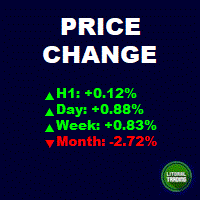
This is an informant indicator, very simple. It shows how much the price has chanded in percentage in certain period (month, week, day and actual period). It is discreet and small, does not visually posslute the chart. If your MT is not on portuguese idiom the indicator will automatically change to english. Check out our most complete tool for the market, the Trade Panel: https://www.mql5.com/en/market/product/42658 If you have any suggestion or find any bug, please, contact us. Enjoy!
This is
FREE

Imagine what results you could achieve in your manual trading if you had a tool that notifies you of a possible price reversal for all the symbols you are interested in at the same time (futures, stocks, forex or cryptocurrency)?
VSA screener is just the right tool. It was created for traders who value their time and make their own trading decisions on opening or closing a position. The software monitors the presence of trading patterns on the preselected tickers under several timeframes (up to
FREE

Reflex Panel - 半自動売買の革命! MT5の使いにくい標準インターフェースにうんざりしていませんか?ウィンドウの切り替えや複雑な計算はもう忘れましょう! Chart Revolution EA は、あなたのチャートをトレーダーの本格的なコマンドセンターに変える、次世代のプロフェッショナル取引パネルです! CHART REVOLUTIONが選ばれる理由 すべてを1画面で - 余分なウィンドウはもう不要
即時実行 - ワンクリックで取引を開始
スマートなリスク計算 - 証拠金に対する割合(%)でロットを自動計算
視覚的な管理 - すべてのポジションレベルをチャート上に直接表示
4つのスタイリッシュなテーマ - サイバーパンクからマトリックスまで 主な機能 取引パネル: ワンクリックでBUY/SELLポジションを発注 ロット、SL、TPの迅速な設定 クイック選択ボタン (0.01 - 1.00 ロット) プリセットSL/TPレベル (25, 50, 100, 200 ポイント) 全ポジション決済 / 利益のあるポジションのみ決済 省スペ
FREE

Equity monitor
This is a simple means change informer. I wrote it for myself, maybe someone will need it...
1. Displays the change in funds for the day. Every day, when the terminal is first launched, it remembers the current funds and monitors changes throughout the day.
2. The first day of the month, well remembers the money and, within months, to monitor changes.
3. Well, it displays the profit of the open position.
To work, you need to create 4 global variables: gvarEqityDay , gvarEq
FREE

ApexForge Quote Paused Notification is a lightweight monitoring utility designed for MetaTrader 5 that detects when market quotes stop updating and immediately alerts you when abnormal quote interruptions occur. Whether caused by server issues, network disconnections, market closures, or temporary liquidity interruptions, the tool helps traders recognize quote freezes before they lead to missed opportunities or unexpected trading behavior. A notification is also generated once normal price upda
FREE

Proton Trade Assistant MT5
OVERVIEW Proton Trade Assistant MT5 is a utility for MetaTrader 5 that provides streamlined position management functions accessible directly from the chart. This tool is designed for traders who manage positions manually and require faster execution of closing and risk management operations.
PRIMARY FUNCTION The utility provides one-click access to commonly used position management operations that normally require menu navigation in MetaTrader 5. All operations exe
FREE

Обычная трейдец-сетка, но не имеет явного диапазона. Вместо диапазона, в настройках устанавливаются стоп-лоссы. Закрытие происходит по тейк-профиту, так же устанавливаются в настройках. Робот может торговать в любом направлении, как вверх или вниз, так и в обоих направлениях. Робот не проверяет баланс счета, а потому имеет очень высокий риск. По умолчанию стоят настройки для EURUSD пары (не самые лучшие). Рекомендуемый минимальный депозит $200. Имеется вторая версия в которой добавлены дополните
FREE

Having a chart window that has multiple pairs (symbols), timeframes, and indicators displayed simultaneously can be quite advantageous. This indicator will allow traders to place multiple chart objects in a sub window of the main chart window. The indicator is capable of adding all available MT5 indicators and custom indicators to the existing chart. The list and parameters of the indicators are for reference at: https://www.mql5.com/en/docs/indicators
Input parameters Name
Example
Indicator
FREE

This reliable, professional trade copier system is without a doubt one of the best on the market, it is able to copy trades at very fast speeds from one master account (sender) to one or multiple slave accounts (receivers). The system works very fast and mimics the master account a full 100%. So changing stop losses, take profits, pending orders on the master account is executed on the slave accounts too, like each other action. It is a 100% full copy (unlike many other copiers who only copy ma
FREE

RoundNum Readme (Traders Club)
特徴: このツールはDOWやNIKKEIなど500や1000ポイントがラウンドナンバーの 指数を取引する際に表示するように開発しました。 もちろんメジャー通貨でも表示はされます。
更新頻度を制限しているのでチャート表示が遅くなるということは ありません。
XMでDOWを取引される場合、Main Levelsを10000 Sub Levelsを5000にしてください。
各パラメータの説明: Number to display lines:表示するライン数を設定します。 Main Levels:メインレベルをポイントで指定します。 Main Line Color:メインラインの色を設定します。 Main Line Style:メインラインで使用されるラインを設定します。 Show Sub Lines:サブラインを表示するか設定します。 Sub Levels:サブレベルをポイントで指定します。 Sub Line Color:サブラインの色を設定します。 Sub Line Style:サブラインで使用され
FREE

Your risk, sized before the trade. Set risk once - percent of balance, percent of equity, or a fixed amount - and the panel computes the lot for every trade from your stop distance. Drag the ENTRY, SL and TP lines on the chart; each carries a live label with price, money at risk and R multiple, with shaded risk and reward zones. An entry line placed away from price becomes a pending order. Orders you can account for. Every order, market or pending, is written to a durable journal before it is se
FREE

TradePanel — All-in-One Trading Panel for MT5 TradePanel is a compact, draggable on-chart control panel for fast manual trading. Open and close positions, read live price and P&L, and switch symbols — all without leaving the chart or opening an order ticket. Built on CTrade with retry logic on every close, size-step/min/max-aware lot handling, and per-chart position memory, it is designed to be a safe, reliable daily driver — not just a demo panel. Full step-by-step guide (every button explai
FREE

FastCloser - Simple Profit-Taking Utility Description: FastCloser is a lightweight tool that automatically closes all open positions when total profit reaches a predefined target (in USD). Ideal for profit-taking without manual market monitoring. How It Works: Calculates the combined profit of all active trades. If profit ≥ TargetProfit (e.g., $100), it instantly closes all positions . Works as a one-click script (manual execution) or continuously as an Expert Advisor (auto-trading). Key Featur
FREE

RMI • Position Size Pro V1.3 Precision Risk Management & Advanced Position Sizing for MetaTrader 5 Overview RMI • Position Size Pro is a professional-grade trading tool designed to give traders full control over risk, execution, and trade management directly on the chart. Built for precision and simplicity, this tool calculates optimal position sizes based on your defined risk parameters and provides an integrated dashboard to manage trades efficiently in real time. Whether you are a discretion
FREE

Xpert Trade Copier copies open positions from one MetaTrader 5 account to another on the same computer or VPS. Attach it once as Sender on the source account and once as Receiver on the destination account, give both the same channel name, and the Receiver mirrors every position with the lot size, symbol and safety limits you choose. No DLL, no internet connection, no extra program. It is built around one rule: a trade must never be copied twice. The Sender publishes the full state of its positi
FREE

JVH Protection – Universal Prop Firm Risk Manager (MT5) Broker-Time Reset | Daily Max Loss | Overall Drawdown | Trailing Lock | Full Account Guard JVH Protection is a professional-grade equity protection tool for MetaTrader 5, built for prop firm traders, EA users, and anyone who wants strict automated risk control. This EA acts as a real-time risk firewall for your entire MT5 trading account. Key Features Full Account Protection Monitors all symbols Covers all magic numbers Works with m
FREE

Closes your positions and deletes your pending orders when the day's equity drawdown reaches your limit, and closes anything you open for the rest of that day. FEATURES On breach: closes every open position, deletes pending orders, locks the day. Panel: drawdown percentage, equity, state. HOW TO USE IT 1. Enable Allow Algo Trading. 2. Attach it to a chart and set the loss and warning levels. 3. Choose the breach actions. PARAMETERS InpDailyMaxLossPercent, InpDailyWarningPercent, InpAutoCloseOnBr
FREE

通貨の力は通貨の強さを分析します。 これにより、トレンドの開始時に市場に参入することができます。 製品は、あなたの取引システムを補完し、購入または販売の決定を行う際のフィルタとして機能します。 検光子のパネルは単に押し、引っ張ることによって容易に動かすことができる。 入力パラメータの説明: ソートタイプ-ソート順。 フォント名-フォントの名前。 フォントサイズ-フォントサイズ。 フォント間隔-行間隔。 プログレスバーの幅-プログレスバーの幅。 テキストの色-テキストの色。 Back Color-背景色。 背景の透明度-透明度。 責任の免責事項: また、お金の管理を忘れて損失を止めるべきではありません。 レバレッジを使って外国為替やその他の金融商品を取引することは非常に危険であり、重大な損失につながる可能性があります。 市場での取引操作を行うことは、すべての人に適しているわけではありません。 質問や疑問がある場合は、すべてのリスクを認識し、独立した財務アドバイザーの助けを求める必要があります。 取引システムの補助要素としてユーティリティを使用することをお勧めします。 ユーティリティを購入
FREE

SmartRescuer is an advanced institutional-grade trading co-pilot designed to rescue stuck manual positions, manage floating drawdown, and lock basket profits automatically.
Key Features: - Anti-Whipsaw Breakout Engine: Uses Donchian Channels & ATR pullback retests to avoid false breakouts. - Smart Recovery Strategies: Supports Zone Hedging, Pullback Averaging, and Smart Hybrid execution. - Partial Loss Scraping: Gradually unwinds the worst losing orders using floating recovery profits. - Compl
FREE

The Co-Pilot is a simple trade management system designed to be the quickest way from your strategy to the market. It is optimized for single trade setups that might be short, medium or long term. The program allows you to set your trade setup directly from the chart using graphical objects, set your risk apetite and even provides oppurtunity for partial closes. It also has a built in alert system that keeps you informed on the actions taken by the copilot when youre offline.
It is designed to b
FREE

Why You Need VLine Alarm
Stop Missing Trade Setups.
News events, session opens, key timeframes - they all happen whether you're watching or not. VLine Alarm keeps you on point.
Set It Once. Forget It.
Drag a line. Walk away. Get alerted. No babysitting charts. No missing opportunities because you switched timeframes or stepped away.
The Problem It Solves:
You know that moment when you realize the news already hit 5 minutes ago? Or you miss the London open because you were analyzing the daily cha
FREE

The PromptGen AI is a utility that generates AI prompts that are specific to your account, trading history and market context. WORKS WITH ALL LLMs. No more generic trading advice from AI agents, get custom trade ideas, trade management recommendations and even historical trade analytics and improvement advice that is relevant and specific to you, using expertly designed prompt templates that use your account details like Balance, Equity, Net Exposure, Price Quotes, Historical Trades and even tra
FREE

OnBoard stats is a panel that show in a single view a lot of usefull information about working orders and trading account. It has 4 different sub-panels (from left to right): Symbols order statistics : it can be found symbols for which there are orders (market or pendings). Symbol with pendings are colored with "Pendings color". Clicking on a specific symbol row, chart will be changed to that symbol. Current symbol statistics : informations about the "current" symbol, the one which is opened in
FREE

SimPHash is a free script that automatically generates ultra-fast conversion functions from a string to a value: it can be a simple type (integer, double, ulong, etc.) or an index into your own array or struct when the value you need is more complex. Instead of using a HashMap, a linear array with a search, or an endless chain of if / switch, SimPHash builds a Perfect Hash table at design time: a function that resolves each known key in a handful of arithmetic operations and a single array acces
FREE

Elevate your trading with this Metatrader 5 expert – the Position Volume Calculator. This tool takes the guesswork out of risk management and profit optimization. Simply input your desired stop-loss points with dragging the stop-loss line, and let the expert advisor compute the optimal position volume for your trade. Plus, with customizable reward ratios, it's easier than ever to set your take-profit points for maximum gains. Trade with confidence and precision. Try the Position Volume Calculat
FREE

The VR Orders History script is designed to upload a trade report to a csv file. This format is intended for additional analysis of trading history in programs such as EXCEL, Openoffice, and Libreoffice. Thanks to the script, it is now much easier for a trader to analyze their trading history. The program facilitates the analysis of the trading history for the MetaTrader 5 terminal. The trader sees structured trading. The entire report is based on the following principle: Position > Order on the
FREE

Panel Trade Basic: Speed and Total Control
It is the ultimate tool for high-speed manual trading. Trade directly from the chart with a single click or thru keyboard shortcuts, eliminating unnecessary menus.
Key Functions
Instant execution: Market and Pending Orders (Limit/Stop). Quick management: Total control of Batch, SL, and TP instantly. Pro Interface: Floating, draggable panel and real-time P&L/Margin visualization. Keyboard Shortcuts (Hotkeys)
C / V: Buy / Sell. X / Z: Close all / Cle
FREE

Product Overview The Simple Telegram Copy Trader is a FREE unified Expert Advisor that combines both Master and Slave functionality in a single EA with easy mode switching. This simplified version focuses on OPEN TRADES ONLY , making it perfect for basic copy trading setups without the complexity of advanced features.
Get professional-grade copy trading with complete lifecycle management: Telegram Signal Broadcaster MT5 (Master)
Telegram Signal Subscriber MT5 (Slave) Key Features Unified Des
FREE

ProTrade Panel – Speed, Precision, Professionalism Master the markets with the ultimate MT5 assistant. Are you tired of the slow, clumsy default execution in MT5?
Do you struggle to manage multiple orders during high volatility?
ProTrade Panel is designed for serious manual traders. It combines One-Click Execution, Breakout Pending Orders, Bulk Closing, and Visual Risk Management into one sleek, floating interface. Key Features Smart Drag & Drop : Long-press the header to move th
FREE

Free multi-pair trend scanner / dashboard for MT5 — 12 major Forex pairs, M15 to D1. The scan and ranking work out of the box, no API key needed. The optional AI breakdown uses your own Anthropic API key.
MarketEnvNavi — AI Market Scanner for Discretionary Traders What this tool does MarketEnvNavi scans 12 major currency pairs in real time, ranks them by how well conditions are aligned, and lets you ask Claude AI for a plain-English breakdown of the top pairs — including specific price levels,
FREE

FXCompute Trade Copier Bridge for MetaTrader 5 FXCompute Trade Copier Bridge is a lightweight, ultra-low latency execution engine that connects your MetaTrader 5 terminal directly to your FXCompute cloud trade copying network with zero third-party software required. Overview FXCompute Trade Copier replicates trades across your accounts in real time. Operating alongside dedicated 24/7 cloud infrastructure, it handles position opens, modifications (Stop Loss and Take Profit), partial closes, and m
FREE

SIMPLE AND QUICK CHART CLEANUP SCRIPT - FREE FOR ALL - EASY TO DRAG AND DROP ONTO THE CHART - A MUST HAVE IN MY EYES
Everybody loves to draw on a chart! But cleaning is nobodies favor. Most of the time it will be faster to dump all and redraw the important part. Repetition makes you good! ALWAYS think about that! KEEP IT GROWING, ;-) I wish you a good day, Traders!
If you need something, send me a message. Best wishes to you from Vienna!
FREE

Try turning dust to gold with Reverse copier! Unprofitable EA or strategy can become profitable with reversing the direction of it's trades. As of now only MT5 → MT4 bridge is available, new functions will be added accordingly. EA's that work best with Reverse trade system is single-shot or scalping EA's.
How it works:
When a trade is executed on Master account, Reverse copier sends special log to the common txt file with a command to "open/close, buy/sell, symbol, volume...etc". Reverse slave
FREE
MetaTraderマーケットは、他に類のない自動売買ロボットやテクニカル指標の販売場所です。
MQL5.community ユーザーメモを読んで、取引シグナルのコピー、フリーランサーによるカスタムアプリの開発、支払いシステムを経由した自動支払い、MQL5Cloud Networkなど、当社がトレーダーに対して提供するユニークなサービスについて詳しくご覧ください。

取引の機会を逃しています。
- 無料取引アプリ
- 8千を超えるシグナルをコピー
- 金融ニュースで金融マーケットを探索