Trades Manager MT5

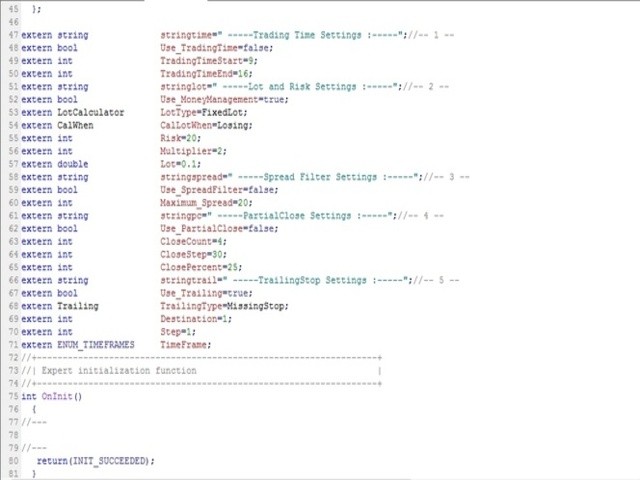
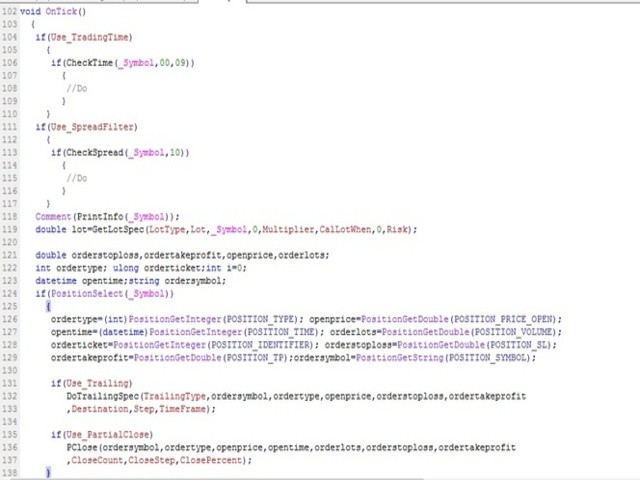
The library is dedicated to help manage your trades, calculate lot, trailing, partial close and other functions.


Lot Calculation

  • Mode 0: Fixed Lot.
  • Mode 1: Martingale Lot (1,3,5,8,13) you can use it in different way calculate when loss=1 ,when profit=0.
  • Mode 2: Multiplier Lot (1,2,4,8,16) you can use it in different way calculate when loss=1 ,when profit=0.
  • Mode 3: Plus Lot (1,2,3,4,5) you can use it in different way calculate when loss=1 ,when profit=0.
  • Mode 4: SL/Risk Lot calculate based on stop loss and risk ex balance=1000 -risk =10 -SL=20 then loss is 100$ lot will be 0.50.
  • Mode 5: Based On Balance Lot calculate based 0.01 for each 1000$.


Partial Close

  • close_count: apply partial close X times.
  • close_step: apply partial close each X pips in profit.
  • close_percent: close X% Percentage of the lot size is counted from initial lot size.


Trailing

  • Mode 0: Previous High/Low Trailing.
  • Mode 1: Break Even.
  • Mode 2: Normal Trailing Mode (Stop/Step).
  • Mode 3: Missing Stop place SL to all order if you miss that.
  • Mode 4: Missing TakeProfit place TP to all order if you miss that.


Other tools

  • CheckSpread: SpreadFilter return true / false.
  • PrintInfo: return simple information as string to use it in comment.
  • CheckTime: Time Filter return true / false with information on chart.
  • CloseAtPerProfit: close all order when x% profit reach.
  • CloseAtProfit: close all order when x$ profit reach.
  • CloseAtPerLoss: close all order when x% loss reach.
  • CloseAtLoss: close all order when x$ loss reach.

All functions allowed you to control, call any symbol not just chart symbol.

All functions design to detect any error while process and retrying until done.


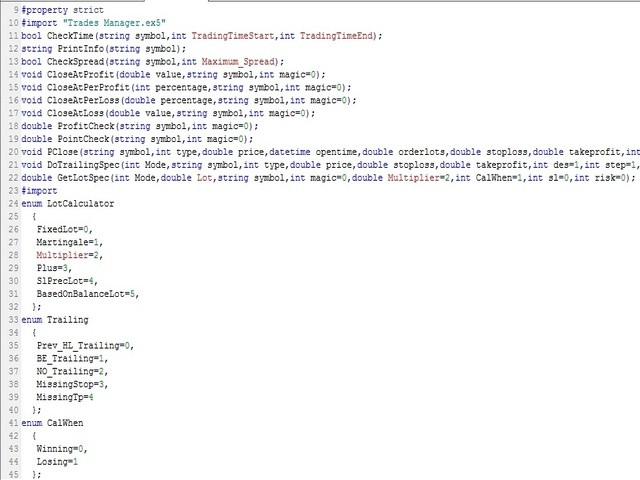
Usage

#import "\\Market\\Trades Manager.ex5"
bool CheckTime(string symbol,int TradingTimeStart,int TradingTimeEnd);
string PrintInfo(string symbol);
bool CheckSpread(string symbol,int Maximum_Spread);
void CloseAtProfit(double value,string symbol,int magic=0);
void CloseAtPerProfit(int percentage,string symbol,int magic=0);
void CloseAtPerLoss(double percentage,string symbol,int magic=0);
void CloseAtLoss(double value,string symbol,int magic=0);
double ProfitCheck(string symbol,int magic=0);
double PointCheck(string symbol,int magic=0);
void PClose(string symbol,int type,double price,datetime opentime,double orderlots,double stoploss,double takeprofit,int close_count,int close_step,int close_percent);
void DoTrailingSpec(int Mode,string symbol,int type,double price,double stoploss,double takeprofit,int des=1,int step=1,ENUM_TIMEFRAMES TF=PERIOD_CURRENT);
double GetLotSpec(int Mode,double Lot,string symbol,int magic=0,double Multiplier=2,int CalWhen=1,int sl=0,int risk=0);
#import

Feel free to give your opinion about the tool .... and please inform me of any improvements needed to be done.

Happy Trading (:
Prodotti consigliati
License Manager EA
Timothy Chuma Ifiora
License Panel Integration Guide This EA uses a license panel system to verify usage before running trading logic. File Placement Place LICENSE_SINGLE.mqh in the same folder as your EA .mq5 file. If using a subfolder, update the #include path in the EA file. Integration Steps Include the License File #include "LICENSE_SINGLE.mqh" Initialization (OnInit) Call the license check when the EA starts: VerifyLicense(); Deinitialization (OnDeinit) Clean up license resources when EA is removed: HandleLi

Pivot Hunter EA
Daniel Naranjo Morales
Pivot Hunter EA Pivot Hunter EA è un robot di trading specializzato, sviluppato esclusivamente per la coppia di valute   CADJPY   sul timeframe   H1 . La sua strategia è progettata per identificare potenziali punti di svolta del mercato, analizzando l'azione dei prezzi e il momentum. Il nucleo della logica dell'EA è un sistema di conferma multi-indicatore. Combina i segnali di indicatori classici, tra cui Parabolic SAR, Awesome Oscillator (AO), Relative Strength Index (RSI) e Average True Range
Goliath Mt5
Nicolokondwani Biscaldi
Goliath MT5 - scalper fully automated Expert Advisor for medium-volatile forex markets P roperties: The Library trades 10 currency pairs (USDCHF, EURCHF, EURGBP, AUDUSD, USDCAD, GBPUSD, EURUSD, NZDUSD, CADCHF, EURAUD, EURCAD, AUDJPY) The Library does not use martingale The Library sets a fixed stop loss and take profit for all orders The Library only trades a user input volume The Library can be installed on any currency pair and any timeframe Recommendations: Before using on a real account, t
Sarah green
Thabang John Wotsa
Sarah Green EA v3.5 - Technical Specifications General Information EA Name:   Sarah Green EA Version:   3.5 Platform:   MetaTrader 5 (MQL5) Trading Mode:   Fully automated Symbol Compatibility:   Any forex pair (configurable) Timeframes:   Configurable via input parameter Risk Management Features Position Sizing: Multiple risk level presets (20%, 40%, 60%, 80%, 100%) Dynamic lot calculation based on account balance Broker lot size normalization and validation Margin requirement checking Loss Pro
The Catalyst EA
Daniel Naranjo Morales
The Catalyst EA The Catalyst EA è un sofisticato robot di trading sviluppato per la piattaforma MetaTrader 5. È stato creato specificamente per il trading sulla coppia di valute   AUDUSD   con   timeframe H1 . L'EA impiega una strategia multi-indicatore che mira a identificare e capitalizzare su potenziali inversioni e correzioni di mercato. Un punto focale della sua progettazione è una solida gestione del rischio, caratterizzata da un dimensionamento dinamico dei lotti e da molteplici livelli d
Binance Library
Hadil Mutaqin SE
5 (1)
The library is used to develop automatic trading on Binance Spot Market from MT5 platform. Support all order types: Limit, Market, StopLimit and StopMarket Support Testnet mode Automatically display the chart on the screen Usage: 1. Open MQL5 demo account 2. Download Header   file and EA sample   https://drive.google.com/uc?export=download&id=1kjUX7Hyy02EiwTLgVi8qdaCNvNzazjln Copy Binance.mqh to folder \MQL5\Include Copy  BinanceEA-Sample.mq5 to folder \MQL5\Experts 3. Allow WebRequest from MT5
Introducing "TG Risk Service Manager" — your comprehensive toolkit for swift and precise risk management and lot size calculations in the dynamic world of trading. Designed to streamline development processes and enhance trading strategies, this indispensable library equips developers with essential tools for optimizing risk assessment and trade profitability. Metatrader4 Version |  All Products  |  Contact   Key Features: Efficient Lot Size Calculation : Harness the power of precise lot size c
Binance is a world-renowned cryptocurrency exchange! In order to facilitate MT5 users to directly trade Binance Futures, the program provides the following trading functions: 1. Imitate the trading style of Binance Futures and provide a friendly operation panel; 2. Enter api and secret by yourself (you need to open futures trading permission in Binance api) to get leverage, balance and other information; 3. Support limitOrder (limit order), marketOrder (market order), stopLimit (limit stop p
Turn your manual trades into fully automated profit machines! This powerful MT5 EA takes over the moment you open a position — no delays, no stress. It instantly places Stop Loss and Take Profit, activates customizable trailing, and locks in profits while protecting your capital Perfect for scalpers: Every trade is immediately secured, giving you the freedom to focus on sniping the best entries while the EA handles all the management work in the background. Auto SL/TP Full trailin
Automatic Replenishment Trading Within a Defined Range The EA operates   only within the predefined price range . When an order is   closed, filled, or cancelled   (reducing the total number of orders), the EA will   automatically place new orders   to maintain the continuous operation of the trading strategy. This EA is   designed for ranging / sideways market conditions . You can control the total number of orders using   Max Orders . Example: Max Orders:   8 Active trades:   2 Pending Sell L
Advisor for hedging trading or pair trading. A convenient panel allows you to open positions on the necessary trading instruments and lots. Automatically determines the type of trading account - netting or hedging. Advisor can close all its positions upon reaching profit or loss (determined in the settings). A negative value is required to control losses (for example, -100, -500, etc.). If the corresponding fields are 0, the EA will not use this function.   Settings: Close profit (if 0 here
This trailing stop application will helping trader to set the trailing stop value for many open positions, that apply a grid or martingale strategy as a solution. So if you apply a grid or martingale strategy (either using an EA or trading manually), and you don't have an application to set a trailing stop, then this application is the solution. For EAs with a single shot strategy, just use the FREE trailing stop application which I have also shared on this forum.
Multiple Positions
Emanuel Reynard Phillips
Hai bisogno di aprire più posizioni/operazioni contemporaneamente? Abbiamo creato la tua soluzione semplice. Ora puoi inserire più posizioni contemporaneamente. Puoi impostare la dimensione del lotto, il numero di posizioni, il take profit e lo stop loss. Ad esempio: desideri acquistare 3, 5, 10 o un numero qualsiasi di posizioni con una determinata dimensione del lotto. Ora puoi farlo semplicemente toccando il pulsante "Acquista". O Ad esempio: desideri vendere 3, 5, 10 o un numero qualsiasi d
VeloxGrid AI
Jasser Bin Munir Bin Ayyad Bandakhil
How to Use It Open MetaEditor in MT5. Create a new EA ( File > New > Expert Advisor ). Name it something like SimpleGoldSELL . Paste the full code and compile. Attach it to the XAUUSD chart on any timeframe. ️ Tips This EA only sends one SELL order when attached. Test on a demo account first . Adjust LotSize , StopLoss , and TakeProfit based on your broker's gold settings. Let me know if you want to: Automatically re-enter a sell if the trade closes Add moving averages for signal confirmatio
Gold Pro Sniper
Rhulani Cedrick Vukeya
About Gold Pro Sniper: Gold Pro Sniper uses complex algorithm to enter and exits trades. It is suited for consolidating symbols such as EURUSD, EURCHF, EURGBP, USDCHF, AUDNZD  RECOMENDATIONS:  Recommended pair is EURUSD, 15 minutes timeframe. Recommended deposit is 300 USD or more. It is recommended that you always withdraw your profit whenever the account doubles in profit. Please contact me before you start using the EA so i can assist with the installation.
Automatic Replenishment Trading Within a Defined Range The EA operates only within the predefined price range . When an order is closed, filled, or cancelled (reducing the total number of orders), the EA will automatically place new orders to maintain the continuous operation of the trading strategy. This EA is designed for ranging / sideways market conditions . You can control the total number of orders using Max Orders . Example: Max Orders: 8 Active trades: 2 Pending Buy Limit orders: 6 In t
Just $10 for six months!!!. This will draw Supply & Demand zones just by clicking on a candle. It can also draw a 50% line on the zone. https://youtu.be/XeO_x7cpx8g As a drawing tool, it is not active all the time after adding it to the chart. Activate by pressing 's' twice on the keyboard within a second. If activated but then decided not to draw, deactivate by pressing 's' once.  Box color depends if candle is above or below current price. Features: Draw the box up to the last current candl
Martingale panel MT5
Mohammadbagher Ramezan Akbari
In this article, we would like to introduce the trade panel product with the Martingale panel. This panel is made in such a way that it can meet the needs of traders to a great extent. This trade panel actually consists of two trade panels at the same time, with the first one you can take positions with certain profit and loss limits, and with the second one, you can have positions with profit limits but without loss limits. When positions lose, a new position will be added based on the settings
AccMan
Manuel Marcel Simon
Good money/risk management is more than just position sizing, it's much more. Successful traders analyze your trading activities and keep an eye on your key figures. With the help of AccountMan you can also do this very conveniently, analyze your trading activities for the purpose of professional money / risk management. Evaluate your trades by trade symbol to see if trading is profitable overall with these. Would you like to keep an eye on your individual strategies? e.g. which strategy works b
EA Golden SIN-TIANG is a robust trading strategy designed for XAUUSD or GOLD and H4 time frame. The EA creates pending stop trade orders using indicators of the Highest-Lowest, Hight , Low parameters based on the market environment. It uses fixed SL, PT and exit from the position after time cut off. The EA was tested with several Monte Carlo robustness tests and optimized. Backtest was done on ticks data with a 15-year history 2007-20023. There is no need to set any parameters, all settings are
VPS Sentinel MT5
Marti Castany
4.5 (2)
The VPS Sentinel Expert Advisor will be your ally to   protect your trading capital   and keep you updated of the status of your trading terminal (MT5) running on your remote VPS (Virtual Private Server). With the VPS Sentinel running on your terminal, you will have a first line of defence against any problem that could occur. You will also be able to: Define a  Global Stop  level (Stop-Out), decide if you want to receive notifications and also enable an automatic closing of working positions an
FREE
Chart Navigator Pro
ELITE FOREX TRADERS LLC
Introducing the   Elite Chart Navigator   — your ultimate MetaTrader 5 Expert Advisor designed to revolutionize multi-symbol trading with seamless chart navigation and superior usability. Product Overview The   Elite Chart Navigator EA   is a sophisticated trading utility enabling rapid switching between multiple trading pairs through an intuitive on-chart button interface. Built for professional traders managing numerous instruments, this EA dramatically improves workflow efficiency, ensuring
Cypher Cobra
Youssef Souih Hejjaji
Cypher Cobra is now available! Most bots cost thousands of dollars, boast perfect equity curves... and then fail. I’ve also bought bots that were marketed with flawless equity curves, supposedly infallible and almost loss-free—only to spend thousands and find out they don’t work. So, I built my own robots, have been using them for a while, and they really perform as expected. This robot is designed for USDJPY on the 1-hour timeframe, with a very good profit factor of 2.07. It does not use martin
KT STC Robot MT5
KEENBASE SOFTWARE SOLUTIONS
Il KT Schaff Trend Cycle Robot implementa una strategia di trading molto efficace combinando i cicli di ipercomprato/ipervenduto rilevati dall’indicatore STC con medie mobili esponenziali (EMA) rapide e lente. Quando le condizioni di ingresso predefinite sono soddisfatte, il robot inserisce rapidamente ordini pendenti ai massimi o minimi rilevati dalle ultime 10 candele. Scarica i file di configurazione . Entrata Long: L’indicatore STC esce dalla zona di ipervenduto, indicando una possibile in
Quantum Sig
Maryna Shulzhenko
**Quantum Signal** is a professional Expert Advisor engineered for fully automated trading on Forex and cryptocurrency markets. Crafted to meet MQL5 Market standards, it combines cutting-edge algorithms, flexible risk controls and an intuitive settings interface to deliver consistent profits and minimal drawdown. A minimum deposit of **10 000 USD** unlocks trading on most major and minor currency pairs as well as crypto symbols. --- ## Overview & Purpose * Automates trade entries and exits u
Trade Copier Agent è progettato per copiare operazioni tra account/terminali multi MetaTrader (4/5). Con questo strumento, puoi agire come fornitore (fonte) o ricevitore (destinazione). Tutte le azioni di trading verranno copiate dal fornitore al destinatario senza alcun ritardo. Questo strumento ti consente di copiare operazioni tra più terminali MetaTrader sullo stesso computer con velocità di copia fulminee inferiori a 0,5 secondi. Guida all'installazione e agli input di Trade Copier Agent S
Multi Strategy Dashboard EA MT5
Kevin Beltran Keena
5 (1)
Multi instrument and multi time frame EA, with the best indicators.  The MSD EA can be used for automated and manual trading. Click on the '?' button on the dashboard to obtain information about the various elements of the MSD EA. Uses ATR Take Profits, ATR Stop Losses and ATR Trailing Stops. Comes with an FX Currency Strength meter and a Market Sessions indicator. Has the option to place Trade Lines (Buy, Sell, Close, Alarm). When the price reaches the trendline, the EA will perform the approp
Entry In The Zone and SMC Multi Timeframe è uno strumento di analisi di mercato in tempo reale sviluppato sulla base degli Smart Money Concepts (SMC). È progettato per aiutare i trader ad analizzare la struttura del mercato in modo sistematico e ottenere una visione più chiara della direzione generale del mercato. Il sistema analizza automaticamente i Punti di Inversione, le Zone Chiave e la Market Structure su più timeframe, mostrando Point of Interest (POI), segnali No Repaint e Auto Fibonacci
Advanced XAUUSD Blaster Supercharge your gold trading with this cutting-edge bot! Designed for XAUUSD , it uses smart EMA crossovers to spot trends on M15 timeframes . Catch breakouts like a pro , get instant Telegram alerts , and trade with confidence using re-entry logic and stop loss management (20 points) ️. Fully automated, powerful, and ready to blast your profits to the moon! Spot bullish and bearish breakouts effortlessly , and stay ahead with real-time
RazorQuant AI
Steffen Schmidt
RAZORQUANT AI v3.7 (MT5 EA)  Purpose: Automated trading EA that combines classic technical filters with machine-learning signals and optional external AI (LLM) advice to decide BUY/SELL/HOLD and manage trades. Core trading + risk rules: Runs on a chosen timeframe (default M1 ), with MagicNumber , max trades per symbol/day , minimum minutes between trades , max spread , and daily loss limit (% of balance) . Position sizing supports fixed lot or risk-% . Technical filters (rule-based): Trend/MA s
Gli utenti di questo prodotto hanno anche acquistato
BitMEX Trading API
Romeu Bertho
5 (1)
Cryptocurrency analysis has never been easier with Crypto Charts for MetaTrader 5. Now, trading on BitMEX has never been easier with BitMEX Trading API for MetaTrader 5. BitMEX Trading API library was built to be as easy to use as possible. Just include the library into your Expert Advisor or Script, call the corresponding methods and start trading! Features Trade on BitMEX and BitMEX Testnet. Build and automate your strategies. Concern more with the trading strategy logic and less with the co
EA Toolkit
Esteban Thevenon
EA Toolkit   is a library that allows any developer to quickly and easily program Advisor experts. It includes many functions and enumerations such as trailing stop, lot, stop loss management, market trading authorisations, price table updates, trading conditions and many more. Installation + Documentation : You will find all the information to install this library and the documentation of its functions on this GitHub : https://github.com/Venon282/Expert-Advisor-Toolkit WARNING : The installat
Hello everyone! I am a professional MQL programmer , Making EAs, Indicators and Trading Tools for my clients all over the world. I build 3-7 programs every week but I seldomly sell any ready-made Robots. Because I am fastidious and good strategy is so few...  this EA is the only one so far I think its good enough to be published here.  As we all know, the Ichimoku indicator has become world popular for decades, but still, only few people knows the right way of using it, and if we check the clo
Applying these methods, I managed to arrive at a nuanced conclusion that is crucial to understanding the importance of unique strategies in contemporary trading. Although the neural network advisor showed impressive efficiency in the initial stages, it proved to be highly unstable in the long run. Various factors such as market fluctuations, trend changes, external events, etc. cause its operation to be chaotic and eventually lead to instability. With these experiences, I accepted the challenge
Kaseki
Ben Mati Mulatya
The Hybrid Metaheuristic Algorithm (HMA) is a cutting-edge optimization approach that combines the strengths of genetic algorithms with the best features of population-based algorithms. Its high-speed computation ensures unparalleled accuracy and efficient search capabilities, significantly reducing the total time required for optimization while identifying optimal solutions in fewer iterations. HMA outperforms all known population optimization algorithms in both speed and accuracy. Use Cases AO
Shawrie
Kevin Kipkoech
This Pine Script implements a Gaussian Channel + Stochastic RSI Strategy for TradingView . It calculates a Gaussian Weighted Moving Average (GWMA) and its standard deviation to form an upper and lower channel. A Stochastic RSI is also computed to determine momentum. A long position is entered when the price closes above the upper Gaussian band and the Stoch RSI K-line crosses above D-line . The position is exited when the price falls back below the upper band. The script includes commission, cap
Bookeepr
Marvellous Peace Kiragu
Bookeepr is an advanced MQL5 trading bookkeeping software that automates trade logging, tracks real-time P&L, and integrates a ledger-style financial system for deposits, withdrawals, and expenses. It supports multi-currency assets , generates detailed performance reports , and provides risk management tools to help traders optimize their strategies. With secure cloud storage, exportable reports, and seamless MetaTrader 5 integration , Bookeepr ensures accurate, transparent, and hassle-free fina
Ai Prediction MT5
Mochamad Alwy Fauzi
A free indicator for those who purchase the full version This indicator is created by this Ai, with your desired settings Artificial Intelligence at your service Have a complete artificial intelligence and use it in your codes This artificial intelligence is trained to tell you on each candle whether the market is moving up or down. In general, artificial intelligence can be used in all markets, all timeframes and all symbols However, due to the increasing complexity and decreasing accuracy of
快速关仓,无需任何操作。 当前版本的一键关仓主要针对的是来不及手动关仓的情况,目前是不分交易标的类别,是对所有的持仓进行关仓。 未来可能升级的方向: 1、分类别、分标的关仓。 适用场景:开了多个标的的仓位,并且波动不一,快速频繁的波动影响了整体的判断。 2、增加只关闭盈利仓位、只关闭亏损仓位。 适用场景:持仓较多,趋势发生变化。 个人建议:一般建议选择一键全部关仓,因为如果行情与持仓方向一致,只关闭盈利仓位无形就是扩大了亏损。如果行情方向与持仓方向相反,只关闭亏损仓位,当前已盈利的后面又会变为亏损,盈利无法变现。 3、按照仓位顺序由大到小关仓、按照仓位顺序由小到大关仓。 适用 场景:行情发生波动,对于未来行情判断把握不确定的,可根据自己需求选择仓位关仓顺序,由大到小关仓的话,可以避免亏损的进一步扩大。 4、减小仓位量,保持绝对的安全距离。 适用 场景:对未来趋势相对确定,不想错过当前行情,但是认为当前持仓体量又有点大,想降低仓位。
[Gold Intelligent Trading EA | Risk Control is Steady, Profit Breakthrough] The intelligent trading EA, which is customized for the fluctuation characteristics of gold, takes the hard-core trading system as the core, and each order is derived from the accurate judgment of market trends and supporting pressures by quantitative models, so as to eliminate subjective interference and make trading decisions more objective and efficient. Equipped with multi-dimensional risk control system, dynamic s
SniperkickEA
Mohamed Maguini
Questo Expert Advisor (EA) è stato progettato per offrire un'esperienza di trading automatizzata di alto livello, adatta sia ai trader principianti che a quelli esperti. Utilizzando algoritmi avanzati e tecniche di analisi del mercato, l'EA è in grado di identificare opportunità di trading redditizie con precisione e velocità. L'EA è configurabile per operare su vari strumenti finanziari, tra cui forex, indici e materie prime, garantendo una flessibilità senza pari. Le caratteristiche princip
LSTM Library
Thalles Nascimento De Carvalho
LSTM Library - Reti Neurali Avanzate per MetaTrader 5 Libreria Professionale di Reti Neurali per il Trading Algoritmico LSTM Library porta la potenza delle reti neurali ricorrenti alle tue strategie di trading in MQL5. Questa implementazione di livello professionale include reti LSTM, BiLSTM e GRU con funzionalità avanzate tipicamente disponibili solo in framework specializzati di machine learning. "Il segreto del successo nel Machine Learning per il trading risiede nel trattamento adeguato dei
WalkForwardOptimizer MT5
Stanislav Korotky
3.78 (9)
WalkForwardOptimizer library allows you to perform rolling and cluster walk-forward optimization of expert advisers (EA) in MetaTrader 5. To use the library include its header file WalkForwardOptimizer.mqh into your EA source code, add call provided functions as appropriate. Once the library is embedded into EA, you may start optimization according to the procedure described in the User guide . When it's finished, intermediate results are saved into a CSV file and some special global variables.
Questa libreria ti consentirà di gestire le operazioni utilizzando qualsiasi tuo EA ed è molto facile da integrare su qualsiasi EA, cosa che puoi fare tu stesso con il codice script menzionato nella descrizione e anche esempi demo su video che mostrano il processo completo. - Ordini con limite di posizionamento, limite SL e limite di take profit - Ordini di mercato, mercato SL, mercato TP - Modifica ordine limite - Annulla Ordine - Interroga gli ordini - Cambia leva, margine - Ottieni inf
Native Websocket
Racheal Samson
5 (6)
An   easy to use, fast,  asynchronous   WebSocket library  for MQL5. It supports: ws://   and   wss://  (Secure "TLS" WebSocket) text   and   binary   data It handles: fragmented message  automatically (large data transfer) ping-pong   frames  automatically (keep-alive handshake) Benefits: No DLL required. No OpenSSL installation required. Up to 128 Web Socket Connections from a single program. Various Log Levels for error tracing Can be synchronized to MQL5 Virtual Hosting . Completely native t
MetaCOT 2 CFTC ToolBox is a special library that provides access to CFTC (U.S. Commodity Futures Trading Commission) reports straight from the MetaTrader terminal. The library includes all indicators that are based on these reports. With this library you do not need to purchase each MetaCOT indicator separately. Instead, you can obtain a single set of all 34 indicators including additional indicators that are not available as separate versions. The library supports all types of reports, and prov
If you're a trader looking to use Binance.com and Binance.us exchanges directly from your MetaTrader 5 terminal, you'll want to check out Binance Library MetaTrader 5. This powerful tool allows you to trade all asset classes on both exchanges, including Spot, USD-M   and COIN-M futures, and includes all the necessary functions for trading activity. Important: you need to have source code to properly implement the library. With Binance Library MetaTrader 5, you can easily add instruments from Bi
The library is dedicated to help manage your trades, calculate lot, trailing, partial close and other functions. Lot Calculation Mode 0: Fixed Lot. Mode 1: Martingale Lot (1,3,5,8,13) you can use it in different way calculate when loss=1 ,when profit=0. Mode 2: Multiplier Lot (1,2,4,8,16) you can use it in different way calculate when loss=1 ,when profit=0. Mode 3: Plus Lot (1,2,3,4,5) you can use it in different way calculate when loss=1 ,when profit=0. Mode 4: SL/Risk Lot calculate based on s
This is a simplified and effective version of the library for walk forward analysis of trading experts. It collects data about the expert's trade during the optimization process in the MetaTrader tester and stores them in intermediate files in the "MQL5\Files" directory. Then it uses these files to automatically build a cluster walk forward report and rolling walk forward reports that refine it (all of them in one HTML file). Using the WalkForwardBuilder MT5 auxiliary script allows building othe
OrderBook History Library
Stanislav Korotky
3 (2)
Order Book, known also as Market Book, market depth, Level 2, - is a dynamically updated table with current volumes of orders to buy and to sell specific financial instument at price levels near Bid and Ask. MetaTrader 5 provides the means for receiving market book from your broker, but in real time only, without access to its history. The library OrderBook History Library reads market book state in the past from archive files, created by OrderBook Recorder . The library can be embedded into you
BitMEX Trading API
Romeu Bertho
5 (1)
Cryptocurrency analysis has never been easier with Crypto Charts for MetaTrader 5. Now, trading on BitMEX has never been easier with BitMEX Trading API for MetaTrader 5. BitMEX Trading API library was built to be as easy to use as possible. Just include the library into your Expert Advisor or Script, call the corresponding methods and start trading! Features Trade on BitMEX and BitMEX Testnet. Build and automate your strategies. Concern more with the trading strategy logic and less with the co
Teclado trader, é uma BIBLIOTECA que você pode chamar no OnChartEvent para abrir posição de compra/venda/zerar, os botões padrões são: V = venda C = compra Z = zerar posições a mercado S = zerar posições opostas e depois a mercado X = zerar posições opostas Além da função de teclado, é possível mostrar os estados do ExpertAdvisor usando o MagicId, com informação de: lucro mensal, semanal, diario, e posição aberta, para isto use o OnTick, ou qualquer outro evento (OnTimer / OnTrade / OnBookEven
Gold plucking machine   Gold plucking machine is an Expert Advisor designed specifically for trading gold. The operation is based on opening orders using the Fast and Slow lines indicator, thus the EA works according to the "Trend Follow" strategy, which means following the trend. Use grid strategy to place orders without stop loss operation, so please make sure the account has sufficient funds. magic number      -  is a special number that the EA assigns to its orders. Lot Multiplier        - 
The library is used to develop automatic trading on Binance Futures Market from MT5 platform. Support Binance Futures USD-M and COIN-M Support Testnet mode Support all order types: Limit, Market, StopLimit, StopMarket, StopLoss and TakeProfit Automatically display the chart on the screen Usage: 1. Open MQL5 demo account 2. Download Header file and EA sample https://drive.google.com/uc?export=download&id=17fWrZFeMZoSvH9-2iv4WDJhcyxG2eW17 Copy BinanceFutures.mqh to folder \MQL5\Include Copy  Bina
MT4/5通用交易库(  一份代码通用4和5 ) #ifdef __MQL5__      #define KOD_TICKET ulong      #define KOD_MAGIC   long #else        #define KOD_TICKET long      #define KOD_MAGIC   int #endif class ODLIST; #import "K Trade Lib Pro 5.ex5"       //祝有个美好开始,运行首行加入    void StartGood() ;    //简单开单    long OrderOpen( int type, double volume, int magic, string symbol= "" , string comment= "" , double opprice= 0 , double sl= 0 , double tp= 0 , int expiration= 0 , bool slsetmode= false , bool tpsetmode= false );    //复杂开单
1. What is this The MT5 system comes with very few optimization results. Sometimes we need to study more results. This library allows you to output more results during backtest optimization. It also supports printing more strategy results in a single backtest. 2. Product Features The results of the optimized output are quite numerous. CustomMax can be customized. The output is in the Common folder. It is automatically named according to the name of the EA, and the name of the same EA will be au
T5L Library is necessary to use the EAs from TSU Investimentos, IAtrader and others. It contains all the functions framework needed to Expert Advisors working properly.  ツ - The Expert Advisors from  TSU Investimentos does not work without this library,  the T5L library can have updates during the year - At this Library you will find several funcionalities like order sends, buy and sell, trigger entry points check, candlestick analyses, supply and demmand marking and lines, and much more. 
AO Core
Andrey Dik
3.67 (3)
AO Core is the core of the optimization algorithm, it is a library built on the author's HMA (hybrid metaheuristic algorithm) algorithm. Pay attention to the MT5 Optimization Booster product , which makes it very easy to manage the regular MT5 optimizer . An example of using AO Core is described in the article: https://www.mql5.com/ru/articles/14183 https://www.mql5.com/en/blogs/post/756510 This hybrid algorithm is based on a genetic algorithm and contains the best qualities and properties of p
EA Toolkit
Esteban Thevenon
EA Toolkit   is a library that allows any developer to quickly and easily program Advisor experts. It includes many functions and enumerations such as trailing stop, lot, stop loss management, market trading authorisations, price table updates, trading conditions and many more. Installation + Documentation : You will find all the information to install this library and the documentation of its functions on this GitHub : https://github.com/Venon282/Expert-Advisor-Toolkit WARNING : The installat
GetFFEvents MT5 I tester capability
Hans Alexander Nolawon Djurberg
Want to get all events like Previous/Forecast/Actual values for each news to analyze/predict it? By this simple library you can do it easily,Just import/integrate the library into your system,then get all possible values for each news   Even In Strategy Tester   . Note: Please add the address " https://www.forexfactory.com/ " of news feed at your MT5 tab > Tools > Options > Expert Advisors > Check Allow web request for listed URL. Since the WebRequest() function can't be called from indicator ba
Altri dall’autore
Draw Agent
Omar Alkassar
Draw Agent è progettato come un modo bello e innovativo per creare e gestire tutte le analisi dei grafici, gli scarabocchi, le note e altro ancora. Questo strumento fornisce un metodo di disegno a mano libera, per trattare lo spazio del grafico come una lavagna e disegnare a mano. Questo strumento di disegno a mano libera ti consente di disegnare sui grafici MT4/MT5, al fine di contrassegnare o evidenziare gli eventi sul grafico. È uno strumento utile se ti piace   disegnare manualmente le onde
Draw Agent MT5
Omar Alkassar
5 (1)
Draw Agent è progettato come un modo bello e innovativo per creare e gestire tutte le analisi dei grafici, gli scarabocchi, le note e altro ancora. Questo strumento fornisce un metodo di disegno a mano libera, per trattare lo spazio del grafico come una lavagna e disegnare a mano. Questo strumento di disegno a mano libera ti consente di disegnare sui grafici MT4/MT5, al fine di contrassegnare o evidenziare gli eventi sul grafico. È uno strumento utile se ti piace   disegnare manualmente le onde
Prendi facilmente il controllo della tua routine di trading con il rivoluzionario Trades Time Manager. Questo potente strumento automatizza l'esecuzione degli ordini in orari prestabiliti, trasformando il tuo approccio al trading. Crea elenchi di attività personalizzati per diverse azioni di trading, dall'acquisto all'impostazione degli ordini, il tutto senza intervento manuale. Trades Time Manager Guida all'installazione e agli input Se desideri ricevere notifiche sull'EA, aggiungi il nostro UR
Partial Close Expert   è uno strumento che combina numerose funzioni in un unico sistema automatizzato. Questo EA può aiutare i trader a gestire le proprie posizioni in modo più efficace, offrendo molteplici opzioni per gestire il rischio e massimizzare i potenziali guadagni. Con Partial Close Expert, i trader possono impostare un       chiusura parziale       livello per bloccare i profitti, un       stop mobile       livello per proteggere i profitti e limitare le perdite, un       pareggiare
Il Risk to Reward Ratio Manager è uno strumento visivo di gestione degli ordini e di calcolo delle dimensioni delle posizioni, progettato per supportare un trading disciplinato e una gestione professionale del rischio. Consente ai trader di impostare visivamente i livelli di ingresso, stop-loss e take-profit direttamente sul grafico, calcolando automaticamente la dimensione del lotto e il rapporto rischio/rendimento prima di inviare un ordine. Lo strumento aiuta a standardizzare la preparazione
Elliott Wave Counter è un pannello per il markup manuale rapido e intuitivo delle onde di Elliott. Si può selezionare un colore e un livello di segni. Sono inoltre disponibili funzioni per la rimozione dell'ultimo markup e dell'intero markup effettuato dallo strumento. Il markup viene eseguito con un clic. Fai clic cinque volte: ottieni cinque onde! Elliott Wave Counter sarà un ottimo strumento sia per i principianti che per gli analisti professionisti delle onde di Elliott. Guida all'installazi
If you wish to draw Support and Resistance lines, view: daily market opening, classical pivot levels, Fibonacci pivot levels, trend lines, Fibonacci levels, the remaining time to candle closing, and current spread. If you seek to place your orders with the exact lot that meets your desired stop loss risk. If you wish to do all this and more with just one click, then this is the perfect tool to use. This tool will allow you to feel more relaxed when deciding to open orders, as well as predicting
Lo strumento di analisi con un clic è un       creazione di oggetti basata su scorciatoie da tastiera       e strumento di copia per MetaTrader. Semplifica l'utilizzo degli strumenti di analisi in MetaTrader con un semplice clic. Con il nostro strumento, puoi disegnare rapidamente livelli di supporto e resistenza, livelli di Fibonacci, forme, canali, linee di tendenza e tutti gli altri oggetti sul tuo grafico. Basta fare clic sul pulsante, spostare il mouse e One Click Analysis Tool farà il rest
Partial Close Expert
Omar Alkassar
5 (1)
Partial Close Expert   è uno strumento che combina numerose funzioni in un unico sistema automatizzato. Questo EA può aiutare i trader a gestire le proprie posizioni in modo più efficace, offrendo molteplici opzioni per gestire il rischio e massimizzare i potenziali guadagni. Con Partial Close Expert, i trader possono impostare un       chiusura parziale       livello per bloccare i profitti, un       stop mobile       livello per proteggere i profitti e limitare le perdite, un       pareggiare
Trade Copier Agent è progettato per copiare operazioni tra account/terminali multi MetaTrader (4/5). Con questo strumento, puoi agire come fornitore (fonte) o ricevitore (destinazione). Tutte le azioni di trading verranno copiate dal fornitore al destinatario senza alcun ritardo. Questo strumento ti consente di copiare operazioni tra più terminali MetaTrader sullo stesso computer con velocità di copia fulminee inferiori a 0,5 secondi. Guida all'installazione e agli input di Trade Copier Agent S
The library is dedicated to help manage your trades, calculate lot, trailing, partial close and other functions Orders CloseallSell CloseallBuy CloseallOpen DeletePending DeleteAll: Close All Market Orders and delete all pending orders. CheckOpenBuyOrders: return the count of buy orders. CheckOpenSellOrders: return the count of sell orders. CheckOpenOrders: return the count of market orders. ModifyOrder DeleteOrder CloseOrder OpenOrder Lot Calculation Mode 0: Fixed Lot. Mode 1: Martingale Lot
Telegram Publisher Agent   è un componente aggiuntivo che consente ai trader di inviare segnali ai propri canali e gruppi Telegram in tempo reale. Con messaggi personalizzabili, schermate di grafici e altre funzionalità, lo strumento aiuta i trader a condividere le loro intuizioni e strategie di trading con i loro follower. Lo strumento presenta anche un bellissimo design con interruttore a tema chiaro e scuro, offrendo agli utenti un'esperienza di trading estetica e funzionale. Telegram Publish
Hai trovato un ottimo segnale, ma il lotto di un fornitore è troppo piccolo? Hai bisogno di un volume di posizione maggiore, ma le impostazioni del terminale sono troppo scadenti? Signal Lot Manager aumenterà il volume della posizione del fornitore mediante un ordine duplicato del volume necessario. Basta impostare una dimensione del lotto e un nome di un segnale da cui copiare gli ordini. Signal Lot Manager è un'utilità moltiplicatrice di lotti per duplicare gli ordini sul tuo terminale. La fon
Binary Trade Panel è uno strumento molto utile per il trading di opzioni binarie sulla piattaforma MT4/MT5. Non è più necessario configurare plug-in al di fuori di MT4/MT5. Questo è un pannello semplice e conveniente direttamente sul grafico MT4/MT5. Il Binary Trade Panel è uno strumento utile per i trader che utilizzano la piattaforma MT4/MT5 per negoziare opzioni binarie. È un pannello semplice e conveniente che consente ai trader di effettuare operazioni di opzioni binarie direttamente dal g
News Panel MT4
Omar Alkassar
1 (1)
News Panel per MetaTrader è uno strumento che visualizza i dati del calendario economico all'interno della piattaforma di trading MetaTrader. Lo strumento estrae notizie economiche e rilasci di dati da fonti esterne, come siti Web di notizie finanziarie o fornitori di dati, e li visualizza in un formato di facile lettura. Lo strumento consente agli operatori di filtrare i comunicati stampa per fonte, fuso orario, livello di impatto, valuta e metodo di notifica. Include anche un pulsante Aggiorna
Prendi facilmente il controllo della tua routine di trading con il rivoluzionario Trades Time Manager. Questo potente strumento automatizza l'esecuzione degli ordini in orari prestabiliti, trasformando il tuo approccio al trading. Crea elenchi di attività personalizzati per diverse azioni di trading, dall'acquisto all'impostazione degli ordini, il tutto senza intervento manuale. Trades Time Manager Guida all'installazione e agli input Se desideri ricevere notifiche sull'EA, aggiungi il nostro UR
Un grafico. Controllo totale. Smetti di perdere tempo a gestire oggetti, colori e impostazioni su ogni grafico separatamente. Con       Chart Sync Manager   , puoi       sincronizza, copia e controlla tutti i tuoi grafici MetaTrader       all'istante, utilizzando un solo pannello e poche scorciatoie. Disegna una volta, aggiorna ovunque. Apri e chiudi i grafici con un solo clic. Mantieni pulito il tuo spazio di lavoro con       gestione degli oggetti basata sui simboli   . E non perdere mai detta
OneClick Analysis MT5
Omar Alkassar
5 (1)
Lo strumento di analisi con un clic è un       creazione di oggetti basata su scorciatoie da tastiera       e strumento di copia per MetaTrader. Semplifica l'utilizzo degli strumenti di analisi in MetaTrader con un semplice clic. Con il nostro strumento, puoi disegnare rapidamente livelli di supporto e resistenza, livelli di Fibonacci, forme, canali, linee di tendenza e tutti gli altri oggetti sul tuo grafico. Basta fare clic sul pulsante, spostare il mouse e One Click Analysis Tool farà il rest
Elliott Wave Counter è un pannello per il markup manuale rapido e intuitivo delle onde di Elliott. Si può selezionare un colore e un livello di segni. Sono inoltre disponibili funzioni per la rimozione dell'ultimo markup e dell'intero markup effettuato dallo strumento. Il markup viene eseguito con un clic. Fai clic cinque volte: ottieni cinque onde! Elliott Wave Counter sarà un ottimo strumento sia per i principianti che per gli analisti professionisti delle onde di Elliott. Guida all'installazi
If you wish to draw Support and Resistance lines, view: daily market opening, classical pivot levels, Fibonacci pivot levels, trend lines, Fibonacci levels, the remaining time to candle closing, and current spread. If you seek to place your orders with the exact lot that meets your desired stop loss risk. If you wish to do all this and more with just one click, then this is the perfect tool to use. This tool will allow you to feel more relaxed when deciding to open orders, as well as predicting
Telegram Publisher Agent   è un componente aggiuntivo che consente ai trader di inviare segnali ai propri canali e gruppi Telegram in tempo reale. Con messaggi personalizzabili, schermate di grafici e altre funzionalità, lo strumento aiuta i trader a condividere le loro intuizioni e strategie di trading con i loro follower. Lo strumento presenta anche un bellissimo design con interruttore a tema chiaro e scuro, offrendo agli utenti un'esperienza di trading estetica e funzionale. Telegram Publish
Hai trovato un ottimo segnale, ma il lotto di un fornitore è troppo piccolo? Hai bisogno di un volume di posizione maggiore, ma le impostazioni del terminale sono troppo scadenti? Signal Lot Manager aumenterà il volume della posizione del fornitore mediante un ordine duplicato del volume necessario. Basta impostare una dimensione del lotto e un nome di un segnale da cui copiare gli ordini. Signal Lot Manager è un'utilità moltiplicatrice di lotti per duplicare gli ordini sul tuo terminale. La fon
Trade Copier Agent è progettato per copiare operazioni tra account/terminali multi MetaTrader (4/5). Con questo strumento, puoi agire come fornitore (fonte) o ricevitore (destinazione). Tutte le azioni di trading verranno copiate dal fornitore al destinatario senza alcun ritardo. Questo strumento ti consente di copiare operazioni tra più terminali MetaTrader sullo stesso computer con velocità di copia fulminee inferiori a 0,5 secondi. Guida all'installazione e agli input di Trade Copier Agent S
News Panel per MetaTrader è uno strumento che visualizza i dati del calendario economico all'interno della piattaforma di trading MetaTrader. Lo strumento estrae notizie economiche e rilasci di dati da fonti esterne, come siti Web di notizie finanziarie o fornitori di dati, e li visualizza in un formato di facile lettura. Lo strumento consente agli operatori di filtrare i comunicati stampa per fonte, fuso orario, livello di impatto, valuta e metodo di notifica. Include anche un pulsante Aggiorn
Binary Trade Panel è uno strumento molto utile per il trading di opzioni binarie sulla piattaforma MT4/MT5. Non è più necessario configurare plug-in al di fuori di MT4/MT5. Questo è un pannello semplice e conveniente direttamente sul grafico MT4/MT5. Il Binary Trade Panel è uno strumento utile per i trader che utilizzano la piattaforma MT4/MT5 per negoziare opzioni binarie. È un pannello semplice e conveniente che consente ai trader di effettuare operazioni di opzioni binarie direttamente dal g
Un grafico. Controllo totale. Smetti di perdere tempo a gestire oggetti, colori e impostazioni su ogni grafico separatamente. Con       Chart Sync Manager   , puoi       sincronizza, copia e controlla tutti i tuoi grafici MetaTrader       all'istante, utilizzando un solo pannello e poche scorciatoie. Disegna una volta, aggiorna ovunque. Apri e chiudi i grafici con un solo clic. Mantieni pulito il tuo spazio di lavoro con       gestione degli oggetti basata sui simboli   . E non perdere mai detta
Filtro:
Nessuna recensione
Rispondi alla recensione