MT5 Script Loader History

History Pre-loader — MT5

History Pre-loader is a utility script for traders who want to prepare and inspect MetaTrader price history before running a Strategy Tester, reviewing an older market period or using tools that depend on a deeper historical range.

The script works from the symbol of the chart where it is attached. Open a chart for the exact broker symbol you want to prepare, attach the script, select the target oldest date and let the terminal request the available history.

What the script does

  • Requests older history for M1, M5, M15, M30, H1, H4 and D1.
  • Checks the first and last available dates for each timeframe.
  • Calculates history coverage against the selected target date.
  • Estimates the required Max Bars setting with a configurable safety buffer.
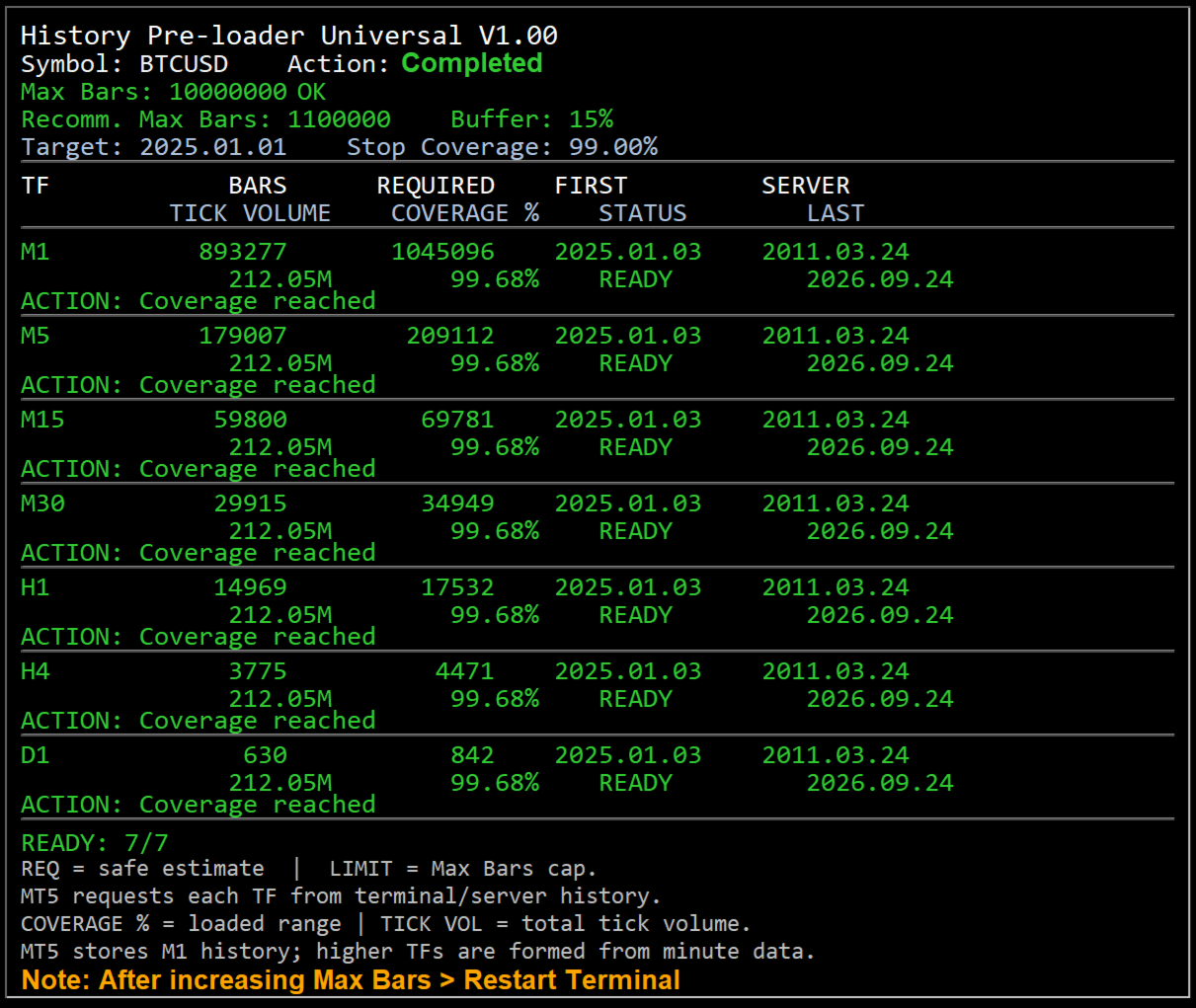
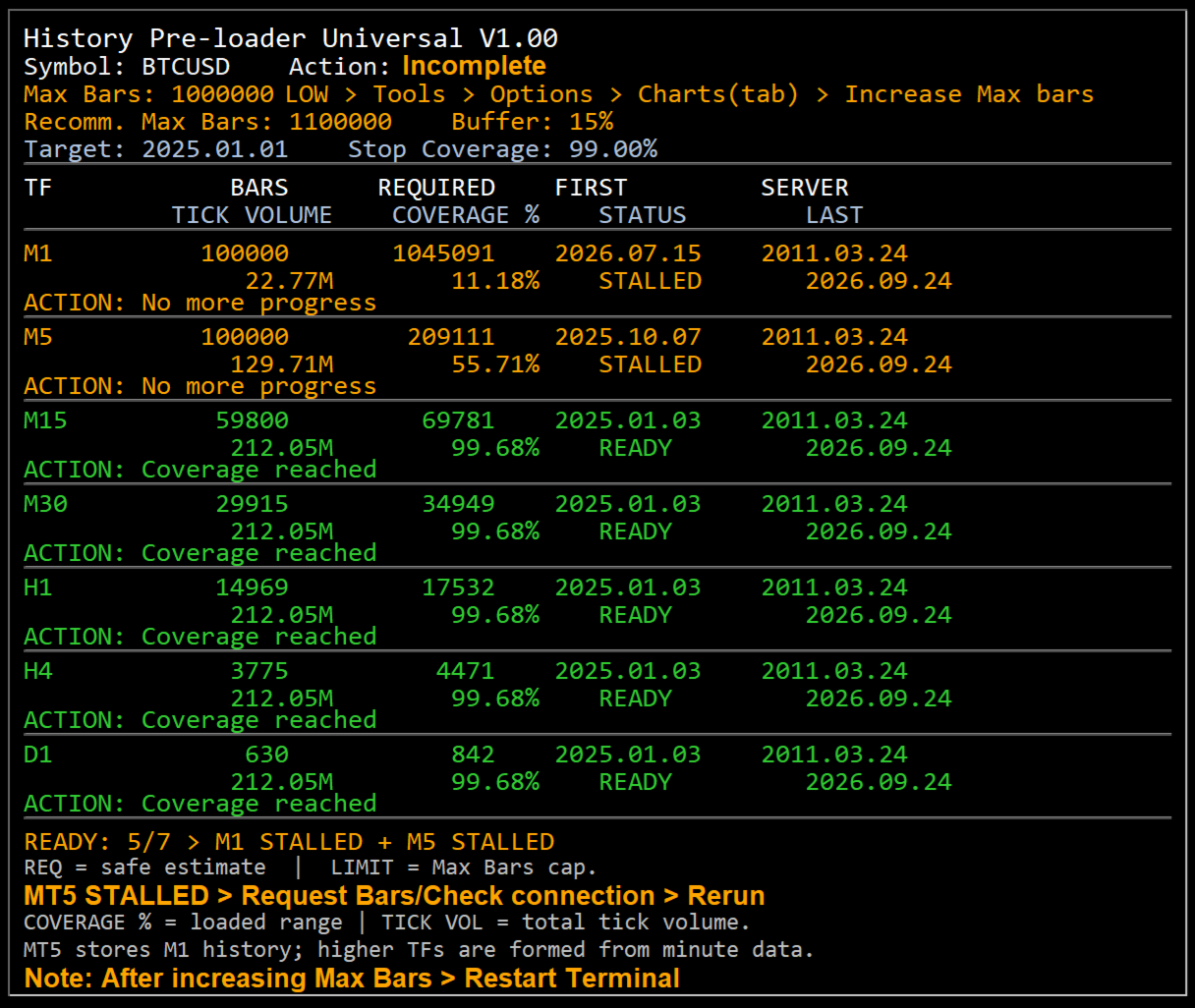
  • Shows bar count, required bars, server first date, tick volume, coverage, status and action on an on-chart dashboard.
  • Reports clear status states including READY, BUILT, LOADING, LIMIT, NO DATA, STALLED and ERROR.

Why history preparation matters

A historical test can only use the data that is available to the terminal. If the required period has not been downloaded, the terminal may work with a shorter range than expected or spend time synchronizing data when the test begins. History Pre-loader provides a separate preparation step so you can inspect the available range before starting the main test or analysis.

MT4 workflow

MT4 keeps local chart history and uses terminal limits for the amount of history retained and displayed. The script gives special attention to M1 history. When sufficient M1 data is available, the MT4 build path can create the standard higher timeframes and then ask the terminal to refresh and verify them.

  • Open File → Open Data Folder → MQL4 → Scripts and place the MT4 script there.
  • Open a new chart for the exact broker symbol whose history you want.
  • Attach History Pre-loader from Navigator → Scripts.
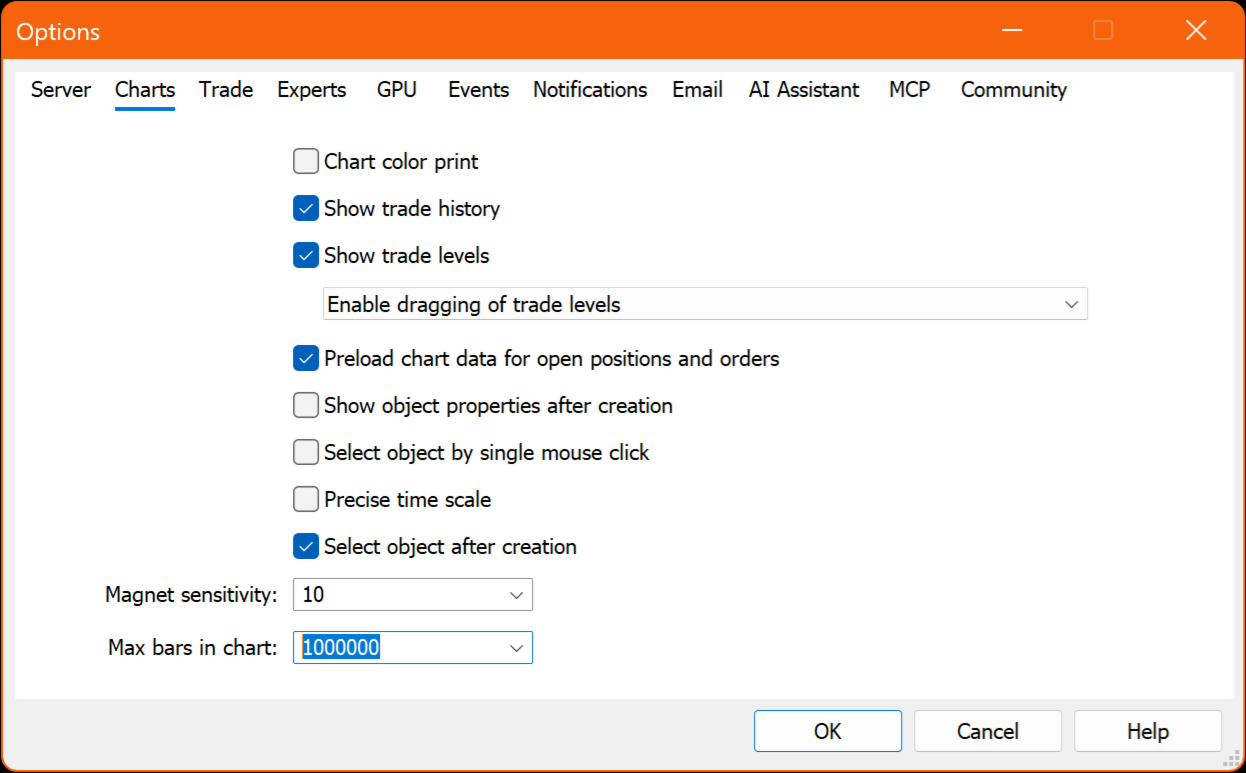
  • If the dashboard shows Max Bars LOW, increase the value under Tools → Options → Charts, restart the terminal and rerun the script.
  • If M1 history is unavailable, use F2 → History Center → symbol → 1 Minute (M1) → Download, restart MT4 and rerun.

MT5 workflow

MT5 stores quote history as one-minute bars and creates higher timeframes from the minute history. The script requests and checks the terminal series while showing the loaded date range and coverage on the chart.

  • Open File → Open Data Folder → MQL5 → Scripts and place the MT5 script there.
  • Open a new chart for the exact broker symbol whose history you want.
  • Attach History Pre-loader from Navigator → Scripts.
  • If the dashboard shows Max Bars LOW, increase Max. bars in chart under Tools → Options → Charts, restart MT5 and rerun.
  • If more broker history is required, use the MT5 Symbols → Bars → Request function for that symbol.

Dashboard status guide

  • READY — the selected target date or coverage goal has been reached.
  • BUILT — MT4 higher-timeframe history was built from M1 and is being refreshed or verified.
  • LOADING — the terminal is currently requesting or synchronizing history.
  • LIMIT — Max Bars is restricting the requested range.
  • NO DATA — the required range was not returned by the terminal/server and may require a manual history request.
  • STALLED — no additional history progress was detected within the retry window.
  • ERROR — an operation failed; check the dashboard Action field and the Experts/Journal message.

Broker history availability

The script can request and prepare history that is available through the MetaTrader terminal and the connected broker server. If the broker's earliest available data starts later than the selected target date, the script reports the available range rather than creating market data that the server does not provide.

Preparation utility only

History Pre-loader does not open or manage trades. Its role is to prepare, inspect and report historical chart data so the user can move into backtesting or historical analysis with a clearer view of what data the terminal currently has.
Prodotti consigliati
Simple Trading Controller
Pierpaolo De Nicolo
4.67 (3)
Il "Simple Trading Controller" per MetaTrader 5 stabilisce un nuovo standard in termini di velocità ed efficienza nell'apertura e chiusura delle posizioni di mercato. Progettato con un design pulito e intuitivo, questo strumento risponde alle esigenze specifiche dei trader, garantendo un'esperienza di trading fluida e rapida. Ecco cosa offre: Pulsanti BUY e SELL rapidi Apertura simultanea di più operazioni Impostazione della dimensione della posizione (Trade Size) Impostazione di Stop Loss e Tak
FREE
NORA NEWS SHIELD - Professional News Protection System Product Description Overview NORA NEWS SHIELD is a professional risk management tool that automatically protects your trading during high-impact economic news releases. It monitors major global currencies and temporarily suspends trading activity during critical market-moving events, helping you avoid sudden volatility spikes and potential losses. How It Works The system continuously scans the economic calendar for upcoming high-impact news

FREE
is designed to simplify switching between trading instruments directly from the active chart. It allows traders to cycle through symbols listed in the broker's Market Watch using on-chart navigation buttons or keyboard arrow keys . The indicator's primary motive is to make multi-symbol market analysis faster, more convenient, and more organized by reducing the need to manually locate and open individual charts. Key Features Previous / Next Navigation: Switch between Market Watch symbols using t
FREE
Aggression Volume Profile
Edson Cavalca Junior
4.55 (11)
This indicator plots the volume profile by Price on the chart There are 5 ways to view it: By Total Volume Traded (Premium Version); Volume Ticks(Forex) Separated by Buyers and Sellers (Premium Version); Buyers Only (Premium Version); Sellers Only (Premium Version); Business balance (Buyers - Sellers) (Premium Version); . It is possible to select how many days the profiles will be calculated.( Premium Version) On the current day it recalculates the histogram data for each new candlestick.
FREE
Trade Assistant – Position & History Overview Streamline your trading workflow with a powerful all-in-one panel for MetaTrader 5. Trade Assistant is a professional EA panel that gives you full control over your trades — from order execution to real-time position monitoring — all within a clean, intuitive on-chart interface. Key Features One-Click Order Execution Instant   Market Orders   (Buy / Sell) with configurable Lot, SL and TP Full   Pending Order   support: Buy/Sell Limit & Buy/Se
FREE
Ninja Trend Matrix MT5 Ninja Trend Matrix MT5 è un indicatore per MetaTrader 5 che riunisce in un unico pannello la direzione del trend su più timeframe, la forza relativa e la volatilità basata sull’ATR. Aiuta a valutare l’ambiente di mercato prima di una decisione discrezionale o dell’utilizzo di un altro sistema di trading. L’indicatore non apre, modifica o chiude operazioni. Non mostra frecce di ingresso, livelli TP/SL, percentuali di successo o previsioni di profitto. Funzioni principali Cl
FREE
Mattrix Basket Viewer Mattrix Basket Viewer creates 8 synthetic currency index charts directly in MetaTrader 5 using geometric mean calculation. It analyzes all 28 major forex pairs and groups them into 8 currency baskets, one for each major currency. Instead of watching 28 individual pairs, you see 8 basket charts that show the strength of each currency. A compact dashboard ranks the baskets by pip sum and coherence - per day, week, month, year or trading session. Click any basket name to open
FREE
Script Name: Close All Positions Language: MQL5 Type: Utility Script Primary Function: Instantly close all open positions on the current trading account Purpose The “Close All Positions” script is a lightweight and efficient tool designed for traders using MetaTrader 5. Its main purpose is to help users quickly exit all active trades with a single click, especially during volatile market conditions or when risk management requires immediate action. Instead of manually closing each position on
FREE
Show Pips for MT5
Roman Podpora
4.5 (32)
Questo indicatore informativo sarà utile per coloro che vogliono essere sempre informati sulla situazione attuale del conto. VERSION MT 4 -   More useful indicators L'indicatore mostra dati come profitto in punti, percentuale e valuta, nonché lo spread per la coppia corrente e il tempo fino alla chiusura della barra nell'intervallo di tempo corrente. Esistono diverse opzioni per posizionare la linea delle informazioni sulla carta: A destra del prezzo (corre dietro al prezzo); Come commento (nell
FREE
TradeHistoryParsing
MetaQuotes Ltd.
2 (1)
The TradeHistoryParsing is a utility for working with the trade history obtained from the MetaTrader 5 terminal. The product is based on the " RegularExpressions in MQL5 " library. It allows to quickly get the required data on your trading history. The filtering results are displayed as a table, a summary of mathematical statistics is provided below the table. Working with the tool Export the trade report as an html file and place it into the "sandbox". After that, when launching the EA, specif
FREE
Alert Relay Helper (EA) – MT5 &  MT4 Encrypted bridge that forwards indicator alerts to external messengers * in real-time. Plug-and-play utility – simply attach it to one chart. Zero trading functions – does not open, modify or close orders. End-to-end AES-256 encryption – only custom indicators that support the same key can broadcast messages (e.g.  VWAP Ultimate Pro v1.20+). Multi-platform – MT5 build 4150+, MT4 build 1380+. Before you turn it on : Open Tools > Options > Expert Advisors and
FREE
TrendVision AI
Murtadha Majid Jeyad Al-Khuzaie
TrendVision AI – Smart Trend Channels & Price Forecasting for MetaTrader 5 Discover market structure and explore potential future price direction with TrendVision AI, an advanced technical indicator for MetaTrader 5 that combines automatic trendline analysis with a machine-learning-based price forecasting model. How Does TrendVision AI Work? TrendVision AI analyzes historical candlestick data within a configurable lookback window. It automatically draws two trendlines directly on the chart:
FREE
AI Weekly Open Bias Trader
Fadi Hassan Khaled Ghanem
Usa il prezzo di apertura settimanale come linea di bias e opera sui rifiuti di quella linea nella direzione del bias settimanale. Come funziona L'EA valuta le proprie regole una volta per ogni barra chiusa del timeframe del segnale (H1 per impostazione predefinita), quindi i segnali non vengono ridisegnati e la logica è la stessa nel tester e su un grafico live. Quando compare il setup e non c'è alcuna posizione aperta di questo EA sul simbolo, apre un ordine a mercato con uno stop loss e un ta
FREE
Risk Manager – Account Protection Tool Risk Manager is an Expert Advisor for MetaTrader 5 designed to protect your trading account by applying automatic risk management rules. This tool does not open trades . It continuously monitors your account and enforces predefined limits to help prevent excessive losses and maintain disciplined trading. Risk Manager works in the background and can manage positions opened by manual trading or other Expert Advisors. It is particularly useful for: • Manual tr
FREE
Double Correlation indicator (free) plots two windowed correlations in a separate window.  the size of window is taken as input before the two symbols to correlate to. Two symbols are taken as an input parameters as well as period length. and the two correlations are computed with the currently shown symbol ex: input GBPJPY and AUDNZD.  current symbol EURUSD then the following will be computed corr(EURUSD,GBPJPY) and corr(EURUSD,AUDNZD) The indicator can be useful to run a multi-symbol pair trad
FREE
Gestione Drag-and-Drop: Trascina semplicemente le linee di ingresso, Stop Loss (SL) o Take Profit (TP) sul tuo grafico per modificare i tuoi ordini in tempo reale. Monitoraggio Visuale del PnL: Visualizza il profitto o la perdita proiettata in USD direttamente sulle linee SL/TP ancora prima di spostarle. Supporto Chiusura Parziale: Chiudi facilmente una parte della tua posizione attiva (es. 50%) utilizzando la casella di modifica e i pulsanti integrati sul grafico. Interazioni con un Clic: Pulsa
FREE
Execution Suite Pro is an on-chart trading panel designed for MetaTrader 5 manual traders and scalpers. The utility provides visual trade management directly on the chart, allowing users to execute market orders, manage positions, and apply filtered bulk closures without using standard terminal dialogs. The panel utilizes asynchronous order dispatching (OrderSendAsync) to transmit trading requests without blocking the interface thread. It includes position filtering capabilities, multi-order exe
FREE
EmaRsi robot
Deepak Saini
https://youtu.be/KHhg88fXWTk?si=ZoVtpc-wpfTVImSL 5-Minute Trading Strategy | Quick & Effective for Beginners Welcome to our trading channel- the deepak trading In this video, we'll be exploring a simple 5-minute trading strategy that can help you capture quick market movements and make profitable trades. Whether you're a beginner or an experienced trader, this strategy is designed to give you clear entry and exit points using technical indicators like EMA, RSI, and Stochastic Oscillator.
FREE
RegularExpressionsExamples — is an expert, which contains the graphical interface for running examples from the " RegularExpressions in MQL5 " library. The codes of these examples can be found in the library itself. These examples are for demonstration purposes only. They serve only to evaluate the library operation and its capabilities. They can also be found on the official Microsoft‎ website, in the descriptions of classes in the System.Text.RegularExpressions namespace. Each example can be
FREE
Session Profiles
Basharat Umar Khan
Short Description Draws rolling Time-Price-Opportunity (TPO) and footprint volume profiles for the Asia, London, and New York sessions with POC/VAH/VAL levels, delta volume bias, order flow overlays, liquidity heatmaps, developing rolling lines, Naked POC (NPOC) tracking, Initial Balance breakouts, multi-session confluence zones, and automatic broker GMT-offset detection. Full Description Plots separate market-profile and volume-profile style histograms for the three major trading sessions (Asi
FREE
Versione Italiana Titolo: Pocket Reversal Notifier - Free Mobile Utility Descrizione: Pocket Reversal Notifier è un'utilità di monitoraggio professionale e gratuita, progettata per i trader che desiderano cogliere le migliori opportunità di mercato senza dover passare ore davanti ai grafici. Questo strumento scansiona continuamente il mercato alla ricerca di inversioni ad alta probabilità e invia notifiche Push in tempo reale direttamente sul tuo smartphone. L'algoritmo non è un semplice in
FREE
Strifor Chart Sync
Strifor (Mauritius) Ltd
5 (3)
Strifor Chart Sync — Sincronizza i grafici e l’analisi tecnica in MetaTrader 5 Strifor Chart Sync è un Expert Advisor per MetaTrader 5 progettato per sincronizzare più grafici e semplificare l’analisi multi-timeframe dello stesso strumento. Invece di modificare manualmente il simbolo su ogni grafico aperto, è sufficiente cambiare lo strumento sul grafico Master . Tutti i grafici Slave collegati passeranno automaticamente allo stesso simbolo, mantenendo i propri timeframe. Ad esempio, puoi lavora
FREE
DashXpert
Steve Rosenstock
5 (1)
CLICCA QUI PER VEDERE TUTTI I MIEI PRODOTTI GRATUITI DashXpert è un pannello potente e completamente gratuito per MetaTrader 5 , che mostra tutti i dati essenziali del mercato, le informazioni del conto e le statistiche di performance direttamente sul tuo grafico. Invece di passare continuamente tra finestre e schede, DashXpert ti offre una visione centralizzata e intelligente - ottimizzata per la massima chiarezza, la minima distrazione e un aspetto professionale. Fornisce una panoramica chia
FREE
TrendView
Rafael Grecco
TrendView — Clear Trend Visualization for Confident Trading TrendView is a free trend indicator designed to give traders a clean and reliable view of market direction. It displays clear trendlines in three colors, making it easy to identify bullish, bearish, and neutral phases without cluttering the chart with unnecessary elements. Whether you are monitoring long-term market structure or short-term price action, TrendView helps you keep your focus on the bigger picture. For traders who also w
FREE
Exact Neuron Genuine Algo Genius Engaged
Toha Arekaatera Akutina Gage
3.8 (5)
!! THE FIRST FREE NEURAL NETWORK EA WITH EXCELLENT AND REALISTIC RESULTS.!! Another beautiful work of art, guys you don't know the powerful creations that are created by my developer Nardus Van Staden. Check him out guys and gals, he is the real deal, an amazing person and a professional when it comes to coding and business, if you want work done!, hit him up! you can get in contact with him HERE . THE FOLLOWING PRODUCT IS A FREE VERSION OF A PAID VERSION THAT IS TO COME, PROFITS ARE GOING TO B
FREE
Free automatic Fibonacci is an indicator that automatically plots a Fibonacci retracement based on the number of bars you select on the BarsToScan setting in the indicator. The Fibonacci is automatically updated in real time as new highest and lowest values appears amongst the selected bars. You can select which level values to be displayed in the indicator settings. You can also select the color of the levels thus enabling the trader to be able to attach the indicator several times with differe
FREE
RiskGuard Position Size Calculator
Aly Abdelnaser Madbouly Afifi
Drag the stop line on your chart and see the lot size update live. Sizes every trade from your own risk setting, using the broker's real contract size and lot step. It does not trade and it sends no orders. What it does Set the stop where you actually want it - by dragging a line on the chart, not by typing points into a box - and read the lot size straight off the panel. The panel shows direction, entry, stop, stop distance in price and points, your risk in both percent and account currency, th
FREE
More Advanced version is available as  QuantView AnalyticsPro  at  https://www.mql5.com/en/market/product/205251 with a limited time offer of $50 for lifetime license. =========================================================================================================================================================== QuantView Analytics Master Advanced On-Chart Portfolio Diagnostics & Equity Forensics for MetaTrader 5 Standard MT5 history reports simply show you how much money was made o
FREE
SnapDraw Drawing Panel
Tamara Garcia Infantes
SnapDraw — every MT5 drawing tool in a panel under your chart Drawing in MetaTrader means hunting through menus and toolbars, and changing the colour of every line by hand. SnapDraw puts the tools you use in a slim panel docked under the chart: drag one onto the chart, or click it and draw, and it lands in your colour, snapped to the candle. What it includes • Every object in the MT5 Insert menu: lines, channels, Gann, Fibonacci, Elliott waves, shapes, arrows, text and graphical objects. • Ex
FREE
Pin Bars MT5
Yury Emeliyanov
Main purpose:   "Pin Bars"   is designed to automatically detect pin bars on financial market charts. A pin bar is a candle with a characteristic body and a long tail, which can signal a trend reversal or correction. How it works:   The indicator analyzes each candle on the chart, determining the size of the body, tail and nose of the candle. When a pin bar corresponding to predefined parameters is detected, the indicator marks it on the chart with an up or down arrow, depending on the directi
FREE
Gli utenti di questo prodotto hanno anche acquistato
Trade Assistant MT5
Evgeniy Kravchenko
4.43 (216)
It helps to calculate the risk per trade, the easy installation of a new order, order management with partial closing functions, trailing stop of 7 types and other useful functions. Additional materials and instructions Installation instructions - Application instructions Line function -   shows on the chart the Opening line, Stop Loss, Take Profit. With this function it is easy to set a new order and see its additional characteristics before opening.   Risk management  - The risk calculation
FarmedHedge Pair Trading Dashboard
Tanapisit Tepawarapruek
5 (7)
Farmed Hedge Yield Farming | All Markets (Manual - Hybrid - Semi/Automated EA) VERIFIED TRADING RESULTS - Farmed Hedge Yield Axi Copy:  https://www.mql5.com/en/signals/2356376 - Farmed Hedge Yield Exn Copy:   https://www.mql5.com/en/signals/2356404 - Farmed Hedge Yield V Copy:  https://www.mql5.com/en/signals/2357156 IMPORTANT NOTICE: FarmedHedge is a MANUAL-FOCUSED TRADING UTILITY ,not a fully automated EA. Results shown on this Signal include manual trades and overall strategic management.
Forex Trade Manager MT5
InvestSoft
4.98 (689)
Benvenuto a Trade Manager EA, lo strumento definitivo per la gestione del rischio , progettato per rendere il trading più intuitivo, preciso ed efficiente. Non è solo uno strumento per l'esecuzione degli ordini, ma una soluzione completa per la pianificazione delle operazioni, la gestione delle posizioni e il controllo del rischio. Che tu sia un principiante, un trader avanzato o uno scalper che necessita di esecuzioni rapide, Trade Manager EA si adatta alle tue esigenze, offrendo flessibilità s
Telegram to MT5 MultiChannel Copier
Sergio Marquez Uroz
4.68 (22)
Telegram to MT5 Multi-Channel Copier   copia automaticamente i segnali di trading dai tuoi canali Telegram e Discord direttamente su MetaTrader 5. Niente bot, niente estensioni del browser, niente copia manuale. Il segnale arriva su Telegram o Discord e l'EA apre l'operazione nel tuo terminale in pochi secondi. E prima di copiare un canale, il backtester integrato ti mostra cosa avrebbe fatto quel canale sul tuo conto. Il prodotto include due componenti: un'applicazione Windows che ascolta i tuo
Local Trade Copier EA MT5
Juvenille Emperor Limited
4.94 (150)
Local Trade Copier EA MT5 è un trade copier rapido e flessibile per copiare e gestire operazioni tra più conti MetaTrader 5 sullo stesso computer Windows o Windows VPS. Combina la sincronizzazione locale delle operazioni con controlli lato Receiver per dimensione del lotto, gestione del rischio, filtraggio delle operazioni, mappatura dei simboli, gestione delle operazioni e protezione del conto. Configura i terminali Transmitter e Receiver in circa 1 minuto e copia operazioni manuali o aperte d
TradePanel MT5
Alfiya Fazylova
4.88 (172)
Trade Panel è un assistente commerciale multifunzionale. L'applicazione contiene più di 50 funzioni di trading per il trading manuale e permette di automatizzare la maggior parte delle attività commerciali. Istruzioni per l'applicazione: https://www.mql5.com/it/blogs/post/762331 Versione di prova dell'applicazione per un conto demo: https://www.mql5.com/it/blogs/post/762419 Come installare l'applicazione: https://www.mql5.com/it/blogs/post/762362 Come testare l'applicazione in modalità visuale:
News Trade EA MT5
Konstantin Kulikov
4.55 (11)
Presento un utile robot che io stesso utilizzo da diversi anni. Questo robot può essere utilizzato sia in modalità semiautomatica che completamente automatica. >>> Chat <<< Il programma contiene le impostazioni flessibili per fare trading sulle notizie del calendario economico. Non può essere verificato nel tester delle strategie. Soltanto il vero lavoro. Scarica l'ultimo archivio di impostazioni: https://www.mql5.com/en/blogs/post/747929 Monitoraggio dei segnali: https://www.mql5.com/en/signa
Copia i segnali Telegram con le tue regole di trading Telegram to MT5 Signal Trader copia automaticamente i segnali di trading testuali dai canali e gruppi Telegram pubblici e privati in MetaTrader 5. Gestisci più fornitori e conti MT5 da un'unica applicazione desktop, con impostazioni di rischio e di trading specifiche per ogni fornitore . Per copiare i segnali non servono bot Telegram né configurazioni API. Accedi semplicemente con il tuo account Telegram tramite numero di telefono o codice QR
Strategy Ledger Pro
Abdullah Uygar Tuna
5 (14)
Ora disponibile in italiano. Strategy Ledger Pro è un pannello di analisi del conto in sola lettura per MetaTrader 5. Separa i risultati del conto per Expert Advisor, strategia, simbolo e numero magic, così puoi vedere quanto contribuisce davvero ciascuno. Il pannello è disponibile in 11 lingue: English, Français, Deutsch, Español, Italiano, Português, Русский, Türkçe, 中文, 日本語 e 한국어. Prima di scaricare la demo. Il Market esegue la demo di qualsiasi prodotto a pagamento solo nello Strategy Teste
================================================================================ POC BREAKOUT - V20.72. Full Professional Grade Toolkit ================================================================================ POC Breakout is a full MetaTrader 5 trading dashboard for discretionary traders who want breakout signals, Point of Control (POC) context, volume profiles, order flow, market structure, news, alerts, and advanced trade planning in one professional workspace. Attached directly to you
Exp COPYLOT CLIENT for MT5
Vladislav Andruschenko
3.97 (35)
Copiatore professionale di trade per MetaTrader 5 Un copiatore di trade veloce, professionale e affidabile per MetaTrader . COPYLOT consente di copiare operazioni Forex tra terminali MT4 e MT5 con supporto per conti Hedge e Netting . La versione MT5 di COPYLOT supporta: - MT5 Hedge → MT5 Hedge - MT5 Hedge → MT5 Netting - MT5 Netting → MT5 Hedge - MT5 Netting → MT5 Netting - MT4 → MT5 Hedge - MT4 → MT5 Netting Versione MT4 Descrizione completa + DEMO + PDF Come acquistare Come installare Come ot
The product will copy all telegram signal to MT5 ( which you are member) , also it can work as remote copier.  Easy to set up, copy order instant, can work with almost signal formats, image signal,  s upport to translate other language to English Work with all type of channel or group, even channel have "Restrict Saving Content", work with  multi channel, multi MT5 Work as remote copier: with signal have ticket number, it will copy exactly via ticket number. Support to backtest signal. How to s
EA Overfitter
Stephen J Martret
5 (3)
That backtest looks great. But will it still be making money tomorrow, next week, next month? EA Overfitter re-runs your EA on 100 price histories it has never seen. One score tells you if the edge is real. A backtest tells you what an EA did on one price history — the one that happened to occur. What you cannot tell from it is how much of that result was the strategy and how much was the particular path. EA Overfitter answers that. It builds up to 100 synthetic price histories your EA has n
Power Candles Strategy Scanner - Strumento di ricerca configurazioni multi-simbolo con ottimizzazione automatica Power Candles Strategy Scanner utilizza lo stesso motore di auto-ottimizzazione che alimenta l'indicatore Power Candles, applicandolo a tutti i simboli presenti nel tuo Market Watch, uno accanto all'altro. Un unico pannello ti indica quali simboli sono statisticamente negoziabili in questo momento, quale strategia è vincente su ciascuno di essi, la coppia ottimale di Stop Loss / Take
Telegram To MT5 Ultra
Mirel Daniel Gheonu
5 (5)
Telegram To MT5 — Copiatore di segnali Trasforma le indicazioni di trading dei tuoi canali Telegram in veri ordini MT5 — automaticamente, su quanti account vuoi, con rischio e regole totalmente sotto il tuo controllo. Telegram To MT5 collega i canali VIP / di segnali che già segui su Telegram al tuo terminale MetaTrader 5. Un'app desktop companion gratuita legge i messaggi (anche dai canali che bloccano i bot), e questo Expert Advisor li esegue sul tuo conto — applicando le tue impostazioni di r
HINN MagicEntry Extra
ALGOFLOW OÜ
4.74 (19)
HINN MAGIC ENTRY – the ultimate tool for entry and position management! SIMPLE. FASTEST. INTUITIVE. MAX AUTOMATED. Place orders by selecting a level directly on the chart! full description   ::  demo-version  :: 60-sec-video-description Key features: - Market, limit, and pending orders - Automatic lot size calculation - Automatic spread and commission accounting - Unlimited partitial take-profits  - Breakeven and trailing stop-loss and take-profit  functions - Invalidation leves - Intuitive, a
Timeless Charts
Samuel Manoel De Souza
5 (9)
Timeless Charts è un'utilità di trading completa progettata per trader professionisti. Combina tipi di grafici personalizzati come Grafici a Secondi e Renko con analisi avanzata del flusso ordini tramite Footprints , Clusters , Profili di Volume , studi VWAP e strumenti di analisi ancorata per una visione più approfondita del mercato. Il trading e la gestione delle posizioni vengono eseguiti direttamente dal grafico tramite un pannello integrato di gestione delle operazioni , mentre Market Repla
Telegram to MT5 Coppy
Sergey Batudayev
5 (10)
Da Telegram a MT5:   la soluzione definitiva per la copia del segnale Semplifica il tuo trading con Telegram su MT5, il moderno strumento che copia i segnali di trading direttamente dai canali e dalle chat di Telegram sulla tua piattaforma MetaTrader 5, senza bisogno di DLL. Questa potente soluzione garantisce un'esecuzione precisa dei segnali, ampie opzioni di personalizzazione, fa risparmiare tempo e aumenta la tua efficienza. [ Instructions and DEMO ] Caratteristiche principali Integrazione d
VirtualTradePad One Click Trading Panel
Vladislav Andruschenko
4.59 (74)
Pannello di trading per MetaTrader 5 — controllo professionale del trading in un clic dal grafico e dalla tastiera Un pannello di trading avanzato progettato per trader attivi, pensato per aprire, gestire e chiudere operazioni molto più velocemente rispetto all’interfaccia standard di MetaTrader. Questa soluzione è dedicata a chi desidera controllare posizioni, ordini pendenti, profitto totale ed esecuzione da un unico spazio di lavoro professionale. Non si tratta di un semplice utilitario. È u
Anchor Trade Manager
Kalinskie Gilliam
5 (8)
Your EAs cannot see each other, but Anchor can. Anchor gives you one place to coordinate your EAs, manage risk, and decide when trading is allowed. It works alongside the trading bots you already use without any changes to them. The Problem One EA opens a trade. Then another starts trading. The next thing you know, you wake up to multiple grids built across your account. Each EA may be doing exactly what it was designed to do, but together they can place far more risk on your account than you in
Prossimo aggiornamento — Versione 2.52 in arrivo! [NOVITÀ] Preparati a 4 nuove funzionalità principali progettate per migliorare la tua analisi di mercato e il tuo flusso di lavoro nel trading Portiamo l’analisi di mercato a un livello superiore con 4 nuove funzionalità progettate per soddisfare le tue esigenze di trading. Ecco le novità: 1. TRADE OVERVIEW DASHBOARD 2. CONFLUENCE AT ZONE 3. STRONG & WEAK HIGH/LOW 4. OTE 1. TRADE OVERVIEW DASHBOARD Una dashboard che ti aiuta a comprendere più fa
Exp5 VirtualTradePad PRO SE for MT5
Vladislav Andruschenko
5 (1)
VirtualTradePad PRO SE MT5 — centro di controllo professionale per il trading su MetaTrader 5 VirtualTradePad PRO SE è un pannello di trading premium basato sul grafico e un ambiente di gestione delle operazioni per MetaTrader 5 . È progettato per i trader che desiderano esecuzione più rapida, controllo più chiaro delle posizioni, gestione strutturata delle operazioni, pianificazione visiva dei livelli e un workflow professionale direttamente dal grafico. Non è soltanto un semplice pannello BUY
Trade Indicator Assistant   is a powerful MT5 utility designed to turn indicators into automated trading systems. Its main feature is the ability to automatically detect an indicator’s   BUY and SELL signal buffers , without requiring you to know the buffer numbers, search through indicator settings, or modify the indicator source code. Bonus Indicator:   After purchasing Trade Indicator Assistant, contact me to receive   Trade Signal Pro   completely free as a bonus indicator. [Download Demo V
EA Auditor
Stephen J Martret
5 (7)
EA Auditor is an independent analysis tool for traders evaluating Expert Advisors and trading signals on MetaTrader 5. It audits backtest reports, reviews posted developer signals, and cross-verifies the two against each other to help traders assess strategies before committing capital. The MQL5 market offers a wide range of Expert Advisors from many developers, with varying approaches, quality, and transparency. EA Auditor provides a consistent, data-driven framework for reviewing them, answer
Trade Manager DaneTrades
Levi Dane Benjamin
4.13 (31)
Trade Manager per aiutarti a entrare e uscire rapidamente dalle operazioni calcolando automaticamente il tuo rischio. Incluse funzionalità che ti aiutano a prevenire l'eccessivo trading, il vendetta trading e il trading emotivo. Le operazioni possono essere gestite automaticamente e i parametri di performance del conto possono essere visualizzati in un grafico. Queste caratteristiche rendono questo pannello ideale per tutti i trader manuali e aiuta a migliorare la piattaforma MetaTrader 5. Suppo
MT5 to Telegram Signal Provider è un'utilità facile da usare e completamente personalizzabile che consente l'invio di segnali specificati a una chat, canale o gruppo Telegram, rendendo il tuo account un fornitore di segnali. A differenza della maggior parte dei prodotti concorrenti, non utilizza importazioni DLL. [ Dimostrativo ] [ Manuale ] [ Versione MT4 ] [ Versione Discord ] [ Canale Telegram ]  New: [ Telegram To MT5 ] Configurazione Una guida utente passo-passo è disponibile. Nessuna cono
RETAILBERG FOOTPRINT CHART PRO — Order-Flow Workspace for MetaTrader 5 Version 7.00  |  Professional System  |  31 tools  |  One chart A full 150-page illustrated User Manual is included. Please read the full manual to understand this feature packed footprint chart elements and ui. https://www.mql5.com/en/blogs/post/777982 DEMO / STRATEGY TESTER — PLEASE READ FIRST
Trader Evolution
Siarhei Vashchylka
5 (7)
" Trader Evolution " - A utility designed for traders who use wave and technical analysis in their work. One tab of the utility is capable of money management and opening orders, and the other can help in making Elliott wave and technical analysis. Manual (Be sure to read before purchasing) | Version for MT4 Advantages 1. Trading in a few clicks. Immediate and pending orders are available in the panel 2. Money management. The program automatically selects the appropriate lot size 3. Simplifies
Trade copier MT5
Alfiya Fazylova
4.61 (57)
Trade Copier è un'utilità professionale progettata per copiare e sincronizzare le transazioni tra conti di trading. La copiatura avviene dal conto/terminale del fornitore al conto/terminale del destinatario, che sono installati sullo stesso computer o vps. Prima di acquistare, puoi testare la versione demo su un account demo. Versione demo qui . Istruzioni complete qui . Funzionalità e vantaggi principali: Supporta la copia degli ordini: MT5> MT5, MT4> MT5, MT5> MT4, inclusi i conti di compensaz
DrawDown Limiter
Haidar Lionel Haj Ali
5 (23)
DrawDown Limiter v5.0 — Controller avanzato per la protezione del conto DrawDown Limiter v5.0 è un controller di protezione del conto lato client, progettato per monitorare il tuo conto di trading e reagire automaticamente quando vengono raggiunti i limiti configurati relativi a rischio, profitto, notizie, pianificazione, rollover o numero di posizioni. Può monitorare operazioni manuali, strategie automatizzate, più Expert Advisor, ordini pendenti e posizioni aperte da un unico grafico dedicato.
Altri dall’autore
Telegram Copier Signal EA
Mahamad Khairie Izwan Bin Yusli
Telegram Copier Signal Telegram Copier Signal (TCS) rappresenta il lato MetaTrader di esecuzione e gestione di un flusso di segnali Telegram. La GUI sul grafico mantiene visibili stato connessione, ambito simboli, comportamento del lotto e controlli di gestione, così la configurazione quotidiana può essere seguita dal chart senza riaprire continuamente gli Inputs dell’EA. TCS è organizzato in tre schede operative — Current, Modify e Features — ognuna dedicata a una fase diversa del passaggio dal
FREE
EA Momentum Master Gold
Mahamad Khairie Izwan Bin Yusli
Momentum Master Gold Momentum Master Gold (MMG) è un Expert Advisor automatizzato orientato principalmente a Gold, costruito attorno a un pratico sistema di controllo sul grafico. Il suo punto di forza è la GUI: le impostazioni che normalmente controlli più spesso restano visibili e modificabili dal grafico, senza riaprire gli Inputs dell’EA per ogni modifica di routine. MMG riunisce selezione della strategia, lotto, direzione, valori di protezione e filtri di mercato in un layout più chiaro, re
FREE
Momentum Master Gold EA
Mahamad Khairie Izwan Bin Yusli
Momentum Master Gold Momentum Master Gold (MMG) è un Expert Advisor automatizzato orientato principalmente a Gold, costruito attorno a un pratico sistema di controllo sul grafico. Il suo punto di forza è la GUI: le impostazioni che normalmente controlli più spesso restano visibili e modificabili dal grafico, senza riaprire gli Inputs dell’EA per ogni modifica di routine. MMG riunisce selezione della strategia, lotto, direzione, valori di protezione e filtri di mercato in un layout più chiaro, re
FREE
Smark Risk Panel EA
Mahamad Khairie Izwan Bin Yusli
Smart Risk Panel Smart Risk Panel (SRP) è un pannello interattivo di gestione per trader manuali. Tu decidi gli ingressi; SRP offre uno spazio strutturato per inserire ordini, gestire posizioni aperte e applicare protezione a livello conto senza tornare agli Inputs dell’EA per ogni modifica di routine. La sua forza è nell’organizzazione: inserimento ordini, gestione post-ingresso e riferimento opzionale dei comandi Telegram sono separati in schede chiare, con Quick Actions sempre vicine al grafi
FREE
EA Telegram Copier Signal
Mahamad Khairie Izwan Bin Yusli
Telegram Copier Signal Telegram Copier Signal (TCS) rappresenta il lato MetaTrader di esecuzione e gestione di un flusso di segnali Telegram. La GUI sul grafico mantiene visibili stato connessione, ambito simboli, comportamento del lotto e controlli di gestione, così la configurazione quotidiana può essere seguita dal chart senza riaprire continuamente gli Inputs dell’EA. TCS è organizzato in tre schede operative — Current, Modify e Features — ognuna dedicata a una fase diversa del passaggio dal
FREE
EA Smark Risk Panel
Mahamad Khairie Izwan Bin Yusli
Smart Risk Panel Smart Risk Panel (SRP) è un pannello interattivo di gestione per trader manuali. Tu decidi gli ingressi; SRP offre uno spazio strutturato per inserire ordini, gestire posizioni aperte e applicare protezione a livello conto senza tornare agli Inputs dell’EA per ogni modifica di routine. La sua forza è nell’organizzazione: inserimento ordini, gestione post-ingresso e riferimento opzionale dei comandi Telegram sono separati in schede chiare, con Quick Actions sempre vicine al grafi
FREE
MT4 Script Loader History
Mahamad Khairie Izwan Bin Yusli
History Pre-loader — MT4 History Pre-loader is a utility script for traders who want to prepare and inspect MetaTrader price history before running a Strategy Tester, reviewing an older market period or using tools that depend on a deeper historical range. The script works from the symbol of the chart where it is attached . Open a chart for the exact broker symbol you want to prepare, attach the script, select the target oldest date and let the terminal request the available history. What the sc
FREE
MT4 Local Trade Copier LTC
Mahamad Khairie Izwan Bin Yusli
Local Trade Copier Local Trade Copier (LTC) collega terminali MetaTrader 4 e MetaTrader 5 compatibili e semplifica la copia delle operazioni tra conti tramite un pannello sul grafico. Installa l'edizione LTC appropriata su ogni terminale per collegamenti MT4-MT4, MT5-MT5 oppure MT4-MT5. Ogni conto ricevente può applicare impostazioni proprie per lotti, selezione dei simboli e gestione delle operazioni, senza richiedere impostazioni identiche tra broker. Collegamento dei conti Scegli MASTER e RE
MT5 Local Trade Copier LTC
Mahamad Khairie Izwan Bin Yusli
Local Trade Copier Local Trade Copier (LTC) collega terminali MetaTrader 4 e MetaTrader 5 compatibili e semplifica la copia delle operazioni tra conti tramite un pannello sul grafico. Installa l'edizione LTC appropriata su ogni terminale per collegamenti MT4-MT4, MT5-MT5 oppure MT4-MT5. Ogni conto ricevente può applicare impostazioni proprie per lotti, selezione dei simboli e gestione delle operazioni, senza richiedere impostazioni identiche tra broker. Collegamento dei conti Scegli MASTER e RE
Filtro:
Nessuna recensione
Rispondi alla recensione