MT5 Script Loader History

History Pre-loader — MT5

History Pre-loader is a utility script for traders who want to prepare and inspect MetaTrader price history before running a Strategy Tester, reviewing an older market period or using tools that depend on a deeper historical range.

The script works from the symbol of the chart where it is attached. Open a chart for the exact broker symbol you want to prepare, attach the script, select the target oldest date and let the terminal request the available history.

What the script does

  • Requests older history for M1, M5, M15, M30, H1, H4 and D1.
  • Checks the first and last available dates for each timeframe.
  • Calculates history coverage against the selected target date.
  • Estimates the required Max Bars setting with a configurable safety buffer.
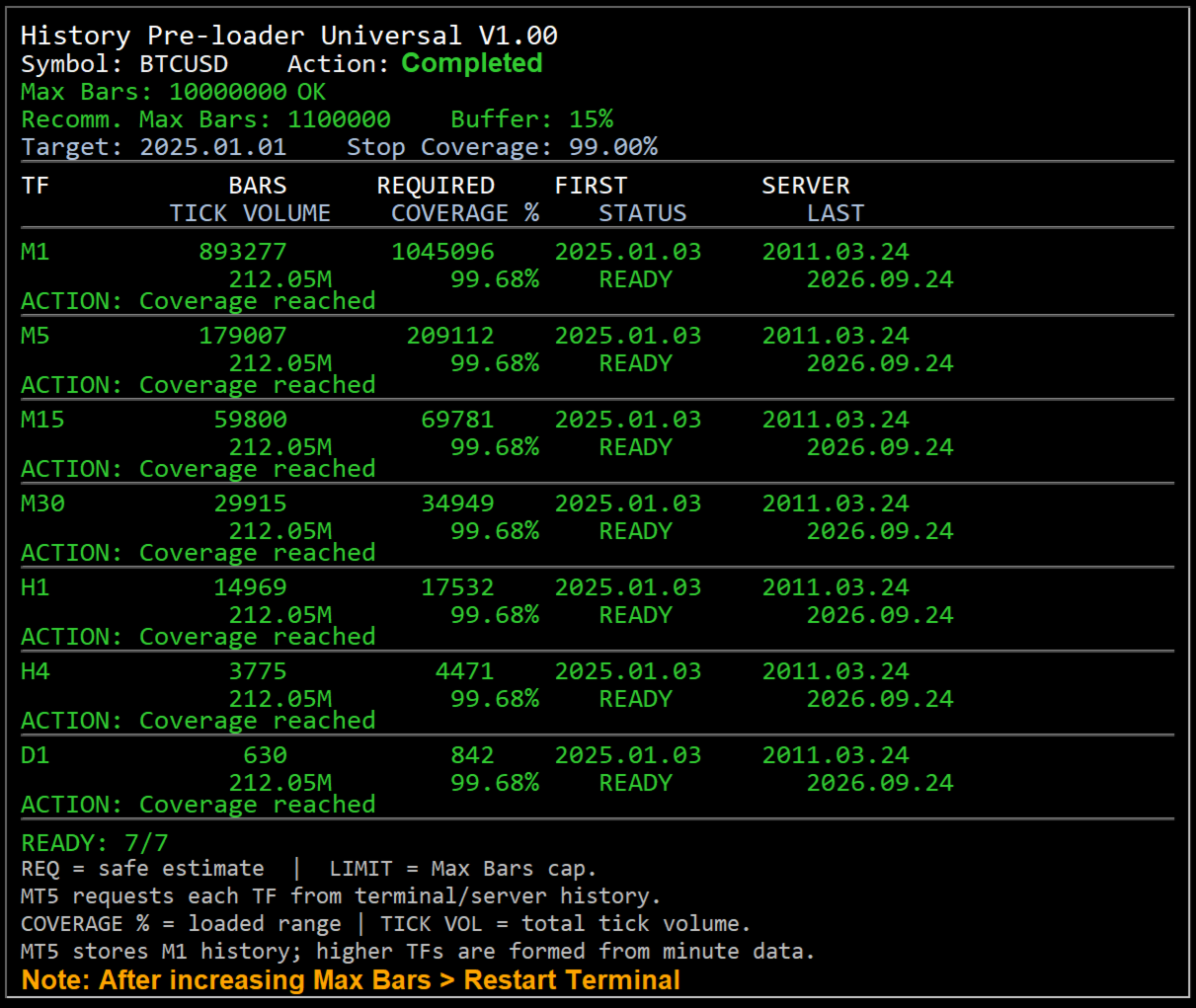
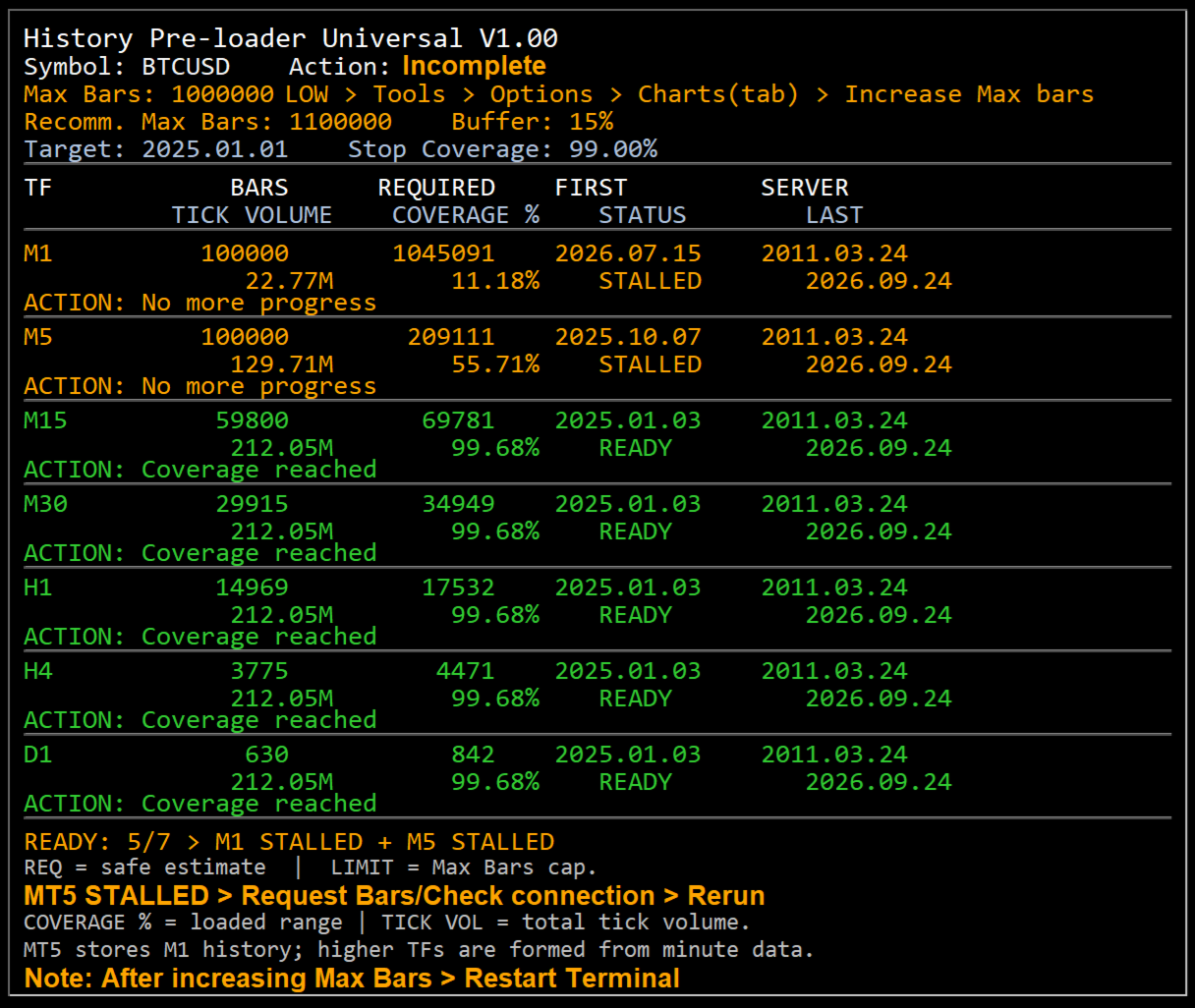
  • Shows bar count, required bars, server first date, tick volume, coverage, status and action on an on-chart dashboard.
  • Reports clear status states including READY, BUILT, LOADING, LIMIT, NO DATA, STALLED and ERROR.

Why history preparation matters

A historical test can only use the data that is available to the terminal. If the required period has not been downloaded, the terminal may work with a shorter range than expected or spend time synchronizing data when the test begins. History Pre-loader provides a separate preparation step so you can inspect the available range before starting the main test or analysis.

MT4 workflow

MT4 keeps local chart history and uses terminal limits for the amount of history retained and displayed. The script gives special attention to M1 history. When sufficient M1 data is available, the MT4 build path can create the standard higher timeframes and then ask the terminal to refresh and verify them.

  • Open File → Open Data Folder → MQL4 → Scripts and place the MT4 script there.
  • Open a new chart for the exact broker symbol whose history you want.
  • Attach History Pre-loader from Navigator → Scripts.
  • If the dashboard shows Max Bars LOW, increase the value under Tools → Options → Charts, restart the terminal and rerun the script.
  • If M1 history is unavailable, use F2 → History Center → symbol → 1 Minute (M1) → Download, restart MT4 and rerun.

MT5 workflow

MT5 stores quote history as one-minute bars and creates higher timeframes from the minute history. The script requests and checks the terminal series while showing the loaded date range and coverage on the chart.

  • Open File → Open Data Folder → MQL5 → Scripts and place the MT5 script there.
  • Open a new chart for the exact broker symbol whose history you want.
  • Attach History Pre-loader from Navigator → Scripts.
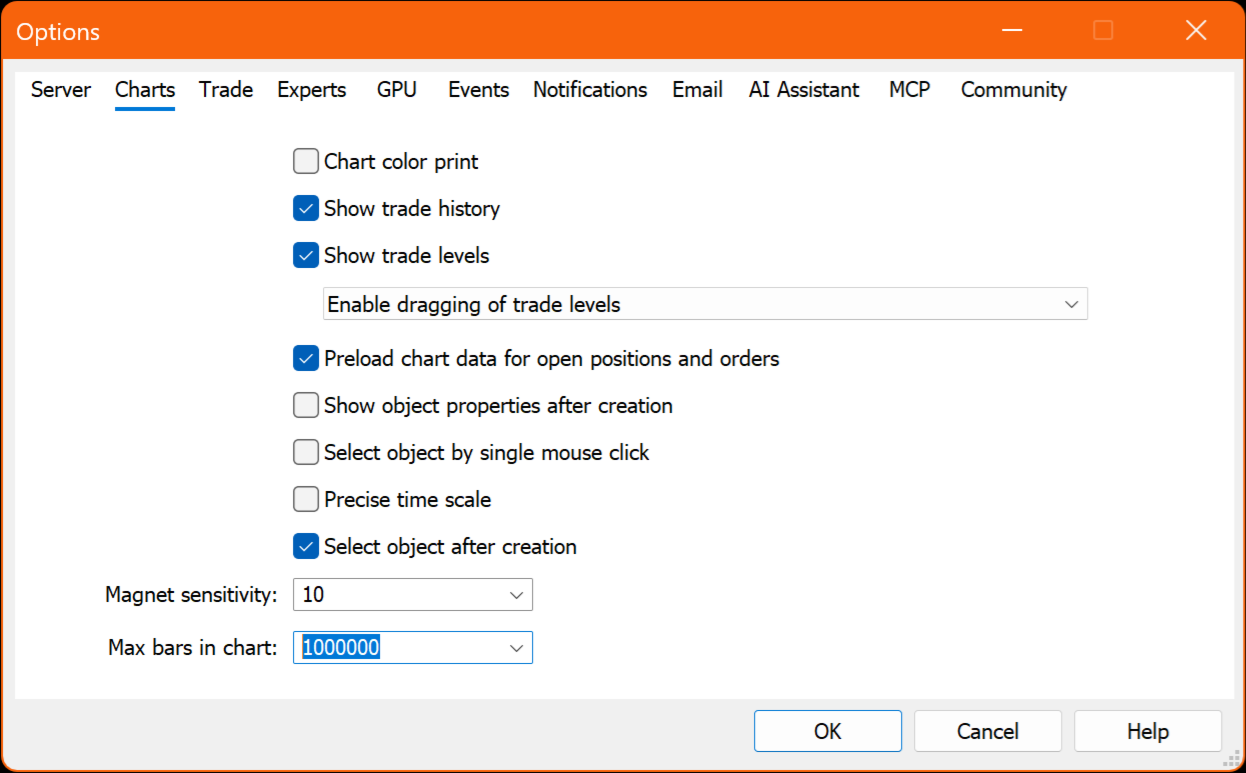
  • If the dashboard shows Max Bars LOW, increase Max. bars in chart under Tools → Options → Charts, restart MT5 and rerun.
  • If more broker history is required, use the MT5 Symbols → Bars → Request function for that symbol.

Dashboard status guide

  • READY — the selected target date or coverage goal has been reached.
  • BUILT — MT4 higher-timeframe history was built from M1 and is being refreshed or verified.
  • LOADING — the terminal is currently requesting or synchronizing history.
  • LIMIT — Max Bars is restricting the requested range.
  • NO DATA — the required range was not returned by the terminal/server and may require a manual history request.
  • STALLED — no additional history progress was detected within the retry window.
  • ERROR — an operation failed; check the dashboard Action field and the Experts/Journal message.

Broker history availability

The script can request and prepare history that is available through the MetaTrader terminal and the connected broker server. If the broker's earliest available data starts later than the selected target date, the script reports the available range rather than creating market data that the server does not provide.

Preparation utility only

History Pre-loader does not open or manage trades. Its role is to prepare, inspect and report historical chart data so the user can move into backtesting or historical analysis with a clearer view of what data the terminal currently has.
추천 제품
Simple Trading Controller
Pierpaolo De Nicolo
4.67 (3)
The "Simple Trading Controller" for MetaTrader 5 sets a new standard for speed and efficiency in opening and closing market positions. Crafted with a clean and intuitive design, this tool is a response to the specific needs of traders, ensuring a seamless and rapid trading experience. All it provides is: Quick BUY and SELL Buttons Open multiple operations at the same time Set Trade Size Set Stop Loss Take Profit Points Close All Positions Let's go and see the advantages of using "Simple Trading
FREE
NORA NEWS SHIELD - Professional News Protection System Product Description Overview NORA NEWS SHIELD is a professional risk management tool that automatically protects your trading during high-impact economic news releases. It monitors major global currencies and temporarily suspends trading activity during critical market-moving events, helping you avoid sudden volatility spikes and potential losses. How It Works The system continuously scans the economic calendar for upcoming high-impact news
FREE
Aggression Volume Profile
Edson Cavalca Junior
4.55 (11)
This indicator plots the volume profile by Price on the chart There are 5 ways to view it: By Total Volume Traded (Premium Version); Volume Ticks(Forex) Separated by Buyers and Sellers (Premium Version); Buyers Only (Premium Version); Sellers Only (Premium Version); Business balance (Buyers - Sellers) (Premium Version); . It is possible to select how many days the profiles will be calculated.( Premium Version) On the current day it recalculates the histogram data for each new candlestick.
FREE
Trade Assistant – Position & History Overview Streamline your trading workflow with a powerful all-in-one panel for MetaTrader 5. Trade Assistant is a professional EA panel that gives you full control over your trades — from order execution to real-time position monitoring — all within a clean, intuitive on-chart interface. Key Features One-Click Order Execution Instant   Market Orders   (Buy / Sell) with configurable Lot, SL and TP Full   Pending Order   support: Buy/Sell Limit & Buy/Se
FREE
Ninja Trend Matrix MT5 Ninja Trend Matrix MT5는 여러 시간대의 추세 방향, 상대 강도, ATR 기반 변동성 상태를 하나의 패널에 모아 보여 주는 MetaTrader 5용 지표입니다. 재량 판단을 내리거나 다른 거래 시스템을 사용하기 전에 현재 시장 환경을 빠르게 확인하는 데 도움이 됩니다. 이 지표는 주문을 열거나 수정하거나 청산하지 않습니다. 진입 화살표, TP/SL, 승률 또는 수익 예측도 표시하지 않습니다. 주요 기능 선택한 각 시간대를 STRONG UP, UP, RANGE, DOWN, STRONG DOWN 또는 N/A로 분류 0~100의 상대 추세 강도 표시 ATR 기반 변동성을 LOW, NORMAL, HIGH 또는 SHOCK로 표시 EMA 20/50, EMA 기울기, 최근 고점·저점 구조, ADX, +DI/-DI를 결합 현재 형성 중인 캔들이 아닌 마감된 캔들 데이터 사용 패널 직접 드래그, 최소화, 자동 배치, 콤팩트 그리드 시간대 DE
FREE
Mattrix Basket Viewer Mattrix Basket Viewer creates 8 synthetic currency index charts directly in MetaTrader 5 using geometric mean calculation. It analyzes all 28 major forex pairs and groups them into 8 currency baskets, one for each major currency. Instead of watching 28 individual pairs, you see 8 basket charts that show the strength of each currency. A compact dashboard ranks the baskets by pip sum and coherence - per day, week, month, year or trading session. Click any basket name to open
FREE
Script Name: Close All Positions Language: MQL5 Type: Utility Script Primary Function: Instantly close all open positions on the current trading account Purpose The “Close All Positions” script is a lightweight and efficient tool designed for traders using MetaTrader 5. Its main purpose is to help users quickly exit all active trades with a single click, especially during volatile market conditions or when risk management requires immediate action. Instead of manually closing each position on
FREE
Show Pips for MT5
Roman Podpora
4.5 (32)
이 정보 표시기는 계정의 현재 상황을 항상 알고 싶어하는 사람들에게 유용합니다. VERSION MT 4 -   More useful indicators 표시기는 포인트, 백분율, 통화 단위의 이익뿐만 아니라 현재 쌍의 스프레드와 현재 기간에서 막대가 마감될 때까지의 시간과 같은 데이터를 표시합니다. 차트에 정보선을 배치하는 데는 여러 가지 옵션이 있습니다. 가격 오른쪽(가격보다 뒤에 있음) 코멘트(차트의 왼쪽 상단) 화면의 선택된 모서리에 있습니다. 정보 구분 기호를 선택할 수도 있습니다. | / \ # 이 표시기는 사용하기 쉽고 매우 유익합니다. 설정에서 불필요한 정보 항목을 비활성화할 수 있습니다. 설정 외모의 종류       - 정보 라인 표시 유형. 세 가지 옵션이 있습니다: 가격을 따르세요       - 가격을 따르세요. 댓글로       - 코멘트로; 화면의 선택된 모서리에서       - 화면의 선택한 모서리에 있습니다. 첨부용 그래프 코너       - 화면의 선택한
FREE
TradeHistoryParsing
MetaQuotes Ltd.
2 (1)
The TradeHistoryParsing is a utility for working with the trade history obtained from the MetaTrader 5 terminal. The product is based on the " RegularExpressions in MQL5 " library. It allows to quickly get the required data on your trading history. The filtering results are displayed as a table, a summary of mathematical statistics is provided below the table. Working with the tool Export the trade report as an html file and place it into the "sandbox". After that, when launching the EA, specif
FREE
Alert Relay Helper (EA) – MT5 &  MT4 Encrypted bridge that forwards indicator alerts to external messengers * in real-time. Plug-and-play utility – simply attach it to one chart. Zero trading functions – does not open, modify or close orders. End-to-end AES-256 encryption – only custom indicators that support the same key can broadcast messages (e.g.  VWAP Ultimate Pro v1.20+). Multi-platform – MT5 build 4150+, MT4 build 1380+. Before you turn it on : Open Tools > Options > Expert Advisors and
FREE
Risk Manager – Account Protection Tool Risk Manager is an Expert Advisor for MetaTrader 5 designed to protect your trading account by applying automatic risk management rules. This tool does not open trades . It continuously monitors your account and enforces predefined limits to help prevent excessive losses and maintain disciplined trading. Risk Manager works in the background and can manage positions opened by manual trading or other Expert Advisors. It is particularly useful for: • Manual tr
FREE
Double Correlation indicator (free) plots two windowed correlations in a separate window.  the size of window is taken as input before the two symbols to correlate to. Two symbols are taken as an input parameters as well as period length. and the two correlations are computed with the currently shown symbol ex: input GBPJPY and AUDNZD.  current symbol EURUSD then the following will be computed corr(EURUSD,GBPJPY) and corr(EURUSD,AUDNZD) The indicator can be useful to run a multi-symbol pair trad
FREE
드래그 앤 드롭 관리: 차트에서 진입가, 손절매(SL) 또는 이익실현(TP) 라인을 드래그하여 실시간으로 주문을 수정할 수 있습니다. 시각적 손익(PnL) 추적: 라인을 이동하기 전에 SL/TP 라인에서 직접 USD로 예상 수익 또는 손실을 확인할 수 있습니다. 부분 청산 지원: 차트 내 통합 편집 상자와 버튼을 사용하여 활성 포지션의 일부(예: 50%)를 쉽게 청산할 수 있습니다. 원클릭 상호작용: 즉시 청산, 포지션 추가 또는 축소를 위한 각 거래 레벨의 빠른 버튼(X, +, -)을 제공합니다. 깔끔한 인터페이스: MT5의 기본 거래 레벨을 자동으로 숨겨 깔끔하고 전문적인 차트 환경을 제공합니다. 대기 주문 제어: 차트에서 직접 수량을 편집하는 것을 포함하여 리밋(Limit) 및 스탑(Stop) 주문에 대한 전체 시각적 관리가 가능합니다. 왜 이 도구를 선택해야 하나요? 속도: 뉴욕 시장 개장과 같이 변동성이 큰 시간대에 거래를 더 빠르게 실행하고 수정할 수 있습니다. 정밀도:
FREE
EmaRsi robot
Deepak Saini
https://youtu.be/KHhg88fXWTk?si=ZoVtpc-wpfTVImSL 5-Minute Trading Strategy | Quick & Effective for Beginners Welcome to our trading channel- the deepak trading In this video, we'll be exploring a simple 5-minute trading strategy that can help you capture quick market movements and make profitable trades. Whether you're a beginner or an experienced trader, this strategy is designed to give you clear entry and exit points using technical indicators like EMA, RSI, and Stochastic Oscillator.
FREE
RegularExpressionsExamples — is an expert, which contains the graphical interface for running examples from the " RegularExpressions in MQL5 " library. The codes of these examples can be found in the library itself. These examples are for demonstration purposes only. They serve only to evaluate the library operation and its capabilities. They can also be found on the official Microsoft‎ website, in the descriptions of classes in the System.Text.RegularExpressions namespace. Each example can be
FREE
Session Profiles
Basharat Umar Khan
Short Description Draws rolling Time-Price-Opportunity (TPO) and footprint volume profiles for the Asia, London, and New York sessions with POC/VAH/VAL levels, delta volume bias, order flow overlays, liquidity heatmaps, developing rolling lines, Naked POC (NPOC) tracking, Initial Balance breakouts, multi-session confluence zones, and automatic broker GMT-offset detection. Full Description Plots separate market-profile and volume-profile style histograms for the three major trading sessions (Asi
FREE
Versione Inglese Title: Pocket Reversal Notifier - Free Mobile Utility Description: Pocket Reversal Notifier is a professional, free monitoring utility designed for traders who want to catch high-probability market opportunities without spending all day glued to the charts. This tool continuously scans the market for price reversals and sends real-time Push notifications straight to your smartphone. The algorithm is far more than a simple moving average crossover: it is a true "No-Lag" ecos
FREE
Strifor Chart Sync
Strifor (Mauritius) Ltd
Strifor Chart Sync — MetaTrader 5 차트 및 기술적 분석 동기화 Strifor Chart Sync 는 여러 차트를 동기화하고 동일한 종목에 대한 멀티 타임프레임 분석을 간소화하도록 설계된 MetaTrader 5용 Expert Advisor입니다. 열려 있는 각 차트에서 종목을 수동으로 변경할 필요 없이 Master 차트에서 종목만 변경하면 됩니다. 연결된 모든 Slave 차트는 자동으로 동일한 종목으로 전환되며, 각 차트의 개별 타임프레임은 그대로 유지됩니다. 예를 들어 다음과 같은 방식으로 작업할 수 있습니다. D1 — 전체적인 시장 상황 H1 — 현재 시장 구조 M5 — 트레이드 셋업 M1 — 진입 지점 Master 차트의 종목을 US500 에서 XAUUSD 로 변경하면 연결된 모든 차트가 자동으로 XAUUSD로 전환됩니다. D1은 D1 그대로 유지 H1은 H1 그대로 유지 M5는 M5 그대로 유지 M1은 M1 그대로 유지 이를 통해 체계적인 멀티 타임프
FREE
DashXpert
Steve Rosenstock
5 (1)
여기를 클릭하여 제 모든 무료 제품을 확인하세요 DashXpert 는 MetaTrader 5 를 위한 완전 무료의 강력한 대시보드로, 모든 핵심 시장 데이터, 계정 정보, 성과 통계 를 차트에 직접 표시합니다. 여러 창과 탭을 오가야 할 필요 없이, DashXpert 는 중앙 집중식의 스마트한 개요 화면 을 제공합니다 - 최대한의 명확성, 최소한의 방해 요소, 그리고 전문적인 디자인을 위해 최적화되어 있습니다. 이를 통해 당신은 보유 중인 포지션, 손익, 승률, 계정 잔액 을 실시간으로 명확하게 파악할 수 있습니다. 이로 인해 DashXpert 는 일상적인 편의 기능을 넘어서, 당신의 트레이딩을 이해하고 개선하며 투명하게 시각화할 수 있는 완전한 성과 모니터링 도구 가 됩니다. 또한 이 대시보드는 가장 중요한 트레이딩 세션(Sydney, Tokyo, London, New York) 을 상태와 함께 자동 표시하여, 시장이 언제 어디에서 움직이는지 즉시 확인할 수 있습니다.  모던하
FREE
TrendView
Rafael Grecco
TrendView — Clear Trend Visualization for Confident Trading TrendView is a free trend indicator designed to give traders a clean and reliable view of market direction. It displays clear trendlines in three colors, making it easy to identify bullish, bearish, and neutral phases without cluttering the chart with unnecessary elements. Whether you are monitoring long-term market structure or short-term price action, TrendView helps you keep your focus on the bigger picture. For traders who also w
FREE
Exact Neuron Genuine Algo Genius Engaged
Toha Arekaatera Akutina Gage
3.8 (5)
!! THE FIRST FREE NEURAL NETWORK EA WITH EXCELLENT AND REALISTIC RESULTS.!! Another beautiful work of art, guys you don't know the powerful creations that are created by my developer Nardus Van Staden. Check him out guys and gals, he is the real deal, an amazing person and a professional when it comes to coding and business, if you want work done!, hit him up! you can get in contact with him HERE . THE FOLLOWING PRODUCT IS A FREE VERSION OF A PAID VERSION THAT IS TO COME, PROFITS ARE GOING TO B
FREE
Free automatic Fibonacci is an indicator that automatically plots a Fibonacci retracement based on the number of bars you select on the BarsToScan setting in the indicator. The Fibonacci is automatically updated in real time as new highest and lowest values appears amongst the selected bars. You can select which level values to be displayed in the indicator settings. You can also select the color of the levels thus enabling the trader to be able to attach the indicator several times with differe
FREE
Drag the stop line on your chart and see the lot size update live. Sizes every trade from your own risk setting, using the broker's real contract size and lot step. It does not trade and it sends no orders. What it does Set the stop where you actually want it - by dragging a line on the chart, not by typing points into a box - and read the lot size straight off the panel. The panel shows direction, entry, stop, stop distance in price and points, your risk in both percent and account currency, th
FREE
LIMITED TIME OFFER to download for FREE for Unlimited use license ================================================================ QuantView Analytics Master Advanced On-Chart Portfolio Diagnostics & Equity Forensics for MetaTrader 5 Standard MT5 history reports simply show you how much money was made or lost. QuantView Analytics Master is designed to answer the "Why" and the "How." By segmenting your trading history across four distinct analytical dimensions, this institutional-grade terminal
FREE
Pin Bars MT5
Yury Emeliyanov
Main purpose:   "Pin Bars"   is designed to automatically detect pin bars on financial market charts. A pin bar is a candle with a characteristic body and a long tail, which can signal a trend reversal or correction. How it works:   The indicator analyzes each candle on the chart, determining the size of the body, tail and nose of the candle. When a pin bar corresponding to predefined parameters is detected, the indicator marks it on the chart with an up or down arrow, depending on the directi
FREE
MultiTradeNews
Leeank Andres Fernandez Molano
This script is designed for traders who need to quickly place trades across multiple currency pairs during critical news releases, where every second counts. With this tool, you can pre-select your desired currency pairs and assign independent volumes for each one. When a major news event hits, such as Non-Farm Payroll (NFP) or PMI data releases, the script allows you to execute all your trades instantly without the need to open each pair manually. Key Features: Customizable Pairs : Choose from
FREE
- وصف المنتج - مؤشر احترافي متكامل لا يعد KING Fusion MACD-Vol من KING TRADING EA مجرد MACD آخر — فهو عبارة عن مجموعة أدوات تداول كاملة تجمع بين مؤشرات احترافية متعددة في نافذة فرعية واحدة أنيقة. لم تعد بحاجة إلى تحميل مخططك بأدوات منفصلة. يجمع هذا المؤشر بين: MACD مع خطوط مزدوجة ورسم بياني مكبر رسم بياني ملون ومثبت بالحجم ملصقات ديناميكية مع قيم المؤشرات في الوقت الفعلي (ATR، ADX، RSI، Volume) عداد تنازلي للبار التنبيهات المتقاطعة (مرئية + صوتية) كل ما تحتاجه من الوضوح والسرعة والدقة -
FREE
Market Grid View
Danilo Pagano
5 (1)
Market Grid View is a utility to replace the original 'Market Watch' window. It was designed to be fast and give the user the ability to navigate over all symbols with just a click, while watch the price change or last trade value. To use it, configure your "Market Watch" window with all the symbols you want to monitor, and you can close it. Then insert the indicator in the graph. The parameters window need to be configured: Columns: the number of columns you want to be drawn ShowInfo: the type
FREE
QuickTrade Manager for MT5 Professional One-Click Trade Execution & Management Panel for MetaTrader 5 Trade faster. Manage smarter. Execute with precision. QuickTrade Manager is a powerful chart-side trading panel built for traders who want instant execution, cleaner workflow, and precise control over every position directly from the chart. No more slow manual adjustments. No more cluttered order management. Everything you need is in one professional panel . NEW IN THIS VERSION Modern Profession
FREE
VR Orders History MT5
Vladimir Pastushak
3 (2)
The VR Orders History script is designed to upload a trade report to a csv file. This format is intended for additional analysis of trading history in programs such as EXCEL, Openoffice, and Libreoffice. Thanks to the script, it is now much easier for a trader to analyze their trading history. The program facilitates the analysis of the trading history for the MetaTrader 5 terminal. The trader sees structured trading. The entire report is based on the following principle: Position > Order on the
FREE
이 제품의 구매자들이 또한 구매함
Trade Assistant MT5
Evgeniy Kravchenko
4.43 (216)
거래당 위험 계산, 라인을 사용한 손쉬운 신규 주문, 부분 청산 기능을 통한 주문 관리, 7가지 유형의 트레일링 스탑 및 기타 유용한 기능을 제공합니다. 추가 자료 및 지침 설치 지침   -   애플리케이션 지침   -   데모 계정용 애플리케이션 평가판 라인 기능       - 차트에 개시선, 손절매, 차익실현을 표시합니다. 이 기능을 사용하면 새로운 주문을 쉽게 하고 개봉 전에 추가 특성을 볼 수 있습니다. 위기 관리       -       위험 계산 기능은 설정된 위험과 손절매 주문의 크기를 고려하여 새 주문의 볼륨을 계산합니다. 이를 통해 손절매 크기를 설정하고 동시에 설정된 위험을 존중할 수 있습니다. 로트 계산 버튼 - 위험 계산을 활성화/비활성화합니다. 필요한 위험 값은 위험 필드에 0에서 100 사이의 백분율 또는 예금 통화로 설정됩니다. 설정 탭에서 위험 계산 옵션을 선택합니다. $ 통화, % 잔액, % 지분, % 자유 마진, % 사용자 정의, % AB 이전
Trade Manager EA에 오신 것을 환영합니다. 이 도구는 거래를 보다 직관적이고 정확하며 효율적으로 만들기 위해 설계된 궁극적인 리스크 관리 도구 입니다. 단순한 주문 실행 도구가 아닌, 원활한 거래 계획, 포지션 관리 및 리스크 제어를 위한 종합 솔루션입니다. 초보자부터 고급 트레이더, 빠른 실행이 필요한 스캘퍼에 이르기까지 Trade Manager EA는 외환, 지수, 상품, 암호화폐 등 다양한 시장에서 유연성을 제공합니다. Trade Manager EA를 사용하면 복잡한 계산은 이제 과거의 일이 됩니다. 시장을 분석하고 진입, 손절 및 익절 수준을 차트의 수평선으로 표시한 후 리스크를 설정하면, Trade Manager가 이상적인 포지션 크기를 즉시 계산하고 SL 및 TP 값을 실시간으로 표시합니다. 모든 거래가 간편하게 관리됩니다. 주요 기능: 포지션 크기 계산기 : 정의된 리스크에 따라 거래 크기를 즉시 결정합니다. 간단한 거래 계획 : 진입, 손절, 익절을 위한
Local Trade Copier EA MT5
Juvenille Emperor Limited
4.94 (149)
Local Trade Copier EA MT5는 동일한 Windows 컴퓨터 또는 Windows VPS에서 여러 MetaTrader 5 계정 간에 거래를 복사하고 관리할 수 있는 빠르고 유연한 거래 복사기입니다. 로컬 거래 동기화 기능과 함께 Receiver 측에서 로트 크기, 리스크 관리, 거래 필터링, 심볼 매핑, 거래 관리 및 계정 보호를 독립적으로 설정할 수 있습니다. Transmitter와 Receiver 터미널을 약 1분 안에 설정하고, 동일한 브로커 또는 서로 다른 브로커의 계정 간에 수동 거래 또는 EA 거래를 복사할 수 있습니다. 적절한 조건에서는 로컬 MetaTrader 터미널 간의 거래 정보가 0.5초 이내 에 동기화될 수 있습니다. 실제 체결 속도는 브로커 지연 시간, 네트워크 상태, 컴퓨터/VPS 성능 및 터미널 부하에 따라 달라집니다. 구매 전에 무료 데모를 사용해 보세요 MT5 데모 계정에서 Local Trade Copier EA MT5의 모든 기능을
Strategy Ledger Pro
Abdullah Uygar Tuna
5 (4)
이제 한국어로 이용할 수 있습니다. Strategy Ledger Pro 는 MetaTrader 5용 읽기 전용 계좌 분석 패널입니다. 계좌 성과를 전문가 어드바이저(EA), 전략, 심볼, 매직 넘버별로 나누어 각각이 실제로 얼마나 기여하는지 보여줍니다. 패널은 11개 언어를 지원합니다: English, Français, Deutsch, Español, Italiano, Português, Русский, Türkçe, 中文, 日本語, 한국어. 데모를 다운로드하기 전에. Market은 모든 유료 제품의 데모를 전략 테스터에서만 실행합니다. 이 패널은 사용자 자신의 계좌 거래를 분석하는데, 전략 테스터에는 읽을 계좌 기록이 없으므로 데모는 빈 패널로 열리고 그 사실을 표시합니다. 이는 데모 방식에 따른 것이며 제품의 제약이 아닙니다. 이 설명의 동영상에서 실계좌에서 작동하는 패널을 확인할 수 있습니다. 모든 기능을 설명한 자세한 매뉴얼 (영문)과 토론 및 공지를 위한 AureusAI
================================================================================ POC BREAKOUT - V20.72. Full Professional Grade Toolkit ================================================================================ POC Breakout is a full MetaTrader 5 trading dashboard for discretionary traders who want breakout signals, Point of Control (POC) context, volume profiles, order flow, market structure, news, alerts, and advanced trade planning in one professional workspace. Attached directly to you
TradePanel MT5
Alfiya Fazylova
4.88 (169)
Trade Panel은 다기능 거래 도우미입니다. 이 애플리케이션에는 50개 이상의 수동 거래 기능이 포함되어 있으며 대부분의 거래 작업을 자동화할 수 있습니다. 앱 사용 설명서 + 동영상 설명: https://www.mql5.com/en/blogs/post/772292 데모 계정용 앱 체험판: https://www.mql5.com/en/blogs/post/750865 앱 설치 방법: https://www.mql5.com/en/blogs/post/756239 시각 모드에서 앱 테스트 방법: https://www.mql5.com/en/blogs/post/770277 VPS MetaTrader에 앱 설치 방법: https://www.mql5.com/en/blogs/post/770190 거래. 한 번의 클릭으로 거래를 수행할 수 있습니다: 리스크 자동 계산과 함께 예약 주문 및 포지션 열기. 한 번의 클릭으로 여러 주문 및 포지션 열기. 주문 그리드 열기. 예약 주문 및 포지션을 그룹별로
Telegram to MT5 Multi-Channel Copier   는 Telegram 채널의 트레이딩 시그널을 MetaTrader 5로 자동 복사합니다. 봇도, 브라우저 확장도, 수동 복사도 필요 없습니다. Telegram에 시그널이 도착하면 EA가 몇 초 안에 터미널에서 주문을 실행합니다. 그리고 채널을 복사하기 전에, 내장 백테스터가 그 채널이 내 계좌에서 어떤 결과를 냈을지 보여줍니다. 제품은 두 가지 구성 요소로 이루어집니다: Telegram 채널을 수신하는 Windows 애플리케이션과, MT5 터미널에서 시그널을 실행하는 본 EA입니다. MT4 버전도 제공됩니다   여기 . 설정 가이드와 앱 다운로드:   https://www.mql5.com/en/blogs/post/768988 현재 가격은 향후 인상될 예정입니다. 작동 방식 앱은 여러분 자신의 Telegram 계정으로 연결되므로, 팔로우하는 모든 채널, 그룹, 토픽, 봇(비공개 및 VIP 포함)을 볼 수 있습니다. 시
내 거래 규칙에 맞춰 Telegram 신호 복사 Telegram to MT5 Signal Trader 는 공개 및 비공개 Telegram 채널과 그룹의 텍스트 기반 거래 신호를 MetaTrader 5로 자동 복사합니다. 하나의 데스크톱 앱에서 여러 신호 제공자와 MT5 계좌를 관리하고, 제공자마다 위험 관리 및 거래 설정을 개별적으로 지정 할 수 있습니다. 신호 복사에는 Telegram 봇이나 API 설정이 필요하지 않습니다. 전화번호 또는 QR 코드로 본인의 Telegram 계정에 로그인한 후, 이미 가입한 채널이나 그룹을 선택하면 됩니다. 봇을 만들거나 Telegram API 토큰, API ID 또는 API 해시를 입력할 필요가 없습니다. 포지션 크기를 선택하고, 여러 익절 목표에 청산 물량을 배분하며, 손익분기점 이동과 트레일링 스톱을 자동화하세요. 제공자의 신호를 따르면서도 실제 거래 방식은 직접 설정할 수 있습니다. 이 제품은 MT5 Expert Advisor와 필수 Win
Farmed Hedge Yield Farming | All Markets (Manual - Hybrid - Semi/Automated EA) VERIFIED TRADING RESULTS - Farmed Hedge Yield Axi Copy:  https://www.mql5.com/en/signals/2356376 - Farmed Hedge Yield Exn Copy:   https://www.mql5.com/en/signals/2356404 - Farmed Hedge Yield V Copy:  https://www.mql5.com/en/signals/2357156 IMPORTANT NOTICE: FarmedHedge is a MANUAL-FOCUSED TRADING UTILITY ,not a fully automated EA. Results shown on this Signal include manual trades and overall strategic management.
Premium Trade Manager - 코치가 내장된 트레이딩 패널 Premium Trade Manager 는 차트 안에 트레이딩 코치를 심어놓은 도구입니다. 주문을 확정하기 전에, AI 트레이딩 코치 Max가 설정된 거래를 직접 읽고 명확한 판단을 내려줍니다. 스톱이 규율 있는 접근 방식에 맞는지, 리스크 크기가 합리적인지, 고영향 뉴스 이벤트가 몇 분 후에 있는지, 프롭 펌 한도에 근접했는지. 그 아래에는 완전한 실행 엔진이 있습니다. 원클릭 리스크 기반 진입, 차트에서 드래그로 세우고 거래가 진행되는 동안에도 계속 움직일 수 있는 플랜, 최대 4단계 분할 익절, 7가지 트레일링 방식, 실시간 프롭 펌 컴플라이언스, 뉴스 가드, 그리고 자체 비용을 평가하는 스프레드까지. 결정은 당신이 내립니다. Max가 두 번째 시선으로 확인합니다. 패널이 그 이후의 모든 것을 처리합니다. 구매 전에 직접 체험해 보세요. 브라우저에서 라이브 패널을 직접 클릭해볼 수 있습니다. 구매 전에 실제
파워 캔들 전략 스캐너 - 자체 최적화 다중 종목 설정 찾기 도구 파워 캔들 전략 스캐너는 마켓 워치에 등록된 모든 종목에 대해 파워 캔들 지표와 동일한 자체 최적화 엔진을 동시에 실행합니다. 하나의 패널에서 현재 통계적으로 거래 가능한 종목, 각 종목별 최적의 전략, 최적의 손절매/익절 조합을 알려주며, 새로운 신호가 발생하면 즉시 알림을 전송합니다. 이 도구는 Stein Investments 에코시스템의 일부입니다. 18개 이상의 도구와 함께 당신의 1대1 AI 트레이딩 멘토 Max.  항상 대기 중, 모든 인디케이터를 깊이 있게 이해, 무언가를 차근차근 생각해보고 싶은 순간에 도움을 줍니다.  https://stein.investments 에서 만나보세요 완벽한 시장 모니터링. 종목당 3,000건 이상의 자동 최적화. 2가지 알림 유형. 한 번의 클릭으로 차트를 전환하고 바로 거래하세요. 이 도구가 필요한 이유 대부분의 다중 종목 스캐너는 가격 변동만 보여줍니다. 티커별
Exp COPYLOT CLIENT for MT5
Vladislav Andruschenko
3.97 (35)
MetaTrader 5용 전문 트레이드 복사기 MetaTrader 용 빠르고 전문적이며 신뢰할 수 있는 트레이드 복사기 입니다. COPYLOT 은 MT4와 MT5 터미널 간의 Forex 거래 복사를 지원하며, Hedge 및 Netting 계좌를 모두 지원합니다. COPYLOT MT5 버전 지원 구성: - MT5 Hedge → MT5 Hedge - MT5 Hedge → MT5 Netting - MT5 Netting → MT5 Hedge - MT5 Netting → MT5 Netting - MT4 → MT5 Hedge - MT4 → MT5 Netting MT4 버전 전체 설명 + DEMO + PDF 구매 방법 설치 방법 로그 파일 확인 방법 테스트 및 최적화 방법 Expforex의 모든 제품 MT4 터미널로도 거래를 복사할 수 있습니다(MT4 → MT4, MT5 → MT4): COPYLOT CLIENT for MT4 COPYLOT은 2개, 3개, 심지어 10개의 터미널과 동시에 작동할
HINN MagicEntry Extra
ALGOFLOW OÜ
4.74 (19)
HINN MAGIC ENTRY – the ultimate tool for entry and position management! SIMPLE. FASTEST. INTUITIVE. MAX AUTOMATED. Place orders by selecting a level directly on the chart! full description   ::  demo-version  :: 60-sec-video-description Key features: - Market, limit, and pending orders - Automatic lot size calculation - Automatic spread and commission accounting - Unlimited partitial take-profits  - Breakeven and trailing stop-loss and take-profit  functions - Invalidation leves - Intuitive, a
구매 후 저에게 메시지를 보내주시면 전체 매뉴얼 키트 + AI 기능을 테스트할 수 있는 3일간의 OpenAI API 체험 + 추가 보너스 선물을 제공해 드립니다 현재 가격은 8월 재출시 업데이트를 위한 기간 한정 할인 가격입니다 — 가격이 인상되기 전에 지금 에디션을 확보하세요. 다음 가격: $340 이것은 시장에서 지금까지 사용해 보았거나 본 어떤 트레이딩 패널과도 완전히 다릅니다. 현재 리테일 시장에서 이용할 수 있는 가장 혁신적인 AI 기반 트레이딩 패널 중 하나입니다. AI를 차트에 직접 연결한다고 상상해 보세요   — AI 추천, 계좌 감사, AI 트레이딩 신호 수신 및 클릭 한 번으로 실행. Telegram을 통해 스마트폰에서   전체 트레이딩 계좌를 관리한다고 상상해 보세요   — AI와 채팅하고, 즉각적인 알림을 받고, 거래를 관리하며 어디서든 계좌를 보호할 수 있습니다. 여러   EA를 실행하면서   각 EA의 성과를 개별적으로 모니터링하고, 거래를 관리하거나 특정
MT5 Trading Deck
Manuel Michiels
5 (2)
One button. One trade. MT5 Trading Deck is a hotkey trading panel for MetaTrader 5 that turns the platform into a keyboard-driven execution cockpit. Stop loss, take profit and lot size are pre-calculated for every key; the moment you press, a market order is live on the broker. A complete technical user manual is attached in the product Comments section. It documents every input parameter, the full hotkey map, the recommended Stream Deck XL layout, and the advanced workflows for Pre-Limit orders
Signal TradingView to MT5 Pro Automator TradingView와 MetaTrader 5 간의 즉각적인 전문 실행 TradingView 알림과 MT5의 실제 실행을 연결하는 가장 강력한 커뮤니케이션 브리지로 거래 전략을 자동화하세요. 속도, 유연성 및 완벽한 위험 관리를 요구하는 트레이더를 위해 설계된 이 Expert Advisor는 모든 알림 메시지를 정확한 시장가 또는 지정가 주문으로 변환합니다. 강점 및 이점 범용 파싱 엔진(독점 기술): 모든 알림 형식에서 데이터를 자동으로 인식하고 추출할 수 있는 고급 기술입니다. 단일하고 엄격한 형식에 얽매일 필요가 없습니다. 시스템은 심볼, 액션, 가격, SL 및 TP를 자동으로 이해합니다. 실시간 실행: 지연 시간을 최소화하도록 최적화된 1초 미만의 초고속 폴링 기술. 신호 수신 후 몇 밀리초 내에 주문 실행이 이루어집니다. 기관 수준의 위험 관리: 다음 기준에 따른 자동적이고 정확한 로트(Lot) 크기 계
Grid Manual MT5
Alfiya Fazylova
4.73 (22)
"Grid Manual"은 주문 그리드 작업을 위한 거래 패널입니다. 이 유틸리티는 보편적이며 유연한 설정과 직관적인 인터페이스를 제공합니다. 그것은 손실을 평균화하는 방향뿐만 아니라 이익을 증가시키는 방향으로 주문 그리드와 함께 작동합니다. 거래자는 주문 그리드를 만들고 유지할 필요가 없으며 유틸리티에서 수행합니다. 거래자가 주문을 시작하는 것으로 충분하며 "Grid Manual"는 자동으로 그를 위한 주문 그리드를 생성하고 거래가 마감될 때까지 그와 동행할 것입니다. 전체 설명 및 데모 버전 여기 . 유틸리티의 주요 기능: 모바일 터미널을 포함하여 어떤 방식으로든 열린 주문과 함께 작동합니다. "제한" 및 "중지"의 두 가지 유형의 그리드와 함께 작동합니다. 고정 및 동적(ATR 표시기 기반)의 두 가지 유형의 그리드 간격 계산과 함께 작동합니다. 오픈 오더 그리드의 설정을 변경할 수 있습니다. 차트에서 각 주문 그리드의 손익분기점 수준을 표시합니다. 각 주문 그리드에 대한 이익
Trade Dashboard MT5
Fatemeh Ameri
4.94 (134)
Trade Dashboard simplifies how you open, manage, and control your trades, with built-in lot size calculation. It allows you to execute trades, manage risk, and control positions directly on the chart, with tools such as partial close, breakeven, and trailing stop. Designed to reduce manual work and help you stay focused on your trading decisions. A demo version is available for testing. Detailed explanations of features are provided within the MQL5 platform. Installation instructions are include
EasyInsight AIO MT5
Alain Verleyen
4.92 (12)
EASY Insight AIO – 스마트하고 손쉬운 트레이딩을 위한 올인원 솔루션 개요 외환, 금, 암호화폐, 지수, 심지어 주식까지 — 전 시장을 몇 초 만에, 수동 차트 확인이나 복잡한 설치, 인디케이터 설정 없이 스캔할 수 있다고 상상해 보세요. EASY Insight AIO 는 AI 기반 트레이딩을 위한 궁극의 플러그 앤 플레이(Plug & Play) 데이터 내보내기 도구입니다. 단 하나의 깔끔한 CSV 파일로 전체 시장 스냅샷을 제공하며, ChatGPT, Claude, Gemini, Perplexity 등 다양한 AI 플랫폼에서 즉시 분석할 수 있습니다. 창 전환, 복잡함, 차트 오버레이는 더 이상 필요 없습니다. 자동으로 내보내지는 순수하고 구조화된 데이터 인사이트만으로, 반복적인 차트 감시 대신 데이터 기반의 스마트한 의사결정에 집중할 수 있습니다. 왜 EASY Insight AIO인가요? 진정한 올인원 • 별도의 설정, 인디케이터 설치, 차트 오버레이가 필요 없습
EA Overfitter
Stephen J Martret
5 (1)
That backtest looks great. But will it still be making money tomorrow, next week, next month? EA Overfitter re-runs your EA on 100 price histories it has never seen. One score tells you if the edge is real. A backtest tells you what an EA did on one price history — the one that happened to occur. What you cannot tell from it is how much of that result was the strategy and how much was the particular path. EA Overfitter answers that. It builds up to 100 synthetic price histories your EA has n
Telegram To MT5 Ultra
Mirel Daniel Gheonu
5 (5)
Telegram To MT5 — 시그널 카피어 텔레그램 채널의 트레이딩 콜을 실제 MT5 주문으로 바꿔 드립니다 — 자동으로, 원하는 만큼의 계좌에서, 리스크와 규칙을 완전히 당신의 통제 아래 둡니다. Telegram To MT5는 이미 텔레그램에서 팔로우하고 있는 VIP / 시그널 채널을 당신의 MetaTrader 5 터미널에 연결합니다. 무료 동반 데스크톱 앱이 메시지를 읽고(봇을 차단하는 채널에서도 가능), 이 EA가 당신의 계좌에서 이를 실행합니다 — 당신만의 리스크 설정, 심볼 매핑, 익절(TP) 처리, 세션 및 뉴스 필터를 적용합니다. 이것은 블랙박스 전략이 아니라 시그널 카피어입니다. 어떤 채널을 신뢰할지, 각 거래의 수량과 관리 방식을 당신이 결정합니다. 단계별 설정 및 동반 앱 설치 가이드 작동 방식 [당신의 텔레그램 채널] -> [동반 데스크톱 앱] -> [MT5 + 이 EA] -> 주문 동반 데스크톱 앱(무료, 포함)은 당신의 텔레그램 계정으로 로그인하여 선택한
EA Slipstream
Stephen J Martret
5 (1)
Your backtest filled every order at the price it asked for. Your account does not. EA Slipstream measures what execution costs your EA, using your own fills, slippages and spreads to show you the true performance of your EA. Special launch price of $99 for this week only. Price rises to $149 from the 26h September (when market closes) A backtest prices every trade at the level the EA named. In live trading a pending order fills at whatever price is available when it triggers, a stop closes where
Dynamic Fibonacci Grid
Tsvetan Tsvetanov
5 (1)
MT5용 Dynamic Fibonacci Grid Dashboard 최신 버전을 소개합니다. 많은 새로운 기능이 추가된 이번 대시보드는 거래 경험을 완전히 변화시키며, 시장과 가격 움직임을 완전히 새로운 관점에서 볼 수 있게 합니다. 여러 시간대와 여러 심볼을 동시에 분석하여 새로운 가능성을 발견하세요. 수동 거래와 포지션 관리에 친화적인 사용자 인터페이스와 미리 정의된 자동 전략을 적용할 수 있는 확장된 기능을 제공합니다. 또한 DFG는 이제 전략 테스터(Strategy Tester)에서 트레이딩 시뮬레이터로 완벽하게 작동하며, 과거 데이터를 사용하여 다양한 거래 조건을 재현할 수 있습니다. 시각 모드에서 수동 거래를 연습하고, 고속 모드에서 자동 전략을 테스트할 수 있습니다. 주요 기능 • Dynamic Fibonacci Bands 개념을 기반으로 한 다중 시간대 및 다중 심볼 고급 기술 분석 실시간 시장 모니터링 대시보드를 통해 탁월한 효율성을 경험할 수 있습니다. M1,
Telegram to MT5 Coppy
Sergey Batudayev
5 (10)
Telegram에서 MT5로:   최고의 신호 복사 솔루션 DLL 없이도 Telegram 채널과 채팅에서 MetaTrader 5 플랫폼으로 거래 신호를 직접 복사하는 최신 도구인 Telegram to MT5를 사용하여 거래를 간소화하세요. 이 강력한 솔루션은 정밀한 신호 실행, 광범위한 사용자 정의 옵션을 제공하고 시간을 절약하며 효율성을 높여줍니다. [ Instructions and DEMO ] 주요 특징 직접 Telegram API 통합 전화번호와 보안 코드를 통해 인증하세요. 사용자 친화적인 EXE 브리지를 통해 채팅 ID를 쉽게 관리하세요. 여러 채널/채팅을 추가, 삭제, 새로 고침하여 동시에 신호를 복사합니다. 고급 필터를 사용한 신호 파싱 예외 단어(예: "보고서", "결과")가 포함된 원치 않는 신호를 건너뜁니다. 유연한 SL 및 TP 형식을 지원합니다: 가격, 핍 또는 포인트. 가격 대신 포인트를 지정하는 신호에 대한 진입 포인트를 자동으로 계산합니다. 주문 맞춤화 및
Trade copier MT5
Alfiya Fazylova
4.61 (56)
Trade Copier는 거래 계정 간의 거래를 복사하고 동기화하도록 설계된 전문 유틸리티입니다. 복사는 공급자의 계정/단말기에서 동일한 컴퓨터 또는 vps에 설치된 수신자의 계정/단말기로 발생합니다. 프로모션 - 이미 "Trade copier MT5"를 구매하셨다면, "Trade copier MT4"를 무료로 받으실 수 있습니다 (MT4 → MT5 및 MT4 ← MT5 복사용). 조건에 대한 자세한 정보를 원하시면, 개인 메시지를 통해 저희에게 문의해 주시기 바랍니다! 구매하기 전에 데모 계정에서 데모 버전을 테스트할 수 있습니다. 데모 버전 여기 . 전체 지침 여기 . 주요 기능 및 이점: 복사기는 "МТ5> МТ5", "МТ4> МТ5", "МТ5> МТ4" 복사를 지원합니다. 복사기는 데모 계정 > 실 계정, 실 계정 > 데모 계정, 데모 계정 > 데모 계정 및 실제 계정 > 실 계정 복사를 지원합니다. 복사기는 읽기 전용 암호가 적용된 투자자 계정에서 복사를 지원합니다. 하
Trade Indicator Assistant   is a powerful MT5 utility designed to turn indicators into automated trading systems. Its main feature is the ability to automatically detect an indicator’s   BUY and SELL signal buffers , without requiring you to know the buffer numbers, search through indicator settings, or modify the indicator source code. Bonus Indicator:   After purchasing Trade Indicator Assistant, contact me to receive   Trade Signal Pro   completely free as a bonus indicator. [Download Demo V
The News Filter MT5
Leolouiski Gan
4.78 (23)
이 제품은 뉴스 시간 동안 모든 전문가 어드바이저 및 수동 차트를 필터링하여 수동 거래 설정이나 다른 전문가 어드바이저가 입력한 거래가 파괴될 수 있는 급격한 가격 상승으로부터 걱정하지 않아도 됩니다. 이 제품은 또한 뉴스 발표 전에 열린 포지션과 대기 주문을 처리할 수 있는 완전한 주문 관리 시스템이 함께 제공됩니다.   The News Filter  를 구매하면 더 이상 내장 뉴스 필터에 의존할 필요가 없으며 이제부터 모든 전문가 어드바이저를 여기서 필터링할 수 있습니다. 뉴스 선택 뉴스 소스는 Forex Factory의 경제 캘린더에서 얻어집니다. USD, EUR, GBP, JPY, AUD, CAD, CHF, NZD 및 CNY와 같은 어떤 통화 기준으로 선택할 수 있습니다. Non-Farm (NFP), FOMC, CPI 등과 같은 키워드 식별을 기준으로 선택할 수도 있습니다. 저, 중, 고 영향을 가지는 뉴스를 필터링할 수 있도록 선택할 수 있습니다. 차트와 관련된 뉴스만 선
Local Trade Copier EA 는 외부 소스에서 거래 신호를 실행해야 하거나 MAM 또는 PAMM 계정 없이 동시에 여러 계정을 관리해야 하는 개인 거래자 또는 계정 관리자를 위한 솔루션입니다. 최대 8개의 마스터 계정에서 무제한 슬레이브 계정으로 복사합니다. [ 설치 가이드 | 업데이트 가이드 | 문제 해결 | 자주하는 질문 | 모든 제품 ] 100% 자체 호스팅 설치 및 사용이 간편함 설치 프로그램, 구성 파일, 서버, 메모리 파이프 또는 DLL이 사용되지 않음 EA를 영원히 사용하기 위한 1000번의 활성화 로컬 실행, 네트워크 대기 시간 없음 필요한 모든 기능을 구현합니다. 최대 8개의 마스터 계정 및 무제한 슬레이브 계정 모든 브로커 및 DD/NDD/ECN/STP 실행과 함께 작동 다른 계정 통화를 사용하는 계정에서 작동 라이브 계정과 데모 계정 간에 구분 없이 작동 마스터 및 슬레이브 계정에서 기호 이름의 접미사 지원 매직 넘버 및 주문 댓글로 필터링 다른 거래
수동 매매를 위한 전문가용 트레이딩 패널로, 정밀한 진입부터 계좌 보호까지 매매의 전 과정을 차트 위 하나의 창에 담았습니다. 정해진 리스크에 정확히 맞춰 모든 포지션의 거래량을 산정하고, RR Tool로 차트에 직접 라인을 그려 거래를 설계하며, Market 주문과 예약 주문은 물론 Grid와 OCO까지 사용할 수 있습니다. 포지션 관리는 패널이 대신 처리합니다. 최대 다섯 단계 부분 청산, 여섯 가지 트레일링 스탑, 브레이크이븐, Virtual SL/TP를 지원합니다. 일간·주간·월간 한도가 예치금을 지키며, 기준을 넘기는 즉시 자동으로 발동됩니다. 가이드와 무료 Live 데모 무료 Live 데모 버전은 여기에서 이용할 수 있습니다 ( Free Live Demo ). 제품 사용 가이드는 여기에서 확인할 수 있습니다 ( User Manual ). NT Trade Manager는 트레이더의 모든 작업 흐름을 차트 위 작고 간결한 패널 하나에 모아, 터미널 창을 오갈 필요도, 진입할
Anchor Trade Manager
Kalinskie Gilliam
5 (9)
Your EAs cannot see each other, but Anchor can. Anchor gives you one place to coordinate your EAs, manage risk, and decide when trading is allowed. It works alongside the trading bots you already use without any changes to them. The Problem One EA opens a trade. Then another starts trading. The next thing you know, you wake up to multiple grids built across your account. Each EA may be doing exactly what it was designed to do, but together they can place far more risk on your account than you in
제작자의 제품 더 보기
Momentum Master Gold EA
Mahamad Khairie Izwan Bin Yusli
Momentum Master Gold Momentum Master Gold (MMG) 는 주로 Gold를 대상으로 하는 자동 Expert Advisor이며, 실용적인 온차트 제어 방식이 핵심입니다. 가장 큰 장점은 GUI입니다. 자주 확인하는 설정을 차트에 계속 표시하고 직접 수정할 수 있어, 일상적인 작은 변경마다 EA Inputs 창을 다시 열 필요가 없습니다. MMG는 전략 선택, 랏 크기, 거래 방향, 보호 값, 시장 필터를 더 명확한 작업 레이아웃에 배치합니다. 현재 EA가 어떻게 설정되어 있고 어떤 컨트롤이 실제로 활성화되어 있는지 이해하기 쉬워집니다. 차트에서 바로 사용하는 실용적인 작업 패널 GUI는 하나의 긴 설정 목록이 아니라 목적별 영역으로 나뉩니다. Trade Settings 에는 핵심 실행 및 보호 컨트롤이 모이고, Trade Filters 에는 MMG가 신규 진입을 검토하는 시점에 영향을 줄 수 있는 프로필과 시장 필터가 표시됩니다. 주요 컨트롤과 기능 Tr
FREE
Telegram Copier Signal EA
Mahamad Khairie Izwan Bin Yusli
Telegram Copier Signal Telegram Copier Signal (TCS) 는 Telegram 신호 워크플로에서 MetaTrader 실행과 관리를 담당하는 부분입니다. 온차트 GUI에 실시간 연결 상태, 심볼 범위, 랏 동작, 거래 관리 컨트롤이 표시되어 EA Inputs를 반복해서 열지 않고도 일상 설정을 차트에서 확인할 수 있습니다. TCS는 Current, Modify, Features의 3개 작업 탭으로 구성되며, 각각 신호 수신부터 관리된 포지션까지 서로 다른 단계를 담당합니다. 신호 워크플로를 명확하게 확인 Current 탭은 TCS가 무엇을 기다리는지와 심볼 및 랏이 어떻게 처리되는지를 보여 줍니다. Modify 는 TP 또는 SL이 없는 신호에 대한 처리와 진입 후 기능을 관리합니다. Features 는 수동 거래 도구와 설정 바로가기를 한 곳에 모읍니다. 주요 컨트롤과 기능 Current tab — 연결 상태, 활성 심볼 범위, running/pen
FREE
Smark Risk Panel EA
Mahamad Khairie Izwan Bin Yusli
Smart Risk Panel Smart Risk Panel (SRP) 는 수동 트레이더를 위한 인터랙티브 온차트 거래 관리 패널입니다. 진입 판단은 사용자가 하고, SRP는 주문 실행, 열린 포지션 관리, 계정 보호를 정리된 작업 공간에서 처리할 수 있게 합니다. 일상적인 변경마다 EA Inputs로 돌아갈 필요가 없습니다. 강점은 작업 구조입니다. 주문 입력, 진입 후 관리, 선택형 Telegram 명령 참고가 명확한 탭으로 나뉘고 Quick Actions는 항상 차트 가까이에 있습니다. 세 개의 탭, 하나의 작업 공간 GUI는 Trading Panel , Modify Orders , Telegram 으로 구성됩니다. 각 탭의 역할이 명확해 차트를 보면서 주문 실행과 거래 관리를 따라가기 쉽습니다. 주요 컨트롤과 기능 Trading Panel — 가격, 랏, 수량, 간격을 설정하여 BUY, SELL, BUY LIMIT, BUY STOP, SELL LIMIT, SELL STOP 주
FREE
EA Momentum Master Gold
Mahamad Khairie Izwan Bin Yusli
Momentum Master Gold Momentum Master Gold (MMG) 는 주로 Gold를 대상으로 하는 자동 Expert Advisor이며, 실용적인 온차트 제어 방식이 핵심입니다. 가장 큰 장점은 GUI입니다. 자주 확인하는 설정을 차트에 계속 표시하고 직접 수정할 수 있어, 일상적인 작은 변경마다 EA Inputs 창을 다시 열 필요가 없습니다. MMG는 전략 선택, 랏 크기, 거래 방향, 보호 값, 시장 필터를 더 명확한 작업 레이아웃에 배치합니다. 현재 EA가 어떻게 설정되어 있고 어떤 컨트롤이 실제로 활성화되어 있는지 이해하기 쉬워집니다. 차트에서 바로 사용하는 실용적인 작업 패널 GUI는 하나의 긴 설정 목록이 아니라 목적별 영역으로 나뉩니다. Trade Settings 에는 핵심 실행 및 보호 컨트롤이 모이고, Trade Filters 에는 MMG가 신규 진입을 검토하는 시점에 영향을 줄 수 있는 프로필과 시장 필터가 표시됩니다. 주요 컨트롤과 기능 Tr
FREE
EA Telegram Copier Signal
Mahamad Khairie Izwan Bin Yusli
Telegram Copier Signal Telegram Copier Signal (TCS) 는 Telegram 신호 워크플로에서 MetaTrader 실행과 관리를 담당하는 부분입니다. 온차트 GUI에 실시간 연결 상태, 심볼 범위, 랏 동작, 거래 관리 컨트롤이 표시되어 EA Inputs를 반복해서 열지 않고도 일상 설정을 차트에서 확인할 수 있습니다. TCS는 Current, Modify, Features의 3개 작업 탭으로 구성되며, 각각 신호 수신부터 관리된 포지션까지 서로 다른 단계를 담당합니다. 신호 워크플로를 명확하게 확인 Current 탭은 TCS가 무엇을 기다리는지와 심볼 및 랏이 어떻게 처리되는지를 보여 줍니다. Modify 는 TP 또는 SL이 없는 신호에 대한 처리와 진입 후 기능을 관리합니다. Features 는 수동 거래 도구와 설정 바로가기를 한 곳에 모읍니다. 주요 컨트롤과 기능 Current tab — 연결 상태, 활성 심볼 범위, running/pen
FREE
EA Smark Risk Panel
Mahamad Khairie Izwan Bin Yusli
Smart Risk Panel Smart Risk Panel (SRP) 는 수동 트레이더를 위한 인터랙티브 온차트 거래 관리 패널입니다. 진입 판단은 사용자가 하고, SRP는 주문 실행, 열린 포지션 관리, 계정 보호를 정리된 작업 공간에서 처리할 수 있게 합니다. 일상적인 변경마다 EA Inputs로 돌아갈 필요가 없습니다. 강점은 작업 구조입니다. 주문 입력, 진입 후 관리, 선택형 Telegram 명령 참고가 명확한 탭으로 나뉘고 Quick Actions는 항상 차트 가까이에 있습니다. 세 개의 탭, 하나의 작업 공간 GUI는 Trading Panel , Modify Orders , Telegram 으로 구성됩니다. 각 탭의 역할이 명확해 차트를 보면서 주문 실행과 거래 관리를 따라가기 쉽습니다. 주요 컨트롤과 기능 Trading Panel — 가격, 랏, 수량, 간격을 설정하여 BUY, SELL, BUY LIMIT, BUY STOP, SELL LIMIT, SELL STOP 주
FREE
MT4 Script Loader History
Mahamad Khairie Izwan Bin Yusli
History Pre-loader — MT4 History Pre-loader is a utility script for traders who want to prepare and inspect MetaTrader price history before running a Strategy Tester, reviewing an older market period or using tools that depend on a deeper historical range. The script works from the symbol of the chart where it is attached . Open a chart for the exact broker symbol you want to prepare, attach the script, select the target oldest date and let the terminal request the available history. What the sc
FREE
필터:
리뷰 없음
리뷰 답변