Exposure Command Center
- Utilità
- Versione: 2.0
- Attivazioni: 5

See the Entire Account. Control Every Position. Act with Confidence.
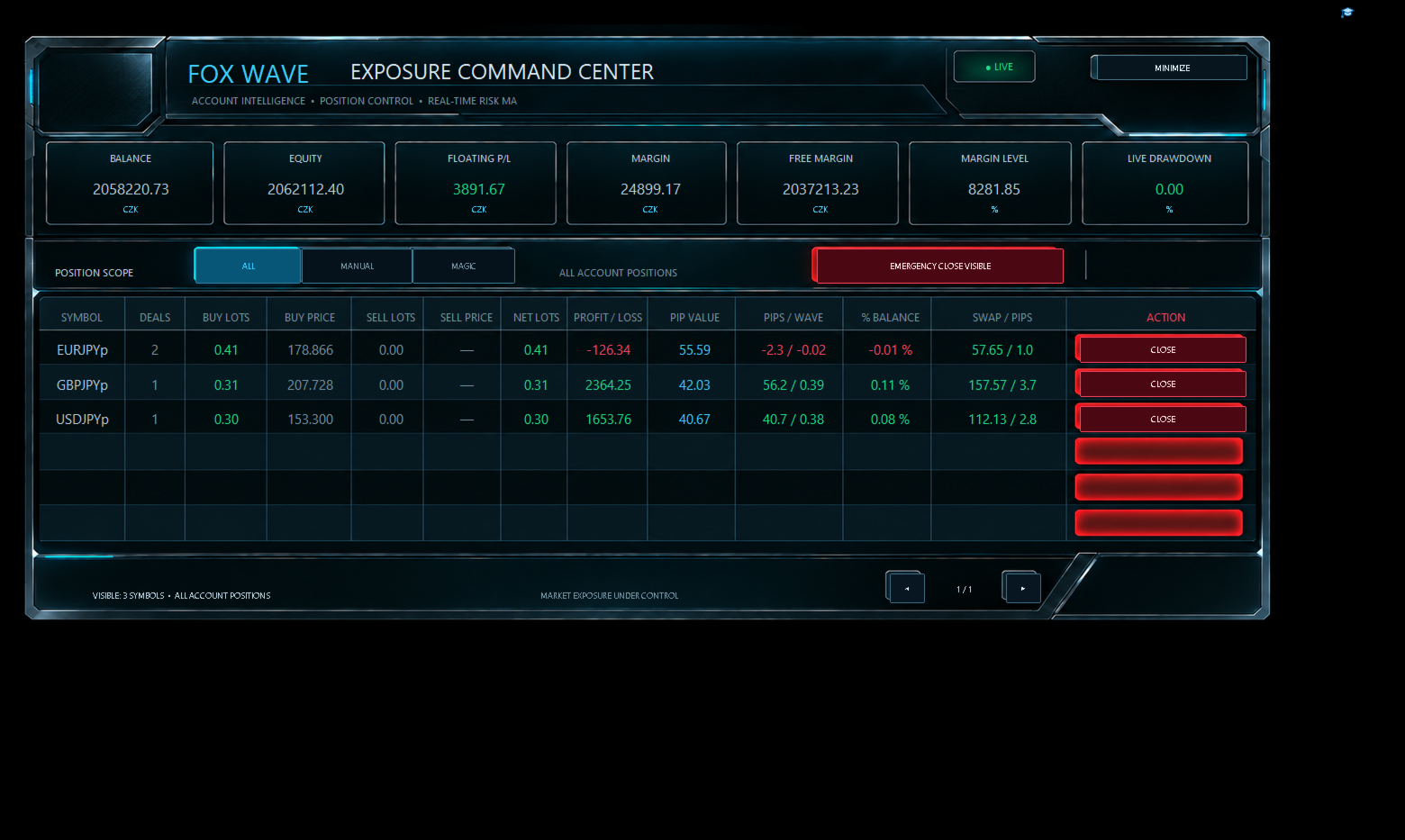
FOX WAVE Exposure Command Center MT5 is a premium account-monitoring and position-management utility designed for traders who need a clear, immediate overview of their total market exposure.
Instead of switching between charts, searching through the terminal, and calculating exposure manually, the Command Center consolidates the most important account and position information into one professional control panel.
It does not generate trading signals or promise trading profits. Its purpose is different: to provide clarity, control, speed, and an additional layer of operational safety when managing open positions.
SPECIAL INTRODUCTORY PRICE — ONLY $39
The current price of $39 is a limited introductory offer for early users.
As the product receives further updates, improvements, documentation, and user feedback, the price will increase. The planned regular price is $79.
Early buyers receive future product updates through the MQL5 Market under the standard MQL5 product licensing conditions.
COMPLETE ACCOUNT OVERVIEWThe upper section of the Command Center displays the current condition of the trading account in real time.
The dashboard includes:
-
Account Balance
-
Account Equity
-
Floating Profit or Loss
-
Used Margin
-
Free Margin
-
Margin Level
-
Current Live Drawdown
-
Account currency
-
Live system status
Positive and negative values are visually separated by color, making the current account condition immediately recognizable.
The information is presented in a clean institutional-style interface without requiring the trader to examine multiple MetaTrader windows.
EXPOSURE GROUPED BY SYMBOLFOX WAVE Exposure Command Center does not merely list individual position tickets.
It analyzes all currently selected positions and groups them by symbol, creating a structured exposure overview for every traded market.
For each symbol, the panel can display:
-
Symbol name
-
Number of open positions
-
Total BUY volume
-
Average BUY entry price
-
Total SELL volume
-
Average SELL entry price
-
Net position volume
-
Current profit or loss
-
Estimated pip value
-
Current movement in pips
-
Wave-based movement information
-
Profit or loss as a percentage of the account
-
Accumulated swap
-
Swap expressed in relation to pips
This makes it possible to see the real combined exposure of a symbol even when several separate positions are open.
POSITION SCOPE FILTERSThe Command Center allows the trader to control which positions are included in the dashboard.
ALL
Displays all open positions available on the trading account.
MANUAL
Displays positions identified as manually opened positions.
MAGIC
Displays positions filtered by the configured Magic Number.
These modes allow the same Command Center to be used for manual trading, automated strategies, or a combination of both.
Always verify the selected scope before closing any position.
SYMBOL-LEVEL POSITION CONTROLEvery visible symbol row includes its own CLOSE button.
This allows the trader to close positions belonging to a selected symbol directly from the Command Center without searching for individual tickets in the MetaTrader terminal.
The action is protected by a two-step confirmation process.
The first click prepares the command.
The second confirmation authorizes execution.
This safety mechanism helps reduce the risk of accidental position closure.
EMERGENCY CLOSE VISIBLEThe panel includes a dedicated emergency control for closing positions currently included in the selected scope.
The emergency function is intentionally protected by double confirmation.
A single accidental click is not enough to execute the command.
Before confirming an emergency closure, always check:
-
Selected position scope
-
Visible symbols
-
Active Magic Number filter
-
Current market conditions
-
Trading permissions
-
Broker execution status
The emergency function is a powerful account-management tool and should only be used deliberately.
DOUBLE-CONFIRMATION SAFETYPosition-closing functions can have an immediate financial effect. For this reason, FOX WAVE Exposure Command Center uses a two-stage confirmation mechanism for critical actions.
Double confirmation is applied to:
-
Closing positions for an individual symbol
-
Emergency closure of visible positions
The system is designed to make accidental execution less likely while preserving fast access when immediate action is required.
AUTOMATIC PAGINATIONThe dashboard is designed to remain organized even when many symbols have active positions.
A single page displays up to six symbol rows. If more symbols are present, additional pages are created automatically.
Navigation controls allow the trader to move between pages while maintaining a clean and readable layout.
The footer displays:
-
Number of visible symbols
-
Current page
-
Total number of pages
-
Active position scope
This prevents the panel from expanding uncontrollably across the chart.
PREMIUM CUSTOMIZABLE INTERFACEThe visual appearance can be adjusted through the Expert Advisor inputs.
Available customization options include:
-
Font family
-
Font size
-
Primary text color
-
Secondary text color
-
Positive-value color
-
Negative-value color
-
Accent color
-
Interface scaling and visual preferences
-
Panel position and presentation settings
The interface uses a premium FOX WAVE visual identity inspired by professional market terminals and futuristic institutional command systems.
The design is not only decorative. Color hierarchy, structured sections, and aligned data columns are intended to improve readability during active market conditions.
MINIMIZE MODEThe entire Command Center can be minimized when the trader needs an unobstructed view of the chart.
The panel can then be restored without removing the Expert Advisor.
This allows the utility to remain attached and available while reducing visual interference with normal chart analysis.
REAL-TIME INFORMATIONAccount and position information is updated while the Expert Advisor is active.
The Command Center reacts to changes such as:
-
New positions
-
Closed positions
-
Changing floating profit or loss
-
Equity movement
-
Margin changes
-
Swap accumulation
-
Position-volume changes
-
Changes in the number of active symbols
Displayed values depend on the information supplied by MetaTrader 5 and the connected broker.
DESIGNED FOR DIFFERENT TRADING STYLESFOX WAVE Exposure Command Center can be useful for:
-
Manual discretionary traders
-
Algorithmic traders
-
Multi-strategy accounts
-
Multi-symbol portfolios
-
Swing traders
-
Intraday traders
-
Traders managing several positions on one symbol
-
Traders using different Magic Numbers
-
Traders who require fast emergency control
-
Traders who want a cleaner account overview than the standard terminal provides
The utility can be especially valuable when several symbols or multiple positions are active simultaneously.
IMPORTANT: THIS IS A MANAGEMENT UTILITYFOX WAVE Exposure Command Center is not an automatic trading strategy.
It does not independently search for entries, predict market direction, or guarantee profitable results.
Its primary functions are:
-
Account monitoring
-
Exposure aggregation
-
Position visualization
-
Position filtering
-
Symbol-level position control
-
Emergency position management
The trader remains responsible for every trading and risk-management decision.
INSTALLATION-
Purchase and install the product through the MQL5 Market.
-
Open MetaTrader 5.
-
Open any chart.
-
Attach FOX WAVE Exposure Command Center MT5 to the chart.
-
Enable algorithmic trading if position-closing functions are required.
-
Configure the desired position scope and Magic Number.
-
Adjust fonts, colors, and visual settings if necessary.
-
Verify the displayed positions before using any closing function.
Only one instance is normally required for monitoring a single trading account.
RECOMMENDED FIRST USEBefore using the product on a live trading account:
-
Test it on a demo account.
-
Open several small test positions.
-
Verify ALL, MANUAL, and MAGIC filtering.
-
Test page navigation.
-
Verify symbol aggregation.
-
Test the individual CLOSE confirmation.
-
Test the emergency double-confirmation process.
-
Confirm that the displayed values correspond with the MetaTrader terminal.
-
Check operation with your broker and account type.
Do not use critical position-management functions on a live account until you understand their behavior.
TECHNICAL NOTESThe accuracy and availability of displayed values may depend on:
-
Broker symbol specifications
-
Account currency
-
Symbol digits
-
Tick size
-
Tick value
-
Contract size
-
Trading-session status
-
Available price data
-
Hedging or netting account configuration
-
Broker execution rules
-
MetaTrader trading permissions
Pip values and derived measurements are calculated using the symbol and account information available in MetaTrader 5.
Broker-specific conditions may produce differences between accounts.
RISK WARNINGTrading financial markets involves substantial risk and may result in partial or complete loss of trading capital.
FOX WAVE Exposure Command Center is a software utility. It cannot eliminate market risk, execution risk, slippage, spread expansion, broker-side rejection, connection failure, platform failure, or user error.
Closing commands are sent through MetaTrader 5 and remain subject to broker execution.
Past performance, account statistics, or displayed information do not guarantee future results.
Always test the product on a demo account before using it with real funds.
WHY FOX WAVE EXPOSURE COMMAND CENTER?Because account exposure should not be hidden across dozens of tickets and multiple terminal windows.
Because a trader should be able to see the condition of the entire account immediately.
Because critical position controls should be powerful, accessible, and protected against accidental activation.
FOX WAVE Exposure Command Center transforms fragmented position data into one structured operational view.
One account.
One command center.
Complete exposure under control.
INTRODUCTORY RELEASE PRICE: $39
The introductory price is available for a limited early-release period.
The price will increase as the product develops and receives additional updates.
Planned regular price: $79.
Get FOX WAVE Exposure Command Center MT5 at the introductory price and take control of your account exposure from one premium professional dashboard.